horn FORD TRANSIT 2015 5.G Owners Manual
[x] Cancel search | Manufacturer: FORD, Model Year: 2015, Model line: TRANSIT, Model: FORD TRANSIT 2015 5.GPages: 461, PDF Size: 5.82 MB
Page 48 of 461
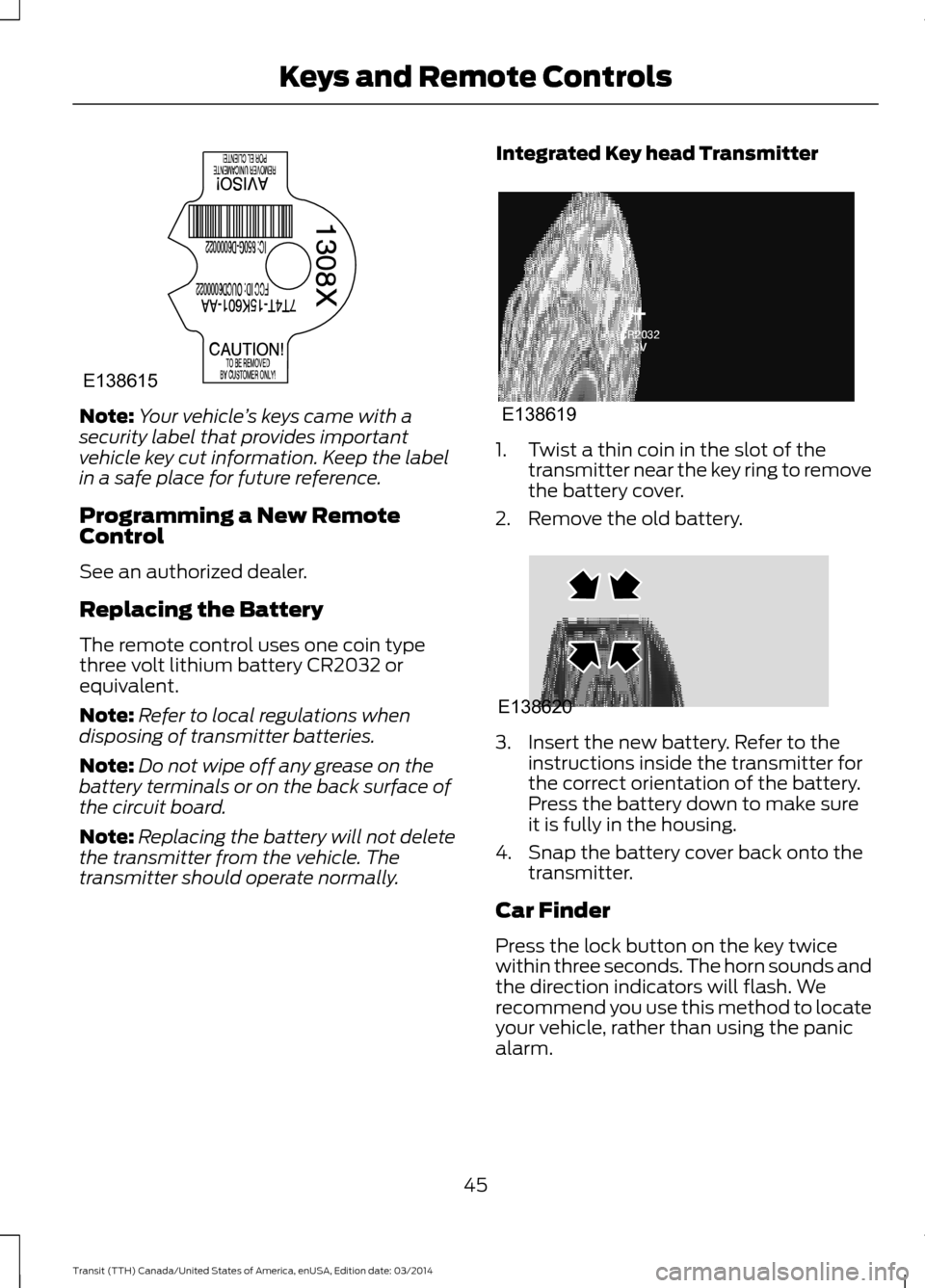
Note:
Your vehicle ’s keys came with a
security label that provides important
vehicle key cut information. Keep the label
in a safe place for future reference.
Programming a New Remote
Control
See an authorized dealer.
Replacing the Battery
The remote control uses one coin type
three volt lithium battery CR2032 or
equivalent.
Note: Refer to local regulations when
disposing of transmitter batteries.
Note: Do not wipe off any grease on the
battery terminals or on the back surface of
the circuit board.
Note: Replacing the battery will not delete
the transmitter from the vehicle. The
transmitter should operate normally. Integrated Key head Transmitter 1. Twist a thin coin in the slot of the
transmitter near the key ring to remove
the battery cover.
2. Remove the old battery. 3. Insert the new battery. Refer to the
instructions inside the transmitter for
the correct orientation of the battery.
Press the battery down to make sure
it is fully in the housing.
4. Snap the battery cover back onto the transmitter.
Car Finder
Press the lock button on the key twice
within three seconds. The horn sounds and
the direction indicators will flash. We
recommend you use this method to locate
your vehicle, rather than using the panic
alarm.
45 Transit (TTH) Canada/United States of America, enUSA, Edition date: 03/2014 Keys and Remote ControlsE138615 E138619 E138620
Page 49 of 461
Note:
If locking was not successful or if any
door or the liftgate is open, or if the hood is
open on vehicles with a perimeter alarm or
remote start, the horn will sound and the
direction indicators will not flash.
Sounding a Panic Alarm
Note: The alarm will only operate when the
ignition is off. Press the button to turn on the
alarm. Press the button again or
switch the ignition on to turn off.
REPLACING A LOST KEY OR
REMOTE CONTROL
You can purchase replacement keys or
remote controls from an authorized dealer.
Authorized dealers can program remote
controls for your vehicle. See Remote
Control (page 44).
To re-program the passive anti-theft
system see an authorized dealer.
46Transit (TTH) Canada/United States of America, enUSA, Edition date: 03/2014 Keys and Remote ControlsE138624
Page 63 of 461
2.
Switch the ignition from off to on. Keep
the ignition on for at least three
seconds, but no more than 10 seconds.
3. Switch the ignition off and remove the
first correctly coded key from the
ignition.
4. After three seconds but within 10 seconds of switching the ignition off,
insert the second previously correctly
coded key into the ignition.
5. Switch the ignition from off to on. Keep
the ignition on for at least three
seconds, but no more than 10 seconds.
6. Switch the ignition off and remove the
second previously programmed
correctly coded key from the ignition.
7. After three seconds but within 10 seconds of switching the ignition off
and removing the previously
programmed correctly coded key,
insert the new unprogrammed key into
the ignition.
8. Switch the ignition from off to on. Keep
the ignition on for at least six seconds.
9. Remove the newly programmed correctly coded key from the ignition.
If the key has been successfully
programmed it will start the engine and
operate the remote entry system (if the
new key is an integrated keyhead
transmitter).
If the key was not successfully
programmed, wait 10 seconds and repeat
Steps 1 through 8. If you are still
unsuccessful, take your vehicle to an
authorized dealer.
Note: You can program a maximum of eight
coded keys to your vehicle. All eight can be
integrated keyhead transmitters. ANTI-THEFT ALARM (If Equipped)
Alarm System
The perimeter alarm is a deterrent against
unauthorized access to your vehicle
through the doors, luggage compartment
and the hood. It also protects the audio
unit.
Triggering the Alarm
Once armed, the alarm is triggered in any
of the following ways:
• If someone opens a door, cargo area
or the hood without a valid key or
remote control.
• If someone removes the audio or
navigation system.
• If you switch the ignition on without a
valid key.
If the alarm is triggered, the horn will sound
for 30 seconds and the hazard warning
flasher will flash for five minutes.
Any further attempts to perform one of the
above will trigger the alarm again.
Arming the Alarm
To arm the alarm, lock your vehicle. See
Locks
(page 54).
Disarming the Alarm
Disarm and silence the alarm by unlocking
the doors with the key and switching the
ignition on with a correctly coded key
within 12 seconds, or by unlocking the
doors or the cargo area with the remote
control.
60 Transit (TTH) Canada/United States of America, enUSA, Edition date: 03/2014 Security
Page 177 of 461
•
Reduce the use of air conditioning and
heat.
• Avoid using speed control in hilly
terrain.
• Do not rest your foot on the brake
pedal while driving.
• Avoid carrying unnecessary weight
(approximately 1 mpg [0.4
kilometers/liter] is lost for every 400
lbs [180 kilograms] of weight carried).
• Avoid adding particular accessories to
your vehicle (e.g. bug deflectors,
rollbars/light bars, running boards, ski
racks).
• Avoid driving with the wheels out of
alignment.
COLD WEATHER
PRECAUTIONS
The functional operation of some
components and systems can be affected
at temperatures below -13°F (-25°C).
DRIVING THROUGH WATER WARNINGS
Drive through water in an emergency
only and not as part of normal
driving.
Engine damage can occur if water
enters the air filter.
In an emergency, you can drive your vehicle
through water to a maximum depth of 8
inches (200 millimeters) and at a
maximum speed of 6 mph (10 km/h). You
must take extra care when driving through
flowing water. When driving in water, maintain a low
speed and do not stop your vehicle. After
driving through water and as soon as it is
safe to do so:
•
Depress the brake pedal lightly to
check that the brakes are functioning
correctly.
• Check that the horn works.
• Check that your vehicle's lamps are
fully operational.
• Check the power assistance
of the steering system.
FLOOR MATS WARNINGS
Always use floor mats that are
designed to fit the foot well of your
vehicle. Only use floor mats that
leave the pedal area unobstructed. Only
use floor mats that are firmly secured to
retention posts so that they cannot slip out
of position and interfere with the pedals
or impair safe operation of your vehicle in
other ways. Pedals that cannot move freely can
cause loss of vehicle control and
increase the risk of serious personal
injury. Always make sure that the floor
mats are properly attached to the
retention posts in the carpet that are
supplied with your vehicle. Floor mats must
be properly secured to both retention posts
to make sure mats do not shift out of
position. Never place floor mats or any other
covering in the vehicle foot well that
cannot be properly secured to
prevent them from moving and interfering
with the pedals or the ability to control the
vehicle.
174 Transit (TTH) Canada/United States of America, enUSA, Edition date: 03/2014 Driving Hints
Page 183 of 461
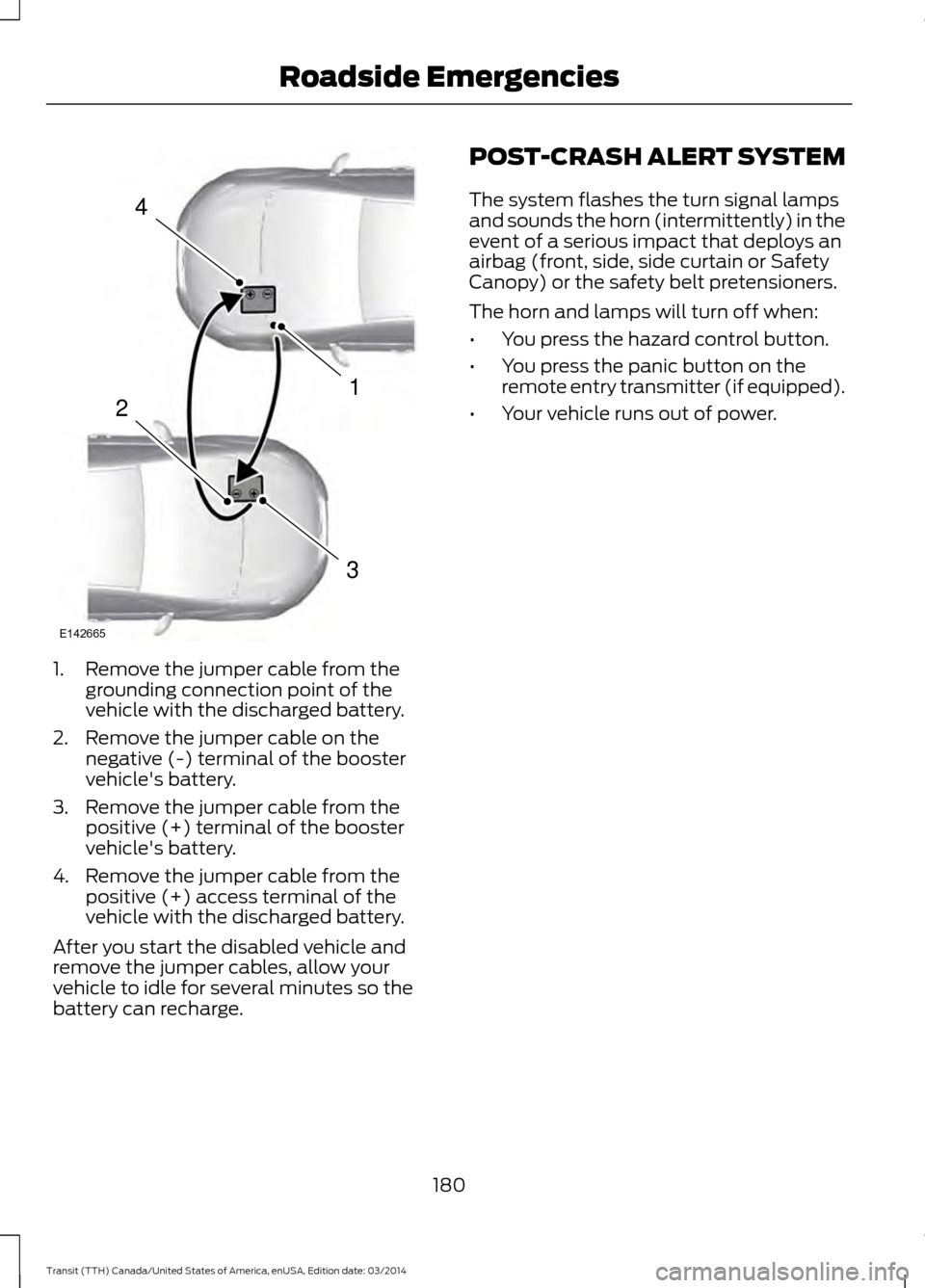
1. Remove the jumper cable from the
grounding connection point of the
vehicle with the discharged battery.
2. Remove the jumper cable on the negative (-) terminal of the booster
vehicle's battery.
3. Remove the jumper cable from the positive (+) terminal of the booster
vehicle's battery.
4. Remove the jumper cable from the positive (+) access terminal of the
vehicle with the discharged battery.
After you start the disabled vehicle and
remove the jumper cables, allow your
vehicle to idle for several minutes so the
battery can recharge. POST-CRASH ALERT SYSTEM
The system flashes the turn signal lamps
and sounds the horn (intermittently) in the
event of a serious impact that deploys an
airbag (front, side, side curtain or Safety
Canopy) or the safety belt pretensioners.
The horn and lamps will turn off when:
•
You press the hazard control button.
• You press the panic button on the
remote entry transmitter (if equipped).
• Your vehicle runs out of power.
180 Transit (TTH) Canada/United States of America, enUSA, Edition date: 03/2014 Roadside Emergencies4
1
3
2
E142665
Page 196 of 461
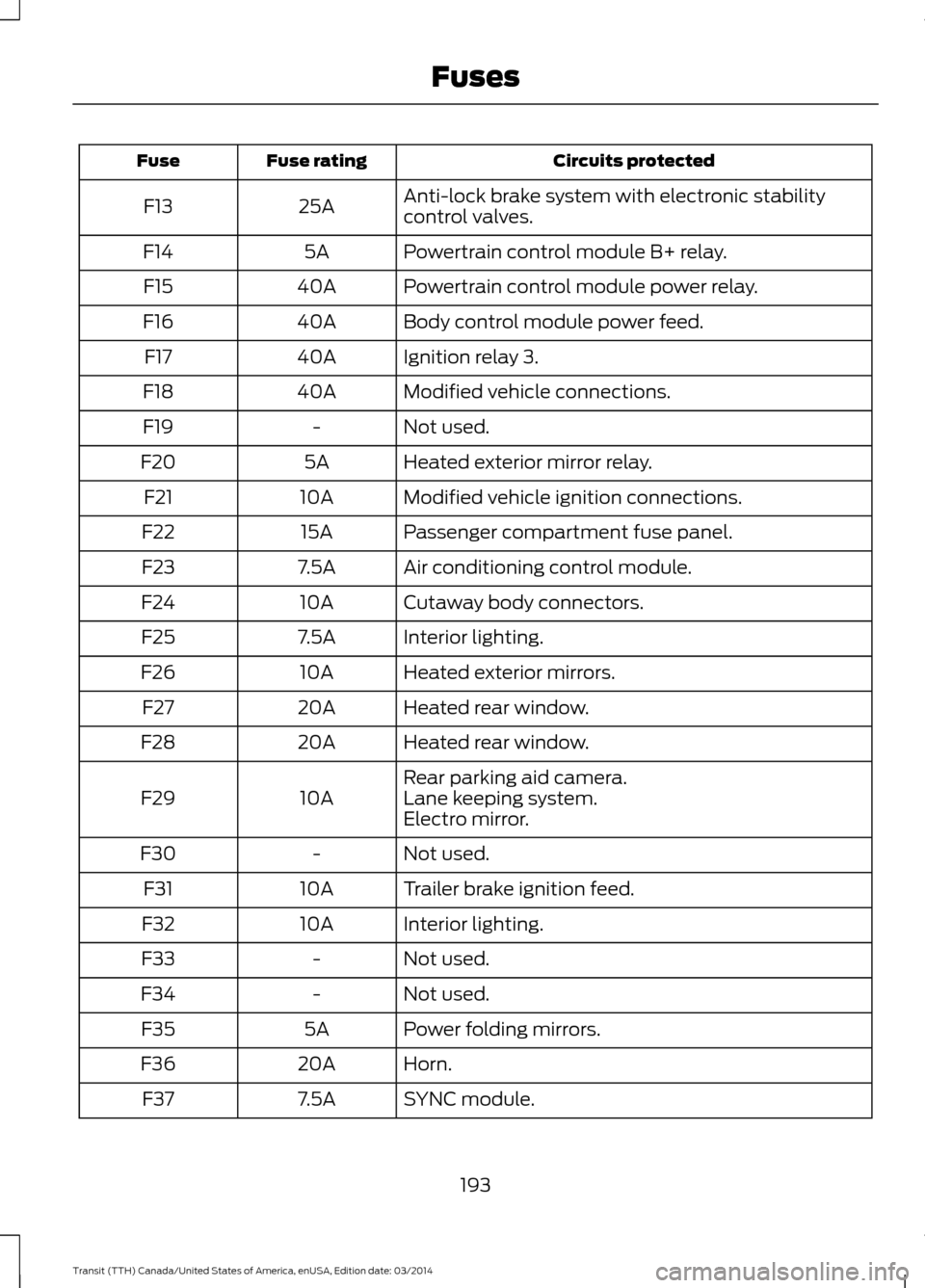
Circuits protected
Fuse rating
Fuse
Anti-lock brake system with electronic stability
control valves.
25A
F13
Powertrain control module B+ relay.
5A
F14
Powertrain control module power relay.
40A
F15
Body control module power feed.
40A
F16
Ignition relay 3.
40A
F17
Modified vehicle connections.
40A
F18
Not used.
-
F19
Heated exterior mirror relay.
5A
F20
Modified vehicle ignition connections.
10A
F21
Passenger compartment fuse panel.
15A
F22
Air conditioning control module.
7.5A
F23
Cutaway body connectors.
10A
F24
Interior lighting.
7.5A
F25
Heated exterior mirrors.
10A
F26
Heated rear window.
20A
F27
Heated rear window.
20A
F28
Rear parking aid camera.
10A
F29 Lane keeping system.
Electro mirror.
Not used.
-
F30
Trailer brake ignition feed.
10A
F31
Interior lighting.
10A
F32
Not used.
-
F33
Not used.
-
F34
Power folding mirrors.
5A
F35
Horn.
20A
F36
SYNC module.
7.5A
F37
193Transit (TTH) Canada/United States of America, enUSA, Edition date: 03/2014 Fuses
Page 197 of 461
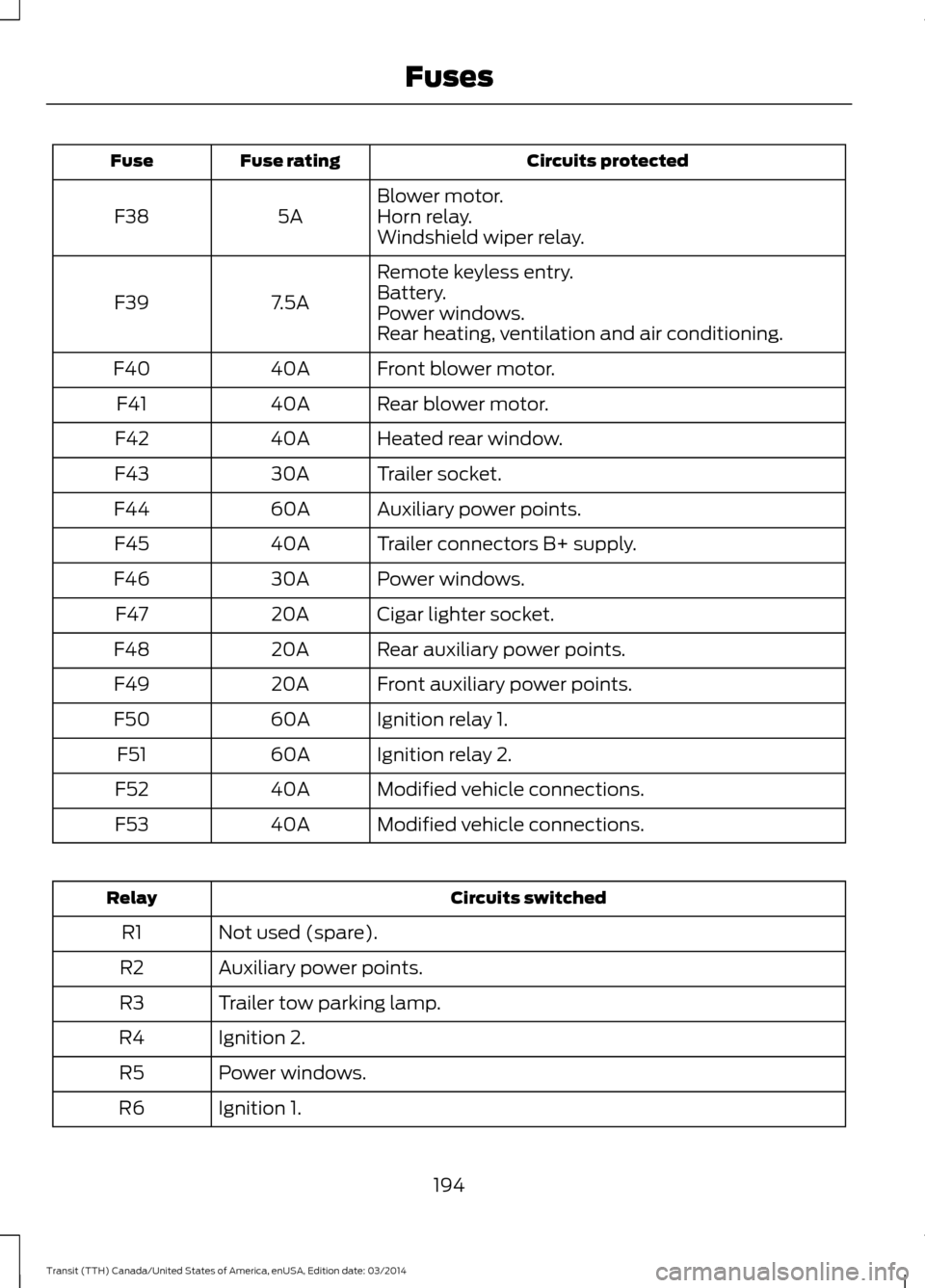
Circuits protected
Fuse rating
Fuse
Blower motor.
5A
F38 Horn relay.
Windshield wiper relay.
Remote keyless entry.
7.5A
F39 Battery.
Power windows.
Rear heating, ventilation and air conditioning.
Front blower motor.
40A
F40
Rear blower motor.
40A
F41
Heated rear window.
40A
F42
Trailer socket.
30A
F43
Auxiliary power points.
60A
F44
Trailer connectors B+ supply.
40A
F45
Power windows.
30A
F46
Cigar lighter socket.
20A
F47
Rear auxiliary power points.
20A
F48
Front auxiliary power points.
20A
F49
Ignition relay 1.
60A
F50
Ignition relay 2.
60A
F51
Modified vehicle connections.
40A
F52
Modified vehicle connections.
40A
F53 Circuits switched
Relay
Not used (spare).
R1
Auxiliary power points.
R2
Trailer tow parking lamp.
R3
Ignition 2.
R4
Power windows.
R5
Ignition 1.
R6
194Transit (TTH) Canada/United States of America, enUSA, Edition date: 03/2014 Fuses
Page 198 of 461
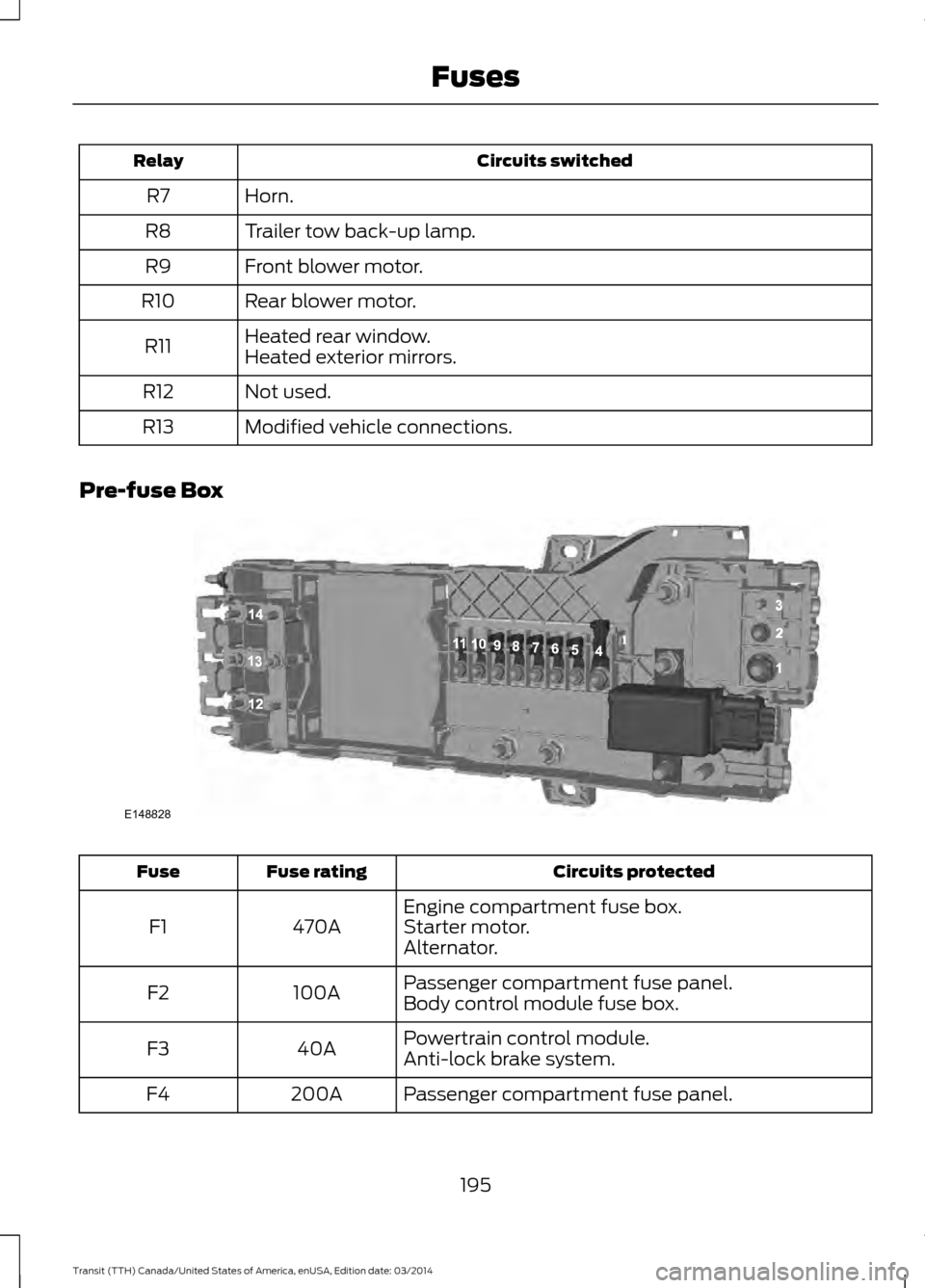
Circuits switched
Relay
Horn.
R7
Trailer tow back-up lamp.
R8
Front blower motor.
R9
Rear blower motor.
R10
Heated rear window.
R11 Heated exterior mirrors.
Not used.
R12
Modified vehicle connections.
R13
Pre-fuse Box Circuits protected
Fuse rating
Fuse
Engine compartment fuse box.
470A
F1 Starter motor.
Alternator.
Passenger compartment fuse panel.
100A
F2
Body control module fuse box.
Powertrain control module.
40A
F3
Anti-lock brake system.
Passenger compartment fuse panel.
200A
F4
195Transit (TTH) Canada/United States of America, enUSA, Edition date: 03/2014 FusesE148828
Page 258 of 461
Overview
WARNING
To determine the required
pressure(s) for your vehicle, see the
Safety Compliance Certification
Label (affixed to either the door hinge
pillar, door-latch post, or the door edge
that meets the door-latch post, next to the
driver seating position), or Tire Label
located on the B-Pillar or the edge of the
driver door. To maintain your vehicle
’s load carrying
capability, this vehicle requires different
tire pressures in the front tires compared
to the rear tires. The system on your vehicle
is designed to illuminate the warning light
at different pressures for the front and rear
tires.
The tires need to be periodically rotated
to provide consistent performance and
maximum tire life, the system needs to
know when the tires have been rotated to
determine which set of tires are on the
front and rear axles. With this information,
the system can detect and correctly warn
of low tire pressures.
System Reset Tips:
• To reduce the chance of interference
from another vehicle, the system reset
procedure should be carried out at
least three feet (one meter) away from
another Ford vehicle undergoing the
system reset procedure.
• Do not wait more than two minutes
between resetting each tire sensor or
the system will time-out and the entire
procedure will have to be repeated on
all four wheels. A double horn chirp
indicates the need to repeat the
procedure. Carrying Out the System Reset
Procedure
Read the entire procedure before carrying
out a system reset.
1. Drive your vehicle above 20 mph (32
km/h) for at least two minutes and
then park in a safe location where you
can easily get to all four tires and have
access to a tire inflation pump.
2. Switch the ignition off.
3. Switch the ignition on with the engine off.
4. Turn the hazard flashers on then off three times, this must be completed
within 10 seconds. If the reset mode
has been entered successfully, the horn
will chirp once and the system indicator
will flash. If this does not occur, repeat
the procedure from step 2. If after
repeated attempts to enter the reset
mode, the horn does not chirp and the
system indicator does not flash, have
your vehicle checked by an authorized
dealer as soon as possible.
5. Train the system sensors in the tires using the following reset sequence
starting with the left front tire and
following a clockwise order: Left front,
right front, right rear, left rear.
6. Remove the valve cap from the valve stem on the left front tire. Decrease the
air pressure until the horn chirps.
Note: The single horn chirp confirms that
the sensor identification code has been
learned by your vehicle for this position. If a
double horn chirp is heard, the reset
procedure was unsuccessful and must be
repeated.
7. Remove the valve cap from the valve stem on the right front tire. Decrease
the air pressure until the horn chirps.
8. Remove the valve cap from the valve stem on the right rear tire. Decrease the
air pressure until the horn chirps.
255 Transit (TTH) Canada/United States of America, enUSA, Edition date: 03/2014 Wheels and Tires
Page 259 of 461
9. Remove the valve cap from the valve
stem on the left rear tire. Decrease the
air pressure until the horn chirps.
Training is complete when the horn
chirps after the last system sensor (left
rear) has been trained and the system
indicator stops flashing.
10. Switch the ignition off. If two short horn chirps are heard, the reset
procedure was unsuccessful and
must be repeated.
Note: If after repeating the procedure two
short horn chirps are heard again, have your
vehicle checked by an authorized dealer as
soon as possible.
11. Set all four tires to the correct pressure See Maintenance (page
200). or the tire inflation pressure label
(located on the edge of driver door or
the B-Pillar).
CHANGING A ROAD WHEEL WARNINGS
The use of tire sealant may damage
your tire pressure monitoring system
and should only be used in roadside
emergencies. If you must use a sealant, the
Ford Tire Mobility Kit sealant should be
used. The tire pressure monitoring system
sensor and valve stem on the wheel must
be replaced by an authorized dealer after
use of the sealant. If the tire pressure monitor sensor
becomes damaged, it will no longer
function. See
Tire Pressure
Monitoring System (page 251). Note:
The tire pressure monitoring system
indicator light will illuminate when the spare
tire is in use. To restore the full function of
the monitoring system, all road wheels
equipped with tire pressure monitoring
sensors must be mounted on this vehicle. If you get a flat tire while driving, do not
apply the brake heavily. Instead, gradually
decrease your speed. Hold the steering
wheel firmly and slowly move to a safe
place on the side of the road.
Have a flat serviced by an authorized
dealer in order to prevent damage to the
system sensors
See Tire Pressure
Monitoring System (page 251). Replace
the spare tire with a road tire as soon as
possible. During repairing or replacing of
the flat tire, have the authorized dealer
inspect the system sensor for damage.
Dissimilar Spare Wheel and Tire
Assembly Information WARNING
Failure to follow these guidelines
could result in an increased risk of
loss of vehicle control, injury or death.
If you have a dissimilar spare wheel and
tire, then it is intended for temporary use
only. This means that if you need to use it,
you should replace it as soon as possible
with a road wheel and tire assembly that
is the same size and type as the road tires
and wheels that were originally provided
by Ford. If the dissimilar spare tire or wheel
is damaged, it should be replaced rather
than repaired.
A dissimilar spare wheel and tire assembly
is defined as a spare wheel and tire
assembly that is different in brand, size or
appearance from the road tires and wheels
and can be one of three types:
1.
T-type mini-spare: This spare tire
begins with the letter T for tire size and
may have Temporary Use Only molded in
the sidewall.
2. Full-size dissimilar spare with label
on wheel:
This spare tire has a label on
the wheel that states: THIS WHEEL AND
TIRE ASSEMBLY FOR TEMPORARY USE
ONLY
256 Transit (TTH) Canada/United States of America, enUSA, Edition date: 03/2014 Wheels and Tires