air condition FORD TRANSIT 2016 5.G User Guide
[x] Cancel search | Manufacturer: FORD, Model Year: 2016, Model line: TRANSIT, Model: FORD TRANSIT 2016 5.GPages: 411, PDF Size: 5.65 MB
Page 95 of 411
PRINCIPLE OF OPERATION
Outside Air
Keep the air intakes in front of the
windshield free from obstruction (such as
snow or leaves) to allow the climate
control system to function effectively.
Recirculated Air
WARNING
Prolonged use of recirculated air may
cause the windows to mist up. If the
windows mist up, follow the settings
for demisting the windshield. The air currently in the passenger
compartment recirculates. Outside air does
not enter your vehicle.
Heating
Heating performance depends on the
temperature of the engine coolant.
General Information on Controlling
the Interior Climate
Fully close all the windows.
Warming the Interior
Direct the air toward your feet. In cold or
humid weather conditions, direct some of
the air toward the windshield and the door
windows.
Cooling the Interior
Direct the air toward your face. Air Conditioning
The system directs air through the
evaporator for cooling. The evaporator
extracts humidity from the air to help keep
the windows free of mist. The system
directs the resulting condensation to the
outside of your vehicle, which may cause
a small pool to form under your vehicle.
This is normal.
Note:
The air conditioning operates only
when the temperature is above 39°F (4°C).
Note: When you use air conditioning, your
vehicle uses more fuel.
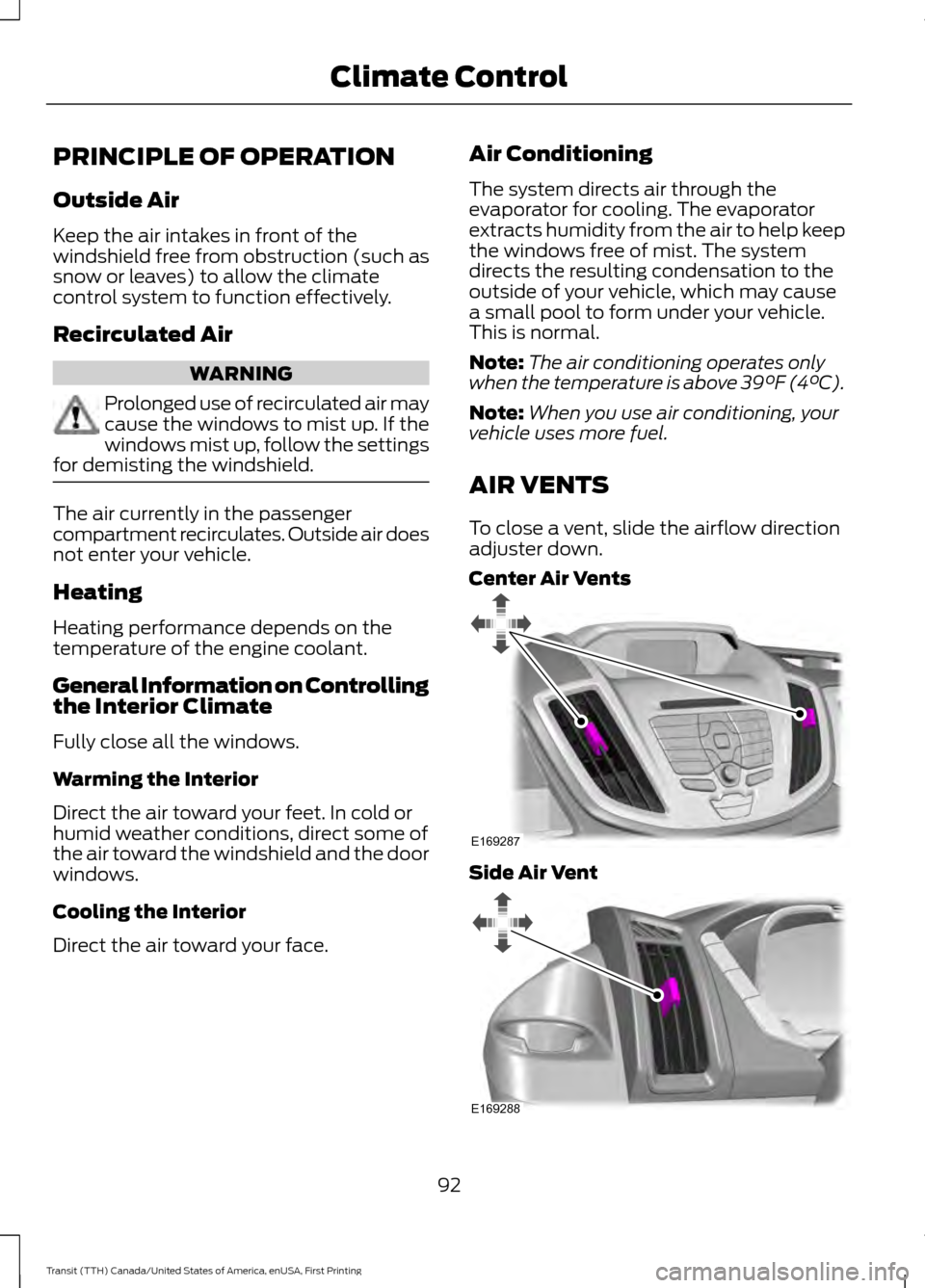
AIR VENTS
To close a vent, slide the airflow direction
adjuster down.
Center Air Vents Side Air Vent
92
Transit (TTH) Canada/United States of America, enUSA, First Printing Climate ControlE169287 E169288
Page 96 of 411
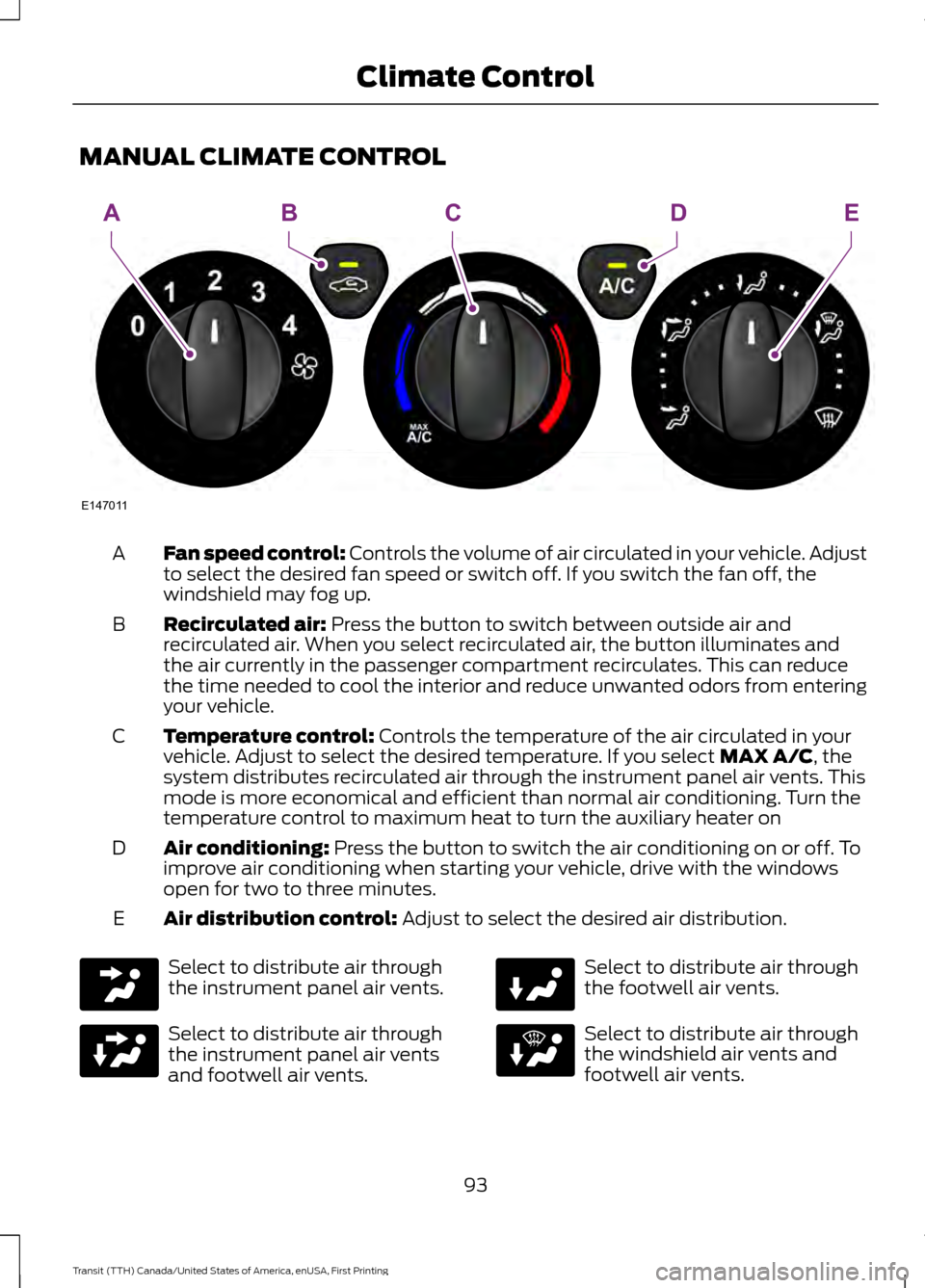
MANUAL CLIMATE CONTROL
Fan speed control: Controls the volume of air circulated in your vehicle. Adjust
to select the desired fan speed or switch off. If you switch the fan off, the
windshield may fog up.
A
Recirculated air:
Press the button to switch between outside air and
recirculated air. When you select recirculated air, the button illuminates and
the air currently in the passenger compartment recirculates. This can reduce
the time needed to cool the interior and reduce unwanted odors from entering
your vehicle.
B
Temperature control:
Controls the temperature of the air circulated in your
vehicle. Adjust to select the desired temperature. If you select MAX A/C, the
system distributes recirculated air through the instrument panel air vents. This
mode is more economical and efficient than normal air conditioning. Turn the
temperature control to maximum heat to turn the auxiliary heater on
C
Air conditioning:
Press the button to switch the air conditioning on or off. To
improve air conditioning when starting your vehicle, drive with the windows
open for two to three minutes.
D
Air distribution control:
Adjust to select the desired air distribution.
E Select to distribute air through
the instrument panel air vents.
Select to distribute air through
the instrument panel air vents
and footwell air vents. Select to distribute air through
the footwell air vents.
Select to distribute air through
the windshield air vents and
footwell air vents.
93
Transit (TTH) Canada/United States of America, enUSA, First Printing Climate ControlE147011
AEBDC
Page 98 of 411
Side Window Defogging in Cold
Weather
•
Adjust the air distribution control to the
instrument panel and windshield air
vents positions.
• Press the A/C button.
• Adjust the temperature control to the
desired setting.
• Adjust the fan speed to the highest
setting.
• Direct the instrument panel side air
vents toward the side windows.
• Close the instrument panel vents. Maximum Cooling Performance in
Instrument Panel or Instrument
Panel and Footwell Positions
•
Adjust the temperature control to the
lowest setting.
• Press the A/C and recirculated air
buttons.
• Adjust the fan speed to the highest
setting initially and then adjust it to suit
the desired comfort level.
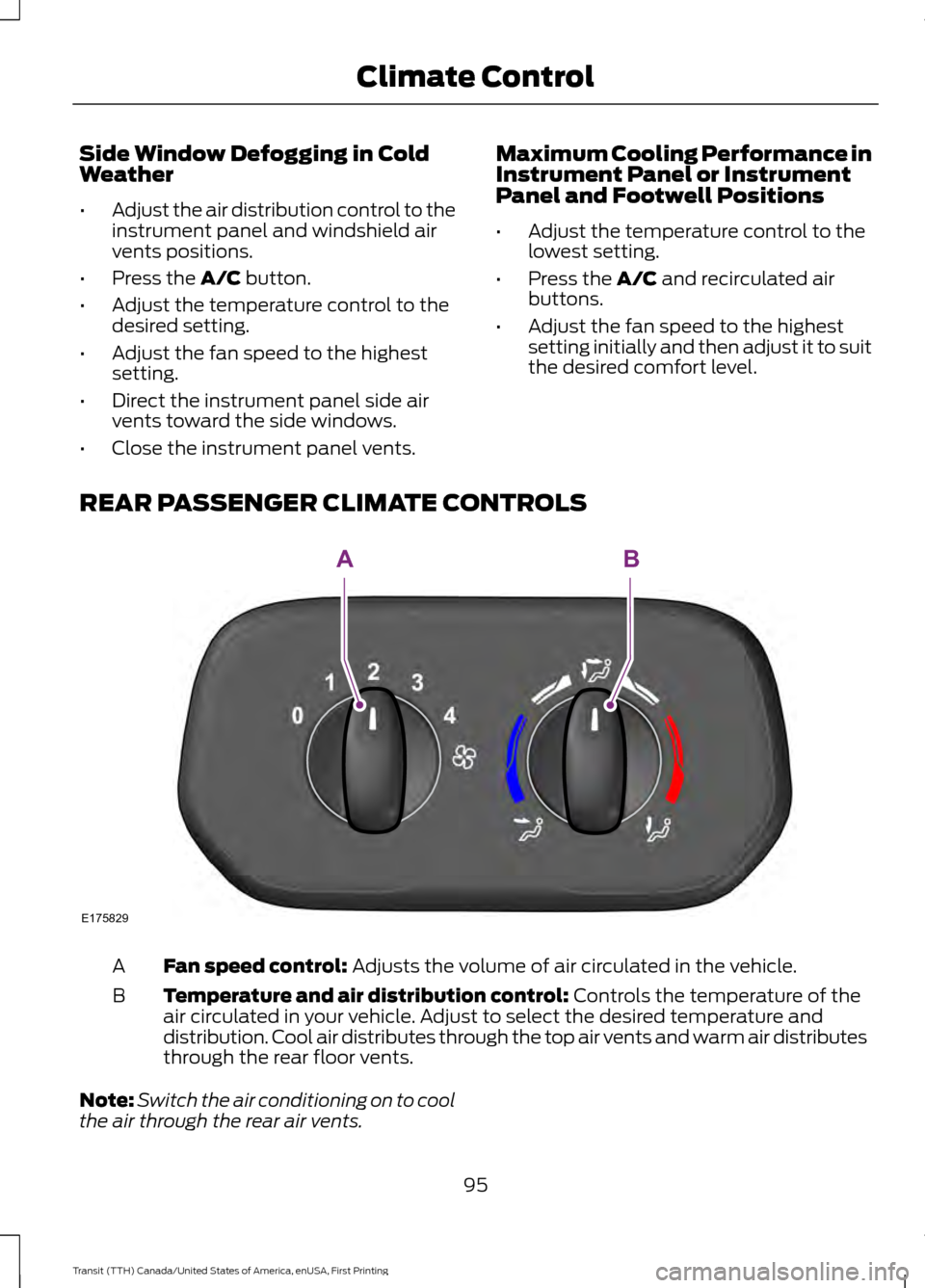
REAR PASSENGER CLIMATE CONTROLS Fan speed control:
Adjusts the volume of air circulated in the vehicle.
A
Temperature and air distribution control:
Controls the temperature of the
air circulated in your vehicle. Adjust to select the desired temperature and
distribution. Cool air distributes through the top air vents and warm air distributes
through the rear floor vents.
B
Note: Switch the air conditioning on to cool
the air through the rear air vents.
95
Transit (TTH) Canada/United States of America, enUSA, First Printing Climate ControlE175829
AB
Page 120 of 411
filter restrictions that may result in a lack
of power or damage to fuel system
components, including fuel pump and fuel
injector failures. See Special Operating
Conditions Scheduled Maintenance
(page
368).
Look for a label on the fuel pump to
confirm the amount of biodiesel contained
in a diesel fuel. Biodiesel fuel blends with
greater than 5% must be labeled.
Biodiesel content is often indicated with
the letter B followed by the percent of
biodiesel in the fuel. For example, B20
indicates a fuel containing 20% biodiesel.
Ask the service station attendant to
confirm the biodiesel content of a diesel
fuel if you do not see a label on the fuel
pump.
Biodiesel fuels degrade more easily than
diesel fuels not containing biodiesel and
should not be stored in the fuel tank for
more than one month. If you plan to park
or store your vehicle for more than one
month, then you should empty your vehicle
fuel tank of biodiesel fuel. You should fill
the tank with a pure petroleum-based
diesel fuel and run your vehicle for a
minimum of 30 minutes.
If you intend to store your vehicle for more
than two months, we recommend that you
seek advice from an authorized dealer.
Note: Degraded or oxidized biodiesel can
damage fuel system seals and plastics and
corrode steel parts.
Fuel companies adjust diesel fuel
formulations for cold temperatures. Diesel
fuel which has not been correctly
formulated for cold ambient temperatures
may gel and block the fuel filters. An
indication that the fuel filters are blocked
is the engine starts, stalls after a short time
and then does not restart. If you have been
using biodiesel, you may need to use a fuel
with lower biodiesel content or discontinue
using biodiesel. Do not use alcohol based fuel additives to
correct fuel gelling. This may damage the
fuel injectors or fuel system. This may also
degrade vehicle performance and could
lead to fuel system damage that may not
be covered by the vehicle Warranty. Only
use an anti-gel and performance
improvement product. We recommend
Motorcraft® Anti-Gel & Performance
Improver.
Diesel Fuel Additives
It should not be necessary to add any
aftermarket additives to your fuel if you
use a high quality diesel fuel that conforms
to ASTM industry specifications.
Aftermarket additives can damage the fuel
injector system or engine.
Use Motorcraft Cetane Booster or an
equivalent cetane booster additive if you
suspect fuel has low cetane. Use
Motorcraft Anti-Gel & Performance
Improver or an equivalent additive if there
is fuel gelling during cold weather.
Do not use alcohol-based additives to
improve cetane quality, to prevent fuel
gelling or any other use. The use of alcohol
additives may result in damage to the fuel
injectors and system.
The vehicle Warranty may not cover repairs
needed to correct the effects of using any
aftermarket product that does not meet
Ford specifications.
FUEL FILLER FUNNEL
LOCATION
The fuel filler funnel is located in the under
seat storage compartment.
RUNNING OUT OF FUEL
Running out of fuel can cause damage not
covered by the vehicle Warranty.
117
Transit (TTH) Canada/United States of America, enUSA, First Printing Fuel and Refueling
Page 125 of 411
Note:
If the vehicle speed becomes limited
or the engine will only run at idle speed,
normal vehicle operation will not resume
until you have the system repaired. To
service a contaminated or inoperative
system, see an authorized dealer.
Note: You must add a minimum of 3.2 qt
(3 L) for your vehicle to exit the run at idle
speed mode.
Diesel Exhaust Fluid Guidelines
• Do not put diesel exhaust fluid in the
vehicle fuel tank.
• Do not overfill the diesel exhaust fluid
tank.
• Do not dilute diesel exhaust fluid with
water or any other liquid.
• Do not re-use a diesel exhaust fluid
container. •
Do not store in direct sunlight.
• Store at temperatures between
23°F
(-5°C) and 68°F (20°C).
• Do not store a diesel exhaust fluid
container in your vehicle.
• Diesel exhaust fluid is non-flammable,
non-toxic, colorless and water-soluble.
Approximate Diesel Exhaust Fluid
Usage
The chart below illustrates the
approximate diesel exhaust fluid usage for
the given distances traveled under various
driving conditions. Usage may vary
depending on:
• Driving style.
• Towing a trailer.
• Vehicle load.
• Engine idling time. Approximate diesel exhaust fluid usage per
tank mi (km)
Driving conditions
1,100–4,100 (1,770–6,600)
Primary trailer tow, aggressive driving
4,100–6,500 (6,600–10,460)
City drive
6,500–10,500 (10,460– 16,900)
Steady highway drive
REFUELING WARNINGS
When refueling always shut the
engine off and never allow sparks or
open flames near the fuel tank filler
valve. Never smoke or use a cell phone
while refueling. Fuel vapor is extremely
hazardous under certain conditions. Avoid
inhaling excess fumes. Do not attempt to refuel using a fuel
pump nozzle that does not fit
through both closing flaps of the
capless fuel filler neck. WARNINGS
Wait at least 10 seconds before
removing the fuel pump nozzle to
allow any residual fuel to drain into
the fuel tank. Stop refueling after the fuel pump
nozzle automatically shuts off for the
second time. Failure to follow this
will fill the expansion space in the fuel tank
and could lead to fuel overflowing. Do not remove the fuel pump nozzle
from its fully inserted position when
refueling.
122
Transit (TTH) Canada/United States of America, enUSA, First Printing Fuel and Refueling
Page 138 of 411
Tampering with emissions
control systems (including
related sensors and the Diesel
Exhaust Fluid (DEF) injection system) can
result in reduced engine power and the
illumination of the service engine soon
light.
Tampering With a Noise Control
System
Federal law prohibits the following acts:
• The removal or rendering inoperative
by any person other than for purposes
of maintenance, repair or replacement
of any device or element of design
incorporated into any new vehicle for
the purpose of noise control prior to its
sale or delivery to the ultimate
purchaser or while it is in use
• The use of the vehicle after such device
or element of design has been removed
or rendered inoperative by any person.
The U.S. Environmental Protection Agency
may presume to constitute tampering as
follows:
• Removal of hood blanket, fender apron
absorbers, fender apron barriers,
underbody noise shields or acoustically
absorptive material.
• Tampering or rendering inoperative the
engine speed governor, to allow engine
speed to exceed manufacturer ’s
specifications.
The complexity of the diesel engine makes
it so you are not encouraged to carry-out
maintenance other than the services
described in this Owner's Manual. If the engine does not start, runs rough,
experiences a decrease in engine
performance, experiences excess fuel
consumption or produces excessive
exhaust smoke, check for the following:
•
A plugged or disconnected air inlet
system hose.
• A plugged engine air filter element.
• Water in the fuel filter and water
separator.
• A clogged fuel filter.
• Contaminated fuel.
• Air in the fuel system, due to loose
connections.
• An open or pinched sensor hose.
• Incorrect engine oil level.
• Incorrect fuel for climatic conditions.
• Incorrect engine oil viscosity for
climactic conditions.
Note: If these checks do not help you
correct the concern, have your vehicle
checked by an authorized dealer.
Noise Emissions Warranty,
Prohibited Tampering Acts and
Maintenance
On January 1, 1978, Federal regulation
became effective governing the noise
emission on trucks over 10,000 lbs. (4,536
kg) GVWR (Gross Vehicle Weight Rating).
The preceding statements concerning
prohibited tampering acts and
maintenance, and the noise warranty
found in the Warranty Guide, are
applicable to complete chassis cabs over
10,000 lbs. (4,536 kg) GVWR.
135
Transit (TTH) Canada/United States of America, enUSA, First Printing Fuel and Refueling
Page 149 of 411
PRINCIPLE OF OPERATION
WARNINGS
The system does not relieve you of
your responsibility to drive with due
care and attention.
If your vehicles has a non-Ford
approved trailer tow module the
system may not correctly detect
objects. The sensors may not detect objects
in heavy rain or other conditions that
cause disruptive reflections.
The sensors may not detect objects
with surfaces that absorb ultrasonic
waves.
The system does not detect objects
that are moving away from your
vehicle. They will only be detected
shortly after they start to move toward
your vehicle. Take particular care when reversing
with a tow ball arm or a rear fitted
accessory. For example, a bicycle
carrier. The rear parking aid will only
indicate the approximate distance from
the rear bumper to an object. If you use a high pressure spray to
wash your vehicle, only spray the
sensors briefly from a distance not
less than eight inches (20 centimeters). Note:
If your vehicle has a tow ball arm,
switch the system off when you connect
trailer lamps (or lighting boards) to the
13-pin socket through a Ford approved
trailer tow module.
Note: Keep the sensors free from dirt, ice
or snow. Do not clean with sharp objects.
Note: The system may emit false alerts if
it detects a signal using the same frequency
as the sensors or if your vehicle is fully
loaded. Note:
The outer sensors may detect the
side walls of a garage. If the distance
between the outer sensors and the side wall
remains constant for three seconds, the
alert will turn off. As you continue the inner
sensors will detect objects directly behind
your vehicle.
PARKING AID WARNINGS
The parking aid system can only
assist you to detect objects when
your vehicle is moving at parking
speeds. To help avoid personal injury you
must take care when using the parking aid
system. Traffic control systems, inclement
weather, air brakes, external motors
and fans may affect the correct
operation of the sensing system.This may
cause reduced performance or false alerts. The system may not detect small or
moving objects, particularly those
close to the ground.
The system warns you of objects that are
within the detection zone of the bumper
areas. When you switch the ignition on,
the system automatically turns on. The
system becomes active when you shift into
reverse (R) and the speed of your vehicle
is 10 mph (16 km/h) or less.
146
Transit (TTH) Canada/United States of America, enUSA, First Printing Parking Aids
(If Equipped)
Page 156 of 411
SPEED LIMITER
Engine Speed Limiter
Engine speed is limited to protect the
engine.
Vehicle Speed Limiter - Fixed
The system prevents you from driving
faster than a programmed speed.
DRIVER ALERT
Principle of Operation
WARNINGS
The system does not relieve you of
your responsibility to drive with due
care and attention.
At all times you are responsible for
controlling your vehicle, supervising
the system and intervening if
required. If the sensor becomes blocked the
system may not function.
Take regular rest breaks as required
and do not wait for the system to
warn you if you feel tired.
Take rest breaks only where it is safe
to do so.
Certain driving styles and behavior
may result in the system issuing a
warning even if you are not feeling
tired. In cold and severe weather
conditions the system may not
function. Rain, snow, spray and large
contrasts in lighting can all influence the
sensor. The system will not operate if the
sensor cannot track the road lane
markings. WARNINGS
The system may not operate in areas
during roadwork construction.
The system may not operate on
roads with sharp bends or narrow
lanes.
Do not carry out windshield repairs
in the immediate area surrounding
the sensor.
If your vehicle has a suspension kit
not approved by us, the system may
not function correctly.
Note:
Keep the windshield free from
obstructions such as bird droppings, insects
and snow or ice.
Note: The system assists you when driving
on fast main roads and freeways.
Note: The system calculates an alertness
level at vehicle speeds above approximately
40 mph (65 km/h).
The system automatically monitors your
driving behavior.
The system is designed to alert you if it
detects that you are becoming drowsy or
if your driving deteriorates.
Using Driver Alert
Switching the System On and Off
Note: The system will remain on or off
depending on how it was last set.
Switch the system on using the information
display. See Information Displays (page
82).
The system will calculate your alertness
level based upon your driving behavior in
relation to the lane markings and other
factors.
153
Transit (TTH) Canada/United States of America, enUSA, First Printing Driving Aids
Page 158 of 411
WARNINGS
The sensor may incorrectly track lane
markings such as other structures or
objects. This can result in a false or
missed warning. In cold and severe weather
conditions the system may not
function. Rain, snow, spray and large
contrasts in lighting can all influence the
sensor. The system will not operate if the
sensor cannot track the road lane
markings.
The system may not operate in areas
during roadwork construction.
The system may not operate on
roads with sharp bends or narrow
lanes.
Do not carry out windshield repairs
in the immediate area surrounding
the sensor.
If your vehicle has a suspension kit
not approved by us, the system may
not function correctly.
Note:
Keep the windshield free from
obstructions such as bird droppings, insects
and snow or ice.
Note: The system may assist you when
driving on fast main roads and freeways.
Note: The system may not operate during
hard braking or acceleration and when you
are intentionally steering your vehicle.
Note: The system will operate with a
minimum of one tracked lane marking.
Note: The system will only operate above
vehicle speeds of approximately 39 mph
(62 km/h).
The sensor is located behind the interior
mirror. It continuously monitors conditions
to alert you of unintentional lane drifting
at high speeds. The system will automatically detect and
track the lane markings on the road. If the
system detects that your vehicle is
unintentionally drifting toward the lane
markings, you will see a warning in the
information display. There is also a warning
given in the form of a vibration felt through
the steering wheel.
Note:
The vibration intensity from the
steering wheel may decease depending on
the quality of the road surface.
Using Lane Keeping Alert
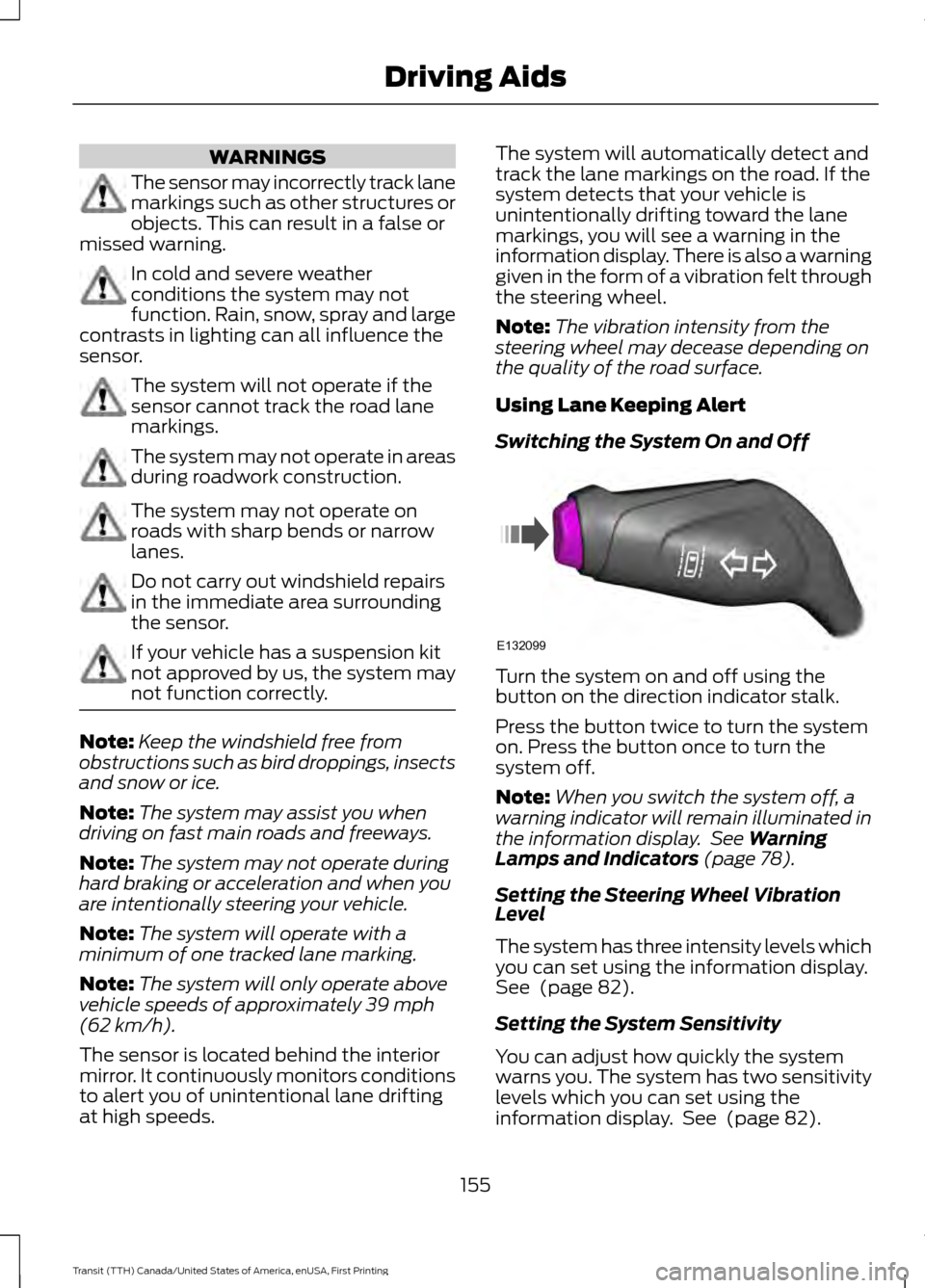
Switching the System On and Off Turn the system on and off using the
button on the direction indicator stalk.
Press the button twice to turn the system
on. Press the button once to turn the
system off.
Note:
When you switch the system off, a
warning indicator will remain illuminated in
the information display. See
Warning
Lamps and Indicators (page 78).
Setting the Steering Wheel Vibration
Level
The system has three intensity levels which
you can set using the information display.
See
(page 82).
Setting the System Sensitivity
You can adjust how quickly the system
warns you. The system has two sensitivity
levels which you can set using the
information display. See
(page 82).
155
Transit (TTH) Canada/United States of America, enUSA, First Printing Driving AidsE132099
Page 176 of 411
5. If the trailer wheels lock, indicated by
squealing tires, reduce the gain setting.
If the trailer wheels turn freely, increase
the gain setting. Repeat steps four and
five until the gain setting is at a point just below trailer wheel lock. If towing
a heavier trailer, trailer wheel lock may
not be attainable even with the
maximum gain setting of 10.
System Warning Messages Action and Description
Message
Displays in response to faults sensed by the trailer brake
controller, accompanied by a single tone. If this message
appears, contact an authorized dealer as soon as possible
for diagnosis and repair. The controller may still function, but
performance may be degraded.
Trailer Brake Module
Fault
Displays when there is a short circuit on the electric brake
output wire. If the message displays, accompanied by a single
tone, with no trailer connected, the problem is with your
vehicle wiring between the trailer brake controller and the 7-
pin connector. If the message only displays with a trailer
connected, the problem is with the trailer wiring. Consult a
trailer dealer for assistance. This can be a short to ground,
for example a chaffed wire, short to voltage, for example a
pulled pin on trailer emergency breakaway battery or the
trailer brakes may be drawing too much current.
Wiring Fault on Trailer
Note: An authorized dealer can diagnose the trailer brake controller to determine exactly
which trailer fault has occurred. However, the Ford Warranty does not cover this diagnosis
if the fault is with the trailer.
Points to Remember
• Do not attempt removal of the trailer
brake controller without consulting the
Workshop Manual. Damage to the unit
may result.
• Adjust gain setting before using the
trailer brake controller for the first time.
• Adjust gain setting, using the procedure
above, whenever road, weather and
trailer or vehicle loading conditions
change from when the gain was initially
set. •
Only use the manual control lever for
correct adjustment of the gain during
trailer setup. Misuse, such as
application during trailer sway, could
cause instability of trailer or tow
vehicle.
• Avoid towing in adverse weather
conditions. The trailer brake controller
does not provide anti-lock control of
the trailer wheels. Trailer wheels can
lock up on slippery surfaces, resulting
in instability of trailer or tow vehicle.
173
Transit (TTH) Canada/United States of America, enUSA, First Printing Towing