instrument cluster FORD TRANSIT 2016 5.G User Guide
[x] Cancel search | Manufacturer: FORD, Model Year: 2016, Model line: TRANSIT, Model: FORD TRANSIT 2016 5.GPages: 411, PDF Size: 5.65 MB
Page 128 of 411
4.
After you are done pumping fuel, slowly
remove the fuel filler nozzle, allow
about five to ten seconds after
pumping fuel before removing the fuel
filler nozzle. This allows residual fuel
to drain back into the fuel tank and not
spill onto the vehicle.
Note: A fuel spillage concern may occur if
overfilling the fuel tank. Do not overfill the
tank to the point that the fuel is able to
bypass the fuel filler nozzle. The overfilled
fuel may run down the drain located below
and in front of the fuel filler door.
If the fuel fill inlet was not properly closed,
a service engine warning lamp may appear
on the instrument cluster.
At the next opportunity, do the following:
1. Safely pull off the road.
2. Put the vehicle in P (Park) and turn the
ignition off.
3. Open the fuel filler door and remove any visible debris from the fuel fill
opening.
4. Insert either the fuel fill nozzle or the fuel fill funnel provided with the vehicle
several times to allow the inlet to close
properly. This will dislodge any debris
preventing the inlet from sealing.
If this action corrects the problem, the
warning lamp may not reset immediately.
It may take several driving cycles for the
warning lamp to turn off. A driving cycle
consists of an engine start-up (after four
or more hours with the engine off) followed
by city or highway driving.
FUEL CONSUMPTION
Empty reserve is the amount of fuel
remaining in the tank after the fuel gauge
indicates empty. The amount of usable
fuel in the empty reserve varies and should
not be relied upon to increase driving range. •
The usable capacity of the fuel tank is
the amount of fuel that can be added
into the tank after the gauge indicates
empty
• The advertised capacity is the total fuel
tank size. See Capacities and
Specifications (page 274). It is the
combined usable capacity plus the
empty reserve.
• Due to the empty reserve, you may not
be able to refuel the full amount of the
advertised capacity of the fuel tank
even when the fuel gauge reads empty.
Filling the Tank
For consistent results when refueling:
• Turn the ignition off before fueling; an
inaccurate reading results if the engine
is left running.
• Use the same fill rate
(low-medium-high) each time the tank
is filled.
• Allow no more than two automatic
click-offs when filling.
Results are most accurate when the filling
method is consistent.
Calculating Fuel Economy
Do not measure fuel economy during the
first
1,000 mi (1,600 km) of driving (this is
your engine ’s break-in period). A more
accurate measurement is obtained after
2,000 mi (3,200 km)
to 3,000 mi
(4,800 km). Also, fuel expense, frequency
of fill ups or fuel gauge readings are not
accurate ways to measure fuel economy.
1. Fill the fuel tank completely and record
the initial odometer reading.
2. Each time you fill the fuel tank, record the amount of fuel added.
3. After at least three fill ups, fill the fuel tank and record the current odometer
reading.
125
Transit (TTH) Canada/United States of America, enUSA, First Printing Fuel and Refueling
Page 139 of 411
AUTOMATIC TRANSMISSION
WARNINGS
Always set the parking brake fully
and make sure you shift the gearshift
lever to park (P). Switch the ignition
off and remove the key whenever you leave
your vehicle. Do not apply the brake pedal and
accelerator pedal simultaneously.
Applying both pedals simultaneously
for more than three seconds will limit
engine rpm, which may result in difficulty
maintaining speed in traffic and could lead
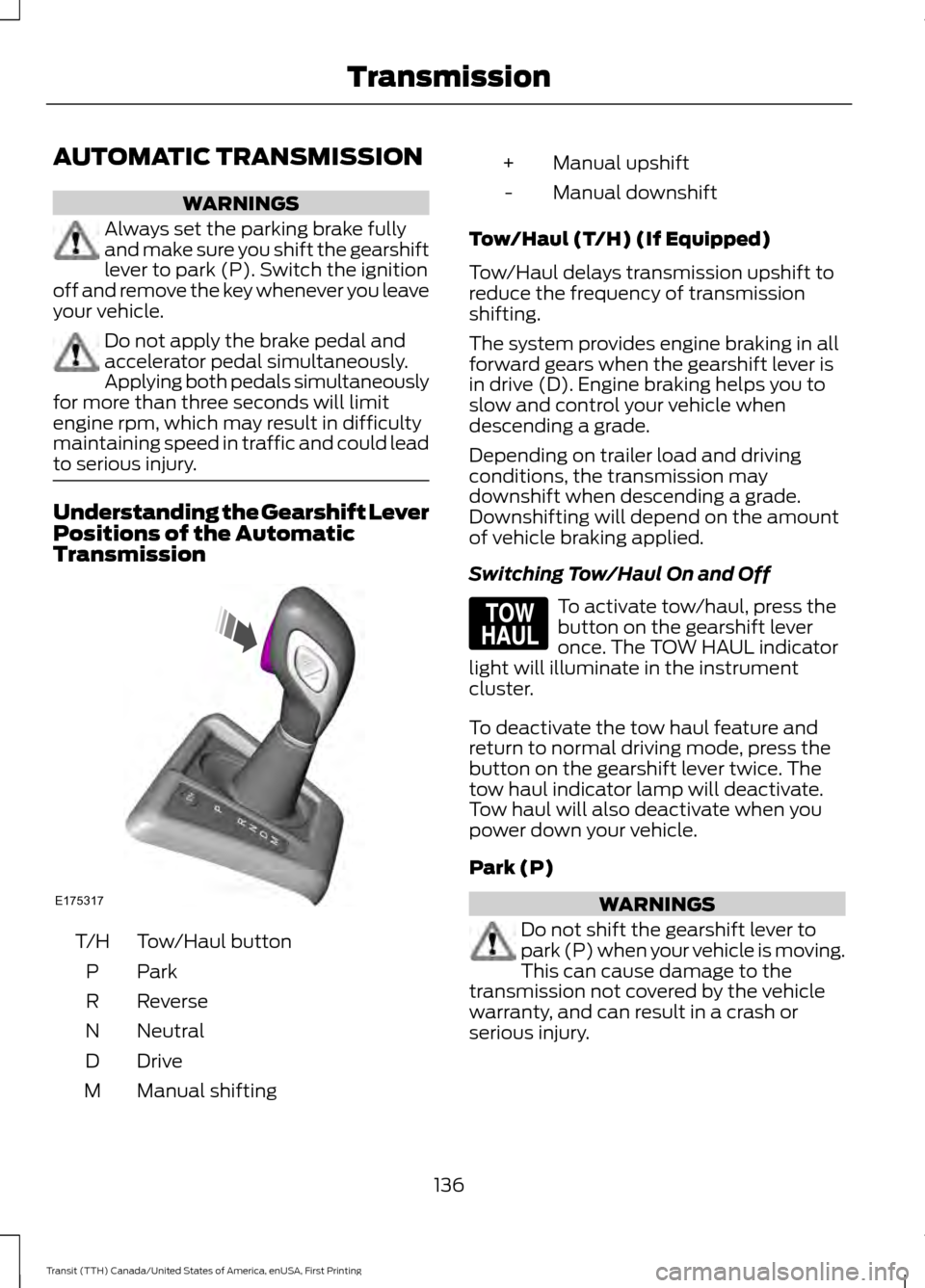
to serious injury. Understanding the Gearshift Lever
Positions of the Automatic
Transmission
Tow/Haul button
T/H
ParkP
Reverse
R
Neutral
N
Drive
D
Manual shifting
M Manual upshift
+
Manual downshift
-
Tow/Haul (T/H) (If Equipped)
Tow/Haul delays transmission upshift to
reduce the frequency of transmission
shifting.
The system provides engine braking in all
forward gears when the gearshift lever is
in drive (D). Engine braking helps you to
slow and control your vehicle when
descending a grade.
Depending on trailer load and driving
conditions, the transmission may
downshift when descending a grade.
Downshifting will depend on the amount
of vehicle braking applied.
Switching Tow/Haul On and Off To activate tow/haul, press the
button on the gearshift lever
once. The TOW HAUL indicator
light will illuminate in the instrument
cluster.
To deactivate the tow haul feature and
return to normal driving mode, press the
button on the gearshift lever twice. The
tow haul indicator lamp will deactivate.
Tow haul will also deactivate when you
power down your vehicle.
Park (P) WARNINGS
Do not shift the gearshift lever to
park (P) when your vehicle is moving.
This can cause damage to the
transmission not covered by the vehicle
warranty, and can result in a crash or
serious injury.
136
Transit (TTH) Canada/United States of America, enUSA, First Printing TransmissionE175317 E161509
Page 140 of 411
WARNINGS
Apply the parking brake, shift the
gearshift lever to park (P) and switch
the ignition off before leaving your
vehicle. Make sure that the gearshift lever
fully latches into position. When the gearshift lever is in this position,
it will lock the transmission. The engine
does not transmit power to the driven
wheels. You can start the engine with the
gearshift lever in this position.
Note:
A warning tone will sound if you open
the driver door and you have not shifted the
gearshift lever to park (P).
Reverse (R) WARNINGS
Do not shift the gearshift lever to
reverse (R) when your vehicle is
moving. This can cause damage to
the transmission not covered by the vehicle
warranty, and can result in a crash or
serious injury. Always come to a complete stop
before shifting the gearshift lever out
of reverse (R).
Shift the gearshift lever to reverse (R) to
allow your vehicle to move backward.
Neutral (N)
When the gearshift lever is in this position,
the transmission does not lock. The engine
does not transmit power to the driven
wheels. You can start the engine with the
gearshift lever in this position.
Drive (D)
Shift the gearshift lever to drive (D) to
allow your vehicle to move forward and
shift automatically through the forward
gears. The transmission shifts to the appropriate
gear for optimum performance based on
ambient temperature, road gradient,
vehicle load and your input.
Note:
A shift will occur only when your
vehicle speed and the engine speed are
appropriate.
Note: You can temporarily override the
selected gear by pressing the + or - buttons
on the side of the gearshift lever.
Manual (M) WARNING
Do not hold the + or - buttons
permanently in. Shift the gearshift lever to manual (M) to
allow your vehicle to move forward and
allow you to shift manually through the
forward gears. Press the
+ or - buttons on
the side of the gearshift lever to shift
manually through the forward gears. The
instrument cluster will display the selected
gear, and a shift indicator arrow to assist
optimum shifting.
• Press the
+ button to upshift.
• Press the
- button to downshift.
You can skip gears by pressing a button
repeatedly at short intervals.
Upshift at the recommended shift
speeds according to the following
chart: Upshifts when accelerating (recom-
mended for best fuel economy)
Vehicle speed mph( km/h):
Upshift from:
15 (24)
1 - 2
25 (40)
2 - 3
40 (64)
3 - 4
137
Transit (TTH) Canada/United States of America, enUSA, First Printing Transmission
Page 154 of 411
PRINCIPLE OF OPERATION
WARNING
The system does not relieve you of
your responsibility to drive with due
care and attention.
Cruise control allows you to control your
speed using the switches on the steering
wheel. You can use cruise control when
you exceed approximately 20 mph (30
km/h).
USING CRUISE CONTROL
WARNINGS
Do not use cruise control in heavy
traffic, on winding roads or when the
road surface is slippery. This could
result in loss of vehicle control, serious
injury or death. When you are going downhill, your
vehicle speed may increase above
the set speed. The system will not
apply the brakes. Change down a gear to
assist the system in maintaining the set
speed. Failure to do so could result in loss
of vehicle control, serious injury or death. Note:
Cruise control will disengage if your
vehicle speed decreases more than 10 mph
(16 km/h) below your set speed while
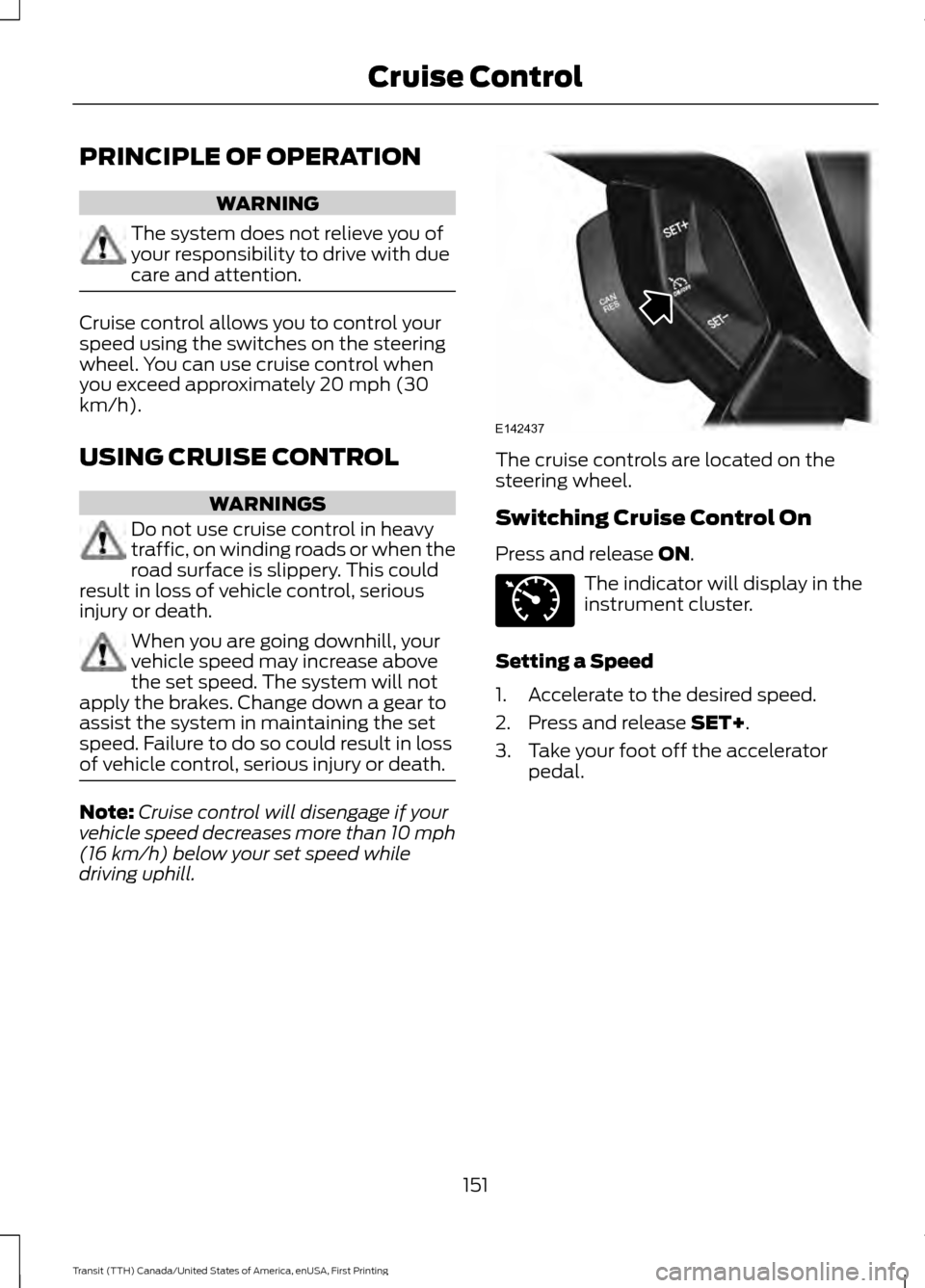
driving uphill. The cruise controls are located on the
steering wheel.
Switching Cruise Control On
Press and release ON.
The indicator will display in the
instrument cluster.
Setting a Speed
1. Accelerate to the desired speed.
2. Press and release
SET+.
3. Take your foot off the accelerator pedal.
151
Transit (TTH) Canada/United States of America, enUSA, First Printing Cruise ControlE142437 E71340
Page 208 of 411
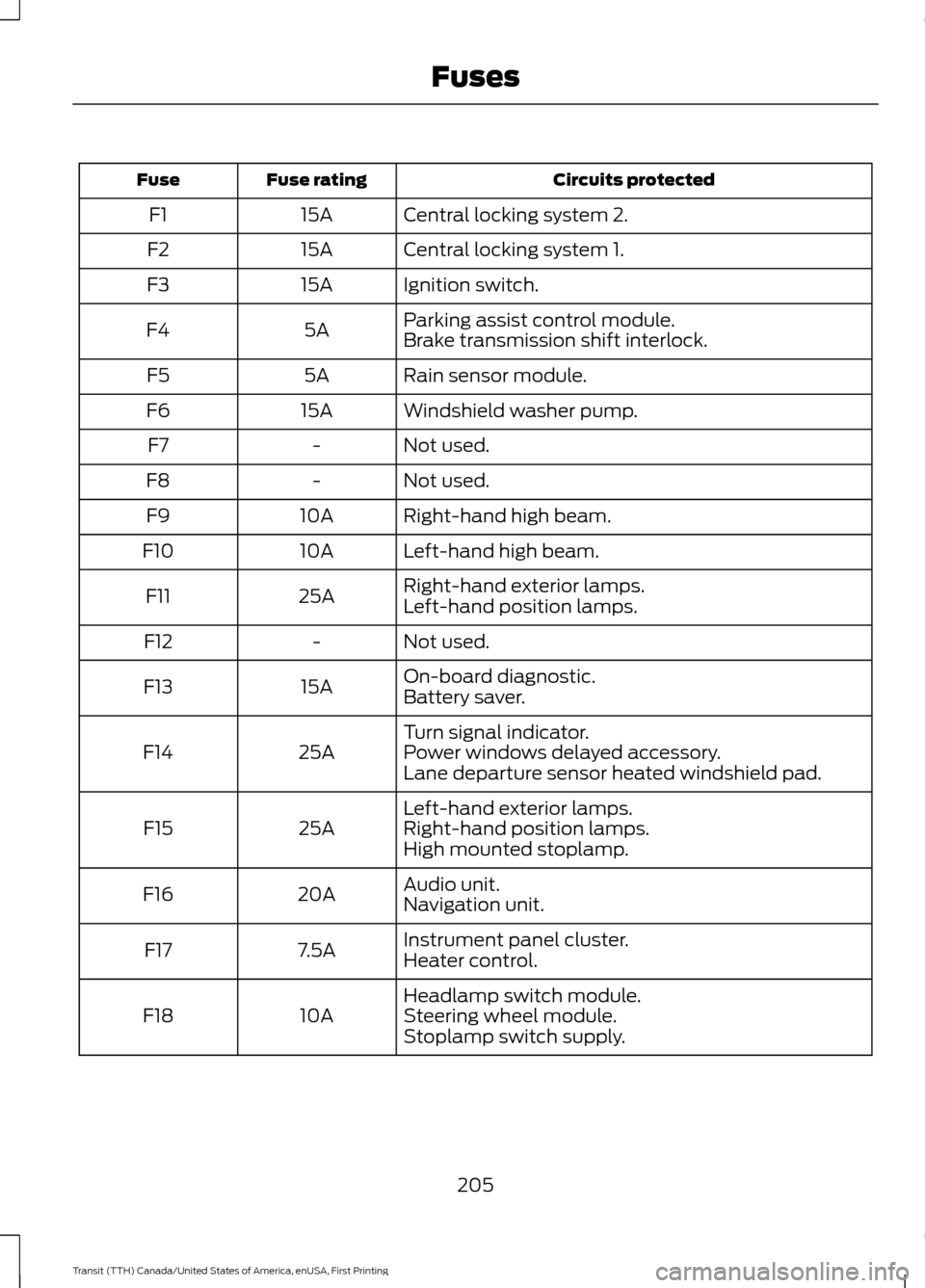
Circuits protected
Fuse rating
Fuse
Central locking system 2.
15A
F1
Central locking system 1.
15A
F2
Ignition switch.
15A
F3
Parking assist control module.
5A
F4
Brake transmission shift interlock.
Rain sensor module.
5A
F5
Windshield washer pump.
15A
F6
Not used.
-
F7
Not used.
-
F8
Right-hand high beam.
10A
F9
Left-hand high beam.
10A
F10
Right-hand exterior lamps.
25A
F11
Left-hand position lamps.
Not used.
-
F12
On-board diagnostic.
15A
F13
Battery saver.
Turn signal indicator.
25A
F14 Power windows delayed accessory.
Lane departure sensor heated windshield pad.
Left-hand exterior lamps.
25A
F15 Right-hand position lamps.
High mounted stoplamp.
Audio unit.
20A
F16
Navigation unit.
Instrument panel cluster.
7.5A
F17
Heater control.
Headlamp switch module.
10A
F18 Steering wheel module.
Stoplamp switch supply.
205
Transit (TTH) Canada/United States of America, enUSA, First Printing Fuses
Page 239 of 411
•
Never wash or rinse any ignition coil,
spark plug wire or spark plug well, or
the area in and around these locations.
• Cover the battery, power distribution
box, and air filter assembly to prevent
water damage when cleaning the
engine.
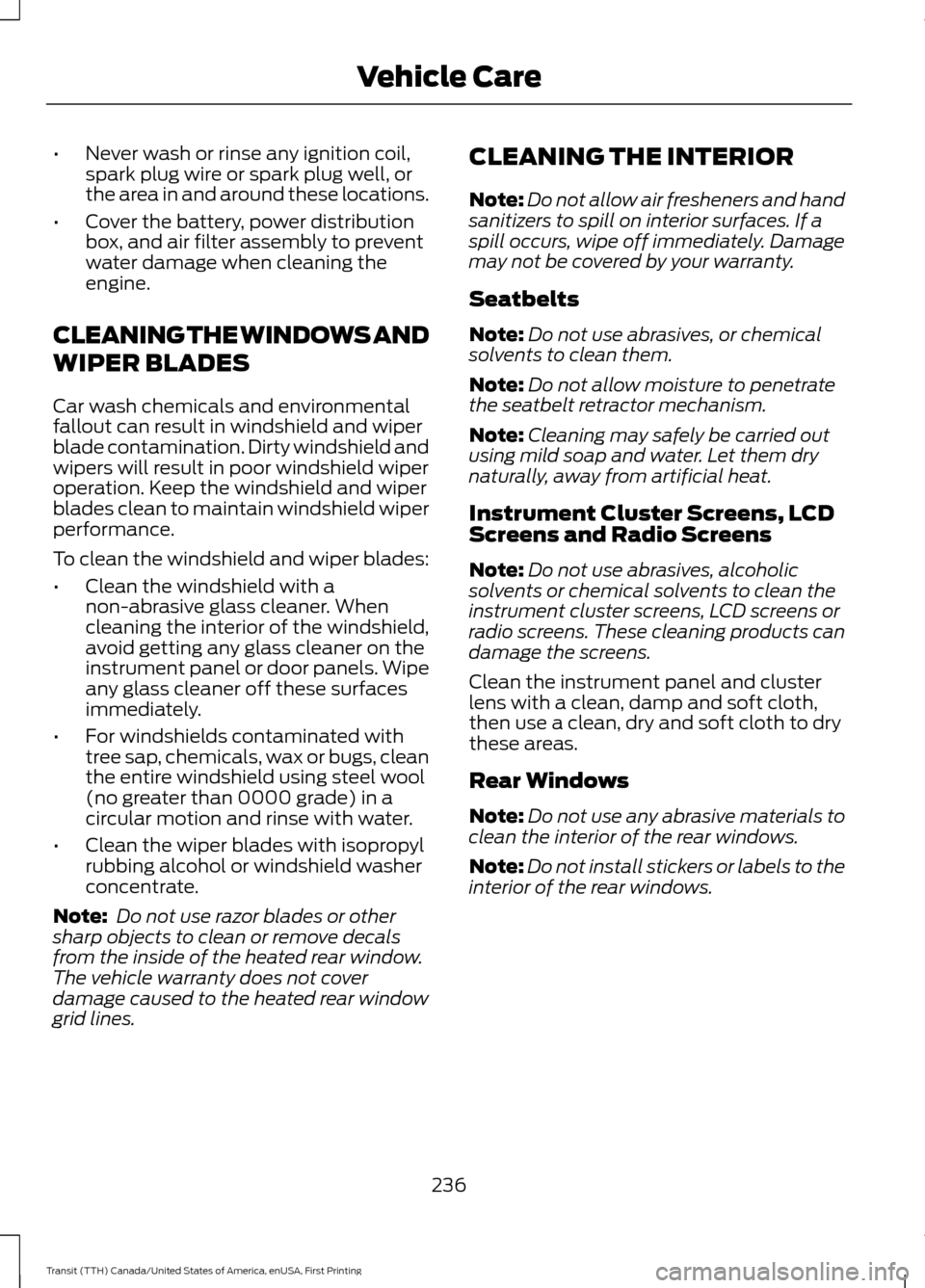
CLEANING THE WINDOWS AND
WIPER BLADES
Car wash chemicals and environmental
fallout can result in windshield and wiper
blade contamination. Dirty windshield and
wipers will result in poor windshield wiper
operation. Keep the windshield and wiper
blades clean to maintain windshield wiper
performance.
To clean the windshield and wiper blades:
• Clean the windshield with a
non-abrasive glass cleaner. When
cleaning the interior of the windshield,
avoid getting any glass cleaner on the
instrument panel or door panels. Wipe
any glass cleaner off these surfaces
immediately.
• For windshields contaminated with
tree sap, chemicals, wax or bugs, clean
the entire windshield using steel wool
(no greater than 0000 grade) in a
circular motion and rinse with water.
• Clean the wiper blades with isopropyl
rubbing alcohol or windshield washer
concentrate.
Note: Do not use razor blades or other
sharp objects to clean or remove decals
from the inside of the heated rear window.
The vehicle warranty does not cover
damage caused to the heated rear window
grid lines. CLEANING THE INTERIOR
Note:
Do not allow air fresheners and hand
sanitizers to spill on interior surfaces. If a
spill occurs, wipe off immediately. Damage
may not be covered by your warranty.
Seatbelts
Note: Do not use abrasives, or chemical
solvents to clean them.
Note: Do not allow moisture to penetrate
the seatbelt retractor mechanism.
Note: Cleaning may safely be carried out
using mild soap and water. Let them dry
naturally, away from artificial heat.
Instrument Cluster Screens, LCD
Screens and Radio Screens
Note: Do not use abrasives, alcoholic
solvents or chemical solvents to clean the
instrument cluster screens, LCD screens or
radio screens. These cleaning products can
damage the screens.
Clean the instrument panel and cluster
lens with a clean, damp and soft cloth,
then use a clean, dry and soft cloth to dry
these areas.
Rear Windows
Note: Do not use any abrasive materials to
clean the interior of the rear windows.
Note: Do not install stickers or labels to the
interior of the rear windows.
236
Transit (TTH) Canada/United States of America, enUSA, First Printing Vehicle Care
Page 240 of 411
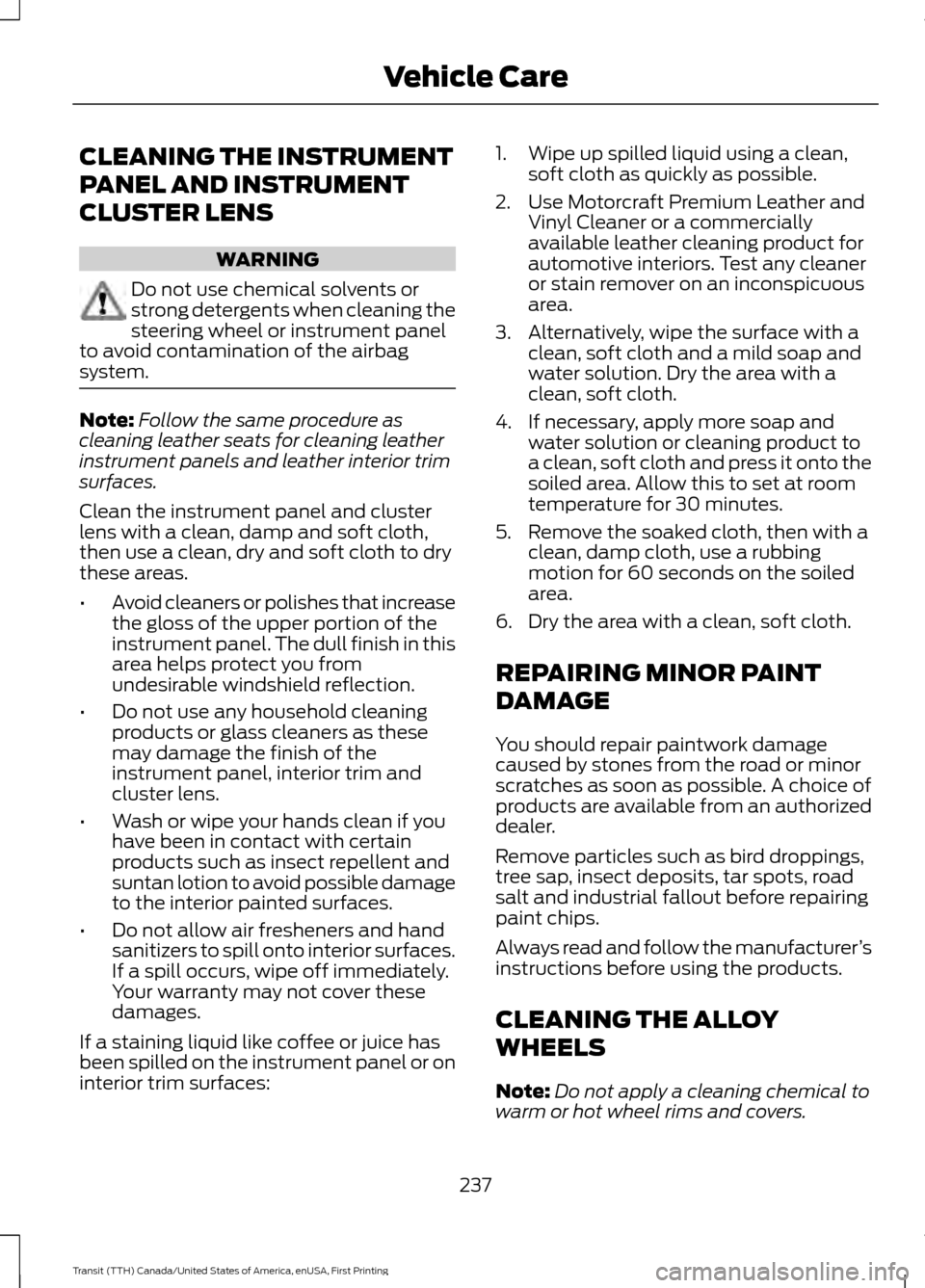
CLEANING THE INSTRUMENT
PANEL AND INSTRUMENT
CLUSTER LENS
WARNING
Do not use chemical solvents or
strong detergents when cleaning the
steering wheel or instrument panel
to avoid contamination of the airbag
system. Note:
Follow the same procedure as
cleaning leather seats for cleaning leather
instrument panels and leather interior trim
surfaces.
Clean the instrument panel and cluster
lens with a clean, damp and soft cloth,
then use a clean, dry and soft cloth to dry
these areas.
• Avoid cleaners or polishes that increase
the gloss of the upper portion of the
instrument panel. The dull finish in this
area helps protect you from
undesirable windshield reflection.
• Do not use any household cleaning
products or glass cleaners as these
may damage the finish of the
instrument panel, interior trim and
cluster lens.
• Wash or wipe your hands clean if you
have been in contact with certain
products such as insect repellent and
suntan lotion to avoid possible damage
to the interior painted surfaces.
• Do not allow air fresheners and hand
sanitizers to spill onto interior surfaces.
If a spill occurs, wipe off immediately.
Your warranty may not cover these
damages.
If a staining liquid like coffee or juice has
been spilled on the instrument panel or on
interior trim surfaces: 1. Wipe up spilled liquid using a clean,
soft cloth as quickly as possible.
2. Use Motorcraft Premium Leather and Vinyl Cleaner or a commercially
available leather cleaning product for
automotive interiors. Test any cleaner
or stain remover on an inconspicuous
area.
3. Alternatively, wipe the surface with a clean, soft cloth and a mild soap and
water solution. Dry the area with a
clean, soft cloth.
4. If necessary, apply more soap and water solution or cleaning product to
a clean, soft cloth and press it onto the
soiled area. Allow this to set at room
temperature for 30 minutes.
5. Remove the soaked cloth, then with a clean, damp cloth, use a rubbing
motion for 60 seconds on the soiled
area.
6. Dry the area with a clean, soft cloth.
REPAIRING MINOR PAINT
DAMAGE
You should repair paintwork damage
caused by stones from the road or minor
scratches as soon as possible. A choice of
products are available from an authorized
dealer.
Remove particles such as bird droppings,
tree sap, insect deposits, tar spots, road
salt and industrial fallout before repairing
paint chips.
Always read and follow the manufacturer ’s
instructions before using the products.
CLEANING THE ALLOY
WHEELS
Note: Do not apply a cleaning chemical to
warm or hot wheel rims and covers.
237
Transit (TTH) Canada/United States of America, enUSA, First Printing Vehicle Care
Page 403 of 411
C
California Proposition 65.............................10
Capacities and Specifications - 3.2L
Power Stroke Diesel................................289
Capacities............................................................ 289
Specifications..................................................... 290
Capacities and Specifications - 3.5L.................................................................281
Capacities.............................................................. 281
Specifications..................................................... 282
Capacities and Specifications - 3.7L.................................................................285
Capacities............................................................. 285
Specifications..................................................... 286
Capacities and Specifications
................274
Car Wash See: Cleaning the Exterior.............................. 234
Catalytic Converter
.......................................119
Driving with a Catalytic Converter.................119
Changing a Bulb...........................................225 Central High Mounted Brake Lamp............228
Front Clearance Lamp...................................... 227
Headlamp............................................................. 226
Interior Lamp....................................................... 229
License Plate Lamp.......................................... 229
Reading Lamps................................................... 229
Rear Lamps.......................................................... 228
Side Direction Indicator................................... 228
Sun Visor Mirror Lamp..................................... 230
Changing a Fuse..........................................206
Changing a Road Wheel...........................264 Dissimilar Spare Wheel and Tire Assembly
Information..................................................... 265
Front Jacking Points......................................... 269
Installing a Road Wheel.................................... 271
Locking Lug Nuts............................................... 266
Rear Jacking Points........................................... 270
Removing a Road Wheel................................ 270
Stowing the Wheel and Vehicle Jack..........272
Vehicle Jack......................................................... 269
Vehicles With a Spare Wheel....................... 266
Changing the 12V Battery
..........................221
Installing the Battery........................................ 223
Removing the Battery........................................ 221
Changing the Engine Air Filter.................232 Secondary Foam Air Filter.............................. 233Changing the Engine Oil and Oil
Filter................................................................213
Engine Lubrication for Severe Service Operation.......................................................... 213
Changing the Wiper Blades.....................223 Changing the Windshield Wiper
Blades................................................................ 223
Checking MyKey System Status...............53
Checking the Wiper Blades......................223
Child Restraint and Seatbelt Maintenance.................................................35
Child Restraint Positioning
..........................27
Child Safety.......................................................15
General Information............................................. 15
Child Safety Locks.........................................28 Left-Hand Side..................................................... 28
Right-Hand Side................................................... 29
Cigar Lighter
...................................................106
Cleaning Products.......................................234
Cleaning the Alloy Wheels........................237
Cleaning the Engine....................................235
Cleaning the Exterior..................................234 Body Paintwork Preservation........................ 234
Cleaning the Chrome Trim............................. 234
Cleaning the Headlamps................................ 234
Cleaning the Rear Window............................ 234
Sliding Door Tracks........................................... 235
Cleaning the Instrument Panel and Instrument Cluster Lens.........................237
Cleaning the Interior...................................236 Instrument Cluster Screens, LCD Screens
and Radio Screens....................................... 236
Rear Windows..................................................... 236
Seatbelts............................................................... 236
Cleaning the Windows and Wiper Blades...........................................................236
Clearing All MyKeys.......................................52
Climate Control
...............................................92
Principle of Operation........................................ 92
Cold Weather Precautions
........................179
Coolant Check See: Engine Coolant Check............................. 214
Crash Sensors and Airbag Indicator
........45
Creating a MyKey.............................................51 Programming/Changing Configurable
Settings................................................................ 51
Cruise Control.................................................64 Principle of Operation........................................ 151
400
Transit (TTH) Canada/United States of America, enUSA, First Printing Index
Page 406 of 411
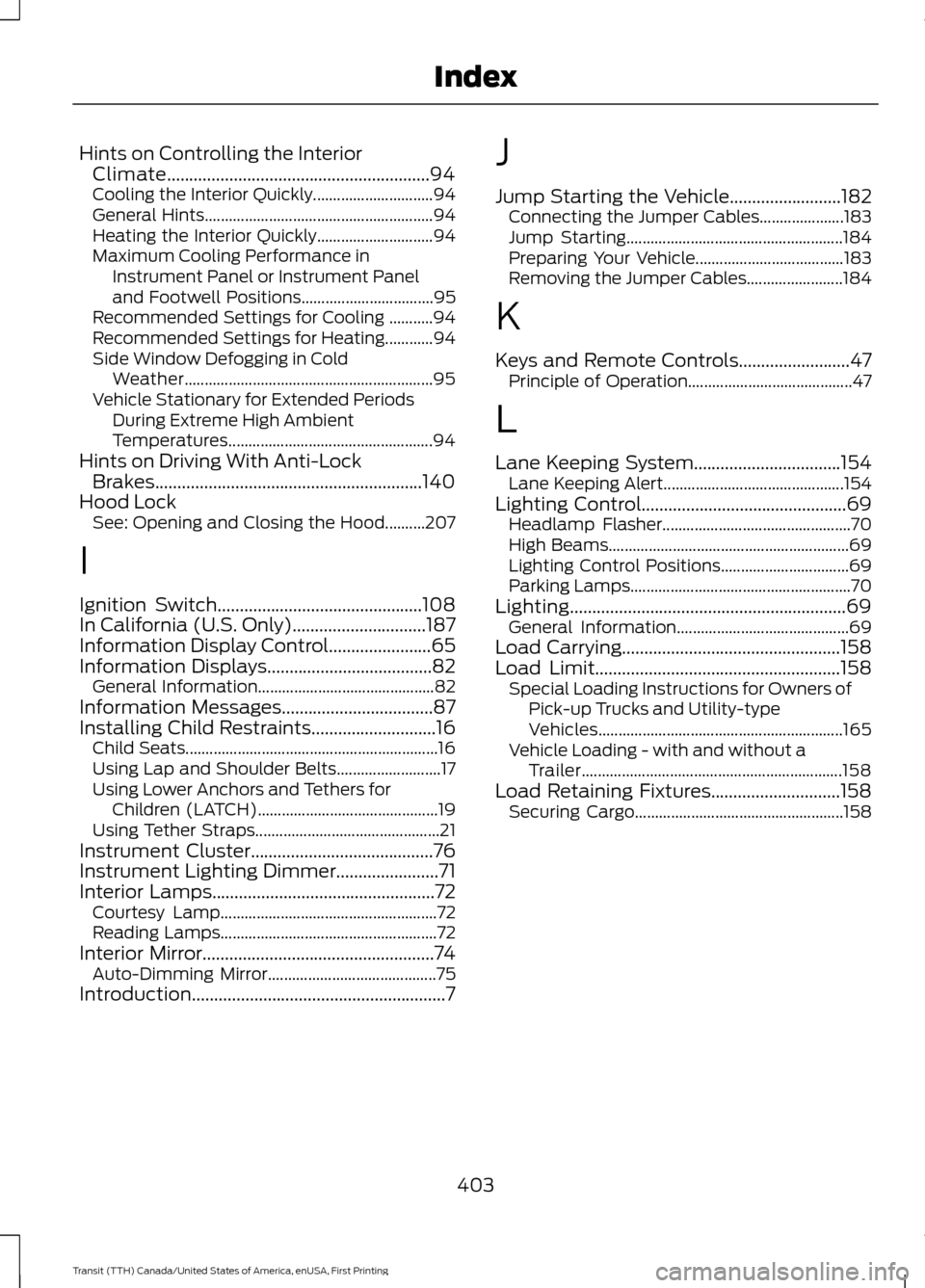
Hints on Controlling the Interior
Climate...........................................................94
Cooling the Interior Quickly.............................. 94
General Hints......................................................... 94
Heating the Interior Quickly............................. 94
Maximum Cooling Performance in Instrument Panel or Instrument Panel
and Footwell Positions................................. 95
Recommended Settings for Cooling ...........94
Recommended Settings for Heating............94
Side Window Defogging in Cold Weather.............................................................. 95
Vehicle Stationary for Extended Periods During Extreme High Ambient
Temperatures................................................... 94
Hints on Driving With Anti-Lock Brakes............................................................140
Hood Lock See: Opening and Closing the Hood..........207
I
Ignition Switch..............................................108
In California (U.S. Only)..............................187
Information Display Control.......................65
Information Displays
.....................................82
General Information............................................ 82
Information Messages
..................................87
Installing Child Restraints............................16
Child Seats............................................................... 16
Using Lap and Shoulder Belts.......................... 17
Using Lower Anchors and Tethers for Children (LATCH)............................................. 19
Using Tether Straps.............................................. 21
Instrument Cluster
.........................................76
Instrument Lighting Dimmer.......................71
Interior Lamps
..................................................72
Courtesy Lamp...................................................... 72
Reading Lamps...................................................... 72
Interior Mirror
....................................................74
Auto-Dimming Mirror.......................................... 75
Introduction.........................................................7 J
Jump Starting the Vehicle
.........................182
Connecting the Jumper Cables..................... 183
Jump Starting...................................................... 184
Preparing Your Vehicle..................................... 183
Removing the Jumper Cables........................ 184
K
Keys and Remote Controls.........................47 Principle of Operation......................................... 47
L
Lane Keeping System.................................154 Lane Keeping Alert............................................. 154
Lighting Control
..............................................69
Headlamp Flasher............................................... 70
High Beams............................................................ 69
Lighting Control Positions................................ 69
Parking Lamps....................................................... 70
Lighting..............................................................69 General Information........................................... 69
Load Carrying
.................................................158
Load Limit.......................................................158
Special Loading Instructions for Owners of
Pick-up Trucks and Utility-type
Vehicles............................................................. 165
Vehicle Loading - with and without a Trailer................................................................. 158
Load Retaining Fixtures.............................158 Securing Cargo.................................................... 158
403
Transit (TTH) Canada/United States of America, enUSA, First Printing Index