service FORD TRANSIT 2016 5.G User Guide
[x] Cancel search | Manufacturer: FORD, Model Year: 2016, Model line: TRANSIT, Model: FORD TRANSIT 2016 5.GPages: 411, PDF Size: 5.65 MB
Page 47 of 411
WARNINGS
Do not lean your head on the door.
The safety canopy could injure you
as it deploys from the headliner.
Do not attempt to service, repair, or
modify the safety canopy, its fuses,
the pillar trims, or the headliner on a
vehicle with a safety canopy as you could
be seriously injured or killed. Contact your
authorized dealer as soon as possible. All occupants of your vehicle
including the driver should always
wear their safety belts even when an
airbag supplemental restraint system and
safety canopy are provided. Failure to wear
your safety belt correctly could seriously
increase the risk of personal injury or death. To reduce risk of personal injury, do
not obstruct or place objects in the
deployment path of the safety
canopy. If a safety canopy deploys it will not
function again. The safety canopy,
including the pillar trims and
headliner, must be inspected and serviced
by an authorized dealer. If the safety
canopy is not replaced, the unrepaired area
will increase the risk of personal injury in a
crash. The Safety Canopy will deploy during
significant side crashes or when a certain
likelihood of a rollover event is detected
by the rollover sensor. The Safety Canopy
is mounted to the roof side rail behind the
headliner and above each row of seats. In
certain sideways crashes or rollover events,
the Safety Canopy will be activated,
regardless of which seats are occupied.
The Safety Canopy is designed to inflate
between the side window area and
occupants to further enhance protection
provided in side impact crashes and
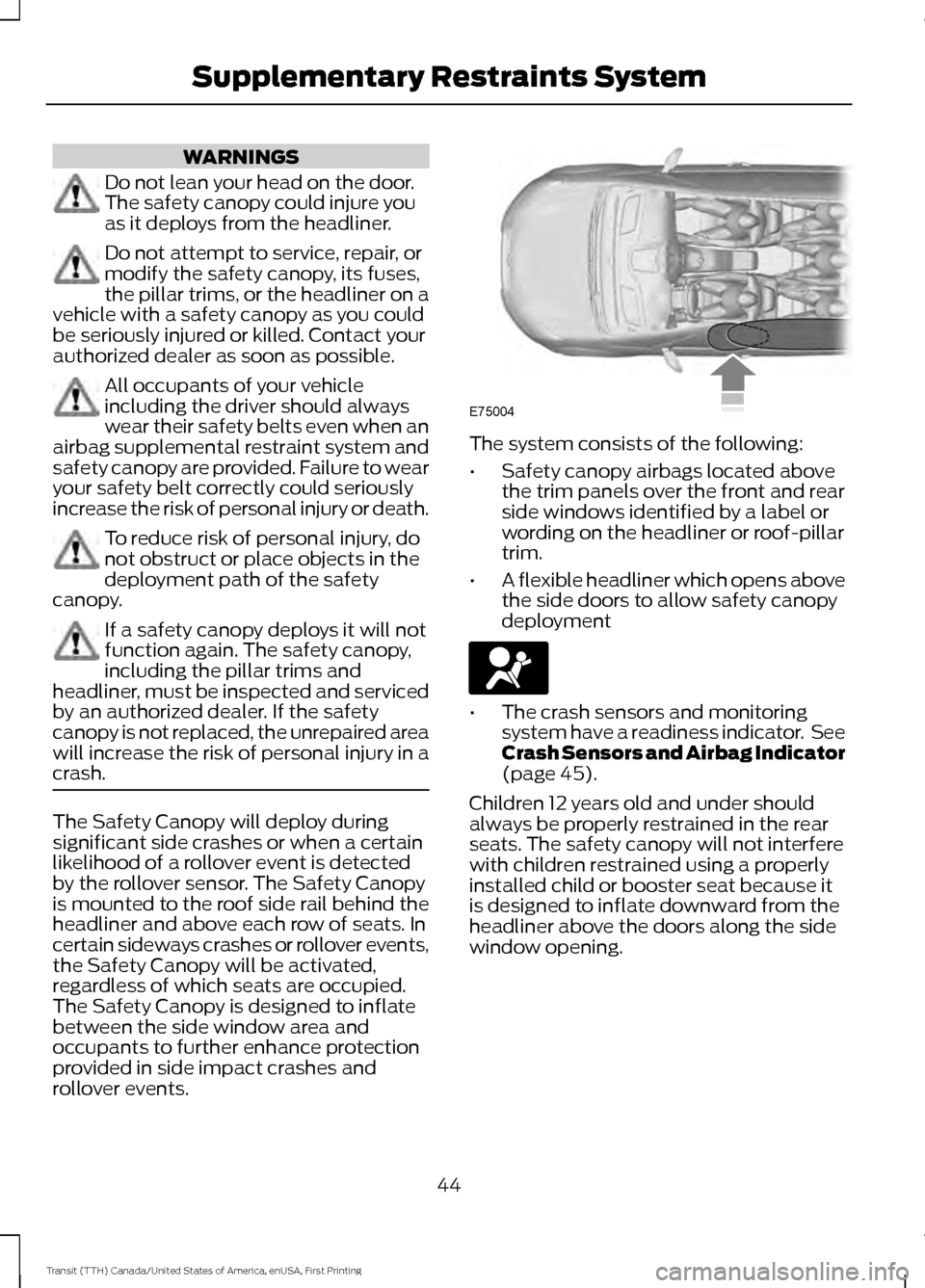
rollover events. The system consists of the following:
•
Safety canopy airbags located above
the trim panels over the front and rear
side windows identified by a label or
wording on the headliner or roof-pillar
trim.
• A flexible headliner which opens above
the side doors to allow safety canopy
deployment •
The crash sensors and monitoring
system have a readiness indicator. See
Crash Sensors and Airbag Indicator
(page 45).
Children 12 years old and under should
always be properly restrained in the rear
seats. The safety canopy will not interfere
with children restrained using a properly
installed child or booster seat because it
is designed to inflate downward from the
headliner above the doors along the side
window opening.
44
Transit (TTH) Canada/United States of America, enUSA, First Printing Supplementary Restraints SystemE75004
Page 76 of 411
POWER WINDOWS
WARNINGS
To avoid risk of injury, do not leave
children or pets unattended in your
vehicle.
When closing the power windows,
you should verify they are free of
obstructions and make sure that
children and pets are not in the proximity
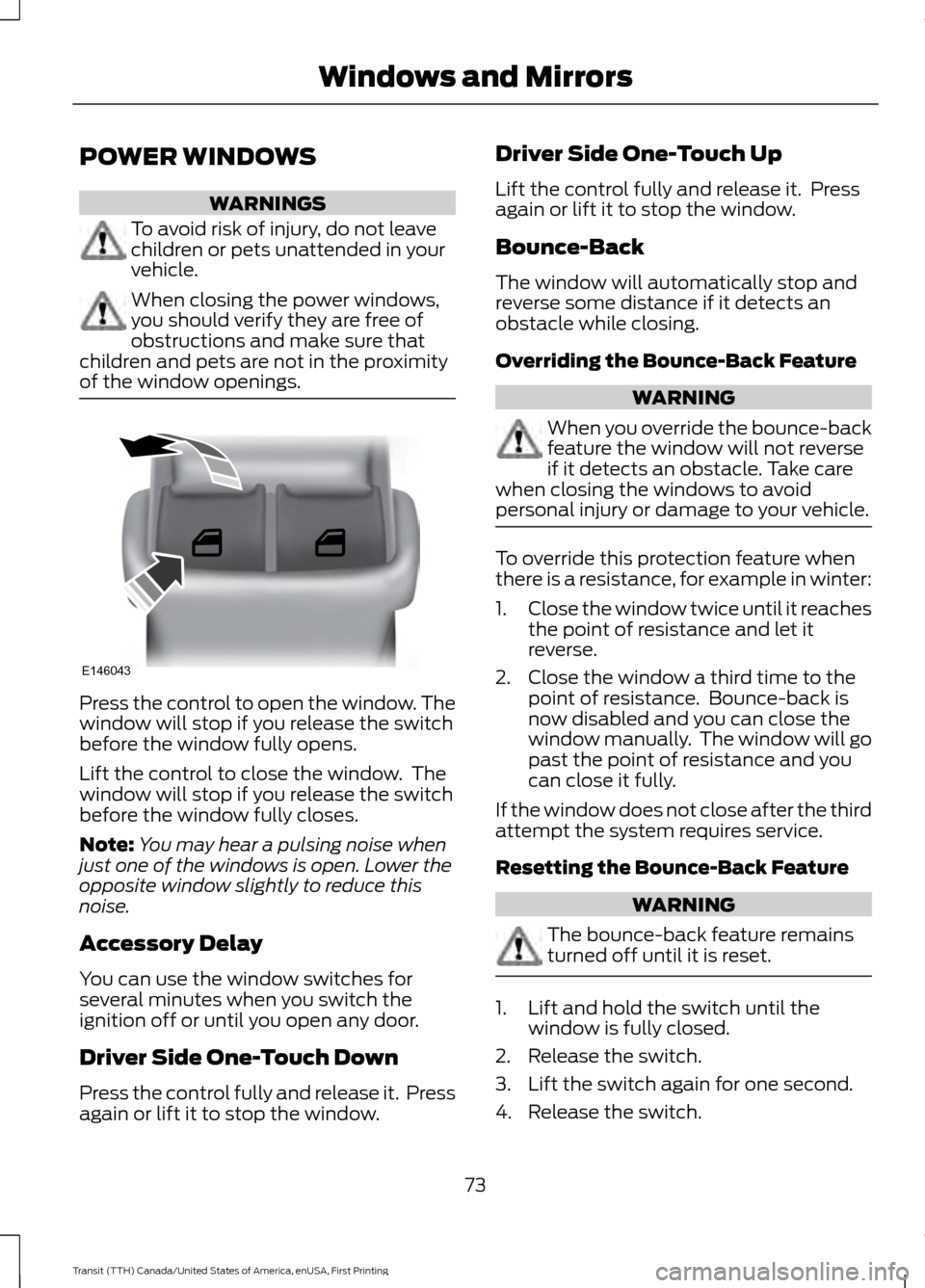
of the window openings. Press the control to open the window. The
window will stop if you release the switch
before the window fully opens.
Lift the control to close the window. The
window will stop if you release the switch
before the window fully closes.
Note:
You may hear a pulsing noise when
just one of the windows is open. Lower the
opposite window slightly to reduce this
noise.
Accessory Delay
You can use the window switches for
several minutes when you switch the
ignition off or until you open any door.
Driver Side One-Touch Down
Press the control fully and release it. Press
again or lift it to stop the window. Driver Side One-Touch Up
Lift the control fully and release it. Press
again or lift it to stop the window.
Bounce-Back
The window will automatically stop and
reverse some distance if it detects an
obstacle while closing.
Overriding the Bounce-Back Feature
WARNING
When you override the bounce-back
feature the window will not reverse
if it detects an obstacle. Take care
when closing the windows to avoid
personal injury or damage to your vehicle. To override this protection feature when
there is a resistance, for example in winter:
1.
Close the window twice until it reaches
the point of resistance and let it
reverse.
2. Close the window a third time to the point of resistance. Bounce-back is
now disabled and you can close the
window manually. The window will go
past the point of resistance and you
can close it fully.
If the window does not close after the third
attempt the system requires service.
Resetting the Bounce-Back Feature WARNING
The bounce-back feature remains
turned off until it is reset.
1. Lift and hold the switch until the
window is fully closed.
2. Release the switch.
3. Lift the switch again for one second.
4. Release the switch.
73
Transit (TTH) Canada/United States of America, enUSA, First Printing Windows and MirrorsE146043
Page 80 of 411
At normal operating temperature, the
needle will remain in the center section.
If the needle enters the red section, the
engine is overheating. Stop your vehicle as
soon as it is safe to do so and switch the
engine off. Determine the cause once the
engine has cooled down. See Engine
Coolant Check (page 214).
Note: Do not restart the engine until the
cause of overheating has been determined
and resolved.
Tripmeter Reset and Distance to
Empty
(If Equipped)
Press the button to change between the
tripmeter and distance to empty
information. Press and hold the button to
reset the tripmeter.
Fuel Gauge
Note: The fuel gauge may vary slightly
when your vehicle is moving or on a gradient. Switch the ignition on. The fuel gauge will
indicate approximately how much fuel is
in the fuel tank. The arrow adjacent to the
fuel pump symbol indicates on which side
of your vehicle the fuel filler door is located.
The needle should move toward F when
you refuel your vehicle. If the needle points
to E after adding fuel, this indicates your
vehicle needs service soon.
After refueling some variability in needle
position is normal:
•
It may take a short time for the needle
to reach F after leaving the gas station.
This is normal and depends upon the
slope of pavement at the gas station.
• The fuel amount dispensed into the
tank is a little less or more than the
gauge indicated. This is normal and
depends upon the slope of pavement
at the gas station.
• If the gas station nozzle shuts off
before the tank is full, try a different
gas pump nozzle.
Low Fuel Reminder
A low fuel reminder triggers when the fuel
gauge needle is at 1/16th.
Variations: Distance-to-empty
Fuel gauge position
Driving type (fuel economy
conditions)
35 miles to 80 miles (56 kmto 129 km)
1/16th
Highway driving
35 miles (56km)
1/16th
Severe duty driving (trailer
towing, extended idle)
77
Transit (TTH) Canada/United States of America, enUSA, First Printing Instrument Cluster
Page 82 of 411
Water In Fuel
It will illuminate if there is excess
water in the fuel filter. Drain off
the water immediately. See
Draining the Fuel Filter Water Trap
(page 218). If it illuminates after draining
the water, this indicates a fuel filter service
is required. Have your vehicle checked by
an authorized dealer immediately.
Direction Indicator Flashes during operation. A
sudden increase in the rate of
flashing warns of a failed
indicator bulb. See
Changing a Bulb
(page 225).
Door Ajar It illuminates when you switch
the ignition on and remains on if
any door or the hood is open.
Engine Coolant Temperature If it illuminates when you are
driving, this indicates a
malfunction. Stop your vehicle
as soon as it is safe to do so and switch the
engine off. Have your vehicle checked by
an authorized dealer. Engine Warning Lamps
Malfunction Indicator Service Required
All Vehicles
If either lamp illuminates when the engine
is running, this indicates a malfunction. The
engine will continue to run but it may have
limited power. If either lamp flashes when
you are driving, reduce the speed of your
vehicle immediately. If it continues to flash,
avoid heavy acceleration or deceleration.
Have your vehicle checked by an
authorized dealer.
WARNING
Under engine misfire conditions,
excessive exhaust temperatures
could damage the catalytic
converter, the fuel system, interior floor
coverings or other vehicle components,
possibly causing a fire. Have an authorized
dealer service your vehicle immediately. If both lamps illuminate when the engine
is running, stop your vehicle as soon as it
is safe to do so. You may notice a reduction
in vehicle speed caused by reduced engine
power. Switch the ignition off and attempt
to restart the engine. Have your vehicle
checked by an authorized dealer.
Front Airbag
If it fails to illuminate when you
start your vehicle, continues to
flash or remains on, this
indicates a malfunction. Have your vehicle
checked by an authorized dealer.
79
Transit (TTH) Canada/United States of America, enUSA, First Printing Instrument Cluster
Page 90 of 411
Action and Description
Message
•Outside temperature units.
• Trip odometer.
• Digital Speedometer.
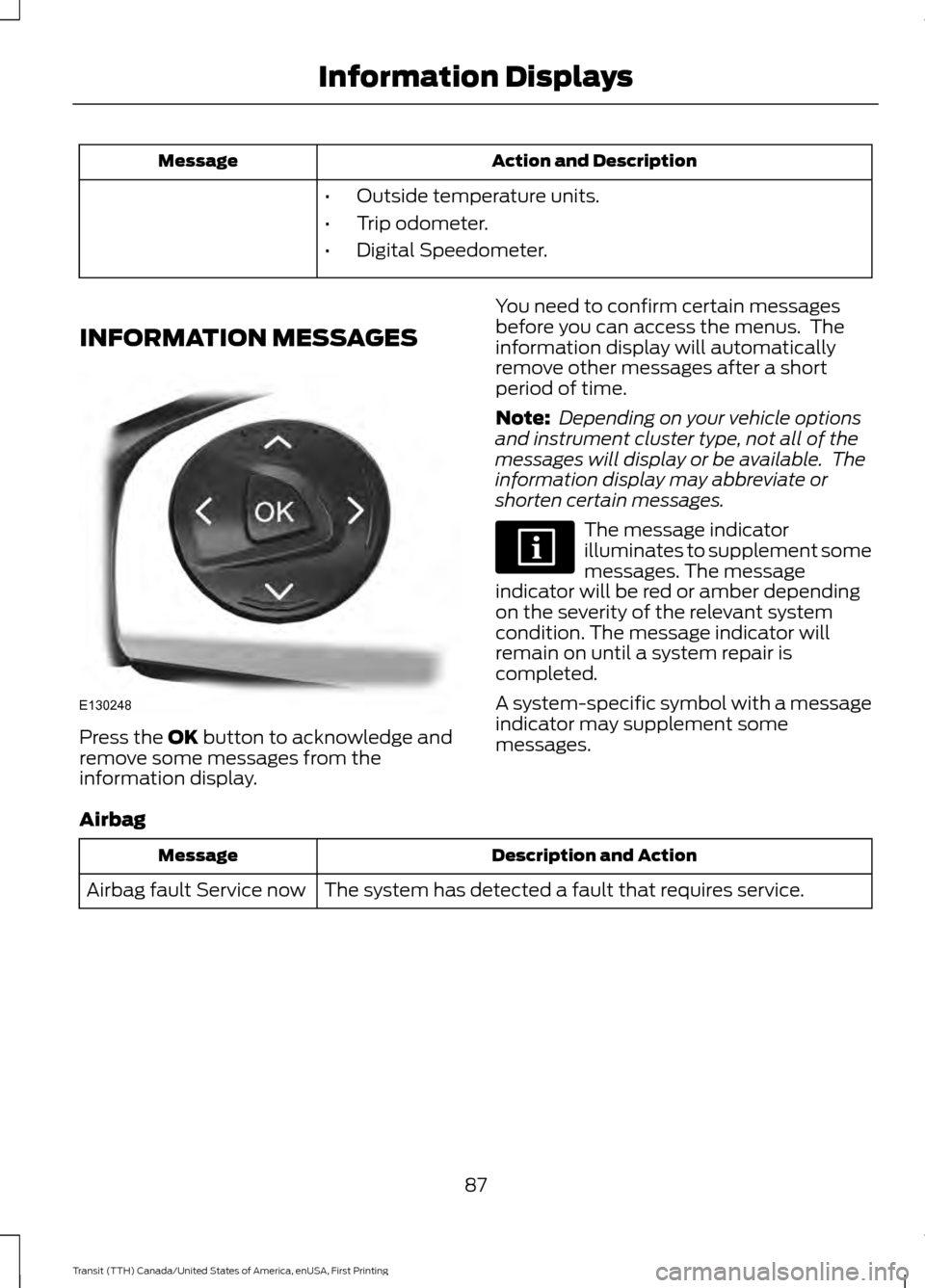
INFORMATION MESSAGES Press the OK button to acknowledge and
remove some messages from the
information display. You need to confirm certain messages
before you can access the menus. The
information display will automatically
remove other messages after a short
period of time.
Note:
Depending on your vehicle options
and instrument cluster type, not all of the
messages will display or be available. The
information display may abbreviate or
shorten certain messages. The message indicator
illuminates to supplement some
messages. The message
indicator will be red or amber depending
on the severity of the relevant system
condition. The message indicator will
remain on until a system repair is
completed.
A system-specific symbol with a message
indicator may supplement some
messages.
Airbag Description and Action
Message
The system has detected a fault that requires service.
Airbag fault Service now
87
Transit (TTH) Canada/United States of America, enUSA, First Printing Information DisplaysE130248
Page 91 of 411
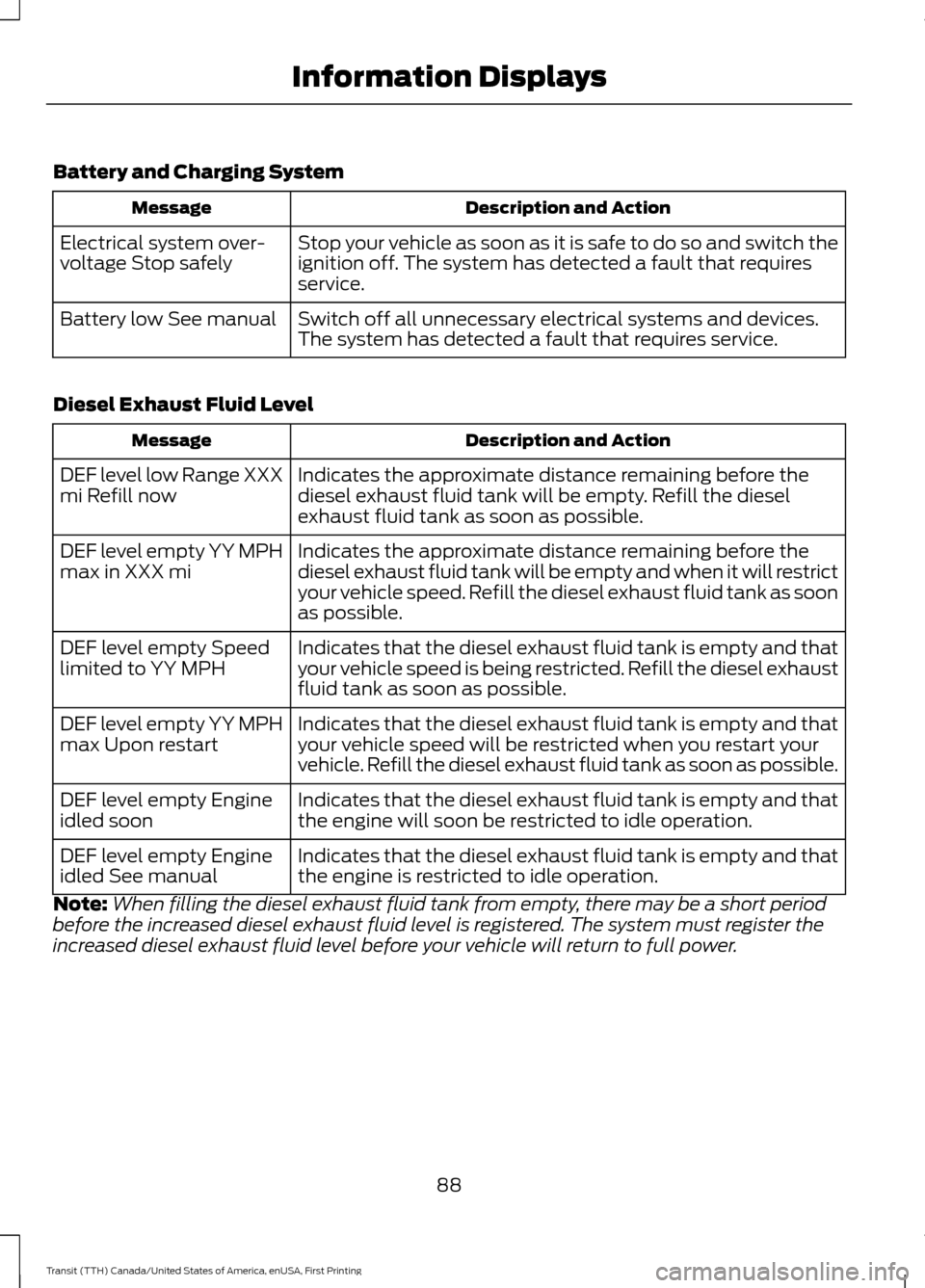
Battery and Charging System
Description and Action
Message
Stop your vehicle as soon as it is safe to do so and switch the
ignition off. The system has detected a fault that requires
service.
Electrical system over-
voltage Stop safely
Switch off all unnecessary electrical systems and devices.
The system has detected a fault that requires service.
Battery low See manual
Diesel Exhaust Fluid Level Description and Action
Message
Indicates the approximate distance remaining before the
diesel exhaust fluid tank will be empty. Refill the diesel
exhaust fluid tank as soon as possible.
DEF level low Range XXX
mi Refill now
Indicates the approximate distance remaining before the
diesel exhaust fluid tank will be empty and when it will restrict
your vehicle speed. Refill the diesel exhaust fluid tank as soon
as possible.
DEF level empty YY MPH
max in XXX mi
Indicates that the diesel exhaust fluid tank is empty and that
your vehicle speed is being restricted. Refill the diesel exhaust
fluid tank as soon as possible.
DEF level empty Speed
limited to YY MPH
Indicates that the diesel exhaust fluid tank is empty and that
your vehicle speed will be restricted when you restart your
vehicle. Refill the diesel exhaust fluid tank as soon as possible.
DEF level empty YY MPH
max Upon restart
Indicates that the diesel exhaust fluid tank is empty and that
the engine will soon be restricted to idle operation.
DEF level empty Engine
idled soon
Indicates that the diesel exhaust fluid tank is empty and that
the engine is restricted to idle operation.
DEF level empty Engine
idled See manual
Note: When filling the diesel exhaust fluid tank from empty, there may be a short period
before the increased diesel exhaust fluid level is registered. The system must register the
increased diesel exhaust fluid level before your vehicle will return to full power.
88
Transit (TTH) Canada/United States of America, enUSA, First Printing Information Displays
Page 92 of 411
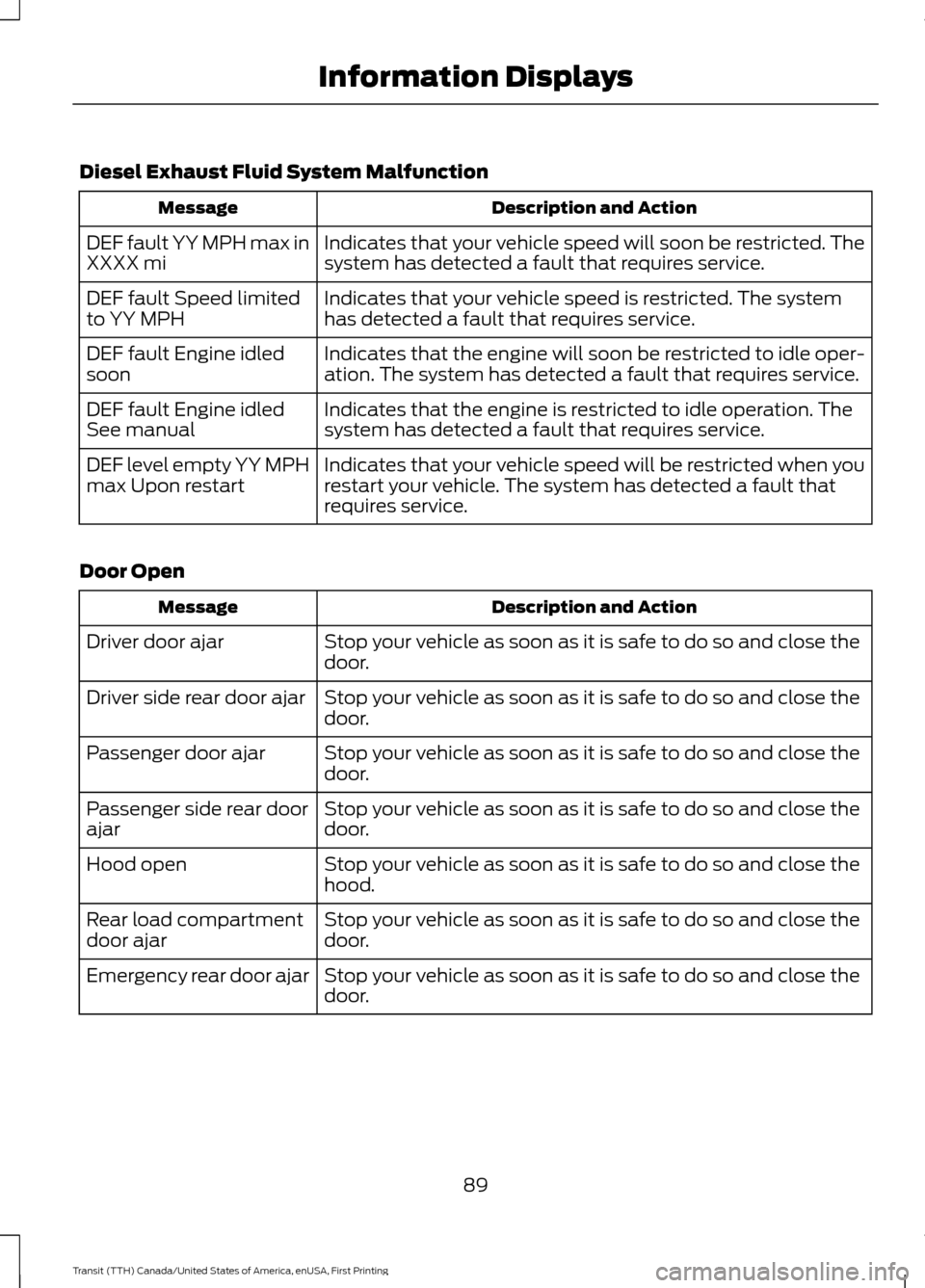
Diesel Exhaust Fluid System Malfunction
Description and Action
Message
Indicates that your vehicle speed will soon be restricted. The
system has detected a fault that requires service.
DEF fault YY MPH max in
XXXX mi
Indicates that your vehicle speed is restricted. The system
has detected a fault that requires service.
DEF fault Speed limited
to YY MPH
Indicates that the engine will soon be restricted to idle oper-
ation. The system has detected a fault that requires service.
DEF fault Engine idled
soon
Indicates that the engine is restricted to idle operation. The
system has detected a fault that requires service.
DEF fault Engine idled
See manual
Indicates that your vehicle speed will be restricted when you
restart your vehicle. The system has detected a fault that
requires service.
DEF level empty YY MPH
max Upon restart
Door Open Description and Action
Message
Stop your vehicle as soon as it is safe to do so and close the
door.
Driver door ajar
Stop your vehicle as soon as it is safe to do so and close the
door.
Driver side rear door ajar
Stop your vehicle as soon as it is safe to do so and close the
door.
Passenger door ajar
Stop your vehicle as soon as it is safe to do so and close the
door.
Passenger side rear door
ajar
Stop your vehicle as soon as it is safe to do so and close the
hood.
Hood open
Stop your vehicle as soon as it is safe to do so and close the
door.
Rear load compartment
door ajar
Stop your vehicle as soon as it is safe to do so and close the
door.
Emergency rear door ajar
89
Transit (TTH) Canada/United States of America, enUSA, First Printing Information Displays
Page 93 of 411
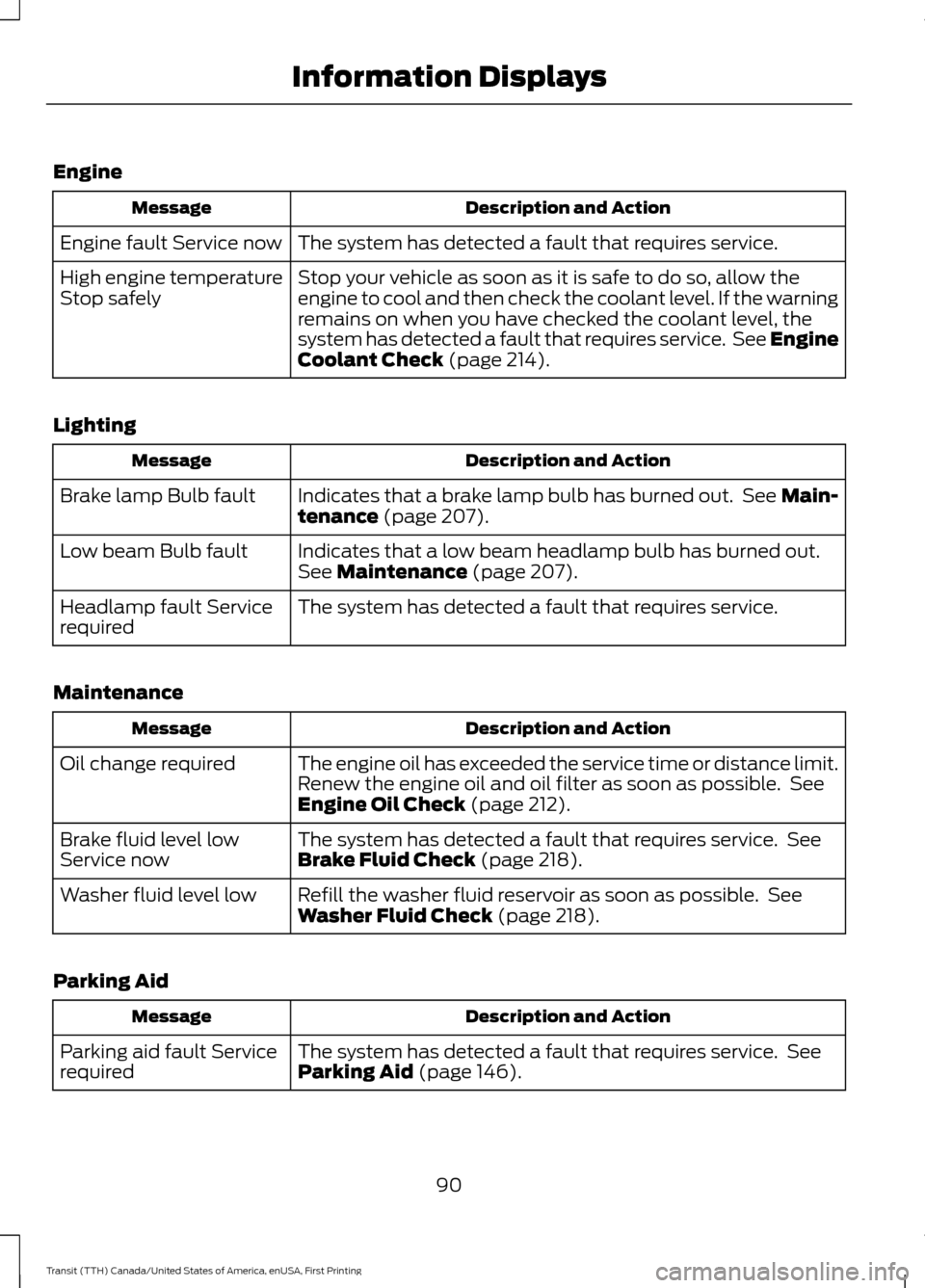
Engine
Description and Action
Message
The system has detected a fault that requires service.
Engine fault Service now
Stop your vehicle as soon as it is safe to do so, allow the
engine to cool and then check the coolant level. If the warning
remains on when you have checked the coolant level, the
system has detected a fault that requires service. See Engine
Coolant Check (page 214).
High engine temperature
Stop safely
Lighting Description and Action
Message
Indicates that a brake lamp bulb has burned out. See Main-
tenance
(page 207).
Brake lamp Bulb fault
Indicates that a low beam headlamp bulb has burned out.
See
Maintenance (page 207).
Low beam Bulb fault
The system has detected a fault that requires service.
Headlamp fault Service
required
Maintenance Description and Action
Message
The engine oil has exceeded the service time or distance limit.
Renew the engine oil and oil filter as soon as possible. See
Engine Oil Check
(page 212).
Oil change required
The system has detected a fault that requires service. See
Brake Fluid Check
(page 218).
Brake fluid level low
Service now
Refill the washer fluid reservoir as soon as possible. See
Washer Fluid Check
(page 218).
Washer fluid level low
Parking Aid Description and Action
Message
The system has detected a fault that requires service. See
Parking Aid
(page 146).
Parking aid fault Service
required
90
Transit (TTH) Canada/United States of America, enUSA, First Printing Information Displays
Page 94 of 411
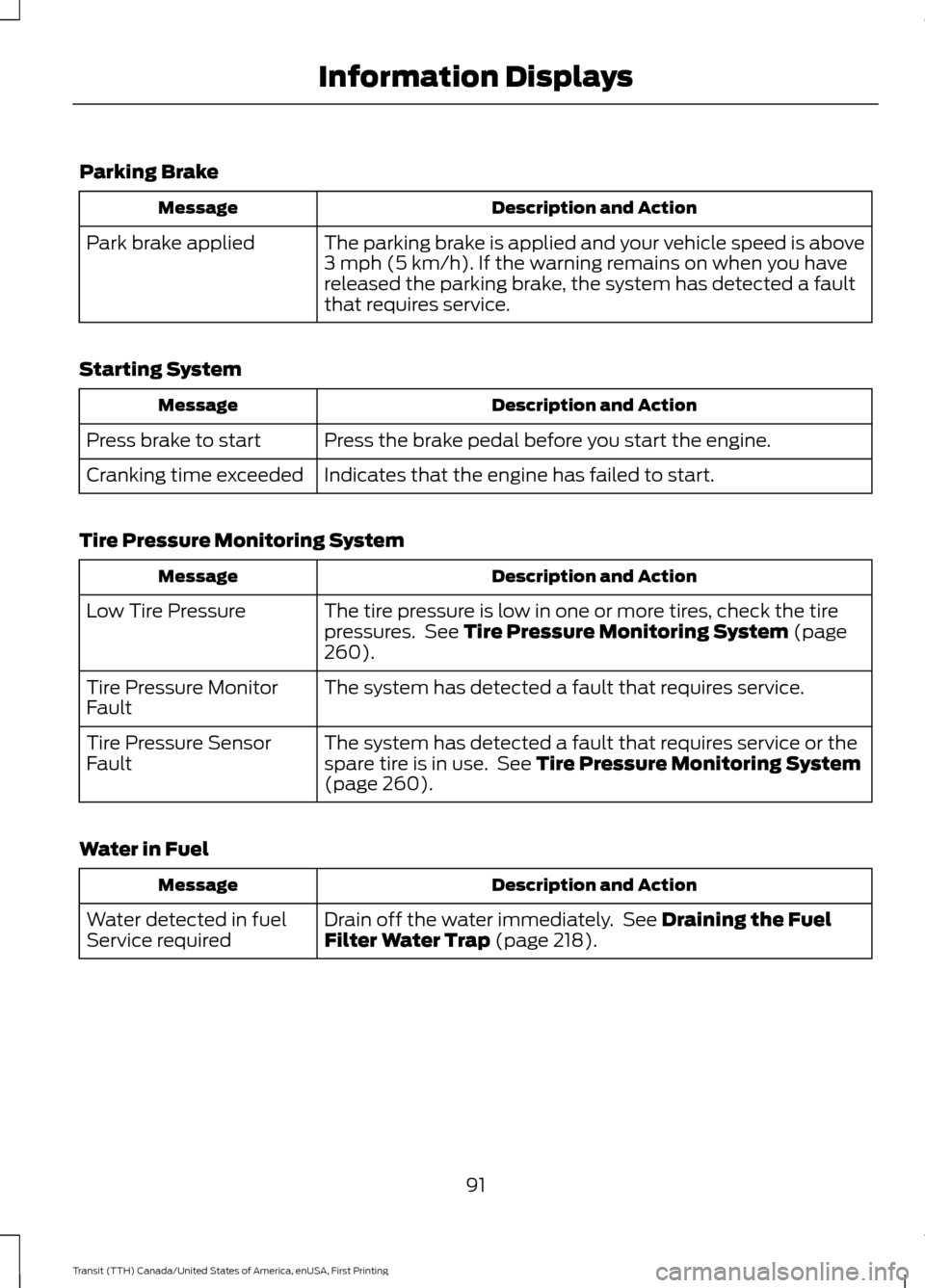
Parking Brake
Description and Action
Message
The parking brake is applied and your vehicle speed is above
3 mph (5 km/h). If the warning remains on when you have
released the parking brake, the system has detected a fault
that requires service.
Park brake applied
Starting System Description and Action
Message
Press the brake pedal before you start the engine.
Press brake to start
Indicates that the engine has failed to start.
Cranking time exceeded
Tire Pressure Monitoring System Description and Action
Message
The tire pressure is low in one or more tires, check the tire
pressures. See
Tire Pressure Monitoring System (page
260).
Low Tire Pressure
The system has detected a fault that requires service.
Tire Pressure Monitor
Fault
The system has detected a fault that requires service or the
spare tire is in use. See
Tire Pressure Monitoring System
(page 260).
Tire Pressure Sensor
Fault
Water in Fuel Description and Action
Message
Drain off the water immediately. See
Draining the Fuel
Filter Water Trap (page 218).
Water detected in fuel
Service required
91
Transit (TTH) Canada/United States of America, enUSA, First Printing Information Displays
Page 119 of 411
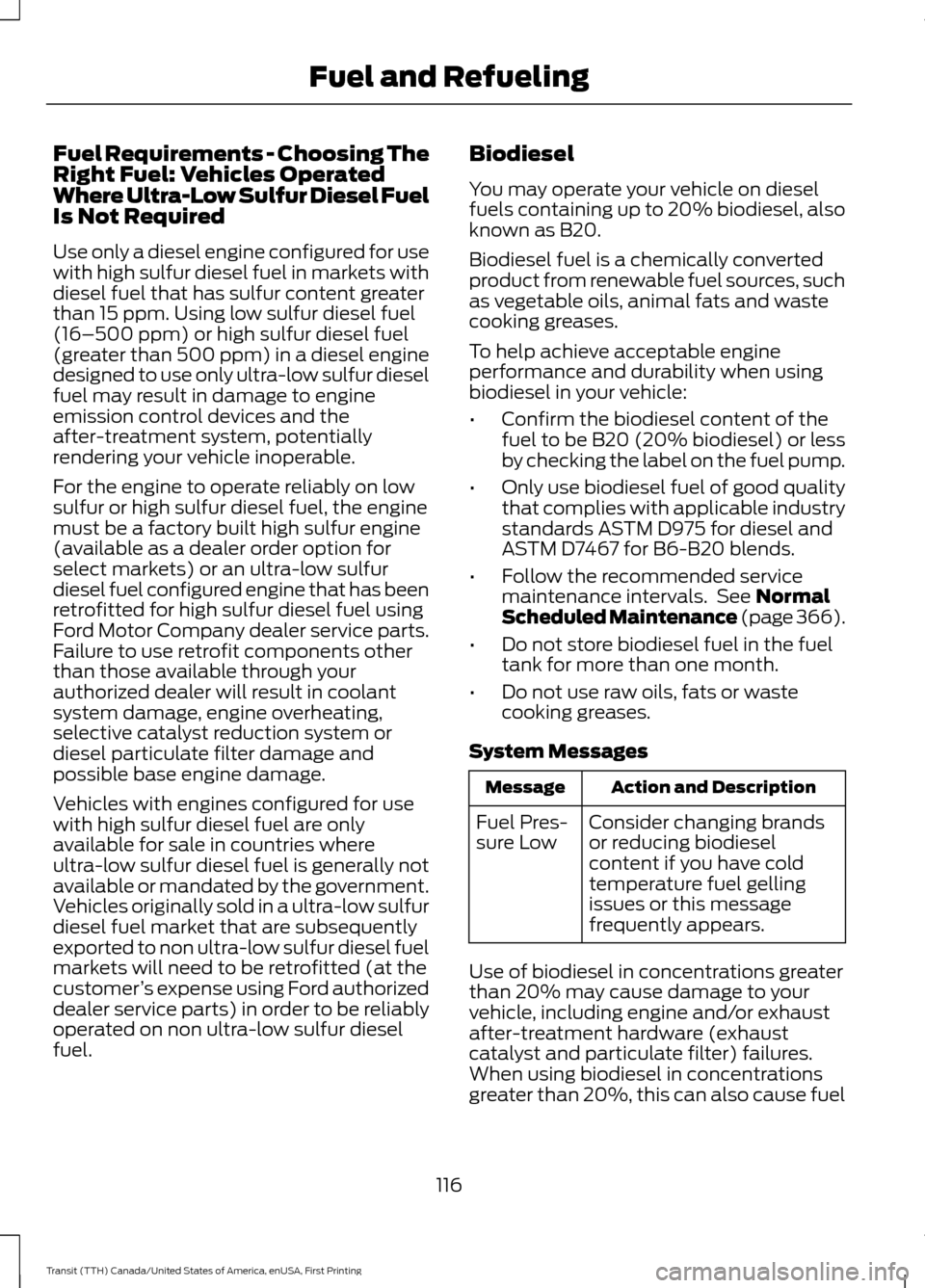
Fuel Requirements - Choosing The
Right Fuel: Vehicles Operated
Where Ultra-Low Sulfur Diesel Fuel
Is Not Required
Use only a diesel engine configured for use
with high sulfur diesel fuel in markets with
diesel fuel that has sulfur content greater
than 15 ppm. Using low sulfur diesel fuel
(16–500 ppm) or high sulfur diesel fuel
(greater than 500 ppm) in a diesel engine
designed to use only ultra-low sulfur diesel
fuel may result in damage to engine
emission control devices and the
after-treatment system, potentially
rendering your vehicle inoperable.
For the engine to operate reliably on low
sulfur or high sulfur diesel fuel, the engine
must be a factory built high sulfur engine
(available as a dealer order option for
select markets) or an ultra-low sulfur
diesel fuel configured engine that has been
retrofitted for high sulfur diesel fuel using
Ford Motor Company dealer service parts.
Failure to use retrofit components other
than those available through your
authorized dealer will result in coolant
system damage, engine overheating,
selective catalyst reduction system or
diesel particulate filter damage and
possible base engine damage.
Vehicles with engines configured for use
with high sulfur diesel fuel are only
available for sale in countries where
ultra-low sulfur diesel fuel is generally not
available or mandated by the government.
Vehicles originally sold in a ultra-low sulfur
diesel fuel market that are subsequently
exported to non ultra-low sulfur diesel fuel
markets will need to be retrofitted (at the
customer
’s expense using Ford authorized
dealer service parts) in order to be reliably
operated on non ultra-low sulfur diesel
fuel. Biodiesel
You may operate your vehicle on diesel
fuels containing up to 20% biodiesel, also
known as B20.
Biodiesel fuel is a chemically converted
product from renewable fuel sources, such
as vegetable oils, animal fats and waste
cooking greases.
To help achieve acceptable engine
performance and durability when using
biodiesel in your vehicle:
•
Confirm the biodiesel content of the
fuel to be B20 (20% biodiesel) or less
by checking the label on the fuel pump.
• Only use biodiesel fuel of good quality
that complies with applicable industry
standards ASTM D975 for diesel and
ASTM D7467 for B6-B20 blends.
• Follow the recommended service
maintenance intervals. See Normal
Scheduled Maintenance (page 366).
• Do not store biodiesel fuel in the fuel
tank for more than one month.
• Do not use raw oils, fats or waste
cooking greases.
System Messages Action and Description
Message
Consider changing brands
or reducing biodiesel
content if you have cold
temperature fuel gelling
issues or this message
frequently appears.
Fuel Pres-
sure Low
Use of biodiesel in concentrations greater
than 20% may cause damage to your
vehicle, including engine and/or exhaust
after-treatment hardware (exhaust
catalyst and particulate filter) failures.
When using biodiesel in concentrations
greater than 20%, this can also cause fuel
116
Transit (TTH) Canada/United States of America, enUSA, First Printing Fuel and Refueling