ECU FORD TRANSIT 2016 5.G Owner's Manual
[x] Cancel search | Manufacturer: FORD, Model Year: 2016, Model line: TRANSIT, Model: FORD TRANSIT 2016 5.GPages: 411, PDF Size: 5.65 MB
Page 225 of 411
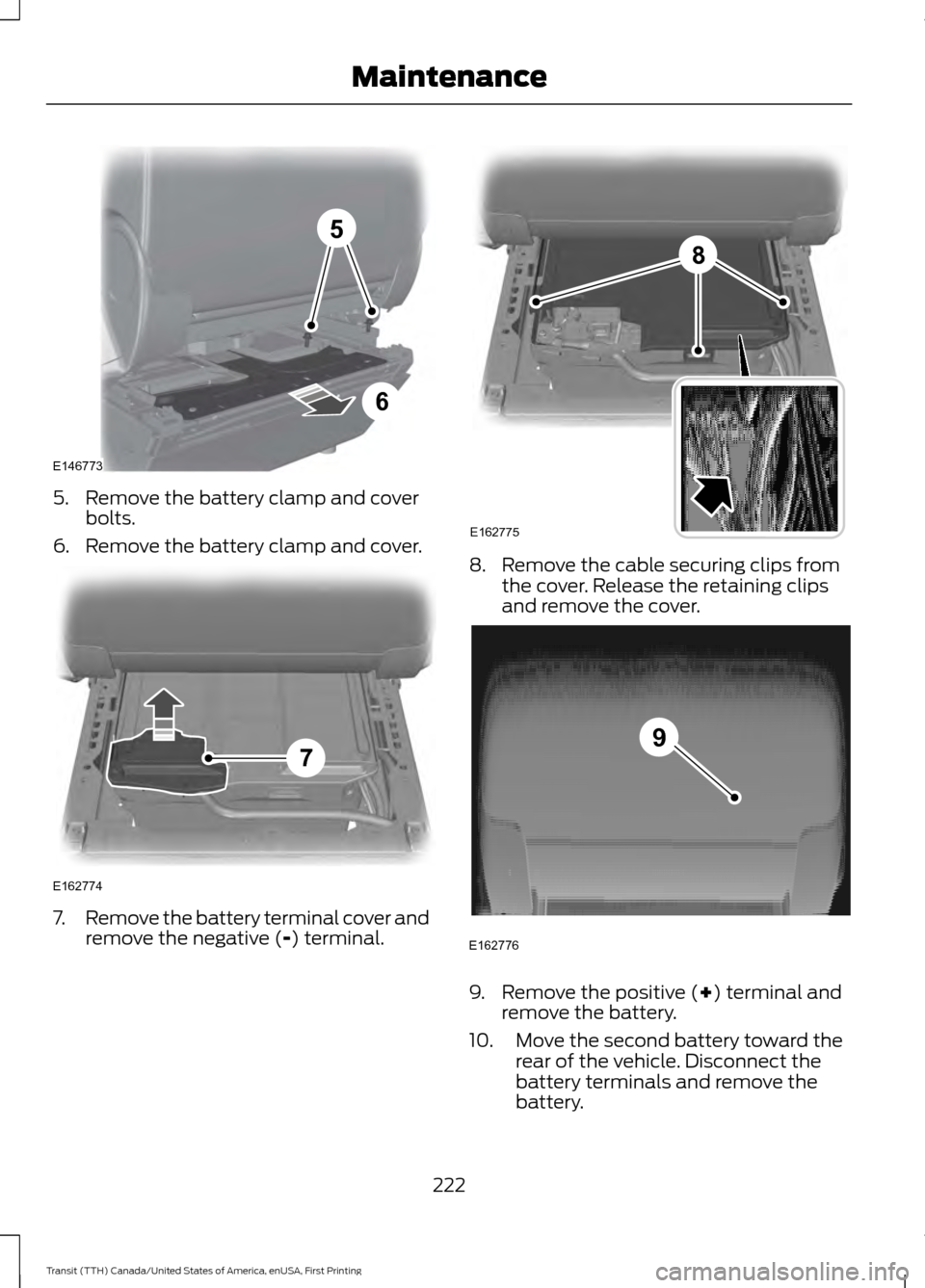
5. Remove the battery clamp and cover
bolts.
6. Remove the battery clamp and cover. 7.
Remove the battery terminal cover and
remove the negative (-) terminal. 8. Remove the cable securing clips from
the cover. Release the retaining clips
and remove the cover. 9. Remove the positive (
+) terminal and
remove the battery.
10. Move the second battery toward the rear of the vehicle. Disconnect the
battery terminals and remove the
battery.
222
Transit (TTH) Canada/United States of America, enUSA, First Printing Maintenance5
6
E146773 E162774
7 8
E162775 E162776
9
Page 226 of 411
Note:
Single batteries are mounted the
opposite way around in the battery tray. The
negative terminal is toward the rear of the
vehicle.
Installing the Battery WARNING
Make sure that you securely fasten
the seat runner bolts before installing
the covers.
Install in the reverse order.
CHECKING THE WIPER
BLADES
Run the tip of your fingers over the edge of
the blade to check for roughness.
Clean the wiper blades with washer fluid
or water applied with a soft sponge or
cloth.
CHANGING THE WIPER
BLADES
Changing the Windshield Wiper
Blades
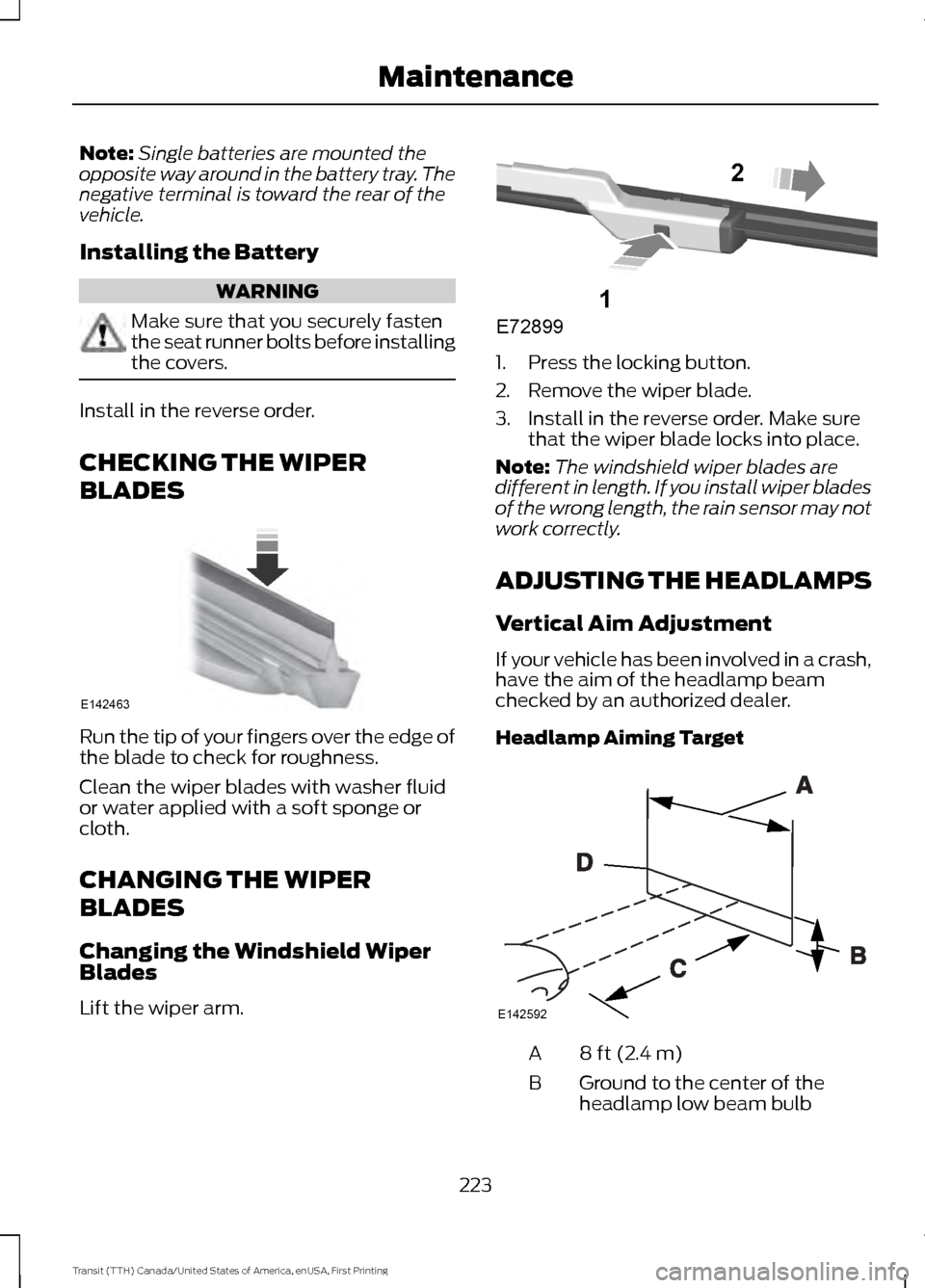
Lift the wiper arm. 1. Press the locking button.
2. Remove the wiper blade.
3. Install in the reverse order. Make sure
that the wiper blade locks into place.
Note: The windshield wiper blades are
different in length. If you install wiper blades
of the wrong length, the rain sensor may not
work correctly.
ADJUSTING THE HEADLAMPS
Vertical Aim Adjustment
If your vehicle has been involved in a crash,
have the aim of the headlamp beam
checked by an authorized dealer.
Headlamp Aiming Target 8 ft (2.4 m)
A
Ground to the center of the
headlamp low beam bulb
B
223
Transit (TTH) Canada/United States of America, enUSA, First Printing MaintenanceE142463 E72899
1
2 E142592
Page 235 of 411
CHANGING THE ENGINE AIR
FILTER
WARNING
To reduce the risk of vehicle damage
and personal burn injuries, do not
start your engine with the air cleaner
removed and do not remove it while the
engine is running. Only use the specified replacement air
filter. See Capacities and Specifications
(page 274).
Note: Failure to use the correct air filter
element may result in severe engine
damage. Resulting component damage
may not be covered by the vehicle Warranty.
Change the air filter element at the correct
interval. See
Scheduled Maintenance
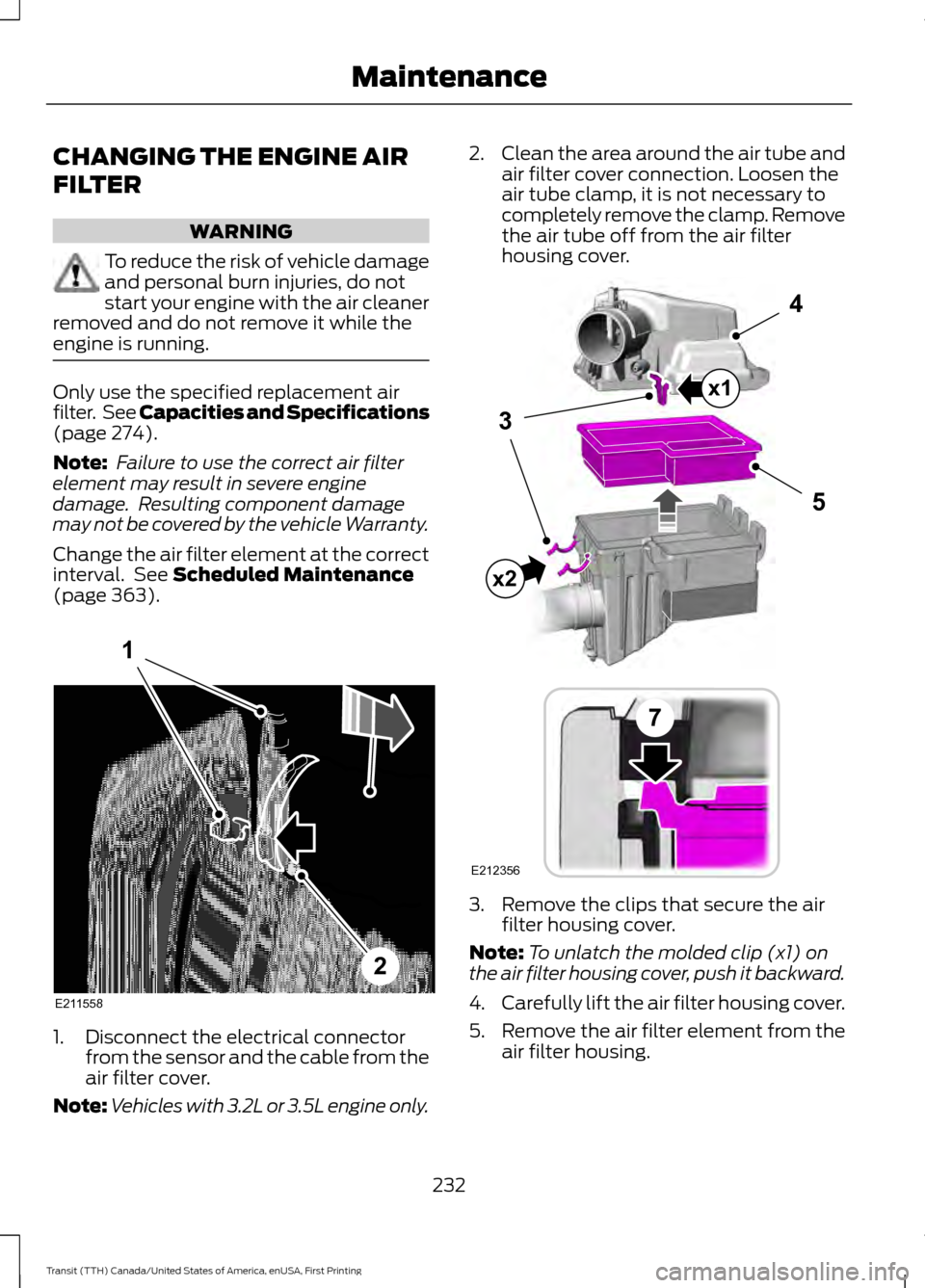
(page 363). 1. Disconnect the electrical connector
from the sensor and the cable from the
air filter cover.
Note: Vehicles with 3.2L or 3.5L engine only. 2.
Clean the area around the air tube and
air filter cover connection. Loosen the
air tube clamp, it is not necessary to
completely remove the clamp. Remove
the air tube off from the air filter
housing cover. 3. Remove the clips that secure the air
filter housing cover.
Note: To unlatch the molded clip (x1) on
the air filter housing cover, push it backward.
4. Carefully lift the air filter housing cover.
5. Remove the air filter element from the
air filter housing.
232
Transit (TTH) Canada/United States of America, enUSA, First Printing MaintenanceE211558
1
2 E212356
5
4
7
3
x1
x2
Page 236 of 411
6.
Wipe any dirt or debris from the air filter
housing and cover to make sure no dirt
gets in the engine and that you have a
good seal.
7. Install a new air filter element. Be careful not to crimp the filter element
edges between the air filter housing
and cover.
8. Install the air filter housing cover.
Note: Make sure the front clips are fully
engaged and the molded clip on the air filter
housing cover is fully pushed down and
securely clicks into place.
9. Install the air tube onto the air filter cover. Tighten the air tube clamp until
you feel a strong resistance.
10. Reconnect the electrical connector to the sensor and the cable to the air
filter cover.
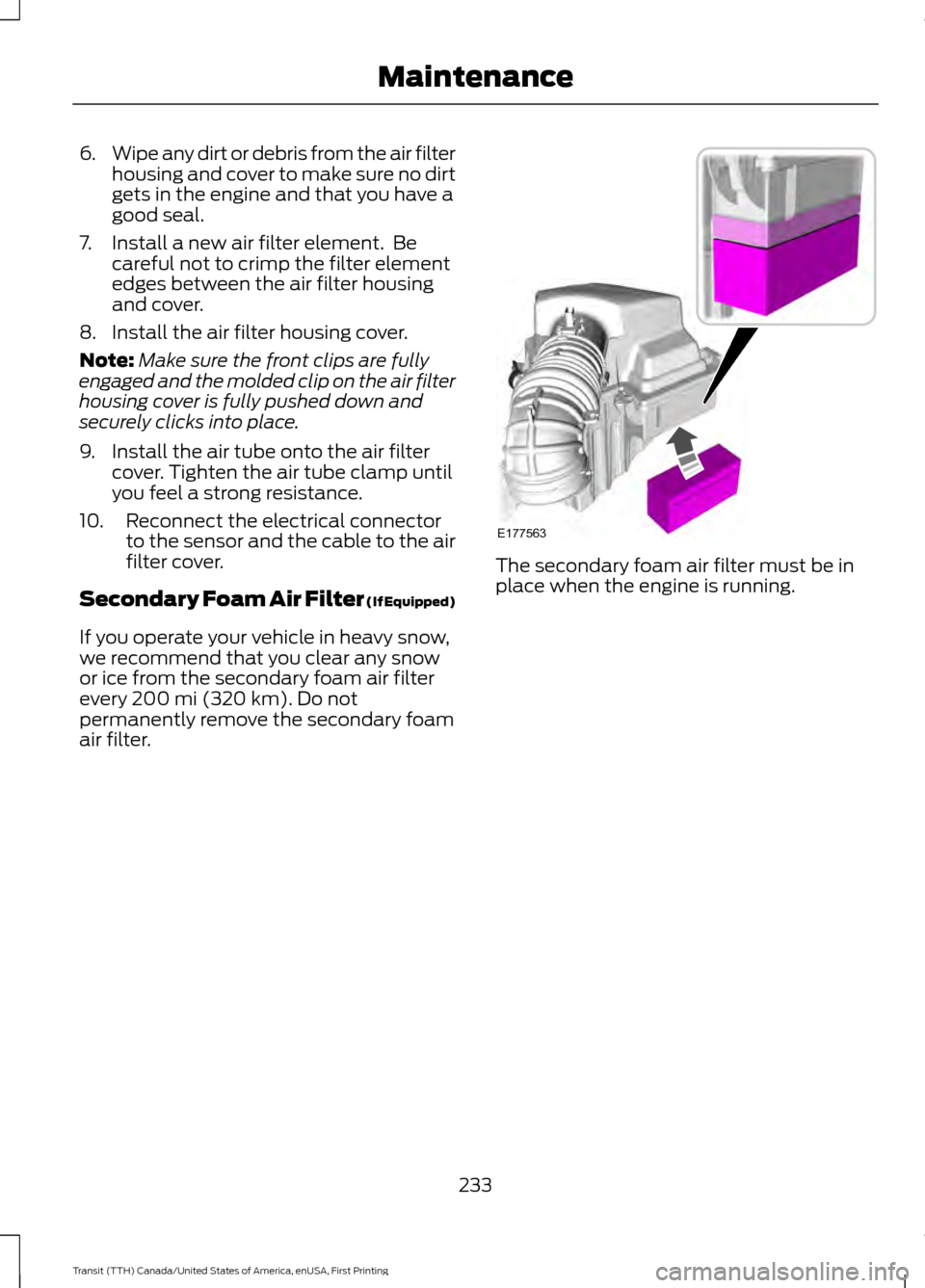
Secondary Foam Air Filter (If Equipped)
If you operate your vehicle in heavy snow,
we recommend that you clear any snow
or ice from the secondary foam air filter
every
200 mi (320 km). Do not
permanently remove the secondary foam
air filter. The secondary foam air filter must be in
place when the engine is running.
233
Transit (TTH) Canada/United States of America, enUSA, First Printing MaintenanceE177563
Page 263 of 411
•
Install snow chains securely, make sure
they do not touch any wiring, brake
lines or fuel lines.
• S class or 15mm or less in dimension
as measured on the sidewall of the tire.
• Do not exceed 30 mph (48 km/h) or
the maximum speed recommended by
the chain manufacturer, whichever is
less.
• Purchase snow chains or cables from
a manufacturer that clearly labels the
body to tire dimension restrictions.
• Remove the cables when they are no
longer needed.
• Do not use snow chains on dry roads.
• If you have any questions regarding
snow chains or cables, see an
authorized dealer.
TIRE PRESSURE MONITORING
SYSTEM (If Equipped) WARNING
The tire pressure monitoring system
is not a substitute for manually
checking tire pressure. The tire
pressure should be checked periodically
(at least monthly) using a tire gauge, see
Inflating your tires in this chapter. Failure
to properly maintain your tire pressure
could increase the risk of tire failure, loss
of control, vehicle rollover and personal
injury. Each tire, including the spare (if
provided), should be checked
monthly when cold and inflated
to the inflation pressure recommended by
the vehicle manufacturer on the vehicle
placard or tire inflation pressure label. (If
your vehicle has tires of a different size
than the size indicated on the vehicle
placard or tire inflation pressure label, you
should determine the proper tire inflation
pressure for those tires.)
As an added safety feature, your vehicle
has been equipped with a Tire Pressure
Monitoring System (TPMS) that
illuminates a low tire pressure telltale
when one or more of your tires is
significantly under-inflated. Accordingly,
when the low tire pressure telltale
illuminates, you should stop and check
your tires as soon as possible, and inflate
them to the proper pressure. Driving on a
significantly under-inflated tire causes the
tire to overheat and can lead to tire failure.
Under-inflation also reduces fuel efficiency
and tire tread life, and may affect the
vehicle ’s handling and stopping ability.
Please note that the TPMS is not a
substitute for proper tire maintenance, and
it is the driver ’s responsibility to maintain
correct tire pressure, even if under-inflation
has not reached the level to trigger
illumination of the TPMS low tire pressure
telltale.
Your vehicle has also been equipped with
a TPMS malfunction indicator to indicate
when the system is not operating properly.
The TPMS malfunction indicator is
combined with the low tire pressure
telltale. When the system detects a
malfunction, the telltale will flash for
approximately one minute and then remain
continuously illuminated. This sequence
will continue upon subsequent vehicle
start-ups as long as the malfunction exists.
260
Transit (TTH) Canada/United States of America, enUSA, First Printing Wheels and Tires
Page 275 of 411

4. Fully tighten all of the lug nuts in the
sequence shown.
5. Install the wheel trim.
Note: Make sure that the cones on the lug
nuts are against the wheel.
Note: Alloy wheel lug nuts are suitable for
use on a steel spare wheel.
Note: If the spare wheel is not the same
type and size as your vehicle road wheel
replace it as soon as possible.
Note: Check the lug nuts for correct
tightness and check the tire pressure as
soon as possible.
Stowing the Wheel and Vehicle
Jack
Note: Do not raise the spare wheel bracket
without a wheel attached. Damage can
occur to the winch mechanism if the spare
wheel bracket is lowered without a wheel
attached. 1. Attach the spare wheel bracket to the
wheel using the retaining nut.
2. Slide the cable through the slot and attach the spare wheel bracket to the
winch.
3. Rotate the cable through 90 degrees and lower the cable end cover.
4. Insert the flat end of the lug wrench into the socket. Turn it clockwise until
you feel a strong resistance. Make sure
the wheel is secure.
5. Stow the vehicle jack, jack handle and lug wrench in their correct locations
and secure them with the straps.
TECHNICAL SPECIFICATIONS
Wheel Lug Nut Torque Specifications WARNING
When a wheel is installed, always remove any corrosion, dirt or foreign materials
present on the mounting surfaces of the wheel or the surface of the wheel hub,
brake drum or brake disc that contacts the wheel. Make sure that any fasteners
that attach the rotor to the hub are secured so they do not interfere with the mounting
surfaces of the wheel. Installing wheels without correct metal-to-metal contact at the
wheel mounting surfaces can cause the wheel nuts to loosen and the wheel to come off
while your vehicle is in motion, resulting in loss of control. Ib-ft (Nm)
*
Bolt size
148 lb.ft (200 Nm)
M14 x 1.5
* Torque specifications are for nut and bolt threads free of dirt and rust. Use only Ford
recommended replacement fasteners.
Retighten the lug nuts to the specified torque within 100 miles (160 kilometers) after any
wheel disturbance, for example tire rotation, changing a flat tire or wheel removal.
272
Transit (TTH) Canada/United States of America, enUSA, First Printing Wheels and Tires
Page 311 of 411
Action
Condition
Message
Contact SIRIUS at 1-888-
539-7474 to resolve
subscription issues.
Your satellite service is no
longer available.
Questions? Call
1-888-539-7474
Use the channel guide to
turn off the Lock or Skip
function on that station.
All the channels in the
selected category are either
skipped or locked.
None found
Check Channel Guide
No action required.
SIRIUS has updated the
channels available for your
vehicle.
Subscription Updated
AUDIO INPUT JACK (If Equipped) WARNINGS
Driving while distracted can result in
loss of vehicle control, crash and
injury. We strongly recommend that
you use extreme caution when using any
device that may take your focus off the
road. Your primary responsibility is the safe
operation of your vehicle. We recommend
against the use of any hand-held device
while driving and encourage the use of
voice-operated systems when possible.
Make sure you are aware of all applicable
local laws that may affect the use of
electronic devices while driving. For safety reasons, do not connect
or adjust the settings on your
portable music player while your
vehicle is moving. Store the portable music player in a
secure location when your vehicle is
moving, for example the glove
compartment. Hard objects may become
projectiles in a crash or sudden stop, which
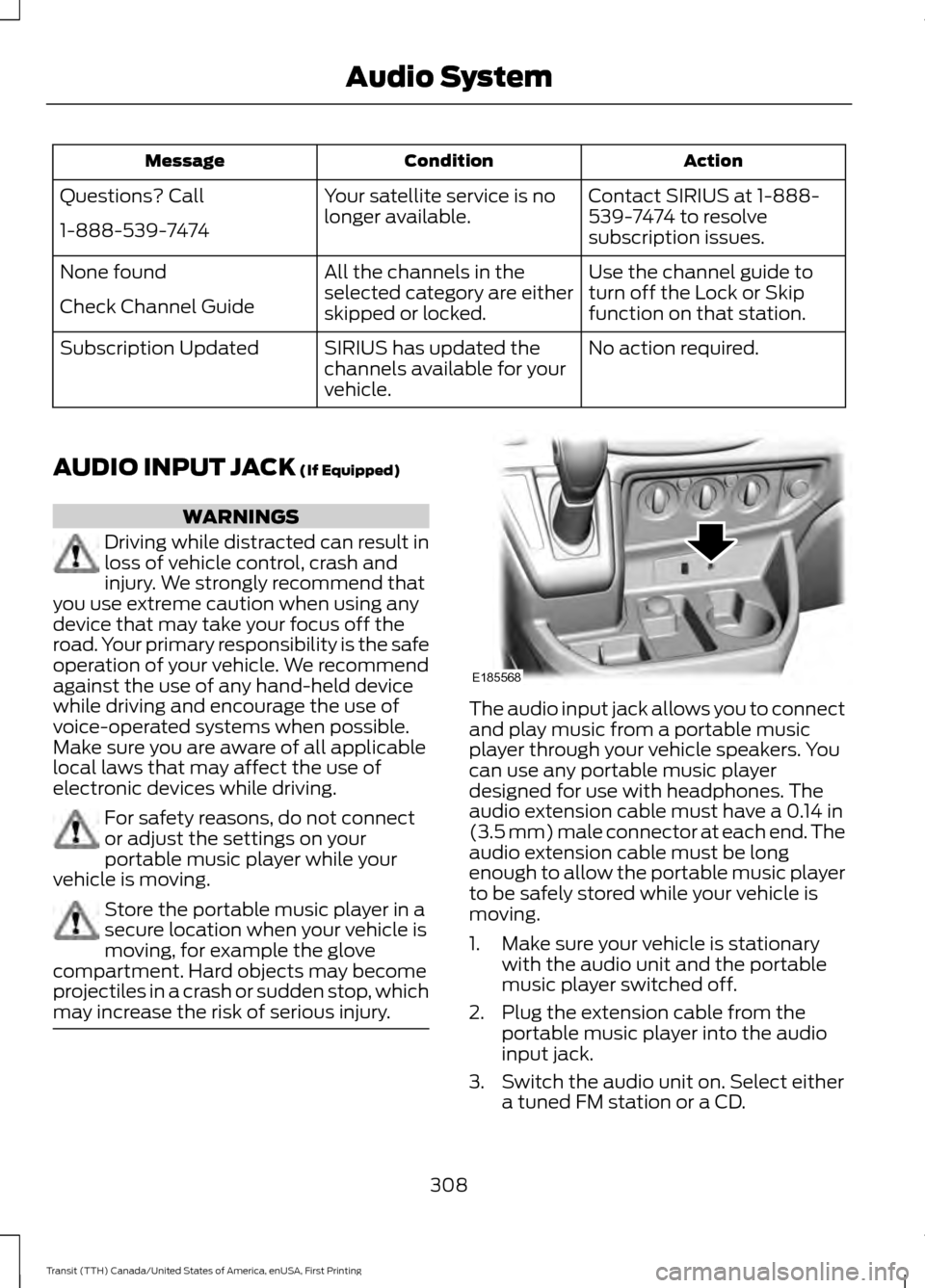
may increase the risk of serious injury. The audio input jack allows you to connect
and play music from a portable music
player through your vehicle speakers. You
can use any portable music player
designed for use with headphones. The
audio extension cable must have a
0.14 in
(3.5 mm) male connector at each end. The
audio extension cable must be long
enough to allow the portable music player
to be safely stored while your vehicle is
moving.
1. Make sure your vehicle is stationary with the audio unit and the portable
music player switched off.
2. Plug the extension cable from the portable music player into the audio
input jack.
3. Switch the audio unit on. Select either a tuned FM station or a CD.
308
Transit (TTH) Canada/United States of America, enUSA, First Printing Audio SystemE185568
Page 312 of 411
4. Adjust the volume as desired.
5. Switch the portable music player on
and adjust the volume to half its
maximum level.
6. Press the AUX button on the audio
unit. You should hear music from the
portable music player even if it is low.
7. Adjust the volume on the portable music player as desired. Do this by
switching back and forth between the
AUX and FM or CD controls.
USB PORT WARNINGS
Driving while distracted can result in
loss of vehicle control, crash and
injury. We strongly recommend that
you use extreme caution when using any
device that may take your focus off the
road. Your primary responsibility is the safe
operation of your vehicle. We recommend
against the use of any hand-held device
while driving and encourage the use of
voice-operated systems when possible.
Make sure you are aware of all applicable
local laws that may affect the use of
electronic devices while driving. For safety reasons, do not connect
or adjust the settings on your device
while your vehicle is moving.
Store all devices in a secure location
when your vehicle is moving, for
example the glove compartment.
Hard objects may become projectiles in a
crash or sudden stop, which may increase
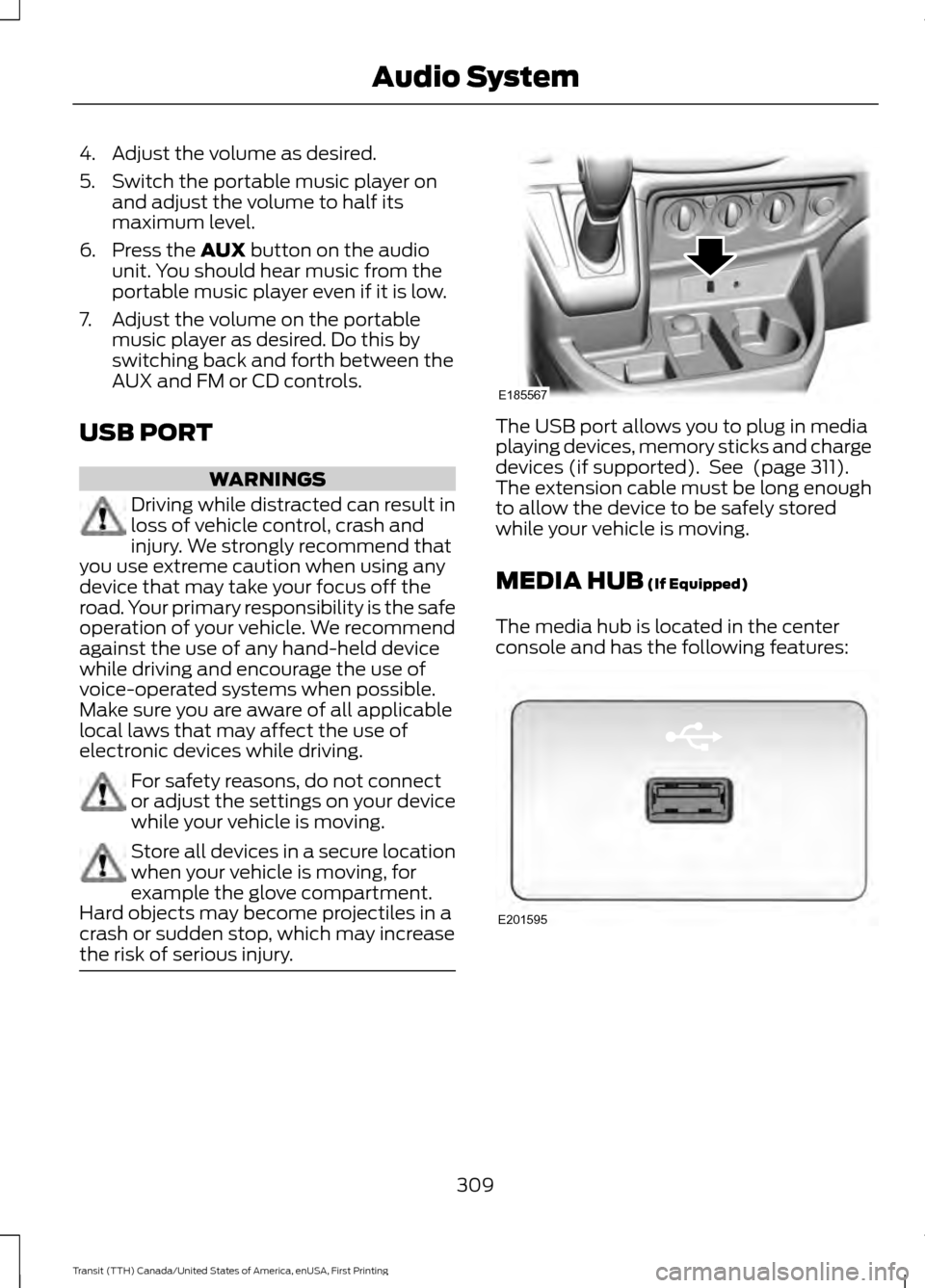
the risk of serious injury. The USB port allows you to plug in media
playing devices, memory sticks and charge
devices (if supported). See
(page 311).
The extension cable must be long enough
to allow the device to be safely stored
while your vehicle is moving.
MEDIA HUB
(If Equipped)
The media hub is located in the center
console and has the following features: 309
Transit (TTH) Canada/United States of America, enUSA, First Printing Audio SystemE185567 E201595
Page 332 of 411
Action and Description
Message
Press OK to select. You only need to pressthe OK button once. SYNC will be unre- sponsive for 2-4 minutes while it is
rebooting. Wait 2-4 minutes before
attempting to execute a SYNC command
CONFIRM REBOOT?
Install applications you have downloaded.
INSTALL APP
Press the OK button and scroll to select. Press the OK button to
confirm.
Access the Auto Version number as well as the FDN number.
SYSTEM INFO
Press the
OK button to select.
Exit the current menu.
RETURN
SYNC™ APPLICATIONS AND
SERVICES
(If Equipped)
In order for the following features to work,
your cell phone must be compatible with
SYNC. To check your phone's
compatibility, visit www.SYNCMyRide.com,
www.SYNCMyRide.ca or
www.syncmaroute.ca.
• SYNC Services *
: Provides access to
traffic, directions and information such
as travel, horoscopes, stock prices and
more.
• 911 Assist: Can alert 911 in the event of
an emergency.
• Vehicle Health Report *
: Provides a
diagnostic and maintenance report
card of your vehicle.
* This is an optional feature and available
in the United States only. 911 Assist
(If Equipped) WARNINGS
Unless the 911 Assist setting is set on
before a crash, the system will not
dial for help which could delay
response time, potentially increasing the
risk of serious injury or death after a crash. Do not wait for 911 Assist to make an
emergency call if you can do it
yourself. Dial emergency services
immediately to avoid delayed response
time which could increase the risk of
serious injury or death after a crash. If you
do not hear 911 Assist within five seconds
of the crash, the system or phone may be
damaged or non-functional. Always place your phone in a secure
location in your vehicle so it does not
become a projectile or get damaged
in a crash. Failure to do so may cause
serious injury to someone or damage the
phone which could prevent 911 Assist from
working properly. Note:
The SYNC 911 Assist feature must be
set on before the incident.
329
Transit (TTH) Canada/United States of America, enUSA, First Printing SYNC™
Page 353 of 411
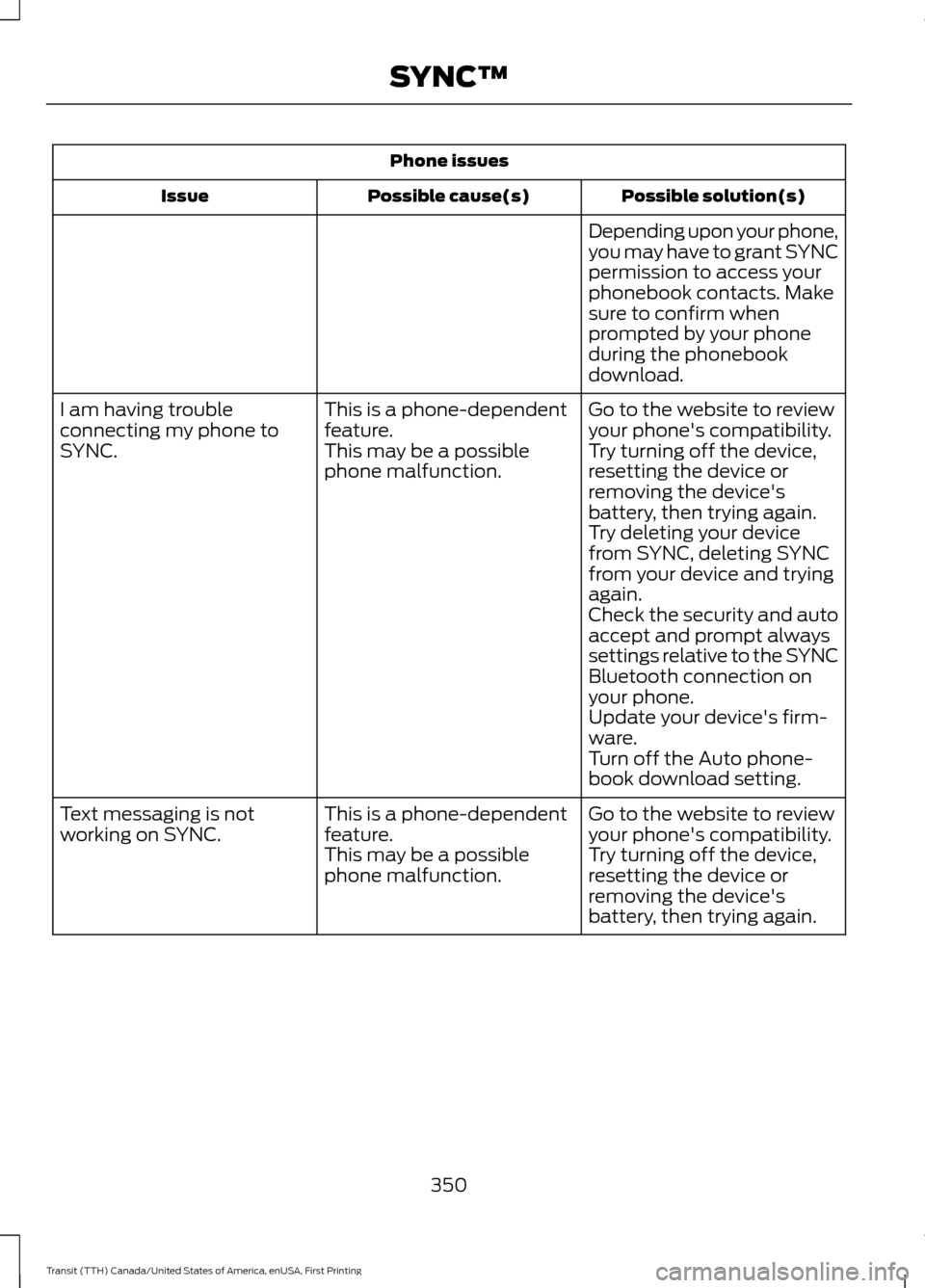
Phone issues
Possible solution(s)
Possible cause(s)
Issue
Depending upon your phone,
you may have to grant SYNC
permission to access your
phonebook contacts. Make
sure to confirm when
prompted by your phone
during the phonebook
download.
Go to the website to review
your phone's compatibility.
This is a phone-dependent
feature.
I am having trouble
connecting my phone to
SYNC.
Try turning off the device,
resetting the device or
removing the device's
battery, then trying again.
This may be a possible
phone malfunction.
Try deleting your device
from SYNC, deleting SYNC
from your device and trying
again.
Check the security and auto
accept and prompt always
settings relative to the SYNC
Bluetooth connection on
your phone.
Update your device's firm-
ware.
Turn off the Auto phone-
book download setting.
Go to the website to review
your phone's compatibility.
This is a phone-dependent
feature.
Text messaging is not
working on SYNC.
Try turning off the device,
resetting the device or
removing the device's
battery, then trying again.
This may be a possible
phone malfunction.
350
Transit (TTH) Canada/United States of America, enUSA, First Printing SYNC™