battery FORD TRANSIT 2016 5.G Owner's Manual
[x] Cancel search | Manufacturer: FORD, Model Year: 2016, Model line: TRANSIT, Model: FORD TRANSIT 2016 5.GPages: 411, PDF Size: 5.65 MB
Page 186 of 411
WARNINGS
Use only an adequate-sized cable
with insulated clamps.
Preparing Your Vehicle
Note:
Do not attempt to push-start your
automatic transmission vehicle. Automatic
transmissions do not have push-start
capability. Attempting to push-start a
vehicle with an automatic transmission may
cause transmission damage.
Note: Use only a 12-volt supply to start your
vehicle.
Note: Do not disconnect the battery of the
disabled vehicle as this could damage the
vehicle's electrical system.
Park the booster vehicle close to the hood
of the disabled vehicle, making sure the
two vehicles do not touch, and switch off
all accessories.
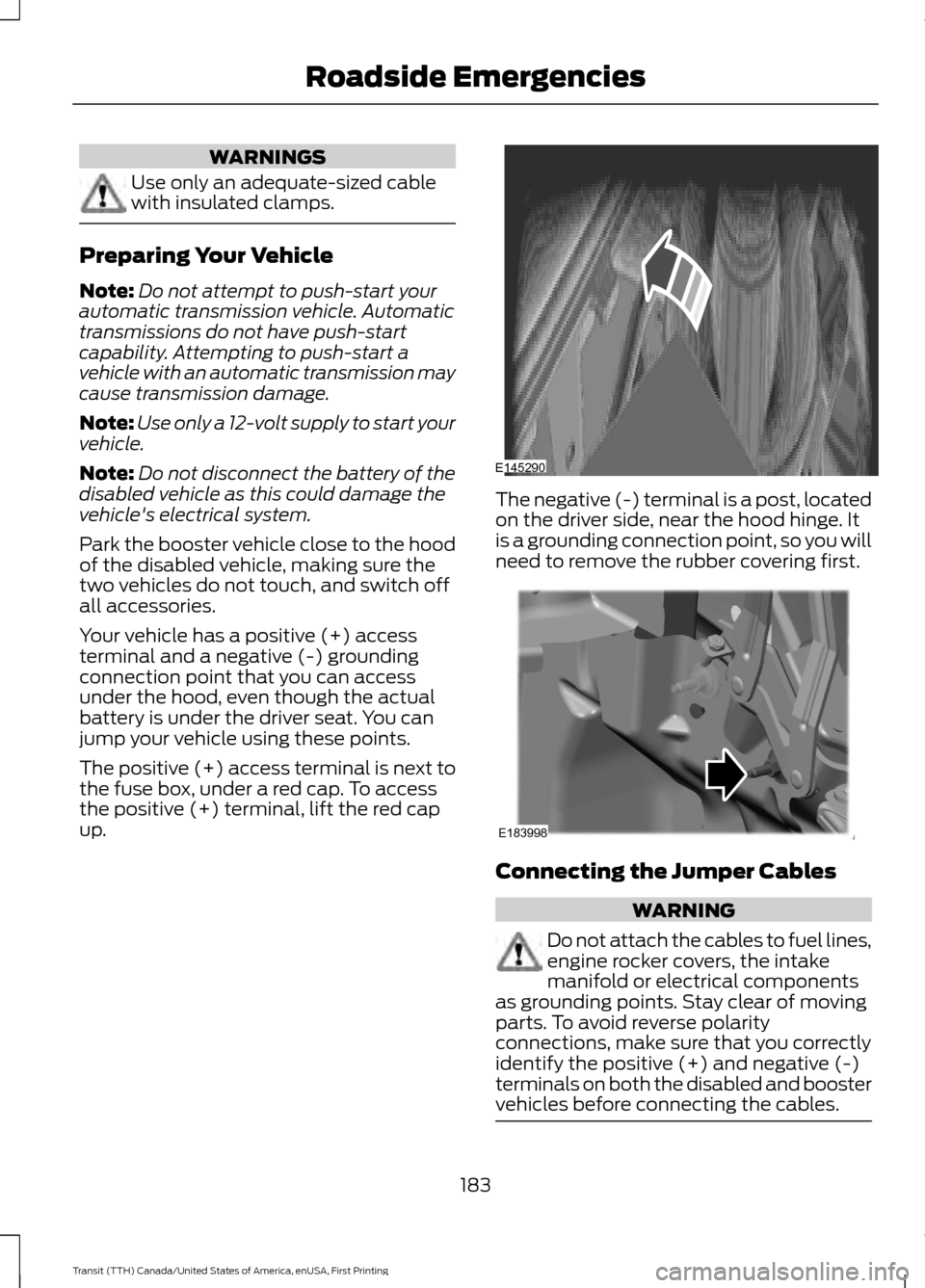
Your vehicle has a positive (+) access
terminal and a negative (-) grounding
connection point that you can access
under the hood, even though the actual
battery is under the driver seat. You can
jump your vehicle using these points.
The positive (+) access terminal is next to
the fuse box, under a red cap. To access
the positive (+) terminal, lift the red cap
up. The negative (-) terminal is a post, located
on the driver side, near the hood hinge. It
is a grounding connection point, so you will
need to remove the rubber covering first.
Connecting the Jumper Cables
WARNING
Do not attach the cables to fuel lines,
engine rocker covers, the intake
manifold or electrical components
as grounding points. Stay clear of moving
parts. To avoid reverse polarity
connections, make sure that you correctly
identify the positive (+) and negative (-)
terminals on both the disabled and booster
vehicles before connecting the cables. 183
Transit (TTH) Canada/United States of America, enUSA, First Printing Roadside EmergenciesE145290 E183998
Page 187 of 411
Note:
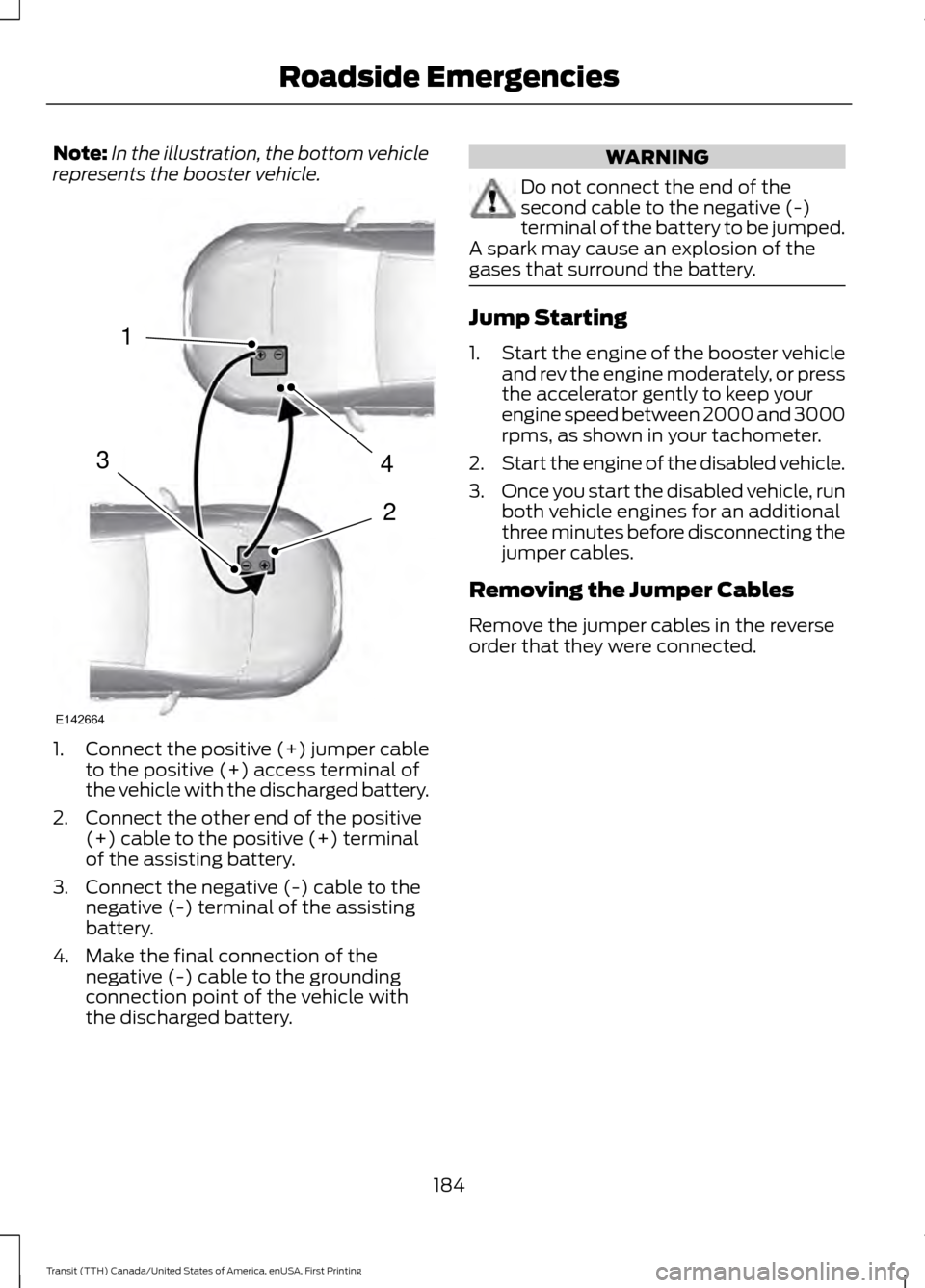
In the illustration, the bottom vehicle
represents the booster vehicle. 1.
Connect the positive (+) jumper cable
to the positive (+) access terminal of
the vehicle with the discharged battery.
2. Connect the other end of the positive (+) cable to the positive (+) terminal
of the assisting battery.
3. Connect the negative (-) cable to the negative (-) terminal of the assisting
battery.
4. Make the final connection of the negative (-) cable to the grounding
connection point of the vehicle with
the discharged battery. WARNING
Do not connect the end of the
second cable to the negative (-)
terminal of the battery to be jumped.
A spark may cause an explosion of the
gases that surround the battery. Jump Starting
1.
Start the engine of the booster vehicle
and rev the engine moderately, or press
the accelerator gently to keep your
engine speed between 2000 and 3000
rpms, as shown in your tachometer.
2. Start the engine of the disabled vehicle.
3. Once you start the disabled vehicle, run
both vehicle engines for an additional
three minutes before disconnecting the
jumper cables.
Removing the Jumper Cables
Remove the jumper cables in the reverse
order that they were connected.
184
Transit (TTH) Canada/United States of America, enUSA, First Printing Roadside Emergencies4
2
1
3
E142664
Page 188 of 411
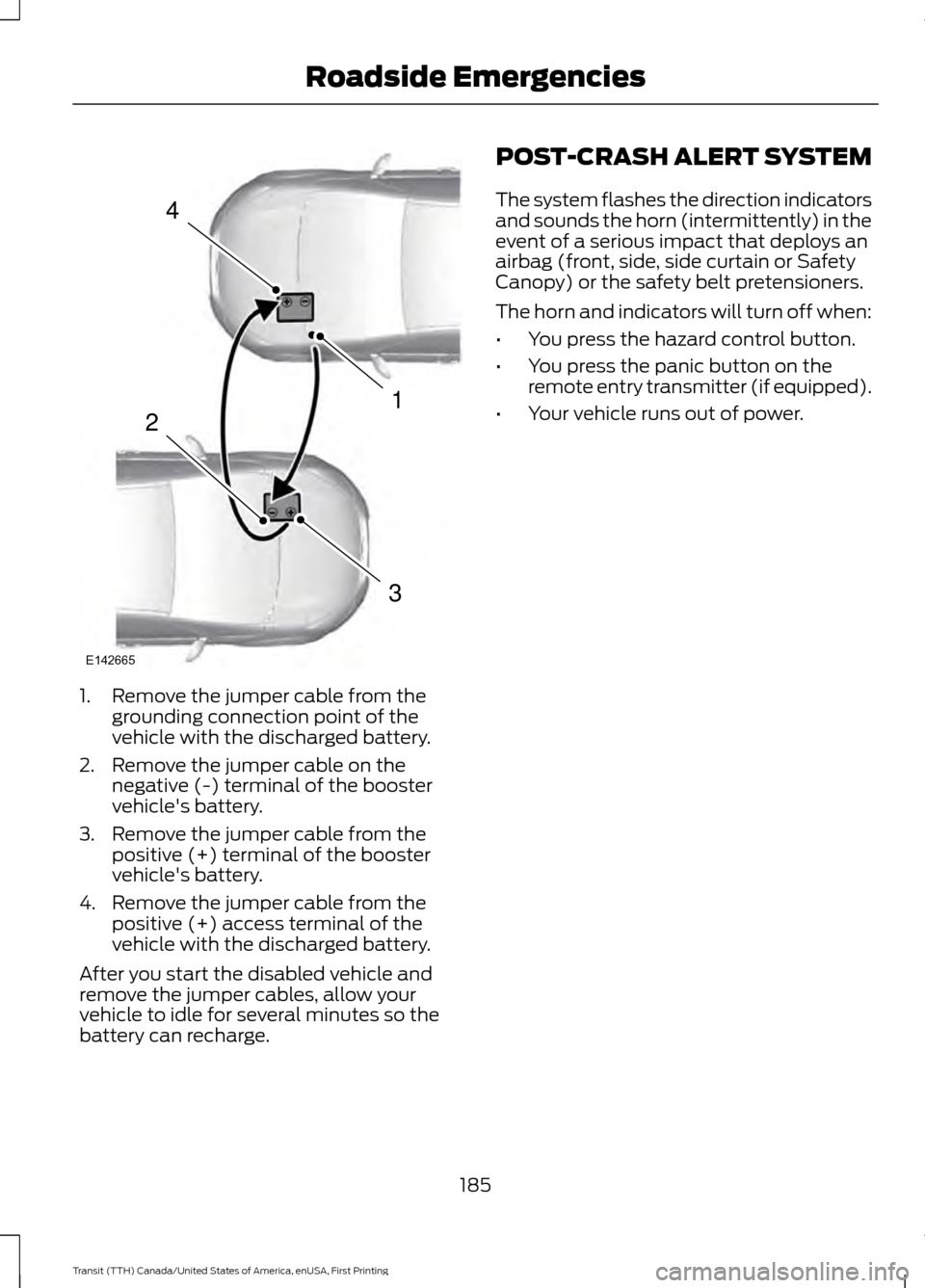
1. Remove the jumper cable from the
grounding connection point of the
vehicle with the discharged battery.
2. Remove the jumper cable on the negative (-) terminal of the booster
vehicle's battery.
3. Remove the jumper cable from the positive (+) terminal of the booster
vehicle's battery.
4. Remove the jumper cable from the positive (+) access terminal of the
vehicle with the discharged battery.
After you start the disabled vehicle and
remove the jumper cables, allow your
vehicle to idle for several minutes so the
battery can recharge. POST-CRASH ALERT SYSTEM
The system flashes the direction indicators
and sounds the horn (intermittently) in the
event of a serious impact that deploys an
airbag (front, side, side curtain or Safety
Canopy) or the safety belt pretensioners.
The horn and indicators will turn off when:
•
You press the hazard control button.
• You press the panic button on the
remote entry transmitter (if equipped).
• Your vehicle runs out of power.
185
Transit (TTH) Canada/United States of America, enUSA, First Printing Roadside Emergencies4
1
3
2
E142665
Page 198 of 411
Circuits protected
Fuse rating
Fuse
Selective Catalytic Reduction - Diesel.
10A
F4
Diesel particulate filter vaporizer - Diesel.
3A
F5
Glow plug monitor - Diesel.
Not used.
-
F6
Automatic transmission control module ignition feed.
7.5A
F7
Cooling fan - Gasoline.
20A
F8
Not used.
-
F9
Not used.
-
F10
Air conditioning clutch.
10A
F11
Diesel particulate filter vaporizer glow plug - Diesel.
20A
F12
Not used.
-
F13
Selective Catalytic Reduction - ignition - Diesel.
3A
F14
Not used.
-
F15
Fuel pump relay - Diesel.
10A
F16 Fuel pump relay - Gasoline.
20A
Automatic transmission module (battery feed) -
Diesel.
15A
F17
Anti-lock brake system.
30A
F18 Stability assist pump - Diesel.
Engine compartment fuse box #F16 - Gasoline.
Engine compartment fuse box #F16, #F17 - Diesel.
Starter solenoid.
30A
F19
Glow plugs - Diesel.
60A
F20
Ignition relay 3.
60A
F21
Selective Catalytic Reduction relay feed.
40A
F22 Electric vacuum pump relay feed - Gasoline.
40A
PROTECTED CIRCUIT FUSE.
10A
F23
Not used.
-
F24
Not used.
-
F25
195
Transit (TTH) Canada/United States of America, enUSA, First Printing Fuses
Page 208 of 411
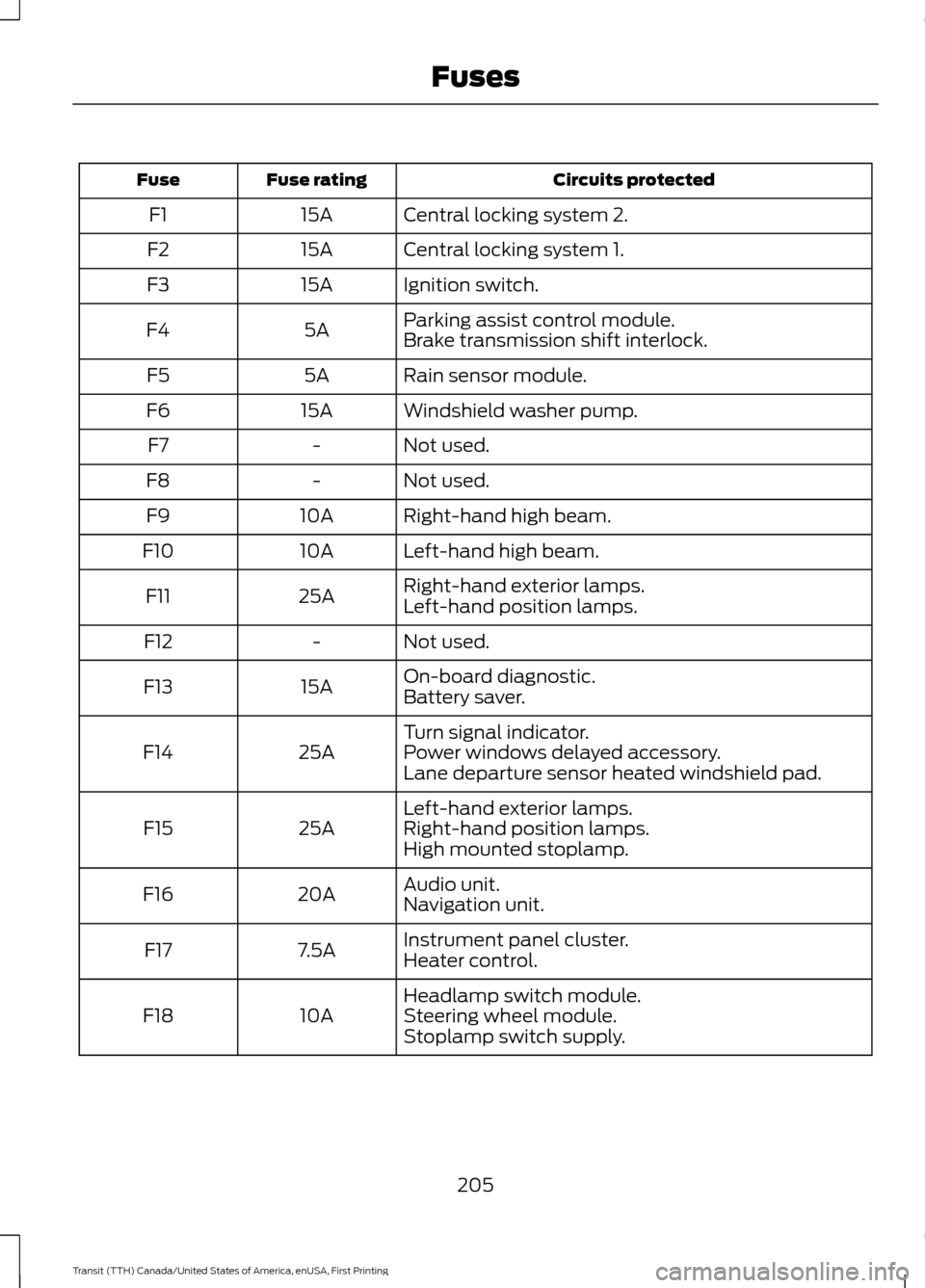
Circuits protected
Fuse rating
Fuse
Central locking system 2.
15A
F1
Central locking system 1.
15A
F2
Ignition switch.
15A
F3
Parking assist control module.
5A
F4
Brake transmission shift interlock.
Rain sensor module.
5A
F5
Windshield washer pump.
15A
F6
Not used.
-
F7
Not used.
-
F8
Right-hand high beam.
10A
F9
Left-hand high beam.
10A
F10
Right-hand exterior lamps.
25A
F11
Left-hand position lamps.
Not used.
-
F12
On-board diagnostic.
15A
F13
Battery saver.
Turn signal indicator.
25A
F14 Power windows delayed accessory.
Lane departure sensor heated windshield pad.
Left-hand exterior lamps.
25A
F15 Right-hand position lamps.
High mounted stoplamp.
Audio unit.
20A
F16
Navigation unit.
Instrument panel cluster.
7.5A
F17
Heater control.
Headlamp switch module.
10A
F18 Steering wheel module.
Stoplamp switch supply.
205
Transit (TTH) Canada/United States of America, enUSA, First Printing Fuses
Page 210 of 411
GENERAL INFORMATION
Have your vehicle serviced regularly to help
maintain its roadworthiness and resale
value. There is a large network of
authorized dealers that are there to help
you with their professional servicing
expertise. We believe that their specially
trained technicians are best qualified to
service your vehicle properly and expertly.
They are supported by a wide range of
highly specialized tools developed
specifically for servicing your vehicle.
If your vehicle requires professional service,
an authorized dealer can provide the
necessary parts and service. Check your
warranty information to find out which
parts and services are covered.
Use only recommended fuels, lubricants,
fluids and service parts conforming to
specifications. Motorcraft® parts are
designed and built to provide the best
performance in your vehicle.
Precautions
•
Do not work on a hot engine.
• Make sure that nothing gets caught in
moving parts.
• Do not work on a vehicle with the
engine running in an enclosed space,
unless you are sure you have enough
ventilation.
• Keep all open flames and other burning
material (such as cigarettes) away
from the battery and all fuel related
parts.
Working with the Engine Off
1. Set the parking brake and shift to park
(P).
2. Switch off the engine.
3. Block the wheels. Working with the Engine On WARNING
To reduce the risk of vehicle damage
and/or personal burn injuries, do not
start your engine with the air cleaner
removed and do not remove it while the
engine is running. 1.
Set the parking brake and shift to park
(P).
2. Block the wheels.
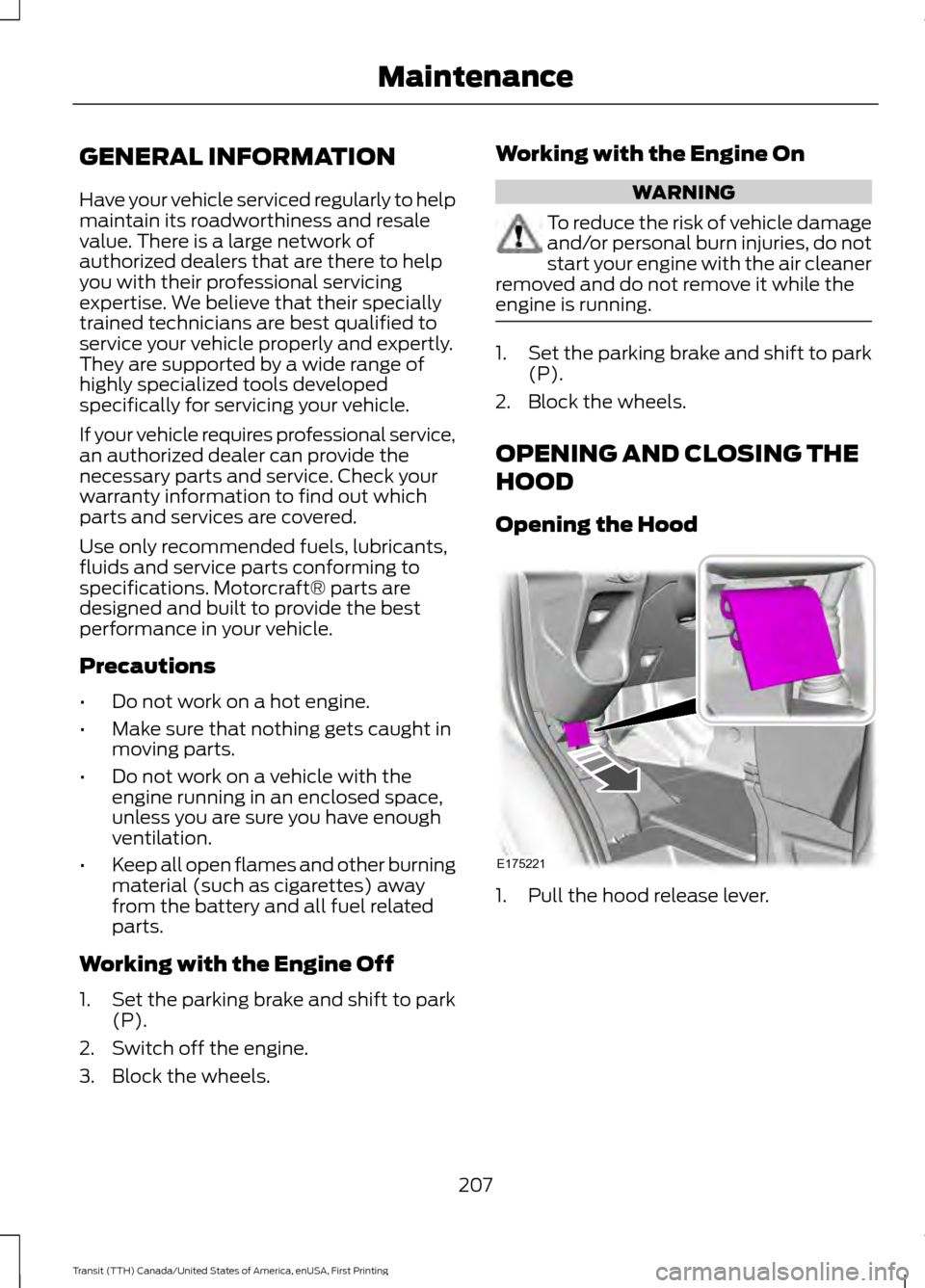
OPENING AND CLOSING THE
HOOD
Opening the Hood 1. Pull the hood release lever.
207
Transit (TTH) Canada/United States of America, enUSA, First Printing MaintenanceE175221
Page 217 of 411
•
Sustained high-speed driving at Gross
Vehicle Weight Rating (maximum
loaded weight for vehicle operation).
• Sustained use of diesel fuel other than
ultra-low sulfur diesel (ULSD).
OIL CHANGE INDICATOR
RESET
Resetting the Oil Life Monitoring
System
Only reset the oil life monitoring system
after changing the engine oil and oil filter.
1. Switch the ignition on. Do not start the
engine. For vehicles with push-button
start, press and hold the start button
for two seconds without pressing the
brake pedal. Do not start the engine.
2. Press the accelerator and brake pedals
at the same time.
3. Keep the accelerator and brake pedals
fully pressed.
4. After three seconds, a message confirming that the reset is in progress
will be displayed.
5. After 25 seconds, a message confirming that the reset is complete
will be displayed.
6. Release the accelerator and brake pedals.
7. The message confirming that the reset
is complete will no longer be displayed.
8. Switch the ignition off. For vehicles with
push-button start, press the start
button to switch the ignition off. ENGINE COOLANT CHECK
Checking the Engine Coolant
When the engine is cold, check the
concentration and level of the engine
coolant at the intervals listed in the
scheduled maintenance information. See
Scheduled Maintenance (page 363).
Note: Make sure that the level is between
the MIN and MAX marks on the coolant
reservoir.
Note: Coolant expands when it is hot. The
level may extend beyond the MAX mark.
Note: If the level is at the MIN mark, below
the MIN mark, or empty, add coolant
immediately. See
Adding Engine Coolant
in this chapter.
The coolant concentration should be
maintained within 48% to 50%, which
equates to a freeze point between -30°F
(-34°C) and -34°F (-37°C).
Note: For best results, coolant
concentration should be tested with a
refractometer, for example Robinair®
Coolant and Battery Refractometer 75240.
We do not recommend the use of
hydrometers or coolant test strips for
measuring coolant concentrations.
Note: Automotive fluids are not
interchangeable. Do not use engine coolant,
antifreeze or windshield washer fluid outside
of its specified function and vehicle location.
Adding Engine Coolant WARNINGS
Do not add engine coolant when the
engine is hot. Steam and scalding
liquids released from a hot cooling
system can burn you badly. Also, spilling
coolant on hot engine parts can burn you.
214
Transit (TTH) Canada/United States of America, enUSA, First Printing Maintenance
Page 224 of 411
CHANGING THE 12V BATTERY
Removing the Battery
WARNINGS
You must replace your vehicle
battery with one of exactly the same
specification.
Make sure the battery box is correctly
sealed.
Your vehicle battery is heavy; take
care when lifting and removing.
Note:
If you have power seats and the
battery has no charge, jump-start your
vehicle to move the seat. See Jump
Starting the Vehicle (page 182).
Note: Where applicable you must
reprogram the audio system using the
keycode.
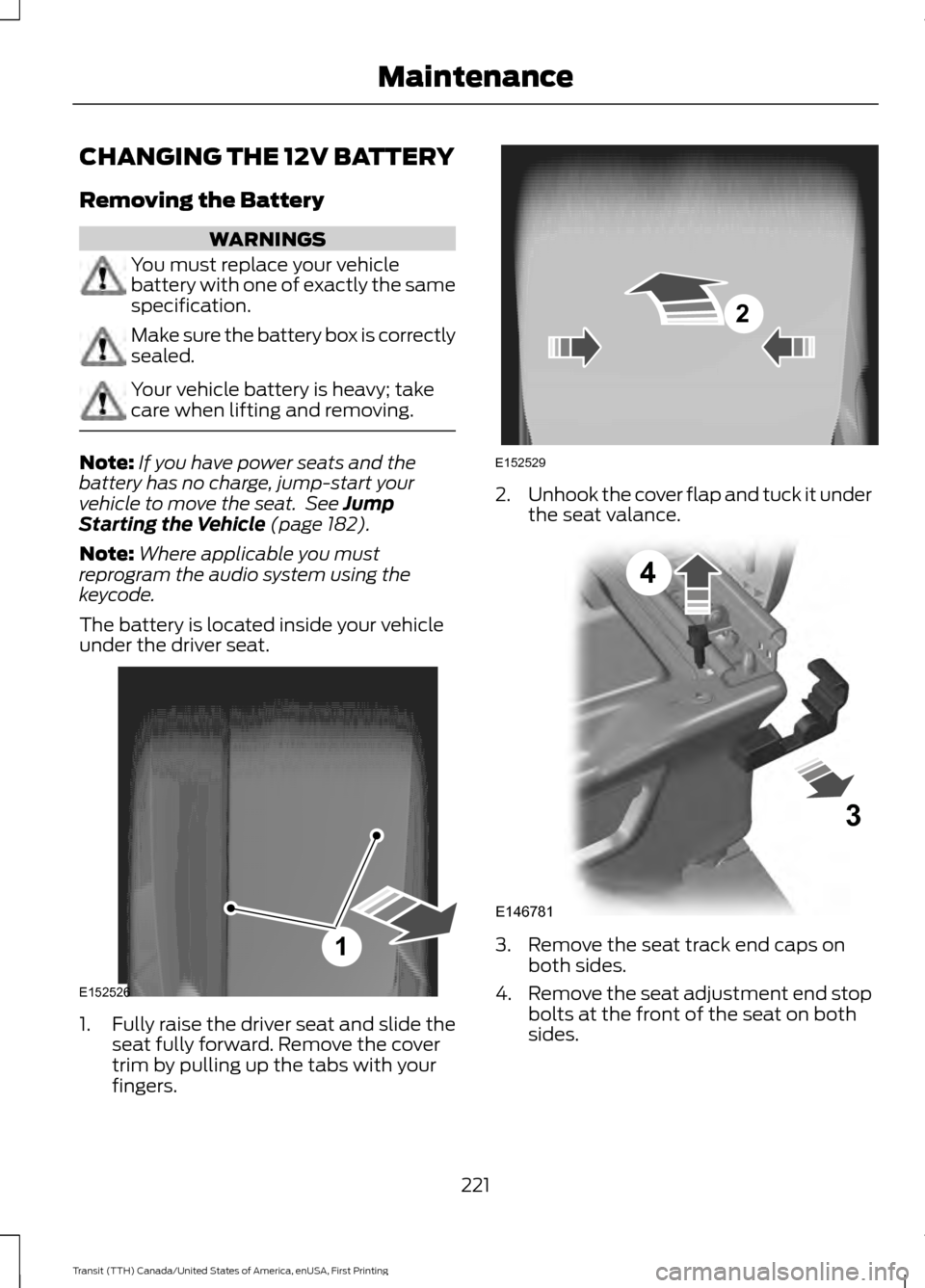
The battery is located inside your vehicle
under the driver seat. 1.
Fully raise the driver seat and slide the
seat fully forward. Remove the cover
trim by pulling up the tabs with your
fingers. 2.
Unhook the cover flap and tuck it under
the seat valance. 3. Remove the seat track end caps on
both sides.
4. Remove the seat adjustment end stop
bolts at the front of the seat on both
sides.
221
Transit (TTH) Canada/United States of America, enUSA, First Printing MaintenanceE152526
1 2
E152529 E146781
3
4
Page 225 of 411
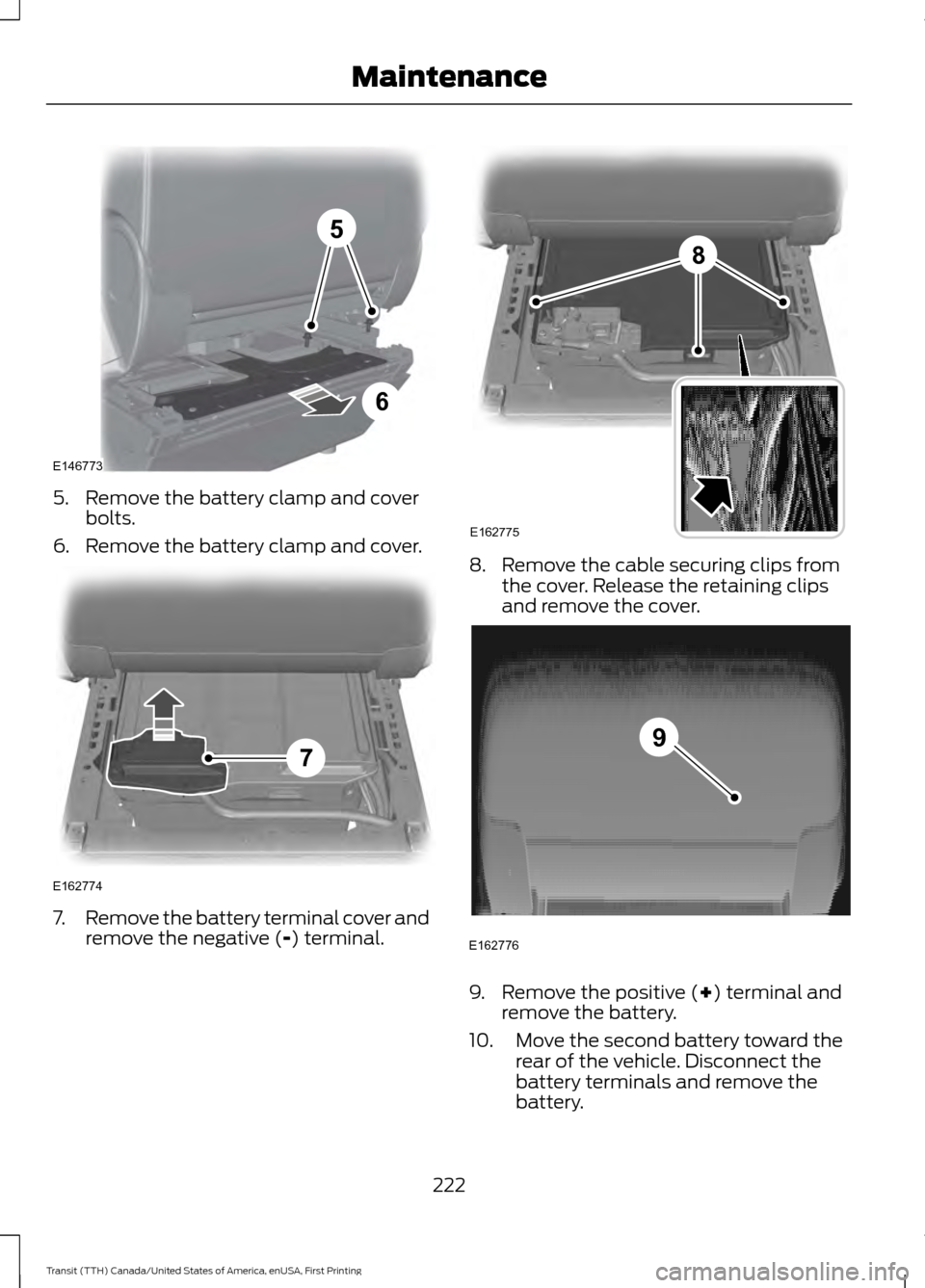
5. Remove the battery clamp and cover
bolts.
6. Remove the battery clamp and cover. 7.
Remove the battery terminal cover and
remove the negative (-) terminal. 8. Remove the cable securing clips from
the cover. Release the retaining clips
and remove the cover. 9. Remove the positive (
+) terminal and
remove the battery.
10. Move the second battery toward the rear of the vehicle. Disconnect the
battery terminals and remove the
battery.
222
Transit (TTH) Canada/United States of America, enUSA, First Printing Maintenance5
6
E146773 E162774
7 8
E162775 E162776
9
Page 226 of 411
Note:
Single batteries are mounted the
opposite way around in the battery tray. The
negative terminal is toward the rear of the
vehicle.
Installing the Battery WARNING
Make sure that you securely fasten
the seat runner bolts before installing
the covers.
Install in the reverse order.
CHECKING THE WIPER
BLADES
Run the tip of your fingers over the edge of
the blade to check for roughness.
Clean the wiper blades with washer fluid
or water applied with a soft sponge or
cloth.
CHANGING THE WIPER
BLADES
Changing the Windshield Wiper
Blades
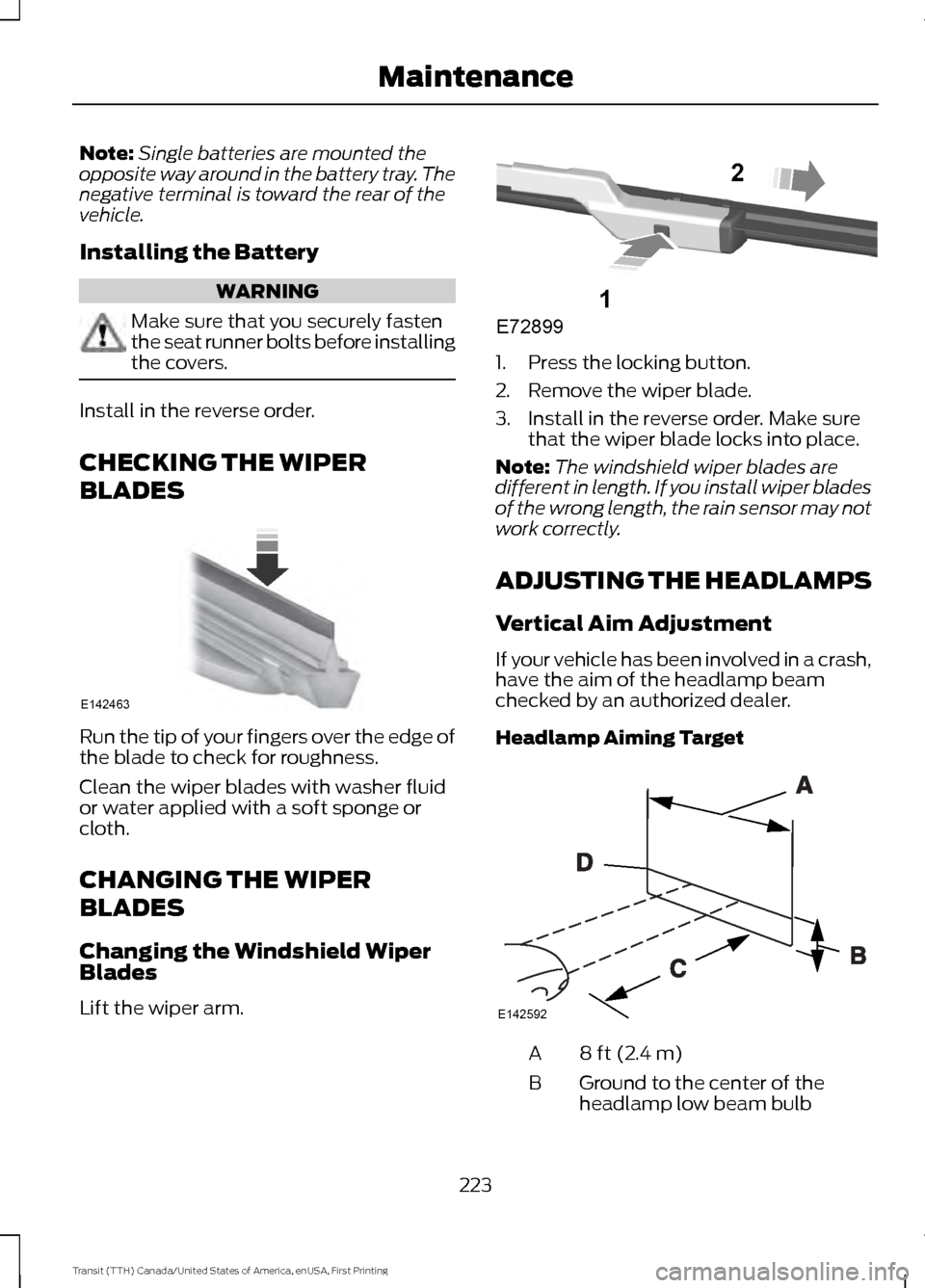
Lift the wiper arm. 1. Press the locking button.
2. Remove the wiper blade.
3. Install in the reverse order. Make sure
that the wiper blade locks into place.
Note: The windshield wiper blades are
different in length. If you install wiper blades
of the wrong length, the rain sensor may not
work correctly.
ADJUSTING THE HEADLAMPS
Vertical Aim Adjustment
If your vehicle has been involved in a crash,
have the aim of the headlamp beam
checked by an authorized dealer.
Headlamp Aiming Target 8 ft (2.4 m)
A
Ground to the center of the
headlamp low beam bulb
B
223
Transit (TTH) Canada/United States of America, enUSA, First Printing MaintenanceE142463 E72899
1
2 E142592