tow FORD TRANSIT 2016 5.G Owner's Manual
[x] Cancel search | Manufacturer: FORD, Model Year: 2016, Model line: TRANSIT, Model: FORD TRANSIT 2016 5.GPages: 411, PDF Size: 5.65 MB
Page 122 of 411
5. Replace the fuel tank filler cap and
close the fuel tank filler door.
6. Clean the plastic funnel and place it back in your vehicle or properly dispose
of it.
Note: Extra funnels can be purchased from
an authorized dealer if you choose to
dispose of the funnel.
CATALYTIC CONVERTER WARNING
Do not park or idle your vehicle over
dry leaves, dry grass or other
combustible materials. The exhaust
will radiate a considerable amount of heat
during use, and after you have switched
the engine off. This is a potential fire
hazard. Driving with a Catalytic Converter
WARNINGS
Avoid running out of fuel.
Do not crank the engine for long
periods.
Do not run the engine when a spark
plug lead is disconnected.
Do not push-start or tow-start your
vehicle. Use booster cables. See
Jump Starting the Vehicle (page
182). Do not switch the ignition off when
driving. SELECTIVE CATALYTIC
REDUCTION SYSTEM
WARNINGS
You must refill the diesel exhaust
fluid tank when it is low. If it is not
refilled, vehicle speed will be limited
to
50 mph (80 km/h). Drive with caution
and refill the fluid tank as soon as possible. If the diesel exhaust fluid becomes
contaminated your vehicle will be
limited to idle speed operation.
Replace the fluid immediately. Tampering with or disabling the
selective catalytic reduction system
will result in severe vehicle
performance limitation. Vehicle speed will
be limited to
5 mph (8 km/h). Your vehicle has a selective catalytic
reduction system to help reduce exhaust
emission levels by injecting diesel exhaust
fluid into the exhaust system.
Diesel Exhaust Fluid Level
For the system to operate correctly, you
must maintain the diesel exhaust fluid
level.
A warning lamp will illuminate
when the diesel exhaust fluid
level is low and needs to be
refilled. See
Warning Lamps and
Indicators (page 78).
The warning lamp will illuminate
approximately
500 mi (800 km) before
the diesel exhaust fluid tank is empty. Refill
the tank as soon as possible.
Note: If the warning lamp illuminates when
your vehicle is moving, and the diesel
exhaust fluid is at a sufficient level, this
indicates a system malfunction. Have your
vehicle checked by an authorized dealer as
soon as possible.
119
Transit (TTH) Canada/United States of America, enUSA, First Printing Fuel and RefuelingE163176
Page 125 of 411
Note:
If the vehicle speed becomes limited
or the engine will only run at idle speed,
normal vehicle operation will not resume
until you have the system repaired. To
service a contaminated or inoperative
system, see an authorized dealer.
Note: You must add a minimum of 3.2 qt
(3 L) for your vehicle to exit the run at idle
speed mode.
Diesel Exhaust Fluid Guidelines
• Do not put diesel exhaust fluid in the
vehicle fuel tank.
• Do not overfill the diesel exhaust fluid
tank.
• Do not dilute diesel exhaust fluid with
water or any other liquid.
• Do not re-use a diesel exhaust fluid
container. •
Do not store in direct sunlight.
• Store at temperatures between
23°F
(-5°C) and 68°F (20°C).
• Do not store a diesel exhaust fluid
container in your vehicle.
• Diesel exhaust fluid is non-flammable,
non-toxic, colorless and water-soluble.
Approximate Diesel Exhaust Fluid
Usage
The chart below illustrates the
approximate diesel exhaust fluid usage for
the given distances traveled under various
driving conditions. Usage may vary
depending on:
• Driving style.
• Towing a trailer.
• Vehicle load.
• Engine idling time. Approximate diesel exhaust fluid usage per
tank mi (km)
Driving conditions
1,100–4,100 (1,770–6,600)
Primary trailer tow, aggressive driving
4,100–6,500 (6,600–10,460)
City drive
6,500–10,500 (10,460– 16,900)
Steady highway drive
REFUELING WARNINGS
When refueling always shut the
engine off and never allow sparks or
open flames near the fuel tank filler
valve. Never smoke or use a cell phone
while refueling. Fuel vapor is extremely
hazardous under certain conditions. Avoid
inhaling excess fumes. Do not attempt to refuel using a fuel
pump nozzle that does not fit
through both closing flaps of the
capless fuel filler neck. WARNINGS
Wait at least 10 seconds before
removing the fuel pump nozzle to
allow any residual fuel to drain into
the fuel tank. Stop refueling after the fuel pump
nozzle automatically shuts off for the
second time. Failure to follow this
will fill the expansion space in the fuel tank
and could lead to fuel overflowing. Do not remove the fuel pump nozzle
from its fully inserted position when
refueling.
122
Transit (TTH) Canada/United States of America, enUSA, First Printing Fuel and Refueling
Page 139 of 411
AUTOMATIC TRANSMISSION
WARNINGS
Always set the parking brake fully
and make sure you shift the gearshift
lever to park (P). Switch the ignition
off and remove the key whenever you leave
your vehicle. Do not apply the brake pedal and
accelerator pedal simultaneously.
Applying both pedals simultaneously
for more than three seconds will limit
engine rpm, which may result in difficulty
maintaining speed in traffic and could lead
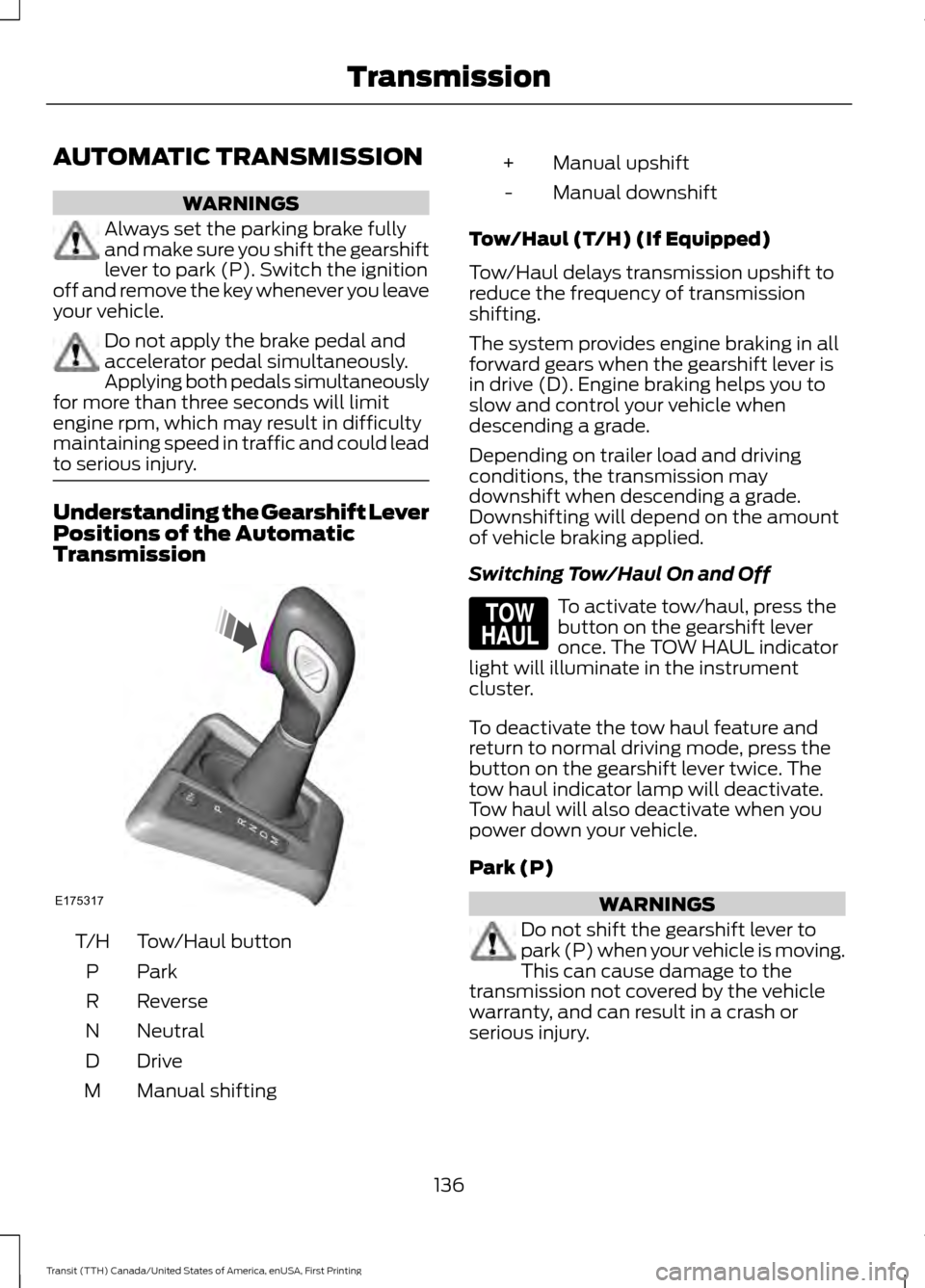
to serious injury. Understanding the Gearshift Lever
Positions of the Automatic
Transmission
Tow/Haul button
T/H
ParkP
Reverse
R
Neutral
N
Drive
D
Manual shifting
M Manual upshift
+
Manual downshift
-
Tow/Haul (T/H) (If Equipped)
Tow/Haul delays transmission upshift to
reduce the frequency of transmission
shifting.
The system provides engine braking in all
forward gears when the gearshift lever is
in drive (D). Engine braking helps you to
slow and control your vehicle when
descending a grade.
Depending on trailer load and driving
conditions, the transmission may
downshift when descending a grade.
Downshifting will depend on the amount
of vehicle braking applied.
Switching Tow/Haul On and Off To activate tow/haul, press the
button on the gearshift lever
once. The TOW HAUL indicator
light will illuminate in the instrument
cluster.
To deactivate the tow haul feature and
return to normal driving mode, press the
button on the gearshift lever twice. The
tow haul indicator lamp will deactivate.
Tow haul will also deactivate when you
power down your vehicle.
Park (P) WARNINGS
Do not shift the gearshift lever to
park (P) when your vehicle is moving.
This can cause damage to the
transmission not covered by the vehicle
warranty, and can result in a crash or
serious injury.
136
Transit (TTH) Canada/United States of America, enUSA, First Printing TransmissionE175317 E161509
Page 142 of 411
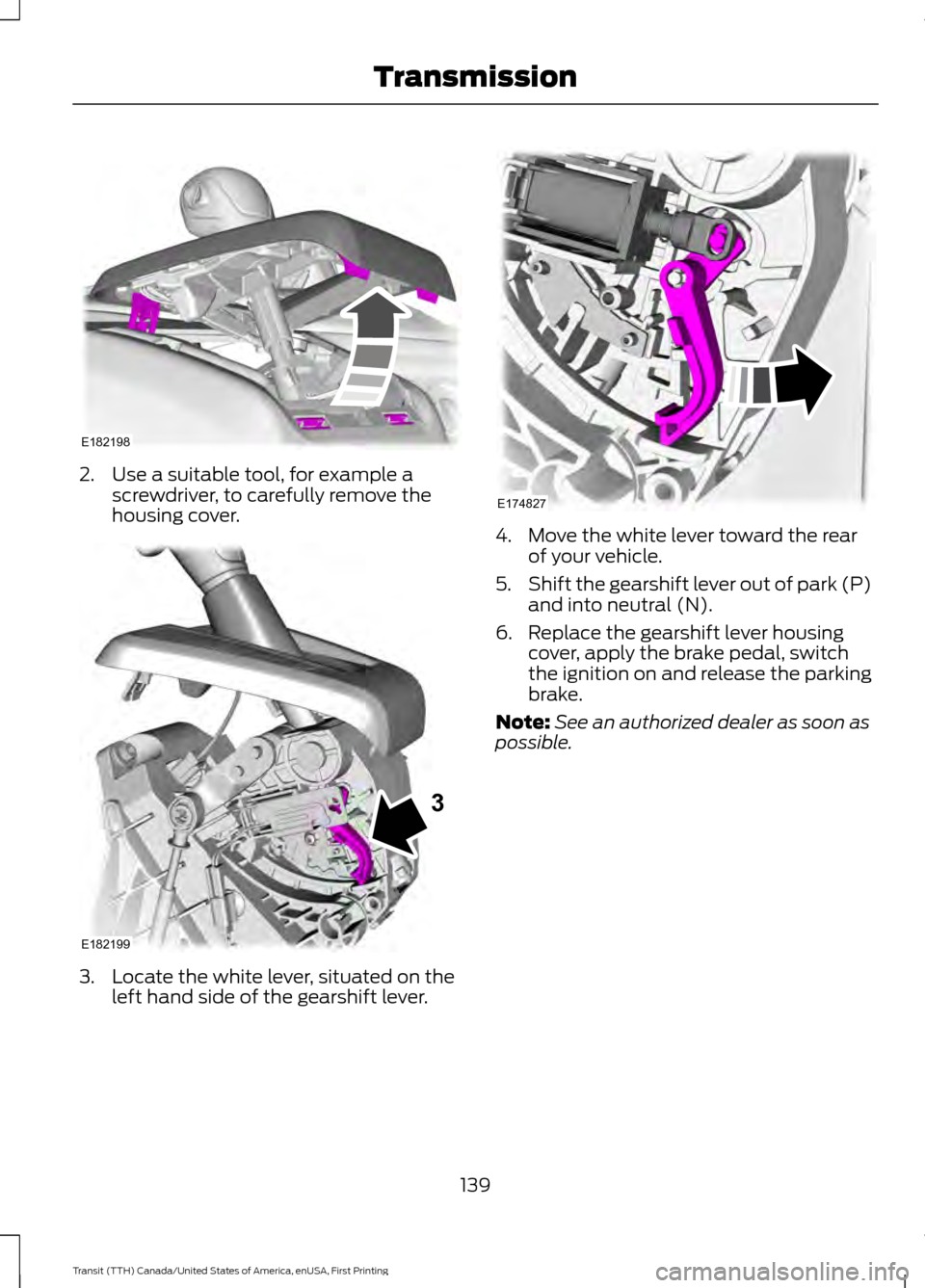
2. Use a suitable tool, for example a
screwdriver, to carefully remove the
housing cover. 3. Locate the white lever, situated on the
left hand side of the gearshift lever. 4. Move the white lever toward the rear
of your vehicle.
5. Shift the gearshift lever out of park (P)
and into neutral (N).
6. Replace the gearshift lever housing cover, apply the brake pedal, switch
the ignition on and release the parking
brake.
Note: See an authorized dealer as soon as
possible.
139
Transit (TTH) Canada/United States of America, enUSA, First Printing TransmissionE182198 E182199
3 E174827
Page 143 of 411
GENERAL INFORMATION
Note:
Occasional brake noise is normal. If
a metal-to-metal, continuous grinding or
continuous squeal sound is present, the
brake linings may be worn-out. Have the
system checked by an authorized dealer. If
your vehicle has continuous vibration or
shudder in the steering wheel while braking,
have it checked by an authorized dealer.
Note: Brake dust may accumulate on the
wheels, even under normal driving
conditions. Some dust is inevitable as the
brakes wear and does not contribute to
brake noise. See Cleaning the Alloy
Wheels (page 237). See
Warning Lamps and
Indicators (page 78).
Wet brakes result in reduced braking
efficiency. Gently press the brake pedal a
few times when driving from a car wash or
standing water to dry the brakes.
Brake Over Accelerator
In the event the accelerator pedal
becomes stuck or entrapped, apply steady
and firm pressure to the brake pedal to
slow the vehicle and reduce engine power.
If you experience this condition, apply the
brakes and bring your vehicle to a safe
stop. Move the gearshift lever to park (P),
switch the engine off and apply the parking
brake. Inspect the accelerator pedal for
any interference. If none are found and the
condition persists, have your vehicle towed
to the nearest authorized dealer.
Brake Assist
Brake assist detects when you brake
rapidly by measuring the rate at which you
press the brake pedal. It provides
maximum braking efficiency as long as you
press the pedal, and can reduce stopping
distances in critical situations. Anti-lock Brake System
This system helps you maintain steering
control during emergency stops by keeping
the brakes from locking. This lamp momentarily
illuminates when you turn the
ignition on. If the light does not
illuminate during start up, remains on or
flashes, the system may be disabled. Have
the system checked by an authorized
dealer. If the system is disabled, normal
braking is still effective. If the
brake warning lamp illuminates
when you release the parking brake, have
the system checked by an authorized
dealer.
HINTS ON DRIVING WITH
ANTI-LOCK BRAKES
Note: When the system is operating, the
brake pedal may pulse and may travel
further. Maintain pressure on the brake
pedal. You may also hear a noise from the
system. This is normal.
The anti-lock braking system will not
eliminate the risks when:
• You drive too closely to the vehicle in
front of you.
• Your vehicle is hydroplaning.
• You take corners too fast.
• The road surface is poor.
140
Transit (TTH) Canada/United States of America, enUSA, First Printing Brakes
Page 144 of 411
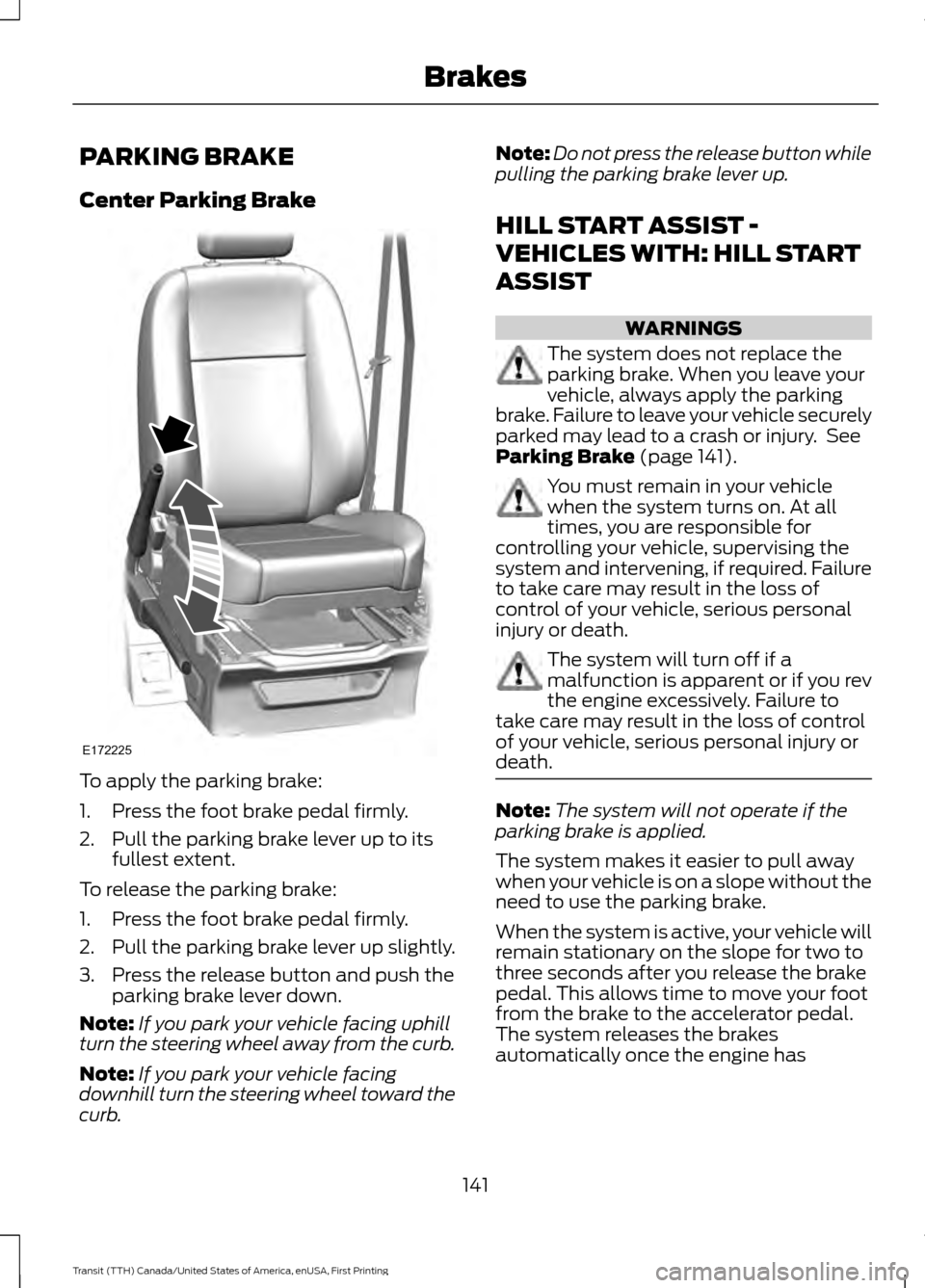
PARKING BRAKE
Center Parking Brake
To apply the parking brake:
1. Press the foot brake pedal firmly.
2. Pull the parking brake lever up to its
fullest extent.
To release the parking brake:
1. Press the foot brake pedal firmly.
2. Pull the parking brake lever up slightly.
3. Press the release button and push the parking brake lever down.
Note: If you park your vehicle facing uphill
turn the steering wheel away from the curb.
Note: If you park your vehicle facing
downhill turn the steering wheel toward the
curb. Note:
Do not press the release button while
pulling the parking brake lever up.
HILL START ASSIST -
VEHICLES WITH: HILL START
ASSIST WARNINGS
The system does not replace the
parking brake. When you leave your
vehicle, always apply the parking
brake. Failure to leave your vehicle securely
parked may lead to a crash or injury. See
Parking Brake (page 141). You must remain in your vehicle
when the system turns on. At all
times, you are responsible for
controlling your vehicle, supervising the
system and intervening, if required. Failure
to take care may result in the loss of
control of your vehicle, serious personal
injury or death. The system will turn off if a
malfunction is apparent or if you rev
the engine excessively. Failure to
take care may result in the loss of control
of your vehicle, serious personal injury or
death. Note:
The system will not operate if the
parking brake is applied.
The system makes it easier to pull away
when your vehicle is on a slope without the
need to use the parking brake.
When the system is active, your vehicle will
remain stationary on the slope for two to
three seconds after you release the brake
pedal. This allows time to move your foot
from the brake to the accelerator pedal.
The system releases the brakes
automatically once the engine has
141
Transit (TTH) Canada/United States of America, enUSA, First Printing BrakesE172225
Page 149 of 411
PRINCIPLE OF OPERATION
WARNINGS
The system does not relieve you of
your responsibility to drive with due
care and attention.
If your vehicles has a non-Ford
approved trailer tow module the
system may not correctly detect
objects. The sensors may not detect objects
in heavy rain or other conditions that
cause disruptive reflections.
The sensors may not detect objects
with surfaces that absorb ultrasonic
waves.
The system does not detect objects
that are moving away from your
vehicle. They will only be detected
shortly after they start to move toward
your vehicle. Take particular care when reversing
with a tow ball arm or a rear fitted
accessory. For example, a bicycle
carrier. The rear parking aid will only
indicate the approximate distance from
the rear bumper to an object. If you use a high pressure spray to
wash your vehicle, only spray the
sensors briefly from a distance not
less than eight inches (20 centimeters). Note:
If your vehicle has a tow ball arm,
switch the system off when you connect
trailer lamps (or lighting boards) to the
13-pin socket through a Ford approved
trailer tow module.
Note: Keep the sensors free from dirt, ice
or snow. Do not clean with sharp objects.
Note: The system may emit false alerts if
it detects a signal using the same frequency
as the sensors or if your vehicle is fully
loaded. Note:
The outer sensors may detect the
side walls of a garage. If the distance
between the outer sensors and the side wall
remains constant for three seconds, the
alert will turn off. As you continue the inner
sensors will detect objects directly behind
your vehicle.
PARKING AID WARNINGS
The parking aid system can only
assist you to detect objects when
your vehicle is moving at parking
speeds. To help avoid personal injury you
must take care when using the parking aid
system. Traffic control systems, inclement
weather, air brakes, external motors
and fans may affect the correct
operation of the sensing system.This may
cause reduced performance or false alerts. The system may not detect small or
moving objects, particularly those
close to the ground.
The system warns you of objects that are
within the detection zone of the bumper
areas. When you switch the ignition on,
the system automatically turns on. The
system becomes active when you shift into
reverse (R) and the speed of your vehicle
is 10 mph (16 km/h) or less.
146
Transit (TTH) Canada/United States of America, enUSA, First Printing Parking Aids
(If Equipped)
Page 150 of 411
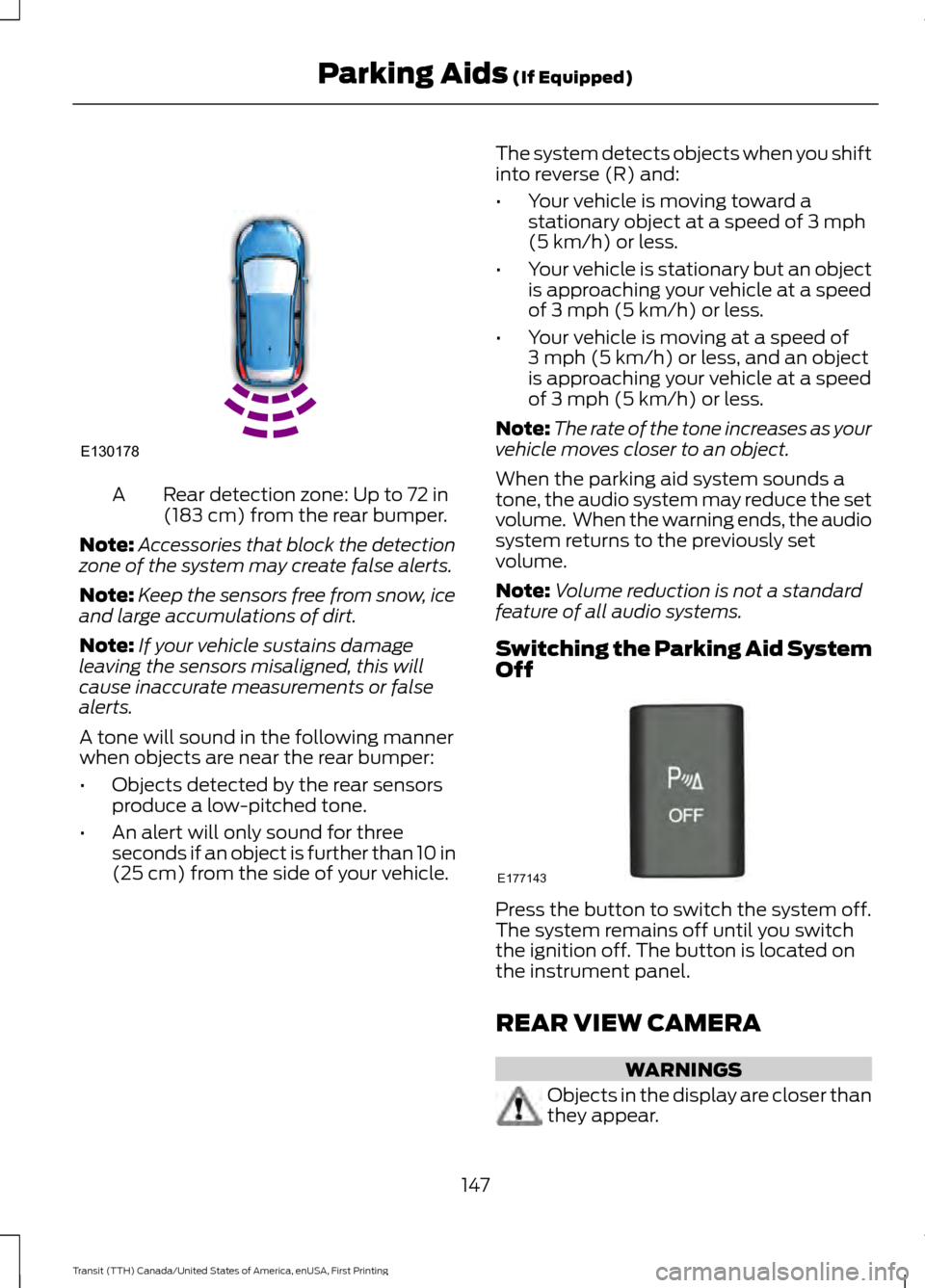
Rear detection zone: Up to 72 in
(183 cm) from the rear bumper.
A
Note: Accessories that block the detection
zone of the system may create false alerts.
Note: Keep the sensors free from snow, ice
and large accumulations of dirt.
Note: If your vehicle sustains damage
leaving the sensors misaligned, this will
cause inaccurate measurements or false
alerts.
A tone will sound in the following manner
when objects are near the rear bumper:
• Objects detected by the rear sensors
produce a low-pitched tone.
• An alert will only sound for three
seconds if an object is further than 10 in
(25 cm) from the side of your vehicle. The system detects objects when you shift
into reverse (R) and:
•
Your vehicle is moving toward a
stationary object at a speed of
3 mph
(5 km/h) or less.
• Your vehicle is stationary but an object
is approaching your vehicle at a speed
of
3 mph (5 km/h) or less.
• Your vehicle is moving at a speed of
3 mph (5 km/h)
or less, and an object
is approaching your vehicle at a speed
of
3 mph (5 km/h) or less.
Note: The rate of the tone increases as your
vehicle moves closer to an object.
When the parking aid system sounds a
tone, the audio system may reduce the set
volume. When the warning ends, the audio
system returns to the previously set
volume.
Note: Volume reduction is not a standard
feature of all audio systems.
Switching the Parking Aid System
Off Press the button to switch the system off.
The system remains off until you switch
the ignition off. The button is located on
the instrument panel.
REAR VIEW CAMERA
WARNINGS
Objects in the display are closer than
they appear.
147
Transit (TTH) Canada/United States of America, enUSA, First Printing Parking Aids
(If Equipped)E130178 E177143
Page 155 of 411
Changing the Set Speed
•
Press and release SET+ or SET-. When
you select kph as the display
measurement in the information
display, the set speed changes in
approximately 2 kph increments. When
you select mph as the display
measurement in the information
display, the set speed changes in
approximately 1 mph increments.
• Press the accelerator or brake pedal
until you reach the desired speed. Press
and release SET+.
• Press and hold SET+ or SET-. Release
the control when you reach the desired
speed.
Canceling the Set Speed
Pull
CAN toward you and release, or tap
the brake pedal. The set speed will not be
erased.
Resuming the Set Speed
Pull
RES toward you and release.
Switching Cruise Control Off
Note: You will erase the set speed if you
switch the system off.
Press and release
OFF or switch the
ignition off.
152
Transit (TTH) Canada/United States of America, enUSA, First Printing Cruise Control
Page 158 of 411
WARNINGS
The sensor may incorrectly track lane
markings such as other structures or
objects. This can result in a false or
missed warning. In cold and severe weather
conditions the system may not
function. Rain, snow, spray and large
contrasts in lighting can all influence the
sensor. The system will not operate if the
sensor cannot track the road lane
markings.
The system may not operate in areas
during roadwork construction.
The system may not operate on
roads with sharp bends or narrow
lanes.
Do not carry out windshield repairs
in the immediate area surrounding
the sensor.
If your vehicle has a suspension kit
not approved by us, the system may
not function correctly.
Note:
Keep the windshield free from
obstructions such as bird droppings, insects
and snow or ice.
Note: The system may assist you when
driving on fast main roads and freeways.
Note: The system may not operate during
hard braking or acceleration and when you
are intentionally steering your vehicle.
Note: The system will operate with a
minimum of one tracked lane marking.
Note: The system will only operate above
vehicle speeds of approximately 39 mph
(62 km/h).
The sensor is located behind the interior
mirror. It continuously monitors conditions
to alert you of unintentional lane drifting
at high speeds. The system will automatically detect and
track the lane markings on the road. If the
system detects that your vehicle is
unintentionally drifting toward the lane
markings, you will see a warning in the
information display. There is also a warning
given in the form of a vibration felt through
the steering wheel.
Note:
The vibration intensity from the
steering wheel may decease depending on
the quality of the road surface.
Using Lane Keeping Alert
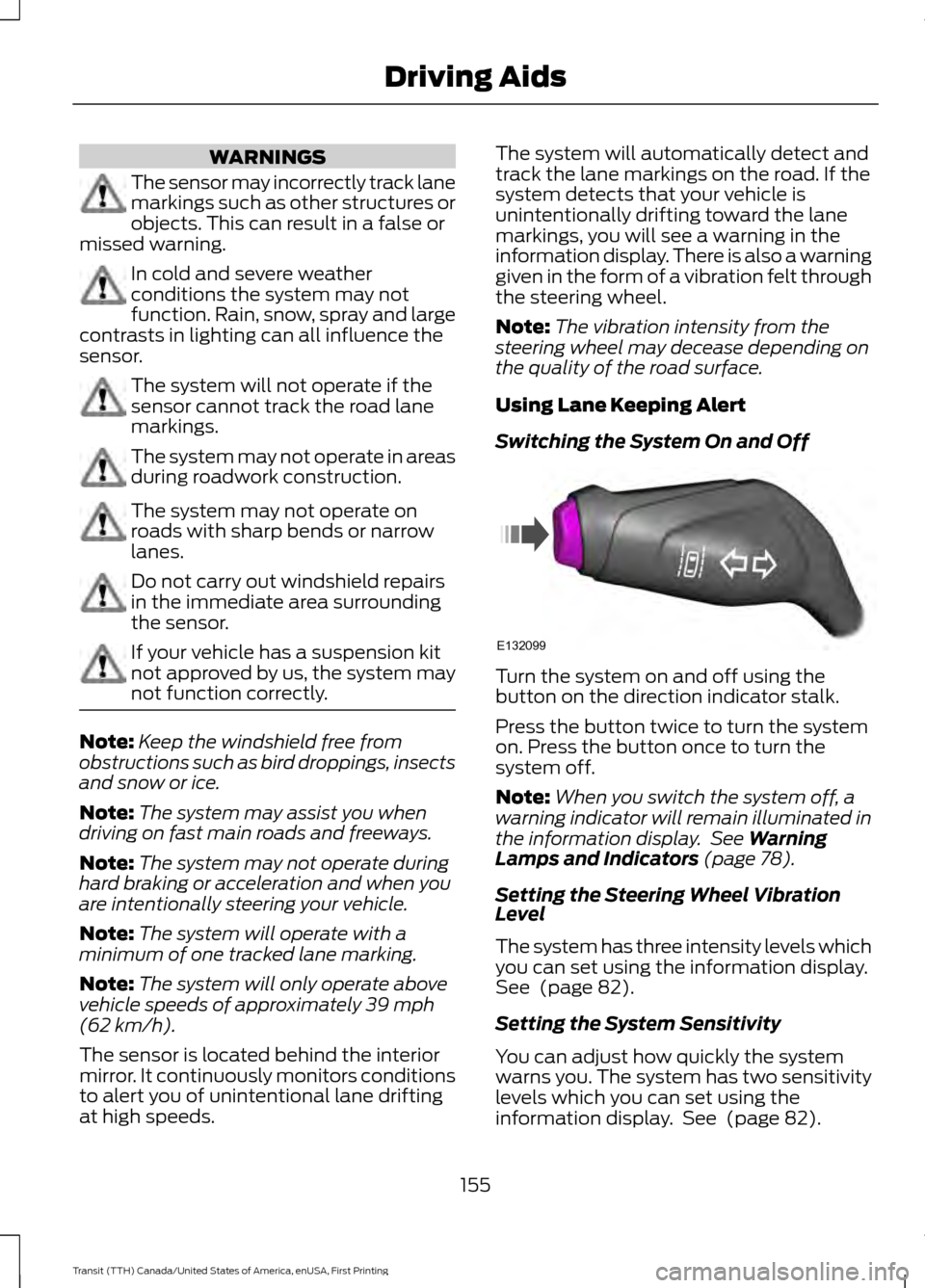
Switching the System On and Off Turn the system on and off using the
button on the direction indicator stalk.
Press the button twice to turn the system
on. Press the button once to turn the
system off.
Note:
When you switch the system off, a
warning indicator will remain illuminated in
the information display. See
Warning
Lamps and Indicators (page 78).
Setting the Steering Wheel Vibration
Level
The system has three intensity levels which
you can set using the information display.
See
(page 82).
Setting the System Sensitivity
You can adjust how quickly the system
warns you. The system has two sensitivity
levels which you can set using the
information display. See
(page 82).
155
Transit (TTH) Canada/United States of America, enUSA, First Printing Driving AidsE132099