brake FORD TRANSIT 2017 5.G User Guide
[x] Cancel search | Manufacturer: FORD, Model Year: 2017, Model line: TRANSIT, Model: FORD TRANSIT 2017 5.GPages: 484, PDF Size: 11.45 MB
Page 90 of 484
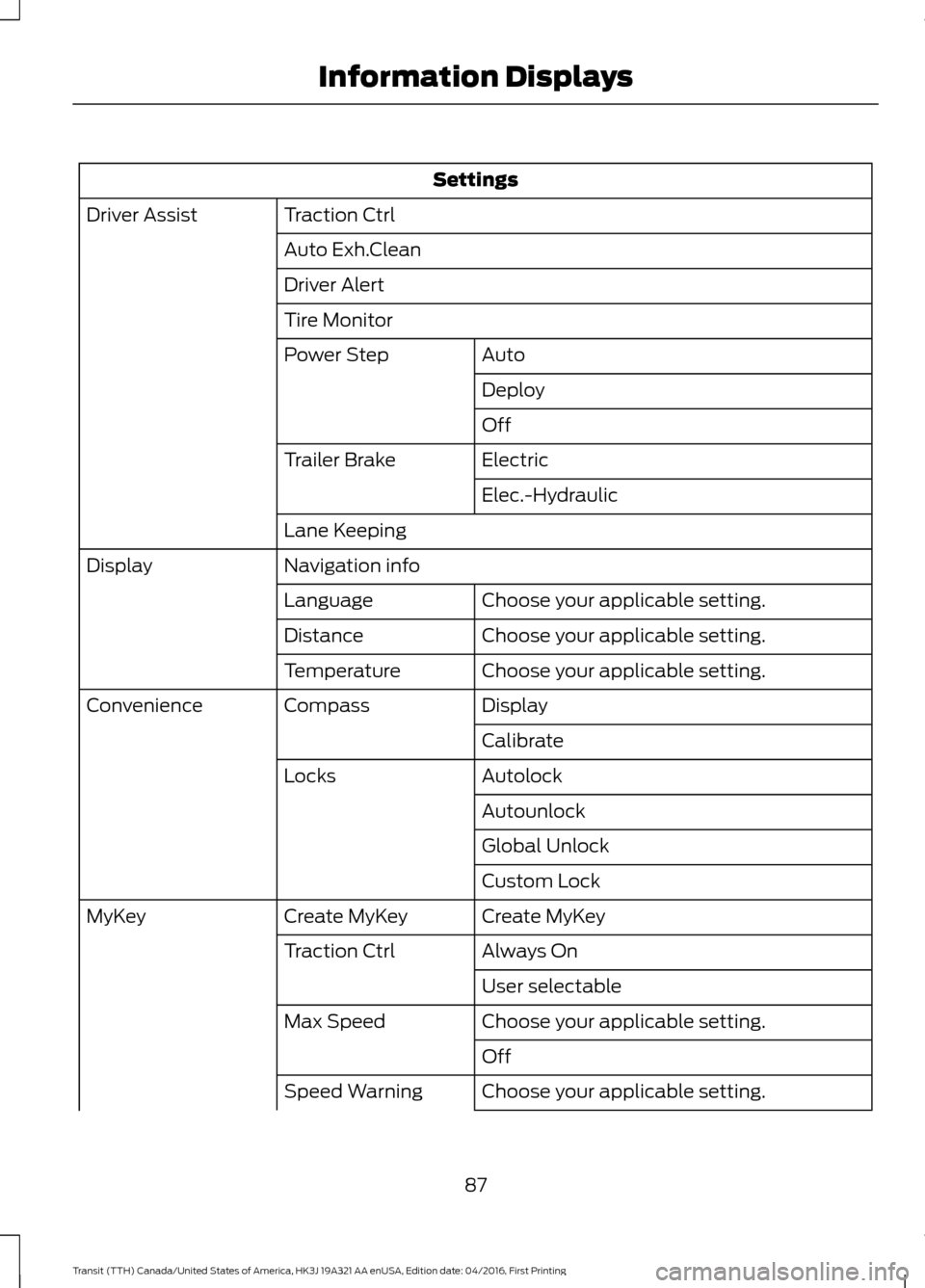
Settings
Traction Ctrl
Driver Assist
Auto Exh.Clean
Driver Alert
Tire MonitorAuto
Power Step
Deploy
Off
Electric
Trailer Brake
Elec.-Hydraulic
Lane Keeping
Navigation info
Display
Choose your applicable setting.
Language
Choose your applicable setting.
Distance
Choose your applicable setting.
Temperature
Display
Compass
Convenience
Calibrate
Autolock
Locks
Autounlock
Global Unlock
Custom Lock
Create MyKey
Create MyKey
MyKey
Always On
Traction Ctrl
User selectable
Choose your applicable setting.
Max Speed
Off
Choose your applicable setting.
Speed Warning
87
Transit (TTH) Canada/United States of America, HK3J 19A321 AA enUSA, Edition date: 04/2016, First Printing Information Displays
Page 94 of 484
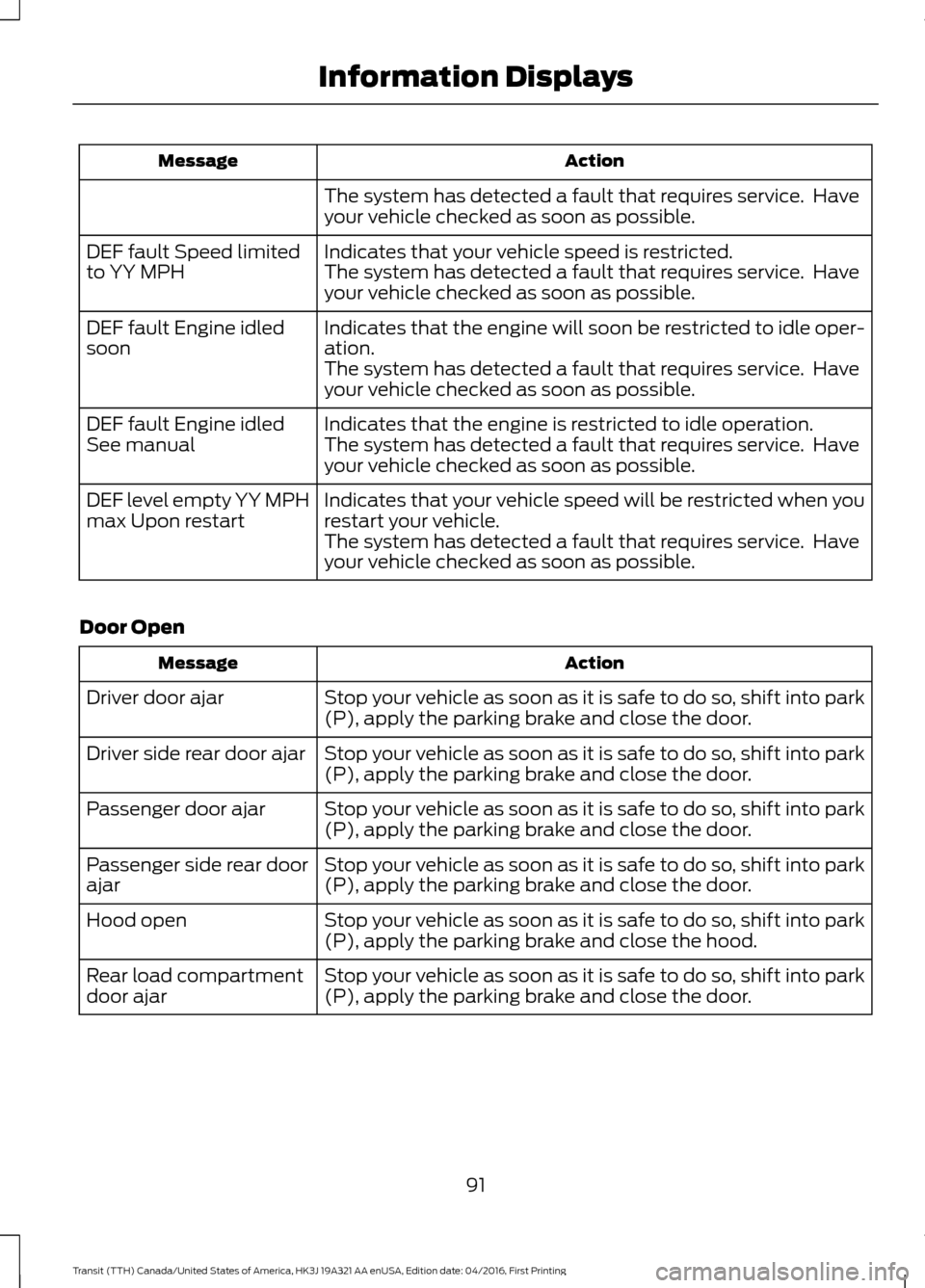
Action
Message
The system has detected a fault that requires service. Have
your vehicle checked as soon as possible.
Indicates that your vehicle speed is restricted.
DEF fault Speed limited
to YY MPH The system has detected a fault that requires service. Have
your vehicle checked as soon as possible.
Indicates that the engine will soon be restricted to idle oper-
ation.
DEF fault Engine idled
soon
The system has detected a fault that requires service. Have
your vehicle checked as soon as possible.
Indicates that the engine is restricted to idle operation.
DEF fault Engine idled
See manual The system has detected a fault that requires service. Have
your vehicle checked as soon as possible.
Indicates that your vehicle speed will be restricted when you
restart your vehicle.
DEF level empty YY MPH
max Upon restart
The system has detected a fault that requires service. Have
your vehicle checked as soon as possible.
Door Open Action
Message
Stop your vehicle as soon as it is safe to do so, shift into park
(P), apply the parking brake and close the door.
Driver door ajar
Stop your vehicle as soon as it is safe to do so, shift into park
(P), apply the parking brake and close the door.
Driver side rear door ajar
Stop your vehicle as soon as it is safe to do so, shift into park
(P), apply the parking brake and close the door.
Passenger door ajar
Stop your vehicle as soon as it is safe to do so, shift into park
(P), apply the parking brake and close the door.
Passenger side rear door
ajar
Stop your vehicle as soon as it is safe to do so, shift into park
(P), apply the parking brake and close the hood.
Hood open
Stop your vehicle as soon as it is safe to do so, shift into park
(P), apply the parking brake and close the door.
Rear load compartment
door ajar
91
Transit (TTH) Canada/United States of America, HK3J 19A321 AA enUSA, Edition date: 04/2016, First Printing Information Displays
Page 95 of 484
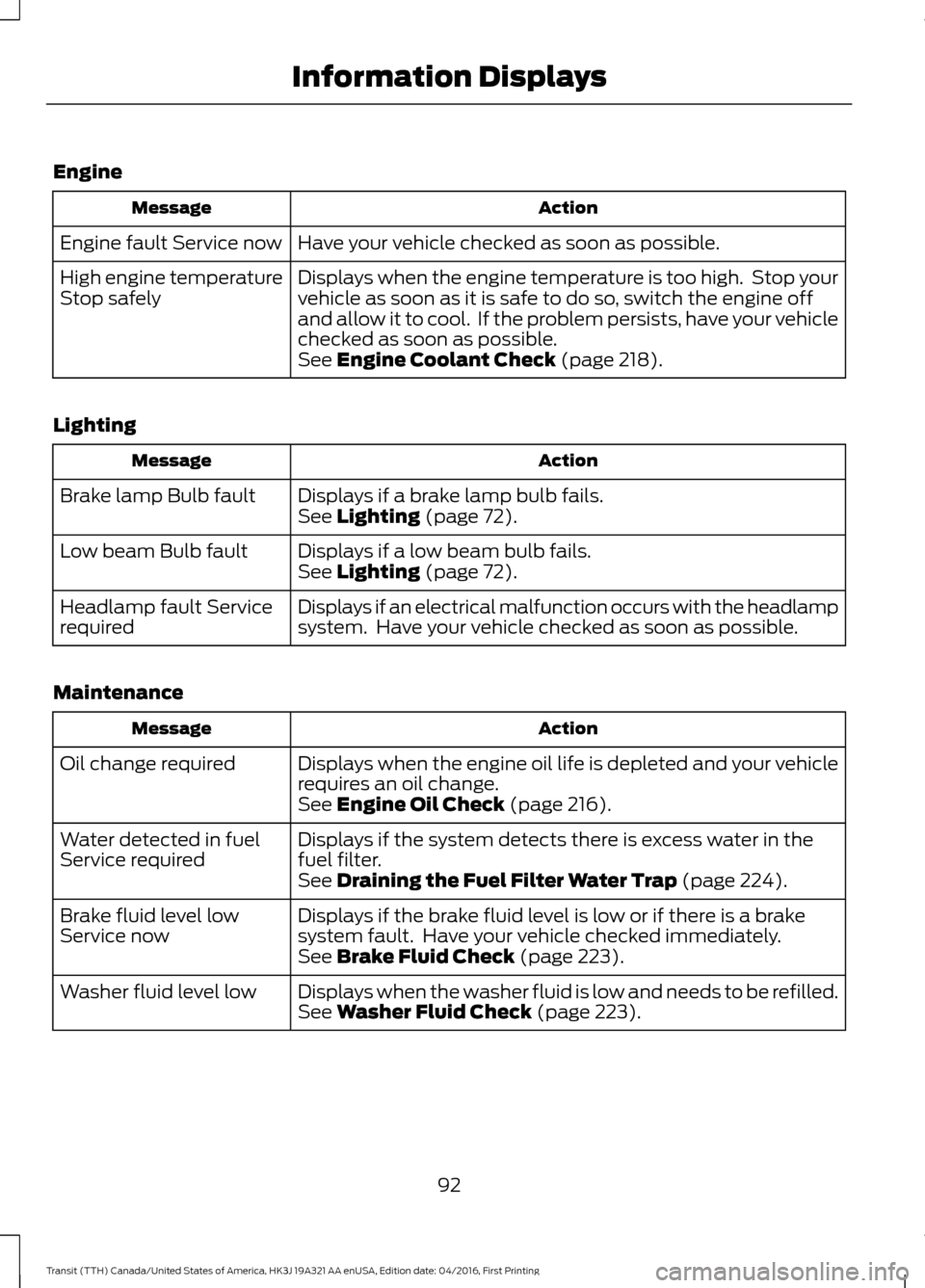
Engine
Action
Message
Have your vehicle checked as soon as possible.
Engine fault Service now
Displays when the engine temperature is too high. Stop your
vehicle as soon as it is safe to do so, switch the engine off
and allow it to cool. If the problem persists, have your vehicle
checked as soon as possible.
High engine temperature
Stop safely
See Engine Coolant Check (page 218).
Lighting Action
Message
Displays if a brake lamp bulb fails.
Brake lamp Bulb fault
See
Lighting (page 72).
Displays if a low beam bulb fails.
Low beam Bulb fault
See
Lighting (page 72).
Displays if an electrical malfunction occurs with the headlamp
system. Have your vehicle checked as soon as possible.
Headlamp fault Service
required
Maintenance Action
Message
Displays when the engine oil life is depleted and your vehicle
requires an oil change.
Oil change required
See
Engine Oil Check (page 216).
Displays if the system detects there is excess water in the
fuel filter.
Water detected in fuel
Service required
See
Draining the Fuel Filter Water Trap (page 224).
Displays if the brake fluid level is low or if there is a brake
system fault. Have your vehicle checked immediately.
Brake fluid level low
Service now
See
Brake Fluid Check (page 223).
Displays when the washer fluid is low and needs to be refilled.
Washer fluid level low
See
Washer Fluid Check (page 223).
92
Transit (TTH) Canada/United States of America, HK3J 19A321 AA enUSA, Edition date: 04/2016, First Printing Information Displays
Page 96 of 484
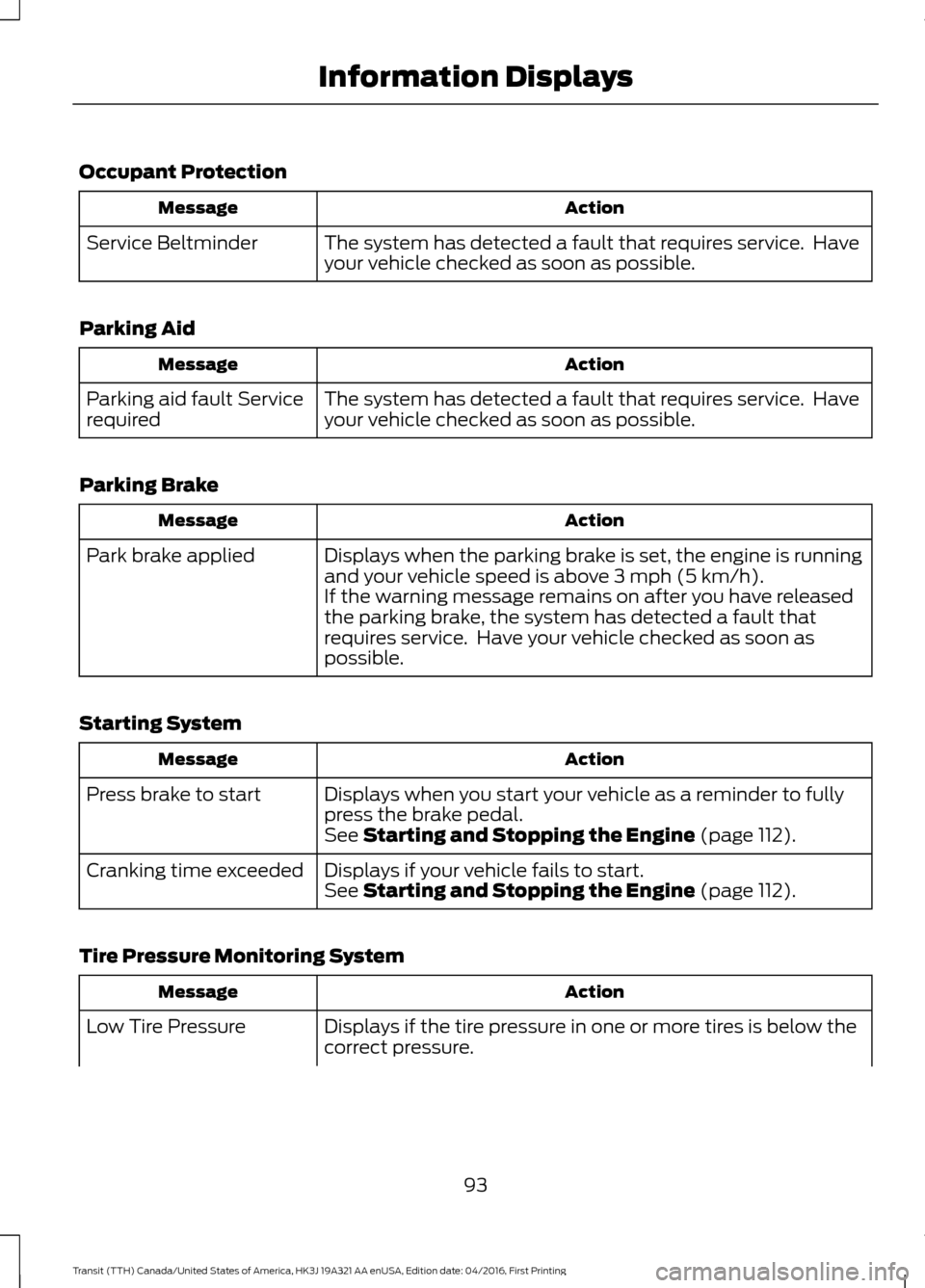
Occupant Protection
Action
Message
The system has detected a fault that requires service. Have
your vehicle checked as soon as possible.
Service Beltminder
Parking Aid Action
Message
The system has detected a fault that requires service. Have
your vehicle checked as soon as possible.
Parking aid fault Service
required
Parking Brake Action
Message
Displays when the parking brake is set, the engine is running
and your vehicle speed is above 3 mph (5 km/h).
Park brake applied
If the warning message remains on after you have released
the parking brake, the system has detected a fault that
requires service. Have your vehicle checked as soon as
possible.
Starting System Action
Message
Displays when you start your vehicle as a reminder to fully
press the brake pedal.
Press brake to start
See
Starting and Stopping the Engine (page 112).
Displays if your vehicle fails to start.
Cranking time exceeded
See
Starting and Stopping the Engine (page 112).
Tire Pressure Monitoring System Action
Message
Displays if the tire pressure in one or more tires is below the
correct pressure.
Low Tire Pressure
93
Transit (TTH) Canada/United States of America, HK3J 19A321 AA enUSA, Edition date: 04/2016, First Printing Information Displays
Page 99 of 484
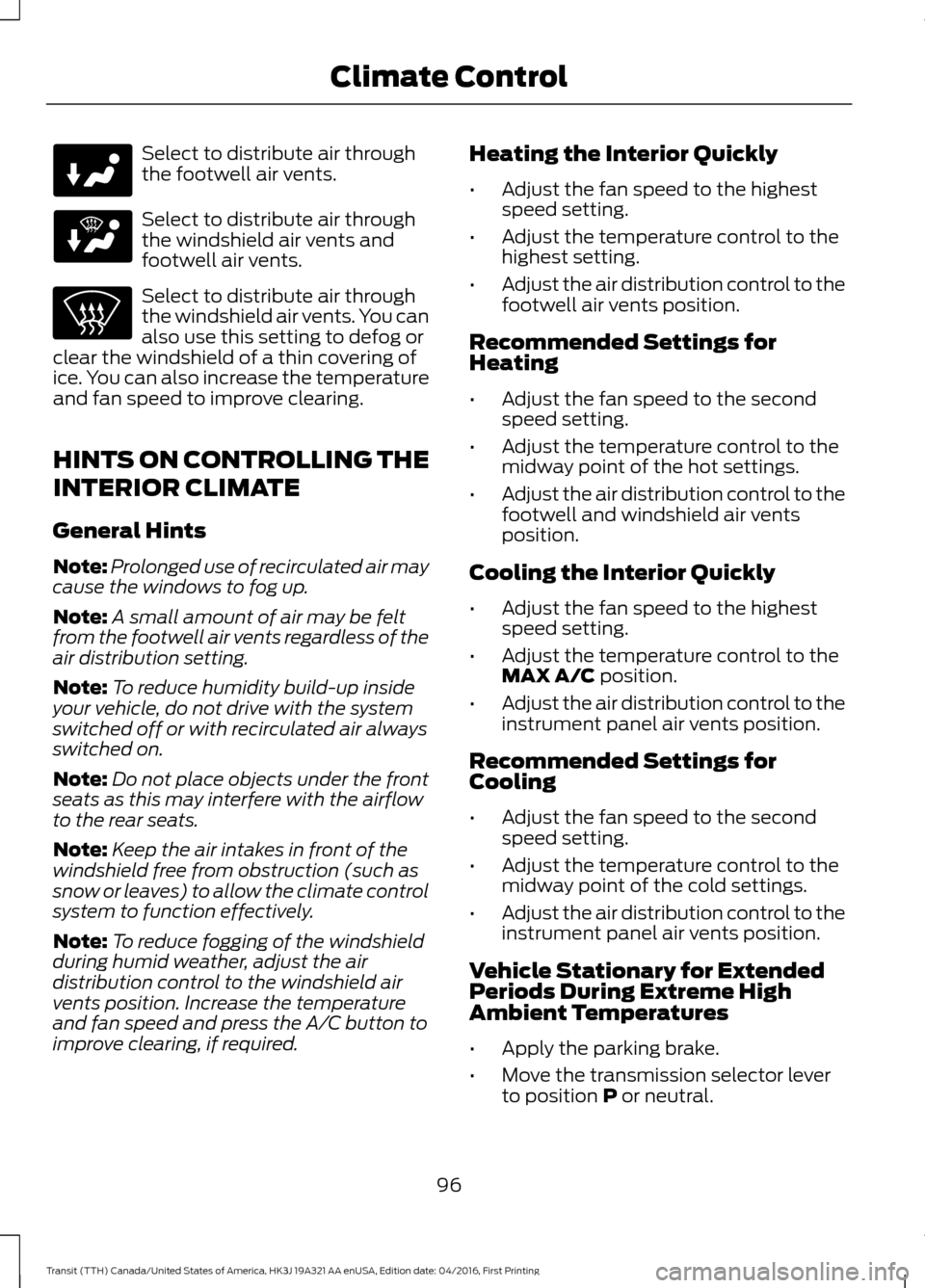
Select to distribute air through
the footwell air vents.
Select to distribute air through
the windshield air vents and
footwell air vents.
Select to distribute air through
the windshield air vents. You can
also use this setting to defog or
clear the windshield of a thin covering of
ice. You can also increase the temperature
and fan speed to improve clearing.
HINTS ON CONTROLLING THE
INTERIOR CLIMATE
General Hints
Note: Prolonged use of recirculated air may
cause the windows to fog up.
Note: A small amount of air may be felt
from the footwell air vents regardless of the
air distribution setting.
Note: To reduce humidity build-up inside
your vehicle, do not drive with the system
switched off or with recirculated air always
switched on.
Note: Do not place objects under the front
seats as this may interfere with the airflow
to the rear seats.
Note: Keep the air intakes in front of the
windshield free from obstruction (such as
snow or leaves) to allow the climate control
system to function effectively.
Note: To reduce fogging of the windshield
during humid weather, adjust the air
distribution control to the windshield air
vents position. Increase the temperature
and fan speed and press the A/C button to
improve clearing, if required. Heating the Interior Quickly
•
Adjust the fan speed to the highest
speed setting.
• Adjust the temperature control to the
highest setting.
• Adjust the air distribution control to the
footwell air vents position.
Recommended Settings for
Heating
• Adjust the fan speed to the second
speed setting.
• Adjust the temperature control to the
midway point of the hot settings.
• Adjust the air distribution control to the
footwell and windshield air vents
position.
Cooling the Interior Quickly
• Adjust the fan speed to the highest
speed setting.
• Adjust the temperature control to the
MAX A/C position.
• Adjust the air distribution control to the
instrument panel air vents position.
Recommended Settings for
Cooling
• Adjust the fan speed to the second
speed setting.
• Adjust the temperature control to the
midway point of the cold settings.
• Adjust the air distribution control to the
instrument panel air vents position.
Vehicle Stationary for Extended
Periods During Extreme High
Ambient Temperatures
• Apply the parking brake.
• Move the transmission selector lever
to position
P or neutral.
96
Transit (TTH) Canada/United States of America, HK3J 19A321 AA enUSA, Edition date: 04/2016, First Printing Climate Control
Page 112 of 484
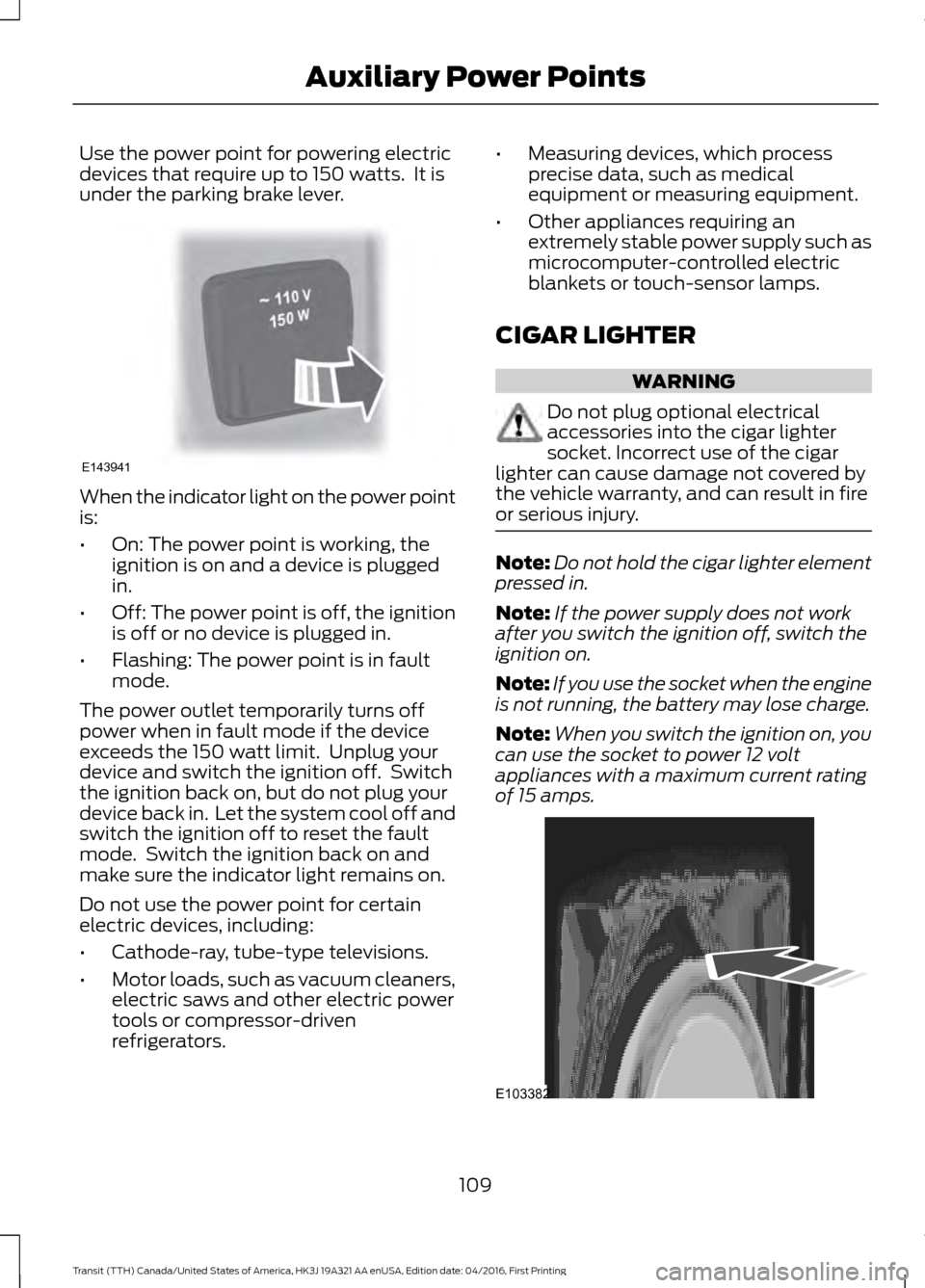
Use the power point for powering electric
devices that require up to 150 watts. It is
under the parking brake lever.
When the indicator light on the power point
is:
•
On: The power point is working, the
ignition is on and a device is plugged
in.
• Off: The power point is off, the ignition
is off or no device is plugged in.
• Flashing: The power point is in fault
mode.
The power outlet temporarily turns off
power when in fault mode if the device
exceeds the 150 watt limit. Unplug your
device and switch the ignition off. Switch
the ignition back on, but do not plug your
device back in. Let the system cool off and
switch the ignition off to reset the fault
mode. Switch the ignition back on and
make sure the indicator light remains on.
Do not use the power point for certain
electric devices, including:
• Cathode-ray, tube-type televisions.
• Motor loads, such as vacuum cleaners,
electric saws and other electric power
tools or compressor-driven
refrigerators. •
Measuring devices, which process
precise data, such as medical
equipment or measuring equipment.
• Other appliances requiring an
extremely stable power supply such as
microcomputer-controlled electric
blankets or touch-sensor lamps.
CIGAR LIGHTER WARNING
Do not plug optional electrical
accessories into the cigar lighter
socket. Incorrect use of the cigar
lighter can cause damage not covered by
the vehicle warranty, and can result in fire
or serious injury. Note:
Do not hold the cigar lighter element
pressed in.
Note: If the power supply does not work
after you switch the ignition off, switch the
ignition on.
Note: If you use the socket when the engine
is not running, the battery may lose charge.
Note: When you switch the ignition on, you
can use the socket to power 12 volt
appliances with a maximum current rating
of 15 amps. 109
Transit (TTH) Canada/United States of America, HK3J 19A321 AA enUSA, Edition date: 04/2016, First Printing Auxiliary Power PointsE143941 E103382
Page 115 of 484
GENERAL INFORMATION
WARNINGS
Extended idling at high engine
speeds can produce very high
temperatures in the engine and
exhaust system, creating the risk of fire or
other damage. Do not park, idle or drive your vehicle
on dry grass or other dry ground
cover. The emission system heats up
the engine compartment and exhaust
system, creating the risk of fire. Do not start the engine in a closed
garage or in other enclosed areas.
Exhaust fumes can be toxic. Always
open the garage door before you start the
engine. If you smell exhaust fumes inside
your vehicle, have your vehicle
checked by an authorized dealer
immediately. Do not drive your vehicle if
you smell exhaust fumes. If you disconnect the battery, your vehicle
may exhibit some unusual driving
characteristics for approximately 5 miles
(8 kilometers) after you reconnect it. This
is because the engine management system
must realign itself with the engine. You can
disregard any unusual driving
characteristics during this period.
The powertrain control system meets all
Canadian interference-causing equipment
standard requirements regulating the
impulse electrical field or radio noise.
When you start the engine, avoid pressing
the accelerator pedal before and during
operation. Only use the accelerator pedal
when you have difficulty starting the
engine. IGNITION SWITCH
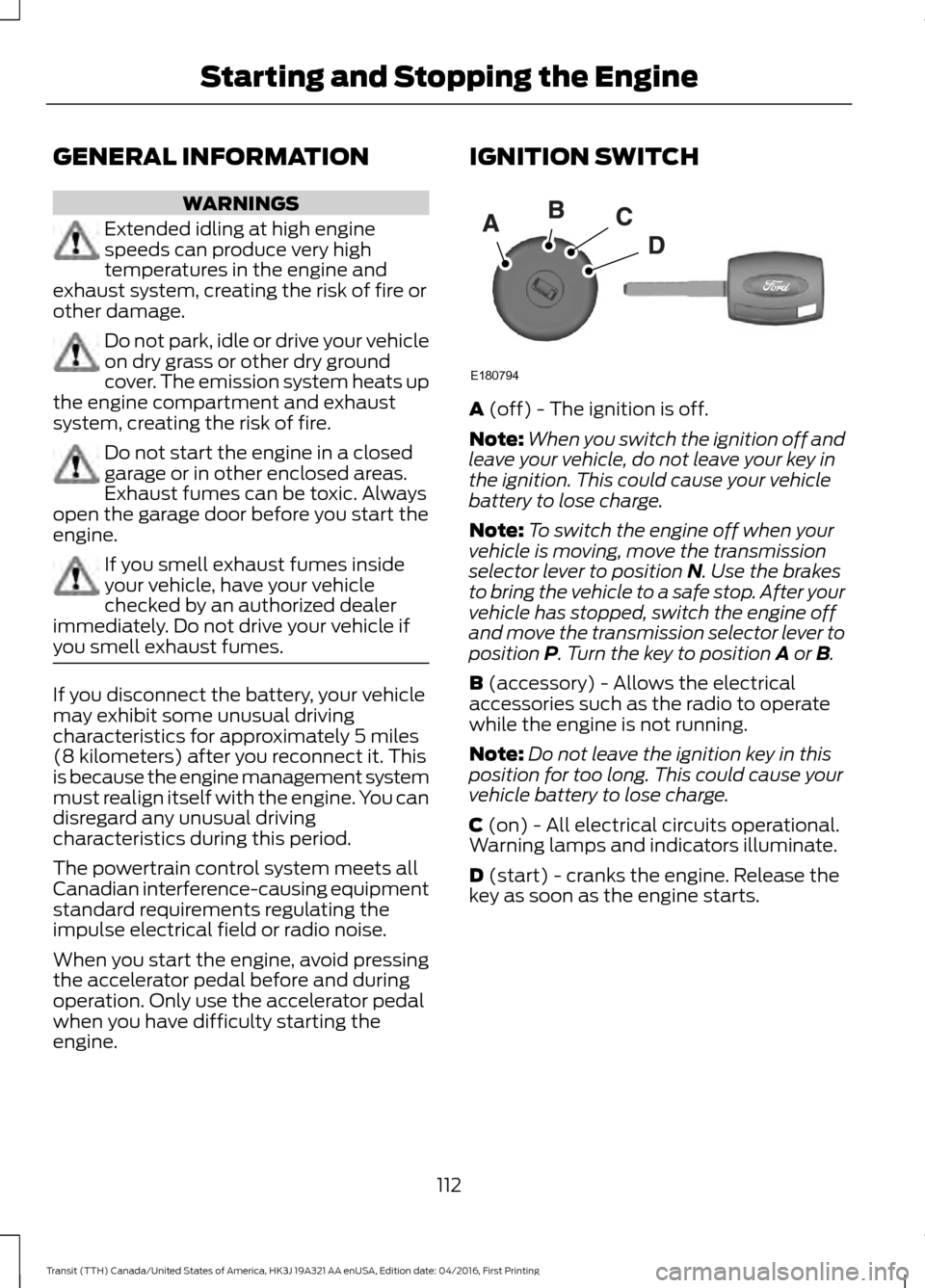
A (off) - The ignition is off.
Note: When you switch the ignition off and
leave your vehicle, do not leave your key in
the ignition. This could cause your vehicle
battery to lose charge.
Note: To switch the engine off when your
vehicle is moving, move the transmission
selector lever to position
N. Use the brakes
to bring the vehicle to a safe stop. After your
vehicle has stopped, switch the engine off
and move the transmission selector lever to
position
P. Turn the key to position A or B.
B
(accessory) - Allows the electrical
accessories such as the radio to operate
while the engine is not running.
Note: Do not leave the ignition key in this
position for too long. This could cause your
vehicle battery to lose charge.
C
(on) - All electrical circuits operational.
Warning lamps and indicators illuminate.
D
(start) - cranks the engine. Release the
key as soon as the engine starts.
112
Transit (TTH) Canada/United States of America, HK3J 19A321 AA enUSA, Edition date: 04/2016, First Printing Starting and Stopping the EngineE180794
Page 116 of 484
STARTING A GASOLINE
ENGINE
Before starting the engine check the
following:
•
Make sure all occupants have fastened
their safety belts.
• Make sure the headlamps and
electrical accessories are off.
• Make sure the parking brake is on.
• Make sure the transmission is in park
(P).
When you start the engine, the idle speed
increases, this helps to warm up the
engine. If the engine idle speed does not
slow down automatically, have your
vehicle checked by an authorized dealer.
Note: Do not touch the accelerator pedal.
1. Fully press the brake pedal.
2. Turn the key to the on position to switch the ignition on.
3. Turn the key to the start position to start your vehicle. Release the key
when the engine starts.
Note: You can only operate the starter for
a limited period of time, for example 10
seconds. The number of start attempts is
limited to approximately six. If you exceed
this limit, the system will not allow you to
try again until a period of time has elapsed,
for example 30 minutes.
Engine Idle Speed after Starting
The speed at which the engine idles
immediately after starting will adjust
automatically to minimize vehicle
emissions and maximize cabin comfort
and fuel economy. The idle speed will vary depending on
certain factors. These include vehicle
component and ambient temperatures as
well as electrical and climate system
demands.
Cold or Hot Engine
If the engine does not start within 10
seconds, wait for a short period and try
again.
If the engine does not start after three
attempts, wait 10 seconds and follow the
flooded engine procedure.
If you have difficulty starting the engine
when the temperature is below -13°F
(-25°C), press the accelerator pedal to the
mid-way point of its travel and try again.
Flooded Engine
1. Shift into park (P).
2. Fully depress the accelerator pedal and
hold it there.
3. Start the engine.
Note: If the engine does not start, repeat
the cold or hot engine procedure.
STARTING A DIESEL ENGINE WARNINGS
Do not use starting fluid, for example
ether, in the air intake system (see
air filter decal). Starting fluids could
cause immediate explosive damage to the
engine. Failure to follow this warning could
result in fire, serious personal injury or
death. Do not add gasoline, gasohol, alcohol
or Kerosene to diesel fuel. This action
creates a serious fire hazard and will
result in poor engine performance. Engine
damage caused by the use of incorrect fuel
is not covered by the vehicle warranty. 113
Transit (TTH) Canada/United States of America, HK3J 19A321 AA enUSA, Edition date: 04/2016, First Printing Starting and Stopping the Engine
Page 117 of 484
Note:
Avoid shutting the engine down after
an extensive idling period. Drive your vehicle
for several miles with the engine at normal
operating temperatures under a moderate
load.
Engine Glow Plugs The powertrain control and glow
plug control modules operate
the glow plug system.
The glow plug control module using the
engine coolant temperature, barometric
pressure sensor and the environmental
temperature sensor will determine how
long the glow plugs stay energized. The
required time for the glow plugs to remain
energized will decrease as the engine
coolant temperature, barometric pressure
and the environmental temperature
increases.
When you switch the ignition on, the glow
plug indicator lamp will illuminate if glow
plug heat is necessary as a starting aid.
Wait until the glow plug indicator lamp
turns off before starting the engine. The
lamp should always momentarily
illuminate when the engine is cold and you
switch the ignition on.
Cold Weather Operation
In cold weather below 32°F (0°C), the
engine may slowly increase to a higher idle
speed if left idling in park (P). As the engine
warms-up, the engine sound level
decreases due to the activation of
powertrain control module controlled
sound reduction features.
It is recommended that the engine block
heater be used for starting when the
temperature is -9°F (-23°C) or colder. See
Engine Block Heater
(page 116). Note:
Idling in cold weather does not heat
the engine to its normal operating
temperature. Long periods of idling,
especially in cold weather, can cause a
buildup of deposits which can cause engine
damage.
Starting a Cold or Hot Engine
Note: Do not press the accelerator pedal.
1. Fully depress the brake pedal.
2. Turn the key to the on position and wait
until the glow plug indicator lamp turns
off.
Note: Do not press the accelerator pedal.
3. Turn the key to the start position to start the engine.
4. Release the key.
Note: You may need to crank the engine for
up to 10 seconds when the outside air
temperature is
5°F (-15°C) or below.
Note: Engine power may be reduced for 15
seconds when the engine oil temperature
is
-9°F (-23°C) or below. This is to allow
the turbocharger to be lubricated.
Note: If the engine fails to start after a
number of attempts, the system will not
allow you to operate the starter for a short
period of time, for example 30 minutes.
Failure to Start
If the engine does not crank with the key
turned to the start position while the brake
pedal is fully depressed, do the following:
1. Switch the ignition off.
Note: Make sure the parking brake is fully
applied.
2. Release the brake pedal.
3. Fully depress the brake pedal.
4. Turn the key to the on position and wait
until the glow plug indicator lamp turns
off.
114
Transit (TTH) Canada/United States of America, HK3J 19A321 AA enUSA, Edition date: 04/2016, First Printing Starting and Stopping the Engine
Page 132 of 484
1. Stop your vehicle as soon as safely
possible and shift the transmission into
park (P) or neutral (N).
2. Apply the parking brake and switch the
ignition off.
3. Fully open the fuel tank filler door until
it engages.
4. Check the fuel filler inlet and the area around it for any items or debris that
may be obstructing its movement.
5. Insert a fuel pump nozzle or the fuel filler funnel provided with your vehicle
in to the fuel tank filler pipe opening.
This action should dislodge any debris
that may be preventing the fuel filler
inlet from fully closing.
Note: If this action corrects the problem
the message may not reset immediately. If
the message remains and the service engine
soon warning lamp appears in the
information display, have your vehicle
checked as soon as possible.
FUEL CONSUMPTION
Empty reserve is the amount of fuel
remaining in the tank after the fuel gauge
indicates empty. The amount of usable
fuel in the empty reserve varies and should
not be relied upon to increase driving range. •
The usable capacity of the fuel tank is
the amount of fuel that you can add to
the fuel tank when the fuel gauge
indicates empty, before the first fuel
filler nozzle automatic shutoff event.
• The advertised capacity is equal to the
volumetric difference between actual
fuel fill before the first fuel filler nozzle
automatic shutoff event and the fuel
quantity when the fuel gauge indicates
empty. See Capacities and
Specifications (page 281). It is the
usable capacity minus the empty
reserve.
• Due to the empty reserve, you may be
able to add more fuel than the
advertised capacity of the fuel tank
when the fuel gauge indicates empty.
Filling the Fuel Tank
For consistent results when refueling:
• Turn the ignition off before fueling; an
inaccurate reading results if the engine
is left running.
• Use the same fill rate
(low-medium-high) each time the tank
is filled.
• Allow no more than one automatic
shut-off when refueling.
Results are most accurate when the filling
method is consistent.
Calculating Fuel Economy
Do not measure fuel economy during the
first
1,000 mi (1,600 km) of driving (this is
your engine ’s break-in period). A more
accurate measurement is obtained after
2,000 mi (3,200 km)
to 3,000 mi
(4,800 km). Also, fuel expense, frequency
of fill ups or fuel gauge readings are not
accurate ways to measure fuel economy.
1. Fill the fuel tank completely and record
the initial odometer reading.
129
Transit (TTH) Canada/United States of America, HK3J 19A321 AA enUSA, Edition date: 04/2016, First Printing Fuel and Refueling