door lock FORD TRANSIT 2017 5.G Owners Manual
[x] Cancel search | Manufacturer: FORD, Model Year: 2017, Model line: TRANSIT, Model: FORD TRANSIT 2017 5.GPages: 484, PDF Size: 11.45 MB
Page 4 of 484
Introduction
About This Manual...........................................7
Symbols Glossary
.............................................7
Data Recording
..................................................9
California Proposition 65.............................10
Perchlorate........................................................10
Ford Credit
.........................................................10
Replacement Parts Recommendation......................................10
Special Notices
.................................................11
Mobile Communications Equipment.....................................................12
Export Unique Options..................................13
Environment
Protecting the Environment........................14
Child Safety
General Information
.......................................15
Installing Child Restraints
............................16
Booster Seats..................................................25
Child Restraint Positioning
..........................27
Child Safety Locks.........................................28
Seatbelts
Principle of Operation
..................................30
Fastening the Seatbelts
................................31
Seatbelt Height Adjustment
......................33
Seatbelt Warning Lamp and Indicator Chime
.............................................................33
Seatbelt Reminder
........................................34
Child Restraint and Seatbelt Maintenance
................................................35
Seatbelt Extension........................................36
Supplementary Restraints System
Principle of Operation...................................37
Driver and Passenger Airbags...................38
Side Airbags
.....................................................44 Safety Canopy
™
............................................44
Crash Sensors and Airbag Indicator.......46
Airbag Disposal
...............................................47
Keys and Remote Controls
Principle of Operation..................................48
General Information on Radio Frequencies.................................................48
Remote Control..............................................48
Replacing a Lost Key or Remote Control...........................................................50
MyKey ™
Principle of Operation
...................................51
Creating a MyKey............................................52
Clearing All MyKeys.......................................53
Checking MyKey System Status...............54
Using MyKey With Remote Start Systems.........................................................55
MyKey Troubleshooting...............................55
Doors and Locks
Locking and Unlocking.................................57
Security
Passive Anti-Theft System.........................62
Anti-Theft Alarm
............................................63
Power Running Boards
Using Power Running Boards....................64
Steering Wheel
Adjusting the Steering Wheel....................67
Audio Control
...................................................67
Voice Control
...................................................68
Cruise Control.................................................68
Information Display Control
......................69
Wipers and Washers
Windshield Wipers
.........................................70
1
Transit (TTH) Canada/United States of America, HK3J 19A321 AA enUSA, Edition date: 04/2016, First Printing Table of Contents
Page 11 of 484
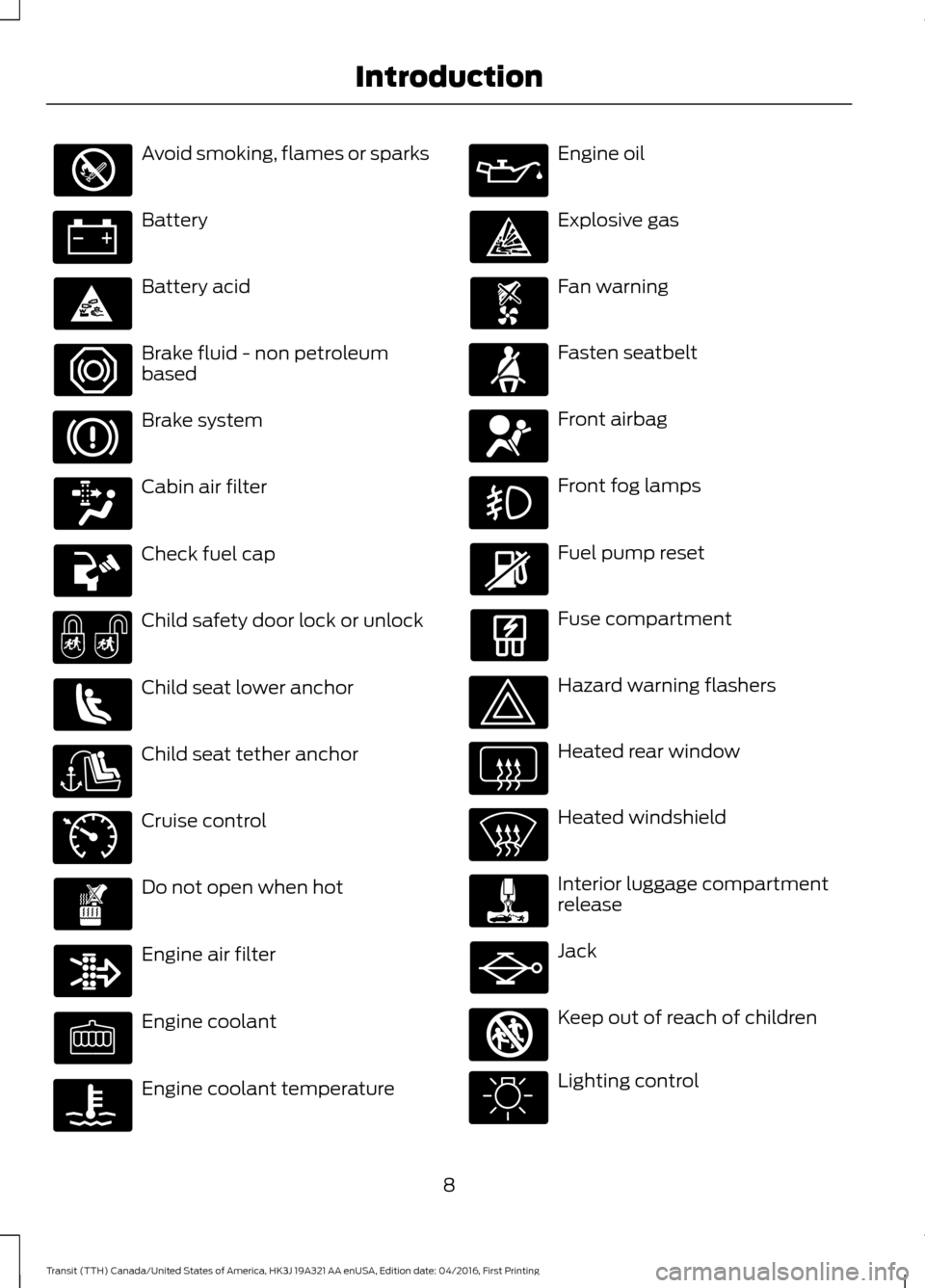
Avoid smoking, flames or sparks
Battery
Battery acid
Brake fluid - non petroleum
based
Brake system
Cabin air filter
Check fuel cap
Child safety door lock or unlock
Child seat lower anchor
Child seat tether anchor
Cruise control
Do not open when hot
Engine air filter
Engine coolant
Engine coolant temperature Engine oil
Explosive gas
Fan warning
Fasten seatbelt
Front airbag
Front fog lamps
Fuel pump reset
Fuse compartment
Hazard warning flashers
Heated rear window
Heated windshield
Interior luggage compartment
release
Jack
Keep out of reach of children
Lighting control
8
Transit (TTH) Canada/United States of America, HK3J 19A321 AA enUSA, Edition date: 04/2016, First Printing Introduction E71340 E161353
Page 31 of 484
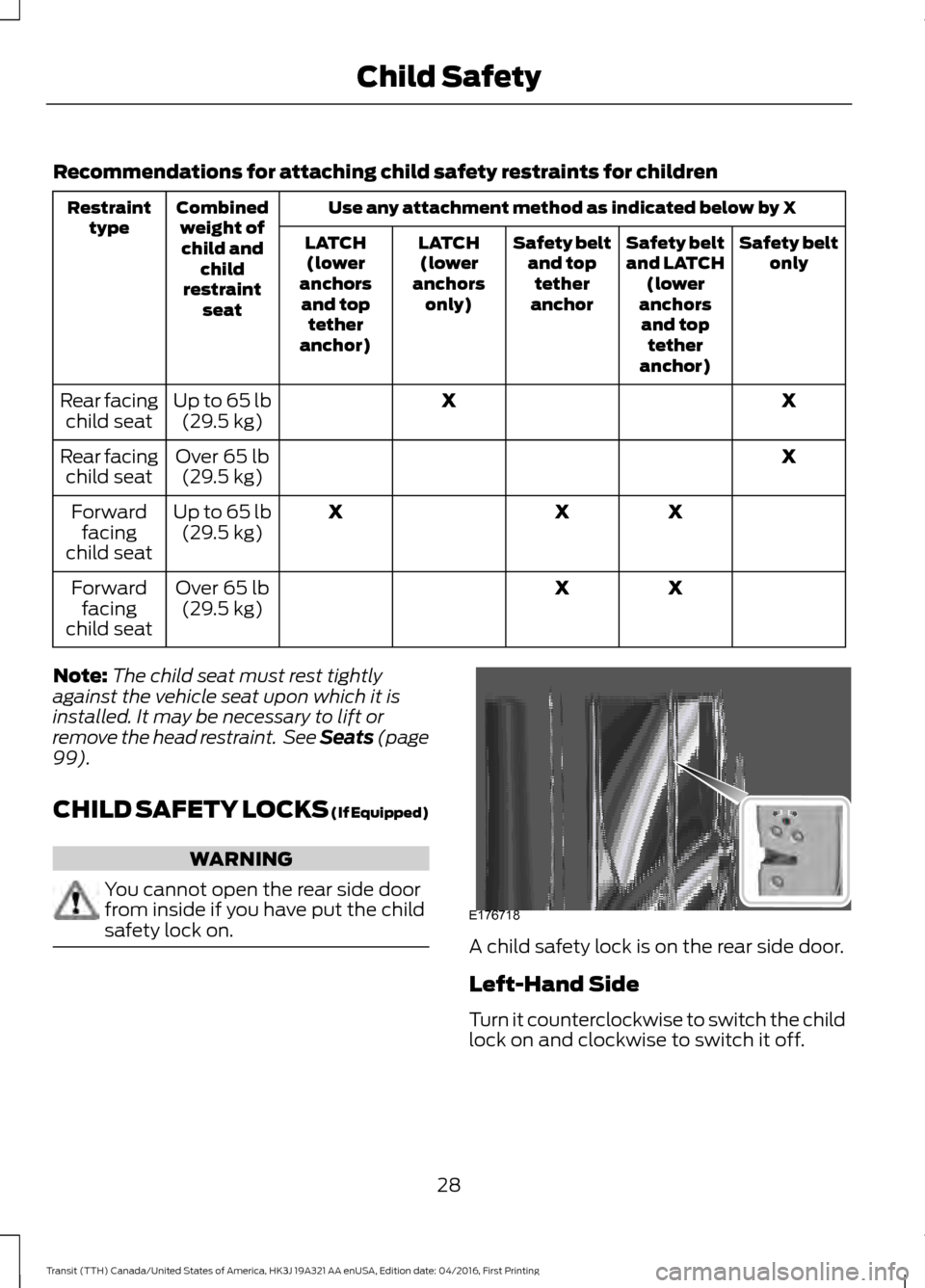
Recommendations for attaching child safety restraints for children
Use any attachment method as indicated below by X
Combined
weight ofchild and child
restraint seat
Restraint
type Safety belt
only
Safety belt
and LATCH
(lower
anchors and top tether
anchor)
Safety belt
and toptether
anchor
LATCH
(lower
anchors only)
LATCH
(lower
anchors and top tether
anchor)
X
X
Up to 65 lb
(29.5 kg)
Rear facing
child seat
X
Over 65 lb
(29.5 kg)
Rear facing
child seat
X
X
X
Up to 65 lb
(29.5 kg)
Forward
facing
child seat
X
X
Over 65 lb
(29.5 kg)
Forward
facing
child seat
Note: The child seat must rest tightly
against the vehicle seat upon which it is
installed. It may be necessary to lift or
remove the head restraint. See Seats (page
99).
CHILD SAFETY LOCKS (If Equipped) WARNING
You cannot open the rear side door
from inside if you have put the child
safety lock on.
A child safety lock is on the rear side door.
Left-Hand Side
Turn it counterclockwise to switch the child
lock on and clockwise to switch it off.
28
Transit (TTH) Canada/United States of America, HK3J 19A321 AA enUSA, Edition date: 04/2016, First Printing Child SafetyE176718
Page 51 of 484
PRINCIPLE OF OPERATION
The remote control allows you to:
•
remotely lock or unlock the vehicle
doors
• unlock the doors without actively using
a key or remote control (intelligent
access only)
• remotely open the power liftgate (if
equipped)
• remotely start or stop the engine (if
equipped)
• arm and disarm the anti-theft system
• activate the panic alarm.
GENERAL INFORMATION ON
RADIO FREQUENCIES
This device complies with Part 15 of the
FCC Rules and with Industry Canada
license-exempt RSS standard(s).
Operation is subject to the following two
conditions: (1) This device may not cause
harmful interference, and (2) This device
must accept any interference received,
including interference that may cause
undesired operation.
Note: Changes or modifications not
expressively approved by the party
responsible for compliance could void the
user's authority to operate the equipment.
The term IC before the radio certification
number only signifies that Industry Canada
technical specifications were met.
The typical operating range for your
transmitter is approximately 33 feet (10
meters). Vehicles with the remote start
feature will have a greater range. One of
the following could cause a decrease in
operating range:
• weather conditions
• nearby radio towers •
structures around the vehicle
• other vehicles parked next to your
vehicle
The radio frequency used by your remote
control can also be used by other short
distance radio transmissions, for example
amateur radios, medical equipment,
wireless headphones, remote controls and
alarm systems. If the frequencies are
jammed, you will not be able to use your
remote control. You can lock and unlock
the doors with the key.
Note: Make sure to lock your vehicle before
leaving it unattended.
Note: If you are in range, the remote control
will operate if you press any button
unintentionally.
Note: The remote control contains sensitive
electrical components. Exposure to moisture
or impact may cause permanent damage.
REMOTE CONTROL
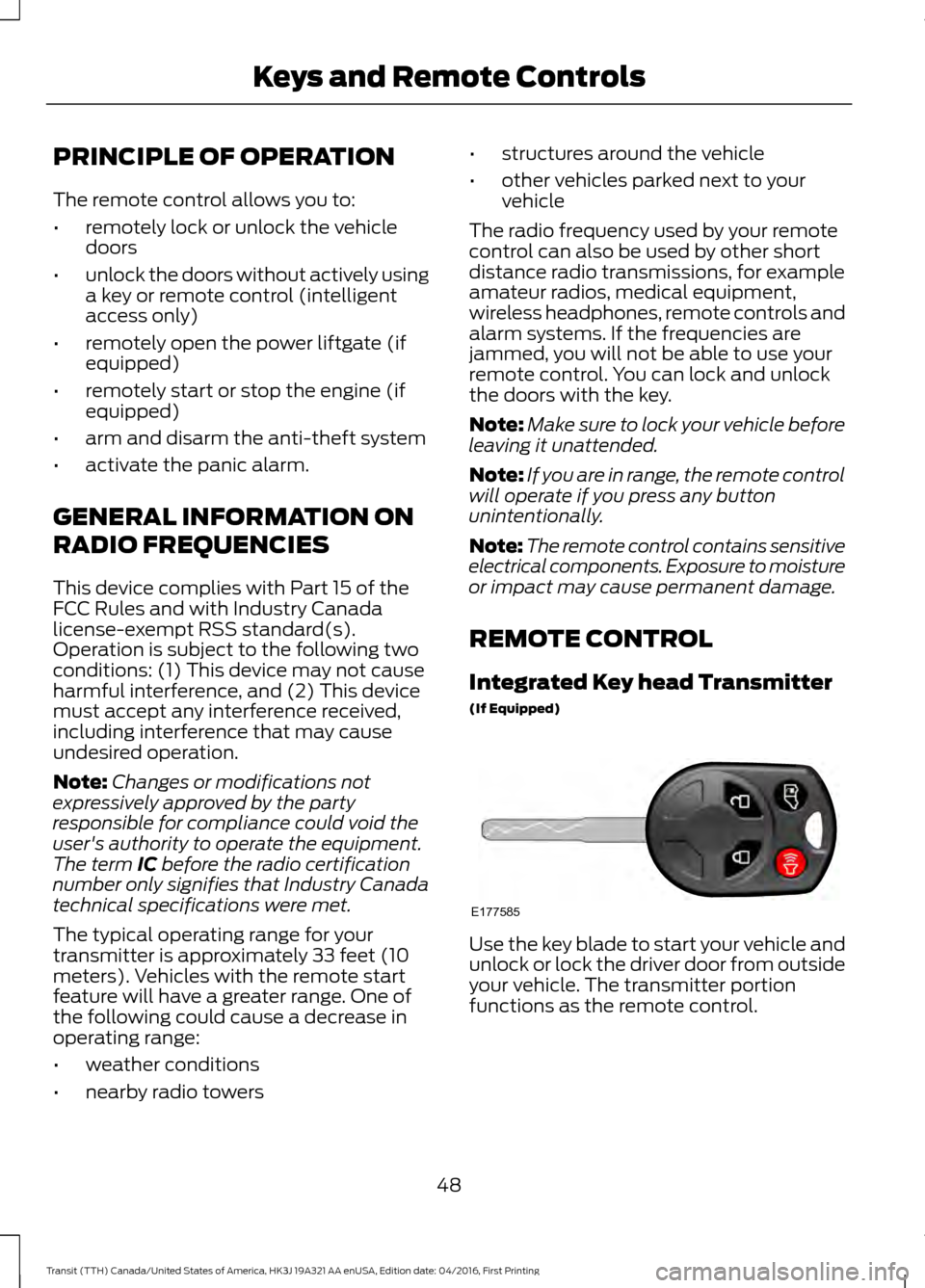
Integrated Key head Transmitter
(If Equipped) Use the key blade to start your vehicle and
unlock or lock the driver door from outside
your vehicle. The transmitter portion
functions as the remote control.
48
Transit (TTH) Canada/United States of America, HK3J 19A321 AA enUSA, Edition date: 04/2016, First Printing Keys and Remote ControlsE177585
Page 53 of 484
Note:
If locking was not successful or if any
door is open, or if the hood is open on
vehicles with a perimeter alarm or remote
start, the horn will sound and the direction
indicators will not flash.
Sounding a Panic Alarm
Note: The alarm will only operate when the
ignition is off. Press the button to turn on the
alarm. Press the button again or
switch the ignition on to turn off.
REPLACING A LOST KEY OR
REMOTE CONTROL
You can purchase replacement keys or
remote controls from an authorized dealer.
Authorized dealers can program remote
controls for your vehicle. See Remote
Control (page 48).
To re-program the passive anti-theft
system see an authorized dealer.
50
Transit (TTH) Canada/United States of America, HK3J 19A321 AA enUSA, Edition date: 04/2016, First Printing Keys and Remote ControlsE138624
Page 60 of 484
LOCKING AND UNLOCKING
Note:
Make sure you have locked your
vehicle before leaving it unattended.
Note: Do not leave the keys in your vehicle.
Locking
Locking With the Key
Turn the top of the key toward the rear of
your vehicle.
Locking With the Remote Control Press the button.
Note: You can lock the driver door with the
key. Use the key when the remote control
is not functioning.
Unlocking
Unlocking With the Key
Turn the top of the key toward the front of
your vehicle.
Unlocking With the Remote Control Press the button.
Note: You can unlock the driver door with
the key. Use the key when the remote
control is not functioning.
Note: When you leave your vehicle
unattended for several weeks, the remote
control turns off.
Note: Unlock your vehicle and start the
engine using the key. Unlocking and starting
your vehicle once enables the remote
control.
Unlocking the Rear Cargo Doors Press the button. Reprogramming the Unlocking
Function
You can reprogram the unlocking function
so that only the driver door unlocks. See
Remote Control (page 48).
Locking and Unlocking
Confirmation
When you lock the doors, the direction
indicators flash twice.
When you unlock the doors, the direction
indicators flash once and a tone sounds.
Locking and Unlocking the Doors
From Inside Lock.
A
Unlock.
B
57
Transit (TTH) Canada/United States of America, HK3J 19A321 AA enUSA, Edition date: 04/2016, First Printing Doors and Locks E148829
A
B
Page 61 of 484
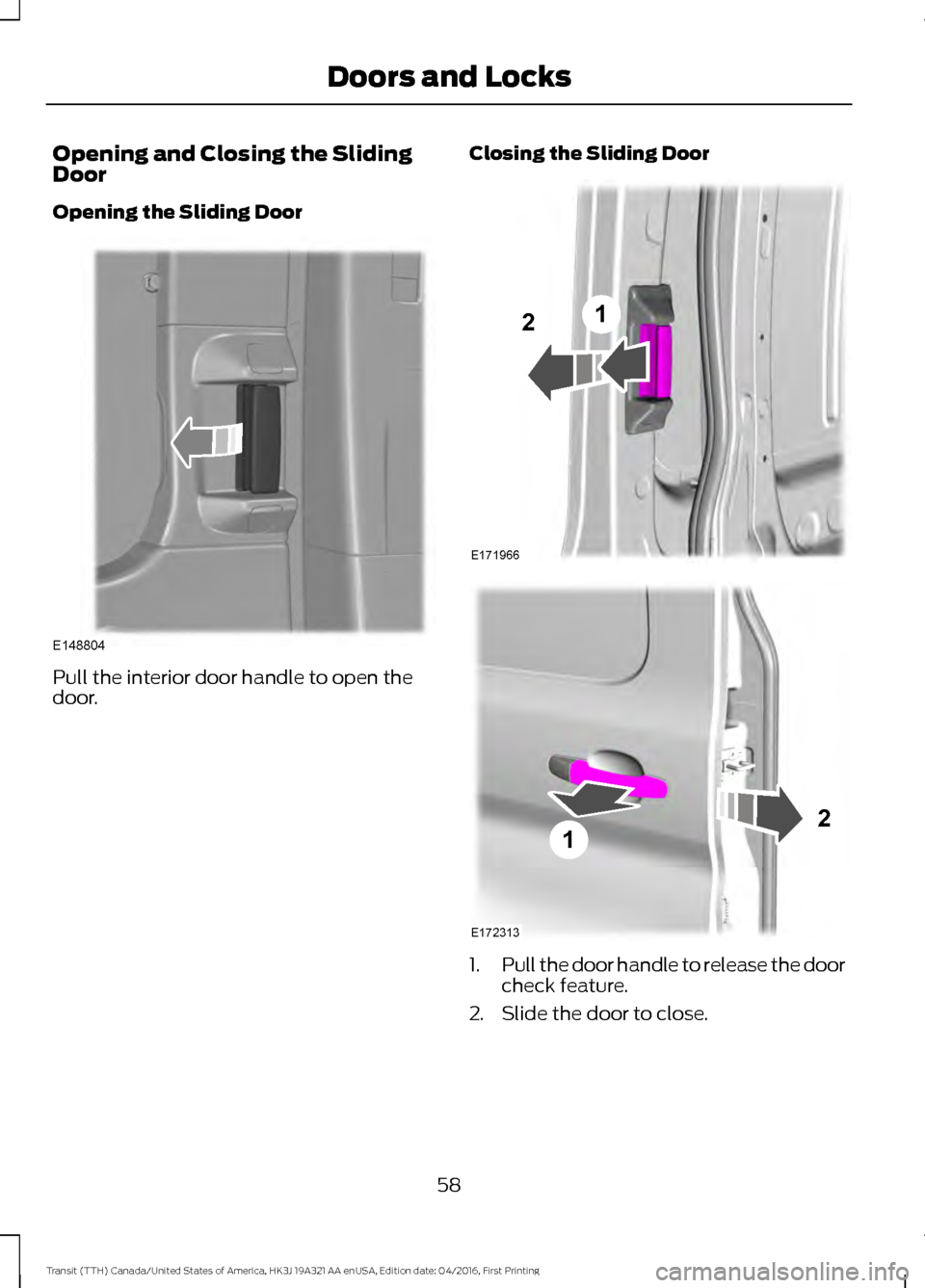
Opening and Closing the Sliding
Door
Opening the Sliding Door
Pull the interior door handle to open the
door.
Closing the Sliding Door
1.
Pull the door handle to release the door
check feature.
2. Slide the door to close.
58
Transit (TTH) Canada/United States of America, HK3J 19A321 AA enUSA, Edition date: 04/2016, First Printing Doors and LocksE148804 E171966
12 E172313
12
Page 62 of 484
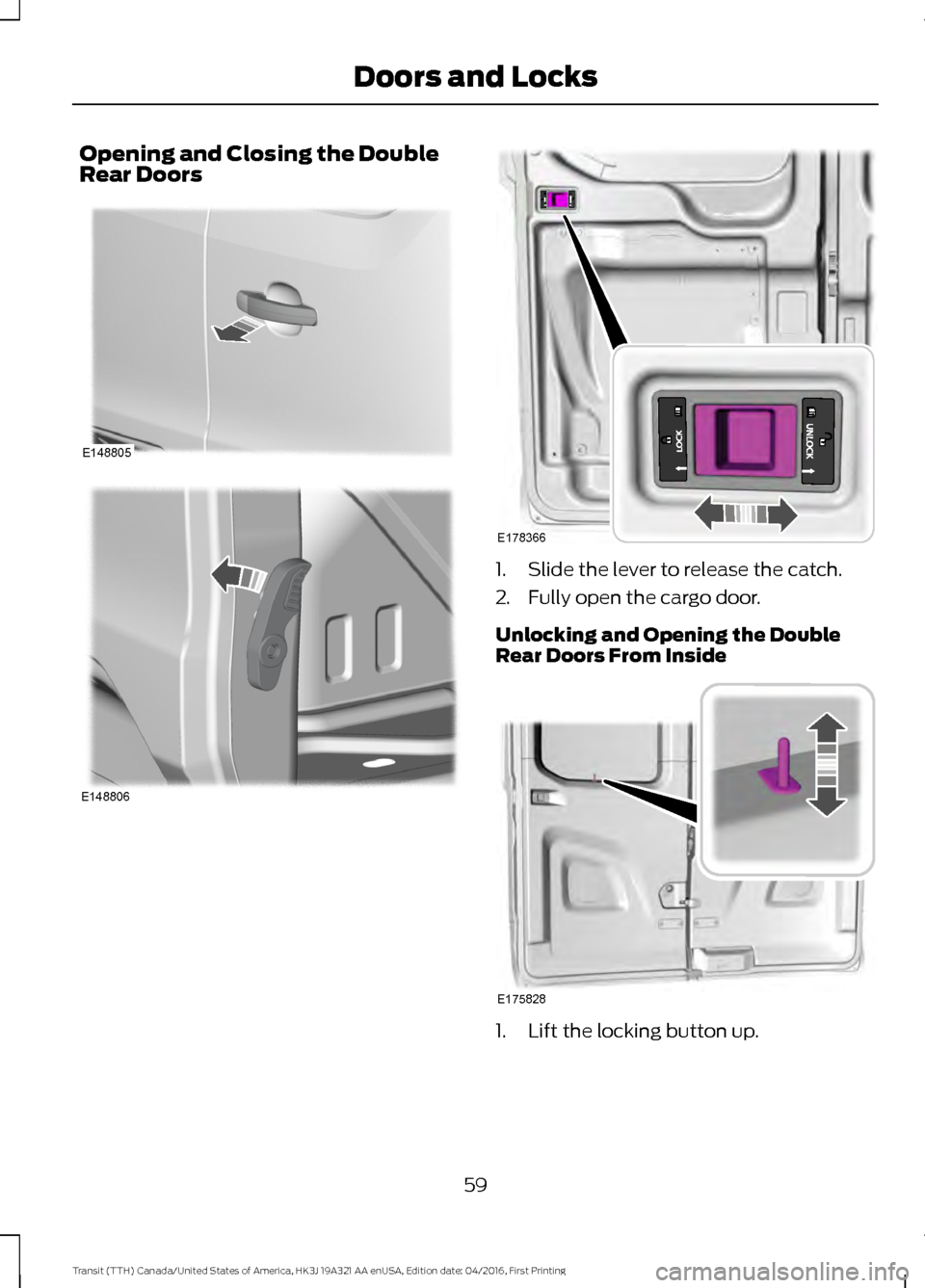
Opening and Closing the Double
Rear Doors
1. Slide the lever to release the catch.
2. Fully open the cargo door.
Unlocking and Opening the Double
Rear Doors From Inside
1. Lift the locking button up.
59
Transit (TTH) Canada/United States of America, HK3J 19A321 AA enUSA, Edition date: 04/2016, First Printing Doors and LocksE148805 E148806 E178366 E175828
Page 63 of 484

2. Push the inner release lever down to
open the door. Rear Emergency Exit
Wagon and Bus
1. Lift the locking button up.
2. Pull the interior handle up to open the
door in an emergency.
60
Transit (TTH) Canada/United States of America, HK3J 19A321 AA enUSA, Edition date: 04/2016, First Printing Doors and LocksE175955 E148806 E236264 E179501
Page 64 of 484
Automatic Locking
You can set your vehicle's doors to lock
automatically when you exceed 5 mph
(8 km/h). You can switch this on in the
information display. See Information
Displays (page 85). If you have switched
automatic locking on, either use the interior
door unlock button or switch the ignition
off and use the key or remote control to
unlock the rear or sliding door.
Automatic Unlocking
You can switch this function on using the
information display. See
Information
Displays (page 85). If you have switched
this function on, the automatic unlocking
feature unlocks all doors within 10 minutes
of the end of a drive cycle, when the driver
door is opened and the ignition is off.
One-Stage Unlocking
You can switch on this function using the
information display. See
Information
Displays (page 85).
If you have switched on this function, you
unlock all doors including the rear doors
and the sliding door.
Note: When you unlock the doors, the
direction indicators flash once.
You unlock all of the doors when you:
• Press the unlock button on the remote
control once.
• Press the interior unlock button once.
Two-Stage Unlocking
Note: When you unlock the doors, the
direction indicators flash once.
You unlock the front doors when you:
• Press the unlock button on the remote
control once.
• Press the interior unlock button once. You unlock the front doors and cargo area
when you:
•
Press the unlock button on the remote
control once.
• Press the unlock button on the remote
control twice within three seconds.
Zone Re-Locking
(If Equipped)
If you enable zone re-locking and open one
door, all other doors remain locked. See an
authorized dealer for further information.
The locks on van, bus or wagon have two
zones, cabin and cargo. For van, the cargo
area includes the rear doors and the sliding
door. For bus or wagon, the cargo area
includes the rear doors.
• Exit your vehicle and press the lock
button.
• Press the unlock button or the cargo
area unlock button once to open the
respective zone.
If you now open a door within the unlocked
zone, the other doors in that zone
automatically lock.
Configurable Unlocking
Configurable unlocking is set when you
purchase your vehicle. It allows you to
select which doors unlock when you press,
once or twice, the unlock button or the
cargo area unlock button on your remote
control. You cannot switch this feature
back on if you had it switched off. See an
authorized dealer for further information.
61
Transit (TTH) Canada/United States of America, HK3J 19A321 AA enUSA, Edition date: 04/2016, First Printing Doors and Locks