ignition FORD TRANSIT 2019 Owners Manual
[x] Cancel search | Manufacturer: FORD, Model Year: 2019, Model line: TRANSIT, Model: FORD TRANSIT 2019Pages: 529, PDF Size: 8.57 MB
Page 398 of 529
The touchscreen allows you quick access
to all of your comfort, navigation,
communication and entertainment
options. Using the status and feature bar
you can quickly select the feature you want
to use.
Note:
Your system is equipped with a
feature that allows you to access and
control audio features for 10 minutes after
you switch the ignition off (and no doors
open).
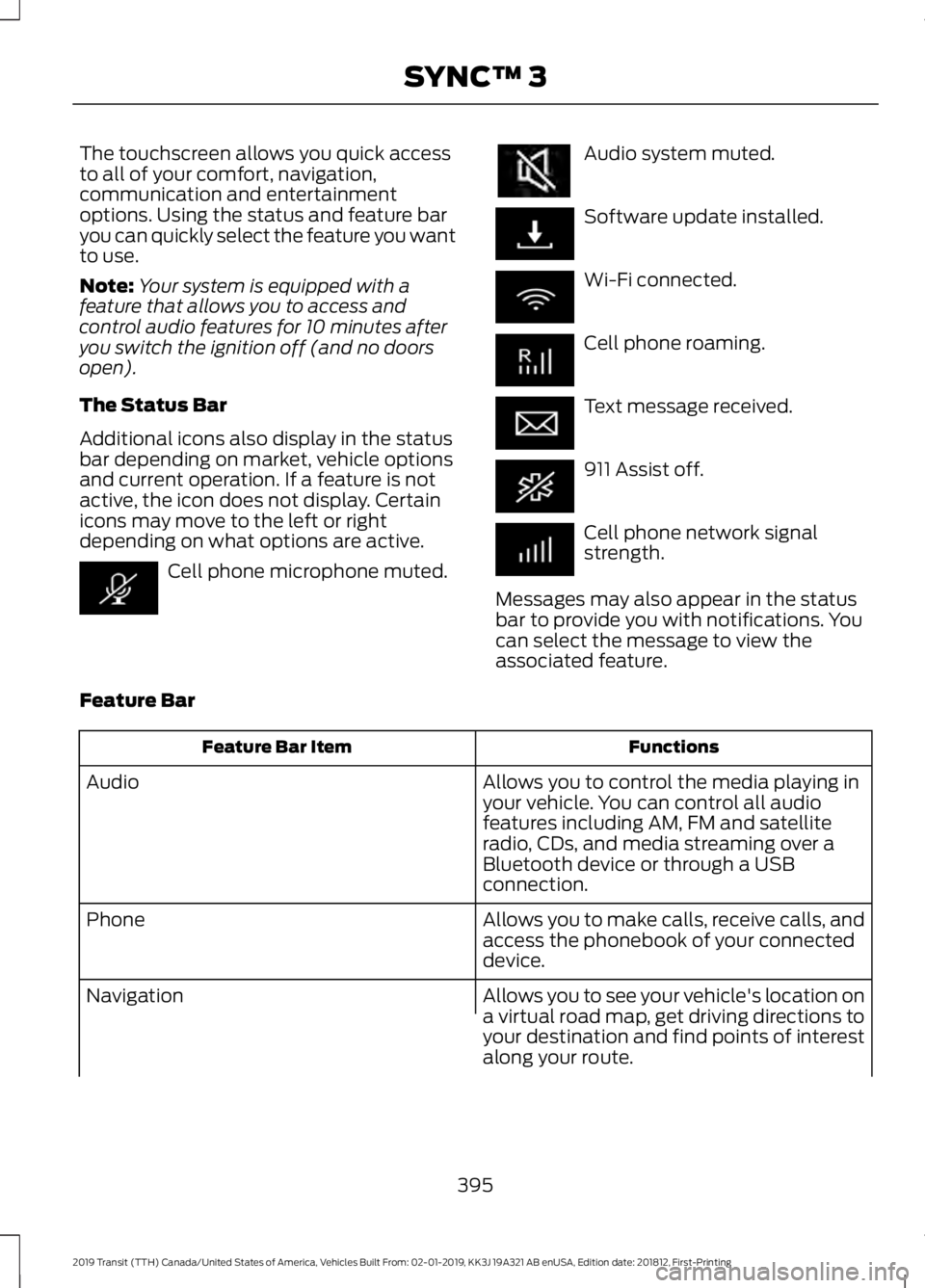
The Status Bar
Additional icons also display in the status
bar depending on market, vehicle options
and current operation. If a feature is not
active, the icon does not display. Certain
icons may move to the left or right
depending on what options are active. Cell phone microphone muted. Audio system muted.
Software update installed.
Wi-Fi connected.
Cell phone roaming.
Text message received.
911 Assist off.
Cell phone network signal
strength.
Messages may also appear in the status
bar to provide you with notifications. You
can select the message to view the
associated feature.
Feature Bar Functions
Feature Bar Item
Allows you to control the media playing in
your vehicle. You can control all audio
features including AM, FM and satellite
radio, CDs, and media streaming over a
Bluetooth device or through a USB
connection.
Audio
Allows you to make calls, receive calls, and
access the phonebook of your connected
device.
Phone
Allows you to see your vehicle's location on
a virtual road map, get driving directions to
your destination and find points of interest
along your route.
Navigation
395
2019 Transit (TTH) Canada/United States of America, Vehicles Built From: 02-01-2019, KK3J 19A321 AB enUSA, Edition date: 201812, First-Printing SYNC™ 3
Page 403 of 529
When Wi-Fi and automatic updates are
enabled, your system checks for software
updates periodically. If a new version is
available, it downloads at that time.
Software downloads can take place for up
to 30 minutes after you have switched your
vehicle off. The updates do not interrupt
the normal use of your SYNC 3 system. If
a download does not complete for any
reason, the download continues where it
left off at the next Wi-Fi connected
opportunity. Upon activation of an update,
a banner displays on the touchscreen
indicating the system update. Select the
icon to see more detail. This icon displays
for two ignition cycles.
To switch this feature off:
Menu Item
Settings
General In this menu selection, you
can change the selection
for automatic updates to
OFF.
Automatic
System
Updates
Customer Assistance
The SYNC support team is available to
help you with any questions you are not
able to answer on your own.
Monday-Saturday, 8:30am-8:00pm EST.
United States: 1-800-392-3673.
Canada: 1-800-565-3673.
Times are subject to change due to
holidays. Privacy Information
When you connect a cellular phone to
SYNC 3, the system creates a profile within
your vehicle that links to that cellular
phone. This profile helps in offering you
more cellular features and operating more
efficiently. Among other things, this profile
may contain data about your cellular
phone book, text messages (read and
unread), and call history, including history
of calls when your cell phone was not
connected to the system. In addition, if you
connect a media device, the system
creates and retains an index of supported
media content. The system also records a
short diagnostic log of approximately 10
minutes of all recent system activity. The
log profile and other system data may be
used to improve the system and help
diagnose any problems that may occur.
The cellular profile, media device index,
and diagnostic log remain in your vehicle
unless you delete them and are generally
accessible only in your vehicle when the
cellular phone or media player is
connected.
If you no longer plan to use the system or
your vehicle, we recommend you perform
a Master Reset to erase all stored
information. You can find more information
about the Master Reset in General
Settings. See Settings (page 432). System
data cannot be accessed without special
equipment and access to your vehicle's
SYNC 3 module. Ford Motor Company and
Ford of Canada do not access the system
data for any purpose other than as
described absent consent, a court order,
or where required by law enforcement,
other government authorities, or other third
parties acting with lawful authority. Other
parties may seek to access the information
independently of Ford Motor Company and
Ford of Canada.
400
2019 Transit (TTH) Canada/United States of America, Vehicles Built From: 02-01-2019, KK3J 19A321 AB enUSA, Edition date: 201812, First-Printing SYNC™ 3
Page 413 of 529
Troubleshooting tips
Action
Cause
Message
No action required. This
message should disappear
shortly.
Radio requires more than two
seconds to produce audio for
the selected channel.
Acquiring Signal
If this message does not clear
shortly, or with an ignition key
cycle, your receiver may have
a fault. See an authorized
dealer for service.
There is an internal module or
system failure present.
Satellite antenna fault
SIRIUS system failure
Tune to another channel or
choose another preset.
The channel is no longer avail-
able.
Invalid Channel
Contact SiriusXM at 1-888-
539-7474 to subscribe to the
channel, or tune to another
channel.
Your subscription does not
include this channel.
Unsubscribed Channel
The signal is blocked. When
you move into an open area,
the signal should return.
The signal is lost from the Siri-
usXM satellite or SiriusXM
tower to your vehicle antenna.
Satellite acquiring
signal…
No action required. The
process may take up to three
minutes.
Update of channel program-
ming in progress.
Updating…
Contact SiriusXM at 1-888-
539-7474 to resolve subscrip-
tion issues.
Your satellite service is no
longer available.
Questions? Call 1-
888-539-7474
Use the channel guide to turn
off the Lock or Skip function on
that station.
All the channels in the selected
category are either skipped or
locked.
None found. Check
channel guide.
No action required.
SiriusXM has updated the
channels available for your
vehicle.
SIRIUS Subscription
updated
HD Radio ™ Information (If
Available)
Note: This feature may not be available in
all markets. To activate HD radio, please see the Radio
Settings in the Settings Chapter. See
Settings (page 432).
Note: HD Radio broadcasts are not
available in all markets.
410
2019 Transit (TTH) Canada/United States of America, Vehicles Built From: 02-01-2019, KK3J 19A321 AB enUSA, Edition date: 201812, First-Printing SYNC™ 3
Page 431 of 529
Menu Item
The waypoint list then appears and you are
able to re-order all of your waypoints by
selecting the menu icon on the right hand
side of the location. You can select up to
five waypoints.
Add Waypoint
Optimize Order
You can also have the system set the order
for you by pressing:
Go
To return to your route, press:
SYNC AppLink
The AppLink app allows you to use some
SYNC 3 navigation features on your phone.
First Mile Navigation
When you switch your ignition off, the
location of your vehicle is recorded and
sent to your SYNC AppLink app. The
location of your vehicle can be viewed
within the app. You can also view walking
directions to your vehicle.
Last Mile Navigation
When you park near your destination, the
system provides walking directions to your
destination.
POI Search
Your paired phone can be used to access
additional points of interest (POI). These
points of interest can only be access when
your phone is paired.
Send To Car
You can send destinations to your
navigation system using a computer or
phone using AppLink. cityseeker (If Equipped)
Note: cityseeker point of interest (POI)
information is limited to approximately 1,110
cities (1,049 in the United States, 36 in
Canada and 15 in Mexico). cityseeker, when available, is a service that
provides more information about certain
points of interest such as restaurants,
hotels and attractions.
When you have selected a point of interest,
the location and information appear, such
as address, phone number and a star
rating.
Press
More Information to see a photo,
a review, a list of services and facilities, the
average room or meal price and the web
address. This screen displays the point of
interest icons.
428
2019 Transit (TTH) Canada/United States of America, Vehicles Built From: 02-01-2019, KK3J 19A321 AB enUSA, Edition date: 201812, First-Printing SYNC™ 3E225487
Page 446 of 529
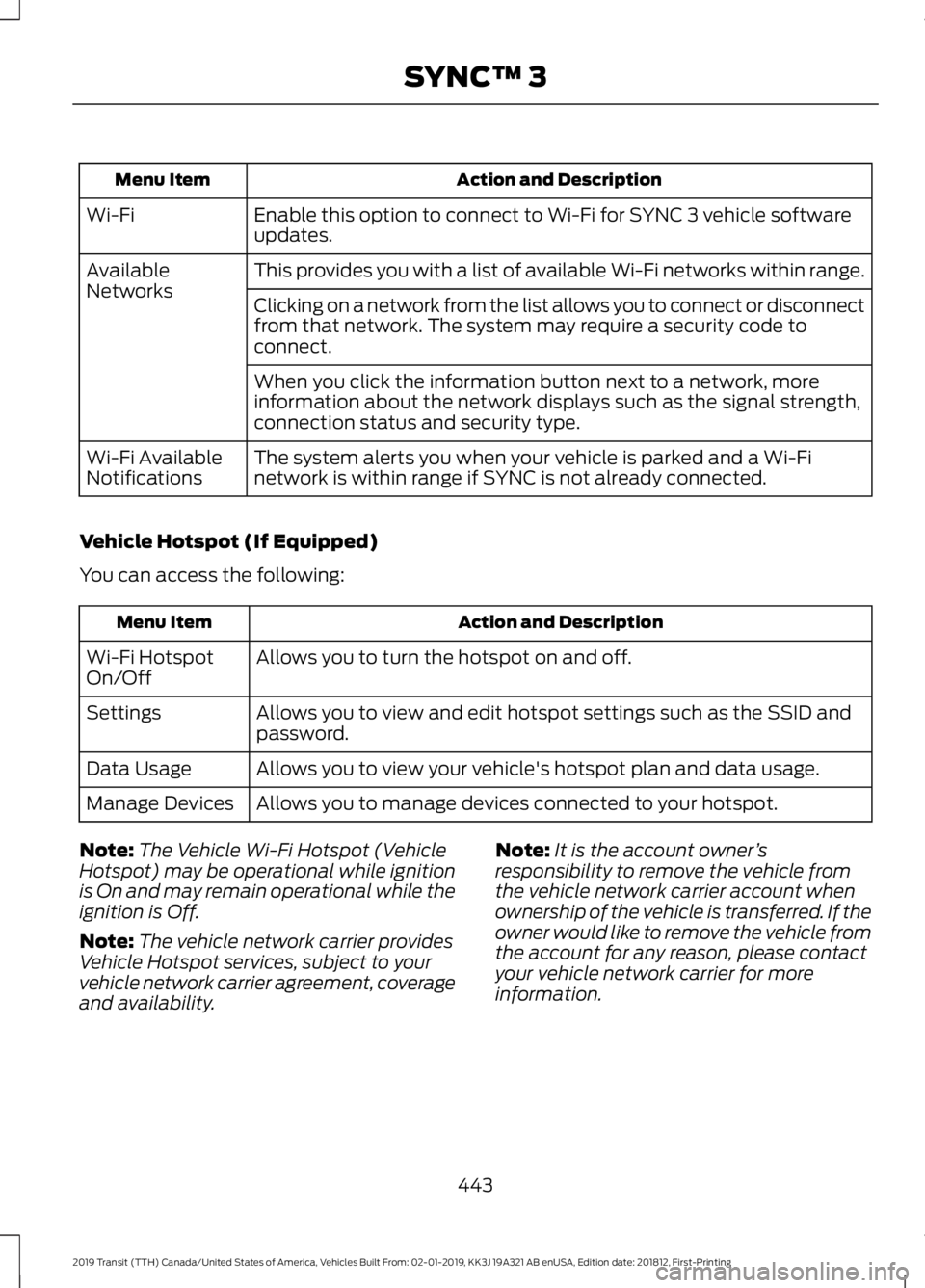
Action and Description
Menu Item
Enable this option to connect to Wi-Fi for SYNC 3 vehicle software
updates.
Wi-Fi
This provides you with a list of available Wi-Fi networks within range.
Available
Networks
Clicking on a network from the list allows you to connect or disconnect
from that network. The system may require a security code to
connect.
When you click the information button next to a network, more
information about the network displays such as the signal strength,
connection status and security type.
The system alerts you when your vehicle is parked and a Wi-Fi
network is within range if SYNC is not already connected.
Wi-Fi Available
Notifications
Vehicle Hotspot (If Equipped)
You can access the following: Action and Description
Menu Item
Allows you to turn the hotspot on and off.
Wi-Fi Hotspot
On/Off
Allows you to view and edit hotspot settings such as the SSID and
password.
Settings
Allows you to view your vehicle's hotspot plan and data usage.
Data Usage
Allows you to manage devices connected to your hotspot.
Manage Devices
Note: The Vehicle Wi-Fi Hotspot (Vehicle
Hotspot) may be operational while ignition
is On and may remain operational while the
ignition is Off.
Note: The vehicle network carrier provides
Vehicle Hotspot services, subject to your
vehicle network carrier agreement, coverage
and availability. Note:
It is the account owner ’s
responsibility to remove the vehicle from
the vehicle network carrier account when
ownership of the vehicle is transferred. If the
owner would like to remove the vehicle from
the account for any reason, please contact
your vehicle network carrier for more
information.
443
2019 Transit (TTH) Canada/United States of America, Vehicles Built From: 02-01-2019, KK3J 19A321 AB enUSA, Edition date: 201812, First-Printing SYNC™ 3
Page 456 of 529
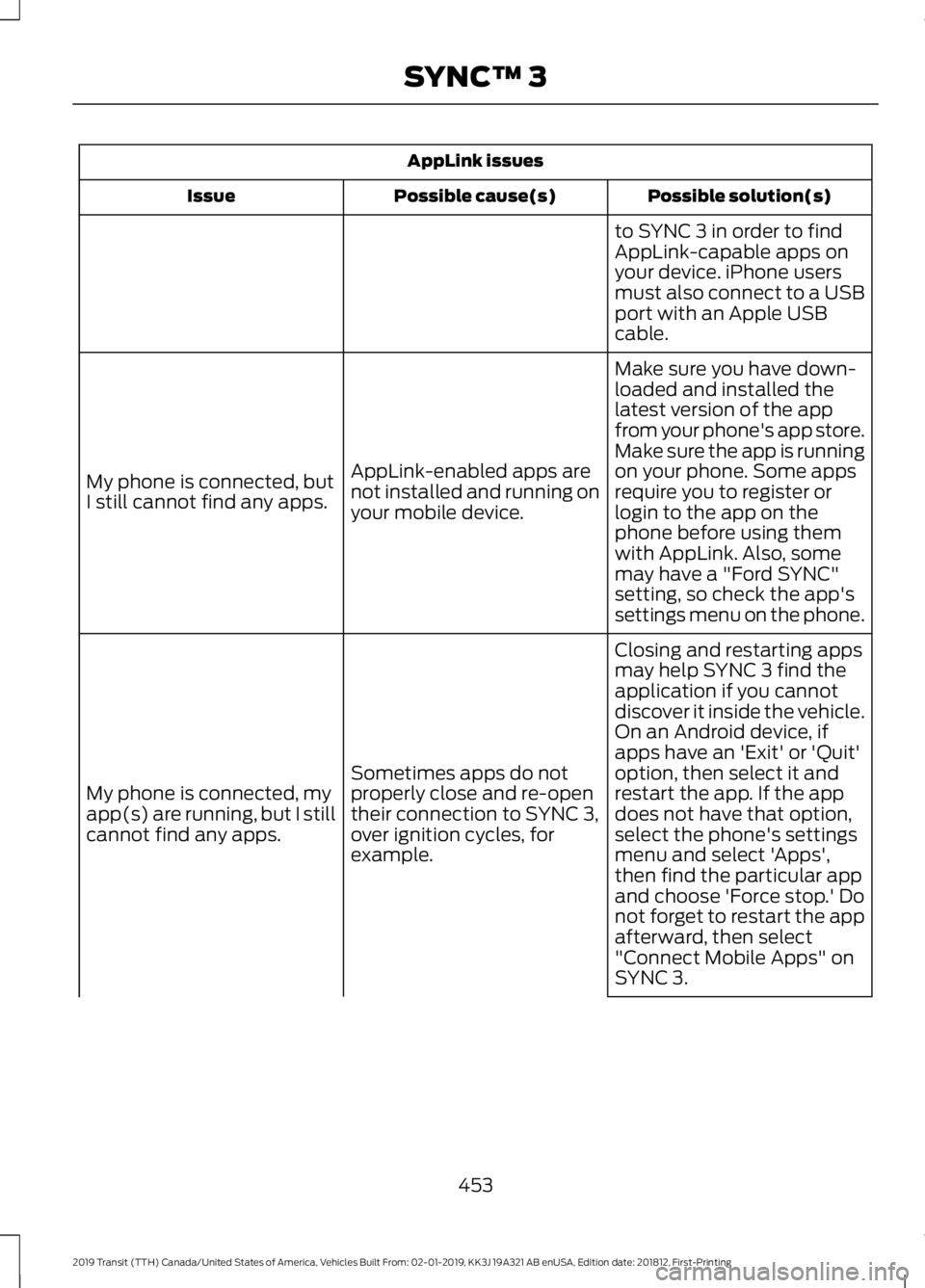
AppLink issues
Possible solution(s)
Possible cause(s)
Issue
to SYNC 3 in order to find
AppLink-capable apps on
your device. iPhone users
must also connect to a USB
port with an Apple USB
cable.
Make sure you have down-
loaded and installed the
latest version of the app
from your phone's app store.
Make sure the app is running
on your phone. Some apps
AppLink-enabled apps are
not installed and running on
your mobile device.
My phone is connected, but
I still cannot find any apps.
require you to register or
login to the app on the
phone before using them
with AppLink. Also, some
may have a "Ford SYNC"
setting, so check the app's
settings menu on the phone.
Closing and restarting apps
may help SYNC 3 find the
application if you cannot
discover it inside the vehicle.
On an Android device, if
apps have an 'Exit' or 'Quit'
Sometimes apps do not
properly close and re-open
their connection to SYNC 3,
over ignition cycles, for
example.
My phone is connected, my
app(s) are running, but I still
cannot find any apps. option, then select it and
restart the app. If the app
does not have that option,
select the phone's settings
menu and select 'Apps',
then find the particular app
and choose 'Force stop.' Do
not forget to restart the app
afterward, then select
"Connect Mobile Apps" on
SYNC 3.
453
2019 Transit (TTH) Canada/United States of America, Vehicles Built From: 02-01-2019, KK3J 19A321 AB enUSA, Edition date: 201812, First-Printing SYNC™ 3
Page 464 of 529
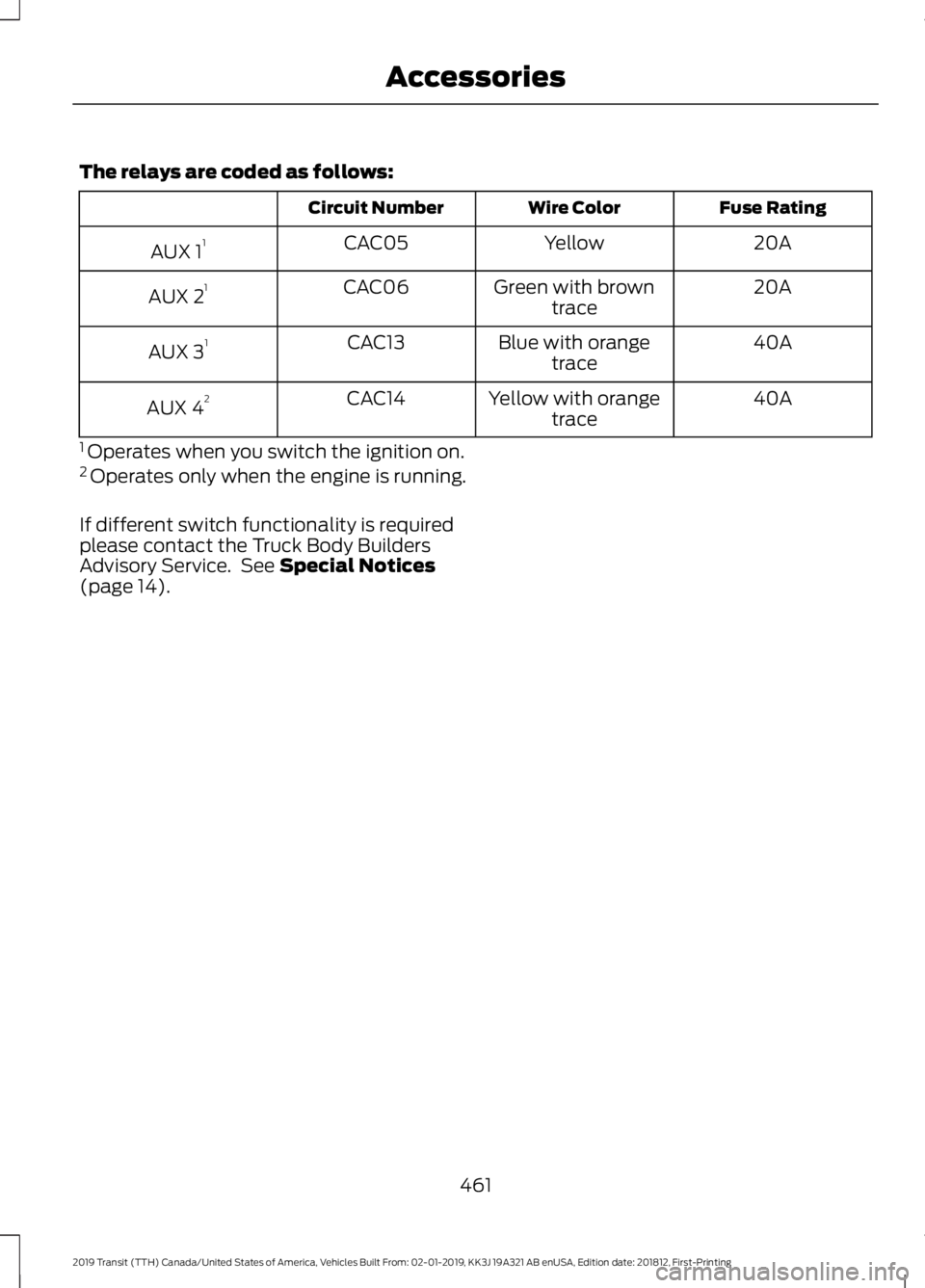
The relays are coded as follows:
Fuse Rating
Wire Color
Circuit Number
20A
Yellow
CAC05
AUX 1 1
20A
Green with brown
trace
CAC06
AUX 2 1
40A
Blue with orange
trace
CAC13
AUX 3 1
40A
Yellow with orange
trace
CAC14
AUX 4 2
1 Operates when you switch the ignition on.
2 Operates only when the engine is running.
If different switch functionality is required
please contact the Truck Body Builders
Advisory Service. See Special Notices
(page 14).
461
2019 Transit (TTH) Canada/United States of America, Vehicles Built From: 02-01-2019, KK3J 19A321 AB enUSA, Edition date: 201812, First-Printing Accessories
Page 490 of 529
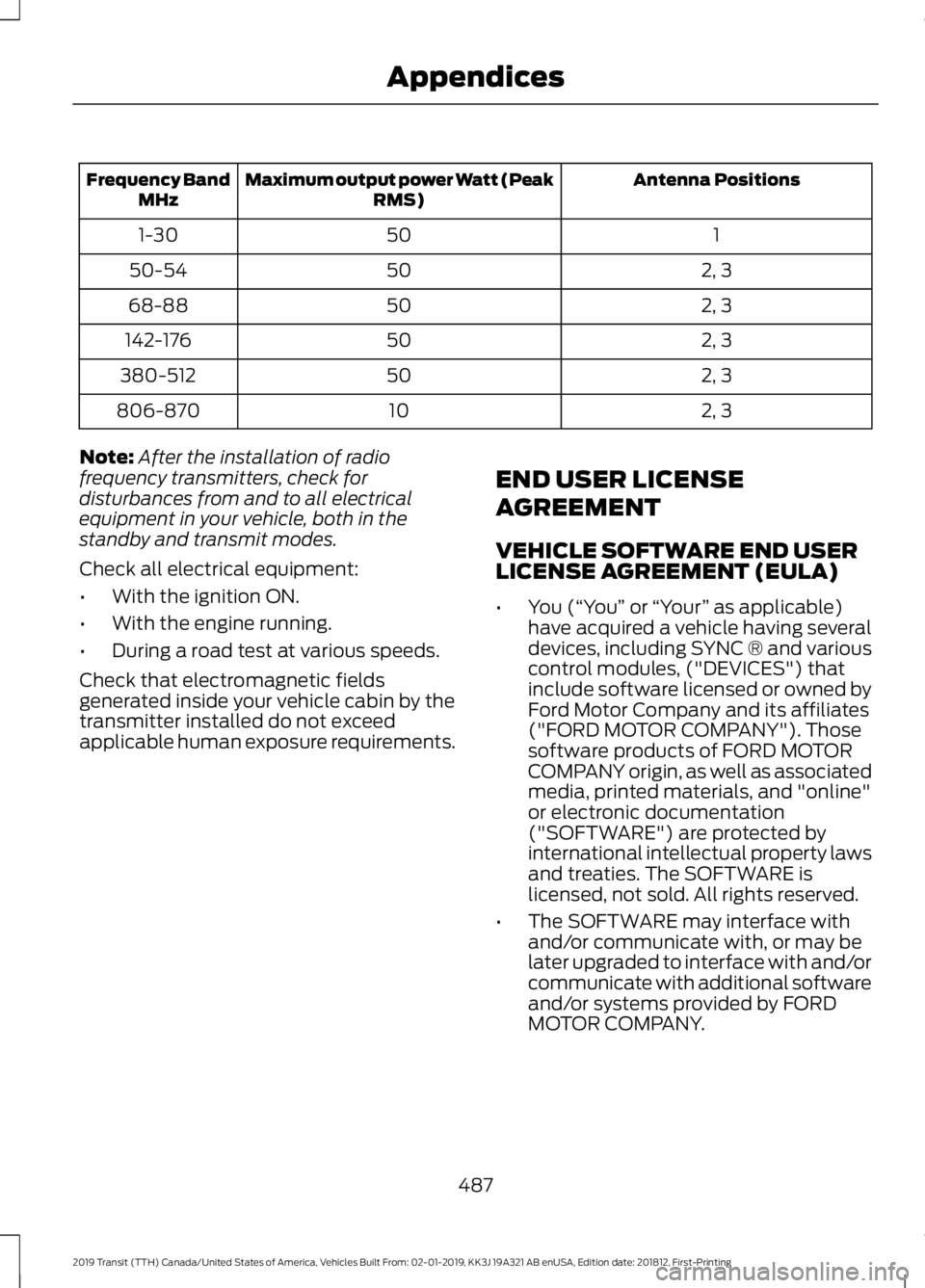
Antenna Positions
Maximum output power Watt (Peak
RMS)
Frequency Band
MHz
1
50
1-30
2, 3
50
50-54
2, 3
50
68-88
2, 3
50
142-176
2, 3
50
380-512
2, 3
10
806-870
Note: After the installation of radio
frequency transmitters, check for
disturbances from and to all electrical
equipment in your vehicle, both in the
standby and transmit modes.
Check all electrical equipment:
• With the ignition ON.
• With the engine running.
• During a road test at various speeds.
Check that electromagnetic fields
generated inside your vehicle cabin by the
transmitter installed do not exceed
applicable human exposure requirements. END USER LICENSE
AGREEMENT
VEHICLE SOFTWARE END USER
LICENSE AGREEMENT (EULA)
•
You (“You” or “Your ” as applicable)
have acquired a vehicle having several
devices, including SYNC ® and various
control modules, ("DEVICES") that
include software licensed or owned by
Ford Motor Company and its affiliates
("FORD MOTOR COMPANY"). Those
software products of FORD MOTOR
COMPANY origin, as well as associated
media, printed materials, and "online"
or electronic documentation
("SOFTWARE") are protected by
international intellectual property laws
and treaties. The SOFTWARE is
licensed, not sold. All rights reserved.
• The SOFTWARE may interface with
and/or communicate with, or may be
later upgraded to interface with and/or
communicate with additional software
and/or systems provided by FORD
MOTOR COMPANY.
487
2019 Transit (TTH) Canada/United States of America, Vehicles Built From: 02-01-2019, KK3J 19A321 AB enUSA, Edition date: 201812, First-Printing Appendices
Page 518 of 529
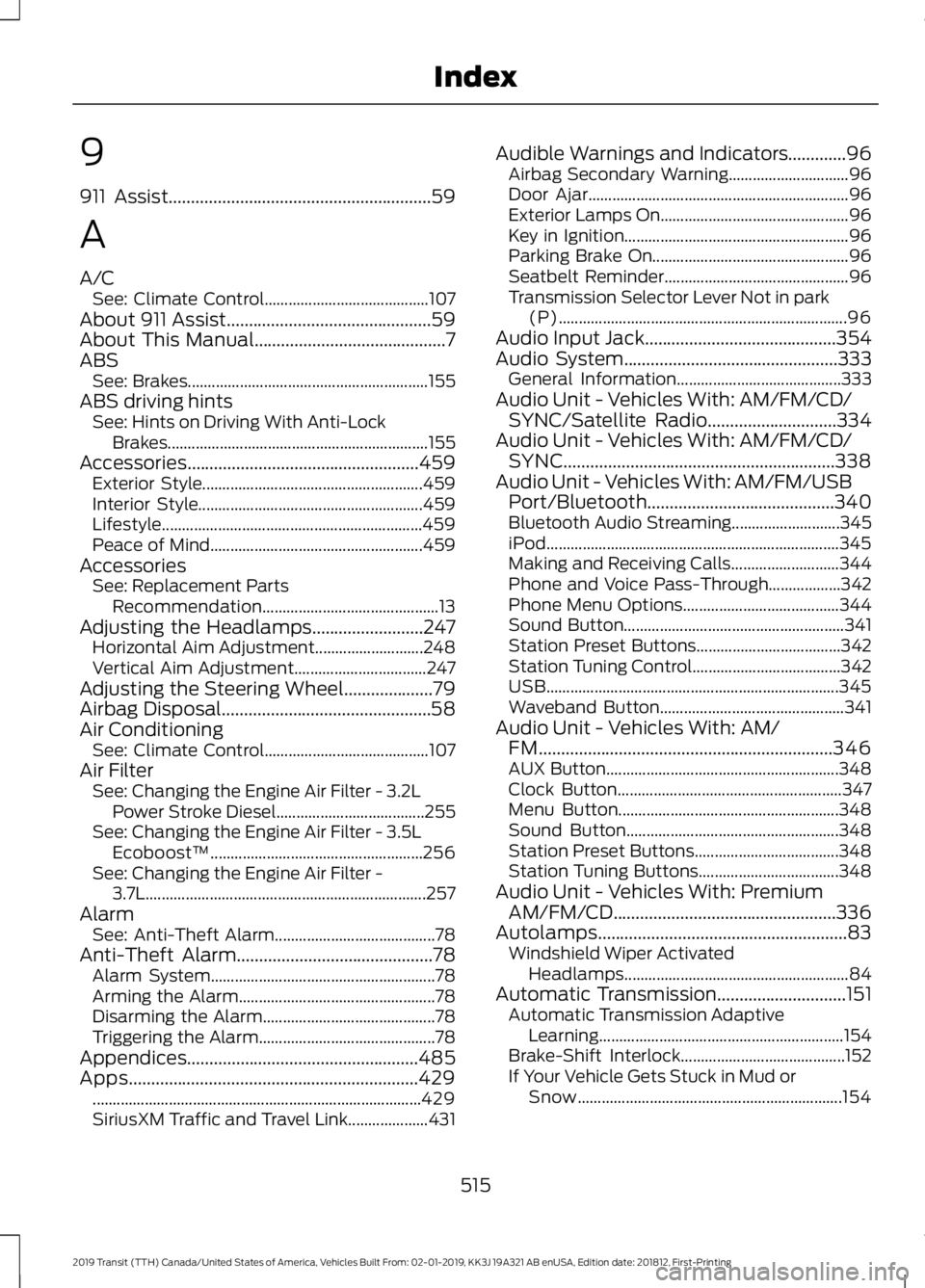
9
911 Assist...........................................................59
A
A/C See: Climate Control......................................... 107
About 911 Assist..............................................59
About This Manual
...........................................7
ABS See: Brakes............................................................ 155
ABS driving hints See: Hints on Driving With Anti-Lock
Brakes................................................................. 155
Accessories....................................................459 Exterior Style....................................................... 459
Interior Style........................................................ 459
Lifestyle................................................................. 459
Peace of Mind..................................................... 459
Accessories See: Replacement Parts
Recommendation............................................ 13
Adjusting the Headlamps.........................247 Horizontal Aim Adjustment........................... 248
Vertical Aim Adjustment................................. 247
Adjusting the Steering Wheel
....................79
Airbag Disposal...............................................58
Air Conditioning See: Climate Control......................................... 107
Air Filter See: Changing the Engine Air Filter - 3.2L
Power Stroke Diesel..................................... 255
See: Changing the Engine Air Filter - 3.5L Ecoboost™..................................................... 256
See: Changing the Engine Air Filter - 3.7L...................................................................... 257
Alarm See: Anti-Theft Alarm........................................ 78
Anti-Theft Alarm............................................78 Alarm System........................................................ 78
Arming the Alarm................................................. 78
Disarming the Alarm........................................... 78
Triggering the Alarm............................................ 78
Appendices....................................................485
Apps.................................................................429 ........................................................................\
.......... 429
SiriusXM Traffic and Travel Link.................... 431Audible Warnings and Indicators.............96
Airbag Secondary Warning.............................. 96
Door Ajar................................................................. 96
Exterior Lamps On............................................... 96
Key in Ignition........................................................ 96
Parking Brake On................................................. 96
Seatbelt Reminder.............................................. 96
Transmission Selector Lever Not in park (P)........................................................................\
96
Audio Input Jack...........................................354
Audio System
................................................333
General Information......................................... 333
Audio Unit - Vehicles With: AM/FM/CD/ SYNC/Satellite Radio.............................334
Audio Unit - Vehicles With: AM/FM/CD/ SYNC.............................................................338
Audio Unit - Vehicles With: AM/FM/USB Port/Bluetooth..........................................340
Bluetooth Audio Streaming........................... 345
iPod........................................................................\
. 345
Making and Receiving Calls........................... 344
Phone and Voice Pass-Through.................. 342
Phone Menu Options....................................... 344
Sound Button....................................................... 341
Station Preset Buttons.................................... 342
Station Tuning Control..................................... 342
USB........................................................................\
. 345
Waveband Button.............................................. 341
Audio Unit - Vehicles With: AM/ FM
..................................................................346
AUX Button.......................................................... 348
Clock Button........................................................ 347
Menu Button....................................................... 348
Sound Button..................................................... 348
Station Preset Buttons.................................... 348
Station Tuning Buttons................................... 348
Audio Unit - Vehicles With: Premium AM/FM/CD..................................................336
Autolamps
........................................................83
Windshield Wiper Activated
Headlamps........................................................ 84
Automatic Transmission.............................151 Automatic Transmission Adaptive
Learning............................................................. 154
Brake-Shift Interlock......................................... 152
If Your Vehicle Gets Stuck in Mud or Snow.................................................................. 154
515
2019 Transit (TTH) Canada/United States of America, Vehicles Built From: 02-01-2019, KK3J 19A321 AB enUSA, Edition date: 201812, First-Printing Index
Page 522 of 529
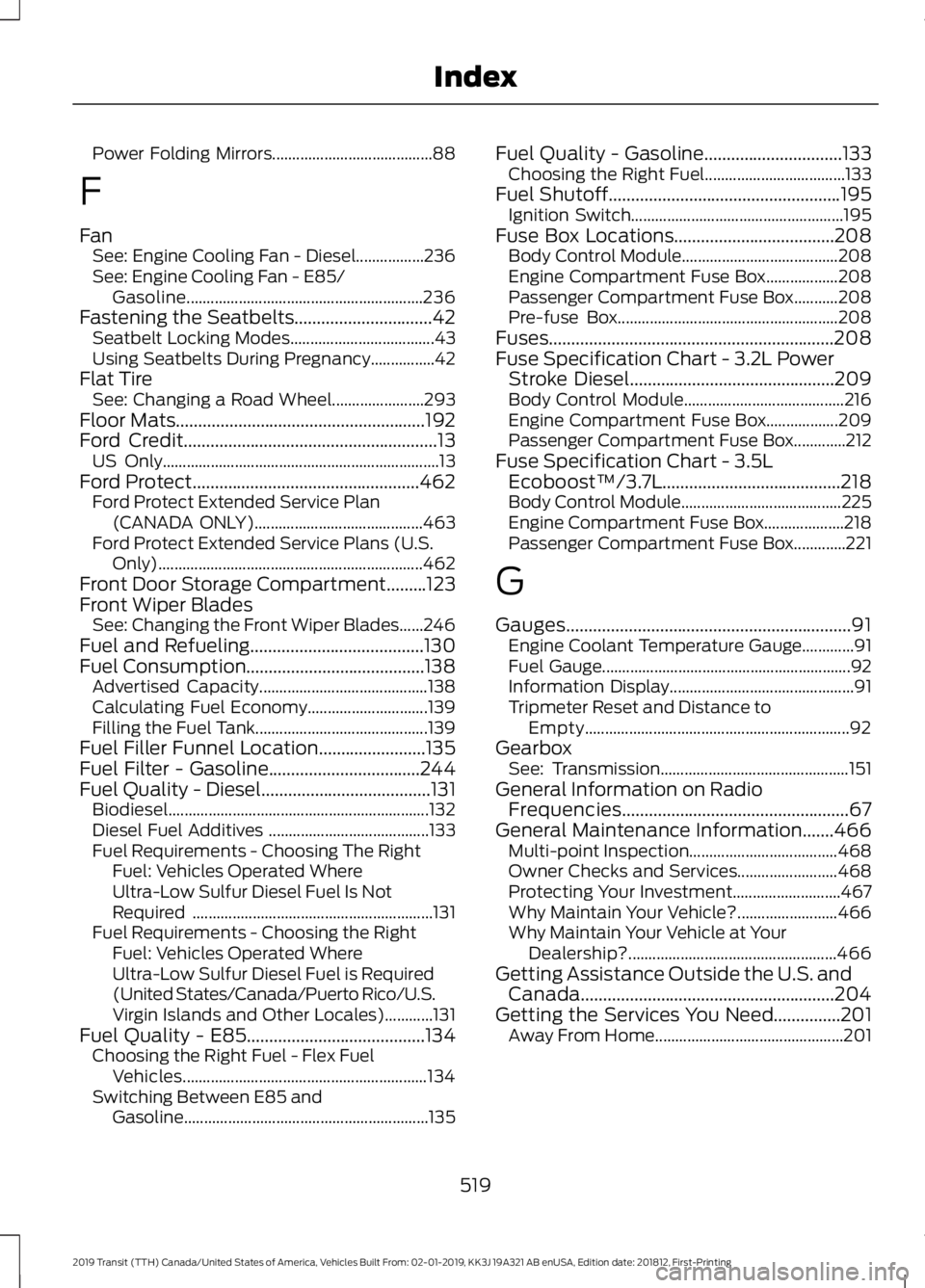
Power Folding Mirrors........................................
88
F
Fan See: Engine Cooling Fan - Diesel.................236
See: Engine Cooling Fan - E85/
Gasoline........................................................... 236
Fastening the Seatbelts...............................42 Seatbelt Locking Modes.................................... 43
Using Seatbelts During Pregnancy................42
Flat Tire See: Changing a Road Wheel....................... 293
Floor Mats........................................................192
Ford Credit.........................................................13
US Only..................................................................... 13
Ford Protect
...................................................462
Ford Protect Extended Service Plan
(CANADA ONLY).......................................... 463
Ford Protect Extended Service Plans (U.S. Only).................................................................. 462
Front Door Storage Compartment.........123
Front Wiper Blades See: Changing the Front Wiper Blades......246
Fuel and Refueling
.......................................130
Fuel Consumption........................................138
Advertised Capacity.......................................... 138
Calculating Fuel Economy.............................. 139
Filling the Fuel Tank........................................... 139
Fuel Filler Funnel Location........................135
Fuel Filter - Gasoline..................................244
Fuel Quality - Diesel
......................................131
Biodiesel................................................................. 132
Diesel Fuel Additives ........................................ 133
Fuel Requirements - Choosing The Right Fuel: Vehicles Operated Where
Ultra-Low Sulfur Diesel Fuel Is Not
Required ............................................................ 131
Fuel Requirements - Choosing the Right Fuel: Vehicles Operated Where
Ultra-Low Sulfur Diesel Fuel is Required
(United States/Canada/Puerto Rico/U.S.
Virgin Islands and Other Locales)............131
Fuel Quality - E85
........................................134
Choosing the Right Fuel - Flex Fuel
Vehicles............................................................. 134
Switching Between E85 and Gasoline............................................................. 135Fuel Quality - Gasoline...............................133
Choosing the Right Fuel................................... 133
Fuel Shutoff
....................................................195
Ignition Switch..................................................... 195
Fuse Box Locations....................................208 Body Control Module....................................... 208
Engine Compartment Fuse Box.................. 208
Passenger Compartment Fuse Box...........208
Pre-fuse Box....................................................... 208
Fuses................................................................208
Fuse Specification Chart - 3.2L Power Stroke Diesel
..............................................209
Body Control Module........................................ 216
Engine Compartment Fuse Box.................. 209
Passenger Compartment Fuse Box.............212
Fuse Specification Chart - 3.5L Ecoboost™/3.7L........................................218
Body Control Module........................................ 225
Engine Compartment Fuse Box.................... 218
Passenger Compartment Fuse Box.............221
G
Gauges................................................................91 Engine Coolant Temperature Gauge.............91
Fuel Gauge.............................................................. 92
Information Display.............................................. 91
Tripmeter Reset and Distance to Empty.................................................................. 92
Gearbox See: Transmission............................................... 151
General Information on Radio Frequencies...................................................67
General Maintenance Information.......466 Multi-point Inspection..................................... 468
Owner Checks and Services......................... 468
Protecting Your Investment........................... 467
Why Maintain Your Vehicle?......................... 466
Why Maintain Your Vehicle at Your Dealership?.................................................... 466
Getting Assistance Outside the U.S. and Canada.........................................................204
Getting the Services You Need...............201 Away From Home............................................... 201
519
2019 Transit (TTH) Canada/United States of America, Vehicles Built From: 02-01-2019, KK3J 19A321 AB enUSA, Edition date: 201812, First-Printing Index