Rear door FORD TRANSIT 2020 User Guide
[x] Cancel search | Manufacturer: FORD, Model Year: 2020, Model line: TRANSIT, Model: FORD TRANSIT 2020Pages: 529, PDF Size: 8.3 MB
Page 92 of 529
Note:
If you program the unlocking function
so that all doors unlock, you do not have to
press the 3·4 button. See Reprogramming
the Unlocking Function (page 88).
The interior lamps illuminate to confirm
that the doors have been unlocked.
Unlocking the Rear Cargo Doors
Enter the master access code or your
personal access code, then press the 5·6
button within five seconds.
Locking the Doors
Press and hold the 7·8 and 9·0 buttons at
the same time with the driver door closed.
KEYLESS ENTRY –
TROUBLESHOOTING
Keyless Entry – Frequently Asked
Questions
Why does the keypad not read the
access code? If you enter the access code too fast
on the keypad, the unlock function
may not work. Slowly re-enter the
access code.
Why does the keypad not function? The keypad goes into an anti-scan
mode if you enter a wrong code seven
times. The anti-scan mode disables
the keypad for one minute and the red
light flashes.
89
2020 Transit (TTH) Canada/United States of America, LK3J 19A321 HA enUSA, Edition date: 201911, First-Printing Keyless Entry
Page 97 of 529
USING POWER RUNNING
BOARDS
WARNING: In extreme climates,
excessive ice buildup may occur, causing
the running boards not to deploy. Make
sure that the running boards have
deployed, and have finished moving
before attempting to step on them. The
running boards will resume normal
function once the blockage is cleared. WARNING:
Switch off the running
boards before jacking or placing any
object under your vehicle. Never place
your hand between the extended running
board and your vehicle. A moving running
board may cause injury.
Note: Do not use the power running boards,
front and rear hinge assemblies, running
board motors or the running board
underbody mounts to lift your vehicle when
jacking. Always use proper jacking points.
Note: The power running boards may
operate more slowly in cool temperatures.
Note: The running board mechanism may
trap debris such as mud, dirt, snow, ice and
salt. This may cause unwanted noise. If this
happens, manually set the power running
boards to the deployed position. Then wash
the system in particular the front and rear
hinge arms with a high-pressure car wash
wand.
Note: If you drive off when the power
running boards are deployed the engine may
stop. Note:
In the event of a malfunction you can
stow the power running boards manually.
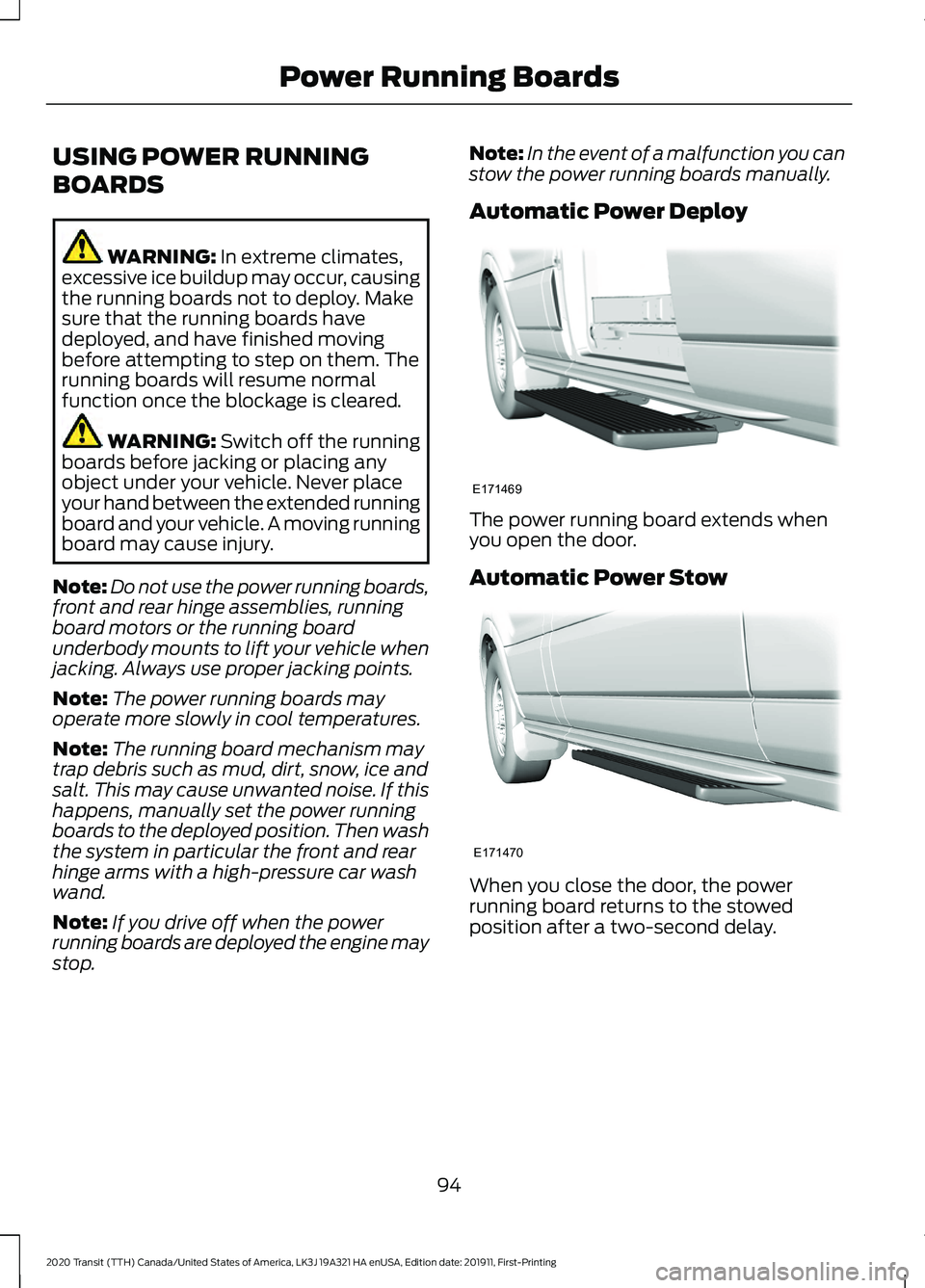
Automatic Power Deploy The power running board extends when
you open the door.
Automatic Power Stow
When you close the door, the power
running board returns to the stowed
position after a two-second delay.
94
2020 Transit (TTH) Canada/United States of America, LK3J 19A321 HA enUSA, Edition date: 201911, First-Printing Power Running BoardsE171469 E171470
Page 105 of 529
Switching High Beam Headlamps
On and Off
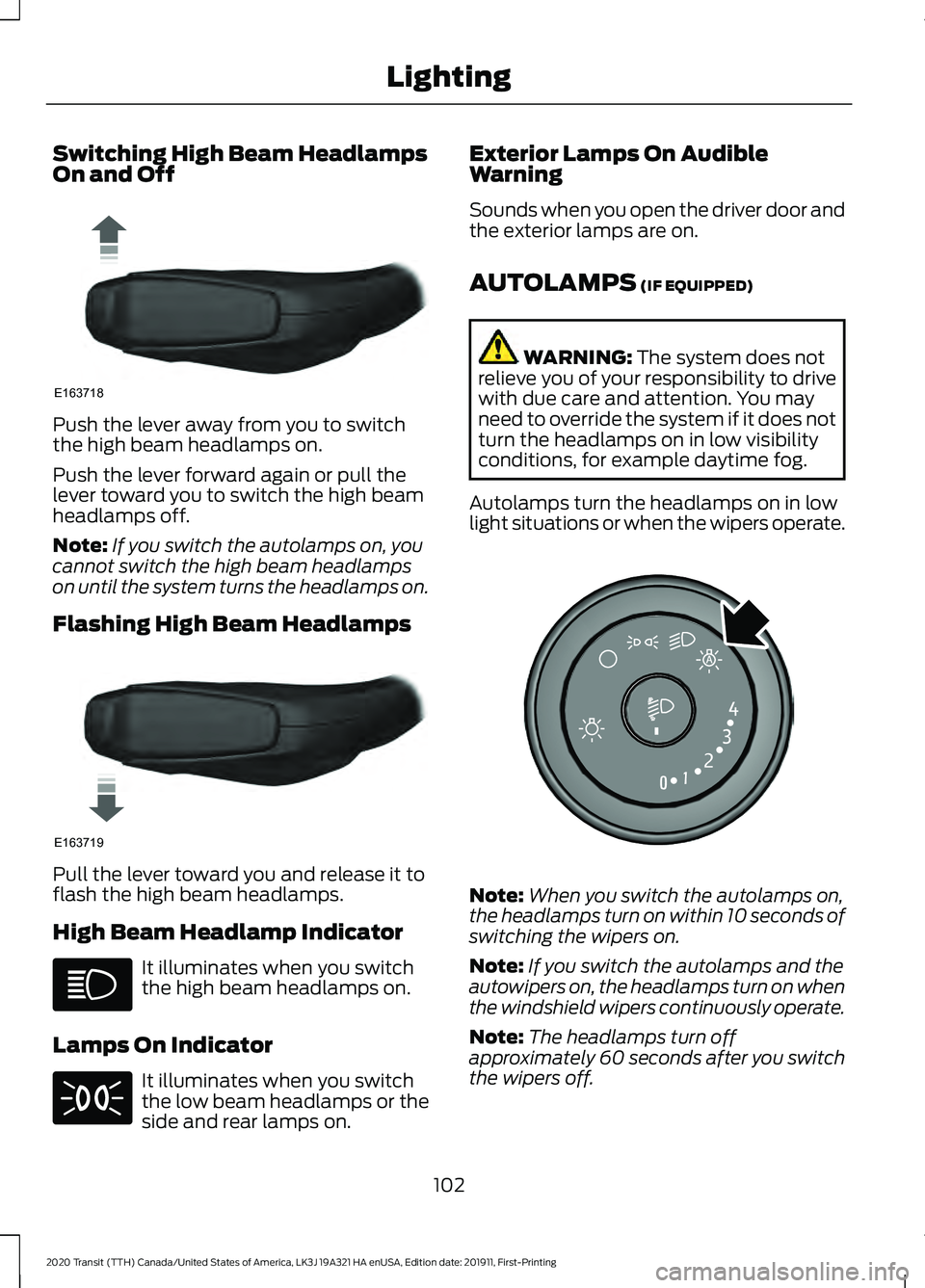
Push the lever away from you to switch
the high beam headlamps on.
Push the lever forward again or pull the
lever toward you to switch the high beam
headlamps off.
Note:
If you switch the autolamps on, you
cannot switch the high beam headlamps
on until the system turns the headlamps on.
Flashing High Beam Headlamps Pull the lever toward you and release it to
flash the high beam headlamps.
High Beam Headlamp Indicator
It illuminates when you switch
the high beam headlamps on.
Lamps On Indicator It illuminates when you switch
the low beam headlamps or the
side and rear lamps on. Exterior Lamps On Audible
Warning
Sounds when you open the driver door and
the exterior lamps are on.
AUTOLAMPS (IF EQUIPPED)
WARNING:
The system does not
relieve you of your responsibility to drive
with due care and attention. You may
need to override the system if it does not
turn the headlamps on in low visibility
conditions, for example daytime fog.
Autolamps turn the headlamps on in low
light situations or when the wipers operate. Note:
When you switch the autolamps on,
the headlamps turn on within 10 seconds of
switching the wipers on.
Note: If you switch the autolamps and the
autowipers on, the headlamps turn on when
the windshield wipers continuously operate.
Note: The headlamps turn off
approximately 60 seconds after you switch
the wipers off.
102
2020 Transit (TTH) Canada/United States of America, LK3J 19A321 HA enUSA, Edition date: 201911, First-Printing LightingE163718 E163719 E253316
Page 110 of 529
CARGO LAMPS
Switching the Cargo Lamps Off
Press the button to switch the cargo lamps
off when a door is open.
Note:
The cargo lamps switch only
operates when the ignition is off.
The switch is inside the cargo area, behind
the left-hand rear door.
The cargo lamps turn off after a short
period of time to prevent the battery from
running out of charge.
Switching the Cargo Lamps On
Press the button to switch the cargo lamps
on.
If the cargo lamps turned off to prevent
the battery from running out of charge or
you switched them off by pressing the
button, reset the switch first.
Resetting the Switch
To reset the switch, do one of the
following:
• Lock or unlock a door.
• Open or close a front door.
• Switch the ignition on then off.
Press the button to switch the cargo lamps
on.
107
2020 Transit (TTH) Canada/United States of America, LK3J 19A321 HA enUSA, Edition date: 201911, First-Printing Lighting
Page 178 of 529
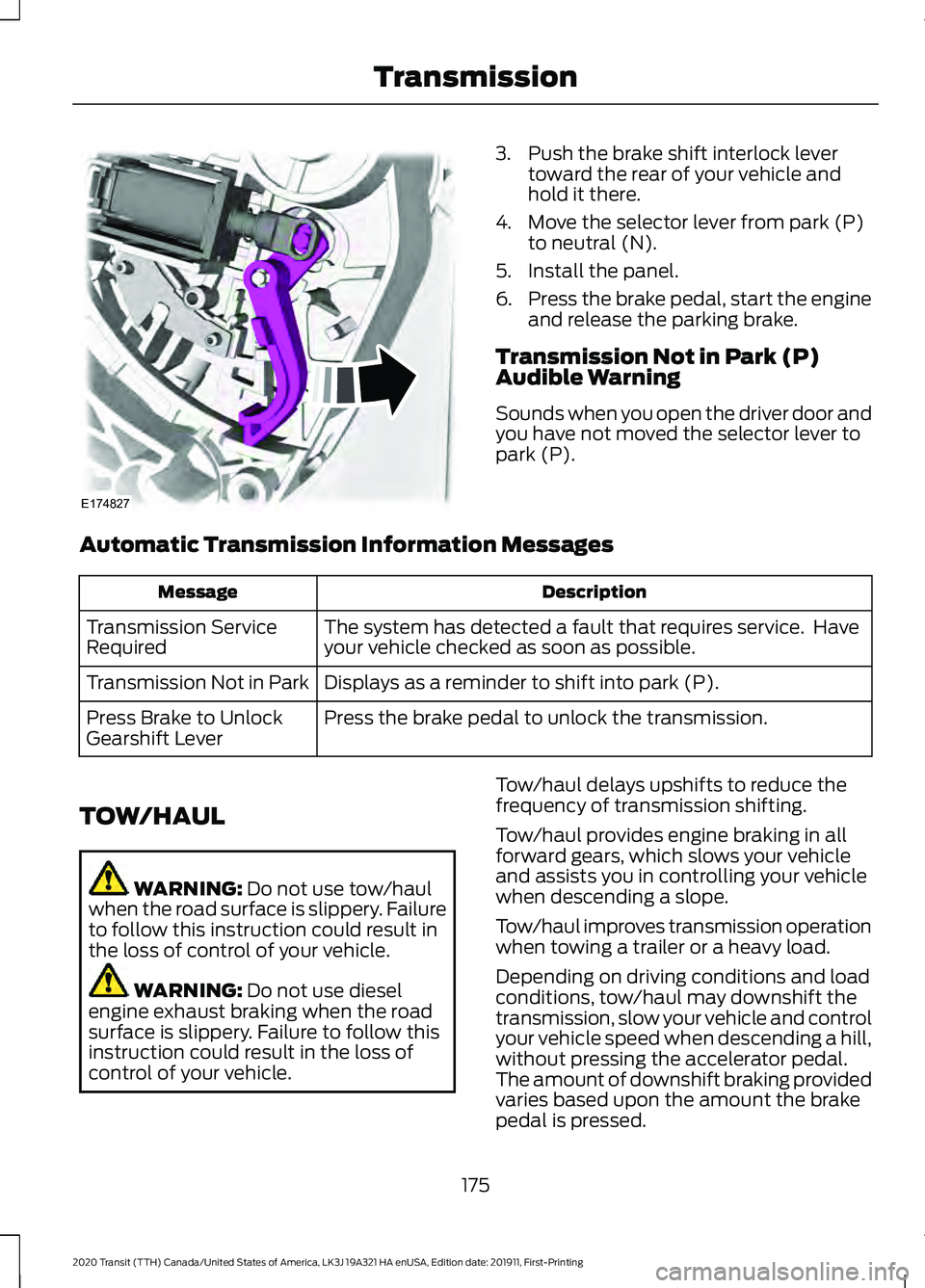
3. Push the brake shift interlock lever
toward the rear of your vehicle and
hold it there.
4. Move the selector lever from park (P) to neutral (N).
5. Install the panel.
6. Press the brake pedal, start the engine
and release the parking brake.
Transmission Not in Park (P)
Audible Warning
Sounds when you open the driver door and
you have not moved the selector lever to
park (P).
Automatic Transmission Information Messages Description
Message
The system has detected a fault that requires service. Have
your vehicle checked as soon as possible.
Transmission Service
Required
Displays as a reminder to shift into park (P).
Transmission Not in Park
Press the brake pedal to unlock the transmission.
Press Brake to Unlock
Gearshift Lever
TOW/HAUL WARNING: Do not use tow/haul
when the road surface is slippery. Failure
to follow this instruction could result in
the loss of control of your vehicle. WARNING:
Do not use diesel
engine exhaust braking when the road
surface is slippery. Failure to follow this
instruction could result in the loss of
control of your vehicle. Tow/haul delays upshifts to reduce the
frequency of transmission shifting.
Tow/haul provides engine braking in all
forward gears, which slows your vehicle
and assists you in controlling your vehicle
when descending a slope.
Tow/haul improves transmission operation
when towing a trailer or a heavy load.
Depending on driving conditions and load
conditions, tow/haul may downshift the
transmission, slow your vehicle and control
your vehicle speed when descending a hill,
without pressing the accelerator pedal.
The amount of downshift braking provided
varies based upon the amount the brake
pedal is pressed.
175
2020 Transit (TTH) Canada/United States of America, LK3J 19A321 HA enUSA, Edition date: 201911, First-Printing TransmissionE174827
Page 180 of 529
USING ALL-WHEEL DRIVE
WARNING: Vehicles with a higher
center of gravity (utility and four-wheel
drive vehicles) handle differently than
vehicles with a lower center of gravity
(passenger cars). Avoid sharp turns,
excessive speed and abrupt steering in
these vehicles. Failure to drive cautiously
increases the risk of losing control of your
vehicle, vehicle rollover, personal injury
and death.
The intelligent AWD system continuously
monitors vehicle conditions and adjusts
the power distribution between the front
and rear wheels. It combines transparent
all-surface operation with highly capable
all-wheel drive.
The AWD system is always active and
requires no driver input. It is capable of
handling all road conditions. You can
optimize the AWD performance for
specialized driving conditions by selecting
different drive modes. See Drive Control
(page
234).
Operating All-Wheel Drive (AWD)
Vehicles with Mismatched Tires WARNING:
Only use replacement
tires and wheels that are the same size,
load index, speed rating and type (such
as P-metric versus LT-metric or
all-season versus all-terrain) as those
originally provided by Ford. The
recommended tire and wheel size may
be found on either the Safety
Compliance Certification Label (affixed
to either the door hinge pillar, door-latch
post, or the door edge that meets the
door-latch post, next to the driver's
seating position), or the Tire Label which
is located on the B-Pillar or edge of the driver's door. If this information is not
found on these labels, then you should
contact your authorized dealer as soon
as possible. Use of any tire or wheel not
recommended by Ford can affect the
safety and performance of your vehicle,
which could result in an increased risk of
loss of vehicle control, vehicle rollover,
personal injury and death.
Major dissimilar tire sizes between the front
and rear axles could cause the AWD
system to stop functioning and default to
rear-wheel drive or damage the AWD
system.
For optimum AWD performance, it is
recommended to follow the tire rotation
maintenance schedule. To avoid potential
AWD malfunction or AWD system damage,
it is recommended to replace all four tires
rather than mixing significantly worn tires
with new tires.
Driving In Special Conditions With
All-Wheel Drive (AWD)
Note: AWD vehicles are equipped for
driving on sand, snow, mud and rough roads
and have operating characteristics that are
somewhat different from conventional
vehicles, both on and off the highway.
Basic Operating Principles in Special
Conditions
• Drive slower in strong crosswinds which
can affect the normal steering
characteristics of your vehicle.
• Be extremely careful when driving on
pavement made slippery by loose sand,
water, gravel, snow or ice.
177
2020 Transit (TTH) Canada/United States of America, LK3J 19A321 HA enUSA, Edition date: 201911, First-Printing All-Wheel Drive
Page 204 of 529
WARNING: Reverse your vehicle
slowly. Failure to follow this instruction
could result in the loss of control of your
vehicle, personal injury or death. WARNING:
Use caution when the
rear cargo door is ajar. If the rear cargo
door is ajar, the camera will be out of
position and the video image could be
incorrect. All guide lines disappear when
the rear cargo door is ajar. Failure to
follow this instruction could result in
personal injury. WARNING:
Use caution when
turning camera features on or off when
the transmission is not in park (P). Make
sure your vehicle is not moving. WARNING:
To help avoid personal
injury always use caution when in reverse
(R) and when using the rear view
camera.
The rear view camera provides an image
of the area behind your vehicle. During
operation, lines appear in the display that
represents the path of your vehicle and
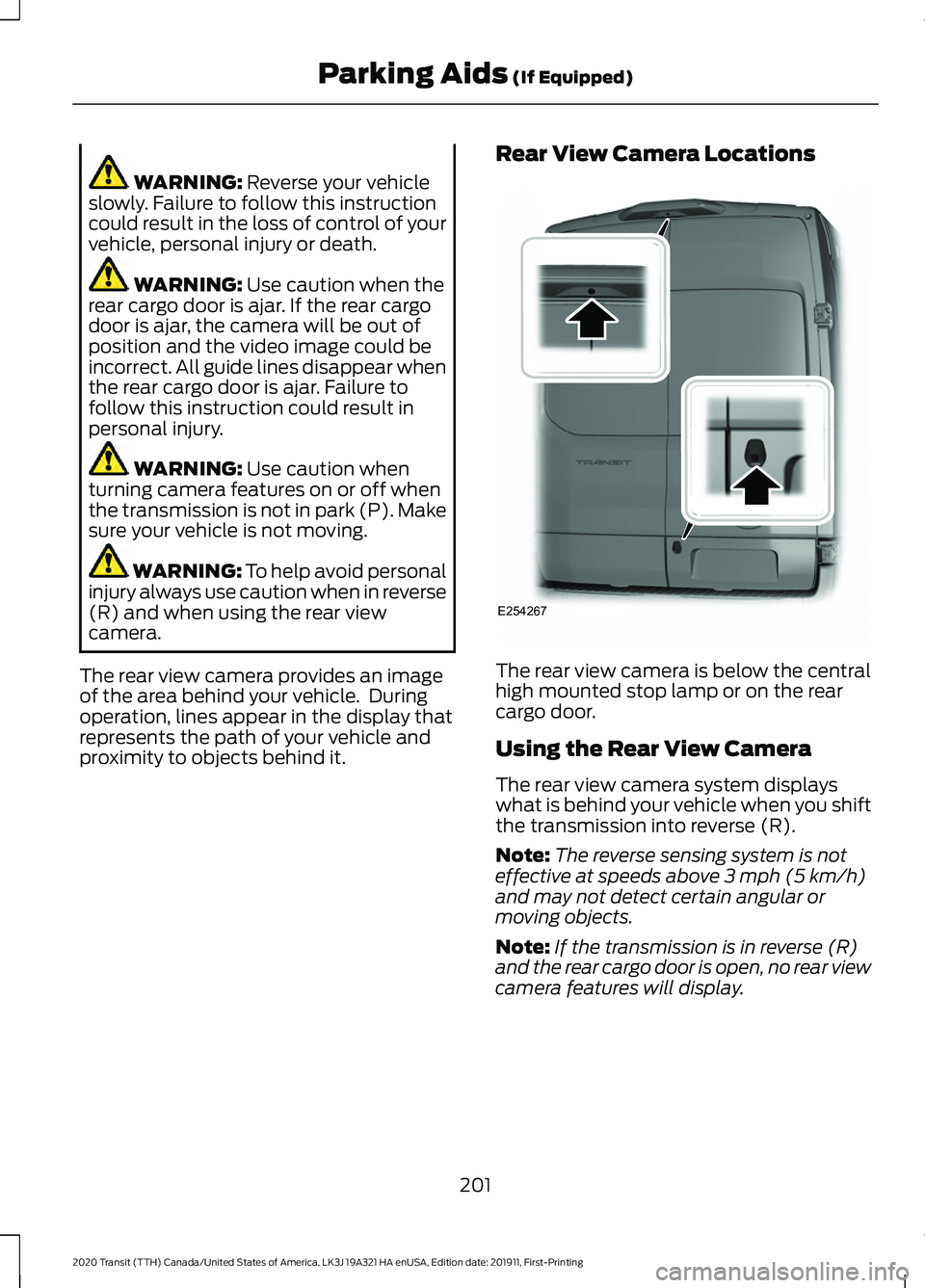
proximity to objects behind it. Rear View Camera Locations
The rear view camera is below the central
high mounted stop lamp or on the rear
cargo door.
Using the Rear View Camera
The rear view camera system displays
what is behind your vehicle when you shift
the transmission into reverse (R).
Note:
The reverse sensing system is not
effective at speeds above
3 mph (5 km/h)
and may not detect certain angular or
moving objects.
Note: If the transmission is in reverse (R)
and the rear cargo door is open, no rear view
camera features will display.
201
2020 Transit (TTH) Canada/United States of America, LK3J 19A321 HA enUSA, Edition date: 201911, First-Printing Parking Aids
(If Equipped)E254267
Page 207 of 529
WARNING: Objects that are close
to either corner of the bumper or under
the bumper, might not be seen on the
screen due to the limited coverage of the
camera system. WARNING:
Use caution when
turning camera features on or off when
the transmission is not in park (P). Make
sure your vehicle is not moving. WARNING: You are responsible for
controlling your vehicle at all times. The
system is designed to be an aid and does
not relieve you of your responsibility to
drive with due care and attention. Failure
to follow this instruction could result in
the loss of control of your vehicle,
personal injury or death.
Note: Use caution using the 180 view when
any of the doors are ajar. If a door is ajar, the
camera will be out of position and the video
image may be incorrect.
Front View Camera WARNING:
The front camera
system still requires the driver to use it
in conjunction with looking out of your
vehicle.
Note: The system turns off the front video
image when your vehicle is in motion at low
speed, except when in reverse (R).
Note: The area displayed on the screen may
vary according to your vehicle's orientation
or road condition.
Note: The camera system may not operate
correctly if mud, water or debris obstructs
the camera's view. You can clean the lens
with a soft, lint-free cloth and non-abrasive
cleaner or by using your front washer.
See
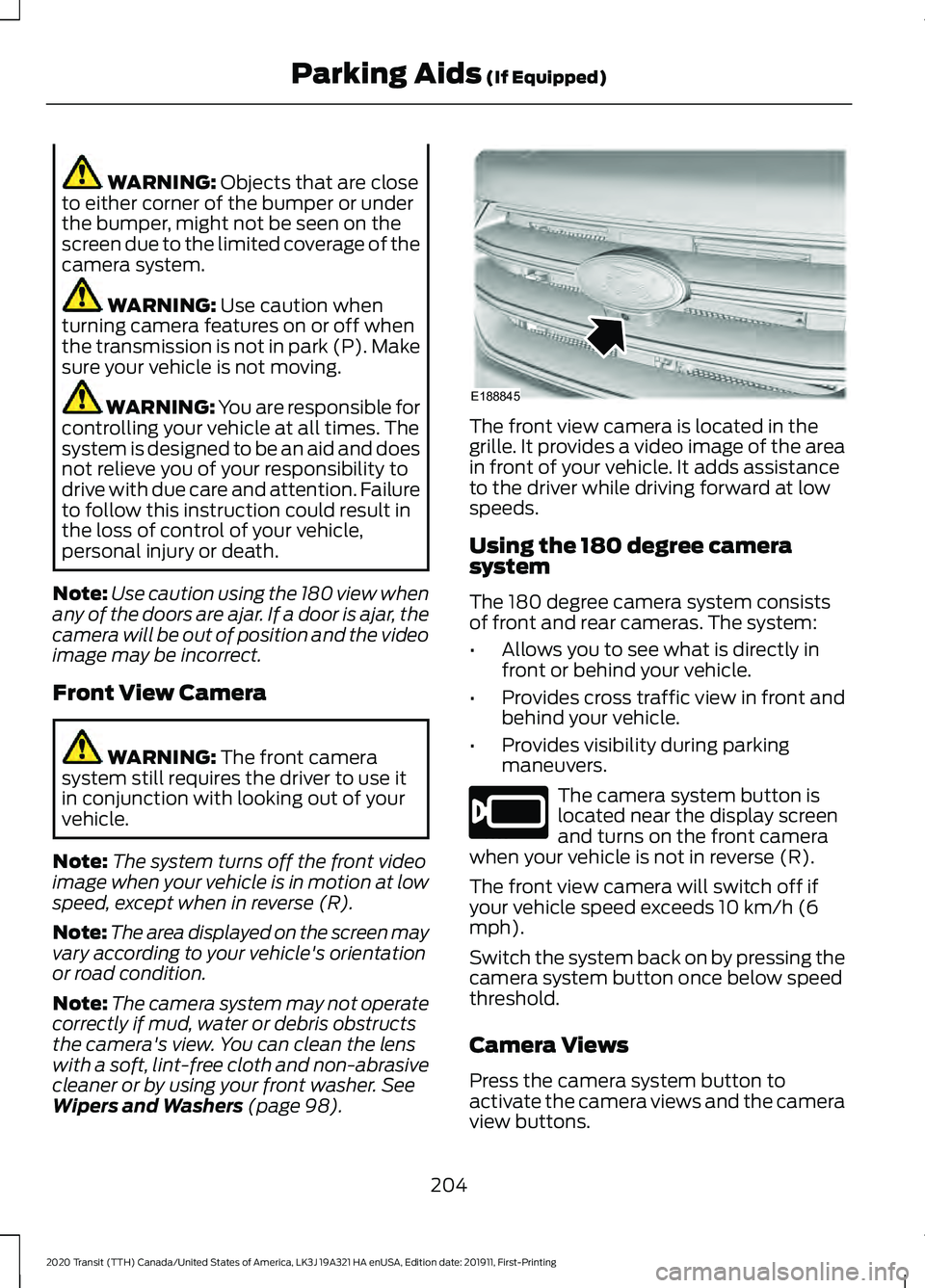
Wipers and Washers (page 98). The front view camera is located in the
grille. It provides a video image of the area
in front of your vehicle. It adds assistance
to the driver while driving forward at low
speeds.
Using the 180 degree camera
system
The 180 degree camera system consists
of front and rear cameras. The system:
•
Allows you to see what is directly in
front or behind your vehicle.
• Provides cross traffic view in front and
behind your vehicle.
• Provides visibility during parking
maneuvers. The camera system button is
located near the display screen
and turns on the front camera
when your vehicle is not in reverse (R).
The front view camera will switch off if
your vehicle speed exceeds 10 km/h (6
mph).
Switch the system back on by pressing the
camera system button once below speed
threshold.
Camera Views
Press the camera system button to
activate the camera views and the camera
view buttons.
204
2020 Transit (TTH) Canada/United States of America, LK3J 19A321 HA enUSA, Edition date: 201911, First-Printing Parking Aids
(If Equipped)E188845 E205884
Page 241 of 529
is the maximum payload for your
vehicle as built by the assembly
plant. If you install any additional
equipment on your vehicle, you
must determine the new payload.
Subtract the weight of the
equipment from the payload listed
on the Tire and Loading label.
When towing, trailer tongue
weight or king pin weight is also
part of payload.
WARNING: The
appropriate loading capacity of
your vehicle can be limited either
by volume capacity (how much
space is available) or by payload
capacity (how much weight the
vehicle should carry). Once you
have reached the maximum
payload of your vehicle, do not
add more cargo, even if there is
space available. Overloading or
improperly loading your vehicle
can contribute to loss of vehicle
control and vehicle rollover.
GAWR (Gross Axle Weight
Rating)
GAWR is the maximum allowable
weight that a single axle (front or
rear) can carry. These numbers
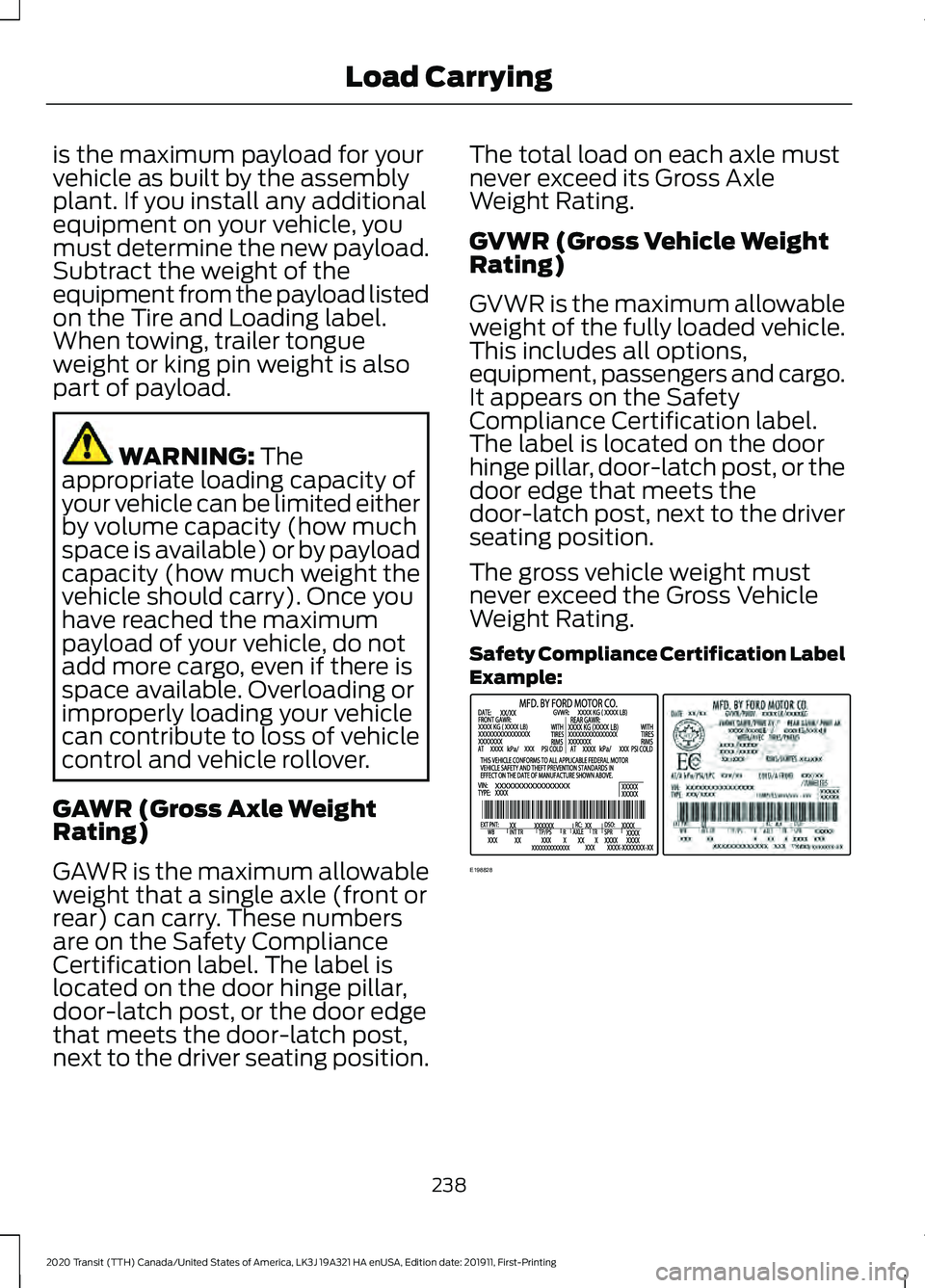
are on the Safety Compliance
Certification label. The label is
located on the door hinge pillar,
door-latch post, or the door edge
that meets the door-latch post,
next to the driver seating position. The total load on each axle must
never exceed its Gross Axle
Weight Rating.
GVWR (Gross Vehicle Weight
Rating)
GVWR is the maximum allowable
weight of the fully loaded vehicle.
This includes all options,
equipment, passengers and cargo.
It appears on the Safety
Compliance Certification label.
The label is located on the door
hinge pillar, door-latch post, or the
door edge that meets the
door-latch post, next to the driver
seating position.
The gross vehicle weight must
never exceed the Gross Vehicle
Weight Rating.
Safety Compliance Certification Label
Example:
238
2020 Transit (TTH) Canada/United States of America, LK3J 19A321 HA enUSA, Edition date: 201911, First-Printing Load CarryingE198828
Page 278 of 529
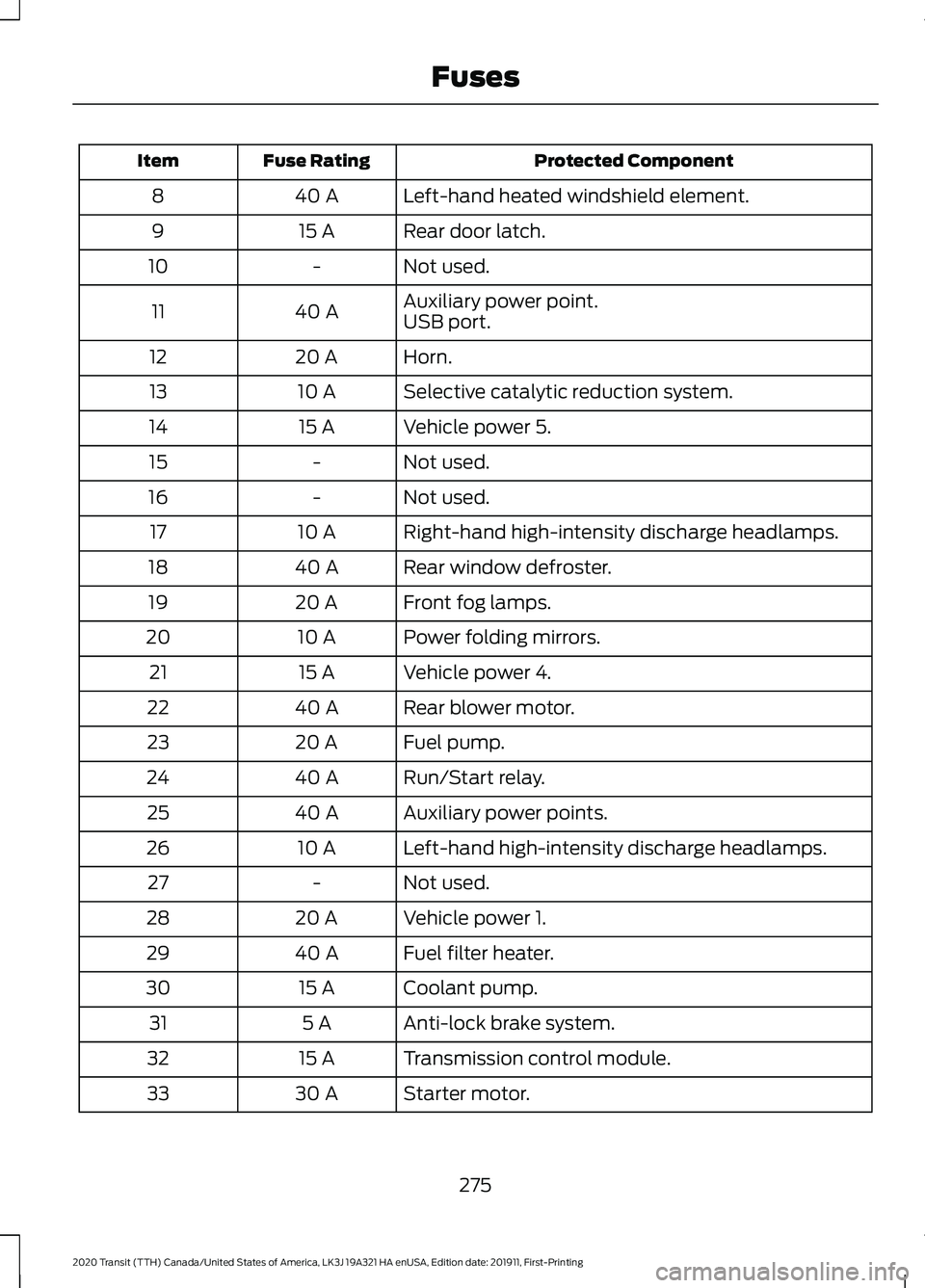
Protected Component
Fuse Rating
Item
Left-hand heated windshield element.
40 A
8
Rear door latch.
15 A
9
Not used.
-
10
Auxiliary power point.
40 A
11
USB port.
Horn.
20 A
12
Selective catalytic reduction system.
10 A
13
Vehicle power 5.
15 A
14
Not used.
-
15
Not used.
-
16
Right-hand high-intensity discharge headlamps.
10 A
17
Rear window defroster.
40 A
18
Front fog lamps.
20 A
19
Power folding mirrors.
10 A
20
Vehicle power 4.
15 A
21
Rear blower motor.
40 A
22
Fuel pump.
20 A
23
Run/Start relay.
40 A
24
Auxiliary power points.
40 A
25
Left-hand high-intensity discharge headlamps.
10 A
26
Not used.
-
27
Vehicle power 1.
20 A
28
Fuel filter heater.
40 A
29
Coolant pump.
15 A
30
Anti-lock brake system.
5 A
31
Transmission control module.
15 A
32
Starter motor.
30 A
33
275
2020 Transit (TTH) Canada/United States of America, LK3J 19A321 HA enUSA, Edition date: 201911, First-Printing Fuses