instrument cluster FORD TRANSIT 2020 User Guide
[x] Cancel search | Manufacturer: FORD, Model Year: 2020, Model line: TRANSIT, Model: FORD TRANSIT 2020Pages: 529, PDF Size: 8.3 MB
Page 225 of 529
When you switch the system off, a warning
lamp illuminates in the instrument cluster
and the alert indicators flash twice.
The system remembers the last setting
when you start your vehicle.
Note:
The system may not correctly operate
when towing a trailer. The system turns off
when you attach a trailer, if your vehicle has
an approved trailer tow module and tow
bar. For vehicles with an aftermarket trailer
tow module or tow bar, turn the system off
when you attach a trailer.
To permanently switch the system off,
contact an authorized dealer.
Blind Spot Information System
Indicator When the system detects a
vehicle, an alert indicator
illuminates in the exterior mirror
on the side the approaching vehicle is
coming from. If you turn the direction
indicator on for that side of your vehicle,
the alert indicator flashes.
Note: The system may not alert you if a
vehicle quickly passes through the detection
zone.
Blind Spot Information System
with Trailer Tow The blind spot information system with
trailer tow is designed to detect vehicles
that may have entered the blind spot zone.
The detection area is on both sides of your
vehicle and trailer, extending rearward
from the exterior mirrors to the end of your
trailer. When you attach a trailer and have
set up a trailer, the blind spot information
system with trailer tow becomes active
when driving forward above 6 mph
(10 km/h).
You can set up the trailer length, select a
trailer or switch blind spot information
system with trailer tow off.
Note: The system remembers the last
trailer setting when you start your vehicle.
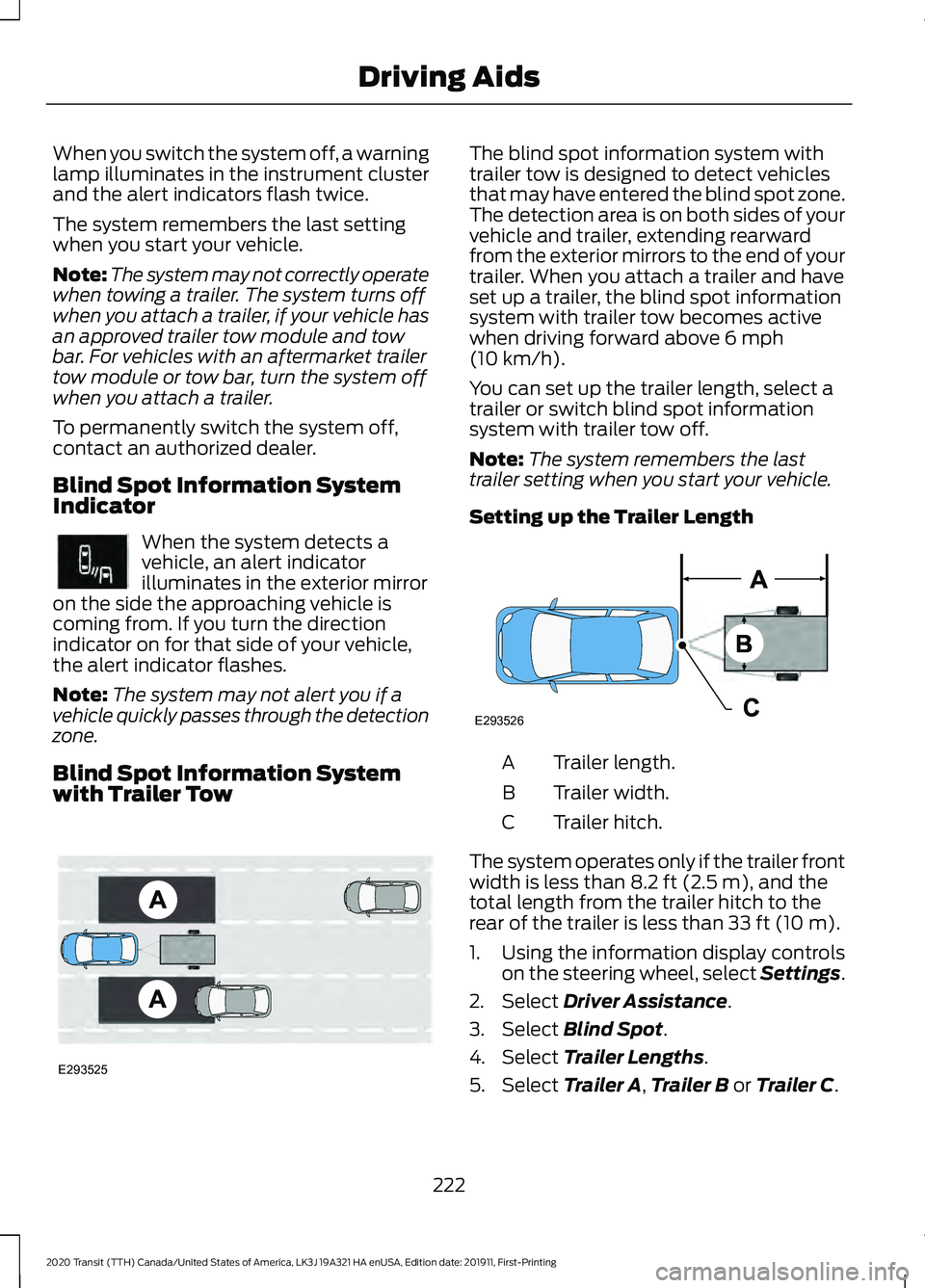
Setting up the Trailer Length Trailer length.
A
Trailer width.
B
Trailer hitch.
C
The system operates only if the trailer front
width is less than
8.2 ft (2.5 m), and the
total length from the trailer hitch to the
rear of the trailer is less than
33 ft (10 m).
1. Using the information display controls on the steering wheel, select Settings.
2. Select
Driver Assistance.
3. Select
Blind Spot.
4. Select
Trailer Lengths.
5. Select
Trailer A, Trailer B or Trailer C.
222
2020 Transit (TTH) Canada/United States of America, LK3J 19A321 HA enUSA, Edition date: 201911, First-Printing Driving AidsE249861E249861 E293525 E293526
Page 226 of 529
6. Select the trailer length at the closest
available value.
Note: Proper measurement and
measurement entry are required for the
system to function as designed.
7. Press the OK button.
Note: If you attach load carriers such as
bike racks or cargo racks with electrical
lighting, enter a length of
3 ft (1 m). Cross
Traffic Alert remains on.
Selecting a Trailer
If you select a trailer in the information
display prior to connecting a trailer, the
system loads that configuration and an
information message appears in the
information display when you connect the
trailer.
1. Using the information display controls on the steering wheel, select Settings.
2. Select
Driver Assistance.
3. Select
Blind Spot.
4. Select
Trailer.
5. Select
Trailer A, Trailer B or Trailer C.
6. Press the
OK button.
Switching the Blind Spot Information
System with Trailer Tow Off
1. Using the information display controls on the steering wheel, select Settings.
2. Select
Driver Assistance.
3. Select
Blind Spot.
4. Select
Trailer.
5. Select
None.
6. Press the
OK button. When you switch the system off, a warning
lamp illuminates and the alert indicators
flash twice.
Note:
The system turns off and a message
appears when a trailer is connected, but not
set up or selected.
Blind Spot Information System
Limitations
Some trailers may cause a slight change
in system performance:
• Wide box trailers, especially those
wider than the towing vehicle, may
cause false alerts to occur when driving
next to infrastructure or near parked
cars. A false alert may also occur while
making a 90-degree turn or driving
through a roundabout.
• Wide trailers that have a total length
greater than
20 ft (6 m) may cause
delayed alerts when a vehicle is
passing at high speed.
• Box trailers that have a width greater
than
8.2 ft (2.5 m) may cause early
alerts when you pass a vehicle.
• Clam shell or V-Nose box trailers with
a width greater than 8.2 ft (2.5 m) may
cause delayed alerts when a vehicle
traveling the same speed as your
vehicle merges lanes.
Blind Spot Information System
Warning Lamp It illuminates in the instrument
cluster if you switch the system
off.
If it illuminates when the system is on this
indicates a malfunction. Have your vehicle
checked as soon as possible.
223
2020 Transit (TTH) Canada/United States of America, LK3J 19A321 HA enUSA, Edition date: 201911, First-Printing Driving AidsE249861E249861
Page 230 of 529
If the system malfunctions, a warning lamp
illuminates in the instrument cluster and
a message appears in the information
display. Have your vehicle checked as soon
as possible.
Note:
In exceptional conditions, the system
could alert you, even when there is nothing
in the detection zone, for example a vehicle
passing further away from your vehicle.
Cross Traffic Alert Information Messages Action
Message
Displays instead of indication arrows when the system
detects a vehicle. Check for approaching traffic.
Cross Traffic Alert
Displays if the cross traffic alert system sensors are blocked.
Clean the sensors. If the message continues to appear, have
your vehicle checked as soon as possible.
Cross Traffic Not Avail-
able Sensor Blocked See
Manual
The system has malfunctioned. Have your vehicle checked
as soon as possible.
Cross Traffic System
Fault
Displays if you attach a trailer to your vehicle.
Cross Traffic Alert Deac-
tivated Trailer Attached
ECO
Eco Mode
How Does Eco Mode Work
The system is designed to monitor certain
driving characteristics to help you drive
more efficiently. See Economical Driving
(page 254).
Note: The efficiency levels do not result in
a defined fuel consumption figure.
Note: The system only indicates the
efficiency level for the current trip. The
system resets each time you switch the
ignition on. Instantaneous Efficiency Level
The display ring increases as the
instantaneous efficiency level increases
and illuminates when it reaches maximum
efficiency. The level continuously updates
to indicate the efficiency level for the
current trip.
Viewing the Instantaneous Efficiency
Level
1. Using the information display controls
on the steering wheel, select
MyView.
2. Select
Eco Coach.
Trip Summary
The calculated trip summary is shown as
four colored bars. The bars travel from left
to right as the calculated efficiency levels
increase. The bars indicate the average
efficiency level for acceleration,
deceleration, speed and gear shifting
during the total distance traveled by your
vehicle for the current trip.
227
2020 Transit (TTH) Canada/United States of America, LK3J 19A321 HA enUSA, Edition date: 201911, First-Printing Driving Aids
Page 285 of 529
Protected Component
Fuse Rating
Item
Data link connector.
7.5 A
13 Steering column.
Instrument cluster.
Battery energy control module - MHEV.
15 A
14
SYNC 3 module.
15 A
15
Not used.
-
16
Not used.
7.5 A
17
Not used.
7.5 A
18
Not used.
5 A
19
Ignition switch.
5 A
20
Positive temperature coefficient heater control.
5 A
21
Pedestrian alert control module.
5 A
22
Not used.
30 A
23
Not used.
30 A
24
Not used.
20 A
25
Not used.
30 A
26
Not used.
30 A
27
Not used.
30 A
28
Not used.
15 A
29
Not used.
5 A
30
Data link connector.
10 A
31
Remote key receiver.
Radio.
20 A
32
Telematics module.
Not used.
-
33
Message center.
30 A
34 Positive temperature coefficient heater.
Direct current/Alternating current inverter.
Lane keeping system camera.
Parking aid.
Steering column.
282
2020 Transit (TTH) Canada/United States of America, LK3J 19A321 HA enUSA, Edition date: 201911, First-Printing Fuses
Page 323 of 529
Instrument Cluster Screens, LCD
Screens and Radio Screens
Note:
Do not use abrasives, alcoholic
solvents or chemical solvents to clean the
instrument cluster screens, LCD screens or
radio screens. These cleaning products can
damage the screens.
Clean the instrument panel and cluster
lens with a clean, damp and soft cloth,
then use a clean, dry and soft cloth to dry
these areas.
Do not spray any liquid directly onto the
screens.
Do not use a microfiber cloth to clean the
bezel around the display screens as it could
damage the surface.
Rear Windows
Note: Do not use any abrasive materials to
clean the interior of the rear windows.
Note: Do not install stickers or labels to the
interior of the rear windows.
Mirrors
Do not clean the housing or glass of any
mirror with harsh abrasives, fuel or other
petroleum or ammonia-based cleaning
products.
Storage Compartments, Cup
Holders and Ashtrays
To clean:
• Take out any removable inserts.
• Wipe the surface with a soft, damp
cloth and a mild soap and water
solution. Dry the area with a clean, soft
cloth. CLEANING THE INSTRUMENT
PANEL AND INSTRUMENT
CLUSTER LENS WARNING: Do not use chemical
solvents or strong detergents when
cleaning the steering wheel or
instrument panel to avoid contamination
of the airbag system.
Note: Follow the same procedure as
cleaning leather seats for cleaning leather
instrument panels and leather interior trim
surfaces.
Clean the instrument panel and cluster
lens with a clean, damp and soft cloth,
then use a clean, dry and soft cloth to dry
these areas.
• Avoid cleaners or polishes that increase
the gloss of the upper portion of the
instrument panel. The dull finish in this
area helps protect you from
undesirable windshield reflection.
• Do not use any household cleaning
products or glass cleaners as these
may damage the finish of the
instrument panel, interior trim and
cluster lens.
• Wash or wipe your hands clean if you
have been in contact with certain
products such as insect repellent and
suntan lotion to avoid possible damage
to the interior painted surfaces.
• Do not allow air fresheners and hand
sanitizers to spill onto interior surfaces.
If a spill occurs, wipe off immediately.
Your warranty may not cover these
damages.
If a staining liquid like coffee or juice has
been spilled on the instrument panel or on
interior trim surfaces:
1. Wipe up spilled liquid using a clean, soft cloth as quickly as possible.
320
2020 Transit (TTH) Canada/United States of America, LK3J 19A321 HA enUSA, Edition date: 201911, First-Printing Vehicle Care
Page 350 of 529
Understanding the Tire Pressure
Monitoring System
The system measures the pressure in the
four road tires and displays the readings in
the instrument cluster.
The system detects this lower pressure as
being significantly below the correct
inflation pressure and the warning lamp
illuminates. You must inflate the tires to
the correct pressure.
When the Temporary Spare Tire is
Installed
If you need to replace a road wheel and
tire with the temporary spare wheel, the
system will continue to identify a defect.
This is to remind you to repair the damaged
road wheel and tire and refit the repaired
road wheel and tire assembly to your
vehicle. To restore the correct operation
of the system, you must have the repaired
road wheel and tire assembly refitted to
your vehicle.
When You Believe the System is Not
Operating Correctly
The main function of the system is to warn
you when the tire pressures are low. It can
also warn you in the event the system is
no longer capable of operating correctly.
See the following chart for information
concerning the system:
347
2020 Transit (TTH) Canada/United States of America, LK3J 19A321 HA enUSA, Edition date: 201911, First-Printing Wheels and Tires
Page 391 of 529
CONNECTED VEHICLE
REQUIREMENTS
Connected service and related feature
functionality requires a compatible vehicle
network.
Some remote features require a
subscription. For additional information,
see the FordPass app. Some restrictions,
third party terms and message or data
rates may apply.
CONNECTED VEHICLE
LIMITATIONS
Evolving technology or evolving cellular
networks could affect functionality and
availability, or continued provision of some
features. These changes could even stop
some features from functioning.
CONNECTING THE VEHICLE TO
A MOBILE NETWORK
What Is the Modem
The modem allows access to a
range of features built into your
vehicle.
Enabling and Disabling the Modem
- Vehicles With: 4.2 Inch
Instrument Cluster Display Screen
1. Using the information display controls on the steering wheel, select Settings.
2. Select FordPass Connect.
3. Select
Connectivity.
4. Switch connectivity features on or off. Enabling and Disabling the Modem
- Vehicles With: 4.2 Inch
Information and Entertainment
Display Screen
1. Select
Settings.
2. Select
Connectivity Features .
3. Select
Data sharing .
4. Switch connectivity features on or off.
Enabling and Disabling the Modem
- Vehicles With: 8 Inch Information
and Entertainment Display Screen
1. Select
Settings.
2. Select
FordPass Connect.
3. Select
Connectivity Settings.
4. Switch connectivity features on or off.
Connecting FordPass to the
Modem
1. Make sure that the modem is enabled using the vehicle settings menu.
2. Open the FordPass app on your device
and log in.
3. Add your vehicle or select your vehicle if already added.
4. Select the option for vehicle details.
5. Select the option to activate your vehicle.
6. Make sure that the name on the screen
matches the name shown in your
FordPass account.
7. Confirm that FordPass account is connected to the modem .
CONNECTING THE VEHICLE TO
A WI-FI NETWORK
1. Select
Settings.
2. Select
Wi-Fi.
388
2020 Transit (TTH) Canada/United States of America, LK3J 19A321 HA enUSA, Edition date: 201911, First-Printing Connected Vehicle
Page 514 of 529
Brake System.......................................................
373
Diesel Exhaust Fluid Tank............................... 373
Engine...................................................................... 371
Fuel Tank............................................................... 372
Grease.................................................................... 374
Locks....................................................................... 373
Washer Reservoir................................................ 372
Capacities and Specifications - 3.5L Duratec..........................................................374
Air Conditioning System.................................. 374
Brake System....................................................... 378
Engine..................................................................... 375
Engine Coolant.................................................... 377
Fuel Tank................................................................ 377
Grease.................................................................... 379
Locks....................................................................... 379
Rear Axle............................................................... 379
Washer Reservoir............................................... 378
Capacities and Specifications - 3.5L Ecoboost™.................................................380
Air Conditioning System................................. 380
Brake System...................................................... 384
Engine..................................................................... 381
Engine Coolant................................................... 383
Fuel Tank.............................................................. 384
Grease.................................................................... 385
Locks...................................................................... 385
Rear Axle............................................................... 385
Washer Reservoir............................................... 384
Capacities and Specifications................362
Cargo Lamps..................................................107 Switching the Cargo Lamps Off.................... 107
Switching the Cargo Lamps On.................... 107
Car Wash See: Cleaning the Exterior............................... 316
Catalytic Converter - 3.5L Duratec/3.5L Ecoboost™..................................................163
On-Board Diagnostics System..................... 164
Changing a Bulb..........................................308 Front Clearance Lamp...................................... 310
Headlamp
............................................................ 309
High Mounted Stoplamps................................ 311
Interior Lamp........................................................ 312
License Plate Lamp............................................ 312
Reading Lamps.................................................... 312
Rear Lamps............................................................ 311
Side Direction Indicator..................................... 311
Sun Visor Mirror Lamp...................................... 313Changing a Fuse..........................................286
Fuses...................................................................... 286
Changing a Road Wheel...........................349 Dissimilar Spare Wheel and Tire Assembly
Information..................................................... 350
Front Jacking Points.......................................... 355
Installing a Road Wheel.................................. 358
Locking Lug Nuts................................................. 351
Rear Jacking Points........................................... 355
Removing a Road Wheel................................ 358
Removing a Wheel Trim.................................. 356
Stowing the Wheel and Vehicle Jack........360
Vehicle Jack......................................................... 354
Vehicles With a Spare Wheel......................... 351
Changing the 12V Battery
.........................303
Removing the Battery...................................... 303
Replacing the Battery...................................... 305
Changing the Engine Air Filter................296
Changing the Engine Oil and Oil Filter...............................................................294
Engine Lubrication for Severe Service Operation......................................................... 295
Changing the Front Wiper Blades.........307
Changing the Wi-Fi Hotspot Name or Password
.....................................................392
Checking MyKey System Status...............75
Checking the Wiper Blades......................307
Child Restraint and Seatbelt Maintenance.................................................50
Child Restraint Positioning
.........................40
Child Safety......................................................20 General Information............................................ 20
Child Safety Locks
.........................................42
Left-Hand Side...................................................... 43
Right-Hand Side................................................... 43
Cigar Lighter
...................................................140
Cleaning Products........................................315
Cleaning the Engine
.....................................317
Cleaning the Exterior...................................316
Body Paintwork Preservation......................... 317
Cleaning the Chrome Trim.............................. 316
Cleaning the Headlamps................................. 316
Cleaning the Rear Window............................. 316
Sliding Door Tracks............................................. 317
Cleaning the Instrument Panel and Instrument Cluster Lens........................320
511
2020 Transit (TTH) Canada/United States of America, LK3J 19A321 HA enUSA, Edition date: 201911, First-Printing Index
Page 515 of 529
Cleaning the Interior....................................318
Fabric, Carpets, Cloth Seats, Headliners
and Floor Mats................................................ 318
Instrument Cluster Screens, LCD Screens and Radio Screens....................................... 320
Leather Interior.................................................... 319
Mirrors.................................................................... 320
Rear Windows..................................................... 320
Seatbelts............................................................... 319
Storage Compartments, Cup Holders and Ashtrays........................................................... 320
Suede Micro Fiber Fabric................................. 319
Cleaning the Wheels...................................321
Cleaning the Windows and Wiper Blades............................................................318
Clearing All MyKeys.......................................74
Climate Control..............................................121
Closing the Sliding Door...............................81 Closing the Sliding Door From Inside Your
Vehicle.................................................................. 81
Closing the Sliding Door From Outside Your Vehicle................................................................. 82
Closing the Sliding Door With the Remote Control................................................................ 85
Cold Weather Precautions
.......................254
Connected Vehicle......................................388 Connecting the Vehicle to a Mobile
Network........................................................... 388
Connected Vehicle Limitations..............388
Connected Vehicle Requirements
........388
Connected Vehicle – Troubleshooting - Vehicles With: Modem
...........................389
Connected Vehicle – Troubleshooting - Vehicles With: SYNC 3...........................390
Connecting a Bluetooth® Device - Vehicles Without: SYNC.........................397
Pairing a Device.................................................. 397
Connecting the Vehicle to a Mobile Network.......................................................388
Connecting FordPass to the Modem.........388
Enabling and Disabling the Modem...........388
What Is the Modem.......................................... 388
Connecting the Vehicle to a Wi-Fi Network.......................................................388
Coolant Check See: Engine Coolant Check........................... 298
Crash Sensors and Airbag Indicator.......60 Creating a MyKey............................................72
MyKey Information Messages.......................... 72
Creating a Wi-Fi Hotspot..........................392 Connecting a Device to the Wi-Fi
Hotspot............................................................. 392
Finding the Wi-Fi Hotspot Name and Password......................................................... 392
Cross Traffic Alert........................................224 Cross Traffic Alert behavior when trailer is
attached........................................................... 226
Cross Traffic Alert Indicator........................... 226
Cross Traffic Alert Information Messages.......................................................... 227
Cross Traffic Alert System Limitations...................................................... 226
Cross Traffic Alert System Sensors............226
Switching the System On and Off..............226
Using Cross Traffic Alert.................................. 224
Cruise Control...............................................206 Principle of Operation..................................... 206
Cruise control See: Using Cruise Control.............................. 206
Customer Assistance.................................266
D
Data Recording
..................................................11
Comfort, Convenience and Entertainment
Data....................................................................... 13
Event Data................................................................ 13
Service Data............................................................ 12
Services That Third Parties Provide...............14
Services That We Provide.................................. 14
Vehicles With a Modem...................................... 14
Vehicles With an Emergency Call System.................................................................. 15
Vehicles With SYNC............................................. 14
Daytime Running Lamps
...........................103
Type 1 - Conventional
(Non-Configurable)...................................... 103
Type 2 - Configurable........................................ 103
Declaration of Conformity
.......................508
Radio Frequency Statement........................ 508
Diesel Particulate Filter
...............................167
Diesel Particulate Filter Automatic
Regeneration................................................... 168
Diesel Particulate Filter Information Messages........................................................... 172
512
2020 Transit (TTH) Canada/United States of America, LK3J 19A321 HA enUSA, Edition date: 201911, First-Printing Index
Page 518 of 529
Pre-fuse Box........................................................
285
G
Gauges................................................................111 Automatic Transmission Position
Indicators........................................................... 112
Engine Coolant Temperature Gauge............112
Fuel Gauge.............................................................. 112
Information Display.............................................. 111
Instrument Cluster............................................... 111
Speedometer........................................................ 112
Tachometer............................................................. 111
Gearbox See: Transmission............................................... 173
General Information on Radio Frequencies...................................................64
General Maintenance Information.......462
Multi-point Inspection..................................... 464
Owner Checks and Services.......................... 463
Protecting Your Investment........................... 462
Why Maintain Your Vehicle?......................... 462
Why Maintain Your Vehicle at Your Dealership?..................................................... 462
Getting Assistance Outside the U.S. and Canada.........................................................269
Getting the Services You Need..............266 Away From Home............................................. 266
H
Hazard Flashers
...........................................258
Headlamp Adjusting See: Adjusting the Headlamps.................... 305
Headlamp Removal See: Removing a Headlamp.......................... 307
Headrest See: Head Restraints......................................... 128
Head Restraints
.............................................128
Adjusting the Head Restraint......................... 129
Installing the Head Restraint ........................ 129
Removing the Head Restraint........................ 129
Heated Exterior Mirrors - Vehicles With: Heated Rear Window
...............................123
Heated Exterior Mirrors - Vehicles Without: Heated Rear Window
.............123
Heated Rear Window..................................123
Heated Seats
..................................................137 Heating
See: Climate Control........................................... 121
Hill Start Assist..............................................182 Hill Start Assist Information
Messages.......................................................... 184
Switching Hill Start Assist On or Off...........183
Using Hill Start Assist....................................... 183
Hints on Controlling the Interior Climate...........................................................122
Defogging or Clearing the Windshield of Thin Ice............................................................... 123
Defogging the Side Windows in Cold Weather............................................................. 122
General Hints........................................................ 122
Quickly Cooling the Interior............................. 122
Quickly Heating the Interior............................. 122
Recommended Settings for Cooling...........122
Recommended Settings for Heating...........122
Hints on Driving With Anti-Lock Brakes............................................................182
Hood Lock See: Opening and Closing the Hood..........288
I
Ignition Switch...............................................143
In California (U.S. Only).............................267
Information Displays
....................................116
General Information........................................... 116
Installing Child Restraints...........................22 Child Safety Restraint......................................... 22
Using Lap and Shoulder Belts......................... 22
Using Lower Anchors and Tethers for Children (LATCH)............................................ 24
Using Tether Straps.............................................. 31
Instrument Cluster
.........................................111
Instrument Lighting Dimmer....................103
Interior Air Quality.........................................127
Interior Lamps
...............................................106
Courtesy Lamp Function................................. 106
Switching the Courtesy Lamps On and Off....................................................................... 106
Switching the Front Map Reading Lamps On and Off....................................................... 106
Interior Mirror
...................................................110
Introduction........................................................9
515
2020 Transit (TTH) Canada/United States of America, LK3J 19A321 HA enUSA, Edition date: 201911, First-Printing Index