steering FORD TRANSIT 2020 User Guide
[x] Cancel search | Manufacturer: FORD, Model Year: 2020, Model line: TRANSIT, Model: FORD TRANSIT 2020Pages: 529, PDF Size: 8.3 MB
Page 77 of 529
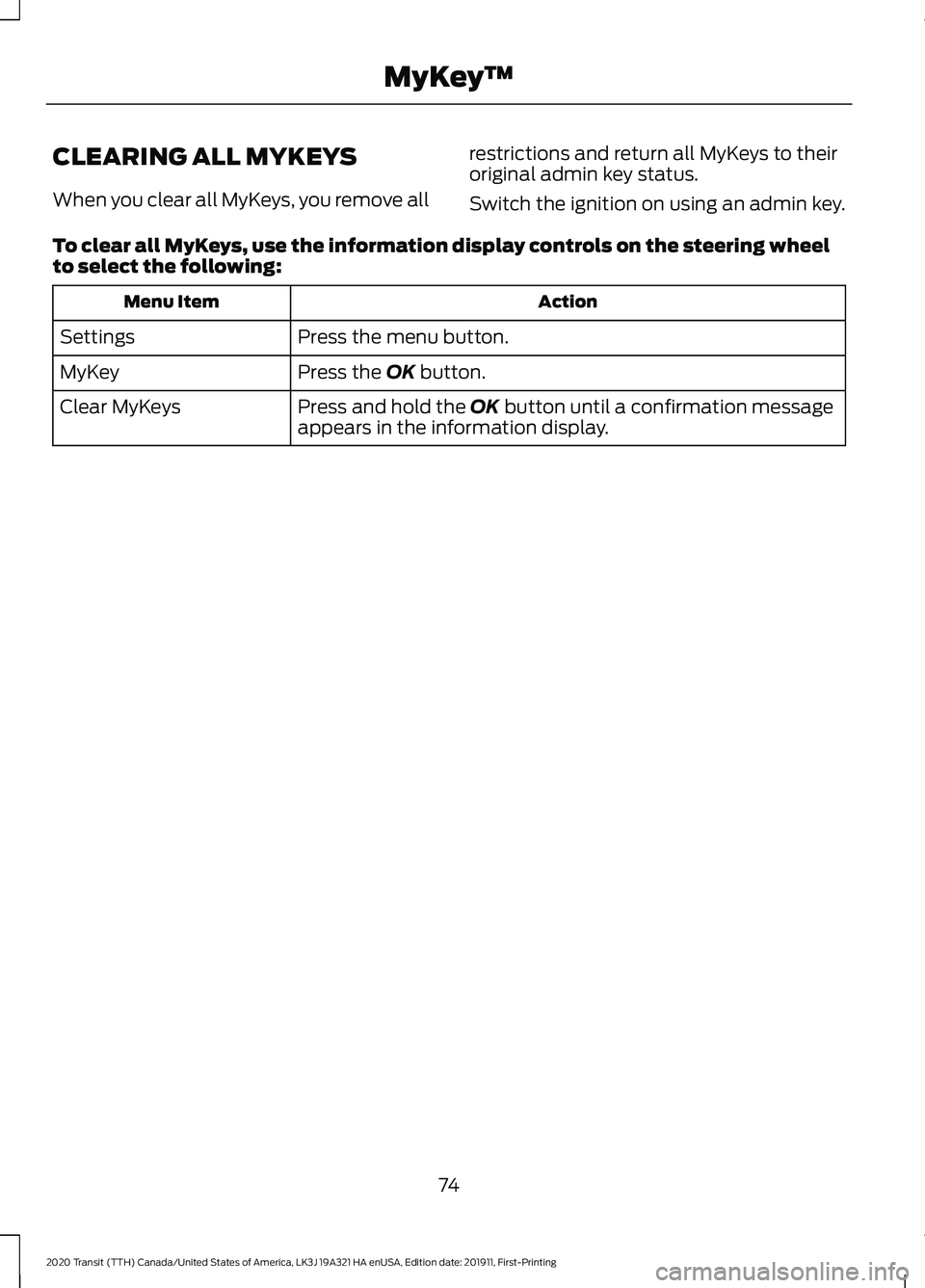
CLEARING ALL MYKEYS
When you clear all MyKeys, you remove all
restrictions and return all MyKeys to their
original admin key status.
Switch the ignition on using an admin key.
To clear all MyKeys, use the information display controls on the steering wheel
to select the following: Action
Menu Item
Press the menu button.
Settings
Press the OK button.
MyKey
Press and hold the
OK button until a confirmation message
appears in the information display.
Clear MyKeys
74
2020 Transit (TTH) Canada/United States of America, LK3J 19A321 HA enUSA, Edition date: 201911, First-Printing MyKey
™
Page 78 of 529
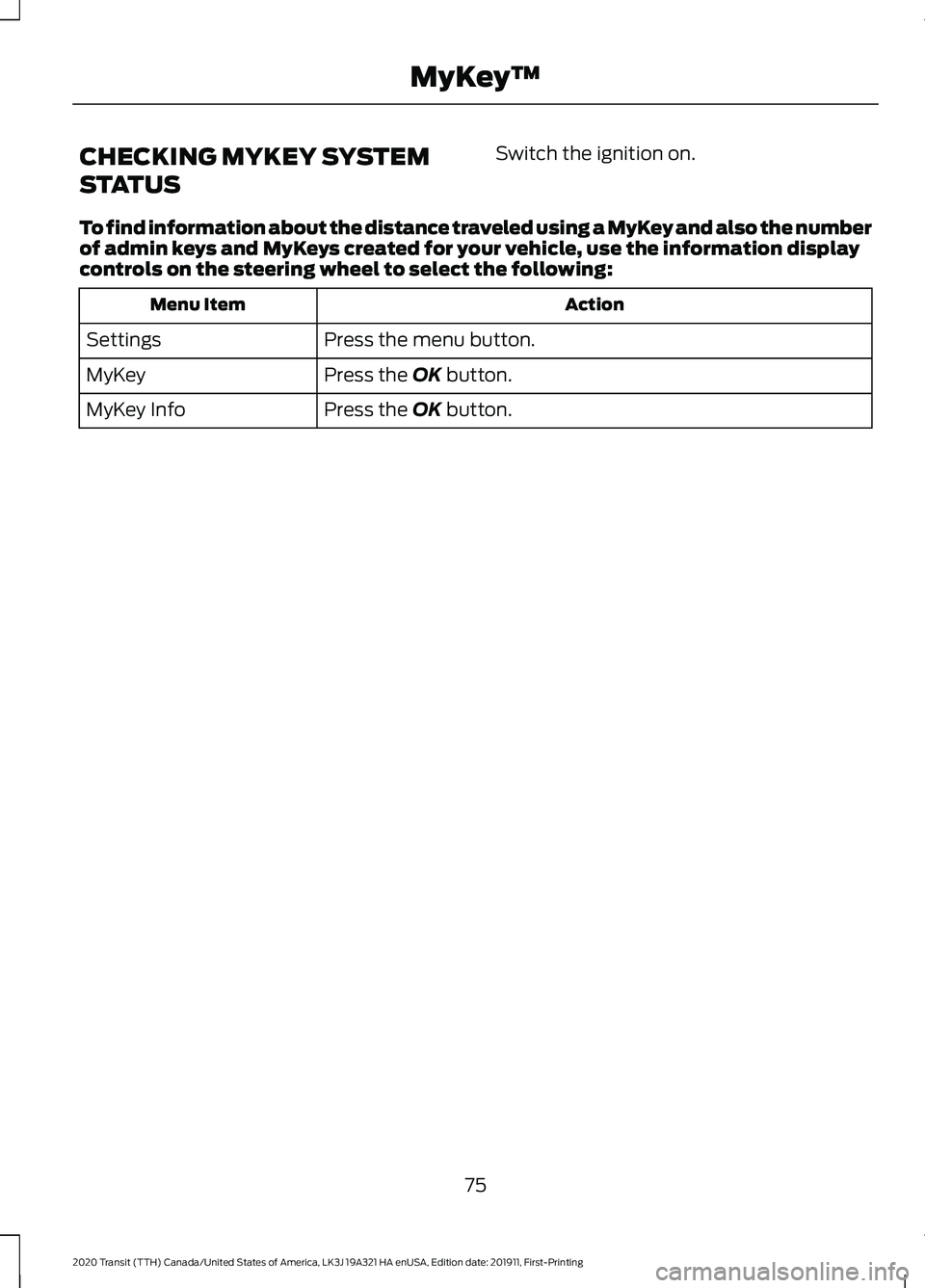
CHECKING MYKEY SYSTEM
STATUS
Switch the ignition on.
To find information about the distance traveled using a MyKey and also the number
of admin keys and MyKeys created for your vehicle, use the information display
controls on the steering wheel to select the following: Action
Menu Item
Press the menu button.
Settings
Press the OK button.
MyKey
Press the
OK button.
MyKey Info
75
2020 Transit (TTH) Canada/United States of America, LK3J 19A321 HA enUSA, Edition date: 201911, First-Printing MyKey
™
Page 82 of 529
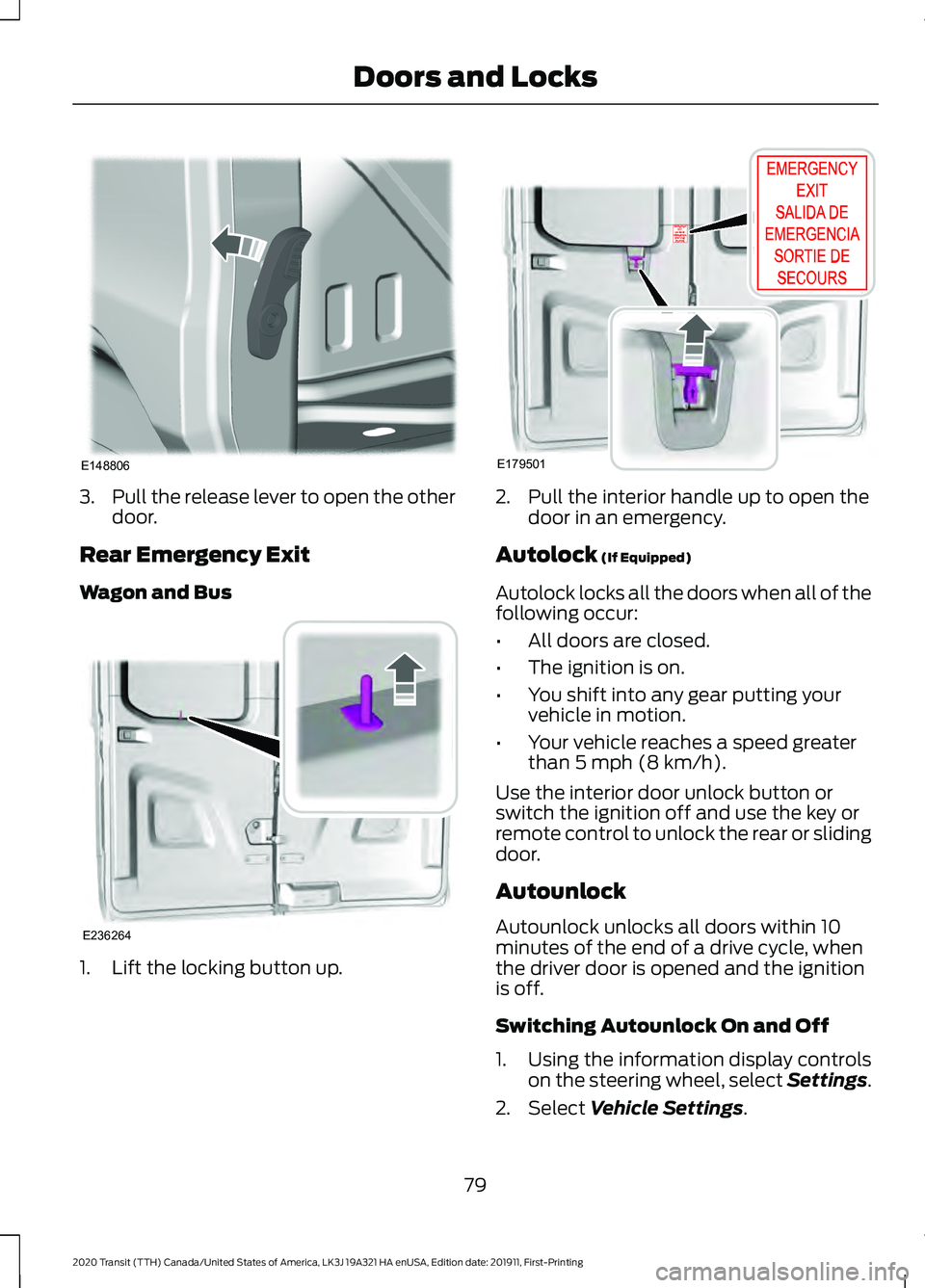
3.
Pull the release lever to open the other
door.
Rear Emergency Exit
Wagon and Bus 1. Lift the locking button up. 2. Pull the interior handle up to open the
door in an emergency.
Autolock (If Equipped)
Autolock locks all the doors when all of the
following occur:
• All doors are closed.
• The ignition is on.
• You shift into any gear putting your
vehicle in motion.
• Your vehicle reaches a speed greater
than
5 mph (8 km/h).
Use the interior door unlock button or
switch the ignition off and use the key or
remote control to unlock the rear or sliding
door.
Autounlock
Autounlock unlocks all doors within 10
minutes of the end of a drive cycle, when
the driver door is opened and the ignition
is off.
Switching Autounlock On and Off
1. Using the information display controls on the steering wheel, select Settings.
2. Select
Vehicle Settings.
79
2020 Transit (TTH) Canada/United States of America, LK3J 19A321 HA enUSA, Edition date: 201911, First-Printing Doors and LocksE148806 E236264 E179501
Page 91 of 529
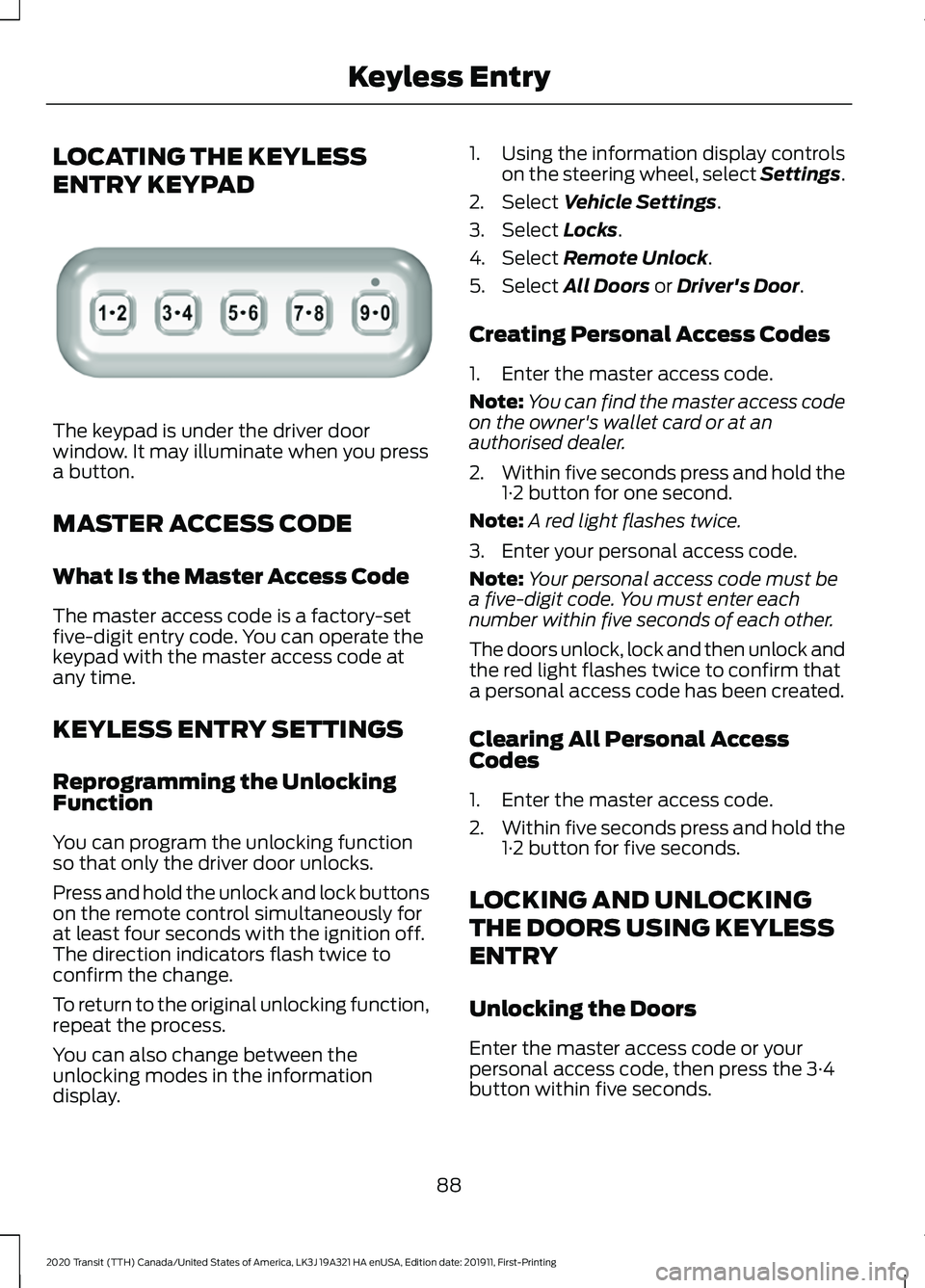
LOCATING THE KEYLESS
ENTRY KEYPAD
The keypad is under the driver door
window. It may illuminate when you press
a button.
MASTER ACCESS CODE
What Is the Master Access Code
The master access code is a factory-set
five-digit entry code. You can operate the
keypad with the master access code at
any time.
KEYLESS ENTRY SETTINGS
Reprogramming the Unlocking
Function
You can program the unlocking function
so that only the driver door unlocks.
Press and hold the unlock and lock buttons
on the remote control simultaneously for
at least four seconds with the ignition off.
The direction indicators flash twice to
confirm the change.
To return to the original unlocking function,
repeat the process.
You can also change between the
unlocking modes in the information
display. 1. Using the information display controls
on the steering wheel, select Settings.
2. Select Vehicle Settings.
3. Select
Locks.
4. Select
Remote Unlock.
5. Select
All Doors or Driver's Door.
Creating Personal Access Codes
1. Enter the master access code.
Note: You can find the master access code
on the owner's wallet card or at an
authorised dealer.
2. Within five seconds press and hold the
1·2 button for one second.
Note: A red light flashes twice.
3. Enter your personal access code.
Note: Your personal access code must be
a five-digit code. You must enter each
number within five seconds of each other.
The doors unlock, lock and then unlock and
the red light flashes twice to confirm that
a personal access code has been created.
Clearing All Personal Access
Codes
1. Enter the master access code.
2. Within five seconds press and hold the
1·2 button for five seconds.
LOCKING AND UNLOCKING
THE DOORS USING KEYLESS
ENTRY
Unlocking the Doors
Enter the master access code or your
personal access code, then press the 3·4
button within five seconds.
88
2020 Transit (TTH) Canada/United States of America, LK3J 19A321 HA enUSA, Edition date: 201911, First-Printing Keyless EntryE307685
Page 98 of 529
Manual Power Deploy
To set the power running boards to the deployed position, use the information
display controls on the steering wheel to select the following:
Action
Message
Press the menu button.
Settings
Press the OK button.
Vehicle Settings
Press the
OK button.
Power Steps
Press the
OK button.
Out
Enabling and Disabling
To enable or disable the power running board feature, use the information display
controls on the steering wheel to select the following: Action and Description
Message
Press the menu button.
Settings
Press the
OK button.
Vehicle Settings
Press the
OK button.
Power Steps
Select one of the following:
Press the
OK button. When disabled the power running
boards move to the stowed position regardless of the door
position.
Off
Press the
OK button. When enabled the power running
boards move to the correct position based on the door posi-
tion.
Auto
When you switch the ignition on, the
system turns on.
Bounce-back
The running board will reverse direction
and move to the end of travel if it
encounters an object while moving. Manual Operation
If the power running board does not return
to the stowed position, you can manually
stow it.
95
2020 Transit (TTH) Canada/United States of America, LK3J 19A321 HA enUSA, Edition date: 201911, First-Printing Power Running Boards
Page 100 of 529
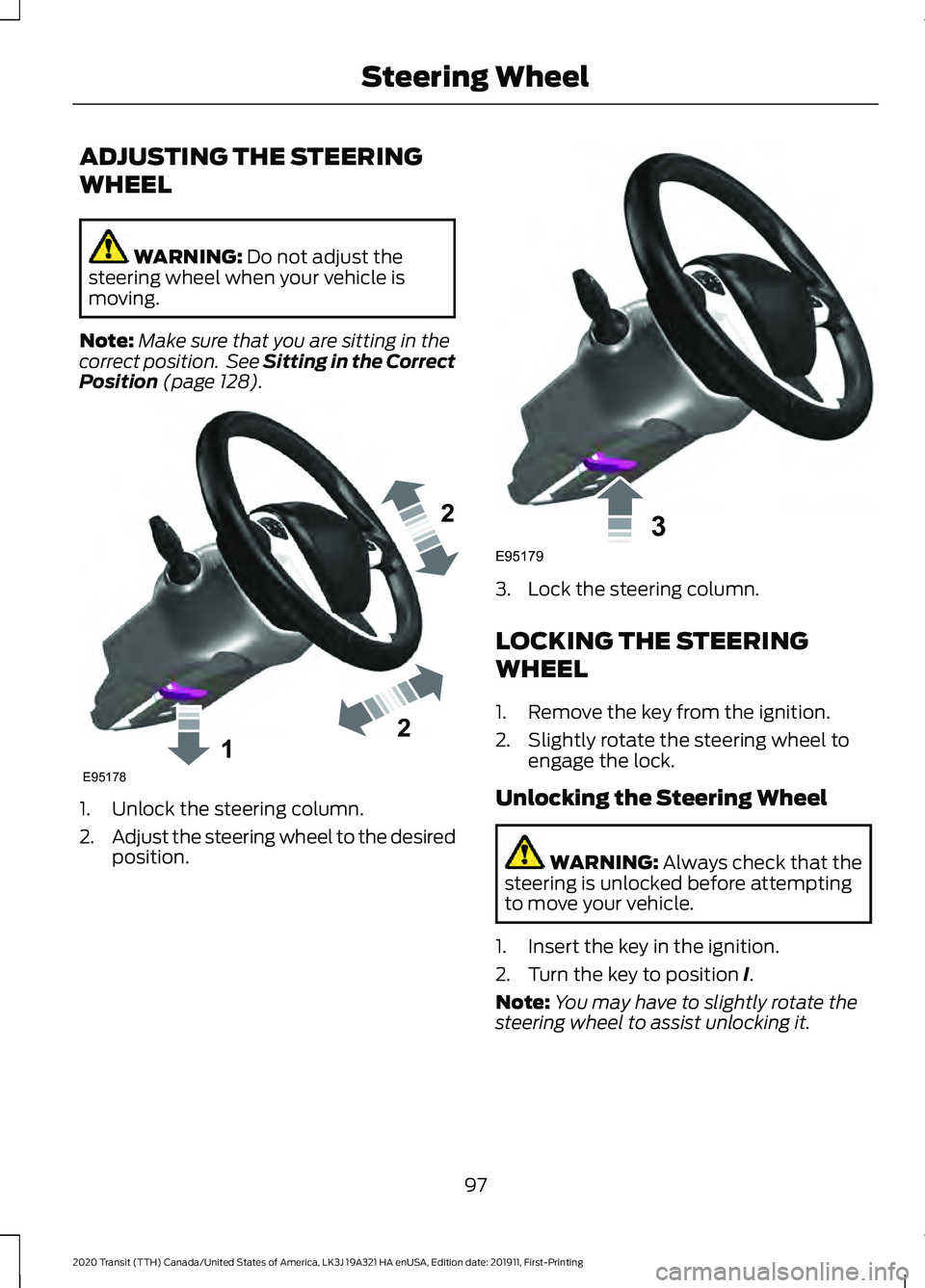
ADJUSTING THE STEERING
WHEEL
WARNING: Do not adjust the
steering wheel when your vehicle is
moving.
Note: Make sure that you are sitting in the
correct position. See Sitting in the Correct
Position
(page 128). 1. Unlock the steering column.
2.
Adjust the steering wheel to the desired
position. 3. Lock the steering column.
LOCKING THE STEERING
WHEEL
1. Remove the key from the ignition.
2. Slightly rotate the steering wheel to
engage the lock.
Unlocking the Steering Wheel WARNING:
Always check that the
steering is unlocked before attempting
to move your vehicle.
1. Insert the key in the ignition.
2. Turn the key to position
I.
Note: You may have to slightly rotate the
steering wheel to assist unlocking it.
97
2020 Transit (TTH) Canada/United States of America, LK3J 19A321 HA enUSA, Edition date: 201911, First-Printing Steering Wheel122E95178 3E95179
Page 102 of 529
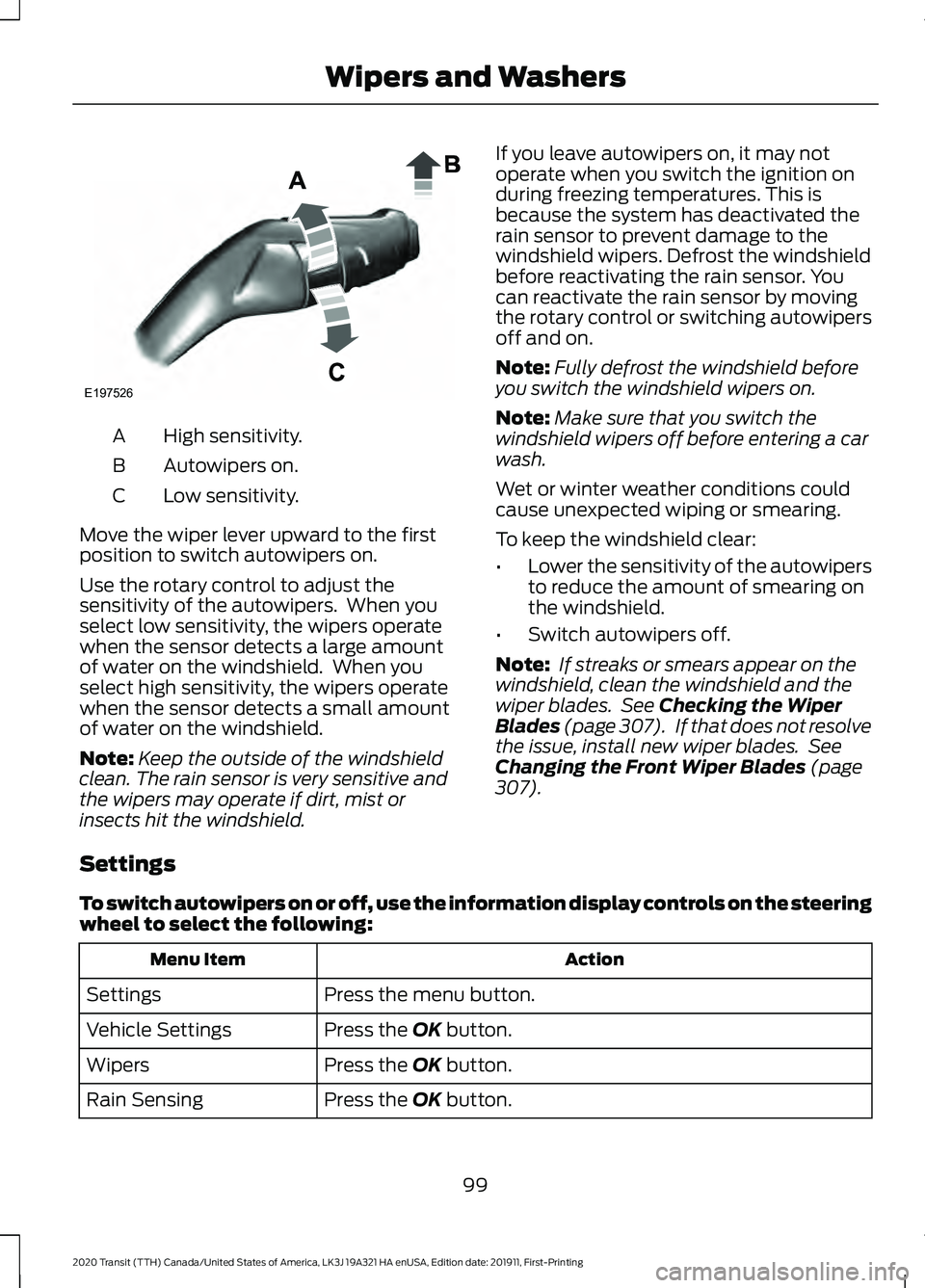
High sensitivity.
A
Autowipers on.
B
Low sensitivity.
C
Move the wiper lever upward to the first
position to switch autowipers on.
Use the rotary control to adjust the
sensitivity of the autowipers. When you
select low sensitivity, the wipers operate
when the sensor detects a large amount
of water on the windshield. When you
select high sensitivity, the wipers operate
when the sensor detects a small amount
of water on the windshield.
Note: Keep the outside of the windshield
clean. The rain sensor is very sensitive and
the wipers may operate if dirt, mist or
insects hit the windshield. If you leave autowipers on, it may not
operate when you switch the ignition on
during freezing temperatures. This is
because the system has deactivated the
rain sensor to prevent damage to the
windshield wipers. Defrost the windshield
before reactivating the rain sensor. You
can reactivate the rain sensor by moving
the rotary control or switching autowipers
off and on.
Note:
Fully defrost the windshield before
you switch the windshield wipers on.
Note: Make sure that you switch the
windshield wipers off before entering a car
wash.
Wet or winter weather conditions could
cause unexpected wiping or smearing.
To keep the windshield clear:
• Lower the sensitivity of the autowipers
to reduce the amount of smearing on
the windshield.
• Switch autowipers off.
Note: If streaks or smears appear on the
windshield, clean the windshield and the
wiper blades. See Checking the Wiper
Blades (page 307). If that does not resolve
the issue, install new wiper blades. See
Changing the Front Wiper Blades
(page
307).
Settings
To switch autowipers on or off, use the information display controls on the steering
wheel to select the following: Action
Menu Item
Press the menu button.
Settings
Press the
OK button.
Vehicle Settings
Press the
OK button.
Wipers
Press the
OK button.
Rain Sensing
99
2020 Transit (TTH) Canada/United States of America, LK3J 19A321 HA enUSA, Edition date: 201911, First-Printing Wipers and WashersE197526
Page 103 of 529
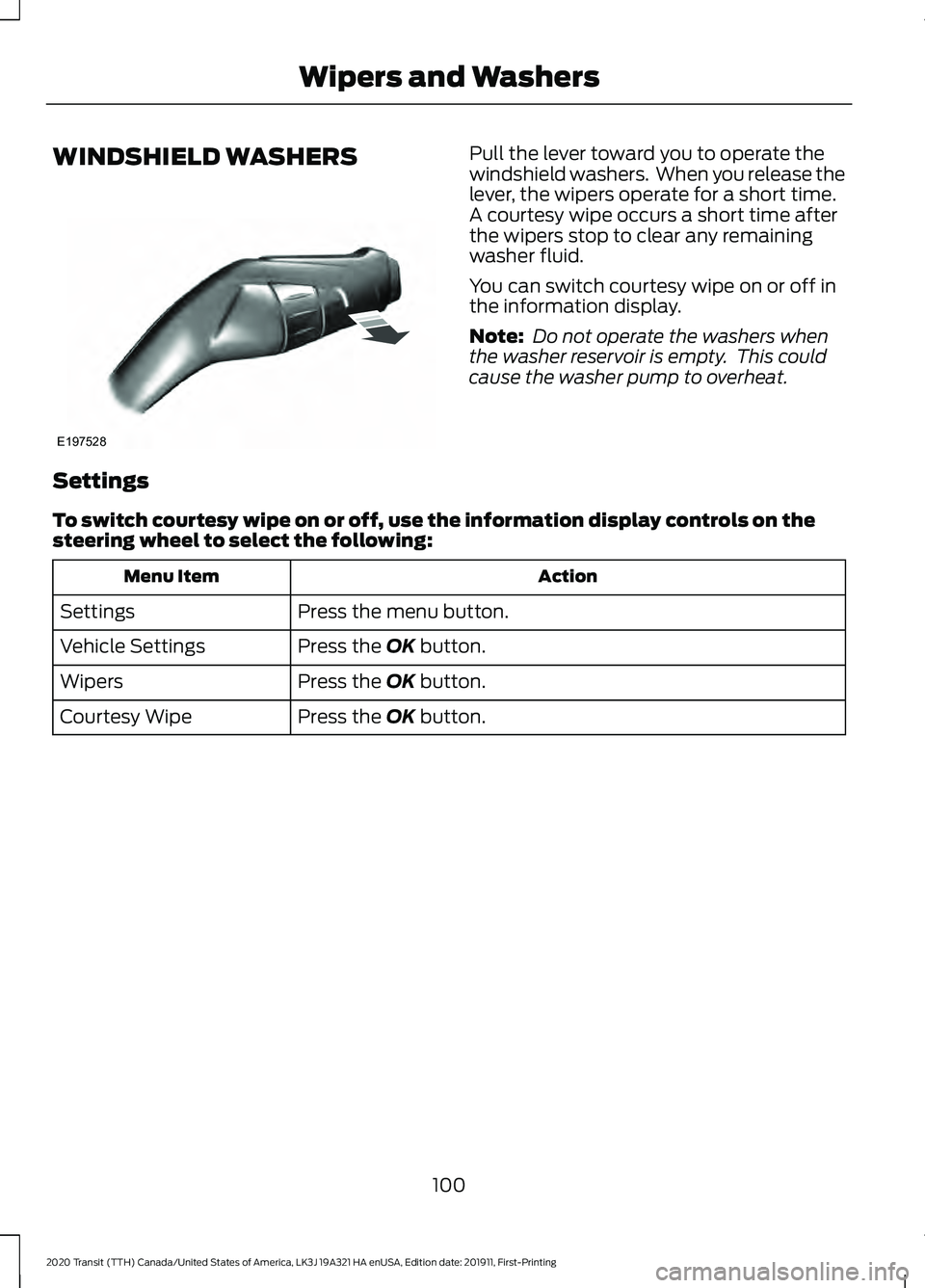
WINDSHIELD WASHERS Pull the lever toward you to operate the
windshield washers. When you release the
lever, the wipers operate for a short time.
A courtesy wipe occurs a short time after
the wipers stop to clear any remaining
washer fluid.
You can switch courtesy wipe on or off in
the information display.
Note:
Do not operate the washers when
the washer reservoir is empty. This could
cause the washer pump to overheat.
Settings
To switch courtesy wipe on or off, use the information display controls on the
steering wheel to select the following: Action
Menu Item
Press the menu button.
Settings
Press the OK button.
Vehicle Settings
Press the
OK button.
Wipers
Press the
OK button.
Courtesy Wipe
100
2020 Transit (TTH) Canada/United States of America, LK3J 19A321 HA enUSA, Edition date: 201911, First-Printing Wipers and WashersE197528
Page 106 of 529
The headlamps remain on for a period of
time after you switch the ignition off. Use
the information display controls to adjust
the period of time that the headlamps
remain on.
Adjusting the Period of Time That
the Headlamps Remain On
1. Using the information display controls
on the steering wheel, select Settings.
2. Select Vehicle Settings.
3. Select
Lighting.
4. Select
Autolamp Delay.
5. Select a setting.
6. Press the
OK button.
INSTRUMENT LIGHTING
DIMMER
The instrument lighting dimmer buttons
are on the lighting control. Repeatedly press one of the
buttons to adjust the brightness.
DAYTIME RUNNING LAMPS
(IF
EQUIPPED) WARNING:
The daytime running
lamps system does not activate the rear
lamps and may not provide adequate
lighting during low visibility driving
conditions. Also, the autolamps switch
position may not activate the headlamps in all low visibility conditions, such as
daytime fog. Make sure the headlamps
are switched to auto or on, as
appropriate, during all low visibility
conditions. Failure to do so may result in
a crash.
Type 1 - Conventional (Non-
Configurable)
The daytime running lamps turn on when:
1. The ignition is switched to the on position.
2. The lighting control is in the off, parking
lamp or autolamps positions.
3. The headlamps are off.
Type 2 - Configurable
Switch the daytime running lamps on or
off using the information display controls.
See
Information Displays (page 116).
The daytime running lamps turn on when:
1. They are switched on in the information
display. See
Information Displays
(page 116).
2. The ignition is switched to the on position.
3. The lighting control is in the autolamps
position.
4. The headlamps are off.
The other lighting control switch positions
do not activate the daytime running lamps,
and you can use them to temporarily
override autolamp control.
When switched off in the information
display, the daytime running lamps are off
in all lighting control switch positions.
103
2020 Transit (TTH) Canada/United States of America, LK3J 19A321 HA enUSA, Edition date: 201911, First-Printing LightingE291299 E291298
Page 108 of 529
Switching Automatic High Beam Control On or Off
To switch the system on or off, use the information display controls on the steering
wheel to select the following:
Action
Menu Item
Press the menu button.
Settings
Press the OK button.
Vehicle Settings
Press the
OK button.
Lighting
Press the
OK button.
Auto Highbeam
Automatic High Beam Indicator It illuminates to confirm when
the system is ready to assist.
Overriding Automatic High Beam
Control
Push the lever away from you to switch
between high beam and low beam.
Automatic High Beam Control Information Messages Description
Message
The camera has reduced visibility. Clean the windshield. If
the message continues to appear, have your vehicle checked
as soon as possible.
Front Camera Low Visib-
ility Clean Screen
The camera has malfunctioned. Wait a short period of time
for the camera to cool down. If the message continues to
appear, have your vehicle checked as soon as possible.
Front Camera Tempor-
arily Not Available
FRONT FOG LAMPS
Switching the Front Fog Lamps On
or Off
Only switch the front fog lamps on during
reduced visibility. You can switch the front fog lamps on if
any of the following occur:
•
You set the lighting control to the
parking lamps position.
• You set the lighting control to the
headlamps position.
• You set the lighting control to the
autolamps position and the headlamps
are on.
The front fog lamp button is on the lighting
control. Press the button to switch the
front fog lamps on or off.
105
2020 Transit (TTH) Canada/United States of America, LK3J 19A321 HA enUSA, Edition date: 201911, First-Printing Lighting