change wheel FORD TRANSIT 2020 Owner's Manual
[x] Cancel search | Manufacturer: FORD, Model Year: 2020, Model line: TRANSIT, Model: FORD TRANSIT 2020Pages: 529, PDF Size: 8.3 MB
Page 345 of 529
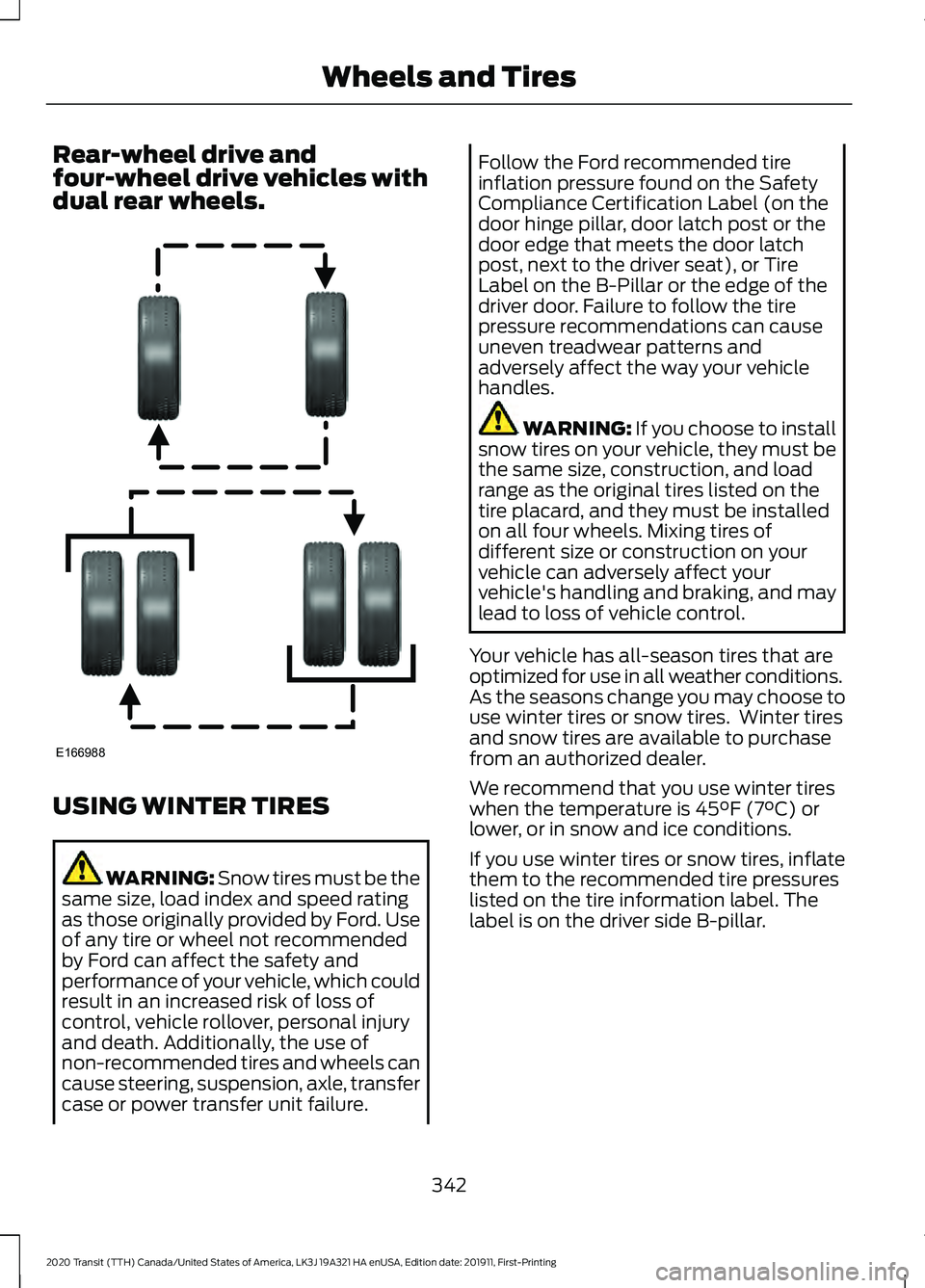
Rear-wheel drive and
four-wheel drive vehicles with
dual rear wheels.
USING WINTER TIRES
WARNING: Snow tires must be the
same size, load index and speed rating
as those originally provided by Ford. Use
of any tire or wheel not recommended
by Ford can affect the safety and
performance of your vehicle, which could
result in an increased risk of loss of
control, vehicle rollover, personal injury
and death. Additionally, the use of
non-recommended tires and wheels can
cause steering, suspension, axle, transfer
case or power transfer unit failure. Follow the Ford recommended tire
inflation pressure found on the Safety
Compliance Certification Label (on the
door hinge pillar, door latch post or the
door edge that meets the door latch
post, next to the driver seat), or Tire
Label on the B-Pillar or the edge of the
driver door. Failure to follow the tire
pressure recommendations can cause
uneven treadwear patterns and
adversely affect the way your vehicle
handles.
WARNING: If you choose to install
snow tires on your vehicle, they must be
the same size, construction, and load
range as the original tires listed on the
tire placard, and they must be installed
on all four wheels. Mixing tires of
different size or construction on your
vehicle can adversely affect your
vehicle's handling and braking, and may
lead to loss of vehicle control.
Your vehicle has all-season tires that are
optimized for use in all weather conditions.
As the seasons change you may choose to
use winter tires or snow tires. Winter tires
and snow tires are available to purchase
from an authorized dealer.
We recommend that you use winter tires
when the temperature is
45°F (7°C) or
lower, or in snow and ice conditions.
If you use winter tires or snow tires, inflate
them to the recommended tire pressures
listed on the tire information label. The
label is on the driver side B-pillar.
342
2020 Transit (TTH) Canada/United States of America, LK3J 19A321 HA enUSA, Edition date: 201911, First-Printing Wheels and TiresE166988
Page 348 of 529
You must check the tire
pressures (including the spare
tire where applicable) every two
weeks when the tires are cold. See
Wheels and Tires (page 324). The tire
pressures are also on the tire inflation
pressure label (located on the edge of
driver door or the B-Pillar).
As a driver assistance feature your vehicle
has a tire pressure monitoring system. A
warning lamp will illuminate when one or
more of the tires are significantly
under-inflated. If the low tire pressure
warning lamp illuminates, you should stop
your vehicle as soon as it is safe to do so,
check the tires and inflate them to the
correct pressure.
Driving on under-inflated tires can:
• Cause them to overheat.
• Lead to tire failure.
• Reduce fuel efficiency.
• Reduce tire life.
• Affect vehicle handling or stopping
ability.
The system is not substitute for correct tire
maintenance.
You must maintain the correct tire
pressures, even if low tire pressure has not
illuminated the warning lamp.
The tire pressure monitoring system has a
system malfunction indicator to warn you
when the system is not operating correctly.
The malfunction indicator and low tire
pressure warning lamp have a combined
function. When the system detects a
malfunction, the warning lamp will flash
for approximately one minute and then
remain illuminated. This sequence will
occur every time you switch the ignition on
while the malfunction remains. The
system has detected a fault that requires
service. When the malfunction indicator is
illuminated, the system may not be able
to detect or signal low tire pressures. A
malfunction may occur for a variety of
reasons, including the installation of a
replacement tire or wheel that prevents
the system from functioning correctly.
Always check the tire pressure monitoring
system malfunction warning after
replacing one or more tires or wheels on
your vehicle. Make sure the replacement
tires or wheels allow the system to
continue to function correctly.
This device complies with Part 15 of the
FCC Rules and with Licence exempt RSS
Standards of Industry Canada. Operation
is subject to the following two conditions:
•
This device may not cause harmful
interference.
• This device must accept any
interference received, including
interference that may cause undesired
operation. WARNING:
Changes or
modifications not expressively approved
by the party responsible for compliance
could void the user's authority to operate
the equipment. The term "IC:" before the
radio certification number only signifies
that Industry Canada technical
specifications were met.
How Temperature Affects the Tire
Pressures
Under normal driving conditions tire
pressures may increase by up to
4 psi
(0.3 bar) from a cold start situation.
345
2020 Transit (TTH) Canada/United States of America, LK3J 19A321 HA enUSA, Edition date: 201911, First-Printing Wheels and Tires
Page 357 of 529
Note:
Do not raise the spare wheel bracket
without a wheel attached. Damage to the
winch mechanism could occur.
Vehicle Jack WARNING: Do not work on your
vehicle when the jack is the only support
as your vehicle could slip off the jack.
Failure to follow this instruction could
result in personal injury or death. WARNING:
To help prevent your
vehicle from moving when changing a
wheel, shift the transmission into park
(P), set the parking brake and use an
appropriate block or wheel chock to
secure the wheel diagonally opposite to
the wheel being changed. For example,
when changing the front left wheel,
place an appropriate block or wheel
chock on the right rear wheel. WARNING:
Do not attempt to
change a tire on the side of the vehicle
close to moving traffic. Pull far enough
off the road to avoid the danger of being
hit when operating the jack or changing
the wheel. WARNING:
Always use the jack
provided as original equipment with your
vehicle. If using a jack other than the one
provided, make sure the jack capacity is
adequate for the vehicle weight,
including any vehicle cargo or
modifications. If you are unsure if the jack
capacity is adequate, contact the
authorized dealer. WARNING:
Switch off the running
boards before jacking or placing any
object under your vehicle. Never place
your hand between the extended running
board and your vehicle. A moving running
board may cause injury. Note:
Passengers should not remain in the
vehicle when the vehicle is being jacked.
Note: Vehicles with a Temporary Mobility
Kit do not have a vehicle jack or a lug
wrench.
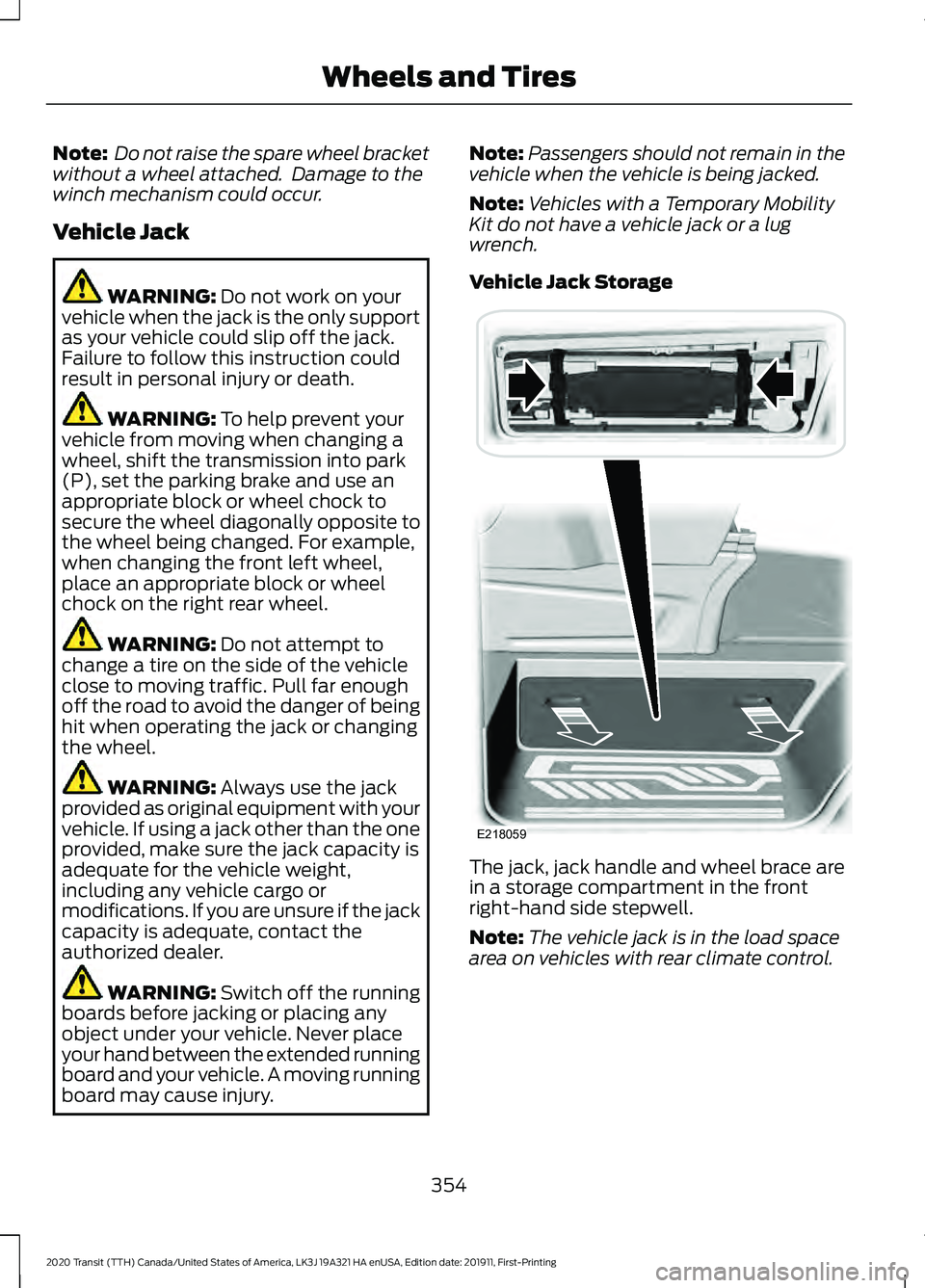
Vehicle Jack Storage The jack, jack handle and wheel brace are
in a storage compartment in the front
right-hand side stepwell.
Note:
The vehicle jack is in the load space
area on vehicles with rear climate control.
354
2020 Transit (TTH) Canada/United States of America, LK3J 19A321 HA enUSA, Edition date: 201911, First-Printing Wheels and TiresE218059
Page 391 of 529
CONNECTED VEHICLE
REQUIREMENTS
Connected service and related feature
functionality requires a compatible vehicle
network.
Some remote features require a
subscription. For additional information,
see the FordPass app. Some restrictions,
third party terms and message or data
rates may apply.
CONNECTED VEHICLE
LIMITATIONS
Evolving technology or evolving cellular
networks could affect functionality and
availability, or continued provision of some
features. These changes could even stop
some features from functioning.
CONNECTING THE VEHICLE TO
A MOBILE NETWORK
What Is the Modem
The modem allows access to a
range of features built into your
vehicle.
Enabling and Disabling the Modem
- Vehicles With: 4.2 Inch
Instrument Cluster Display Screen
1. Using the information display controls on the steering wheel, select Settings.
2. Select FordPass Connect.
3. Select
Connectivity.
4. Switch connectivity features on or off. Enabling and Disabling the Modem
- Vehicles With: 4.2 Inch
Information and Entertainment
Display Screen
1. Select
Settings.
2. Select
Connectivity Features .
3. Select
Data sharing .
4. Switch connectivity features on or off.
Enabling and Disabling the Modem
- Vehicles With: 8 Inch Information
and Entertainment Display Screen
1. Select
Settings.
2. Select
FordPass Connect.
3. Select
Connectivity Settings.
4. Switch connectivity features on or off.
Connecting FordPass to the
Modem
1. Make sure that the modem is enabled using the vehicle settings menu.
2. Open the FordPass app on your device
and log in.
3. Add your vehicle or select your vehicle if already added.
4. Select the option for vehicle details.
5. Select the option to activate your vehicle.
6. Make sure that the name on the screen
matches the name shown in your
FordPass account.
7. Confirm that FordPass account is connected to the modem .
CONNECTING THE VEHICLE TO
A WI-FI NETWORK
1. Select
Settings.
2. Select
Wi-Fi.
388
2020 Transit (TTH) Canada/United States of America, LK3J 19A321 HA enUSA, Edition date: 201911, First-Printing Connected Vehicle
Page 409 of 529
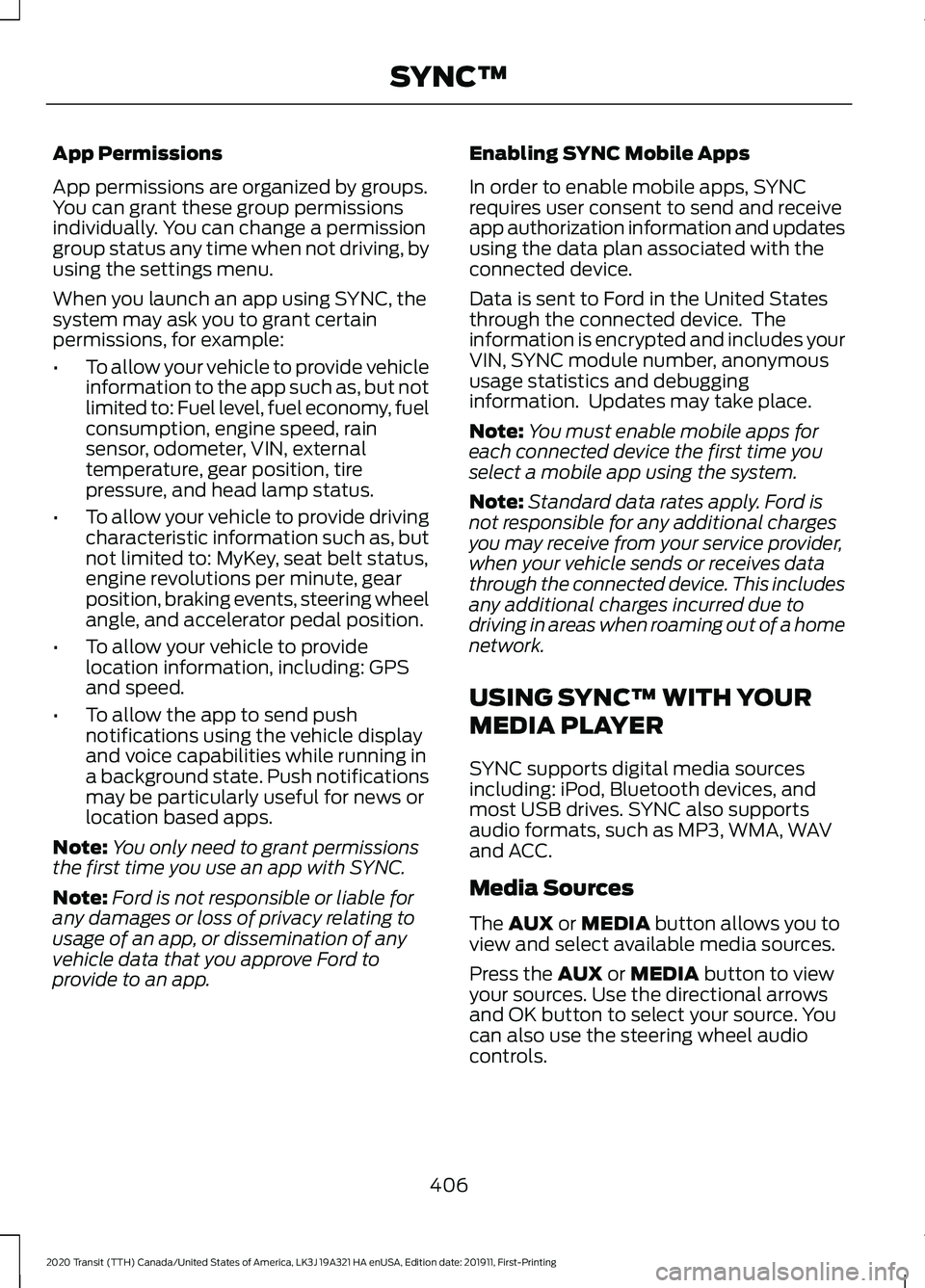
App Permissions
App permissions are organized by groups.
You can grant these group permissions
individually. You can change a permission
group status any time when not driving, by
using the settings menu.
When you launch an app using SYNC, the
system may ask you to grant certain
permissions, for example:
•
To allow your vehicle to provide vehicle
information to the app such as, but not
limited to: Fuel level, fuel economy, fuel
consumption, engine speed, rain
sensor, odometer, VIN, external
temperature, gear position, tire
pressure, and head lamp status.
• To allow your vehicle to provide driving
characteristic information such as, but
not limited to: MyKey, seat belt status,
engine revolutions per minute, gear
position, braking events, steering wheel
angle, and accelerator pedal position.
• To allow your vehicle to provide
location information, including: GPS
and speed.
• To allow the app to send push
notifications using the vehicle display
and voice capabilities while running in
a background state. Push notifications
may be particularly useful for news or
location based apps.
Note: You only need to grant permissions
the first time you use an app with SYNC.
Note: Ford is not responsible or liable for
any damages or loss of privacy relating to
usage of an app, or dissemination of any
vehicle data that you approve Ford to
provide to an app. Enabling SYNC Mobile Apps
In order to enable mobile apps, SYNC
requires user consent to send and receive
app authorization information and updates
using the data plan associated with the
connected device.
Data is sent to Ford in the United States
through the connected device. The
information is encrypted and includes your
VIN, SYNC module number, anonymous
usage statistics and debugging
information. Updates may take place.
Note:
You must enable mobile apps for
each connected device the first time you
select a mobile app using the system.
Note: Standard data rates apply. Ford is
not responsible for any additional charges
you may receive from your service provider,
when your vehicle sends or receives data
through the connected device. This includes
any additional charges incurred due to
driving in areas when roaming out of a home
network.
USING SYNC™ WITH YOUR
MEDIA PLAYER
SYNC supports digital media sources
including: iPod, Bluetooth devices, and
most USB drives. SYNC also supports
audio formats, such as MP3, WMA, WAV
and ACC.
Media Sources
The AUX or MEDIA button allows you to
view and select available media sources.
Press the
AUX or MEDIA button to view
your sources. Use the directional arrows
and OK button to select your source. You
can also use the steering wheel audio
controls.
406
2020 Transit (TTH) Canada/United States of America, LK3J 19A321 HA enUSA, Edition date: 201911, First-Printing SYNC™
Page 444 of 529
Navigation Map Accuracy and
Updates
HERE is the digital map provider for the
navigation application. If you find map data
errors, you may report them directly to
HERE by going to www.here.com. HERE
evaluates all reported map errors and
responds with the result of their
investigation by e-mail.
The navigation system map data may
contain inaccurate or incomplete
information due to the passage of time,
changing circumstances, sources used and
the nature of collecting comprehensive
geographic data, any of which may lead to
incorrect results. Inaccurate speed limit
information, turn restrictions and other
road attributes may affect the determined
route and associated guidance
Annual navigation map updates are
available for purchase through your
dealership. Depending on your purchase
agreement, you might be eligible for free
Map update. You can choose to download
the Map data update onto a USB, order a
USB, or use Wi-Fi to deliver automatic
updates. To update your Map data over
Wi-Fi, your vehicle must be connected to
a Wi-Fi access point. Map Data files are
large, so it is highly recommended to
perform the update when free Wi-Fi is
available otherwise high data rates may
apply. For USB updates, free map update
eligibility, and other details, contact
dealers at 1-866-462-8837 in the United
States and Canada or 01-800-557-5539
in Mexico or visit our local website for more
information.
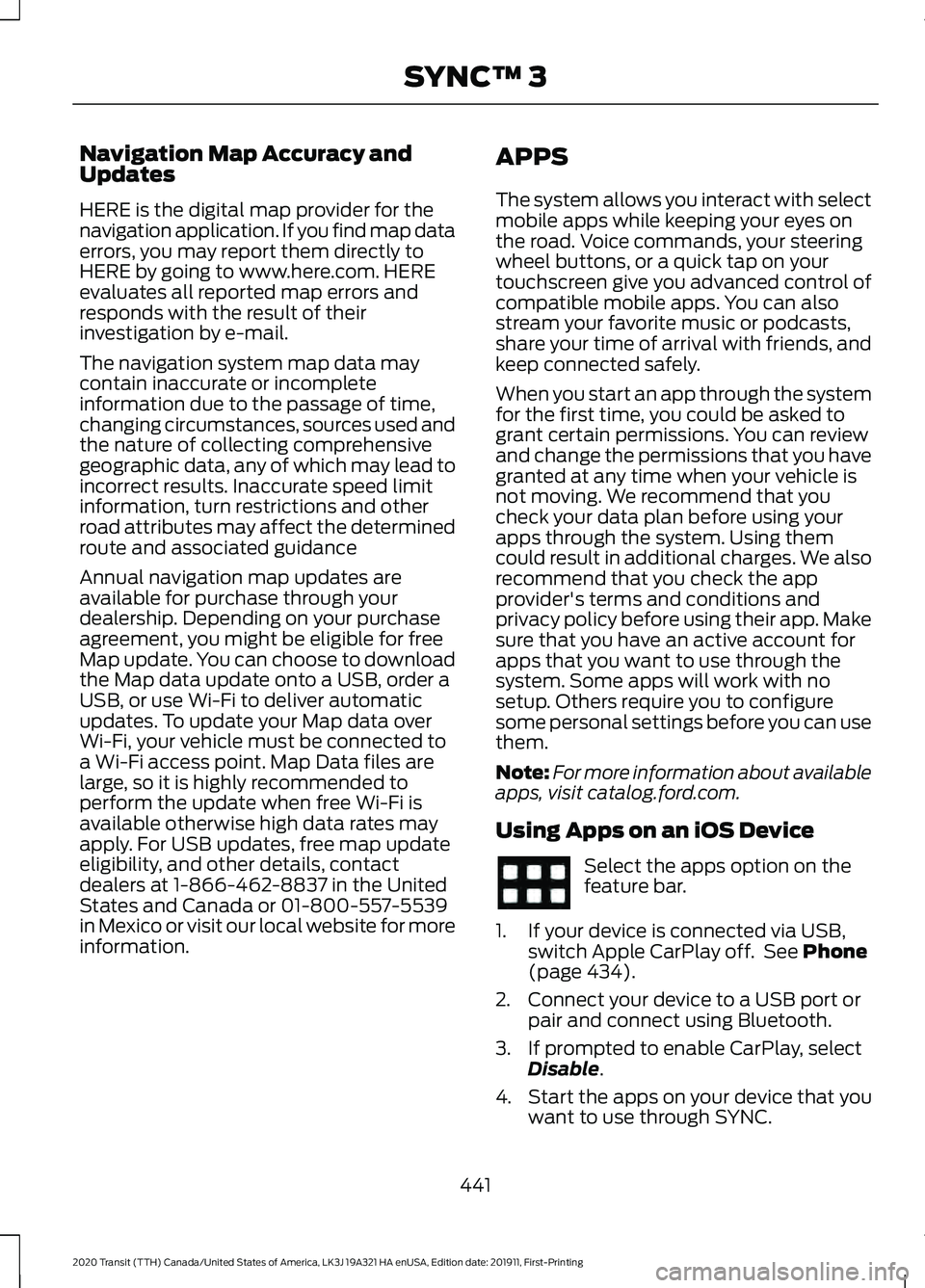
APPS
The system allows you interact with select
mobile apps while keeping your eyes on
the road. Voice commands, your steering
wheel buttons, or a quick tap on your
touchscreen give you advanced control of
compatible mobile apps. You can also
stream your favorite music or podcasts,
share your time of arrival with friends, and
keep connected safely.
When you start an app through the system
for the first time, you could be asked to
grant certain permissions. You can review
and change the permissions that you have
granted at any time when your vehicle is
not moving. We recommend that you
check your data plan before using your
apps through the system. Using them
could result in additional charges. We also
recommend that you check the app
provider's terms and conditions and
privacy policy before using their app. Make
sure that you have an active account for
apps that you want to use through the
system. Some apps will work with no
setup. Others require you to configure
some personal settings before you can use
them.
Note:
For more information about available
apps, visit catalog.ford.com.
Using Apps on an iOS Device Select the apps option on the
feature bar.
1. If your device is connected via USB, switch Apple CarPlay off. See Phone
(page 434).
2. Connect your device to a USB port or pair and connect using Bluetooth.
3. If prompted to enable CarPlay, select Disable
.
4. Start the apps on your device that you want to use through SYNC.
441
2020 Transit (TTH) Canada/United States of America, LK3J 19A321 HA enUSA, Edition date: 201911, First-Printing SYNC™ 3
Page 469 of 529
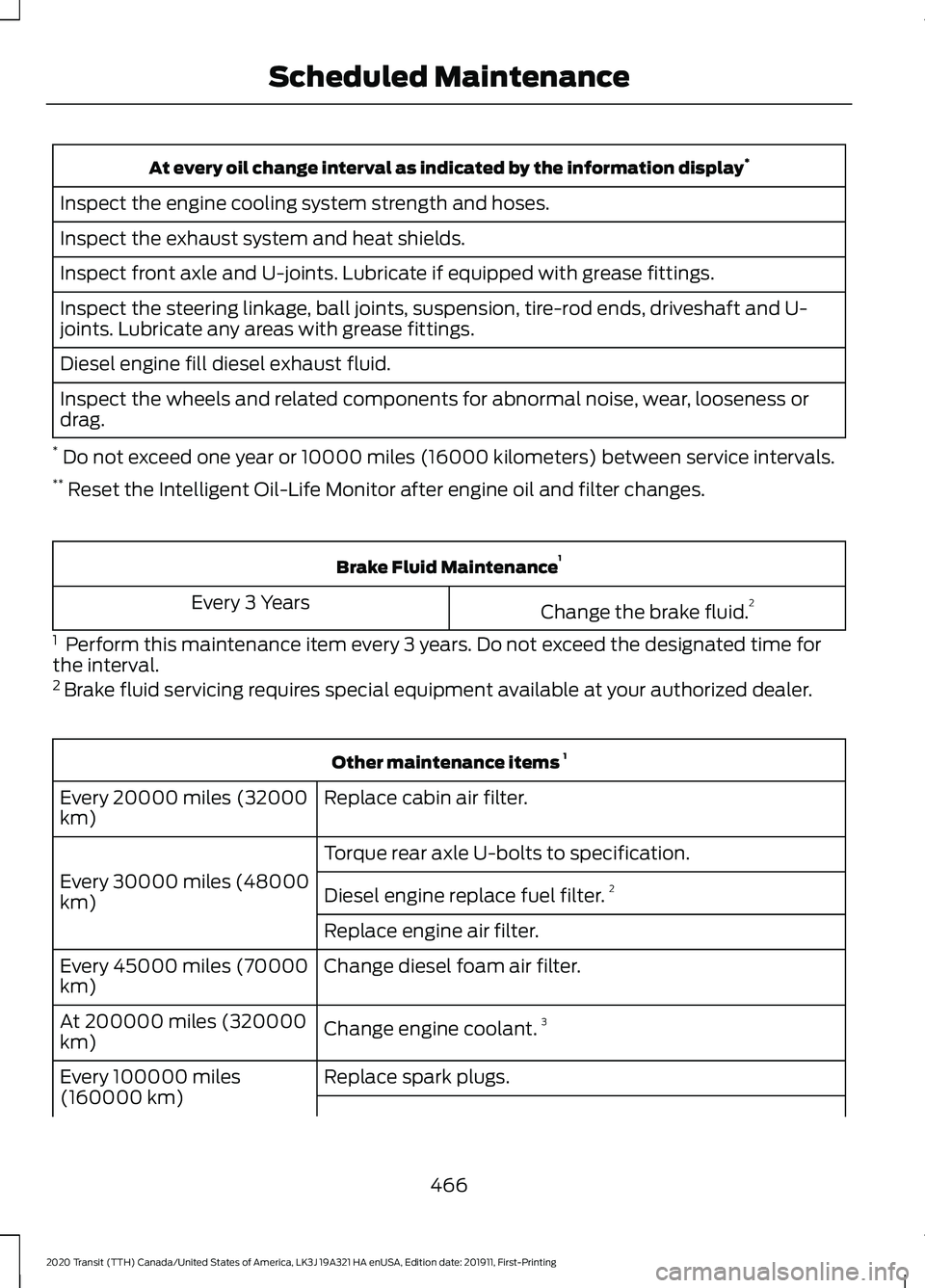
At every oil change interval as indicated by the information display
*
Inspect the engine cooling system strength and hoses.
Inspect the exhaust system and heat shields.
Inspect front axle and U-joints. Lubricate if equipped with grease fittings.
Inspect the steering linkage, ball joints, suspension, tire-rod ends, driveshaft and U-
joints. Lubricate any areas with grease fittings.
Diesel engine fill diesel exhaust fluid.
Inspect the wheels and related components for abnormal noise, wear, looseness or
drag.
* Do not exceed one year or 10000 miles (16000 kilometers) between service intervals.
** Reset the Intelligent Oil-Life Monitor after engine oil and filter changes. Brake Fluid Maintenance
1
Change the brake fluid. 2
Every 3 Years
1 Perform this maintenance item every 3 years. Do not exceed the designated time for
the interval.
2 Brake fluid servicing requires special equipment available at your authorized dealer. Other maintenance items
1
Replace cabin air filter.
Every 20000 miles (32000
km)
Torque rear axle U-bolts to specification.
Every 30000 miles (48000
km) Diesel engine replace fuel filter. 2
Replace engine air filter.
Change diesel foam air filter.
Every 45000 miles (70000
km)
Change engine coolant.3
At 200000 miles (320000
km)
Replace spark plugs.
Every 100000 miles
(160000 km)
466
2020 Transit (TTH) Canada/United States of America, LK3J 19A321 HA enUSA, Edition date: 201911, First-Printing Scheduled Maintenance
Page 471 of 529
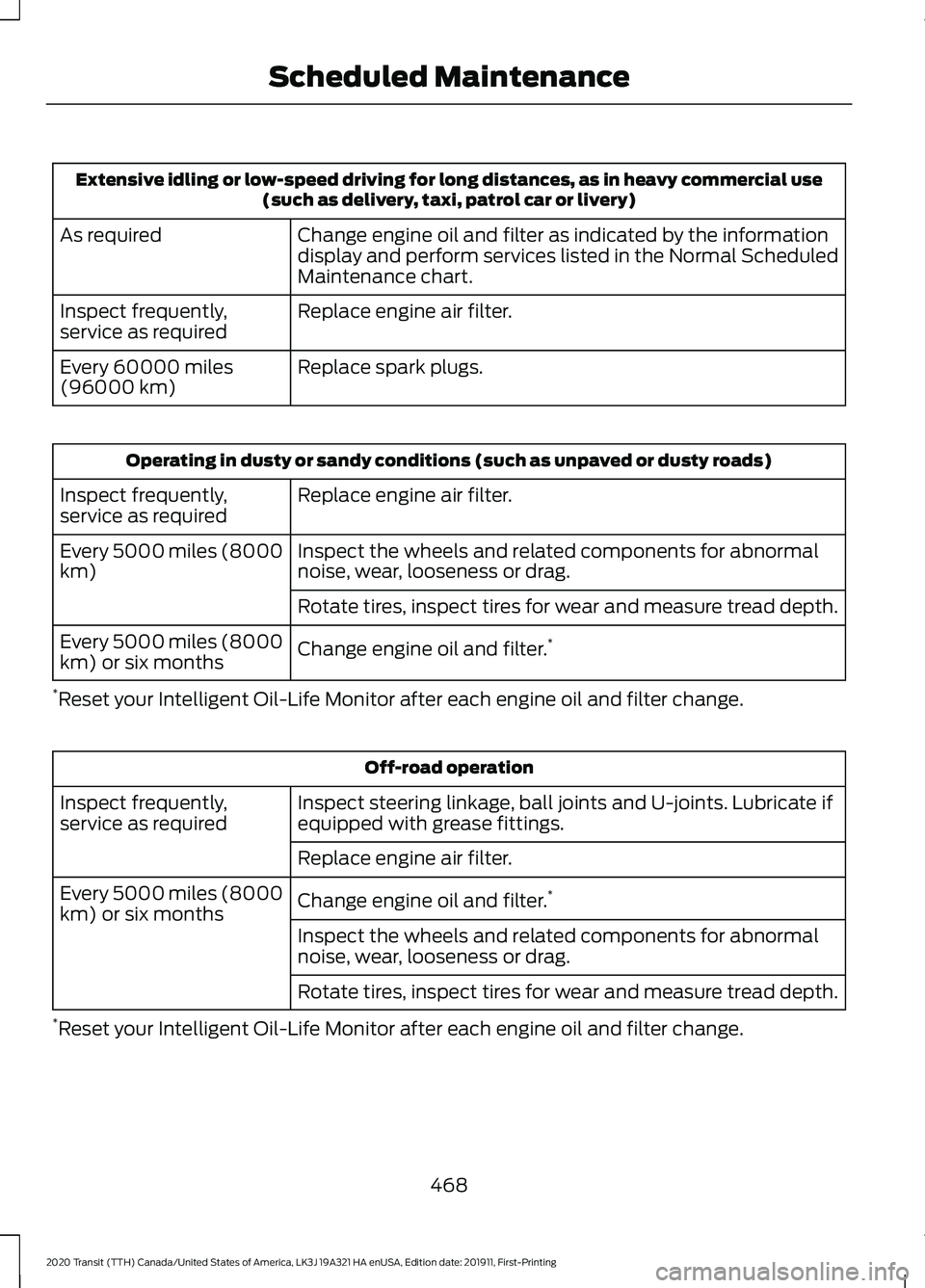
Extensive idling or low-speed driving for long distances, as in heavy commercial use
(such as delivery, taxi, patrol car or livery)
Change engine oil and filter as indicated by the information
display and perform services listed in the Normal Scheduled
Maintenance chart.
As required
Replace engine air filter.
Inspect frequently,
service as required
Replace spark plugs.
Every 60000 miles
(96000 km) Operating in dusty or sandy conditions (such as unpaved or dusty roads)
Replace engine air filter.
Inspect frequently,
service as required
Inspect the wheels and related components for abnormal
noise, wear, looseness or drag.
Every 5000 miles (8000
km)
Rotate tires, inspect tires for wear and measure tread depth.
Change engine oil and filter. *
Every 5000 miles (8000
km) or six months
* Reset your Intelligent Oil-Life Monitor after each engine oil and filter change. Off-road operation
Inspect steering linkage, ball joints and U-joints. Lubricate if
equipped with grease fittings.
Inspect frequently,
service as required
Replace engine air filter.
Change engine oil and filter. *
Every 5000 miles (8000
km) or six months
Inspect the wheels and related components for abnormal
noise, wear, looseness or drag.
Rotate tires, inspect tires for wear and measure tread depth.
* Reset your Intelligent Oil-Life Monitor after each engine oil and filter change.
468
2020 Transit (TTH) Canada/United States of America, LK3J 19A321 HA enUSA, Edition date: 201911, First-Printing Scheduled Maintenance
Page 472 of 529
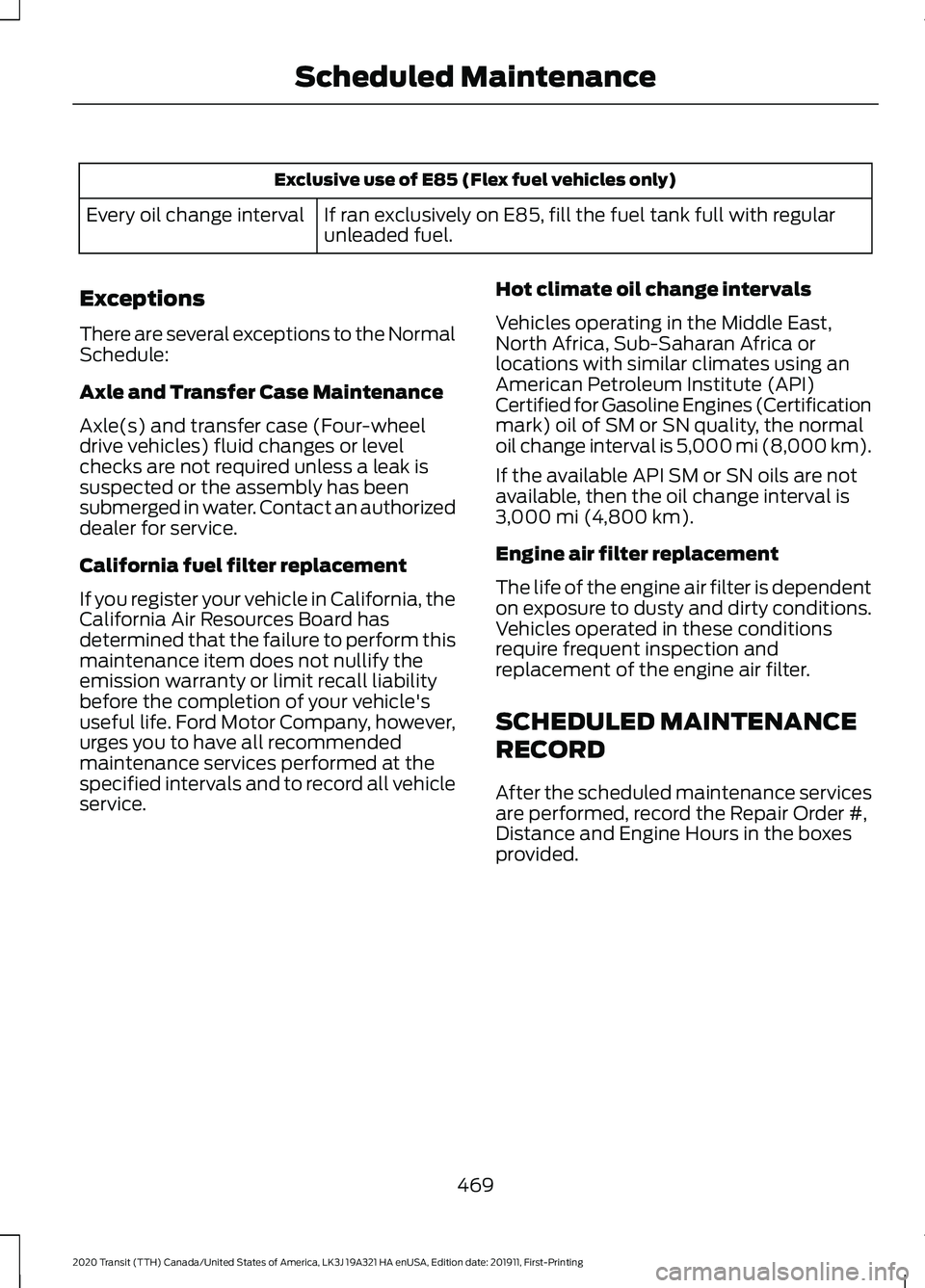
Exclusive use of E85 (Flex fuel vehicles only)
If ran exclusively on E85, fill the fuel tank full with regular
unleaded fuel.
Every oil change interval
Exceptions
There are several exceptions to the Normal
Schedule:
Axle and Transfer Case Maintenance
Axle(s) and transfer case (Four-wheel
drive vehicles) fluid changes or level
checks are not required unless a leak is
suspected or the assembly has been
submerged in water. Contact an authorized
dealer for service.
California fuel filter replacement
If you register your vehicle in California, the
California Air Resources Board has
determined that the failure to perform this
maintenance item does not nullify the
emission warranty or limit recall liability
before the completion of your vehicle's
useful life. Ford Motor Company, however,
urges you to have all recommended
maintenance services performed at the
specified intervals and to record all vehicle
service. Hot climate oil change intervals
Vehicles operating in the Middle East,
North Africa, Sub-Saharan Africa or
locations with similar climates using an
American Petroleum Institute (API)
Certified for Gasoline Engines (Certification
mark) oil of SM or SN quality, the normal
oil change interval is 5,000 mi (8,000 km).
If the available API SM or SN oils are not
available, then the oil change interval is
3,000 mi (4,800 km)
.
Engine air filter replacement
The life of the engine air filter is dependent
on exposure to dusty and dirty conditions.
Vehicles operated in these conditions
require frequent inspection and
replacement of the engine air filter.
SCHEDULED MAINTENANCE
RECORD
After the scheduled maintenance services
are performed, record the Repair Order #,
Distance and Engine Hours in the boxes
provided.
469
2020 Transit (TTH) Canada/United States of America, LK3J 19A321 HA enUSA, Edition date: 201911, First-Printing Scheduled Maintenance