maintenance FORD TRANSIT 2020 Owner's Manual
[x] Cancel search | Manufacturer: FORD, Model Year: 2020, Model line: TRANSIT, Model: FORD TRANSIT 2020Pages: 529, PDF Size: 8.3 MB
Page 263 of 529
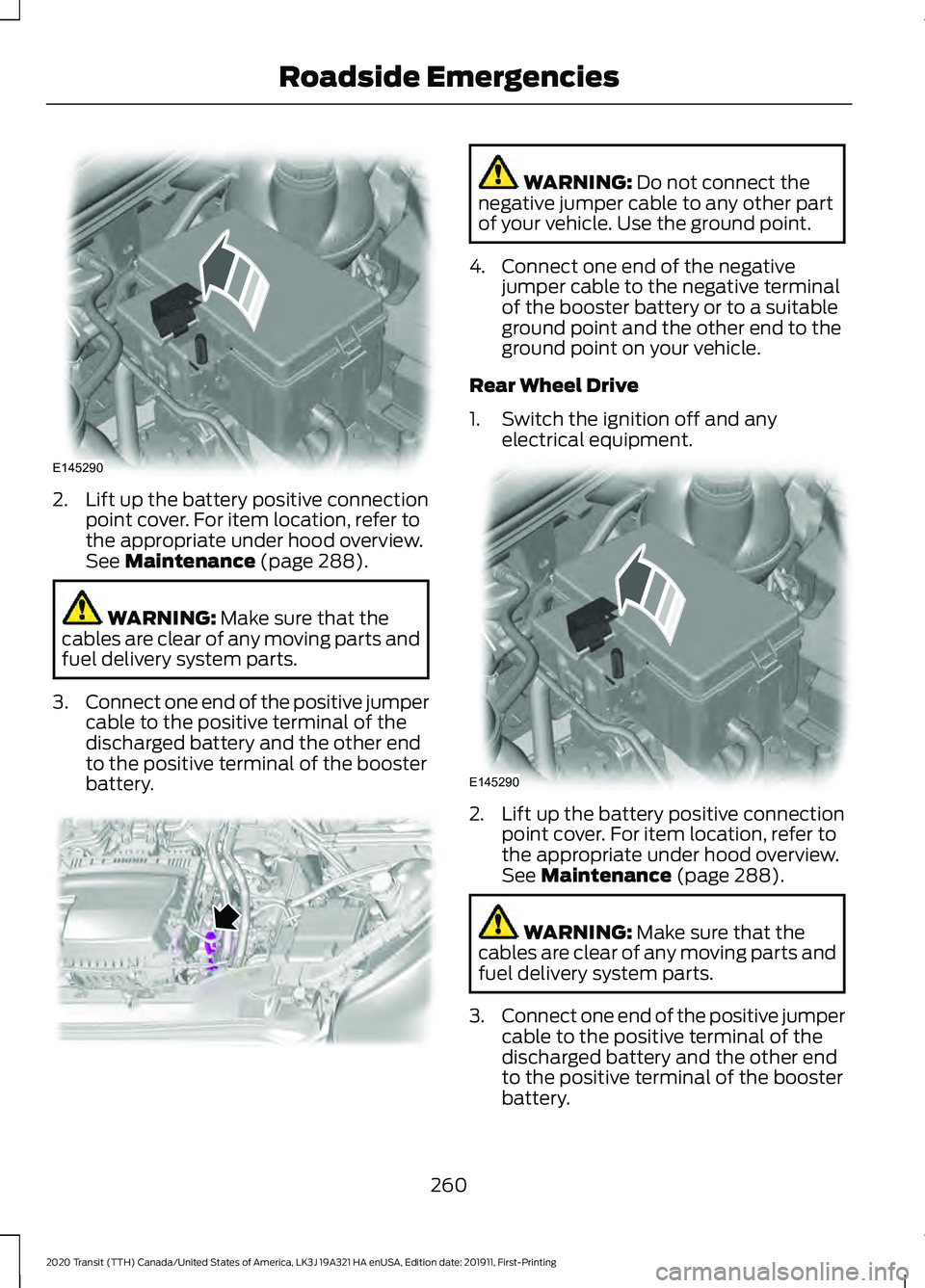
2. Lift up the battery positive connection
point cover. For item location, refer to
the appropriate under hood overview.
See Maintenance (page 288). WARNING:
Make sure that the
cables are clear of any moving parts and
fuel delivery system parts.
3. Connect one end of the positive jumper
cable to the positive terminal of the
discharged battery and the other end
to the positive terminal of the booster
battery. WARNING:
Do not connect the
negative jumper cable to any other part
of your vehicle. Use the ground point.
4. Connect one end of the negative jumper cable to the negative terminal
of the booster battery or to a suitable
ground point and the other end to the
ground point on your vehicle.
Rear Wheel Drive
1. Switch the ignition off and any electrical equipment. 2. Lift up the battery positive connection
point cover. For item location, refer to
the appropriate under hood overview.
See
Maintenance (page 288). WARNING:
Make sure that the
cables are clear of any moving parts and
fuel delivery system parts.
3. Connect one end of the positive jumper
cable to the positive terminal of the
discharged battery and the other end
to the positive terminal of the booster
battery.
260
2020 Transit (TTH) Canada/United States of America, LK3J 19A321 HA enUSA, Edition date: 201911, First-Printing Roadside EmergenciesE145290 E299456 E145290
Page 269 of 529
FORD CREDIT
US Only
Ford Credit offers a full range of financing
and lease plans to help you acquire your
vehicle. If you have financed or leased your
vehicle through Ford Credit, thank you for
your business.
We offer a number of convenient ways for
you to contact us, and to manage your
account.
Call 1-800-727-7000.
For more information about Ford Credit
and access to Account Manager, go to
www.ford.com/finance.
GETTING THE SERVICES YOU
NEED
Warranty repairs to your vehicle must be
performed by an authorized dealer. While
any authorized dealer handling your vehicle
line will provide warranty service, we
recommend you return to your selling
authorized dealer who wants to ensure
your continued satisfaction.
Please note that certain warranty repairs
require special training and equipment, so
not all authorized dealers are authorized
to perform all warranty repairs. This means
that, depending on the warranty repair
needed, you may have to take your vehicle
to another authorized dealer.
A reasonable time must be allowed to
perform a repair after taking your vehicle
to the authorized dealer. Repairs will be
made using Ford or Motorcraft® parts, or
remanufactured or other parts that are
authorized by Ford.
Away From Home
If you are away from home when your
vehicle needs service, contact the Ford
Customer Relationship Center or use the
online resources listed below to find the
nearest authorized dealer.
In the United States:
Mailing address
Ford Motor Company
Customer Relationship Center
P.O. Box 6248
Dearborn, MI 48126
Telephone
1-800-392-3673 (FORD)
(TDD for the hearing impaired:
1-800-232-5952)
If your vehicle is configured as a
motorhome please call 1-800-444-3311
for support.
Additional information and resources are
available online:
Website
www.owner.ford.com
These are some of the items that can be
found online:
• U.S. dealer locator by Dealer Name,
City/State or Zip Code.
• Owner Manuals.
• Maintenance Schedules.
• Recalls.
• Ford Extended Service Plans.
• Ford Genuine Accessories.
• Service specials and promotions.
In Canada:
Mailing address
266
2020 Transit (TTH) Canada/United States of America, LK3J 19A321 HA enUSA, Edition date: 201911, First-Printing Customer Assistance
Page 291 of 529
GENERAL INFORMATION
Have your vehicle serviced regularly to help
maintain its roadworthiness and resale
value. There is a large network of
authorized dealers that are there to help
you with their professional servicing
expertise. We believe that their specially
trained technicians are best qualified to
service your vehicle properly and expertly.
They are supported by a wide range of
highly specialized tools developed
specifically for servicing your vehicle.
If your vehicle requires professional service,
an authorized dealer can provide the
necessary parts and service. Check your
warranty information to find out which
parts and services are covered.
Use only recommended fuels, lubricants,
fluids and service parts conforming to
specifications. Motorcraft® parts are
designed and built to provide the best
performance in your vehicle.
Precautions
•
Do not work on a hot engine.
• Make sure that nothing gets caught in
moving parts.
• Do not work on a vehicle with the
engine running in an enclosed space,
unless you are sure you have enough
ventilation.
• Keep all open flames and other burning
material (such as cigarettes) away
from the battery and all fuel related
parts.
Working with the Engine Off
1. Set the parking brake and shift the transmission to park (P).
2. Switch off the engine.
3. Block the wheels. Working with the Engine On WARNING: To reduce the risk of
vehicle damage and personal burn
injuries, do not start your engine with the
air cleaner removed and do not remove
it while the engine is running.
1. Set the parking brake and shift the transmission to park (P).
2. Block the wheels.
OPENING AND CLOSING THE
HOOD
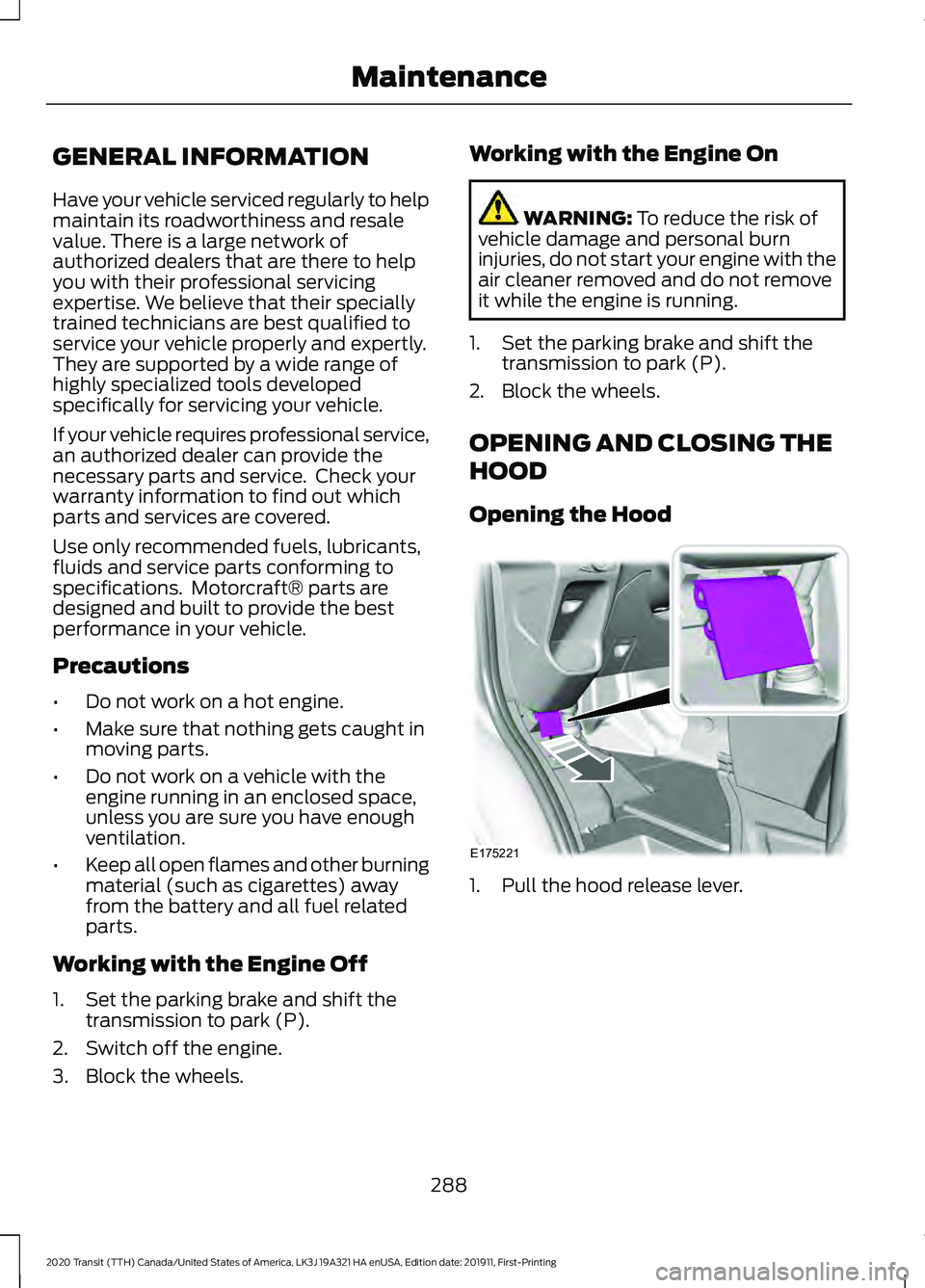
Opening the Hood 1. Pull the hood release lever.
288
2020 Transit (TTH) Canada/United States of America, LK3J 19A321 HA enUSA, Edition date: 201911, First-Printing MaintenanceE175221
Page 292 of 529
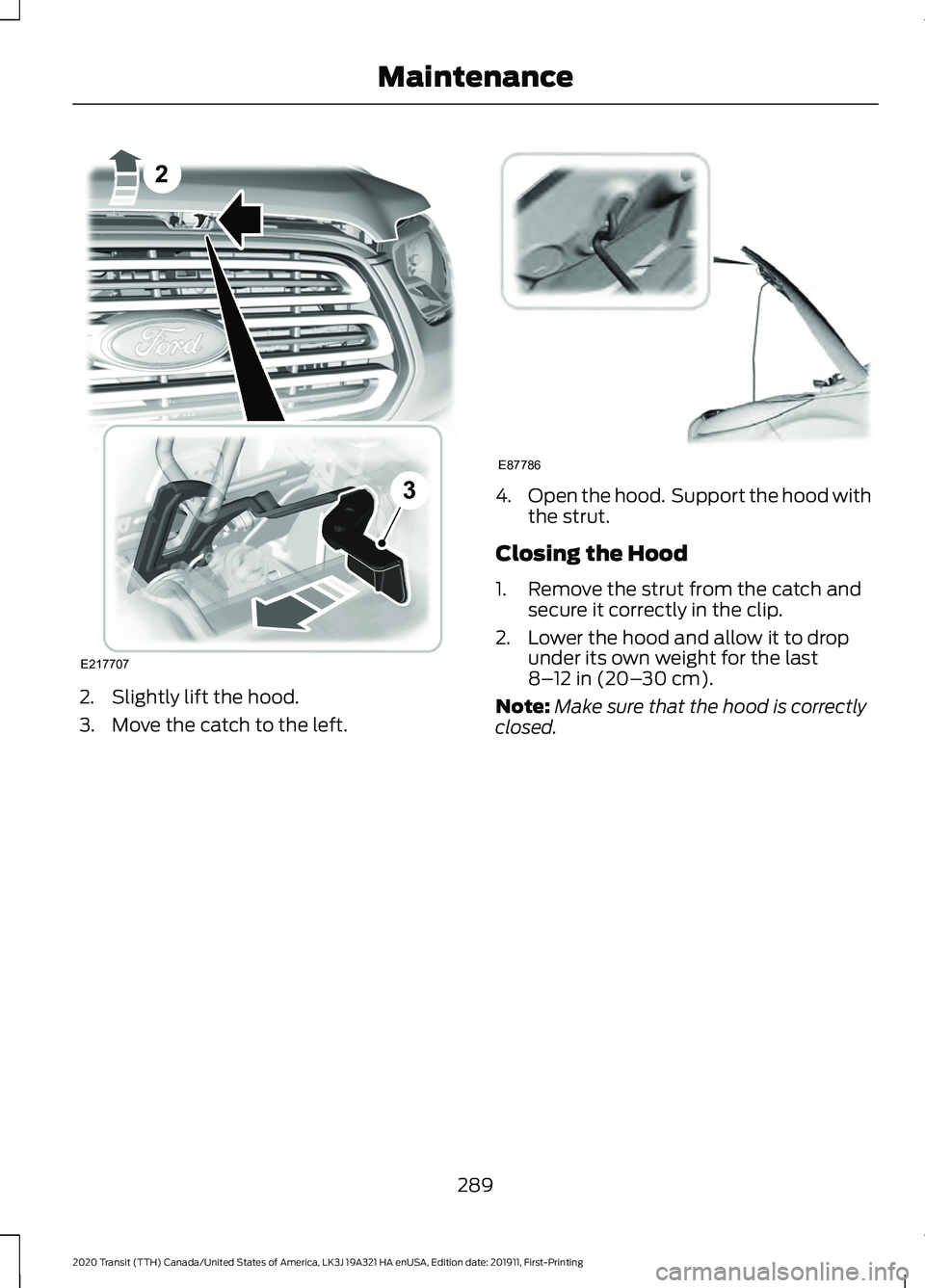
2. Slightly lift the hood.
3. Move the catch to the left. 4.
Open the hood. Support the hood with
the strut.
Closing the Hood
1. Remove the strut from the catch and secure it correctly in the clip.
2. Lower the hood and allow it to drop under its own weight for the last
8–12 in (20– 30 cm).
Note: Make sure that the hood is correctly
closed.
289
2020 Transit (TTH) Canada/United States of America, LK3J 19A321 HA enUSA, Edition date: 201911, First-Printing MaintenanceE217707
2
3 E87786
Page 293 of 529
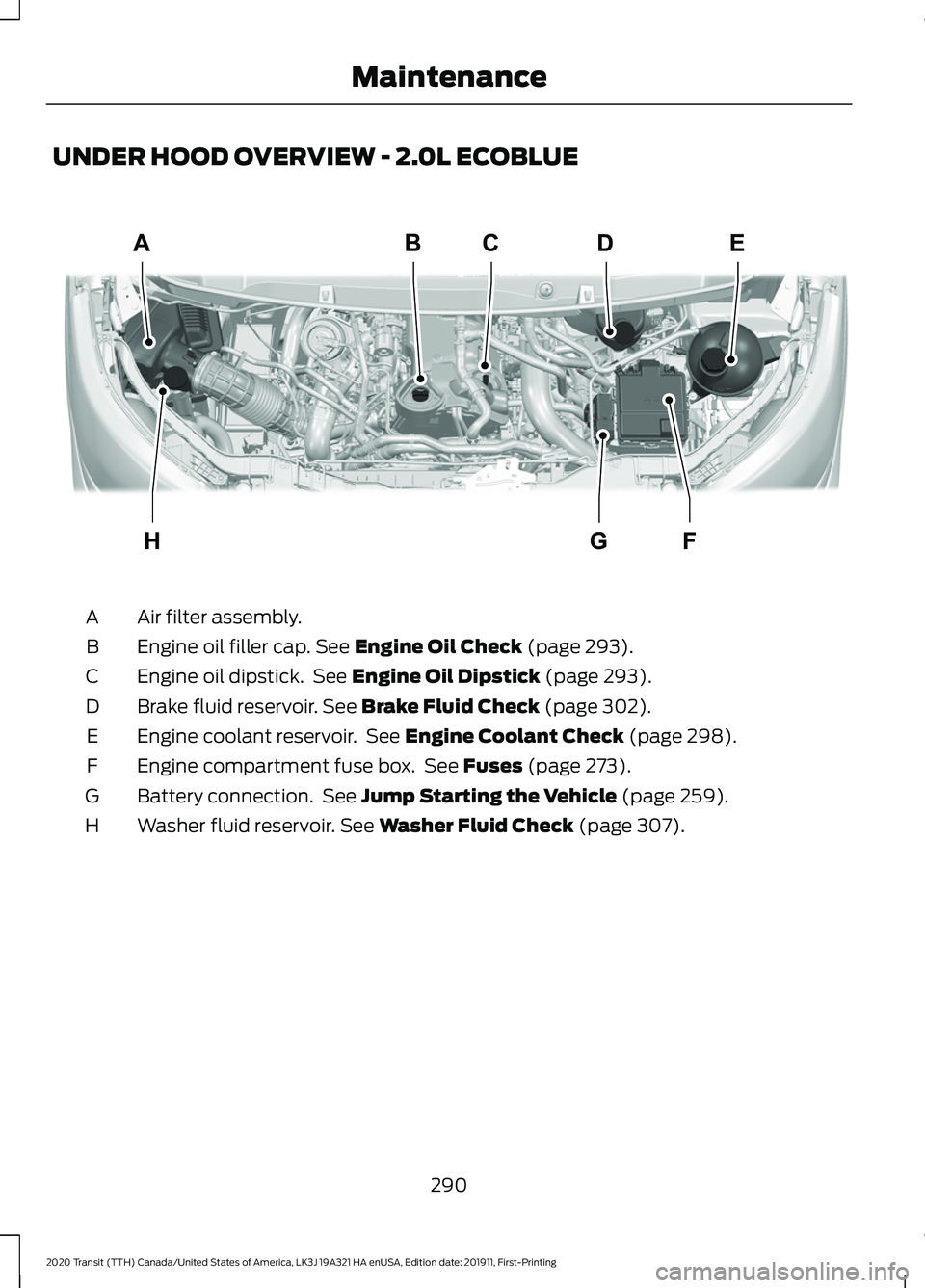
UNDER HOOD OVERVIEW - 2.0L ECOBLUE
Air filter assembly.
A
Engine oil filler cap. See Engine Oil Check (page 293).
B
Engine oil dipstick. See
Engine Oil Dipstick (page 293).
C
Brake fluid reservoir.
See Brake Fluid Check (page 302).
D
Engine coolant reservoir. See
Engine Coolant Check (page 298).
E
Engine compartment fuse box. See
Fuses (page 273).
F
Battery connection. See
Jump Starting the Vehicle (page 259).
G
Washer fluid reservoir.
See Washer Fluid Check (page 307).
H
290
2020 Transit (TTH) Canada/United States of America, LK3J 19A321 HA enUSA, Edition date: 201911, First-Printing MaintenanceABCDE
FGHE306490
Page 294 of 529
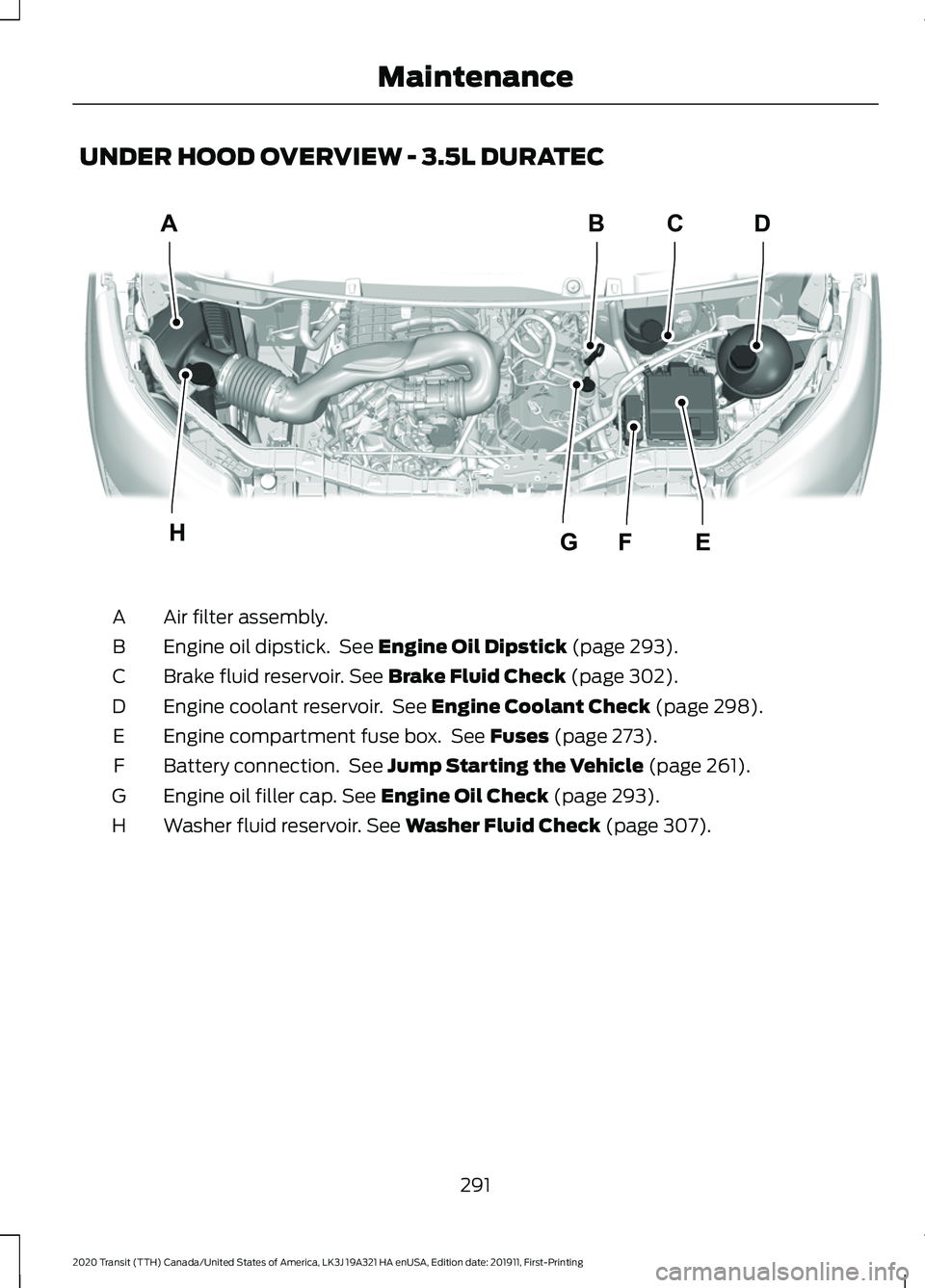
UNDER HOOD OVERVIEW - 3.5L DURATEC
Air filter assembly.
A
Engine oil dipstick. See Engine Oil Dipstick (page 293).
B
Brake fluid reservoir.
See Brake Fluid Check (page 302).
C
Engine coolant reservoir. See
Engine Coolant Check (page 298).
D
Engine compartment fuse box. See
Fuses (page 273).
E
Battery connection. See
Jump Starting the Vehicle (page 261).
F
Engine oil filler cap.
See Engine Oil Check (page 293).
G
Washer fluid reservoir.
See Washer Fluid Check (page 307).
H
291
2020 Transit (TTH) Canada/United States of America, LK3J 19A321 HA enUSA, Edition date: 201911, First-Printing MaintenanceABDC
EFGHE306489
Page 295 of 529
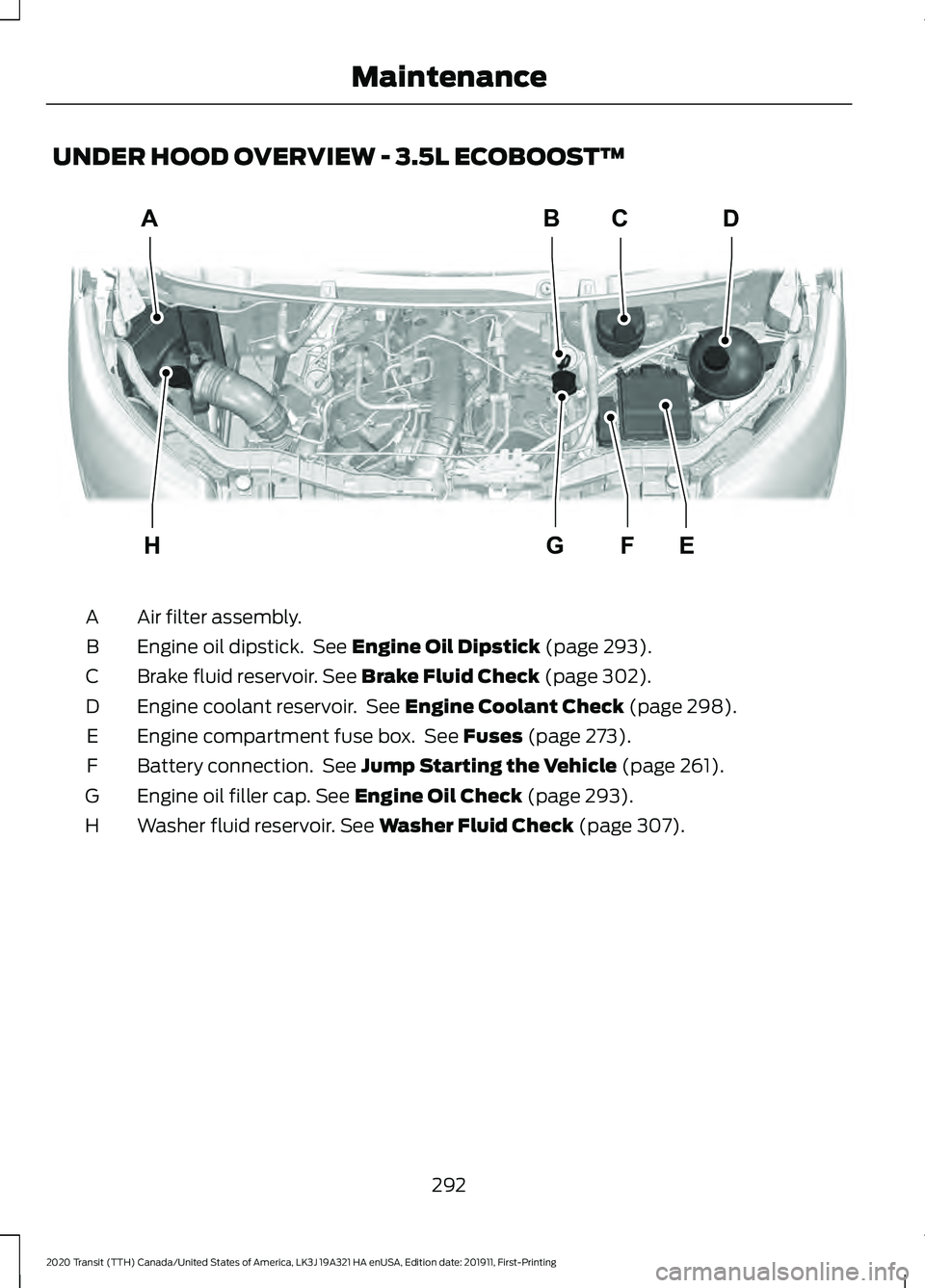
UNDER HOOD OVERVIEW - 3.5L ECOBOOST™
Air filter assembly.
A
Engine oil dipstick. See Engine Oil Dipstick (page 293).
B
Brake fluid reservoir.
See Brake Fluid Check (page 302).
C
Engine coolant reservoir. See
Engine Coolant Check (page 298).
D
Engine compartment fuse box. See
Fuses (page 273).
E
Battery connection. See
Jump Starting the Vehicle (page 261).
F
Engine oil filler cap.
See Engine Oil Check (page 293).
G
Washer fluid reservoir.
See Washer Fluid Check (page 307).
H
292
2020 Transit (TTH) Canada/United States of America, LK3J 19A321 HA enUSA, Edition date: 201911, First-Printing MaintenanceA
H
BD
EG
C
FE306483
Page 296 of 529
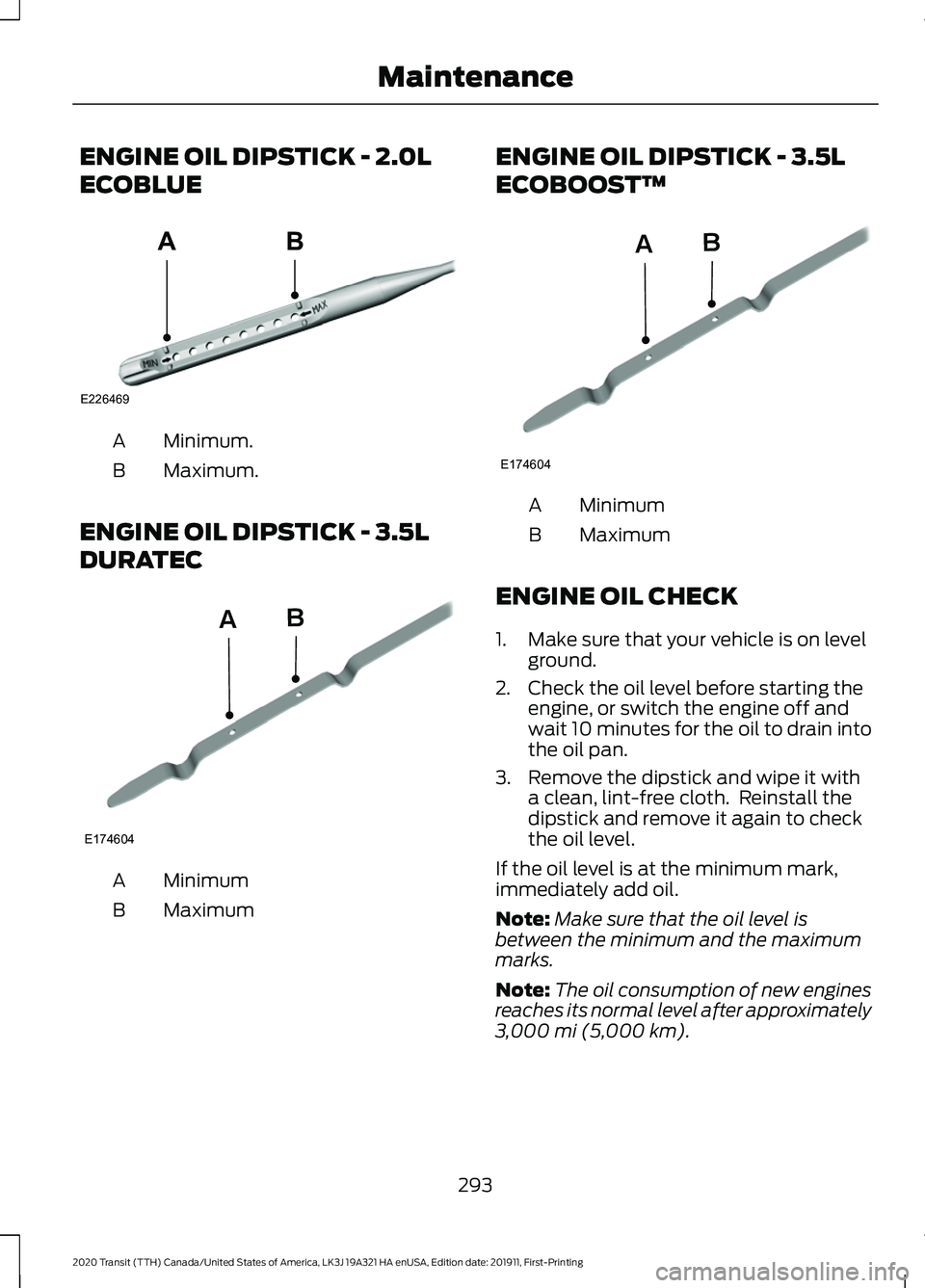
ENGINE OIL DIPSTICK - 2.0L
ECOBLUE
Minimum.
A
Maximum.
B
ENGINE OIL DIPSTICK - 3.5L
DURATEC Minimum
A
Maximum
B ENGINE OIL DIPSTICK - 3.5L
ECOBOOST™
Minimum
A
Maximum
B
ENGINE OIL CHECK
1. Make sure that your vehicle is on level ground.
2. Check the oil level before starting the engine, or switch the engine off and
wait 10 minutes for the oil to drain into
the oil pan.
3. Remove the dipstick and wipe it with a clean, lint-free cloth. Reinstall the
dipstick and remove it again to check
the oil level.
If the oil level is at the minimum mark,
immediately add oil.
Note: Make sure that the oil level is
between the minimum and the maximum
marks.
Note: The oil consumption of new engines
reaches its normal level after approximately
3,000 mi (5,000 km).
293
2020 Transit (TTH) Canada/United States of America, LK3J 19A321 HA enUSA, Edition date: 201911, First-Printing MaintenanceE226469
AB E174604
AB E174604
AB
Page 297 of 529
Adding Engine Oil
WARNING: Do not add engine oil
when the engine is hot. Failure to follow
this instruction could result in personal
injury. WARNING: Do not remove the filler
cap when the engine is running.
Do not use supplemental engine oil
additives because they are unnecessary
and could lead to engine damage that may
not be covered by the vehicle Warranty.
1. Clean the area surrounding the engine oil filler cap before you remove it.
2. Remove the engine oil filler cap.
3. Add engine oil that meets our specifications. See
Capacities and
Specifications (page 362).
4. Replace the engine oil filler cap. Turn it clockwise until you feel a strong
resistance.
Note: Do not add oil further than the
maximum mark. Oil levels above the
maximum mark may cause engine damage.
Note: Immediately soak up any oil spillage
with an absorbent cloth.
Engine Oil Pressure Warning Lamp WARNING:
If it illuminates when
you are driving do not continue your
journey, even if the oil level is correct.
Have your vehicle checked. It illuminates when you switch
the ignition on. If it illuminates when the engine is running
this indicates a malfunction. Stop your
vehicle as soon as it is safe to do so and
switch the engine off. Check the engine oil
level. If the oil level is sufficient, this
indicates a system malfunction. Have your
vehicle checked as soon as possible.
CHANGING THE ENGINE OIL
AND OIL FILTER
WARNING:
Prolonged and
repeated skin contact with mineral oil
will result in the removal of natural fats
from the skin, leading to dryness,
irritation and dermatitis. In addition, used
engine oil contains potentially harmful
contaminants, which may cause skin
cancer. If skin contact occurs, wash the
area thoroughly with soap or skin
cleanser and water immediately. WARNING:
Do not dispose of
engine oils or oil filters in the household
refuse or the public sewage system. Use
an authorized waste disposal facility. WARNING:
Do not remove the oil
pan drain plug when the engine is
running. WARNING:
Do not remove the oil
filter when the engine is running.
1. Remove the oil pan drain plug and wait
for the oil to drain into a suitable
container.
2. Renew the oil filter.
3. Reinstall the oil pan drain plug.
4. Refill the engine with new oil that meets Ford specifications. See
Capacities and Specifications (page
362
).
294
2020 Transit (TTH) Canada/United States of America, LK3J 19A321 HA enUSA, Edition date: 201911, First-Printing Maintenance
Page 298 of 529
Note:
Do not add oil further than the
maximum mark. Oil levels above the
maximum mark may cause engine damage.
Note: Soak up any spillage with an
absorbent cloth immediately.
5. Reset the Intelligent Oil Life Monitor. See Oil Change Indicator Reset
(page 296).
Engine Lubrication for Severe
Service Operation
The following conditions define severe
service operation. The Intelligent Oil Life
Monitor will determine engine oil and oil
filter change intervals.
• Frequent or extended idling.
• Frequent low-speed operation at
25 mph (40 km/h)
or less.
• Frequent severe dust condition
operation. •
Frequent off-road operation.
• Sustained ambient temperatures of
-9°F (-23°C)
or below.
• Sustained ambient temperatures of
100°F (38°C)
or above.
• Sustained towing operation above
1,000 mi (1,600 km)
.
• Sustained high-speed driving at Gross
Vehicle Weight Rating (maximum
loaded weight for vehicle operation).
• Sustained use of diesel fuel other than
ultra-low sulfur diesel (ULSD).
OIL CHANGE INDICATOR
RESET - DIESEL
Only reset the system after changing the
engine oil and oil filter.
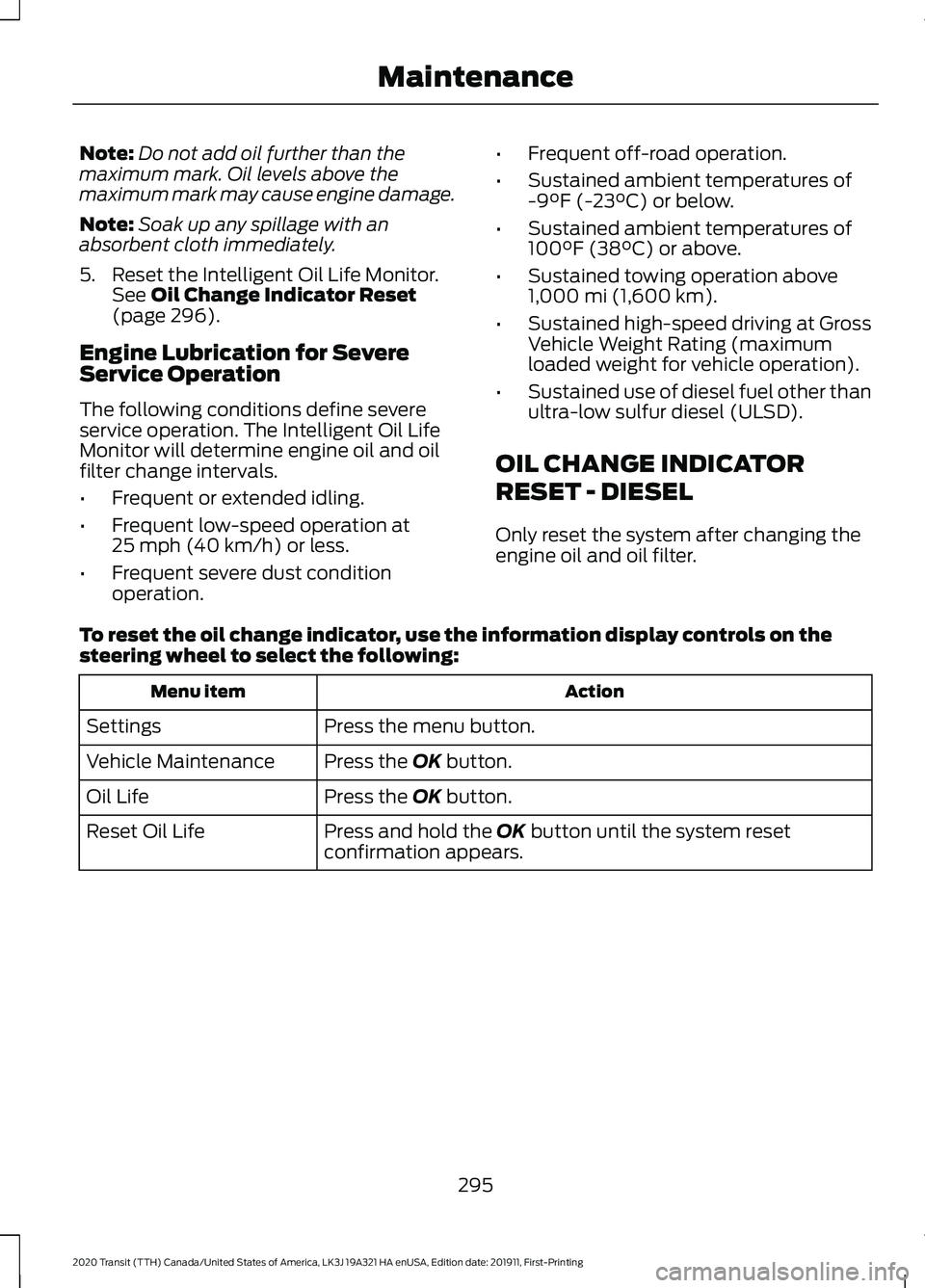
To reset the oil change indicator, use the information display controls on the
steering wheel to select the following: Action
Menu item
Press the menu button.
Settings
Press the
OK button.
Vehicle Maintenance
Press the
OK button.
Oil Life
Press and hold the
OK button until the system reset
confirmation appears.
Reset Oil Life
295
2020 Transit (TTH) Canada/United States of America, LK3J 19A321 HA enUSA, Edition date: 201911, First-Printing Maintenance