transmission FORD TRANSIT 2020 Owners Manual
[x] Cancel search | Manufacturer: FORD, Model Year: 2020, Model line: TRANSIT, Model: FORD TRANSIT 2020Pages: 529, PDF Size: 8.3 MB
Page 6 of 529
Interior Air Quality
What Is the Cabin Air Filter
.......................127
Locating the Cabin Air Filter .....................
127
Replacing the Cabin Air Filter ..................
127
Seats
Sitting in the Correct Position .................
128
Head Restraints ............................................
128
Manual Seats - Vehicles With: 2-Way Manual Seat ..............................................
129
Manual Seats - Vehicles With: 4-Way Manual Seat ..............................................
130
Power Seats ...................................................
133
Rear Seats ......................................................
134
Heated Seats .................................................
137
Auxiliary Power Points
Auxiliary Power Points ...............................
138
Cigar Lighter ..................................................
140
Storage Compartments
Overhead Console ........................................
141
Bottle Holders ................................................
141
Overhead Storage ........................................
141
Rear Overhead Storage ..............................
141
Starting and Stopping the Engine
General Information ...................................
143
Ignition Switch ..............................................
143
Starting a Gasoline Engine .......................
143
Starting a Diesel Engine ............................
145
Switching Off the Engine ..........................
147
Engine Block Heater ....................................
147
Auto-Start-Stop - 3.5L Ecoboost™, 2.0L EcoBlue
What Is Auto-Start-Stop ..........................
149
Auto-Start-Stop Precautions .................
149Switching Auto-Start-Stop On and Off
........................................................................\
.
149
Stopping the Engine ...................................
149
Restarting the Engine ................................
149
Auto-Start-Stop Indicators .....................
150
Auto-Start-Stop – Troubleshooting ........................................................................\
.
150
Fuel and Refueling
Safety Precautions ......................................
152
Fuel Quality - Diesel ....................................
152
Fuel Quality - E85 ........................................
155
Fuel Quality - Gasoline ..............................
156
Fuel Filler Funnel Location .......................
157
Running Out of Fuel ....................................
157
Refueling .........................................................
158
Engine Emission Control
Emission Law ................................................
162
Catalytic Converter - 3.5L Duratec/3.5L Ecoboost™ ................................................
163
Selective Catalytic Reductant System - 2.0L EcoBlue .............................................
164
Diesel Particulate Filter ..............................
167
Transmission
Automatic Transmission ...........................
173
Tow/Haul ........................................................
175
All-Wheel Drive
Using All-Wheel Drive .................................
177
Brakes
General Information ...................................
182
Hints on Driving With Anti-Lock Brakes ........................................................................\
.
182
Hill Start Assist .............................................
182
3
2020 Transit (TTH) Canada/United States of America, LK3J 19A321 HA enUSA, Edition date: 201911, First-Printing Table of Contents
Page 8 of 529
Emergency Exit
............................................258
Fuel Shutoff ..................................................
258
Jump Starting the Vehicle - 2.0L EcoBlue ........................................................................\
259
Jump Starting the Vehicle - 3.5L Duratec/3.5L Ecoboost™ ....................
261
Post-Crash Alert System .........................
264
Transporting the Vehicle .........................
264
Towing Points ..............................................
265
Customer Assistance
Ford Credit ....................................................
266
Getting the Services You Need .............
266
In California (U.S. Only) ............................
267
The Better Business Bureau (BBB) Auto Line Program (U.S. Only) ....................
268
Utilizing the Mediation/Arbitration Program (Canada Only) ......................
269
Getting Assistance Outside the U.S. and Canada .......................................................
269
Ordering Additional Owner's Literature ........................................................................\
..
271
Reporting Safety Defects (U.S. Only) ........................................................................\
..
271
Reporting Safety Defects (Canada Only) ........................................................................\
.
272
Fuses
Fuse Box Locations ....................................
273
Fuse Specification Chart ..........................
274
Changing a Fuse .........................................
286
Maintenance
General Information ..................................
288
Opening and Closing the Hood .............
288
Under Hood Overview - 2.0L EcoBlue .......................................................................
290
Under Hood Overview - 3.5L Duratec ........................................................................\
.
291
Under Hood Overview - 3.5L Ecoboost™ ........................................................................\
292
Engine Oil Dipstick - 2.0L EcoBlue .......
293Engine Oil Dipstick - 3.5L Duratec
........
293
Engine Oil Dipstick - 3.5L Ecoboost™ ........................................................................\
293
Engine Oil Check .........................................
293
Changing the Engine Oil and Oil Filter ........................................................................\
294
Oil Change Indicator Reset - Diesel ......
295
Oil Change Indicator Reset - Gasoline ........................................................................\
296
Changing the Engine Air Filter ...............
296
Draining the Fuel Filter Water Trap - Diesel ...........................................................
297
Engine Cooling Fan - Diesel ....................
298
Engine Cooling Fan - Gasoline ..............
298
Engine Coolant Check ..............................
298
Automatic Transmission Fluid Check ........................................................................\
302
Brake Fluid Check .......................................
302
Changing the 12V Battery ........................
303
Adjusting the Headlamps .......................
305
Fuel Filter Service Indicator Check - Diesel ..........................................................
306
Washer Fluid Check ...................................
307
Fuel Filter - Gasoline ..................................
307
Checking the Wiper Blades .....................
307
Changing the Front Wiper Blades ........
307
Removing a Headlamp .............................
307
Changing a Bulb .........................................
308
Drive Belt Routing - 2.0L EcoBlue ..........
313
Drive Belt Routing - 3.5L Duratec/3.5L Ecoboost™, Vehicles With: Dual
Generators .................................................
314
Drive Belt Routing - 3.5L Duratec/3.5L Ecoboost™, Vehicles With: Single
Generator ...................................................
314
Vehicle Care
Cleaning Products .......................................
315
Cleaning the Exterior ..................................
316
Waxing ..............................................................
317
Cleaning the Engine ....................................
317
5
2020 Transit (TTH) Canada/United States of America, LK3J 19A321 HA enUSA, Edition date: 201911, First-Printing Table of Contents
Page 9 of 529

Cleaning the Windows and Wiper Blades
........................................................................\
.318
Cleaning the Interior ...................................
318
Cleaning the Instrument Panel and Instrument Cluster Lens ......................
320
Repairing Minor Paint Damage ...............
321
Cleaning the Wheels ...................................
321
Vehicle Storage .............................................
321
Body Styling Kits .........................................
323
Wheels and Tires
General Information ..................................
324
Tire Care .........................................................
325
Using Winter Tires ......................................
342
Using Snow Chains ....................................
343
Tire Pressure Monitoring System .........
344
Changing a Road Wheel ..........................
349
Lug Nuts ........................................................
360
Capacities and Specifications
Engine Specifications - 2.0L EcoBlue ........................................................................\
362
Engine Specifications - 3.5L Duratec ........................................................................\
363
Engine Specifications - 3.5L Ecoboost™ ........................................................................\
364
Motorcraft Parts - 2.0L EcoBlue ...........
365
Motorcraft Parts - 3.5L Duratec ............
366
Motorcraft Parts - 3.5L Ecoboost™ .....
367
Vehicle Identification Number ..............
368
Transmission Code Designation ...........
369
Capacities and Specifications - 2.0L EcoBlue ......................................................
370
Capacities and Specifications - 3.5L Duratec .......................................................
374
Capacities and Specifications - 3.5L Ecoboost™ ..............................................
380
Bulb Specification Chart .........................
386Connected Vehicle
Connected Vehicle Requirements
.......
388
Connected Vehicle Limitations .............
388
Connecting the Vehicle to a Mobile Network .....................................................
388
Connecting the Vehicle to a Wi-Fi Network .....................................................
388
Connected Vehicle – Troubleshooting - Vehicles With: Modem .........................
389
Connected Vehicle – Troubleshooting - Vehicles With: SYNC 3 .........................
390
Wi-Fi Hotspot
Creating a Wi-Fi Hotspot .........................
392
Changing the Wi-Fi Hotspot Name or Password ...................................................
392
Audio System
General Information ..................................
393
Audio Unit - Vehicles Without: SYNC ........................................................................\
393
Audio Unit - Vehicles With: SYNC 3 .....
395
AM/FM Radio - Vehicles Without: SYNC .......................................................................
396
Audio Unit Clock and Date Displays - Vehicles Without: SYNC .......................
397
Connecting a Bluetooth® Device - Vehicles Without: SYNC .......................
397
Streaming Bluetooth Audio - Vehicles Without: SYNC ........................................
397
Playing Media From a USB Device - Vehicles Without: SYNC .......................
397
USB Port ........................................................
398
Using Voice Recognition ..........................
398
SYNC™
General Information ..................................
399
Using Voice Recognition .........................
400
Using SYNC™ With Your Phone ...........
402
SYNC™ Applications and Services ......
403
Using SYNC™ With Your Media Player .......................................................................
406
6
2020 Transit (TTH) Canada/United States of America, LK3J 19A321 HA enUSA, Edition date: 201911, First-Printing Table of Contents
Page 19 of 529
Scheduled Maintenance and
Mechanical Repairs
One of the best ways for you to make sure
that your vehicle provides years of service
is to have it maintained in line with our
recommendations using parts that
conform to the specifications detailed in
this Owner
’s Manual. Genuine Ford and
Motorcraft parts meet or exceed these
specifications.
Collision Repairs
We hope that you never experience a
collision, but accidents do happen.
Genuine Ford replacement collision parts
meet our stringent requirements for fit,
finish, structural integrity, corrosion
protection and dent resistance. During
vehicle development we validate that
these parts deliver the intended level of
protection as a whole system. A great way
to know for sure you are getting this level
of protection is to use genuine Ford
replacement collision parts.
Warranty on Replacement Parts
Genuine Ford and Motorcraft replacement
parts are the only replacement parts that
benefit from a Ford Warranty. The Ford
Warranty may not cover damage caused
to your vehicle as a result of failed
non-Ford parts. For additional information,
refer to the terms and conditions of the
Ford Warranty.
SPECIAL NOTICES
New Vehicle Limited Warranty
For a detailed description of what is
covered and what is not covered by your
vehicle ’s New Vehicle Limited Warranty,
refer to the Warranty Manual that is
provided to you along with your Owner ’s
Manual. Special Instructions
For your added safety, your vehicle is fitted
with sophisticated electronic controls. WARNING: You risk death or
serious injury to yourself and others if you
do not follow the instruction highlighted
by the warning symbol. Failure to follow
the specific warnings and instructions
could result in personal injury. WARNING: Never
place front seat
mounted rear-facing child or infant seats
in front of an active passenger airbag.
On Board Diagnostics Data Link
Connector WARNING:
Do not connect
wireless plug-in devices to the data link
connector. Unauthorized third parties
could gain access to vehicle data and
impair the performance of safety related
systems. Only allow repair facilities that
follow our service and repair instructions
to connect their equipment to the data
link connector.
Your vehicle has an OBD Data Link
Connector (DLC) that is used in
conjunction with a diagnostic scan tool for
vehicle diagnostics, repairs and
reprogramming services. Installing an
aftermarket device that uses the DLC
during normal driving for purposes such as
remote insurance company monitoring,
transmission of vehicle data to other
devices or entities, or altering the
performance of the vehicle, may cause
interference with or even damage to
vehicle systems. We do not recommend
or endorse the use of aftermarket plug-in
devices unless approved by Ford. The
vehicle Warranty will not cover damage
caused by an aftermarket plug-in device.
16
2020 Transit (TTH) Canada/United States of America, LK3J 19A321 HA enUSA, Edition date: 201911, First-Printing Introduction
Page 52 of 529
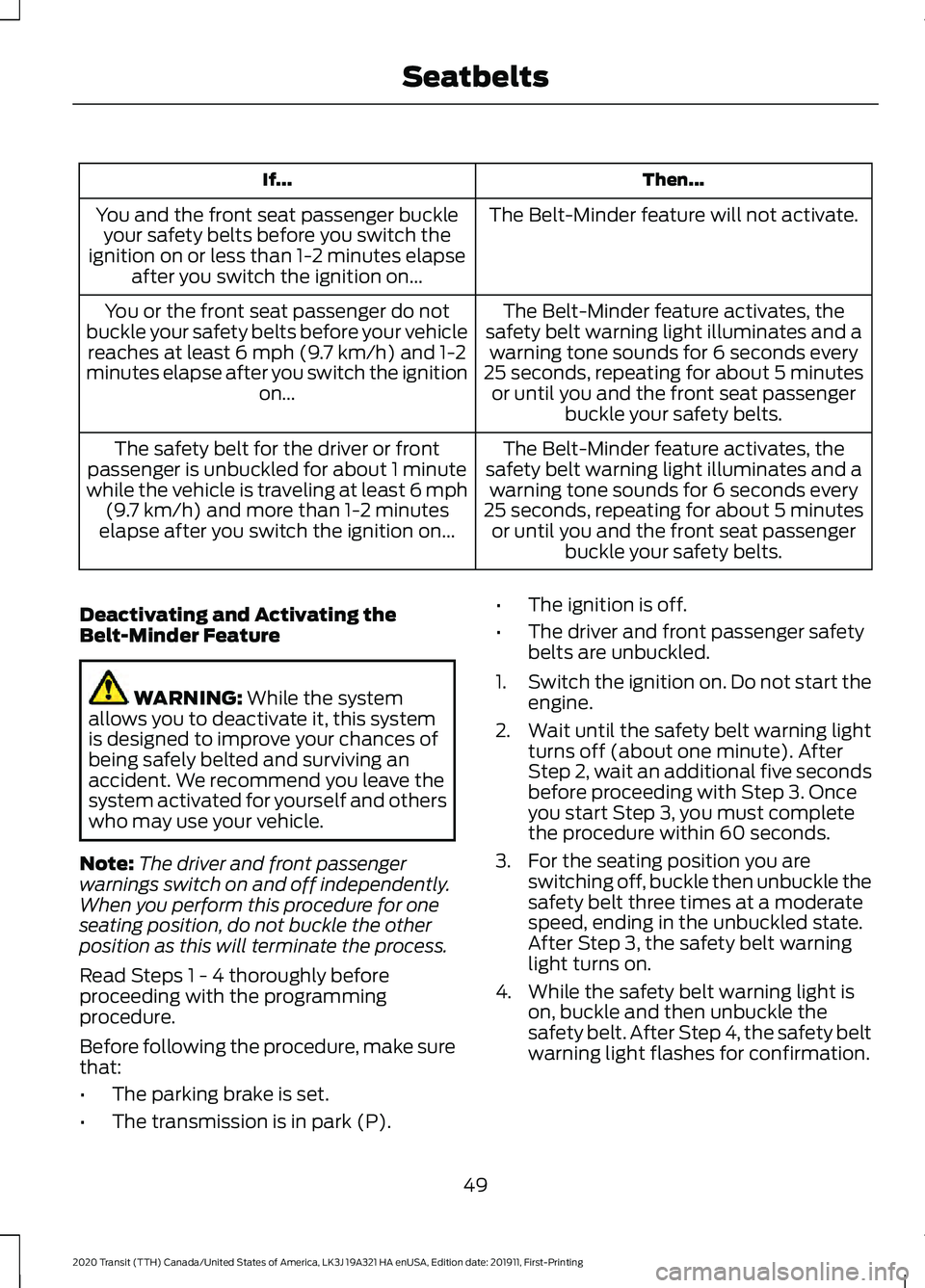
Then...
If...
The Belt-Minder feature will not activate.
You and the front seat passenger buckle
your safety belts before you switch the
ignition on or less than 1-2 minutes elapse after you switch the ignition on...
The Belt-Minder feature activates, the
safety belt warning light illuminates and a warning tone sounds for 6 seconds every
25 seconds, repeating for about 5 minutes or until you and the front seat passenger buckle your safety belts.
You or the front seat passenger do not
buckle your safety belts before your vehicle reaches at least 6 mph (9.7 km/h) and 1-2
minutes elapse after you switch the ignition on...
The Belt-Minder feature activates, the
safety belt warning light illuminates and a warning tone sounds for 6 seconds every
25 seconds, repeating for about 5 minutes or until you and the front seat passenger buckle your safety belts.
The safety belt for the driver or front
passenger is unbuckled for about 1 minute
while the vehicle is traveling at least 6 mph (9.7 km/h) and more than 1-2 minutes
elapse after you switch the ignition on...
Deactivating and Activating the
Belt-Minder Feature WARNING: While the system
allows you to deactivate it, this system
is designed to improve your chances of
being safely belted and surviving an
accident. We recommend you leave the
system activated for yourself and others
who may use your vehicle.
Note: The driver and front passenger
warnings switch on and off independently.
When you perform this procedure for one
seating position, do not buckle the other
position as this will terminate the process.
Read Steps 1 - 4 thoroughly before
proceeding with the programming
procedure.
Before following the procedure, make sure
that:
• The parking brake is set.
• The transmission is in park (P). •
The ignition is off.
• The driver and front passenger safety
belts are unbuckled.
1. Switch the ignition on. Do not start the
engine.
2. Wait until the safety belt warning light turns off (about one minute). After
Step 2, wait an additional five seconds
before proceeding with Step 3. Once
you start Step 3, you must complete
the procedure within 60 seconds.
3. For the seating position you are switching off, buckle then unbuckle the
safety belt three times at a moderate
speed, ending in the unbuckled state.
After Step 3, the safety belt warning
light turns on.
4. While the safety belt warning light is on, buckle and then unbuckle the
safety belt. After Step 4, the safety belt
warning light flashes for confirmation.
49
2020 Transit (TTH) Canada/United States of America, LK3J 19A321 HA enUSA, Edition date: 201911, First-Printing Seatbelts
Page 67 of 529
PRINCIPLE OF OPERATION
The remote control allows you to:
•
remotely lock or unlock the vehicle
doors
• unlock the doors without actively using
a key or remote control (intelligent
access only)
• remotely open the power liftgate (if
equipped)
• remotely start or stop the engine (if
equipped)
• arm and disarm the anti-theft system
• activate the panic alarm.
GENERAL INFORMATION ON
RADIO FREQUENCIES
This device complies with Part 15 of the
FCC Rules and with Licence exempt RSS
Standards of Industry Canada. Operation
is subject to the following two conditions:
• This device may not cause harmful
interference, and
• This device must accept any
interference received, including
interference that may cause undesired
operation. WARNING: Changes or
modifications not expressively approved
by the party responsible for compliance
could void the user's authority to operate
the equipment. The term "IC:" before the
radio certification number only signifies
that Industry Canada technical
specifications were met. The typical operating range for your
transmitter is approximately
33 ft (10 m).
Vehicles with the remote start feature will
have a greater range. One of the following
could cause a decrease in operating range:
• Weather conditions.
• Nearby radio towers.
• Structures around the vehicle.
• Other vehicles parked next to your
vehicle.
Other short distance radio transmissions,
for example amateur radios, medical
equipment, wireless headphones, remote
controls and alarm systems can also use
the radio frequency used by your remote
control. If the frequencies are jammed, you
will not be able to use your remote control.
You can lock and unlock the doors with the
key.
Note: Make sure to lock your vehicle before
leaving it unattended.
Note: If you are in range, the remote control
will operate if you press any button
unintentionally.
Note: The remote control contains sensitive
electrical components. Exposure to moisture
or impact may cause permanent damage.
64
2020 Transit (TTH) Canada/United States of America, LK3J 19A321 HA enUSA, Edition date: 201911, First-Printing Keys and Remote Controls
Page 114 of 529
GAUGES
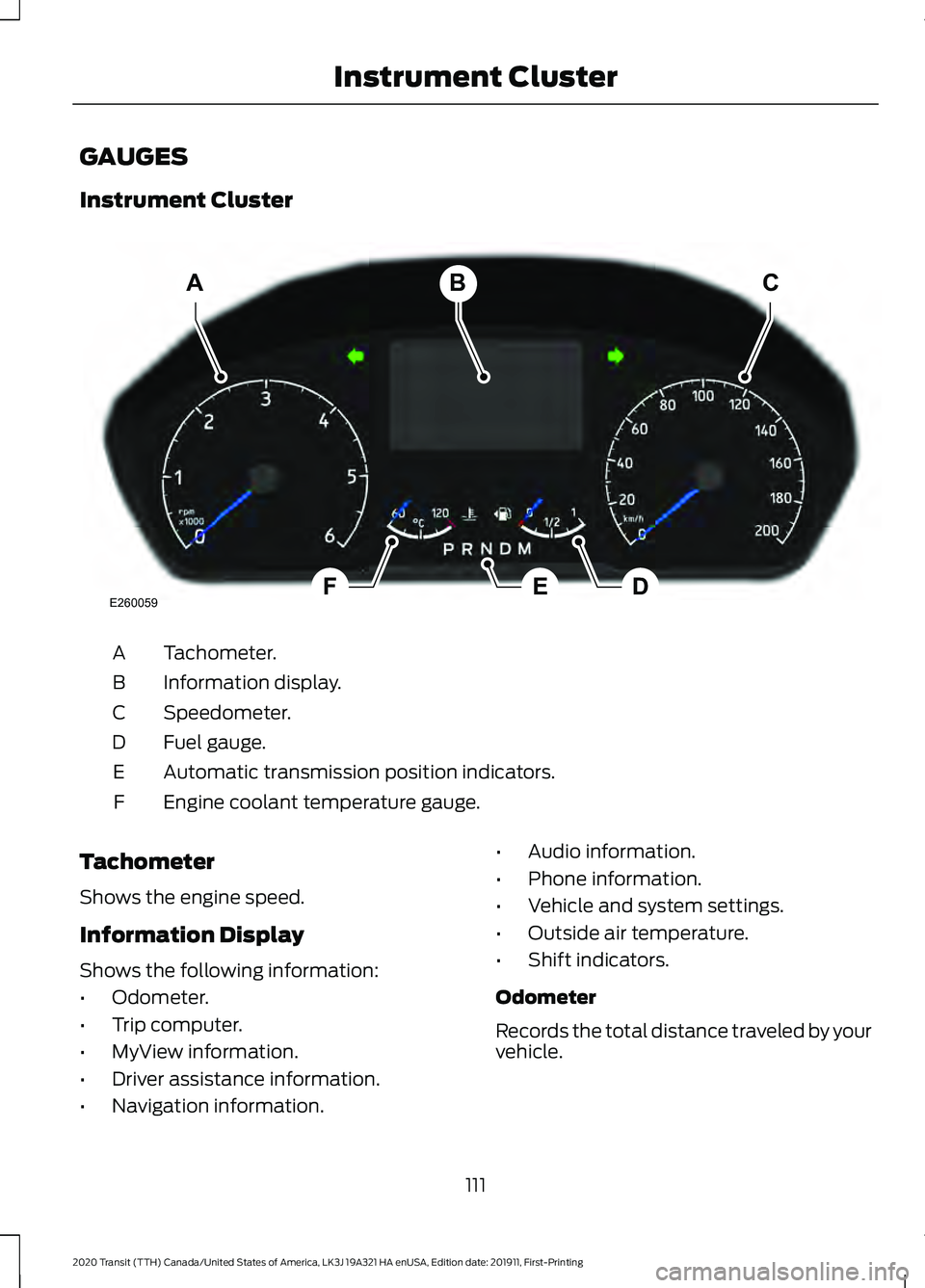
Instrument Cluster
Tachometer.
A
Information display.
B
Speedometer.
C
Fuel gauge.
D
Automatic transmission position indicators.
E
Engine coolant temperature gauge.
F
Tachometer
Shows the engine speed.
Information Display
Shows the following information:
• Odometer.
• Trip computer.
• MyView information.
• Driver assistance information.
• Navigation information. •
Audio information.
• Phone information.
• Vehicle and system settings.
• Outside air temperature.
• Shift indicators.
Odometer
Records the total distance traveled by your
vehicle.
111
2020 Transit (TTH) Canada/United States of America, LK3J 19A321 HA enUSA, Edition date: 201911, First-Printing Instrument ClusterABC
EDFE260059
Page 115 of 529
The system detects unauthorized
odometer adjustments to avoid total
distance reading fraud. If the system
detects an unauthorized odometer
adjustment, the total distance reading
displays XXXX. Recovery of the original
mileage could result in system damage not
covered by the vehicle Warranty and may
carry a significant expense.
Speedometer
Shows the vehicle speed.
Fuel Gauge
The fuel gauge indicates approximately
how much fuel is in the fuel tank.
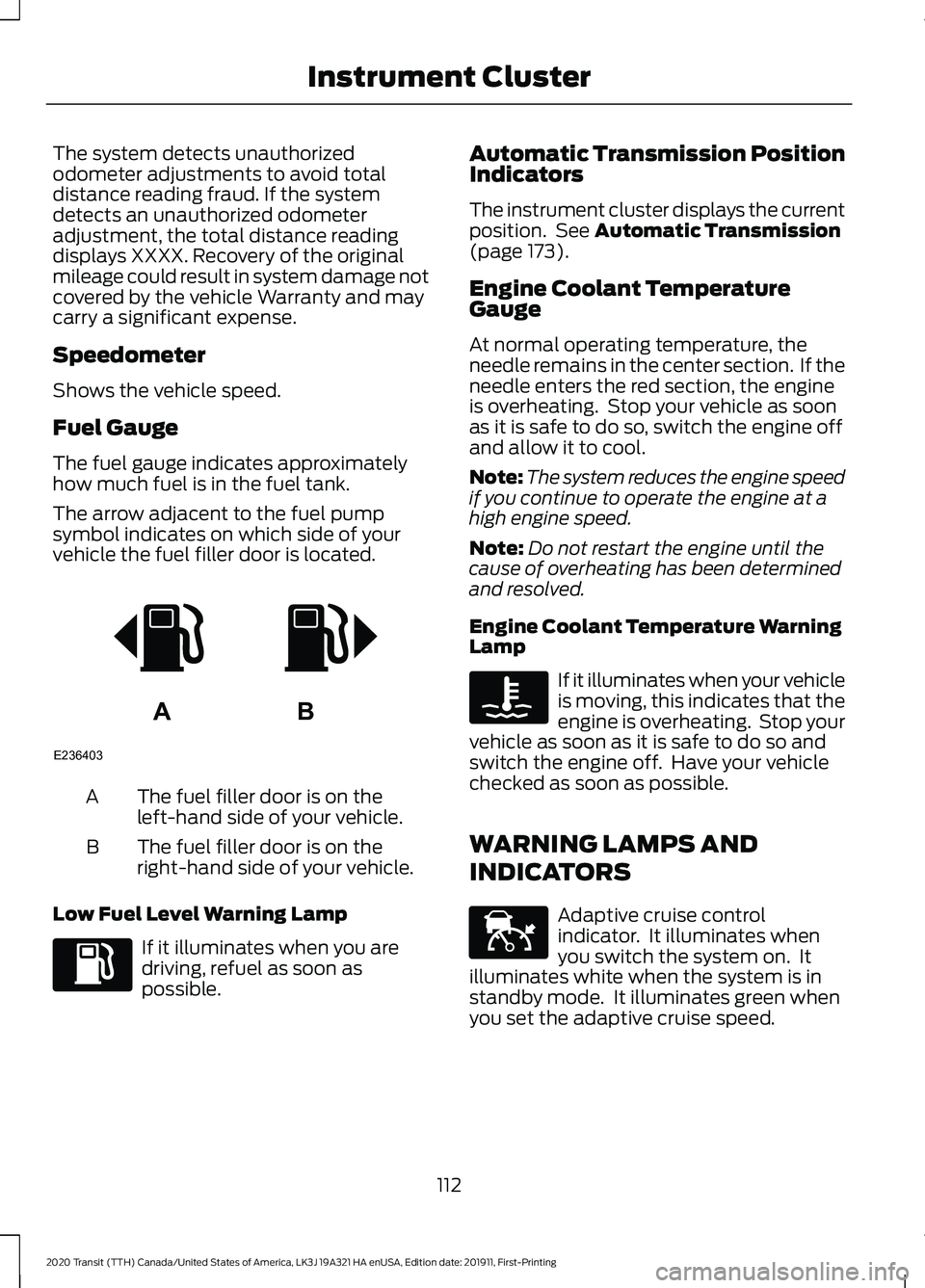
The arrow adjacent to the fuel pump
symbol indicates on which side of your
vehicle the fuel filler door is located.
The fuel filler door is on the
left-hand side of your vehicle.
A
The fuel filler door is on the
right-hand side of your vehicle.
B
Low Fuel Level Warning Lamp If it illuminates when you are
driving, refuel as soon as
possible. Automatic Transmission Position
Indicators
The instrument cluster displays the current
position. See Automatic Transmission
(page 173).
Engine Coolant Temperature
Gauge
At normal operating temperature, the
needle remains in the center section. If the
needle enters the red section, the engine
is overheating. Stop your vehicle as soon
as it is safe to do so, switch the engine off
and allow it to cool.
Note: The system reduces the engine speed
if you continue to operate the engine at a
high engine speed.
Note: Do not restart the engine until the
cause of overheating has been determined
and resolved.
Engine Coolant Temperature Warning
Lamp If it illuminates when your vehicle
is moving, this indicates that the
engine is overheating. Stop your
vehicle as soon as it is safe to do so and
switch the engine off. Have your vehicle
checked as soon as possible.
WARNING LAMPS AND
INDICATORS Adaptive cruise control
indicator. It illuminates when
you switch the system on. It
illuminates white when the system is in
standby mode. It illuminates green when
you set the adaptive cruise speed.
112
2020 Transit (TTH) Canada/United States of America, LK3J 19A321 HA enUSA, Edition date: 201911, First-Printing Instrument ClusterAB
E236403 E144524
Page 128 of 529
REMOTE START
About Remote Start
The system allows you to remotely start
the engine using the FordPass app.
The system can also adjust the interior
temperature according to the settings that
you chose.
Note:
All other vehicle systems remain off
when you have remotely started the engine.
Note: The vehicle remains secured when
you have remotely started the engine. A
valid key must be inside your vehicle to
switch the ignition on and drive your vehicle.
Remote Start Limitations
Remote start does not work if:
• The alarm horn is sounding.
• The hood is open.
• The transmission is not in park (P).
Enabling Remote Start
1. Using the information display controls on the steering wheel, select Settings.
2. Select Vehicle Settings.
3. Select
Remote Start.
4. Switch
System on or off.
Note: To use remote start, make sure that
the modem is enabled.
See Connected
Vehicle (page 388).
Remotely Starting the Engine WARNING:
To avoid exhaust
fumes, do not use remote start if your
vehicle is parked indoors or in areas that
are not well ventilated.
1. Press the lock button on the remote control. 2.
Within three seconds, press the unlock
button on the remote control.
3. Within three seconds, press the lock button on the remote control.
Note: You can also use the FordPass App
to start the engine.
Note: The direction indicators flash twice.
Note: The parking lamps turn on when the
engine is running.
Note: The horn sounds if the system fails
to start.
Note: You must switch on the ignition
before driving your vehicle.
Remotely Stopping the Engine
1. Press the lock button on the remote control.
2. Within three seconds, press the unlock
button on the remote control.
3. Within three seconds, press the lock button on the remote control.
Note: You can also use the FordPass App
to stop the engine.
Remote Start Settings
Use the information display to adjust the
remote start settings.
Note: You cannot adjust the climate control
settings when you have remotely started
the engine.
Note: When you switch the ignition on, the
climate control system returns to the last
used settings.
Switching Auto On
1. Using the information display controls on the steering wheel, select Settings.
2. Select
Vehicle Settings.
3. Select
Remote Start.
4. Select
Climate Control.
125
2020 Transit (TTH) Canada/United States of America, LK3J 19A321 HA enUSA, Edition date: 201911, First-Printing Climate Control
Page 147 of 529
Note:
You can only attempt to start the
engine for a limited amount of time before
the starting system temporarily disables. If
you exceed the starting time limit, a
message may appear and you cannot
attempt to start the engine for at least 15
minutes.
Before starting your vehicle, check the
following:
• Make sure the headlamps and
electrical accessories are off.
• Make sure the parking brake is on.
• Make sure the transmission is in park
(P).
Starting the Engine
1. Fully press the brake pedal.
Note: Do not touch the accelerator pedal.
2. Turn the key to position III.
Note: The engine may continue cranking
for up to 15 seconds or until it starts.
Note: The engine takes longer to start at
lower temperatures. It may crank for several
seconds when very cold.
Failure to Start
If you cannot start the engine after 3
attempts, wait 10 seconds and do the
following:
1. Fully press the brake pedal.
2. Apply the parking brake.
3. Shift into park (P).
4. Fully press the accelerator pedal and hold it there.
5. Turn the key to position
III and wait
until the engine stops cranking.
6. Release the accelerator pedal.
7. Start the engine. Stopping the Engine When Your
Vehicle is Stationary
1. Shift into park (P).
2. Turn the key to position
0.
3. Apply the parking brake.
Stopping the Engine When Your
Vehicle is Moving WARNING:
Switching off the
engine when your vehicle is still moving
results in a significant decrease in
braking assistance. Higher effort is
required to apply the brakes and to stop
your vehicle. A significant decrease in
steering assistance could also occur. The
steering does not lock, but higher effort
could be required to steer your vehicle.
When you switch the ignition off, some
electrical circuits, for example airbags,
also turn off. If you unintentionally switch
the ignition off, shift into neutral (N) and
restart the engine.
1. Shift into neutral and use the brakes to
bring your vehicle to a safe stop.
2. Shift into park (P).
3. Turn the key to position
0.
4. Apply the parking brake.
Guarding Against Exhaust Fumes WARNING:
Exhaust leaks may
result in entry of harmful and potentially
lethal fumes into the passenger
compartment. If you smell exhaust
fumes inside your vehicle, have your
vehicle inspected immediately. Do not
drive if you smell exhaust fumes.
144
2020 Transit (TTH) Canada/United States of America, LK3J 19A321 HA enUSA, Edition date: 201911, First-Printing Starting and Stopping the Engine