parts FORD TRANSIT 2020 Owner's Manual
[x] Cancel search | Manufacturer: FORD, Model Year: 2020, Model line: TRANSIT, Model: FORD TRANSIT 2020Pages: 529, PDF Size: 8.3 MB
Page 370 of 529
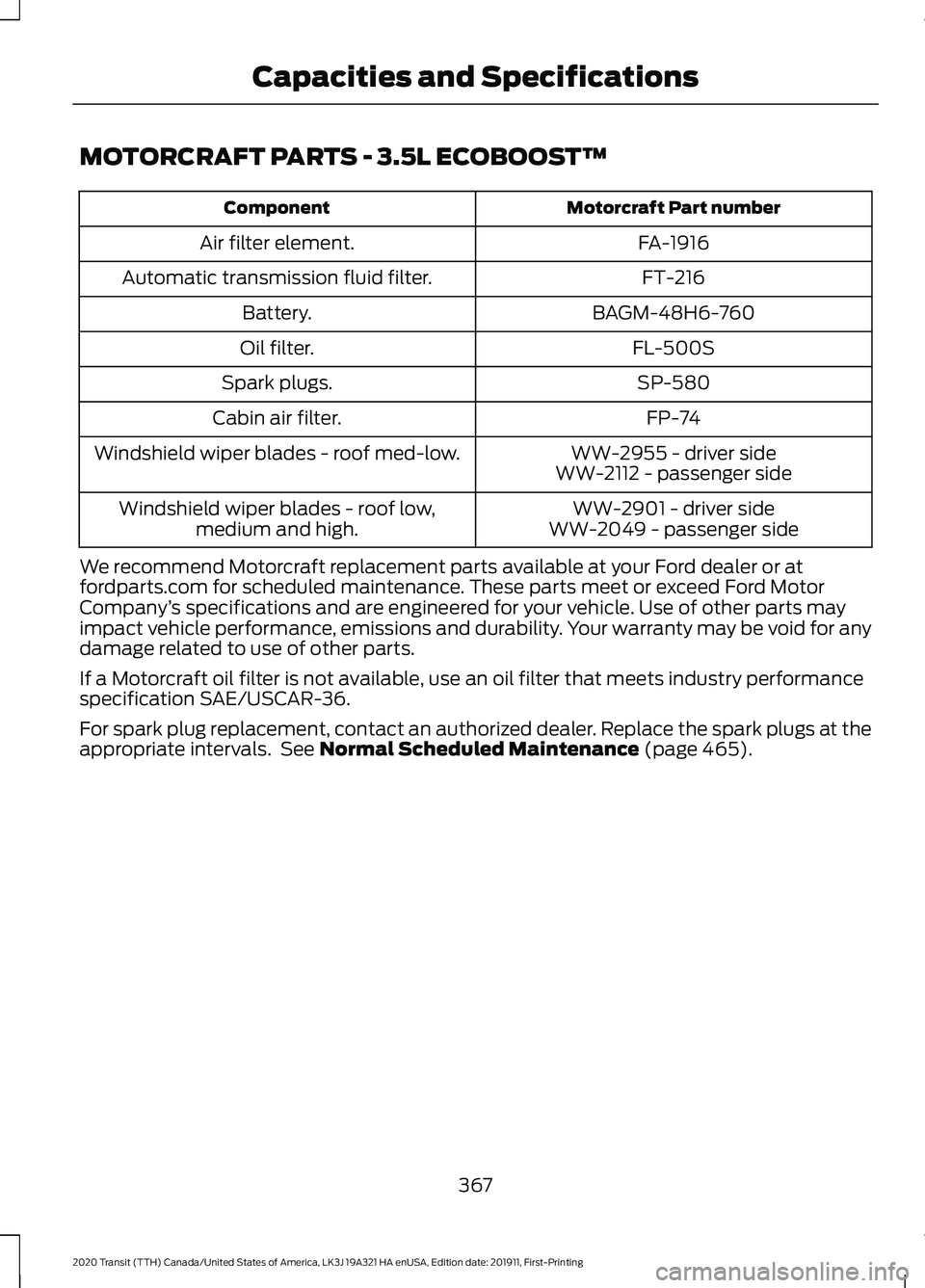
MOTORCRAFT PARTS - 3.5L ECOBOOST™
Motorcraft Part number
Component
FA-1916
Air filter element.
FT-216
Automatic transmission fluid filter.
BAGM-48H6-760
Battery.
FL-500S
Oil filter.
SP-580
Spark plugs.
FP-74
Cabin air filter.
WW-2955 - driver side
Windshield wiper blades - roof med-low.
WW-2112 - passenger side
WW-2901 - driver side
Windshield wiper blades - roof low,
medium and high. WW-2049 - passenger side
We recommend Motorcraft replacement parts available at your Ford dealer or at
fordparts.com for scheduled maintenance. These parts meet or exceed Ford Motor
Company ’s specifications and are engineered for your vehicle. Use of other parts may
impact vehicle performance, emissions and durability. Your warranty may be void for any
damage related to use of other parts.
If a Motorcraft oil filter is not available, use an oil filter that meets industry performance
specification SAE/USCAR-36.
For spark plug replacement, contact an authorized dealer. Replace the spark plugs at the
appropriate intervals. See Normal Scheduled Maintenance (page 465).
367
2020 Transit (TTH) Canada/United States of America, LK3J 19A321 HA enUSA, Edition date: 201911, First-Printing Capacities and Specifications
Page 463 of 529
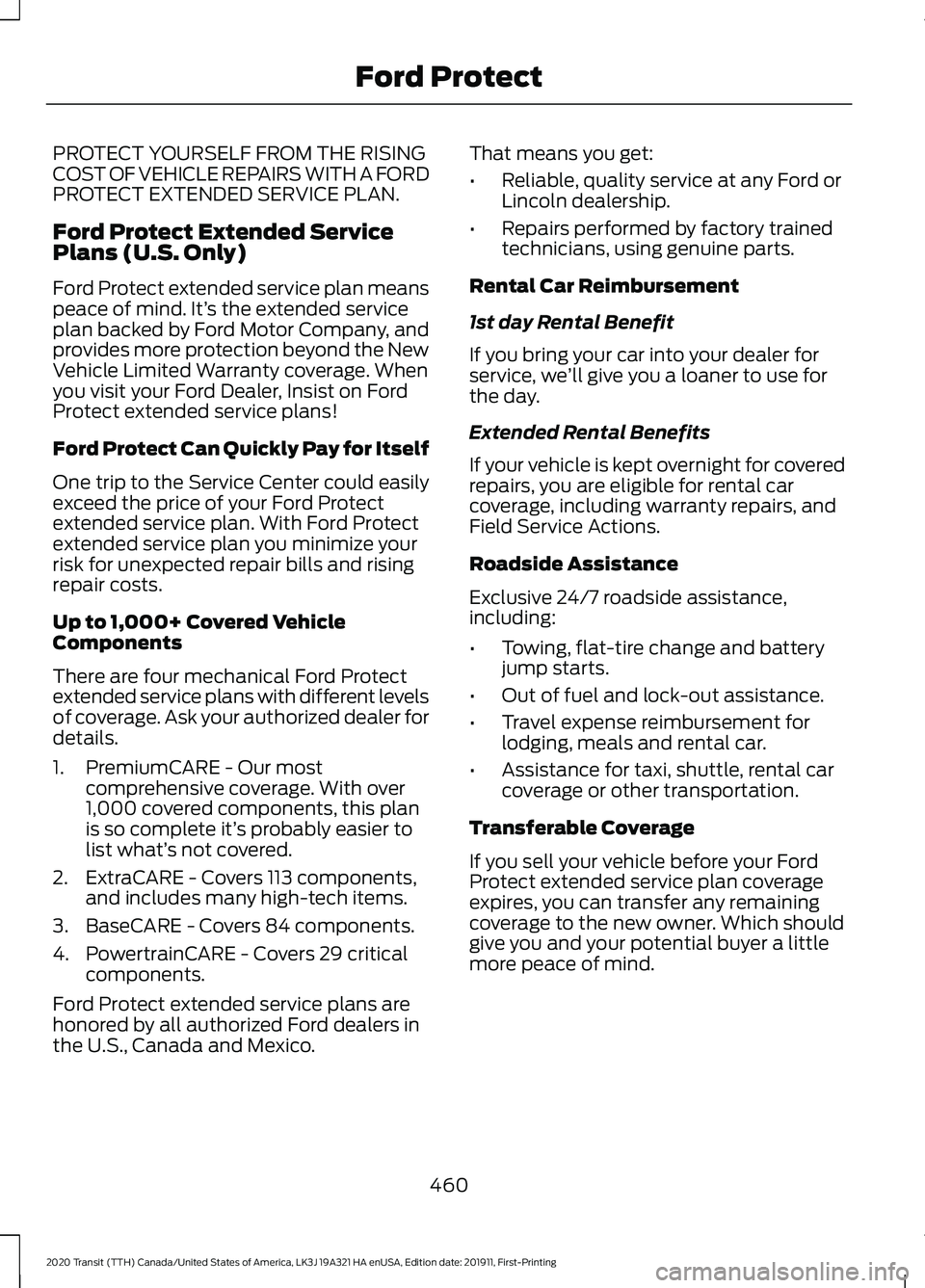
PROTECT YOURSELF FROM THE RISING
COST OF VEHICLE REPAIRS WITH A FORD
PROTECT EXTENDED SERVICE PLAN.
Ford Protect Extended Service
Plans (U.S. Only)
Ford Protect extended service plan means
peace of mind. It’
s the extended service
plan backed by Ford Motor Company, and
provides more protection beyond the New
Vehicle Limited Warranty coverage. When
you visit your Ford Dealer, Insist on Ford
Protect extended service plans!
Ford Protect Can Quickly Pay for Itself
One trip to the Service Center could easily
exceed the price of your Ford Protect
extended service plan. With Ford Protect
extended service plan you minimize your
risk for unexpected repair bills and rising
repair costs.
Up to 1,000+ Covered Vehicle
Components
There are four mechanical Ford Protect
extended service plans with different levels
of coverage. Ask your authorized dealer for
details.
1. PremiumCARE - Our most comprehensive coverage. With over
1,000 covered components, this plan
is so complete it’ s probably easier to
list what’ s not covered.
2. ExtraCARE - Covers 113 components, and includes many high-tech items.
3. BaseCARE - Covers 84 components.
4. PowertrainCARE - Covers 29 critical components.
Ford Protect extended service plans are
honored by all authorized Ford dealers in
the U.S., Canada and Mexico. That means you get:
•
Reliable, quality service at any Ford or
Lincoln dealership.
• Repairs performed by factory trained
technicians, using genuine parts.
Rental Car Reimbursement
1st day Rental Benefit
If you bring your car into your dealer for
service, we ’ll give you a loaner to use for
the day.
Extended Rental Benefits
If your vehicle is kept overnight for covered
repairs, you are eligible for rental car
coverage, including warranty repairs, and
Field Service Actions.
Roadside Assistance
Exclusive 24/7 roadside assistance,
including:
• Towing, flat-tire change and battery
jump starts.
• Out of fuel and lock-out assistance.
• Travel expense reimbursement for
lodging, meals and rental car.
• Assistance for taxi, shuttle, rental car
coverage or other transportation.
Transferable Coverage
If you sell your vehicle before your Ford
Protect extended service plan coverage
expires, you can transfer any remaining
coverage to the new owner. Which should
give you and your potential buyer a little
more peace of mind.
460
2020 Transit (TTH) Canada/United States of America, LK3J 19A321 HA enUSA, Edition date: 201911, First-Printing Ford Protect
Page 465 of 529
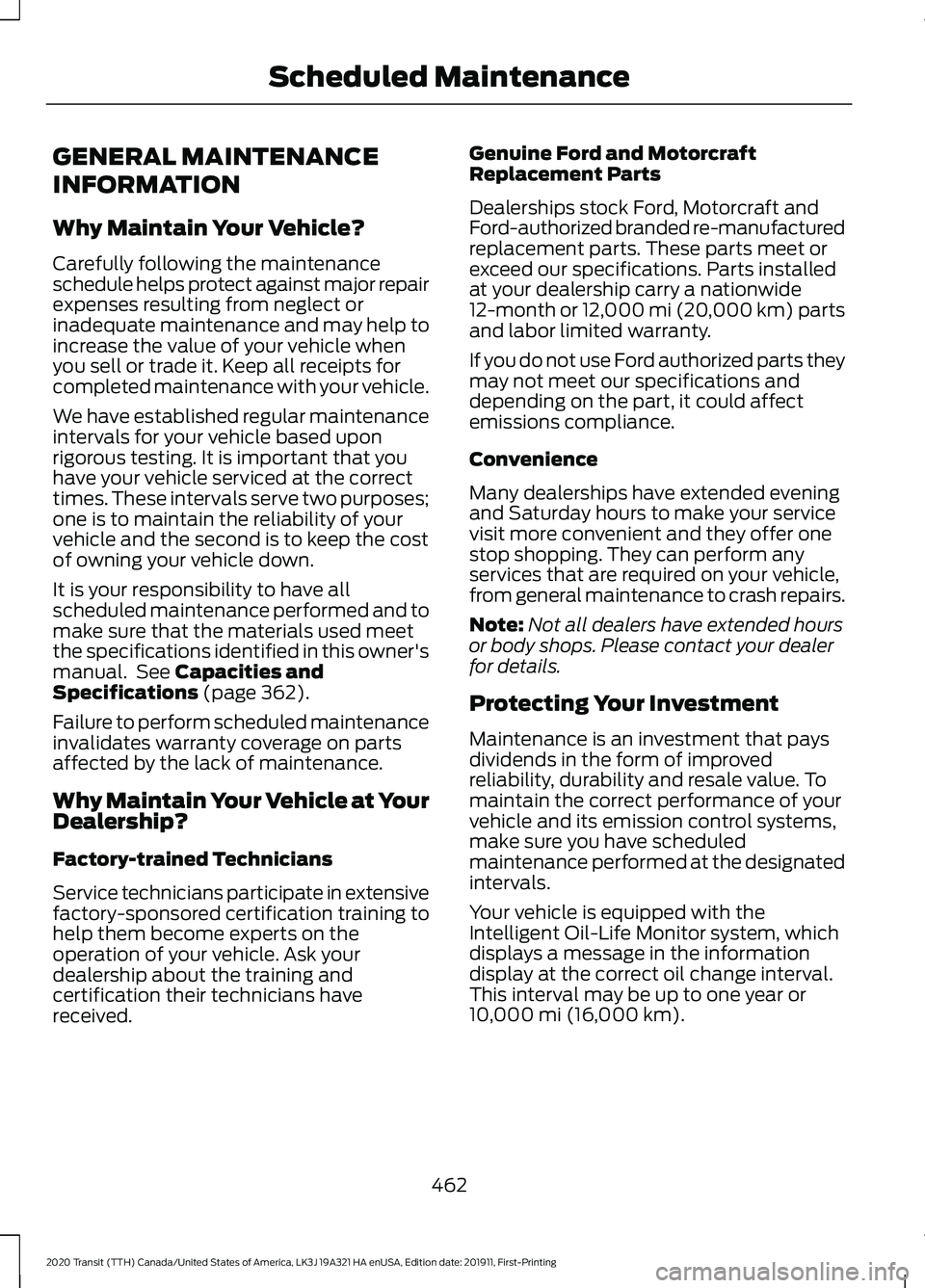
GENERAL MAINTENANCE
INFORMATION
Why Maintain Your Vehicle?
Carefully following the maintenance
schedule helps protect against major repair
expenses resulting from neglect or
inadequate maintenance and may help to
increase the value of your vehicle when
you sell or trade it. Keep all receipts for
completed maintenance with your vehicle.
We have established regular maintenance
intervals for your vehicle based upon
rigorous testing. It is important that you
have your vehicle serviced at the correct
times. These intervals serve two purposes;
one is to maintain the reliability of your
vehicle and the second is to keep the cost
of owning your vehicle down.
It is your responsibility to have all
scheduled maintenance performed and to
make sure that the materials used meet
the specifications identified in this owner's
manual. See Capacities and
Specifications (page 362).
Failure to perform scheduled maintenance
invalidates warranty coverage on parts
affected by the lack of maintenance.
Why Maintain Your Vehicle at Your
Dealership?
Factory-trained Technicians
Service technicians participate in extensive
factory-sponsored certification training to
help them become experts on the
operation of your vehicle. Ask your
dealership about the training and
certification their technicians have
received. Genuine Ford and Motorcraft
Replacement Parts
Dealerships stock Ford, Motorcraft and
Ford-authorized branded re-manufactured
replacement parts. These parts meet or
exceed our specifications. Parts installed
at your dealership carry a nationwide
12-month or 12,000 mi (20,000 km) parts
and labor limited warranty.
If you do not use Ford authorized parts they
may not meet our specifications and
depending on the part, it could affect
emissions compliance.
Convenience
Many dealerships have extended evening
and Saturday hours to make your service
visit more convenient and they offer one
stop shopping. They can perform any
services that are required on your vehicle,
from general maintenance to crash repairs.
Note:
Not all dealers have extended hours
or body shops. Please contact your dealer
for details.
Protecting Your Investment
Maintenance is an investment that pays
dividends in the form of improved
reliability, durability and resale value. To
maintain the correct performance of your
vehicle and its emission control systems,
make sure you have scheduled
maintenance performed at the designated
intervals.
Your vehicle is equipped with the
Intelligent Oil-Life Monitor system, which
displays a message in the information
display at the correct oil change interval.
This interval may be up to one year or
10,000 mi (16,000 km)
.
462
2020 Transit (TTH) Canada/United States of America, LK3J 19A321 HA enUSA, Edition date: 201911, First-Printing Scheduled Maintenance
Page 466 of 529
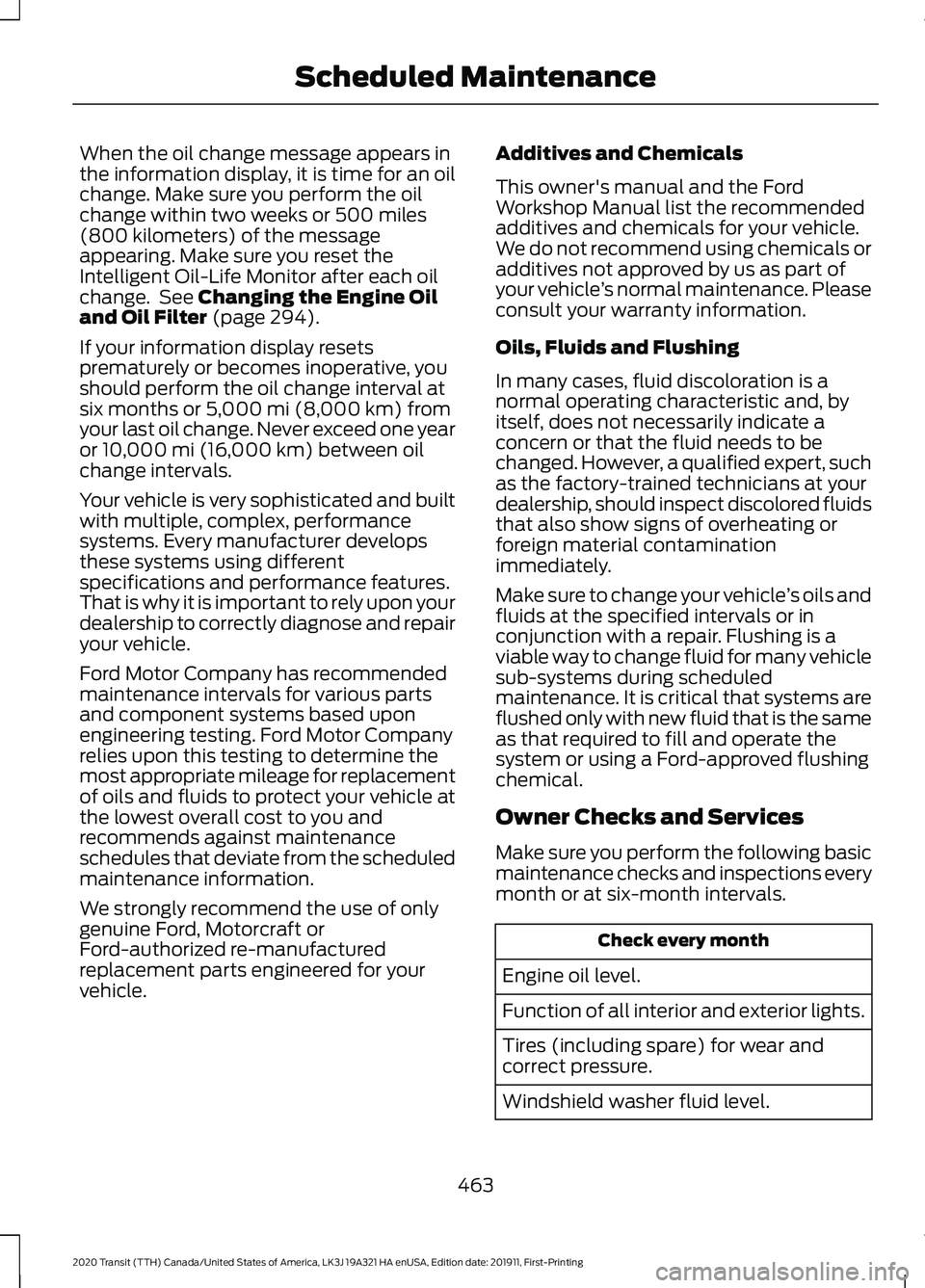
When the oil change message appears in
the information display, it is time for an oil
change. Make sure you perform the oil
change within two weeks or 500 miles
(800 kilometers) of the message
appearing. Make sure you reset the
Intelligent Oil-Life Monitor after each oil
change. See Changing the Engine Oil
and Oil Filter (page 294).
If your information display resets
prematurely or becomes inoperative, you
should perform the oil change interval at
six months or
5,000 mi (8,000 km) from
your last oil change. Never exceed one year
or
10,000 mi (16,000 km) between oil
change intervals.
Your vehicle is very sophisticated and built
with multiple, complex, performance
systems. Every manufacturer develops
these systems using different
specifications and performance features.
That is why it is important to rely upon your
dealership to correctly diagnose and repair
your vehicle.
Ford Motor Company has recommended
maintenance intervals for various parts
and component systems based upon
engineering testing. Ford Motor Company
relies upon this testing to determine the
most appropriate mileage for replacement
of oils and fluids to protect your vehicle at
the lowest overall cost to you and
recommends against maintenance
schedules that deviate from the scheduled
maintenance information.
We strongly recommend the use of only
genuine Ford, Motorcraft or
Ford-authorized re-manufactured
replacement parts engineered for your
vehicle. Additives and Chemicals
This owner's manual and the Ford
Workshop Manual list the recommended
additives and chemicals for your vehicle.
We do not recommend using chemicals or
additives not approved by us as part of
your vehicle
’s normal maintenance. Please
consult your warranty information.
Oils, Fluids and Flushing
In many cases, fluid discoloration is a
normal operating characteristic and, by
itself, does not necessarily indicate a
concern or that the fluid needs to be
changed. However, a qualified expert, such
as the factory-trained technicians at your
dealership, should inspect discolored fluids
that also show signs of overheating or
foreign material contamination
immediately.
Make sure to change your vehicle ’s oils and
fluids at the specified intervals or in
conjunction with a repair. Flushing is a
viable way to change fluid for many vehicle
sub-systems during scheduled
maintenance. It is critical that systems are
flushed only with new fluid that is the same
as that required to fill and operate the
system or using a Ford-approved flushing
chemical.
Owner Checks and Services
Make sure you perform the following basic
maintenance checks and inspections every
month or at six-month intervals. Check every month
Engine oil level.
Function of all interior and exterior lights.
Tires (including spare) for wear and
correct pressure.
Windshield washer fluid level.
463
2020 Transit (TTH) Canada/United States of America, LK3J 19A321 HA enUSA, Edition date: 201911, First-Printing Scheduled Maintenance
Page 487 of 529
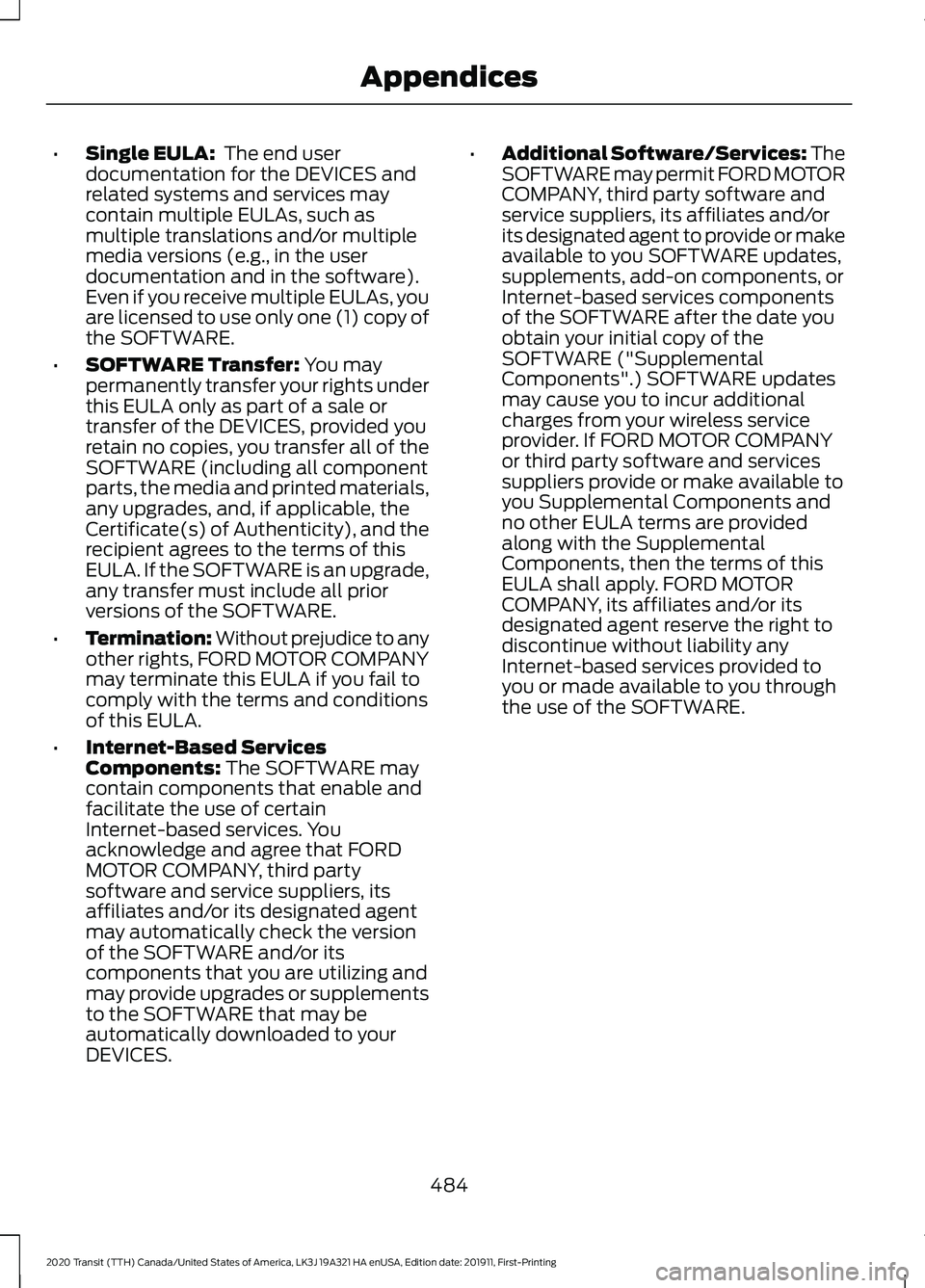
•
Single EULA: The end user
documentation for the DEVICES and
related systems and services may
contain multiple EULAs, such as
multiple translations and/or multiple
media versions (e.g., in the user
documentation and in the software).
Even if you receive multiple EULAs, you
are licensed to use only one (1) copy of
the SOFTWARE.
• SOFTWARE Transfer:
You may
permanently transfer your rights under
this EULA only as part of a sale or
transfer of the DEVICES, provided you
retain no copies, you transfer all of the
SOFTWARE (including all component
parts, the media and printed materials,
any upgrades, and, if applicable, the
Certificate(s) of Authenticity), and the
recipient agrees to the terms of this
EULA. If the SOFTWARE is an upgrade,
any transfer must include all prior
versions of the SOFTWARE.
• Termination: Without prejudice to any
other rights, FORD MOTOR COMPANY
may terminate this EULA if you fail to
comply with the terms and conditions
of this EULA.
• Internet-Based Services
Components:
The SOFTWARE may
contain components that enable and
facilitate the use of certain
Internet-based services. You
acknowledge and agree that FORD
MOTOR COMPANY, third party
software and service suppliers, its
affiliates and/or its designated agent
may automatically check the version
of the SOFTWARE and/or its
components that you are utilizing and
may provide upgrades or supplements
to the SOFTWARE that may be
automatically downloaded to your
DEVICES. •
Additional Software/Services: The
SOFTWARE may permit FORD MOTOR
COMPANY, third party software and
service suppliers, its affiliates and/or
its designated agent to provide or make
available to you SOFTWARE updates,
supplements, add-on components, or
Internet-based services components
of the SOFTWARE after the date you
obtain your initial copy of the
SOFTWARE ("Supplemental
Components".) SOFTWARE updates
may cause you to incur additional
charges from your wireless service
provider. If FORD MOTOR COMPANY
or third party software and services
suppliers provide or make available to
you Supplemental Components and
no other EULA terms are provided
along with the Supplemental
Components, then the terms of this
EULA shall apply. FORD MOTOR
COMPANY, its affiliates and/or its
designated agent reserve the right to
discontinue without liability any
Internet-based services provided to
you or made available to you through
the use of the SOFTWARE.
484
2020 Transit (TTH) Canada/United States of America, LK3J 19A321 HA enUSA, Edition date: 201911, First-Printing Appendices
Page 493 of 529
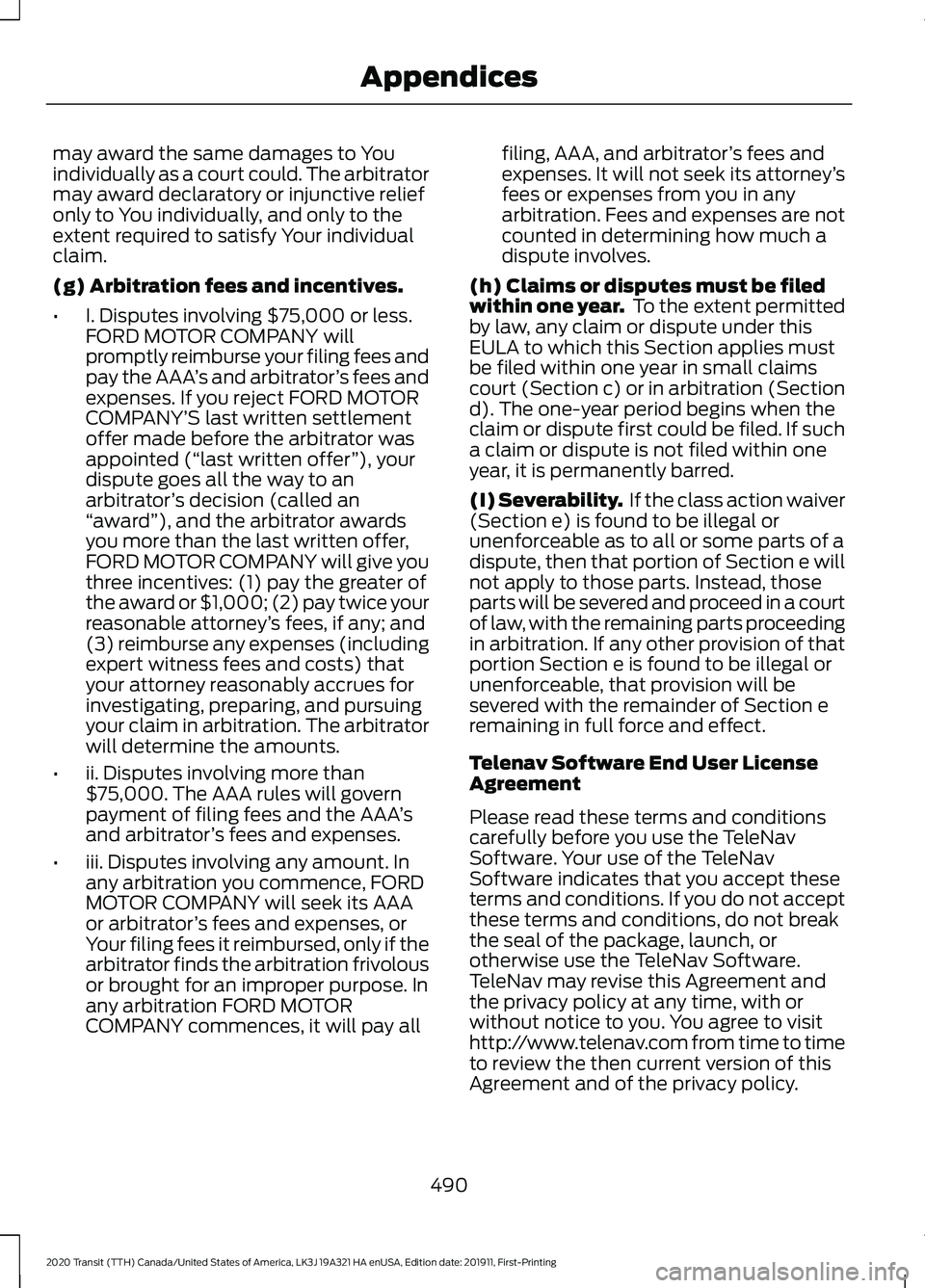
may award the same damages to You
individually as a court could. The arbitrator
may award declaratory or injunctive relief
only to You individually, and only to the
extent required to satisfy Your individual
claim.
(g) Arbitration fees and incentives.
•
I. Disputes involving $75,000 or less.
FORD MOTOR COMPANY will
promptly reimburse your filing fees and
pay the AAA ’s and arbitrator ’s fees and
expenses. If you reject FORD MOTOR
COMPANY’ S last written settlement
offer made before the arbitrator was
appointed (“ last written offer ”), your
dispute goes all the way to an
arbitrator ’s decision (called an
“ award ”), and the arbitrator awards
you more than the last written offer,
FORD MOTOR COMPANY will give you
three incentives: (1) pay the greater of
the award or $1,000; (2) pay twice your
reasonable attorney ’s fees, if any; and
(3) reimburse any expenses (including
expert witness fees and costs) that
your attorney reasonably accrues for
investigating, preparing, and pursuing
your claim in arbitration. The arbitrator
will determine the amounts.
• ii. Disputes involving more than
$75,000. The AAA rules will govern
payment of filing fees and the AAA ’s
and arbitrator ’s fees and expenses.
• iii. Disputes involving any amount. In
any arbitration you commence, FORD
MOTOR COMPANY will seek its AAA
or arbitrator ’s fees and expenses, or
Your filing fees it reimbursed, only if the
arbitrator finds the arbitration frivolous
or brought for an improper purpose. In
any arbitration FORD MOTOR
COMPANY commences, it will pay all filing, AAA, and arbitrator
’s fees and
expenses. It will not seek its attorney ’s
fees or expenses from you in any
arbitration. Fees and expenses are not
counted in determining how much a
dispute involves.
(h) Claims or disputes must be filed
within one year. To the extent permitted
by law, any claim or dispute under this
EULA to which this Section applies must
be filed within one year in small claims
court (Section c) or in arbitration (Section
d). The one-year period begins when the
claim or dispute first could be filed. If such
a claim or dispute is not filed within one
year, it is permanently barred.
(I) Severability. If the class action waiver
(Section e) is found to be illegal or
unenforceable as to all or some parts of a
dispute, then that portion of Section e will
not apply to those parts. Instead, those
parts will be severed and proceed in a court
of law, with the remaining parts proceeding
in arbitration. If any other provision of that
portion Section e is found to be illegal or
unenforceable, that provision will be
severed with the remainder of Section e
remaining in full force and effect.
Telenav Software End User License
Agreement
Please read these terms and conditions
carefully before you use the TeleNav
Software. Your use of the TeleNav
Software indicates that you accept these
terms and conditions. If you do not accept
these terms and conditions, do not break
the seal of the package, launch, or
otherwise use the TeleNav Software.
TeleNav may revise this Agreement and
the privacy policy at any time, with or
without notice to you. You agree to visit
http://www.telenav.com from time to time
to review the then current version of this
Agreement and of the privacy policy.
490
2020 Transit (TTH) Canada/United States of America, LK3J 19A321 HA enUSA, Edition date: 201911, First-Printing Appendices
Page 512 of 529
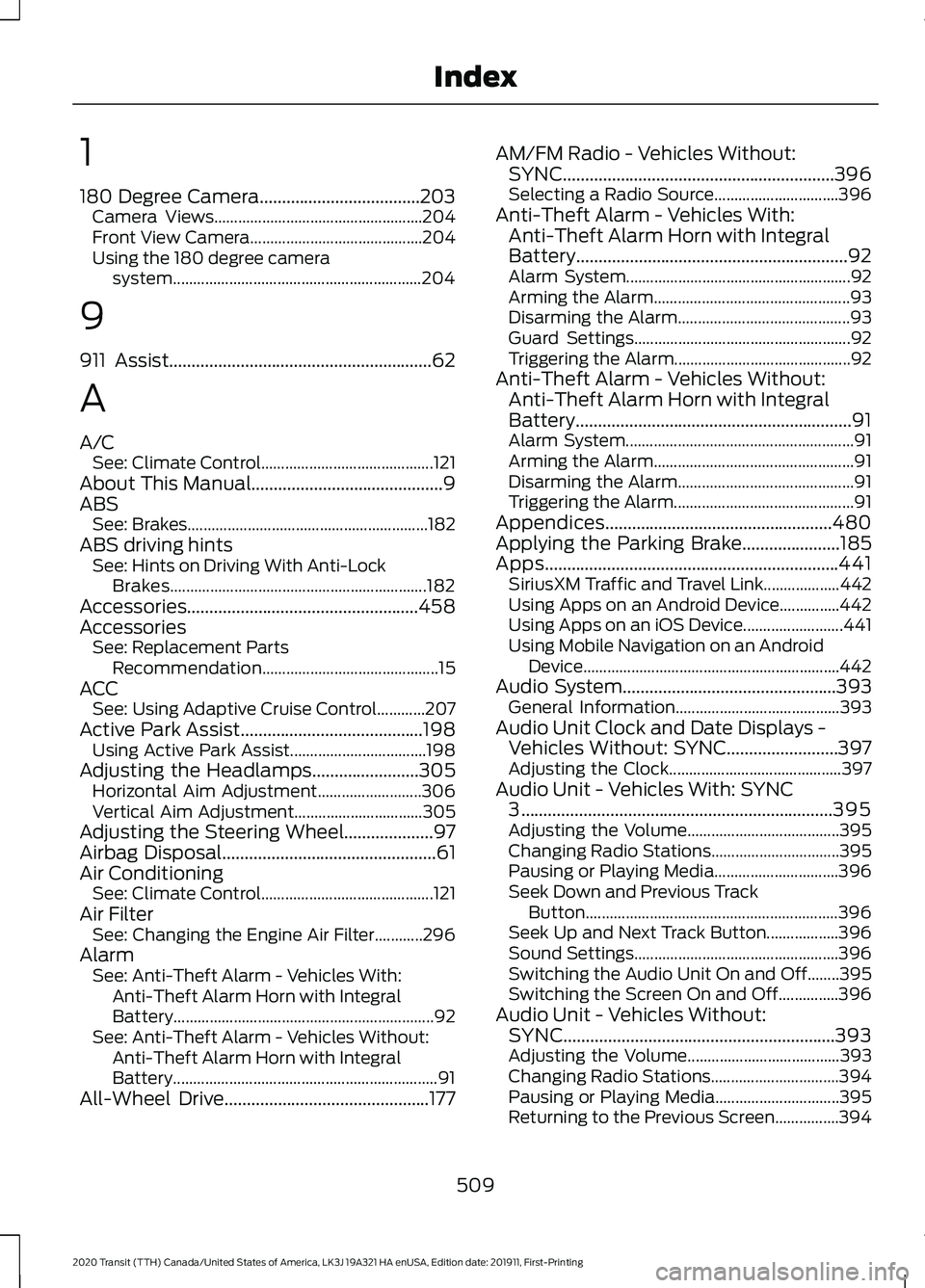
1
180 Degree Camera....................................203
Camera Views.................................................... 204
Front View Camera........................................... 204
Using the 180 degree camera system.............................................................. 204
9
911 Assist...........................................................62
A
A/C See: Climate Control........................................... 121
About This Manual...........................................9
ABS See: Brakes............................................................ 182
ABS driving hints See: Hints on Driving With Anti-Lock
Brakes................................................................ 182
Accessories....................................................458
Accessories See: Replacement Parts
Recommendation............................................ 15
ACC See: Using Adaptive Cruise Control............207
Active Park Assist.........................................198 Using Active Park Assist.................................. 198
Adjusting the Headlamps........................305 Horizontal Aim Adjustment.......................... 306
Vertical Aim Adjustment................................ 305
Adjusting the Steering Wheel....................97
Airbag Disposal
................................................61
Air Conditioning See: Climate Control........................................... 121
Air Filter See: Changing the Engine Air Filter............296
Alarm See: Anti-Theft Alarm - Vehicles With:
Anti-Theft Alarm Horn with Integral
Battery................................................................. 92
See: Anti-Theft Alarm - Vehicles Without: Anti-Theft Alarm Horn with Integral
Battery.................................................................. 91
All-Wheel Drive
..............................................177 AM/FM Radio - Vehicles Without:
SYNC.............................................................396
Selecting a Radio Source............................... 396
Anti-Theft Alarm - Vehicles With: Anti-Theft Alarm Horn with Integral
Battery.............................................................92
Alarm System........................................................ 92
Arming the Alarm................................................. 93
Disarming the Alarm........................................... 93
Guard Settings...................................................... 92
Triggering the Alarm............................................ 92
Anti-Theft Alarm - Vehicles Without: Anti-Theft Alarm Horn with Integral
Battery..............................................................91
Alarm System......................................................... 91
Arming the Alarm.................................................. 91
Disarming the Alarm............................................ 91
Triggering the Alarm............................................. 91
Appendices...................................................480
Applying the Parking Brake......................185
Apps..................................................................441 SiriusXM Traffic and Travel Link................... 442
Using Apps on an Android Device...............442
Using Apps on an iOS Device......................... 441
Using Mobile Navigation on an Android Device................................................................ 442
Audio System
................................................393
General Information......................................... 393
Audio Unit Clock and Date Displays - Vehicles Without: SYNC.........................397
Adjusting the Clock........................................... 397
Audio Unit - Vehicles With: SYNC 3......................................................................395
Adjusting the Volume...................................... 395
Changing Radio Stations................................ 395
Pausing or Playing Media............................... 396
Seek Down and Previous Track Button............................................................... 396
Seek Up and Next Track Button.................. 396
Sound Settings................................................... 396
Switching the Audio Unit On and Off........395
Switching the Screen On and Off...............396
Audio Unit - Vehicles Without: SYNC.............................................................393
Adjusting the Volume...................................... 393
Changing Radio Stations................................ 394
Pausing or Playing Media............................... 395
Returning to the Previous Screen................394
509
2020 Transit (TTH) Canada/United States of America, LK3J 19A321 HA enUSA, Edition date: 201911, First-Printing Index
Page 520 of 529
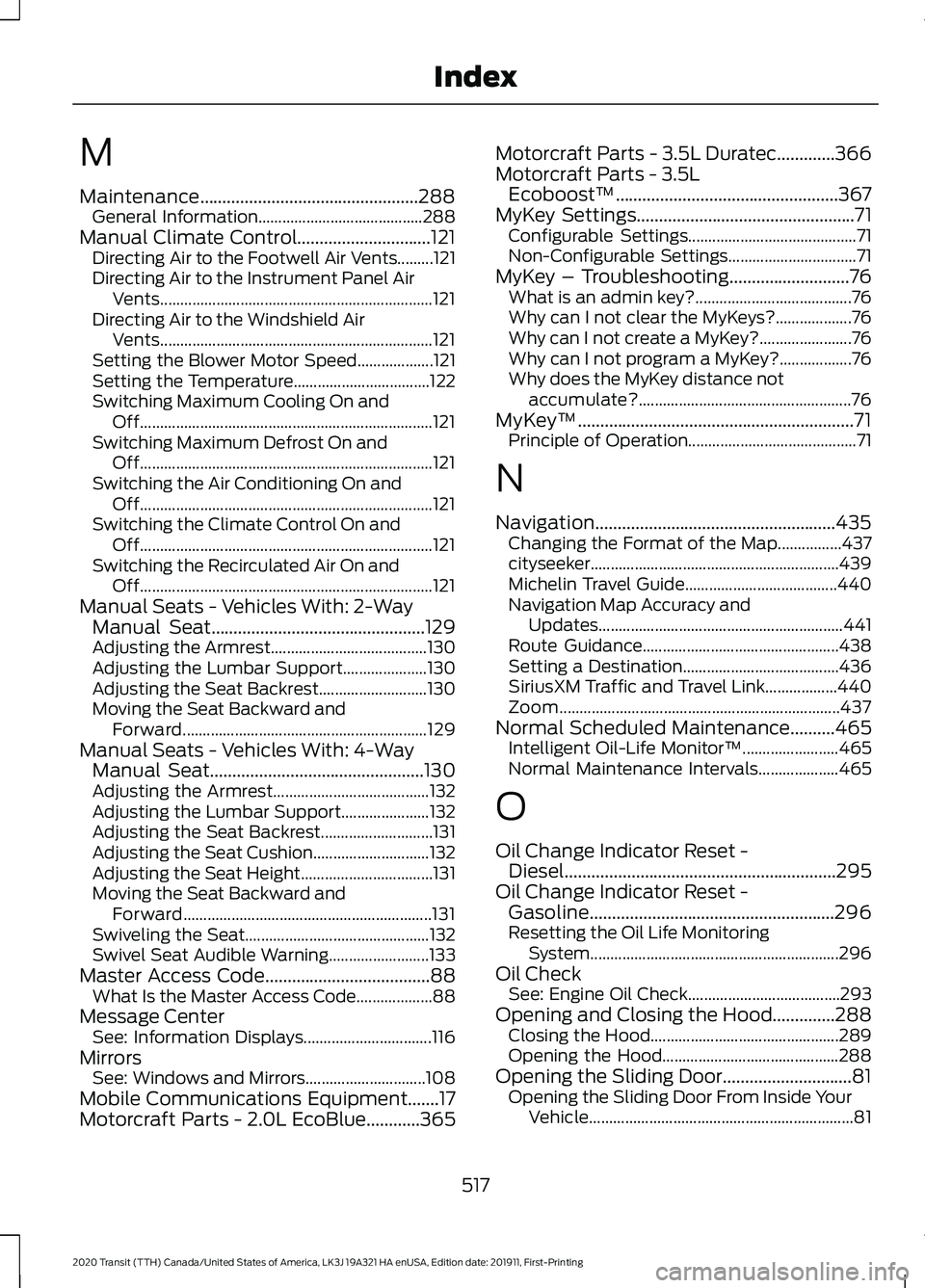
M
Maintenance.................................................288
General Information......................................... 288
Manual Climate Control..............................121 Directing Air to the Footwell Air Vents.........121
Directing Air to the Instrument Panel Air
Vents.................................................................... 121
Directing Air to the Windshield Air Vents.................................................................... 121
Setting the Blower Motor Speed................... 121
Setting the Temperature.................................. 122
Switching Maximum Cooling On and Off........................................................................\
. 121
Switching Maximum Defrost On and Off........................................................................\
. 121
Switching the Air Conditioning On and Off........................................................................\
. 121
Switching the Climate Control On and Off........................................................................\
. 121
Switching the Recirculated Air On and Off........................................................................\
. 121
Manual Seats - Vehicles With: 2-Way Manual Seat................................................129
Adjusting the Armrest....................................... 130
Adjusting the Lumbar Support..................... 130
Adjusting the Seat Backrest........................... 130
Moving the Seat Backward and Forward............................................................. 129
Manual Seats - Vehicles With: 4-Way Manual Seat................................................130
Adjusting the Armrest....................................... 132
Adjusting the Lumbar Support...................... 132
Adjusting the Seat Backrest............................ 131
Adjusting the Seat Cushion............................. 132
Adjusting the Seat Height................................. 131
Moving the Seat Backward and Forward.............................................................. 131
Swiveling the Seat.............................................. 132
Swivel Seat Audible Warning......................... 133
Master Access Code.....................................88 What Is the Master Access Code................... 88
Message Center See: Information Displays................................ 116
Mirrors See: Windows and Mirrors.............................. 108
Mobile Communications Equipment.......17
Motorcraft Parts - 2.0L EcoBlue............365 Motorcraft Parts - 3.5L Duratec
.............366
Motorcraft Parts - 3.5L Ecoboost™..................................................367
MyKey Settings
.................................................71
Configurable Settings.......................................... 71
Non-Configurable Settings................................ 71
MyKey – Troubleshooting
...........................76
What is an admin key?....................................... 76
Why can I not clear the MyKeys?................... 76
Why can I not create a MyKey?....................... 76
Why can I not program a MyKey?.................. 76
Why does the MyKey distance not accumulate?..................................................... 76
MyKey ™
..............................................................71
Principle of Operation.......................................... 71
N
Navigation
......................................................435
Changing the Format of the Map................437
cityseeker..............................................................439
Michelin Travel Guide...................................... 440
Navigation Map Accuracy and Updates............................................................. 441
Route Guidance................................................. 438
Setting a Destination....................................... 436
SiriusXM Traffic and Travel Link.................. 440
Zoom
...................................................................... 437
Normal Scheduled Maintenance..........465 Intelligent Oil-Life Monitor™........................ 465
Normal Maintenance Intervals.................... 465
O
Oil Change Indicator Reset - Diesel.............................................................295
Oil Change Indicator Reset - Gasoline.......................................................296
Resetting the Oil Life Monitoring System.............................................................. 296
Oil Check See: Engine Oil Check...................................... 293
Opening and Closing the Hood..............288 Closing the Hood............................................... 289
Opening the Hood............................................ 288
Opening the Sliding Door.............................81 Opening the Sliding Door From Inside Your
Vehicle.................................................................. 81
517
2020 Transit (TTH) Canada/United States of America, LK3J 19A321 HA enUSA, Edition date: 201911, First-Printing Index
Page 522 of 529
Rear View Camera Locations.........................
201
System Settings................................................. 203
Using the Rear View Camera......................... 201
Rear View Camera See: Rear View Camera.................................. 200
Recommended Towing Weights - Chassis Cab/Crew Van/Cutaway/
Van.................................................................243
Calculating the Maximum Loaded Trailer Weight for Your Vehicle.............................. 245
Recommended Towing Weights - M2 Bus..................................................................245
Calculating the Maximum Loaded Trailer
Weight for Your Vehicle............................... 247
Reduced Engine Performance
................254
Refueling..........................................................158 System Warnings............................................... 160
Releasing the Parking Brake.....................185
Remote Control - Vehicles With: Passive Anti-Theft System (PATS)......................66
Changing the Remote Control Battery.........67
Integrated Keyhead Transmitter.................... 66
Locating Your Vehicle.......................................... 67
Programming a New Remote Control..........67
Switching the Panic Alarm On and Off........................................................................\
. 68
Remote Control - Vehicles With: Power Sliding Door
..................................................68
Changing the Remote Control Battery........68
Locating Your Vehicle......................................... 69
Remote Control Information Messages............................................................ 70
Remote Control - Vehicles Without: Passive Anti-Theft System
(PATS).............................................................65
Changing the Remote Control Battery........65
Integrated Keyhead Transmitter.................... 65
Locating Your Vehicle......................................... 66
Programming a New Remote Control.........65
Switching the Panic Alarm On and Off........................................................................\
. 66
Remote Start
..................................................125
About Remote Start.......................................... 125
Enabling Remote Start..................................... 125
Remotely Starting the Engine........................ 125
Remotely Stopping the Engine...................... 125
Remote Start Limitations................................ 125
Remote Start Settings...................................... 125Removing a Headlamp
..............................307
Repairing Minor Paint Damage................321
Replacement Parts Recommendation
........................................15
Collision Repairs.................................................... 16
Scheduled Maintenance and Mechanical Repairs................................................................. 16
Warranty on Replacement Parts.................... 16
Replacing a Lost Key or Remote Control.............................................................70
Replacing the Cabin Air Filter...................127
Reporting Safety Defects (Canada Only)
...............................................................272
Reporting Safety Defects (U.S. Only)...............................................................271
Resetting the Power Sliding Door............85
Restarting the Engine
.................................149
Roadside Assistance..................................257
Vehicles Sold in Canada: Getting Roadside
Assistance....................................................... 258
Vehicles Sold in the United States: Getting Roadside Assistance.................................... 257
Vehicles Sold in the United States: Using Roadside Assistance.................................... 257
Roadside Emergencies
..............................257
Roof Racks and Load Carriers - Bus.................................................................236
Roof Racks and Load Carriers - Van.................................................................236
Running-In See: Breaking-In................................................. 255
Running Out of Fuel
.....................................157
Adding Fuel From a Portable Fuel
Container.......................................................... 158
Filling a Portable Fuel Container................... 157
S
Safety Canopy ™
............................................59
Safety Precautions.......................................152
Scheduled Maintenance Record...........469
Scheduled Maintenance
..........................462
Seatbelt Extensions......................................50
Seatbelt Height Adjustment......................47
Seatbelt Reminder........................................48 Belt-Minder™........................................................ 48
Seatbelts...........................................................44 Principle of Operation........................................ 44
519
2020 Transit (TTH) Canada/United States of America, LK3J 19A321 HA enUSA, Edition date: 201911, First-Printing Index