wheel FORD TRANSIT 2020 Owner's Manual
[x] Cancel search | Manufacturer: FORD, Model Year: 2020, Model line: TRANSIT, Model: FORD TRANSIT 2020Pages: 529, PDF Size: 8.3 MB
Page 108 of 529
Switching Automatic High Beam Control On or Off
To switch the system on or off, use the information display controls on the steering
wheel to select the following:
Action
Menu Item
Press the menu button.
Settings
Press the OK button.
Vehicle Settings
Press the
OK button.
Lighting
Press the
OK button.
Auto Highbeam
Automatic High Beam Indicator It illuminates to confirm when
the system is ready to assist.
Overriding Automatic High Beam
Control
Push the lever away from you to switch
between high beam and low beam.
Automatic High Beam Control Information Messages Description
Message
The camera has reduced visibility. Clean the windshield. If
the message continues to appear, have your vehicle checked
as soon as possible.
Front Camera Low Visib-
ility Clean Screen
The camera has malfunctioned. Wait a short period of time
for the camera to cool down. If the message continues to
appear, have your vehicle checked as soon as possible.
Front Camera Tempor-
arily Not Available
FRONT FOG LAMPS
Switching the Front Fog Lamps On
or Off
Only switch the front fog lamps on during
reduced visibility. You can switch the front fog lamps on if
any of the following occur:
•
You set the lighting control to the
parking lamps position.
• You set the lighting control to the
headlamps position.
• You set the lighting control to the
autolamps position and the headlamps
are on.
The front fog lamp button is on the lighting
control. Press the button to switch the
front fog lamps on or off.
105
2020 Transit (TTH) Canada/United States of America, LK3J 19A321 HA enUSA, Edition date: 201911, First-Printing Lighting
Page 127 of 529
AUXILIARY HEATER
Principle of Operation
The system is designed to reduce the time
needed to heat the engine when it is
running. It turns on or off depending on the
outside air temperature and the coolant
temperature.
The system warms the engine and the
vehicle interior. It uses fuel from the
vehicle fuel tank.
Using the Auxiliary Heater
WARNING: We recommend that
you have a qualified technician check
and repair the heater system after a
crash. Failure to follow this instruction
could result in personal injury or death. WARNING: Do not use the auxiliary
heater at fuel filling stations or near
sources of combustible vapors, dust or
in enclosed spaces. Failure to follow this
instruction could result in personal injury
or death. The system requires a minimum of
6.1 gal
(23 L) of fuel in the vehicle fuel tank and
the outside air temperature has to be
below
37°F (3°C).
Note: The system does not operate if the
battery charge level is low.
Note: Do not use biodiesel fuel B20 as this
reduces the lifetime of the heater operation.
Note: Make sure the heater exhaust outlet,
under the vehicle, under the driver
compartment, is free from snow, ice, mud
and any other blockages to avoid issues with
the heater operation.
Note: Driving through water can cause
damage to the heater. See Driving Through
Water
(page 255).
Note: When the system is on, exhaust
fumes come from under your vehicle. This
is normal.
Note: If the heater is in the process of
stopping, excess fuel in the heater burns out
and there is some heat, exhaust and noise.
Switching the Auxiliary Heater On and Off
To switch the auxiliary heater on or off, use the information display controls on
the steering wheel to select the following: Action
Menu Item
Press the menu button.
Settings
Press the
OK button.
Vehicle Settings
Press the
OK button.
Aux Heater
124
2020 Transit (TTH) Canada/United States of America, LK3J 19A321 HA enUSA, Edition date: 201911, First-Printing Climate Control
Page 128 of 529
REMOTE START
About Remote Start
The system allows you to remotely start
the engine using the FordPass app.
The system can also adjust the interior
temperature according to the settings that
you chose.
Note:
All other vehicle systems remain off
when you have remotely started the engine.
Note: The vehicle remains secured when
you have remotely started the engine. A
valid key must be inside your vehicle to
switch the ignition on and drive your vehicle.
Remote Start Limitations
Remote start does not work if:
• The alarm horn is sounding.
• The hood is open.
• The transmission is not in park (P).
Enabling Remote Start
1. Using the information display controls on the steering wheel, select Settings.
2. Select Vehicle Settings.
3. Select
Remote Start.
4. Switch
System on or off.
Note: To use remote start, make sure that
the modem is enabled.
See Connected
Vehicle (page 388).
Remotely Starting the Engine WARNING:
To avoid exhaust
fumes, do not use remote start if your
vehicle is parked indoors or in areas that
are not well ventilated.
1. Press the lock button on the remote control. 2.
Within three seconds, press the unlock
button on the remote control.
3. Within three seconds, press the lock button on the remote control.
Note: You can also use the FordPass App
to start the engine.
Note: The direction indicators flash twice.
Note: The parking lamps turn on when the
engine is running.
Note: The horn sounds if the system fails
to start.
Note: You must switch on the ignition
before driving your vehicle.
Remotely Stopping the Engine
1. Press the lock button on the remote control.
2. Within three seconds, press the unlock
button on the remote control.
3. Within three seconds, press the lock button on the remote control.
Note: You can also use the FordPass App
to stop the engine.
Remote Start Settings
Use the information display to adjust the
remote start settings.
Note: You cannot adjust the climate control
settings when you have remotely started
the engine.
Note: When you switch the ignition on, the
climate control system returns to the last
used settings.
Switching Auto On
1. Using the information display controls on the steering wheel, select Settings.
2. Select
Vehicle Settings.
3. Select
Remote Start.
4. Select
Climate Control.
125
2020 Transit (TTH) Canada/United States of America, LK3J 19A321 HA enUSA, Edition date: 201911, First-Printing Climate Control
Page 129 of 529
5. Switch Auto on.
Note: If you switch
Auto on, the system
attempts to heat or cool the interior to 72°F
(22°C)
.
Note: The heated windshield, heated rear
window and heated seats could turn on in
cold weather.
Switching
Last Settings On
1. Using the information display controls on the steering wheel, select Settings.
2. Select
Vehicle Settings.
3. Select
Remote Start.
4. Select
Climate Control.
5. Switch
Last Settings on.
Note: If you switch
Last Settings on, the
system remembers the last used settings.
Switching the Heated Seats Settings
On
1. Using the information display controls on the steering wheel, select Settings.
2. Select
Vehicle Settings.
3. Select
Remote Start.
4. Select
Seats.
5. Switch
Auto on.
Note: If you switch the heated seats
settings on, the heated seats turn on during
cold weather.
Setting the
Duration
You can set a duration for the engine to
run.
Note: Wait a few seconds before remotely
starting the engine after the engine stops
running.
1. Using the information display controls on the steering wheel, select Settings.
2. Select
Vehicle Settings.
3. Select
Remote Start. 4. Select
Duration.
126
2020 Transit (TTH) Canada/United States of America, LK3J 19A321 HA enUSA, Edition date: 201911, First-Printing Climate Control
Page 131 of 529
SITTING IN THE CORRECT
POSITION
WARNING: Do not recline the
seatback too far as this can cause the
occupant to slide under the seatbelt,
resulting in serious injury in the event of
a collision. WARNING:
Always sit upright
against your seatback with your feet on
the floor. WARNING:
Do not place objects
higher than the top of the seat backrest.
Failure to follow this instruction could
result in personal injury or death in the
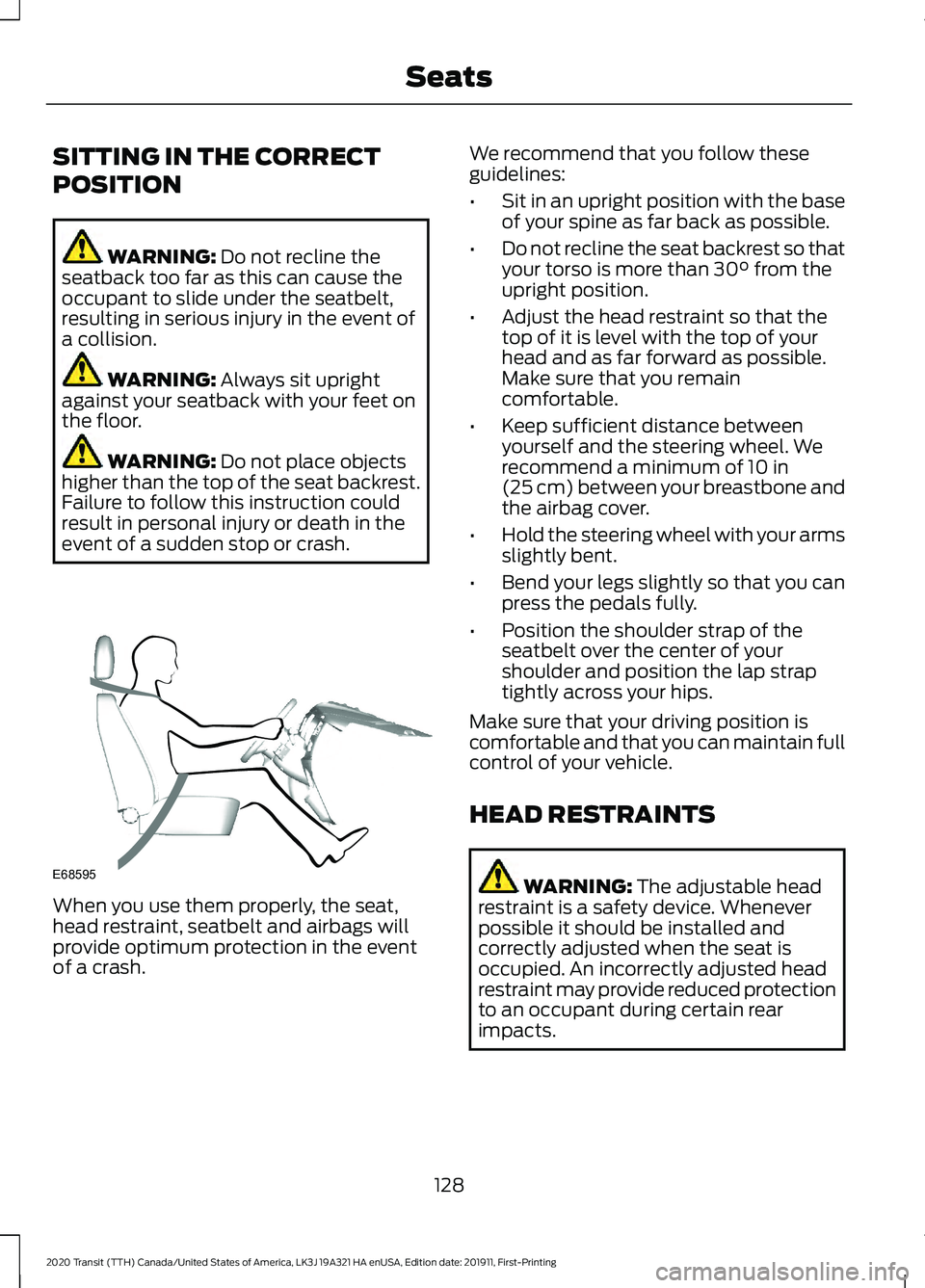
event of a sudden stop or crash. When you use them properly, the seat,
head restraint, seatbelt and airbags will
provide optimum protection in the event
of a crash. We recommend that you follow these
guidelines:
•
Sit in an upright position with the base
of your spine as far back as possible.
• Do not recline the seat backrest so that
your torso is more than
30° from the
upright position.
• Adjust the head restraint so that the
top of it is level with the top of your
head and as far forward as possible.
Make sure that you remain
comfortable.
• Keep sufficient distance between
yourself and the steering wheel. We
recommend a minimum of
10 in
(25 cm) between your breastbone and
the airbag cover.
• Hold the steering wheel with your arms
slightly bent.
• Bend your legs slightly so that you can
press the pedals fully.
• Position the shoulder strap of the
seatbelt over the center of your
shoulder and position the lap strap
tightly across your hips.
Make sure that your driving position is
comfortable and that you can maintain full
control of your vehicle.
HEAD RESTRAINTS WARNING:
The adjustable head
restraint is a safety device. Whenever
possible it should be installed and
correctly adjusted when the seat is
occupied. An incorrectly adjusted head
restraint may provide reduced protection
to an occupant during certain rear
impacts.
128
2020 Transit (TTH) Canada/United States of America, LK3J 19A321 HA enUSA, Edition date: 201911, First-Printing SeatsE68595
Page 174 of 529
Use the manual regeneration feature
when:
•
You are not able to drive in a manner
that allows effective automatic
cleaning. The automatic regeneration
process is most effective when you
drive at a steady vehicle speed of
30 mph (48 km/h) or above for
approximately 20 minutes. .
• You choose to manually start the
regeneration process when the engine
is idling.
Note: Changes in the engine or exhaust
sound may be heard during the regeneration
process.
Note: During regeneration at low speed or
engine idle, you may smell a hot metallic
odor and could notice a clicking metallic
sound. This is due to the high temperatures
reached during the regeneration process.
This is normal.
Starting Manual Regeneration
You can only start manual regeneration
with the engine running at normal
operating temperature using the
information display.
Note: During the use of manual
regeneration, you may observe a light
amount of white smoke. This is normal.
Note: If you press any pedal during manual
regeneration the engine may turn off. To
protect the exhaust system you may not be
able to restart the engine for 10 minutes.
1. Using the information display controls on the steering wheel, select Settings.
2. Select
Vehicle Maintenance.
3. Select
Exhaust Filter.
4. Press and hold the
OK button until a
confirmation message appears in the
information display. If a warning illuminates you may
not be able to start manual
regeneration.
When you start manual regeneration the
engine speed rises to approximately
2000– 2500 rpm and the cooling fan
speed increases. A change in engine noise
due to the cooling fan and engine speed
increase may be heard during the
regeneration process.
Depending on the amount of soot
collected by the diesel particulate filter,
the regeneration process varies depending
on the outside air temperature and
altitude. Manual regeneration may last up
to 40 minutes.
When manual regeneration is complete
the cooling fan and engine speed return to
normal idling. The exhaust system remains
very hot for several minutes after
regeneration is complete. Do not reposition
the vehicle over dry leaves, dry grass or
other combustible materials until the
exhaust system has had sufficient time to
cool.
Interrupting or Cancelling Manual
Regeneration
You can interrupt or cancel manual
regeneration by switching the engine off.
It may be possible to interrupt or cancel
manual regeneration by pressing any
pedal.
Note: To protect the exhaust system you
may not be able to restart the engine for 10
minutes.
Depending on the amount of time allowed
for manual regeneration to operate, soot
may not have had sufficient time to be
eliminated. The exhaust system may still
be very hot for several minutes after
regeneration.
171
2020 Transit (TTH) Canada/United States of America, LK3J 19A321 HA enUSA, Edition date: 201911, First-Printing Engine Emission Control
Page 176 of 529
AUTOMATIC TRANSMISSION
WARNING: Do not apply the brake
pedal and accelerator pedal
simultaneously. Applying both pedals
simultaneously for more than a few
seconds will limit engine performance,
which may result in difficulty maintaining
speed in traffic and could lead to serious
injury. WARNING:
When your vehicle is
stationary, keep the brake pedal fully
pressed when shifting gears. Failure to
follow this instruction could result in
personal injury, death or property
damage. WARNING:
Apply the parking
brake, shift into park (P), switch the
ignition off and remove the key before
you leave your vehicle. Failure to follow
this instruction could result in personal
injury or death.
Selector Lever Positions
The instrument cluster displays the current
position.
Park (P)
In park (P), power is not transmitted to the
driven wheels and the transmission is
locked. You can start the engine with the
transmission in this position.
Shift into park (P) only when your vehicle
is stationary.
Reverse (R)
Shift into reverse (R) only when your
vehicle is stationary and the engine is at
idle speed. Neutral (N) WARNING:
In neutral (N) your
vehicle has the ability to roll freely. If you
intend to leave your vehicle, make sure
you apply the parking brake.
In neutral (N), power is not transmitted to
the driven wheels but the transmission is
not locked. You can start the engine with
the transmission in this position.
Drive (D)
Drive (D) is the normal position for driving.
Manual (M)
In manual (M), you can upshift or
downshift using the buttons on the
selector lever.
SelectShift™
Use this feature to upshift or downshift
using the buttons on the selector lever.
Shift into manual (M) to switch the feature
on.
• Press the
+ button to upshift.
• Press the
– button to downshift.
Shift into another gear to switch the
feature off.
Progressive Range Selection
Use this feature to lock out gears using the
buttons on the selector lever. This may
provide you with an improved driving
experience, for example, on slippery roads
or steep slopes.
With the transmission in drive (D), press
the
– button to switch the feature on.
Note: The instrument cluster displays the
available and selected gears.
173
2020 Transit (TTH) Canada/United States of America, LK3J 19A321 HA enUSA, Edition date: 201911, First-Printing Transmission
Page 177 of 529
Press the – button again to lock out gears
beginning with the highest gear. For
example, press the
– button twice to lock
out 10th and 9th gears.
Note: The instrument cluster only displays
the available gears and the transmission
automatically shifts between the available
gears.
Press the + button to unlock gears to allow
the transmission to shift to higher gears.
Note: The transmission automatically shifts
within the gear range you select.
Brake Shift Interlock WARNING:
Do not drive your
vehicle until you verify that the
stoplamps are working. WARNING:
When doing this
procedure, you need to take the
transmission out of park (P) which
means your vehicle can roll freely. To
avoid unwanted vehicle movement,
always fully apply the parking brake prior
to doing this procedure. Use wheels
chocks if appropriate. WARNING:
If the parking brake is
fully released, but the brake warning
lamp remains illuminated, the brakes
may not be working properly. Have your
vehicle checked as soon as possible.
Brake shift interlock prevents you from
shifting out of park (P) when you have
switched the ignition on and not pressed
the brake pedal.
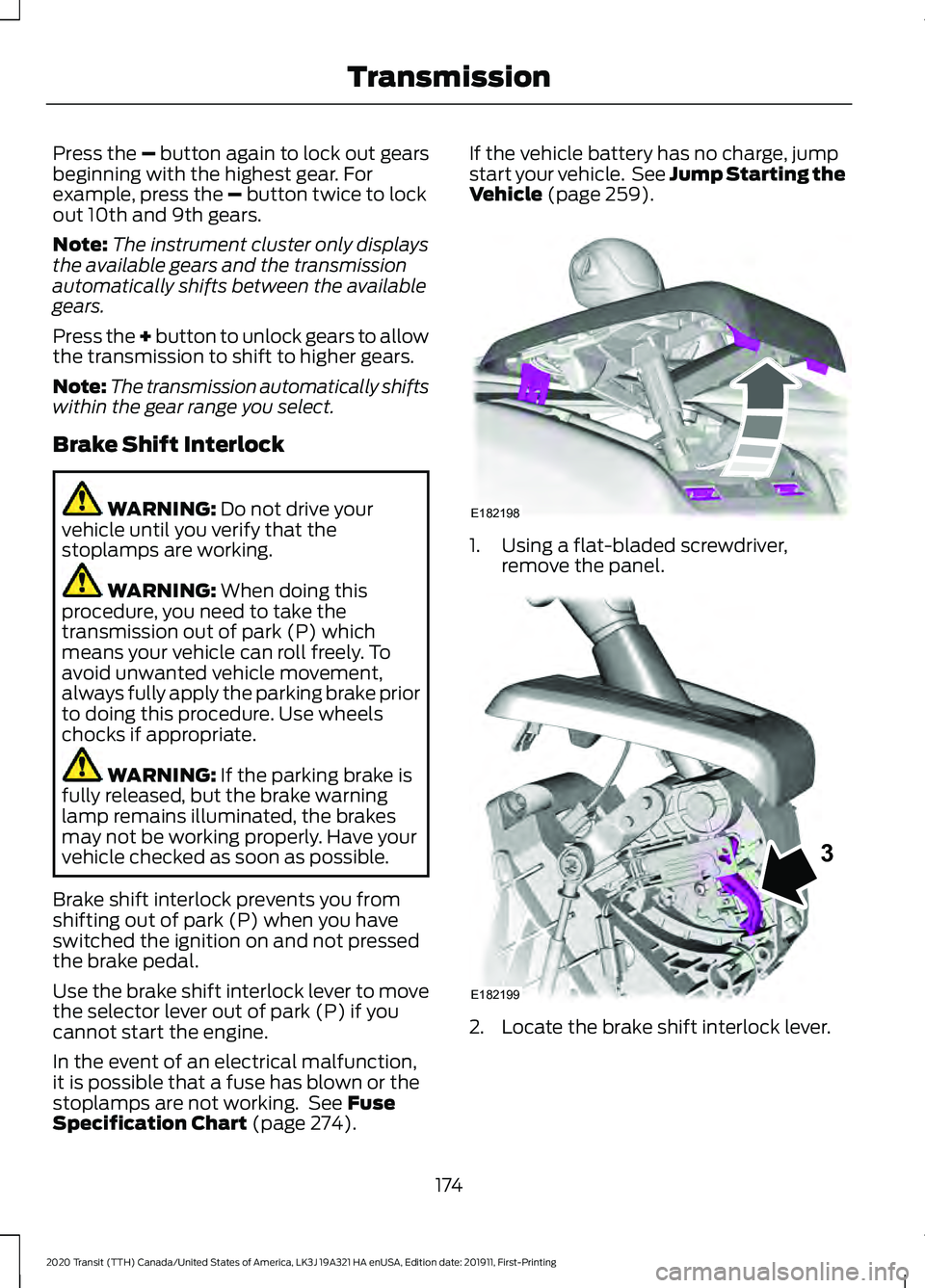
Use the brake shift interlock lever to move
the selector lever out of park (P) if you
cannot start the engine.
In the event of an electrical malfunction,
it is possible that a fuse has blown or the
stoplamps are not working. See
Fuse
Specification Chart (page 274). If the vehicle battery has no charge, jump
start your vehicle. See Jump Starting the
Vehicle
(page 259).
1. Using a flat-bladed screwdriver,
remove the panel. 2. Locate the brake shift interlock lever.
174
2020 Transit (TTH) Canada/United States of America, LK3J 19A321 HA enUSA, Edition date: 201911, First-Printing TransmissionE182198 E182199
3
Page 180 of 529
USING ALL-WHEEL DRIVE
WARNING: Vehicles with a higher
center of gravity (utility and four-wheel
drive vehicles) handle differently than
vehicles with a lower center of gravity
(passenger cars). Avoid sharp turns,
excessive speed and abrupt steering in
these vehicles. Failure to drive cautiously
increases the risk of losing control of your
vehicle, vehicle rollover, personal injury
and death.
The intelligent AWD system continuously
monitors vehicle conditions and adjusts
the power distribution between the front
and rear wheels. It combines transparent
all-surface operation with highly capable
all-wheel drive.
The AWD system is always active and
requires no driver input. It is capable of
handling all road conditions. You can
optimize the AWD performance for
specialized driving conditions by selecting
different drive modes. See Drive Control
(page
234).
Operating All-Wheel Drive (AWD)
Vehicles with Mismatched Tires WARNING:
Only use replacement
tires and wheels that are the same size,
load index, speed rating and type (such
as P-metric versus LT-metric or
all-season versus all-terrain) as those
originally provided by Ford. The
recommended tire and wheel size may
be found on either the Safety
Compliance Certification Label (affixed
to either the door hinge pillar, door-latch
post, or the door edge that meets the
door-latch post, next to the driver's
seating position), or the Tire Label which
is located on the B-Pillar or edge of the driver's door. If this information is not
found on these labels, then you should
contact your authorized dealer as soon
as possible. Use of any tire or wheel not
recommended by Ford can affect the
safety and performance of your vehicle,
which could result in an increased risk of
loss of vehicle control, vehicle rollover,
personal injury and death.
Major dissimilar tire sizes between the front
and rear axles could cause the AWD
system to stop functioning and default to
rear-wheel drive or damage the AWD
system.
For optimum AWD performance, it is
recommended to follow the tire rotation
maintenance schedule. To avoid potential
AWD malfunction or AWD system damage,
it is recommended to replace all four tires
rather than mixing significantly worn tires
with new tires.
Driving In Special Conditions With
All-Wheel Drive (AWD)
Note: AWD vehicles are equipped for
driving on sand, snow, mud and rough roads
and have operating characteristics that are
somewhat different from conventional
vehicles, both on and off the highway.
Basic Operating Principles in Special
Conditions
• Drive slower in strong crosswinds which
can affect the normal steering
characteristics of your vehicle.
• Be extremely careful when driving on
pavement made slippery by loose sand,
water, gravel, snow or ice.
177
2020 Transit (TTH) Canada/United States of America, LK3J 19A321 HA enUSA, Edition date: 201911, First-Printing All-Wheel Drive
Page 181 of 529
If Your Vehicle Goes Off the Edge of the
Pavement
•
If your vehicle goes off the edge of the
pavement, slow down, but avoid severe
brake application, ease the vehicle
back onto the pavement only after
reducing your speed. Do not turn the
steering wheel too sharply while
returning to the road surface.
• It could be safer to stay on the apron
or shoulder of the road and slow down
gradually before returning to the
pavement. You could lose control if you
do not slow down or if you turn the
steering wheel too sharply or abruptly.
• It often could be less risky to strike
small objects, such as highway
reflectors, with minor damage to your
vehicle rather than attempt a sudden
return to the pavement which could
cause the vehicle to slide sideways out
of control or rollover. Remember, your
safety and the safety of others should
be your primary concern.
If Your Vehicle Gets Stuck WARNING: Apply the parking
brake, shift into park (P), switch the
ignition off and remove the key before
you leave your vehicle. Failure to follow
this instruction could result in personal
injury or death. WARNING:
If the parking brake is
fully released, but the brake warning
lamp remains illuminated, the brakes
may not be working properly. Have your
vehicle checked as soon as possible. WARNING:
Do not spin the wheels
at over 34 mph (55 km/h). The tires may
fail and injure a passenger or bystander. If your vehicle gets stuck in mud or snow it
could be rocked out by shifting between
forward and reverse gears, stopping
between shifts, in a steady pattern. Press
lightly on the accelerator in each gear.
If your vehicle is equipped with
AdvanceTrac® with Roll Stability
Control
™, it could be beneficial to
disengage the AdvanceTrac® with Roll
Stability Control ™ system while
attempting to rock the vehicle.
Note: Do not rock the vehicle if the engine
is not at normal operating temperature or
damage to the transmission could occur.
Note: Do not rock the vehicle for more than
a few minutes or damage to the
transmission and tires could occur or the
engine could overheat.
Emergency Maneuvers
• In an unavoidable emergency situation
where a sudden sharp turn must be
made, remember to avoid
"over-driving" your vehicle (i.e., turn the
steering wheel only as rapidly and as
far as required to avoid the
emergency). Excessive steering can
result in less vehicle control, not more.
Additionally, smooth variations of the
accelerator and/or brake pedal
pressure should be utilized if changes
in vehicle speed are called for. Avoid
178
2020 Transit (TTH) Canada/United States of America, LK3J 19A321 HA enUSA, Edition date: 201911, First-Printing All-Wheel Drive