wheel FORD TRANSIT 2020 Workshop Manual
[x] Cancel search | Manufacturer: FORD, Model Year: 2020, Model line: TRANSIT, Model: FORD TRANSIT 2020Pages: 529, PDF Size: 8.3 MB
Page 222 of 529
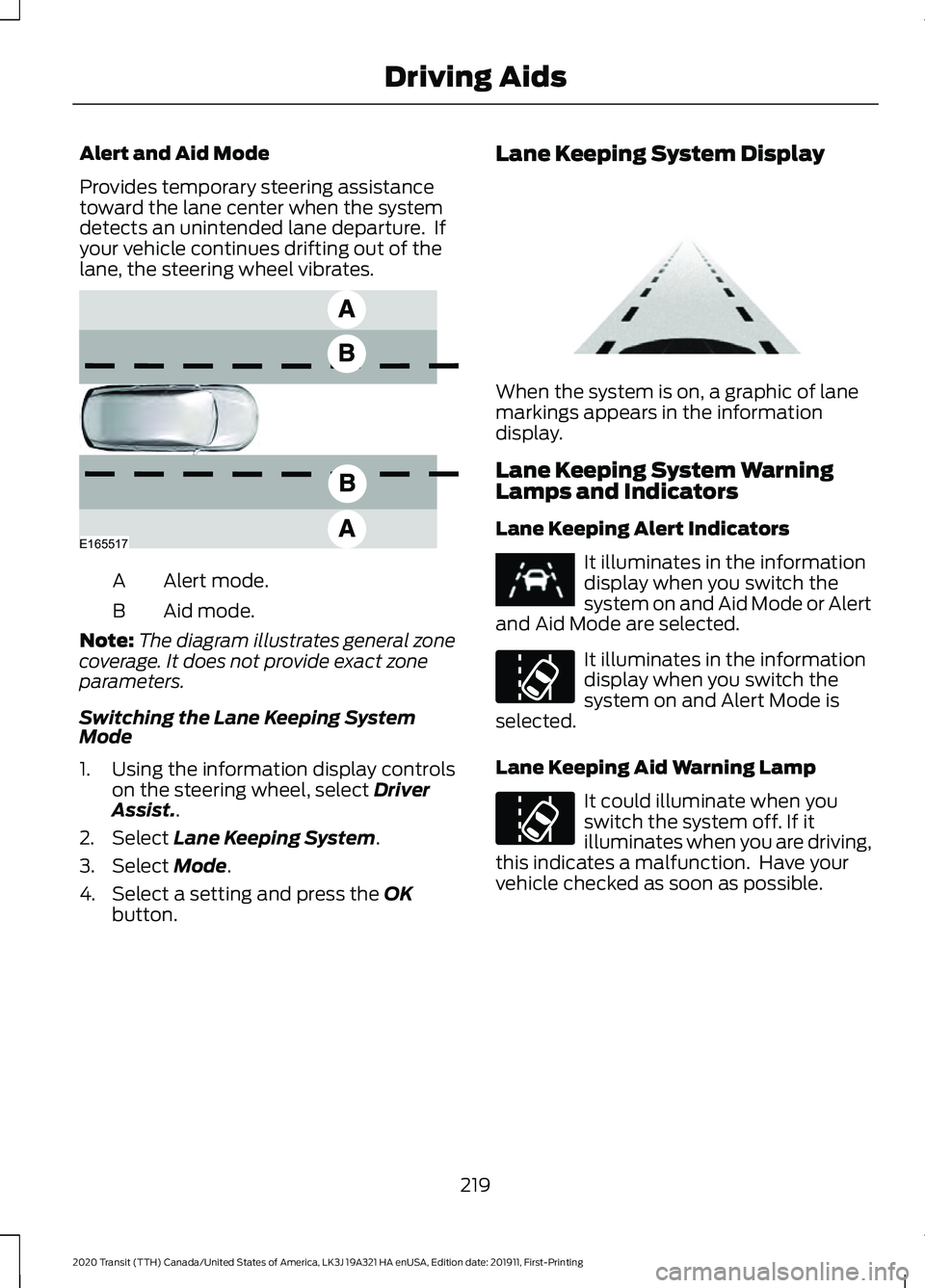
Alert and Aid Mode
Provides temporary steering assistance
toward the lane center when the system
detects an unintended lane departure. If
your vehicle continues drifting out of the
lane, the steering wheel vibrates.
Alert mode.
A
Aid mode.
B
Note: The diagram illustrates general zone
coverage. It does not provide exact zone
parameters.
Switching the Lane Keeping System
Mode
1. Using the information display controls on the steering wheel, select Driver
Assist..
2. Select
Lane Keeping System.
3. Select
Mode.
4. Select a setting and press the
OK
button. Lane Keeping System Display When the system is on, a graphic of lane
markings appears in the information
display.
Lane Keeping System Warning
Lamps and Indicators
Lane Keeping Alert Indicators
It illuminates in the information
display when you switch the
system on and Aid Mode or Alert
and Aid Mode are selected. It illuminates in the information
display when you switch the
system on and Alert Mode is
selected.
Lane Keeping Aid Warning Lamp It could illuminate when you
switch the system off. If it
illuminates when you are driving,
this indicates a malfunction. Have your
vehicle checked as soon as possible.
219
2020 Transit (TTH) Canada/United States of America, LK3J 19A321 HA enUSA, Edition date: 201911, First-Printing Driving AidsE165517 E313922 E251020
Page 223 of 529
Black and White Information Display
System Status
Indicator
Unavailable.
Gray.
Available.
White.
Temporary steering assistance.
White and inverted.
Temporary steering assistance and steering wheel vibration.
White and flashing.
Color Information Display System Status
Indicator
Unavailable.
Gray.
Available.
Green.
Temporary steering assistance.
Amber.
Temporary steering assistance and steering wheel vibration.
Red.
Lane Keeping System Messages Action
Message
The system has detected a fault that requires service. Have
your vehicle checked as soon as possible.
Lane Keeping Sys.
Malfunction Service
Required
BLIND SPOT INFORMATION
SYSTEM WARNING: Do not use the blind
spot information system as a
replacement for using the interior and
exterior mirrors or looking over your
shoulder before changing lanes. The
blind spot information system is not a
replacement for careful driving. WARNING:
The system may not
operate properly during severe weather
conditions, for example snow, ice, heavy
rain and spray. Always drive with due
care and attention. Failure to take care
may result in a crash.
220
2020 Transit (TTH) Canada/United States of America, LK3J 19A321 HA enUSA, Edition date: 201911, First-Printing Driving Aids
Page 224 of 529
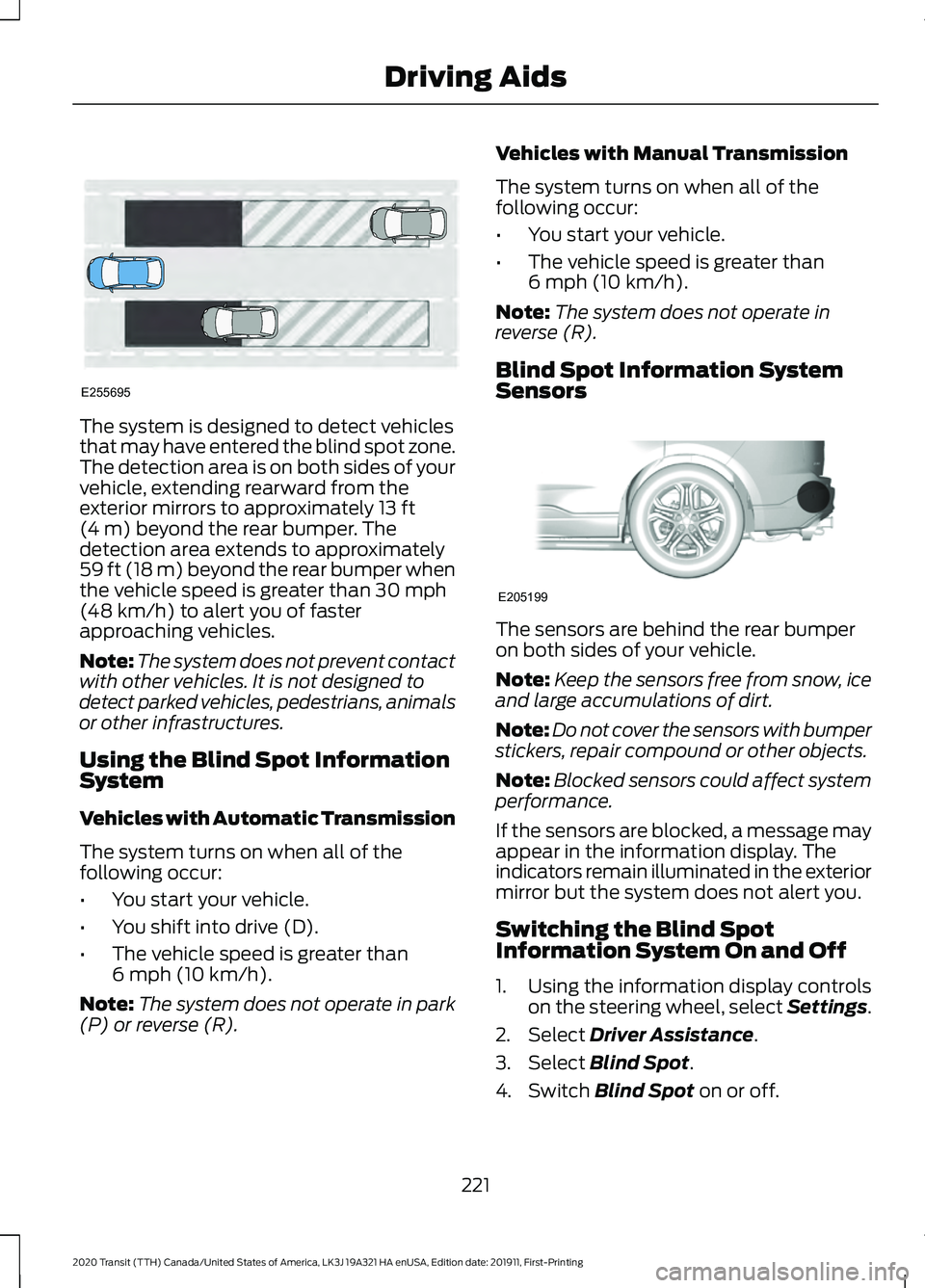
The system is designed to detect vehicles
that may have entered the blind spot zone.
The detection area is on both sides of your
vehicle, extending rearward from the
exterior mirrors to approximately 13 ft
(4 m) beyond the rear bumper. The
detection area extends to approximately
59 ft (18 m)
beyond the rear bumper when
the vehicle speed is greater than 30 mph
(48 km/h) to alert you of faster
approaching vehicles.
Note: The system does not prevent contact
with other vehicles. It is not designed to
detect parked vehicles, pedestrians, animals
or other infrastructures.
Using the Blind Spot Information
System
Vehicles with Automatic Transmission
The system turns on when all of the
following occur:
• You start your vehicle.
• You shift into drive (D).
• The vehicle speed is greater than
6 mph (10 km/h)
.
Note: The system does not operate in park
(P) or reverse (R). Vehicles with Manual Transmission
The system turns on when all of the
following occur:
•
You start your vehicle.
• The vehicle speed is greater than
6 mph (10 km/h)
.
Note: The system does not operate in
reverse (R).
Blind Spot Information System
Sensors The sensors are behind the rear bumper
on both sides of your vehicle.
Note:
Keep the sensors free from snow, ice
and large accumulations of dirt.
Note: Do not cover the sensors with bumper
stickers, repair compound or other objects.
Note: Blocked sensors could affect system
performance.
If the sensors are blocked, a message may
appear in the information display. The
indicators remain illuminated in the exterior
mirror but the system does not alert you.
Switching the Blind Spot
Information System On and Off
1. Using the information display controls on the steering wheel, select Settings.
2. Select
Driver Assistance.
3. Select
Blind Spot.
4. Switch
Blind Spot on or off.
221
2020 Transit (TTH) Canada/United States of America, LK3J 19A321 HA enUSA, Edition date: 201911, First-Printing Driving AidsE255695 E205199
Page 225 of 529
When you switch the system off, a warning
lamp illuminates in the instrument cluster
and the alert indicators flash twice.
The system remembers the last setting
when you start your vehicle.
Note:
The system may not correctly operate
when towing a trailer. The system turns off
when you attach a trailer, if your vehicle has
an approved trailer tow module and tow
bar. For vehicles with an aftermarket trailer
tow module or tow bar, turn the system off
when you attach a trailer.
To permanently switch the system off,
contact an authorized dealer.
Blind Spot Information System
Indicator When the system detects a
vehicle, an alert indicator
illuminates in the exterior mirror
on the side the approaching vehicle is
coming from. If you turn the direction
indicator on for that side of your vehicle,
the alert indicator flashes.
Note: The system may not alert you if a
vehicle quickly passes through the detection
zone.
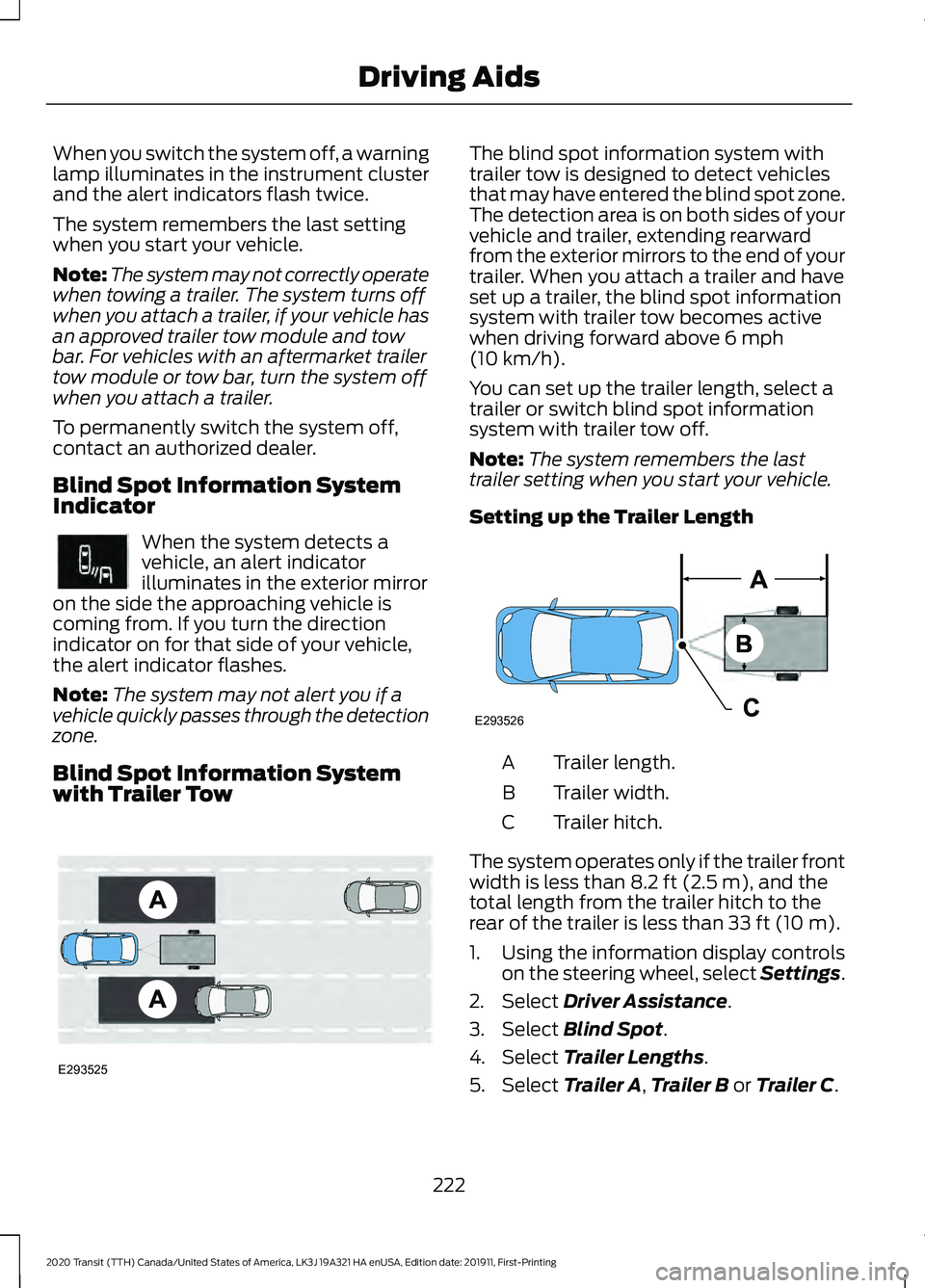
Blind Spot Information System
with Trailer Tow The blind spot information system with
trailer tow is designed to detect vehicles
that may have entered the blind spot zone.
The detection area is on both sides of your
vehicle and trailer, extending rearward
from the exterior mirrors to the end of your
trailer. When you attach a trailer and have
set up a trailer, the blind spot information
system with trailer tow becomes active
when driving forward above 6 mph
(10 km/h).
You can set up the trailer length, select a
trailer or switch blind spot information
system with trailer tow off.
Note: The system remembers the last
trailer setting when you start your vehicle.
Setting up the Trailer Length Trailer length.
A
Trailer width.
B
Trailer hitch.
C
The system operates only if the trailer front
width is less than
8.2 ft (2.5 m), and the
total length from the trailer hitch to the
rear of the trailer is less than
33 ft (10 m).
1. Using the information display controls on the steering wheel, select Settings.
2. Select
Driver Assistance.
3. Select
Blind Spot.
4. Select
Trailer Lengths.
5. Select
Trailer A, Trailer B or Trailer C.
222
2020 Transit (TTH) Canada/United States of America, LK3J 19A321 HA enUSA, Edition date: 201911, First-Printing Driving AidsE249861E249861 E293525 E293526
Page 226 of 529
6. Select the trailer length at the closest
available value.
Note: Proper measurement and
measurement entry are required for the
system to function as designed.
7. Press the OK button.
Note: If you attach load carriers such as
bike racks or cargo racks with electrical
lighting, enter a length of
3 ft (1 m). Cross
Traffic Alert remains on.
Selecting a Trailer
If you select a trailer in the information
display prior to connecting a trailer, the
system loads that configuration and an
information message appears in the
information display when you connect the
trailer.
1. Using the information display controls on the steering wheel, select Settings.
2. Select
Driver Assistance.
3. Select
Blind Spot.
4. Select
Trailer.
5. Select
Trailer A, Trailer B or Trailer C.
6. Press the
OK button.
Switching the Blind Spot Information
System with Trailer Tow Off
1. Using the information display controls on the steering wheel, select Settings.
2. Select
Driver Assistance.
3. Select
Blind Spot.
4. Select
Trailer.
5. Select
None.
6. Press the
OK button. When you switch the system off, a warning
lamp illuminates and the alert indicators
flash twice.
Note:
The system turns off and a message
appears when a trailer is connected, but not
set up or selected.
Blind Spot Information System
Limitations
Some trailers may cause a slight change
in system performance:
• Wide box trailers, especially those
wider than the towing vehicle, may
cause false alerts to occur when driving
next to infrastructure or near parked
cars. A false alert may also occur while
making a 90-degree turn or driving
through a roundabout.
• Wide trailers that have a total length
greater than
20 ft (6 m) may cause
delayed alerts when a vehicle is
passing at high speed.
• Box trailers that have a width greater
than
8.2 ft (2.5 m) may cause early
alerts when you pass a vehicle.
• Clam shell or V-Nose box trailers with
a width greater than 8.2 ft (2.5 m) may
cause delayed alerts when a vehicle
traveling the same speed as your
vehicle merges lanes.
Blind Spot Information System
Warning Lamp It illuminates in the instrument
cluster if you switch the system
off.
If it illuminates when the system is on this
indicates a malfunction. Have your vehicle
checked as soon as possible.
223
2020 Transit (TTH) Canada/United States of America, LK3J 19A321 HA enUSA, Edition date: 201911, First-Printing Driving AidsE249861E249861
Page 230 of 529
If the system malfunctions, a warning lamp
illuminates in the instrument cluster and
a message appears in the information
display. Have your vehicle checked as soon
as possible.
Note:
In exceptional conditions, the system
could alert you, even when there is nothing
in the detection zone, for example a vehicle
passing further away from your vehicle.
Cross Traffic Alert Information Messages Action
Message
Displays instead of indication arrows when the system
detects a vehicle. Check for approaching traffic.
Cross Traffic Alert
Displays if the cross traffic alert system sensors are blocked.
Clean the sensors. If the message continues to appear, have
your vehicle checked as soon as possible.
Cross Traffic Not Avail-
able Sensor Blocked See
Manual
The system has malfunctioned. Have your vehicle checked
as soon as possible.
Cross Traffic System
Fault
Displays if you attach a trailer to your vehicle.
Cross Traffic Alert Deac-
tivated Trailer Attached
ECO
Eco Mode
How Does Eco Mode Work
The system is designed to monitor certain
driving characteristics to help you drive
more efficiently. See Economical Driving
(page 254).
Note: The efficiency levels do not result in
a defined fuel consumption figure.
Note: The system only indicates the
efficiency level for the current trip. The
system resets each time you switch the
ignition on. Instantaneous Efficiency Level
The display ring increases as the
instantaneous efficiency level increases
and illuminates when it reaches maximum
efficiency. The level continuously updates
to indicate the efficiency level for the
current trip.
Viewing the Instantaneous Efficiency
Level
1. Using the information display controls
on the steering wheel, select
MyView.
2. Select
Eco Coach.
Trip Summary
The calculated trip summary is shown as
four colored bars. The bars travel from left
to right as the calculated efficiency levels
increase. The bars indicate the average
efficiency level for acceleration,
deceleration, speed and gear shifting
during the total distance traveled by your
vehicle for the current trip.
227
2020 Transit (TTH) Canada/United States of America, LK3J 19A321 HA enUSA, Edition date: 201911, First-Printing Driving Aids
Page 231 of 529
Note:
Vehicles with an automatic
transmission do not have a bar for gear
shifting.
Viewing the Trip Summary
1. Using the information display controls on the steering wheel, select MyView.
2. Select
Eco Coach.
Efficient Drive Mode
What Is Efficient Drive Mode
Efficient drive mode is a predictive coach
that provides near real-time traffic
information to help you drive more
efficiently by releasing the accelerator
pedal.
Switching Efficient Drive Mode On and
Off
1. Using the information display controls on the steering wheel, select
Driver
Assist..
2. Select
Eco Coach.
3. Switch
Eco Advice on and off.
Displaying the Efficient Drive Mode
1. Using the information display controls on the steering wheel, select
Driver
Assist..
The display ring can provide information
about speed limit, freeway ramp, slope,
curve, crosswalk, etc.
Efficient Drive Mode Indicator It indicates that you have to
slowly decelerate. Trip Summary
The calculated trip summary is shown as
five colored bars. The bars travel from left
to right as the calculated efficiency levels
increase. The bars indicate the average
efficiency level for acceleration,
deceleration, speed, gear shifting and
compliance score during the total distance
traveled by your vehicle for both last and
current trips.
Note:
Vehicles with an automatic
transmission do not have a bar for gear
shifting.
Viewing the trip summary
1. Using the information display controls on the steering wheel, select
MyView.
2. Select
Eco Coach.
3. Switch the engine off.
4. Press the
OK button.
STEERING
Electric Power Steering WARNING:
The electric power
steering system has diagnostic checks
that continuously monitor the system. If
a fault is detected, a message displays
in the information display. Stop your
vehicle as soon as it is safe to do so.
Switch the ignition off. After at least 10
seconds, switch the ignition on and
watch the information display for a
steering system warning message. If a
steering system warning message
returns, have the system checked as
soon as possible.
228
2020 Transit (TTH) Canada/United States of America, LK3J 19A321 HA enUSA, Edition date: 201911, First-Printing Driving AidsE308186
Page 232 of 529
WARNING: If the system detects
an error, you may not feel a difference in
the steering, however a serious condition
may exist. Have your vehicle checked as
soon as possible. Failure to do so may
result in loss of steering control.
Your vehicle has an electric power steering
system, there is no fluid reservoir, no
maintenance is required.
If your vehicle loses electrical power while
you are driving, electric power steering
assistance is lost. The steering system still
operates and you can steer your vehicle
manually. Manually steering your vehicle
requires more effort.
Extreme continuous steering may increase
the effort required for you to steer your
vehicle, this increased effort prevents
overheating and permanent damage to
the steering system. You do not lose the
ability to steer your vehicle manually.
Typical steering and driving maneuvers
allow the system to cool and return to
normal operation. Steering Tips
If the steering wanders or pulls, check for:
•
Correct tire pressures.
• Uneven tire wear.
• Loose or worn suspension
components.
• Loose or worn steering components.
• Improper vehicle alignment.
Note: A high crown in the road or high
crosswinds may also make the steering
seem to wander or pull.
Adaptive Learning
(If Equipped)
The electronic power steering system
adaptive learning helps correct road
irregularities and improves overall handling
and steering feel. It communicates with
the brake system to help operate
advanced stability control and accident
avoidance systems. Additionally, whenever
the battery is disconnected or a new
battery installed, you must drive your
vehicle a short distance before the system
relearns the strategy and reactivates all
systems.
Steering Information Messages Description
Message
The system has malfunctioned. Stop your vehicle as soon
as it is safe to do so. You continue to have full steering but
you need to exert greater force on the steering wheel. Have
your vehicle checked as soon as possible.
Steering Fault Service
Now
Steering Loss Stop
Safely
Steering Assist Fault
Service Required
229
2020 Transit (TTH) Canada/United States of America, LK3J 19A321 HA enUSA, Edition date: 201911, First-Printing Driving Aids
Page 234 of 529
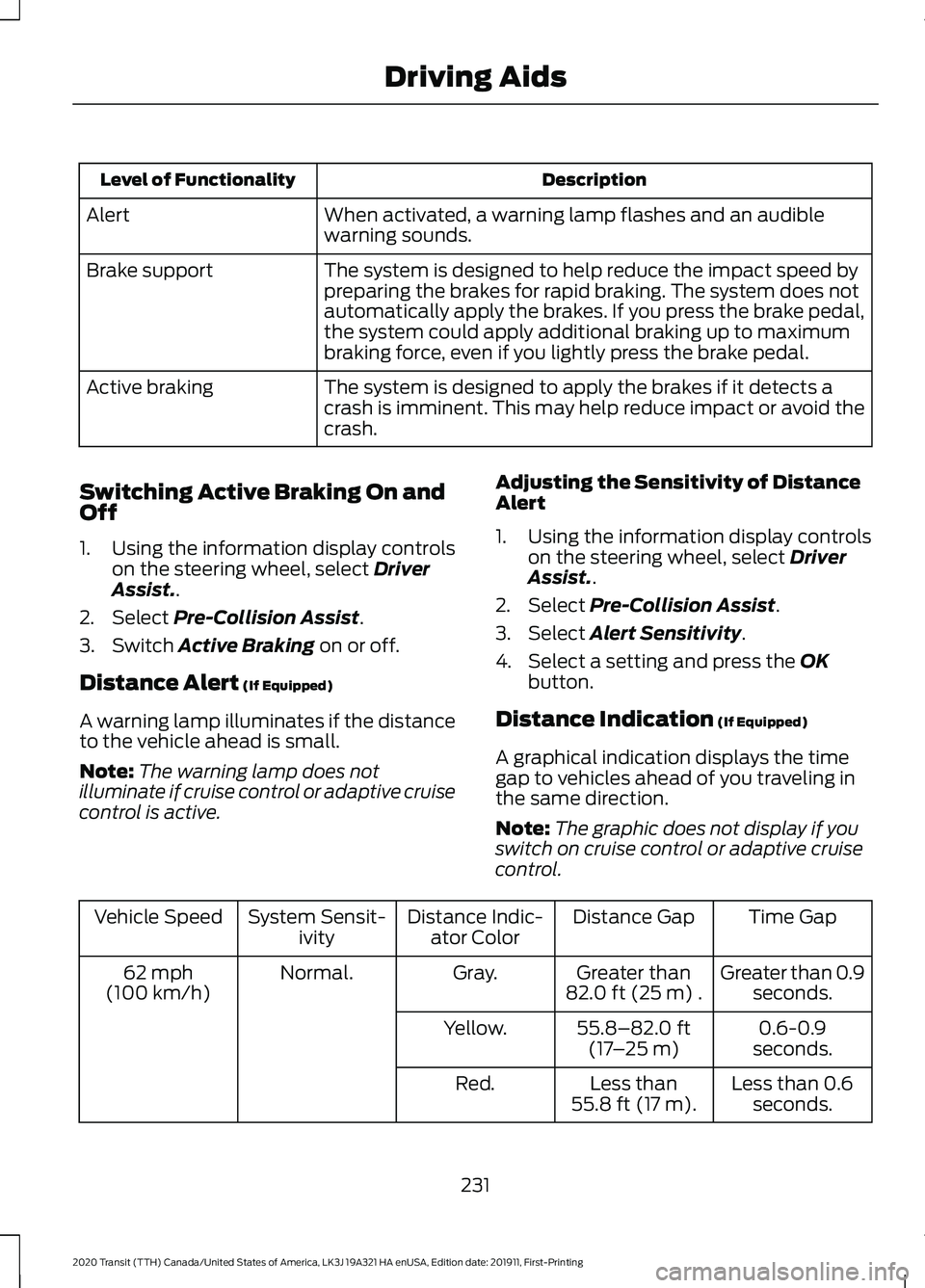
Description
Level of Functionality
When activated, a warning lamp flashes and an audible
warning sounds.
Alert
The system is designed to help reduce the impact speed by
preparing the brakes for rapid braking. The system does not
automatically apply the brakes. If you press the brake pedal,
the system could apply additional braking up to maximum
braking force, even if you lightly press the brake pedal.
Brake support
The system is designed to apply the brakes if it detects a
crash is imminent. This may help reduce impact or avoid the
crash.
Active braking
Switching Active Braking On and
Off
1. Using the information display controls on the steering wheel, select Driver
Assist..
2. Select
Pre-Collision Assist.
3. Switch
Active Braking on or off.
Distance Alert
(If Equipped)
A warning lamp illuminates if the distance
to the vehicle ahead is small.
Note: The warning lamp does not
illuminate if cruise control or adaptive cruise
control is active. Adjusting the Sensitivity of Distance
Alert
1. Using the information display controls
on the steering wheel, select
Driver
Assist..
2. Select
Pre-Collision Assist.
3. Select
Alert Sensitivity.
4. Select a setting and press the
OK
button.
Distance Indication
(If Equipped)
A graphical indication displays the time
gap to vehicles ahead of you traveling in
the same direction.
Note: The graphic does not display if you
switch on cruise control or adaptive cruise
control. Time Gap
Distance Gap
Distance Indic-
ator Color
System Sensit-
ivity
Vehicle Speed
Greater than 0.9seconds.
Greater than
82.0 ft (25 m)
.
Gray.
Normal.
62 mph
(100 km/h)
0.6-0.9
seconds.
55.8–82.0 ft
(17 –25 m)
Yellow.
Less than 0.6seconds.
Less than
55.8 ft (17 m)
.
Red.
231
2020 Transit (TTH) Canada/United States of America, LK3J 19A321 HA enUSA, Edition date: 201911, First-Printing Driving Aids
Page 235 of 529
Switching Distance Indication On and
Off
1. Using the information display controls
on the steering wheel, select Driver
Assist..
2. Select
Pre-Collision Assist.
3. Switch
Distance Indication on or off.
Pre-Collision Assist System
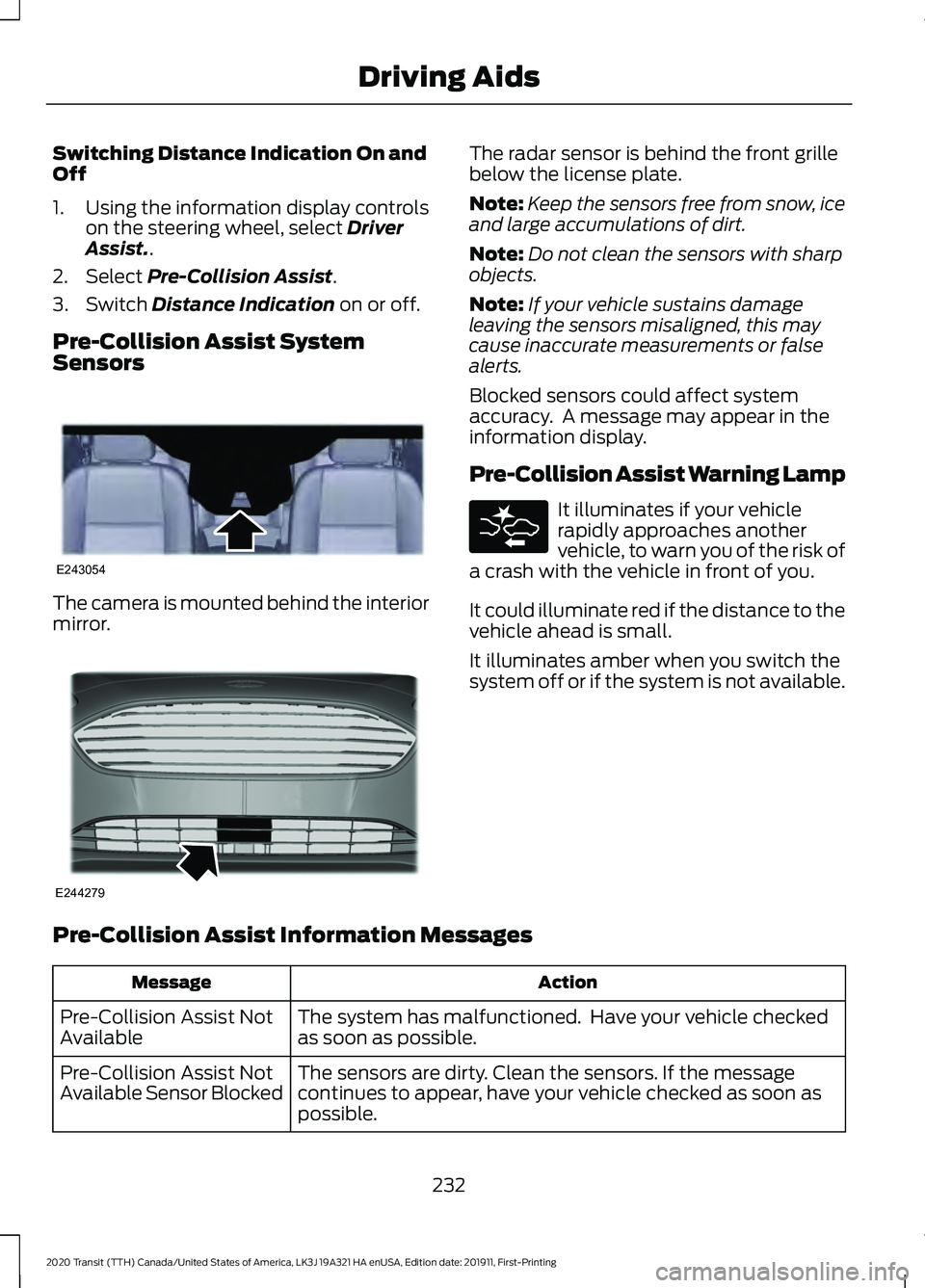
Sensors The camera is mounted behind the interior
mirror. The radar sensor is behind the front grille
below the license plate.
Note:
Keep the sensors free from snow, ice
and large accumulations of dirt.
Note: Do not clean the sensors with sharp
objects.
Note: If your vehicle sustains damage
leaving the sensors misaligned, this may
cause inaccurate measurements or false
alerts.
Blocked sensors could affect system
accuracy. A message may appear in the
information display.
Pre-Collision Assist Warning Lamp It illuminates if your vehicle
rapidly approaches another
vehicle, to warn you of the risk of
a crash with the vehicle in front of you.
It could illuminate red if the distance to the
vehicle ahead is small.
It illuminates amber when you switch the
system off or if the system is not available.
Pre-Collision Assist Information Messages Action
Message
The system has malfunctioned. Have your vehicle checked
as soon as possible.
Pre-Collision Assist Not
Available
The sensors are dirty. Clean the sensors. If the message
continues to appear, have your vehicle checked as soon as
possible.
Pre-Collision Assist Not
Available Sensor Blocked
232
2020 Transit (TTH) Canada/United States of America, LK3J 19A321 HA enUSA, Edition date: 201911, First-Printing Driving AidsE243054 E244279