air condition FORD TRANSIT 2020 Service Manual
[x] Cancel search | Manufacturer: FORD, Model Year: 2020, Model line: TRANSIT, Model: FORD TRANSIT 2020Pages: 529, PDF Size: 8.3 MB
Page 444 of 529
Navigation Map Accuracy and
Updates
HERE is the digital map provider for the
navigation application. If you find map data
errors, you may report them directly to
HERE by going to www.here.com. HERE
evaluates all reported map errors and
responds with the result of their
investigation by e-mail.
The navigation system map data may
contain inaccurate or incomplete
information due to the passage of time,
changing circumstances, sources used and
the nature of collecting comprehensive
geographic data, any of which may lead to
incorrect results. Inaccurate speed limit
information, turn restrictions and other
road attributes may affect the determined
route and associated guidance
Annual navigation map updates are
available for purchase through your
dealership. Depending on your purchase
agreement, you might be eligible for free
Map update. You can choose to download
the Map data update onto a USB, order a
USB, or use Wi-Fi to deliver automatic
updates. To update your Map data over
Wi-Fi, your vehicle must be connected to
a Wi-Fi access point. Map Data files are
large, so it is highly recommended to
perform the update when free Wi-Fi is
available otherwise high data rates may
apply. For USB updates, free map update
eligibility, and other details, contact
dealers at 1-866-462-8837 in the United
States and Canada or 01-800-557-5539
in Mexico or visit our local website for more
information.
APPS
The system allows you interact with select
mobile apps while keeping your eyes on
the road. Voice commands, your steering
wheel buttons, or a quick tap on your
touchscreen give you advanced control of
compatible mobile apps. You can also
stream your favorite music or podcasts,
share your time of arrival with friends, and
keep connected safely.
When you start an app through the system
for the first time, you could be asked to
grant certain permissions. You can review
and change the permissions that you have
granted at any time when your vehicle is
not moving. We recommend that you
check your data plan before using your
apps through the system. Using them
could result in additional charges. We also
recommend that you check the app
provider's terms and conditions and
privacy policy before using their app. Make
sure that you have an active account for
apps that you want to use through the
system. Some apps will work with no
setup. Others require you to configure
some personal settings before you can use
them.
Note:
For more information about available
apps, visit catalog.ford.com.
Using Apps on an iOS Device Select the apps option on the
feature bar.
1. If your device is connected via USB, switch Apple CarPlay off. See Phone
(page 434).
2. Connect your device to a USB port or pair and connect using Bluetooth.
3. If prompted to enable CarPlay, select Disable
.
4. Start the apps on your device that you want to use through SYNC.
441
2020 Transit (TTH) Canada/United States of America, LK3J 19A321 HA enUSA, Edition date: 201911, First-Printing SYNC™ 3
Page 450 of 529
Possible Cause and Resolution
Symptom
–Incorrect device settings.
•Make sure that your device does not have an auto-
install program or active security settings.
• Check that your device is not set only to charge.
– Device lock screen enabled.
•Unlock your device before connecting it.
The system does not recog-
nize my device. –
Device limitation.
•Do not leave your device in your vehicle during very
hot or very cold weather conditions.
– Cable connection issue.
•Correctly connect the cable to your device and the
vehicle USB port.
– Incompatible cable.
•Use the cable recommended by the manufacturer
of your device.
The system does not under-
stand the name of a track or
artist. –
Device limitation. Bluetooth does not support voice
commands.
•Connect your device to a USB port.
• If you have an iOS device, press and hold the voice
control button on the steering wheel to use Siri to
play specific tracks.
I cannot stream audio from
my Bluetooth device. –
Incompatible device.
•Check the compatibility of your device on our
website.
– Device not connected.
•Pair your device. See Phone (page 434).
– Media player not running.
•Start the media player on your device.
The system does not recog-
nize the music on my device. –
Missing or incorrect audio file metadata, for example
artist, song title, album or genre.
•Repair the files on your device.
– Corrupt files.
•Repair the files on your device.
447
2020 Transit (TTH) Canada/United States of America, LK3J 19A321 HA enUSA, Edition date: 201911, First-Printing SYNC™ 3
Page 467 of 529
Check every six months
Battery connections. Clean if necessary.
Body and door drain holes for obstruc-
tions. Clean if necessary.
Cooling system fluid level and coolant
strength.
Door weatherstrips for wear. Lubricate if
necessary.
Front door check arms for correct opera-
tion.
Hinges, latches and outside locks for
correct operation. Lubricate if necessary.
Parking brake for correct operation.
Seatbelts and seat latches for wear and
function.
Safety warning lamps (brake, ABS, airbag
and seatbelt) for operation.
Washer spray and wiper operation. Clean
or replace blades as necessary.
Multi-point Inspection
In order to keep your vehicle running
correctly, it is important to have the
systems on your vehicle checked regularly.
This can help identify potential issues and
prevent major problems. We recommend
having the following multi-point inspection
performed at every scheduled
maintenance interval to help make sure
your vehicle keeps running correctly. Multi-point inspection
Accessory drive belt(s).
Battery performance.
Engine air filter. Multi-point inspection
Exhaust system.
Exterior lamps and hazard warning
system operation.
Fluid levels *
; fill if necessary.
For oil and fluid leaks.
Horn operation.
Radiator, cooler, heater and A/C hoses.
Suspension component for leaks or
damage.
Steering and linkage.
Tires (including spare) for wear and
correct pressure **
.
Windshield for cracks, chips or pits.
Washer spray and wiper operation.
* Brake, coolant recovery reservoir,
automatic transmission, power steering (if
equipped with hydraulic power assist
steering) and window washer.
** If your vehicle is equipped with a
temporary mobility kit, check the tire
sealant expiration Use By date on the
canister. Replace as needed.
Be sure to ask your dealership service
advisor or technician about the multi-point
vehicle inspection. It is a comprehensive
way to perform a thorough inspection of
your vehicle. Your checklist gives you
immediate feedback on the overall
condition of your vehicle.
464
2020 Transit (TTH) Canada/United States of America, LK3J 19A321 HA enUSA, Edition date: 201911, First-Printing Scheduled Maintenance
Page 470 of 529
Other maintenance items
1
Inspect accessory drive belt(s). 4
Change automatic transmission fluid and filter.
Every 150000 miles
(240000 km) Change rear axle fluid.
Replace accessory drive belt(s).
1 Perform these maintenance items within 3000 miles (4800 kilometers) of the last
engine oil and filter change. Do not exceed the designated distance for the interval.
2 Replace early if indicated by per Water In Fuel warning lamp.
3 Initial replacement at ten years or 200000 miles (320000 kilometers), then every five
years or 100000 miles (160000 kilometers).
4 After initial inspection, inspect every other oil change until replaced.
SPECIAL OPERATING
CONDITIONS SCHEDULED
MAINTENANCE
If you operate your vehicle primarily in any
of the following conditions, you need to
perform extra maintenance as indicated.
If you operate your vehicle
occasionally
under any of these conditions, it is not
necessary to perform the extra
maintenance. For specific
recommendations, see your dealership
service advisor or technician. Perform the services shown in the
following tables when specified or within
3000 miles (4800 kilometers) of the oil
change required message appearing in the
information display.
•
Example 1
: The message appears at
28,750 mi (46,270 km). Perform the
30,000 mi (48,000 km) automatic
transmission fluid replacement.
• Example 2
: The message does not
appear, but the odometer reads
30,000 mi (48,000 km) (for example,
the Intelligent Oil-Life Monitor was
reset at
25,000 mi (40,000 km)).
Perform the engine air filter
replacement. Towing a trailer or using a car-top carrier
Change engine oil and filter as indicated by the information
display and perform services listed in the Normal Scheduled
Maintenance chart.
As required
Inspect and lubricate U-joints.
Inspect frequently,
service as required
See axle maintenance items under
Exceptions.
Replace spark plugs.
Every 60000 miles
(96000 km)
467
2020 Transit (TTH) Canada/United States of America, LK3J 19A321 HA enUSA, Edition date: 201911, First-Printing Scheduled Maintenance
Page 471 of 529
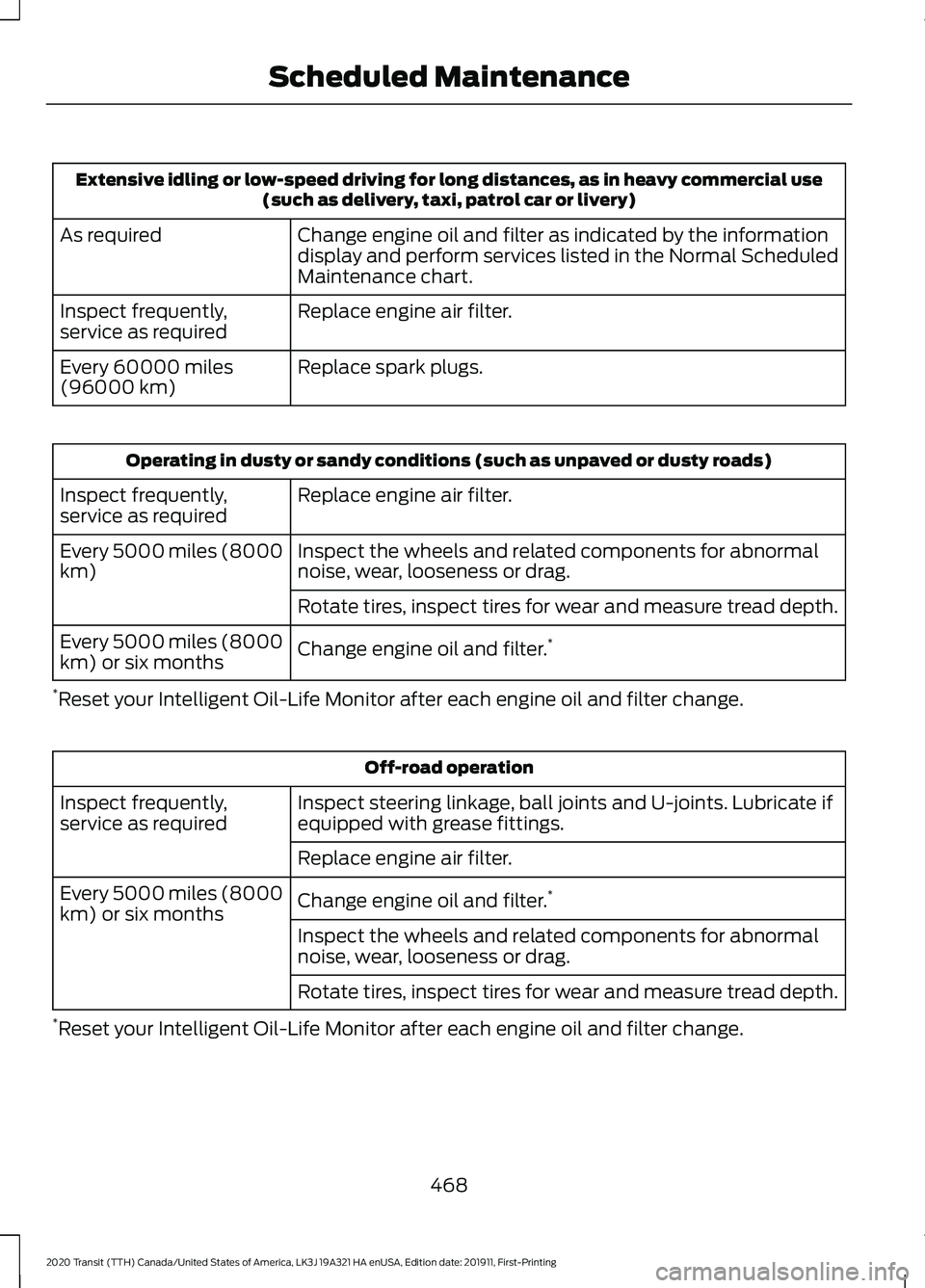
Extensive idling or low-speed driving for long distances, as in heavy commercial use
(such as delivery, taxi, patrol car or livery)
Change engine oil and filter as indicated by the information
display and perform services listed in the Normal Scheduled
Maintenance chart.
As required
Replace engine air filter.
Inspect frequently,
service as required
Replace spark plugs.
Every 60000 miles
(96000 km) Operating in dusty or sandy conditions (such as unpaved or dusty roads)
Replace engine air filter.
Inspect frequently,
service as required
Inspect the wheels and related components for abnormal
noise, wear, looseness or drag.
Every 5000 miles (8000
km)
Rotate tires, inspect tires for wear and measure tread depth.
Change engine oil and filter. *
Every 5000 miles (8000
km) or six months
* Reset your Intelligent Oil-Life Monitor after each engine oil and filter change. Off-road operation
Inspect steering linkage, ball joints and U-joints. Lubricate if
equipped with grease fittings.
Inspect frequently,
service as required
Replace engine air filter.
Change engine oil and filter. *
Every 5000 miles (8000
km) or six months
Inspect the wheels and related components for abnormal
noise, wear, looseness or drag.
Rotate tires, inspect tires for wear and measure tread depth.
* Reset your Intelligent Oil-Life Monitor after each engine oil and filter change.
468
2020 Transit (TTH) Canada/United States of America, LK3J 19A321 HA enUSA, Edition date: 201911, First-Printing Scheduled Maintenance
Page 472 of 529
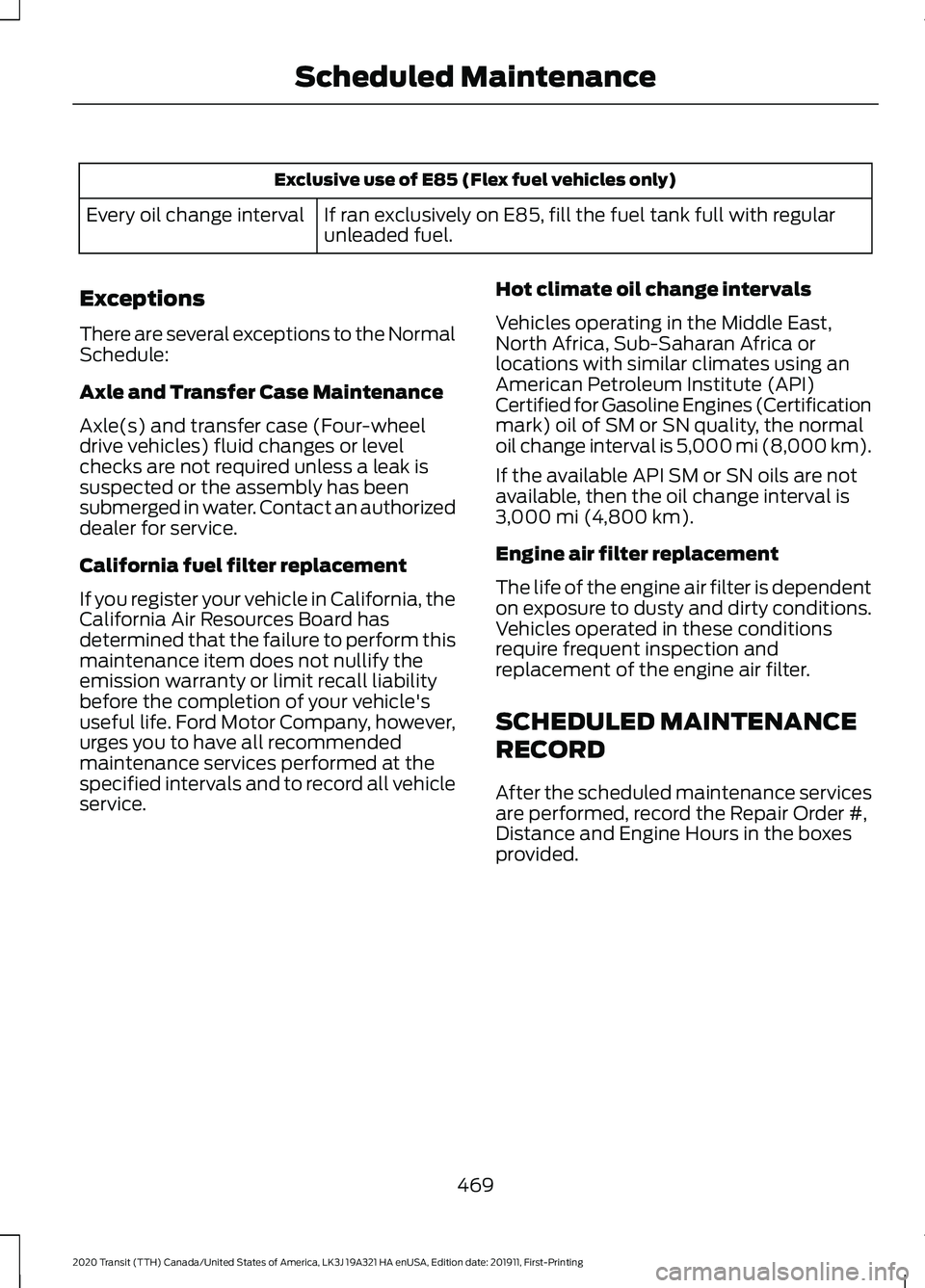
Exclusive use of E85 (Flex fuel vehicles only)
If ran exclusively on E85, fill the fuel tank full with regular
unleaded fuel.
Every oil change interval
Exceptions
There are several exceptions to the Normal
Schedule:
Axle and Transfer Case Maintenance
Axle(s) and transfer case (Four-wheel
drive vehicles) fluid changes or level
checks are not required unless a leak is
suspected or the assembly has been
submerged in water. Contact an authorized
dealer for service.
California fuel filter replacement
If you register your vehicle in California, the
California Air Resources Board has
determined that the failure to perform this
maintenance item does not nullify the
emission warranty or limit recall liability
before the completion of your vehicle's
useful life. Ford Motor Company, however,
urges you to have all recommended
maintenance services performed at the
specified intervals and to record all vehicle
service. Hot climate oil change intervals
Vehicles operating in the Middle East,
North Africa, Sub-Saharan Africa or
locations with similar climates using an
American Petroleum Institute (API)
Certified for Gasoline Engines (Certification
mark) oil of SM or SN quality, the normal
oil change interval is 5,000 mi (8,000 km).
If the available API SM or SN oils are not
available, then the oil change interval is
3,000 mi (4,800 km)
.
Engine air filter replacement
The life of the engine air filter is dependent
on exposure to dusty and dirty conditions.
Vehicles operated in these conditions
require frequent inspection and
replacement of the engine air filter.
SCHEDULED MAINTENANCE
RECORD
After the scheduled maintenance services
are performed, record the Repair Order #,
Distance and Engine Hours in the boxes
provided.
469
2020 Transit (TTH) Canada/United States of America, LK3J 19A321 HA enUSA, Edition date: 201911, First-Printing Scheduled Maintenance
Page 483 of 529
ELECTROMAGNETIC
COMPATIBILITY
WARNING: Do not place objects
or mount equipment on or near the
airbag cover, on the side of the front or
rear seatbacks, or in areas that may
come into contact with a deploying
airbag. Failure to follow these
instructions may increase the risk of
personal injury in the event of a crash. WARNING: Do not fasten antenna
cables to vehicle wiring, fuel pipes and
brake pipes. WARNING:
Keep antenna and
power cables at least 4 in (10 cm) from
any electronic modules and airbags. Note:
We test and certify your vehicle to
meet electromagnetic compatibility
legislation. It is your responsibility to make
sure that any equipment an authorized
dealer installs on your vehicle complies with
applicable local legislation and other
requirements. Installation of some
aftermarket electronic devices could
degrade the performance of vehicle
functions, which use radio frequency signals
such as broadcast radio receiver, tire
pressure monitoring system, push button
start, Bluetooth connectivity or satellite
navigation.
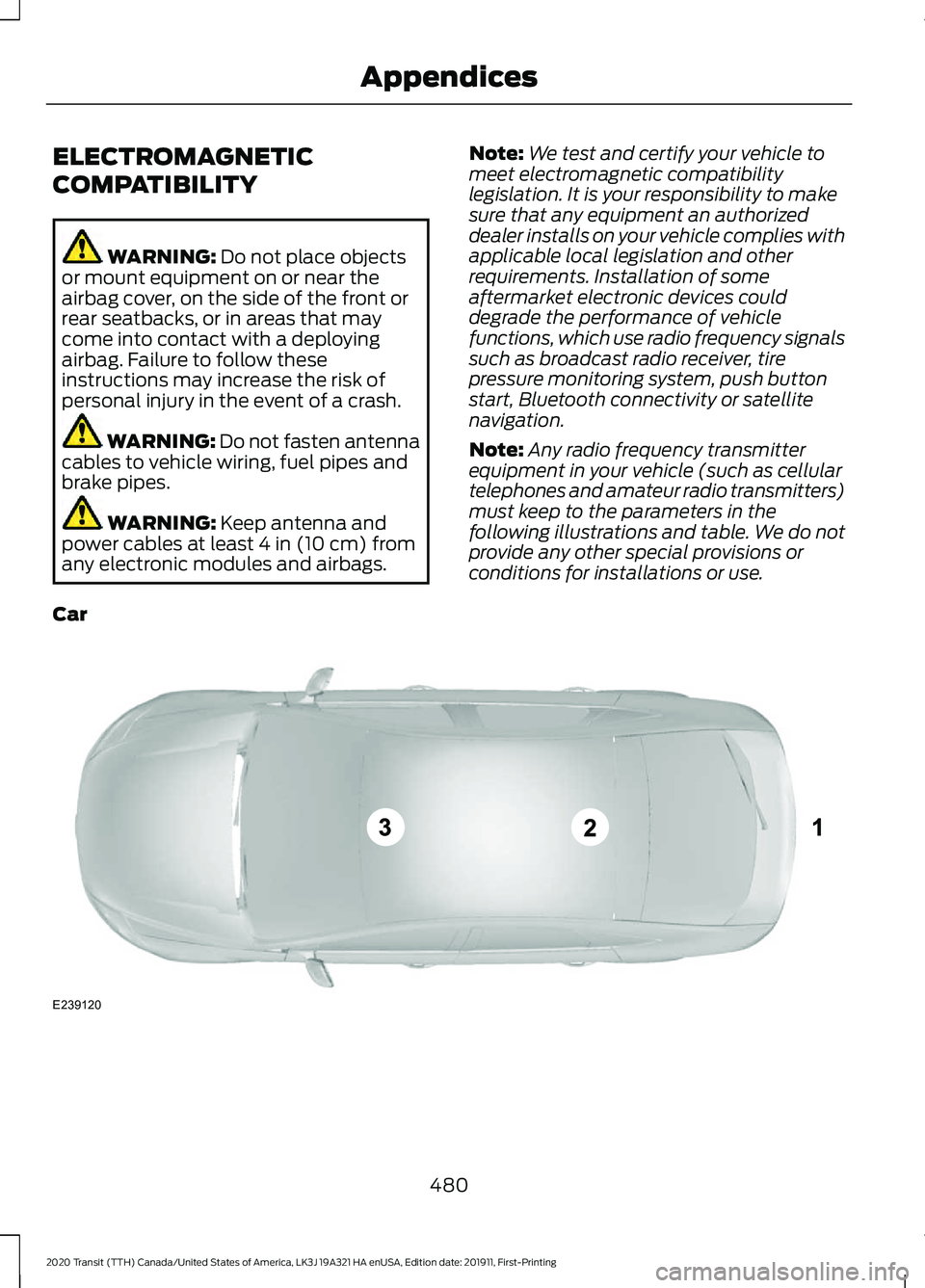
Note: Any radio frequency transmitter
equipment in your vehicle (such as cellular
telephones and amateur radio transmitters)
must keep to the parameters in the
following illustrations and table. We do not
provide any other special provisions or
conditions for installations or use.
Car 480
2020 Transit (TTH) Canada/United States of America, LK3J 19A321 HA enUSA, Edition date: 201911, First-Printing AppendicesE239120
Page 491 of 529
Disclaimer of Warranty
YOU EXPRESSLY ACKNOWLEDGE AND
AGREE THAT USE OF THE DEVICES AND
SOFTWARE IS AT YOUR SOLE RISK AND
THAT THE ENTIRE RISK AS TO
SATISFACTORY QUALITY,
PERFORMANCE, COMPATIBILITY,
ACCURACY AND EFFORT IS WITH YOU.
TO THE MAXIMUM EXTENT PERMITTED
BY APPLICABLE LAW, THE SOFTWARE
AND ANY THIRD PARTY SOFTWARE OR
THIRD-PARTY SERVICES ARE PROVIDED
"AS IS" AND
“AS AVAILABLE” , WITH ALL
FAULTS AND WITHOUT WARRANTY OF
ANY KIND, AND FORD MOTOR COMPANY
HEREBY DISCLAIMS ALL WARRANTIES
AND CONDITIONS WITH RESPECT TO
THE SOFTWARE, THIRD PARTY
SOFTWARE, AND THIRD-PARTY
SERVICES, EITHER EXPRESS, IMPLIED OR
STATUTORY, INCLUDING, BUT NOT
LIMITED TO, THE IMPLIED WARRANTIES
AND/OR CONDITIONS OF
MERCHANTABILITY, OF SATISFACTORY
QUALITY, OF FITNESS FOR AN
ARTICULAR PURPOSE, OF ACCURACY,
OF QUIET ENJOYMENT, AND
NON-INFRINGEMENT OF THIRD-PARTY
RIGHTS. FORD MOTOR COMPANY DOES
NOT WARRANT (a) AGAINST
INTERFERENCE WITH YOUR ENJOYMENT
OF THE SOFTWARE, THIRD PARTY
SOFTWARE, OR THIRD-PARTY SERVICES,
(b) THAT THE SOFTWARE, THIRD PARTY
SOFTWARE, OR THIRD-PARTY SERVICES
WILL MEET YOUR REQUIREMENTS, (c)
THAT THE OPERATION OF THE
SOFTWARE, THIRD PARTY SOFTWARE,
OR THIRD-PARTY SERVICES WILL BE
UNINTERRUPTED OR ERROR-FREE, (d)
OR THAT DEFECTS IN THE SOFTWARE,
THIRD PARTY SOFTWARE, OR
THIRD-PARTY SERVICES WILL BE
CORRECTED. NO ORAL OR WRITTEN
INFORMATION OR ADVICE GIVEN BY
FORD MOTOR COMPANY OR ITS
AUTHORIZED REPRESENTATIVE SHALL CREATE A WARRANTY. SHOULD THE
SOFTWARE, THIRD PARTY SOFTWARE,
OR THIRD-PARTY SERVICES PROVE
DEFECTIVE, YOU ASSUME THE ENTIRE
COST OF ALL NECESSARY SERVICING,
REPAIR OR CORRECTION. SOME
JURISDICTIONS DO NOT ALLOW THE
DISCLAIMER OF IMPLIED WARRANTIES
OR LIMITATIONS ON APPLICABLE
STATUTORY RIGHTS OF A CONSUMER,
SO THE ABOVE DISCLAIMER MAY NOT
FULLY APPLY TO YOU. THE SOLE
WARRANTY PROVIDED BY FORD MOTOR
COMPANY SHALL BE FOUND IN THE
WARRANTY INFORMATION INCLUDING
WITH YOUR OWNER GUIDE. TO THE
EXTENT THAT THERE IS ANY CONFLICT
BETWEEN THE TERMS OF THIS SECTION
AND THE WARRANTY BOOKLET, THE
WARRANTY BOOKLET SHALL CONTROL.
Applicable Law, Venue, Jurisdiction
•
The laws of the State of Michigan
govern this EULA and Your use of the
SOFTWARE. Your use of the
SOFTWARE may also be subject to
other local, state, national, or
international laws. Any litigation arising
out of or related to this EULA shall be
brought and maintained exclusively in
a court of the State of Michigan
located in Wayne County or in the
United States District Court for the
Eastern District of Michigan. You hereby
consent to submit to the personal
jurisdiction of a court in the State of
Michigan located in Wayne County and
the United States District Court for the
Eastern District of Michigan for any
dispute arising out of or relating to this
EULA.
488
2020 Transit (TTH) Canada/United States of America, LK3J 19A321 HA enUSA, Edition date: 201911, First-Printing Appendices
Page 507 of 529
rigCustomer Remedies
NAV2 and its suppliers’
entire liability and
your exclusive remedy shall be, at NAV2’ s
sole discretion, either (a) return of the price
paid, if any, or (b) repair or replacement of
the Data that do not meet NAV2’ s Limited
Warranty and that are returned to NAV2
with a copy of your receipt. This Limited
Warranty is void if failure of the Data has
resulted from accident, abuse, or
misapplication. Any replacement Data will
be warranted for the remainder of the
original warranty period or thirty (30) days,
whichever is longer. Neither these remedies
nor any product support services offered
by NAV2 are available without proof of
purchase from an authorized international
source.
No Other Warranty:
EXCEPT FOR THE LMITED WARRANTY
SET FORTH ABOVE AND TO THE EXTENT
PERMITTED BY APPLICABLE LAW, NAV2
AND ITS LICENSORS (INCLUDING THEIR
LICENSORS AND SUPPLIERS) DISCLAIM
ANY WARRANTIES, EXPRESS OR IMPLIED,
OF QUALITY, PERFORMANCE,
MERCHANTABILITY, FITNESS FOR A
PARTICULAR PURPOSE, OWNERSHIP OR
NON-INFRINGEMENT. Certain warranty
exclusions may not be permitted under
applicable law, so to that extent the above
exclusion may not apply to you.
Limited Liability:
TO THE EXTENT PERMITTED BY
APPLICABLE LAW, NAV2 AND ITS
LICENSORS (INCLUDING THEIR
LICENSORS AND SUPPLIERS) SHALL NOT
BE LIABLE TO YOU: IN RESPECT OF ANY
CLAIM, DEMAND OR ACTION,
IRRESPECTIVE OF THE NATURE OF THE
CAUSE OF THE CLAIM, DEMAND OR
ACTION ALLEGING ANY LOSS, INJURY OR
DAMAGES, DIRECT OR INDIRECT, WHICH
MAY RESULT FROM THE USE OR
POSSESSION OF THE INFORMATION; OR FOR ANY LOSS OF PROFIT, REVENUE,
CONTRACTS OR SAVINGS, OR ANY
OTHER DIRECT, INDIRECT, INCIDENTAL,
SPECIAL OR CONSEQUENTIAL DAMAGES
ARISING OUT OF YOUR USE OF OR
INABILITY TO USE THIS INFORMATION,
ANY DEFECT IN THE INFROMATION, OR
THE BREACH OF THESE TERMS OR
CONDITIONS, WHETHER IN AN ACTION
IN CONTRACT OR TORT OR BASED ON A
WARRANTY, EVEN IF NAV2 OR ITS
LICENSORS HAVE BEEN ADVISED OF THE
POSSIBILITY OF SUCH DAMAGES. UNDER
NO CIRCUMSTANCES SHALL NAV2’
s OR
ITS SUPPLIERS ’ LIABILITY HEREUNDER
EXCEED THE PRICE PAID. Certain liability
exclusions may not be permitted under
applicable law, so to that extent the above
exclusion may not apply to you.
Export Control
You agree not to export to anywhere any
part of the Data provided to you or any
direct product thereof except in
compliance with, and with all licenses and
approvals required under, applicable
export laws, rules and regulations.
IP Protection
The Data are owned by NAV2 or its
suppliers and are protected by applicable
copyright and other intellectual property
law and treaties. The Data are provided
solely on the basis of a license to use, not
sale.
Entire Agreement
These terms and conditions constitute the
entire agreement between NAV2(and its
licensors, including their licensors and
suppliers) and you pertaining to the subject
matter hereof, and supersedes in their
entirety any and all written or oral
agreements previously existing between
us with respect to such subject matter.
504
2020 Transit (TTH) Canada/United States of America, LK3J 19A321 HA enUSA, Edition date: 201911, First-Printing Appendices
Page 512 of 529
1
180 Degree Camera....................................203
Camera Views.................................................... 204
Front View Camera........................................... 204
Using the 180 degree camera system.............................................................. 204
9
911 Assist...........................................................62
A
A/C See: Climate Control........................................... 121
About This Manual...........................................9
ABS See: Brakes............................................................ 182
ABS driving hints See: Hints on Driving With Anti-Lock
Brakes................................................................ 182
Accessories....................................................458
Accessories See: Replacement Parts
Recommendation............................................ 15
ACC See: Using Adaptive Cruise Control............207
Active Park Assist.........................................198 Using Active Park Assist.................................. 198
Adjusting the Headlamps........................305 Horizontal Aim Adjustment.......................... 306
Vertical Aim Adjustment................................ 305
Adjusting the Steering Wheel....................97
Airbag Disposal
................................................61
Air Conditioning See: Climate Control........................................... 121
Air Filter See: Changing the Engine Air Filter............296
Alarm See: Anti-Theft Alarm - Vehicles With:
Anti-Theft Alarm Horn with Integral
Battery................................................................. 92
See: Anti-Theft Alarm - Vehicles Without: Anti-Theft Alarm Horn with Integral
Battery.................................................................. 91
All-Wheel Drive
..............................................177 AM/FM Radio - Vehicles Without:
SYNC.............................................................396
Selecting a Radio Source............................... 396
Anti-Theft Alarm - Vehicles With: Anti-Theft Alarm Horn with Integral
Battery.............................................................92
Alarm System........................................................ 92
Arming the Alarm................................................. 93
Disarming the Alarm........................................... 93
Guard Settings...................................................... 92
Triggering the Alarm............................................ 92
Anti-Theft Alarm - Vehicles Without: Anti-Theft Alarm Horn with Integral
Battery..............................................................91
Alarm System......................................................... 91
Arming the Alarm.................................................. 91
Disarming the Alarm............................................ 91
Triggering the Alarm............................................. 91
Appendices...................................................480
Applying the Parking Brake......................185
Apps..................................................................441 SiriusXM Traffic and Travel Link................... 442
Using Apps on an Android Device...............442
Using Apps on an iOS Device......................... 441
Using Mobile Navigation on an Android Device................................................................ 442
Audio System
................................................393
General Information......................................... 393
Audio Unit Clock and Date Displays - Vehicles Without: SYNC.........................397
Adjusting the Clock........................................... 397
Audio Unit - Vehicles With: SYNC 3......................................................................395
Adjusting the Volume...................................... 395
Changing Radio Stations................................ 395
Pausing or Playing Media............................... 396
Seek Down and Previous Track Button............................................................... 396
Seek Up and Next Track Button.................. 396
Sound Settings................................................... 396
Switching the Audio Unit On and Off........395
Switching the Screen On and Off...............396
Audio Unit - Vehicles Without: SYNC.............................................................393
Adjusting the Volume...................................... 393
Changing Radio Stations................................ 394
Pausing or Playing Media............................... 395
Returning to the Previous Screen................394
509
2020 Transit (TTH) Canada/United States of America, LK3J 19A321 HA enUSA, Edition date: 201911, First-Printing Index