424 FORD TRANSIT 2020 Owners Manual
[x] Cancel search | Manufacturer: FORD, Model Year: 2020, Model line: TRANSIT, Model: FORD TRANSIT 2020Pages: 529, PDF Size: 8.3 MB
Page 10 of 529
SYNC™ Troubleshooting
........................407
SYNC™ 3
General Information ...................................
416
Using Voice Recognition ...........................
418
Entertainment .............................................
424
Phone ..............................................................
434
Navigation .....................................................
435
Apps .................................................................
441
Settings ..........................................................
443
SYNC™ 3 Troubleshooting .....................
445
Accessories
Accessories ...................................................
458
Auxiliary Switches ......................................
459
Ford Protect
Ford Protect .................................................
460
Scheduled Maintenance
General Maintenance Information ......
462
Normal Scheduled Maintenance .........
465
Special Operating Conditions Scheduled Maintenance ............................................
467
Scheduled Maintenance Record ..........
469
Appendices
Electromagnetic Compatibility ............
480
End User License Agreement ................
483
Declaration of Conformity ......................
508
7
2020 Transit (TTH) Canada/United States of America, LK3J 19A321 HA enUSA, Edition date: 201911, First-Printing Table of Contents
Page 205 of 529
Note:
When towing, the camera only sees
what you are towing. This might not provide
adequate coverage as it usually provides in
normal operation and some objects might
not be seen. In some vehicles, the guidelines
may disappear when you connect the trailer
tow connector.
The system may not correctly operate in
any of the following conditions:
• Nighttime or dark areas if the reverse
lamps are not operating.
• If the camera is obstructed.Clean the
lens with a soft, lint-free cloth and
non-abrasive cleaner.
• The camera is misaligned due to
damage to the rear of your vehicle.
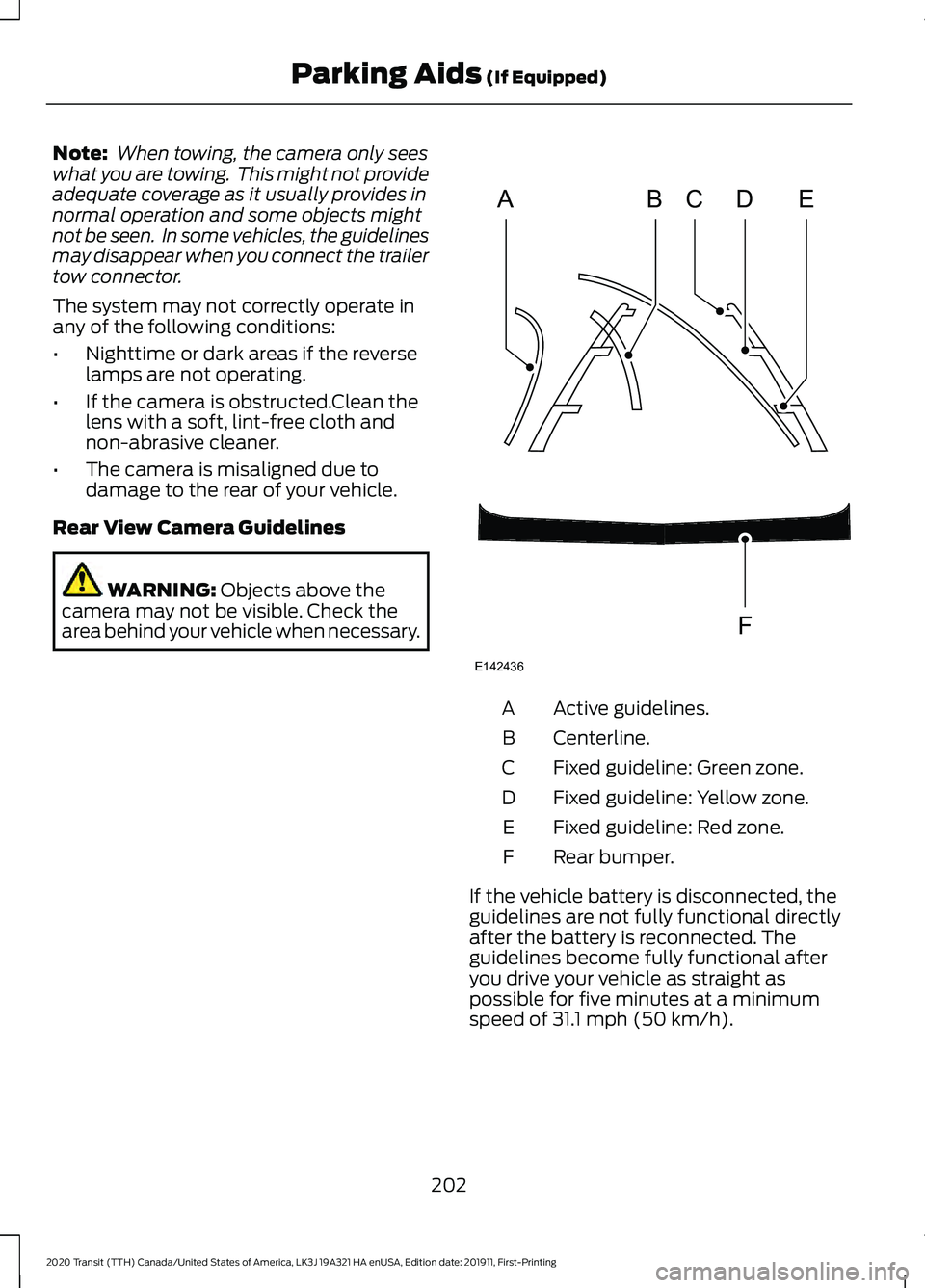
Rear View Camera Guidelines WARNING: Objects above the
camera may not be visible. Check the
area behind your vehicle when necessary. Active guidelines.
A
Centerline.
B
Fixed guideline: Green zone.
C
Fixed guideline: Yellow zone.
D
Fixed guideline: Red zone.
E
Rear bumper.
F
If the vehicle battery is disconnected, the
guidelines are not fully functional directly
after the battery is reconnected. The
guidelines become fully functional after
you drive your vehicle as straight as
possible for five minutes at a minimum
speed of
31.1 mph (50 km/h).
202
2020 Transit (TTH) Canada/United States of America, LK3J 19A321 HA enUSA, Edition date: 201911, First-Printing Parking Aids
(If Equipped)ABCD
F
E
E142436
Page 228 of 529
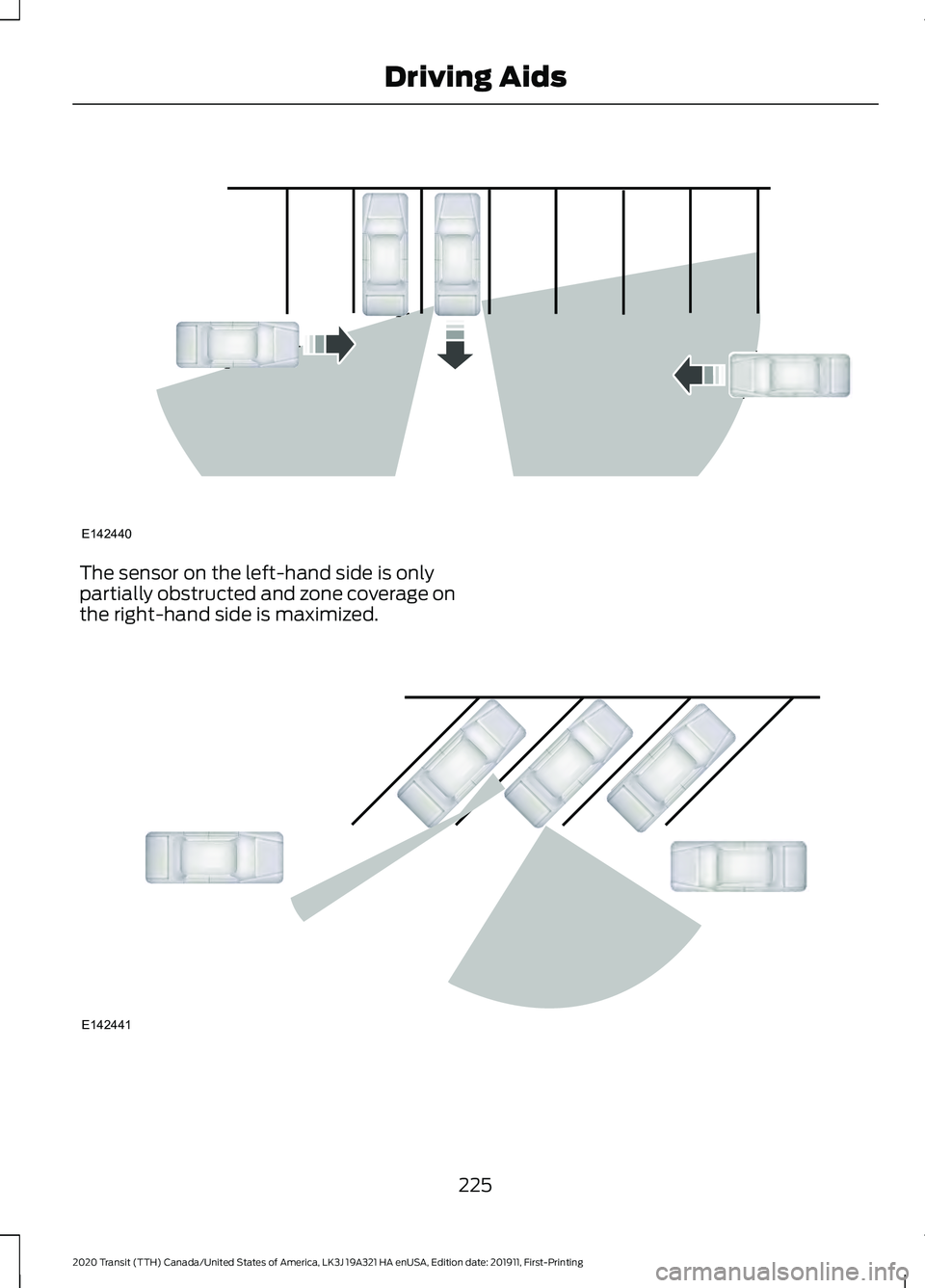
The sensor on the left-hand side is only
partially obstructed and zone coverage on
the right-hand side is maximized.
225
2020 Transit (TTH) Canada/United States of America, LK3J 19A321 HA enUSA, Edition date: 201911, First-Printing Driving AidsE142440 E142441
Page 274 of 529
If you buy your vehicle in North America
and then relocate to any of the above
locations, register your vehicle
identification number (VIN) and new
address with Ford Global Trade Services
by emailing, [email protected].
If you are in another foreign country,
contact the nearest authorized dealer. In
the event your inquiry is unresolved,
communicate your concern with the
dealership
’s Sales Manager, Service
Manager or Customer Relations Manager.
If you require additional assistance or
clarification, please contact the respective
Customer Relationship Center as
previously listed.
Customers in the U.S. should call
1-800-392-3673.
ORDERING ADDITIONAL
OWNER'S LITERATURE
To order the publications in this portfolio,
contact Helm, Incorporated at:
HELM, INCORPORATED
47911 Halyard Drive
Plymouth, Michigan 48170
Attention: Customer Service
Or to order a free publication catalog, call
toll free: 1-800-782-4356
Monday-Friday 8:00 a.m. - 6:00 p.m. EST
Helm, Incorporated can also be reached
by their website:
www.helminc.com
(Items in this catalog may be purchased
by credit card, check or money order.) Obtaining a French Owner
’s
Manual
French Owner ’s Manual can be obtained
from your authorized dealer or by
contacting Helm, Incorporated using the
contact information listed previously in this
section.
REPORTING SAFETY DEFECTS
(U.S. ONLY)
If you believe that your vehicle has
a defect which could cause a
crash or could cause injury or
death, you should immediately
inform the National Highway
Traffic Safety Administration
(NHTSA) in addition to notifying
Ford Motor Company.
If NHTSA receives similar
complaints, it may open an
investigation, and if it finds that a
safety defect exists in a group of
vehicles, it may order a recall and
remedy campaign. However,
NHTSA cannot become involved
in individual problems between
you, your dealer, or Ford Motor
Company.
To contact NHTSA, you may call
the Vehicle Safety Hotline
toll-free at 1-888-327-4236 (TTY:
1-800-424-9153); go to
www .s a f er c ar .g o v ; or write to:
Administrator
1200 New Jersey Avenue,
Southeast
Washington, D.C. 20590
271
2020 Transit (TTH) Canada/United States of America, LK3J 19A321 HA enUSA, Edition date: 201911, First-Printing Customer Assistance
Page 277 of 529
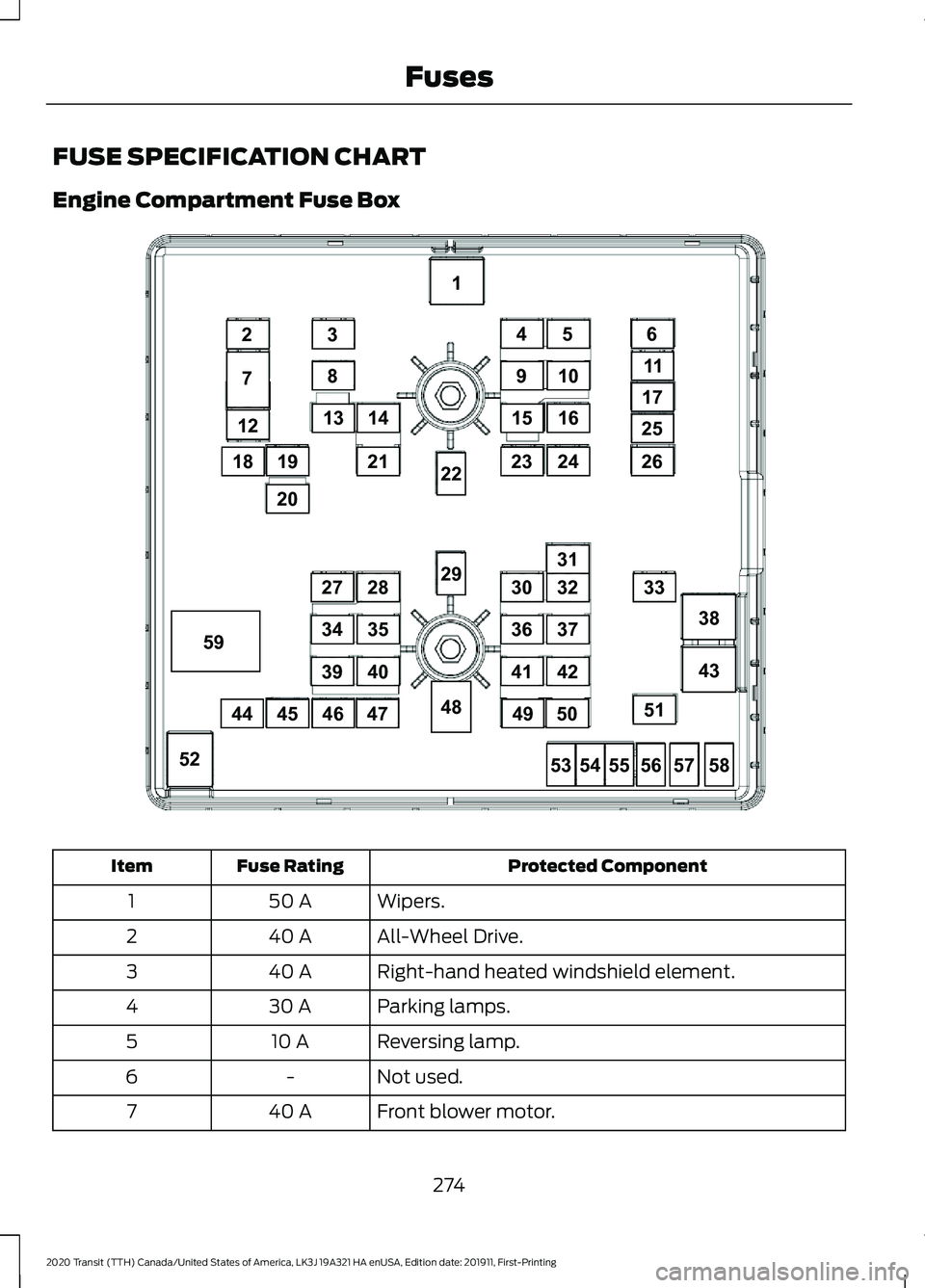
FUSE SPECIFICATION CHART
Engine Compartment Fuse Box
Protected Component
Fuse Rating
Item
Wipers.
50 A
1
All-Wheel Drive.
40 A
2
Right-hand heated windshield element.
40 A
3
Parking lamps.
30 A
4
Reversing lamp.
10 A
5
Not used.
-
6
Front blower motor.
40 A
7
274
2020 Transit (TTH) Canada/United States of America, LK3J 19A321 HA enUSA, Edition date: 201911, First-Printing Fuses12
18
7
23
8
13
1
38
43
52
21
28
35
4039
34
27
31
33
51
26
25
17
11
6
14
910
45
1516
2324
53
48
29
22
5455565758
19
20
45444647
32
37
4241
36
30
4950
59E308021
Page 280 of 529
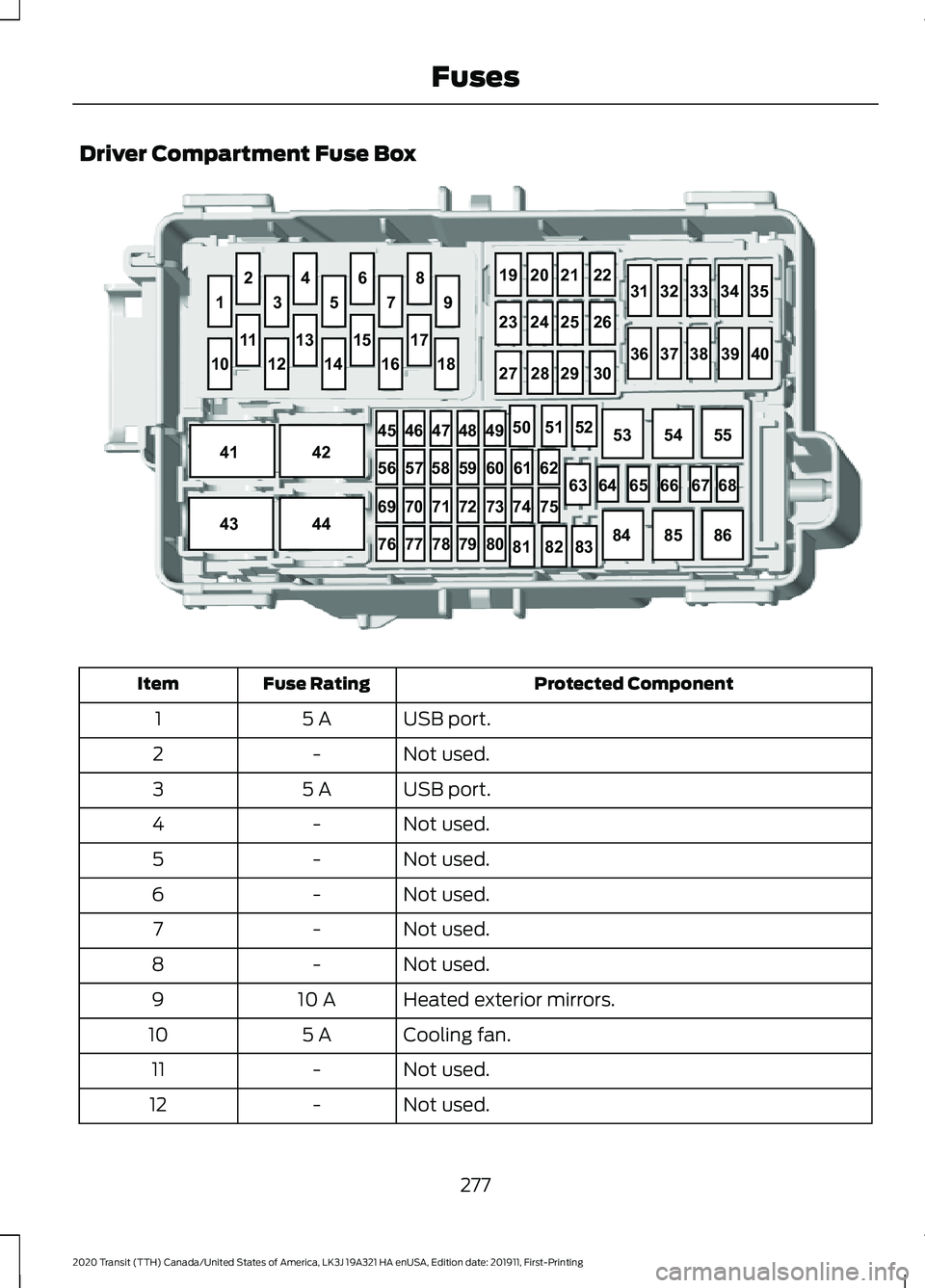
Driver Compartment Fuse Box
Protected Component
Fuse Rating
Item
USB port.
5 A
1
Not used.
-
2
USB port.
5 A
3
Not used.
-
4
Not used.
-
5
Not used.
-
6
Not used.
-
7
Not used.
-
8
Heated exterior mirrors.
10 A
9
Cooling fan.
5 A
10
Not used.
-
11
Not used.
-
12
277
2020 Transit (TTH) Canada/United States of America, LK3J 19A321 HA enUSA, Edition date: 201911, First-Printing Fuses646566 6768
63
1
35 79
8
19
2021 22
313233 3435
36 3738 3940
23
2425 26
27 2829 30
6
4
2
10
41 4245
464748 49
56 5758 59 60 6162
74 75
69 707172 73
76 777879 8050
5152
53 5455
84 8586
81 8283
43
44
12
14 1618
17
15
13
11E296291
Page 309 of 529
Note:
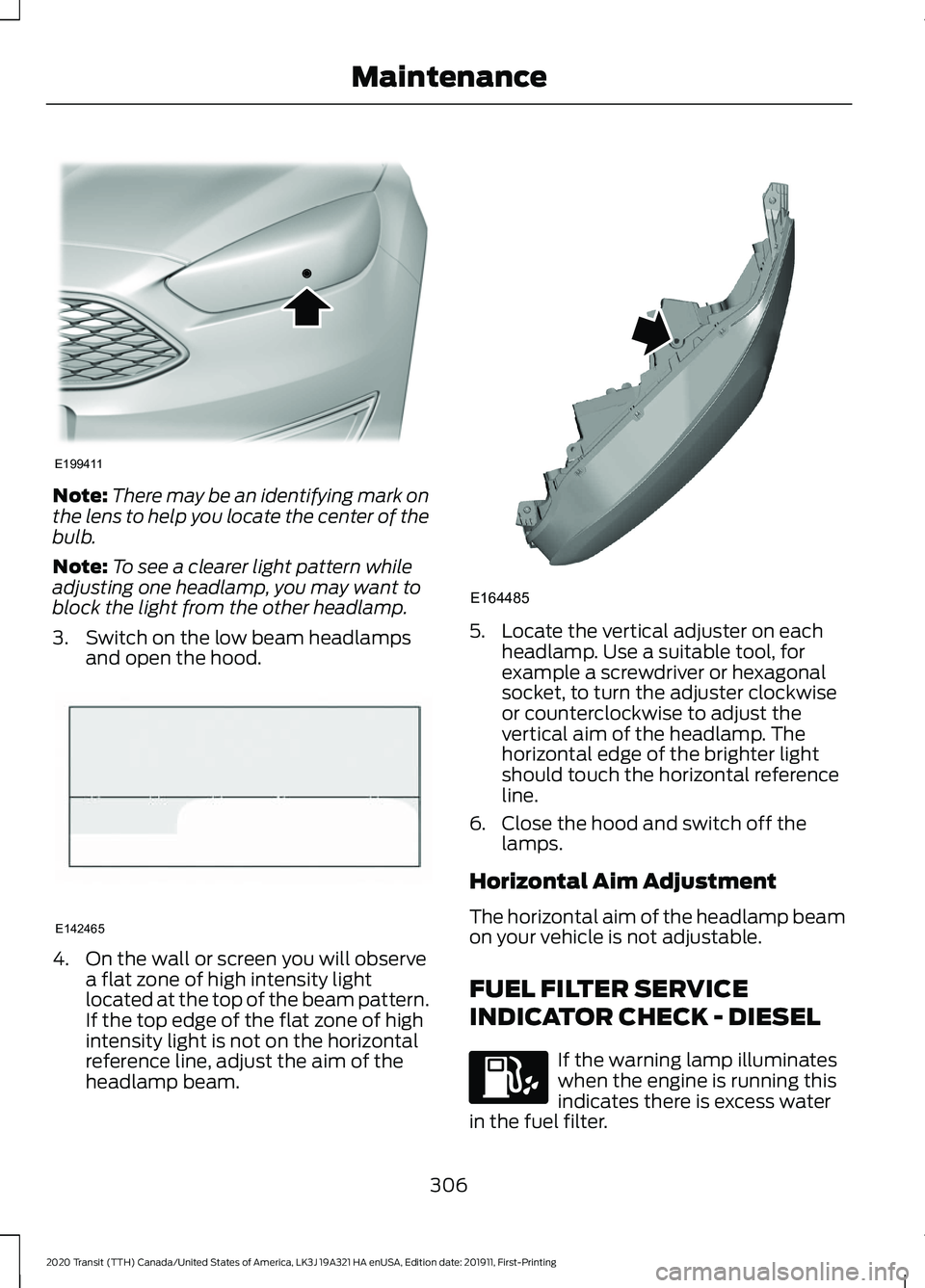
There may be an identifying mark on
the lens to help you locate the center of the
bulb.
Note: To see a clearer light pattern while
adjusting one headlamp, you may want to
block the light from the other headlamp.
3. Switch on the low beam headlamps and open the hood. 4. On the wall or screen you will observe
a flat zone of high intensity light
located at the top of the beam pattern.
If the top edge of the flat zone of high
intensity light is not on the horizontal
reference line, adjust the aim of the
headlamp beam. 5. Locate the vertical adjuster on each
headlamp. Use a suitable tool, for
example a screwdriver or hexagonal
socket, to turn the adjuster clockwise
or counterclockwise to adjust the
vertical aim of the headlamp. The
horizontal edge of the brighter light
should touch the horizontal reference
line.
6. Close the hood and switch off the lamps.
Horizontal Aim Adjustment
The horizontal aim of the headlamp beam
on your vehicle is not adjustable.
FUEL FILTER SERVICE
INDICATOR CHECK - DIESEL If the warning lamp illuminates
when the engine is running this
indicates there is excess water
in the fuel filter.
306
2020 Transit (TTH) Canada/United States of America, LK3J 19A321 HA enUSA, Edition date: 201911, First-Printing MaintenanceE199411 E142465 E164485
Page 310 of 529
This occurs when approximately 7 fl oz
(200 ml) of water accumulates in the fuel
filter water trap. Have your vehicle
checked as soon as possible.
Alternatively you can drain the fuel filter
water trap. See
Draining the Fuel Filter
Water Trap (page 297).
WASHER FLUID CHECK
When adding fluid, use a mixture of washer
fluid and water to help prevent freezing in
cold weather and improve the cleaning
capability. For information on fluid dilution,
refer to the product instructions. We
recommend that you only use high quality
washer fluid.
Note: The reservoir supplies the front and
rear washer systems.
FUEL FILTER - GASOLINE
Your vehicle is equipped with a lifetime
fuel filter that is integrated with the fuel
tank. Regular maintenance or replacement
is not needed.
CHECKING THE WIPER
BLADES Run the tip of your fingers over the edge of
the blade to check for roughness. Clean the wiper blades with washer fluid
or water applied with a soft sponge or
cloth.
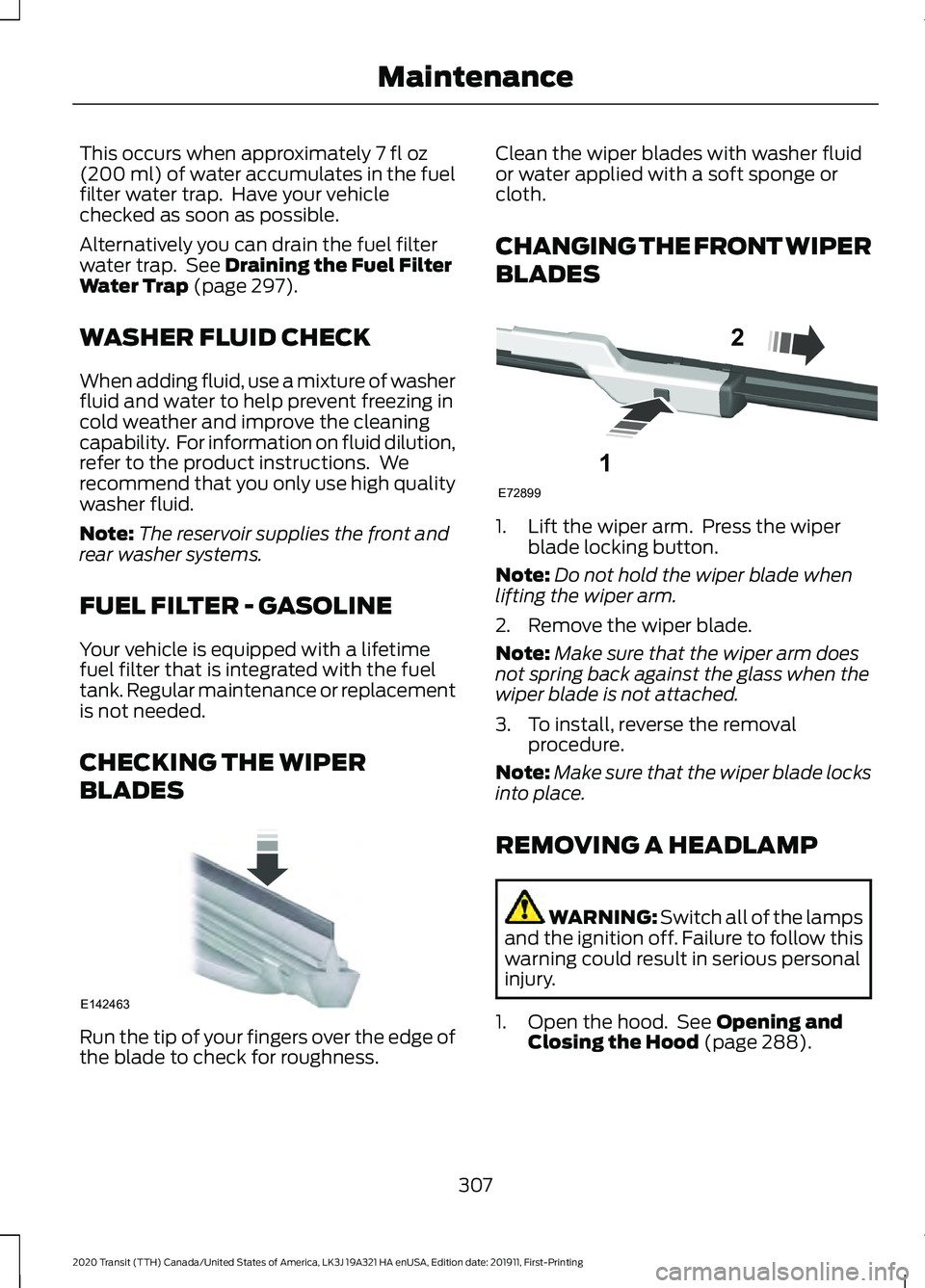
CHANGING THE FRONT WIPER
BLADES
1. Lift the wiper arm. Press the wiper
blade locking button.
Note: Do not hold the wiper blade when
lifting the wiper arm.
2. Remove the wiper blade.
Note: Make sure that the wiper arm does
not spring back against the glass when the
wiper blade is not attached.
3. To install, reverse the removal procedure.
Note: Make sure that the wiper blade locks
into place.
REMOVING A HEADLAMP WARNING:
Switch all of the lamps
and the ignition off. Failure to follow this
warning could result in serious personal
injury.
1. Open the hood. See
Opening and
Closing the Hood (page 288).
307
2020 Transit (TTH) Canada/United States of America, LK3J 19A321 HA enUSA, Edition date: 201911, First-Printing MaintenanceE142463 E72899
1
2
Page 371 of 529
VEHICLE IDENTIFICATION
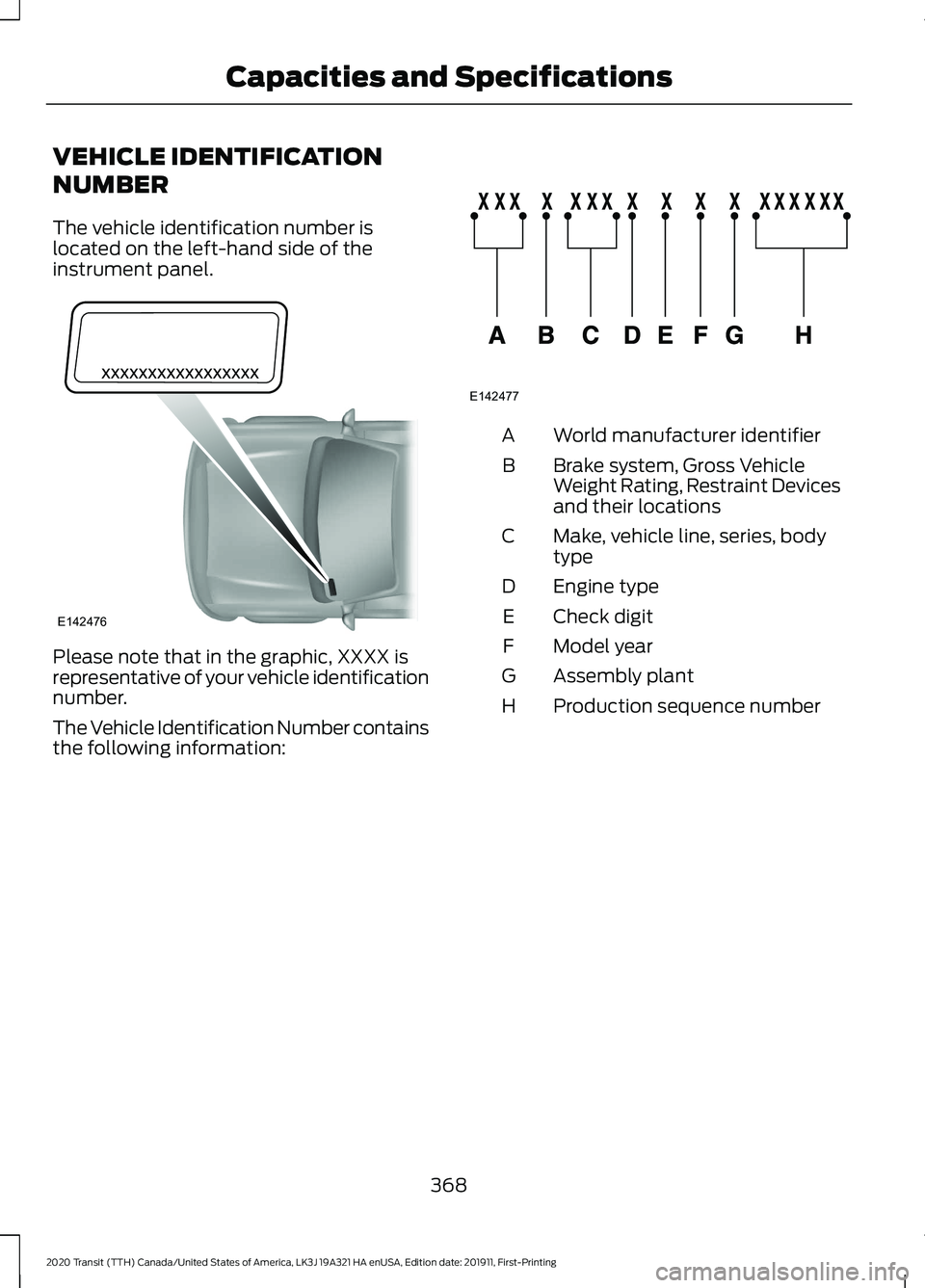
NUMBER
The vehicle identification number is
located on the left-hand side of the
instrument panel.
Please note that in the graphic, XXXX is
representative of your vehicle identification
number.
The Vehicle Identification Number contains
the following information: World manufacturer identifier
A
Brake system, Gross Vehicle
Weight Rating, Restraint Devices
and their locations
B
Make, vehicle line, series, body
type
C
Engine type
D
Check digit
E
Model year
F
Assembly plant
G
Production sequence number
H
368
2020 Transit (TTH) Canada/United States of America, LK3J 19A321 HA enUSA, Edition date: 201911, First-Printing Capacities and SpecificationsE142476 E142477
Page 420 of 529
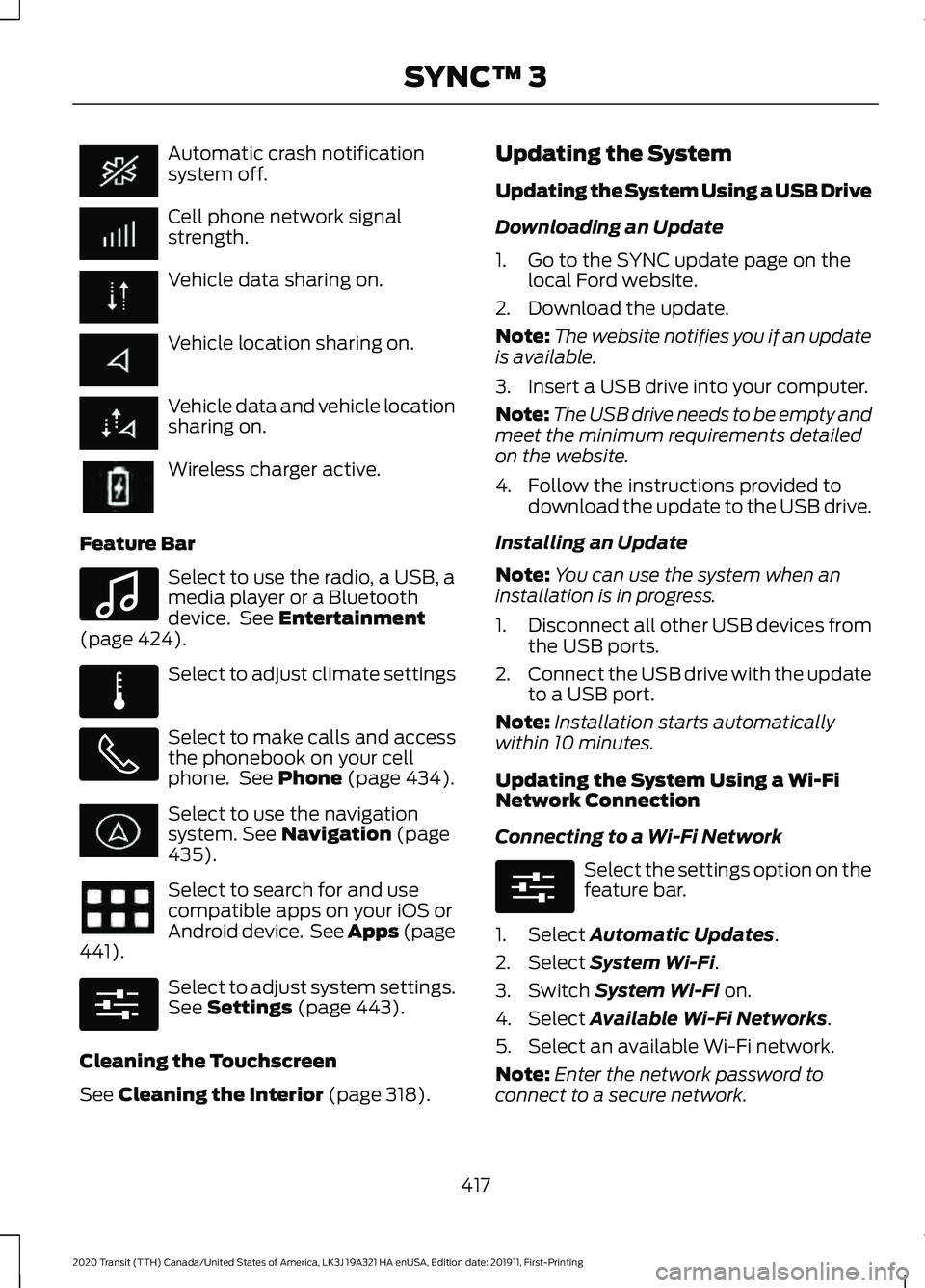
Automatic crash notification
system off.
Cell phone network signal
strength.
Vehicle data sharing on.
Vehicle location sharing on.
Vehicle data and vehicle location
sharing on.
Wireless charger active.
Feature Bar Select to use the radio, a USB, a
media player or a Bluetooth
device. See Entertainment
(page 424). Select to adjust climate settings
Select to make calls and access
the phonebook on your cell
phone. See
Phone (page 434).
Select to use the navigation
system.
See Navigation (page
435). Select to search for and use
compatible apps on your iOS or
Android device. See Apps (page
441
). Select to adjust system settings.
See
Settings (page 443).
Cleaning the Touchscreen
See
Cleaning the Interior (page 318). Updating the System
Updating the System Using a USB Drive
Downloading an Update
1. Go to the SYNC update page on the
local Ford website.
2. Download the update.
Note: The website notifies you if an update
is available.
3. Insert a USB drive into your computer.
Note: The USB drive needs to be empty and
meet the minimum requirements detailed
on the website.
4. Follow the instructions provided to download the update to the USB drive.
Installing an Update
Note: You can use the system when an
installation is in progress.
1. Disconnect all other USB devices from
the USB ports.
2. Connect the USB drive with the update
to a USB port.
Note: Installation starts automatically
within 10 minutes.
Updating the System Using a Wi-Fi
Network Connection
Connecting to a Wi-Fi Network Select the settings option on the
feature bar.
1. Select
Automatic Updates.
2. Select
System Wi-Fi.
3. Switch
System Wi-Fi on.
4. Select
Available Wi-Fi Networks.
5. Select an available Wi-Fi network.
Note: Enter the network password to
connect to a secure network.
417
2020 Transit (TTH) Canada/United States of America, LK3J 19A321 HA enUSA, Edition date: 201911, First-Printing SYNC™ 3 E100027 E283811 E280315 E280315