warning FORD TRANSIT 2021 Owners Manual
[x] Cancel search | Manufacturer: FORD, Model Year: 2021, Model line: TRANSIT, Model: FORD TRANSIT 2021Pages: 509, PDF Size: 8.21 MB
Page 193 of 509
Note:
Some accessories, for example large
trailer hitches or bike or surfboard racks can
cause reduced performance or false alerts.
To reinitialize the system, you may have to
drive your vehicle approximately 10 ft
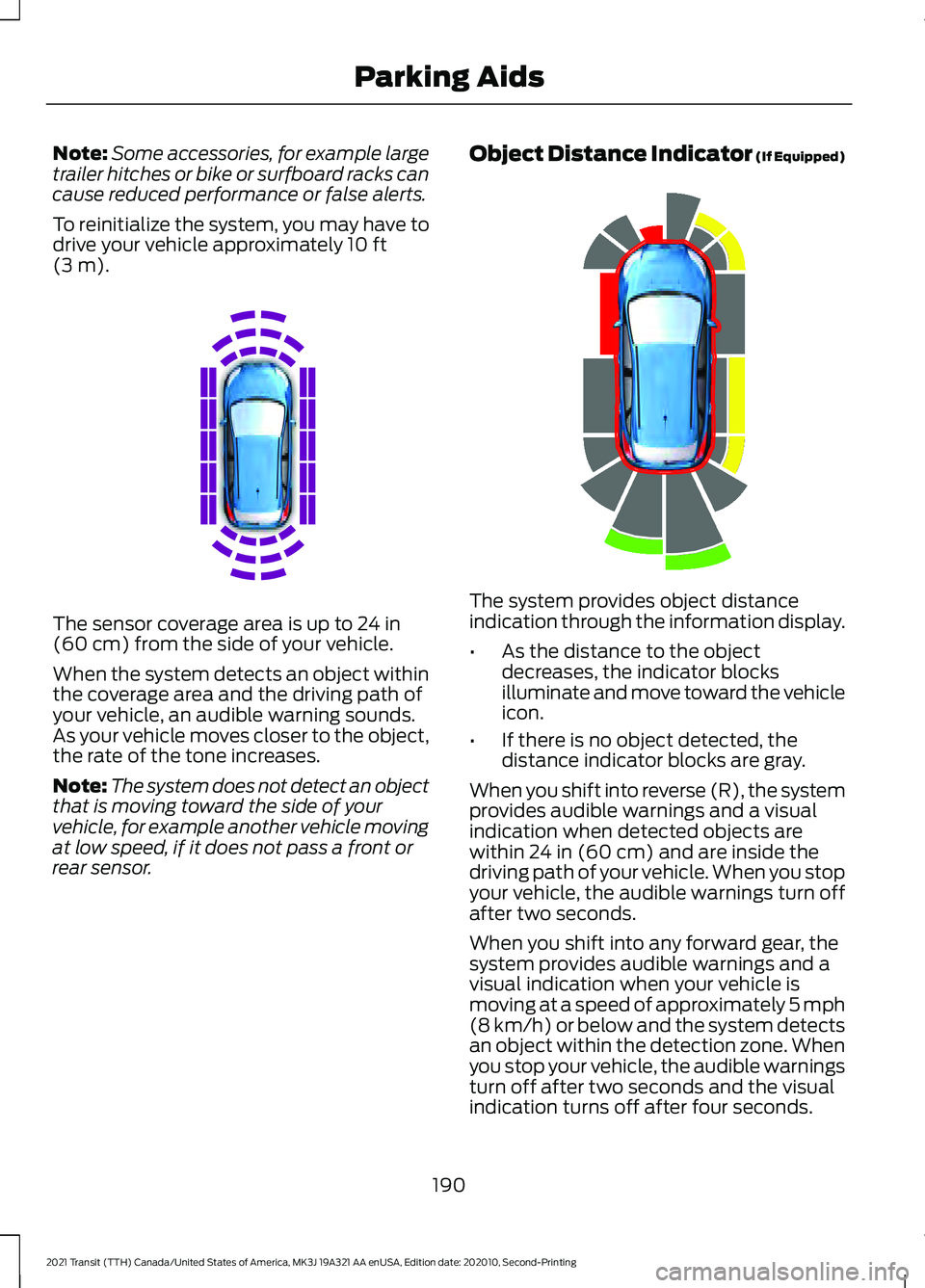
(3 m). The sensor coverage area is up to
24 in
(60 cm) from the side of your vehicle.
When the system detects an object within
the coverage area and the driving path of
your vehicle, an audible warning sounds.
As your vehicle moves closer to the object,
the rate of the tone increases.
Note: The system does not detect an object
that is moving toward the side of your
vehicle, for example another vehicle moving
at low speed, if it does not pass a front or
rear sensor. Object Distance Indicator (If Equipped)
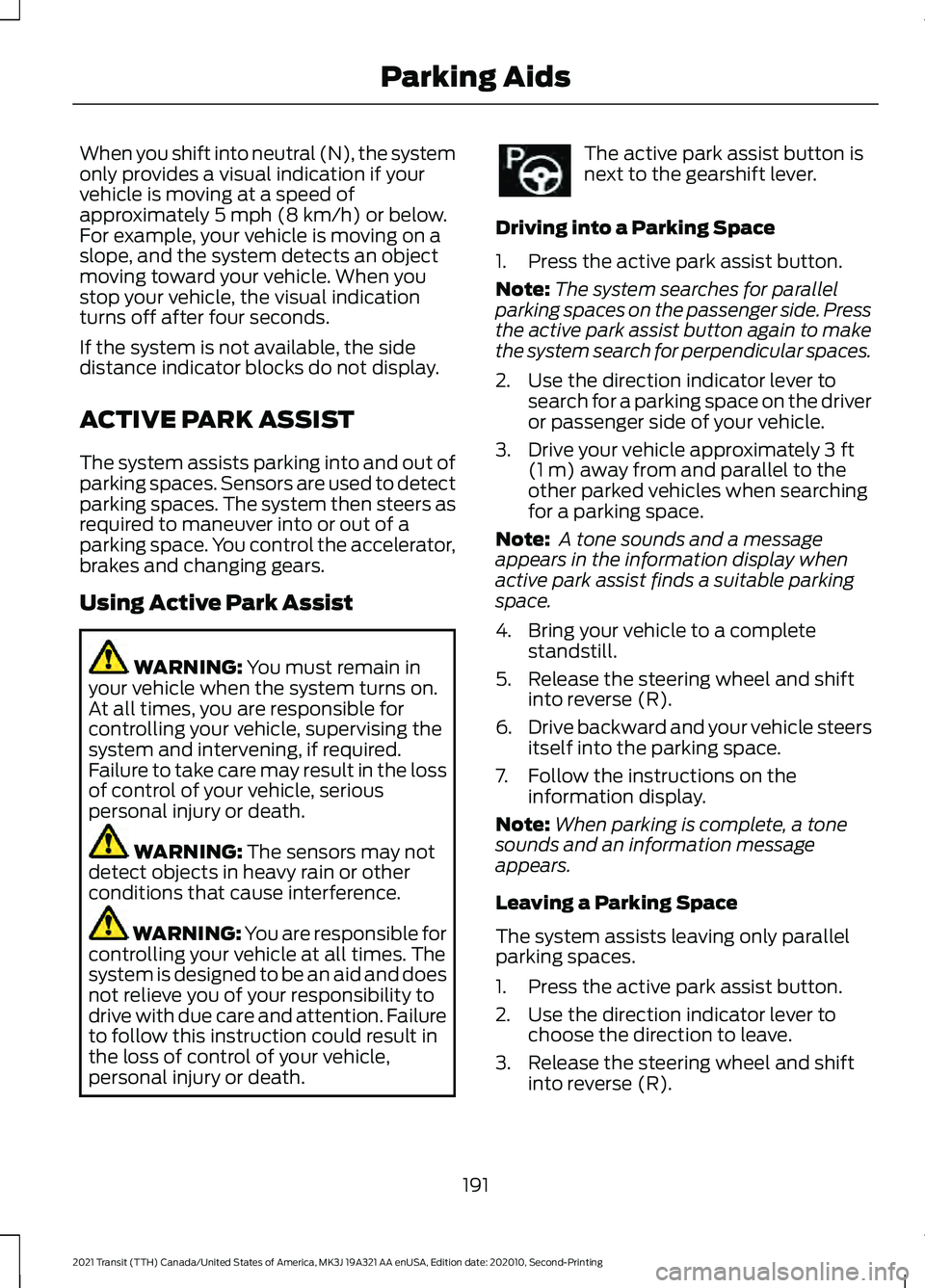
The system provides object distance
indication through the information display.
•
As the distance to the object
decreases, the indicator blocks
illuminate and move toward the vehicle
icon.
• If there is no object detected, the
distance indicator blocks are gray.
When you shift into reverse (R), the system
provides audible warnings and a visual
indication when detected objects are
within
24 in (60 cm) and are inside the
driving path of your vehicle. When you stop
your vehicle, the audible warnings turn off
after two seconds.
When you shift into any forward gear, the
system provides audible warnings and a
visual indication when your vehicle is
moving at a speed of approximately 5 mph
(8 km/h)
or below and the system detects
an object within the detection zone. When
you stop your vehicle, the audible warnings
turn off after two seconds and the visual
indication turns off after four seconds.
190
2021 Transit (TTH) Canada/United States of America, MK3J 19A321 AA enUSA, Edition date: 202010, Second-Printing Parking AidsE190458 E190459
Page 194 of 509
When you shift into neutral (N), the system
only provides a visual indication if your
vehicle is moving at a speed of
approximately 5 mph (8 km/h) or below.
For example, your vehicle is moving on a
slope, and the system detects an object
moving toward your vehicle. When you
stop your vehicle, the visual indication
turns off after four seconds.
If the system is not available, the side
distance indicator blocks do not display.
ACTIVE PARK ASSIST
The system assists parking into and out of
parking spaces. Sensors are used to detect
parking spaces. The system then steers as
required to maneuver into or out of a
parking space. You control the accelerator,
brakes and changing gears.
Using Active Park Assist WARNING:
You must remain in
your vehicle when the system turns on.
At all times, you are responsible for
controlling your vehicle, supervising the
system and intervening, if required.
Failure to take care may result in the loss
of control of your vehicle, serious
personal injury or death. WARNING:
The sensors may not
detect objects in heavy rain or other
conditions that cause interference. WARNING: You are responsible for
controlling your vehicle at all times. The
system is designed to be an aid and does
not relieve you of your responsibility to
drive with due care and attention. Failure
to follow this instruction could result in
the loss of control of your vehicle,
personal injury or death. The active park assist button is
next to the gearshift lever.
Driving into a Parking Space
1. Press the active park assist button.
Note: The system searches for parallel
parking spaces on the passenger side. Press
the active park assist button again to make
the system search for perpendicular spaces.
2. Use the direction indicator lever to search for a parking space on the driver
or passenger side of your vehicle.
3. Drive your vehicle approximately
3 ft
(1 m) away from and parallel to the
other parked vehicles when searching
for a parking space.
Note: A tone sounds and a message
appears in the information display when
active park assist finds a suitable parking
space.
4. Bring your vehicle to a complete standstill.
5. Release the steering wheel and shift into reverse (R).
6. Drive backward and your vehicle steers
itself into the parking space.
7. Follow the instructions on the information display.
Note: When parking is complete, a tone
sounds and an information message
appears.
Leaving a Parking Space
The system assists leaving only parallel
parking spaces.
1. Press the active park assist button.
2. Use the direction indicator lever to choose the direction to leave.
3. Release the steering wheel and shift into reverse (R).
191
2021 Transit (TTH) Canada/United States of America, MK3J 19A321 AA enUSA, Edition date: 202010, Second-Printing Parking Aids
Page 196 of 509
Possible Cause
Symptom
Vehicles or objects bordering the space may not be
correctly parked.
Your vehicle stopped too far past the parking space.
The tires may not be correctly installed or maintained.
For example, not inflated correctly, improper size, or of
different sizes.
A repair or alteration changes the detection capabilities.
A parked vehicle has a high attachment. For example,
a salt sprayer, snowplow or moving truck bed.
The parking space length or position of parked objects
changes after your vehicle passes the space.
You are using a spare tire or a tire that is significantly
worn more than the other tires.
The temperature around your vehicle quickly changes.
For example, driving from a heated garage into cold
outside temperature, or after leaving a car wash.
REAR VIEW CAMERA -
VEHICLES WITH: PARKING AID
CAMERA WARNING: The rear view camera
system is a reverse aid supplement
device that still requires the driver to use
it in conjunction with the interior and
exterior mirrors for maximum coverage. WARNING:
Objects that are close
to either corner of the bumper or under
the bumper, might not be seen on the
screen due to the limited coverage of the
camera system. WARNING:
The operation of the
camera depends on the outside
temperature, vehicle and road
conditions. WARNING:
Reverse your vehicle
slowly. Failure to follow this instruction
could result in the loss of control of your
vehicle, personal injury or death. WARNING:
Use caution when the
rear cargo door is ajar. If the rear cargo
door is ajar, the camera will be out of
position and the video image could be
incorrect. All guide lines disappear when
the rear cargo door is ajar. Failure to
follow this instruction could result in
personal injury.
193
2021 Transit (TTH) Canada/United States of America, MK3J 19A321 AA enUSA, Edition date: 202010, Second-Printing Parking Aids
Page 197 of 509
WARNING: Use caution when
turning camera features on or off when
the transmission is not in park (P). Make
sure your vehicle is not moving. WARNING:
To help avoid personal
injury always use caution when in reverse
(R) and when using the rear view
camera.
The rear view camera provides an image
of the area behind your vehicle. During
operation, lines appear in the display that
represents the path of your vehicle and
proximity to objects behind it.
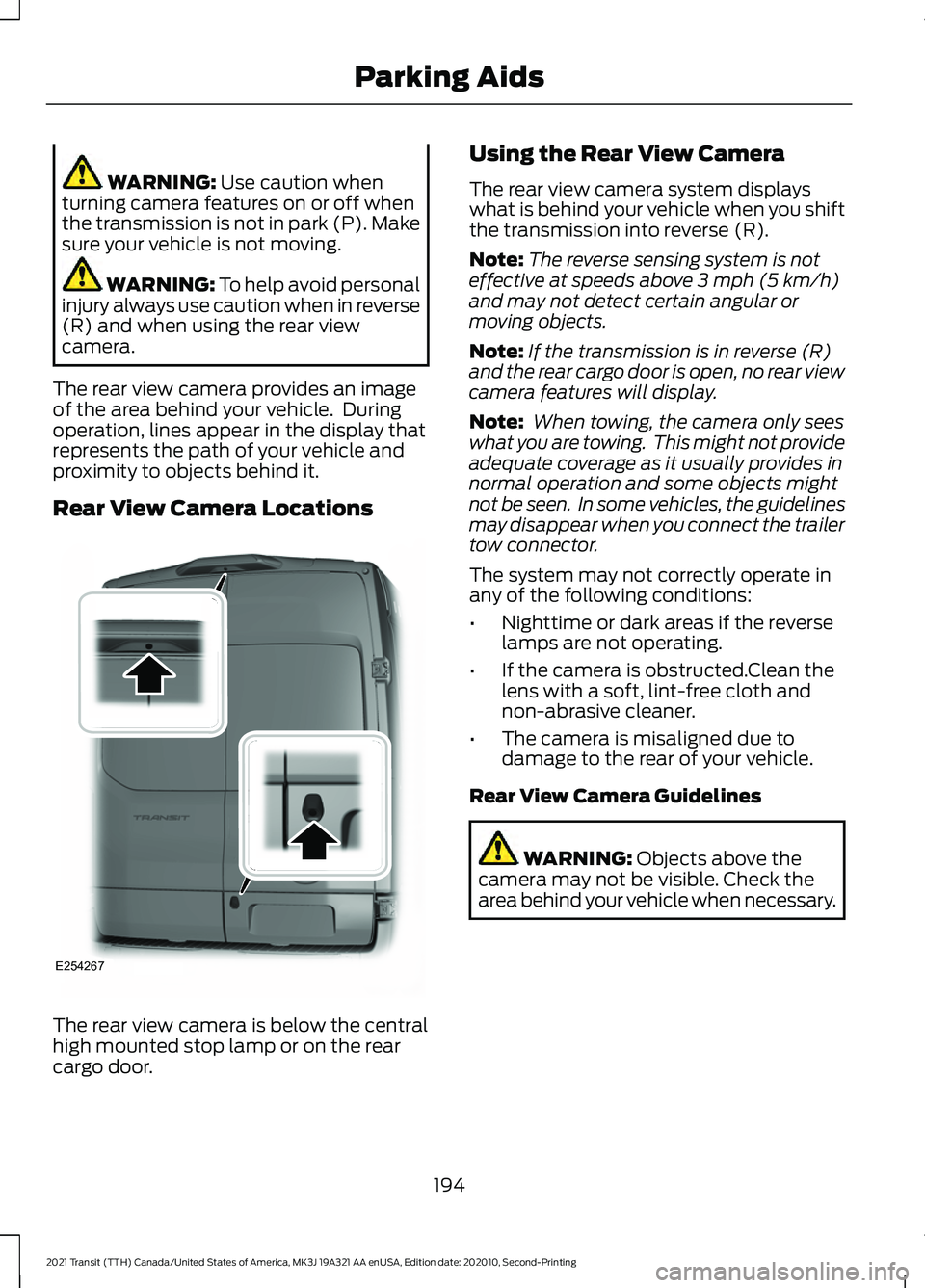
Rear View Camera Locations The rear view camera is below the central
high mounted stop lamp or on the rear
cargo door. Using the Rear View Camera
The rear view camera system displays
what is behind your vehicle when you shift
the transmission into reverse (R).
Note:
The reverse sensing system is not
effective at speeds above 3 mph (5 km/h)
and may not detect certain angular or
moving objects.
Note: If the transmission is in reverse (R)
and the rear cargo door is open, no rear view
camera features will display.
Note: When towing, the camera only sees
what you are towing. This might not provide
adequate coverage as it usually provides in
normal operation and some objects might
not be seen. In some vehicles, the guidelines
may disappear when you connect the trailer
tow connector.
The system may not correctly operate in
any of the following conditions:
• Nighttime or dark areas if the reverse
lamps are not operating.
• If the camera is obstructed.Clean the
lens with a soft, lint-free cloth and
non-abrasive cleaner.
• The camera is misaligned due to
damage to the rear of your vehicle.
Rear View Camera Guidelines WARNING:
Objects above the
camera may not be visible. Check the
area behind your vehicle when necessary.
194
2021 Transit (TTH) Canada/United States of America, MK3J 19A321 AA enUSA, Edition date: 202010, Second-Printing Parking AidsE254267
Page 198 of 509
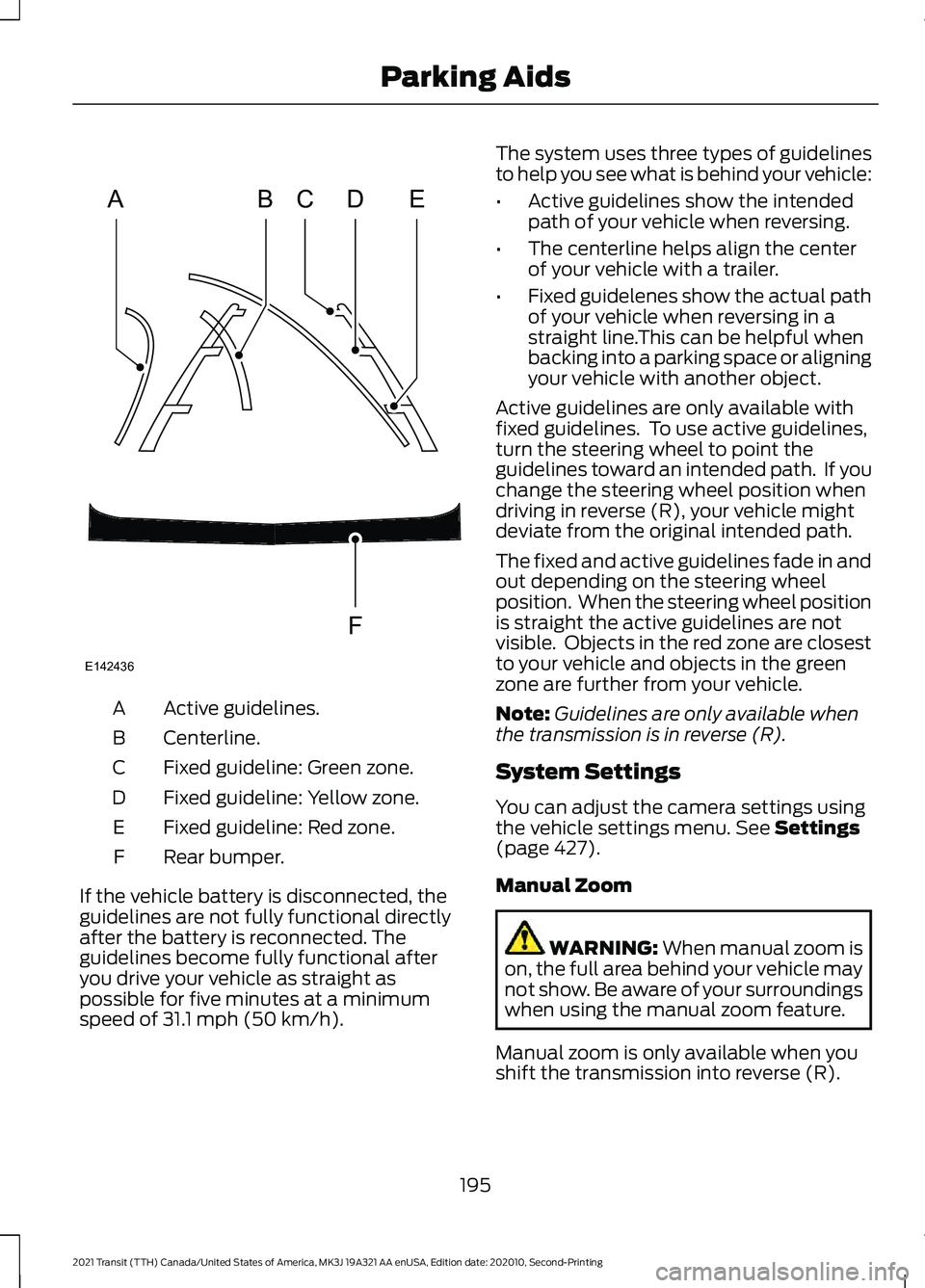
Active guidelines.
A
Centerline.
B
Fixed guideline: Green zone.
C
Fixed guideline: Yellow zone.
D
Fixed guideline: Red zone.
E
Rear bumper.
F
If the vehicle battery is disconnected, the
guidelines are not fully functional directly
after the battery is reconnected. The
guidelines become fully functional after
you drive your vehicle as straight as
possible for five minutes at a minimum
speed of 31.1 mph (50 km/h). The system uses three types of guidelines
to help you see what is behind your vehicle:
•
Active guidelines show the intended
path of your vehicle when reversing.
• The centerline helps align the center
of your vehicle with a trailer.
• Fixed guidelenes show the actual path
of your vehicle when reversing in a
straight line.This can be helpful when
backing into a parking space or aligning
your vehicle with another object.
Active guidelines are only available with
fixed guidelines. To use active guidelines,
turn the steering wheel to point the
guidelines toward an intended path. If you
change the steering wheel position when
driving in reverse (R), your vehicle might
deviate from the original intended path.
The fixed and active guidelines fade in and
out depending on the steering wheel
position. When the steering wheel position
is straight the active guidelines are not
visible. Objects in the red zone are closest
to your vehicle and objects in the green
zone are further from your vehicle.
Note: Guidelines are only available when
the transmission is in reverse (R).
System Settings
You can adjust the camera settings using
the vehicle settings menu.
See Settings
(page 427).
Manual Zoom WARNING:
When manual zoom is
on, the full area behind your vehicle may
not show. Be aware of your surroundings
when using the manual zoom feature.
Manual zoom is only available when you
shift the transmission into reverse (R).
195
2021 Transit (TTH) Canada/United States of America, MK3J 19A321 AA enUSA, Edition date: 202010, Second-Printing Parking AidsABCD
F
E
E142436
Page 199 of 509
Selectable settings for this feature are
Zoom in (+) and Zoom Out (-). Press the
symbol in the camera screen to change the
view. The default setting is Zoom OFF. The
rear bumper remains in the image as a
reference point.
Note:
Only the centerline shows when you
switch on manual zoom.
Rear View Camera Delay
You can switch this feature on or off using
the vehicle settings menu. See Settings
(page 427). The default setting is off.
When shifting the transmission out of
reverse (R) and into any gear other than
park (P), the camera image remains in the
display until:
• Your vehicle speed sufficiently
increases.
• You shift your vehicle into park (P).
Enhanced Parking Aids or Park
Pilot
(If Equipped)
You can switch this feature on or off using
the vehicle settings menu. See
Settings
(page 427).
When the reverse sensing system detects
an object, it displays red, yellow and green
indicators at the top of the image.
180 DEGREE CAMERA WARNING:
The rear view camera
system is a reverse aid supplement
device that still requires the driver to use
it in conjunction with the interior and
exterior mirrors for maximum coverage. WARNING:
Objects that are close
to either corner of the bumper or under
the bumper, might not be seen on the
screen due to the limited coverage of the
camera system. WARNING:
Use caution when
turning camera features on or off when
the transmission is not in park (P). Make
sure your vehicle is not moving. WARNING: You are responsible for
controlling your vehicle at all times. The
system is designed to be an aid and does
not relieve you of your responsibility to
drive with due care and attention. Failure
to follow this instruction could result in
the loss of control of your vehicle,
personal injury or death.
Note: Use caution using the 180 view when
any of the doors are ajar. If a door is ajar, the
camera will be out of position and the video
image may be incorrect.
Front View Camera WARNING:
The front camera
system still requires the driver to use it
in conjunction with looking out of your
vehicle.
Note: The system turns off the front video
image when your vehicle is in motion at low
speed, except when in reverse (R).
Note: The area displayed on the screen may
vary according to your vehicle's orientation
or road condition.
Note: The camera system may not operate
correctly if mud, water or debris obstructs
the camera's view. You can clean the lens
with a soft, lint-free cloth and non-abrasive
cleaner or by using your front washer.
See
Wipers and Washers (page 97).
196
2021 Transit (TTH) Canada/United States of America, MK3J 19A321 AA enUSA, Edition date: 202010, Second-Printing Parking Aids
Page 201 of 509
PRINCIPLE OF OPERATION
Cruise control lets you maintain a set
speed without keeping your foot on the
accelerator pedal. You can use cruise
control when your vehicle speed is greater
than 20 mph (30 km/h).
USING CRUISE CONTROL WARNING:
Do not use cruise
control on winding roads, in heavy traffic
or when the road surface is slippery. This
could result in loss of vehicle control,
serious injury or death. WARNING:
When you are going
downhill, your vehicle speed could
increase above the set speed. The
system does not apply the brakes.
The cruise controls are on the steering
wheel.
Switching Cruise Control On Press the button.
Switching Cruise Control Off Press the button when the
system is in standby mode. The
system also turns off when you
switch the ignition off.
Note: The set speed erases when you
switch the system off.
Setting the Cruise Speed
Drive to the required speed. Press the toggle button upward
or downward to set the current
speed.
Take your foot off the accelerator pedal.
Note: The set speed appears in the
information display.
Changing the Set Speed Press the toggle button upward
to increase the set speed.
Press the toggle button
downward to decrease the set
speed.
You can adjust the set speed in small or
large increments. Press the toggle button
upward or downward once to adjust the
set speed in small increments. Press and
hold the toggle button upward or
downward to adjust the set speed in large
increments.
Note: If you accelerate by pressing the
accelerator pedal, the set speed does not
change. When you release the accelerator
pedal, your vehicle returns to the speed that
you previously set.
Canceling the Set Speed Press the button, or press the
brake pedal to cancel the set
speed.
Note: The set speed is stored.
Note: The system cancels if the vehicle
speed drops below 10 mph (16 km/h) under
the set speed when driving uphill.
Resuming the Set Speed Press to resume the set speed.
198
2021 Transit (TTH) Canada/United States of America, MK3J 19A321 AA enUSA, Edition date: 202010, Second-Printing Cruise ControlE71340 E71340
Page 202 of 509
Cruise Control Indicator
The indicator appears when you
switch the system on.
USING ADAPTIVE CRUISE
CONTROL (IF EQUIPPED) WARNING: You are responsible for
controlling your vehicle at all times. The
system is designed to be an aid and does
not relieve you of your responsibility to
drive with due care and attention. Failure
to follow this instruction could result in
the loss of control of your vehicle,
personal injury or death. WARNING:
Pay close attention to
changing road conditions such as
entering or leaving a highway, on roads
with intersections or roundabouts, roads
without visible lanes of travel, roads that
are winding, slippery, unpaved, or steep
slopes. WARNING:
The system may not
detect stationary or slow moving
vehicles below
6 mph (10 km/h). WARNING:
Do not use the system
when towing a trailer that has
aftermarket electronic trailer brake
controls. Failure to follow this instruction
could result in the loss of control of your
vehicle, personal injury or death. WARNING:
The system is not a
crash warning or avoidance system. WARNING:
The system does not
detect pedestrians or objects in the road. WARNING:
The system does not
detect oncoming vehicles in the same
lane. WARNING:
Do not use the system
in poor visibility, for example fog, heavy
rain, spray or snow. WARNING:
Do not use tire sizes
other than those recommended because
this can affect the normal operation of
the system. Failure to do so may result
in a loss of vehicle control, which could
result in serious injury.
The system adjusts the vehicle speed to
maintain the set gap between you and the
vehicle in front of you in the same lane.
You can select four gap settings.
The system uses a radar that projects a
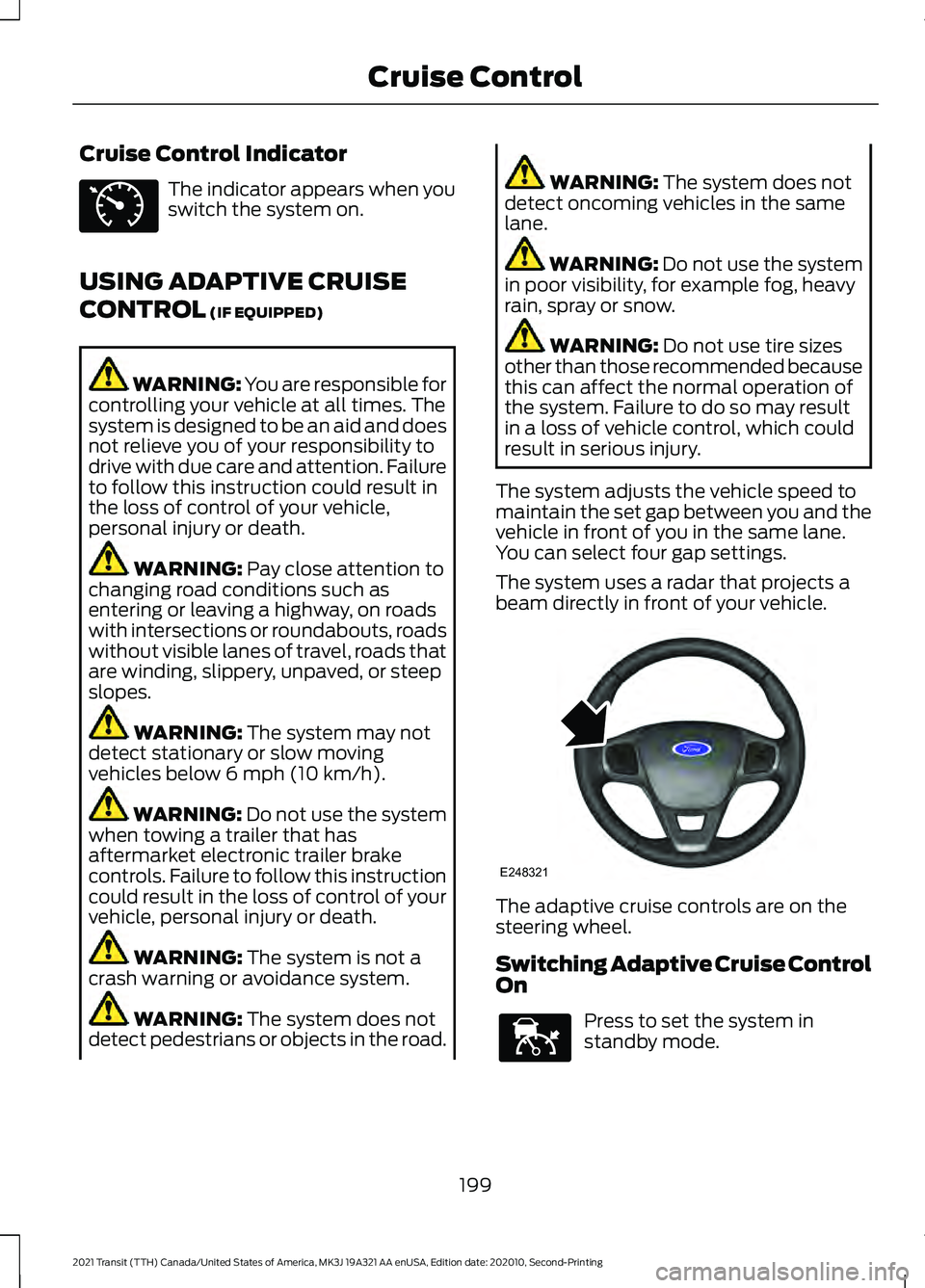
beam directly in front of your vehicle. The adaptive cruise controls are on the
steering wheel.
Switching Adaptive Cruise Control
On
Press to set the system in
standby mode.
199
2021 Transit (TTH) Canada/United States of America, MK3J 19A321 AA enUSA, Edition date: 202010, Second-Printing Cruise ControlE71340 E248321 E144529
Page 203 of 509
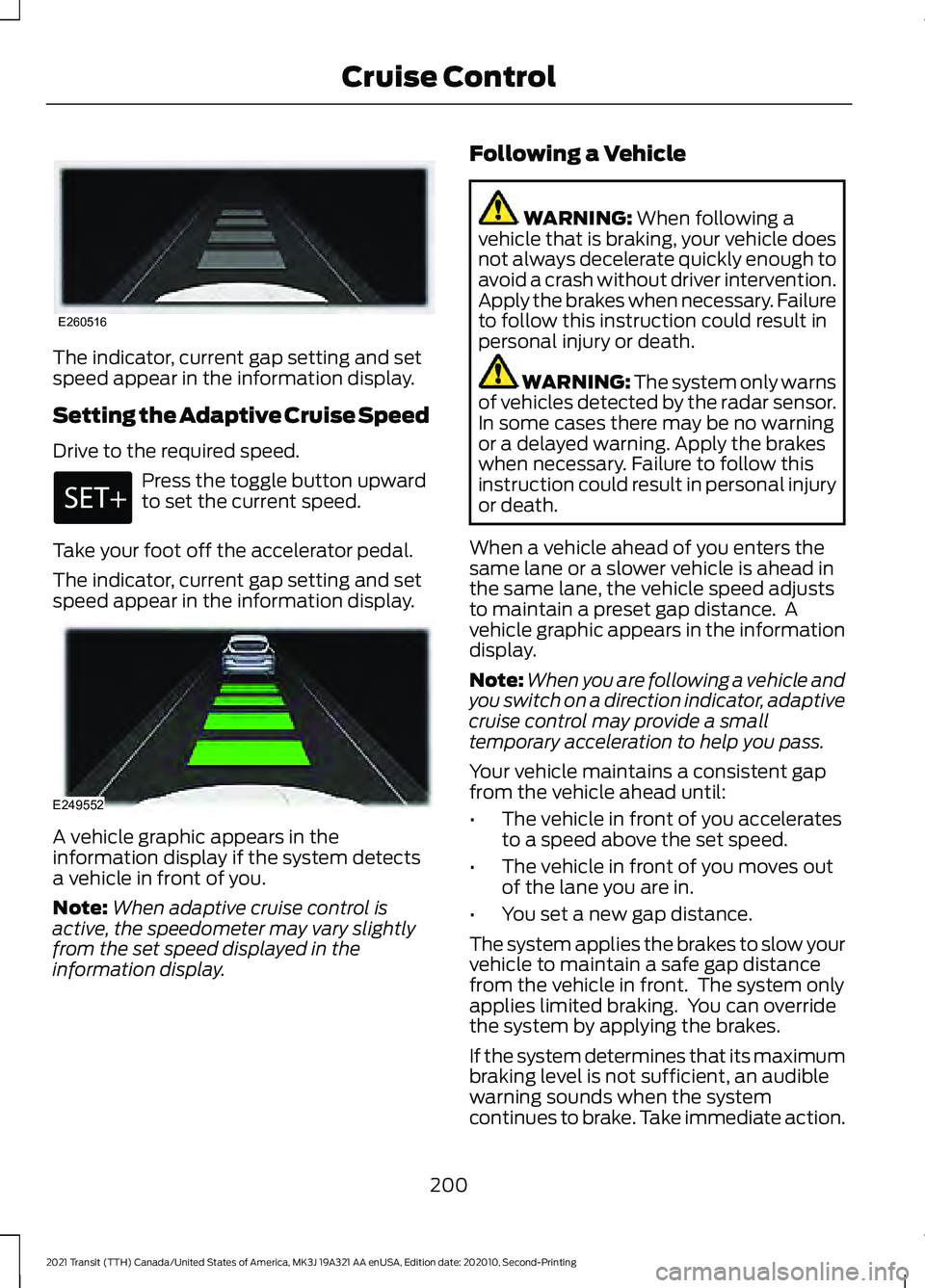
The indicator, current gap setting and set
speed appear in the information display.
Setting the Adaptive Cruise Speed
Drive to the required speed.
Press the toggle button upward
to set the current speed.
Take your foot off the accelerator pedal.
The indicator, current gap setting and set
speed appear in the information display. A vehicle graphic appears in the
information display if the system detects
a vehicle in front of you.
Note:
When adaptive cruise control is
active, the speedometer may vary slightly
from the set speed displayed in the
information display. Following a Vehicle WARNING: When following a
vehicle that is braking, your vehicle does
not always decelerate quickly enough to
avoid a crash without driver intervention.
Apply the brakes when necessary. Failure
to follow this instruction could result in
personal injury or death. WARNING:
The system only warns
of vehicles detected by the radar sensor.
In some cases there may be no warning
or a delayed warning. Apply the brakes
when necessary. Failure to follow this
instruction could result in personal injury
or death.
When a vehicle ahead of you enters the
same lane or a slower vehicle is ahead in
the same lane, the vehicle speed adjusts
to maintain a preset gap distance. A
vehicle graphic appears in the information
display.
Note: When you are following a vehicle and
you switch on a direction indicator, adaptive
cruise control may provide a small
temporary acceleration to help you pass.
Your vehicle maintains a consistent gap
from the vehicle ahead until:
• The vehicle in front of you accelerates
to a speed above the set speed.
• The vehicle in front of you moves out
of the lane you are in.
• You set a new gap distance.
The system applies the brakes to slow your
vehicle to maintain a safe gap distance
from the vehicle in front. The system only
applies limited braking. You can override
the system by applying the brakes.
If the system determines that its maximum
braking level is not sufficient, an audible
warning sounds when the system
continues to brake. Take immediate action.
200
2021 Transit (TTH) Canada/United States of America, MK3J 19A321 AA enUSA, Edition date: 202010, Second-Printing Cruise ControlE260516 E249552
Page 204 of 509
Note:
The brakes may emit noise when
applied by the system.
Setting the Gap Distance You can decrease or increase the
distance between your vehicle
and the vehicle in front by
pressing the gap control.
Note: It is your responsibility to select a gap
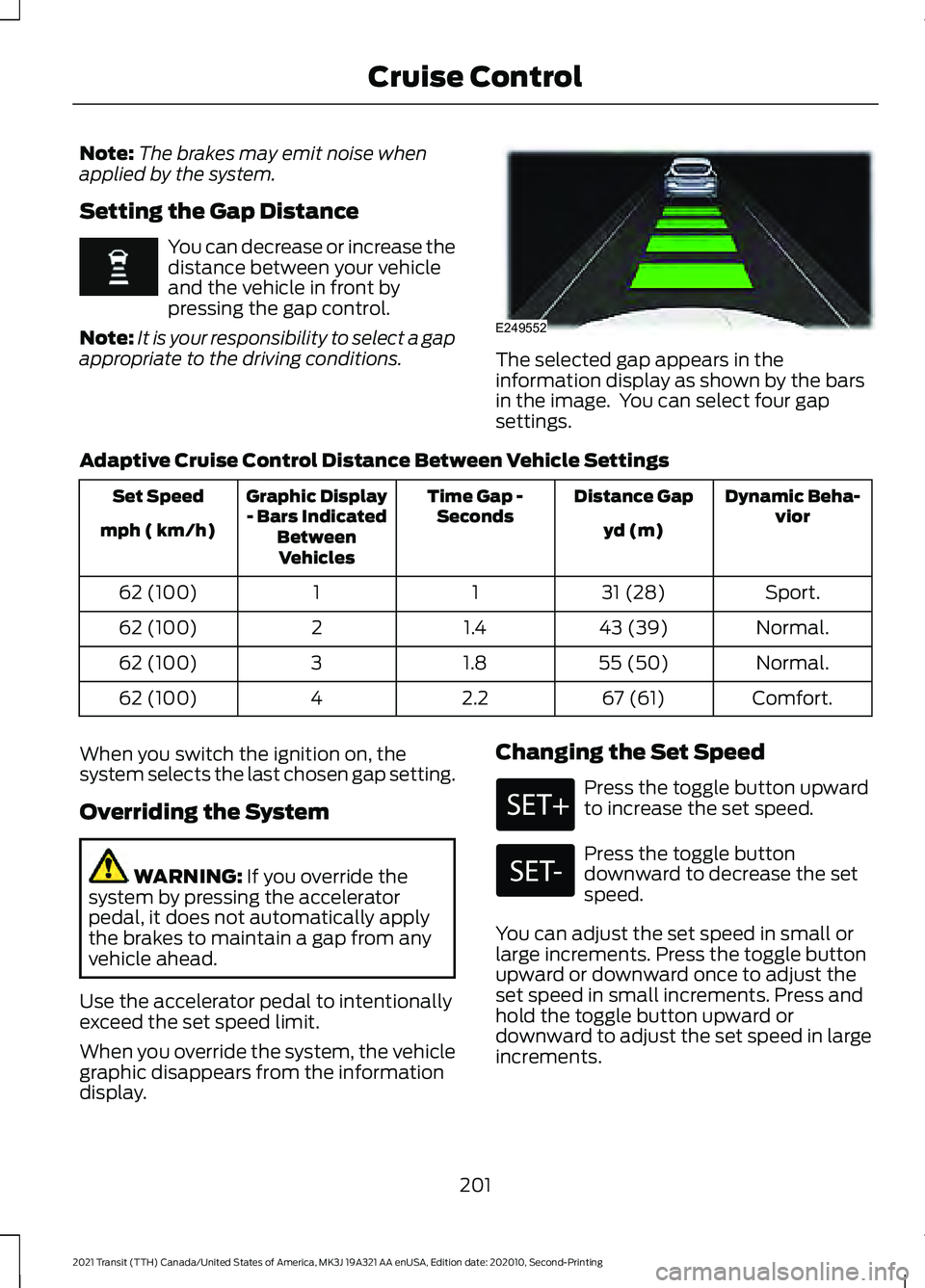
appropriate to the driving conditions. The selected gap appears in the
information display as shown by the bars
in the image. You can select four gap
settings.
Adaptive Cruise Control Distance Between Vehicle Settings Dynamic Beha-
vior
Distance Gap
Time Gap -
Seconds
Graphic Display
- Bars Indicated BetweenVehicles
Set Speed
yd (m)
mph ( km/h)
Sport.
31 (28)
1
1
62 (100)
Normal.
43 (39)
1.4
2
62 (100)
Normal.
55 (50)
1.8
3
62 (100)
Comfort.
67 (61)
2.2
4
62 (100)
When you switch the ignition on, the
system selects the last chosen gap setting.
Overriding the System WARNING: If you override the
system by pressing the accelerator
pedal, it does not automatically apply
the brakes to maintain a gap from any
vehicle ahead.
Use the accelerator pedal to intentionally
exceed the set speed limit.
When you override the system, the vehicle
graphic disappears from the information
display. Changing the Set Speed Press the toggle button upward
to increase the set speed.
Press the toggle button
downward to decrease the set
speed.
You can adjust the set speed in small or
large increments. Press the toggle button
upward or downward once to adjust the
set speed in small increments. Press and
hold the toggle button upward or
downward to adjust the set speed in large
increments.
201
2021 Transit (TTH) Canada/United States of America, MK3J 19A321 AA enUSA, Edition date: 202010, Second-Printing Cruise Control E249552