brake light FORD TRANSIT 2021 User Guide
[x] Cancel search | Manufacturer: FORD, Model Year: 2021, Model line: TRANSIT, Model: FORD TRANSIT 2021Pages: 509, PDF Size: 8.21 MB
Page 184 of 509
PRINCIPLE OF OPERATION
WARNING: Vehicle modifications
involving braking system, aftermarket
roof racks, suspension, steering system,
tire construction and wheel and tire size
may change the handling characteristics
of your vehicle and may adversely affect
the performance of the electronic
stability control system. In addition,
installing any stereo loudspeakers may
interfere with and adversely affect the
electronic stability control system. Install
any aftermarket stereo loudspeaker as
far as possible from the front center
console, the tunnel, and the front seats
in order to minimize the risk of interfering
with the electronic stability control
sensors. Reducing the effectiveness of
the electronic stability control system
could lead to an increased risk of loss of
vehicle control, vehicle rollover, personal
injury and death. WARNING:
Remember that even
advanced technology cannot defy the
laws of physics. It's always possible to
lose control of a vehicle due to
inappropriate driver input for the
conditions. Aggressive driving on any
road condition can cause you to lose
control of your vehicle increasing the risk
of personal injury or property damage.
Activation of the electronic stability
control system is an indication that at
least some of the tires have exceeded
their ability to grip the road; this could
reduce the operator's ability to control
the vehicle potentially resulting in a loss
of vehicle control, vehicle rollover,
personal injury and death. If your
electronic stability control system
activates, SLOW DOWN.
The system automatically turns on each
time you switch the ignition on. If the stability control or traction control
system detects a fault, the following may
occur:
•
The stability and traction control light
illuminates steadily.
• The stability control and traction
control systems do not enhance your
vehicle's ability to maintain traction of
the wheels.
If the stability control or traction control
system activates, the following may occur:
• The stability and traction control light
flashes.
• Your vehicle slows down.
• Reduced engine power.
• A vibration in the brake pedal.
• The brake pedal is stiffer than usual.
• If the driving condition is severe and
your foot is not on the brake pedal, the
pedal may move as the system applies
higher brake force.
The stability control system has several
features built into it to help you maintain
control of your vehicle.
Electronic Stability Control
The system helps to prevent your vehicle
skidding or laterally sliding by individually
applying the brakes to one or more wheels
and, if necessary, reducing engine power.
Roll Stability Control
The system helps to prevent rollovers by
detecting your vehicle's roll motion, and
individually applying the brakes to one or
more wheels.
181
2021 Transit (TTH) Canada/United States of America, MK3J 19A321 AA enUSA, Edition date: 202010, Second-Printing Stability Control
Page 185 of 509
Side-Wind Stabilization
The system applies the brakes on one side
of your vehicle to reduce the effect of a
sudden side-wind gust on your vehicle's
path. When the system turns on, the
stability and traction control light flashes,
and a message may appear in the
information display. You may notice a
slight deceleration and may still need to
make a steering correction to maintain the
intended vehicle path. The system does
not turn on for a continuous side-wind or
during turns.
Traction Control
The system enhances your vehicle's ability
to maintain traction of the wheels by
detecting and controlling wheel spin. See
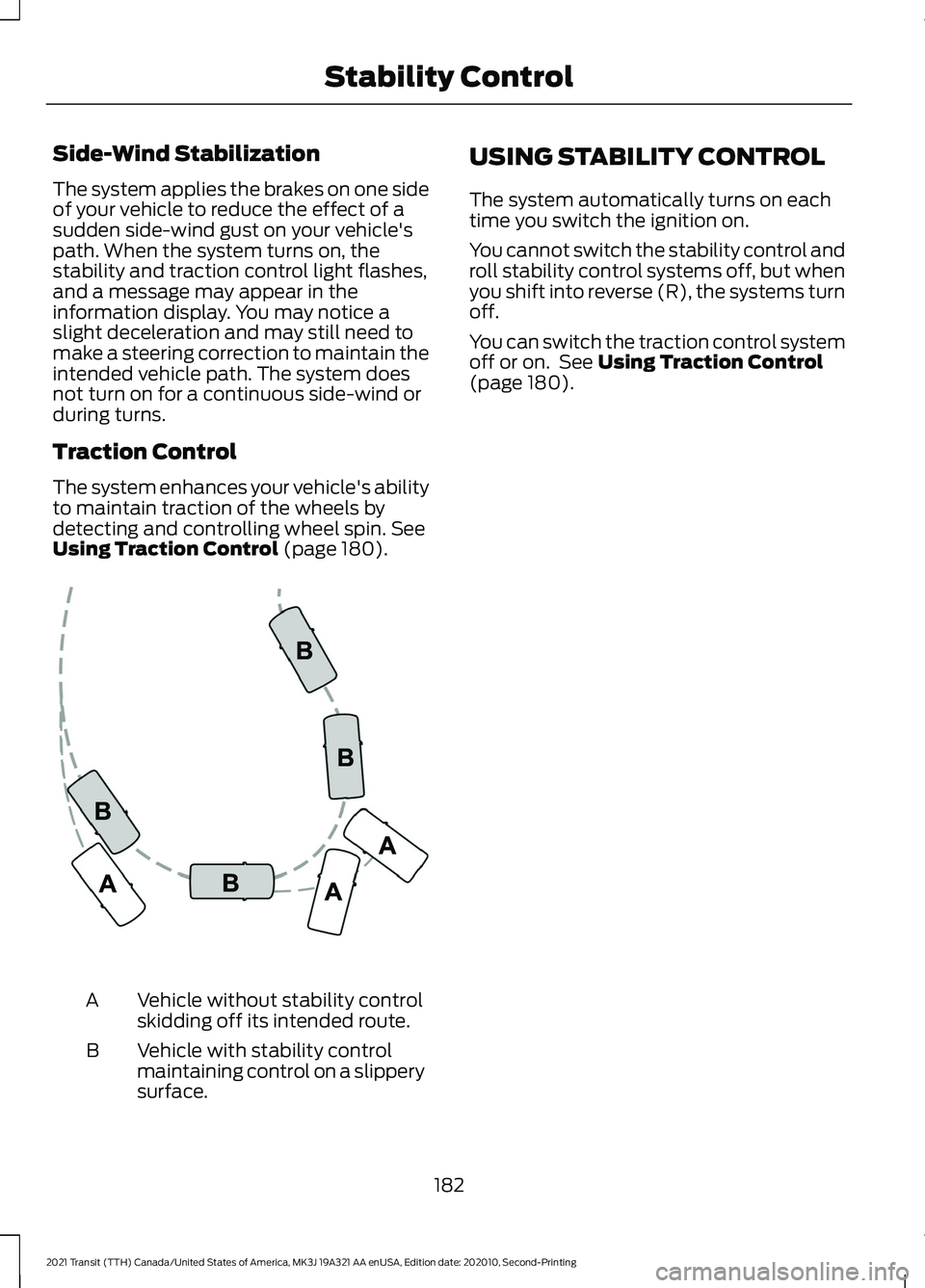
Using Traction Control (page 180). Vehicle without stability control
skidding off its intended route.
A
Vehicle with stability control
maintaining control on a slippery
surface.
B USING STABILITY CONTROL
The system automatically turns on each
time you switch the ignition on.
You cannot switch the stability control and
roll stability control systems off, but when
you shift into reverse (R), the systems turn
off.
You can switch the traction control system
off or on. See
Using Traction Control
(page 180).
182
2021 Transit (TTH) Canada/United States of America, MK3J 19A321 AA enUSA, Edition date: 202010, Second-Printing Stability ControlE72903
Page 203 of 509
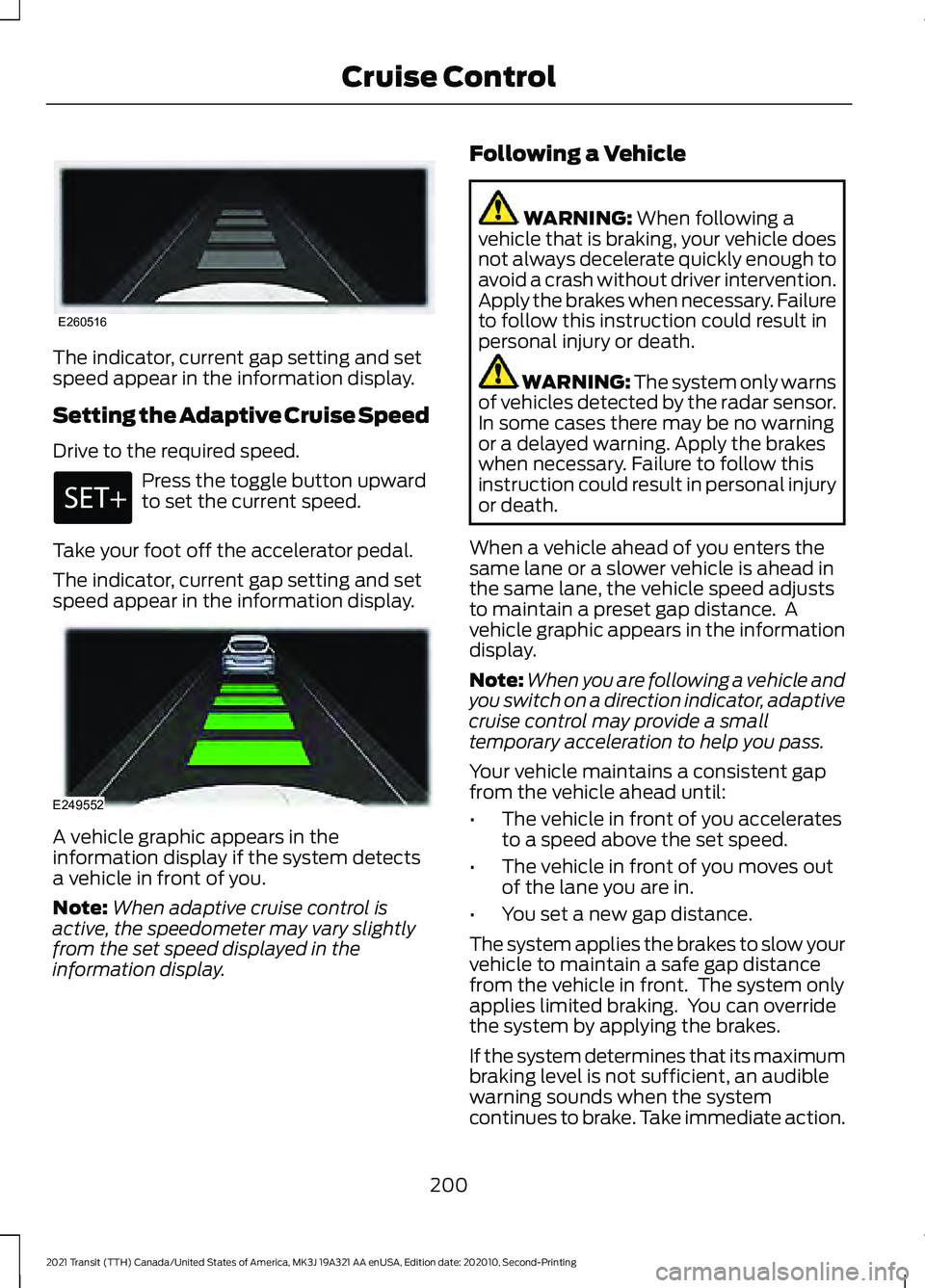
The indicator, current gap setting and set
speed appear in the information display.
Setting the Adaptive Cruise Speed
Drive to the required speed.
Press the toggle button upward
to set the current speed.
Take your foot off the accelerator pedal.
The indicator, current gap setting and set
speed appear in the information display. A vehicle graphic appears in the
information display if the system detects
a vehicle in front of you.
Note:
When adaptive cruise control is
active, the speedometer may vary slightly
from the set speed displayed in the
information display. Following a Vehicle WARNING: When following a
vehicle that is braking, your vehicle does
not always decelerate quickly enough to
avoid a crash without driver intervention.
Apply the brakes when necessary. Failure
to follow this instruction could result in
personal injury or death. WARNING:
The system only warns
of vehicles detected by the radar sensor.
In some cases there may be no warning
or a delayed warning. Apply the brakes
when necessary. Failure to follow this
instruction could result in personal injury
or death.
When a vehicle ahead of you enters the
same lane or a slower vehicle is ahead in
the same lane, the vehicle speed adjusts
to maintain a preset gap distance. A
vehicle graphic appears in the information
display.
Note: When you are following a vehicle and
you switch on a direction indicator, adaptive
cruise control may provide a small
temporary acceleration to help you pass.
Your vehicle maintains a consistent gap
from the vehicle ahead until:
• The vehicle in front of you accelerates
to a speed above the set speed.
• The vehicle in front of you moves out
of the lane you are in.
• You set a new gap distance.
The system applies the brakes to slow your
vehicle to maintain a safe gap distance
from the vehicle in front. The system only
applies limited braking. You can override
the system by applying the brakes.
If the system determines that its maximum
braking level is not sufficient, an audible
warning sounds when the system
continues to brake. Take immediate action.
200
2021 Transit (TTH) Canada/United States of America, MK3J 19A321 AA enUSA, Edition date: 202010, Second-Printing Cruise ControlE260516 E249552
Page 207 of 509
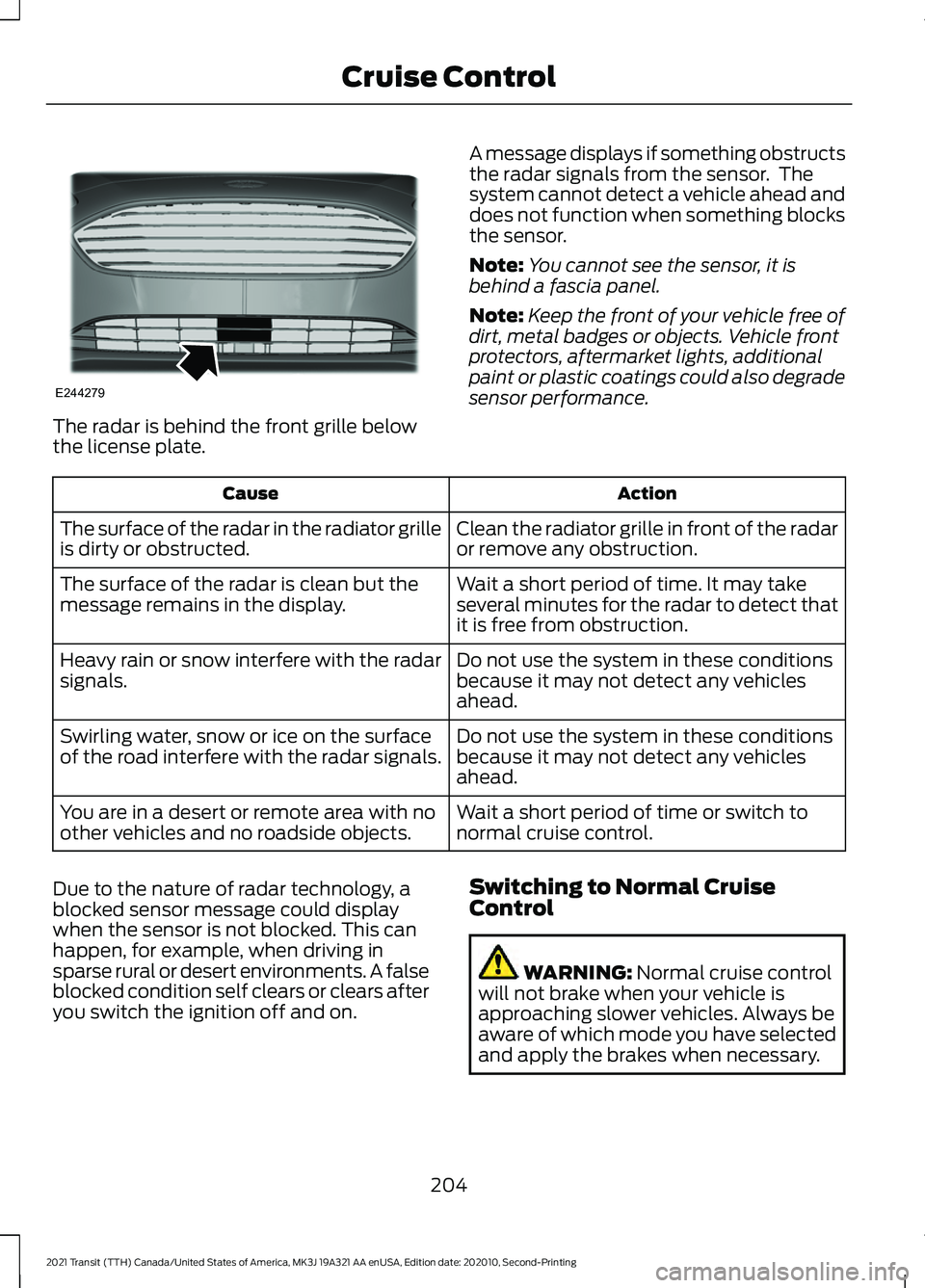
The radar is behind the front grille below
the license plate.
A message displays if something obstructs
the radar signals from the sensor. The
system cannot detect a vehicle ahead and
does not function when something blocks
the sensor.
Note:
You cannot see the sensor, it is
behind a fascia panel.
Note: Keep the front of your vehicle free of
dirt, metal badges or objects. Vehicle front
protectors, aftermarket lights, additional
paint or plastic coatings could also degrade
sensor performance. Action
Cause
Clean the radiator grille in front of the radar
or remove any obstruction.
The surface of the radar in the radiator grille
is dirty or obstructed.
Wait a short period of time. It may take
several minutes for the radar to detect that
it is free from obstruction.
The surface of the radar is clean but the
message remains in the display.
Do not use the system in these conditions
because it may not detect any vehicles
ahead.
Heavy rain or snow interfere with the radar
signals.
Do not use the system in these conditions
because it may not detect any vehicles
ahead.
Swirling water, snow or ice on the surface
of the road interfere with the radar signals.
Wait a short period of time or switch to
normal cruise control.
You are in a desert or remote area with no
other vehicles and no roadside objects.
Due to the nature of radar technology, a
blocked sensor message could display
when the sensor is not blocked. This can
happen, for example, when driving in
sparse rural or desert environments. A false
blocked condition self clears or clears after
you switch the ignition off and on. Switching to Normal Cruise
Control WARNING: Normal cruise control
will not brake when your vehicle is
approaching slower vehicles. Always be
aware of which mode you have selected
and apply the brakes when necessary.
204
2021 Transit (TTH) Canada/United States of America, MK3J 19A321 AA enUSA, Edition date: 202010, Second-Printing Cruise ControlE244279
Page 224 of 509
Adaptive Learning (If Equipped)
The electronic power steering system
adaptive learning helps correct road
irregularities and improves overall handling
and steering feel. It communicates with
the brake system to help operate advanced stability control and accident
avoidance systems. Additionally, whenever
the battery is disconnected or a new
battery installed, you must drive your
vehicle a short distance before the system
relearns the strategy and reactivates all
systems.
Steering Information Messages Description
Message
The system has malfunctioned. Stop your vehicle as soon
as it is safe to do so. You continue to have full steering but
you need to exert greater force on the steering wheel. Have
your vehicle checked as soon as possible.
Steering Fault Service
Now
Steering Loss Stop
Safely
Steering Assist Fault
Service Required
PRE-COLLISION ASSIST WARNING: You are responsible for
controlling your vehicle at all times. The
system is designed to be an aid and does
not relieve you of your responsibility to
drive with due care and attention. Failure
to follow this instruction could result in
the loss of control of your vehicle,
personal injury or death. WARNING:
The system does not
operate during hard acceleration or
steering. Failure to take care may lead
to a crash or personal injury. WARNING: The system may fail or
operate with reduced function during
cold and severe weather conditions.
Snow, ice, rain, spray and fog can
adversely affect the system. Keep the
front camera and radar free of snow and
ice. Failure to take care may result in the
loss of control of your vehicle, serious
personal injury or death. WARNING:
The system may not
operate properly if your vehicle has a
non-Ford windshield. Do not carry out
windshield repairs in the area around the
sensor. WARNING:
In situations where the
vehicle camera has limited detection
capability, this may reduce system
performance. These situations include
but are not limited to direct or low
sunlight, vehicles at night without tail
lights, unconventional vehicle types,
pedestrians with complex backgrounds,
221
2021 Transit (TTH) Canada/United States of America, MK3J 19A321 AA enUSA, Edition date: 202010, Second-Printing Driving Aids
Page 225 of 509
running pedestrians, partly obscured
pedestrians, or pedestrians that the
system cannot distinguish from a group.
Failure to take care may result in the loss
of control of your vehicle, serious
personal injury or death.
WARNING: The Pre-Collision Assist
system with brake support cannot help
prevent all collisions. Do not rely on this
system to replace your judgment and the
need to maintain correct distance and
speed.
The pre-collision assist system is active
when your vehicle reaches a speed greater
than approximately 6 mph (10 km/h).
Pedestrian detection is active at speeds
up to
50 mph (80 km/h). Note:
The system is not designed to detect
animals.
Note: The system is not designed to detect
vehicles or cyclists that are traveling in a
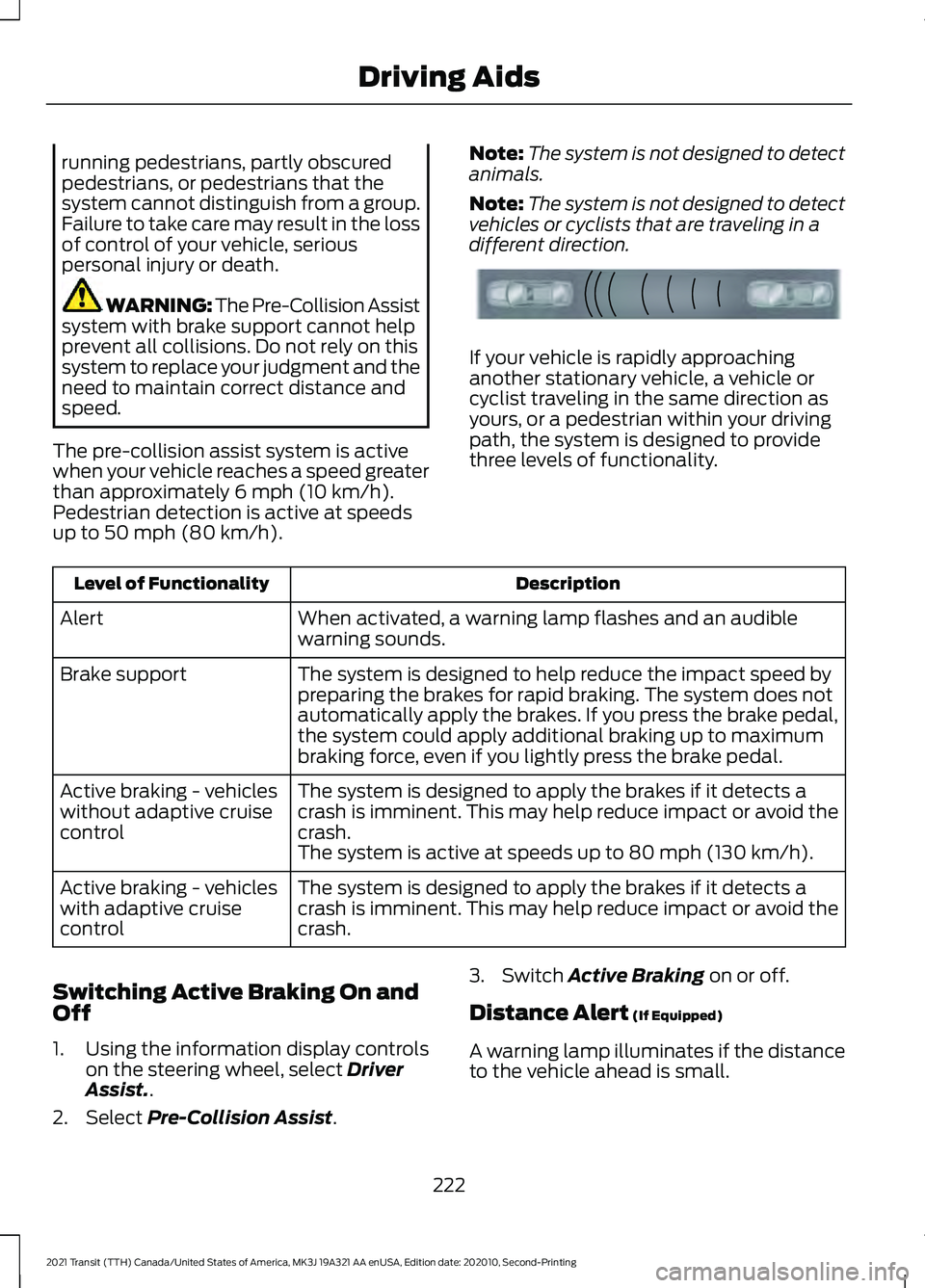
different direction. If your vehicle is rapidly approaching
another stationary vehicle, a vehicle or
cyclist traveling in the same direction as
yours, or a pedestrian within your driving
path, the system is designed to provide
three levels of functionality.
Description
Level of Functionality
When activated, a warning lamp flashes and an audible
warning sounds.
Alert
The system is designed to help reduce the impact speed by
preparing the brakes for rapid braking. The system does not
automatically apply the brakes. If you press the brake pedal,
the system could apply additional braking up to maximum
braking force, even if you lightly press the brake pedal.
Brake support
The system is designed to apply the brakes if it detects a
crash is imminent. This may help reduce impact or avoid the
crash.
Active braking - vehicles
without adaptive cruise
control
The system is active at speeds up to
80 mph (130 km/h).
The system is designed to apply the brakes if it detects a
crash is imminent. This may help reduce impact or avoid the
crash.
Active braking - vehicles
with adaptive cruise
control
Switching Active Braking On and
Off
1. Using the information display controls on the steering wheel, select
Driver
Assist..
2. Select
Pre-Collision Assist. 3. Switch
Active Braking on or off.
Distance Alert
(If Equipped)
A warning lamp illuminates if the distance
to the vehicle ahead is small.
222
2021 Transit (TTH) Canada/United States of America, MK3J 19A321 AA enUSA, Edition date: 202010, Second-Printing Driving AidsE156130
Page 237 of 509
TOWING A TRAILER
WARNING: Towing trailers
beyond the maximum
recommended gross trailer
weight exceeds the limit of your
vehicle and could result in engine
damage, transmission damage,
structural damage, loss of
vehicle control, vehicle rollover
and personal injury. WARNING:
Do not exceed
the GVWR or the GAWR
specified on the certification
label.
Note: See
Recommended
Towing Weights (page 235).
Your vehicle may have electrical
items, such as fuses or relays,
related to towing. See
Fuses
(page 263).
Your vehicle's load capacity
designation is by weight, not by
volume, so you cannot necessarily
use all available space when
loading a vehicle or trailer.
Towing a trailer places an extra
load on your vehicle's engine,
transmission, axle, brakes, tires
and suspension. Inspect these
components periodically during,
and after, any towing operation. Load Placement
To help minimize how trailer
movement affects your vehicle
when driving:
•
Load the heaviest items closest
to the trailer floor.
• Load the heaviest items
centered between the left and
right side trailer tires.
• Load the heaviest items above
the trailer axles or just slightly
forward toward the trailer
tongue. Do not allow the final
trailer tongue weight to go
above or below 10-15% of the
loaded trailer weight.
• Select a ball mount with the
correct rise or drop and load
capacity. When both the
loaded vehicle and trailer are
connected, the trailer frame
should be level, or slightly
angled down toward your
vehicle, when viewed from the
side.
When driving with a trailer or
payload, a slight takeoff vibration
or shudder may be present due to
the increased payload weight.
Additional information regarding
proper trailer loading and setting
your vehicle up for towing is
located in another chapter of this
manual. See
Load Limit (page
229).
You can also find information in
the
RV & Trailer Towing Guide
available at your authorized
dealer, or online.
234
2021 Transit (TTH) Canada/United States of America, MK3J 19A321 AA enUSA, Edition date: 202010, Second-Printing Towing
Page 250 of 509
BREAKING-IN
You need to break in new tires for
approximately 300 mi (480 km). During
this time, your vehicle may exhibit some
unusual driving characteristics. The engine
also needs to break in. Avoid hard
accelerations and driving too fast for the
first 1,000 mi (1,600 km). If possible, avoid
carrying heavy loads up steep grades
during the break-in period.
DRIVING THROUGH WATER WARNING:
Do not drive through
flowing or deep water as you may lose
control of your vehicle.
Note: Driving through standing water can
cause vehicle damage.
Note: Engine damage can occur if water
enters the air filter.
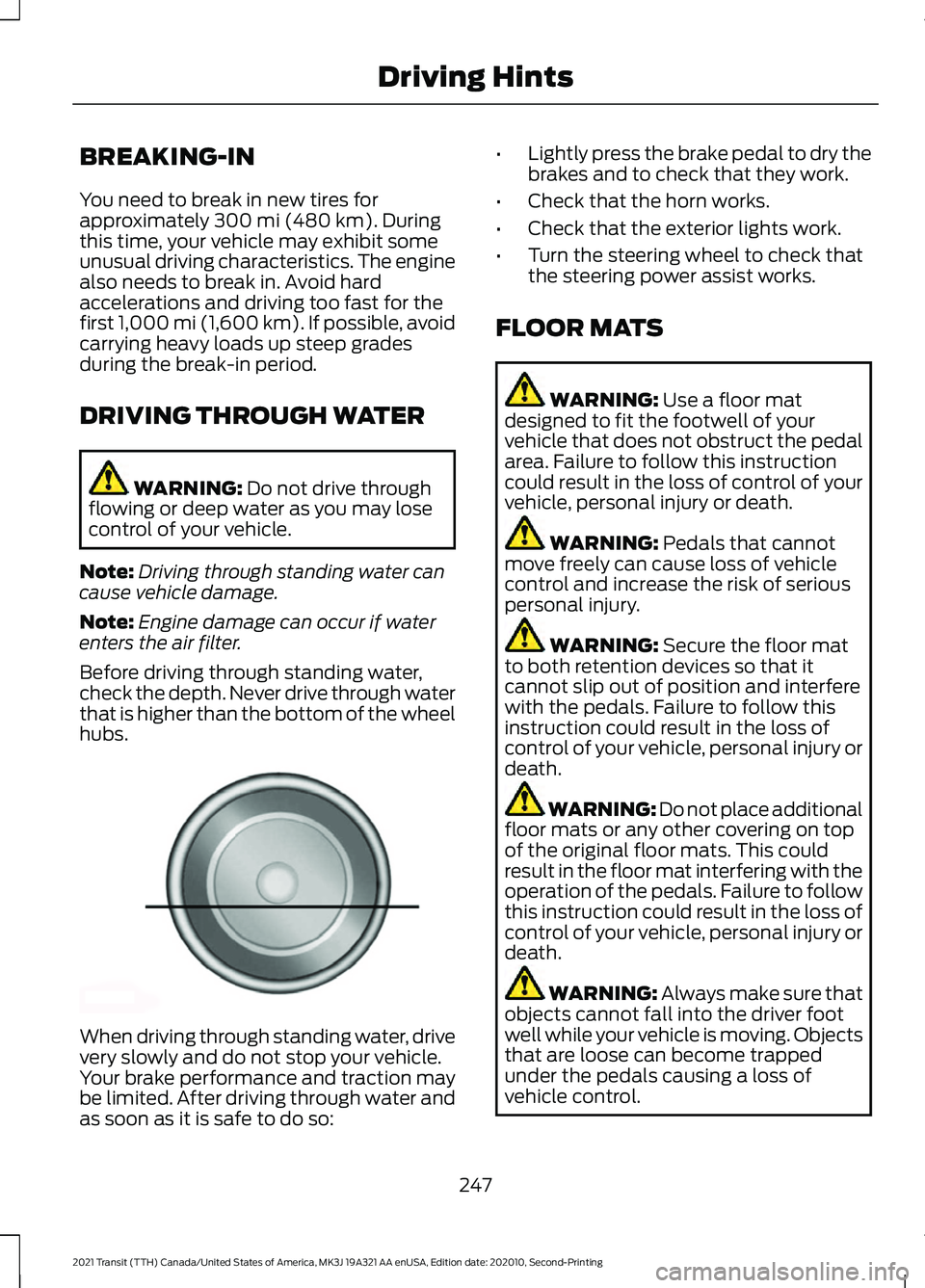
Before driving through standing water,
check the depth. Never drive through water
that is higher than the bottom of the wheel
hubs. When driving through standing water, drive
very slowly and do not stop your vehicle.
Your brake performance and traction may
be limited. After driving through water and
as soon as it is safe to do so: •
Lightly press the brake pedal to dry the
brakes and to check that they work.
• Check that the horn works.
• Check that the exterior lights work.
• Turn the steering wheel to check that
the steering power assist works.
FLOOR MATS WARNING:
Use a floor mat
designed to fit the footwell of your
vehicle that does not obstruct the pedal
area. Failure to follow this instruction
could result in the loss of control of your
vehicle, personal injury or death. WARNING:
Pedals that cannot
move freely can cause loss of vehicle
control and increase the risk of serious
personal injury. WARNING:
Secure the floor mat
to both retention devices so that it
cannot slip out of position and interfere
with the pedals. Failure to follow this
instruction could result in the loss of
control of your vehicle, personal injury or
death. WARNING: Do not place additional
floor mats or any other covering on top
of the original floor mats. This could
result in the floor mat interfering with the
operation of the pedals. Failure to follow
this instruction could result in the loss of
control of your vehicle, personal injury or
death. WARNING:
Always make sure that
objects cannot fall into the driver foot
well while your vehicle is moving. Objects
that are loose can become trapped
under the pedals causing a loss of
vehicle control.
247
2021 Transit (TTH) Canada/United States of America, MK3J 19A321 AA enUSA, Edition date: 202010, Second-Printing Driving HintsE176913
Page 254 of 509
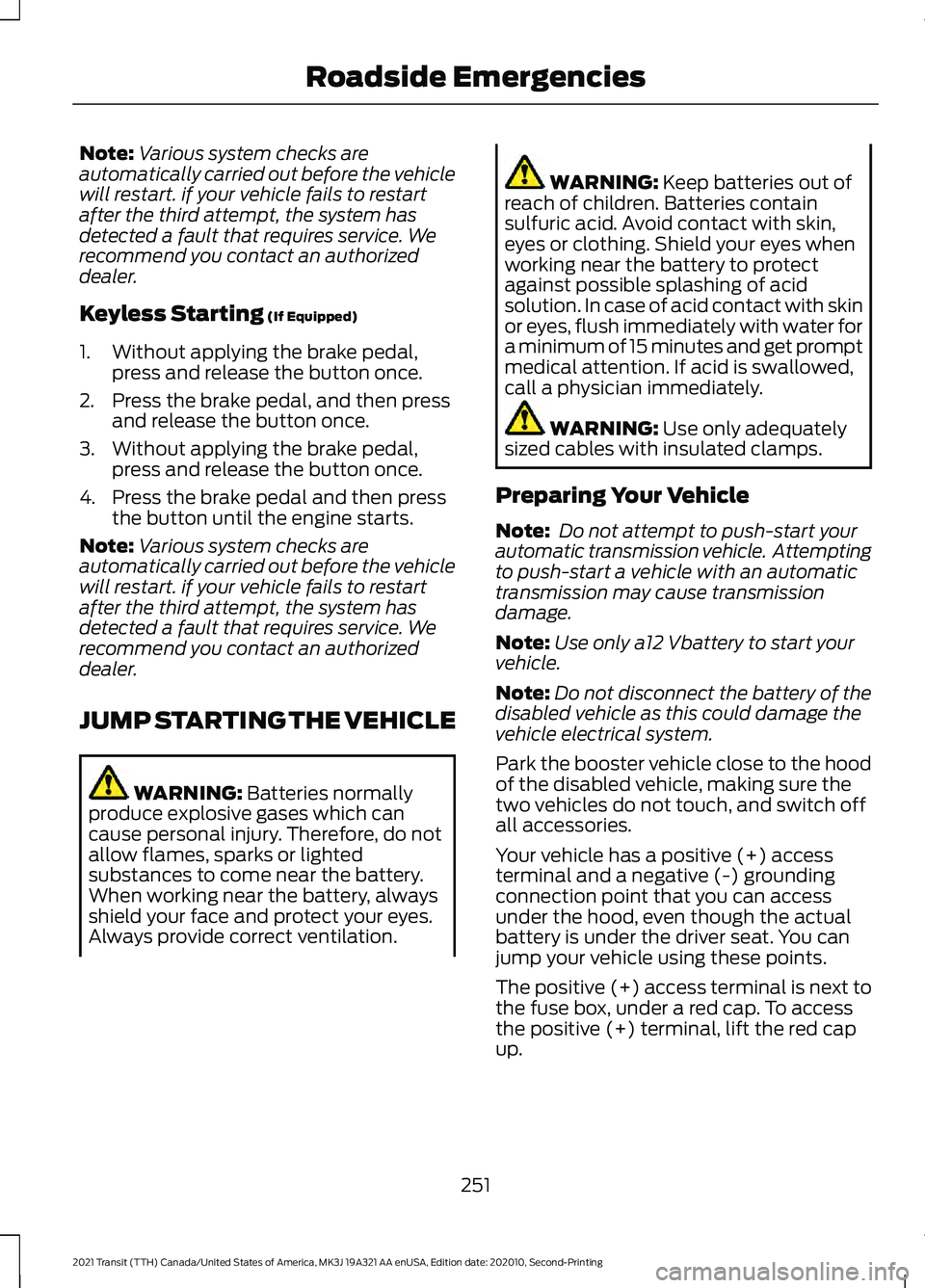
Note:
Various system checks are
automatically carried out before the vehicle
will restart. if your vehicle fails to restart
after the third attempt, the system has
detected a fault that requires service. We
recommend you contact an authorized
dealer.
Keyless Starting (If Equipped)
1. Without applying the brake pedal, press and release the button once.
2. Press the brake pedal, and then press and release the button once.
3. Without applying the brake pedal, press and release the button once.
4. Press the brake pedal and then press the button until the engine starts.
Note: Various system checks are
automatically carried out before the vehicle
will restart. if your vehicle fails to restart
after the third attempt, the system has
detected a fault that requires service. We
recommend you contact an authorized
dealer.
JUMP STARTING THE VEHICLE WARNING:
Batteries normally
produce explosive gases which can
cause personal injury. Therefore, do not
allow flames, sparks or lighted
substances to come near the battery.
When working near the battery, always
shield your face and protect your eyes.
Always provide correct ventilation. WARNING:
Keep batteries out of
reach of children. Batteries contain
sulfuric acid. Avoid contact with skin,
eyes or clothing. Shield your eyes when
working near the battery to protect
against possible splashing of acid
solution. In case of acid contact with skin
or eyes, flush immediately with water for
a minimum of 15 minutes and get prompt
medical attention. If acid is swallowed,
call a physician immediately. WARNING:
Use only adequately
sized cables with insulated clamps.
Preparing Your Vehicle
Note: Do not attempt to push-start your
automatic transmission vehicle. Attempting
to push-start a vehicle with an automatic
transmission may cause transmission
damage.
Note: Use only a
12 Vbattery to start your
vehicle.
Note: Do not disconnect the battery of the
disabled vehicle as this could damage the
vehicle electrical system.
Park the booster vehicle close to the hood
of the disabled vehicle, making sure the
two vehicles do not touch, and switch off
all accessories.
Your vehicle has a positive (+) access
terminal and a negative (-) grounding
connection point that you can access
under the hood, even though the actual
battery is under the driver seat. You can
jump your vehicle using these points.
The positive (+) access terminal is next to
the fuse box, under a red cap. To access
the positive (+) terminal, lift the red cap
up.
251
2021 Transit (TTH) Canada/United States of America, MK3J 19A321 AA enUSA, Edition date: 202010, Second-Printing Roadside Emergencies
Page 273 of 509
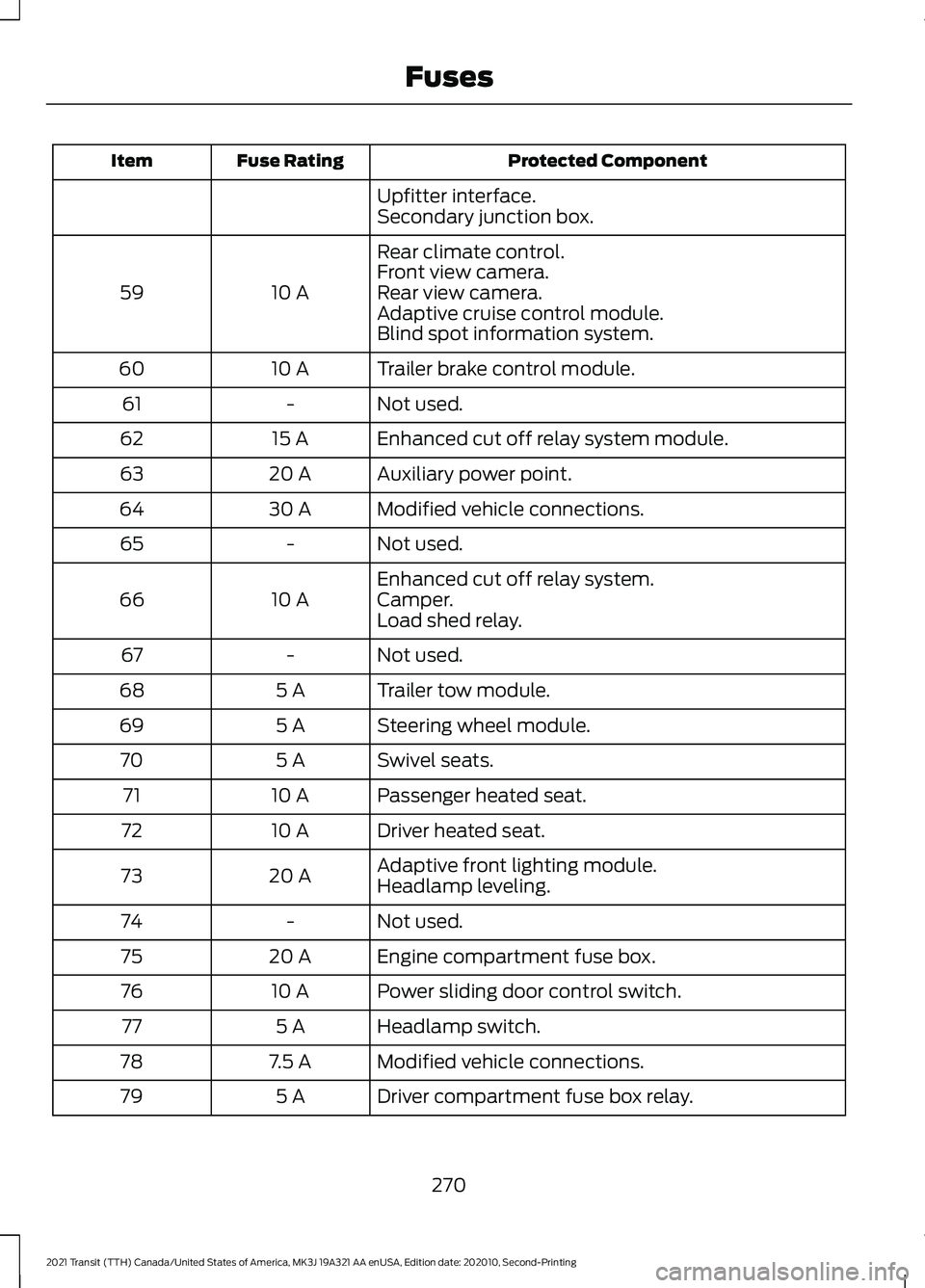
Protected Component
Fuse Rating
Item
Upfitter interface.
Secondary junction box.
Rear climate control.
10 A
59 Front view camera.
Rear view camera.
Adaptive cruise control module.
Blind spot information system.
Trailer brake control module.
10 A
60
Not used.
-
61
Enhanced cut off relay system module.
15 A
62
Auxiliary power point.
20 A
63
Modified vehicle connections.
30 A
64
Not used.
-
65
Enhanced cut off relay system.
10 A
66 Camper.
Load shed relay.
Not used.
-
67
Trailer tow module.
5 A
68
Steering wheel module.
5 A
69
Swivel seats.
5 A
70
Passenger heated seat.
10 A
71
Driver heated seat.
10 A
72
Adaptive front lighting module.
20 A
73
Headlamp leveling.
Not used.
-
74
Engine compartment fuse box.
20 A
75
Power sliding door control switch.
10 A
76
Headlamp switch.
5 A
77
Modified vehicle connections.
7.5 A
78
Driver compartment fuse box relay.
5 A
79
270
2021 Transit (TTH) Canada/United States of America, MK3J 19A321 AA enUSA, Edition date: 202010, Second-Printing Fuses