camera FORD TRANSIT 2021 User Guide
[x] Cancel search | Manufacturer: FORD, Model Year: 2021, Model line: TRANSIT, Model: FORD TRANSIT 2021Pages: 509, PDF Size: 8.21 MB
Page 212 of 509
WARNING: The system will not
operate if the sensor cannot track the
road lane markings. WARNING:
If damage occurs in the
immediate area surrounding the sensor,
have your vehicle checked as soon as
possible. WARNING:
The system may not
correctly operate if your vehicle is fitted
with a suspension kit not approved by
us.
The system is designed to alert you by
providing temporary steering assistance
or steering wheel vibration when it detects
an unintended lane departure. The system
detects and tracks the road lane markings
using a camera mounted behind the
interior mirror. The system only operates
when the vehicle speed is greater than
approximately
37 mph (60 km/h). You
can view the system status in the
information display.
Note: The system works when the camera
can detect at least one lane marking or the
edge of the road.
The system may not correctly operate in
any of the following conditions:
• The system does not detect at least
one lane marking or the edge of the
road.
• You switch the direction indicator on.
• You apply direct steering, accelerate
fast or brake hard.
• The vehicle speed is less than
37 mph
(60 km/h).
• The anti-lock brake, stability control or
traction control system activates.
• Narrow lane width. The system may not correct lane
positioning in any of the following
conditions:
•
High winds.
• Uneven road surfaces.
• Heavy or uneven loads.
• Incorrect tire pressure.
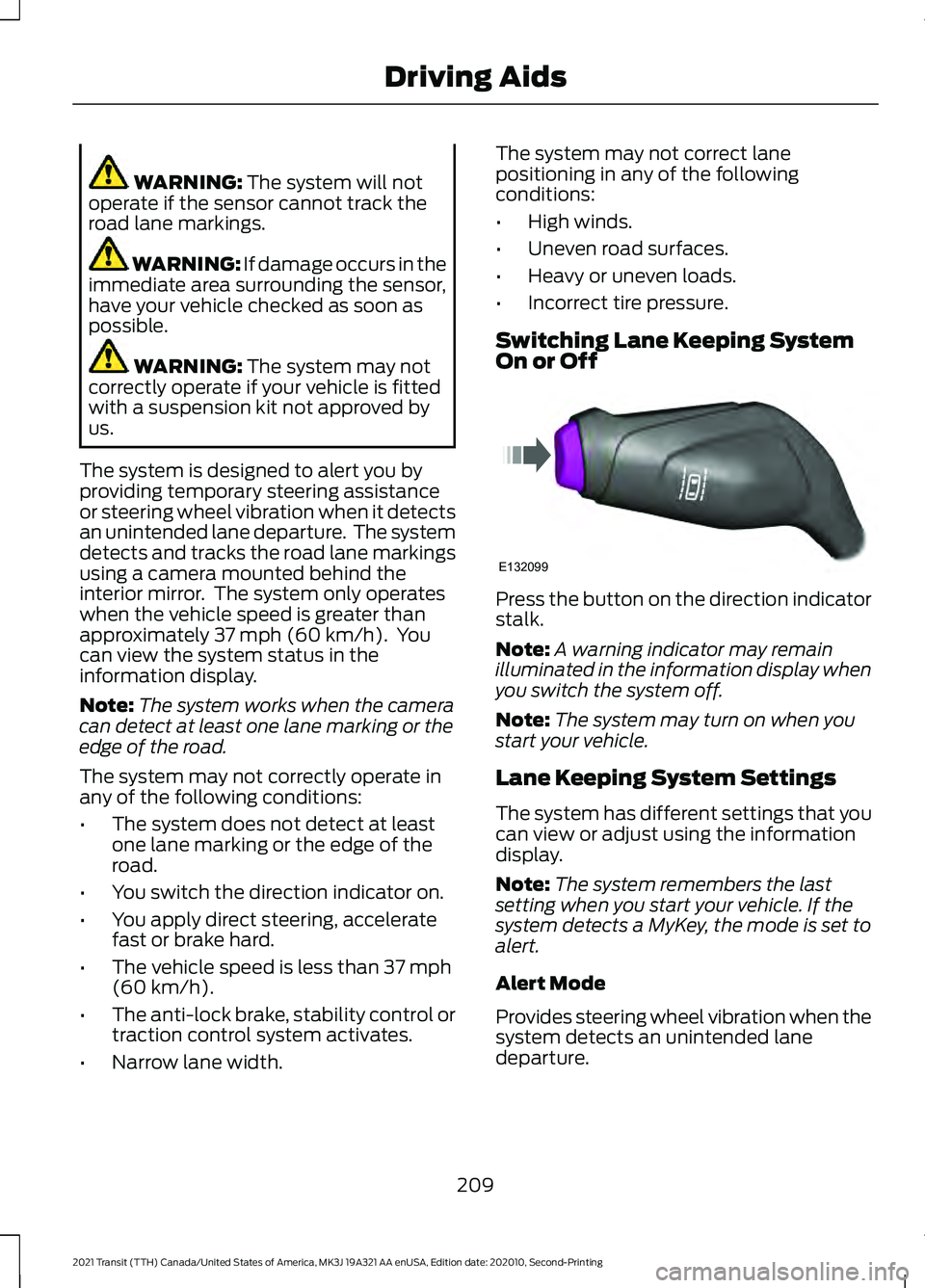
Switching Lane Keeping System
On or Off Press the button on the direction indicator
stalk.
Note:
A warning indicator may remain
illuminated in the information display when
you switch the system off.
Note: The system may turn on when you
start your vehicle.
Lane Keeping System Settings
The system has different settings that you
can view or adjust using the information
display.
Note: The system remembers the last
setting when you start your vehicle. If the
system detects a MyKey, the mode is set to
alert.
Alert Mode
Provides steering wheel vibration when the
system detects an unintended lane
departure.
209
2021 Transit (TTH) Canada/United States of America, MK3J 19A321 AA enUSA, Edition date: 202010, Second-Printing Driving AidsE132099
Page 224 of 509
Adaptive Learning (If Equipped)
The electronic power steering system
adaptive learning helps correct road
irregularities and improves overall handling
and steering feel. It communicates with
the brake system to help operate advanced stability control and accident
avoidance systems. Additionally, whenever
the battery is disconnected or a new
battery installed, you must drive your
vehicle a short distance before the system
relearns the strategy and reactivates all
systems.
Steering Information Messages Description
Message
The system has malfunctioned. Stop your vehicle as soon
as it is safe to do so. You continue to have full steering but
you need to exert greater force on the steering wheel. Have
your vehicle checked as soon as possible.
Steering Fault Service
Now
Steering Loss Stop
Safely
Steering Assist Fault
Service Required
PRE-COLLISION ASSIST WARNING: You are responsible for
controlling your vehicle at all times. The
system is designed to be an aid and does
not relieve you of your responsibility to
drive with due care and attention. Failure
to follow this instruction could result in
the loss of control of your vehicle,
personal injury or death. WARNING:
The system does not
operate during hard acceleration or
steering. Failure to take care may lead
to a crash or personal injury. WARNING: The system may fail or
operate with reduced function during
cold and severe weather conditions.
Snow, ice, rain, spray and fog can
adversely affect the system. Keep the
front camera and radar free of snow and
ice. Failure to take care may result in the
loss of control of your vehicle, serious
personal injury or death. WARNING:
The system may not
operate properly if your vehicle has a
non-Ford windshield. Do not carry out
windshield repairs in the area around the
sensor. WARNING:
In situations where the
vehicle camera has limited detection
capability, this may reduce system
performance. These situations include
but are not limited to direct or low
sunlight, vehicles at night without tail
lights, unconventional vehicle types,
pedestrians with complex backgrounds,
221
2021 Transit (TTH) Canada/United States of America, MK3J 19A321 AA enUSA, Edition date: 202010, Second-Printing Driving Aids
Page 226 of 509
Note:
The warning lamp does not
illuminate if cruise control or adaptive cruise
control is active.
Setting the Distance Alert Sensitivity
1. Using the information display controls on the steering wheel, select Driver
Assist..
2. Select
Pre-Collision Assist.
3. Select
Alert Sensitivity. 4. Select a setting and press the
OK
button.
Distance Indication
(If Equipped)
A graphical indication displays the time
gap to vehicles ahead of you traveling in
the same direction.
Note: The graphic does not display if you
switch on cruise control or adaptive cruise
control. Time Gap
Distance Gap
Distance Indic-
ator Color
System Sensit-
ivity
Vehicle Speed
Greater than 0.9seconds.
Greater than
82.0 ft (25 m)
.
Gray.
Normal.
62 mph
(100 km/h)
0.6-0.9
seconds.
55.8–82.0 ft
(17 –25 m)
.
Yellow.
Less than 0.6seconds.
Less than
55.8 ft (17 m)
.
Red.
Switching Distance Indication On and
Off
1. Using the information display controls on the steering wheel, select
Driver
Assist..
2. Select
Pre-Collision Assist.
3. Switch
Distance Indication on or off. Pre-Collision Assist System
Sensors
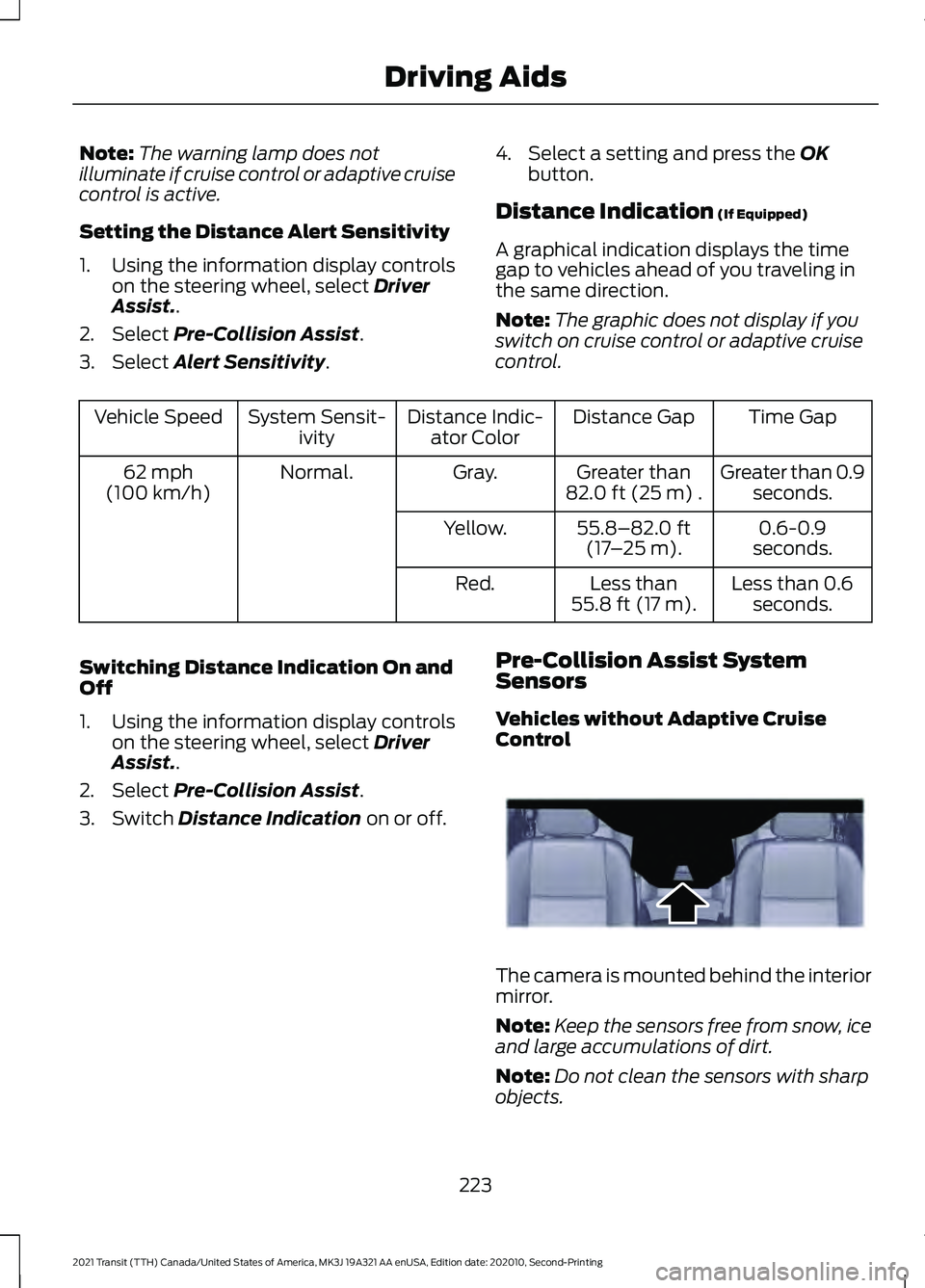
Vehicles without Adaptive Cruise
Control The camera is mounted behind the interior
mirror.
Note:
Keep the sensors free from snow, ice
and large accumulations of dirt.
Note: Do not clean the sensors with sharp
objects.
223
2021 Transit (TTH) Canada/United States of America, MK3J 19A321 AA enUSA, Edition date: 202010, Second-Printing Driving AidsE243054
Page 227 of 509
Note:
If your vehicle sustains damage
leaving the sensors misaligned, this may
cause inaccurate measurements or false
alerts.
Blocked sensors could affect system
accuracy. A message may appear in the
information display.
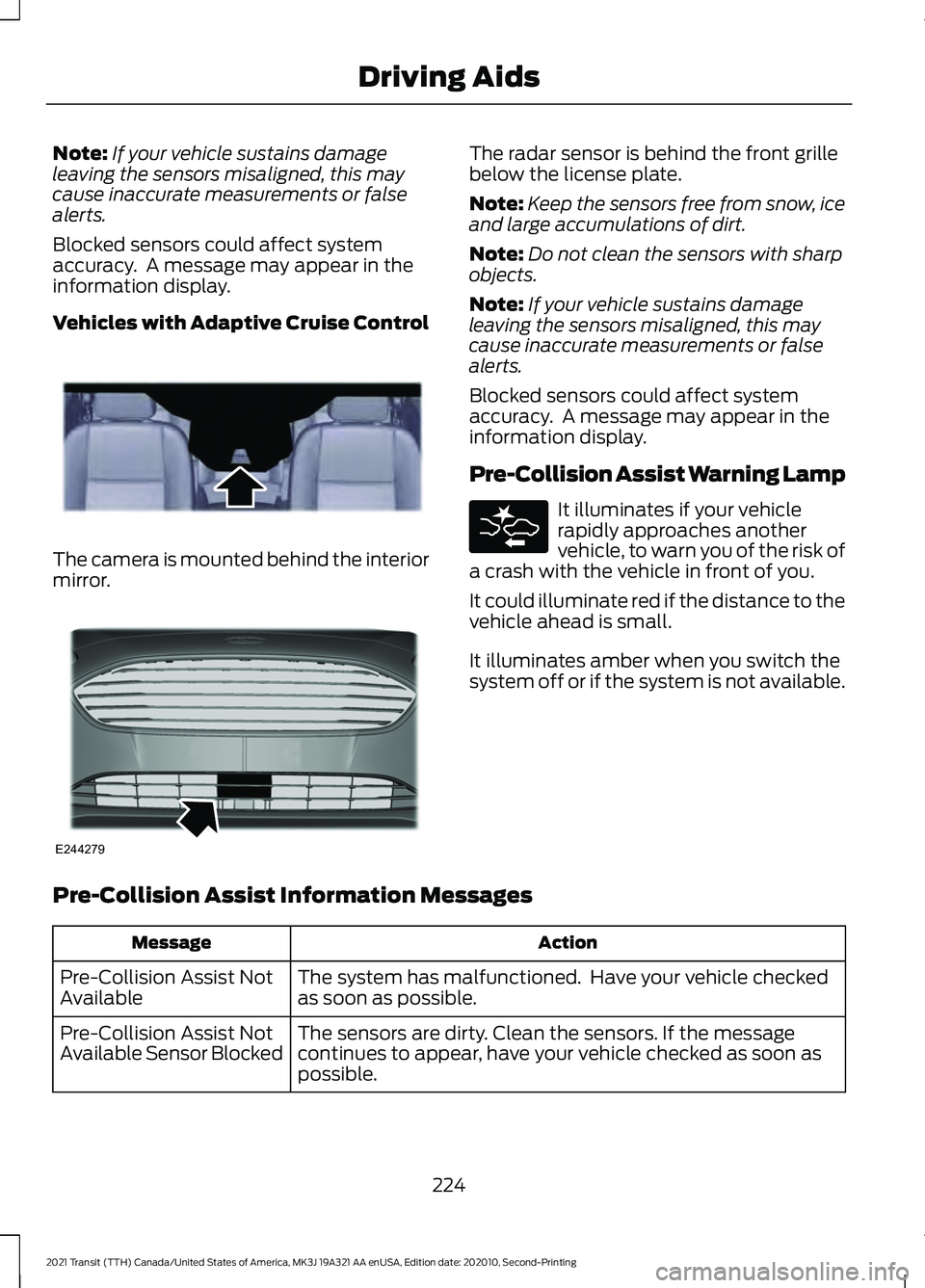
Vehicles with Adaptive Cruise Control The camera is mounted behind the interior
mirror. The radar sensor is behind the front grille
below the license plate.
Note:
Keep the sensors free from snow, ice
and large accumulations of dirt.
Note: Do not clean the sensors with sharp
objects.
Note: If your vehicle sustains damage
leaving the sensors misaligned, this may
cause inaccurate measurements or false
alerts.
Blocked sensors could affect system
accuracy. A message may appear in the
information display.
Pre-Collision Assist Warning Lamp It illuminates if your vehicle
rapidly approaches another
vehicle, to warn you of the risk of
a crash with the vehicle in front of you.
It could illuminate red if the distance to the
vehicle ahead is small.
It illuminates amber when you switch the
system off or if the system is not available.
Pre-Collision Assist Information Messages Action
Message
The system has malfunctioned. Have your vehicle checked
as soon as possible.
Pre-Collision Assist Not
Available
The sensors are dirty. Clean the sensors. If the message
continues to appear, have your vehicle checked as soon as
possible.
Pre-Collision Assist Not
Available Sensor Blocked
224
2021 Transit (TTH) Canada/United States of America, MK3J 19A321 AA enUSA, Edition date: 202010, Second-Printing Driving AidsE243054 E244279
Page 228 of 509
The following table lists possible causes and actions for when a blocked sensor
message may display.
Action
Cause
Clean the radiator grille in front of the radar
or remove any obstruction.
The surface of the radar in the radiator grille
is dirty or obstructed.
Wait for a short period of time. It may take
several minutes for the system to detect
that there is no obstruction.
The surface of the radar is clean but the
message remains in the display.
The system is temporarily disabled. The
system should reactivate after a short
period of time when the weather conditions
improve.
Heavy rain, spray, snow, or fog is interfering
with the radar signals.
Have your vehicle checked as soon as
possible.
The radar is misaligned.
Clean the outside of the windshield in front
of the camera.
The windshield in front of the camera is
dirty or obstructed.
Wait for a short period of time. It may take
several minutes for the camera to detect
that there is no obstruction.
The windshield in front of the camera is
clean but the message remains in the
display.
Wait for a short period of time. The
message should clear when the temper-
ature around the camera decreases.
Excessive heat around the camera.
FRONT VIEW CAMERA WARNING: The front camera
system still requires the driver to use it
in conjunction with looking out of your
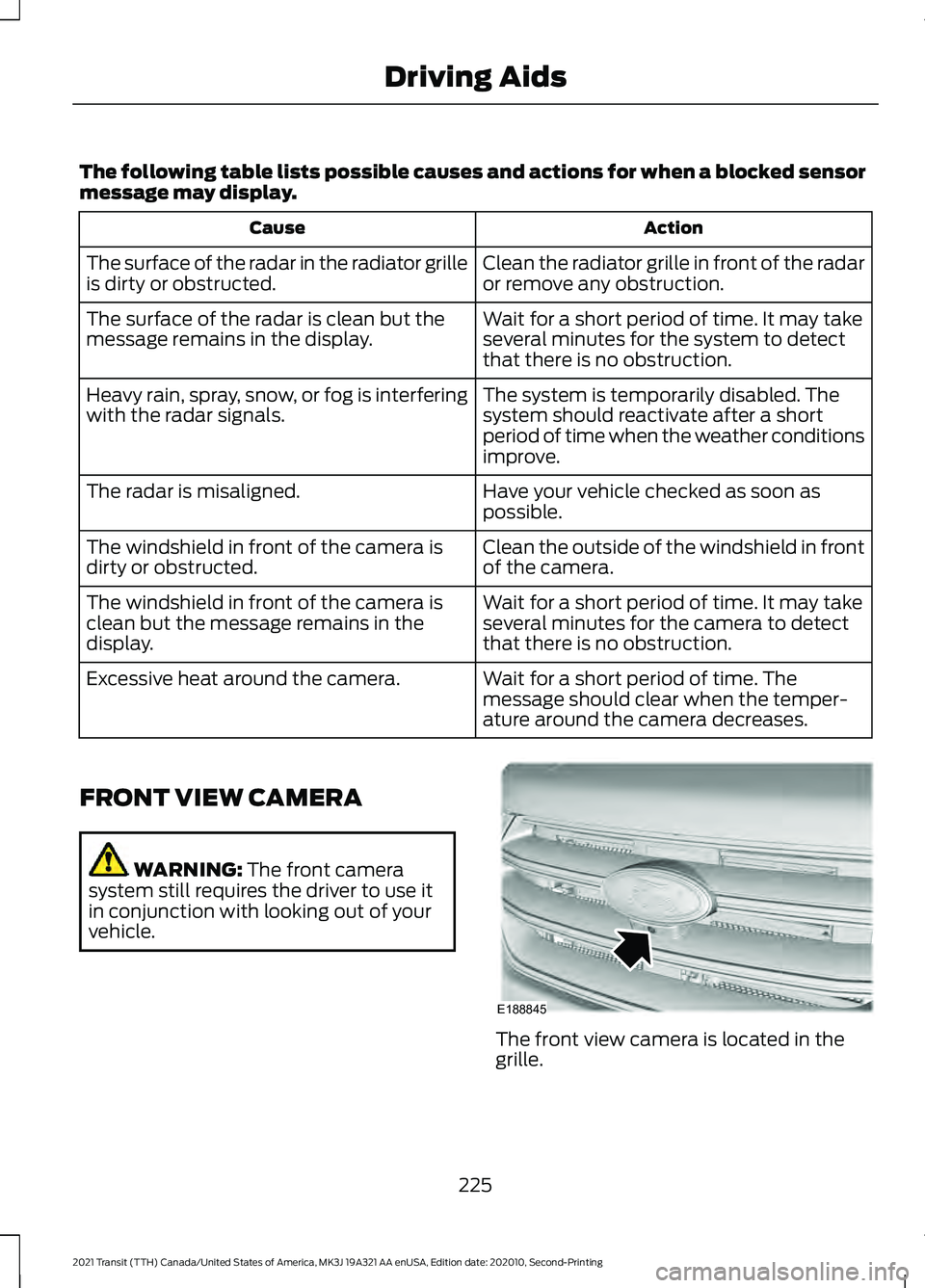
vehicle. The front view camera is located in the
grille.
225
2021 Transit (TTH) Canada/United States of America, MK3J 19A321 AA enUSA, Edition date: 202010, Second-Printing Driving AidsE188845
Page 229 of 509
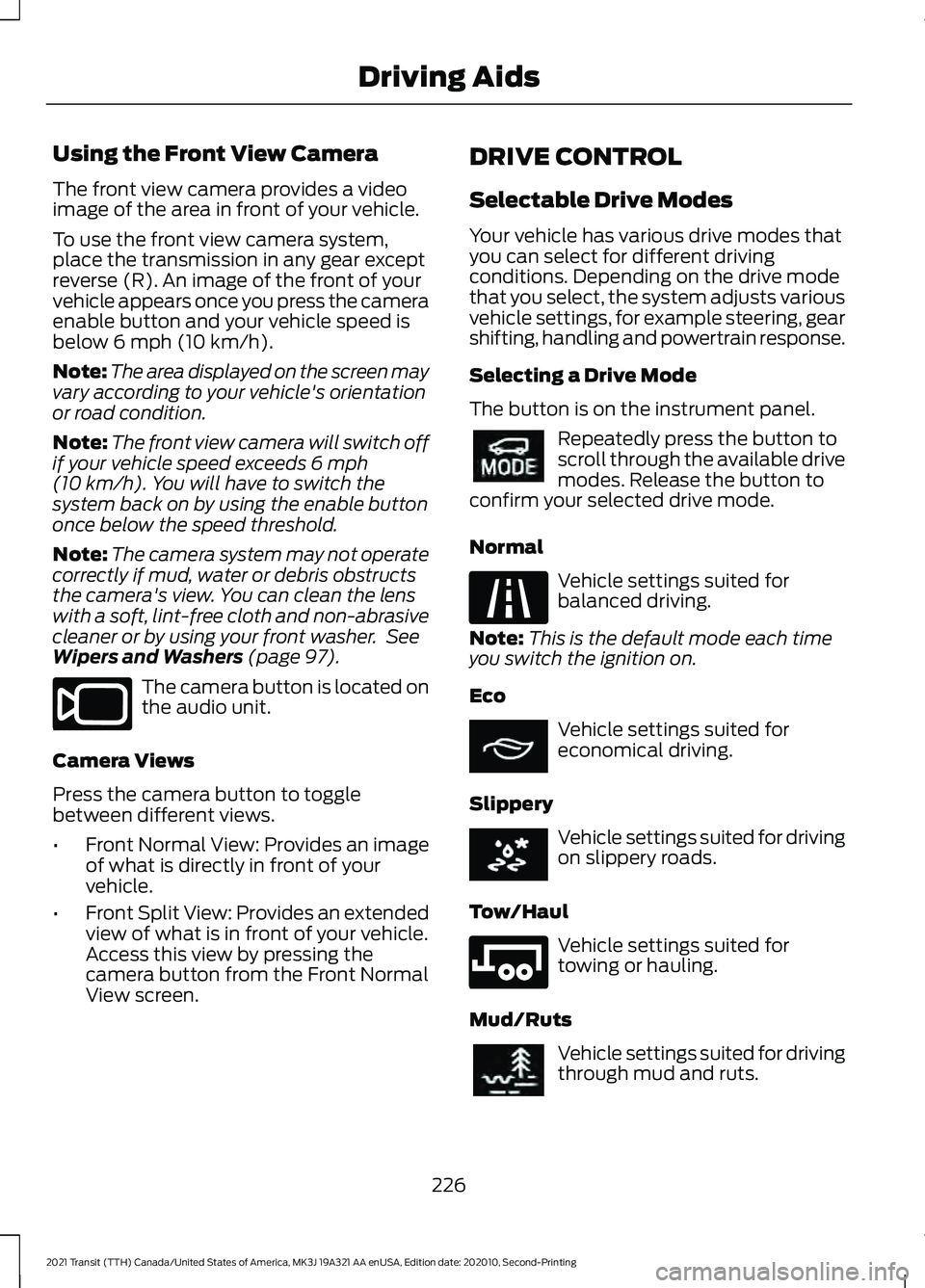
Using the Front View Camera
The front view camera provides a video
image of the area in front of your vehicle.
To use the front view camera system,
place the transmission in any gear except
reverse (R). An image of the front of your
vehicle appears once you press the camera
enable button and your vehicle speed is
below 6 mph (10 km/h).
Note: The area displayed on the screen may
vary according to your vehicle's orientation
or road condition.
Note: The front view camera will switch off
if your vehicle speed exceeds
6 mph
(10 km/h). You will have to switch the
system back on by using the enable button
once below the speed threshold.
Note: The camera system may not operate
correctly if mud, water or debris obstructs
the camera's view. You can clean the lens
with a soft, lint-free cloth and non-abrasive
cleaner or by using your front washer. See
Wipers and Washers
(page 97). The camera button is located on
the audio unit.
Camera Views
Press the camera button to toggle
between different views.
• Front Normal View: Provides an image
of what is directly in front of your
vehicle.
• Front Split View: Provides an extended
view of what is in front of your vehicle.
Access this view by pressing the
camera button from the Front Normal
View screen. DRIVE CONTROL
Selectable Drive Modes
Your vehicle has various drive modes that
you can select for different driving
conditions. Depending on the drive mode
that you select, the system adjusts various
vehicle settings, for example steering, gear
shifting, handling and powertrain response.
Selecting a Drive Mode
The button is on the instrument panel.
Repeatedly press the button to
scroll through the available drive
modes. Release the button to
confirm your selected drive mode.
Normal Vehicle settings suited for
balanced driving.
Note: This is the default mode each time
you switch the ignition on.
Eco Vehicle settings suited for
economical driving.
Slippery Vehicle settings suited for driving
on slippery roads.
Tow/Haul Vehicle settings suited for
towing or hauling.
Mud/Ruts Vehicle settings suited for driving
through mud and ruts.
226
2021 Transit (TTH) Canada/United States of America, MK3J 19A321 AA enUSA, Edition date: 202010, Second-Printing Driving AidsE188847 E298514 E225310 E267164 E269320 E246592 E296606
Page 273 of 509
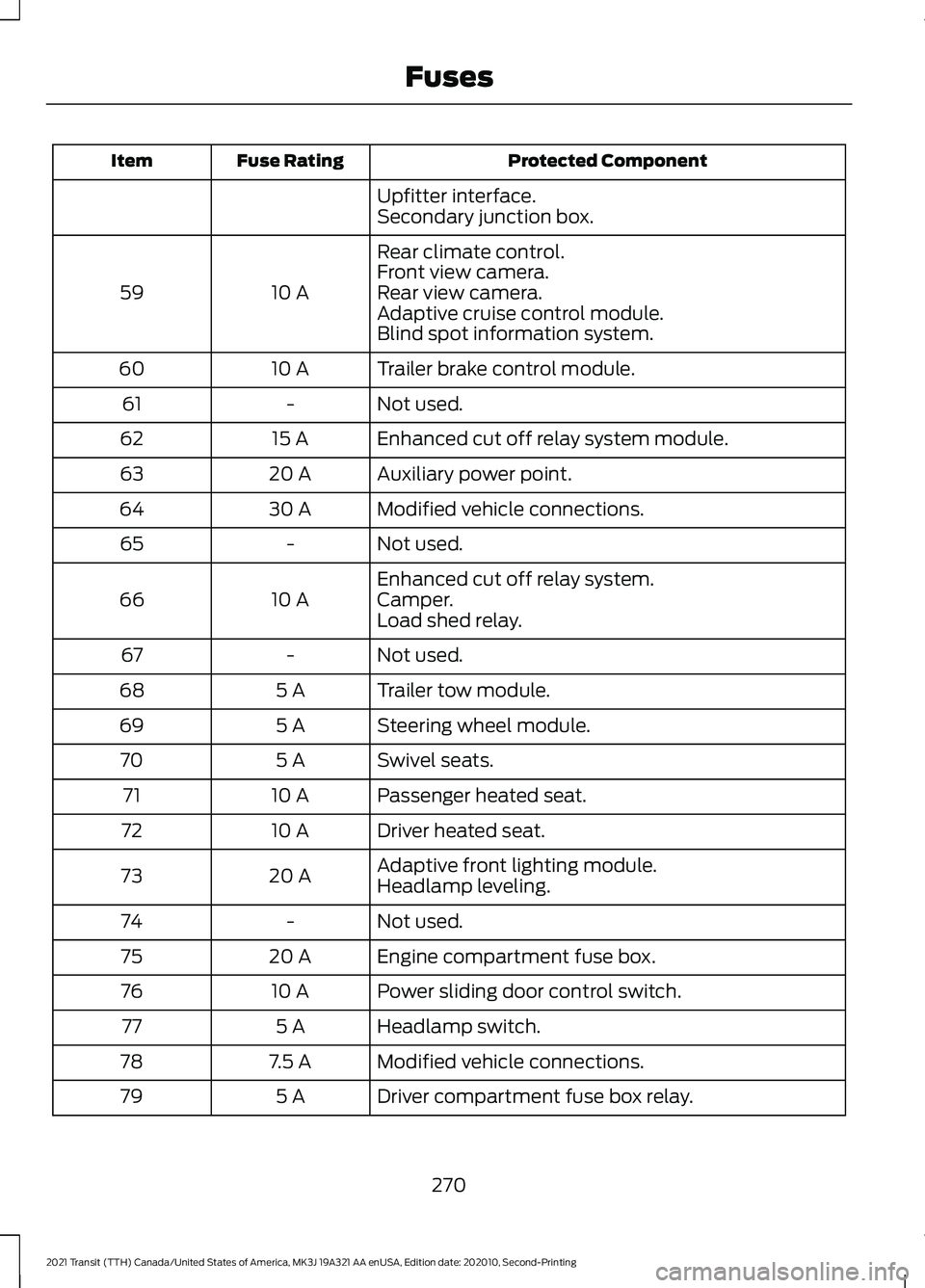
Protected Component
Fuse Rating
Item
Upfitter interface.
Secondary junction box.
Rear climate control.
10 A
59 Front view camera.
Rear view camera.
Adaptive cruise control module.
Blind spot information system.
Trailer brake control module.
10 A
60
Not used.
-
61
Enhanced cut off relay system module.
15 A
62
Auxiliary power point.
20 A
63
Modified vehicle connections.
30 A
64
Not used.
-
65
Enhanced cut off relay system.
10 A
66 Camper.
Load shed relay.
Not used.
-
67
Trailer tow module.
5 A
68
Steering wheel module.
5 A
69
Swivel seats.
5 A
70
Passenger heated seat.
10 A
71
Driver heated seat.
10 A
72
Adaptive front lighting module.
20 A
73
Headlamp leveling.
Not used.
-
74
Engine compartment fuse box.
20 A
75
Power sliding door control switch.
10 A
76
Headlamp switch.
5 A
77
Modified vehicle connections.
7.5 A
78
Driver compartment fuse box relay.
5 A
79
270
2021 Transit (TTH) Canada/United States of America, MK3J 19A321 AA enUSA, Edition date: 202010, Second-Printing Fuses
Page 494 of 509
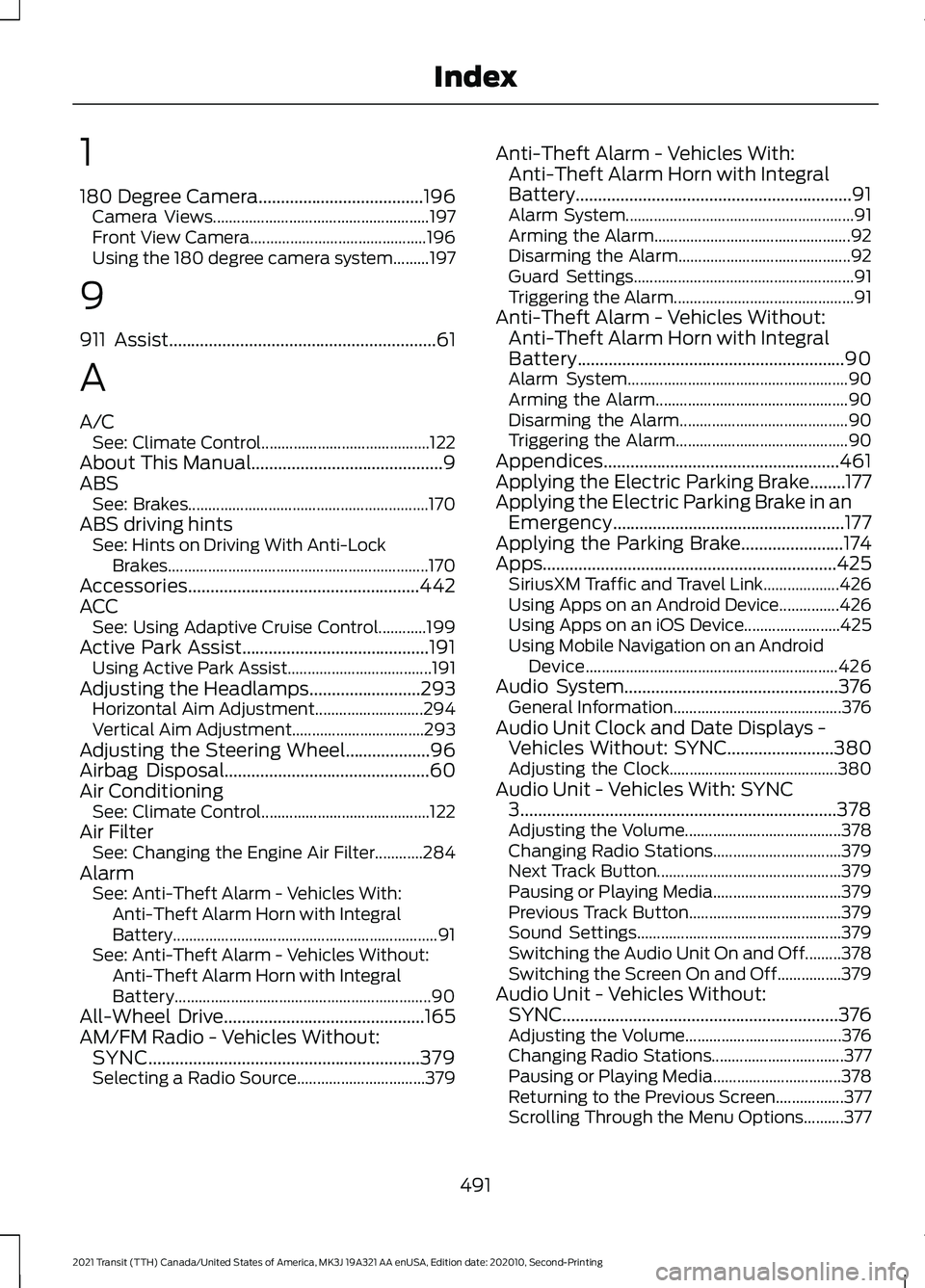
1
180 Degree Camera.....................................196
Camera Views...................................................... 197
Front View Camera............................................ 196
Using the 180 degree camera system.........197
9
911 Assist
............................................................61
A
A/C See: Climate Control.......................................... 122
About This Manual...........................................9
ABS See: Brakes............................................................ 170
ABS driving hints See: Hints on Driving With Anti-Lock
Brakes................................................................. 170
Accessories....................................................442
ACC See: Using Adaptive Cruise Control............199
Active Park Assist..........................................191 Using Active Park Assist.................................... 191
Adjusting the Headlamps
.........................293
Horizontal Aim Adjustment........................... 294
Vertical Aim Adjustment................................. 293
Adjusting the Steering Wheel...................96
Airbag Disposal
..............................................60
Air Conditioning See: Climate Control.......................................... 122
Air Filter See: Changing the Engine Air Filter............284
Alarm See: Anti-Theft Alarm - Vehicles With:
Anti-Theft Alarm Horn with Integral
Battery.................................................................. 91
See: Anti-Theft Alarm - Vehicles Without: Anti-Theft Alarm Horn with Integral
Battery................................................................ 90
All-Wheel Drive.............................................165
AM/FM Radio - Vehicles Without: SYNC.............................................................379
Selecting a Radio Source................................ 379Anti-Theft Alarm - Vehicles With:
Anti-Theft Alarm Horn with Integral
Battery..............................................................91
Alarm System......................................................... 91
Arming the Alarm................................................. 92
Disarming the Alarm........................................... 92
Guard Settings....................................................... 91
Triggering the Alarm............................................. 91
Anti-Theft Alarm - Vehicles Without: Anti-Theft Alarm Horn with Integral
Battery............................................................90
Alarm System....................................................... 90
Arming the Alarm................................................ 90
Disarming the Alarm.......................................... 90
Triggering the Alarm........................................... 90
Appendices.....................................................461
Applying the Electric Parking Brake........177
Applying the Electric Parking Brake in an Emergency....................................................177
Applying the Parking Brake.......................174
Apps
..................................................................425
SiriusXM Traffic and Travel Link................... 426
Using Apps on an Android Device...............426
Using Apps on an iOS Device........................ 425
Using Mobile Navigation on an Android Device............................................................... 426
Audio System
................................................376
General Information.......................................... 376
Audio Unit Clock and Date Displays - Vehicles Without: SYNC
........................380
Adjusting the Clock.......................................... 380
Audio Unit - Vehicles With: SYNC 3.......................................................................378
Adjusting the Volume....................................... 378
Changing Radio Stations................................ 379
Next Track Button.............................................. 379
Pausing or Playing Media................................ 379
Previous Track Button...................................... 379
Sound Settings................................................... 379
Switching the Audio Unit On and Off.........378
Switching the Screen On and Off................379
Audio Unit - Vehicles Without: SYNC
..............................................................376
Adjusting the Volume....................................... 376
Changing Radio Stations................................. 377
Pausing or Playing Media................................ 378
Returning to the Previous Screen.................377
Scrolling Through the Menu Options..........377
491
2021 Transit (TTH) Canada/United States of America, MK3J 19A321 AA enUSA, Edition date: 202010, Second-Printing Index
Page 499 of 509
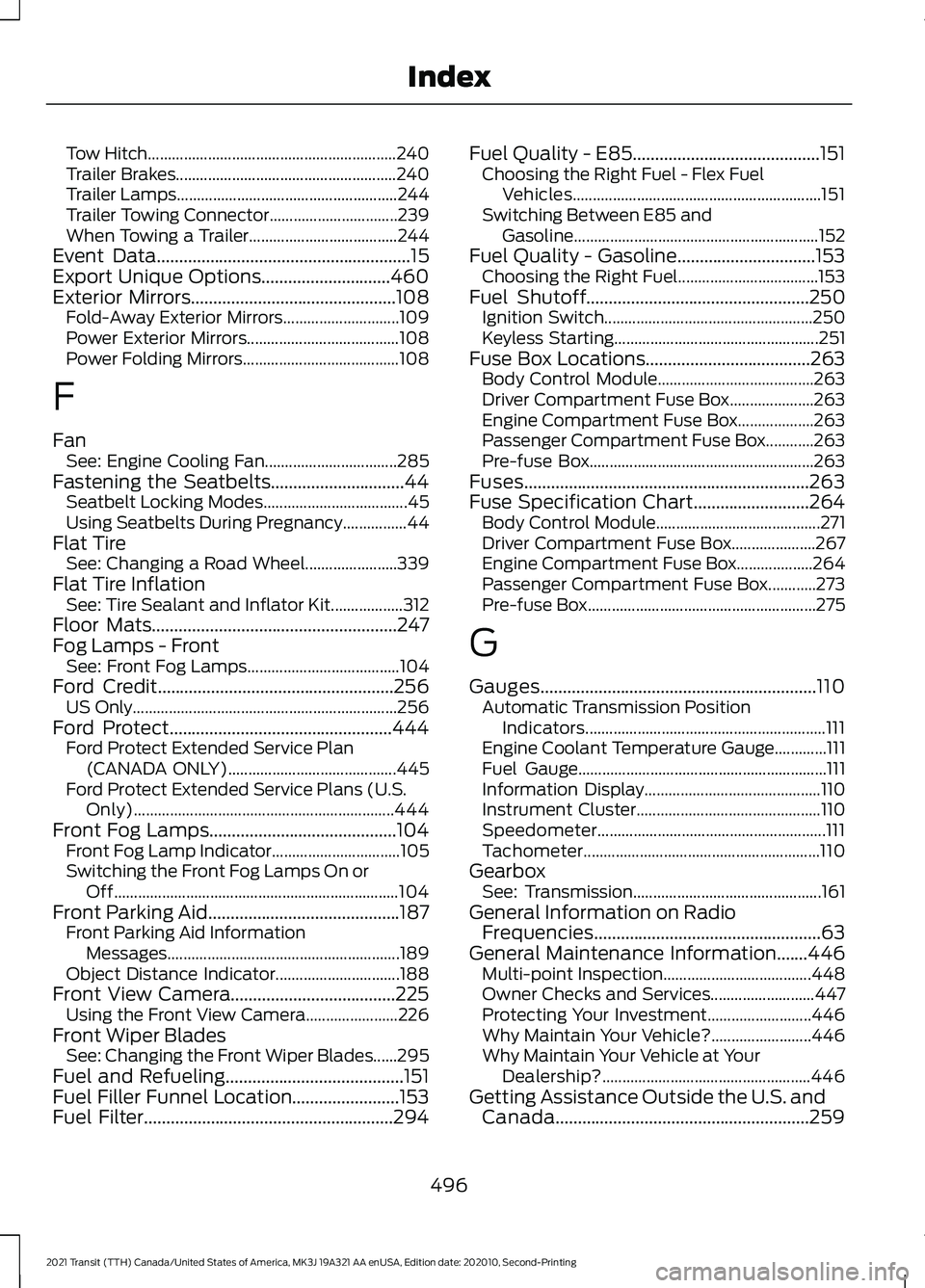
Tow Hitch..............................................................
240
Trailer Brakes....................................................... 240
Trailer Lamps....................................................... 244
Trailer Towing Connector................................ 239
When Towing a Trailer..................................... 244
Event Data.........................................................15
Export Unique Options.............................460
Exterior Mirrors
..............................................108
Fold-Away Exterior Mirrors............................. 109
Power Exterior Mirrors...................................... 108
Power Folding Mirrors....................................... 108
F
Fan See: Engine Cooling Fan................................. 285
Fastening the Seatbelts..............................44 Seatbelt Locking Modes.................................... 45
Using Seatbelts During Pregnancy................44
Flat Tire See: Changing a Road Wheel....................... 339
Flat Tire Inflation See: Tire Sealant and Inflator Kit.................. 312
Floor Mats
.......................................................247
Fog Lamps - Front See: Front Fog Lamps...................................... 104
Ford Credit.....................................................256 US Only.................................................................. 256
Ford Protect..................................................444 Ford Protect Extended Service Plan
(CANADA ONLY).......................................... 445
Ford Protect Extended Service Plans (U.S. Only)................................................................. 444
Front Fog Lamps
..........................................104
Front Fog Lamp Indicator................................ 105
Switching the Front Fog Lamps On or Off....................................................................... 104
Front Parking Aid...........................................187 Front Parking Aid Information
Messages.......................................................... 189
Object Distance Indicator............................... 188
Front View Camera.....................................225 Using the Front View Camera....................... 226
Front Wiper Blades See: Changing the Front Wiper Blades......295
Fuel and Refueling........................................151
Fuel Filler Funnel Location........................153
Fuel Filter
........................................................294 Fuel Quality - E85..........................................151
Choosing the Right Fuel - Flex Fuel
Vehicles.............................................................. 151
Switching Between E85 and Gasoline............................................................. 152
Fuel Quality - Gasoline...............................153 Choosing the Right Fuel................................... 153
Fuel Shutoff
..................................................250
Ignition Switch.................................................... 250
Keyless Starting................................................... 251
Fuse Box Locations
.....................................263
Body Control Module....................................... 263
Driver Compartment Fuse Box..................... 263
Engine Compartment Fuse Box................... 263
Passenger Compartment Fuse Box............263
Pre-fuse Box........................................................ 263
Fuses................................................................263
Fuse Specification Chart..........................264 Body Control Module......................................... 271
Driver Compartment Fuse Box..................... 267
Engine Compartment Fuse Box................... 264
Passenger Compartment Fuse Box............273
Pre-fuse Box......................................................... 275
G
Gauges..............................................................110 Automatic Transmission Position
Indicators............................................................ 111
Engine Coolant Temperature Gauge.............111
Fuel Gauge.............................................................. 111
Information Display............................................ 110
Instrument Cluster.............................................. 110
Speedometer......................................................... 111
Tachometer........................................................... 110
Gearbox See: Transmission............................................... 161
General Information on Radio Frequencies...................................................63
General Maintenance Information
.......446
Multi-point Inspection..................................... 448
Owner Checks and Services.......................... 447
Protecting Your Investment.......................... 446
Why Maintain Your Vehicle?......................... 446
Why Maintain Your Vehicle at Your Dealership?.................................................... 446
Getting Assistance Outside the U.S. and Canada.........................................................259
496
2021 Transit (TTH) Canada/United States of America, MK3J 19A321 AA enUSA, Edition date: 202010, Second-Printing Index
Page 503 of 509
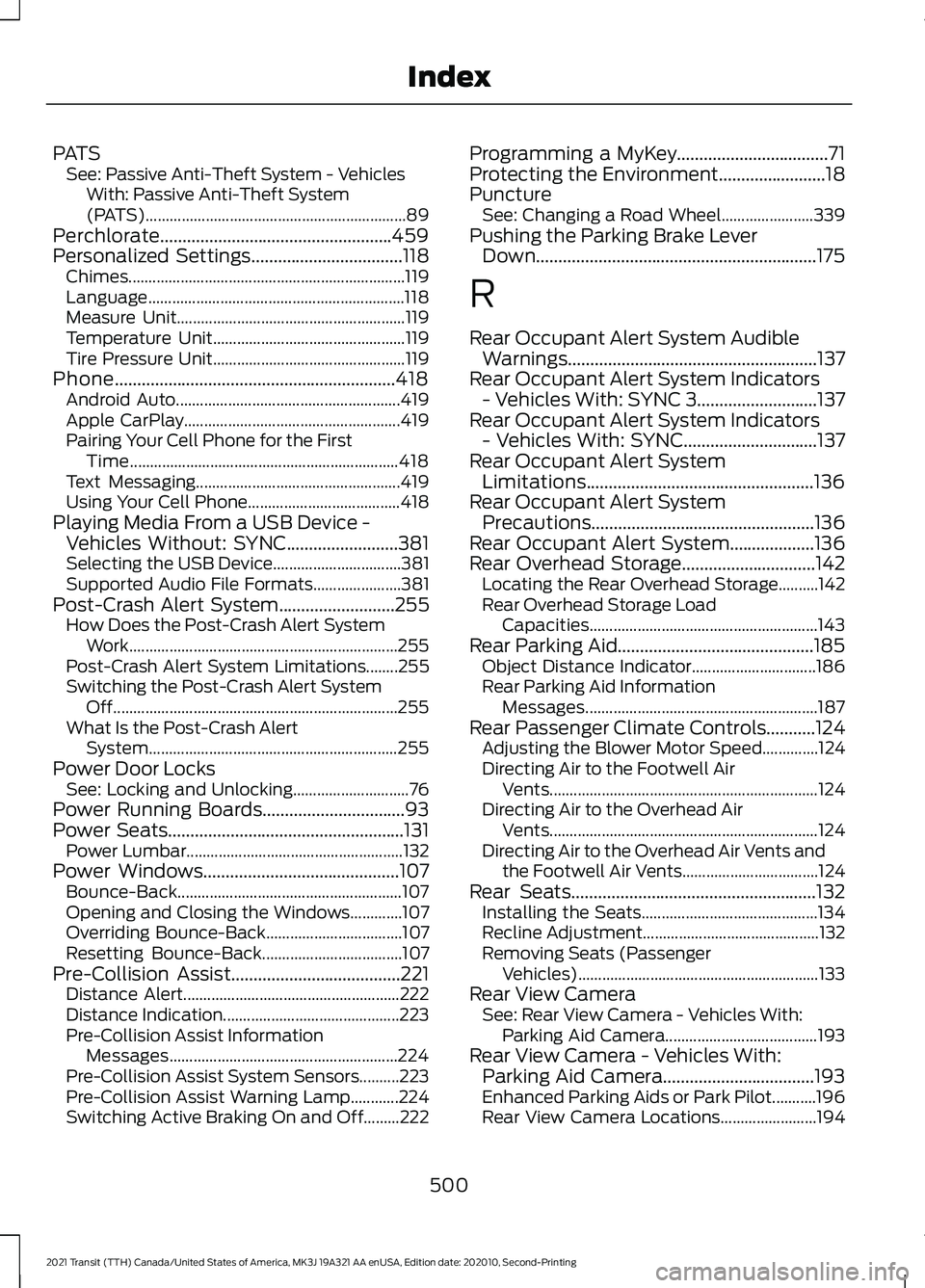
PATS
See: Passive Anti-Theft System - Vehicles
With: Passive Anti-Theft System
(PATS)................................................................. 89
Perchlorate....................................................459
Personalized Settings..................................118
Chimes..................................................................... 119
Language................................................................ 118
Measure Unit......................................................... 119
Temperature Unit................................................ 119
Tire Pressure Unit................................................ 119
Phone...............................................................418 Android Auto........................................................ 419
Apple CarPlay...................................................... 419
Pairing Your Cell Phone for the First Time................................................................... 418
Text Messaging................................................... 419
Using Your Cell Phone...................................... 418
Playing Media From a USB Device - Vehicles Without: SYNC.........................381
Selecting the USB Device................................ 381
Supported Audio File Formats...................... 381
Post-Crash Alert System
..........................255
How Does the Post-Crash Alert System
Work................................................................... 255
Post-Crash Alert System Limitations........255
Switching the Post-Crash Alert System Off....................................................................... 255
What Is the Post-Crash Alert System.............................................................. 255
Power Door Locks See: Locking and Unlocking............................. 76
Power Running Boards
................................93
Power Seats.....................................................131 Power Lumbar...................................................... 132
Power Windows
............................................107
Bounce-Back........................................................ 107
Opening and Closing the Windows.............107
Overriding Bounce-Back.................................. 107
Resetting Bounce-Back................................... 107
Pre-Collision Assist......................................221 Distance Alert...................................................... 222
Distance Indication............................................ 223
Pre-Collision Assist Information Messages......................................................... 224
Pre-Collision Assist System Sensors..........223
Pre-Collision Assist Warning Lamp............224
Switching Active Braking On and Off.........222 Programming a MyKey..................................71
Protecting the Environment........................18
Puncture
See: Changing a Road Wheel....................... 339
Pushing the Parking Brake Lever Down
...............................................................175
R
Rear Occupant Alert System Audible Warnings ........................................................
137
Rear Occupant Alert System Indicators - Vehicles With: SYNC 3...........................137
Rear Occupant Alert System Indicators - Vehicles With: SYNC..............................137
Rear Occupant Alert System Limitations...................................................136
Rear Occupant Alert System Precautions..................................................136
Rear Occupant Alert System...................136
Rear Overhead Storage
..............................142
Locating the Rear Overhead Storage..........142
Rear Overhead Storage Load
Capacities......................................................... 143
Rear Parking Aid............................................185 Object Distance Indicator............................... 186
Rear Parking Aid Information Messages.......................................................... 187
Rear Passenger Climate Controls
...........124
Adjusting the Blower Motor Speed..............124
Directing Air to the Footwell Air
Vents................................................................... 124
Directing Air to the Overhead Air Vents................................................................... 124
Directing Air to the Overhead Air Vents and the Footwell Air Vents.................................. 124
Rear Seats.......................................................132 Installing the Seats............................................ 134
Recline Adjustment............................................ 132
Removing Seats (Passenger Vehicles)............................................................ 133
Rear View Camera See: Rear View Camera - Vehicles With:
Parking Aid Camera...................................... 193
Rear View Camera - Vehicles With: Parking Aid Camera..................................193
Enhanced Parking Aids or Park Pilot...........196
Rear View Camera Locations........................ 194
500
2021 Transit (TTH) Canada/United States of America, MK3J 19A321 AA enUSA, Edition date: 202010, Second-Printing Index