fuel FORD TRANSIT 2021 User Guide
[x] Cancel search | Manufacturer: FORD, Model Year: 2021, Model line: TRANSIT, Model: FORD TRANSIT 2021Pages: 509, PDF Size: 8.21 MB
Page 116 of 509
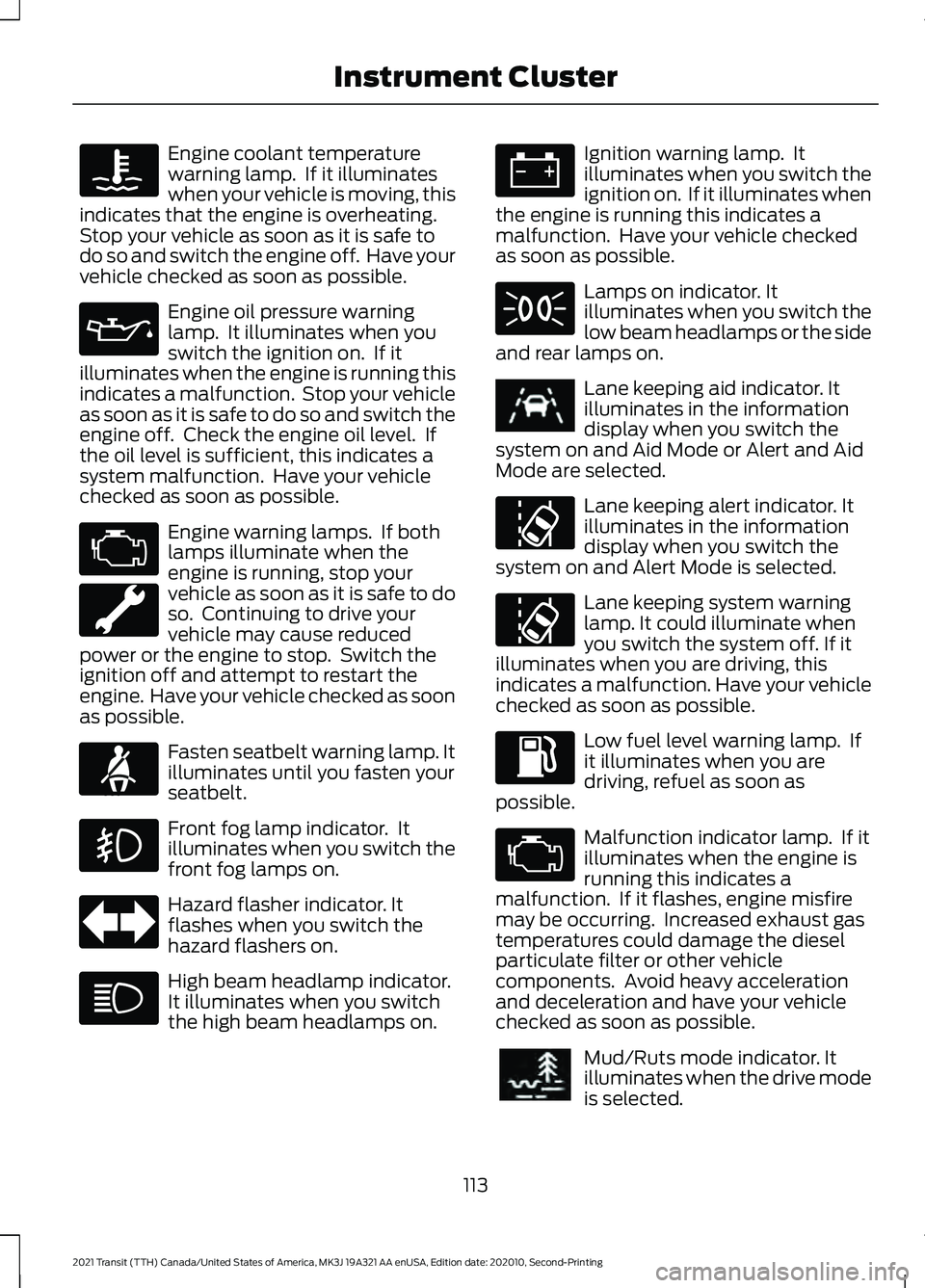
Engine coolant temperature
warning lamp. If it illuminates
when your vehicle is moving, this
indicates that the engine is overheating.
Stop your vehicle as soon as it is safe to
do so and switch the engine off. Have your
vehicle checked as soon as possible. Engine oil pressure warning
lamp. It illuminates when you
switch the ignition on. If it
illuminates when the engine is running this
indicates a malfunction. Stop your vehicle
as soon as it is safe to do so and switch the
engine off. Check the engine oil level. If
the oil level is sufficient, this indicates a
system malfunction. Have your vehicle
checked as soon as possible. Engine warning lamps. If both
lamps illuminate when the
engine is running, stop your
vehicle as soon as it is safe to do
so. Continuing to drive your
vehicle may cause reduced
power or the engine to stop. Switch the
ignition off and attempt to restart the
engine. Have your vehicle checked as soon
as possible. Fasten seatbelt warning lamp. It
illuminates until you fasten your
seatbelt.
Front fog lamp indicator. It
illuminates when you switch the
front fog lamps on.
Hazard flasher indicator. It
flashes when you switch the
hazard flashers on.
High beam headlamp indicator.
It illuminates when you switch
the high beam headlamps on. Ignition warning lamp. It
illuminates when you switch the
ignition on. If it illuminates when
the engine is running this indicates a
malfunction. Have your vehicle checked
as soon as possible. Lamps on indicator. It
illuminates when you switch the
low beam headlamps or the side
and rear lamps on. Lane keeping aid indicator. It
illuminates in the information
display when you switch the
system on and Aid Mode or Alert and Aid
Mode are selected. Lane keeping alert indicator. It
illuminates in the information
display when you switch the
system on and Alert Mode is selected. Lane keeping system warning
lamp. It could illuminate when
you switch the system off. If it
illuminates when you are driving, this
indicates a malfunction. Have your vehicle
checked as soon as possible. Low fuel level warning lamp. If
it illuminates when you are
driving, refuel as soon as
possible. Malfunction indicator lamp. If it
illuminates when the engine is
running this indicates a
malfunction. If it flashes, engine misfire
may be occurring. Increased exhaust gas
temperatures could damage the diesel
particulate filter or other vehicle
components. Avoid heavy acceleration
and deceleration and have your vehicle
checked as soon as possible. Mud/Ruts mode indicator. It
illuminates when the drive mode
is selected.
113
2021 Transit (TTH) Canada/United States of America, MK3J 19A321 AA enUSA, Edition date: 202010, Second-Printing Instrument Cluster E71880 E251020 E296606
Page 119 of 509
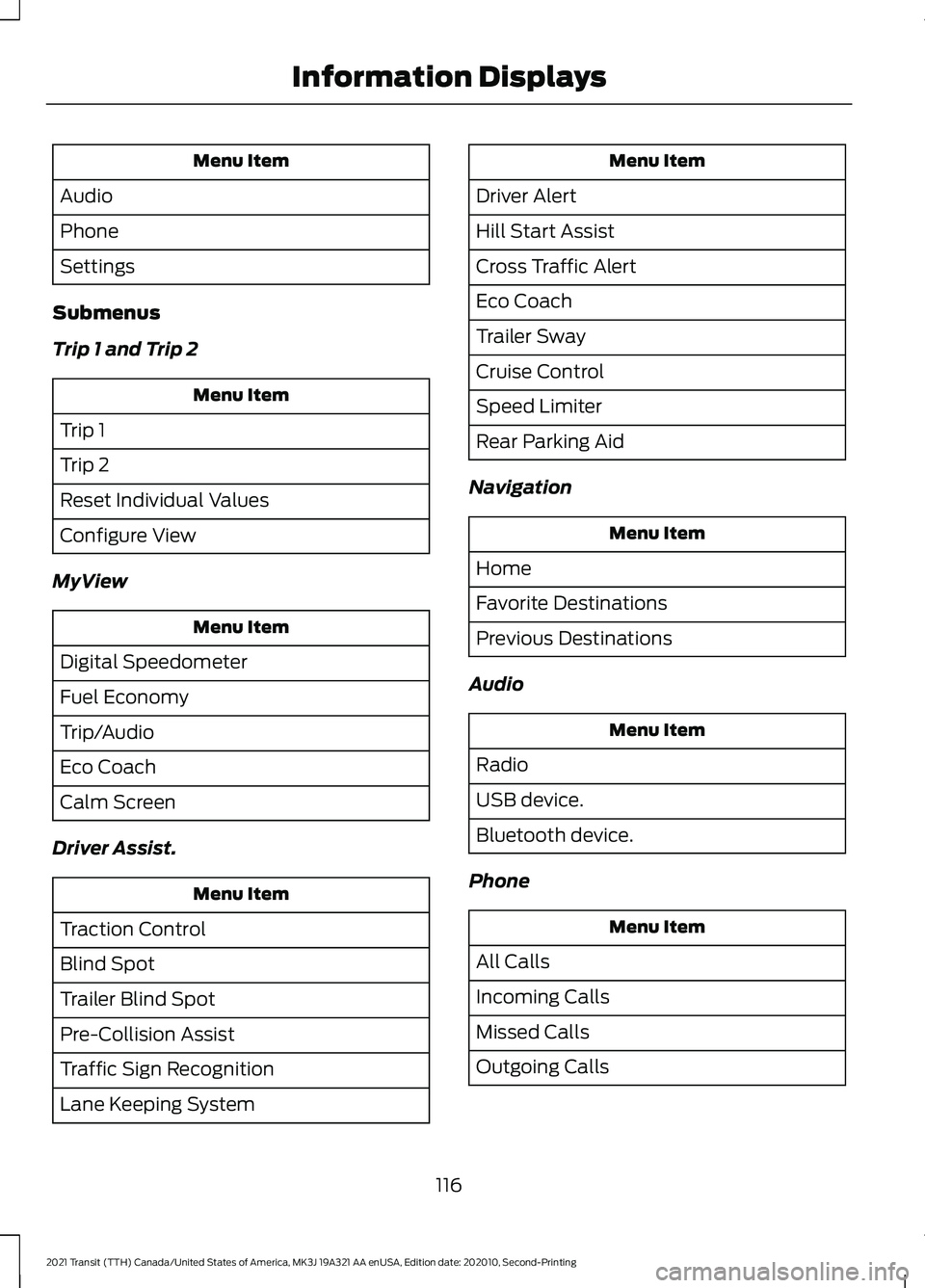
Menu Item
Audio
Phone
Settings
Submenus
Trip 1 and Trip 2 Menu Item
Trip 1
Trip 2
Reset Individual Values
Configure View
MyView Menu Item
Digital Speedometer
Fuel Economy
Trip/Audio
Eco Coach
Calm Screen
Driver Assist. Menu Item
Traction Control
Blind Spot
Trailer Blind Spot
Pre-Collision Assist
Traffic Sign Recognition
Lane Keeping System Menu Item
Driver Alert
Hill Start Assist
Cross Traffic Alert
Eco Coach
Trailer Sway
Cruise Control
Speed Limiter
Rear Parking Aid
Navigation Menu Item
Home
Favorite Destinations
Previous Destinations
Audio Menu Item
Radio
USB device.
Bluetooth device.
Phone Menu Item
All Calls
Incoming Calls
Missed Calls
Outgoing Calls
116
2021 Transit (TTH) Canada/United States of America, MK3J 19A321 AA enUSA, Edition date: 202010, Second-Printing Information Displays
Page 120 of 509
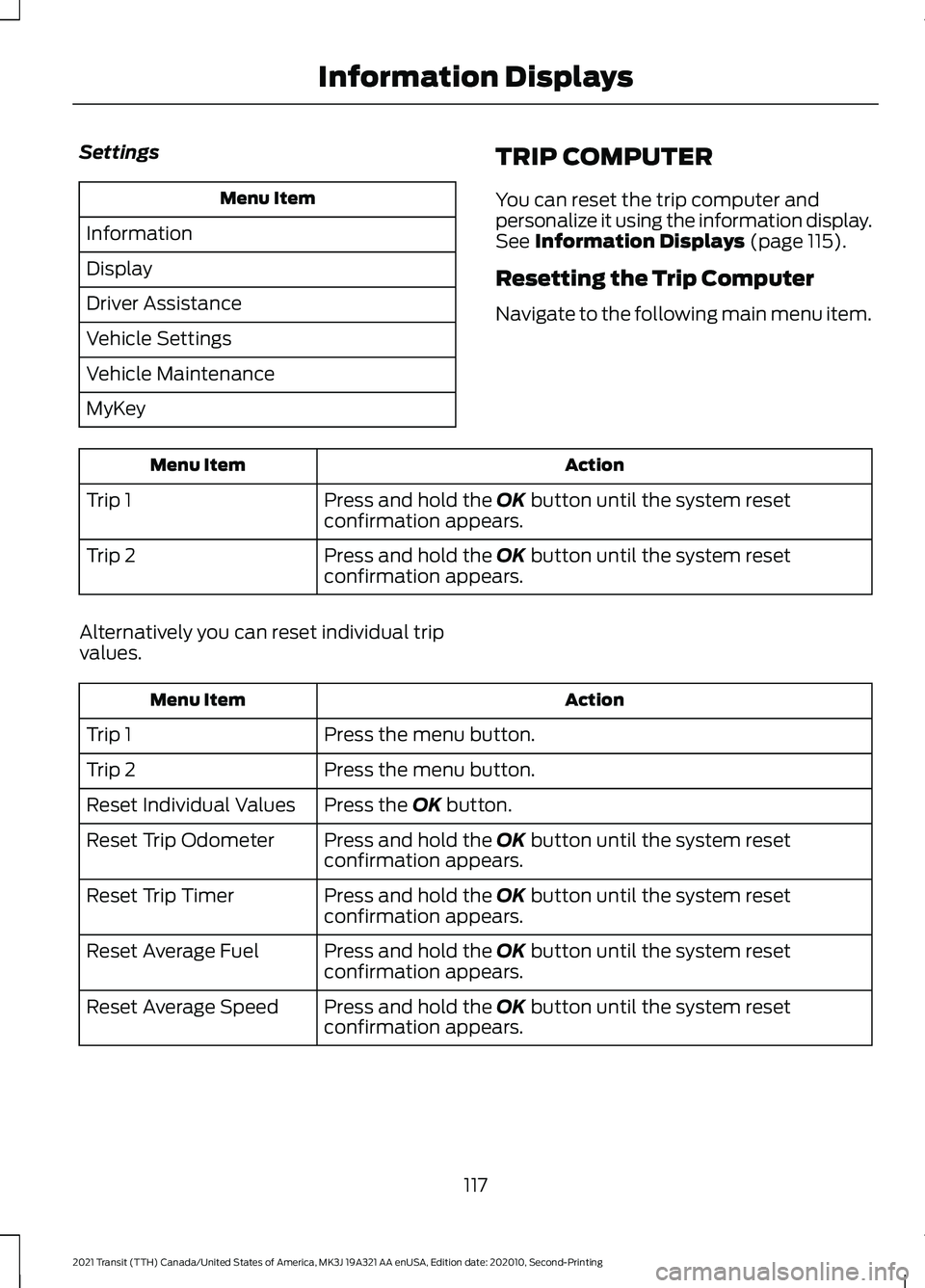
Settings
Menu Item
Information
Display
Driver Assistance
Vehicle Settings
Vehicle Maintenance
MyKey TRIP COMPUTER
You can reset the trip computer and
personalize it using the information display.
See Information Displays (page 115).
Resetting the Trip Computer
Navigate to the following main menu item. Action
Menu Item
Press and hold the
OK button until the system reset
confirmation appears.
Trip 1
Press and hold the
OK button until the system reset
confirmation appears.
Trip 2
Alternatively you can reset individual trip
values. Action
Menu Item
Press the menu button.
Trip 1
Press the menu button.
Trip 2
Press the
OK button.
Reset Individual Values
Press and hold the
OK button until the system reset
confirmation appears.
Reset Trip Odometer
Press and hold the
OK button until the system reset
confirmation appears.
Reset Trip Timer
Press and hold the
OK button until the system reset
confirmation appears.
Reset Average Fuel
Press and hold the
OK button until the system reset
confirmation appears.
Reset Average Speed
117
2021 Transit (TTH) Canada/United States of America, MK3J 19A321 AA enUSA, Edition date: 202010, Second-Printing Information Displays
Page 121 of 509
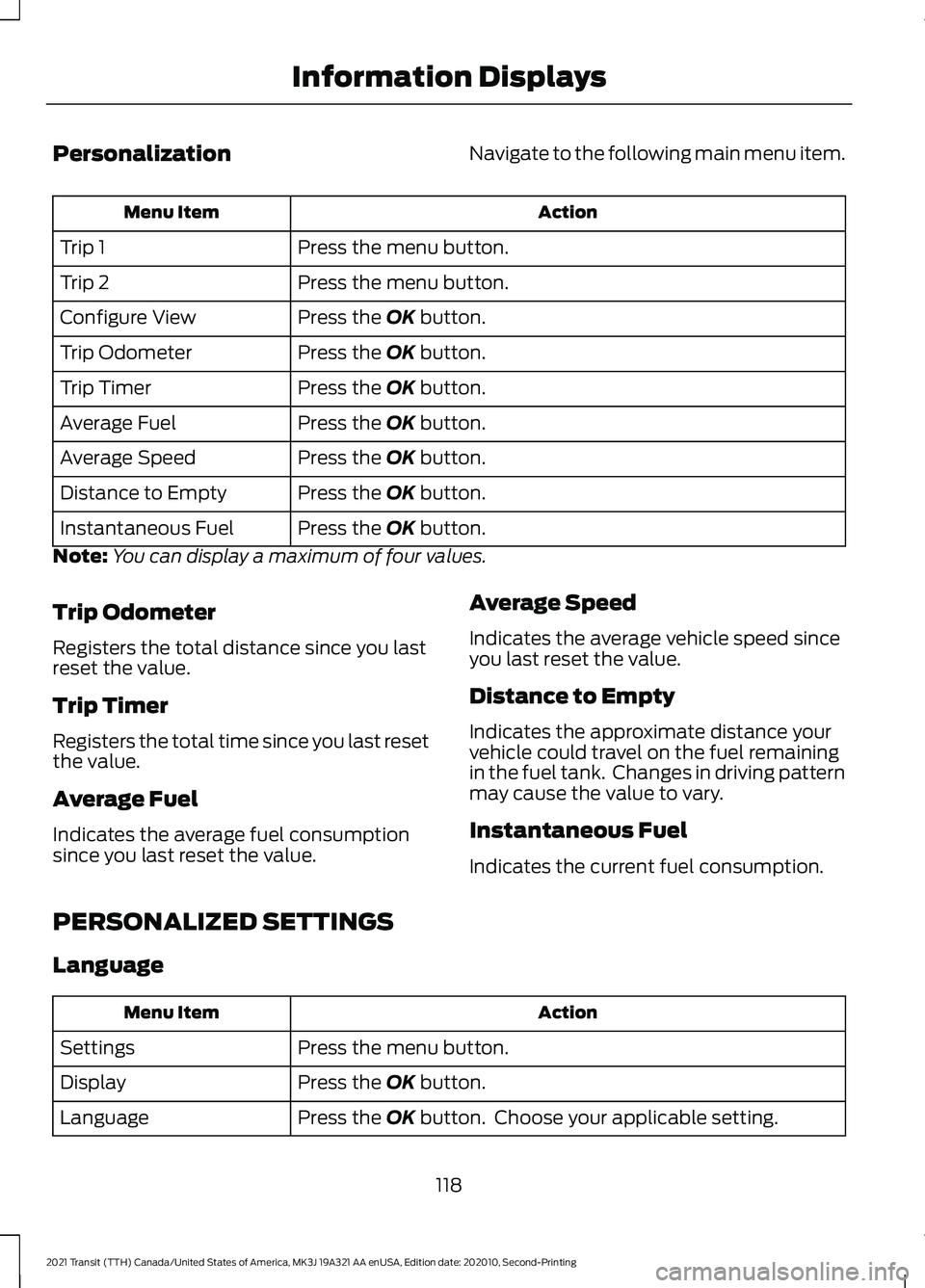
Personalization
Navigate to the following main menu item. Action
Menu Item
Press the menu button.
Trip 1
Press the menu button.
Trip 2
Press the OK button.
Configure View
Press the
OK button.
Trip Odometer
Press the
OK button.
Trip Timer
Press the
OK button.
Average Fuel
Press the
OK button.
Average Speed
Press the
OK button.
Distance to Empty
Press the
OK button.
Instantaneous Fuel
Note: You can display a maximum of four values.
Trip Odometer
Registers the total distance since you last
reset the value.
Trip Timer
Registers the total time since you last reset
the value.
Average Fuel
Indicates the average fuel consumption
since you last reset the value. Average Speed
Indicates the average vehicle speed since
you last reset the value.
Distance to Empty
Indicates the approximate distance your
vehicle could travel on the fuel remaining
in the fuel tank. Changes in driving pattern
may cause the value to vary.
Instantaneous Fuel
Indicates the current fuel consumption.
PERSONALIZED SETTINGS
Language Action
Menu Item
Press the menu button.
Settings
Press the
OK button.
Display
Press the
OK button. Choose your applicable setting.
Language
118
2021 Transit (TTH) Canada/United States of America, MK3J 19A321 AA enUSA, Edition date: 202010, Second-Printing Information Displays
Page 123 of 509
WHAT IS REMOTE START
The system allows you to remotely start
your vehicle and therefore to heat or cool
the interior to a predetermined
temperature.
REMOTE START LIMITATIONS
Remote start does not work if:
•
The alarm horn is sounding.
• The hood is open.
• The transmission is not in park (P).
• Remote start is not enabled.
• The ignition is on.
Note: Do not use remote start if your fuel
level is low.
ENABLING REMOTE START
1. Using the information display controls on the steering wheel, select Settings.
2. Select Vehicle Settings.
3. Select
Remote Start.
4. Switch
System on.
Note: To use remote start, make sure that
the modem is enabled. See
Enabling and
Disabling the Modem (page 371).
REMOTELY STARTING AND
STOPPING THE VEHICLE WARNING: Do not start the engine
in a closed garage or in other enclosed
areas. Exhaust fumes are toxic. Always
open the garage door before you start
the engine. Failure to follow this
instruction could result in personal injury
or death. Use the FordPass App to start the vehicle.
Note:
The turn signal lamps flash twice.
Note: The parking lamps turn on when the
vehicle is running.
Note: The horn sounds if the system fails
to start.
Note: All other vehicle systems remain off
when you have remotely started the vehicle.
Note: You may have to wait a short period
of time before remotely starting the vehicle
after the vehicle stops running.
Note: The vehicle remains secured when
you have remotely started it. A valid key
must be inside your vehicle to switch the
ignition on and drive your vehicle.
Note: A maximum of two remote starts are
allowed. After that you need to turn the
ignition on and off before you can use
remote start again.
Use the FordPass App to switch the vehicle
off.
REMOTE START SETTINGS
Climate Control Settings
1. Using the information display controls on the steering wheel, select Settings.
2. Select Vehicle Settings.
3. Select
Remote Start.
4. Select
Climate Control.
5. Select
Auto or Last Settings.
Note: If you select
Auto, the system
attempts to heat or cool the interior to 72°F
(22°C)
.
Note: If you select
Last Settings, the
system remembers the last used settings.
Note: You cannot adjust the climate control
settings when you have remotely started
the vehicle.
120
2021 Transit (TTH) Canada/United States of America, MK3J 19A321 AA enUSA, Edition date: 202010, Second-Printing Remote Start
Page 127 of 509
Defogging or Clearing the
Windshield of Thin Ice
•
Select maximum defrost.
REAR PASSENGER CLIMATE
CONTROLS
Adjusting the Blower Motor Speed Directing Air to the Overhead Air
Vents
When you direct air to the
overhead air vents, the system
distributes cold air.
Directing Air to the Footwell Air
Vents When you direct air to the
footwell air vents, the system
distributes hot air.
Directing Air to the Overhead Air
Vents and the Footwell Air Vents When you direct air to the
Overhead and footwell air vents,
the system distributes warm air.
HEATED REAR WINDOW Press the button to clear the rear
window of thin ice and fog. The
heated rear window turns off
after a short period of time.
Note: Make sure the engine is on before
operating the heated windows. Note:
Do not use razor blades or other
sharp objects to clean or remove decals
from the inside of the heated rear window.
The vehicle Warranty may not cover
damage caused to the heated rear window
grid lines.
HEATED EXTERIOR MIRRORS
- VEHICLES WITHOUT:
HEATED REAR WINDOW Press the button to clear the
exterior mirrors of thin ice and
fog. Press the button again to
switch them off. They switch off after a
short period of time.
Note: Do not remove ice from the mirrors
with a scraper or adjust the mirror glass
when it is frozen in place. These actions
could cause damage to the glass and
mirrors.
Note: Do not clean the mirror housing or
glass with harsh abrasives, fuel or other
petroleum-based cleaning products.
HEATED EXTERIOR MIRRORS
- VEHICLES WITH: HEATED
REAR WINDOW
When you switch the heated rear window
on, the heated exterior mirrors turn on.
Note: Do not remove ice from the mirrors
with a scraper or adjust the mirror glass
when it is frozen in place.
Note: Do not clean the mirror housing or
glass with harsh abrasives, fuel or other
petroleum-based cleaning products. The
vehicle warranty may not cover damage
caused to the mirror housing or glass.
124
2021 Transit (TTH) Canada/United States of America, MK3J 19A321 AA enUSA, Edition date: 202010, Second-Printing Climate Control E244097
Page 147 of 509
GENERAL INFORMATION
WARNING: Extended idling at high
engine speeds can produce very high
temperatures in the engine and exhaust
system, creating the risk of fire or other
damage. WARNING:
Do not park, idle or
drive your vehicle on dry grass or other
dry ground cover. The emission system
heats up the engine compartment and
exhaust system, creating the risk of fire. WARNING: Do not start the engine
in a closed garage or in other enclosed
areas. Exhaust fumes can be toxic.
Always open the garage door before you
start the engine. WARNING:
Exhaust leaks may
result in entry of harmful and potentially
lethal fumes into the passenger
compartment. If you smell exhaust
fumes inside your vehicle, have your
vehicle inspected immediately. Do not
drive if you smell exhaust fumes.
If you disconnect the battery, your vehicle
may exhibit some unusual driving
characteristics for approximately
5 mi
(8 km) after you reconnect it. This is
because the engine management system
must realign itself with the engine. You
can disregard any unusual driving
characteristics during this period.
The powertrain control system meets all
Canadian interference-causing equipment
standard requirements regulating the
impulse electrical field or radio noise.
When you start the engine, avoid pressing
the accelerator pedal before and during
operation. Only use the accelerator pedal
when you have difficulty starting the
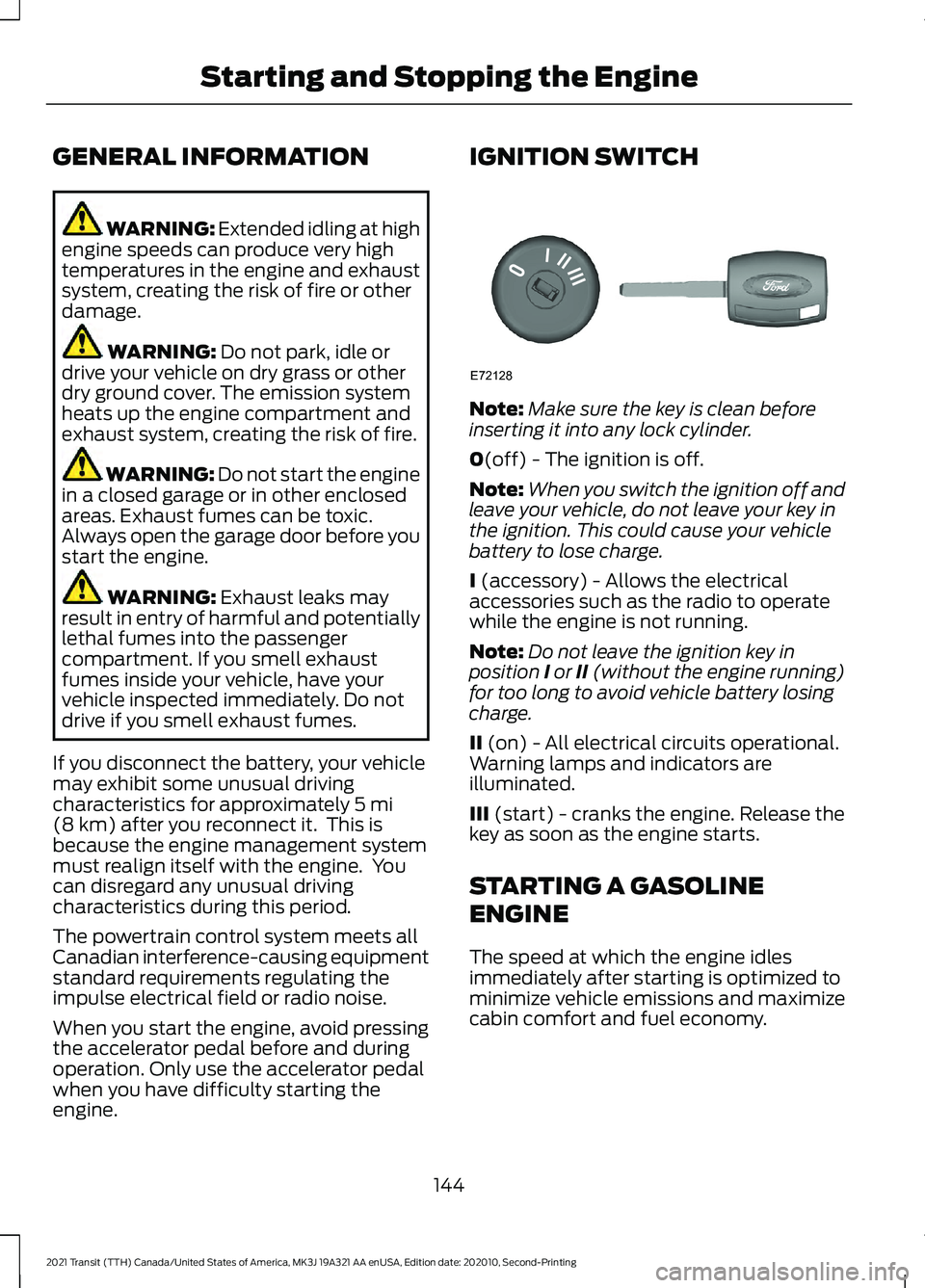
engine. IGNITION SWITCH
Note:
Make sure the key is clean before
inserting it into any lock cylinder.
0
(off) - The ignition is off.
Note: When you switch the ignition off and
leave your vehicle, do not leave your key in
the ignition. This could cause your vehicle
battery to lose charge.
I
(accessory) - Allows the electrical
accessories such as the radio to operate
while the engine is not running.
Note: Do not leave the ignition key in
position I or II (without the engine running)
for too long to avoid vehicle battery losing
charge.
II
(on) - All electrical circuits operational.
Warning lamps and indicators are
illuminated.
III
(start) - cranks the engine. Release the
key as soon as the engine starts.
STARTING A GASOLINE
ENGINE
The speed at which the engine idles
immediately after starting is optimized to
minimize vehicle emissions and maximize
cabin comfort and fuel economy.
144
2021 Transit (TTH) Canada/United States of America, MK3J 19A321 AA enUSA, Edition date: 202010, Second-Printing Starting and Stopping the EngineE72128
Page 151 of 509
WHAT IS AUTO-START-STOP
The system is designed to help reduce fuel
consumption and CO
2 emissions by
stopping the engine when it is idling, for
example at traffic lights.
AUTO-START-STOP
PRECAUTIONS WARNING: Apply the parking
brake, shift into park (P), switch the
ignition off and remove the key before
you leave your vehicle. Failure to follow
this instruction could result in personal
injury or death. WARNING:
Apply the parking
brake, shift into park (P), switch the
ignition off and remove the key before
you open the hood or have any service
or repair work completed. If you do not
switch the ignition off, the engine could
restart at any time. Failure to follow this
instruction could result in personal injury
or death. SWITCHING AUTO-START-
STOP ON AND OFF
The system turns on when you switch the
ignition on. Press the switch to switch the
system off.
Note: OFF
illuminates in the switch.
Press the switch again to switch the
system back on.
Note: The system is designed to turn off if
it detects a malfunction. If the system
malfunctions, have your vehicle checked as
soon as possible.
STOPPING THE ENGINE
Stop your vehicle, keep your foot on the
brake pedal and the transmission in drive
(D).
Note: Power assist steering turns off when
the engine stops.
RESTARTING THE ENGINE
Release the brake pedal or press the
accelerator pedal.
A message appears in the information
display if the system requires you to take
action. Action
Condition
Message
Press the brake pedal to
restart the engine.
The system needs to restart
the engine but requires your
confirmation.
Auto StartStop Press Brake
to Start Engine
Press the brake pedal or the
accelerator pedal to restart
the engine.
The system needs to restart
the engine but requires your
confirmation.
Auto StartStop Press a
Pedal to Start Engine
148
2021 Transit (TTH) Canada/United States of America, MK3J 19A321 AA enUSA, Edition date: 202010, Second-Printing Auto-Start-Stop - 3.5L Ecoboost™
Page 153 of 509
AUTO-START-STOP –
FREQUENTLY ASKED QUESTIONS
Why does the engine not always
stop when I expect it to?
The system is designed to work in a way
that complements other vehicle systems,
allowing them to operate at optimum
performance.
The system does not stop the engine if:
•
The driver door is open.
• The driver seatbelt is unfastened.
• Your vehicle is at high altitude.
• The heated windshield is on.
• The transmission is in manual (M).
• Your vehicle is on a steep grade.
• The engine is warming up.
• The outside temperature is too low or
too high.
• The battery charge is low.
• The battery temperature is outside the
optimal operating range.
• The engine is required to run to
maintain interior climate and reduce
fogging.
Why does the engine sometimes
restart when I do not expect it to?
The system is designed to work in a way
that complements other vehicle systems,
allowing them to operate at optimum
performance.
The system restarts the engine if:
• You switch the heated windshield on.
• You switch maximum defrost on.
• Your vehicle starts to roll downhill in
neutral. •
The engine is required to run to
maintain adequate brake system
assistance.
• The engine is required to run to
maintain interior climate and reduce
fogging.
Can I permanently switch the
system off?
No. The system plays an important role in
reducing the fuel consumption and the CO 2
emissions.
Will the frequent engine starts
cause parts to wear out?
Your vehicle has an enhanced battery and
starter motor that are designed for the
increased number of engine starts.
150
2021 Transit (TTH) Canada/United States of America, MK3J 19A321 AA enUSA, Edition date: 202010, Second-Printing Auto-Start-Stop - 3.5L Ecoboost™
Page 154 of 509
SAFETY PRECAUTIONS
WARNING: Do not overfill the fuel
tank. The pressure in an overfilled tank
may cause leakage and lead to fuel spray
and fire. WARNING:
The fuel system may
be under pressure. If you hear a hissing
sound near the fuel filler inlet, do not
refuel until the sound stops. Otherwise,
fuel may spray out, which could cause
serious personal injury. WARNING: Fuels can cause serious
injury or death if misused or mishandled. WARNING:
Fuel may contain
benzene, which is a cancer-causing
agent. WARNING: When refueling always
shut the engine off and never allow
sparks or open flames near the fuel tank
filler valve. Never smoke or use a cell
phone while refueling. Fuel vapor is
extremely hazardous under certain
conditions. Avoid inhaling excess fumes.
Follow these guidelines when refueling:
• Extinguish all smoking materials and
any open flames before refueling your
vehicle.
• Always switch the engine off before
refueling.
• Automotive fuels can be harmful or
fatal if swallowed. Fuel is highly toxic
and if swallowed can cause death or
permanent injury. If fuel is swallowed
immediately call a physician, even if no
symptoms are immediately apparent.
The toxic effects of fuel may not be
apparent for hours. •
Avoid inhaling fuel vapors. Inhaling fuel
vapor can lead to eye and respiratory
tract irritation. In severe cases,
excessive or prolonged breathing of
fuel vapor can cause serious illness and
permanent injury.
• Avoid getting fuel in your eyes. If you
splash fuel in your eyes, immediately
remove contact lenses (if worn), flush
with water for 15 minutes and seek
medical attention. Failure to seek
proper medical attention could lead to
permanent injury.
• Fuels can be harmful if absorbed
through the skin. If you splash fuel on
your skin, clothing or both, promptly
remove contaminated clothing and
thoroughly wash your skin with soap
and water. Repeated or prolonged skin
contact causes skin irritation.
• Be particularly careful if you are taking
Antabuse or other forms of Disulfiram
for the treatment of alcoholism.
Breathing fuel vapors could cause an
adverse reaction, serious personal
injury or sickness. Immediately call a
physician if you experience any adverse
reactions.
FUEL QUALITY - E85
Choosing the Right Fuel - Flex Fuel
Vehicles
Flex fuel vehicles have one of the following
identifiers:
• Yellow fuel filler cap.
• Yellow bezel around the fuel filler inlet.
• Yellow fuel filler housing.
• Yellow E85 label on the fuel tank filler
door.
151
2021 Transit (TTH) Canada/United States of America, MK3J 19A321 AA enUSA, Edition date: 202010, Second-Printing Fuel and Refueling