vents FORD TRANSIT 2021 User Guide
[x] Cancel search | Manufacturer: FORD, Model Year: 2021, Model line: TRANSIT, Model: FORD TRANSIT 2021Pages: 509, PDF Size: 8.21 MB
Page 223 of 509
Trip Summary
The calculated trip summary is shown as
five colored bars. The bars travel from left
to right as the calculated efficiency levels
increase. The bars indicate the average
efficiency level for acceleration,
deceleration, speed, gear shifting and
compliance score during the total distance
traveled by your vehicle for both last and
current trips.
Note:
Vehicles with an automatic
transmission do not have a bar for gear
shifting.
Viewing the trip summary
1. Using the information display controls on the steering wheel, select MyView.
2. Select
Eco Coach.
3. Switch the engine off.
4. Press the
OK button.
STEERING
Electric Power Steering WARNING:
The electric power
steering system has diagnostic checks
that continuously monitor the system. If
a fault is detected, a message displays
in the information display. Stop your
vehicle as soon as it is safe to do so.
Switch the ignition off. After at least 10
seconds, switch the ignition on and
watch the information display for a
steering system warning message. If a
steering system warning message
returns, have the system checked as
soon as possible. WARNING:
If the system detects
an error, you may not feel a difference in
the steering, however a serious condition
may exist. Have your vehicle checked as
soon as possible. Failure to do so may
result in loss of steering control.
Your vehicle has an electric power steering
system, there is no fluid reservoir, no
maintenance is required.
If your vehicle loses electrical power while
you are driving, electric power steering
assistance is lost. The steering system still
operates and you can steer your vehicle
manually. Manually steering your vehicle
requires more effort.
Extreme continuous steering may increase
the effort required for you to steer your
vehicle, this increased effort prevents
overheating and permanent damage to
the steering system. You do not lose the
ability to steer your vehicle manually.
Typical steering and driving maneuvers
allow the system to cool and return to
normal operation.
Steering Tips
If the steering wanders or pulls, check for:
• Correct tire pressures.
• Uneven tire wear.
• Loose or worn suspension
components.
• Loose or worn steering components.
• Improper vehicle alignment.
Note: A high crown in the road or high
crosswinds may also make the steering
seem to wander or pull.
220
2021 Transit (TTH) Canada/United States of America, MK3J 19A321 AA enUSA, Edition date: 202010, Second-Printing Driving Aids
Page 257 of 509
If you need to have your vehicle towed,
contact a professional towing service or,
if you are a member of a roadside
assistance program, your roadside
assistance service provider.
We recommend the use of a wheel lift and
dollies or flatbed equipment to tow your
vehicle. Do not tow with a slingbelt. Ford
Motor Company has not approved a
slingbelt towing procedure. Vehicle
damage may occur if towed incorrectly, or
by any other means.
Ford Motor Company produces a towing
manual for all authorized tow truck
operators. Have your tow truck operator
refer to this manual for proper hook-up
and towing procedures for your vehicle.
It is acceptable to have your front-wheel
drive vehicle towed from the front if using
proper wheel lift equipment to raise the
front wheels off the ground. When towing
in this manner, the rear wheels can remain
on the ground.
Front-wheel drive vehicles must have the
front wheels placed on a tow dolly when
towing your vehicle from the rear using
wheel lift equipment. This prevents
damage to the transmission.
Towing an all-wheel or four-wheel drive
vehicle requires that all wheels be off the
ground, such as using a wheel lift and
dollies or flatbed equipment. This prevents
damage to the transmission, all-wheel or
four-wheel drive system and vehicle.
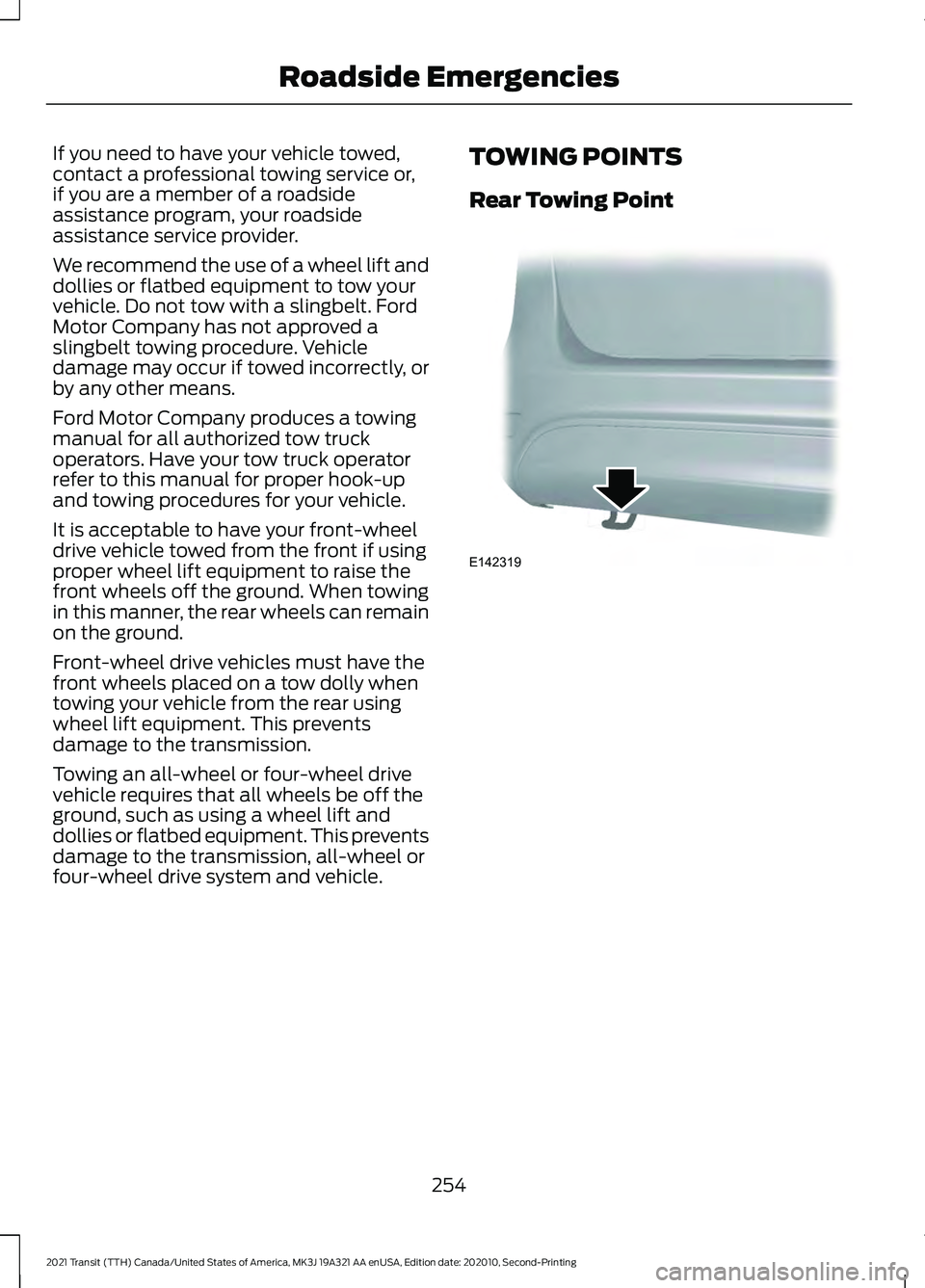
TOWING POINTS
Rear Towing Point
254
2021 Transit (TTH) Canada/United States of America, MK3J 19A321 AA enUSA, Edition date: 202010, Second-Printing Roadside EmergenciesE142319
Page 306 of 509
Specification
Name
ZC-54(U.S. & Canada) -
Motorcraft® Spot and Stain Remover(U.S.)
(Canada)
ZC-14(U.S.)
ESR-M14P5-A
Motorcraft® Ultra-Clear Spray Glass Cleaner(U.S.)
Motorcraft® Premium Glass Cleaner / Nettoie-vitres
de qualité supérieure Motorcraft®(Canada)
ZC-23(U.S.)
CXC-100(Canada)
-
Motorcraft® Wheel and Tire Cleaner(U.S.)
Motorcraft® Wheel and Tire Cleaner / Nettoyant
pour roues et pneus Motorcraft®(Canada)
ZC-37-A(U.S. & Canada)
CLEANING THE EXTERIOR
We recommend that you wash your vehicle
with a sponge and lukewarm water
containing a car shampoo.
Note: If you use a car wash with a waxing
cycle, make sure that you remove the wax
from the windshield and the wiper blades.
Note: Before using a car wash, check that
it is suitable for your vehicle.
Note: Some car washes use water at high
pressure. Due to this, water droplets may
enter inside your vehicle and could also
damage certain parts of your vehicle.
Note: Remove the antenna before using an
automatic car wash.
Note: Switch the blower motor off to
prevent contamination of the cabin air filter.
Cleaning the Headlamps
Note: Do not scrape the headlamps.
Note: Do not use abrasives, alcoholic
solvents or chemical solvents to clean the
headlamps. Note:
Do not wipe the headlamps when
they are dry.
Cleaning the Rear Window
Note: Do not scrape the inside of the rear
window.
Note: Do not use abrasives, alcoholic
solvents or chemical solvents to clean the
inside of the rear window.
Clean the inside of the rear window with a
soft, lint-free cloth and non-abrasive
cleaner
Cleaning the Chrome Trim
Note: Do not use abrasives, alcoholic
solvents or chemical solvents to clean the
chrome trim. Use soapy water.
Dry the chrome trim with a clean, soft cloth
Note: Do not apply cleaning product to hot
surfaces and do not leave cleaning product
on chrome surfaces for a period of time
exceeding that which is recommended.
Note: Industrial-strength (heavy-duty)
cleaners, or cleaning chemicals, may cause
damage over a period of time.
303
2021 Transit (TTH) Canada/United States of America, MK3J 19A321 AA enUSA, Edition date: 202010, Second-Printing Vehicle Care
Page 309 of 509
Seatbelts
WARNING: Do not use cleaning
solvents, bleach or dye on the vehicle's
seatbelts, as these actions may weaken
the belt webbing. WARNING:
On vehicles equipped
with seat-mounted airbags, do not use
chemical solvents or strong detergents.
Such products could contaminate the
side airbag system and affect
performance of the side airbag in a crash.
Note: Do not use abrasives, or chemical
solvents to clean them.
Note: Do not allow moisture to penetrate
the seatbelt retractor mechanism.
Cleaning may safely be carried out using
mild soap and water. Let them dry
naturally, away from artificial heat.
Leather Interior
(If Equipped)
Note: Follow the same procedure as
cleaning leather seats for cleaning leather
instrument panels and leather interior trim
surfaces.
For routine cleaning, wipe the surface with
a soft, damp cloth and a mild soap and
water solution. Dry the area with a clean,
soft cloth.
For cleaning and removing stains such as
dye transfer, use a leather cleaning product
for automotive interiors.
Do not use the following products as these
may damage the leather:
• Oil and petroleum or silicone-based
leather conditioners.
• Household cleaners. •
Alcohol solutions.
• Solvents or cleaners intended
specifically for rubber, vinyl and
plastics.
Suede Micro Fiber Fabric
(If Equipped)
Note: Do not steam clean.
Note: To avoid spots or discoloration, clean
the entire surface.
Do not use the following products:
• Leather care products.
• Household cleaners.
• Alcoholic solutions.
• Spot removers.
• Shoe polish.
To clean:
• Remove dust and loose dirt with a
vacuum cleaner.
• Wipe the surface with a soft, damp
cloth and a mild soap and water
solution. Dry the area with a clean, soft
cloth.
• If a ring forms on the fabric after spot
cleaning, clean the entire area
immediately, but do not soak or the
ring will set.
Instrument Cluster Screens, LCD
Screens and Radio Screens
Note: Do not use abrasives, alcoholic
solvents or chemical solvents to clean the
instrument cluster screens, LCD screens or
radio screens. These cleaning products can
damage the screens.
Clean the instrument panel and cluster
lens with a clean, damp and soft cloth,
then use a clean, dry and soft cloth to dry
these areas.
Do not spray any liquid directly onto the
screens.
306
2021 Transit (TTH) Canada/United States of America, MK3J 19A321 AA enUSA, Edition date: 202010, Second-Printing Vehicle Care
Page 310 of 509
Do not use a microfiber cloth to clean the
bezel around the display screens as it could
damage the surface.
Rear Windows
Note:
Do not use any abrasive materials to
clean the interior of the rear windows.
Note: Do not install stickers or labels to the
interior of the rear windows.
Mirrors
Do not clean the housing or glass of any
mirror with harsh abrasives, fuel or other
petroleum or ammonia-based cleaning
products.
Storage Compartments, Cup
Holders and Ashtrays
To clean:
• Take out any removable inserts.
• Wipe the surface with a soft, damp
cloth and a mild soap and water
solution. Dry the area with a clean, soft
cloth.
CLEANING THE INSTRUMENT
PANEL AND INSTRUMENT
CLUSTER LENS WARNING: Do not use chemical
solvents or strong detergents when
cleaning the steering wheel or
instrument panel to avoid contamination
of the airbag system.
Note: Follow the same procedure as
cleaning leather seats for cleaning leather
instrument panels and leather interior trim
surfaces. Clean the instrument panel and cluster
lens with a clean, damp and soft cloth,
then use a clean, dry and soft cloth to dry
these areas.
•
Avoid cleaners or polishes that increase
the gloss of the upper portion of the
instrument panel. The dull finish in this
area helps protect you from
undesirable windshield reflection.
• Do not use any household cleaning
products or glass cleaners as these
may damage the finish of the
instrument panel, interior trim and
cluster lens.
• Wash or wipe your hands clean if you
have been in contact with certain
products such as insect repellent and
suntan lotion to avoid possible damage
to the interior painted surfaces.
• Do not allow air fresheners and hand
sanitizers to spill onto interior surfaces.
If a spill occurs, wipe off immediately.
Your warranty may not cover these
damages.
If a staining liquid like coffee or juice has
been spilled on the instrument panel or on
interior trim surfaces:
1. Wipe up spilled liquid using a clean, soft cloth as quickly as possible.
2. Use Motorcraft Premium Leather and Vinyl Cleaner or a commercially
available leather cleaning product for
automotive interiors. Test any cleaner
or stain remover on an inconspicuous
area.
3. Alternatively, wipe the surface with a clean, soft cloth and a mild soap and
water solution. Dry the area with a
clean, soft cloth.
4. If necessary, apply more soap and water solution or cleaning product to
a clean, soft cloth and press it onto the
soiled area. Allow this to set at room
temperature for 30 minutes.
307
2021 Transit (TTH) Canada/United States of America, MK3J 19A321 AA enUSA, Edition date: 202010, Second-Printing Vehicle Care
Page 312 of 509
Body
•
Wash your vehicle thoroughly to
remove dirt, grease, oil, tar or mud from
exterior surfaces, rear-wheel housing
and the underside of front fenders.
• Periodically wash your vehicle if it is
stored in exposed locations.
• Touch-up exposed or primed metal to
prevent rust.
• Cover chrome and stainless steel parts
with a thick coat of auto wax to prevent
discoloration. Re-wax as necessary
when you wash your vehicle.
• Lubricate all hood, door and luggage
compartment hinges and latches with
a light grade oil.
• Cover interior trim to prevent fading.
• Keep all rubber parts free from oil and
solvents.
Engine
• Change the engine oil and filter prior to
storage because used engine oil
contains contaminates which may
cause engine damage.
• Start the engine every 15 days for a
minimum of 15 minutes. Run at fast idle
with the climate controls set to defrost
until the engine reaches normal
operating temperature.
• With your foot on the brake, shift
through all the gears while the engine
is running.
• We recommend that you change the
engine oil before you use your vehicle
again.
Fuel system
• Fill the fuel tank with high-quality fuel
until the first automatic shutoff of the
fuel pump nozzle. Cooling system
•
Protect against freezing temperatures.
• When removing your vehicle from
storage, check coolant fluid level.
Confirm that there are no cooling
system leaks and that fluid is at the
recommended level.
Battery
• Check and recharge as necessary. Keep
connections clean.
• If storing your vehicle for more than 30
days without recharging the battery,
we recommend that you disconnect
the battery cables to maintain battery
charge for quick starting.
Note: It is necessary to reset memory
features if battery cables are disconnected.
Brakes
• Make sure the brakes and parking brake
release fully.
Tires
• Maintain recommended air pressure.
Miscellaneous
• Make sure all linkages, cables, levers
and pins under your vehicle are covered
with grease to prevent rust.
• Move vehicles at least 25 ft (7.5 m)
every 15 days to lubricate working parts
and prevent corrosion.
Removing Vehicle From Storage
When your vehicle is ready to come out of
storage, do the following:
• Wash your vehicle to remove any dirt
or grease film build-up on window
surfaces.
• Check windshield wipers for any
deterioration.
309
2021 Transit (TTH) Canada/United States of America, MK3J 19A321 AA enUSA, Edition date: 202010, Second-Printing Vehicle Care
Page 338 of 509
You must check the tire
pressures (including the spare
tire where applicable) every two
weeks when the tires are cold. See
Wheels and Tires (page 311). The tire
pressures are also on the tire inflation
pressure label (located on the edge of
driver door or the B-Pillar).
As a driver assistance feature your vehicle
has a tire pressure monitoring system. A
warning lamp will illuminate when one or
more of the tires are significantly
under-inflated. If the low tire pressure
warning lamp illuminates, you should stop
your vehicle as soon as it is safe to do so,
check the tires and inflate them to the
correct pressure.
Driving on under-inflated tires can:
• Cause them to overheat.
• Lead to tire failure.
• Reduce fuel efficiency.
• Reduce tire life.
• Affect vehicle handling or stopping
ability.
The system is not substitute for correct tire
maintenance.
You must maintain the correct tire
pressures, even if low tire pressure has not
illuminated the warning lamp.
The tire pressure monitoring system has a
system malfunction indicator to warn you
when the system is not operating correctly.
The malfunction indicator and low tire
pressure warning lamp have a combined
function. When the system detects a
malfunction, the warning lamp will flash
for approximately one minute and then
remain illuminated. This sequence will
occur every time you switch the ignition on
while the malfunction remains. The
system has detected a fault that requires
service. When the malfunction indicator is
illuminated, the system may not be able
to detect or signal low tire pressures. A
malfunction may occur for a variety of
reasons, including the installation of a
replacement tire or wheel that prevents
the system from functioning correctly.
Always check the tire pressure monitoring
system malfunction warning after
replacing one or more tires or wheels on
your vehicle. Make sure the replacement
tires or wheels allow the system to
continue to function correctly.
This device complies with Part 15 of the
FCC Rules and with Licence exempt RSS
Standards of Industry Canada. Operation
is subject to the following two conditions:
•
This device may not cause harmful
interference.
• This device must accept any
interference received, including
interference that may cause undesired
operation. WARNING:
Changes or
modifications not expressively approved
by the party responsible for compliance
could void the user's authority to operate
the equipment. The term "IC:" before the
radio certification number only signifies
that Industry Canada technical
specifications were met.
How Temperature Affects the Tire
Pressures
Under normal driving conditions tire
pressures may increase by up to
4 psi
(0.3 bar) from a cold start situation.
335
2021 Transit (TTH) Canada/United States of America, MK3J 19A321 AA enUSA, Edition date: 202010, Second-Printing Wheels and Tires
Page 393 of 509
App Permissions
App permissions are organized by groups.
You can grant these group permissions
individually. You can change a permission
group status any time when not driving, by
using the settings menu.
When you launch an app using SYNC, the
system may ask you to grant certain
permissions, for example:
•
To allow your vehicle to provide vehicle
information to the app such as, but not
limited to: Fuel level, fuel economy, fuel
consumption, engine speed, rain
sensor, odometer, VIN, external
temperature, gear position, tire
pressure, and head lamp status.
• To allow your vehicle to provide driving
characteristic information such as, but
not limited to: MyKey, seatbelt status,
engine revolutions per minute, gear
position, braking events, steering wheel
angle, and accelerator pedal position.
• To allow your vehicle to provide
location information, including: GPS
and speed.
• To allow the app to send push
notifications using the vehicle display
and voice capabilities while running in
a background state. Push notifications
may be particularly useful for news or
location based apps.
Note: You only need to grant permissions
the first time you use an app with SYNC.
Note: Ford is not responsible or liable for
any damages or loss of privacy relating to
usage of an app, or dissemination of any
vehicle data that you approve Ford to
provide to an app. Enabling SYNC Mobile Apps
In order to enable mobile apps, SYNC
requires user consent to send and receive
app authorization information and updates
using the data plan associated with the
connected device.
Data is sent to Ford in the United States
through the connected device. The
information is encrypted and includes, for
example, the vehicle identification number
of your vehicle, the SYNC module serial
number, odometer, enabled apps, usage
statistics and debugging information.
Updates may take place.
Note:
You must enable mobile apps for
each connected device the first time you
select a mobile app using the system.
Note: Standard data rates apply. Ford is
not responsible for any additional charges
you may receive from your service provider,
when your vehicle sends or receives data
through the connected device. This includes
any additional charges incurred due to
driving in areas when roaming out of a home
network.
USING SYNC™ WITH YOUR
MEDIA PLAYER
SYNC supports digital media sources
including: iPod, Bluetooth® devices, and
most USB drives. SYNC also supports
audio formats, such as MP3, WMA, WAV
and ACC.
Media Sources
The
AUX or MEDIA button allows you to
view and select available media sources.
Press the
AUX or MEDIA button to view
your sources. Use the directional arrows
and OK button to select your source. You
can also use the steering wheel audio
controls.
390
2021 Transit (TTH) Canada/United States of America, MK3J 19A321 AA enUSA, Edition date: 202010, Second-Printing SYNC™
Page 409 of 509
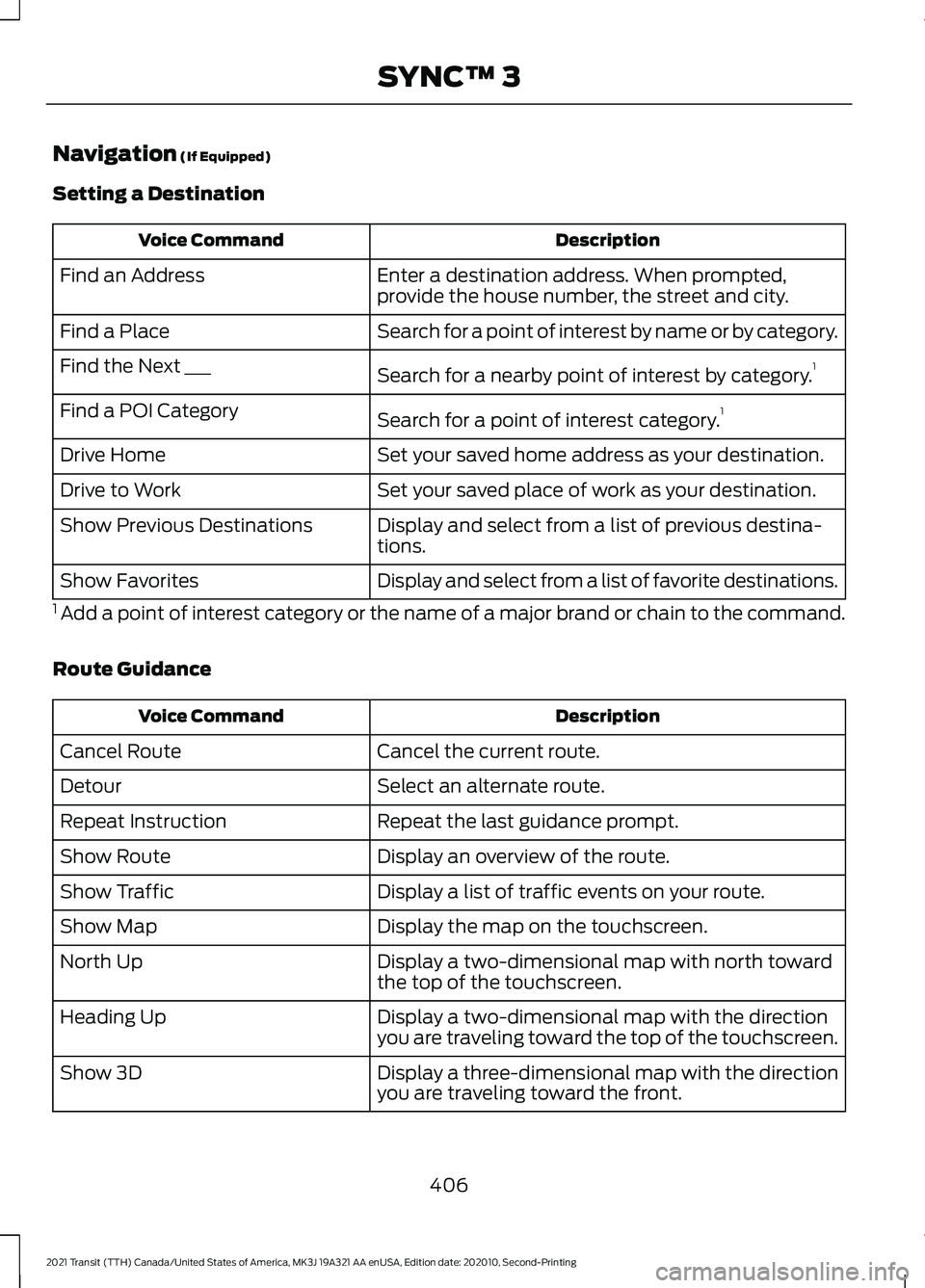
Navigation (If Equipped)
Setting a Destination Description
Voice Command
Enter a destination address. When prompted,
provide the house number, the street and city.
Find an Address
Search for a point of interest by name or by category.
Find a Place
Search for a nearby point of interest by category. 1
Find the Next ___
Search for a point of interest category. 1
Find a POI Category
Set your saved home address as your destination.
Drive Home
Set your saved place of work as your destination.
Drive to Work
Display and select from a list of previous destina-
tions.
Show Previous Destinations
Display and select from a list of favorite destinations.
Show Favorites
1 Add a point of interest category or the name of a major brand or chain to the command.
Route Guidance Description
Voice Command
Cancel the current route.
Cancel Route
Select an alternate route.
Detour
Repeat the last guidance prompt.
Repeat Instruction
Display an overview of the route.
Show Route
Display a list of traffic events on your route.
Show Traffic
Display the map on the touchscreen.
Show Map
Display a two-dimensional map with north toward
the top of the touchscreen.
North Up
Display a two-dimensional map with the direction
you are traveling toward the top of the touchscreen.
Heading Up
Display a three-dimensional map with the direction
you are traveling toward the front.
Show 3D
406
2021 Transit (TTH) Canada/United States of America, MK3J 19A321 AA enUSA, Edition date: 202010, Second-Printing SYNC™ 3
Page 501 of 509
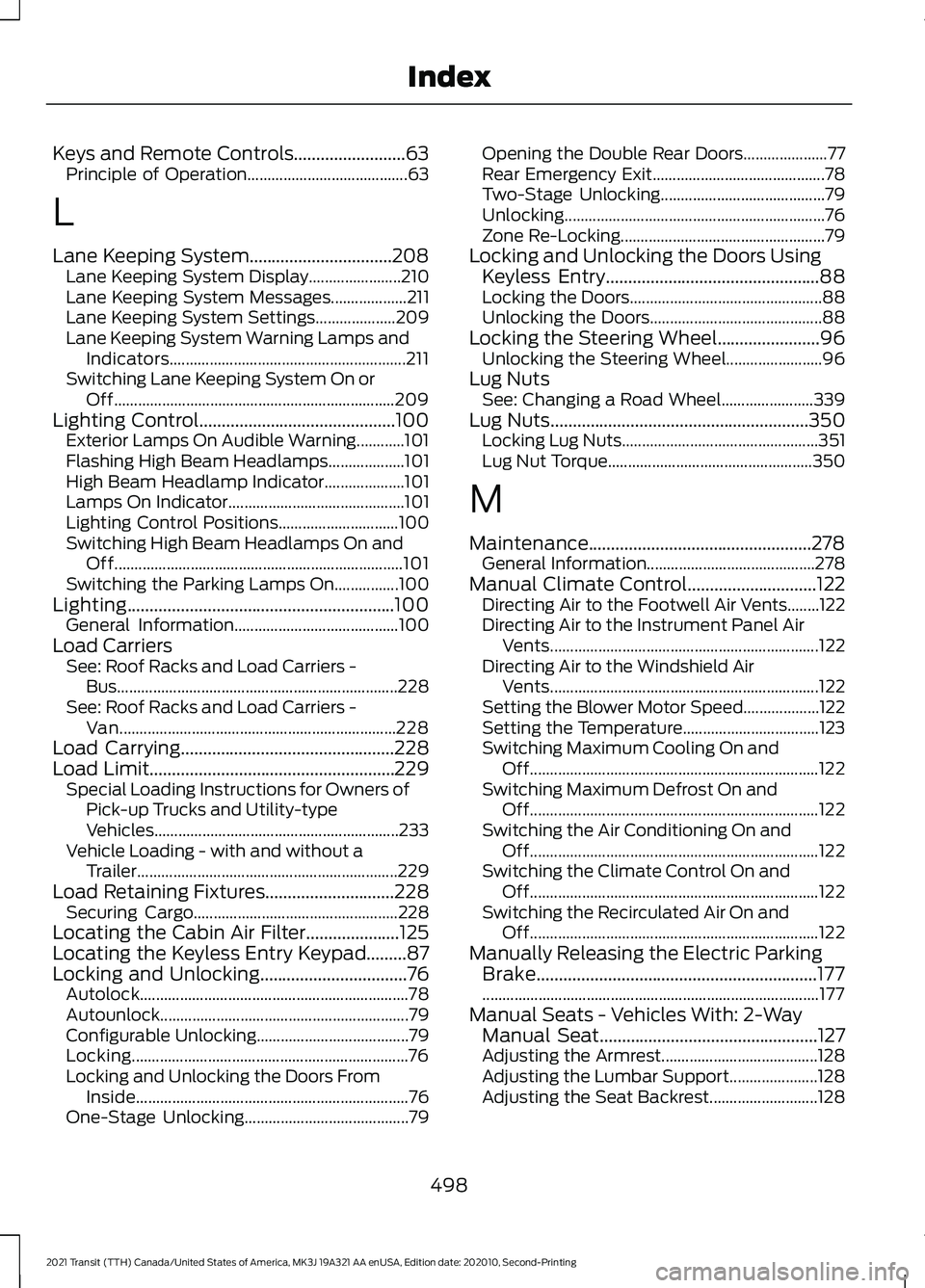
Keys and Remote Controls.........................63
Principle of Operation........................................ 63
L
Lane Keeping System................................208 Lane Keeping System Display....................... 210
Lane Keeping System Messages................... 211
Lane Keeping System Settings.................... 209
Lane Keeping System Warning Lamps and Indicators........................................................... 211
Switching Lane Keeping System On or Off...................................................................... 209
Lighting Control............................................100 Exterior Lamps On Audible Warning............101
Flashing High Beam Headlamps................... 101
High Beam Headlamp Indicator.................... 101
Lamps On Indicator............................................ 101
Lighting Control Positions.............................. 100
Switching High Beam Headlamps On and Off........................................................................\
101
Switching the Parking Lamps On................100
Lighting............................................................100 General Information......................................... 100
Load Carriers See: Roof Racks and Load Carriers -
Bus...................................................................... 228
See: Roof Racks and Load Carriers - Van..................................................................... 228
Load Carrying................................................228
Load Limit.......................................................229 Special Loading Instructions for Owners of
Pick-up Trucks and Utility-type
Vehicles............................................................. 233
Vehicle Loading - with and without a Trailer................................................................. 229
Load Retaining Fixtures
.............................228
Securing Cargo................................................... 228
Locating the Cabin Air Filter.....................125
Locating the Keyless Entry Keypad.........87
Locking and Unlocking.................................76 Autolock................................................................... 78
Autounlock.............................................................. 79
Configurable Unlocking...................................... 79
Locking..................................................................... 76
Locking and Unlocking the Doors From Inside.................................................................... 76
One-Stage Unlocking......................................... 79Opening the Double Rear Doors.....................
77
Rear Emergency Exit........................................... 78
Two-Stage Unlocking......................................... 79
Unlocking................................................................. 76
Zone Re-Locking................................................... 79
Locking and Unlocking the Doors Using Keyless Entry
................................................88
Locking the Doors................................................ 88
Unlocking the Doors........................................... 88
Locking the Steering Wheel.......................96 Unlocking the Steering Wheel........................ 96
Lug Nuts See: Changing a Road Wheel....................... 339
Lug Nuts
..........................................................350
Locking Lug Nuts................................................. 351
Lug Nut Torque................................................... 350
M
Maintenance..................................................278 General Information.......................................... 278
Manual Climate Control
.............................122
Directing Air to the Footwell Air Vents........122
Directing Air to the Instrument Panel Air
Vents................................................................... 122
Directing Air to the Windshield Air Vents................................................................... 122
Setting the Blower Motor Speed................... 122
Setting the Temperature.................................. 123
Switching Maximum Cooling On and Off........................................................................\
122
Switching Maximum Defrost On and Off........................................................................\
122
Switching the Air Conditioning On and Off........................................................................\
122
Switching the Climate Control On and Off........................................................................\
122
Switching the Recirculated Air On and Off........................................................................\
122
Manually Releasing the Electric Parking Brake...............................................................177
........................................................................\
............ 177
Manual Seats - Vehicles With: 2-Way Manual Seat.................................................127
Adjusting the Armrest....................................... 128
Adjusting the Lumbar Support...................... 128
Adjusting the Seat Backrest........................... 128
498
2021 Transit (TTH) Canada/United States of America, MK3J 19A321 AA enUSA, Edition date: 202010, Second-Printing Index