warning FORD TRANSIT 2021 Owners Manual
[x] Cancel search | Manufacturer: FORD, Model Year: 2021, Model line: TRANSIT, Model: FORD TRANSIT 2021Pages: 509, PDF Size: 8.21 MB
Page 344 of 509
•
Ground clearance and parking at curbs.
• Winter weather driving capability.
• Wet weather driving capability.
• All-wheel driving capability.
When driving with the full-size dissimilar
spare wheel and tire assembly additional
caution should be given to:
• Towing a trailer.
• Driving vehicles equipped with a
camper body.
• Driving vehicles with a load on the
cargo rack.
Drive cautiously when using a full-size
dissimilar spare wheel and tire assembly
and seek service as soon as possible.
Locking Lug Nuts (If Equipped)
You can obtain replacement locking lug
nuts or a locking lug nut key using the
reference number certificate.
The locking lug nut key is located in the
glove box or in the storage compartment
in the front right-hand side stepwell.
Vehicles With a Spare Wheel
The spare wheel is under the rear of your
vehicle.
If the spare wheel is the same type and
size as your vehicle road wheel, you can fit
the spare wheel and continue to drive in
the normal manner.
If the spare wheel is not the same type and
size as your vehicle road wheel, it has a
label showing the maximum driving speed
limit. Note:
If your vehicle is fitted with a tire
pressure monitoring system, the warning
indicator will flash if you fit the spare wheel
to your vehicle. To restore the correct
operation of the tire pressure monitoring
system, you must have the repaired road
wheel and tire assembly refitted to your
vehicle. See
Tire Pressure Monitoring
System (page 334). To prevent damage
occurring to the tire pressure monitoring
system sensors, make sure you have a
damage tire repaired or replaced by a tire
professional.
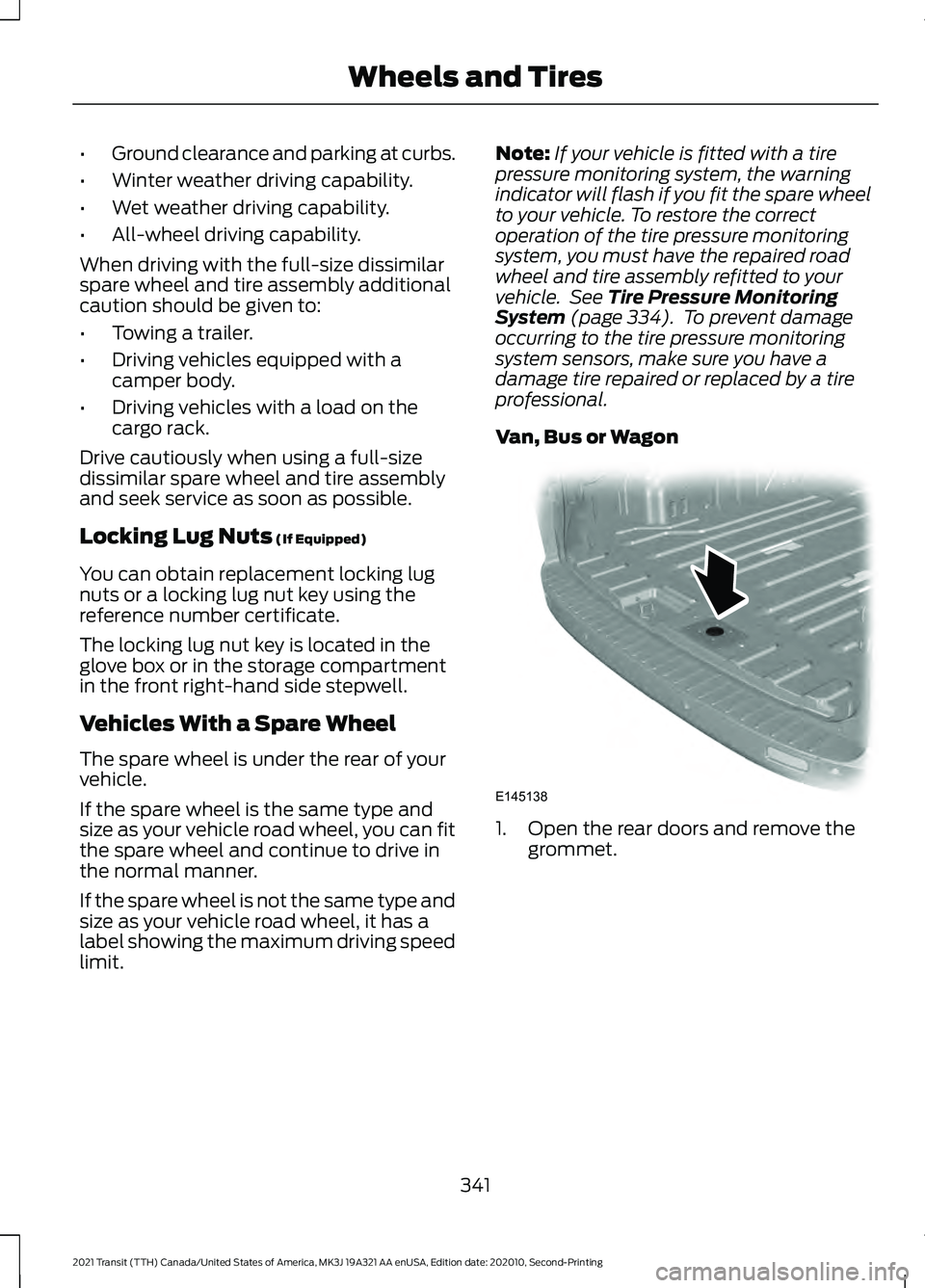
Van, Bus or Wagon 1. Open the rear doors and remove the
grommet.
341
2021 Transit (TTH) Canada/United States of America, MK3J 19A321 AA enUSA, Edition date: 202010, Second-Printing Wheels and TiresE145138
Page 347 of 509
Note:
Do not raise the spare wheel bracket
without a wheel attached. Damage to the
winch mechanism could occur.
Vehicle Jack WARNING: Do not work on your
vehicle when the jack is the only support
as your vehicle could slip off the jack.
Failure to follow this instruction could
result in personal injury or death. WARNING:
To help prevent your
vehicle from moving when changing a
wheel, shift the transmission into park
(P), set the parking brake and use an
appropriate block or wheel chock to
secure the wheel diagonally opposite to
the wheel being changed. For example,
when changing the front left wheel,
place an appropriate block or wheel
chock on the right rear wheel. WARNING:
Do not attempt to
change a tire on the side of the vehicle
close to moving traffic. Pull far enough
off the road to avoid the danger of being
hit when operating the jack or changing
the wheel. WARNING:
Always use the jack
provided as original equipment with your
vehicle. If using a jack other than the one
provided, make sure the jack capacity is
adequate for the vehicle weight,
including any vehicle cargo or
modifications. If you are unsure if the jack
capacity is adequate, contact the
authorized dealer. WARNING:
Switch off the running
boards before jacking or placing any
object under your vehicle. Never place
your hand between the extended running
board and your vehicle. A moving running
board may cause injury. Note:
Passengers should not remain in the
vehicle when the vehicle is being jacked.
Note: Vehicles with a Temporary Mobility
Kit do not have a vehicle jack or a lug
wrench.
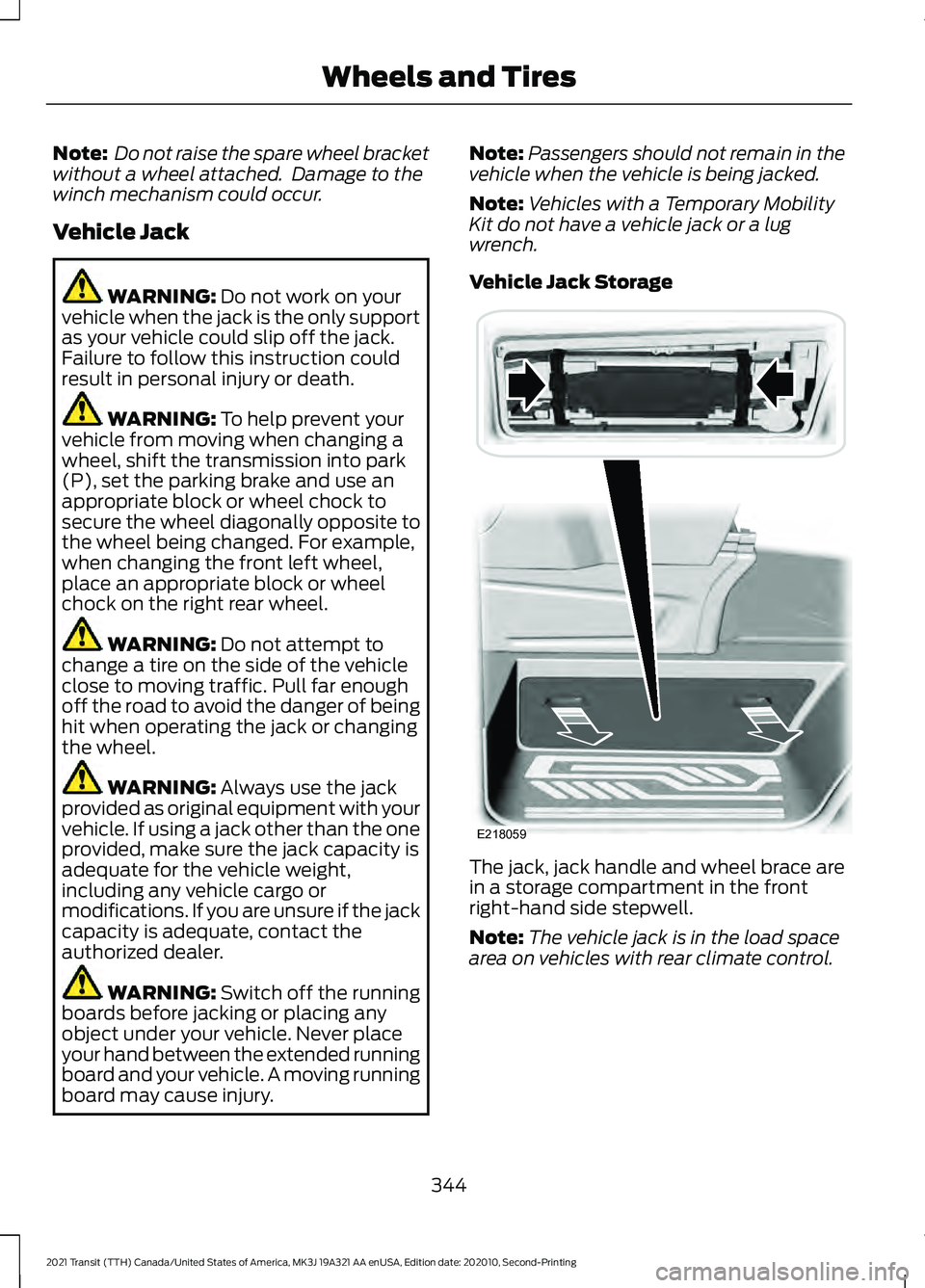
Vehicle Jack Storage The jack, jack handle and wheel brace are
in a storage compartment in the front
right-hand side stepwell.
Note:
The vehicle jack is in the load space
area on vehicles with rear climate control.
344
2021 Transit (TTH) Canada/United States of America, MK3J 19A321 AA enUSA, Edition date: 202010, Second-Printing Wheels and TiresE218059
Page 348 of 509
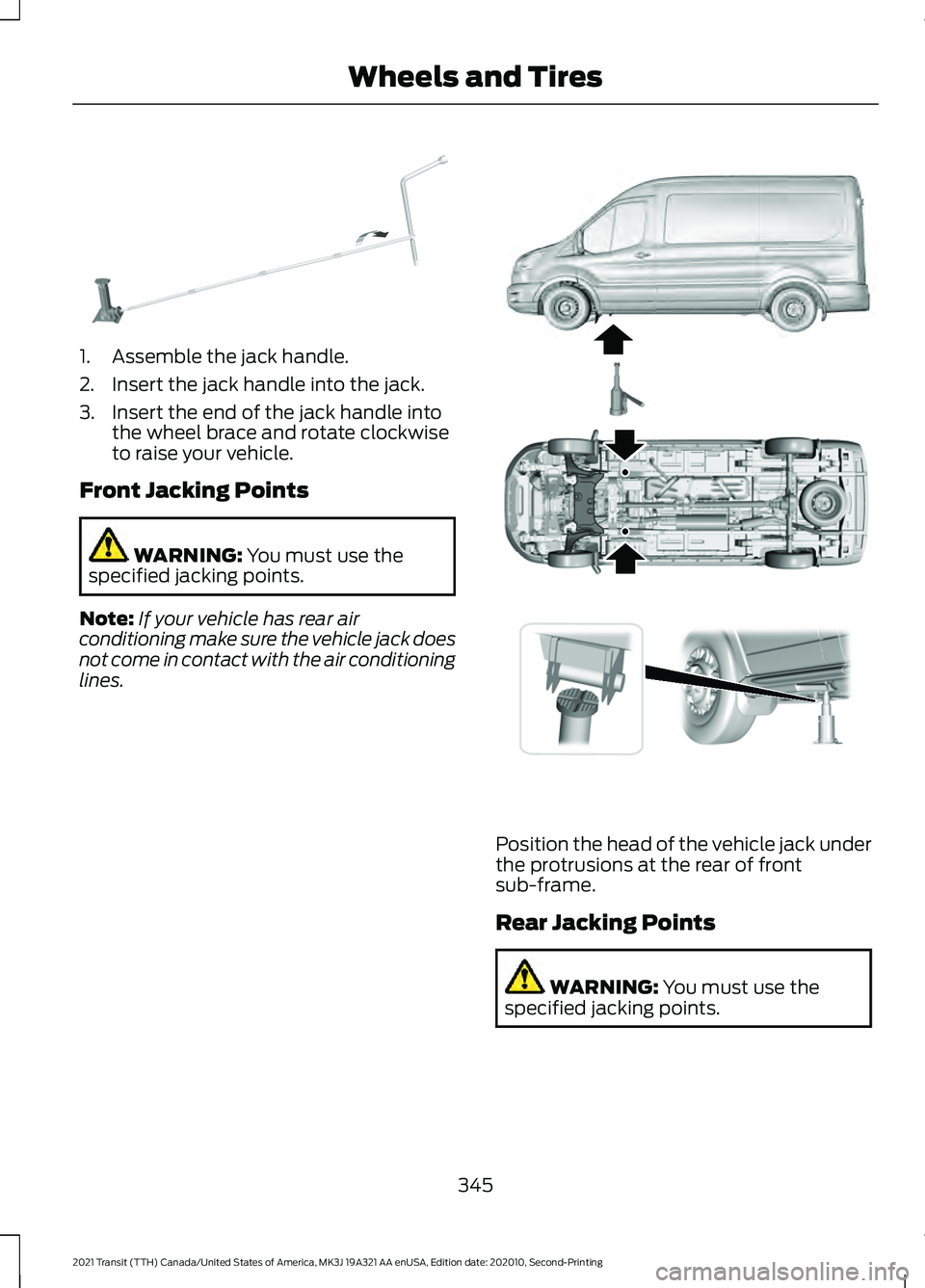
1. Assemble the jack handle.
2. Insert the jack handle into the jack.
3. Insert the end of the jack handle into
the wheel brace and rotate clockwise
to raise your vehicle.
Front Jacking Points WARNING: You must use the
specified jacking points.
Note: If your vehicle has rear air
conditioning make sure the vehicle jack does
not come in contact with the air conditioning
lines. Position the head of the vehicle jack under
the protrusions at the rear of front
sub-frame.
Rear Jacking Points
WARNING:
You must use the
specified jacking points.
345
2021 Transit (TTH) Canada/United States of America, MK3J 19A321 AA enUSA, Edition date: 202010, Second-Printing Wheels and TiresE297495 E171405
Page 351 of 509
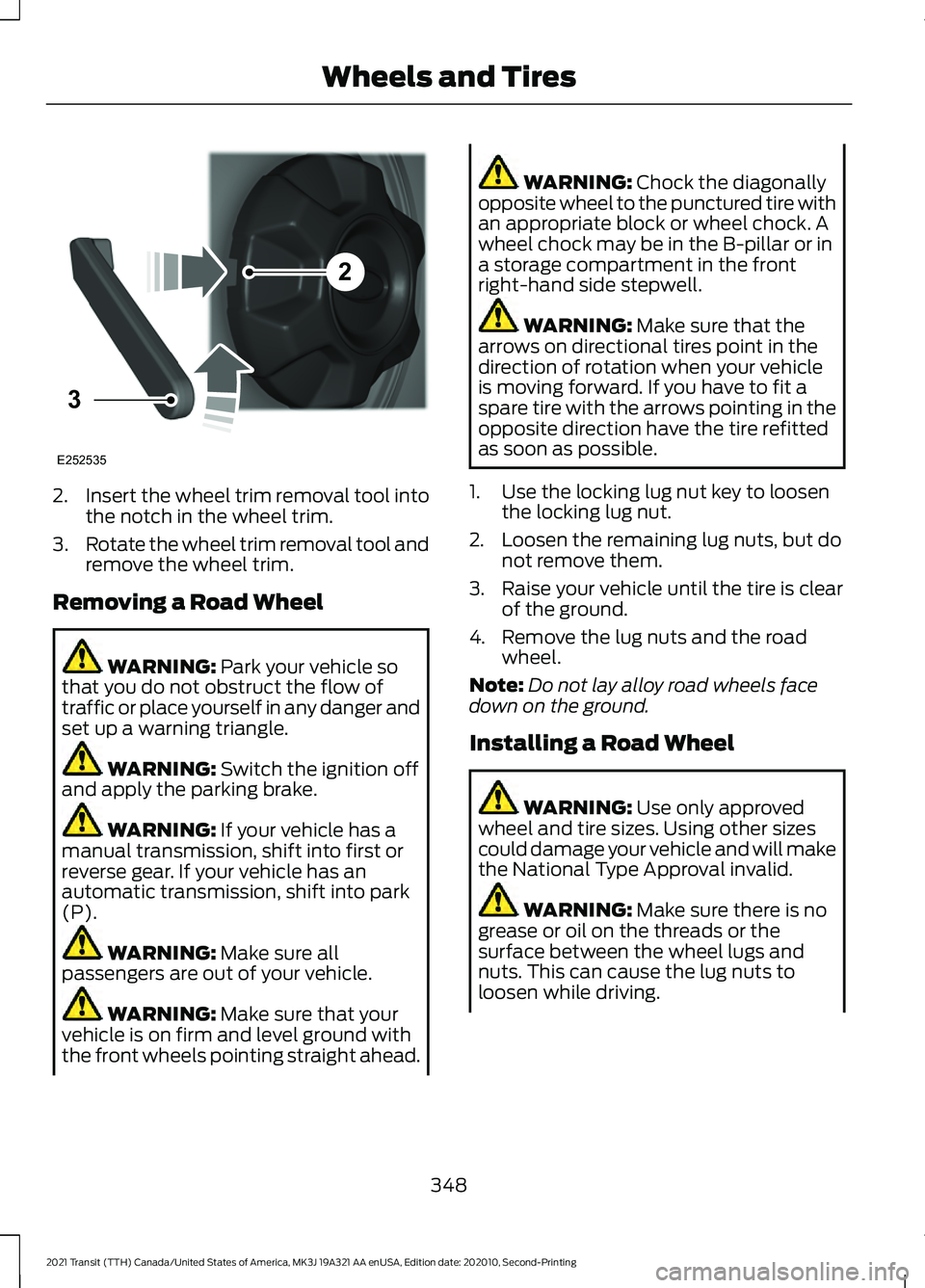
2.
Insert the wheel trim removal tool into
the notch in the wheel trim.
3. Rotate the wheel trim removal tool and
remove the wheel trim.
Removing a Road Wheel WARNING: Park your vehicle so
that you do not obstruct the flow of
traffic or place yourself in any danger and
set up a warning triangle. WARNING:
Switch the ignition off
and apply the parking brake. WARNING:
If your vehicle has a
manual transmission, shift into first or
reverse gear. If your vehicle has an
automatic transmission, shift into park
(P). WARNING:
Make sure all
passengers are out of your vehicle. WARNING:
Make sure that your
vehicle is on firm and level ground with
the front wheels pointing straight ahead. WARNING:
Chock the diagonally
opposite wheel to the punctured tire with
an appropriate block or wheel chock. A
wheel chock may be in the B-pillar or in
a storage compartment in the front
right-hand side stepwell. WARNING:
Make sure that the
arrows on directional tires point in the
direction of rotation when your vehicle
is moving forward. If you have to fit a
spare tire with the arrows pointing in the
opposite direction have the tire refitted
as soon as possible.
1. Use the locking lug nut key to loosen the locking lug nut.
2. Loosen the remaining lug nuts, but do not remove them.
3. Raise your vehicle until the tire is clear of the ground.
4. Remove the lug nuts and the road wheel.
Note: Do not lay alloy road wheels face
down on the ground.
Installing a Road Wheel WARNING:
Use only approved
wheel and tire sizes. Using other sizes
could damage your vehicle and will make
the National Type Approval invalid. WARNING:
Make sure there is no
grease or oil on the threads or the
surface between the wheel lugs and
nuts. This can cause the lug nuts to
loosen while driving.
348
2021 Transit (TTH) Canada/United States of America, MK3J 19A321 AA enUSA, Edition date: 202010, Second-Printing Wheels and Tires2
3
E252535
Page 352 of 509
WARNING: When you install a
wheel, always remove any corrosion, dirt
or foreign materials present on the
mounting surfaces of the wheel or the
surface of the wheel hub, brake drum or
brake disc that contacts the wheel. Make
sure to secure any fasteners that attach
the rotor to the hub so they do not
interfere with the mounting surfaces of
the wheel. Installing wheels without
correct metal-to-metal contact at the
wheel mounting surfaces can cause the
wheel nuts to loosen and the wheel to
come off while your vehicle is in motion,
resulting in loss of vehicle control,
personal injury or death. WARNING:
Only use the specific
lug nuts and wheels supplied with your
vehicle. If in doubt, contact an authorized
dealer. WARNING:
Do not install alloy
wheels using lug nuts designed for use
with steel wheels. WARNING:
The lug nuts of alloy
wheels and spoked steel wheels can also
be used for the steel spare wheel for a
short time (maximum two weeks).
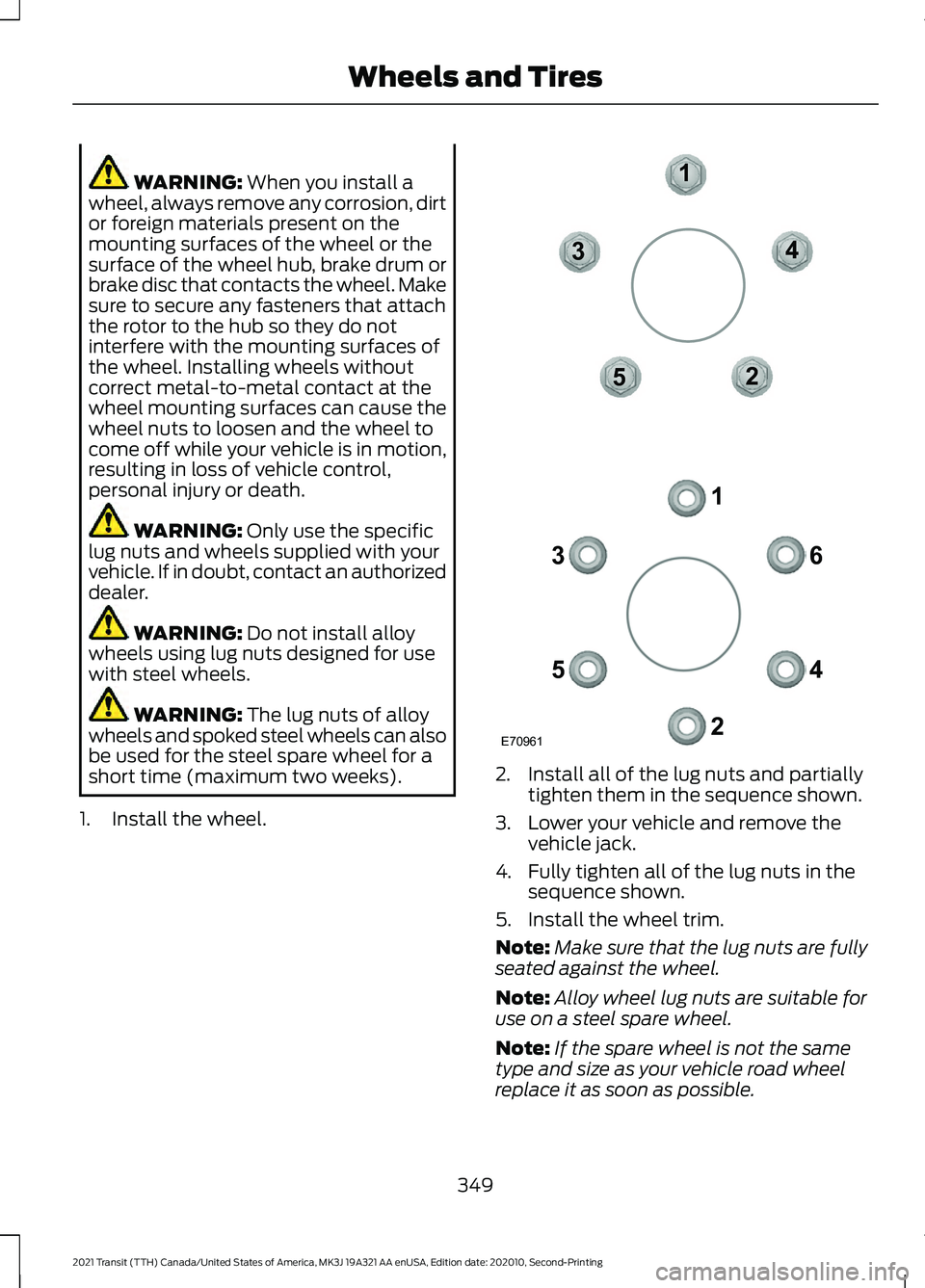
1. Install the wheel. 2. Install all of the lug nuts and partially
tighten them in the sequence shown.
3. Lower your vehicle and remove the vehicle jack.
4. Fully tighten all of the lug nuts in the sequence shown.
5. Install the wheel trim.
Note: Make sure that the lug nuts are fully
seated against the wheel.
Note: Alloy wheel lug nuts are suitable for
use on a steel spare wheel.
Note: If the spare wheel is not the same
type and size as your vehicle road wheel
replace it as soon as possible.
349
2021 Transit (TTH) Canada/United States of America, MK3J 19A321 AA enUSA, Edition date: 202010, Second-Printing Wheels and TiresE70961
1
2
3
4
5 6
1
2
3
4
5
Page 353 of 509
Note:
Check the lug nuts for correct
tightness and check the tire pressure as
soon as possible. Note:
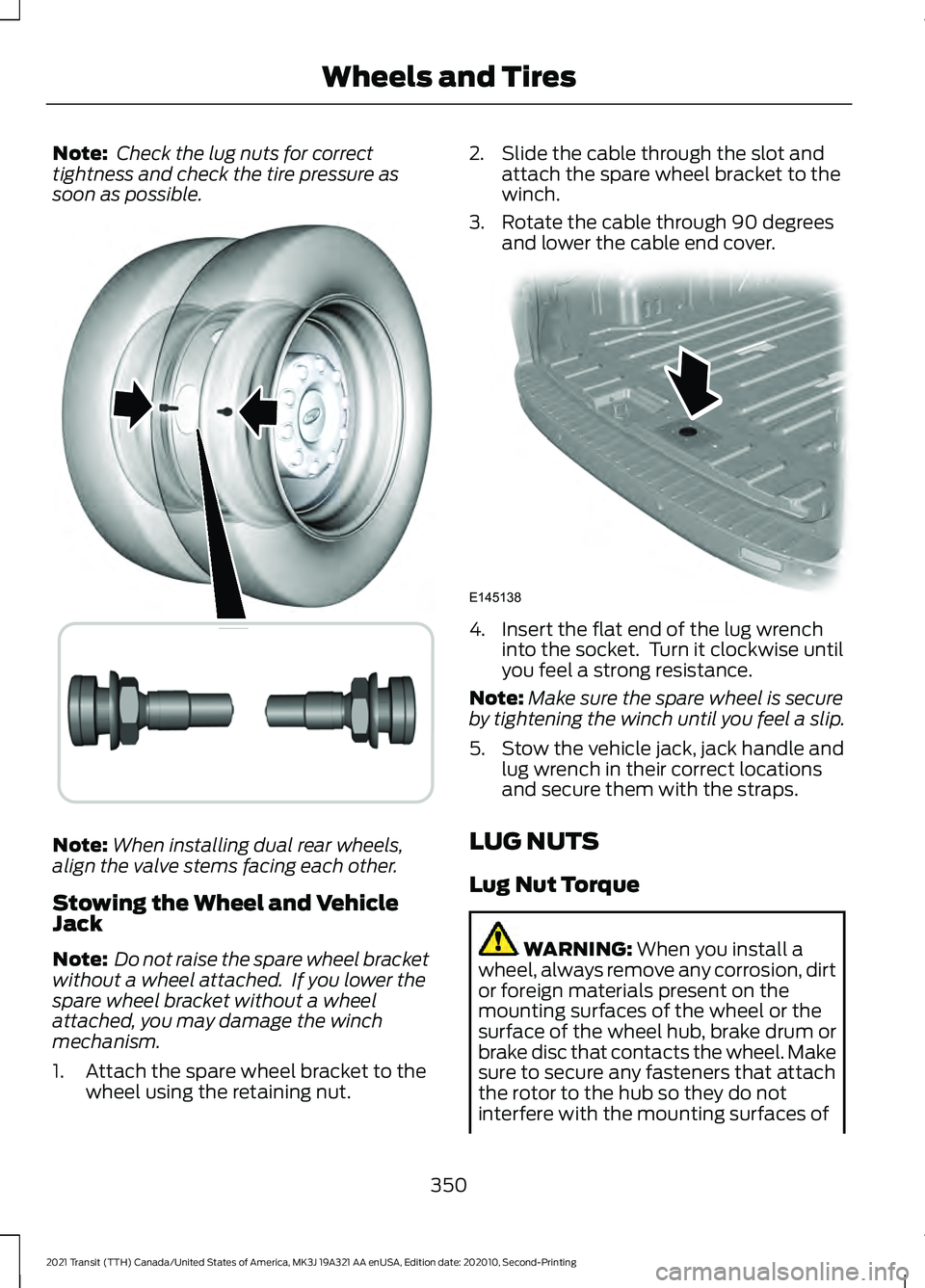
When installing dual rear wheels,
align the valve stems facing each other.
Stowing the Wheel and Vehicle
Jack
Note: Do not raise the spare wheel bracket
without a wheel attached. If you lower the
spare wheel bracket without a wheel
attached, you may damage the winch
mechanism.
1. Attach the spare wheel bracket to the wheel using the retaining nut. 2. Slide the cable through the slot and
attach the spare wheel bracket to the
winch.
3. Rotate the cable through 90 degrees and lower the cable end cover. 4. Insert the flat end of the lug wrench
into the socket. Turn it clockwise until
you feel a strong resistance.
Note: Make sure the spare wheel is secure
by tightening the winch until you feel a slip.
5. Stow the vehicle jack, jack handle and lug wrench in their correct locations
and secure them with the straps.
LUG NUTS
Lug Nut Torque WARNING: When you install a
wheel, always remove any corrosion, dirt
or foreign materials present on the
mounting surfaces of the wheel or the
surface of the wheel hub, brake drum or
brake disc that contacts the wheel. Make
sure to secure any fasteners that attach
the rotor to the hub so they do not
interfere with the mounting surfaces of
350
2021 Transit (TTH) Canada/United States of America, MK3J 19A321 AA enUSA, Edition date: 202010, Second-Printing Wheels and Tires E227387 E145138
Page 361 of 509
CAPACITIES AND
SPECIFICATIONS - 3.5L
DURATEC
Use oil and fluid that meets the defined
specification and viscosity grade.
If you do not use oil and fluid that meets
the defined specification and viscosity
grade, it could result in:
•
Component damage not covered by
the vehicle Warranty.
• Longer engine cranking periods.
• Increased emission levels. •
Reduced engine performance.
• Reduced fuel economy.
• Reduced brake performance.
Air Conditioning System WARNING: The air conditioning
refrigerant system contains refrigerant
under high pressure. Only qualified
personnel should service the air
conditioning refrigerant system. Opening
the air conditioning refrigerant system
can cause personal injury.
Capacities Refrigerant Oil
Refrigerant
Variant
9.5 fl oz (280 ml)
39.2 oz (1.11 kg)
Vehicles with rear air conditioning.
5.4 fl oz (160 ml)
28.2 oz (0.8 kg)
Vehicles without rear air conditioning.
Materials Specification
Name
WSH-M17B19-A
Motorcraft® R-134a Refrigerant(U.S.)
R-134a Refrigerant / Frigorigène R-134a(Canada)
YN-19(U.S.)
CYN-19-R(Canada)
WSH-M1C231-B
Motorcraft® PAG Refrigerant Compressor Oil(U.S.)
Motorcraft® PAG Refrigerant Compressor Oil / Huile
PAG pour compresseur frigorifique Motor-
craft®(Canada)
YN-12-D(U.S. & Canada)
358
2021 Transit (TTH) Canada/United States of America, MK3J 19A321 AA enUSA, Edition date: 202010, Second-Printing Capacities and Specifications
Page 366 of 509
Materials
Specification
Name
ESA-M1C75-B
Motorcraft® Premium Long-Life Grease(U.S.)
Motorcraft® Premium Long-Life Grease / Graisse
longue durée de qualité première Motor-
craft®(Canada)
XG-1-E1(U.S. & Canada)
CAPACITIES AND
SPECIFICATIONS - 3.5L
ECOBOOST™
Use oil and fluid that meets the defined
specification and viscosity grade.
If you do not use oil and fluid that meets
the defined specification and viscosity
grade, it could result in:
• Component damage not covered by
the vehicle Warranty.
• Longer engine cranking periods. •
Increased emission levels.
• Reduced engine performance.
• Reduced fuel economy.
• Reduced brake performance.
Air Conditioning System WARNING: The air conditioning
refrigerant system contains refrigerant
under high pressure. Only qualified
personnel should service the air
conditioning refrigerant system. Opening
the air conditioning refrigerant system
can cause personal injury.
Capacities Refrigerant Oil
Refrigerant
Variant
9.5 fl oz (280 ml)
39.2 oz (1.11 kg)
Vehicles with rear air conditioning.
5.4 fl oz (160 ml)
28.2 oz (0.8 kg)
Vehicles without rear air conditioning.
363
2021 Transit (TTH) Canada/United States of America, MK3J 19A321 AA enUSA, Edition date: 202010, Second-Printing Capacities and Specifications
Page 384 of 509
Press the button to skip to the
next track.
Press and hold the button to fast
forward through the track. Press the button once to return
to the beginning of the track.
Repeatedly press the button to
return to previous tracks.
Press and hold the button to fast rewind.
Note: Not all functions are supported by all
phones.
PLAYING MEDIA FROM A USB
DEVICE - VEHICLES WITHOUT:
SYNC
Supported Audio File Formats
You can play audio file formats including
MP3, WMA, WAV, M4A, M4B, AAC, and
FLAC.
Note: The NTFS file system is not
supported.
Selecting the USB Device Press the button to display the
menu.
Repeatedly press the button to scroll to
your USB device.
Press the OK button.
Playing from the USB Device Press the button to play a track.
Press the button again to pause
the track.
Press the button to skip to the
next track.
Press and hold the button to fast
forward through the track. Press the button once to return
to the beginning of a track.
Repeatedly press the button to
return to previous tracks.
Press and hold the button to fast rewind.
Sorting by Categories
You can also sort and play music by
specific categories, for example artist or
album.
Press the
OK button to view the available
categories.
USB PORT WARNING: Driving while distracted
can result in loss of vehicle control, crash
and injury. We strongly recommend that
you use extreme caution when using any
device that may take your focus off the
road. Your primary responsibility is the
safe operation of your vehicle. We
recommend against the use of any
hand-held device while driving and
encourage the use of voice-operated
systems when possible. Make sure you
are aware of all applicable local laws
that may affect the use of electronic
devices while driving.
USB Ports could be in the following
locations:
• In the instrument panel storage bin.
• On the instrument panel below the
climate controls.
The USB port allows you to plug in media
playing devices, memory sticks and charge
devices.
See General Information (page
383).
The audio extension cable must be long
enough to allow the device to be safely
stored when your vehicle is moving.
381
2021 Transit (TTH) Canada/United States of America, MK3J 19A321 AA enUSA, Edition date: 202010, Second-Printing Audio System E100027
Page 386 of 509
GENERAL INFORMATION
SYNC is an in-vehicle communications
system that works with your Bluetooth
enabled cellular phone and portable media
player. This allows you to:
•
Make and receive calls.
• Access and play music from your
portable music player.
• Use 911 Assist or Emergency Assistance
and applications via SYNC AppLink. *
• Access phonebook contacts and music
using voice commands.
• Stream music from your connected
phone.
• Text message.
• Use the advanced voice recognition
system.
• Charge your USB device (if your device
supports this).
* These features are not available in all
markets and may require activation.
Available AppLink enabled apps vary by
market.
Make sure that you review your device's
manual before using it with SYNC.
Support
SYNC support is available at your regional
Ford website. See SYNC™
Troubleshooting (page 391).
SYNC Owner Account
Why do I need a SYNC owner account?
• Essential for keeping up with the latest
software downloads available for
SYNC.
• Access to customer support for any
questions you may have. Driving Restrictions
For your safety, certain features are
speed-dependent and restricted when your
vehicle is traveling over
3 mph (5 km/h).
Safety Information WARNING: Driving while distracted
can result in loss of vehicle control, crash
and injury. We strongly recommend that
you use extreme caution when using any
device that may take your focus off the
road. Your primary responsibility is the
safe operation of your vehicle. We
recommend against the use of any
hand-held device while driving and
encourage the use of voice-operated
systems when possible. Make sure you
are aware of all applicable local laws
that may affect the use of electronic
devices while driving.
When using SYNC:
• Do not operate playing devices if the
power cords or cables are broken, split
or damaged. Place cords and cables
out of the way, so they do not interfere
with the operation of pedals, seats,
compartments or safe driving abilities.
• Do not leave playing devices in your
vehicle during extreme conditions as it
could cause them damage. See your
device's manual for further information.
• Do not attempt to service or repair the
system. See an authorized dealer.
Privacy Information
When a cellular phone is connected to
SYNC, the system creates a profile within
your vehicle that is linked to that cellular
phone. This profile is created in order to
offer you more cellular features and to
operate more efficiently. Among other
things, this profile may contain data about
your cellular phone book, text messages
383
2021 Transit (TTH) Canada/United States of America, MK3J 19A321 AA enUSA, Edition date: 202010, Second-Printing SYNC™