parking brake FORD TRANSIT 2021 Owner's Guide
[x] Cancel search | Manufacturer: FORD, Model Year: 2021, Model line: TRANSIT, Model: FORD TRANSIT 2021Pages: 509, PDF Size: 8.21 MB
Page 292 of 509
Engine Coolant Temperature
Management (If Equipped)
WARNING:
To reduce the risk of
crash and injury, be prepared that the
vehicle speed may reduce and the
vehicle may not be able to accelerate
with full power until the coolant
temperature reduces.
If you tow a trailer with your vehicle, the
engine may temporarily reach a higher
temperature during severe operating
conditions, for example ascending a long
or steep grade in high ambient
temperatures.
At this time, you may notice the coolant
temperature gauge moves toward the red
zone and a message may appear in the
information display.
You may notice a reduction in vehicle
speed caused by reduced engine power in
order to manage the engine coolant
temperature. Your vehicle may enter this
mode if certain high-temperature and
high-load conditions take place. The
amount of speed reduction depends on
vehicle loading, grade and ambient
temperature. If this occurs, there is no
need to stop your vehicle. You can
continue to drive.
The air conditioning may automatically
turn on and off during severe operating
conditions to protect the engine from
overheating. When the coolant
temperature decreases to the normal
operating temperature, the air conditioning
turns on.
If the coolant temperature gauge moves
fully into the red zone, or if the coolant
temperature warning or service engine
soon messages appear in your information
display, do the following: 1. Stop your vehicle as soon as it is safe
to do so. Fully apply the parking brake,
shift into park (P) or neutral (N).
2. Leave the engine running until the coolant temperature gauge needle
returns to the normal position. If the
temperature does not drop after
several minutes, follow the remaining
steps.
3. Switch the engine off and wait for it to
cool. Check the coolant level.
4. If the coolant level is at or below the minimum mark, add prediluted coolant
immediately.
5. If the coolant level is normal, restart the engine and continue.
AUTOMATIC TRANSMISSION
FLUID CHECK
The automatic transmission does not have
a transmission fluid dipstick.
Have an authorized dealer check and
change the transmission fluid at the
correct service interval. Your transmission
does not consume fluid. However, if the
transmission slips, shifts slowly or if you
notice a sign of leaking fluid, contact an
authorized dealer.
Do not use supplemental transmission
fluid additives, treatments or cleaning
agents. The use of these materials may
affect transmission operation and result
in damage to internal transmission
components.
289
2021 Transit (TTH) Canada/United States of America, MK3J 19A321 AA enUSA, Edition date: 202010, Second-Printing Maintenance
Page 311 of 509
5. Remove the soaked cloth, then with a
clean, damp cloth, use a rubbing
motion for 60 seconds on the soiled
area.
6. Dry the area with a clean, soft cloth.
REPAIRING MINOR PAINT
DAMAGE
You should repair paintwork damage
caused by stones from the road or minor
scratches as soon as possible. A choice of
products are available from an authorized
dealer.
Remove particles such as bird droppings,
tree sap, insect deposits, tar spots, road
salt and industrial fallout before repairing
paint chips.
Always read and follow the manufacturer ’s
instructions before using the products.
CLEANING THE WHEELS
Note: Do not apply a cleaning chemical to
warm or hot wheel rims and covers.
Note: Industrial-strength (heavy-duty)
cleaners, or cleaning chemicals, in
combination with brush agitation to remove
brake dust and dirt, could wear away the
clear coat finish over a period of time.
Note: Do not use hydrofluoric acid-based
or high caustic-based wheel cleaners, steel
wool, fuels or strong household detergent.
Note: If you intend parking your vehicle for
an extended period after cleaning the
wheels with a wheel cleaner, drive your
vehicle for a few minutes before doing so.
This will reduce the risk of increased
corrosion of the brake discs, brake pads and
linings.
Note: Some automatic car washes may
cause damage to the finish on your wheel
rims and covers. Alloy wheels and wheel covers are coated
with a clear coat paint finish. To maintain
their condition we recommend that you:
•
Clean them weekly with the
recommended wheel and tire cleaner.
• Use a sponge to remove heavy
deposits of dirt and brake dust
accumulation.
• Rinse them thoroughly with a
pressurized stream of water when you
have completed the cleaning process.
Consult your authorized dealer for
approved cleaning products.
Using other non-recommended cleaning
products can result in severe and
permanent cosmetic damage.
VEHICLE STORAGE
If you plan on storing your vehicle for 30
days or more, read the following
maintenance recommendations to make
sure your vehicle stays in good operating
condition.
We engineer and test all motor vehicles
and their components for reliable, regular
driving. Under various conditions,
long-term storage may lead to degraded
engine performance or failure unless you
use specific precautions to preserve engine
components.
General
• Store all vehicles in a dry, ventilated
place.
• Protect from sunlight, if possible.
• If vehicles are stored outside, they
require regular maintenance to protect
against rust and damage.
308
2021 Transit (TTH) Canada/United States of America, MK3J 19A321 AA enUSA, Edition date: 202010, Second-Printing Vehicle Care
Page 312 of 509
Body
•
Wash your vehicle thoroughly to
remove dirt, grease, oil, tar or mud from
exterior surfaces, rear-wheel housing
and the underside of front fenders.
• Periodically wash your vehicle if it is
stored in exposed locations.
• Touch-up exposed or primed metal to
prevent rust.
• Cover chrome and stainless steel parts
with a thick coat of auto wax to prevent
discoloration. Re-wax as necessary
when you wash your vehicle.
• Lubricate all hood, door and luggage
compartment hinges and latches with
a light grade oil.
• Cover interior trim to prevent fading.
• Keep all rubber parts free from oil and
solvents.
Engine
• Change the engine oil and filter prior to
storage because used engine oil
contains contaminates which may
cause engine damage.
• Start the engine every 15 days for a
minimum of 15 minutes. Run at fast idle
with the climate controls set to defrost
until the engine reaches normal
operating temperature.
• With your foot on the brake, shift
through all the gears while the engine
is running.
• We recommend that you change the
engine oil before you use your vehicle
again.
Fuel system
• Fill the fuel tank with high-quality fuel
until the first automatic shutoff of the
fuel pump nozzle. Cooling system
•
Protect against freezing temperatures.
• When removing your vehicle from
storage, check coolant fluid level.
Confirm that there are no cooling
system leaks and that fluid is at the
recommended level.
Battery
• Check and recharge as necessary. Keep
connections clean.
• If storing your vehicle for more than 30
days without recharging the battery,
we recommend that you disconnect
the battery cables to maintain battery
charge for quick starting.
Note: It is necessary to reset memory
features if battery cables are disconnected.
Brakes
• Make sure the brakes and parking brake
release fully.
Tires
• Maintain recommended air pressure.
Miscellaneous
• Make sure all linkages, cables, levers
and pins under your vehicle are covered
with grease to prevent rust.
• Move vehicles at least 25 ft (7.5 m)
every 15 days to lubricate working parts
and prevent corrosion.
Removing Vehicle From Storage
When your vehicle is ready to come out of
storage, do the following:
• Wash your vehicle to remove any dirt
or grease film build-up on window
surfaces.
• Check windshield wipers for any
deterioration.
309
2021 Transit (TTH) Canada/United States of America, MK3J 19A321 AA enUSA, Edition date: 202010, Second-Printing Vehicle Care
Page 316 of 509
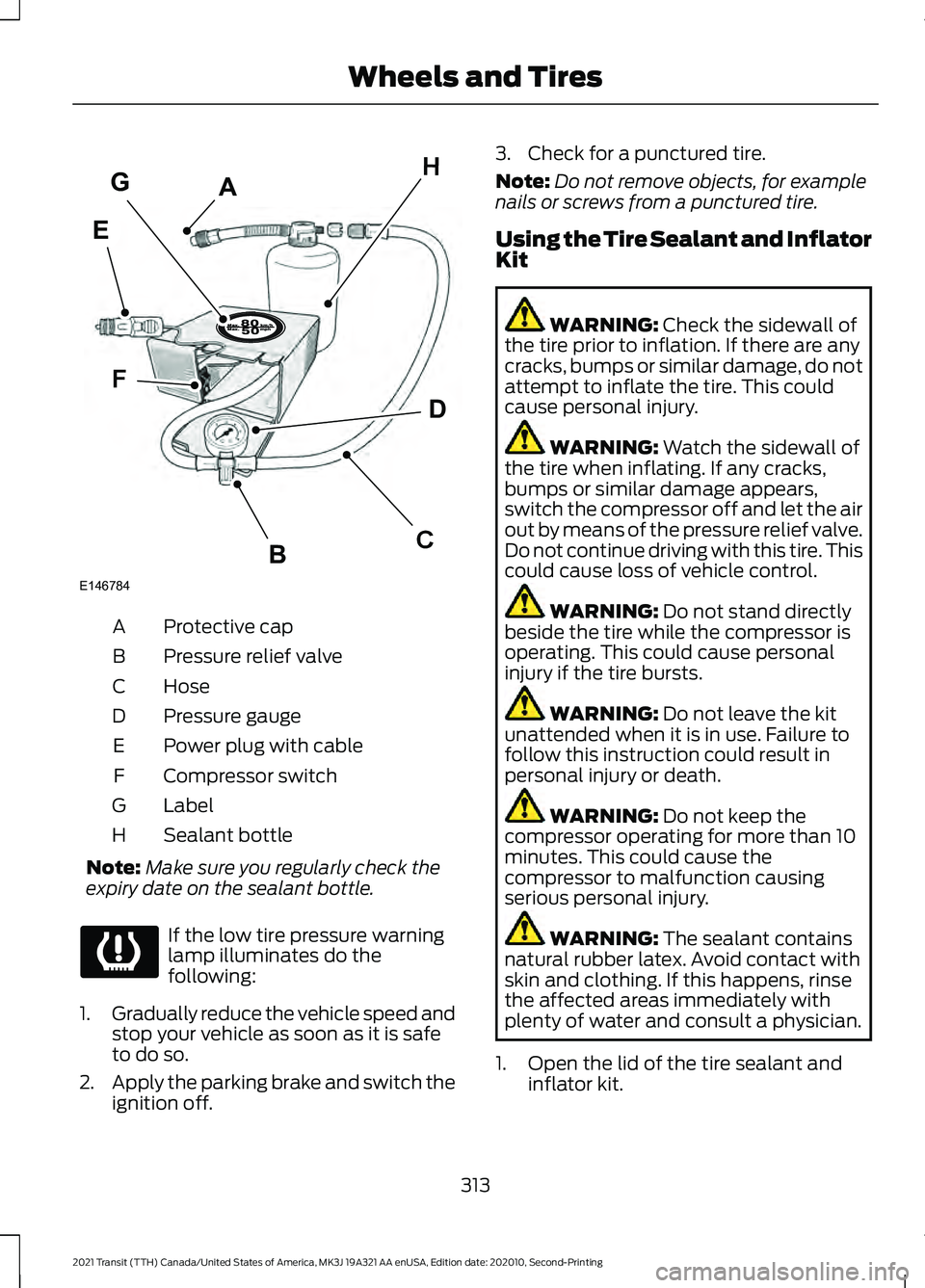
Protective cap
A
Pressure relief valve
B
Hose
C
Pressure gauge
D
Power plug with cable
E
Compressor switch
F
Label
G
Sealant bottle
H
Note: Make sure you regularly check the
expiry date on the sealant bottle. If the low tire pressure warning
lamp illuminates do the
following:
1. Gradually reduce the vehicle speed and
stop your vehicle as soon as it is safe
to do so.
2. Apply the parking brake and switch the
ignition off. 3. Check for a punctured tire.
Note:
Do not remove objects, for example
nails or screws from a punctured tire.
Using the Tire Sealant and Inflator
Kit WARNING: Check the sidewall of
the tire prior to inflation. If there are any
cracks, bumps or similar damage, do not
attempt to inflate the tire. This could
cause personal injury. WARNING:
Watch the sidewall of
the tire when inflating. If any cracks,
bumps or similar damage appears,
switch the compressor off and let the air
out by means of the pressure relief valve.
Do not continue driving with this tire. This
could cause loss of vehicle control. WARNING:
Do not stand directly
beside the tire while the compressor is
operating. This could cause personal
injury if the tire bursts. WARNING:
Do not leave the kit
unattended when it is in use. Failure to
follow this instruction could result in
personal injury or death. WARNING:
Do not keep the
compressor operating for more than 10
minutes. This could cause the
compressor to malfunction causing
serious personal injury. WARNING:
The sealant contains
natural rubber latex. Avoid contact with
skin and clothing. If this happens, rinse
the affected areas immediately with
plenty of water and consult a physician.
1. Open the lid of the tire sealant and inflator kit.
313
2021 Transit (TTH) Canada/United States of America, MK3J 19A321 AA enUSA, Edition date: 202010, Second-Printing Wheels and TiresA
C
D
F
B
H
E
G
E146784
Page 347 of 509
Note:
Do not raise the spare wheel bracket
without a wheel attached. Damage to the
winch mechanism could occur.
Vehicle Jack WARNING: Do not work on your
vehicle when the jack is the only support
as your vehicle could slip off the jack.
Failure to follow this instruction could
result in personal injury or death. WARNING:
To help prevent your
vehicle from moving when changing a
wheel, shift the transmission into park
(P), set the parking brake and use an
appropriate block or wheel chock to
secure the wheel diagonally opposite to
the wheel being changed. For example,
when changing the front left wheel,
place an appropriate block or wheel
chock on the right rear wheel. WARNING:
Do not attempt to
change a tire on the side of the vehicle
close to moving traffic. Pull far enough
off the road to avoid the danger of being
hit when operating the jack or changing
the wheel. WARNING:
Always use the jack
provided as original equipment with your
vehicle. If using a jack other than the one
provided, make sure the jack capacity is
adequate for the vehicle weight,
including any vehicle cargo or
modifications. If you are unsure if the jack
capacity is adequate, contact the
authorized dealer. WARNING:
Switch off the running
boards before jacking or placing any
object under your vehicle. Never place
your hand between the extended running
board and your vehicle. A moving running
board may cause injury. Note:
Passengers should not remain in the
vehicle when the vehicle is being jacked.
Note: Vehicles with a Temporary Mobility
Kit do not have a vehicle jack or a lug
wrench.
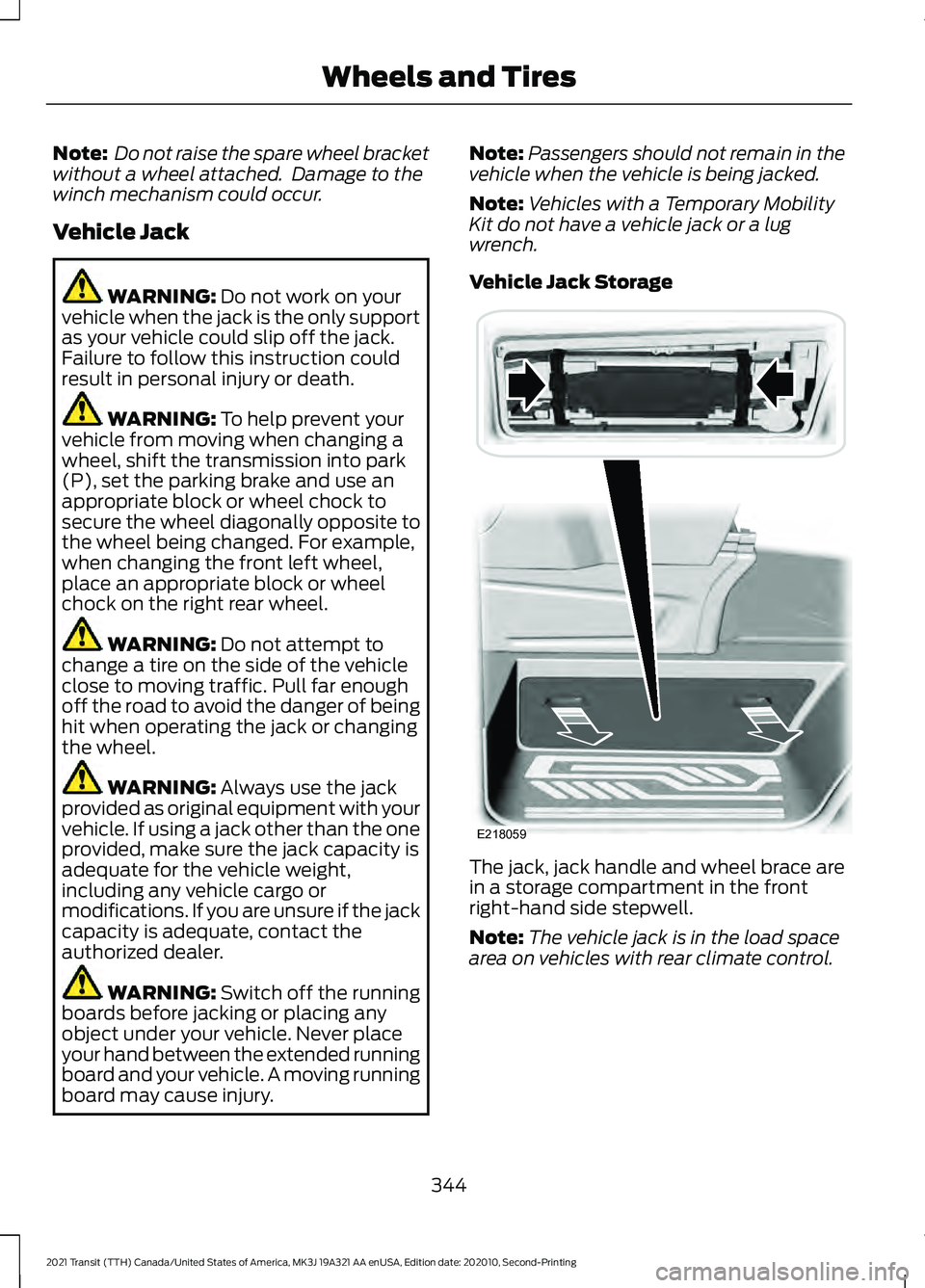
Vehicle Jack Storage The jack, jack handle and wheel brace are
in a storage compartment in the front
right-hand side stepwell.
Note:
The vehicle jack is in the load space
area on vehicles with rear climate control.
344
2021 Transit (TTH) Canada/United States of America, MK3J 19A321 AA enUSA, Edition date: 202010, Second-Printing Wheels and TiresE218059
Page 351 of 509
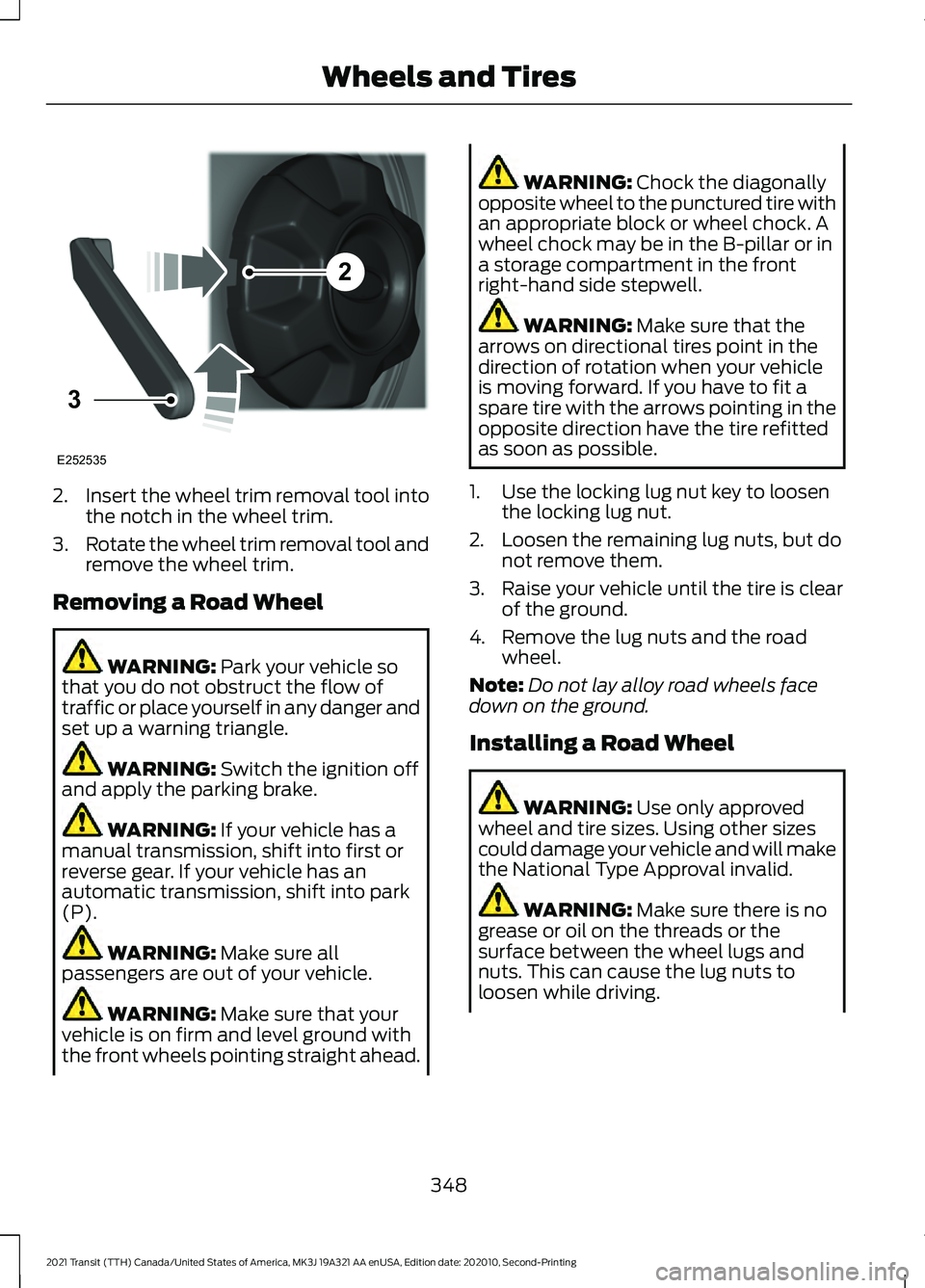
2.
Insert the wheel trim removal tool into
the notch in the wheel trim.
3. Rotate the wheel trim removal tool and
remove the wheel trim.
Removing a Road Wheel WARNING: Park your vehicle so
that you do not obstruct the flow of
traffic or place yourself in any danger and
set up a warning triangle. WARNING:
Switch the ignition off
and apply the parking brake. WARNING:
If your vehicle has a
manual transmission, shift into first or
reverse gear. If your vehicle has an
automatic transmission, shift into park
(P). WARNING:
Make sure all
passengers are out of your vehicle. WARNING:
Make sure that your
vehicle is on firm and level ground with
the front wheels pointing straight ahead. WARNING:
Chock the diagonally
opposite wheel to the punctured tire with
an appropriate block or wheel chock. A
wheel chock may be in the B-pillar or in
a storage compartment in the front
right-hand side stepwell. WARNING:
Make sure that the
arrows on directional tires point in the
direction of rotation when your vehicle
is moving forward. If you have to fit a
spare tire with the arrows pointing in the
opposite direction have the tire refitted
as soon as possible.
1. Use the locking lug nut key to loosen the locking lug nut.
2. Loosen the remaining lug nuts, but do not remove them.
3. Raise your vehicle until the tire is clear of the ground.
4. Remove the lug nuts and the road wheel.
Note: Do not lay alloy road wheels face
down on the ground.
Installing a Road Wheel WARNING:
Use only approved
wheel and tire sizes. Using other sizes
could damage your vehicle and will make
the National Type Approval invalid. WARNING:
Make sure there is no
grease or oil on the threads or the
surface between the wheel lugs and
nuts. This can cause the lug nuts to
loosen while driving.
348
2021 Transit (TTH) Canada/United States of America, MK3J 19A321 AA enUSA, Edition date: 202010, Second-Printing Wheels and Tires2
3
E252535
Page 451 of 509

Check every six months
Battery connections. Clean if necessary.
Body and door drain holes for obstruc-
tions. Clean if necessary.
Cooling system fluid level and coolant
strength.
Door weatherstrips for wear. Lubricate if
necessary.
Front door check arms for correct opera-
tion.
Hinges, latches and outside locks for
correct operation. Lubricate if necessary.
Parking brake for correct operation.
Seatbelts and seat latches for wear and
function.
Safety warning lamps (brake, ABS, airbag
and seatbelt) for operation.
Washer spray and wiper operation. Clean
or replace blades as necessary.
Multi-point Inspection
In order to keep your vehicle running
correctly, it is important to have the
systems on your vehicle checked regularly.
This can help identify potential issues and
prevent major problems. We recommend
having the following multi-point inspection
performed at every scheduled
maintenance interval to help make sure
your vehicle keeps running correctly. Multi-point inspection
Accessory drive belt(s).
Battery performance.
Engine air filter. Multi-point inspection
Exhaust system.
Exterior lamps and hazard warning
system operation.
Fluid levels *
; fill if necessary.
For oil and fluid leaks.
Horn operation.
Radiator, cooler, heater and A/C hoses.
Suspension component for leaks or
damage.
Steering and linkage.
Tires (including spare) for wear and
correct pressure **
.
Windshield for cracks, chips or pits.
Washer spray and wiper operation.
* Brake, coolant recovery reservoir,
automatic transmission, power steering (if
equipped with hydraulic power assist
steering) and window washer.
** If your vehicle is equipped with a
temporary mobility kit, check the tire
sealant expiration Use By date on the
canister. Replace as needed.
Be sure to ask your dealership service
advisor or technician about the multi-point
vehicle inspection. It is a comprehensive
way to perform a thorough inspection of
your vehicle. Your checklist gives you
immediate feedback on the overall
condition of your vehicle.
448
2021 Transit (TTH) Canada/United States of America, MK3J 19A321 AA enUSA, Edition date: 202010, Second-Printing Scheduled Maintenance
Page 452 of 509
NORMAL SCHEDULED
MAINTENANCE
Intelligent Oil-Life Monitor™
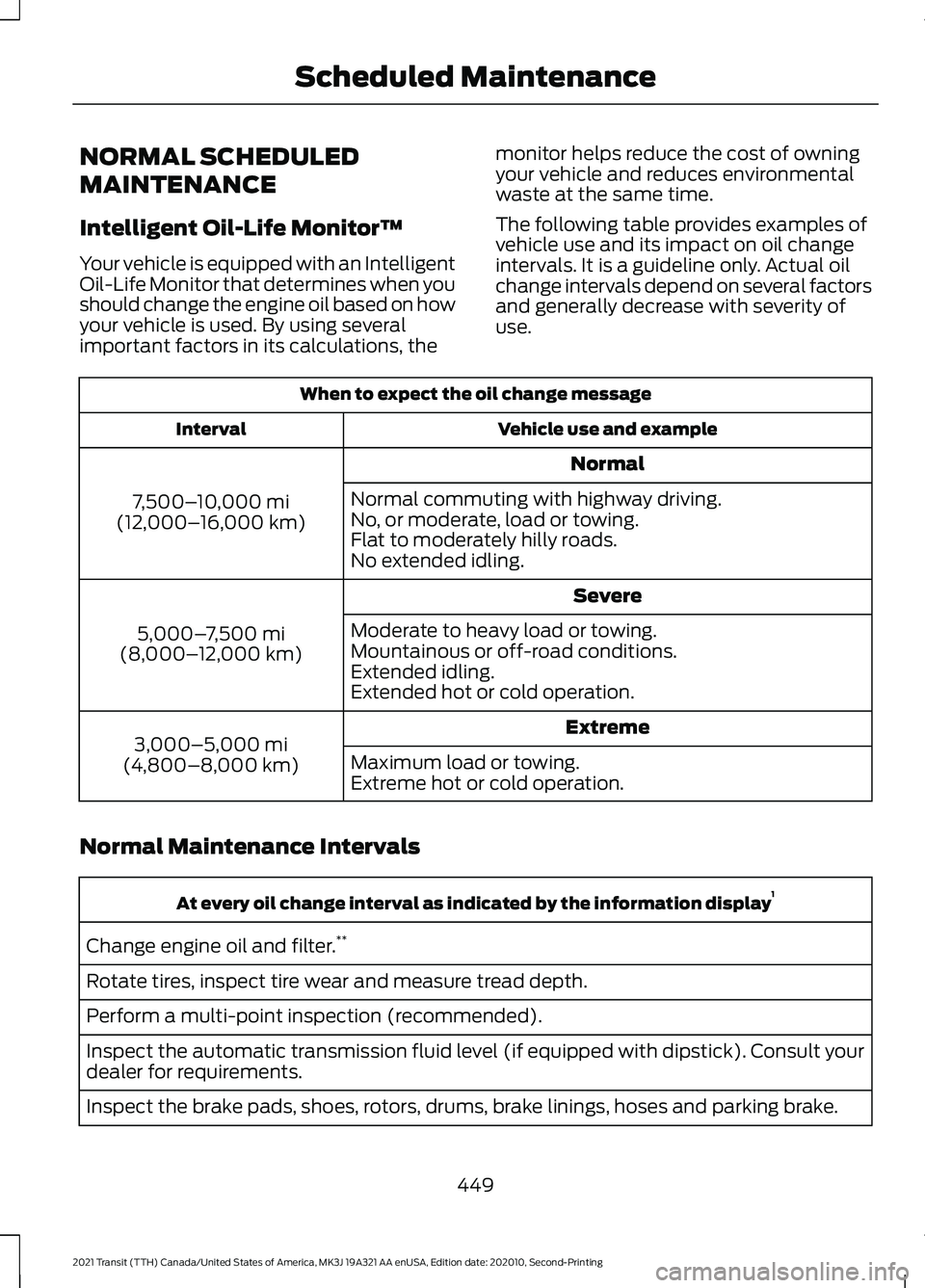
Your vehicle is equipped with an Intelligent
Oil-Life Monitor that determines when you
should change the engine oil based on how
your vehicle is used. By using several
important factors in its calculations, the
monitor helps reduce the cost of owning
your vehicle and reduces environmental
waste at the same time.
The following table provides examples of
vehicle use and its impact on oil change
intervals. It is a guideline only. Actual oil
change intervals depend on several factors
and generally decrease with severity of
use.When to expect the oil change message
Vehicle use and example
Interval
Normal
7,500– 10,000 mi
(12,000– 16,000 km) Normal commuting with highway driving.
No, or moderate, load or towing.
Flat to moderately hilly roads.
No extended idling.
Severe
5,000– 7,500 mi
(8,000– 12,000 km) Moderate to heavy load or towing.
Mountainous or off-road conditions.
Extended idling.
Extended hot or cold operation.
Extreme
3,000–5,000 mi
(4,800–8,000 km) Maximum load or towing.
Extreme hot or cold operation.
Normal Maintenance Intervals At every oil change interval as indicated by the information display
1
Change engine oil and filter. **
Rotate tires, inspect tire wear and measure tread depth.
Perform a multi-point inspection (recommended).
Inspect the automatic transmission fluid level (if equipped with dipstick). Consult your
dealer for requirements.
Inspect the brake pads, shoes, rotors, drums, brake linings, hoses and parking brake.
449
2021 Transit (TTH) Canada/United States of America, MK3J 19A321 AA enUSA, Edition date: 202010, Second-Printing Scheduled Maintenance
Page 494 of 509
1
180 Degree Camera.....................................196
Camera Views...................................................... 197
Front View Camera............................................ 196
Using the 180 degree camera system.........197
9
911 Assist
............................................................61
A
A/C See: Climate Control.......................................... 122
About This Manual...........................................9
ABS See: Brakes............................................................ 170
ABS driving hints See: Hints on Driving With Anti-Lock
Brakes................................................................. 170
Accessories....................................................442
ACC See: Using Adaptive Cruise Control............199
Active Park Assist..........................................191 Using Active Park Assist.................................... 191
Adjusting the Headlamps
.........................293
Horizontal Aim Adjustment........................... 294
Vertical Aim Adjustment................................. 293
Adjusting the Steering Wheel...................96
Airbag Disposal
..............................................60
Air Conditioning See: Climate Control.......................................... 122
Air Filter See: Changing the Engine Air Filter............284
Alarm See: Anti-Theft Alarm - Vehicles With:
Anti-Theft Alarm Horn with Integral
Battery.................................................................. 91
See: Anti-Theft Alarm - Vehicles Without: Anti-Theft Alarm Horn with Integral
Battery................................................................ 90
All-Wheel Drive.............................................165
AM/FM Radio - Vehicles Without: SYNC.............................................................379
Selecting a Radio Source................................ 379Anti-Theft Alarm - Vehicles With:
Anti-Theft Alarm Horn with Integral
Battery..............................................................91
Alarm System......................................................... 91
Arming the Alarm................................................. 92
Disarming the Alarm........................................... 92
Guard Settings....................................................... 91
Triggering the Alarm............................................. 91
Anti-Theft Alarm - Vehicles Without: Anti-Theft Alarm Horn with Integral
Battery............................................................90
Alarm System....................................................... 90
Arming the Alarm................................................ 90
Disarming the Alarm.......................................... 90
Triggering the Alarm........................................... 90
Appendices.....................................................461
Applying the Electric Parking Brake........177
Applying the Electric Parking Brake in an Emergency....................................................177
Applying the Parking Brake.......................174
Apps
..................................................................425
SiriusXM Traffic and Travel Link................... 426
Using Apps on an Android Device...............426
Using Apps on an iOS Device........................ 425
Using Mobile Navigation on an Android Device............................................................... 426
Audio System
................................................376
General Information.......................................... 376
Audio Unit Clock and Date Displays - Vehicles Without: SYNC
........................380
Adjusting the Clock.......................................... 380
Audio Unit - Vehicles With: SYNC 3.......................................................................378
Adjusting the Volume....................................... 378
Changing Radio Stations................................ 379
Next Track Button.............................................. 379
Pausing or Playing Media................................ 379
Previous Track Button...................................... 379
Sound Settings................................................... 379
Switching the Audio Unit On and Off.........378
Switching the Screen On and Off................379
Audio Unit - Vehicles Without: SYNC
..............................................................376
Adjusting the Volume....................................... 376
Changing Radio Stations................................. 377
Pausing or Playing Media................................ 378
Returning to the Previous Screen.................377
Scrolling Through the Menu Options..........377
491
2021 Transit (TTH) Canada/United States of America, MK3J 19A321 AA enUSA, Edition date: 202010, Second-Printing Index
Page 495 of 509
Seek Down and Previous Track
Button............................................................... 378
Seek Up and Next Track Button.................... 377
Selecting a Menu Option................................. 377
Selecting Media................................................... 377
Selecting the Radio............................................ 377
Sound Settings................................................... 378
Switching the Audio Unit On and Off.........376
Switching the Screen On and Off................378
System Settings................................................. 378
Using a Cell Phone............................................ 378
Auto Hold.........................................................172
Auto Hold Indicator............................................ 172
Auto Hold Information Messages.................173
Switching Auto Hold On and Off................... 172
Using Auto Hold................................................... 172
Autolamps.......................................................101 Adjusting the Period of Time That the
Headlamps Remain On............................... 102
Automatically Releasing the Electric Parking Brake...............................................177
Automatic High Beam Control
................103
Automatic High Beam Control Information
Messages.......................................................... 104
Automatic High Beam Indicator................... 104
Overriding Automatic High Beam Control............................................................... 104
Switching Automatic High Beam Control On or Off........................................................... 104
Automatic Transmission
.............................161
Automatic Transmission Information
Messages.......................................................... 163
Brake Shift Interlock.......................................... 162
Progressive Range Selection........................... 161
Selector Lever Positions................................... 161
SelectShift™......................................................... 161
Transmission Not in Park (P) Audible Warning............................................................. 163
Automatic Transmission Fluid Check............................................................289
Auto-Start-Stop...........................................148 Auto-Start-Stop – Troubleshooting...........149
Auto-Start-Stop Indicators
......................149
Auto-Start-Stop Precautions..................148
Auto-Start-Stop – Troubleshooting.........................................149
Auto-Start-Stop – Frequently Asked Questions......................................................... 150Auto-Start-Stop – Information
Messages.......................................................... 149
Autowipers
........................................................97
Settings................................................................... 98
Auxiliary Power Points................................138 110 Volt - 150 Watt Capacity AC Power
Outlet................................................................. 138
110 Volt - 400 Watt Capacity AC Power Outlet................................................................. 139
Auxiliary Switches.......................................443
AWD See: All-Wheel Drive......................................... 165
B
Battery See: Changing the 12V Battery..................... 290
Blind Spot Information System...............212 Blind Spot Information System
Indicator............................................................. 213
Blind Spot Information System Information Messages.......................................................... 215
Blind Spot Information System Sensors.............................................................. 212
Blind Spot Information System Warning Lamp................................................................... 215
Blind Spot Information System with Trailer Tow...................................................................... 213
Switching the Blind Spot Information System On and Off........................................ 213
Using the Blind Spot Information System............................................................... 212
BLIS See: Blind Spot Information System...........212
Body Styling Kits
...........................................310
Bonnet Lock See: Opening and Closing the Hood..........278
Booster Seats
...................................................37
Types of Booster Seats...................................... 38
Bottle Holders
................................................142
Bottle Holder Precautions............................... 142
Locating the Bottle Holders............................ 142
Brake Fluid Check.......................................290
Brakes
................................................................170
General Information.......................................... 170
Breaking-In.....................................................247
Bulb Specification Chart
..........................369
492
2021 Transit (TTH) Canada/United States of America, MK3J 19A321 AA enUSA, Edition date: 202010, Second-Printing Index