parking brake FORD TRANSIT 2021 Owner's Manual
[x] Cancel search | Manufacturer: FORD, Model Year: 2021, Model line: TRANSIT, Model: FORD TRANSIT 2021Pages: 509, PDF Size: 8.21 MB
Page 181 of 509
ELECTRIC PARKING BRAKE
AUDIBLE WARNING
Sounds when the parking brake is on and
your vehicle is moving. If the warning tone
continues after you have released the
parking brake, this indicates a malfunction.
Have your vehicle checked as soon as
possible.
RELEASING THE ELECTRIC
PARKING BRAKE IF THE
VEHICLE BATTERY HAS RUN
OUT OF CHARGE
WARNING: The electric parking
brake does not operate if the vehicle
battery has run out of charge. Connect a booster battery to the vehicle
battery to release the electric parking brake
if the vehicle battery has run out of charge.
See
Jump Starting the Vehicle (page
251).
ELECTRIC PARKING BRAKE –
TROUBLESHOOTING
ELECTRIC PARKING BRAKE –
WARNING LAMPS The red warning lamp
illuminates when the electronic
parking brake is applied or for a
few seconds on start up.
If it remains illuminated or
flashes when the electronic
parking brake is not applied, it indicates a
malfunction. Have your vehicle checked
as soon as possible.
ELECTRIC PARKING BRAKE – INFORMATION MESSAGES Action
Message
The electric parking brake has malfunctioned. Have your
vehicle checked as soon as possible.
Park Brake Malfunction
Service Now
The electric parking brake has not released. Manually release
the electric parking brake. If the message continues to appear,
have your vehicle checked as soon as possible.
Park Brake Not Released
The electric parking brake has not applied. Apply the electric
parking brake. If the message continues to appear, have your
vehicle checked as soon as possible.
Park Brake Not Applied
The electric parking brake has not automatically released.
Manually release the electric parking brake.
Park Brake Use Switch to
Release
You have not pressed the brake pedal. Press the brake pedal
to release the parking brake.
To Release: Press Brake
and Switch
The electric parking brake has malfunctioned. Have your
vehicle checked as soon as possible.
Park Brake Limited Func-
tion Service Required
178
2021 Transit (TTH) Canada/United States of America, MK3J 19A321 AA enUSA, Edition date: 202010, Second-Printing Electric Parking BrakeE270480
Page 182 of 509
Action
Message
The electric parking brake has overheated. Wait for the elec-
tric parking brake to cool down.
Park Brake System Over-
heated
The electric parking brake is released.
Park Brake Off
The electric parking brake has not released. Manually release
the electric parking brake. If the message continues to appear,
have your vehicle checked as soon as possible.
Release Park Brake
The electric parking brake is applied.
Park Brake On
179
2021 Transit (TTH) Canada/United States of America, MK3J 19A321 AA enUSA, Edition date: 202010, Second-Printing Electric Parking Brake
Page 186 of 509
PRINCIPLE OF OPERATION
WARNING: To help avoid personal
injury, always use caution when in
reverse (R) and when using the sensing
system. WARNING:
The system may not
detect objects with surfaces that absorb
reflection. Always drive with due care
and attention. Failure to take care may
result in a crash. WARNING: Traffic control systems,
inclement weather, air brakes, external
motors and fans may affect the correct
operation of the sensing system. This
may cause reduced performance or false
alerts. WARNING:
The system may not
detect small or moving objects,
particularly those close to the ground. WARNING:
If damage occurs in the
immediate area surrounding the sensor,
have your vehicle checked as soon as
possible. WARNING:
The parking aid system
can only assist you to detect objects
when your vehicle is moving at parking
speeds. To help avoid personal injury you
must take care when using the parking
aid system. WARNING:
In cold and severe
weather conditions the system may not
function. Rain, snow and spray can all
limit sensor performance. WARNING:
The system may not
function if the sensor is blocked. Note:
If your vehicle has MyKey ™, the
sensing system cannot be switched off
when a MyKey ™ is present.
See Principle
of Operation (page 70).
Note: Do not clean the sensors with sharp
objects.
Note: If your vehicle sustains damage to
the bumper or fascia and you leave it
misaligned or bent, the sensing zone may
be altered causing inaccurate measurement
of obstacles or false alerts.
Note: Certain add-on devices installed
around the bumper or fascia may create
false alerts. For example, large trailer
hitches, bike or surfboard racks, license plate
brackets, bumper covers or any other device
that may block the normal detection zone
of the system. Remove the add-on device
to prevent false alerts.
Note: When you connect a trailer to your
vehicle, the rear parking aid may detect the
trailer and therefore provide an alert. Disable
the rear parking aid when you connect a
trailer to prevent the alert.
The sensing system warns you of obstacles
within a certain range of your vehicle. The
system turns on when you switch the
ignition on.
You can switch the system off through the
information display menu or from the
pop-up message that appears once you
shift the transmission into reverse (R). See
General Information
(page 115). If your
vehicle has a parking aid button, you can
switch the system off by pressing the
button. The system turns on when you
switch the ignition on.
If a fault is present in the system, a warning
message appears in the information
display.
183
2021 Transit (TTH) Canada/United States of America, MK3J 19A321 AA enUSA, Edition date: 202010, Second-Printing Parking Aids
Page 187 of 509
PARKING AID
WARNING: The parking aid system
can only assist you to detect objects
when your vehicle is moving at parking
speeds. To help avoid personal injury you
must take care when using the parking
aid system. WARNING: Traffic control systems,
fluorescent lamps, inclement weather,
air brakes, external motors and fans may
affect the correct operation of the
sensing system. This may cause reduced
performance or false alerts. WARNING:
The system may not
detect small or moving objects,
particularly those close to the ground. Press the parking aid button to
switch the system on and off.
The system becomes active when you shift
into reverse (R) and the vehicle speed is
5 mph (8 km/h)
or less. The system
remains active when you shift out of
reverse (R) until the vehicle speed is
greater than
5 mph (8 km/h), or until you
press the parking aid button.
Note: The system could turn off when you
shift out of reverse (R).
The system warns you of objects that are
within the detection zone of the bumper
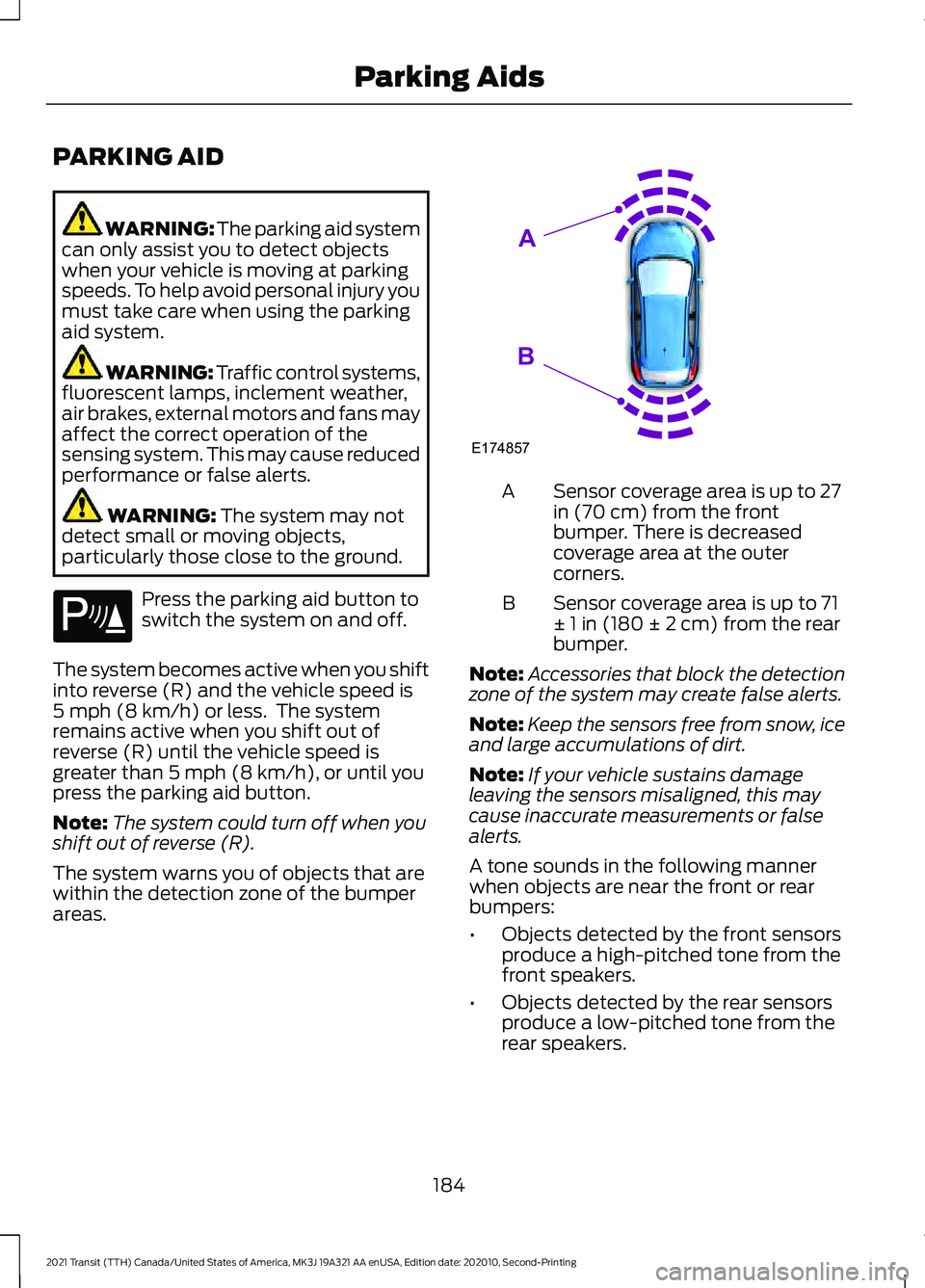
areas. Sensor coverage area is up to 27
in (70 cm) from the front
bumper. There is decreased
coverage area at the outer
corners.
A
Sensor coverage area is up to 71
± 1 in (180 ± 2 cm) from the rear
bumper.
B
Note: Accessories that block the detection
zone of the system may create false alerts.
Note: Keep the sensors free from snow, ice
and large accumulations of dirt.
Note: If your vehicle sustains damage
leaving the sensors misaligned, this may
cause inaccurate measurements or false
alerts.
A tone sounds in the following manner
when objects are near the front or rear
bumpers:
• Objects detected by the front sensors
produce a high-pitched tone from the
front speakers.
• Objects detected by the rear sensors
produce a low-pitched tone from the
rear speakers.
184
2021 Transit (TTH) Canada/United States of America, MK3J 19A321 AA enUSA, Edition date: 202010, Second-Printing Parking AidsE139213 E174857
A
B
Page 192 of 509
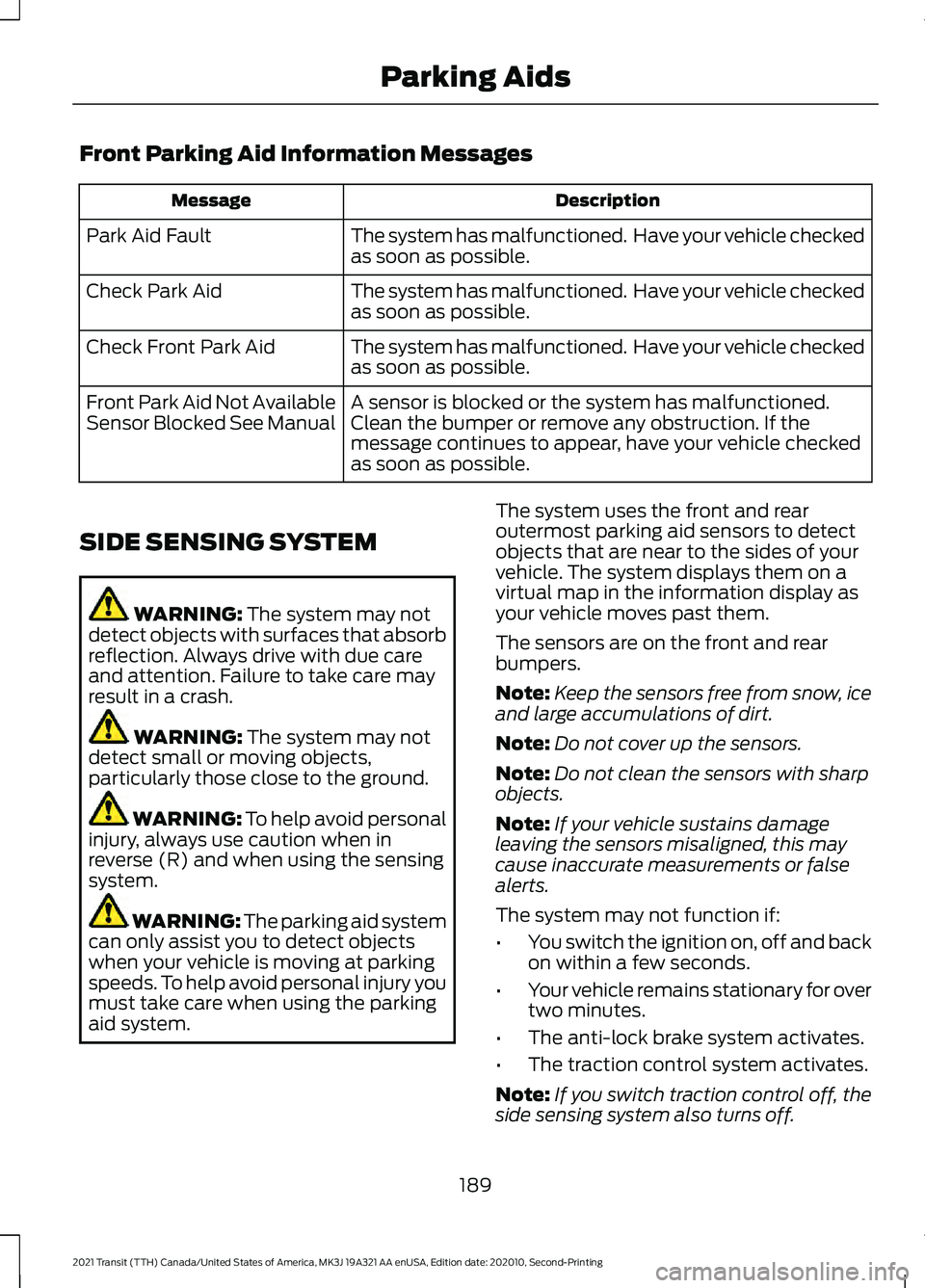
Front Parking Aid Information Messages
Description
Message
The system has malfunctioned. Have your vehicle checked
as soon as possible.
Park Aid Fault
The system has malfunctioned. Have your vehicle checked
as soon as possible.
Check Park Aid
The system has malfunctioned. Have your vehicle checked
as soon as possible.
Check Front Park Aid
A sensor is blocked or the system has malfunctioned.
Clean the bumper or remove any obstruction. If the
message continues to appear, have your vehicle checked
as soon as possible.
Front Park Aid Not Available
Sensor Blocked See Manual
SIDE SENSING SYSTEM WARNING: The system may not
detect objects with surfaces that absorb
reflection. Always drive with due care
and attention. Failure to take care may
result in a crash. WARNING:
The system may not
detect small or moving objects,
particularly those close to the ground. WARNING:
To help avoid personal
injury, always use caution when in
reverse (R) and when using the sensing
system. WARNING:
The parking aid system
can only assist you to detect objects
when your vehicle is moving at parking
speeds. To help avoid personal injury you
must take care when using the parking
aid system. The system uses the front and rear
outermost parking aid sensors to detect
objects that are near to the sides of your
vehicle. The system displays them on a
virtual map in the information display as
your vehicle moves past them.
The sensors are on the front and rear
bumpers.
Note:
Keep the sensors free from snow, ice
and large accumulations of dirt.
Note: Do not cover up the sensors.
Note: Do not clean the sensors with sharp
objects.
Note: If your vehicle sustains damage
leaving the sensors misaligned, this may
cause inaccurate measurements or false
alerts.
The system may not function if:
• You switch the ignition on, off and back
on within a few seconds.
• Your vehicle remains stationary for over
two minutes.
• The anti-lock brake system activates.
• The traction control system activates.
Note: If you switch traction control off, the
side sensing system also turns off.
189
2021 Transit (TTH) Canada/United States of America, MK3J 19A321 AA enUSA, Edition date: 202010, Second-Printing Parking Aids
Page 194 of 509
When you shift into neutral (N), the system
only provides a visual indication if your
vehicle is moving at a speed of
approximately 5 mph (8 km/h) or below.
For example, your vehicle is moving on a
slope, and the system detects an object
moving toward your vehicle. When you
stop your vehicle, the visual indication
turns off after four seconds.
If the system is not available, the side
distance indicator blocks do not display.
ACTIVE PARK ASSIST
The system assists parking into and out of
parking spaces. Sensors are used to detect
parking spaces. The system then steers as
required to maneuver into or out of a
parking space. You control the accelerator,
brakes and changing gears.
Using Active Park Assist WARNING:
You must remain in
your vehicle when the system turns on.
At all times, you are responsible for
controlling your vehicle, supervising the
system and intervening, if required.
Failure to take care may result in the loss
of control of your vehicle, serious
personal injury or death. WARNING:
The sensors may not
detect objects in heavy rain or other
conditions that cause interference. WARNING: You are responsible for
controlling your vehicle at all times. The
system is designed to be an aid and does
not relieve you of your responsibility to
drive with due care and attention. Failure
to follow this instruction could result in
the loss of control of your vehicle,
personal injury or death. The active park assist button is
next to the gearshift lever.
Driving into a Parking Space
1. Press the active park assist button.
Note: The system searches for parallel
parking spaces on the passenger side. Press
the active park assist button again to make
the system search for perpendicular spaces.
2. Use the direction indicator lever to search for a parking space on the driver
or passenger side of your vehicle.
3. Drive your vehicle approximately
3 ft
(1 m) away from and parallel to the
other parked vehicles when searching
for a parking space.
Note: A tone sounds and a message
appears in the information display when
active park assist finds a suitable parking
space.
4. Bring your vehicle to a complete standstill.
5. Release the steering wheel and shift into reverse (R).
6. Drive backward and your vehicle steers
itself into the parking space.
7. Follow the instructions on the information display.
Note: When parking is complete, a tone
sounds and an information message
appears.
Leaving a Parking Space
The system assists leaving only parallel
parking spaces.
1. Press the active park assist button.
2. Use the direction indicator lever to choose the direction to leave.
3. Release the steering wheel and shift into reverse (R).
191
2021 Transit (TTH) Canada/United States of America, MK3J 19A321 AA enUSA, Edition date: 202010, Second-Printing Parking Aids
Page 195 of 509
4. Follow the instructions on the
information display.
Note: After the system drives your vehicle
to a position where you can exit the parking
space in a forward movement, a message
appears instructing you to take full control
of your vehicle.
Canceling Active Park Assist
To cancel parking assistance at any time,
press the active park assist button or turn
the steering wheel. Note:
It also cancels when your vehicle
exceeds 6 mph (9 km/h).
Brake System Intervention
When active park assist is controlling the
steering, it may under certain conditions
apply the brakes to slow or stop your
vehicle.
Note: This could cause the parking
assistance to cancel.
Active Park Assist Troubleshooting Possible Cause
Symptom
You may have switched traction control off.
The system does not search for
a parking space.
The transmission is in reverse (R). Your vehicle must
be moving forward to be able to detect a parking space.
The sensors may be blocked. For example, snow, ice
or large accumulations of dirt. Blocked sensors can
affect how the system functions.
The system does not offer a
parking space.
The sensors in the front or rear bumper could be
damaged.
There is not enough room in the parking space for your
vehicle to safely park.
There is not enough space for the parking maneuver on
the opposite side of the parking space.
The parking space is more than
5 ft (1.5 m) or less than
2 ft (0.5 m) away.
The vehicle speed is greater than
22 mph (35 km/h)
for parallel parking or greater than 19 mph (30 km/h)
for perpendicular parking.
You recently disconnected or replaced the battery. After
you reconnect the battery you must drive your vehicle
on a straight road for a short period of time.
An irregular curb along the parking space prevents the
system from correctly aligning your vehicle.
The system does not correctly
position your vehicle in a
parking space.
192
2021 Transit (TTH) Canada/United States of America, MK3J 19A321 AA enUSA, Edition date: 202010, Second-Printing Parking Aids
Page 205 of 509
The system may apply the brakes to slow
your vehicle to the new set speed. The set
speed continuously displays in the
information display when the system is
active.
Canceling the Set Speed
Press the button, or tap the
brake pedal.
The last set speed displays with a
strikethrough and the last gap setting
appears but does not erase.
Note: The set speed also cancels if you
press the clutch pedal for an extended
period.
Resuming the Set Speed Press the button.
The vehicle speed returns to the previously
set speed and gap setting. The set speed
continuously shows in the information
display when the system is active.
Note: Only use resume if you are aware of
the set speed and intend to return to it.
Automatic Cancellation
The system does not operate if the vehicle
speed is below 12 mph (20 km/h). A tone
sounds and adaptive braking releases if
the vehicle speed falls below
12 mph
(20 km/h).
Automatic cancellation can also occur
when:
• The tires lose traction.
• The engine speed is too low.
• You apply the parking brake.
Note: If the engine speed drops too low,
the information display advises you to shift
to a lower gear. Hilly Condition Usage
Select a lower gear when the system is
active and you are driving downhill on
steep grades, for example in mountainous
areas. The system needs additional engine
braking in these situations to reduce the
load on the brake system to prevent it from
overheating.
Note:
A tone sounds and the system turns
off if it applies brakes for an extended period
of time. This allows the brakes to cool. The
system operates after the brakes cool.
Switching Adaptive Cruise Control
Off Press the button.
Note: The set speed erases when you
switch the system off.
Detection Issues WARNING:
On rare occasions,
detection issues can occur due to the
road infrastructures, for example bridges,
tunnels and safety barriers. In these
cases, the system may brake late or
unexpectedly. At all times, you are
responsible for controlling your vehicle,
supervising the system and intervening,
if required. WARNING:
If the system
malfunctions, have your vehicle checked
as soon as possible.
The radar has a limited field of view. It does
not detect all vehicles in all situations and
could detect vehicles later that you expect.
The lead vehicle graphic does not display
if the system does not detect a vehicle in
front of you.
202
2021 Transit (TTH) Canada/United States of America, MK3J 19A321 AA enUSA, Edition date: 202010, Second-Printing Cruise Control E144529
Page 248 of 509
•
If your vehicle is fitted with
AdvanceTrac with roll stability control
(RSC), this system may turn on during
typical cornering maneuvers with a
heavily loaded trailer. This is normal.
Turning the corner at a slower speed
while towing may reduce this tendency.
• If you are towing a trailer frequently in
hot weather, hilly conditions, at the
gross combined weight rating (or any
combination of these factors), consider
refilling your vehicle's rear axle with
synthetic gear lubricant (if the axle is
not already filled with it). See
Capacities and Specifications (page
352).
• Allow more distance for stopping with
a trailer attached. Anticipate stops and
brake gradually.
• Avoid parking on a grade. However, if
you must park on a grade:
•Turn the steering wheel to point
your vehicle tires away from traffic
flow.
• Set your vehicle parking brake.
• Place the automatic transmission
in position park (
P).
• Place wheel chocks in front of and
at the back of the trailer wheels.
(Trailer wheel chocks are not
included with your vehicle.)
Launching or Retrieving a Boat or
Personal Water Craft (PWC)
When backing down a ramp during boat
launching or retrieval:
• Do not allow the static water level to
rise above the bottom edge of the rear
bumper.
• Do not allow waves to break higher
than
6 in (15 cm) above the bottom
edge of the rear bumper.
Note: Disconnect the wiring to the trailer
before backing the trailer into the water. Note:
Reconnect the wiring to the trailer
after the trailer is removed from the water.
Exceeding these limits may allow water to
enter vehicle components:
• Causing internal damage to the
components.
• Affecting driveability, emissions, and
reliability.
Replace the rear axle lubricant anytime
the rear axle has been submerged in water.
Water may have contaminated the rear
axle lubricant, which is not normally
checked or changed unless a leak is
suspected or other axle repair is required.
TOWING THE VEHICLE ON
FOUR WHEELS
If you need to tow your vehicle, contact a
professional towing service or, if you are a
member of a roadside assistance program,
your roadside assistance service provider.
245
2021 Transit (TTH) Canada/United States of America, MK3J 19A321 AA enUSA, Edition date: 202010, Second-Printing Towing
Page 281 of 509
GENERAL INFORMATION
Have your vehicle serviced regularly to help
maintain its roadworthiness and resale
value. There is a large network of
authorized dealers that are there to help
you with their professional servicing
expertise. We believe that their specially
trained technicians are best qualified to
service your vehicle properly and expertly.
They are supported by a wide range of
highly specialized tools developed
specifically for servicing your vehicle.
If your vehicle requires professional service,
an authorized dealer can provide the
necessary parts and service. Check your
warranty information to find out which
parts and services are covered.
Use only recommended fuels, lubricants,
fluids and service parts conforming to
specifications. Motorcraft® parts are
designed and built to provide the best
performance in your vehicle.
Precautions
•
Do not work on a hot engine.
• Make sure that nothing gets caught in
moving parts.
• Do not work on a vehicle with the
engine running in an enclosed space,
unless you are sure you have enough
ventilation.
• Keep all open flames and other burning
material (such as cigarettes) away
from the battery and all fuel related
parts.
Working with the Engine Off
1. Set the parking brake and shift the transmission to park (P).
2. Switch off the engine.
3. Block the wheels. Working with the Engine On WARNING: To reduce the risk of
vehicle damage and personal burn
injuries, do not start your engine with the
air cleaner removed and do not remove
it while the engine is running.
1. Set the parking brake and shift the transmission to park (P).
2. Block the wheels.
OPENING AND CLOSING THE
HOOD
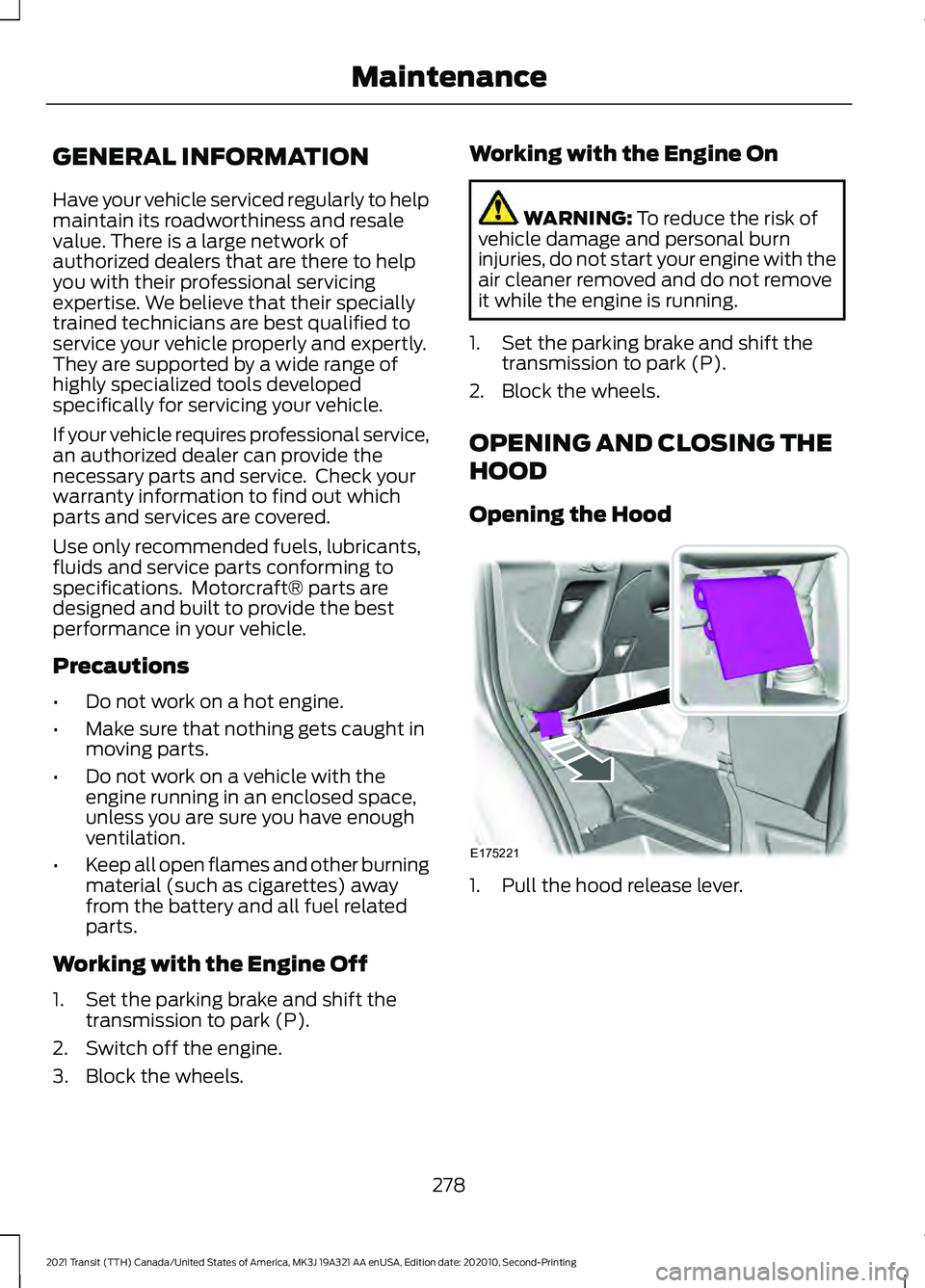
Opening the Hood 1. Pull the hood release lever.
278
2021 Transit (TTH) Canada/United States of America, MK3J 19A321 AA enUSA, Edition date: 202010, Second-Printing MaintenanceE175221