phone FORD TRANSIT 2021 Workshop Manual
[x] Cancel search | Manufacturer: FORD, Model Year: 2021, Model line: TRANSIT, Model: FORD TRANSIT 2021Pages: 509, PDF Size: 8.21 MB
Page 437 of 509
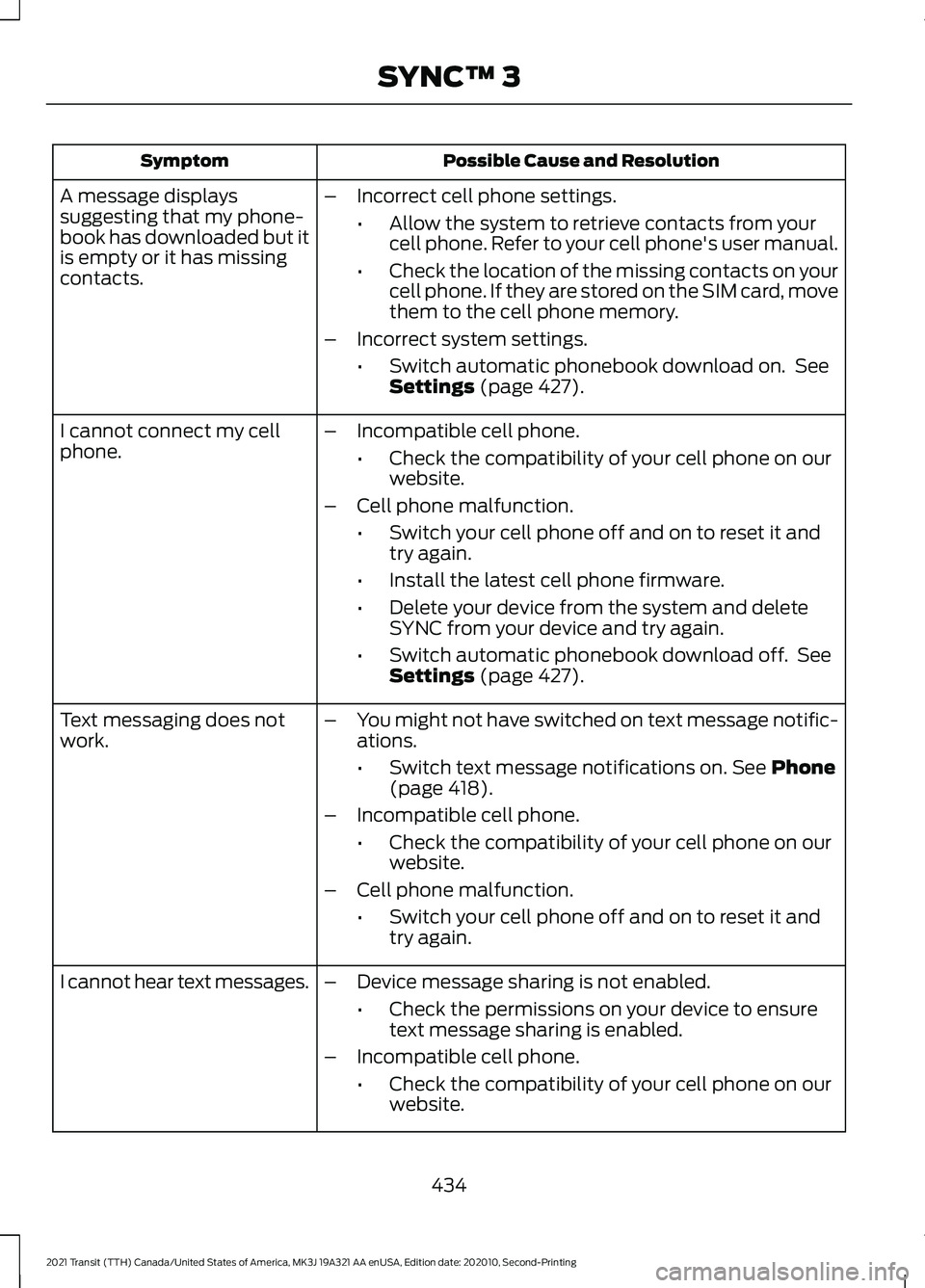
Possible Cause and Resolution
Symptom
–Incorrect cell phone settings.
•Allow the system to retrieve contacts from your
cell phone. Refer to your cell phone's user manual.
• Check the location of the missing contacts on your
cell phone. If they are stored on the SIM card, move
them to the cell phone memory.
– Incorrect system settings.
•Switch automatic phonebook download on. See
Settings (page 427).
A message displays
suggesting that my phone-
book has downloaded but it
is empty or it has missing
contacts.
–Incompatible cell phone.
•Check the compatibility of your cell phone on our
website.
– Cell phone malfunction.
•Switch your cell phone off and on to reset it and
try again.
• Install the latest cell phone firmware.
• Delete your device from the system and delete
SYNC from your device and try again.
• Switch automatic phonebook download off. See
Settings
(page 427).
I cannot connect my cell
phone.
Text messaging does not
work.
–
You might not have switched on text message notific-
ations.
•Switch text message notifications on.
See Phone
(page 418).
– Incompatible cell phone.
•Check the compatibility of your cell phone on our
website.
– Cell phone malfunction.
•Switch your cell phone off and on to reset it and
try again.
– Device message sharing is not enabled.
•Check the permissions on your device to ensure
text message sharing is enabled.
– Incompatible cell phone.
•Check the compatibility of your cell phone on our
website.
I cannot hear text messages.
434
2021 Transit (TTH) Canada/United States of America, MK3J 19A321 AA enUSA, Edition date: 202010, Second-Printing SYNC™ 3
Page 442 of 509
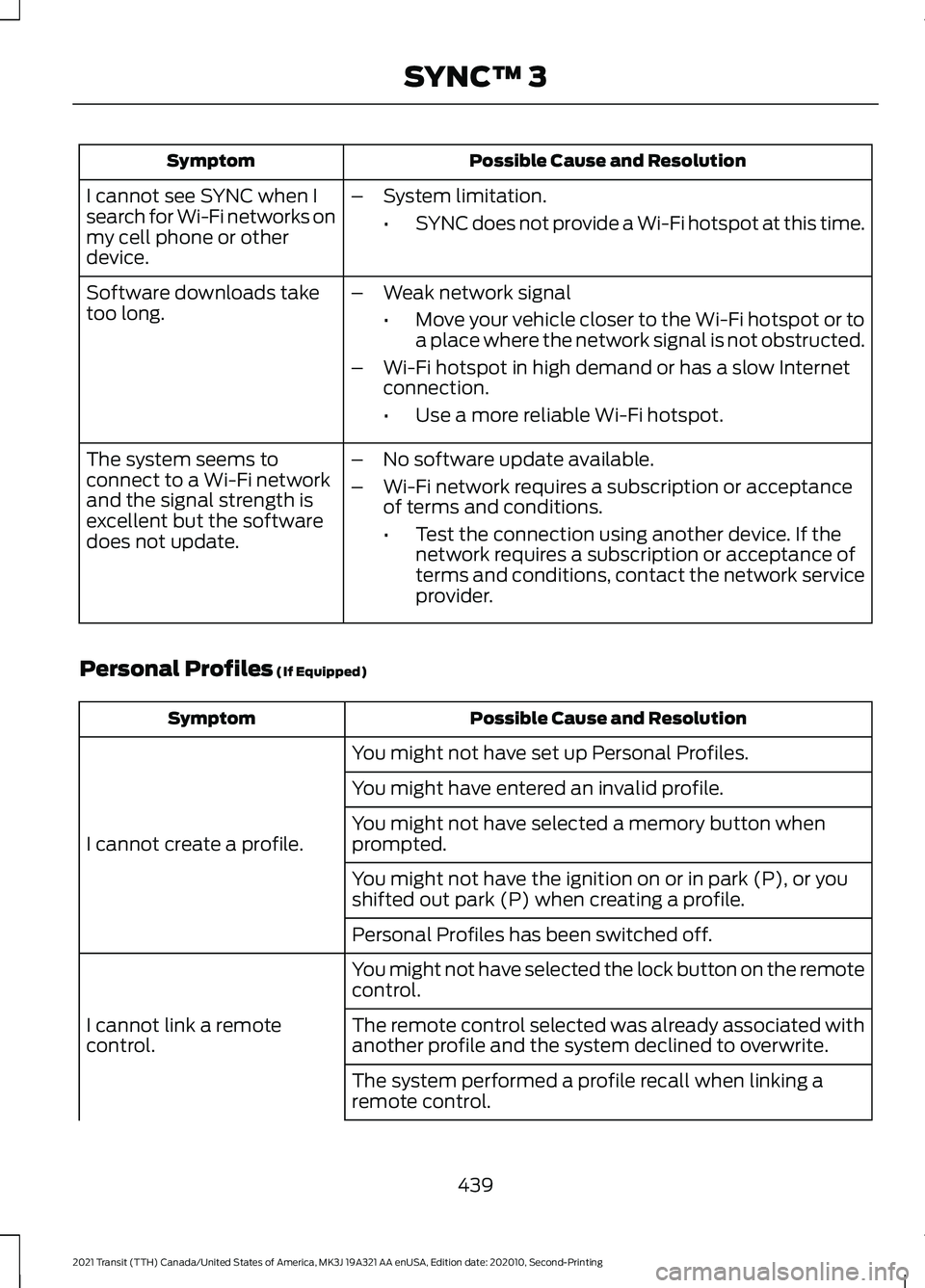
Possible Cause and Resolution
Symptom
I cannot see SYNC when I
search for Wi-Fi networks on
my cell phone or other
device. –
System limitation.
•SYNC does not provide a Wi-Fi hotspot at this time.
– Weak network signal
•Move your vehicle closer to the Wi-Fi hotspot or to
a place where the network signal is not obstructed.
– Wi-Fi hotspot in high demand or has a slow Internet
connection.
•Use a more reliable Wi-Fi hotspot.
Software downloads take
too long.
–No software update available.
– Wi-Fi network requires a subscription or acceptance
of terms and conditions.
•Test the connection using another device. If the
network requires a subscription or acceptance of
terms and conditions, contact the network service
provider.
The system seems to
connect to a Wi-Fi network
and the signal strength is
excellent but the software
does not update.
Personal Profiles (If Equipped) Possible Cause and Resolution
Symptom
You might not have set up Personal Profiles.
I cannot create a profile. You might have entered an invalid profile.
You might not have selected a memory button when
prompted.
You might not have the ignition on or in park (P), or you
shifted out park (P) when creating a profile.
Personal Profiles has been switched off.
You might not have selected the lock button on the remote
control.
I cannot link a remote
control. The remote control selected was already associated with
another profile and the system declined to overwrite.
The system performed a profile recall when linking a
remote control.
439
2021 Transit (TTH) Canada/United States of America, MK3J 19A321 AA enUSA, Edition date: 202010, Second-Printing SYNC™ 3
Page 445 of 509
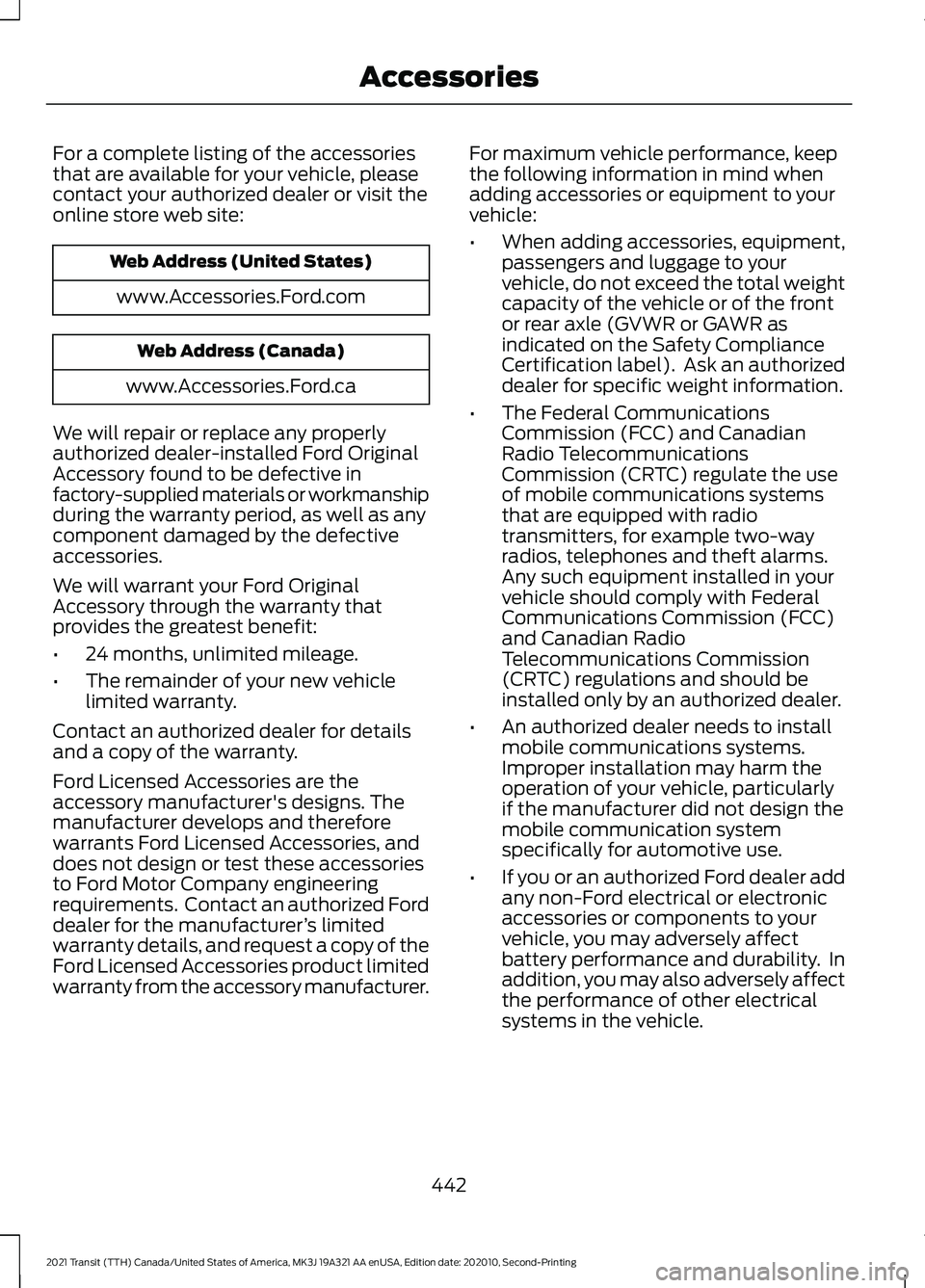
For a complete listing of the accessories
that are available for your vehicle, please
contact your authorized dealer or visit the
online store web site:
Web Address (United States)
www.Accessories.Ford.com Web Address (Canada)
www.Accessories.Ford.ca
We will repair or replace any properly
authorized dealer-installed Ford Original
Accessory found to be defective in
factory-supplied materials or workmanship
during the warranty period, as well as any
component damaged by the defective
accessories.
We will warrant your Ford Original
Accessory through the warranty that
provides the greatest benefit:
• 24 months, unlimited mileage.
• The remainder of your new vehicle
limited warranty.
Contact an authorized dealer for details
and a copy of the warranty.
Ford Licensed Accessories are the
accessory manufacturer's designs. The
manufacturer develops and therefore
warrants Ford Licensed Accessories, and
does not design or test these accessories
to Ford Motor Company engineering
requirements. Contact an authorized Ford
dealer for the manufacturer ’s limited
warranty details, and request a copy of the
Ford Licensed Accessories product limited
warranty from the accessory manufacturer. For maximum vehicle performance, keep
the following information in mind when
adding accessories or equipment to your
vehicle:
•
When adding accessories, equipment,
passengers and luggage to your
vehicle, do not exceed the total weight
capacity of the vehicle or of the front
or rear axle (GVWR or GAWR as
indicated on the Safety Compliance
Certification label). Ask an authorized
dealer for specific weight information.
• The Federal Communications
Commission (FCC) and Canadian
Radio Telecommunications
Commission (CRTC) regulate the use
of mobile communications systems
that are equipped with radio
transmitters, for example two-way
radios, telephones and theft alarms.
Any such equipment installed in your
vehicle should comply with Federal
Communications Commission (FCC)
and Canadian Radio
Telecommunications Commission
(CRTC) regulations and should be
installed only by an authorized dealer.
• An authorized dealer needs to install
mobile communications systems.
Improper installation may harm the
operation of your vehicle, particularly
if the manufacturer did not design the
mobile communication system
specifically for automotive use.
• If you or an authorized Ford dealer add
any non-Ford electrical or electronic
accessories or components to your
vehicle, you may adversely affect
battery performance and durability. In
addition, you may also adversely affect
the performance of other electrical
systems in the vehicle.
442
2021 Transit (TTH) Canada/United States of America, MK3J 19A321 AA enUSA, Edition date: 202010, Second-Printing Accessories
Page 463 of 509
The Ford Warranty may not cover damage
caused to your vehicle as a result of failed
non-Ford parts.
For additional information, refer to the
terms and conditions of the Ford Warranty.
MOBILE COMMUNICATIONS
EQUIPMENT
WARNING: Driving while distracted
can result in loss of vehicle control, crash
and injury. We strongly recommend that
you use extreme caution when using any
device that may take your focus off the
road. Your primary responsibility is the
safe operation of your vehicle. We
recommend against the use of any
hand-held device while driving and
encourage the use of voice-operated
systems when possible. Make sure you
are aware of all applicable local laws
that may affect the use of electronic
devices while driving.
Using mobile communications equipment
is becoming increasingly important in the
conduct of business and personal affairs.
However, you must not compromise your
own or others’ safety when using such
equipment. Mobile communications can
enhance personal safety and security when
appropriately used, particularly in
emergency situations. Safety must be
paramount when using mobile
communications equipment to avoid
negating these benefits. Mobile
communication equipment includes, but
is not limited to, cellular phones, pagers,
portable email devices, text messaging
devices and portable two-way radios. EXPORT UNIQUE OPTIONS
For your particular global region, your
vehicle may be equipped with features and
options that are different from the features
and options that are described in this
Owner
’s Manual. A market unique
supplement may be supplied that
complements this book. By referring to the
market unique supplement, if provided,
you can properly identify those features,
recommendations and specifications that
are unique to your vehicle. This Owner ’s
Manual is written primarily for the U.S. and
Canadian markets. Features or equipment
listed as standard may be different on units
built for export. Refer to this Owner ’s
Manual for all other required
information and warnings.
460
2021 Transit (TTH) Canada/United States of America, MK3J 19A321 AA enUSA, Edition date: 202010, Second-Printing Customer Information
Page 464 of 509
ELECTROMAGNETIC
COMPATIBILITY
WARNING: Do not place objects
or mount equipment on or near the
airbag cover, on the side of the front or
rear seatbacks, or in areas that may
come into contact with a deploying
airbag. Failure to follow these
instructions may increase the risk of
personal injury in the event of a crash. WARNING: Do not fasten antenna
cables to vehicle wiring, fuel pipes and
brake pipes. WARNING:
Keep antenna and
power cables at least 4 in (10 cm) from
any electronic modules and airbags. Note:
We test and certify your vehicle to
meet electromagnetic compatibility
legislation. It is your responsibility to make
sure that any equipment an authorized
dealer installs on your vehicle complies with
applicable local legislation and other
requirements. Installation of some
aftermarket electronic devices could
degrade the performance of vehicle
functions, which use radio frequency signals
such as broadcast radio receiver, tire
pressure monitoring system, push button
start, Bluetooth®
connectivity or satellite
navigation.
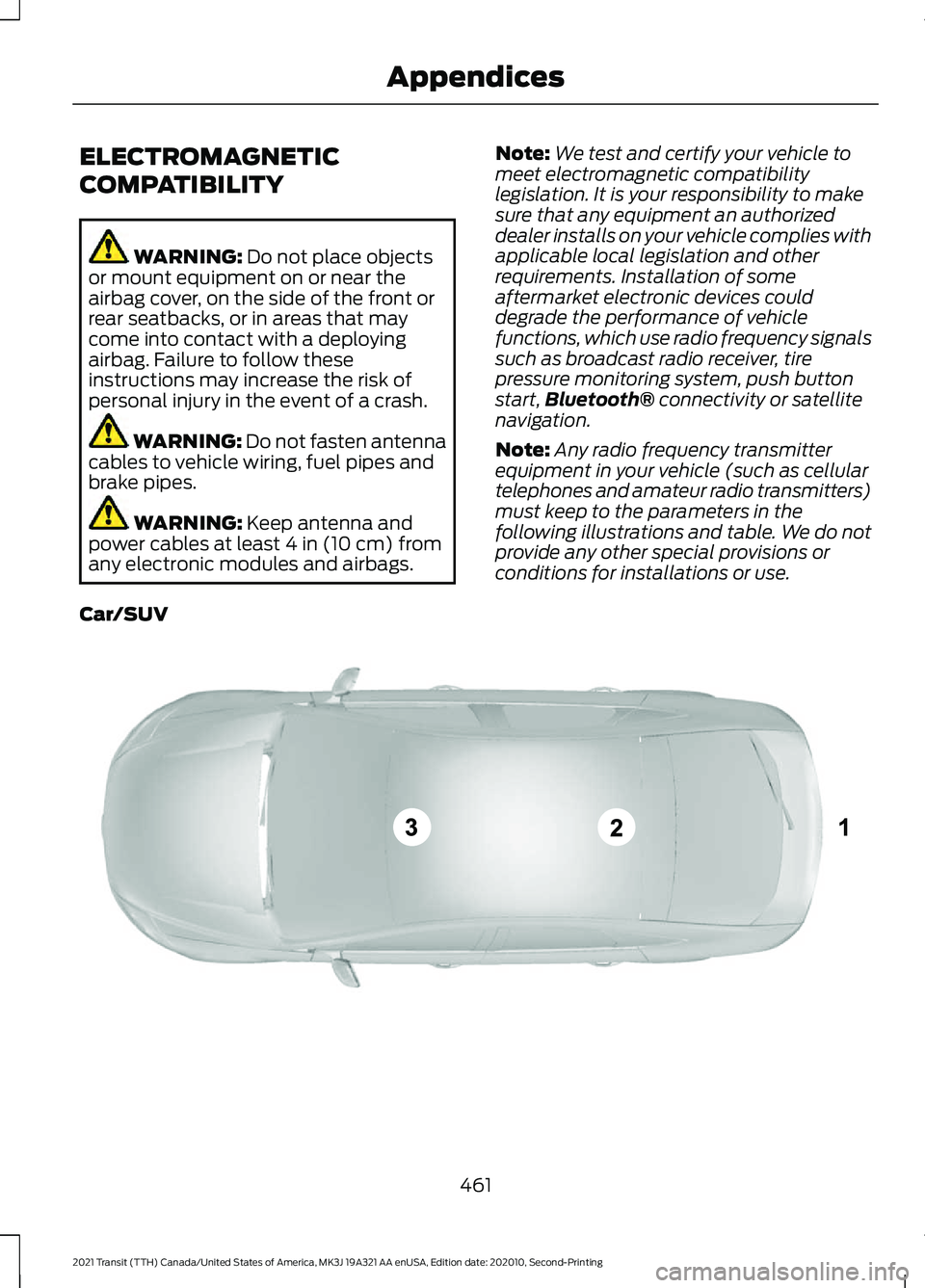
Note: Any radio frequency transmitter
equipment in your vehicle (such as cellular
telephones and amateur radio transmitters)
must keep to the parameters in the
following illustrations and table. We do not
provide any other special provisions or
conditions for installations or use.
Car/SUV 461
2021 Transit (TTH) Canada/United States of America, MK3J 19A321 AA enUSA, Edition date: 202010, Second-Printing AppendicesE239120
Page 479 of 509

HERE holds a non-exclusive license from
the United States Postal Service® to
publish and sell ZIP+4® information.
©United States Postal Service® 2014.
Prices are not established, controlled or
approved by the United States Postal
Service®. The following trademarks and
registrations are owned by the USPS:
United States Postal Service, USPS, and
ZIP+4
The Data for Mexico includes certain data
from Instituto Nacional de Estadística y
Geografía.
9.2 End User Terms Required by NAV2
(Shanghai) Co., Ltd
The data (“Data
”) is provided for your
personal, internal use only and not for
resale. It is protected by copyright, and is
subject to the following terms and
conditions which are agreed to by you, on
the one hand, and NAV2 (Shanghai) Co.,
Ltd (“NAV2”) and its licensors (including
their licensors and suppliers) on the other
hand. 20xx. All rights reserved
Terms and Conditions
Permitted Use. You agree to use this Data
together with the Telenav Software solely
for the internal business and personal
purposes for which you were licensed, and
not for service bureau, time-sharing or
other similar purposes. Accordingly, but
subject to the restrictions set forth in the
following paragraphs, you agree not to
otherwise reproduce, copy, modify,
decompile, disassemble, create any
derivative works of, or reverse engineer any
portion of this Data, and may not transfer
or distribute it in any form, for any purpose,
except to the extent permitted by
mandatory laws. Restrictions. Except where you have been
specifically licensed to do so by Telenav,
and without limiting the preceding
paragraph, you may not use this Data (a)
with any products, systems, or applications
installed or otherwise connected to or in
communication with vehicles, capable of
vehicle navigation, positioning, dispatch,
real time route guidance, fleet
management or similar applications; or (b)
with or in communication with any
positioning devices or any mobile or
wireless-connected electronic or computer
devices, including without limitation
cellular phones, palmtop and handheld
computers, pagers, and personal digital
assistants or PDAs.
Warning. The Data may contain
inaccurate or incomplete information due
to the passage of time, changing
circumstances, sources used and the
nature of collecting comprehensive
geographic data, any of which may lead to
incorrect results.
No Warranty.
This Data is provided to you
“ as is, ” and you agree to use it at your own
risk. Telenav and its licensors (and their
licensors and suppliers) make no
guarantees, representations or warranties
of any kind, express or implied, arising by
law or otherwise, including but not limited
to, content, quality, accuracy,
completeness, effectiveness, reliability,
fitness for a particular purpose, usefulness,
use or results to be obtained from this
Data, or that the Data or server will be
uninterrupted or error-free.
Disclaimer of Warranty:
TELENAV AND
ITS LICENSORS (INCLUDING THEIR
LICENSORS AND SUPPLIERS) DISCLAIM
ANY WARRANTIES, EXPRESS OR IMPLIED,
OF QUALITY, PERFORMANCE,
MERCHANTABILITY, FITNESS FOR A
476
2021 Transit (TTH) Canada/United States of America, MK3J 19A321 AA enUSA, Edition date: 202010, Second-Printing Appendices
Page 487 of 509
MAKES NO WARRANTY, EXPRESS OR
IMPLIED, OF MERCHANTABILITY OR
FITNESS FOR A PARTICULAR PURPOSE,
SUITABILITY, OR PERFORMANCE
REGARDING ANY SERVICES OR GOODS,
AND IN NO EVENT SHALL AT&T BE
LIABLE, WHETHER OR NOT DUE TO ITS
OWN NEGLIGENCE, FOR ANY: (A) ACT OR
OMISSION OF A THIRD PARTY; (B)
MISTAKES, OMISSIONS, INTERRUPTIONS,
ERRORS, FAILURES TO TRANSMIT,
DELAYS, OR DEFECTS IN THE SERVICE
PROVIDED BY OR THROUGH THE
UNDERLYING CARRIER; (C) DAMAGE OR
INJURY CAUSED BY SUSPENSION OR
TERMINATION BY THE UNDERLYING
CARRIER; OR (D) DAMAGE OR INJURY
CAUSED BY A FAILURE OR DELAY IN
CONNECTING A CALL TO ANY ENTITY,
INCLUDING 911 OR ANY OTHER
EMERGENCY SERVICE. TO THE FULL
EXTENT ALLOWED BY LAW, THE END
USER RELEASES, INDEMNIFIES AND
HOLDS THE UNDERLYING CARRIER
HARMLESS FROM AND AGAINST ANY
AND ALL CLAIMS OF ANY PERSON OR
ENTITY FOR DAMAGES OF ANY NATURE
ARISING IN ANY WAY FROM OR RELATING
TO, DIRECTLY OR INDIRECTLY, SERVICES
PROVIDED BY THE UNDERLYING CARRIER
OR ANY PERSON’
S USE THEREOF,
INCLUDING CLAIMS ARISING IN WHOLE
OR IN PART FROM THE ALLEGED
NEGLIGENCE OF THE UNDERLYING
CARRIER.
VII. China Territory
Personal Use Only
You agree to use this Data together with
[insert name of Client Application] for the
solely personal, non-commercial purposes
for which you were licensed, and not for
service bureau, time-sharing or other
similar purposes. Accordingly, but subject
to the restrictions set forth in the following
paragraphs, you may copy this Data only
as necessary for your personal use to (i) view it, and (ii) save it, provided that you
do not remove any copyright notices that
appear and do not modify the Data in any
way. You agree not to otherwise reproduce,
copy, modify, decompile, disassemble or
reverse engineer any portion of this Data,
and may not transfer or distribute it in any
form, for any purpose, except to the extent
permitted by mandatory laws.
Restrictions
Except where you have been specifically
licensed to do so by NAV2 , and without
limiting the preceding paragraph, you may
not (a) use this Data with any products,
systems, or applications installed or
otherwise connected to or in
communication with vehicles, capable of
vehicle navigation, positioning, dispatch,
real time route guidance, fleet
management or similar applications; or (b)
with or in communication with any
positioning devices or any mobile or
wireless-connected electronic or computer
devices, including without limitation
cellular phones, palmtop and handheld
computers, pagers, and personal digital
assistants or PDAs. You agree to cease
using this Data if you fail to comply with
these terms and conditions.
Limited Warranty
NAV2 warrants that (a) the Data will
perform substantially in accordance with
the accompanying written materials for a
period of ninety (90) days from the date
of receipt, and (b) any support services
provided by NAV2 shall be substantially as
described in applicable written materials
provided to you by NAV2, and NAV2’
s
support engineers will make commercially
reasonable efforts to solve any problem
issues.
484
2021 Transit (TTH) Canada/United States of America, MK3J 19A321 AA enUSA, Edition date: 202010, Second-Printing Appendices
Page 495 of 509
Seek Down and Previous Track
Button............................................................... 378
Seek Up and Next Track Button.................... 377
Selecting a Menu Option................................. 377
Selecting Media................................................... 377
Selecting the Radio............................................ 377
Sound Settings................................................... 378
Switching the Audio Unit On and Off.........376
Switching the Screen On and Off................378
System Settings................................................. 378
Using a Cell Phone............................................ 378
Auto Hold.........................................................172
Auto Hold Indicator............................................ 172
Auto Hold Information Messages.................173
Switching Auto Hold On and Off................... 172
Using Auto Hold................................................... 172
Autolamps.......................................................101 Adjusting the Period of Time That the
Headlamps Remain On............................... 102
Automatically Releasing the Electric Parking Brake...............................................177
Automatic High Beam Control
................103
Automatic High Beam Control Information
Messages.......................................................... 104
Automatic High Beam Indicator................... 104
Overriding Automatic High Beam Control............................................................... 104
Switching Automatic High Beam Control On or Off........................................................... 104
Automatic Transmission
.............................161
Automatic Transmission Information
Messages.......................................................... 163
Brake Shift Interlock.......................................... 162
Progressive Range Selection........................... 161
Selector Lever Positions................................... 161
SelectShift™......................................................... 161
Transmission Not in Park (P) Audible Warning............................................................. 163
Automatic Transmission Fluid Check............................................................289
Auto-Start-Stop...........................................148 Auto-Start-Stop – Troubleshooting...........149
Auto-Start-Stop Indicators
......................149
Auto-Start-Stop Precautions..................148
Auto-Start-Stop – Troubleshooting.........................................149
Auto-Start-Stop – Frequently Asked Questions......................................................... 150Auto-Start-Stop – Information
Messages.......................................................... 149
Autowipers
........................................................97
Settings................................................................... 98
Auxiliary Power Points................................138 110 Volt - 150 Watt Capacity AC Power
Outlet................................................................. 138
110 Volt - 400 Watt Capacity AC Power Outlet................................................................. 139
Auxiliary Switches.......................................443
AWD See: All-Wheel Drive......................................... 165
B
Battery See: Changing the 12V Battery..................... 290
Blind Spot Information System...............212 Blind Spot Information System
Indicator............................................................. 213
Blind Spot Information System Information Messages.......................................................... 215
Blind Spot Information System Sensors.............................................................. 212
Blind Spot Information System Warning Lamp................................................................... 215
Blind Spot Information System with Trailer Tow...................................................................... 213
Switching the Blind Spot Information System On and Off........................................ 213
Using the Blind Spot Information System............................................................... 212
BLIS See: Blind Spot Information System...........212
Body Styling Kits
...........................................310
Bonnet Lock See: Opening and Closing the Hood..........278
Booster Seats
...................................................37
Types of Booster Seats...................................... 38
Bottle Holders
................................................142
Bottle Holder Precautions............................... 142
Locating the Bottle Holders............................ 142
Brake Fluid Check.......................................290
Brakes
................................................................170
General Information.......................................... 170
Breaking-In.....................................................247
Bulb Specification Chart
..........................369
492
2021 Transit (TTH) Canada/United States of America, MK3J 19A321 AA enUSA, Edition date: 202010, Second-Printing Index
Page 503 of 509
PATS
See: Passive Anti-Theft System - Vehicles
With: Passive Anti-Theft System
(PATS)................................................................. 89
Perchlorate....................................................459
Personalized Settings..................................118
Chimes..................................................................... 119
Language................................................................ 118
Measure Unit......................................................... 119
Temperature Unit................................................ 119
Tire Pressure Unit................................................ 119
Phone...............................................................418 Android Auto........................................................ 419
Apple CarPlay...................................................... 419
Pairing Your Cell Phone for the First Time................................................................... 418
Text Messaging................................................... 419
Using Your Cell Phone...................................... 418
Playing Media From a USB Device - Vehicles Without: SYNC.........................381
Selecting the USB Device................................ 381
Supported Audio File Formats...................... 381
Post-Crash Alert System
..........................255
How Does the Post-Crash Alert System
Work................................................................... 255
Post-Crash Alert System Limitations........255
Switching the Post-Crash Alert System Off....................................................................... 255
What Is the Post-Crash Alert System.............................................................. 255
Power Door Locks See: Locking and Unlocking............................. 76
Power Running Boards
................................93
Power Seats.....................................................131 Power Lumbar...................................................... 132
Power Windows
............................................107
Bounce-Back........................................................ 107
Opening and Closing the Windows.............107
Overriding Bounce-Back.................................. 107
Resetting Bounce-Back................................... 107
Pre-Collision Assist......................................221 Distance Alert...................................................... 222
Distance Indication............................................ 223
Pre-Collision Assist Information Messages......................................................... 224
Pre-Collision Assist System Sensors..........223
Pre-Collision Assist Warning Lamp............224
Switching Active Braking On and Off.........222 Programming a MyKey..................................71
Protecting the Environment........................18
Puncture
See: Changing a Road Wheel....................... 339
Pushing the Parking Brake Lever Down
...............................................................175
R
Rear Occupant Alert System Audible Warnings ........................................................
137
Rear Occupant Alert System Indicators - Vehicles With: SYNC 3...........................137
Rear Occupant Alert System Indicators - Vehicles With: SYNC..............................137
Rear Occupant Alert System Limitations...................................................136
Rear Occupant Alert System Precautions..................................................136
Rear Occupant Alert System...................136
Rear Overhead Storage
..............................142
Locating the Rear Overhead Storage..........142
Rear Overhead Storage Load
Capacities......................................................... 143
Rear Parking Aid............................................185 Object Distance Indicator............................... 186
Rear Parking Aid Information Messages.......................................................... 187
Rear Passenger Climate Controls
...........124
Adjusting the Blower Motor Speed..............124
Directing Air to the Footwell Air
Vents................................................................... 124
Directing Air to the Overhead Air Vents................................................................... 124
Directing Air to the Overhead Air Vents and the Footwell Air Vents.................................. 124
Rear Seats.......................................................132 Installing the Seats............................................ 134
Recline Adjustment............................................ 132
Removing Seats (Passenger Vehicles)............................................................ 133
Rear View Camera See: Rear View Camera - Vehicles With:
Parking Aid Camera...................................... 193
Rear View Camera - Vehicles With: Parking Aid Camera..................................193
Enhanced Parking Aids or Park Pilot...........196
Rear View Camera Locations........................ 194
500
2021 Transit (TTH) Canada/United States of America, MK3J 19A321 AA enUSA, Edition date: 202010, Second-Printing Index
Page 505 of 509
Seatbelt Warning Lamp and Indicator
Chime..............................................................46
Conditions of operation..................................... 47
Seats.................................................................126
Security..............................................................89
Service Data......................................................15
Settings Data....................................................16
Comfort and Convenience Data...................... 16
Entertainment Data............................................. 16
Settings............................................................427 ........................................................................\
........... 427
911 Assist............................................................... 428
Ambient Lighting............................................... 428
Audio....................................................................... 427
Automatic Updates.......................................... 428
Charge Settings.................................................. 428
Clock....................................................................... 427
Display................................................................... 428
Driver Assist......................................................... 428
FordPass............................................................... 428
General.................................................................. 428
Message Center................................................. 428
Mobile Apps......................................................... 428
Multi Contour Seats.......................................... 428
Navigation............................................................ 428
Personal Profiles................................................ 428
Phone..................................................................... 427
Seats...................................................................... 428
Sound..................................................................... 427
Valet Mode........................................................... 428
Vehicle................................................................... 428
Voice Control....................................................... 428
Side Airbags
......................................................57
Side Sensing System..................................189 Object Distance Indicator............................... 190
Sitting in the Correct Position..................126
Sliding Door Precautions
............................80
Sliding Door.....................................................80
Closing the Sliding Door.................................... 80
Opening the Sliding Door................................. 80
Sliding Door – Troubleshooting...................... 85
Sliding Door – Troubleshooting
...............85
Sliding Door – Frequently Asked
Questions ........................................................... 86
Sliding Door – Information Messages..........85
Snow Chains See: Using Snow Chains................................. 333Spare Wheel
See: Changing a Road Wheel....................... 339
Special Notices
.................................................11
New Vehicle Limited Warranty.......................... 11
Special Operating Conditions Scheduled Maintenance...............................................451
Exceptions............................................................ 453
Speed Control See: Cruise Control............................................ 198
Speed Limiter
...............................................206
Principle of Operation..................................... 206
Using Speed Limiter......................................... 206
Stability Control
.............................................181
Principle of Operation........................................ 181
Starter Switch See: Ignition Switch........................................... 144
Starting a Gasoline Engine.......................144 Engine Warning Lamps.................................... 146
Failure to Start..................................................... 145
Guarding Against Exhaust Fumes................145
Important Ventilating Information..............146
Starting the Engine............................................ 145
Stopping the Engine When Your Vehicle is Moving............................................................... 145
Stopping the Engine When Your Vehicle is Stationary......................................................... 145
Starting and Stopping the Engine.........144 General Information.......................................... 144
Steering...........................................................220 Adaptive Learning............................................... 221
Electric Power Steering................................... 220
Steering Information Messages..................... 221
Steering Wheel...............................................96
Stopping the Engine
....................................148
Stopping the Sliding Door Movement.....................................................84
Storage Compartments
..............................141
Storage.............................................................142 Bottle Holders...................................................... 142
Overhead Storage.............................................. 142
Rear Overhead Storage.................................... 142
Streaming Bluetooth Audio - Vehicles Without: SYNC..........................................380
Selecting a Source............................................ 380
Supplementary Restraints System.........50 Principle of Operation........................................ 50
Switching Auto-Start-Stop On and Off...................................................................148
502
2021 Transit (TTH) Canada/United States of America, MK3J 19A321 AA enUSA, Edition date: 202010, Second-Printing Index