warning FORD TRANSIT 2021 Workshop Manual
[x] Cancel search | Manufacturer: FORD, Model Year: 2021, Model line: TRANSIT, Model: FORD TRANSIT 2021Pages: 509, PDF Size: 8.21 MB
Page 111 of 509
5. Lift the switch again for one more
second.
Note: Repeat the procedure if the window
does not close when you use one-touch.
Note: If you have disconnected the battery,
you must reset the bounce-back memory.
EXTERIOR MIRRORS
Power Exterior Mirrors WARNING: Do not adjust the
mirrors when your vehicle is moving. This
could result in the loss of control of your
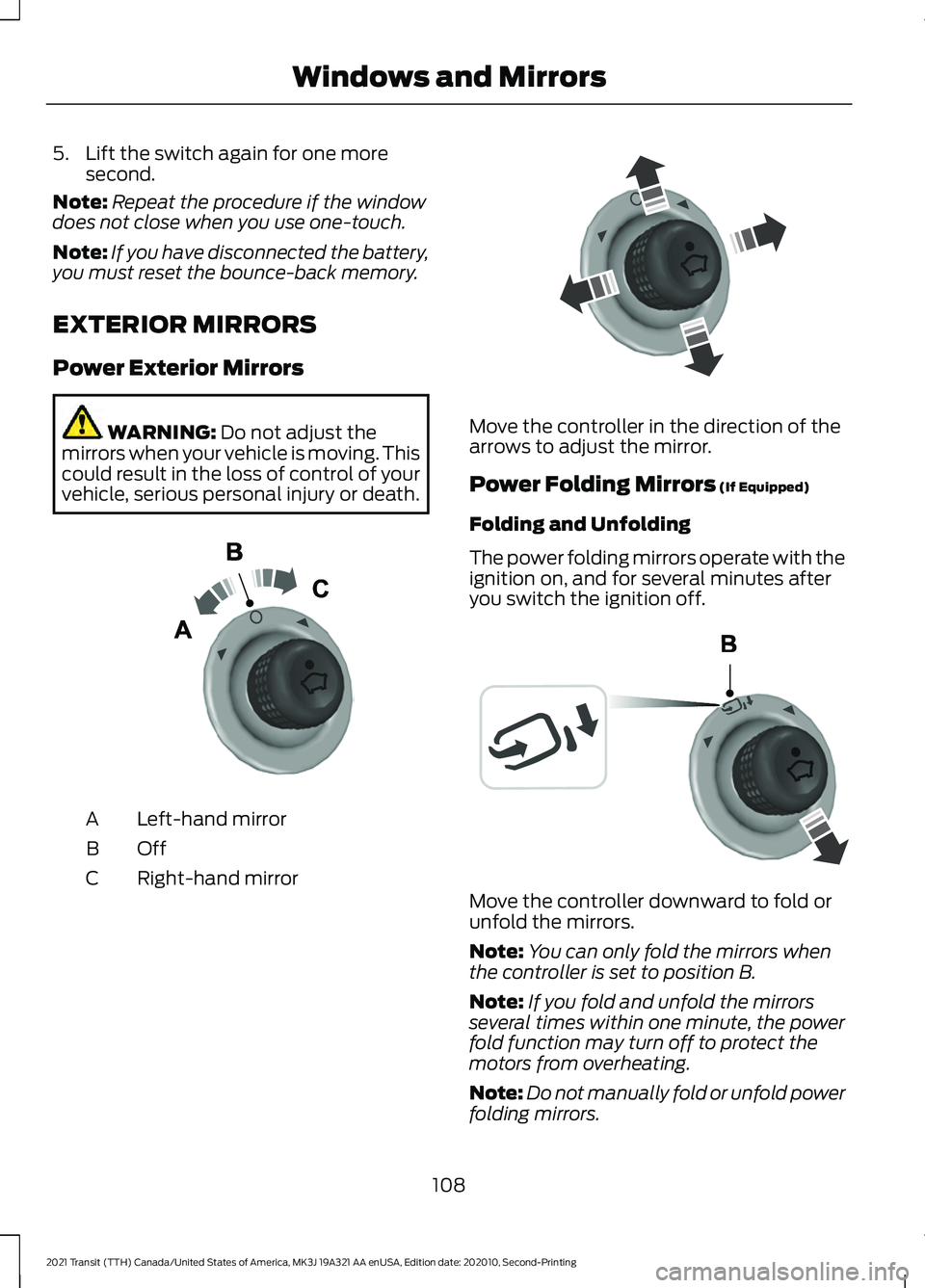
vehicle, serious personal injury or death. Left-hand mirror
A
OffB
Right-hand mirror
C Move the controller in the direction of the
arrows to adjust the mirror.
Power Folding Mirrors
(If Equipped)
Folding and Unfolding
The power folding mirrors operate with the
ignition on, and for several minutes after
you switch the ignition off. Move the controller downward to fold or
unfold the mirrors.
Note:
You can only fold the mirrors when
the controller is set to position B.
Note: If you fold and unfold the mirrors
several times within one minute, the power
fold function may turn off to protect the
motors from overheating.
Note: Do not manually fold or unfold power
folding mirrors.
108
2021 Transit (TTH) Canada/United States of America, MK3J 19A321 AA enUSA, Edition date: 202010, Second-Printing Windows and MirrorsE71280 E71281 E72184
Page 112 of 509
Loose Mirror
If your power-folding mirrors are manually
folded, they may not work properly, even
after you re-position them. You need to
reset them if:
•
The mirrors vibrate when you drive.
• The mirrors feel loose.
• The mirrors do not stay in the folded or
unfolded position.
• One of the mirrors is not in its normal
driving position.
To reset the power-fold feature, use the
power-folding mirror control to fold and
unfold the mirrors. You may hear a loud
noise as your reset the power-folding
mirrors. This sound is normal. Repeat this
process as needed each time the mirrors
are manually folded.
Fold-Away Exterior Mirrors
Push the mirror toward the door window
glass. Make sure that you fully engage the
mirror in its support when you unfold it.
INTERIOR MIRROR WARNING: Do not adjust the
mirrors when your vehicle is moving. This
could result in the loss of control of your
vehicle, serious personal injury or death.
Pull the tab below the mirror toward you
to reduce the effect of bright light from
behind.
109
2021 Transit (TTH) Canada/United States of America, MK3J 19A321 AA enUSA, Edition date: 202010, Second-Printing Windows and Mirrors
Page 114 of 509
The system detects unauthorized
odometer adjustments to avoid total
distance reading fraud. If the system
detects an unauthorized odometer
adjustment, the total distance reading
displays XXXX. Recovery of the original
mileage could result in system damage not
covered by the vehicle Warranty and may
carry a significant expense.
Trip Computer
See Trip Computer (page 117).
Vehicle and System Settings
See
General Information (page 115).
Speedometer
Shows the vehicle speed.
Fuel Gauge
The fuel gauge indicates approximately
how much fuel is in the fuel tank.
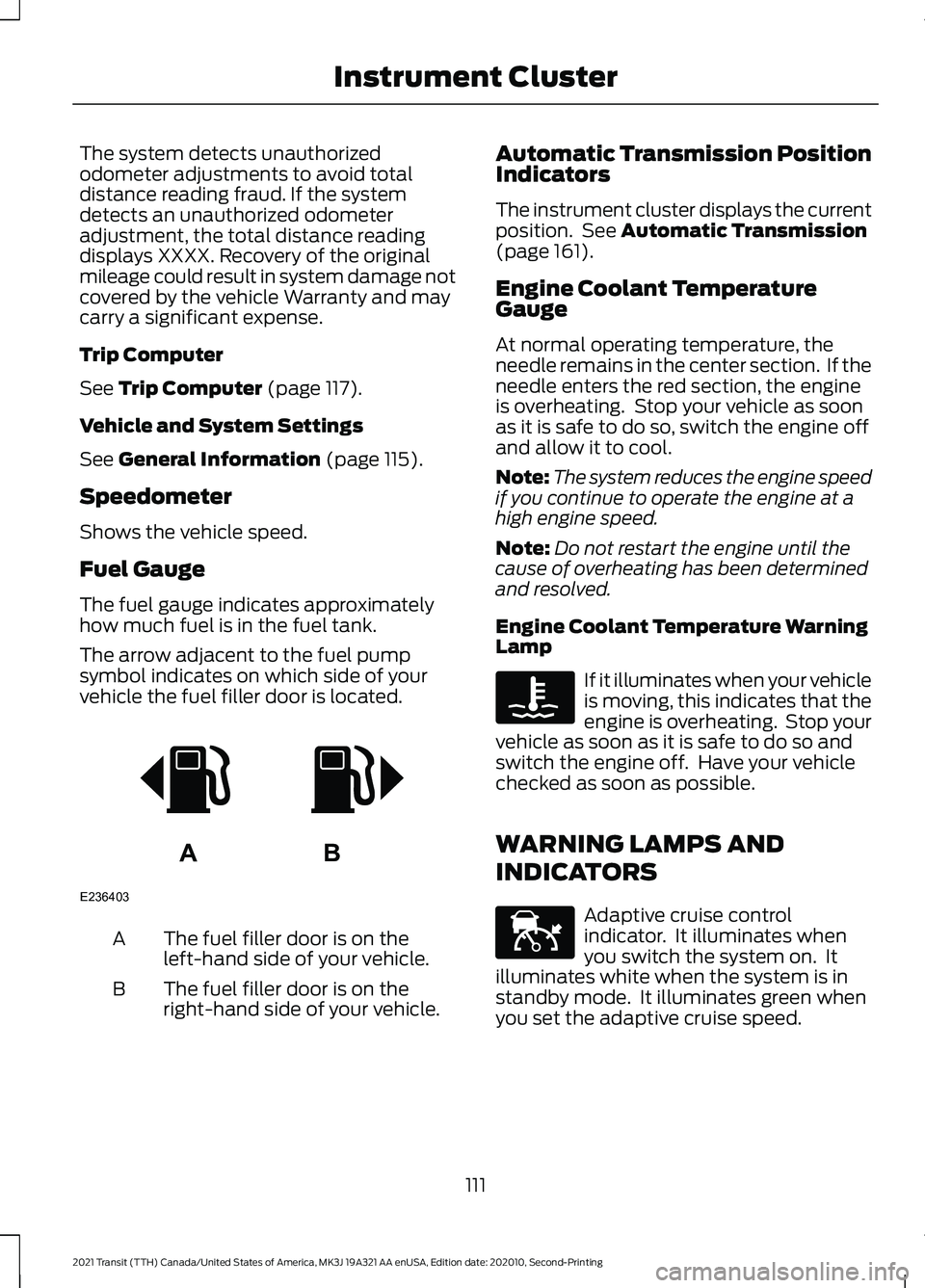
The arrow adjacent to the fuel pump
symbol indicates on which side of your
vehicle the fuel filler door is located. The fuel filler door is on the
left-hand side of your vehicle.
A
The fuel filler door is on the
right-hand side of your vehicle.
B Automatic Transmission Position
Indicators
The instrument cluster displays the current
position. See
Automatic Transmission
(page 161).
Engine Coolant Temperature
Gauge
At normal operating temperature, the
needle remains in the center section. If the
needle enters the red section, the engine
is overheating. Stop your vehicle as soon
as it is safe to do so, switch the engine off
and allow it to cool.
Note: The system reduces the engine speed
if you continue to operate the engine at a
high engine speed.
Note: Do not restart the engine until the
cause of overheating has been determined
and resolved.
Engine Coolant Temperature Warning
Lamp If it illuminates when your vehicle
is moving, this indicates that the
engine is overheating. Stop your
vehicle as soon as it is safe to do so and
switch the engine off. Have your vehicle
checked as soon as possible.
WARNING LAMPS AND
INDICATORS Adaptive cruise control
indicator. It illuminates when
you switch the system on. It
illuminates white when the system is in
standby mode. It illuminates green when
you set the adaptive cruise speed.
111
2021 Transit (TTH) Canada/United States of America, MK3J 19A321 AA enUSA, Edition date: 202010, Second-Printing Instrument ClusterAB
E236403 E144524
Page 115 of 509
Airbag warning lamp. If it does
not illuminate when you switch
the ignition on, continues to flash
or remains on when the engine is running,
this indicates a malfunction. Have your
vehicle checked as soon as possible. Anti-lock brake system warning
lamp. If it illuminates when you
are driving, this indicates a
malfunction. Your vehicle continues to
have normal braking without the anti-lock
brake system function. Have your vehicle
checked as soon as possible. Auto-Start-Stop indicators. It
illuminates green when the
engine stops. It flashes amber
and a message appears when
you need to take action. It
illuminates gray with a
strikethrough when the system is not
available. Automatic high beam control on
indicator. It illuminates to
confirm when the system is
ready to assist. Blind spot information system
indicator. When the system
detects a vehicle, the indicator
illuminates in the exterior mirror on the side
the approaching vehicle is coming from. If
you turn the direction indicator on for that
side of your vehicle, the indicator flashes. Blind spot information system
and cross traffic alert warning
lamp. If the system
malfunctions, the warning lamp
illuminates in the instrument cluster and
a message appears in the information
display. Have your vehicle checked as soon
as possible. Change engine oil indicator. It
displays when the engine oil life
is becoming depleted. Have the
engine oil changed as soon as possible. Note:
Do not ignore engine oil change
indicators and information messages.
Resulting component damage is not
covered by the Warranty. Change engine oil now
indicators. If both indicators
display, the engine oil life is
seriously depleted. Engine
torque reduces to 70% to further
indicate the serious risk of engine
damage. Have the engine oil changed
immediately.
Note: Do not ignore engine oil change
indicators and information messages.
Resulting component damage is not
covered by the Warranty. Cross traffic alert indicator.
When the system detects an
approaching vehicle a tone
sounds, the indicator illuminates in the
relevant exterior mirror and arrows appear
in the information display to show which
side the approaching vehicle is coming
from. Cruise control indicator. It
illuminates when you switch the
system on.
Direction indicator. It flashes
when you switch the direction
indicators on.
Door ajar warning lamp. It
illuminates when you switch the
ignition on and remains on if any
door or the hood is open. Eco mode indicator. It
illuminates when the drive mode
is selected.
Efficient drive mode indicator. It
indicates that you have to slowly
decelerate.
112
2021 Transit (TTH) Canada/United States of America, MK3J 19A321 AA enUSA, Edition date: 202010, Second-Printing Instrument ClusterE67017 E146361 E249861E249861 E249861E249861 E268294 E71340 E249859 E267164 E308186
Page 116 of 509
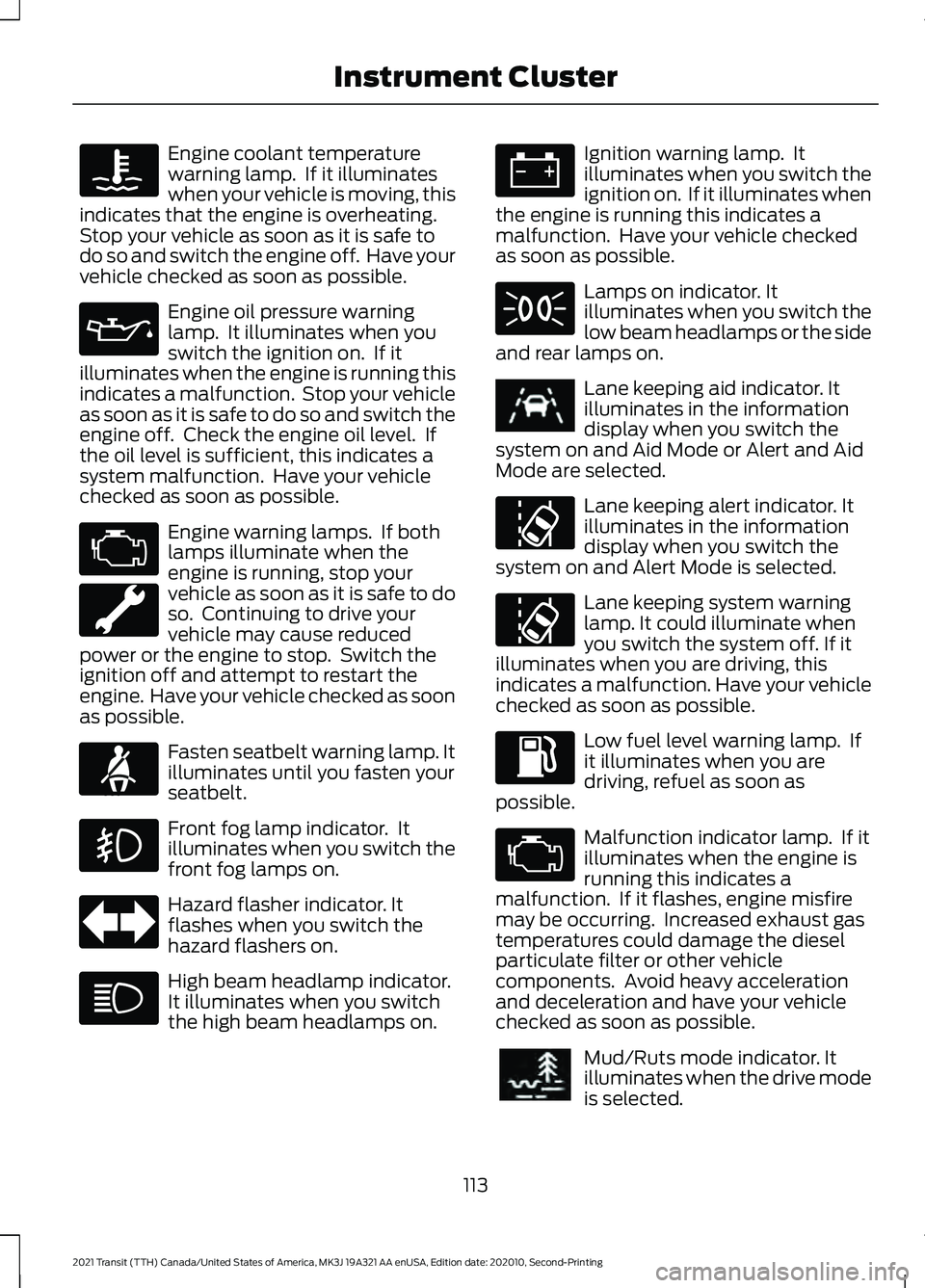
Engine coolant temperature
warning lamp. If it illuminates
when your vehicle is moving, this
indicates that the engine is overheating.
Stop your vehicle as soon as it is safe to
do so and switch the engine off. Have your
vehicle checked as soon as possible. Engine oil pressure warning
lamp. It illuminates when you
switch the ignition on. If it
illuminates when the engine is running this
indicates a malfunction. Stop your vehicle
as soon as it is safe to do so and switch the
engine off. Check the engine oil level. If
the oil level is sufficient, this indicates a
system malfunction. Have your vehicle
checked as soon as possible. Engine warning lamps. If both
lamps illuminate when the
engine is running, stop your
vehicle as soon as it is safe to do
so. Continuing to drive your
vehicle may cause reduced
power or the engine to stop. Switch the
ignition off and attempt to restart the
engine. Have your vehicle checked as soon
as possible. Fasten seatbelt warning lamp. It
illuminates until you fasten your
seatbelt.
Front fog lamp indicator. It
illuminates when you switch the
front fog lamps on.
Hazard flasher indicator. It
flashes when you switch the
hazard flashers on.
High beam headlamp indicator.
It illuminates when you switch
the high beam headlamps on. Ignition warning lamp. It
illuminates when you switch the
ignition on. If it illuminates when
the engine is running this indicates a
malfunction. Have your vehicle checked
as soon as possible. Lamps on indicator. It
illuminates when you switch the
low beam headlamps or the side
and rear lamps on. Lane keeping aid indicator. It
illuminates in the information
display when you switch the
system on and Aid Mode or Alert and Aid
Mode are selected. Lane keeping alert indicator. It
illuminates in the information
display when you switch the
system on and Alert Mode is selected. Lane keeping system warning
lamp. It could illuminate when
you switch the system off. If it
illuminates when you are driving, this
indicates a malfunction. Have your vehicle
checked as soon as possible. Low fuel level warning lamp. If
it illuminates when you are
driving, refuel as soon as
possible. Malfunction indicator lamp. If it
illuminates when the engine is
running this indicates a
malfunction. If it flashes, engine misfire
may be occurring. Increased exhaust gas
temperatures could damage the diesel
particulate filter or other vehicle
components. Avoid heavy acceleration
and deceleration and have your vehicle
checked as soon as possible. Mud/Ruts mode indicator. It
illuminates when the drive mode
is selected.
113
2021 Transit (TTH) Canada/United States of America, MK3J 19A321 AA enUSA, Edition date: 202010, Second-Printing Instrument Cluster E71880 E251020 E296606
Page 117 of 509
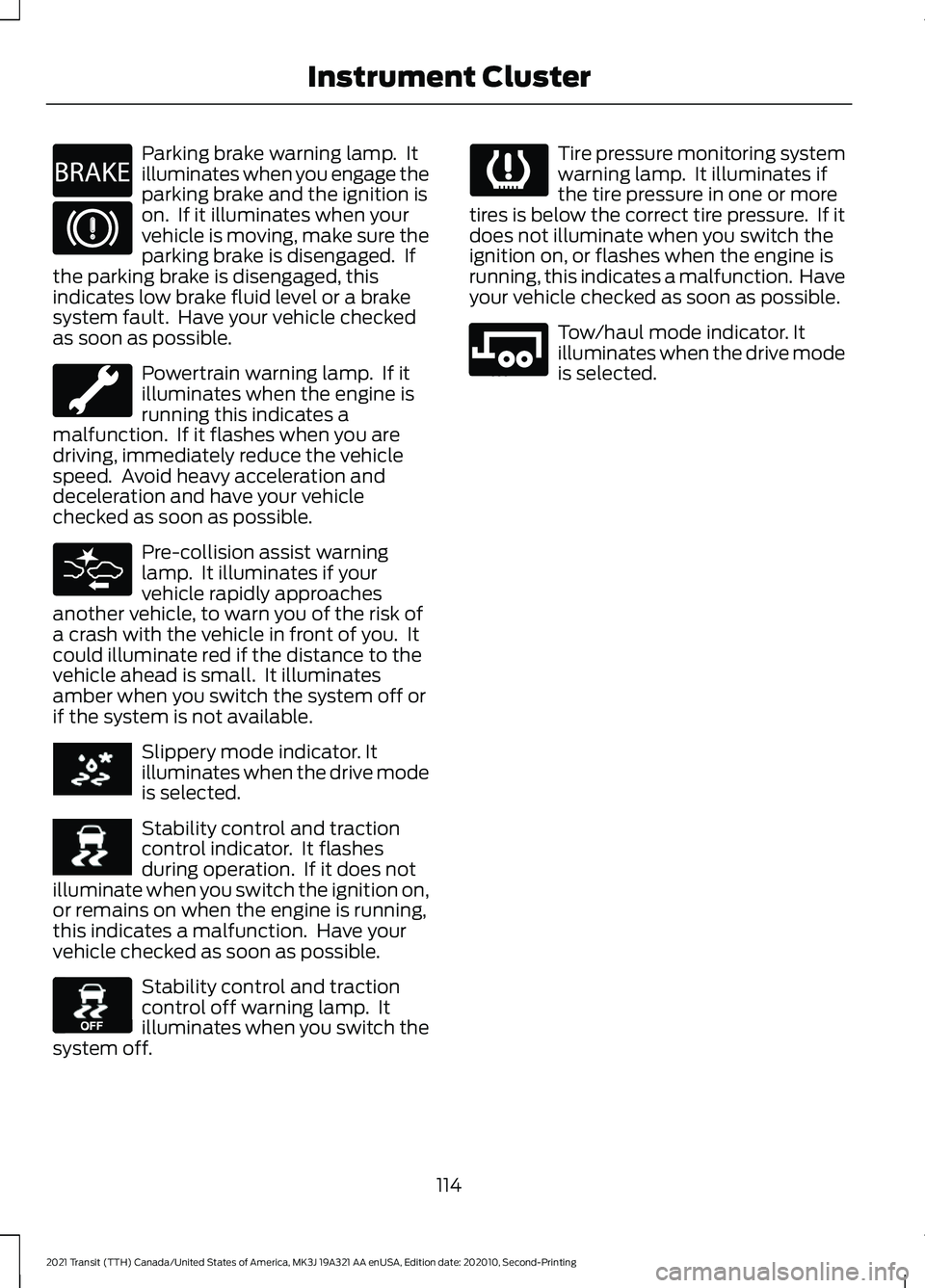
Parking brake warning lamp. It
illuminates when you engage the
parking brake and the ignition is
on. If it illuminates when your
vehicle is moving, make sure the
parking brake is disengaged. If
the parking brake is disengaged, this
indicates low brake fluid level or a brake
system fault. Have your vehicle checked
as soon as possible. Powertrain warning lamp. If it
illuminates when the engine is
running this indicates a
malfunction. If it flashes when you are
driving, immediately reduce the vehicle
speed. Avoid heavy acceleration and
deceleration and have your vehicle
checked as soon as possible. Pre-collision assist warning
lamp. It illuminates if your
vehicle rapidly approaches
another vehicle, to warn you of the risk of
a crash with the vehicle in front of you. It
could illuminate red if the distance to the
vehicle ahead is small. It illuminates
amber when you switch the system off or
if the system is not available. Slippery mode indicator. It
illuminates when the drive mode
is selected.
Stability control and traction
control indicator. It flashes
during operation. If it does not
illuminate when you switch the ignition on,
or remains on when the engine is running,
this indicates a malfunction. Have your
vehicle checked as soon as possible. Stability control and traction
control off warning lamp. It
illuminates when you switch the
system off. Tire pressure monitoring system
warning lamp. It illuminates if
the tire pressure in one or more
tires is below the correct tire pressure. If it
does not illuminate when you switch the
ignition on, or flashes when the engine is
running, this indicates a malfunction. Have
your vehicle checked as soon as possible. Tow/haul mode indicator. It
illuminates when the drive mode
is selected.
114
2021 Transit (TTH) Canada/United States of America, MK3J 19A321 AA enUSA, Edition date: 202010, Second-Printing Instrument ClusterE270480 E269320 E252028 E130458 E246592
Page 118 of 509
GENERAL INFORMATION
WARNING: Driving while distracted
can result in loss of vehicle control, crash
and injury. We strongly recommend that
you use extreme caution when using any
device that may take your focus off the
road. Your primary responsibility is the
safe operation of your vehicle. We
recommend against the use of any
hand-held device while driving and
encourage the use of voice-operated
systems when possible. Make sure you
are aware of all applicable local laws
that may affect the use of electronic
devices while driving.
Note: For your safety, some features are
speed-dependent. Their use is limited to
when your vehicle speed is not moving.
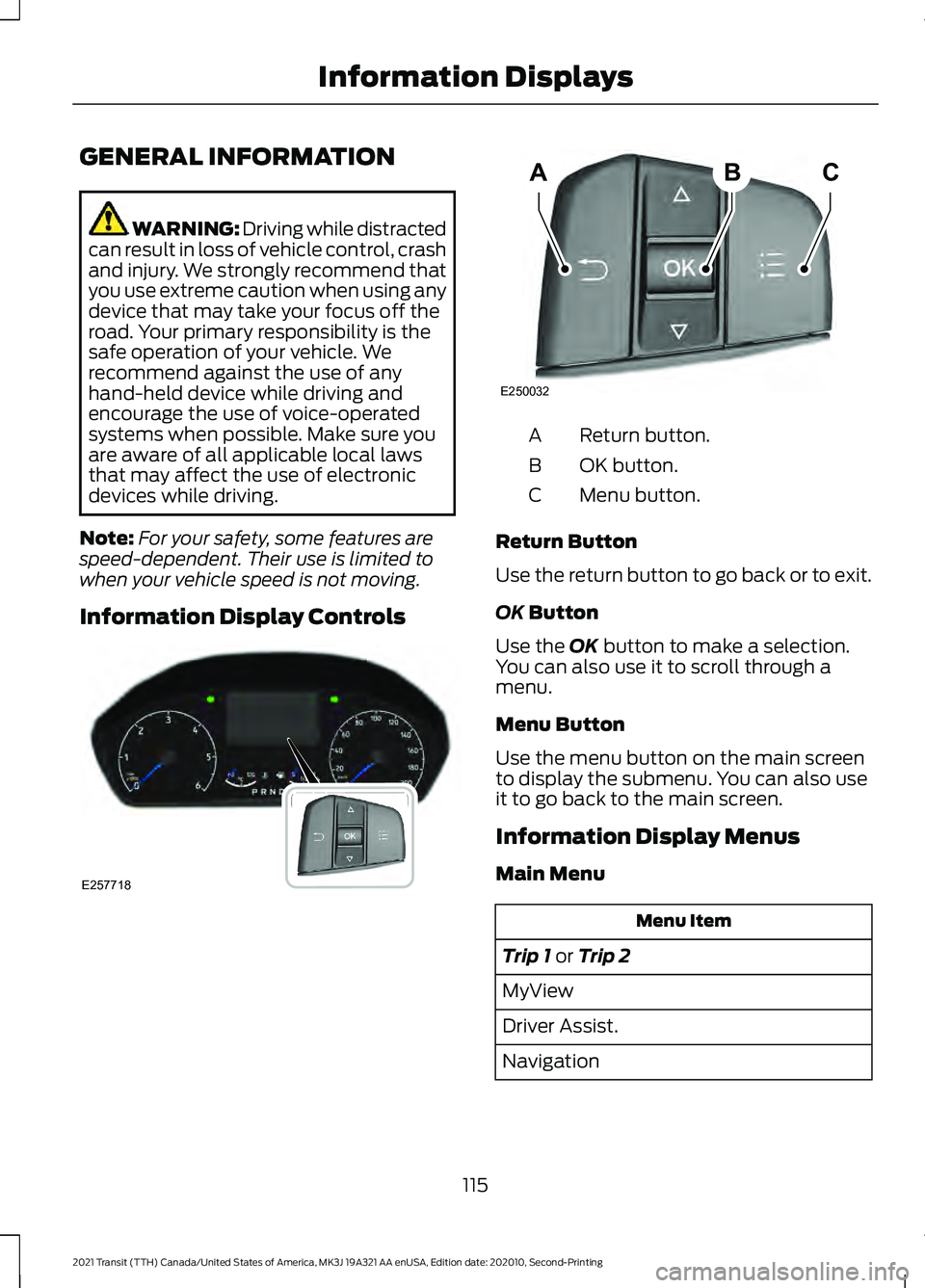
Information Display Controls Return button.
A
OK button.
B
Menu button.
C
Return Button
Use the return button to go back or to exit.
OK Button
Use the
OK button to make a selection.
You can also use it to scroll through a
menu.
Menu Button
Use the menu button on the main screen
to display the submenu. You can also use
it to go back to the main screen.
Information Display Menus
Main Menu Menu Item
Trip 1
or Trip 2
MyView
Driver Assist.
Navigation
115
2021 Transit (TTH) Canada/United States of America, MK3J 19A321 AA enUSA, Edition date: 202010, Second-Printing Information DisplaysE257718 ABC
E250032
Page 123 of 509
WHAT IS REMOTE START
The system allows you to remotely start
your vehicle and therefore to heat or cool
the interior to a predetermined
temperature.
REMOTE START LIMITATIONS
Remote start does not work if:
•
The alarm horn is sounding.
• The hood is open.
• The transmission is not in park (P).
• Remote start is not enabled.
• The ignition is on.
Note: Do not use remote start if your fuel
level is low.
ENABLING REMOTE START
1. Using the information display controls on the steering wheel, select Settings.
2. Select Vehicle Settings.
3. Select
Remote Start.
4. Switch
System on.
Note: To use remote start, make sure that
the modem is enabled. See
Enabling and
Disabling the Modem (page 371).
REMOTELY STARTING AND
STOPPING THE VEHICLE WARNING: Do not start the engine
in a closed garage or in other enclosed
areas. Exhaust fumes are toxic. Always
open the garage door before you start
the engine. Failure to follow this
instruction could result in personal injury
or death. Use the FordPass App to start the vehicle.
Note:
The turn signal lamps flash twice.
Note: The parking lamps turn on when the
vehicle is running.
Note: The horn sounds if the system fails
to start.
Note: All other vehicle systems remain off
when you have remotely started the vehicle.
Note: You may have to wait a short period
of time before remotely starting the vehicle
after the vehicle stops running.
Note: The vehicle remains secured when
you have remotely started it. A valid key
must be inside your vehicle to switch the
ignition on and drive your vehicle.
Note: A maximum of two remote starts are
allowed. After that you need to turn the
ignition on and off before you can use
remote start again.
Use the FordPass App to switch the vehicle
off.
REMOTE START SETTINGS
Climate Control Settings
1. Using the information display controls on the steering wheel, select Settings.
2. Select Vehicle Settings.
3. Select
Remote Start.
4. Select
Climate Control.
5. Select
Auto or Last Settings.
Note: If you select
Auto, the system
attempts to heat or cool the interior to 72°F
(22°C)
.
Note: If you select
Last Settings, the
system remembers the last used settings.
Note: You cannot adjust the climate control
settings when you have remotely started
the vehicle.
120
2021 Transit (TTH) Canada/United States of America, MK3J 19A321 AA enUSA, Edition date: 202010, Second-Printing Remote Start
Page 129 of 509
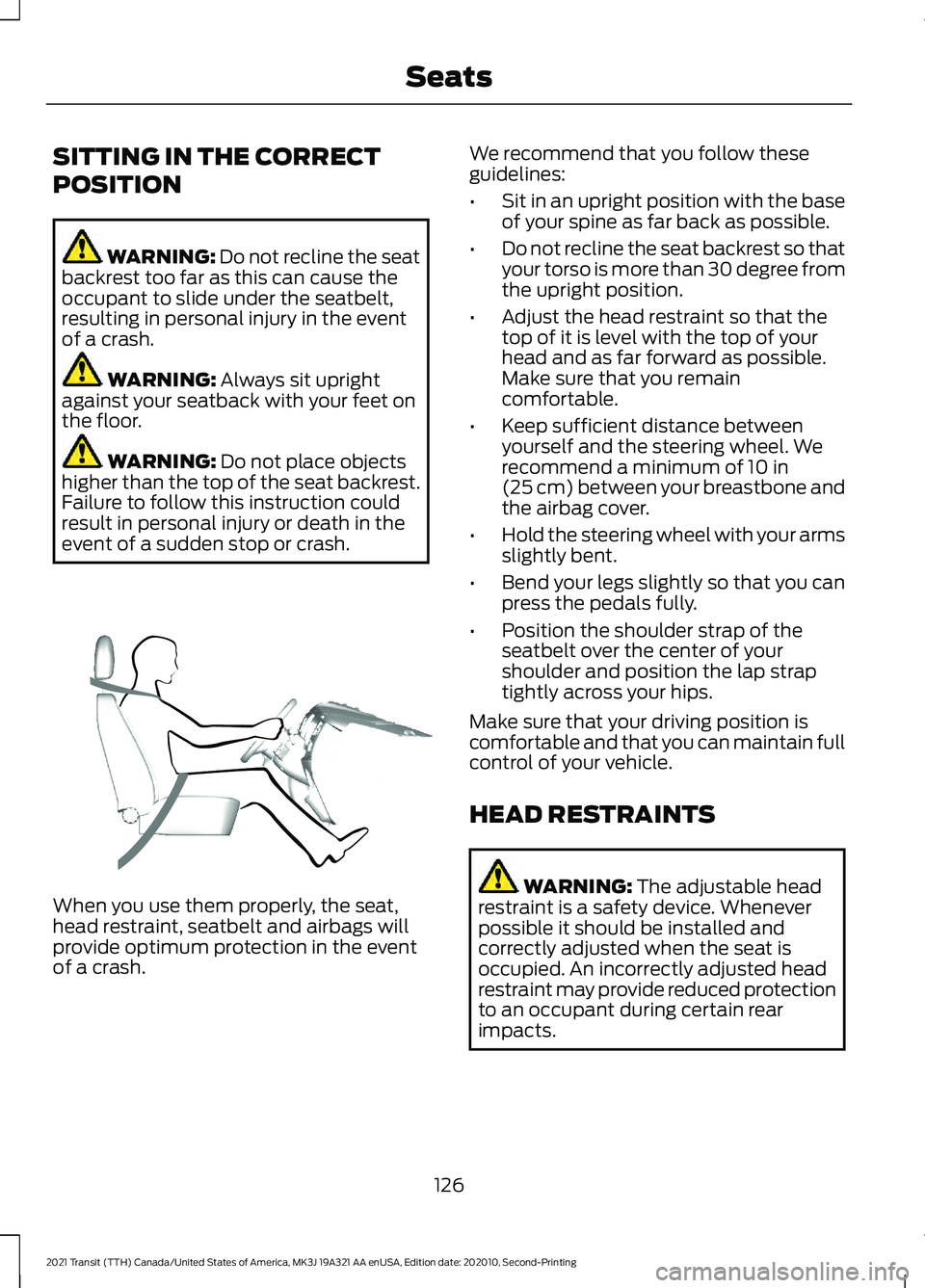
SITTING IN THE CORRECT
POSITION
WARNING: Do not recline the seat
backrest too far as this can cause the
occupant to slide under the seatbelt,
resulting in personal injury in the event
of a crash. WARNING: Always sit upright
against your seatback with your feet on
the floor. WARNING:
Do not place objects
higher than the top of the seat backrest.
Failure to follow this instruction could
result in personal injury or death in the
event of a sudden stop or crash. When you use them properly, the seat,
head restraint, seatbelt and airbags will
provide optimum protection in the event
of a crash. We recommend that you follow these
guidelines:
•
Sit in an upright position with the base
of your spine as far back as possible.
• Do not recline the seat backrest so that
your torso is more than 30 degree from
the upright position.
• Adjust the head restraint so that the
top of it is level with the top of your
head and as far forward as possible.
Make sure that you remain
comfortable.
• Keep sufficient distance between
yourself and the steering wheel. We
recommend a minimum of 10 in
(25 cm) between your breastbone and
the airbag cover.
• Hold the steering wheel with your arms
slightly bent.
• Bend your legs slightly so that you can
press the pedals fully.
• Position the shoulder strap of the
seatbelt over the center of your
shoulder and position the lap strap
tightly across your hips.
Make sure that your driving position is
comfortable and that you can maintain full
control of your vehicle.
HEAD RESTRAINTS WARNING:
The adjustable head
restraint is a safety device. Whenever
possible it should be installed and
correctly adjusted when the seat is
occupied. An incorrectly adjusted head
restraint may provide reduced protection
to an occupant during certain rear
impacts.
126
2021 Transit (TTH) Canada/United States of America, MK3J 19A321 AA enUSA, Edition date: 202010, Second-Printing SeatsE68595
Page 130 of 509
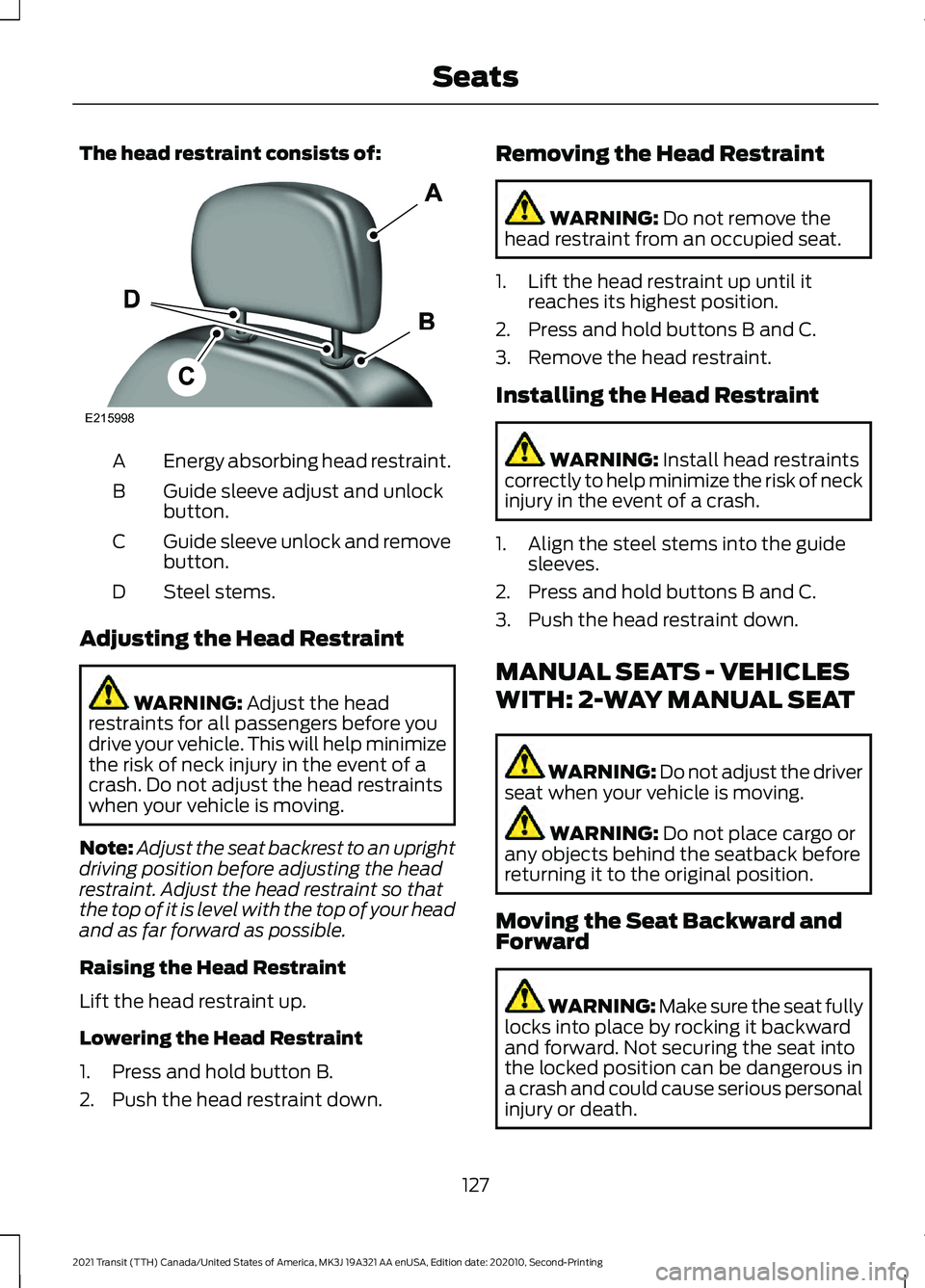
The head restraint consists of:
Energy absorbing head restraint.
A
Guide sleeve adjust and unlock
button.
B
Guide sleeve unlock and remove
button.
C
Steel stems.
D
Adjusting the Head Restraint WARNING: Adjust the head
restraints for all passengers before you
drive your vehicle. This will help minimize
the risk of neck injury in the event of a
crash. Do not adjust the head restraints
when your vehicle is moving.
Note: Adjust the seat backrest to an upright
driving position before adjusting the head
restraint. Adjust the head restraint so that
the top of it is level with the top of your head
and as far forward as possible.
Raising the Head Restraint
Lift the head restraint up.
Lowering the Head Restraint
1. Press and hold button B.
2. Push the head restraint down. Removing the Head Restraint WARNING:
Do not remove the
head restraint from an occupied seat.
1. Lift the head restraint up until it reaches its highest position.
2. Press and hold buttons B and C.
3. Remove the head restraint.
Installing the Head Restraint WARNING:
Install head restraints
correctly to help minimize the risk of neck
injury in the event of a crash.
1. Align the steel stems into the guide sleeves.
2. Press and hold buttons B and C.
3. Push the head restraint down.
MANUAL SEATS - VEHICLES
WITH: 2-WAY MANUAL SEAT WARNING: Do not adjust the driver
seat when your vehicle is moving. WARNING:
Do not place cargo or
any objects behind the seatback before
returning it to the original position.
Moving the Seat Backward and
Forward WARNING: Make sure the seat fully
locks into place by rocking it backward
and forward. Not securing the seat into
the locked position can be dangerous in
a crash and could cause serious personal
injury or death.
127
2021 Transit (TTH) Canada/United States of America, MK3J 19A321 AA enUSA, Edition date: 202010, Second-Printing SeatsE215998