transmission FORD TRANSIT CONNECT 2012 1.G User Guide
[x] Cancel search | Manufacturer: FORD, Model Year: 2012, Model line: TRANSIT CONNECT, Model: FORD TRANSIT CONNECT 2012 1.GPages: 299, PDF Size: 3.31 MB
Page 170 of 299
STARTING
Electric vehicles
For specific information on the Transit Connect Electric, refer to the
Azure Dynamics TC-E Owner’s GuideSupplement.
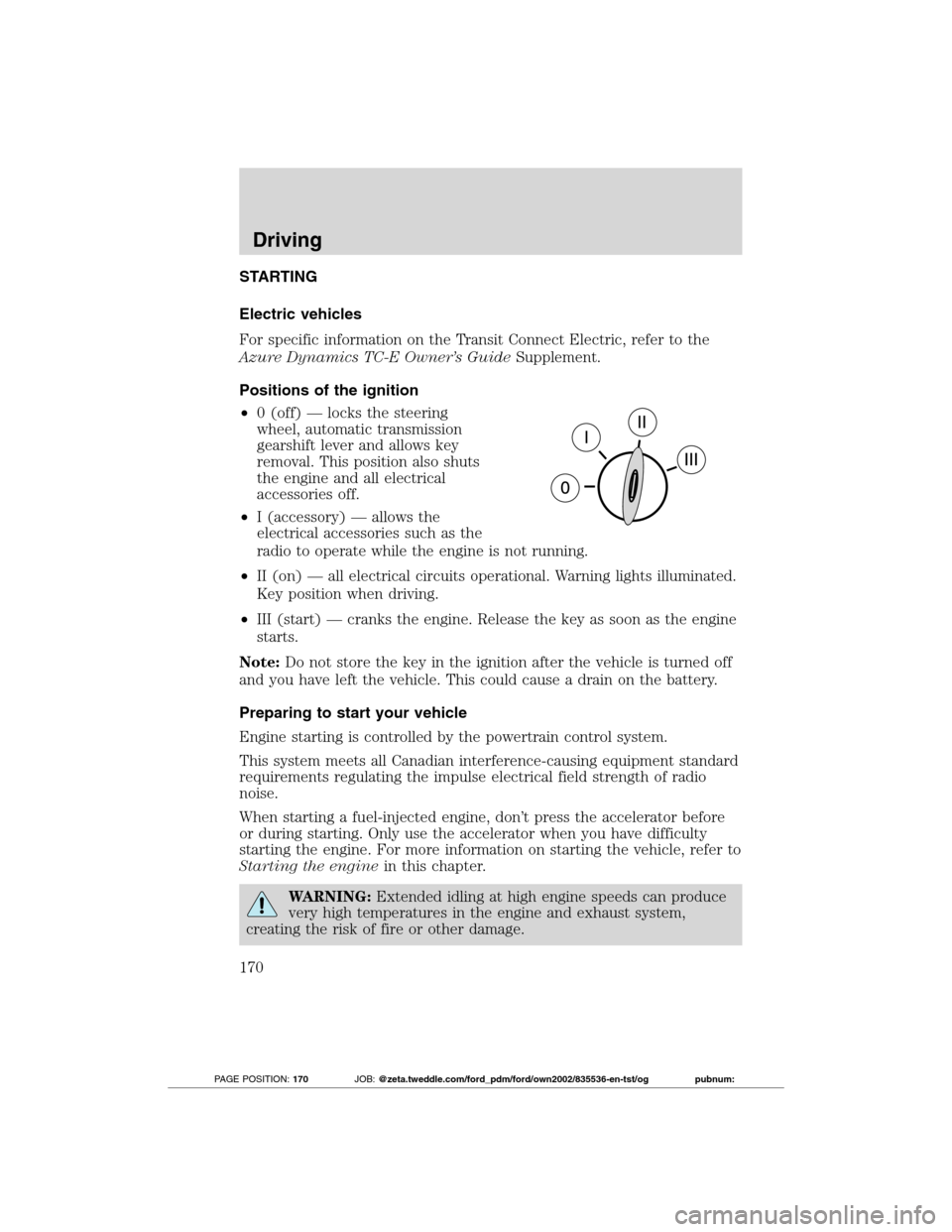
Positions of the ignition
•0 (off) — locks the steering
wheel, automatic transmission
gearshift lever and allows key
removal. This position also shuts
the engine and all electrical
accessories off.
•I (accessory) — allows the
electrical accessories such as the
radio to operate while the engine is not running.
•II (on) — all electrical circuits operational. Warning lights illuminated.
Key position when driving.
•III (start) — cranks the engine. Release the key as soon as the engine
starts.
Note:Do not store the key in the ignition after the vehicle is turned off
and you have left the vehicle. This could cause a drain on the battery.
Preparing to start your vehicle
Engine starting is controlled by the powertrain control system.
This system meets all Canadian interference-causing equipment standard
requirements regulating the impulse electrical field strength of radio
noise.
When starting a fuel-injected engine, don’t press the accelerator before
or during starting. Only use the accelerator when you have difficulty
starting the engine. For more information on starting the vehicle, refer to
Starting the enginein this chapter.
WARNING:Extended idling at high engine speeds can produce
very high temperatures in the engine and exhaust system,
creating the risk of fire or other damage.
Driving
170
2012 Transit Connect(tst)
Owners Guide, 1st Printing
USA(fus)
PAGE POSITION:170JOB:@zeta.tweddle.com/ford_pdm/ford/own2002/835536-en-tst/og pubnum:
Page 184 of 299
WARNING:If the parking brake is fully released, but the brake
warning lamp remains illuminated, the brakes may not be
working properly. See your authorized dealer.
AUTOMATIC TRANSMISSION OPERATION
Electric vehicles
For specific information on the Transit Connect Electric, refer to the
Azure Dynamics TC-E Owner’s GuideSupplement.
Understanding the gearshift positions of the 4–speed automatic
transmission
This vehicle is equipped with an adaptive transmission shift s trategy.
Adaptive Shift Strategy offers the optimal transmission operation and
shift quality. When the vehicle’s battery has been disconnected for any
type of service or repair, the transmission will need to relearn the normal
shift strategy parameters, much like having to reset your radio stations
when your vehicle battery has been disconnected. The Adaptive
Transmission Strategy allows the transmission to relearn these operating
parameters. This learning process could take several transmission
upshifts and downshifts; during this learning process, slightly firmer
shifts may occur. After this learning process, normal shift feel and shift
scheduling will resume.
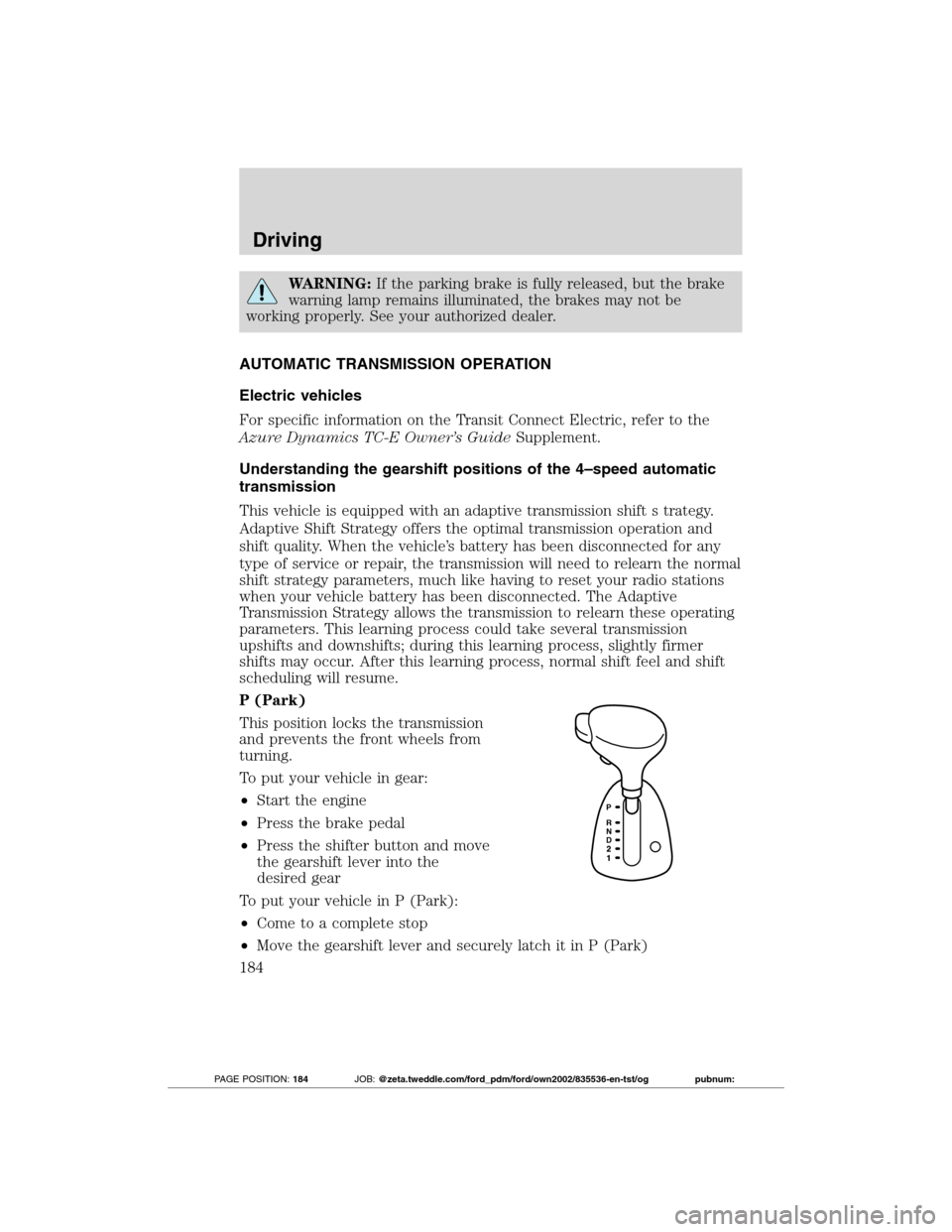
P (Park)
This position locks the transmission
and prevents the front wheels from
turning.
To put your vehicle in gear:
•Start the engine
•Press the brake pedal
•Press the shifter button and move
the gearshift lever into the
desired gear
To put your vehicle in P (Park):
•Come to a complete stop
•Move the gearshift lever and securely latch it in P (Park)
Driving
184
2012 Transit Connect(tst)
Owners Guide, 1st Printing
USA(fus)
PAGE POSITION:184JOB:@zeta.tweddle.com/ford_pdm/ford/own2002/835536-en-tst/og pubnum:
Page 185 of 299
WARNING:Always set the parking brake fully and make sure
the gearshift is latched in P (Park). Turn the ignition to the off
position and remove the key whenever you leave your vehicle.
R (Reverse)
With the gearshift lever in R (Reverse), the vehicle will move backward.
Always come to a complete stop before shifting into and out of R
(Reverse).
N (Neutral)
With the gearshift lever in N (Neutral), the vehicle can be started and is
free to roll. Hold the brake pedal down while in this position.
D (Drive) with Overdrive
The normal driving position for the best fuel economy. Transmission
operates in gears one through four.
D (Drive) without Overdrive
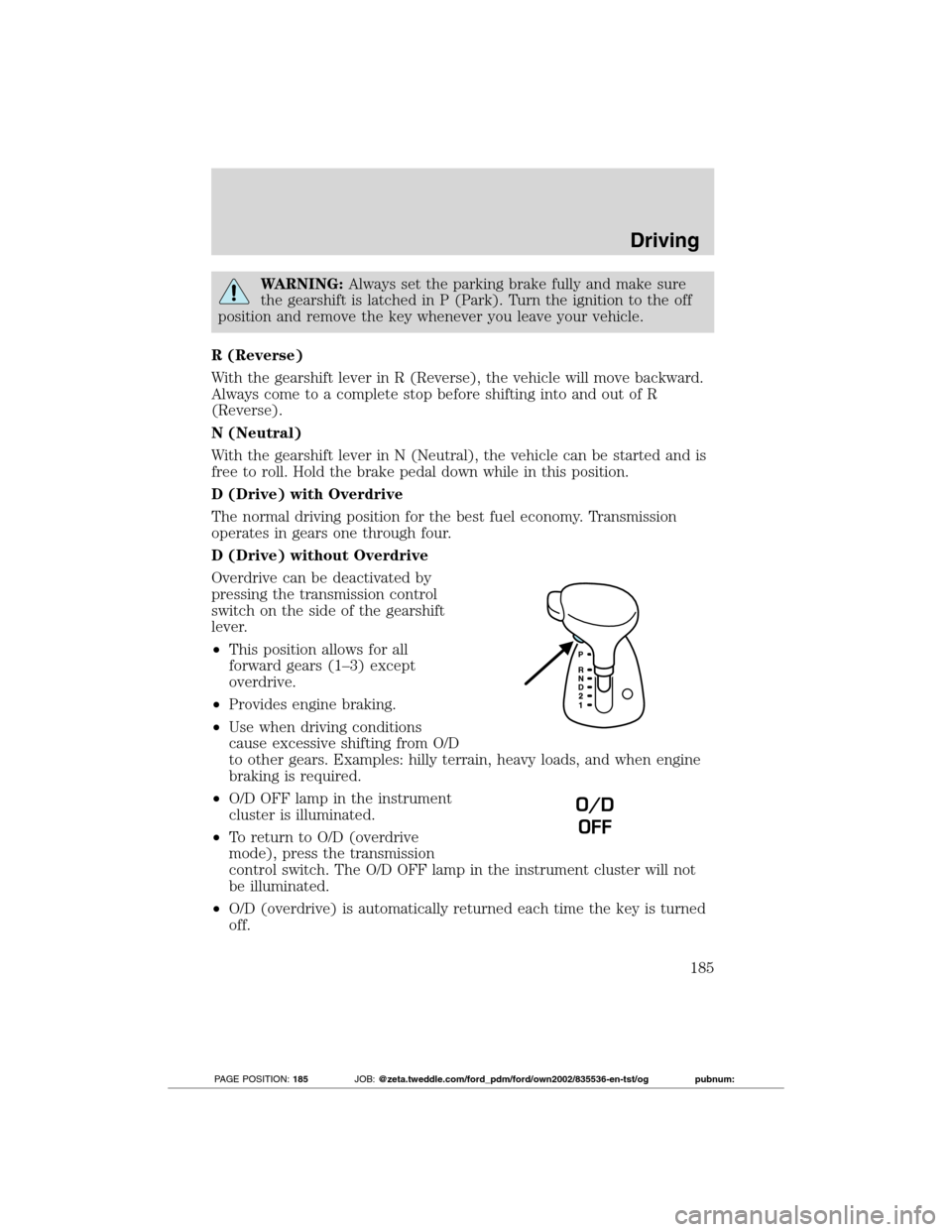
Overdrive can be deactivated by
pressing the transmission control
switch on the side of the gearshift
lever.
•This position allows for all
forward gears (1–3) except
overdrive.
•Provides engine braking.
•Use when driving conditions
cause excessive shifting from O/D
to other gears. Examples: hilly terrain, heavy loads, and when engine
braking is required.
•O/D OFF lamp in the instrument
cluster is illuminated.
•To return to O/D (overdrive
mode), press the transmission
control switch. The O/D OFF lamp in the instrument cluster will not
be illuminated.
•O/D (overdrive) is automatically returned each time the key is turned
off.
O/D
OFF
Driving
185
2012 Transit Connect(tst)
Owners Guide, 1st Printing
USA(fus)
PAGE POSITION:185JOB:@zeta.tweddle.com/ford_pdm/ford/own2002/835536-en-tst/og pubnum:
Page 186 of 299
2 (Second)
This position allows for second gear only.
•Provides engine braking.
•Use to start-up on slippery roads.
•To return to D (Overdrive), move the gearshift lever into the D
(Overdrive) position.
•Selecting 2 (Second) at higher speeds will cause the transmission to
downshift to second gear once the vehicle has slowed down to the
appropriate speed.
1 (First)
This position allows for first gear only.
•Provides maximum engine braking.
•Selecting 1 (First) at higher speeds will cause the transmission to
downshift to first gear once the vehicle has slowed down to the
appropriate speed.
Note:2 (Second) and 1 (First) are not intended for use under extended
or normal driving conditions and results in lower fuel economy.
REVERSE SENSING SYSTEM (IF EQUIPPED)
The reverse sensing system (RSS) sounds a tone to warn the driver of
obstacles near the rear bumper when the R (Reverse) is selected and the
vehicle is moving at low speeds. The system is not effective at high
speeds and may not detect certain angular or moving objects.
WARNING:To help avoid personal injury, please read and
understand the limitations of the reverse sensing system as
contained in this section. Reverse sensing is only an aid for some
(generally large and fixed) objects when moving in reverse on a flat
surface at “parking speeds”. Inclement weather may also affect the
function of the RSS; this may include reduced performance or a false
activation.
WARNING:To help avoid personal injury, always use caution
when in reverse and when using the RSS.
Driving
186
2012 Transit Connect(tst)
Owners Guide, 1st Printing
USA(fus)
PAGE POSITION:186JOB:@zeta.tweddle.com/ford_pdm/ford/own2002/835536-en-tst/og pubnum:
Page 188 of 299
REARVIEW CAMERA SYSTEM (IF EQUIPPED)
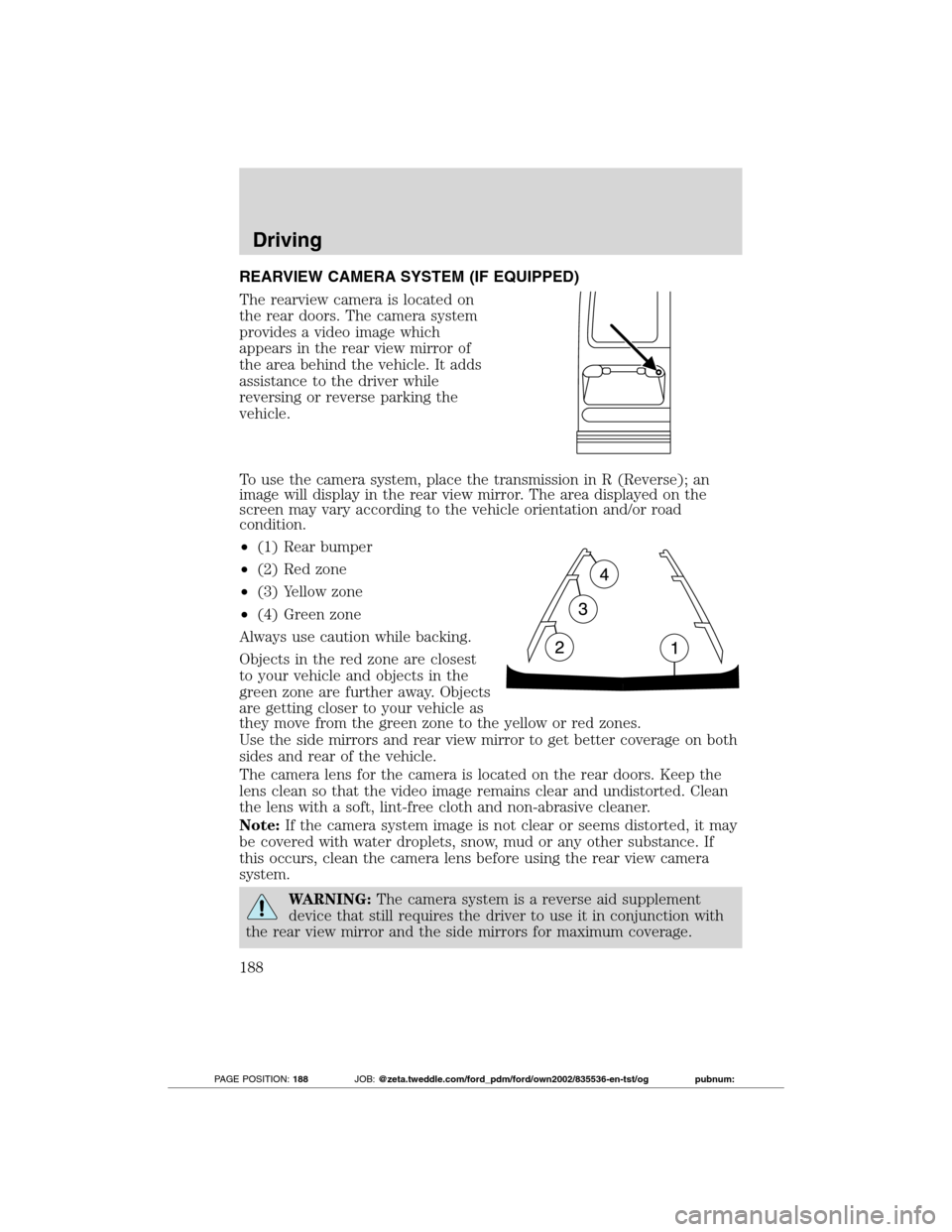
The rearview camera is located on
the rear doors. The camera system
provides a video image which
appears in the rear view mirror of
the area behind the vehicle. It adds
assistance to the driver while
reversing or reverse parking the
vehicle.
To use the camera system, place the transmission in R (Reverse); an
image will display in the rear view mirror. The area displayed on the
screen may vary according to the vehicle orientation and/or road
condition.
•(1) Rear bumper
•(2) Red zone
•(3) Yellow zone
•(4) Green zone
Always use caution while backing.
Objects in the red zone are closest
to your vehicle and objects in the
green zone are further away. Objects
are getting closer to your vehicle as
they move from the green zone to the yellow or red zones.
Use the side mirrors and rear view mirror to get better coverage on both
sides and rear of the vehicle.
The camera lens for the camera is located on the rear doors. Keep the
lens clean so that the video image remains clear and undistorted. Clean
the lens with a soft, lint-free cloth and non-abrasive cleaner.
Note:If the camera system image is not clear or seems distorted, it may
be covered with water droplets, snow, mud or any other substance. If
this occurs, clean the camera lens before using the rear view camera
system.
WARNING:The camera system is a reverse aid supplement
device that still requires the driver to use it in conjunction with
the rear view mirror and the side mirrors for maximum coverage.
Driving
188
2012 Transit Connect(tst)
Owners Guide, 1st Printing
USA(fus)
PAGE POSITION:188JOB:@zeta.tweddle.com/ford_pdm/ford/own2002/835536-en-tst/og pubnum:
Page 191 of 299
DRIVING THROUGH WATER
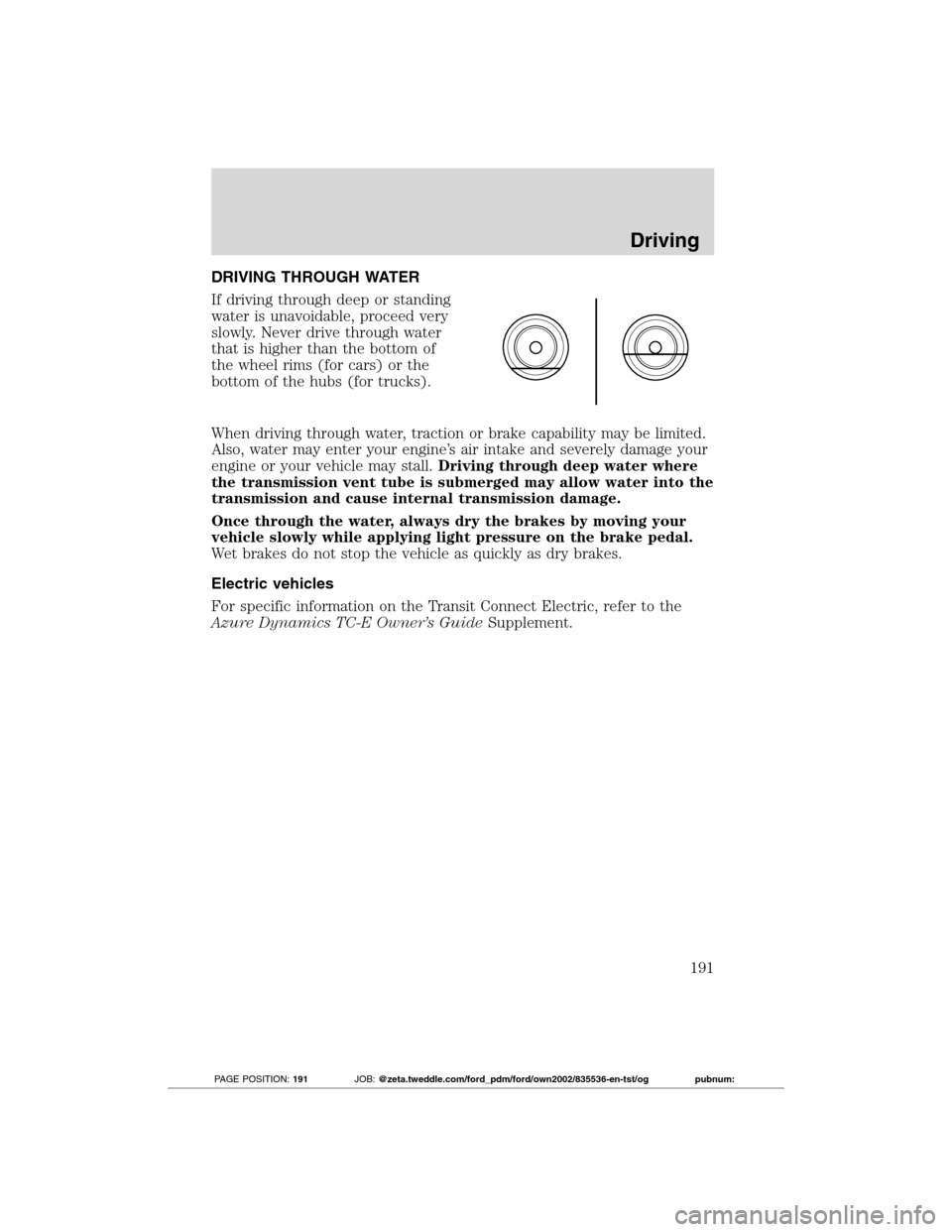
If driving through deep or standing
water is unavoidable, proceed very
slowly. Never drive through water
that is higher than the bottom of
the wheel rims (for cars) or the
bottom of the hubs (for trucks).
When driving through water, traction or brake capability may be limited.
Also, water may enter your engine’s air intake and severely damage your
engine or your vehicle may stall.Driving through deep water where
the transmission vent tube is submerged may allow water into the
transmission and cause internal transmission damage.
Once through the water, always dry the brakes by moving your
vehicle slowly while applying light pressure on the brake pedal.
Wet brakes do not stop the vehicle as quickly as dry brakes.
Electric vehicles
For specific information on the Transit Connect Electric, refer to the
Azure Dynamics TC-E Owner’s GuideSupplement.
Driving
191
2012 Transit Connect(tst)
Owners Guide, 1st Printing
USA(fus)
PAGE POSITION:191JOB:@zeta.tweddle.com/ford_pdm/ford/own2002/835536-en-tst/og pubnum:
Page 201 of 299
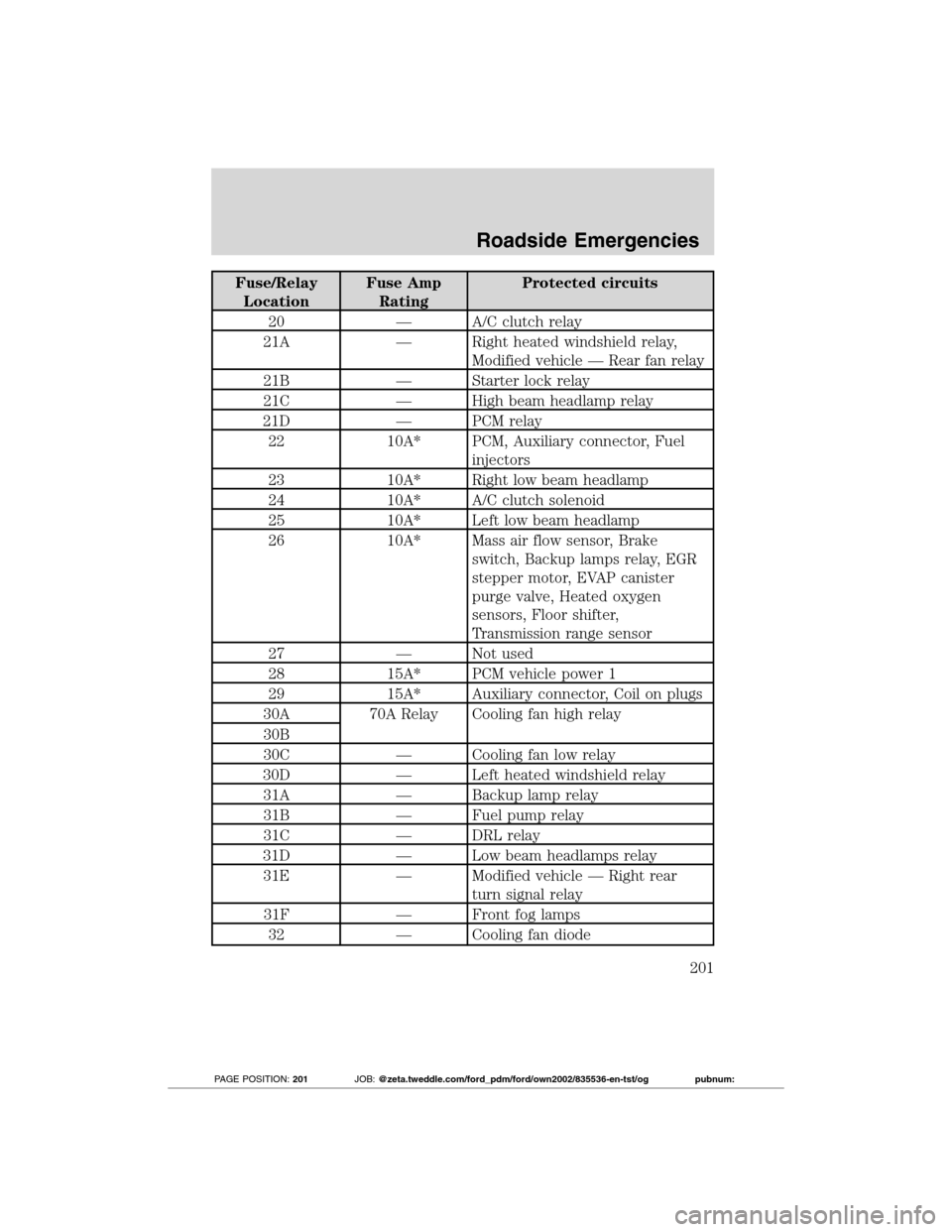
Fuse/Relay
LocationFuse Amp
RatingProtected circuits
20 — A/C clutch relay
21A — Right heated windshield relay,
Modified vehicle — Rear fan relay
21B — Starter lock relay
21C — High beam headlamp relay
21D — PCM relay
22 10A* PCM, Auxiliary connector, Fuel
injectors
23 10A* Right low beam headlamp
24 10A* A/C clutch solenoid
25 10A* Left low beam headlamp
26 10A* Mass air flow sensor, Brake
switch, Backup lamps relay, EGR
stepper motor, EVAP canister
purge valve, Heated oxygen
sensors, Floor shifter,
Transmission range sensor
27 — Not used
28 15A* PCM vehicle power 1
29 15A* Auxiliary connector, Coil on plugs
30A 70A Relay Cooling fan high relay
30B
30C — Cooling fan low relay
30D — Left heated windshield relay
31A — Backup lamp relay
31B — Fuel pump relay
31C — DRL relay
31D — Low beam headlamps relay
31E — Modified vehicle — Right rear
turn signal relay
31F — Front fog lamps
32 — Cooling fan diode
Roadside Emergencies
201
2012 Transit Connect(tst)
Owners Guide, 1st Printing
USA(fus)
PAGE POSITION:201JOB:@zeta.tweddle.com/ford_pdm/ford/own2002/835536-en-tst/og pubnum:
Page 206 of 299
Tire change procedure
WARNING:When one of the front wheels is off the ground, the
transmission alone will not prevent the vehicle from moving or
slipping off the jack, even if the vehicle is in P (Park).
WARNING:To help prevent the vehicle from moving when you
change a tire, be sure the parking brake is set, then block (in
both directions) the wheel that is diagonally opposite (other side and
end of the vehicle) to the tire being changed.
WARNING:If the vehicle slips off the jack, you or someone else
could be seriously injured.
WARNING:Do not attempt to change a tire on the side of the
vehicle close to moving traffic. Pull far enough off the road to
avoid the danger of being hit when operating the jack or changing the
wheel.
Note:Passengers should not remain in the vehicle when the vehicle is
being jacked.
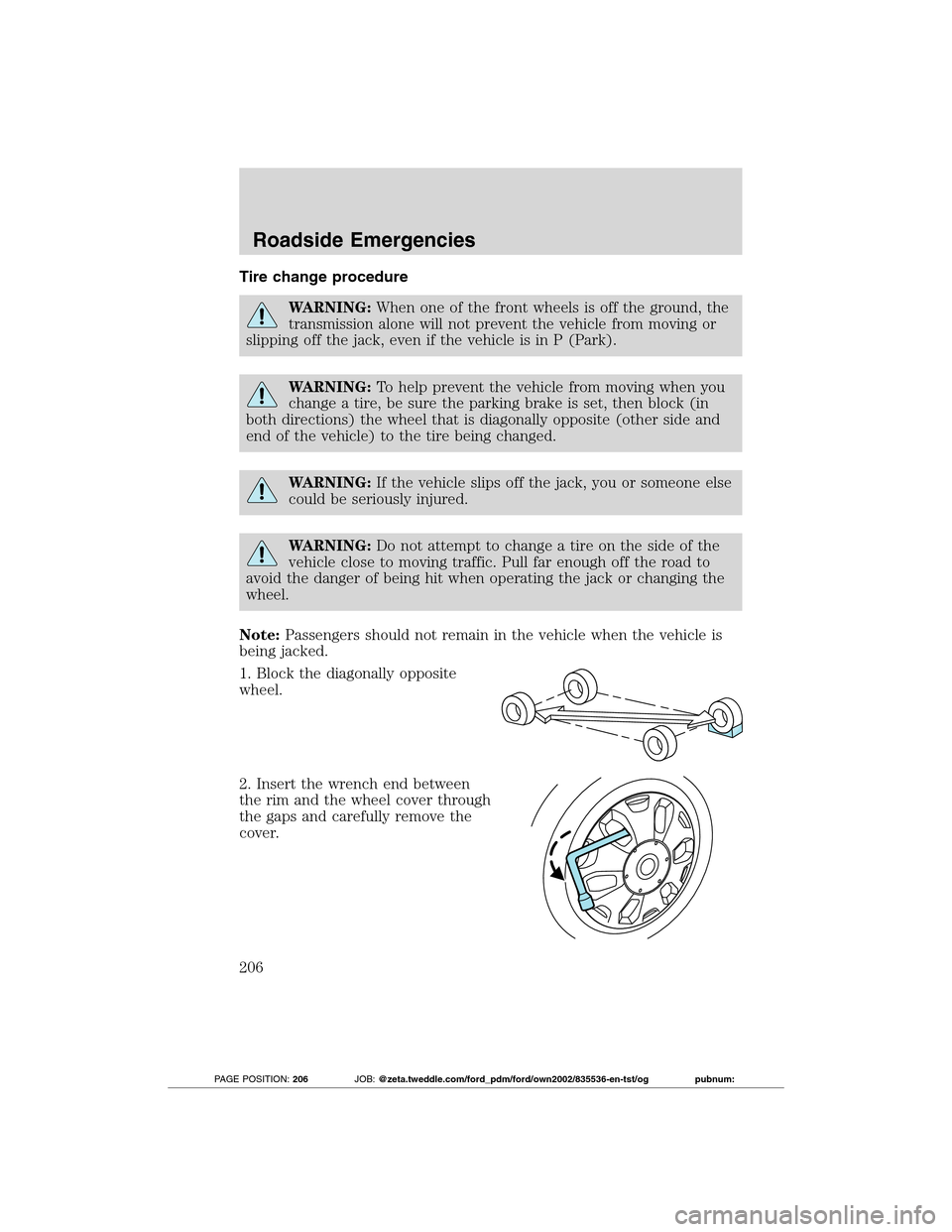
1. Block the diagonally opposite
wheel.
2. Insert the wrench end between
the rim and the wheel cover through
the gaps and carefully remove the
cover.
Roadside Emergencies
206
2012 Transit Connect(tst)
Owners Guide, 1st Printing
USA(fus)
PAGE POSITION:206JOB:@zeta.tweddle.com/ford_pdm/ford/own2002/835536-en-tst/og pubnum:
Page 210 of 299
JUMP STARTING
WARNING:The gases around the battery can explode if
exposed to flames, sparks, or lit cigarettes. An explosion could
result in injury or vehicle damage.
WARNING:Batteries contain sulfuric acid which can burn skin,
eyes and clothing, if contacted.
Do not attempt to push-start your automatic transmission
vehicle. Automatic transmissions do not have push-start
capability. Attempting to push-start a vehicle with an automatic
transmission may cause transmission damage.
Electric vehicles
For specific information on the Transit Connect Electric, refer to the
Azure Dynamics TC-E Owner’s GuideSupplement.
Preparing your vehicle
When the battery is disconnected or a new battery is installed, the
automatic transmission must relearn its shift strategy. As a result, the
transmission may have firm and/or soft shifts. This operation is
considered normal and will not affect function or durability of the
transmission. Over time, the adaptive learning process will fully update
transmission operation.
1.Use only a 12–volt supply to start your vehicle.
2. Do not disconnect the battery of the disabled vehicle as this could
damage the vehicle’s electrical system.
3. Park the booster vehicle close to the hood of the disabled vehicle
making sure the two vehiclesdo nottouch. Set the parking brake on
both vehicles and stay clear of the engine cooling fan and other moving
parts.
4. Check all battery terminals and remove any excessive corrosion before
you attach the battery cables. Ensure that vent caps are tight and level.
5. Turn the heater fan on in both vehicles to protect from any electrical
surges. Turn all other accessories off.
Roadside Emergencies
210
2012 Transit Connect(tst)
Owners Guide, 1st Printing
USA(fus)
PAGE POSITION:210JOB:@zeta.tweddle.com/ford_pdm/ford/own2002/835536-en-tst/og pubnum:
Page 213 of 299
WRECKER TOWING
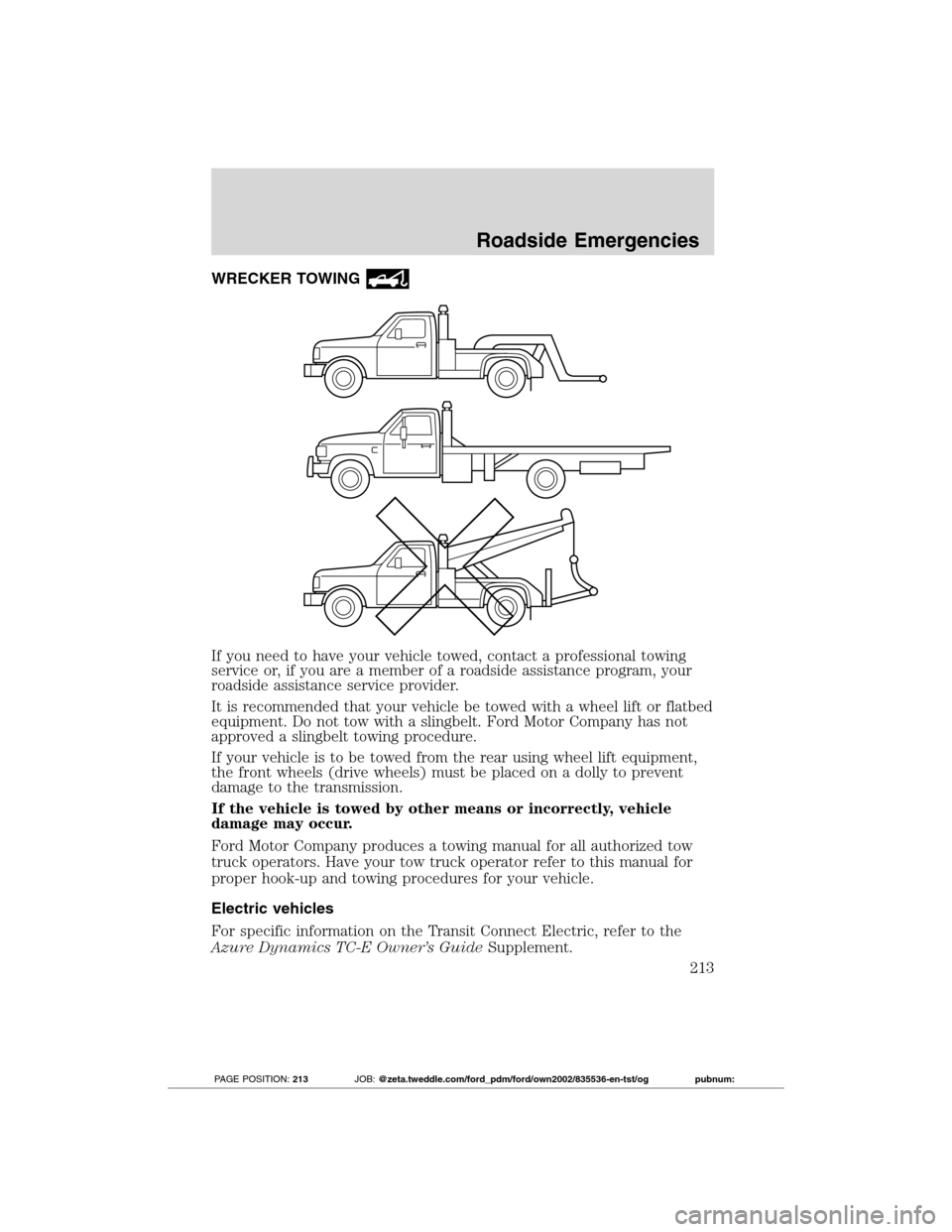
If you need to have your vehicle towed, contact a professional towing
service or, if you are a member of a roadside assistance program, your
roadside assistance service provider.
It is recommended that your vehicle be towed with a wheel lift or flatbed
equipment. Do not tow with a slingbelt. Ford Motor Company has not
approved a slingbelt towing procedure.
If your vehicle is to be towed from the rear using wheel lift equipment,
the front wheels (drive wheels) must be placed on a dolly to prevent
damage to the transmission.
If the vehicle is towed by other means or incorrectly, vehicle
damage may occur.
Ford Motor Company produces a towing manual for all authorized tow
truck operators. Have your tow truck operator refer to this manual for
proper hook-up and towing procedures for your vehicle.
Electric vehicles
For specific information on the Transit Connect Electric, refer to the
Azure Dynamics TC-E Owner’s GuideSupplement.
Roadside Emergencies
213
2012 Transit Connect(tst)
Owners Guide, 1st Printing
USA(fus)
PAGE POSITION:213JOB:@zeta.tweddle.com/ford_pdm/ford/own2002/835536-en-tst/og pubnum: