ad blue FORD TRANSIT CONNECT 2013 1.G Owner's Manual
[x] Cancel search | Manufacturer: FORD, Model Year: 2013, Model line: TRANSIT CONNECT, Model: FORD TRANSIT CONNECT 2013 1.GPages: 321, PDF Size: 4.5 MB
Page 304 of 321
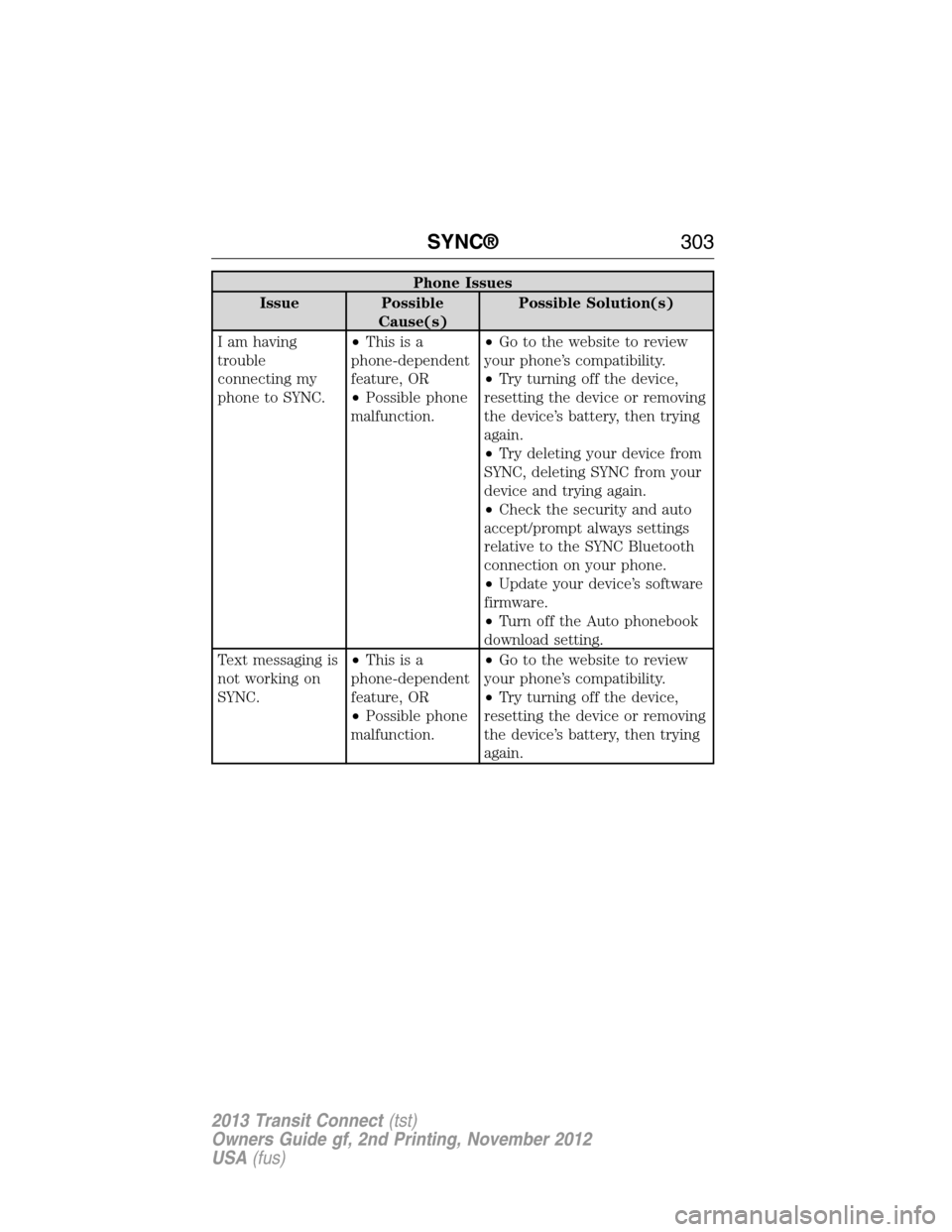
Phone Issues
Issue Possible
Cause(s)Possible Solution(s)
I am having
trouble
connecting my
phone to SYNC.•Thisisa
phone-dependent
feature, OR
•Possible phone
malfunction.•Go to the website to review
your phone’s compatibility.
•Try turning off the device,
resetting the device or removing
the device’s battery, then trying
again.
•Try deleting your device from
SYNC, deleting SYNC from your
device and trying again.
•Check the security and auto
accept/prompt always settings
relative to the SYNC Bluetooth
connection on your phone.
•Update your device’s software
firmware.
•Turn off the Auto phonebook
download setting.
Text messaging is
not working on
SYNC.•Thisisa
phone-dependent
feature, OR
•Possible phone
malfunction.•Go to the website to review
your phone’s compatibility.
•Try turning off the device,
resetting the device or removing
the device’s battery, then trying
again.
SYNC®303
2013 Transit Connect(tst)
Owners Guide gf, 2nd Printing, November 2012
USA(fus)
Page 305 of 321
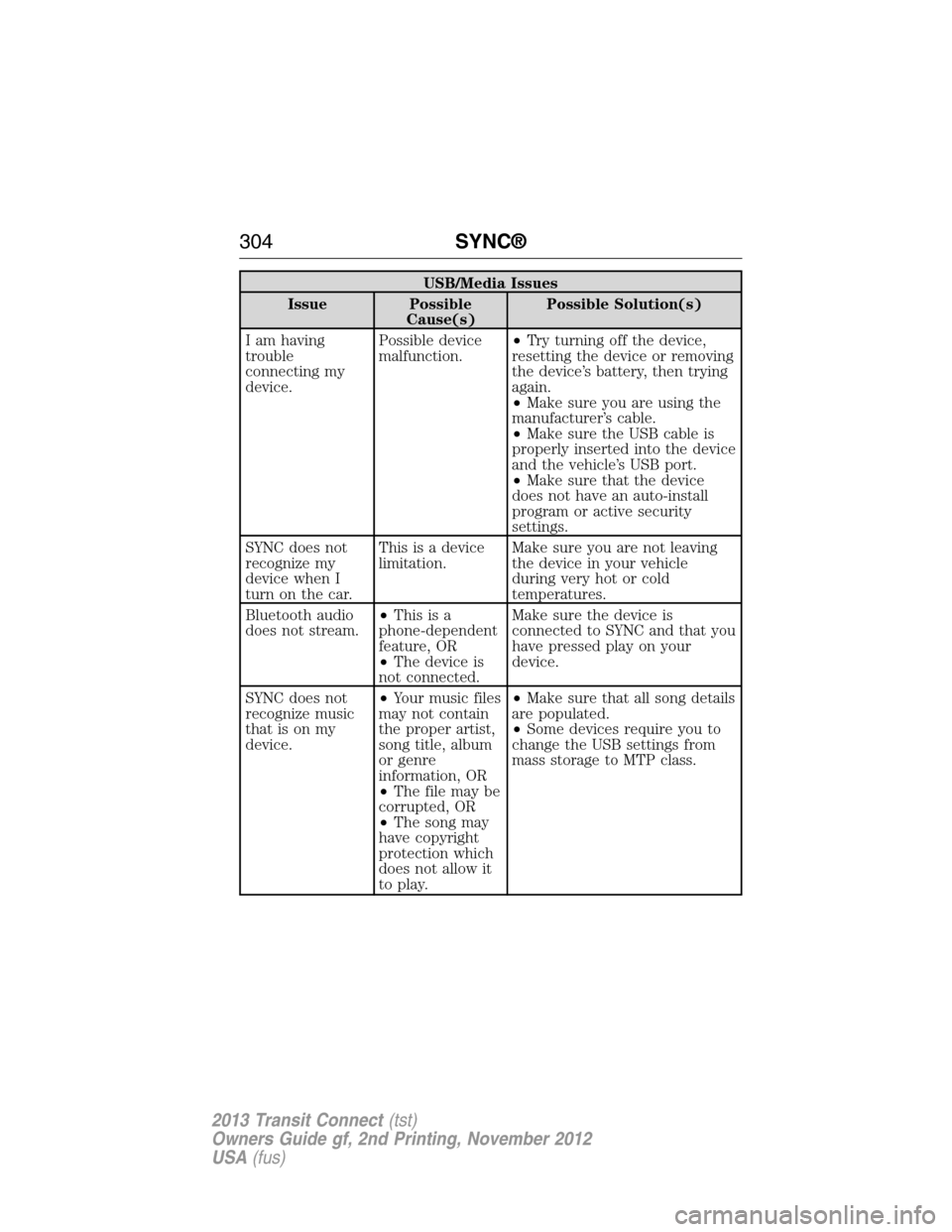
USB/Media Issues
Issue Possible
Cause(s)Possible Solution(s)
I am having
trouble
connecting my
device.Possible device
malfunction.•Try turning off the device,
resetting the device or removing
the device’s battery, then trying
again.
•Make sure you are using the
manufacturer’s cable.
•Make sure the USB cable is
properly inserted into the device
and the vehicle’s USB port.
•Make sure that the device
does not have an auto-install
program or active security
settings.
SYNC does not
recognize my
device when I
turn on the car.This is a device
limitation.Make sure you are not leaving
the device in your vehicle
during very hot or cold
temperatures.
Bluetooth audio
does not stream.•Thisisa
phone-dependent
feature, OR
•The device is
not connected.Make sure the device is
connected to SYNC and that you
have pressed play on your
device.
SYNC does not
recognize music
that is on my
device.•Your music files
may not contain
the proper artist,
song title, album
or genre
information, OR
•The file may be
corrupted, OR
•The song may
have copyright
protection which
does not allow it
to play.•Make sure that all song details
are populated.
•Some devices require you to
change the USB settings from
mass storage to MTP class.
304SYNC®
2013 Transit Connect(tst)
Owners Guide gf, 2nd Printing, November 2012
USA(fus)
Page 319 of 321
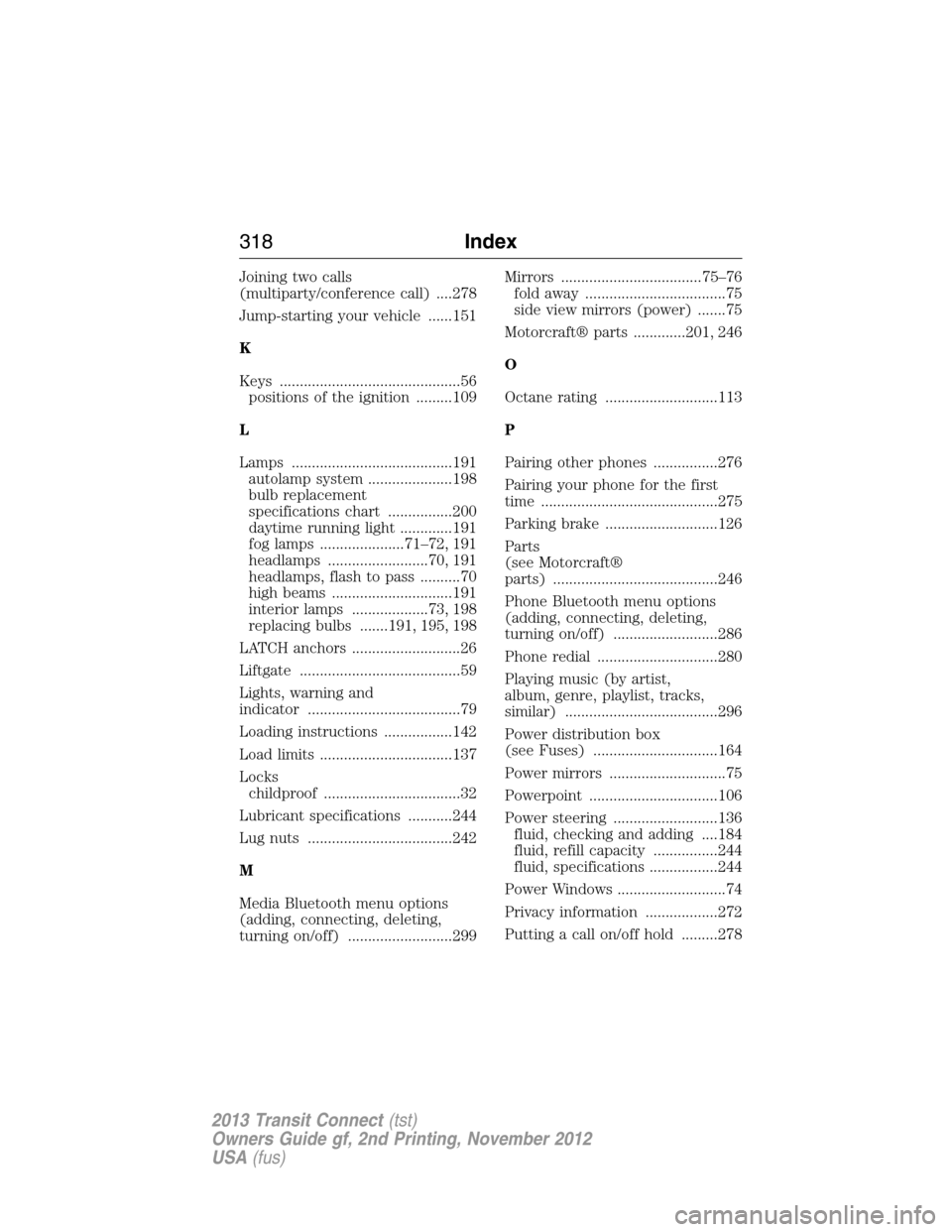
Joining two calls
(multiparty/conference call) ....278
Jump-starting your vehicle ......151
K
Keys .............................................56
positions of the ignition .........109
L
Lamps ........................................191
autolamp system .....................198
bulb replacement
specifications chart ................200
daytime running light .............191
fog lamps .....................71–72, 191
headlamps .........................70, 191
headlamps, flash to pass ..........70
high beams ..............................191
interior lamps ...................73, 198
replacing bulbs .......191, 195, 198
LATCH anchors ...........................26
Liftgate ........................................59
Lights, warning and
indicator ......................................79
Loading instructions .................142
Load limits .................................137
Locks
childproof ..................................32
Lubricant specifications ...........244
Lug nuts ....................................242
M
Media Bluetooth menu options
(adding, connecting, deleting,
turning on/off) ..........................299Mirrors ...................................75–76
fold away ...................................75
side view mirrors (power) .......75
Motorcraft® parts .............201, 246
O
Octane rating ............................113
P
Pairing other phones ................276
Pairing your phone for the first
time ............................................275
Parking brake ............................126
Parts
(see Motorcraft®
parts) .........................................246
Phone Bluetooth menu options
(adding, connecting, deleting,
turning on/off) ..........................286
Phone redial ..............................280
Playing music (by artist,
album, genre, playlist, tracks,
similar) ......................................296
Power distribution box
(see Fuses) ...............................164
Power mirrors .............................75
Powerpoint ................................106
Power steering ..........................136
fluid, checking and adding ....184
fluid, refill capacity ................244
fluid, specifications .................244
Power Windows ...........................74
Privacy information ..................272
Putting a call on/off hold .........278
318Index
2013 Transit Connect(tst)
Owners Guide gf, 2nd Printing, November 2012
USA(fus)