automatic transmission FORD TRANSIT CONNECT 2014 2.G Owner's Manual
[x] Cancel search | Manufacturer: FORD, Model Year: 2014, Model line: TRANSIT CONNECT, Model: FORD TRANSIT CONNECT 2014 2.GPages: 411, PDF Size: 6.62 MB
Page 268 of 411
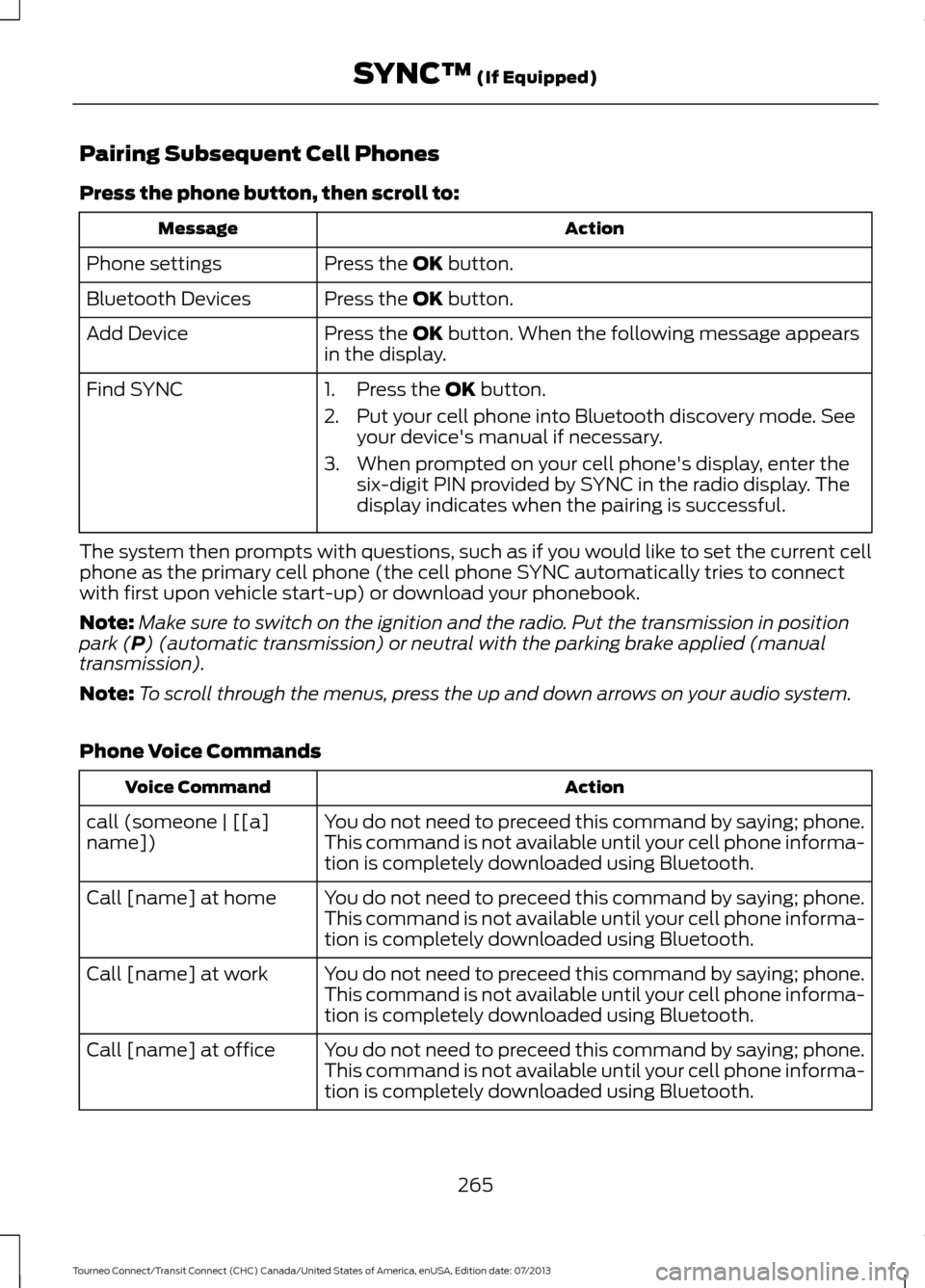
Pairing Subsequent Cell Phones
Press the phone button, then scroll to:
Action
Message
Press the OK button.
Phone settings
Press the
OK button.
Bluetooth Devices
Press the
OK button. When the following message appears
in the display.
Add Device
Find SYNC
1. Press the
OK button.
2. Put your cell phone into Bluetooth discovery mode. See your device's manual if necessary.
3. When prompted on your cell phone's display, enter the six-digit PIN provided by SYNC in the radio display. The
display indicates when the pairing is successful.
The system then prompts with questions, such as if you would like to set the current cell
phone as the primary cell phone (the cell phone SYNC automatically tries to connect
with first upon vehicle start-up) or download your phonebook.
Note: Make sure to switch on the ignition and the radio. Put the transmission in position
park (
P) (automatic transmission) or neutral with the parking brake applied (manual
transmission).
Note: To scroll through the menus, press the up and down arrows on your audio system.
Phone Voice Commands Action
Voice Command
You do not need to preceed this command by saying; phone.
call (someone | [[a]
name]) This command is not available until your cell phone informa-
tion is completely downloaded using Bluetooth.
You do not need to preceed this command by saying; phone.
Call [name] at home
This command is not available until your cell phone informa-
tion is completely downloaded using Bluetooth.
You do not need to preceed this command by saying; phone.
Call [name] at work
This command is not available until your cell phone informa-
tion is completely downloaded using Bluetooth.
You do not need to preceed this command by saying; phone.
Call [name] at office
This command is not available until your cell phone informa-
tion is completely downloaded using Bluetooth.
265
Tourneo Connect/Transit Connect (CHC) Canada/United States of America, enUSA, Edition date: 07/2013 SYNC™
(If Equipped)
Page 343 of 411
•
Dialing a number.
• Redialing.
• Call waiting notification.
• Caller ID.
Other features, such as text messaging
using Bluetooth and automatic phonebook
download, are cell phone-dependent
features. To check your cell phone ’s
compatibility, see your cell phone ’s user
manual and visit www.SYNCMyRide.com,
www.SYNCMyRide.ca or
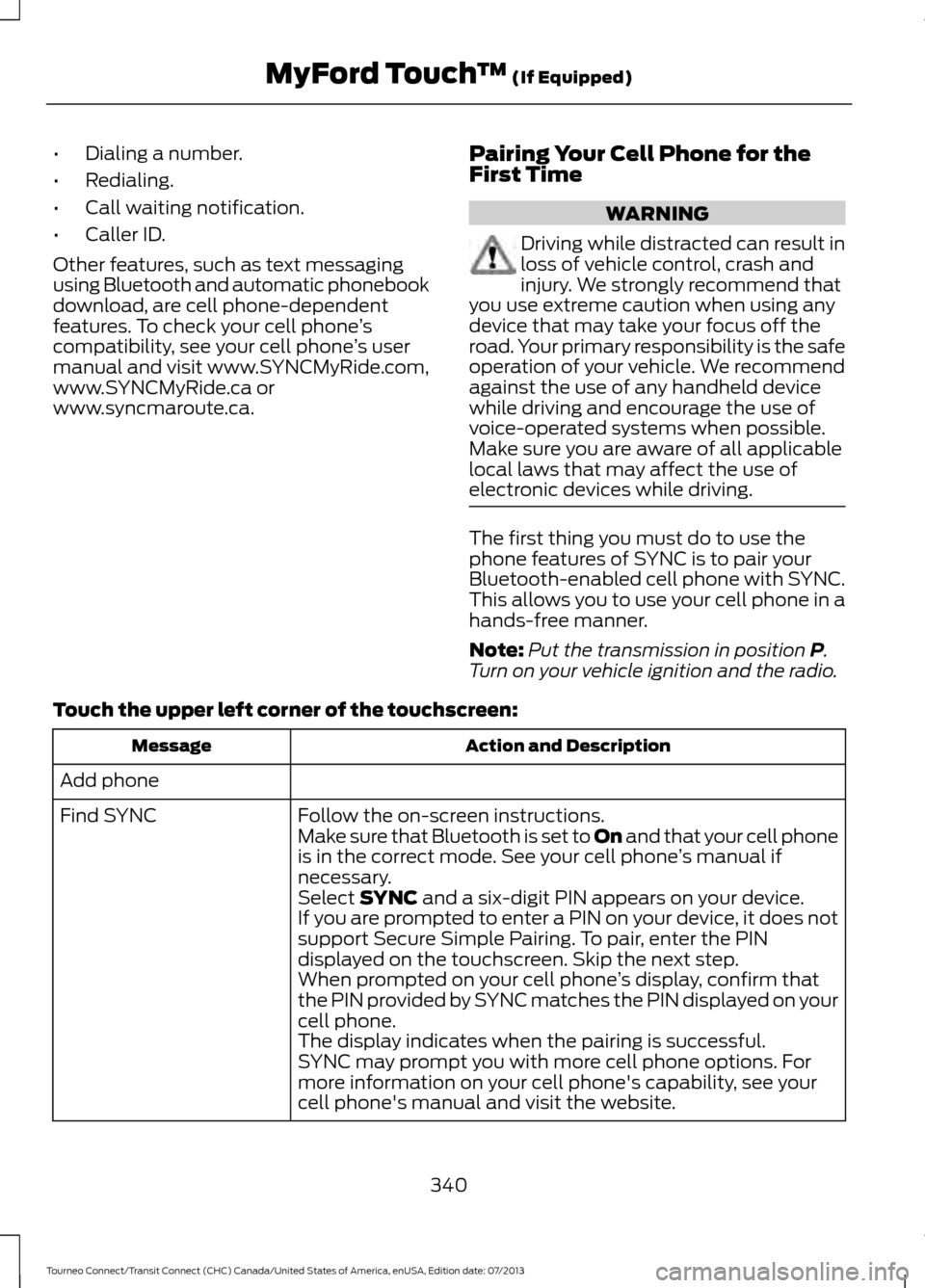
www.syncmaroute.ca. Pairing Your Cell Phone for the
First Time WARNING
Driving while distracted can result in
loss of vehicle control, crash and
injury. We strongly recommend that
you use extreme caution when using any
device that may take your focus off the
road. Your primary responsibility is the safe
operation of your vehicle. We recommend
against the use of any handheld device
while driving and encourage the use of
voice-operated systems when possible.
Make sure you are aware of all applicable
local laws that may affect the use of
electronic devices while driving. The first thing you must do to use the
phone features of SYNC is to pair your
Bluetooth-enabled cell phone with SYNC.
This allows you to use your cell phone in a
hands-free manner.
Note:
Put the transmission in position P.
Turn on your vehicle ignition and the radio.
Touch the upper left corner of the touchscreen: Action and Description
Message
Add phone Follow the on-screen instructions.
Find SYNC
Make sure that Bluetooth is set to On
and that your cell phone
is in the correct mode. See your cell phone ’s manual if
necessary.
Select
SYNC and a six-digit PIN appears on your device.
If you are prompted to enter a PIN on your device, it does not
support Secure Simple Pairing. To pair, enter the PIN
displayed on the touchscreen. Skip the next step.
When prompted on your cell phone ’s display, confirm that
the PIN provided by SYNC matches the PIN displayed on your
cell phone.
The display indicates when the pairing is successful.
SYNC may prompt you with more cell phone options. For
more information on your cell phone's capability, see your
cell phone's manual and visit the website.
340
Tourneo Connect/Transit Connect (CHC) Canada/United States of America, enUSA, Edition date: 07/2013 MyFord Touch
™
(If Equipped)
Page 390 of 411
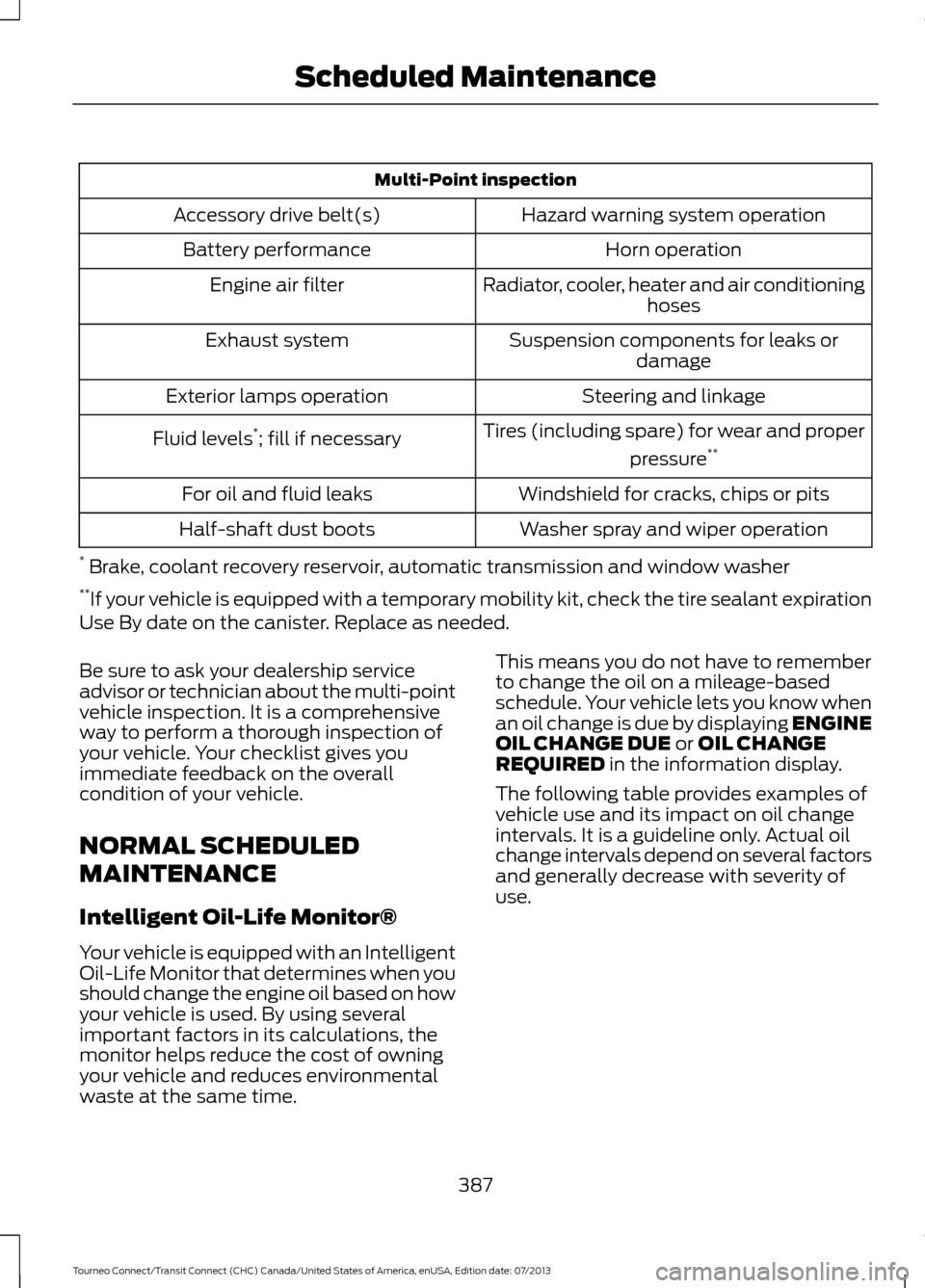
Multi-Point inspection
Hazard warning system operation
Accessory drive belt(s)
Horn operation
Battery performance
Radiator, cooler, heater and air conditioninghoses
Engine air filter
Suspension components for leaks ordamage
Exhaust system
Steering and linkage
Exterior lamps operation
Tires (including spare) for wear and properpressure**
Fluid levels *
; fill if necessary
Windshield for cracks, chips or pits
For oil and fluid leaks
Washer spray and wiper operation
Half-shaft dust boots
* Brake, coolant recovery reservoir, automatic transmission and window washer
** If your vehicle is equipped with a temporary mobility kit, check the tire sealant expiration
Use By date on the canister. Replace as needed.
Be sure to ask your dealership service
advisor or technician about the multi-point
vehicle inspection. It is a comprehensive
way to perform a thorough inspection of
your vehicle. Your checklist gives you
immediate feedback on the overall
condition of your vehicle.
NORMAL SCHEDULED
MAINTENANCE
Intelligent Oil-Life Monitor®
Your vehicle is equipped with an Intelligent
Oil-Life Monitor that determines when you
should change the engine oil based on how
your vehicle is used. By using several
important factors in its calculations, the
monitor helps reduce the cost of owning
your vehicle and reduces environmental
waste at the same time. This means you do not have to remember
to change the oil on a mileage-based
schedule. Your vehicle lets you know when
an oil change is due by displaying ENGINE
OIL CHANGE DUE or OIL CHANGE
REQUIRED in the information display.
The following table provides examples of
vehicle use and its impact on oil change
intervals. It is a guideline only. Actual oil
change intervals depend on several factors
and generally decrease with severity of
use.
387
Tourneo Connect/Transit Connect (CHC) Canada/United States of America, enUSA, Edition date: 07/2013 Scheduled Maintenance
Page 391 of 411
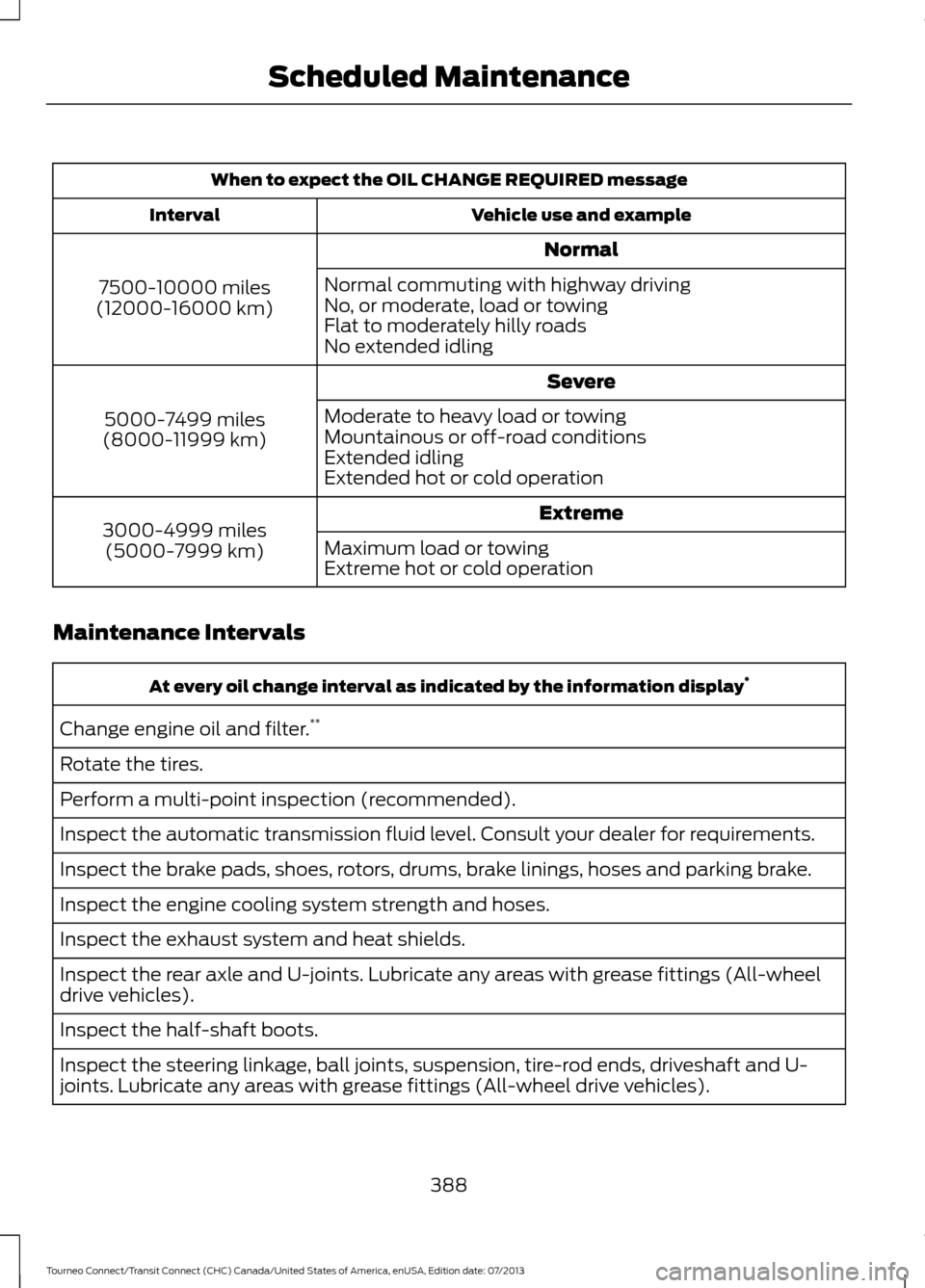
When to expect the OIL CHANGE REQUIRED message
Vehicle use and example
Interval
Normal
7500-10000 miles
(12000-16000 km) Normal commuting with highway driving
No, or moderate, load or towing
Flat to moderately hilly roads
No extended idling
Severe
5000-7499 miles
(8000-11999 km) Moderate to heavy load or towing
Mountainous or off-road conditions
Extended idling
Extended hot or cold operation
Extreme
3000-4999 miles
(5000-7999 km) Maximum load or towing
Extreme hot or cold operation
Maintenance Intervals At every oil change interval as indicated by the information display
*
Change engine oil and filter. **
Rotate the tires.
Perform a multi-point inspection (recommended).
Inspect the automatic transmission fluid level. Consult your dealer for requirements.
Inspect the brake pads, shoes, rotors, drums, brake linings, hoses and parking brake.
Inspect the engine cooling system strength and hoses.
Inspect the exhaust system and heat shields.
Inspect the rear axle and U-joints. Lubricate any areas with grease fittings (All-wheel
drive vehicles).
Inspect the half-shaft boots.
Inspect the steering linkage, ball joints, suspension, tire-rod ends, driveshaft and U-
joints. Lubricate any areas with grease fittings (All-wheel drive vehicles).
388
Tourneo Connect/Transit Connect (CHC) Canada/United States of America, enUSA, Edition date: 07/2013 Scheduled Maintenance
Page 392 of 411
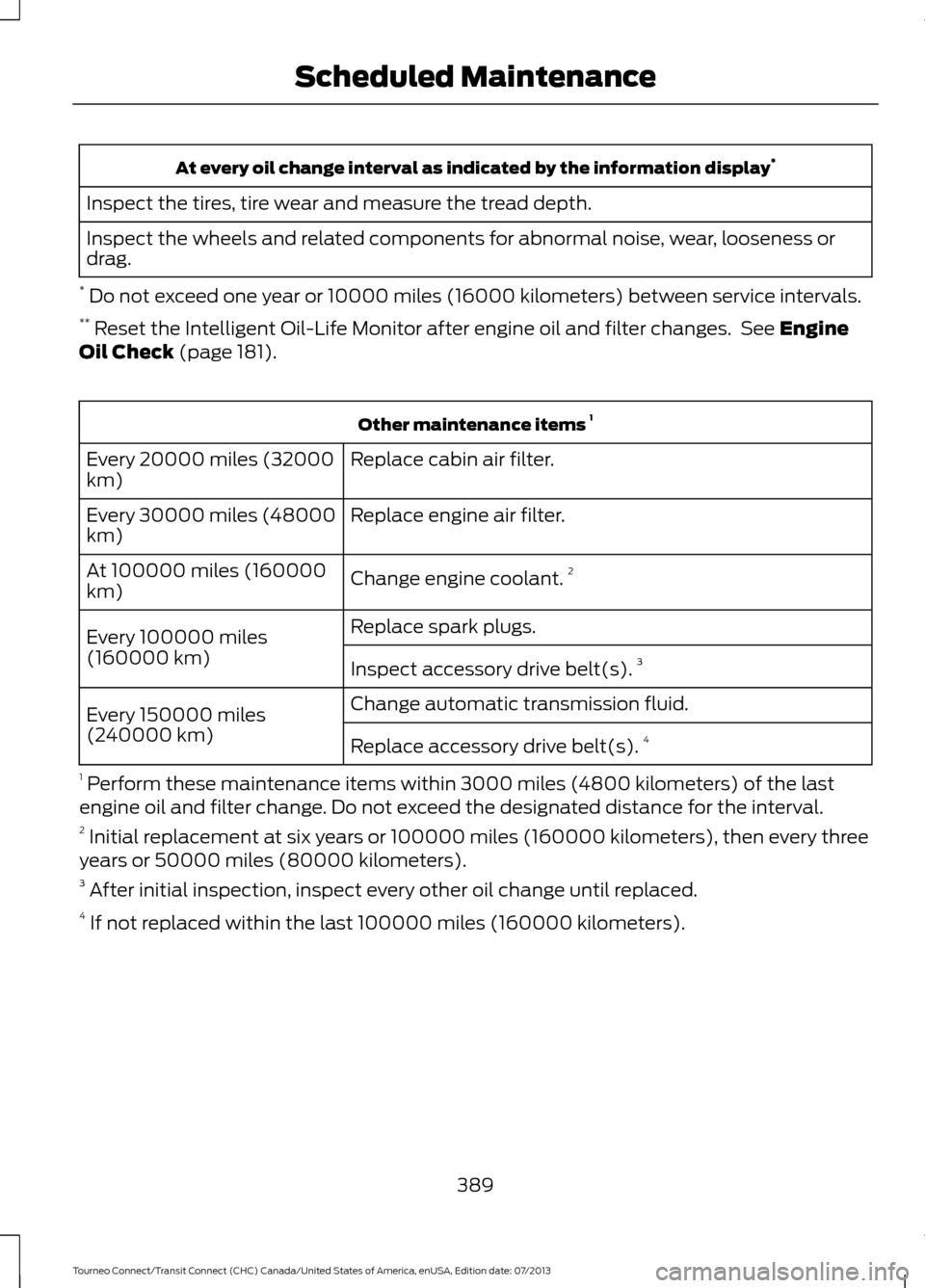
At every oil change interval as indicated by the information display
*
Inspect the tires, tire wear and measure the tread depth.
Inspect the wheels and related components for abnormal noise, wear, looseness or
drag.
* Do not exceed one year or 10000 miles (16000 kilometers) between service intervals.
** Reset the Intelligent Oil-Life Monitor after engine oil and filter changes. See Engine
Oil Check (page 181). Other maintenance items
1
Replace cabin air filter.
Every 20000 miles (32000
km)
Replace engine air filter.
Every 30000 miles (48000
km)
Change engine coolant.2
At 100000 miles (160000
km)
Replace spark plugs.
Every 100000 miles
(160000 km) Inspect accessory drive belt(s). 3
Change automatic transmission fluid.
Every 150000 miles
(240000 km)
Replace accessory drive belt(s). 4
1 Perform these maintenance items within 3000 miles (4800 kilometers) of the last
engine oil and filter change. Do not exceed the designated distance for the interval.
2 Initial replacement at six years or 100000 miles (160000 kilometers), then every three
years or 50000 miles (80000 kilometers).
3 After initial inspection, inspect every other oil change until replaced.
4 If not replaced within the last 100000 miles (160000 kilometers).
389
Tourneo Connect/Transit Connect (CHC) Canada/United States of America, enUSA, Edition date: 07/2013 Scheduled Maintenance
Page 393 of 411
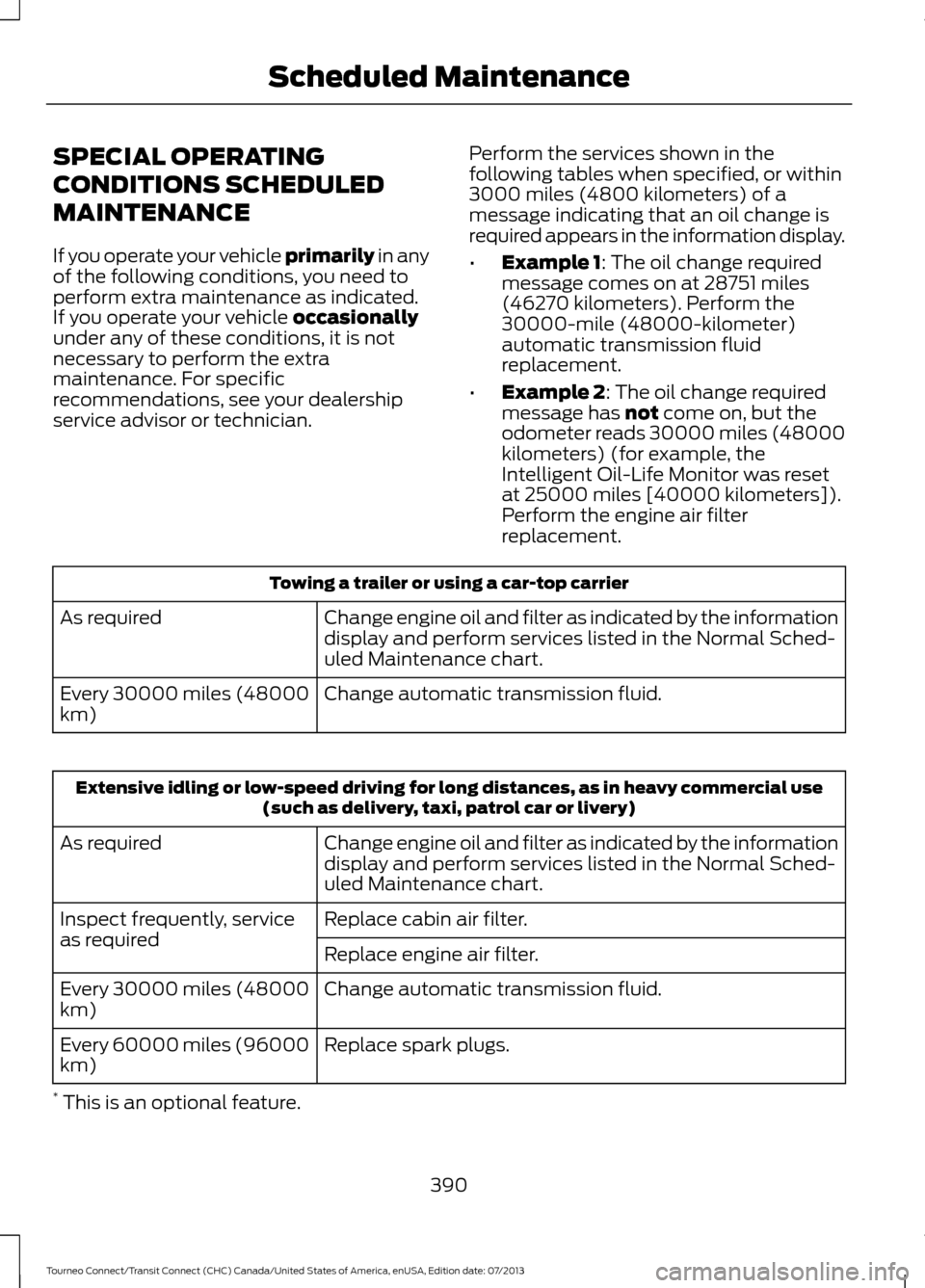
SPECIAL OPERATING
CONDITIONS SCHEDULED
MAINTENANCE
If you operate your vehicle primarily in any
of the following conditions, you need to
perform extra maintenance as indicated.
If you operate your vehicle
occasionally
under any of these conditions, it is not
necessary to perform the extra
maintenance. For specific
recommendations, see your dealership
service advisor or technician. Perform the services shown in the
following tables when specified, or within
3000 miles (4800 kilometers) of a
message indicating that an oil change is
required appears in the information display.
•
Example 1
: The oil change required
message comes on at 28751 miles
(46270 kilometers). Perform the
30000-mile (48000-kilometer)
automatic transmission fluid
replacement.
• Example 2
: The oil change required
message has not come on, but the
odometer reads 30000 miles (48000
kilometers) (for example, the
Intelligent Oil-Life Monitor was reset
at 25000 miles [40000 kilometers]).
Perform the engine air filter
replacement. Towing a trailer or using a car-top carrier
Change engine oil and filter as indicated by the information
display and perform services listed in the Normal Sched-
uled Maintenance chart.
As required
Change automatic transmission fluid.
Every 30000 miles (48000
km) Extensive idling or low-speed driving for long distances, as in heavy commercial use
(such as delivery, taxi, patrol car or livery)
Change engine oil and filter as indicated by the information
display and perform services listed in the Normal Sched-
uled Maintenance chart.
As required
Replace cabin air filter.
Inspect frequently, service
as required
Replace engine air filter.
Change automatic transmission fluid.
Every 30000 miles (48000
km)
Replace spark plugs.
Every 60000 miles (96000
km)
* This is an optional feature.
390
Tourneo Connect/Transit Connect (CHC) Canada/United States of America, enUSA, Edition date: 07/2013 Scheduled Maintenance
Page 394 of 411
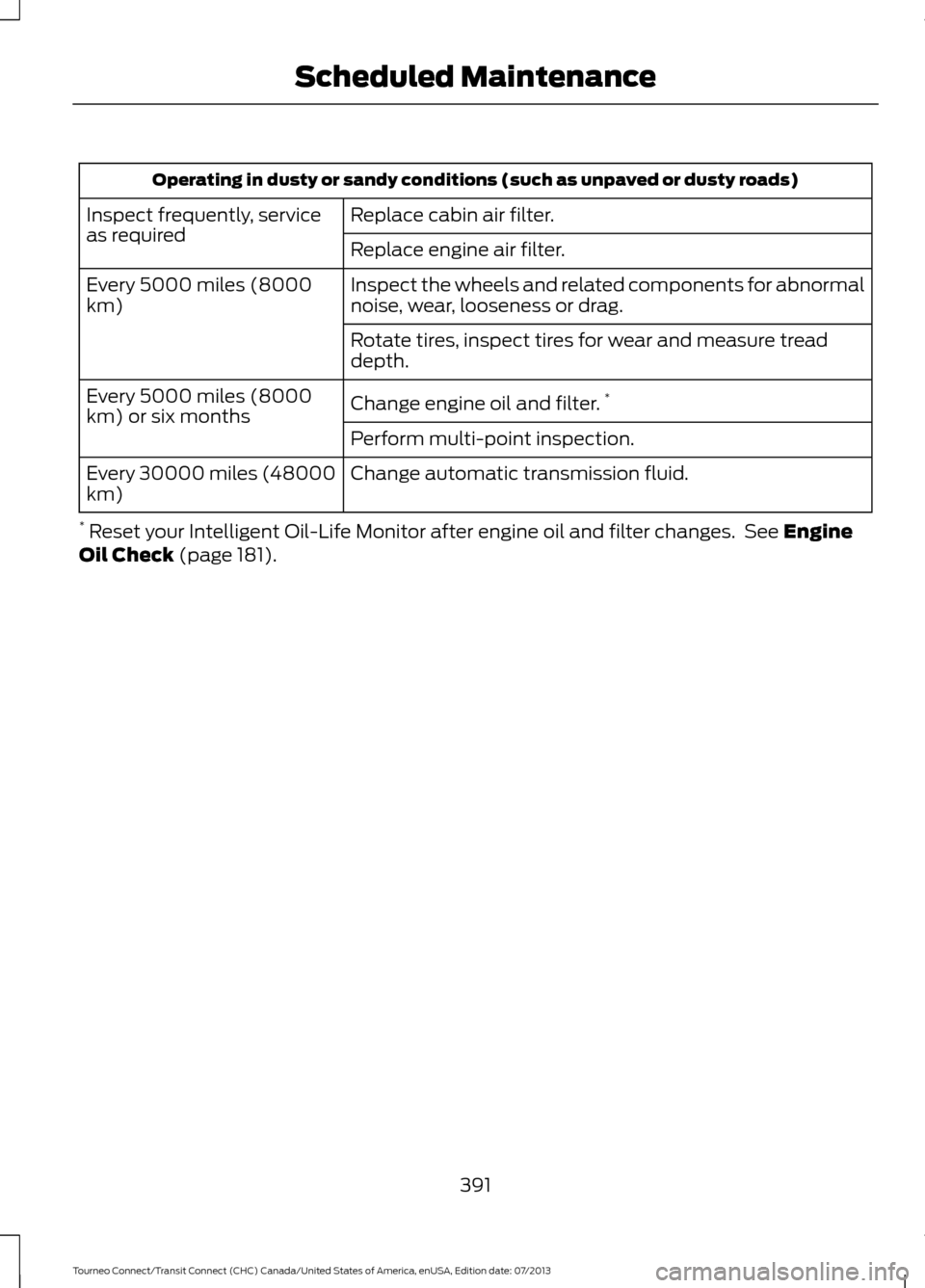
Operating in dusty or sandy conditions (such as unpaved or dusty roads)
Replace cabin air filter.
Inspect frequently, service
as required
Replace engine air filter.
Inspect the wheels and related components for abnormal
noise, wear, looseness or drag.
Every 5000 miles (8000
km)
Rotate tires, inspect tires for wear and measure tread
depth.
Change engine oil and filter.*
Every 5000 miles (8000
km) or six months
Perform multi-point inspection.
Change automatic transmission fluid.
Every 30000 miles (48000
km)
* Reset your Intelligent Oil-Life Monitor after engine oil and filter changes. See Engine
Oil Check (page 181).
391
Tourneo Connect/Transit Connect (CHC) Canada/United States of America, enUSA, Edition date: 07/2013 Scheduled Maintenance
Page 402 of 411
A
A/C
See: Climate Control.......................................... 88
About This Manual...........................................7
ABS See: Brakes............................................................ 122
ABS driving hints See: Hints on Driving With Anti-Lock
Brakes................................................................. 122
Accessories....................................................365 Exterior style........................................................ 365
Interior style......................................................... 365
Lifestyle................................................................. 365
Peace of mind..................................................... 365
Accessories See: Replacement Parts
Recommendation............................................. 11
Adjusting the Headlamps.........................188 Horizontal Aim Adjustment............................ 189
Vertical Aim Adjustment................................. 188
Adjusting the Steering Wheel
....................55
Airbag Disposal..............................................40
Air Conditioning See: Climate Control.......................................... 88
Air Vents
............................................................88
Center Air Vents.................................................... 88
Side Air Vents........................................................ 89
Alarm See: Anti-Theft Alarm........................................ 54
Anti-Theft Alarm
............................................54
Alarm System........................................................ 54
Arming the Alarm................................................. 54
Disarming the Alarm........................................... 54
Triggering the Alarm............................................ 54
Appendices....................................................367
Audible Warnings and Indicators
.............75
Automatic Transmission Warning
Chime................................................................... 76
Headlamps On Warning Chime...................... 75
Key in Ignition Warning Chime......................... 75
Parking Brake On Warning Chime.................. 75
Audio Control
...................................................55
Audio Input Jack...........................................256
Audio System
................................................242
General Information.......................................... 242
Audio Troubleshooting
...............................257 Audio Unit - Vehicles With: AM/FM/CD/
SYNC/Satellite Radio
.............................249
Audio Unit - Vehicles With: AM/FM/CD/ SYNC..............................................................247
Audio Unit - Vehicles With: AM/ FM...................................................................243
AUX Button.......................................................... 246
Clock Button........................................................ 245
Frequency Band Buttons................................ 245
Menu Button........................................................ 246
Sound Button...................................................... 245
Station Preset Buttons.................................... 245
Station Tuning Buttons................................... 245
Audio Unit - Vehicles With: Premium AM/FM/CD..................................................246
Autolamps........................................................62
Automatic Climate Control
.........................91
Mono Mode............................................................ 92
Switching Mono Mode Back On..................... 92
Switching Mono Mode Off................................ 92
Temperature Control.......................................... 92
Automatic Transmission
.............................119
Brake-Shift Interlock......................................... 120
If Your Vehicle Gets Stuck In Mud or Snow.................................................................... 121
SelectShift Automatic® Transmission.................................................... 119
Understanding the Positions of Your Automatic Transmission.............................. 119
Automatic Transmission Fluid Check.............................................................184
Autowipers.......................................................58
Auxiliary Power Points...............................106 12 Volt DC Power Point..................................... 106
B
Bonnet Lock See: Opening and Closing the Hood............177
Booster Seats
..................................................20
Types of Booster Seats....................................... 21
Brake Fluid Check.........................................184
Brakes................................................................122 General Information........................................... 122
Breaking-In......................................................152
Bulb Specification Chart...........................194
399
Tourneo Connect/Transit Connect (CHC) Canada/United States of America, enUSA, Edition date: 07/2013 Index