AUX FORD TRANSIT CONNECT 2014 2.G Owners Manual
[x] Cancel search | Manufacturer: FORD, Model Year: 2014, Model line: TRANSIT CONNECT, Model: FORD TRANSIT CONNECT 2014 2.GPages: 411, PDF Size: 6.62 MB
Page 5 of 411
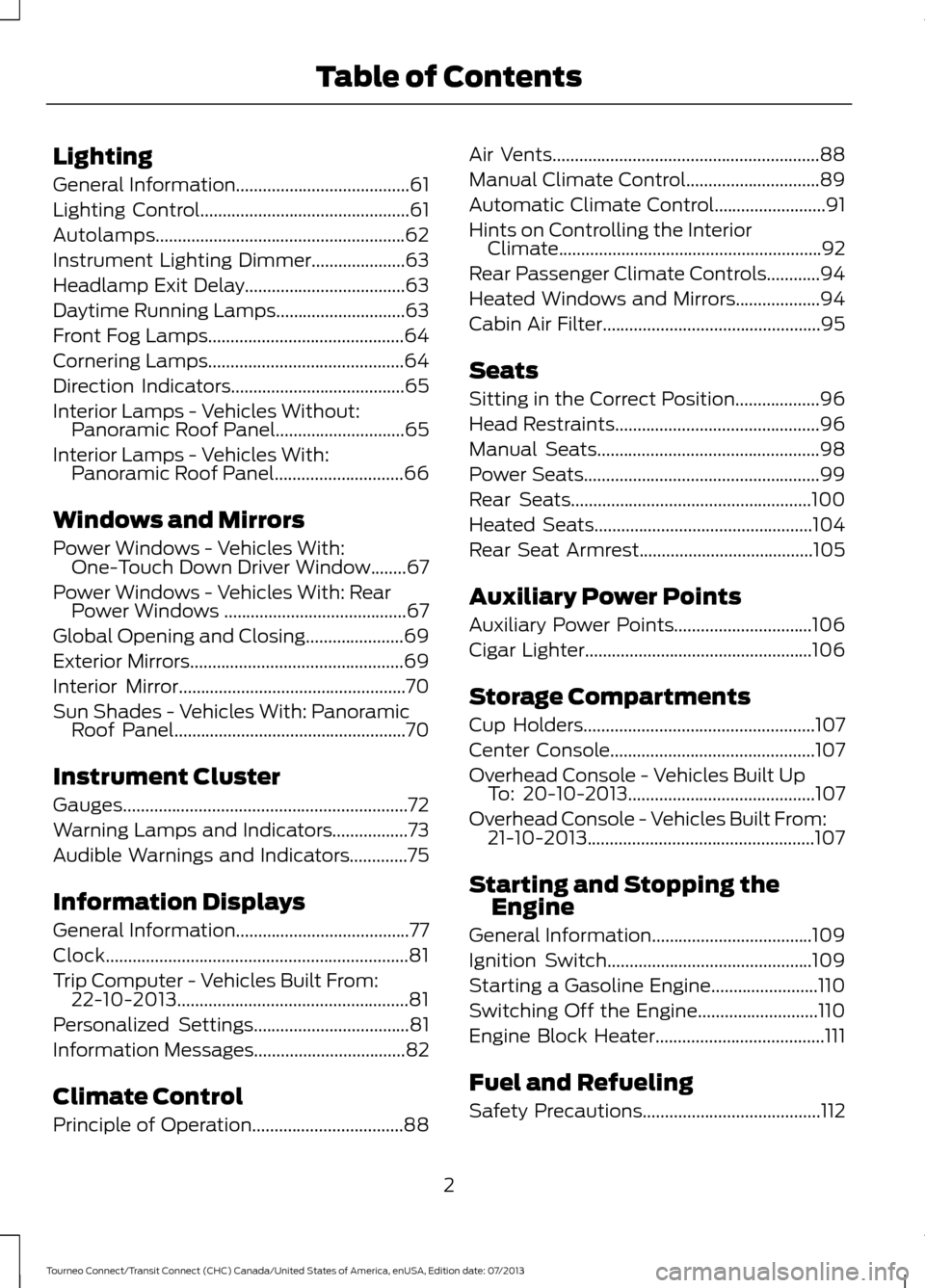
Lighting
General Information.......................................61
Lighting Control...............................................61
Autolamps........................................................62
Instrument Lighting Dimmer.....................63
Headlamp Exit Delay....................................63
Daytime Running Lamps.............................63
Front Fog Lamps............................................64
Cornering Lamps
............................................64
Direction Indicators
.......................................65
Interior Lamps -
Vehicles Without:
Panoramic Roof Panel.............................65
Interior Lamps -
Vehicles With:
Panoramic Roof Panel.............................66
Windows and Mirrors
Power Windows -
Vehicles With:
One-Touch Down Driver Window........67
Power Windows -
Vehicles With: Rear
Power Windows .........................................67
Global Opening and Closing......................69
Exterior Mirrors
................................................69
Interior Mirror
...................................................70
Sun Shades -
Vehicles With: Panoramic
Roof Panel....................................................70
Instrument Cluster
Gauges................................................................72
Warning Lamps and Indicators.................73
Audible Warnings and Indicators.............75
Information Displays
General Information
.......................................77
Clock....................................................................81
Trip Computer -
Vehicles Built From:
22-10-2013....................................................81
Personalized Settings...................................81
Information Messages
..................................82
Climate Control
Principle of Operation..................................88 Air Vents
............................................................88
Manual Climate Control..............................89
Automatic Climate Control
.........................91
Hints on Controlling the Interior Climate...........................................................92
Rear Passenger Climate Controls............94
Heated Windows and Mirrors...................94
Cabin Air Filter.................................................95
Seats
Sitting in the Correct Position...................96
Head Restraints..............................................96
Manual Seats
..................................................98
Power Seats
.....................................................99
Rear Seats
......................................................100
Heated Seats
.................................................104
Rear Seat Armrest.......................................105
Auxiliary Power Points
Auxiliary Power Points...............................106
Cigar Lighter
...................................................106
Storage Compartments
Cup Holders
....................................................107
Center Console..............................................107
Overhead Console -
Vehicles Built Up
To: 20-10-2013..........................................107
Overhead Console - Vehicles Built From: 21-10-2013...................................................107
Starting and Stopping the Engine
General Information
....................................109
Ignition Switch
..............................................109
Starting a Gasoline Engine........................110
Switching Off the Engine
...........................110
Engine Block Heater......................................111
Fuel and Refueling
Safety Precautions
........................................112
2
Tourneo Connect/Transit Connect (CHC) Canada/United States of America, enUSA, Edition date: 07/2013 Table of Contents
Page 81 of 411
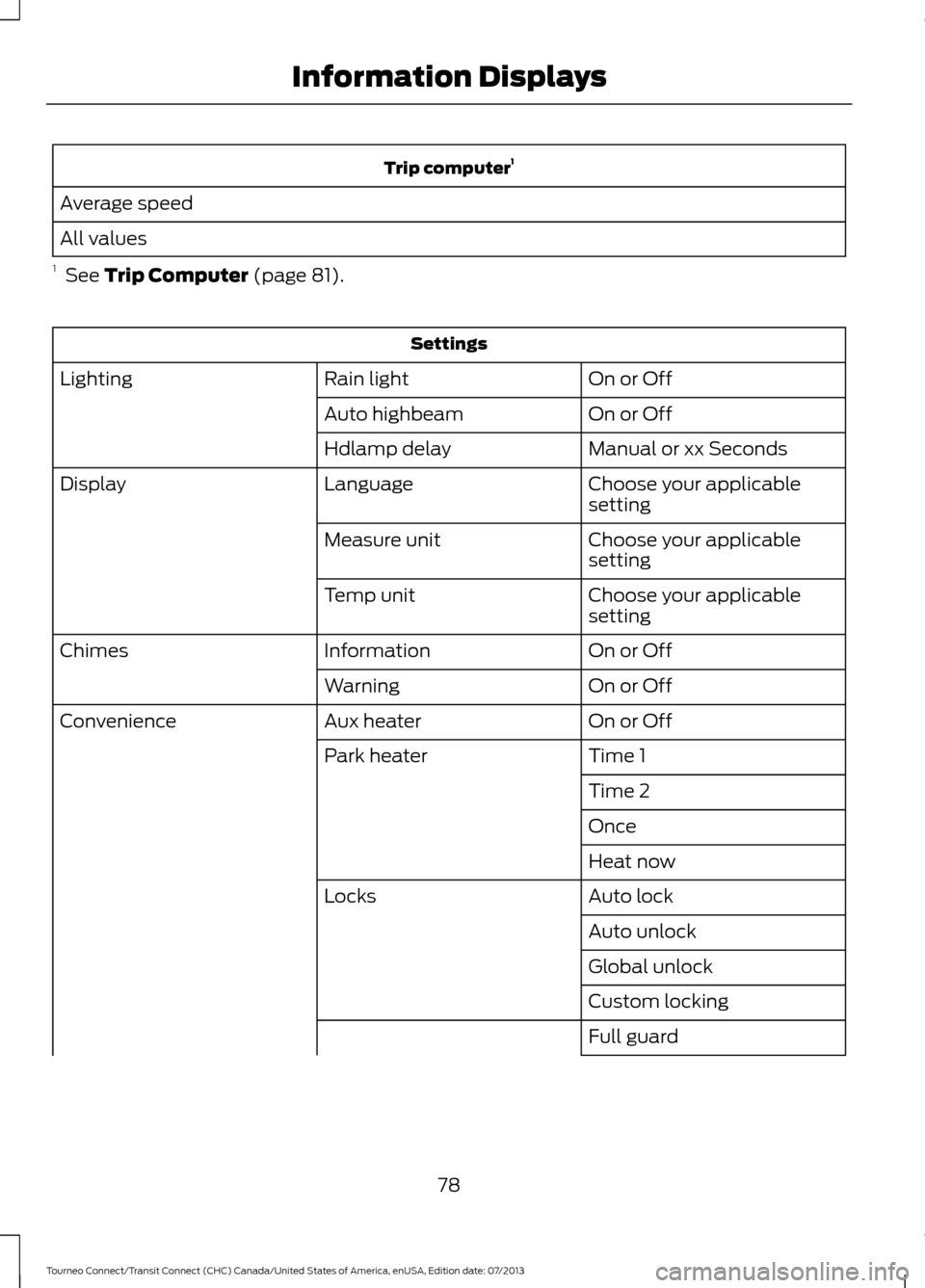
Trip computer
1
Average speed
All values
1 See Trip Computer (page 81). Settings
On or Off
Rain light
Lighting
On or Off
Auto highbeam
Manual or xx Seconds
Hdlamp delay
Choose your applicable
setting
Language
Display
Choose your applicable
setting
Measure unit
Choose your applicable
setting
Temp unit
On or Off
Information
Chimes
On or Off
Warning
On or Off
Aux heater
Convenience
Time 1
Park heater
Time 2
Once
Heat now
Auto lock
Locks
Auto unlock
Global unlock
Custom locking
Full guard
78
Tourneo Connect/Transit Connect (CHC) Canada/United States of America, enUSA, Edition date: 07/2013 Information Displays
Page 109 of 411
12 Volt DC Power Point
WARNINGS
Do not use the power point for
operating a cigar lighter element, this
can result in fire or serious injury.
Do not insert objects other than an
accessory plug into the power point,
this can result in fire or serious injury.
Run the engine for full capacity use of the
power point.
Auxiliary power points may be found at
the:
•
Front of the floor console.
• Rear of the floor console.
• Right hand side of the luggage
compartment.
To prevent the battery from running out of
charge:
• Do not use the power point longer than
necessary when the engine is not
running.
• Do not leave devices plugged in
overnight or when your vehicle is
parked for extended periods.
Note: When you switch the ignition on you
can use the power point to power 12 volt
appliances with a maximum current rating
of 20 amps.
Note: Do not hang any type of accessory or
accessory bracket from an accessory plug.
Note: Do not use the power point over the
vehicle capacity of 12 volt DC 180 watt or a
fuse may blow.
Note: Incorrect use of the power point can
cause damage not covered by the vehicle
warranty.
Note: Always keep the power point caps
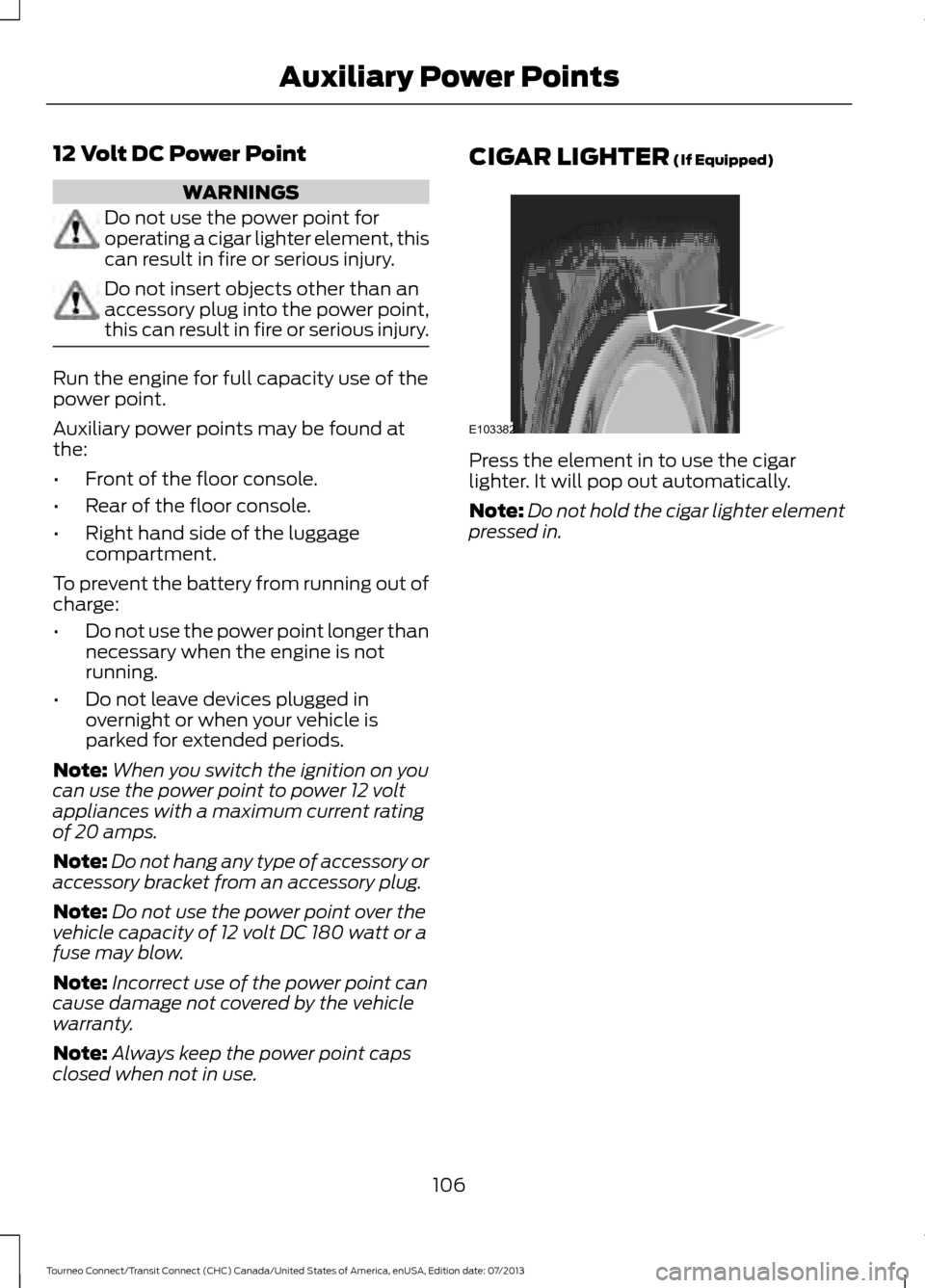
closed when not in use. CIGAR LIGHTER (If Equipped)
Press the element in to use the cigar
lighter. It will pop out automatically.
Note:
Do not hold the cigar lighter element
pressed in.
106
Tourneo Connect/Transit Connect (CHC) Canada/United States of America, enUSA, Edition date: 07/2013 Auxiliary Power PointsE103382
Page 110 of 411
CUP HOLDERS
WARNINGS
Do not place hot drinks in the cup
holders when your vehicle is moving.
Make sure that cups placed in the
holders do not obstruct your vision
while driving.
CENTER CONSOLE
Stow items in the cupholder carefully as
items may become loose during hard
braking, acceleration or collisions, including
hot drinks which may spill.
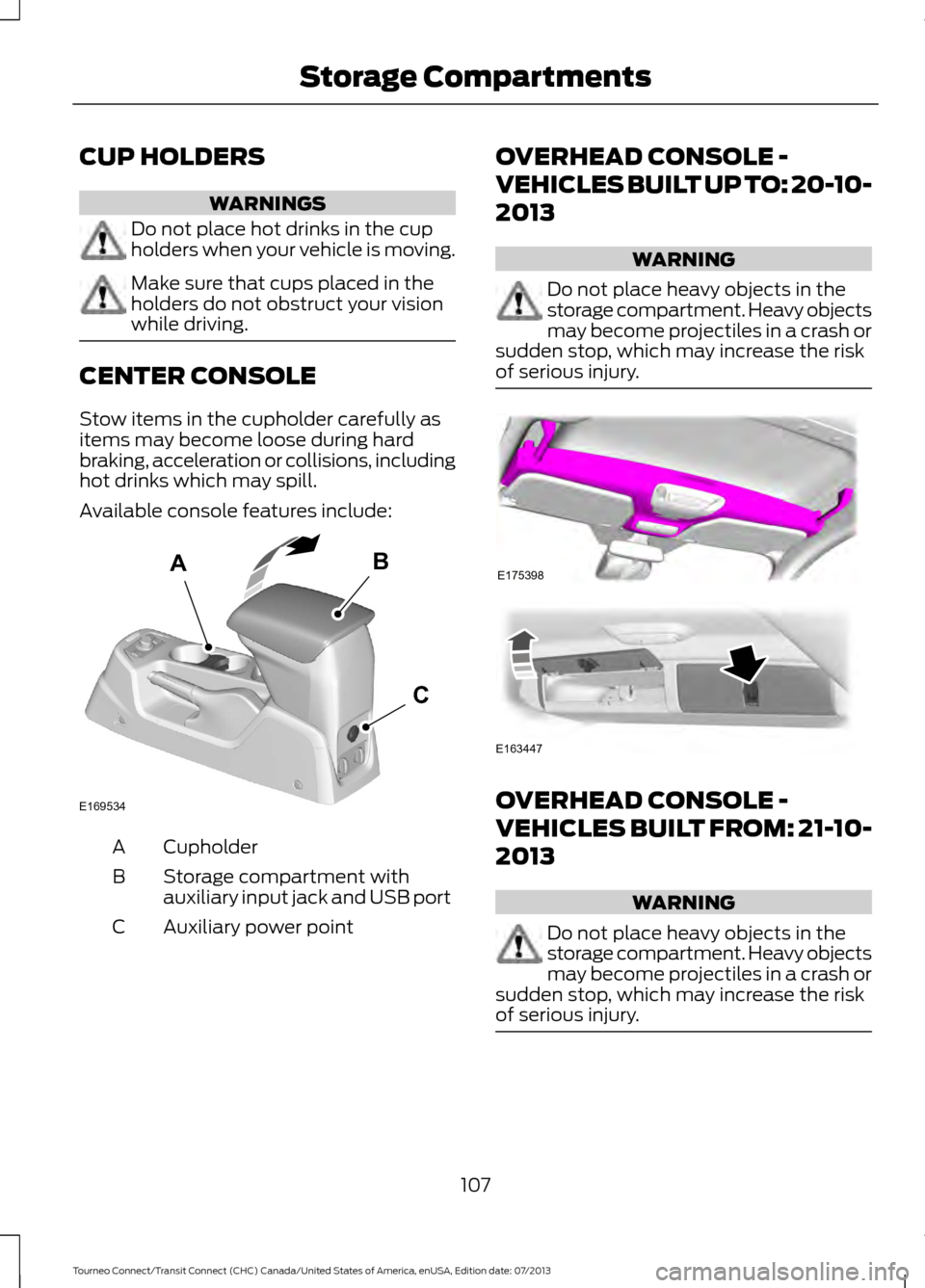
Available console features include:
Cupholder
A
Storage compartment with
auxiliary input jack and USB port
B
Auxiliary power point
C OVERHEAD CONSOLE -
VEHICLES BUILT UP TO: 20-10-
2013 WARNING
Do not place heavy objects in the
storage compartment. Heavy objects
may become projectiles in a crash or
sudden stop, which may increase the risk
of serious injury. OVERHEAD CONSOLE -
VEHICLES BUILT FROM: 21-10-
2013
WARNING
Do not place heavy objects in the
storage compartment. Heavy objects
may become projectiles in a crash or
sudden stop, which may increase the risk
of serious injury. 107
Tourneo Connect/Transit Connect (CHC) Canada/United States of America, enUSA, Edition date: 07/2013 Storage CompartmentsAB
C
E169534 E175398 E163447
Page 171 of 411
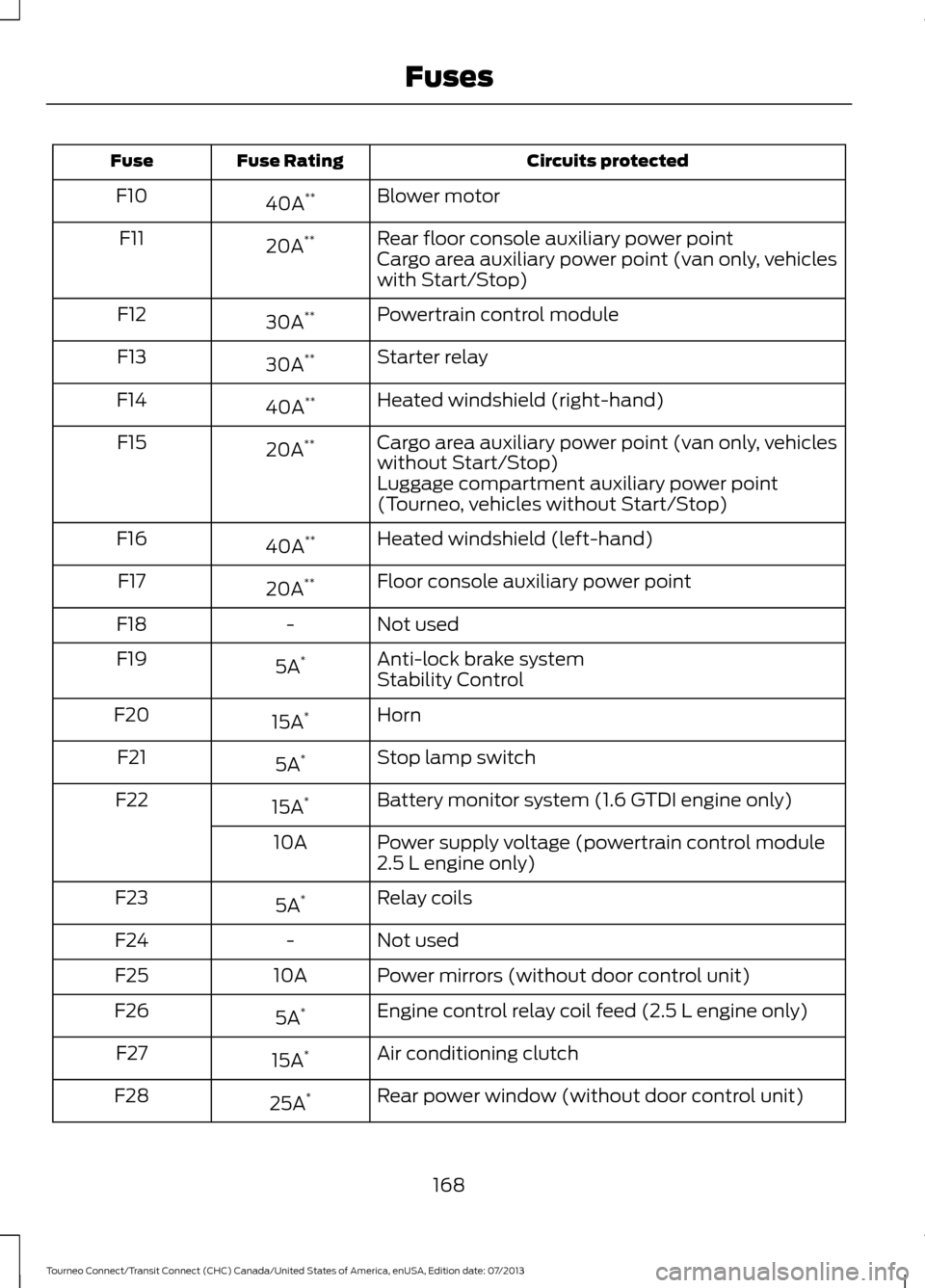
Circuits protected
Fuse Rating
Fuse
Blower motor
40A **
F10
Rear floor console auxiliary power point
20A **
F11
Cargo area auxiliary power point (van only, vehicles
with Start/Stop)
Powertrain control module
30A **
F12
Starter relay
30A **
F13
Heated windshield (right-hand)
40A **
F14
Cargo area auxiliary power point (van only, vehicles
without Start/Stop)
20A
**
F15
Luggage compartment auxiliary power point
(Tourneo, vehicles without Start/Stop)
Heated windshield (left-hand)
40A **
F16
Floor console auxiliary power point
20A **
F17
Not used
-
F18
Anti-lock brake system
5A *
F19
Stability Control
Horn
15A *
F20
Stop lamp switch
5A *
F21
Battery monitor system (1.6 GTDI engine only)
15A *
F22
Power supply voltage (powertrain control module
2.5 L engine only)
10A
Relay coils
5A *
F23
Not used
-
F24
Power mirrors (without door control unit)
10A
F25
Engine control relay coil feed (2.5 L engine only)
5A *
F26
Air conditioning clutch
15A *
F27
Rear power window (without door control unit)
25A *
F28
168
Tourneo Connect/Transit Connect (CHC) Canada/United States of America, enUSA, Edition date: 07/2013 Fuses
Page 201 of 411
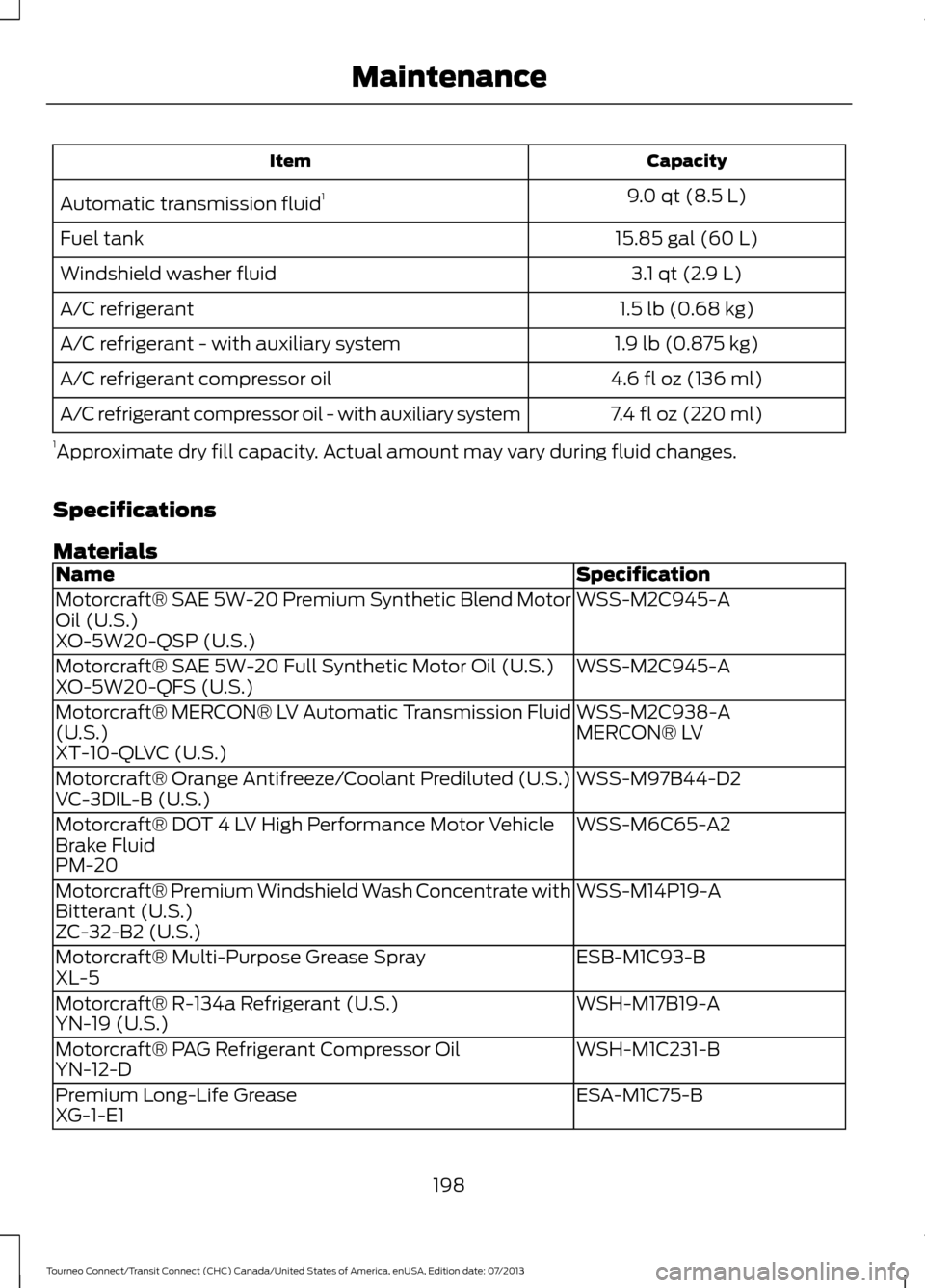
Capacity
Item
9.0 qt (8.5 L)
Automatic transmission fluid 1
15.85 gal (60 L)
Fuel tank
3.1 qt (2.9 L)
Windshield washer fluid
1.5 lb (0.68 kg)
A/C refrigerant
1.9 lb (0.875 kg)
A/C refrigerant - with auxiliary system
4.6 fl oz (136 ml)
A/C refrigerant compressor oil
7.4 fl oz (220 ml)
A/C refrigerant compressor oil - with auxiliary system
1 Approximate dry fill capacity. Actual amount may vary during fluid changes.
Specifications
Materials Specification
Name
WSS-M2C945-A
Motorcraft® SAE 5W-20 Premium Synthetic Blend Motor
Oil (U.S.)
XO-5W20-QSP (U.S.)
WSS-M2C945-A
Motorcraft® SAE 5W-20 Full Synthetic Motor Oil (U.S.)
XO-5W20-QFS (U.S.)
WSS-M2C938-A
Motorcraft® MERCON® LV Automatic Transmission Fluid
(U.S.) MERCON® LV
XT-10-QLVC (U.S.)
WSS-M97B44-D2
Motorcraft® Orange Antifreeze/Coolant Prediluted (U.S.)
VC-3DIL-B (U.S.)
WSS-M6C65-A2
Motorcraft® DOT 4 LV High Performance Motor Vehicle
Brake Fluid
PM-20
WSS-M14P19-A
Motorcraft® Premium Windshield Wash Concentrate with
Bitterant (U.S.)
ZC-32-B2 (U.S.)
ESB-M1C93-B
Motorcraft® Multi-Purpose Grease Spray
XL-5
WSH-M17B19-A
Motorcraft® R-134a Refrigerant (U.S.)
YN-19 (U.S.)
WSH-M1C231-B
Motorcraft® PAG Refrigerant Compressor Oil
YN-12-D
ESA-M1C75-B
Premium Long-Life Grease
XG-1-E1
198
Tourneo Connect/Transit Connect (CHC) Canada/United States of America, enUSA, Edition date: 07/2013 Maintenance
Page 241 of 411
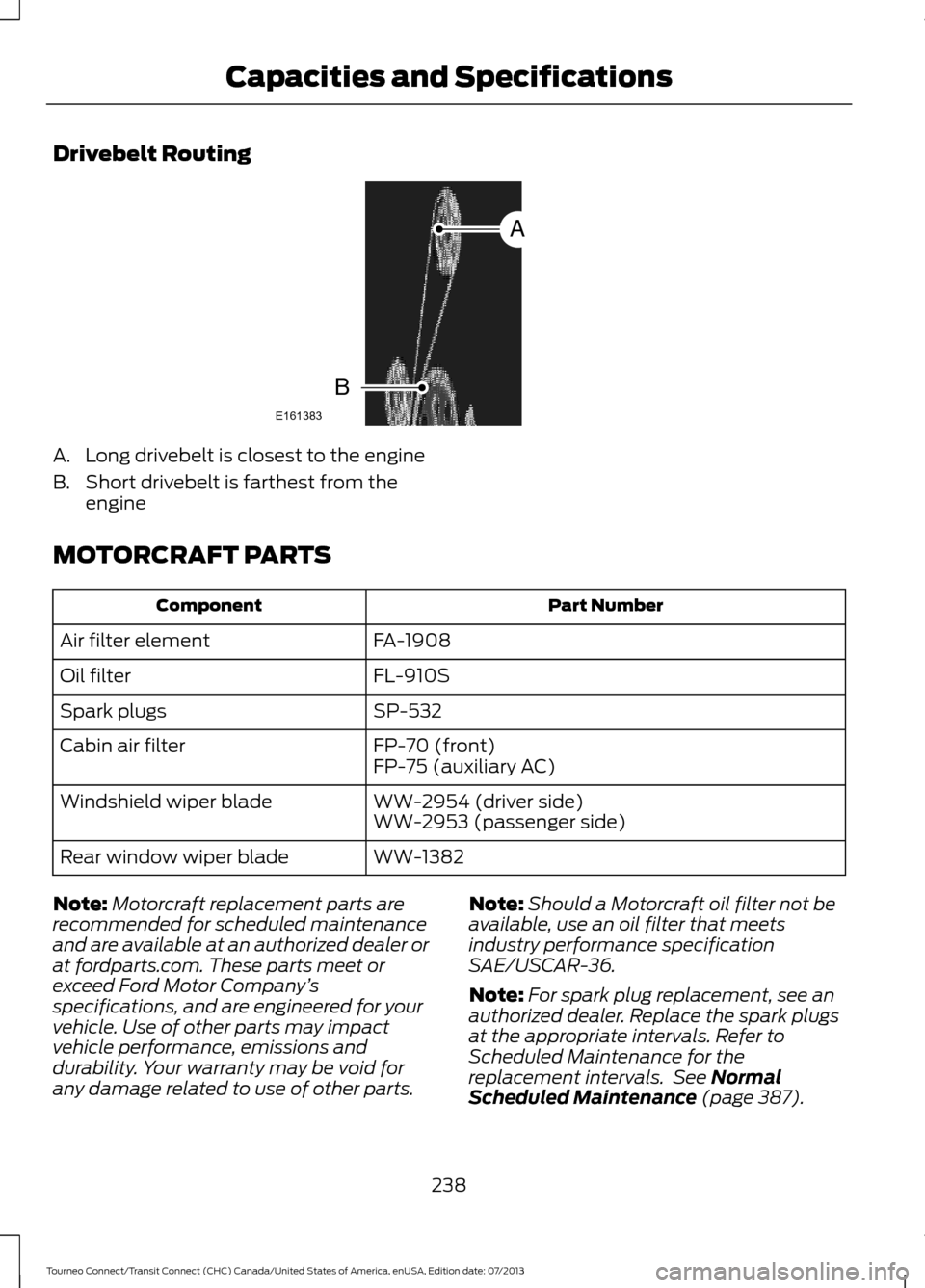
Drivebelt Routing
A. Long drivebelt is closest to the engine
B. Short drivebelt is farthest from the
engine
MOTORCRAFT PARTS Part Number
Component
FA-1908
Air filter element
FL-910S
Oil filter
SP-532
Spark plugs
FP-70 (front)
Cabin air filter
FP-75 (auxiliary AC)
WW-2954 (driver side)
Windshield wiper blade
WW-2953 (passenger side)
WW-1382
Rear window wiper blade
Note: Motorcraft replacement parts are
recommended for scheduled maintenance
and are available at an authorized dealer or
at fordparts.com. These parts meet or
exceed Ford Motor Company ’s
specifications, and are engineered for your
vehicle. Use of other parts may impact
vehicle performance, emissions and
durability. Your warranty may be void for
any damage related to use of other parts. Note:
Should a Motorcraft oil filter not be
available, use an oil filter that meets
industry performance specification
SAE/USCAR-36.
Note: For spark plug replacement, see an
authorized dealer. Replace the spark plugs
at the appropriate intervals. Refer to
Scheduled Maintenance for the
replacement intervals. See Normal
Scheduled Maintenance (page 387).
238
Tourneo Connect/Transit Connect (CHC) Canada/United States of America, enUSA, Edition date: 07/2013 Capacities and SpecificationsE161383
A
B
Page 242 of 411
Note:
Do not use American Petroleum
Institute S category oils labeled as SN, SM,
SL or lower category unless the label also
displays the American Petroleum Institute
certification mark. These oils do not meet
all of the requirements of your vehicles
engine and emissions system.
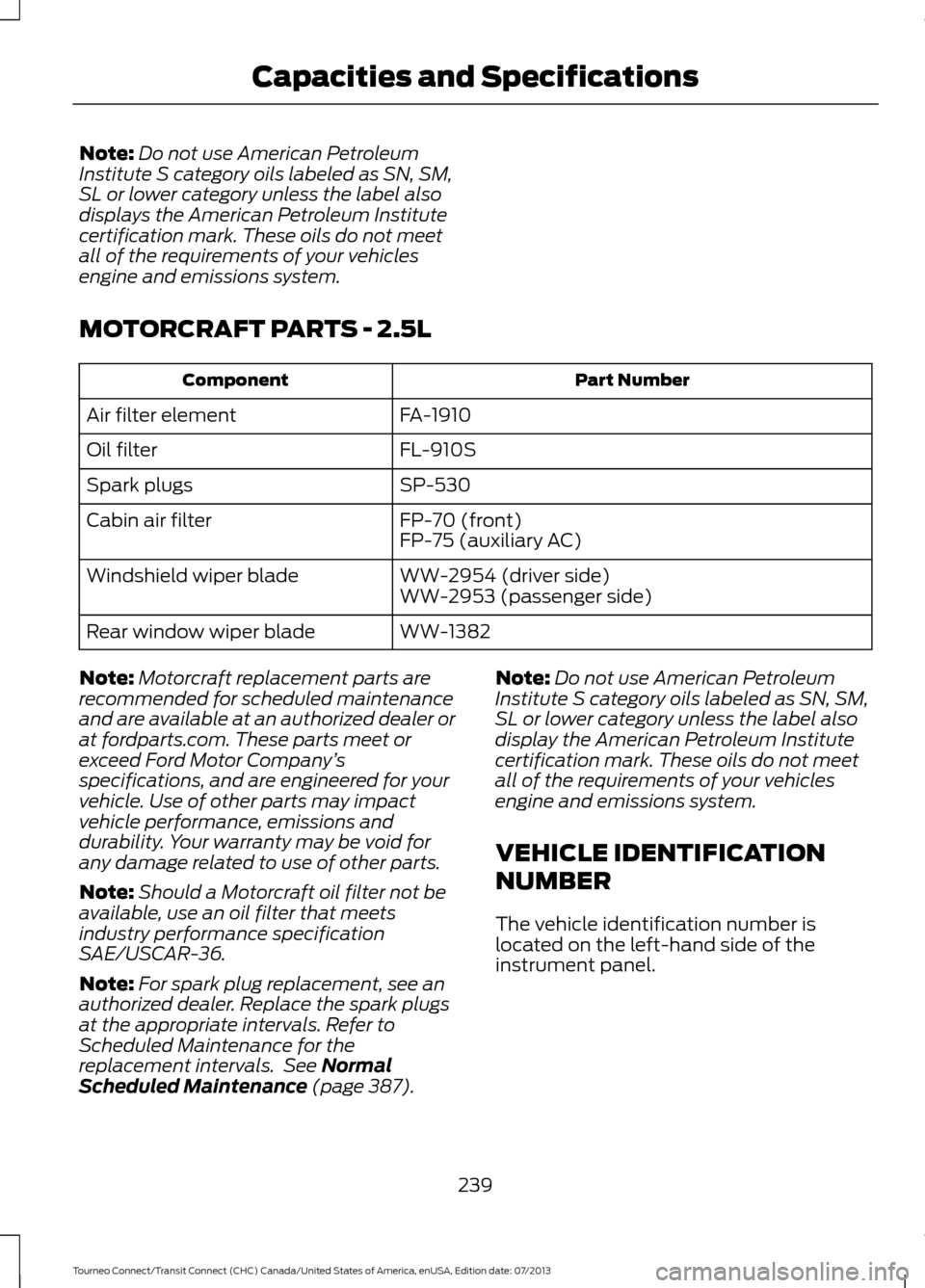
MOTORCRAFT PARTS - 2.5L Part Number
Component
FA-1910
Air filter element
FL-910S
Oil filter
SP-530
Spark plugs
FP-70 (front)
Cabin air filter
FP-75 (auxiliary AC)
WW-2954 (driver side)
Windshield wiper blade
WW-2953 (passenger side)
WW-1382
Rear window wiper blade
Note: Motorcraft replacement parts are
recommended for scheduled maintenance
and are available at an authorized dealer or
at fordparts.com. These parts meet or
exceed Ford Motor Company ’s
specifications, and are engineered for your
vehicle. Use of other parts may impact
vehicle performance, emissions and
durability. Your warranty may be void for
any damage related to use of other parts.
Note: Should a Motorcraft oil filter not be
available, use an oil filter that meets
industry performance specification
SAE/USCAR-36.
Note: For spark plug replacement, see an
authorized dealer. Replace the spark plugs
at the appropriate intervals. Refer to
Scheduled Maintenance for the
replacement intervals. See Normal
Scheduled Maintenance (page 387). Note:
Do not use American Petroleum
Institute S category oils labeled as SN, SM,
SL or lower category unless the label also
display the American Petroleum Institute
certification mark. These oils do not meet
all of the requirements of your vehicles
engine and emissions system.
VEHICLE IDENTIFICATION
NUMBER
The vehicle identification number is
located on the left-hand side of the
instrument panel.
239
Tourneo Connect/Transit Connect (CHC) Canada/United States of America, enUSA, Edition date: 07/2013 Capacities and Specifications
Page 247 of 411
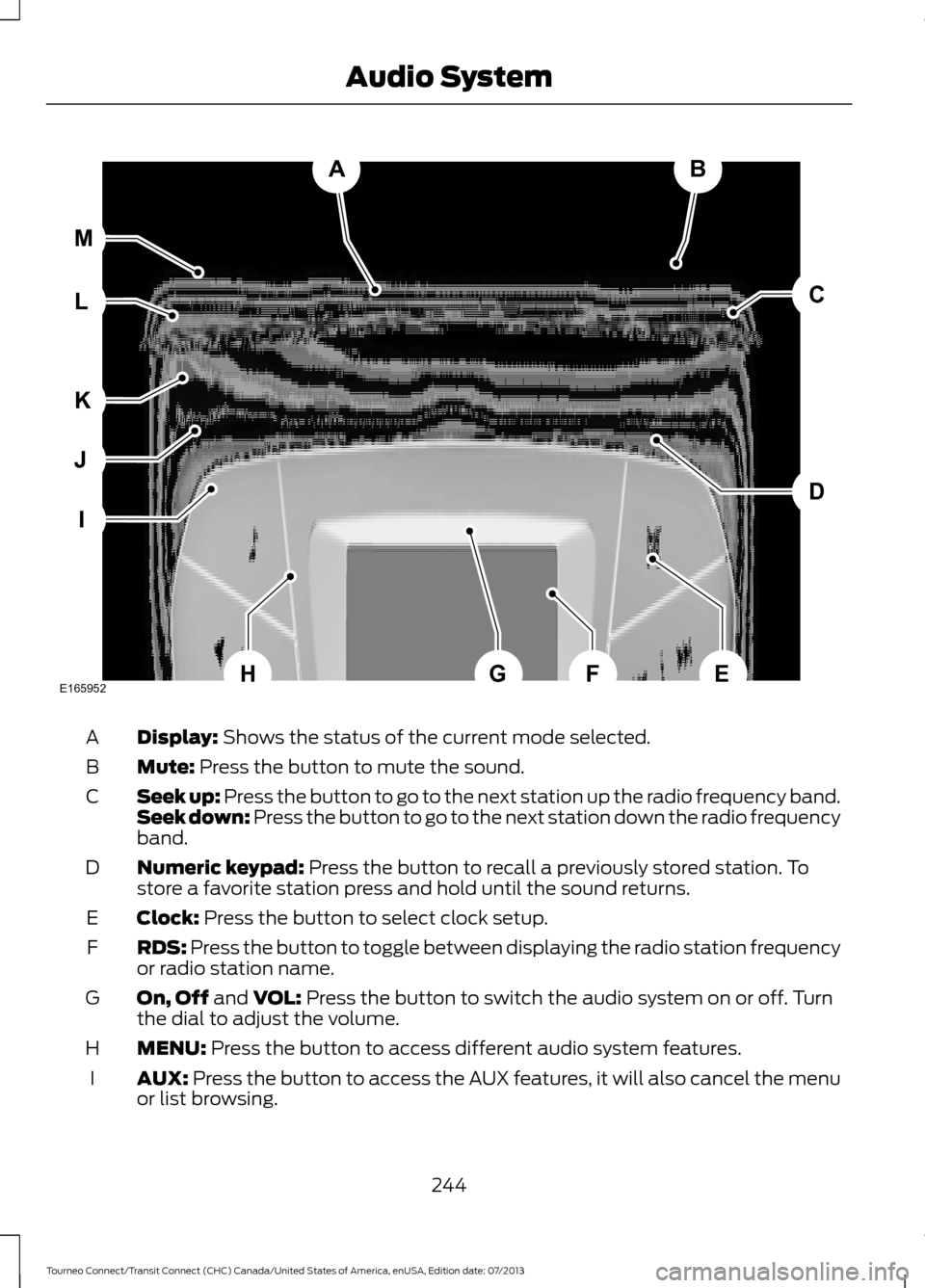
Display: Shows the status of the current mode selected.
A
Mute:
Press the button to mute the sound.
B
Seek up: Press the button to go to the next station up the radio frequency band.
Seek down: Press the button to go to the next station down the radio frequency
band.
C
Numeric keypad:
Press the button to recall a previously stored station. To
store a favorite station press and hold until the sound returns.
D
Clock:
Press the button to select clock setup.
E
RDS:
Press the button to toggle between displaying the radio station frequency
or radio station name.
F
On, Off
and VOL: Press the button to switch the audio system on or off. Turn
the dial to adjust the volume.
G
MENU:
Press the button to access different audio system features.
H
AUX:
Press the button to access the AUX features, it will also cancel the menu
or list browsing.
I
244
Tourneo Connect/Transit Connect (CHC) Canada/United States of America, enUSA, Edition date: 07/2013 Audio SystemAB
D
C
I
J
K
L M
EHFGE165952
Page 248 of 411
FM: Press the button to select the FM frequency band.
J
AM:
Press the button to select the AM frequency band.
K
Cursor up
or down: Press the cursor up or down arrow buttons to adjust the
settings within the menus or to move to the next radio station while listening
to the radio on the
FM or AM frequency band.
L
Sound:
Press the button to adjust the sound settings for bass, treble, balance
or fade.
M
Sound Button
This will allow you to adjust the sound
settings for bass, treble, balance or fade.
1. Press the sound button until the required setting is displayed.
2. Use the cursor up or down arrow buttons to select the required level.
Note: Fade settings are only adjustable if
there are speakers in the rear of your vehicle.
Frequency Band Buttons
Press the
FM or AM button to select
frequency band.
You can use the buttons to return to radio
reception when you have been listening to
an
AUX source.
Station Tuning Buttons
Seek Tuning
Select a frequency band and briefly press
one of the seek buttons. The unit will stop
at the first station it finds in the direction
you have chosen.
Manual Tuning
Use the cursor up or down arrow buttons
to tune up or down the frequency band in
small increments, or press and hold to
increment quickly until you find a station
you want to listen to. Station Preset Buttons
This feature allows you to store your
favorite stations. They can be recalled by
selecting the appropriate frequency band
and pressing one of the preset buttons.
1. Select a frequency band.
2. Tune to the station required.
3. Press and hold one of the preset
buttons. The audio unit will also mute
momentarily as confirmation.
You can repeat this on each frequency
band and for each preset button.
Clock Button
This will allow you to adjust the clock
settings.
1. Press the clock button until Set Hour
is displayed.
2. Use the cursor up or down arrow buttons to set the correct hour.
3. Press the clock button again until
Set
Minutes is displayed.
4. Use the cursor up or down arrow buttons to set the correct minutes.
Setting 24 Hour or 12 Hour Display
1. Press the
MENU button until 24 Hour
is displayed.
2. Use the cursor up or down arrow buttons to toggle between 24 hour or
12 hour display.
245
Tourneo Connect/Transit Connect (CHC) Canada/United States of America, enUSA, Edition date: 07/2013 Audio System