power steering FORD TRANSIT CONNECT 2015 2.G User Guide
[x] Cancel search | Manufacturer: FORD, Model Year: 2015, Model line: TRANSIT CONNECT, Model: FORD TRANSIT CONNECT 2015 2.GPages: 428, PDF Size: 6.27 MB
Page 216 of 428
•
Never wash or rinse any ignition coil,
spark plug wire or spark plug well, or
the area in and around these locations.
• Cover the battery, power distribution
box, and air filter assembly to prevent
water damage when cleaning the
engine.
CLEANING THE WINDOWS AND
WIPER BLADES
Car wash chemicals and environmental
fallout can result in windshield and wiper
blade contamination. Dirty windshield and
wipers will result in poor windshield wiper
operation. Keep the windshield and wiper
blades clean to maintain windshield wiper
performance.
To clean the windshield and wiper blades:
• Clean the windshield with a
non-abrasive glass cleaner.
• For windshields contaminated with
tree sap, chemicals, wax or bugs, clean
the entire windshield using steel wool
(no greater than 0000 grade) in a
circular motion and rinse with water.
• Clean the wiper blades with isopropyl
rubbing alcohol or windshield washer
concentrate.
Note: Do not use razor blades or other
sharp objects to clean or remove decals
from the inside of the heated rear window.
The vehicle warranty does not cover
damage caused to the heated rear window
grid lines.
CLEANING THE INTERIOR WARNINGS
Do not use cleaning solvents, bleach
or dye on the vehicle
’s safety belts,
as these actions may weaken the
belt webbing. WARNINGS
On vehicles equipped with
seat-mounted airbags, do not use
chemical solvents or strong
detergents. Such products could
contaminate the side airbag system and
affect performance of the side airbag in a
collision. For fabric, carpets, cloth seats, safety belts
and seats equipped with side airbags:
•
Remove dust and loose dirt with a
vacuum cleaner.
• Remove light stains and soil with
Motorcraft Professional Strength
Carpet & Upholstery Cleaner.
• If grease or tar is present on the
material, spot-clean the area first with
Motorcraft Spot and Stain Remover. In
Canada, use Motorcraft Multi-Purpose
Cleaner.
• If a ring forms on the fabric after spot
cleaning, clean the entire area
immediately (but do not oversaturate)
or the ring will set.
• Do not use household cleaning
products or glass cleaners, which can
stain and discolor the fabric and affect
the flame retardant abilities of the seat
materials.
CLEANING THE INSTRUMENT
PANEL AND INSTRUMENT
CLUSTER LENS WARNING
Do not use chemical solvents or
strong detergents when cleaning the
steering wheel or instrument panel
to avoid contamination of the airbag
system. 213
Transit Connect (CHC) Canada/United States of America, enUSA, First Printing Vehicle Care
Page 234 of 428
WARNINGS
may be found on either the Safety
Compliance Certification Label
(affixed to either the door hinge
pillar, door-latch post, or the door
edge that meets the door-latch
post, next to the driver's seating
position), or the Tire Label which
is located on the B-Pillar or edge
of the driver ’s door. If this
information is not found on these
labels, then you should contact
your authorized dealer as soon as
possible. Use of any tire or wheel
not recommended by Ford can
affect the safety and performance
of your vehicle, which could result
in an increased risk of loss of
vehicle control, vehicle rollover,
personal injury and death.
Additionally the use of
non-recommended tires and
wheels could cause steering,
suspension, axle, transfer case or
power transfer unit failure. If you
have questions regarding tire
replacement, contact your
authorized dealer as soon as
possible. When mounting replacement
tires and wheels, you should
not exceed the maximum pressure
indicated on the sidewall of the
tire to set the beads without
additional precautions listed
below. If the beads do not seat at
the maximum pressure indicated,
re-lubricate and try again WARNINGS
When inflating the tire for
mounting pressures up to 20 psi
(1.38 bar) greater than the
maximum pressure on the tire
sidewall, the following
precautions must be taken to
protect the person mounting the
tire:
1. Make sure that you have the
correct tire and wheel size.
2. Lubricate the tire bead and
wheel bead seat area again.
3. Stand at a minimum of 12 ft
(3.66 m) away from the wheel
and tire assembly.
4. Use both eye and ear
protection.
For a mounting pressure more
than 20 psi (1.38 bar) greater than
the maximum pressure, a Ford
dealer or other tire service
professional should do the
mounting.
Always inflate steel carcass tires
with a remote air fill with the
person inflating standing at a
minimum of 12 ft (3.66 m) away
from the wheel and tire assembly. Important: Remember to replace
the wheel valve stems when the
road tires are replaced on your
vehicle.
231
Transit Connect (CHC) Canada/United States of America, enUSA, First Printing Wheels and Tires
Page 237 of 428
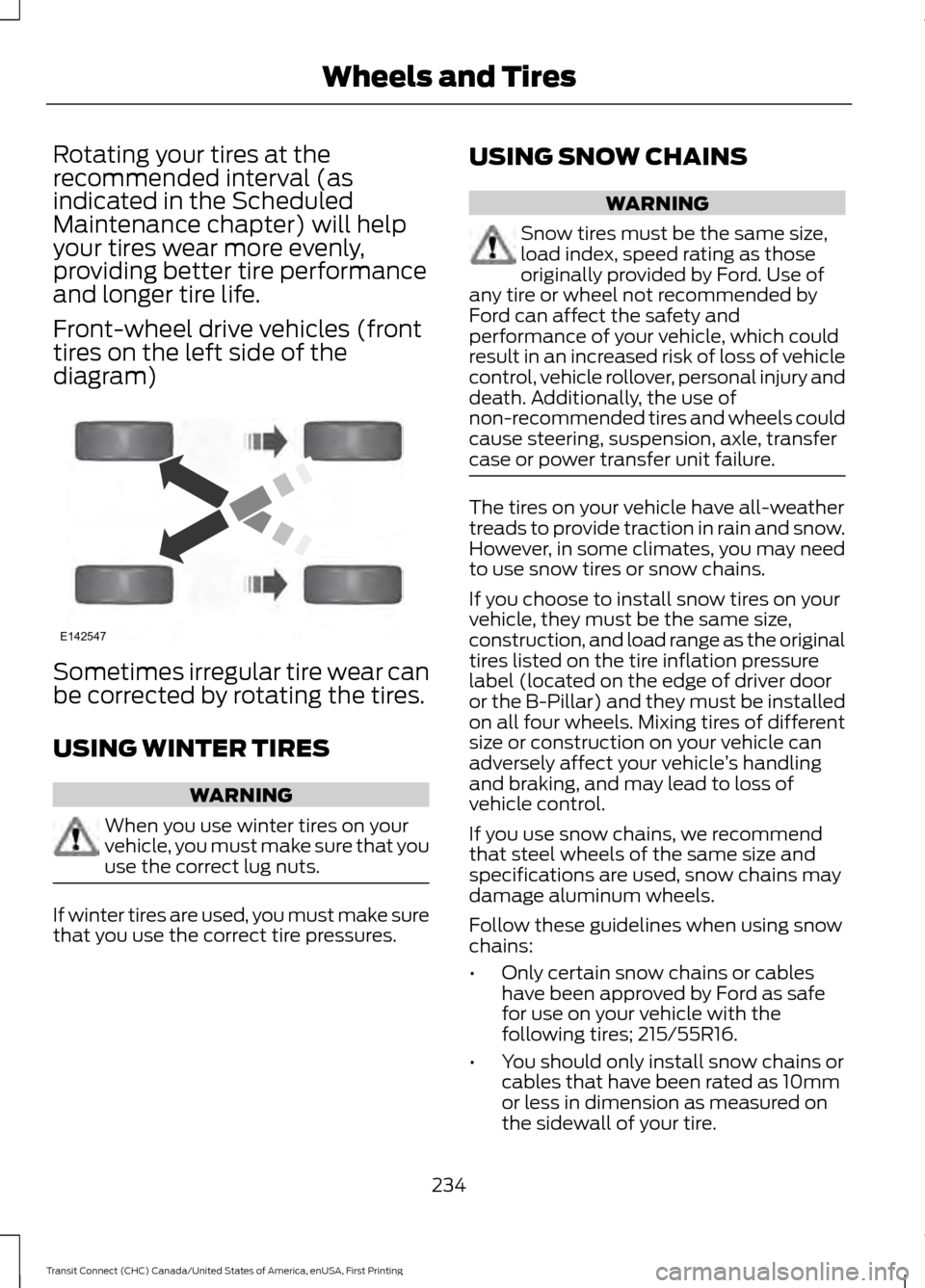
Rotating your tires at the
recommended interval (as
indicated in the Scheduled
Maintenance chapter) will help
your tires wear more evenly,
providing better tire performance
and longer tire life.
Front-wheel drive vehicles (front
tires on the left side of the
diagram)
Sometimes irregular tire wear can
be corrected by rotating the tires.
USING WINTER TIRES
WARNING
When you use winter tires on your
vehicle, you must make sure that you
use the correct lug nuts.
If winter tires are used, you must make sure
that you use the correct tire pressures. USING SNOW CHAINS WARNING
Snow tires must be the same size,
load index, speed rating as those
originally provided by Ford. Use of
any tire or wheel not recommended by
Ford can affect the safety and
performance of your vehicle, which could
result in an increased risk of loss of vehicle
control, vehicle rollover, personal injury and
death. Additionally, the use of
non-recommended tires and wheels could
cause steering, suspension, axle, transfer
case or power transfer unit failure. The tires on your vehicle have all-weather
treads to provide traction in rain and snow.
However, in some climates, you may need
to use snow tires or snow chains.
If you choose to install snow tires on your
vehicle, they must be the same size,
construction, and load range as the original
tires listed on the tire inflation pressure
label (located on the edge of driver door
or the B-Pillar) and they must be installed
on all four wheels. Mixing tires of different
size or construction on your vehicle can
adversely affect your vehicle
’s handling
and braking, and may lead to loss of
vehicle control.
If you use snow chains, we recommend
that steel wheels of the same size and
specifications are used, snow chains may
damage aluminum wheels.
Follow these guidelines when using snow
chains:
• Only certain snow chains or cables
have been approved by Ford as safe
for use on your vehicle with the
following tires; 215/55R16.
• You should only install snow chains or
cables that have been rated as 10mm
or less in dimension as measured on
the sidewall of your tire.
234
Transit Connect (CHC) Canada/United States of America, enUSA, First Printing Wheels and TiresE142547
Page 289 of 428
Setting 911 Assist On or Off
1. Press the phone button to enter the
phone menu.
2. Scroll to select 911 Assist.
3. Press OK to confirm and enter the 911
Assist menu.
4. Scroll to select between On or Off.
5. Press
OK when the desired option
appears in the radio display. Set On or
Set Off
appears in the display as
confirmation.
Off selections include:
• Off with reminder: Provides a display
and voice reminder at phone
connection at vehicle start.
• Off without reminder: Provides a
display reminder only without a voice
reminder at phone connection.
To make sure that 911 Assist works
properly:
• SYNC must be powered and working
properly at the time of the incident and
throughout feature activation and use.
• The 911 Assist feature must be set on
before the incident.
• You must pair and connect a
Bluetooth-enabled and compatible
cell phone to SYNC.
• A connected Bluetooth-enabled phone
must have the ability to make and
maintain an outgoing call at the time
of the incident.
• A connected Bluetooth-enabled phone
must have adequate network coverage,
battery power and signal strength.
• The vehicle must have battery power
and be located in the U.S., Canada or
in a territory in which 911 is the
emergency number. In the Event of a Crash
Not all crashes will deploy an airbag or
activate the fuel pump shut-off (the
triggers for 911 Assist). If a connected cell
phone sustains damage or loses its
connection to SYNC during a crash, SYNC
will search for and try to connect to a
previously paired cell phone; SYNC will
then attempt to call the emergency
services.
Before making the call:
•
SYNC provides a short window of time
(about 10 seconds) to cancel the call.
If you fail to cancel the call, SYNC
attempts to dial 911.
• SYNC says the following, or a similar
message: "SYNC will attempt to call
911, to cancel the call, press Cancel on
your screen or press and hold the
phone button on your steering wheel."
If you do not cancel the call, and SYNC
makes a successful call, a pre-recorded
message plays for the 911 operator, and
then the occupant(s) in your vehicle is able
to talk with the operator. Be prepared to
provide your name, phone number and
location immediately, because not all 911
systems are capable of receiving this
information electronically.
911 Assist May Not Work If
• Your cellular phone or 911 Assist
hardware sustains damage in a crash.
• The vehicle's battery or the SYNC
system has no power.
• The phone(s) previously paired or
connected to the system are thrown
from your vehicle.
286
Transit Connect (CHC) Canada/United States of America, enUSA, First Printing SYNC™
Page 369 of 428
•
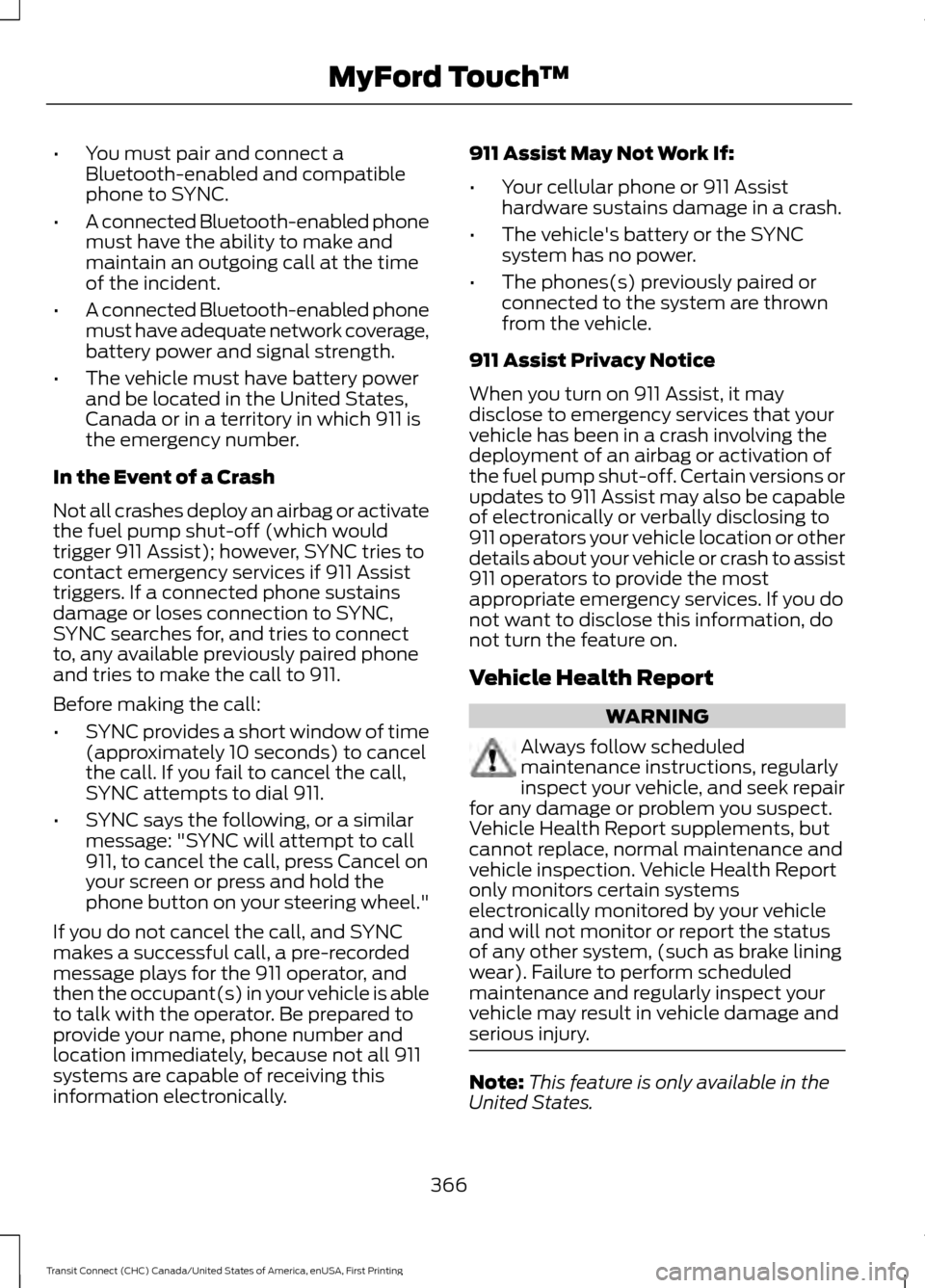
You must pair and connect a
Bluetooth-enabled and compatible
phone to SYNC.
• A connected Bluetooth-enabled phone
must have the ability to make and
maintain an outgoing call at the time
of the incident.
• A connected Bluetooth-enabled phone
must have adequate network coverage,
battery power and signal strength.
• The vehicle must have battery power
and be located in the United States,
Canada or in a territory in which 911 is
the emergency number.
In the Event of a Crash
Not all crashes deploy an airbag or activate
the fuel pump shut-off (which would
trigger 911 Assist); however, SYNC tries to
contact emergency services if 911 Assist
triggers. If a connected phone sustains
damage or loses connection to SYNC,
SYNC searches for, and tries to connect
to, any available previously paired phone
and tries to make the call to 911.
Before making the call:
• SYNC provides a short window of time
(approximately 10 seconds) to cancel
the call. If you fail to cancel the call,
SYNC attempts to dial 911.
• SYNC says the following, or a similar
message: "SYNC will attempt to call
911, to cancel the call, press Cancel on
your screen or press and hold the
phone button on your steering wheel."
If you do not cancel the call, and SYNC
makes a successful call, a pre-recorded
message plays for the 911 operator, and
then the occupant(s) in your vehicle is able
to talk with the operator. Be prepared to
provide your name, phone number and
location immediately, because not all 911
systems are capable of receiving this
information electronically. 911 Assist May Not Work If:
•
Your cellular phone or 911 Assist
hardware sustains damage in a crash.
• The vehicle's battery or the SYNC
system has no power.
• The phones(s) previously paired or
connected to the system are thrown
from the vehicle.
911 Assist Privacy Notice
When you turn on 911 Assist, it may
disclose to emergency services that your
vehicle has been in a crash involving the
deployment of an airbag or activation of
the fuel pump shut-off. Certain versions or
updates to 911 Assist may also be capable
of electronically or verbally disclosing to
911 operators your vehicle location or other
details about your vehicle or crash to assist
911 operators to provide the most
appropriate emergency services. If you do
not want to disclose this information, do
not turn the feature on.
Vehicle Health Report WARNING
Always follow scheduled
maintenance instructions, regularly
inspect your vehicle, and seek repair
for any damage or problem you suspect.
Vehicle Health Report supplements, but
cannot replace, normal maintenance and
vehicle inspection. Vehicle Health Report
only monitors certain systems
electronically monitored by your vehicle
and will not monitor or report the status
of any other system, (such as brake lining
wear). Failure to perform scheduled
maintenance and regularly inspect your
vehicle may result in vehicle damage and
serious injury. Note:
This feature is only available in the
United States.
366
Transit Connect (CHC) Canada/United States of America, enUSA, First Printing MyFord Touch
™
Page 418 of 428
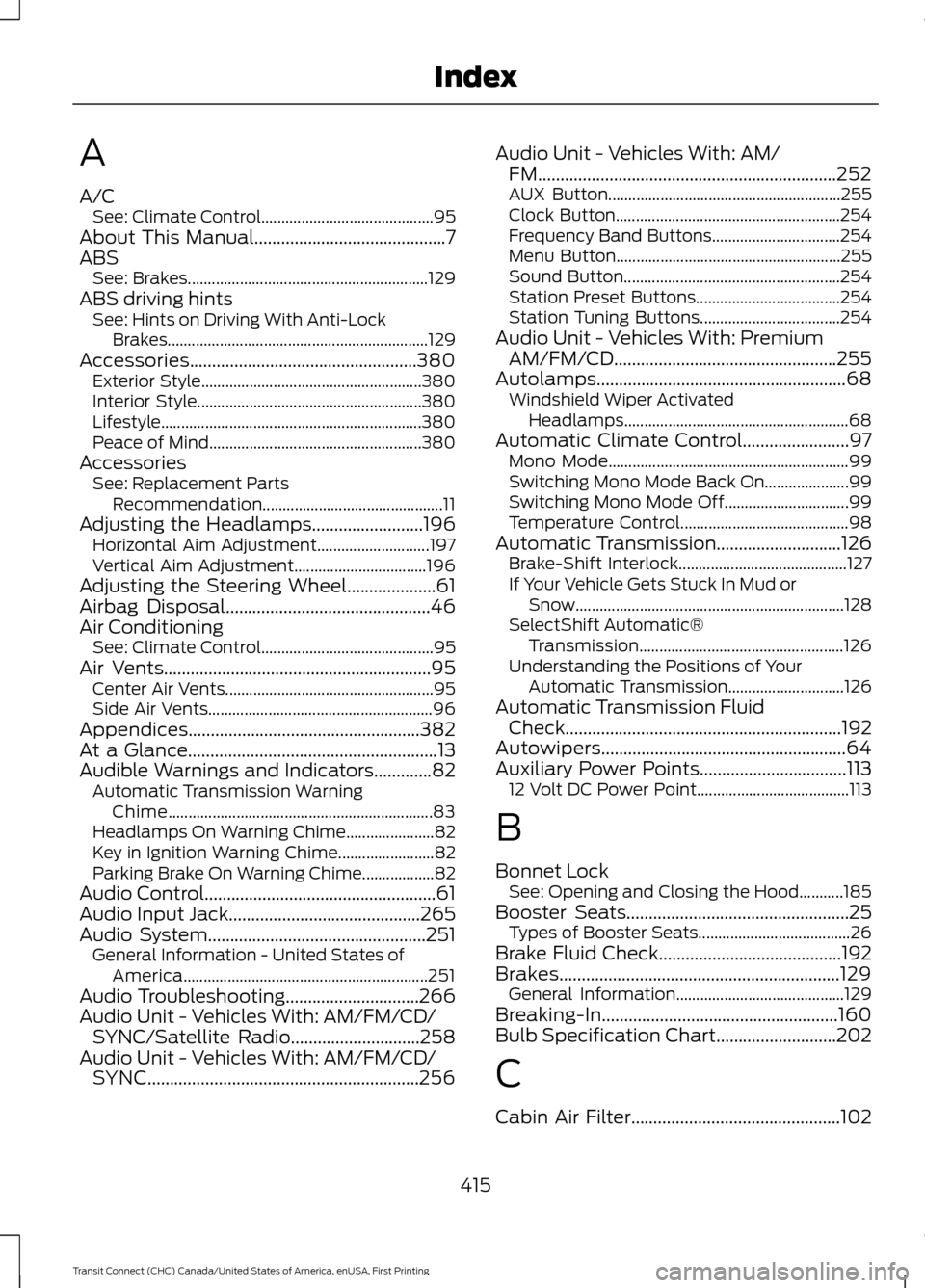
A
A/C
See: Climate Control........................................... 95
About This Manual...........................................7
ABS See: Brakes............................................................ 129
ABS driving hints See: Hints on Driving With Anti-Lock
Brakes................................................................. 129
Accessories...................................................380 Exterior Style....................................................... 380
Interior Style........................................................ 380
Lifestyle................................................................. 380
Peace of Mind..................................................... 380
Accessories See: Replacement Parts
Recommendation............................................. 11
Adjusting the Headlamps.........................196 Horizontal Aim Adjustment............................ 197
Vertical Aim Adjustment................................. 196
Adjusting the Steering Wheel....................61
Airbag Disposal
..............................................46
Air Conditioning See: Climate Control........................................... 95
Air Vents............................................................95 Center Air Vents.................................................... 95
Side Air Vents........................................................ 96
Appendices....................................................382
At a Glance
........................................................13
Audible Warnings and Indicators.............82 Automatic Transmission Warning
Chime.................................................................. 83
Headlamps On Warning Chime...................... 82
Key in Ignition Warning Chime........................ 82
Parking Brake On Warning Chime.................. 82
Audio Control....................................................61
Audio Input Jack
...........................................265
Audio System.................................................251 General Information - United States of
America............................................................. 251
Audio Troubleshooting..............................266
Audio Unit - Vehicles With: AM/FM/CD/ SYNC/Satellite Radio.............................258
Audio Unit - Vehicles With: AM/FM/CD/ SYNC
.............................................................256 Audio Unit - Vehicles With: AM/
FM
...................................................................252
AUX Button.......................................................... 255
Clock Button........................................................ 254
Frequency Band Buttons................................ 254
Menu Button........................................................ 255
Sound Button...................................................... 254
Station Preset Buttons.................................... 254
Station Tuning Buttons................................... 254
Audio Unit - Vehicles With: Premium AM/FM/CD
..................................................255
Autolamps........................................................68
Windshield Wiper Activated
Headlamps........................................................ 68
Automatic Climate Control........................97 Mono Mode............................................................ 99
Switching Mono Mode Back On..................... 99
Switching Mono Mode Off............................... 99
Temperature Control.......................................... 98
Automatic Transmission
............................126
Brake-Shift Interlock.......................................... 127
If Your Vehicle Gets Stuck In Mud or Snow................................................................... 128
SelectShift Automatic® Transmission................................................... 126
Understanding the Positions of Your Automatic Transmission............................. 126
Automatic Transmission Fluid Check
..............................................................192
Autowipers.......................................................64
Auxiliary Power Points.................................113 12 Volt DC Power Point...................................... 113
B
Bonnet Lock See: Opening and Closing the Hood...........185
Booster Seats..................................................25 Types of Booster Seats...................................... 26
Brake Fluid Check.........................................192
Brakes...............................................................129 General Information.......................................... 129
Breaking-In.....................................................160
Bulb Specification Chart...........................202
C
Cabin Air Filter...............................................102
415
Transit Connect (CHC) Canada/United States of America, enUSA, First Printing Index
Page 423 of 428
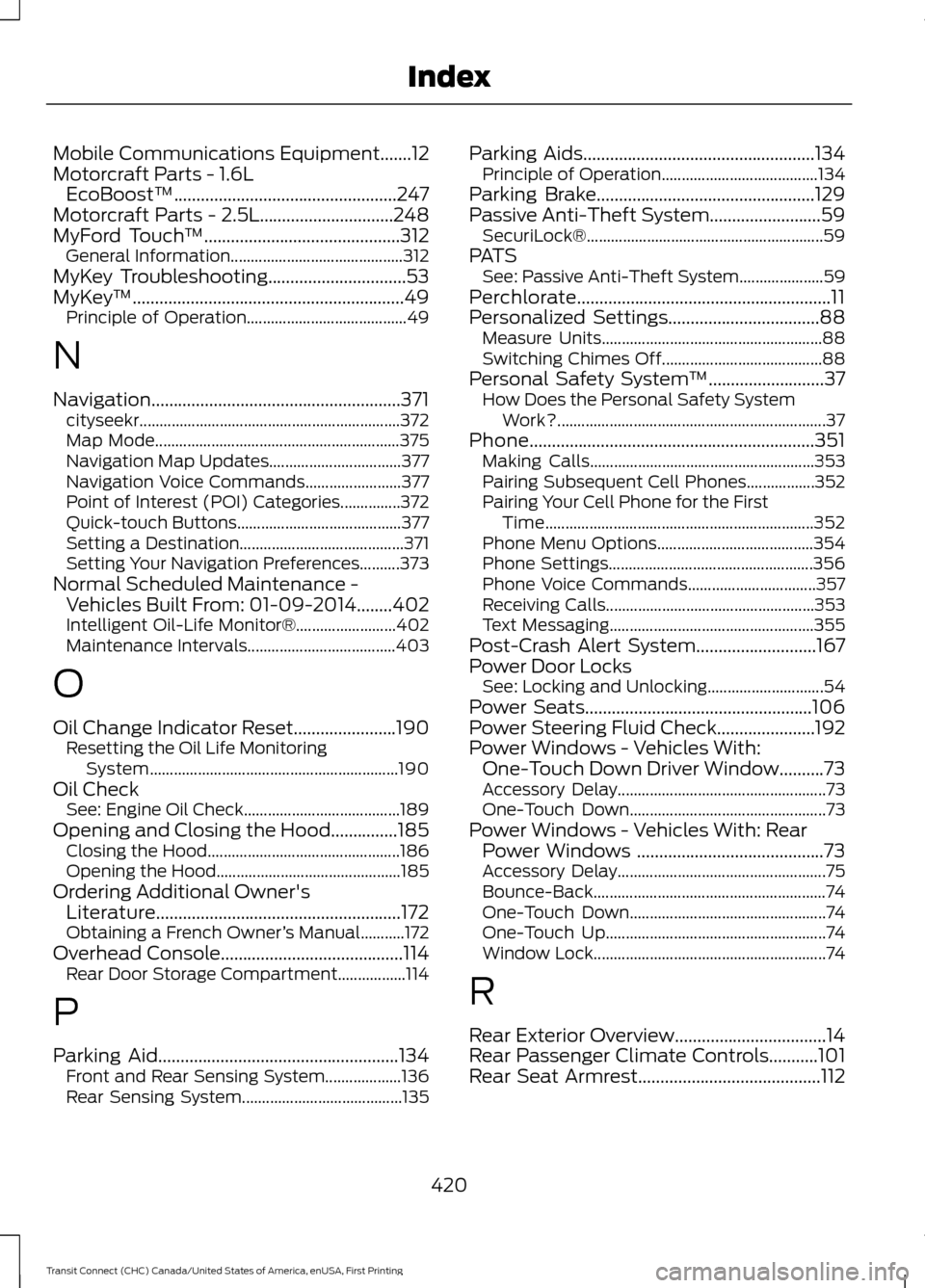
Mobile Communications Equipment.......12
Motorcraft Parts - 1.6L EcoBoost™..................................................247
Motorcraft Parts - 2.5L..............................248
MyFord Touch ™
............................................312
General Information........................................... 312
MyKey Troubleshooting
...............................53
MyKey ™.............................................................49
Principle of Operation........................................ 49
N
Navigation........................................................371 cityseekr................................................................. 372
Map Mode............................................................. 375
Navigation Map Updates................................. 377
Navigation Voice Commands........................ 377
Point of Interest (POI) Categories...............372
Quick-touch Buttons......................................... 377
Setting a Destination......................................... 371
Setting Your Navigation Preferences..........373
Normal Scheduled Maintenance - Vehicles Built From: 01-09-2014........402
Intelligent Oil-Life Monitor®......................... 402
Maintenance Intervals..................................... 403
O
Oil Change Indicator Reset
.......................190
Resetting the Oil Life Monitoring
System.............................................................. 190
Oil Check See: Engine Oil Check....................................... 189
Opening and Closing the Hood...............185 Closing the Hood................................................ 186
Opening the Hood.............................................. 185
Ordering Additional Owner's Literature.......................................................172
Obtaining a French Owner ’s Manual...........172
Overhead Console
.........................................114
Rear Door Storage Compartment.................114
P
Parking Aid
......................................................134
Front and Rear Sensing System................... 136
Rear Sensing System........................................ 135Parking Aids....................................................134
Principle of Operation....................................... 134
Parking Brake
.................................................129
Passive Anti-Theft System.........................59 SecuriLock®........................................................... 59
PATS See: Passive Anti-Theft System..................... 59
Perchlorate.........................................................11
Personalized Settings..................................88 Measure Units....................................................... 88
Switching Chimes Off........................................ 88
Personal Safety System ™
..........................37
How Does the Personal Safety System
Work?................................................................... 37
Phone
................................................................351
Making Calls........................................................ 353
Pairing Subsequent Cell Phones.................352
Pairing Your Cell Phone for the First Time................................................................... 352
Phone Menu Options....................................... 354
Phone Settings................................................... 356
Phone Voice Commands................................ 357
Receiving Calls.................................................... 353
Text Messaging................................................... 355
Post-Crash Alert System...........................167
Power Door Locks See: Locking and Unlocking............................. 54
Power Seats
...................................................106
Power Steering Fluid Check......................192
Power Windows - Vehicles With: One-Touch Down Driver Window..........73
Accessory Delay.................................................... 73
One-Touch Down................................................. 73
Power Windows - Vehicles With: Rear Power Windows ..........................................73
Accessory Delay.................................................... 75
Bounce-Back.......................................................... 74
One-Touch Down................................................. 74
One-Touch Up....................................................... 74
Window Lock.......................................................... 74
R
Rear Exterior Overview..................................14
Rear Passenger Climate Controls...........101
Rear Seat Armrest.........................................112
420
Transit Connect (CHC) Canada/United States of America, enUSA, First Printing Index
Page 425 of 428
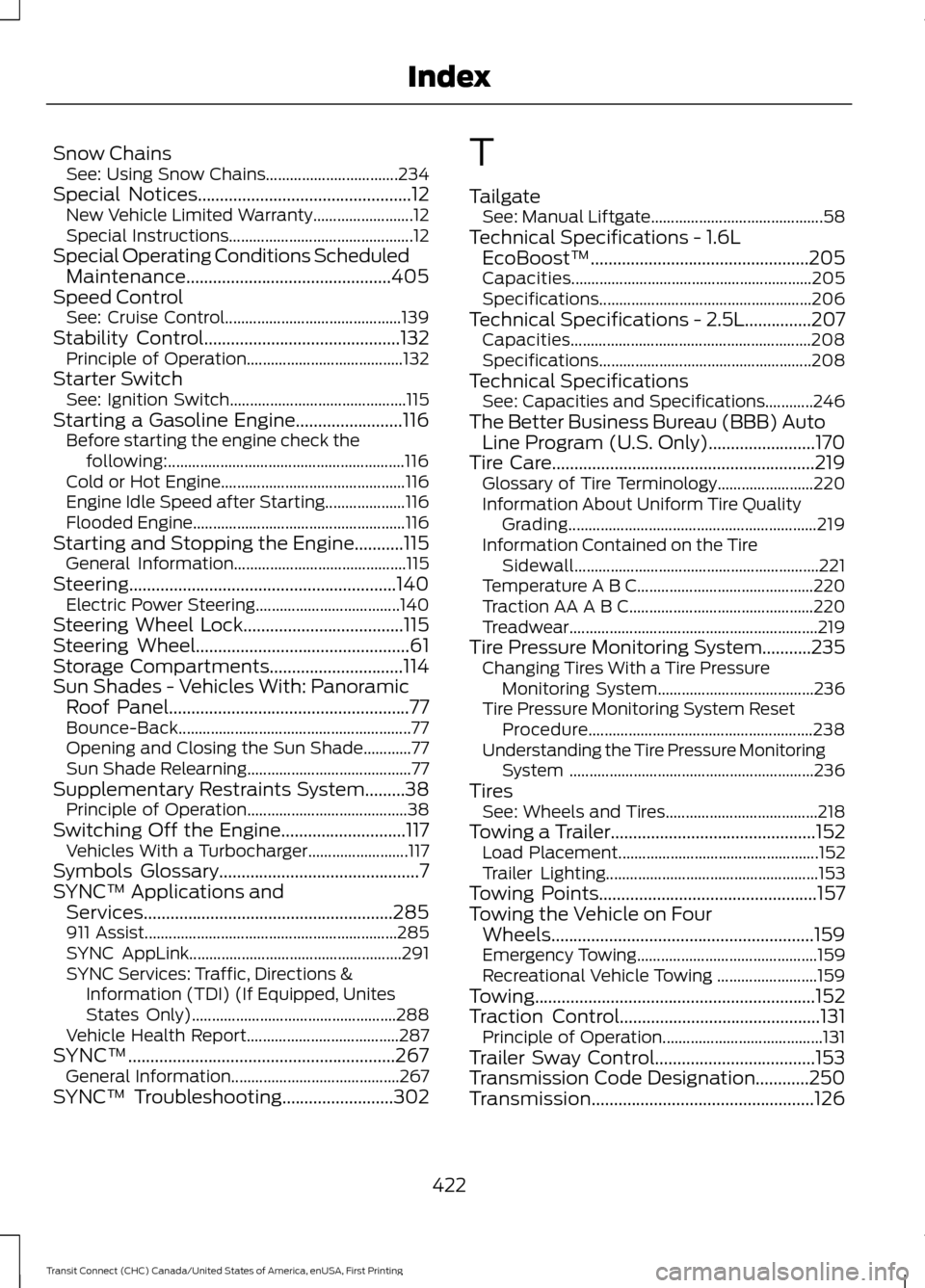
Snow Chains
See: Using Snow Chains................................. 234
Special Notices................................................12 New Vehicle Limited Warranty......................... 12
Special Instructions.............................................. 12
Special Operating Conditions Scheduled Maintenance..............................................405
Speed Control See: Cruise Control............................................ 139
Stability Control............................................132
Principle of Operation....................................... 132
Starter Switch See: Ignition Switch............................................ 115
Starting a Gasoline Engine........................116 Before starting the engine check the
following:........................................................... 116
Cold or Hot Engine.............................................. 116
Engine Idle Speed after Starting.................... 116
Flooded Engine..................................................... 116
Starting and Stopping the Engine...........115 General Information........................................... 115
Steering............................................................140 Electric Power Steering.................................... 140
Steering Wheel Lock....................................115
Steering Wheel................................................61
Storage Compartments
..............................114
Sun Shades - Vehicles With: Panoramic Roof Panel
......................................................77
Bounce-Back.......................................................... 77
Opening and Closing the Sun Shade............77
Sun Shade Relearning......................................... 77
Supplementary Restraints System.........38 Principle of Operation........................................ 38
Switching Off the Engine............................117 Vehicles With a Turbocharger......................... 117
Symbols Glossary
.............................................7
SYNC™ Applications and Services........................................................285
911 Assist............................................................... 285
SYNC AppLink..................................................... 291
SYNC Services: Traffic, Directions & Information (TDI) (If Equipped, Unites
States Only)................................................... 288
Vehicle Health Report...................................... 287
SYNC™............................................................267 General Information.......................................... 267
SYNC™ Troubleshooting
.........................302 T
Tailgate
See: Manual Liftgate........................................... 58
Technical Specifications - 1.6L EcoBoost™.................................................205
Capacities............................................................ 205
Specifications..................................................... 206
Technical Specifications - 2.5L...............207 Capacities............................................................ 208
Specifications..................................................... 208
Technical Specifications See: Capacities and Specifications............246
The Better Business Bureau (BBB) Auto Line Program (U.S. Only)........................170
Tire Care
...........................................................219
Glossary of Tire Terminology........................ 220
Information About Uniform Tire Quality Grading.............................................................. 219
Information Contained on the Tire Sidewall............................................................. 221
Temperature A B C............................................ 220
Traction AA A B C.............................................. 220
Treadwear..............................................................219
Tire Pressure Monitoring System...........235 Changing Tires With a Tire Pressure
Monitoring System....................................... 236
Tire Pressure Monitoring System Reset Procedure........................................................ 238
Understanding the Tire Pressure Monitoring System ............................................................. 236
Tires See: Wheels and Tires...................................... 218
Towing a Trailer..............................................152 Load Placement.................................................. 152
Trailer Lighting..................................................... 153
Towing Points
.................................................157
Towing the Vehicle on Four Wheels...........................................................159
Emergency Towing............................................. 159
Recreational Vehicle Towing ......................... 159
Towing...............................................................152
Traction Control.............................................131 Principle of Operation........................................ 131
Trailer Sway Control....................................153
Transmission Code Designation
............250
Transmission..................................................126
422
Transit Connect (CHC) Canada/United States of America, enUSA, First Printing Index