tow FORD TRANSIT CONNECT 2015 2.G Repair Manual
[x] Cancel search | Manufacturer: FORD, Model Year: 2015, Model line: TRANSIT CONNECT, Model: FORD TRANSIT CONNECT 2015 2.GPages: 428, PDF Size: 6.27 MB
Page 345 of 428
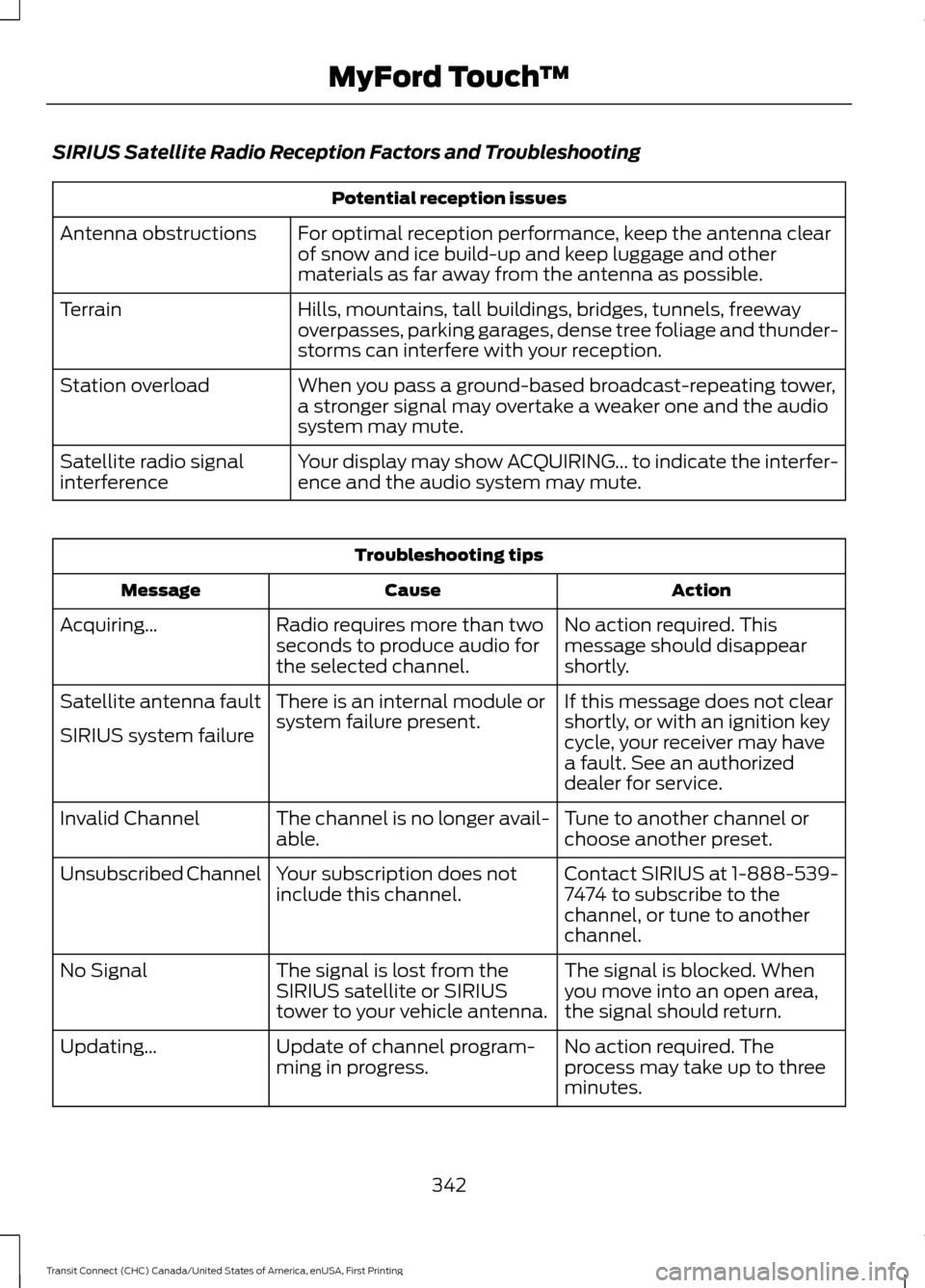
SIRIUS Satellite Radio Reception Factors and Troubleshooting
Potential reception issues
For optimal reception performance, keep the antenna clear
of snow and ice build-up and keep luggage and other
materials as far away from the antenna as possible.
Antenna obstructions
Hills, mountains, tall buildings, bridges, tunnels, freeway
overpasses, parking garages, dense tree foliage and thunder-
storms can interfere with your reception.
Terrain
When you pass a ground-based broadcast-repeating tower,
a stronger signal may overtake a weaker one and the audio
system may mute.
Station overload
Your display may show ACQUIRING... to indicate the interfer-
ence and the audio system may mute.
Satellite radio signal
interference Troubleshooting tips
Action
Cause
Message
No action required. This
message should disappear
shortly.
Radio requires more than two
seconds to produce audio for
the selected channel.
Acquiring…
If this message does not clear
shortly, or with an ignition key
cycle, your receiver may have
a fault. See an authorized
dealer for service.
There is an internal module or
system failure present.
Satellite antenna fault
SIRIUS system failure
Tune to another channel or
choose another preset.
The channel is no longer avail-
able.
Invalid Channel
Contact SIRIUS at 1-888-539-
7474 to subscribe to the
channel, or tune to another
channel.
Your subscription does not
include this channel.
Unsubscribed Channel
The signal is blocked. When
you move into an open area,
the signal should return.
The signal is lost from the
SIRIUS satellite or SIRIUS
tower to your vehicle antenna.
No Signal
No action required. The
process may take up to three
minutes.
Update of channel program-
ming in progress.
Updating…
342
Transit Connect (CHC) Canada/United States of America, enUSA, First Printing MyFord Touch
™
Page 378 of 428
Other traffic alert features allows you to
turn on certain, or all, traffic icons on the
map such as road work, incident, accidents
and closed roads. Scroll down to view all
the different types of alerts. Switch these
features ON or OFF.
Avoid Areas
Choose areas which you want the system
to avoid when calculating a route for you.
Press
Add to program an entry. Once you
make a selection, the system tries to avoid
the area(s) if possible for all routes. To
delete a selection, choose the listing on
the screen. When the screen changes to
Avoid Areas Edit
, you can press Delete
at the bottom right of the screen.
Map Mode
Press the green bar in the upper right area
of the touchscreen to view map mode. Map
mode shows advanced viewing comprised
of both 2D city maps as well as 3D
landmarks (when available).
2D city maps show detailed outlines of
buildings, visible land use and land
elements and detailed railway
infrastructure for the most essential cities
around the globe. These maps also contain
features, such as town blocks, building
footprints and railways.
3D landmarks appear as clear, visible
objects that are typically recognizable and
have a certain tourist value. The 3D
landmarks appear in 3D map mode only.
Coverage varies and improves with
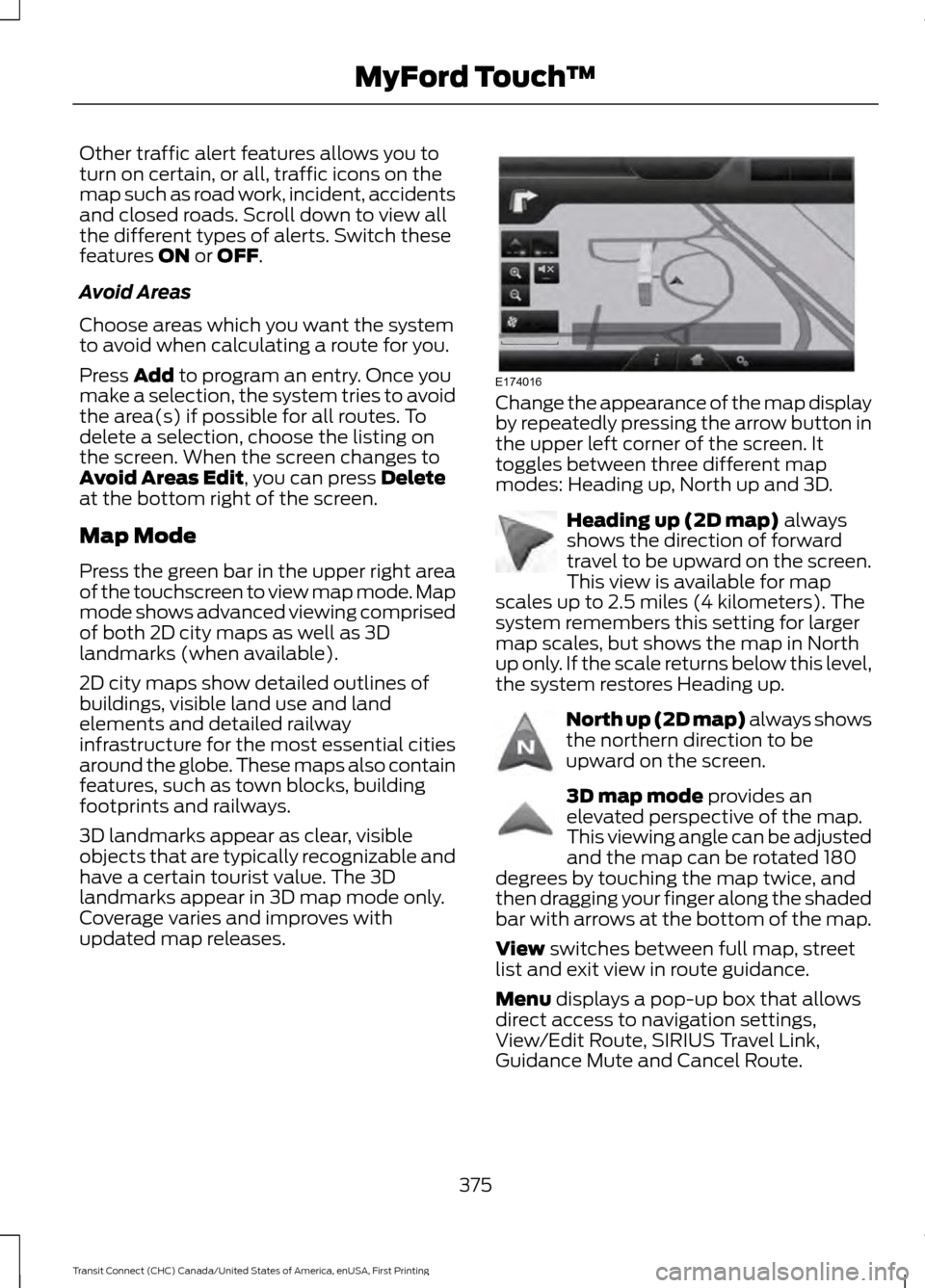
updated map releases. Change the appearance of the map display
by repeatedly pressing the arrow button in
the upper left corner of the screen. It
toggles between three different map
modes: Heading up, North up and 3D.
Heading up (2D map)
always
shows the direction of forward
travel to be upward on the screen.
This view is available for map
scales up to 2.5 miles (4 kilometers). The
system remembers this setting for larger
map scales, but shows the map in North
up only. If the scale returns below this level,
the system restores Heading up. North up (2D map) always shows
the northern direction to be
upward on the screen.
3D map mode
provides an
elevated perspective of the map.
This viewing angle can be adjusted
and the map can be rotated 180
degrees by touching the map twice, and
then dragging your finger along the shaded
bar with arrows at the bottom of the map.
View
switches between full map, street
list and exit view in route guidance.
Menu
displays a pop-up box that allows
direct access to navigation settings,
View/Edit Route, SIRIUS Travel Link,
Guidance Mute and Cancel Route.
375
Transit Connect (CHC) Canada/United States of America, enUSA, First Printing MyFord Touch
™E174016 E142642 E142643 E142644
Page 382 of 428
![FORD TRANSIT CONNECT 2015 2.G Repair Manual Destination
Voice command
<nametag>
<POI category>
favorites | favorite destinations | favorite
destination
[my] home
Intersection
(nearest | nearby) <POI_category>
(nearest | nearby) ((point | points](/img/11/5406/w960_5406-381.png "FORD TRANSIT CONNECT 2015 2.G Repair Manual Destination
Voice command
<nametag>
<POI category>
favorites | favorite destinations | favorite
destination
[my] home
Intersection
(nearest | nearby) <POI_category>
(nearest | nearby) ((point | points")
Destination
Voice command
favorites | favorite destinations | favorite
destination
[my] home
Intersection
(nearest | nearby)
(nearest | nearby) ((point | points) of
interest | POI)
[destination] (play | read) nametags
((point | points) of interest | POI)
Category
previous (destination | destinations)
street address | address
Help
Navigation Voice command
*
[navigation] destination
Zoom city
Zoom country
Zoom in (minimum | min)
Zoom out (maximum | max)
Zoom (state | province)
Zoom street Voice command
Zoom to
Help
* If you say "Destination", you can then say
any command in the "Destination" chart.
One-shot Destination Street Address
When you say either "Navigation
destination street address" or "Destination
street address", the system asks you to say
the full address. The system displays an
example on-screen. You can then speak
the address naturally, such as "One two
three four Main Street, Anytown".
379
Transit Connect (CHC) Canada/United States of America, enUSA, First Printing MyFord Touch
™
Page 383 of 428
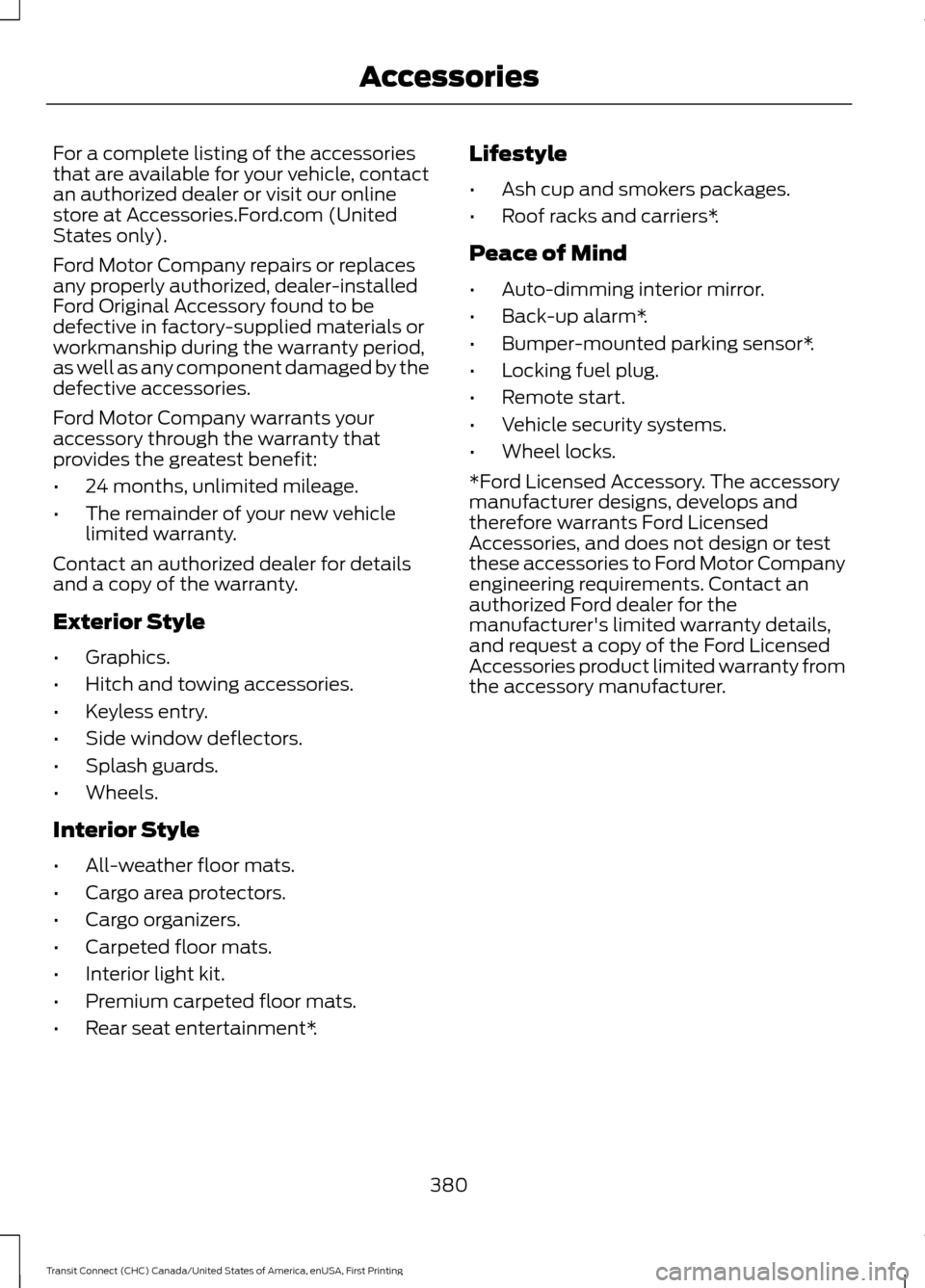
For a complete listing of the accessories
that are available for your vehicle, contact
an authorized dealer or visit our online
store at Accessories.Ford.com (United
States only).
Ford Motor Company repairs or replaces
any properly authorized, dealer-installed
Ford Original Accessory found to be
defective in factory-supplied materials or
workmanship during the warranty period,
as well as any component damaged by the
defective accessories.
Ford Motor Company warrants your
accessory through the warranty that
provides the greatest benefit:
•
24 months, unlimited mileage.
• The remainder of your new vehicle
limited warranty.
Contact an authorized dealer for details
and a copy of the warranty.
Exterior Style
• Graphics.
• Hitch and towing accessories.
• Keyless entry.
• Side window deflectors.
• Splash guards.
• Wheels.
Interior Style
• All-weather floor mats.
• Cargo area protectors.
• Cargo organizers.
• Carpeted floor mats.
• Interior light kit.
• Premium carpeted floor mats.
• Rear seat entertainment*. Lifestyle
•
Ash cup and smokers packages.
• Roof racks and carriers*.
Peace of Mind
• Auto-dimming interior mirror.
• Back-up alarm*.
• Bumper-mounted parking sensor*.
• Locking fuel plug.
• Remote start.
• Vehicle security systems.
• Wheel locks.
*Ford Licensed Accessory. The accessory
manufacturer designs, develops and
therefore warrants Ford Licensed
Accessories, and does not design or test
these accessories to Ford Motor Company
engineering requirements. Contact an
authorized Ford dealer for the
manufacturer's limited warranty details,
and request a copy of the Ford Licensed
Accessories product limited warranty from
the accessory manufacturer.
380
Transit Connect (CHC) Canada/United States of America, enUSA, First Printing Accessories
Page 400 of 428
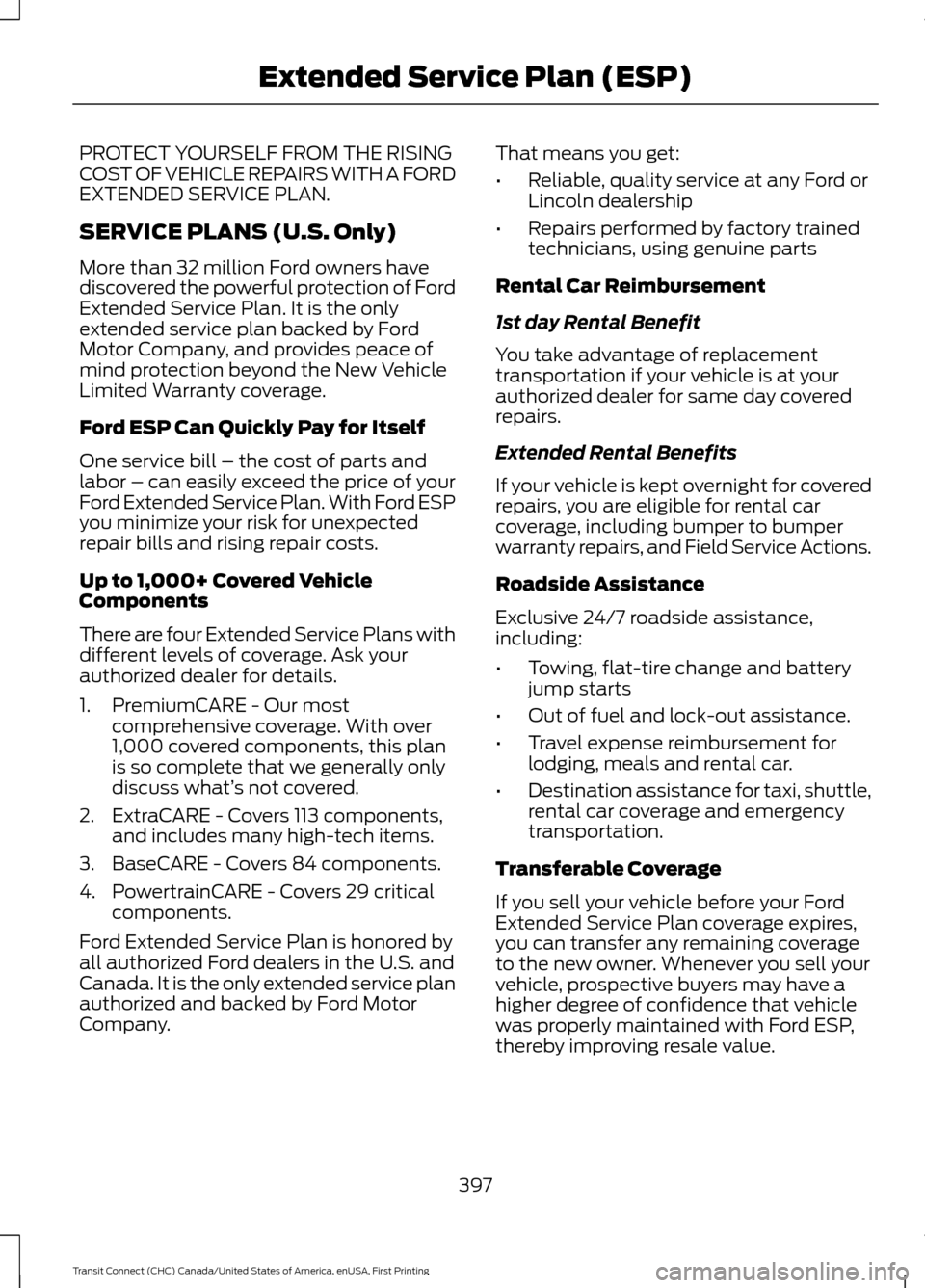
PROTECT YOURSELF FROM THE RISING
COST OF VEHICLE REPAIRS WITH A FORD
EXTENDED SERVICE PLAN.
SERVICE PLANS (U.S. Only)
More than 32 million Ford owners have
discovered the powerful protection of Ford
Extended Service Plan. It is the only
extended service plan backed by Ford
Motor Company, and provides peace of
mind protection beyond the New Vehicle
Limited Warranty coverage.
Ford ESP Can Quickly Pay for Itself
One service bill – the cost of parts and
labor – can easily exceed the price of your
Ford Extended Service Plan. With Ford ESP
you minimize your risk for unexpected
repair bills and rising repair costs.
Up to 1,000+ Covered Vehicle
Components
There are four Extended Service Plans with
different levels of coverage. Ask your
authorized dealer for details.
1. PremiumCARE - Our most
comprehensive coverage. With over
1,000 covered components, this plan
is so complete that we generally only
discuss what’ s not covered.
2. ExtraCARE - Covers 113 components, and includes many high-tech items.
3. BaseCARE - Covers 84 components.
4. PowertrainCARE - Covers 29 critical components.
Ford Extended Service Plan is honored by
all authorized Ford dealers in the U.S. and
Canada. It is the only extended service plan
authorized and backed by Ford Motor
Company. That means you get:
•
Reliable, quality service at any Ford or
Lincoln dealership
• Repairs performed by factory trained
technicians, using genuine parts
Rental Car Reimbursement
1st day Rental Benefit
You take advantage of replacement
transportation if your vehicle is at your
authorized dealer for same day covered
repairs.
Extended Rental Benefits
If your vehicle is kept overnight for covered
repairs, you are eligible for rental car
coverage, including bumper to bumper
warranty repairs, and Field Service Actions.
Roadside Assistance
Exclusive 24/7 roadside assistance,
including:
• Towing, flat-tire change and battery
jump starts
• Out of fuel and lock-out assistance.
• Travel expense reimbursement for
lodging, meals and rental car.
• Destination assistance for taxi, shuttle,
rental car coverage and emergency
transportation.
Transferable Coverage
If you sell your vehicle before your Ford
Extended Service Plan coverage expires,
you can transfer any remaining coverage
to the new owner. Whenever you sell your
vehicle, prospective buyers may have a
higher degree of confidence that vehicle
was properly maintained with Ford ESP,
thereby improving resale value.
397
Transit Connect (CHC) Canada/United States of America, enUSA, First Printing Extended Service Plan (ESP)
Page 401 of 428
Avoid the Rising Cost of Properly
Maintaining Your Vehicle!
Ford Extended Service Plan also offers a
Premium Maintenance Plan that covers all
scheduled maintenance, and selected
wear items. The coverage is prepaid, so
you never have to worry about affording
your vehicle
’s maintenance. It covers
regular checkups, routine inspections,
preventive care and replacement of select
items that require periodic attention for
normal wear:
• Windshield wiper blades.
• Spark plugs (except in California).
• The clutch disc.
• Brake pads and linings.
• Shock absorbers.
• Belts and hoses.
• Diesel exhaust fluid replenishment.
Interest Free Finance Options
Available
Take advantage of our interest free
installment payment plan. Just a 10%
down payment will provide you with an
affordable, no interest, no fee payment
program allowing you all the security and
benefits Ford ESP has to offer while paying
over time. You are pre-approved with no
credit checks, no hassles! To learn more,
call our Ford ESP specialists at
800-367-3377.
Ford ESP
P.O. Box 8072
Royal Oak, MI 48068-0039 SERVICE PLANS (CANADA ONLY)
You can get more protection for your
vehicle by purchasing a Ford Extended
Service Plan. Ford Extended Service Plan
is the only service contract backed by Ford
Motor Company of Canada, Limited.
Depending on the plan you purchase, Ford
Extended Service Plan provides benefits
such as:
•
Rental reimbursement.
• Coverage for certain maintenance and
wear items.
• Protection against repair costs after
your New Vehicle Limited Warranty
Coverage expires.
• Roadside Assistance benefits.
There are several Ford Extended Service
Plans available in various time, distance
and deductible combinations. Each plan
is tailored to fit your own driving needs,
including reimbursement for towing and
rental. When you purchase Ford Extended
Service Plan, you receive added
peace-of-mind protection throughout
Canada and the United States, provided
by a network of participating authorized
Ford Motor Company dealers.
Note: Repairs performed outside of Canada
and the United States are not eligible for
Ford Extended Service Plan coverage.
This information is subject to change. For
more information, visit your local Ford of
Canada dealer or www.ford.ca to find the
Ford Extended Service Plan that is right for
you.
398
Transit Connect (CHC) Canada/United States of America, enUSA, First Printing Extended Service Plan (ESP)
Page 406 of 428
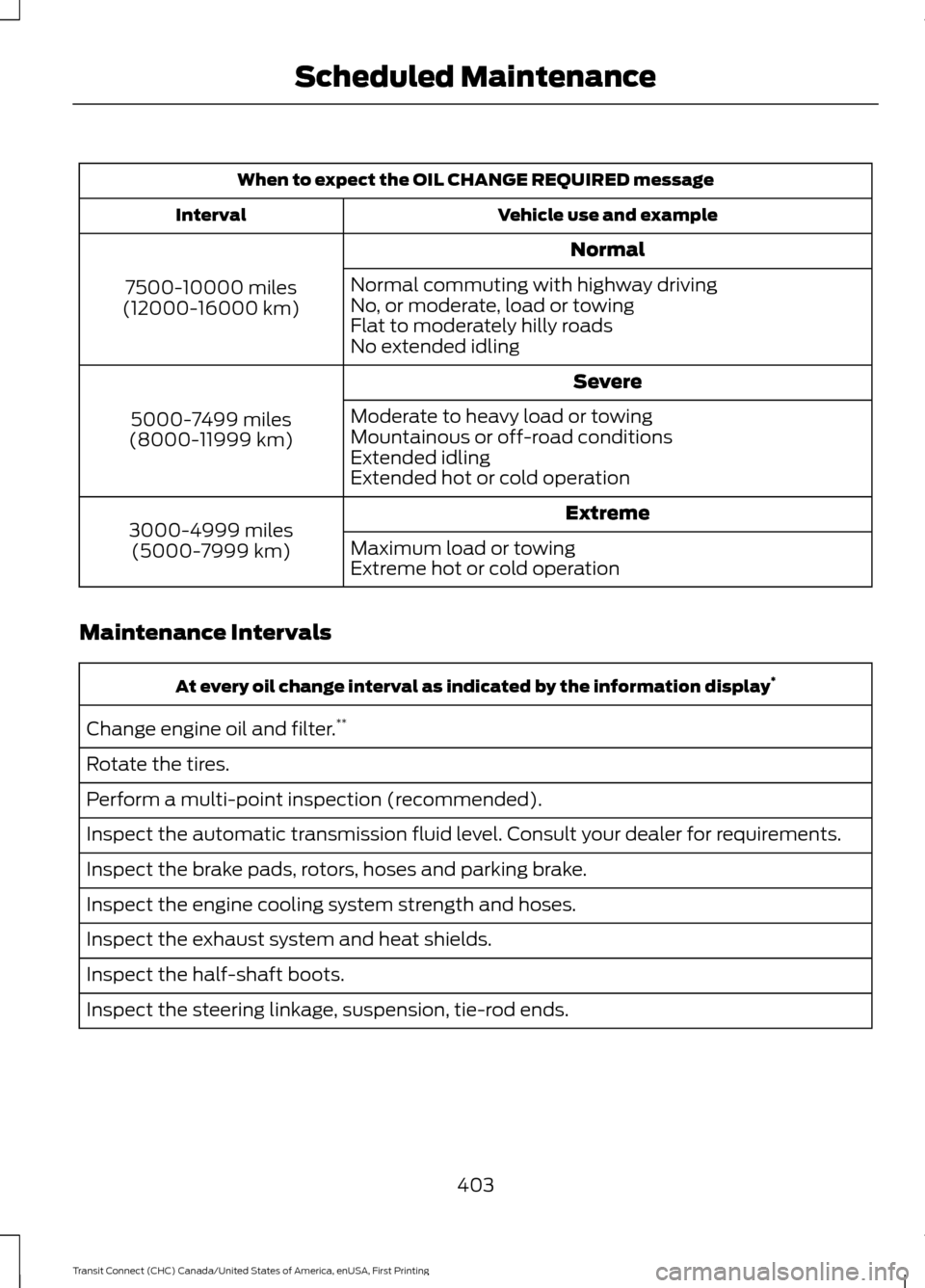
When to expect the OIL CHANGE REQUIRED message
Vehicle use and example
Interval
Normal
7500-10000 miles
(12000-16000 km) Normal commuting with highway driving
No, or moderate, load or towing
Flat to moderately hilly roads
No extended idling
Severe
5000-7499 miles
(8000-11999 km) Moderate to heavy load or towing
Mountainous or off-road conditions
Extended idling
Extended hot or cold operation
Extreme
3000-4999 miles
(5000-7999 km) Maximum load or towing
Extreme hot or cold operation
Maintenance Intervals At every oil change interval as indicated by the information display
*
Change engine oil and filter. **
Rotate the tires.
Perform a multi-point inspection (recommended).
Inspect the automatic transmission fluid level. Consult your dealer for requirements.
Inspect the brake pads, rotors, hoses and parking brake.
Inspect the engine cooling system strength and hoses.
Inspect the exhaust system and heat shields.
Inspect the half-shaft boots.
Inspect the steering linkage, suspension, tie-rod ends.
403
Transit Connect (CHC) Canada/United States of America, enUSA, First Printing Scheduled Maintenance
Page 408 of 428
SPECIAL OPERATING
CONDITIONS SCHEDULED
MAINTENANCE
If you operate your vehicle primarily in any
of the following conditions, you need to
perform extra maintenance as indicated.
If you operate your vehicle
occasionally
under any of these conditions, it is not
necessary to perform the extra
maintenance. For specific
recommendations, see your dealership
service advisor or technician. Perform the services shown in the
following tables when specified, or within
3000 miles (4800 kilometers) of a
message indicating that an oil change is
required appears in the information display.
•
Example 1
: The oil change required
message comes on at 28751 miles
(46270 kilometers). Perform the
30000-mile (48000-kilometer)
automatic transmission fluid
replacement.
• Example 2
: The oil change required
message has not come on, but the
odometer reads 30000 miles (48000
kilometers) (for example, the
Intelligent Oil-Life Monitor was reset
at 25000 miles [40000 kilometers]).
Perform the engine air filter
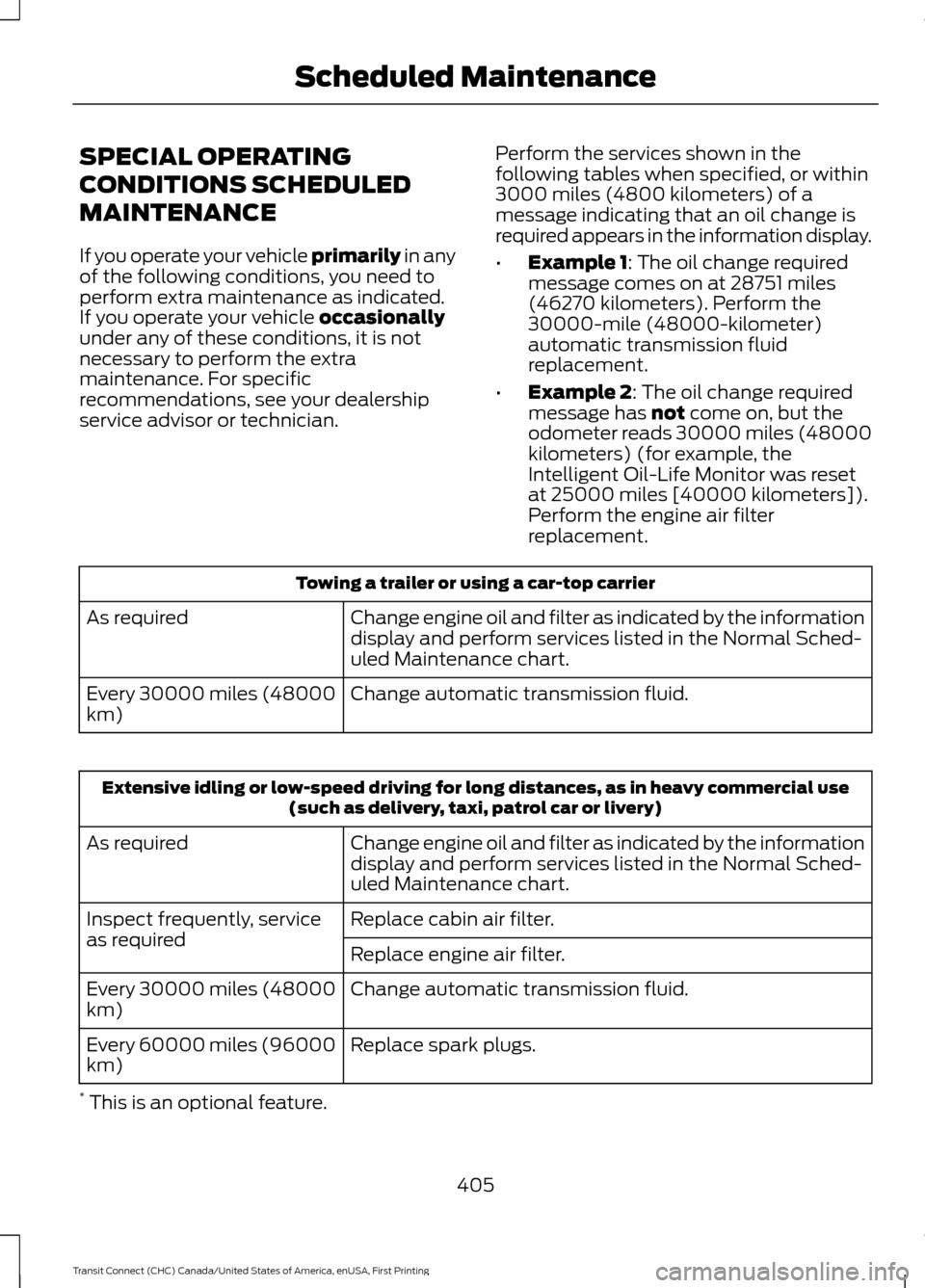
replacement. Towing a trailer or using a car-top carrier
Change engine oil and filter as indicated by the information
display and perform services listed in the Normal Sched-
uled Maintenance chart.
As required
Change automatic transmission fluid.
Every 30000 miles (48000
km) Extensive idling or low-speed driving for long distances, as in heavy commercial use
(such as delivery, taxi, patrol car or livery)
Change engine oil and filter as indicated by the information
display and perform services listed in the Normal Sched-
uled Maintenance chart.
As required
Replace cabin air filter.
Inspect frequently, service
as required
Replace engine air filter.
Change automatic transmission fluid.
Every 30000 miles (48000
km)
Replace spark plugs.
Every 60000 miles (96000
km)
* This is an optional feature.
405
Transit Connect (CHC) Canada/United States of America, enUSA, First Printing Scheduled Maintenance
Page 418 of 428
A
A/C
See: Climate Control........................................... 95
About This Manual...........................................7
ABS See: Brakes............................................................ 129
ABS driving hints See: Hints on Driving With Anti-Lock
Brakes................................................................. 129
Accessories...................................................380 Exterior Style....................................................... 380
Interior Style........................................................ 380
Lifestyle................................................................. 380
Peace of Mind..................................................... 380
Accessories See: Replacement Parts
Recommendation............................................. 11
Adjusting the Headlamps.........................196 Horizontal Aim Adjustment............................ 197
Vertical Aim Adjustment................................. 196
Adjusting the Steering Wheel....................61
Airbag Disposal
..............................................46
Air Conditioning See: Climate Control........................................... 95
Air Vents............................................................95 Center Air Vents.................................................... 95
Side Air Vents........................................................ 96
Appendices....................................................382
At a Glance
........................................................13
Audible Warnings and Indicators.............82 Automatic Transmission Warning
Chime.................................................................. 83
Headlamps On Warning Chime...................... 82
Key in Ignition Warning Chime........................ 82
Parking Brake On Warning Chime.................. 82
Audio Control....................................................61
Audio Input Jack
...........................................265
Audio System.................................................251 General Information - United States of
America............................................................. 251
Audio Troubleshooting..............................266
Audio Unit - Vehicles With: AM/FM/CD/ SYNC/Satellite Radio.............................258
Audio Unit - Vehicles With: AM/FM/CD/ SYNC
.............................................................256 Audio Unit - Vehicles With: AM/
FM
...................................................................252
AUX Button.......................................................... 255
Clock Button........................................................ 254
Frequency Band Buttons................................ 254
Menu Button........................................................ 255
Sound Button...................................................... 254
Station Preset Buttons.................................... 254
Station Tuning Buttons................................... 254
Audio Unit - Vehicles With: Premium AM/FM/CD
..................................................255
Autolamps........................................................68
Windshield Wiper Activated
Headlamps........................................................ 68
Automatic Climate Control........................97 Mono Mode............................................................ 99
Switching Mono Mode Back On..................... 99
Switching Mono Mode Off............................... 99
Temperature Control.......................................... 98
Automatic Transmission
............................126
Brake-Shift Interlock.......................................... 127
If Your Vehicle Gets Stuck In Mud or Snow................................................................... 128
SelectShift Automatic® Transmission................................................... 126
Understanding the Positions of Your Automatic Transmission............................. 126
Automatic Transmission Fluid Check
..............................................................192
Autowipers.......................................................64
Auxiliary Power Points.................................113 12 Volt DC Power Point...................................... 113
B
Bonnet Lock See: Opening and Closing the Hood...........185
Booster Seats..................................................25 Types of Booster Seats...................................... 26
Brake Fluid Check.........................................192
Brakes...............................................................129 General Information.......................................... 129
Breaking-In.....................................................160
Bulb Specification Chart...........................202
C
Cabin Air Filter...............................................102
415
Transit Connect (CHC) Canada/United States of America, enUSA, First Printing Index
Page 419 of 428
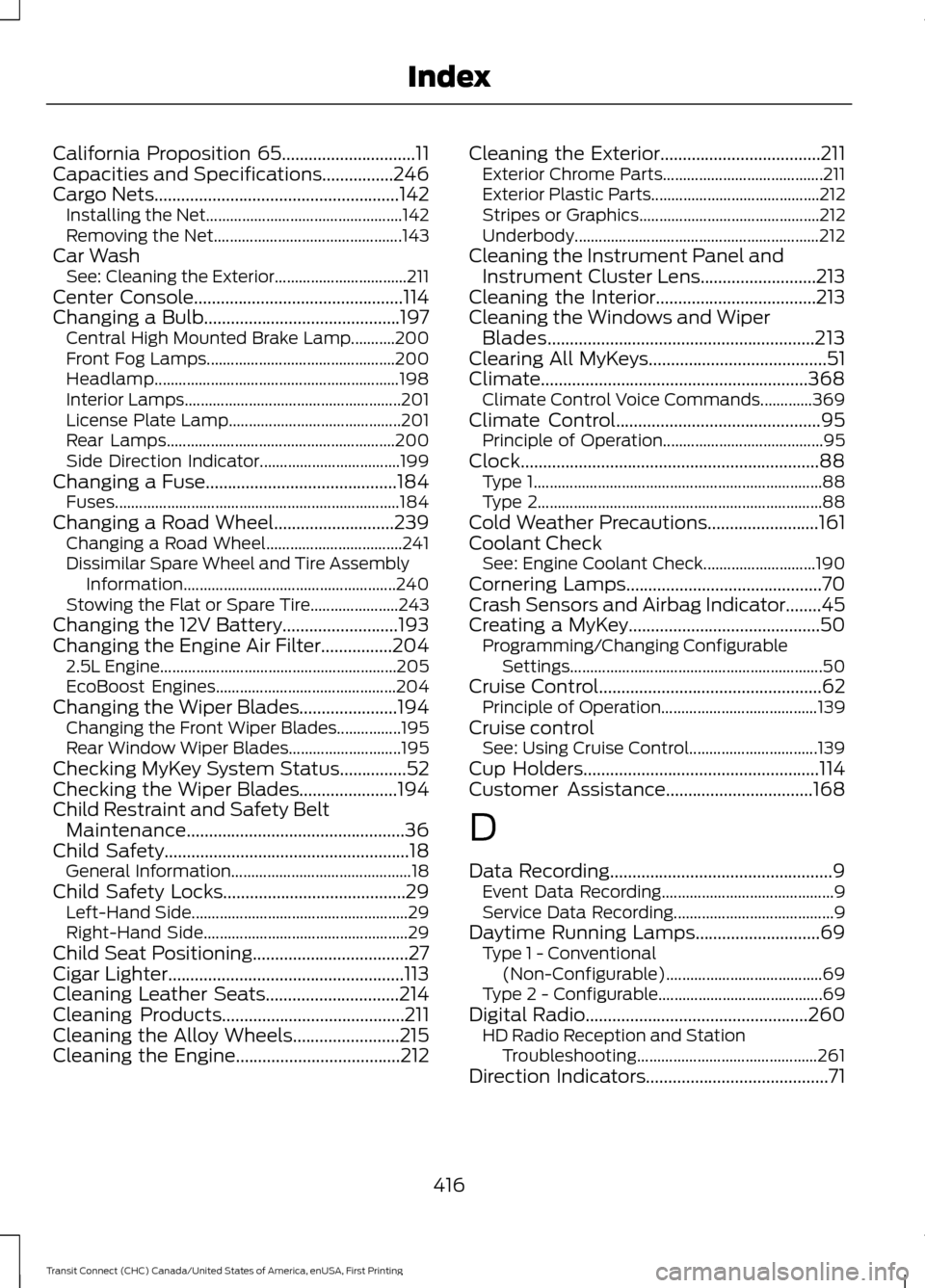
California Proposition 65..............................11
Capacities and Specifications................246
Cargo Nets.......................................................142
Installing the Net................................................. 142
Removing the Net............................................... 143
Car Wash See: Cleaning the Exterior.................................211
Center Console...............................................114
Changing a Bulb............................................197 Central High Mounted Brake Lamp...........200
Front Fog Lamps............................................... 200
Headlamp............................................................. 198
Interior Lamps...................................................... 201
License Plate Lamp........................................... 201
Rear Lamps......................................................... 200
Side Direction Indicator................................... 199
Changing a Fuse...........................................184
Fuses....................................................................... 184
Changing a Road Wheel
...........................239
Changing a Road Wheel.................................. 241
Dissimilar Spare Wheel and Tire Assembly Information..................................................... 240
Stowing the Flat or Spare Tire...................... 243
Changing the 12V Battery..........................193
Changing the Engine Air Filter................204 2.5L Engine........................................................... 205
EcoBoost Engines............................................. 204
Changing the Wiper Blades......................194 Changing the Front Wiper Blades................195
Rear Window Wiper Blades............................ 195
Checking MyKey System Status...............52
Checking the Wiper Blades......................194
Child Restraint and Safety Belt Maintenance
.................................................36
Child Safety.......................................................18
General Information............................................. 18
Child Safety Locks
.........................................29
Left-Hand Side...................................................... 29
Right-Hand Side................................................... 29
Child Seat Positioning...................................27
Cigar Lighter
.....................................................113
Cleaning Leather Seats..............................214
Cleaning Products
.........................................211
Cleaning the Alloy Wheels........................215
Cleaning the Engine.....................................212 Cleaning the Exterior....................................211
Exterior Chrome Parts........................................ 211
Exterior Plastic Parts.......................................... 212
Stripes or Graphics............................................. 212
Underbody............................................................. 212
Cleaning the Instrument Panel and Instrument Cluster Lens..........................213
Cleaning the Interior....................................213
Cleaning the Windows and Wiper Blades
............................................................213
Clearing All MyKeys........................................51
Climate............................................................368 Climate Control Voice Commands.............369
Climate Control
..............................................95
Principle of Operation........................................ 95
Clock...................................................................88 Type 1........................................................................\
88
Type 2....................................................................... 88
Cold Weather Precautions.........................161
Coolant Check See: Engine Coolant Check............................ 190
Cornering Lamps............................................70
Crash Sensors and Airbag Indicator
........45
Creating a MyKey...........................................50
Programming/Changing Configurable
Settings............................................................... 50
Cruise Control
..................................................62
Principle of Operation....................................... 139
Cruise control See: Using Cruise Control................................ 139
Cup Holders
.....................................................114
Customer Assistance.................................168
D
Data Recording
..................................................9
Event Data Recording........................................... 9
Service Data Recording........................................ 9
Daytime Running Lamps............................69 Type 1 - Conventional
(Non-Configurable)....................................... 69
Type 2 - Configurable......................................... 69
Digital Radio
..................................................260
HD Radio Reception and Station
Troubleshooting............................................. 261
Direction Indicators
.........................................71
416
Transit Connect (CHC) Canada/United States of America, enUSA, First Printing Index