lock FORD TRANSIT CONNECT 2016 2.G Owners Manual
[x] Cancel search | Manufacturer: FORD, Model Year: 2016, Model line: TRANSIT CONNECT, Model: FORD TRANSIT CONNECT 2016 2.GPages: 439, PDF Size: 6.96 MB
Page 350 of 439
Message
Message
Touch this button to adjust settings for:
Sound Settings
Bass
Midrange
Treble
Set Balance and Fade
DSP
Occupancy Mode
Speed Compensated Volume
This allows you to select a category of music you would like to
search for. You can then choose to either seek or scan for the
stations playing that category.
Set Category for
Seek/Scan
This allows you to lock and unlock channels, change or reset your
PIN or unlock all channels. To use this feature, you need your initial
PIN, which is 1234.
Parental Lockout
This feature allows you turn alerts on and off.
Artist / Title / Team
Alerts
SIRIUS requires this number when communicating with you about
your account.
Electronic Serial
Number (ESN)
Touch this button to manually enter the desired satellite channel
number. Touch Enter when you are done
Direct Tune
Note: Your vehicle may not have all these sound settings.
SIRIUS Satellite Radio Information
Note: SIRIUS reserves the unrestricted right
to change, rearrange, add or delete
programming including canceling, moving
or adding particular channels, and its prices,
at any time, with or without notice to you.
Ford Motor Company shall not be
responsible for any such programming
changes. 347
Tourneo Connect/Transit Connect (CHC) Canada/United States of America, enUSA, First Printing MyFord Touch
™E142593
Page 352 of 439
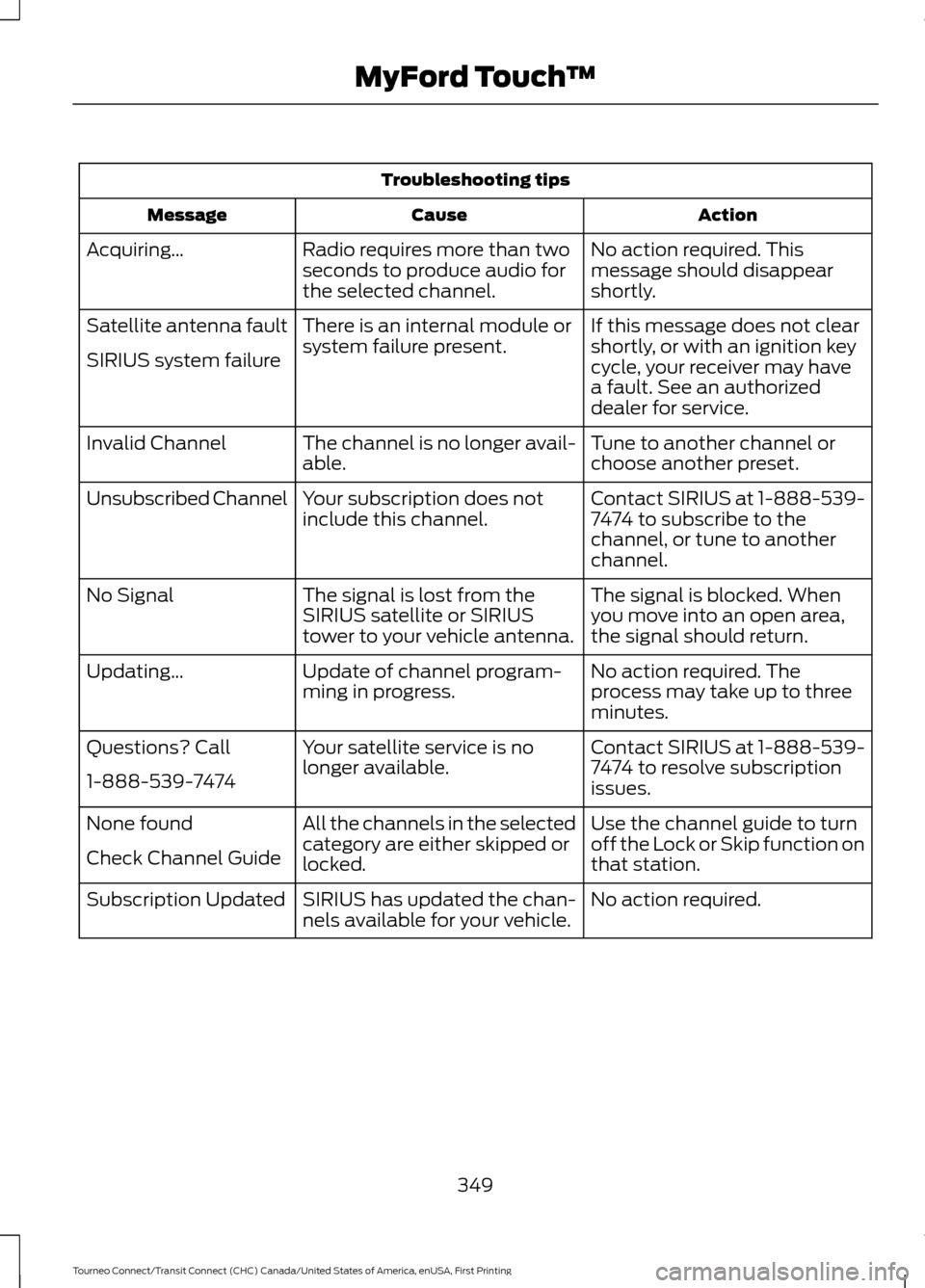
Troubleshooting tips
Action
Cause
Message
No action required. This
message should disappear
shortly.
Radio requires more than two
seconds to produce audio for
the selected channel.
Acquiring\b
If this message does not clear
shortly, or with an ignition key
cycle, your receiver may have
a fault. See an authorized
dealer for service.
There is an internal module or
system failure present.
Satellite antenna fault
SIRIUS system failure
Tune to another channel or
choose another preset.
The channel is no longer avail-
able.
Invalid Channel
Contact SIRIUS at 1-888-539-
7474 to subscribe to the
channel, or tune to another
channel.
Your subscription does not
include this channel.
Unsubscribed Channel
The signal is blocked. When
you move into an open area,
the signal should return.
The signal is lost from the
SIRIUS satellite or SIRIUS
tower to your vehicle antenna.
No Signal
No action required. The
process may take up to three
minutes.
Update of channel program-
ming in progress.
Updating\b
Contact SIRIUS at 1-888-539-
7474 to resolve subscription
issues.
Your satellite service is no
longer available.
Questions? Call
1-888-539-7474
Use the channel guide to turn
off the Lock or Skip function on
that station.
All the channels in the selected
category are either skipped or
locked.
None found
Check Channel Guide
No action required.
SIRIUS has updated the chan-
nels available for your vehicle.
Subscription Updated
349
Tourneo Connect/Transit Connect (CHC) Canada/United States of America, enUSA, First Printing MyFord Touch
™
Page 367 of 439
Note:
This feature does not function
properly if you have enabled caller ID
blocking on your cellular phone. Make sure
your cellular phone is not blocking caller ID
before using SYNC Services.
Note: The driver is ultimately responsible
for the safe operation of the vehicle, and
therefore, must evaluate whether it is safe
to follow the suggested directions. Any
navigation features provided are only an aid.
Make your driving decisions based on your
observations of local conditions and existing
traffic regulations. Do not follow the route
suggestions if doing so would result in an
unsafe or illegal maneuver, if you would be
placed in an unsafe situation, or if you would
be directed into an area that you consider
unsafe. Maps used by this system may be
inaccurate because of errors, changes in
roads, traffic conditions or driving
conditions. Note:
When you connect, the service uses
GPS technology and advanced vehicle
sensors to collect your vehicle's current
location, travel direction and speed to help
provide you with the directions, traffic
reports, or business searches you request.
Further, to provide the services you request,
for continuous improvement, the service
may collect and record call details and voice
communications. For more information, see
SYNC Services Terms and Conditions at
www.SYNCMyRide.com. If you do not want
Ford or its service providers to collect your
vehicle travel information or other
information identified in the Terms and
Conditions, do not subscribe or use the
service.
SYNC Services uses advanced vehicle
sensors, integrated GPS technology and
comprehensive map and traffic data, to
give you personalized traffic reports,
precise turn-by-turn directions, business
search, news, sports, weather and more.
For a complete list of services, or to learn
more, please visit www.SYNCMyRide.com.
Connecting to SYNC Services
You can connect to SYNC Services using
voice commands or by selecting a menu
item on the touchscreen.
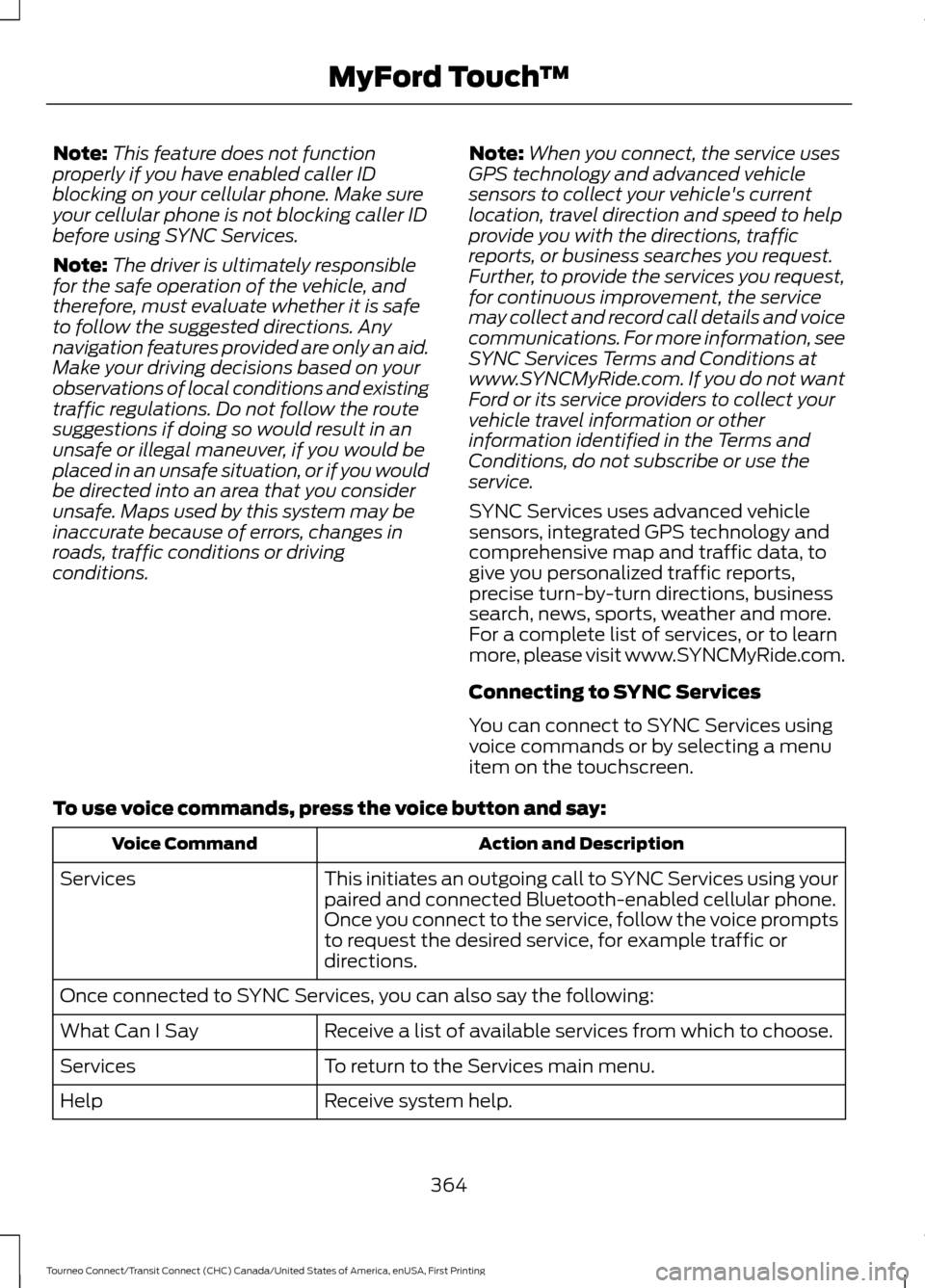
To use voice commands, press the voice button and say: Action and Description
Voice Command
This initiates an outgoing call to SYNC Services using your
paired and connected Bluetooth-enabled cellular phone.
Once you connect to the service, follow the voice prompts
to request the desired service, for example traffic or
directions.
Services
Once connected to SYNC Services, you can also say the following:
Receive a list of available services from which to choose.
What Can I Say
To return to the Services main menu.
Services
Receive system help.
Help
364
Tourneo Connect/Transit Connect (CHC) Canada/United States of America, enUSA, First Printing MyFord Touch
™
Page 374 of 439
911 Assist May Not Work If:
•
Your cellular phone or 911 Assist
hardware sustains damage in a crash.
• The vehicle's battery or the SYNC
system has no power.
• The phones(s) previously paired or
connected to the system are thrown
from the vehicle.
911 Assist Privacy Notice
When you turn on 911 Assist, it may
disclose to emergency services that your
vehicle has been in a crash involving the
deployment of an airbag or activation of
the fuel pump shut-off. Certain versions or
updates to 911 Assist may also be capable
of electronically or verbally disclosing to
911 operators your vehicle location or other
details about your vehicle or crash to assist
911 operators to provide the most
appropriate emergency services. If you do
not want to disclose this information, do
not turn the feature on.
Vehicle Health Report (If
Equipped, US Only) WARNING
Always follow scheduled
maintenance instructions, regularly
inspect your vehicle, and seek repair
for any damage or problem you suspect.
Vehicle Health Report supplements, but
cannot replace, normal maintenance and
vehicle inspection. Vehicle Health Report
only monitors certain systems
electronically monitored by your vehicle
and will not monitor or report the status
of any other system, (such as brake lining
wear). Failure to perform scheduled
maintenance and regularly inspect your
vehicle may result in vehicle damage and
serious injury. Note:
Your Vehicle Health Report feature
requires activation prior to use. Visit
www.SYNCMyRide.com to register. There
is no fee or subscription associated with
Vehicle Health Report, but you must register
to use this feature.
Note: This feature may not function
properly if you have enabled caller ID
blocking on your cellular phone. Before
running a report, review the Vehicle Health
Report Privacy Notice.
Note: In order to allow a break-in period for
your vehicle, you may not be able to create
a Vehicle Health Report until your vehicle
odometer has reached 200 miles.
Note: Cellular phone and SMS charges may
apply when making a report.
Register for Vehicle Health Report and set
your report preferences at
www.SYNCMyRide.com. After registering,
you can request a Vehicle Health Report
(inside your vehicle). Return to your
account at www.SYNCMyRide.com to view
your report. You can also choose for SYNC
to remind you automatically to run reports
at specific mileage intervals. Cellular phone
airtime usage may apply when reporting.
The system allows you to check your
vehicle ’s overall health in the form of a
diagnostic report card. The Vehicle Health
Report contains valuable information, for
example:
• Vehicle diagnostic information.
• Scheduled maintenance.
• Open recalls and Field Service Actions.
• Items noted during vehicle inspections
by your authorized dealer that still need
servicing.
371
Tourneo Connect/Transit Connect (CHC) Canada/United States of America, enUSA, First Printing MyFord Touch
™
Page 381 of 439
Second Level Messages, Actions and Descriptions
Menu Item
Choose areas which you want the system to avoid when
calculating a route for you
Avoid Areas
Then select any of the following:
Once you make a selection, the system tries to avoid the
area(s) if possible for all routes. Select this button to program
an entry, then choose a destination entry method. You can
edit the name or location of a destination or remove it from
your selections.
Add
To remove an area from your selection, choose the listing on
the screen. The screen will change, then press delete and
confirm the deletion.
Delete
Map Mode
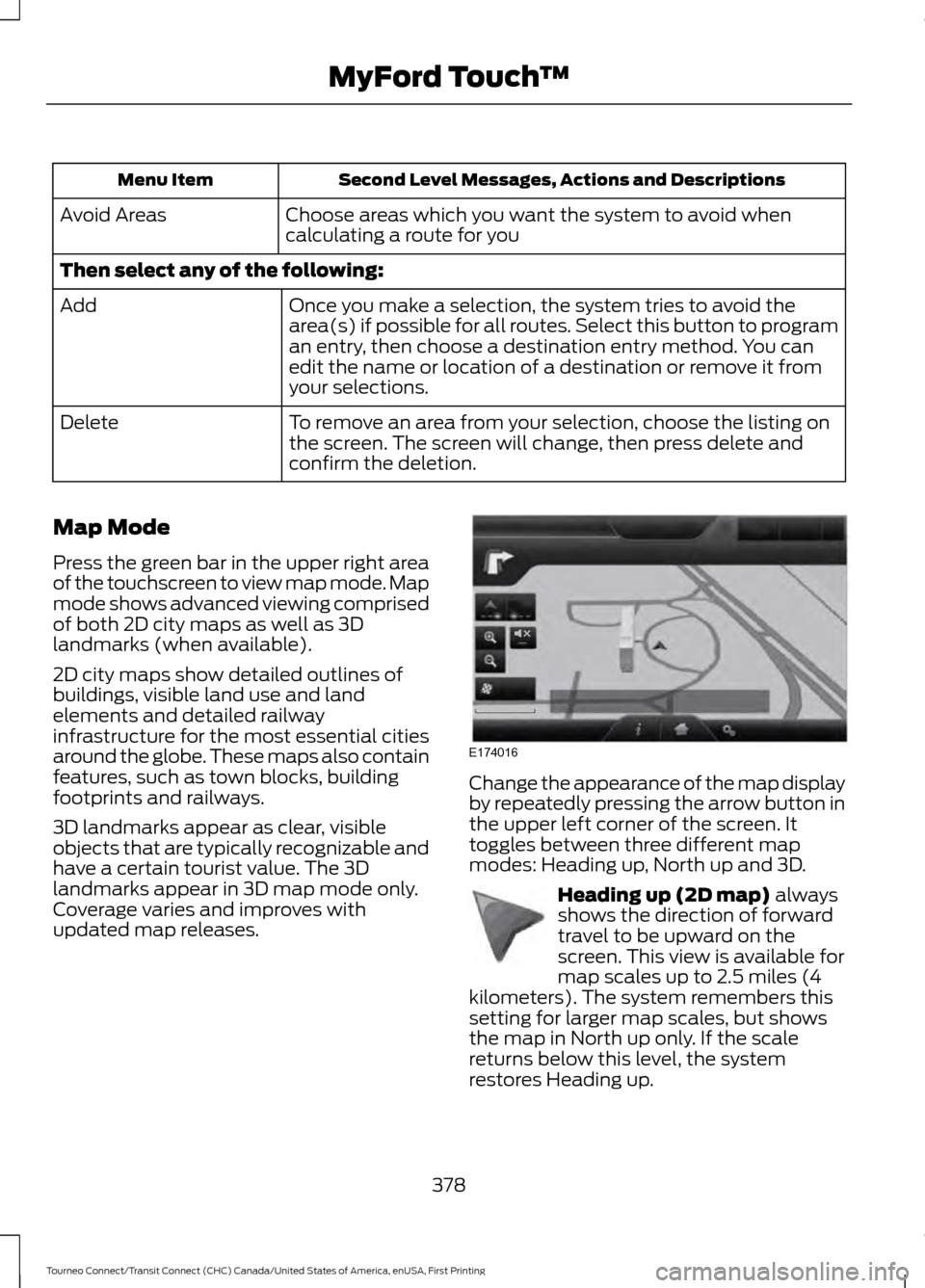
Press the green bar in the upper right area
of the touchscreen to view map mode. Map
mode shows advanced viewing comprised
of both 2D city maps as well as 3D
landmarks (when available).
2D city maps show detailed outlines of
buildings, visible land use and land
elements and detailed railway
infrastructure for the most essential cities
around the globe. These maps also contain
features, such as town blocks, building
footprints and railways.
3D landmarks appear as clear, visible
objects that are typically recognizable and
have a certain tourist value. The 3D
landmarks appear in 3D map mode only.
Coverage varies and improves with
updated map releases. Change the appearance of the map display
by repeatedly pressing the arrow button in
the upper left corner of the screen. It
toggles between three different map
modes: Heading up, North up and 3D.
Heading up (2D map) always
shows the direction of forward
travel to be upward on the
screen. This view is available for
map scales up to 2.5 miles (4
kilometers). The system remembers this
setting for larger map scales, but shows
the map in North up only. If the scale
returns below this level, the system
restores Heading up.
378
Tourneo Connect/Transit Connect (CHC) Canada/United States of America, enUSA, First Printing MyFord Touch
™E174016 E142642
Page 385 of 439
For a complete listing of the accessories
that are available for your vehicle, please
contact your authorized dealer or visit the
online store web site:
Web Address (United States)
www.Accessories.Ford.com Web Address (Canada)
www.Accessories.Ford.ca
Ford Accessories are available for your
vehicle through an authorized Ford dealer.
Ford Motor Company will repair or replace
any properly authorized dealer-installed
Ford Original Accessory found to be
defective in factory-supplied materials or
workmanship during the warranty period,
as well as any component damaged by the
defective accessories.
Ford Motor Company warrants your
accessory through the warranty that
provides the greatest benefit:
• 24 months, unlimited mileage.
• The remainder of your new vehicle
limited warranty.
Contact an authorized dealer for details
and a copy of the warranty.
Exterior Style
• Graphics.
• Hitch and towing accessories.
• Keyless entry.
• Side window deflectors.
• Splash guards.
• Wheels.
Interior Style
• All-weather floor mats.
• Cargo area protectors. •
Cargo organizers.
• Carpeted floor mats.
• Interior light kit.
• Premium carpeted floor mats.
• Rear seat entertainment*.
Lifestyle
• Ash cup and smokers packages.
• Roof racks and carriers*.
Peace of Mind
• Auto-dimming interior mirror.
• Back-up alarm*.
• Bumper-mounted parking sensor*.
• Locking fuel plug.
• Remote start.
• Vehicle security systems.
• Wheel locks.
*Ford Licensed Accessory. The accessory
manufacturer designs, develops and
therefore warrants Ford Licensed
Accessories, and does not design or test
these accessories to Ford Motor Company
engineering requirements. Contact an
authorized Ford dealer for the
manufacturer's limited warranty details,
and request a copy of the Ford Licensed
Accessories product limited warranty from
the accessory manufacturer.
382
Tourneo Connect/Transit Connect (CHC) Canada/United States of America, enUSA, First Printing Accessories
Page 387 of 439
PROTECT YOURSELF FROM THE RISING
COST OF VEHICLE REPAIRS WITH A FORD
EXTENDED SERVICE PLAN.
SERVICE PLANS (U.S. Only)
More than 32 million Ford owners have
discovered the powerful protection of Ford
Extended Service Plan. It is the extended
service plan backed by Ford Motor
Company, and provides peace of mind
protection beyond the New Vehicle Limited
Warranty coverage.
Ford ESP Can Quickly Pay for Itself
One service bill – the cost of parts and
labor – can easily exceed the price of your
Ford Extended Service Plan. With Ford ESP
you minimize your risk for unexpected
repair bills and rising repair costs.
Up to 1,000+ Covered Vehicle
Components
There are four core Extended Service Plans
with different levels of coverage. Ask your
authorized dealer for details.
1. PremiumCARE - Our most
comprehensive coverage. With over
1,000 covered components, this plan
is so complete that we generally only
discuss what’ s not covered.
2. ExtraCARE - Covers 113 components, and includes many high-tech items.
3. BaseCARE - Covers 84 components.
4. PowertrainCARE - Covers 29 critical components.
Ford Extended Service Plan is honored by
all authorized Ford dealers in the U.S.,
Canada and Mexico. It is the extended
service plan authorized and backed by Ford
Motor Company. That means you get:
•
Reliable, quality service at any Ford or
Lincoln dealership
• Repairs performed by factory trained
technicians, using genuine parts
Rental Car Reimbursement
1st day Rental Benefit
You take advantage of replacement
transportation if your vehicle is at your
authorized dealer for same day covered
repairs.
Extended Rental Benefits
If your vehicle is kept overnight for covered
repairs, you are eligible for rental car
coverage, including bumper to bumper
warranty repairs, and Field Service Actions.
Roadside Assistance
Exclusive 24/7 roadside assistance,
including:
• Towing, flat-tire change and battery
jump starts
• Out of fuel and lock-out assistance.
• Travel expense reimbursement for
lodging, meals and rental car.
• Destination assistance for taxi, shuttle,
rental car coverage and emergency
transportation.
Transferable Coverage
If you sell your vehicle before your Ford
Extended Service Plan coverage expires,
you can transfer any remaining coverage
to the new owner. Whenever you sell your
vehicle, prospective buyers may have a
higher degree of confidence that vehicle
was properly maintained with Ford ESP,
thereby improving resale value.
384
Tourneo Connect/Transit Connect (CHC) Canada/United States of America, enUSA, First Printing Extended Service Plan (ESP)
Page 391 of 439
Check every month
Engine oil level.
Function of all interior and exterior lights.
Tires (including spare) for wear and proper pressure. Windshield washer fluid level. Check every six months
Battery connections. Clean if necessary.
Body and door drain holes for obstructions. Clean if necessary. Cooling system fluid level and coolant strength.
Door weatherstrips for wear. Lubricate if necessary.
Hinges, latches and outside locks for proper operation. Lubricate if necessary. Parking brake for proper operation.
Safety belts and seat latches for wear and function.
Safety warning lamps (brake, ABS, airbag and safety belt) for operation.
Washer spray and wiper operation. Clean or replace blades as necessary.
Multi-Point Inspection
In order to keep your vehicle running right,
it is important to have the systems on your
vehicle checked regularly. This can help
identify potential issues and prevent major
problems. We recommend having the
following multi-point inspection performed
at every scheduled maintenance interval
to help make sure your vehicle keeps
running great.
388
Tourneo Connect/Transit Connect (CHC) Canada/United States of America, enUSA, First Printing Scheduled Maintenance
Page 430 of 439
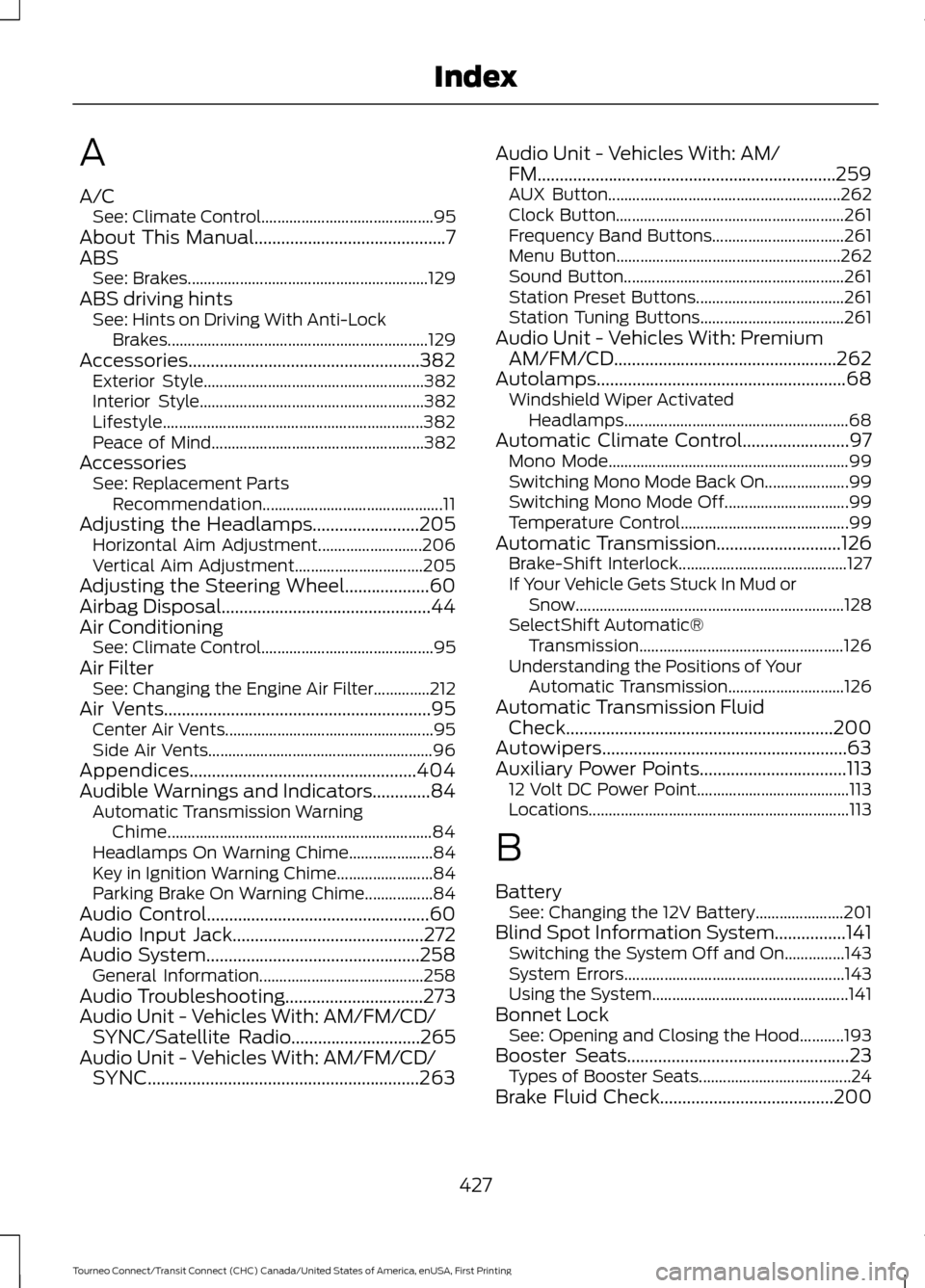
A
A/C
See: Climate Control........................................... 95
About This Manual...........................................7
ABS See: Brakes............................................................ 129
ABS driving hints See: Hints on Driving With Anti-Lock
Brakes................................................................. 129
Accessories....................................................382 Exterior Style....................................................... 382
Interior Style........................................................ 382
Lifestyle................................................................. 382
Peace of Mind..................................................... 382
Accessories See: Replacement Parts
Recommendation............................................. 11
Adjusting the Headlamps........................205 Horizontal Aim Adjustment.......................... 206
Vertical Aim Adjustment................................ 205
Adjusting the Steering Wheel...................60
Airbag Disposal...............................................44
Air Conditioning See: Climate Control........................................... 95
Air Filter See: Changing the Engine Air Filter..............212
Air Vents............................................................95 Center Air Vents.................................................... 95
Side Air Vents........................................................ 96
Appendices...................................................404
Audible Warnings and Indicators.............84 Automatic Transmission Warning
Chime.................................................................. 84
Headlamps On Warning Chime..................... 84
Key in Ignition Warning Chime........................ 84
Parking Brake On Warning Chime.................84
Audio Control..................................................60
Audio Input Jack...........................................272
Audio System................................................258 General Information......................................... 258
Audio Troubleshooting...............................273
Audio Unit - Vehicles With: AM/FM/CD/ SYNC/Satellite Radio
.............................265
Audio Unit - Vehicles With: AM/FM/CD/ SYNC.............................................................263 Audio Unit - Vehicles With: AM/
FM...................................................................259
AUX Button.......................................................... 262
Clock Button......................................................... 261
Frequency Band Buttons................................. 261
Menu Button........................................................ 262
Sound Button....................................................... 261
Station Preset Buttons..................................... 261
Station Tuning Buttons.................................... 261
Audio Unit - Vehicles With: Premium AM/FM/CD..................................................262
Autolamps
........................................................68
Windshield Wiper Activated
Headlamps........................................................ 68
Automatic Climate Control........................97 Mono Mode............................................................ 99
Switching Mono Mode Back On..................... 99
Switching Mono Mode Off............................... 99
Temperature Control.......................................... 99
Automatic Transmission
............................126
Brake-Shift Interlock.......................................... 127
If Your Vehicle Gets Stuck In Mud or Snow................................................................... 128
SelectShift Automatic® Transmission................................................... 126
Understanding the Positions of Your Automatic Transmission............................. 126
Automatic Transmission Fluid Check
............................................................200
Autowipers.......................................................63
Auxiliary Power Points.................................113 12 Volt DC Power Point...................................... 113
Locations................................................................. 113
B
Battery See: Changing the 12V Battery...................... 201
Blind Spot Information System................141 Switching the System Off and On...............143
System Errors....................................................... 143
Using the System................................................. 141
Bonnet Lock See: Opening and Closing the Hood...........193
Booster Seats
..................................................23
Types of Booster Seats...................................... 24
Brake Fluid Check.......................................200
427
Tourneo Connect/Transit Connect (CHC) Canada/United States of America, enUSA, First Printing Index
Page 431 of 439
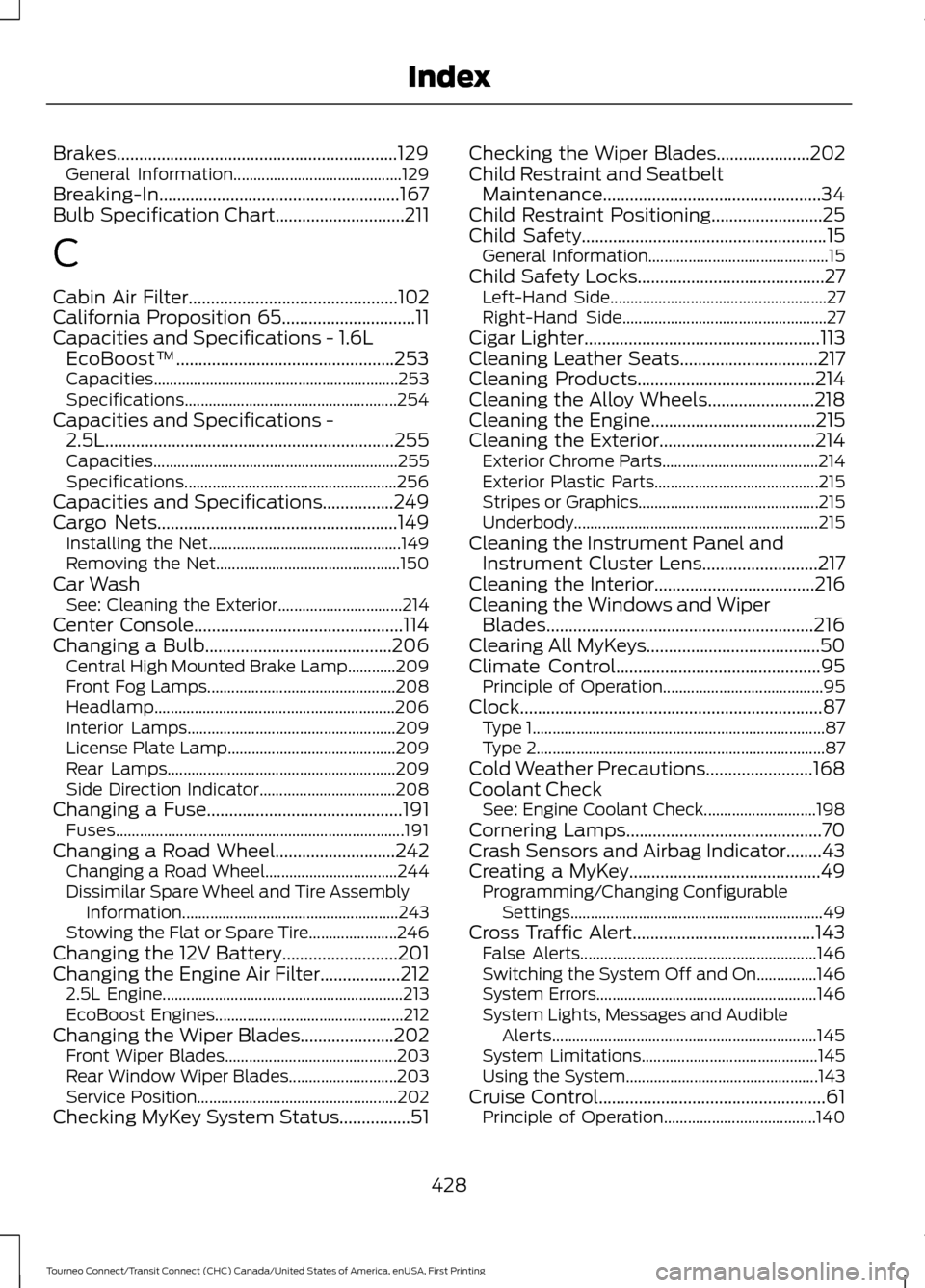
Brakes...............................................................129
General Information.......................................... 129
Breaking-In......................................................167
Bulb Specification Chart.............................211
C
Cabin Air Filter...............................................102
California Proposition 65..............................11
Capacities and Specifications - 1.6L EcoBoost™.................................................253
Capacities............................................................. 253
Specifications..................................................... 254
Capacities and Specifications - 2.5L.................................................................255
Capacities............................................................. 255
Specifications..................................................... 256
Capacities and Specifications................249
Cargo Nets......................................................149 Installing the Net................................................ 149
Removing the Net.............................................. 150
Car Wash See: Cleaning the Exterior............................... 214
Center Console...............................................114
Changing a Bulb..........................................206 Central High Mounted Brake Lamp............209
Front Fog Lamps............................................... 208
Headlamp............................................................ 206
Interior Lamps.................................................... 209
License Plate Lamp.......................................... 209
Rear Lamps......................................................... 209
Side Direction Indicator.................................. 208
Changing a Fuse............................................191 Fuses........................................................................\
191
Changing a Road Wheel...........................242 Changing a Road Wheel................................. 244
Dissimilar Spare Wheel and Tire Assembly Information...................................................... 243
Stowing the Flat or Spare Tire...................... 246
Changing the 12V Battery
..........................201
Changing the Engine Air Filter..................212 2.5L Engine............................................................ 213
EcoBoost Engines............................................... 212
Changing the Wiper Blades.....................202 Front Wiper Blades........................................... 203
Rear Window Wiper Blades........................... 203
Service Position.................................................. 202
Checking MyKey System Status................51 Checking the Wiper Blades.....................202
Child Restraint and Seatbelt
Maintenance.................................................34
Child Restraint Positioning.........................25
Child Safety
.......................................................15
General Information............................................. 15
Child Safety Locks..........................................27 Left-Hand Side...................................................... 27
Right-Hand Side................................................... 27
Cigar Lighter
.....................................................113
Cleaning Leather Seats...............................217
Cleaning Products
........................................214
Cleaning the Alloy Wheels........................218
Cleaning the Engine
.....................................215
Cleaning the Exterior...................................214
Exterior Chrome Parts....................................... 214
Exterior Plastic Parts......................................... 215
Stripes or Graphics............................................. 215
Underbody............................................................. 215
Cleaning the Instrument Panel and Instrument Cluster Lens..........................217
Cleaning the Interior....................................216
Cleaning the Windows and Wiper Blades
............................................................216
Clearing All MyKeys.......................................50
Climate Control
..............................................95
Principle of Operation........................................ 95
Clock....................................................................87 Type 1........................................................................\
. 87
Type 2........................................................................\
87
Cold Weather Precautions
........................168
Coolant Check See: Engine Coolant Check............................ 198
Cornering Lamps............................................70
Crash Sensors and Airbag Indicator........43
Creating a MyKey
...........................................49
Programming/Changing Configurable
Settings............................................................... 49
Cross Traffic Alert.........................................143 False Alerts........................................................... 146
Switching the System Off and On...............146
System Errors....................................................... 146
System Lights, Messages and Audible Alerts.................................................................. 145
System Limitations............................................ 145
Using the System................................................ 143
Cruise Control...................................................61 Principle of Operation...................................... 140
428
Tourneo Connect/Transit Connect (CHC) Canada/United States of America, enUSA, First Printing Index