lock FORD TRANSIT CONNECT 2016 2.G Repair Manual
[x] Cancel search | Manufacturer: FORD, Model Year: 2016, Model line: TRANSIT CONNECT, Model: FORD TRANSIT CONNECT 2016 2.GPages: 439, PDF Size: 6.96 MB
Page 206 of 439
Set the windshield wipers in the service
position to change the wiper blades. The
windshield wipers return to the starting
position when you switch the ignition on.
Note:
You cannot move the wiper arms to
the service position manually when you
switch the ignition on.
Note: You can use the service position to
provide easier access to the wiper blades
for freeing them from snow and ice.
Front Wiper Blades
Note: Do not hold the wiper blade when
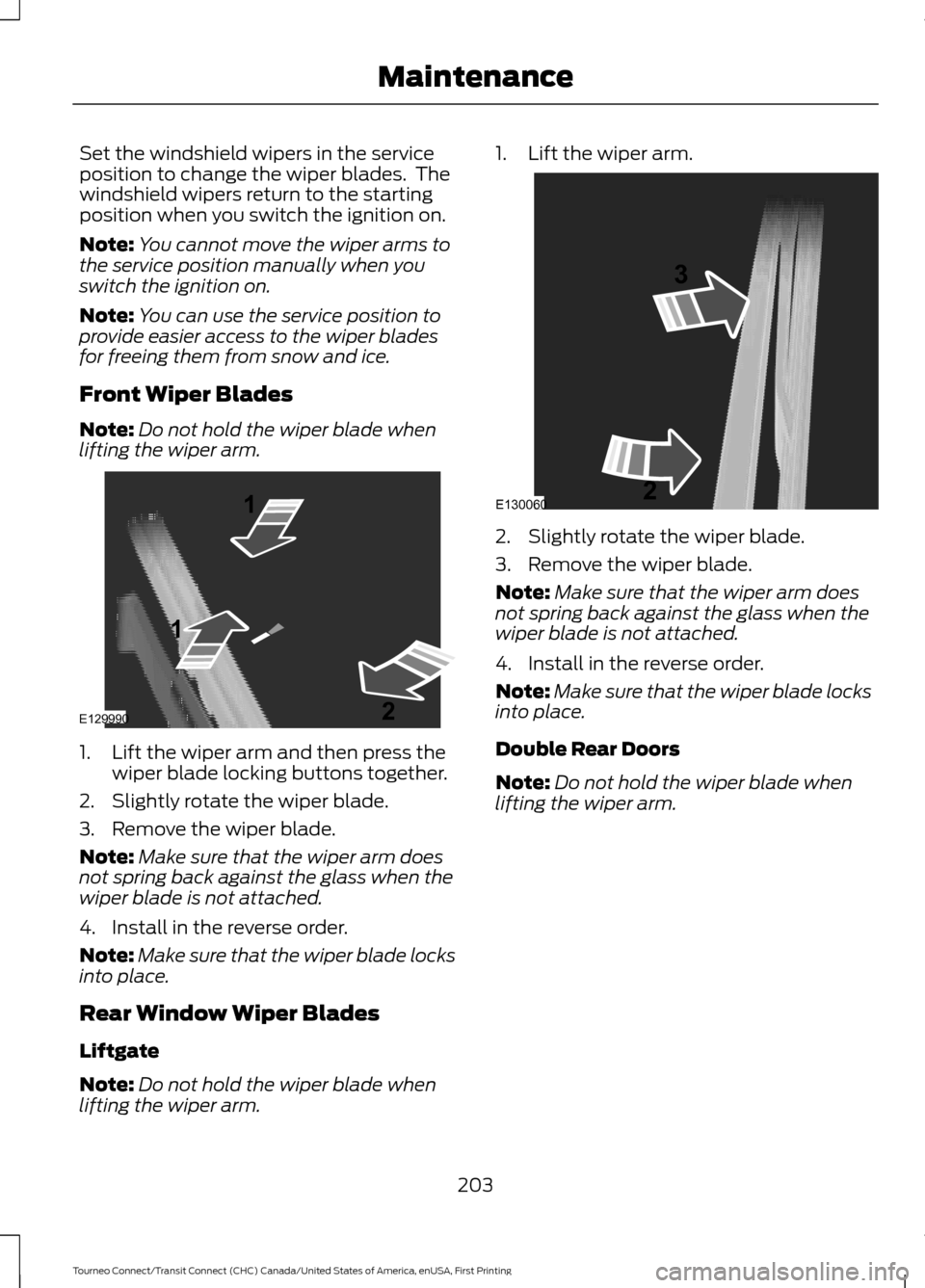
lifting the wiper arm. 1. Lift the wiper arm and then press the
wiper blade locking buttons together.
2. Slightly rotate the wiper blade.
3. Remove the wiper blade.
Note: Make sure that the wiper arm does
not spring back against the glass when the
wiper blade is not attached.
4. Install in the reverse order.
Note: Make sure that the wiper blade locks
into place.
Rear Window Wiper Blades
Liftgate
Note: Do not hold the wiper blade when
lifting the wiper arm. 1. Lift the wiper arm.
2. Slightly rotate the wiper blade.
3. Remove the wiper blade.
Note:
Make sure that the wiper arm does
not spring back against the glass when the
wiper blade is not attached.
4. Install in the reverse order.
Note: Make sure that the wiper blade locks
into place.
Double Rear Doors
Note: Do not hold the wiper blade when
lifting the wiper arm.
203
Tourneo Connect/Transit Connect (CHC) Canada/United States of America, enUSA, First Printing MaintenanceE129990
1
1 2 E130060
3
2
Page 207 of 439
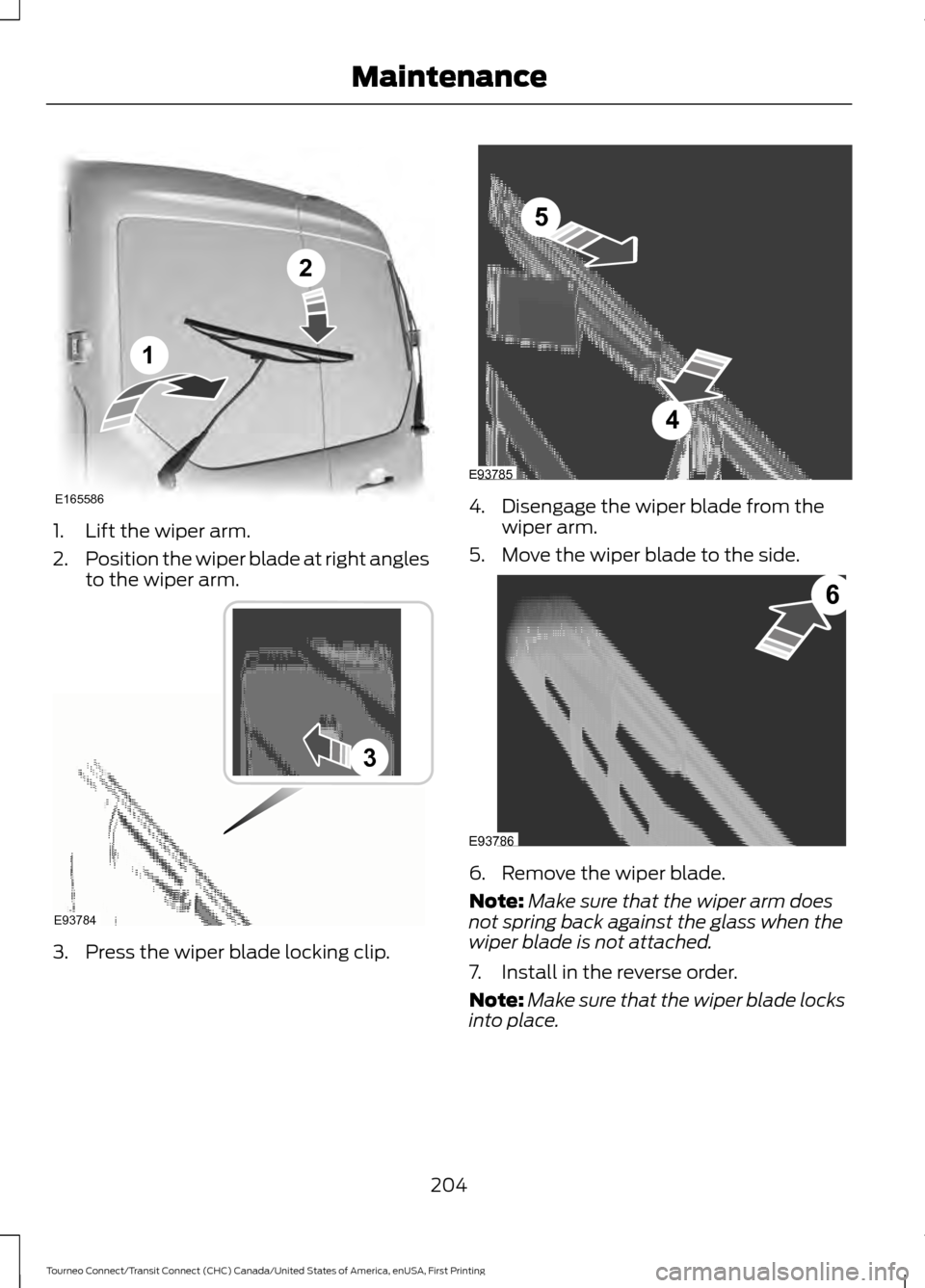
1. Lift the wiper arm.
2.
Position the wiper blade at right angles
to the wiper arm. 3. Press the wiper blade locking clip. 4. Disengage the wiper blade from the
wiper arm.
5. Move the wiper blade to the side. 6. Remove the wiper blade.
Note:
Make sure that the wiper arm does
not spring back against the glass when the
wiper blade is not attached.
7. Install in the reverse order.
Note: Make sure that the wiper blade locks
into place.
204
Tourneo Connect/Transit Connect (CHC) Canada/United States of America, enUSA, First Printing MaintenanceE165586
1
2 E93784
3 5
4
E93785 6
E93786
Page 208 of 439
ADJUSTING THE HEADLAMPS
Vertical Aim Adjustment
If your vehicle has been involved in a crash,
have the aim of the headlamp beam
checked by an authorized dealer.
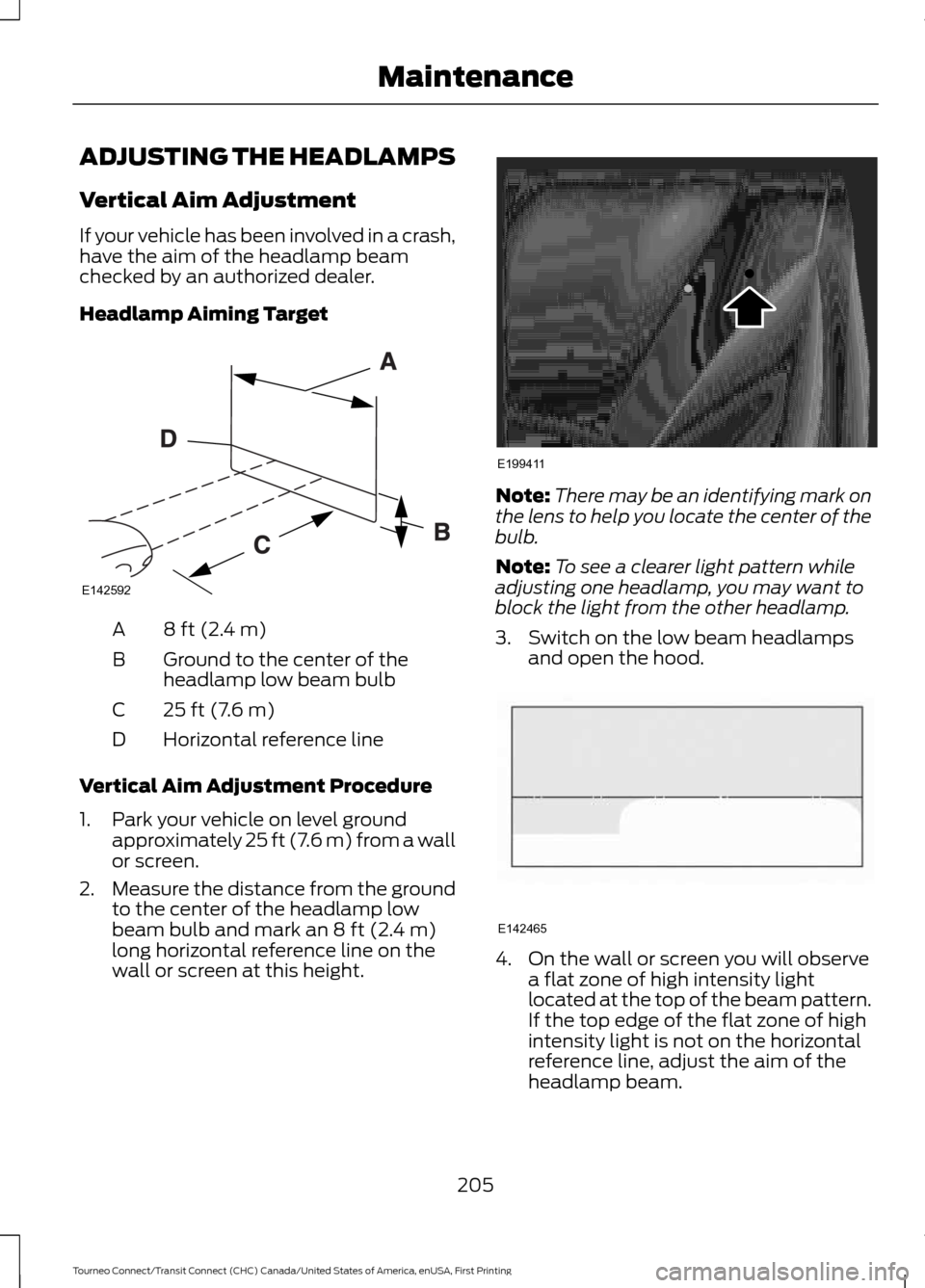
Headlamp Aiming Target
8 ft (2.4 m)
A
Ground to the center of the
headlamp low beam bulb
B
25 ft (7.6 m)
C
Horizontal reference line
D
Vertical Aim Adjustment Procedure
1. Park your vehicle on level ground approximately 25 ft (7.6 m) from a wall
or screen.
2. Measure the distance from the ground
to the center of the headlamp low
beam bulb and mark an
8 ft (2.4 m)
long horizontal reference line on the
wall or screen at this height. Note:
There may be an identifying mark on
the lens to help you locate the center of the
bulb.
Note: To see a clearer light pattern while
adjusting one headlamp, you may want to
block the light from the other headlamp.
3. Switch on the low beam headlamps and open the hood. 4. On the wall or screen you will observe
a flat zone of high intensity light
located at the top of the beam pattern.
If the top edge of the flat zone of high
intensity light is not on the horizontal
reference line, adjust the aim of the
headlamp beam.
205
Tourneo Connect/Transit Connect (CHC) Canada/United States of America, enUSA, First Printing MaintenanceE142592 E199411 E142465
Page 209 of 439
5. Locate the vertical adjuster on each
headlamp. Use a suitable tool, for
example a screwdriver or hexagonal
socket, to turn the adjuster clockwise
or counterclockwise to adjust the
vertical aim of the headlamp. The
horizontal edge of the brighter light
should touch the horizontal reference
line.
6. Close the hood and switch off the lamps.
Horizontal Aim Adjustment
The horizontal aim of the headlamp beam
on your vehicle is not adjustable.
CHANGING A BULB WARNINGS
Switch the lamps and the ignition off.
Failure to do so could result in
serious personal injury. WARNINGS
Bulbs can become hot, let the bulb
cool down before removing it. Failure
to do so could result in personal
injury. The following instructions describe how to
remove the bulbs. Fit replacements in the
reverse order unless otherwise stated.
You must fit bulbs of the correct
specification. See Bulb Specification
Chart (page 211).
Note: We recommended that you see an
authorized dealer to change the headlamp
bulbs if your vehicle is fitted with air
conditioning. Some bulbs are difficult to
access.
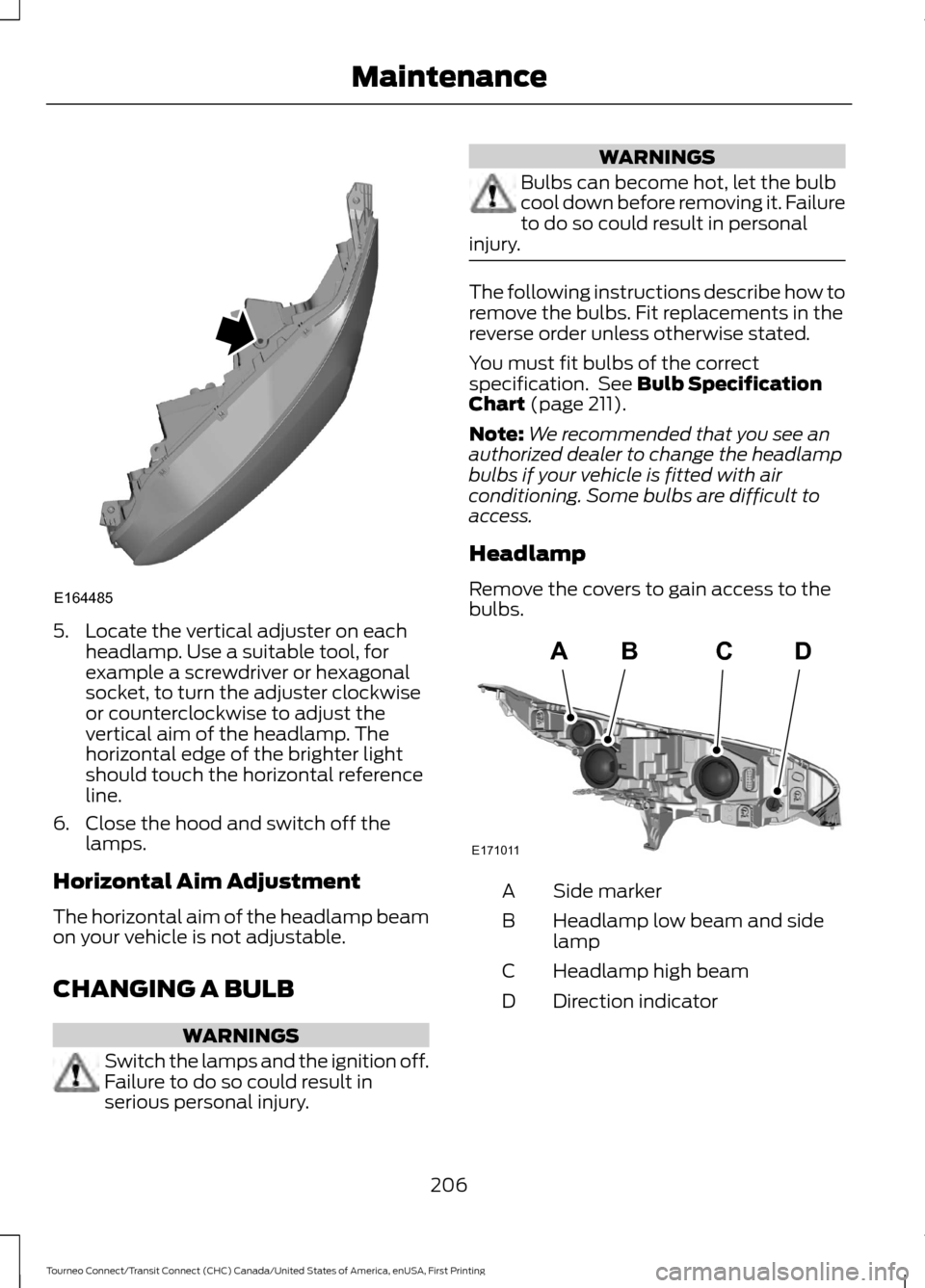
Headlamp
Remove the covers to gain access to the
bulbs. Side marker
A
Headlamp low beam and side
lamp
B
Headlamp high beam
C
Direction indicator
D
206
Tourneo Connect/Transit Connect (CHC) Canada/United States of America, enUSA, First Printing MaintenanceE164485 ABCD
E171011
Page 210 of 439
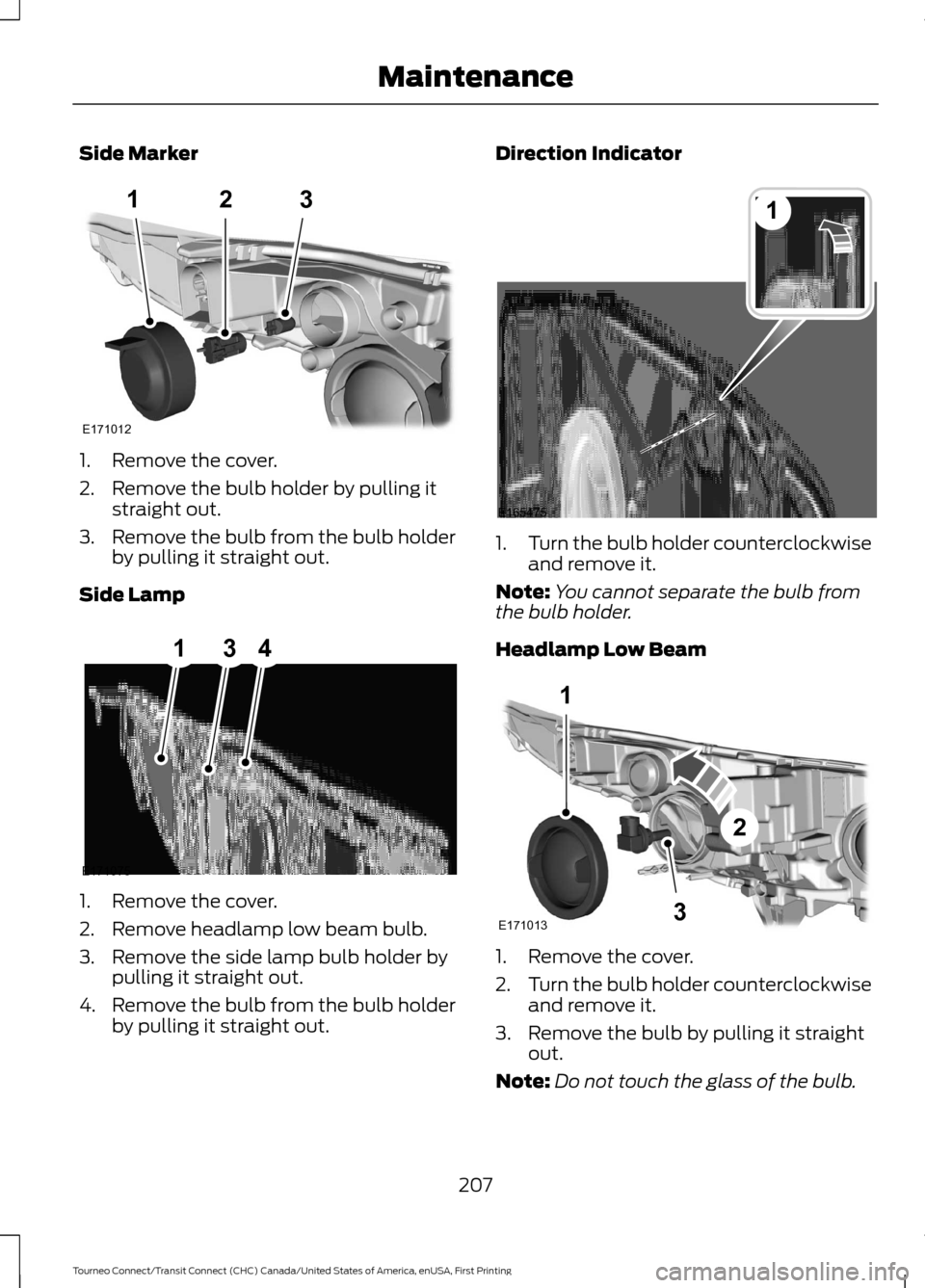
Side Marker
1. Remove the cover.
2. Remove the bulb holder by pulling it
straight out.
3. Remove the bulb from the bulb holder
by pulling it straight out.
Side Lamp 1. Remove the cover.
2. Remove headlamp low beam bulb.
3. Remove the side lamp bulb holder by
pulling it straight out.
4. Remove the bulb from the bulb holder
by pulling it straight out. Direction Indicator
1.
Turn the bulb holder counterclockwise
and remove it.
Note: You cannot separate the bulb from
the bulb holder.
Headlamp Low Beam 1. Remove the cover.
2.
Turn the bulb holder counterclockwise
and remove it.
3. Remove the bulb by pulling it straight out.
Note: Do not touch the glass of the bulb.
207
Tourneo Connect/Transit Connect (CHC) Canada/United States of America, enUSA, First Printing Maintenance123
E171012 E171075
314 1
E165475 1
3
2
E171013
Page 211 of 439
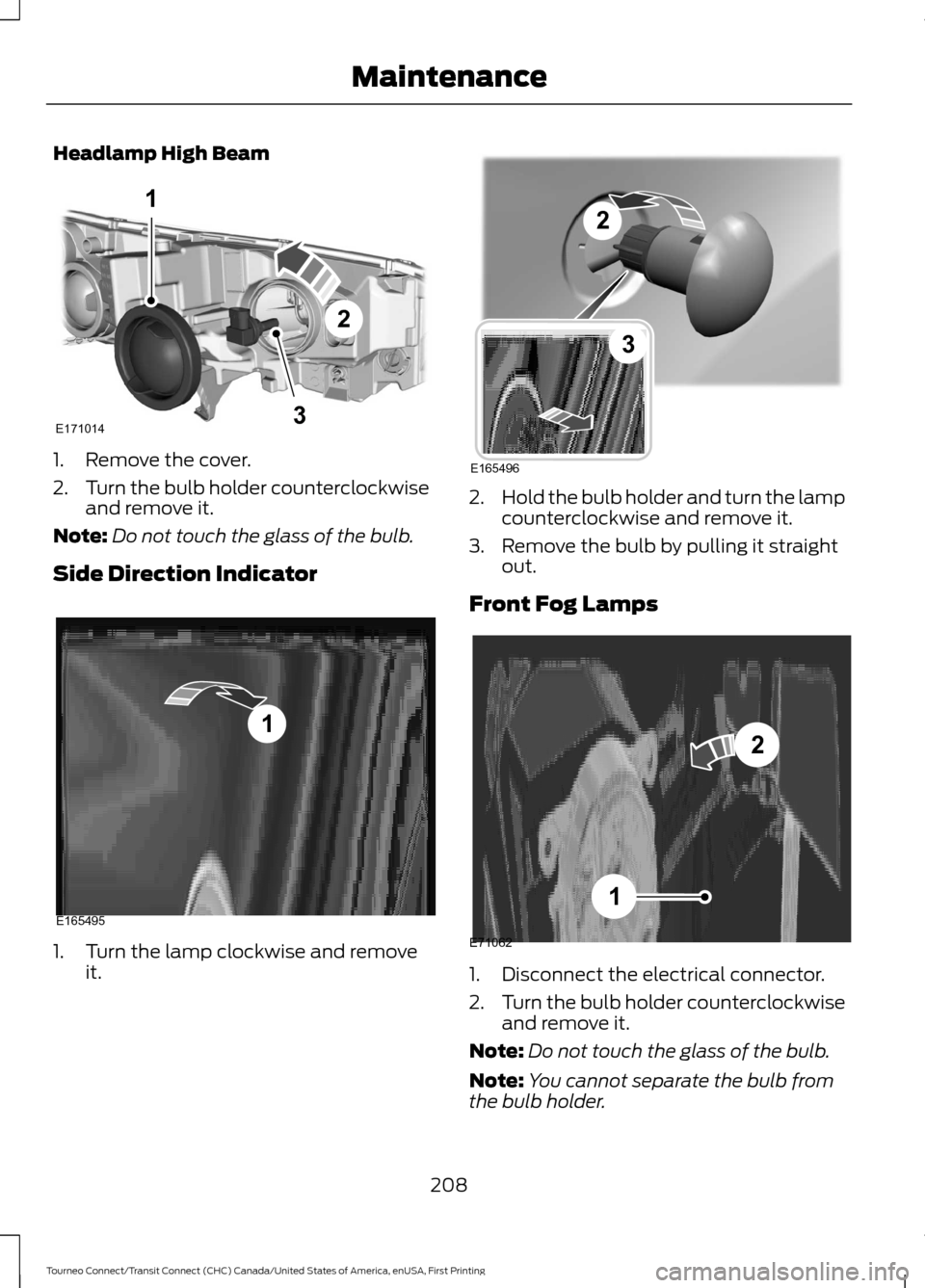
Headlamp High Beam
1. Remove the cover.
2.
Turn the bulb holder counterclockwise
and remove it.
Note: Do not touch the glass of the bulb.
Side Direction Indicator 1. Turn the lamp clockwise and remove
it. 2.
Hold the bulb holder and turn the lamp
counterclockwise and remove it.
3. Remove the bulb by pulling it straight out.
Front Fog Lamps 1. Disconnect the electrical connector.
2.
Turn the bulb holder counterclockwise
and remove it.
Note: Do not touch the glass of the bulb.
Note: You cannot separate the bulb from
the bulb holder.
208
Tourneo Connect/Transit Connect (CHC) Canada/United States of America, enUSA, First Printing Maintenance1
3
2
E171014 1
E165495 E165496
2
3 E71062
1
2
Page 212 of 439
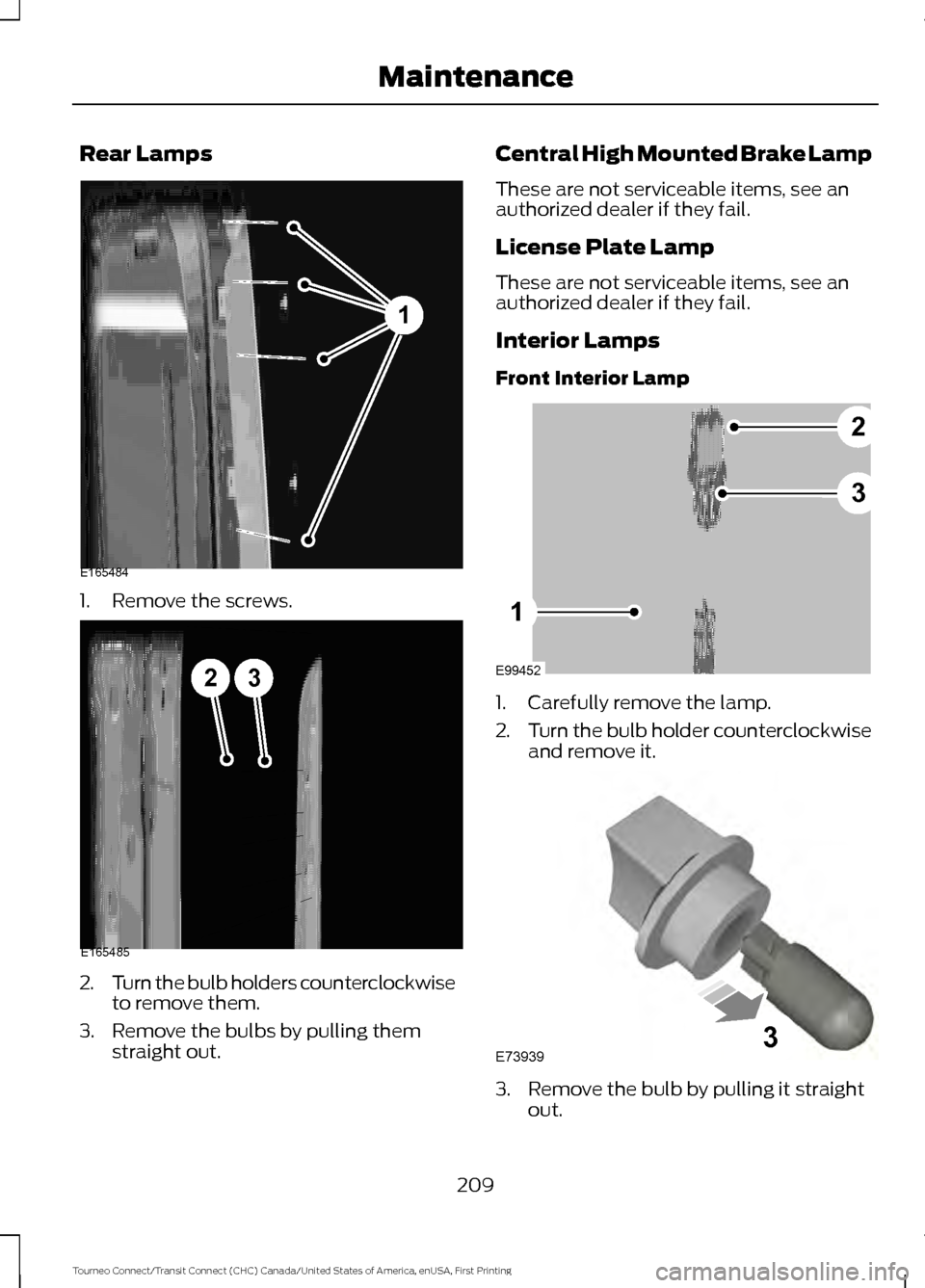
Rear Lamps
1. Remove the screws.
2.
Turn the bulb holders counterclockwise
to remove them.
3. Remove the bulbs by pulling them straight out. Central High Mounted Brake Lamp
These are not serviceable items, see an
authorized dealer if they fail.
License Plate Lamp
These are not serviceable items, see an
authorized dealer if they fail.
Interior Lamps
Front Interior Lamp
1. Carefully remove the lamp.
2.
Turn the bulb holder counterclockwise
and remove it. 3. Remove the bulb by pulling it straight
out.
209
Tourneo Connect/Transit Connect (CHC) Canada/United States of America, enUSA, First Printing Maintenance1
E165484 23
E165485 E99452
2
3
1 E739393
Page 213 of 439
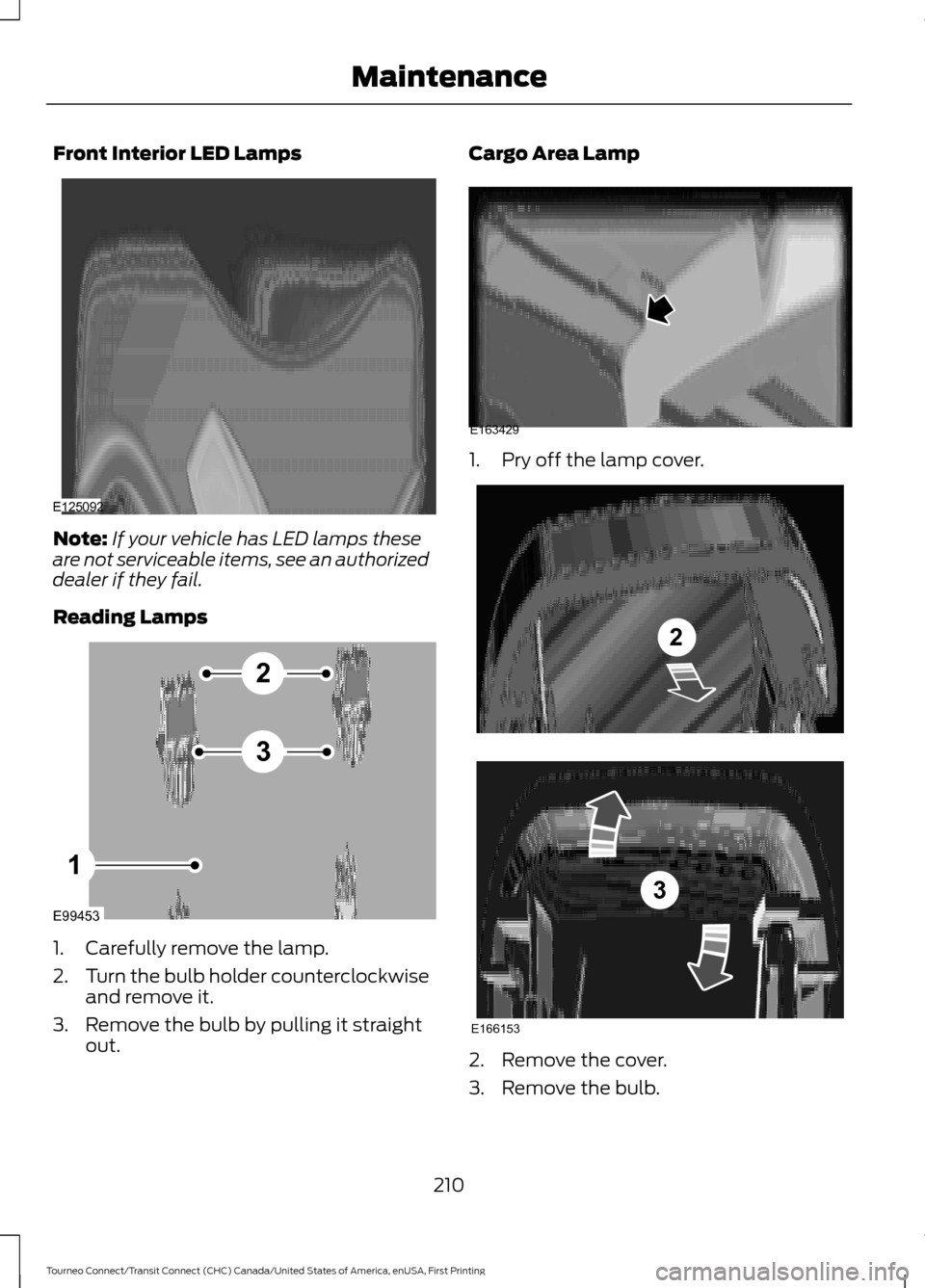
Front Interior LED Lamps
Note:
If your vehicle has LED lamps these
are not serviceable items, see an authorized
dealer if they fail.
Reading Lamps 1. Carefully remove the lamp.
2.
Turn the bulb holder counterclockwise
and remove it.
3. Remove the bulb by pulling it straight out. Cargo Area Lamp
1. Pry off the lamp cover.
2. Remove the cover.
3. Remove the bulb.
210
Tourneo Connect/Transit Connect (CHC) Canada/United States of America, enUSA, First Printing MaintenanceE125092 E99453
2
3
1 E163429 E166153
2
3
Page 218 of 439
Exterior Plastic Parts
For routine cleaning we recommend
Motorcraft Detail Wash. If tar or grease
spots are present, we recommend
Motorcraft Bug and Tar Remover.
Stripes or Graphics (If Equipped)
Do not use a commercial or high-pressure
sprayer on the surface or edge of stripes
and graphics. This can damage them and
cause the edges to peel away from the
vehicle surface.
Underbody
Flush the complete underside of your
vehicle frequently. Keep body and door
drain holes free of debris or foreign
material.
WAXING
Regular waxing is necessary to protect your
car's paint from the elements. We
recommend that you wash and wax the
painted surface once or twice a year.
When washing and waxing, park your
vehicle in a shaded area out of direct
sunlight. Always wash your vehicle before
applying wax.
• Use a quality wax that does not contain
abrasives.
• Follow the manufacturer ’s instructions
to apply and remove the wax.
• Apply a small amount of wax in a
back-and-forth motion, not in circles. •
Do not allow wax to come in contact
with any non-body (low-gloss black)
colored trim. The wax will discolor or
stain the parts over time.
•Roof racks.
• Bumpers.
• Grained door handles.
• Side moldings.
• Mirror housings.
• Windshield cowl area.
• Do not apply wax to glass areas.
• After waxing, your car's paint should
feel smooth, and be free of streaks and
smudges.
CLEANING THE ENGINE
Engines are more efficient when they are
clean because grease and dirt buildup keep
the engine warmer than normal.
When washing:
• Take care when using a power washer
to clean the engine. The high-pressure
fluid could penetrate the sealed parts
and cause damage.
• Do not spray a hot engine with cold
water to avoid cracking the engine
block or other engine components.
• Spray Motorcraft Engine Shampoo and
Degreaser on all parts that require
cleaning and pressure rinse clean. In
Canada, use Motorcraft Engine
Shampoo.
• Never wash or rinse the engine while it
is hot or running; water in the running
engine may cause internal damage.
215
Tourneo Connect/Transit Connect (CHC) Canada/United States of America, enUSA, First Printing Vehicle Care
Page 245 of 439
Carrying Out the System Reset
Procedure
Read the entire procedure before carrying
out a system reset.
1. Drive your vehicle above 20 mph (32
km/h) for at least two minutes and
then park in a safe location where you
can easily get to all four tires and have
access to a tire inflation pump.
2. Switch the ignition off.
3. Switch the ignition on with the engine off.
4. Turn the hazard flashers on then off three times, this must be completed
within 10 seconds. If the reset mode
has been entered successfully, the horn
will chirp once and the system indicator
will flash. If this does not occur, repeat
the procedure from step 2. If after
repeated attempts to enter the reset
mode, the horn does not chirp and the
system indicator does not flash, have
your vehicle checked by an authorized
dealer as soon as possible.
5. Train the system sensors in the tires using the following reset sequence
starting with the left front tire and
following a clockwise order: Left front,
right front, right rear, left rear.
6. Remove the valve cap from the valve stem on the left front tire. Decrease the
air pressure until the horn chirps.
Note: The single horn chirp confirms that
the sensor identification code has been
learned by your vehicle for this position. If a
double horn chirp is heard, the reset
procedure was unsuccessful and must be
repeated.
7. Remove the valve cap from the valve stem on the right front tire. Decrease
the air pressure until the horn chirps.
8. Remove the valve cap from the valve stem on the right rear tire. Decrease the
air pressure until the horn chirps. 9. Remove the valve cap from the valve
stem on the left rear tire. Decrease the
air pressure until the horn chirps.
Training is complete when the horn
chirps after the last system sensor (left
rear) has been trained and the system
indicator stops flashing.
10. Switch the ignition off. If two short horn chirps are heard, the reset
procedure was unsuccessful and
must be repeated.
Note: If after repeating the procedure two
short horn chirps are heard again, have your
vehicle checked by an authorized dealer as
soon as possible.
11. Set all four tires to the correct pressure See Maintenance (page
193). or the tire inflation pressure label
(located on the edge of driver door or
the B-Pillar).
CHANGING A ROAD WHEEL WARNINGS
The use of tire sealants may damage
your tire pressure monitoring system
and should only be used in roadside
emergencies. If you must use a sealant, the
Ford Tire Mobility Kit sealant should be
used. The tire pressure monitoring system
sensor and valve stem on the wheel must
be replaced by an authorized dealer after
use of the sealant. If the tire pressure monitor sensor
becomes damaged, it will no longer
function.
See Tire Pressure
Monitoring System (page 238). Note:
The tire pressure monitoring system
indicator light will illuminate when the spare
tire is in use. To restore the full function of
the monitoring system, all road wheels
equipped with tire pressure monitoring
sensors must be mounted on the vehicle.
242
Tourneo Connect/Transit Connect (CHC) Canada/United States of America, enUSA, First Printing Wheels and Tires