maintenance FORD TRANSIT CONNECT 2016 2.G Service Manual
[x] Cancel search | Manufacturer: FORD, Model Year: 2016, Model line: TRANSIT CONNECT, Model: FORD TRANSIT CONNECT 2016 2.GPages: 439, PDF Size: 6.96 MB
Page 235 of 439
Inspecting Your Tires and
Wheel Valve Stems
Periodically inspect the tire treads
for uneven or excessive wear and
remove objects such as stones,
nails or glass that may be wedged
in the tread grooves. Check the tire
and valve stems for holes, cracks,
or cuts that may permit air
leakage and repair or replace the
tire and replace the valve stem.
Inspect the tire sidewalls for
cracking, cuts, bruises and other
signs of damage or excessive
wear. If internal damage to the tire
is suspected, have the tire
demounted and inspected in case
it needs to be repaired or replaced.
For your safety, tires that are
damaged or show signs of
excessive wear should not be used
because they are more likely to
blow out or fail.
Improper or inadequate vehicle
maintenance can cause tires to
wear abnormally. Inspect all your
tires, including the spare,
frequently, and replace them if
one or more of the following
conditions exist:
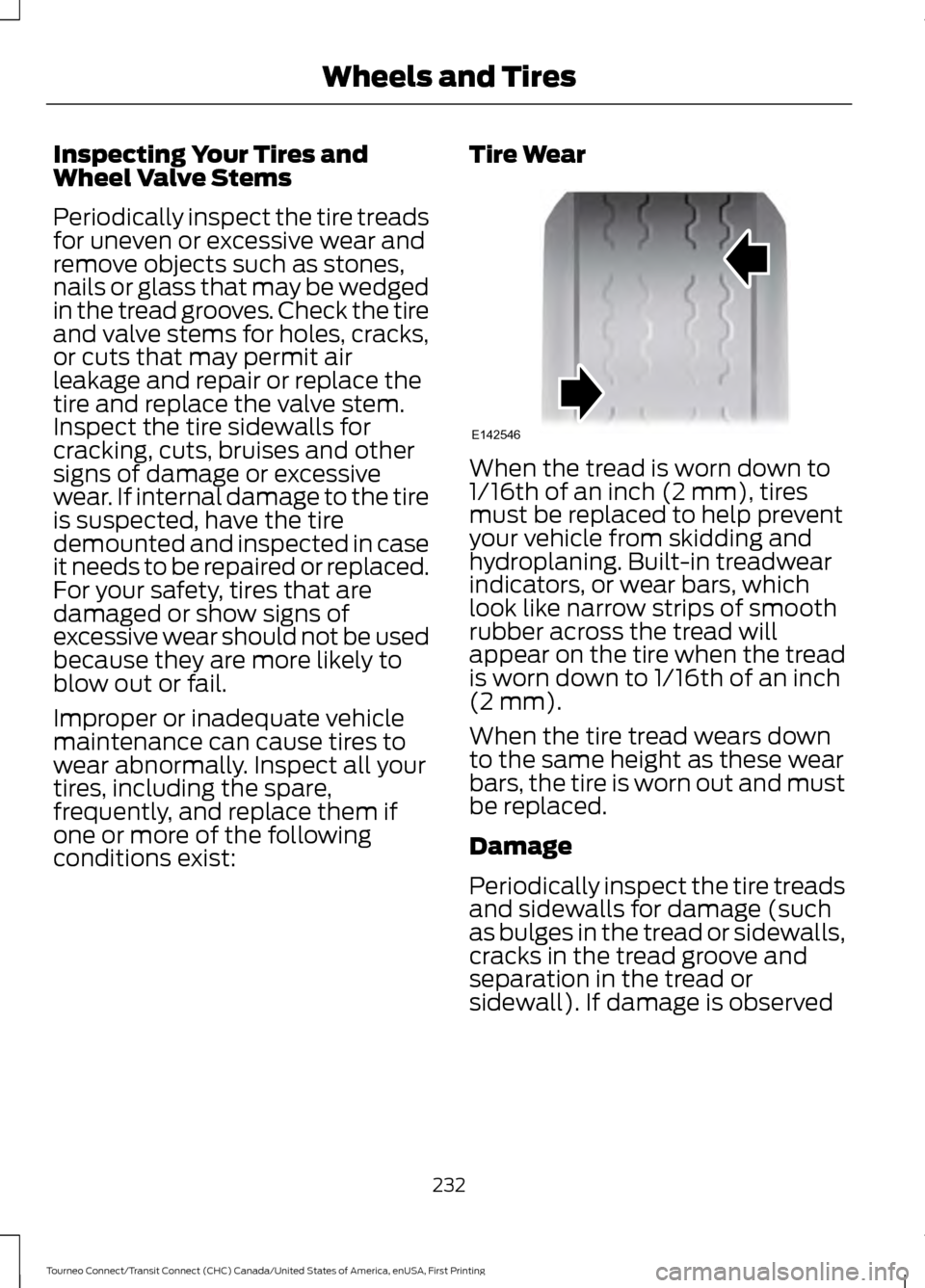
Tire Wear When the tread is worn down to
1/16th of an inch (2 mm), tires
must be replaced to help prevent
your vehicle from skidding and
hydroplaning. Built-in treadwear
indicators, or wear bars, which
look like narrow strips of smooth
rubber across the tread will
appear on the tire when the tread
is worn down to 1/16th of an inch
(2 mm).
When the tire tread wears down
to the same height as these wear
bars, the tire is worn out and must
be replaced.
Damage
Periodically inspect the tire treads
and sidewalls for damage (such
as bulges in the tread or sidewalls,
cracks in the tread groove and
separation in the tread or
sidewall). If damage is observed
232
Tourneo Connect/Transit Connect (CHC) Canada/United States of America, enUSA, First Printing Wheels and TiresE142546
Page 240 of 439
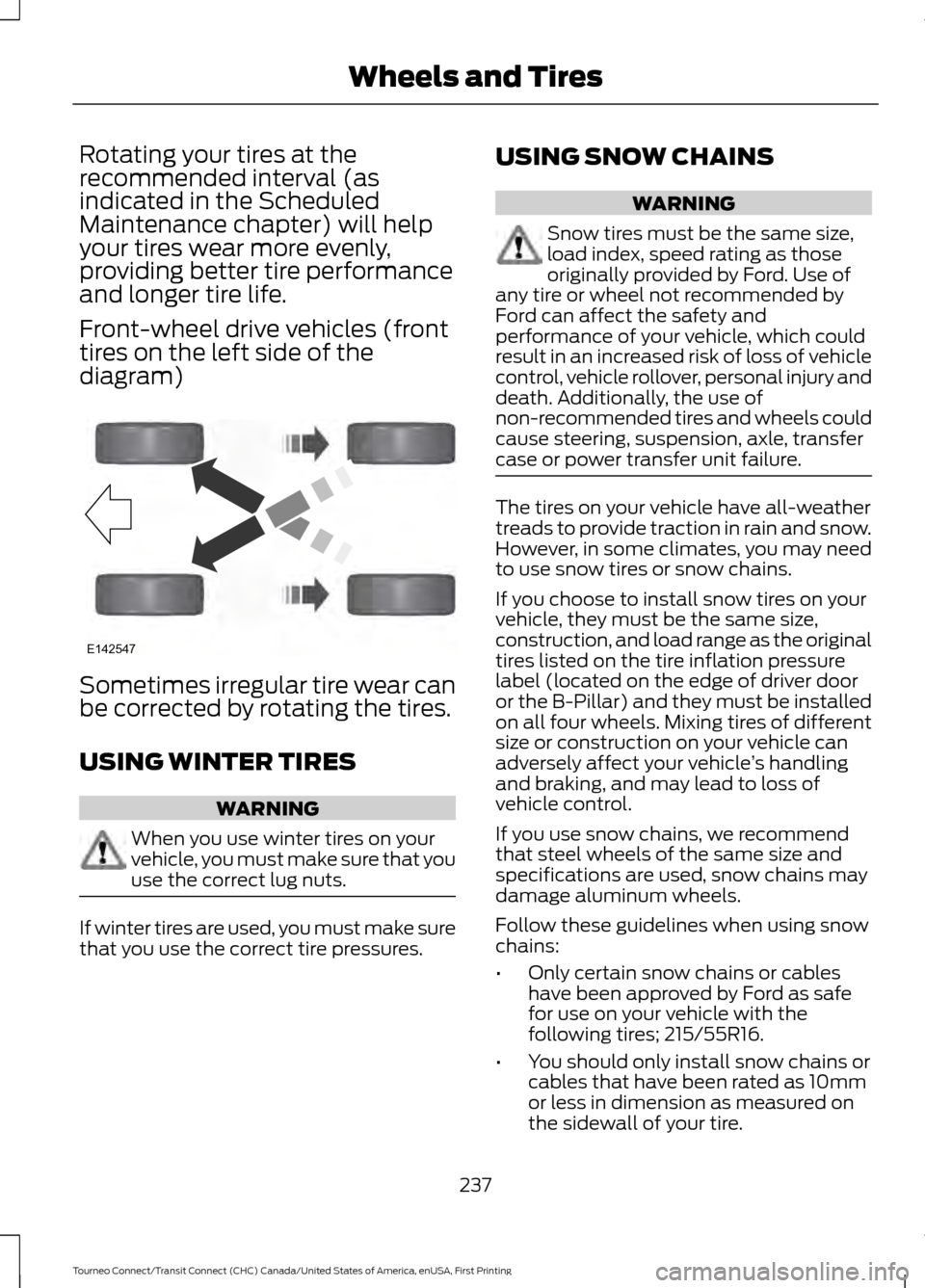
Rotating your tires at the
recommended interval (as
indicated in the Scheduled
Maintenance chapter) will help
your tires wear more evenly,
providing better tire performance
and longer tire life.
Front-wheel drive vehicles (front
tires on the left side of the
diagram)
Sometimes irregular tire wear can
be corrected by rotating the tires.
USING WINTER TIRES
WARNING
When you use winter tires on your
vehicle, you must make sure that you
use the correct lug nuts.
If winter tires are used, you must make sure
that you use the correct tire pressures. USING SNOW CHAINS WARNING
Snow tires must be the same size,
load index, speed rating as those
originally provided by Ford. Use of
any tire or wheel not recommended by
Ford can affect the safety and
performance of your vehicle, which could
result in an increased risk of loss of vehicle
control, vehicle rollover, personal injury and
death. Additionally, the use of
non-recommended tires and wheels could
cause steering, suspension, axle, transfer
case or power transfer unit failure. The tires on your vehicle have all-weather
treads to provide traction in rain and snow.
However, in some climates, you may need
to use snow tires or snow chains.
If you choose to install snow tires on your
vehicle, they must be the same size,
construction, and load range as the original
tires listed on the tire inflation pressure
label (located on the edge of driver door
or the B-Pillar) and they must be installed
on all four wheels. Mixing tires of different
size or construction on your vehicle can
adversely affect your vehicle
’s handling
and braking, and may lead to loss of
vehicle control.
If you use snow chains, we recommend
that steel wheels of the same size and
specifications are used, snow chains may
damage aluminum wheels.
Follow these guidelines when using snow
chains:
• Only certain snow chains or cables
have been approved by Ford as safe
for use on your vehicle with the
following tires; 215/55R16.
• You should only install snow chains or
cables that have been rated as 10mm
or less in dimension as measured on
the sidewall of your tire.
237
Tourneo Connect/Transit Connect (CHC) Canada/United States of America, enUSA, First Printing Wheels and TiresE142547
Page 241 of 439
•
Not all S-Class snow chains or cables
meet these restrictions. Chains of this
size restriction will include a tensioning
device.
• Purchase snow chains or cables from
a manufacturer that clearly labels body
to tire dimension restrictions.
• Snow chains or cables must be
mounted in pairs on the front or rear
tires only.
• Do not exceed 30 mph (48 km/h) or
the maximum speed recommended by
the chain manufacturer, whichever is
less.
If you have any questions regarding snow
chains or cables, contact an authorized
Ford dealer.
TIRE PRESSURE MONITORING
SYSTEM WARNING
The tire pressure monitoring system
is not a substitute for manually
checking tire pressure. The tire
pressure should be checked periodically
(at least monthly) using a tire gauge, see
Inflating your tires in this chapter. Failure
to properly maintain your tire pressure
could increase the risk of tire failure, loss
of control, vehicle rollover and personal
injury. Each tire, including the spare (if
provided), should be checked
monthly when cold and inflated
to the inflation pressure recommended by
the vehicle manufacturer on the vehicle
placard or tire inflation pressure label. (If
your vehicle has tires of a different size
than the size indicated on the vehicle
placard or tire inflation pressure label, you
should determine the proper tire inflation
pressure for those tires.) As an added safety feature, your vehicle
has been equipped with a Tire Pressure
Monitoring System (TPMS) that
illuminates a low tire pressure telltale
when one or more of your tires is
significantly under-inflated. Accordingly,
when the low tire pressure telltale
illuminates, you should stop and check
your tires as soon as possible, and inflate
them to the proper pressure. Driving on a
significantly under-inflated tire causes the
tire to overheat and can lead to tire failure.
Under-inflation also reduces fuel efficiency
and tire tread life, and may affect the
vehicle
’s handling and stopping ability.
Please note that the TPMS is not a
substitute for proper tire maintenance, and
it is the driver ’s responsibility to maintain
correct tire pressure, even if under-inflation
has not reached the level to trigger
illumination of the TPMS low tire pressure
telltale.
Your vehicle has also been equipped with
a TPMS malfunction indicator to indicate
when the system is not operating properly.
The TPMS malfunction indicator is
combined with the low tire pressure
telltale. When the system detects a
malfunction, the telltale will flash for
approximately one minute and then remain
continuously illuminated. This sequence
will continue upon subsequent vehicle
start-ups as long as the malfunction exists.
When the malfunction indicator is
illuminated, the system may not be able
to detect or signal low tire pressure as
intended. TPMS malfunctions may occur
for a variety of reasons, including the
installation of replacement or alternate
tires or wheels on the vehicle that prevent
the TPMS from functioning properly.
Always check the TPMS malfunction
telltale after replacing one or more tires or
wheels on your vehicle to ensure that the
replacement or alternate tires and wheels
allow the TPMS to continue to function
properly.
238
Tourneo Connect/Transit Connect (CHC) Canada/United States of America, enUSA, First Printing Wheels and Tires
Page 243 of 439
Action required
Possible cause
Low tire pressure
warning light
1. Make sure tires are at the correct pres-
sure. See Inflating the tires in this
chapter.
Tire(s) under-inflated
Solid warning light
2. After inflating the tires to the correct
pressure See Maintenance (page 193).
or the tire inflation pressure label
(located on the edge of driver door or the
B-Pillar), the vehicle must be driven for
at least two minutes at over 20 mph (32
km/h) before the light will turn off.
Repair the damaged road wheel and tire
assembly and refit it to your vehicle to
restore correct system function. For a
description on how the system functions,
see
When the temporary spare tire is
installed in this section.
Spare tire in use
On vehicles with different front and rear
tire pressures, you must retrain the
system following every tire rotation. See
Tire Care
(page 222).
Tire rotation without
sensor training
If the tires are correctly inflated and the
spare tire is not in use but the light
remains on, have your vehicle checked
by an authorized dealer as soon as
possible.
Tire pressure monitoring
system malfunction
Repair the damaged road wheel and tire
assembly and refit it to your vehicle to
restore correct system function. For a
description on how the system functions,
see
When the temporary spare tire is
installed in this section.
Spare tire in use
Flashing warning
light
If the tires are correctly inflated and the
spare tire is not in use but the light
remains on, have your vehicle checked
by an authorized dealer as soon as
possible.
Tire pressure monitoring
system malfunction
240
Tourneo Connect/Transit Connect (CHC) Canada/United States of America, enUSA, First Printing Wheels and Tires
Page 245 of 439
Carrying Out the System Reset
Procedure
Read the entire procedure before carrying
out a system reset.
1. Drive your vehicle above 20 mph (32
km/h) for at least two minutes and
then park in a safe location where you
can easily get to all four tires and have
access to a tire inflation pump.
2. Switch the ignition off.
3. Switch the ignition on with the engine off.
4. Turn the hazard flashers on then off three times, this must be completed
within 10 seconds. If the reset mode
has been entered successfully, the horn
will chirp once and the system indicator
will flash. If this does not occur, repeat
the procedure from step 2. If after
repeated attempts to enter the reset
mode, the horn does not chirp and the
system indicator does not flash, have
your vehicle checked by an authorized
dealer as soon as possible.
5. Train the system sensors in the tires using the following reset sequence
starting with the left front tire and
following a clockwise order: Left front,
right front, right rear, left rear.
6. Remove the valve cap from the valve stem on the left front tire. Decrease the
air pressure until the horn chirps.
Note: The single horn chirp confirms that
the sensor identification code has been
learned by your vehicle for this position. If a
double horn chirp is heard, the reset
procedure was unsuccessful and must be
repeated.
7. Remove the valve cap from the valve stem on the right front tire. Decrease
the air pressure until the horn chirps.
8. Remove the valve cap from the valve stem on the right rear tire. Decrease the
air pressure until the horn chirps. 9. Remove the valve cap from the valve
stem on the left rear tire. Decrease the
air pressure until the horn chirps.
Training is complete when the horn
chirps after the last system sensor (left
rear) has been trained and the system
indicator stops flashing.
10. Switch the ignition off. If two short horn chirps are heard, the reset
procedure was unsuccessful and
must be repeated.
Note: If after repeating the procedure two
short horn chirps are heard again, have your
vehicle checked by an authorized dealer as
soon as possible.
11. Set all four tires to the correct pressure See Maintenance (page
193). or the tire inflation pressure label
(located on the edge of driver door or
the B-Pillar).
CHANGING A ROAD WHEEL WARNINGS
The use of tire sealants may damage
your tire pressure monitoring system
and should only be used in roadside
emergencies. If you must use a sealant, the
Ford Tire Mobility Kit sealant should be
used. The tire pressure monitoring system
sensor and valve stem on the wheel must
be replaced by an authorized dealer after
use of the sealant. If the tire pressure monitor sensor
becomes damaged, it will no longer
function.
See Tire Pressure
Monitoring System (page 238). Note:
The tire pressure monitoring system
indicator light will illuminate when the spare
tire is in use. To restore the full function of
the monitoring system, all road wheels
equipped with tire pressure monitoring
sensors must be mounted on the vehicle.
242
Tourneo Connect/Transit Connect (CHC) Canada/United States of America, enUSA, First Printing Wheels and Tires
Page 250 of 439
2. Slide the wheel partially under the
vehicle and install the retainer through
the wheel center. Pull on the cables to
align the components at the end of the
cables.
3. Attach the second cable by screwing the bolt into one of the holes in the
wheel.
4. Turn the end of the first cable so it fits through the slot and install the cable.
Then slide the cap over the retainer.
5. Turn the jack handle clockwise to raise
the tire to its stowed position
underneath the vehicle. The effort to
turn the jack handle increases
significantly when the tire is raised to
the maximum tightness. Tighten to the
best of your ability. 6. Check that the tire is flat against the
frame and is fully tight. Try to push or
pull, then turn the tire to be sure it will
not move. Loosen and retighten, if
necessary. Failure to properly stow the
spare tire may result in failure of the
winch cable and loss of the tire.
7. Repeat this tightness check procedure
when servicing the spare tire pressure
(every six months, per scheduled
maintenance information), or at any
time that the spare tire is disturbed
through service of other components.
Return the jack and tools to the storage
position in the cargo area.
TECHNICAL SPECIFICATIONS
Wheel Lug Nut Torque Specifications WARNING
When a wheel is installed, always remove any corrosion, dirt or foreign materials
present on the mounting surfaces of the wheel or the surface of the wheel hub,
brake drum or brake disc that contacts the wheel. Make sure that any fasteners
that attach the rotor to the hub are secured so they do not interfere with the mounting
surfaces of the wheel. Installing wheels without correct metal-to-metal contact at the
wheel mounting surfaces can cause the wheel nuts to loosen and the wheel to come off
while your vehicle is in motion, resulting in loss of control. Ib-ft (Nm)
*
Bolt size
100 (135)
M12 x 1.5
* Torque specifications are for nut and bolt threads free of dirt and rust. Use only Ford
recommended replacement fasteners.
Retighten the lug nuts to the specified torque within 100 miles (160 kilometers) after any
wheel disturbance (such as tire rotation, changing a flat tire, wheel removal).
247
Tourneo Connect/Transit Connect (CHC) Canada/United States of America, enUSA, First Printing Wheels and Tires
Page 253 of 439
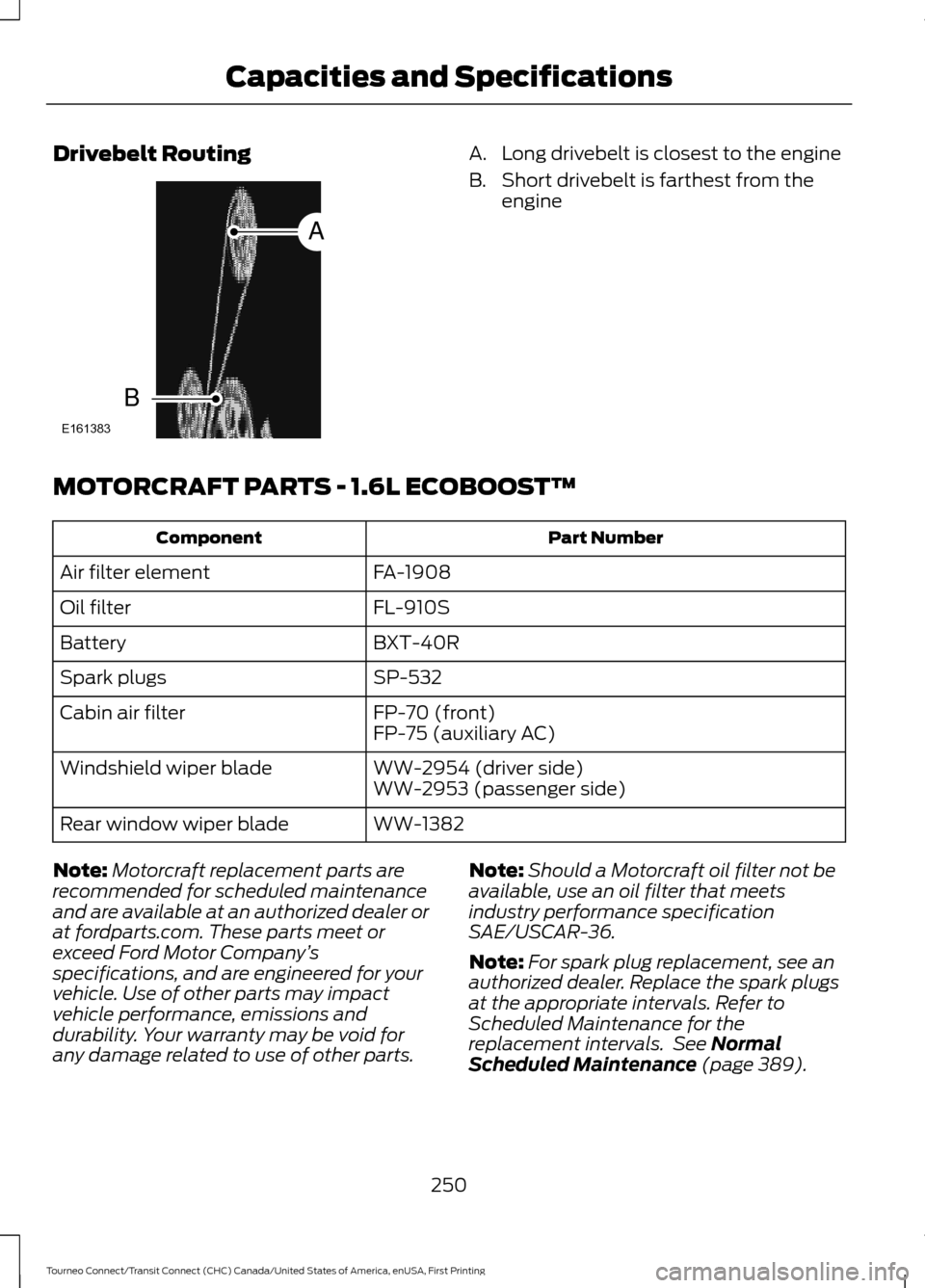
Drivebelt Routing A. Long drivebelt is closest to the engine
B. Short drivebelt is farthest from the
engine
MOTORCRAFT PARTS - 1.6L ECOBOOST™ Part Number
Component
FA-1908
Air filter element
FL-910S
Oil filter
BXT-40R
Battery
SP-532
Spark plugs
FP-70 (front)
Cabin air filter
FP-75 (auxiliary AC)
WW-2954 (driver side)
Windshield wiper blade
WW-2953 (passenger side)
WW-1382
Rear window wiper blade
Note: Motorcraft replacement parts are
recommended for scheduled maintenance
and are available at an authorized dealer or
at fordparts.com. These parts meet or
exceed Ford Motor Company ’s
specifications, and are engineered for your
vehicle. Use of other parts may impact
vehicle performance, emissions and
durability. Your warranty may be void for
any damage related to use of other parts. Note:
Should a Motorcraft oil filter not be
available, use an oil filter that meets
industry performance specification
SAE/USCAR-36.
Note: For spark plug replacement, see an
authorized dealer. Replace the spark plugs
at the appropriate intervals. Refer to
Scheduled Maintenance for the
replacement intervals. See Normal
Scheduled Maintenance (page 389).
250
Tourneo Connect/Transit Connect (CHC) Canada/United States of America, enUSA, First Printing Capacities and SpecificationsE161383
A
B
Page 254 of 439
MOTORCRAFT PARTS - 2.5L
Part Number
Component
FA-1910
Air filter element
FL-910S
Oil filter
BXT-40R
Battery
SP-530
Spark plugs
FP-70 (front)
Cabin air filter
FP-75 (auxiliary AC)
WW-2954 (driver side)
Windshield wiper blade
WW-2953 (passenger side)
WW-1382
Rear window wiper blade
Note: Motorcraft replacement parts are
recommended for scheduled maintenance
and are available at an authorized dealer or
at fordparts.com. These parts meet or
exceed Ford Motor Company ’s
specifications, and are engineered for your
vehicle. Use of other parts may impact
vehicle performance, emissions and
durability. Your warranty may be void for
any damage related to use of other parts.
Note: Should a Motorcraft oil filter not be
available, use an oil filter that meets
industry performance specification
SAE/USCAR-36.
Note: For spark plug replacement, see an
authorized dealer. Replace the spark plugs
at the appropriate intervals. Refer to
Scheduled Maintenance for the
replacement intervals. See Normal
Scheduled Maintenance (page 389).
VEHICLE IDENTIFICATION
NUMBER
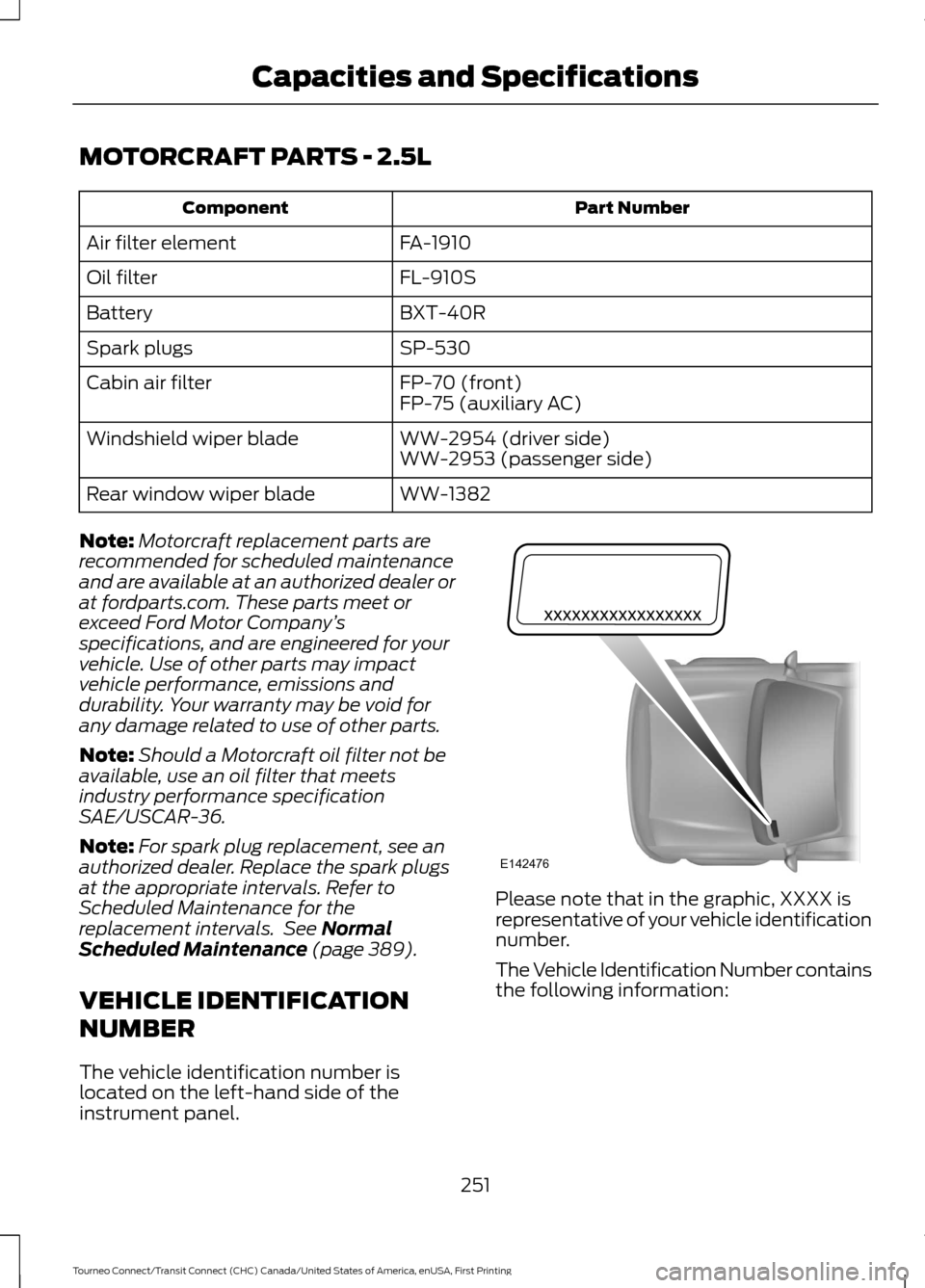
The vehicle identification number is
located on the left-hand side of the
instrument panel. Please note that in the graphic, XXXX is
representative of your vehicle identification
number.
The Vehicle Identification Number contains
the following information:
251
Tourneo Connect/Transit Connect (CHC) Canada/United States of America, enUSA, First Printing Capacities and SpecificationsE142476
Page 294 of 439
Action and Description
Message
Press the OK button and scroll to select. Press the OK button
to confirm.
Access the Auto Version number as well as the FDN number.
System info
Press the
OK button to select.
Exit the current menu.
Return
SYNC™ APPLICATIONS AND
SERVICES
(If Equipped)
In order for the following features to work,
your cell phone must be compatible with
SYNC. To check your phone's
compatibility, visit www.SYNCMyRide.com,
www.SYNCMyRide.ca or
www.syncmaroute.ca.
• SYNC Services *
: Provides access to
traffic, directions and information such
as travel, horoscopes, stock prices and
more.
• 911 Assist: Can alert 911 in the event of
an emergency.
• Vehicle Health Report *
: Provides a
diagnostic and maintenance report
card of your vehicle.
* This is an optional feature and available
in the United States only.
911 Assist
(If Equipped) WARNINGS
Unless the 911 Assist setting is set on
before a crash, the system will not
dial for help which could delay
response time, potentially increasing the
risk of serious injury or death after a crash. WARNINGS
Do not wait for 911 Assist to make an
emergency call if you can do it
yourself. Dial emergency services
immediately to avoid delayed response
time which could increase the risk of
serious injury or death after a crash. If you
do not hear 911 Assist within five seconds
of the crash, the system or phone may be
damaged or non-functional. Always place your phone in a secure
location in your vehicle so it does not
become a projectile or get damaged
in a crash. Failure to do so may cause
serious injury to someone or damage the
phone which could prevent 911 Assist from
working properly. Note:
The SYNC 911 Assist feature must be
set on before the incident.
Note: Before setting this feature on, make
sure that you read the 911 Assist Privacy
Notice later in this section for important
information.
Note: If any user turns 911 Assist on or off,
that setting applies for all paired phones. If
911 Assist is turned off, either a voice
message plays or a display message (or
icon) comes on (or both) when your vehicle
is started after a previously paired phone
connects.
Note: Every phone operates differently.
While SYNC 911 Assist works with most
cellular phones, some may have trouble
using this feature.
291
Tourneo Connect/Transit Connect (CHC) Canada/United States of America, enUSA, First Printing SYNC™
Page 296 of 439
In the Event of a Crash
Not all crashes will deploy an airbag or
activate the fuel pump shut-off (the
triggers for 911 Assist). If a connected cell
phone sustains damage or loses its
connection to SYNC during a crash, SYNC
will search for and try to connect to a
previously paired cell phone; SYNC will
then attempt to call the emergency
services.
Before making the call:
•
SYNC provides a short window of time
(about 10 seconds) to cancel the call.
If you fail to cancel the call, SYNC
attempts to dial 911.
• SYNC says the following, or a similar
message: "SYNC will attempt to call
911, to cancel the call, press Cancel on
your screen or press and hold the
phone button on your steering wheel."
If you do not cancel the call, and SYNC
makes a successful call, a pre-recorded
message plays for the 911 operator, and
then the occupant(s) in your vehicle is able
to talk with the operator. Be prepared to
provide your name, phone number and
location immediately, because not all 911
systems are capable of receiving this
information electronically.
911 Assist May Not Work If
• Your cellular phone or 911 Assist
hardware sustains damage in a crash.
• The vehicle's battery or the SYNC
system has no power.
• The phone(s) thrown from your vehicle
are the ones paired and connected to
the system. 911 Assist Privacy Notice
When you turn on 911 Assist, it may
disclose to emergency services that your
vehicle has been in a crash involving the
deployment of an airbag or activation of
the fuel pump shut-off. Certain versions or
updates to 911 Assist may also be capable
of electronically or verbally disclosing to
911 operators your vehicle location or other
details about your vehicle or crash to assist
911 operators to provide the most
appropriate emergency services. If you do
not want to disclose this information, do
not turn the feature on.
Vehicle Health Report (If
Equipped, United States Only)
WARNING
Always follow scheduled
maintenance instructions, regularly
inspect your vehicle, and seek repair
for any damage or problem you suspect.
Vehicle Health Report supplements, but
cannot replace, normal maintenance and
vehicle inspection. Vehicle Health Report
only monitors certain systems
electronically monitored by your vehicle
and will not monitor or report the status
of any other system, (such as brake lining
wear). Failure to perform scheduled
maintenance and regularly inspect your
vehicle may result in vehicle damage and
serious injury. Note:
This feature is only available in the
United States.
Note: Your Vehicle Health Report feature
requires activation before use. Visit
www.SYNCMyRide.com to register. There
is no fee or subscription associated with
Vehicle Health Report, but you must register
to use this feature.
293
Tourneo Connect/Transit Connect (CHC) Canada/United States of America, enUSA, First Printing SYNC™