mirror FORD TRANSIT CONNECT 2018 User Guide
[x] Cancel search | Manufacturer: FORD, Model Year: 2018, Model line: TRANSIT CONNECT, Model: FORD TRANSIT CONNECT 2018Pages: 449, PDF Size: 6.73 MB
Page 149 of 449
BLIND SPOT INFORMATION
SYSTEM
WARNING
To help avoid injuries, NEVER use the
Blind Spot Information System as a
replacement for using the interior
and exterior mirrors or looking over your
shoulder before changing lanes. The Blind
Spot Information System is not a
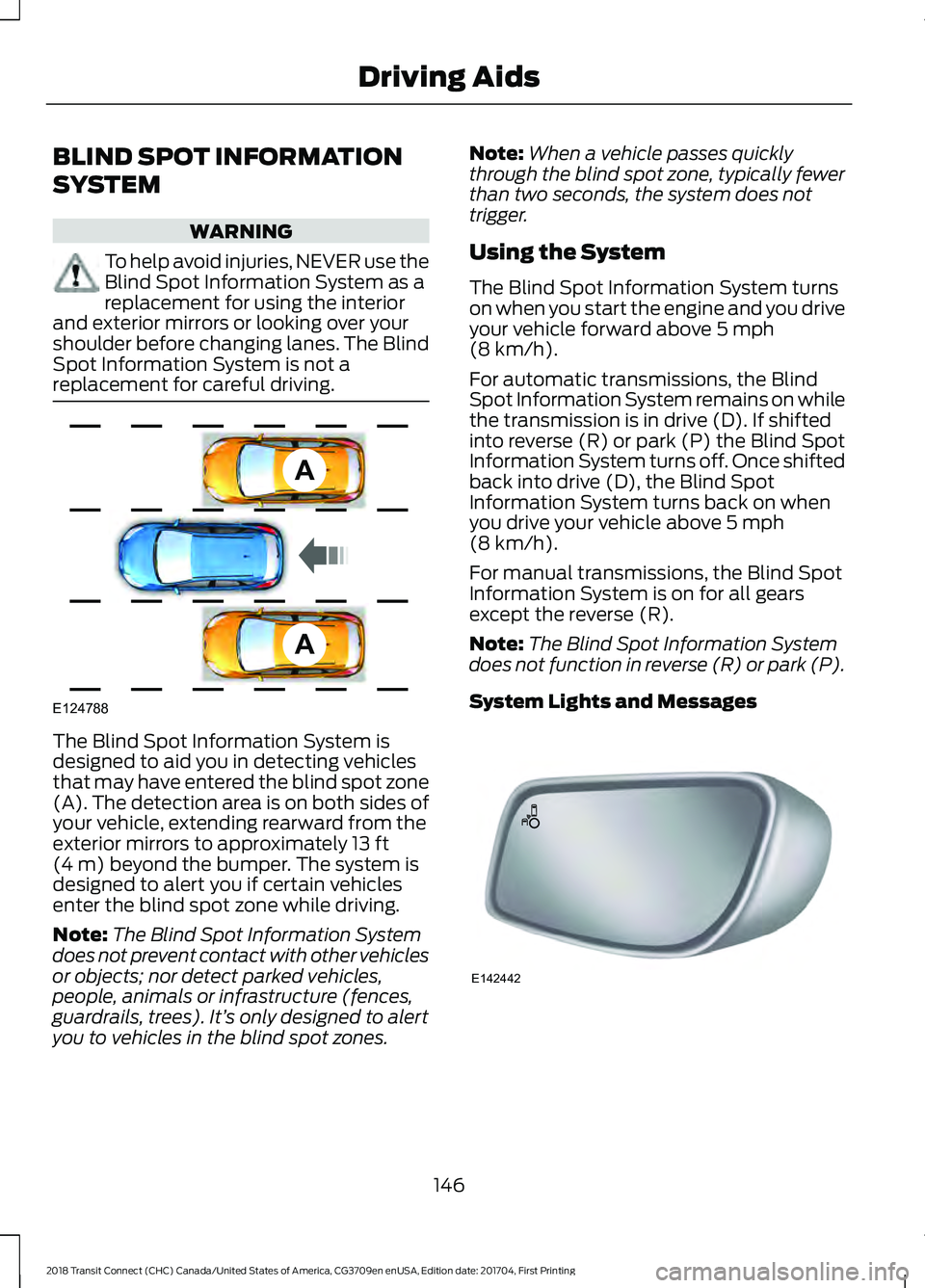
replacement for careful driving. The Blind Spot Information System is
designed to aid you in detecting vehicles
that may have entered the blind spot zone
(A). The detection area is on both sides of
your vehicle, extending rearward from the
exterior mirrors to approximately 13 ft
(4 m) beyond the bumper. The system is
designed to alert you if certain vehicles
enter the blind spot zone while driving.
Note: The Blind Spot Information System
does not prevent contact with other vehicles
or objects; nor detect parked vehicles,
people, animals or infrastructure (fences,
guardrails, trees). It’ s only designed to alert
you to vehicles in the blind spot zones. Note:
When a vehicle passes quickly
through the blind spot zone, typically fewer
than two seconds, the system does not
trigger.
Using the System
The Blind Spot Information System turns
on when you start the engine and you drive
your vehicle forward above
5 mph
(8 km/h).
For automatic transmissions, the Blind
Spot Information System remains on while
the transmission is in drive (D). If shifted
into reverse (R) or park (P) the Blind Spot
Information System turns off. Once shifted
back into drive (D), the Blind Spot
Information System turns back on when
you drive your vehicle above
5 mph
(8 km/h).
For manual transmissions, the Blind Spot
Information System is on for all gears
except the reverse (R).
Note: The Blind Spot Information System
does not function in reverse (R) or park (P).
System Lights and Messages 146
2018 Transit Connect (CHC) Canada/United States of America, CG3709en enUSA, Edition date: 201704, First Printing Driving AidsA
A
E124788 E142442
Page 150 of 449
The Blind Spot Information System
illuminates an amber alert indicator in the
outside mirror on the side of your vehicle
the approaching vehicle is coming from.
When the Blind Spot Information System
is alerting on a vehicle and the
corresponding turn signal is ON, the Blind
Spot Information System alert indicator
flashes as an increased warning level.
The alert indicator dims when the system
detects nighttime darkness.
Note:
The alert indicator flashes in case of
an alert and the turn signal is set to that side
at the same time.
System Sensor Blockage WARNING
To help avoid injuries, NEVER use the
Blind Spot Information System as a
replacement for using the interior
and exterior mirrors or looking over your
shoulder before changing lanes. The Blind
Spot Information System is not a
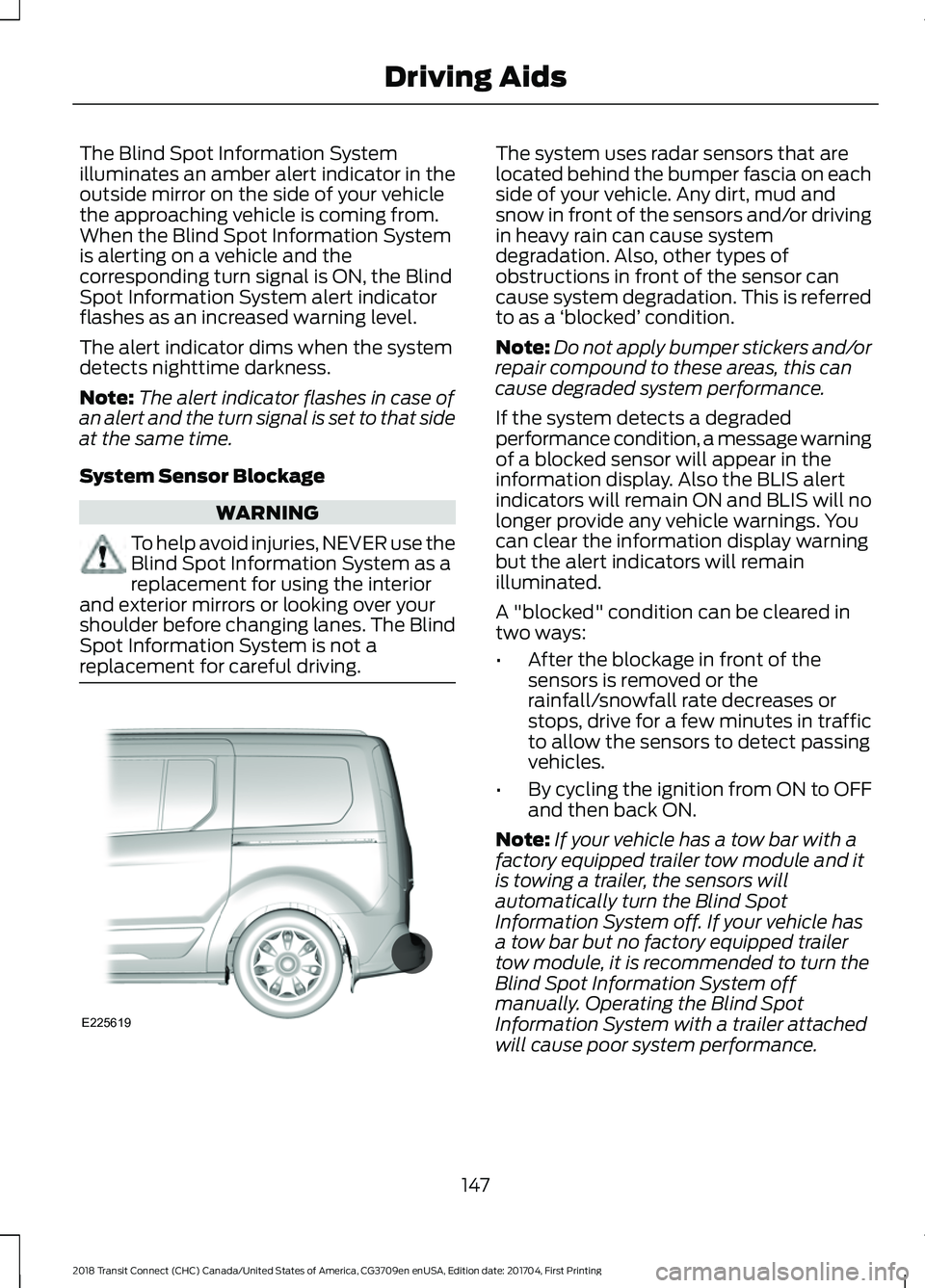
replacement for careful driving. The system uses radar sensors that are
located behind the bumper fascia on each
side of your vehicle. Any dirt, mud and
snow in front of the sensors and/or driving
in heavy rain can cause system
degradation. Also, other types of
obstructions in front of the sensor can
cause system degradation. This is referred
to as a
‘blocked ’ condition.
Note: Do not apply bumper stickers and/or
repair compound to these areas, this can
cause degraded system performance.
If the system detects a degraded
performance condition, a message warning
of a blocked sensor will appear in the
information display. Also the BLIS alert
indicators will remain ON and BLIS will no
longer provide any vehicle warnings. You
can clear the information display warning
but the alert indicators will remain
illuminated.
A "blocked" condition can be cleared in
two ways:
• After the blockage in front of the
sensors is removed or the
rainfall/snowfall rate decreases or
stops, drive for a few minutes in traffic
to allow the sensors to detect passing
vehicles.
• By cycling the ignition from ON to OFF
and then back ON.
Note: If your vehicle has a tow bar with a
factory equipped trailer tow module and it
is towing a trailer, the sensors will
automatically turn the Blind Spot
Information System off. If your vehicle has
a tow bar but no factory equipped trailer
tow module, it is recommended to turn the
Blind Spot Information System off
manually. Operating the Blind Spot
Information System with a trailer attached
will cause poor system performance.
147
2018 Transit Connect (CHC) Canada/United States of America, CG3709en enUSA, Edition date: 201704, First Printing Driving AidsE225619
Page 151 of 449
System Errors
If the system senses a problem with the
left or right sensor, the telltale will
illuminate and a message will appear in
the information display. See Information
Messages (page 87).
Switching the System Off and On
You can temporarily switch the Blind Spot
Information System off in the information
display. See
General Information (page
84). When the Blind Spot Information
System switches off, you will not receive
alerts and the information display shows
a system off message. The telltale in the
cluster also illuminates. When you switch
the Blind Spot Information System on or
off, the alert indicators flash twice.
Note: The Blind Spot Information System
remembers the last selected on or off
setting.
You can also have the Blind Spot
Information System switched off
permanently at an authorized dealer. Once
switched off permanently, the system can
only be switched back on at an authorized
dealer. CROSS TRAFFIC ALERT WARNING
To help avoid personal injury, NEVER
use the Cross Traffic Alert system as
a replacement for using the interior
and exterior mirrors and looking over your
shoulder before backing out of a parking
space. Cross Traffic Alert is not a
replacement for careful driving. Cross Traffic Alert is designed to warn you
of vehicles approaching from the sides
when the transmission is in reverse (R).
Using the System
Cross Traffic Alert turns on when you start
the engine and you shift into reverse (R).
Once shifted out of reverse (R), Cross
Traffic Alert turns off.
Note:
Cross Traffic Alert only functions
while your transmission is in reverse (R).
Cross Traffic Alert is designed to detect
vehicles that approach with a speed up to
37 mph (60 km/h)
. Coverage decreases
when the sensors are partially, mostly or
fully obstructed. Reversing slowly helps
increase the coverage area and
effectiveness.
148
2018 Transit Connect (CHC) Canada/United States of America, CG3709en enUSA, Edition date: 201704, First Printing Driving Aids
Page 153 of 449
Zone coverage also decreases when
parking at shallow angles. Here, the left
sensor is mostly obstructed; zone coverage
on that side is severely limited.
System Lights, Messages and
Audible Alerts
The Cross Traffic Alert illuminates an
amber alert indicator in the outside mirror
on the side of your vehicle the approaching
vehicle is coming from. Cross Traffic Alert
also sounds an audible alert and a
message appears in the information
display indicating a vehicle is coming from
the right or left. Cross Traffic Alert works
with the reverse sensing system that
sounds its own series of tones. See Rear
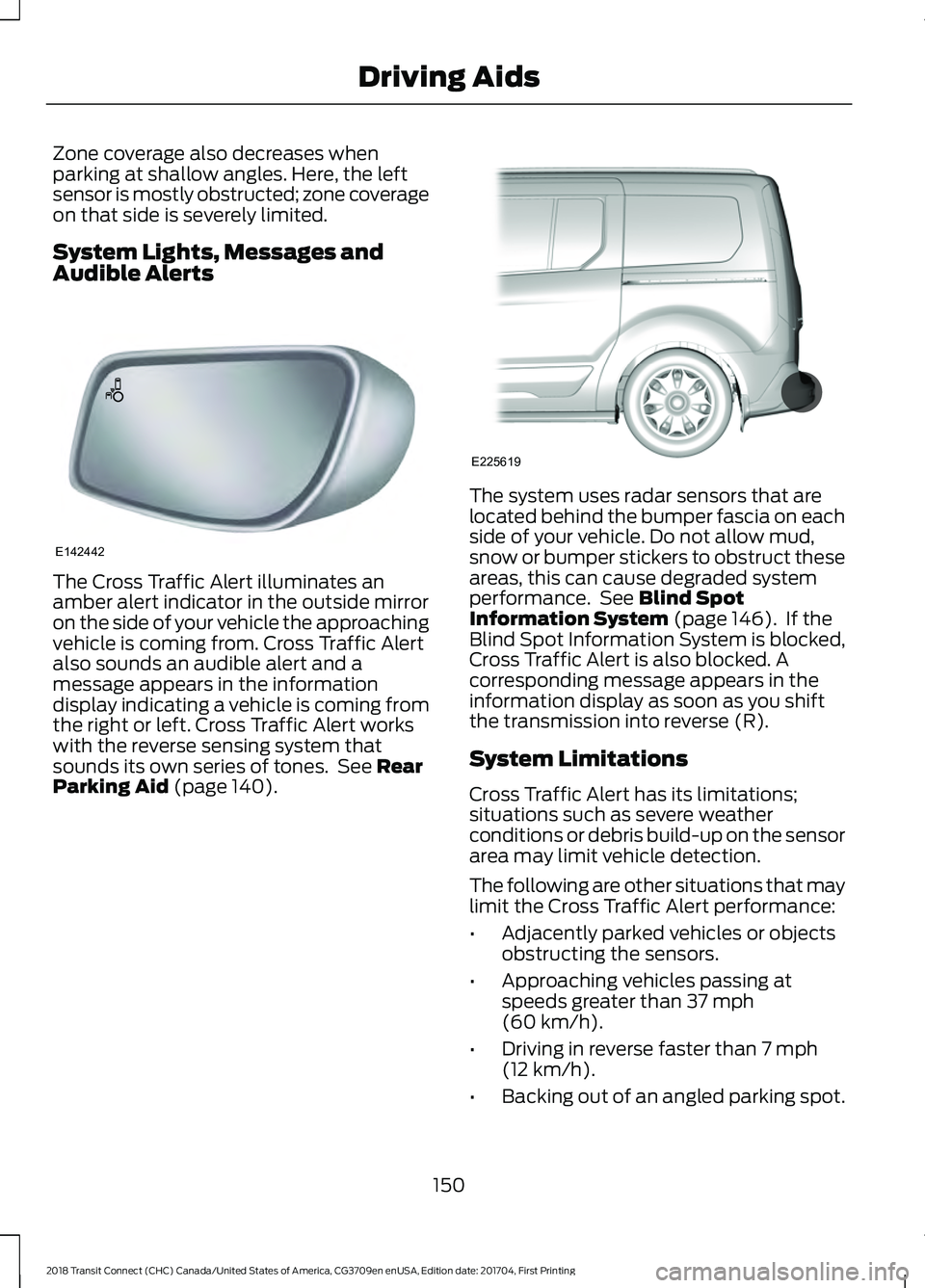
Parking Aid (page 140). The system uses radar sensors that are
located behind the bumper fascia on each
side of your vehicle. Do not allow mud,
snow or bumper stickers to obstruct these
areas, this can cause degraded system
performance. See
Blind Spot
Information System (page 146). If the
Blind Spot Information System is blocked,
Cross Traffic Alert is also blocked. A
corresponding message appears in the
information display as soon as you shift
the transmission into reverse (R).
System Limitations
Cross Traffic Alert has its limitations;
situations such as severe weather
conditions or debris build-up on the sensor
area may limit vehicle detection.
The following are other situations that may
limit the Cross Traffic Alert performance:
• Adjacently parked vehicles or objects
obstructing the sensors.
• Approaching vehicles passing at
speeds greater than
37 mph
(60 km/h).
• Driving in reverse faster than
7 mph
(12 km/h).
• Backing out of an angled parking spot.
150
2018 Transit Connect (CHC) Canada/United States of America, CG3709en enUSA, Edition date: 201704, First Printing Driving AidsE142442 E225619
Page 191 of 449
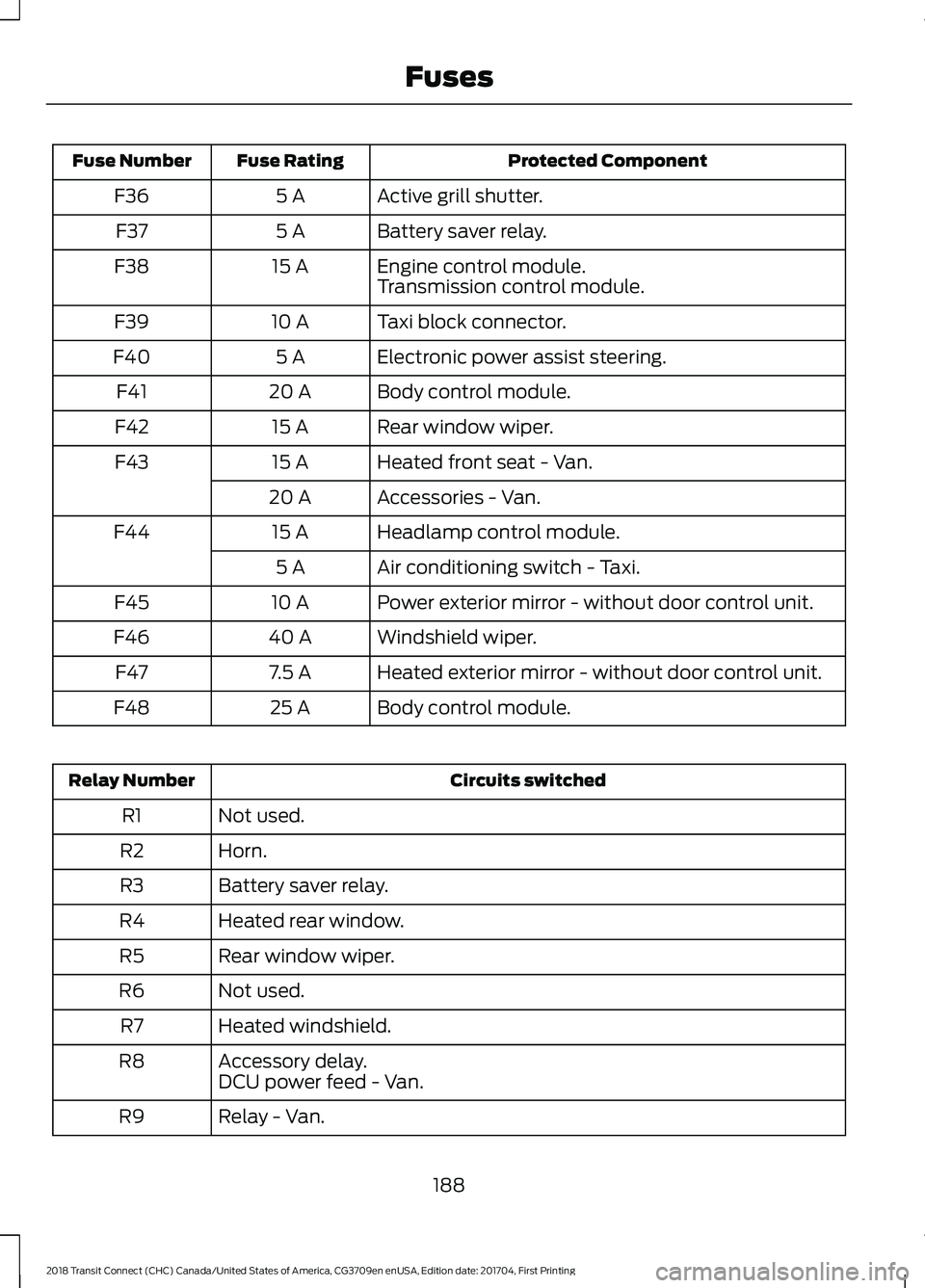
Protected Component
Fuse Rating
Fuse Number
Active grill shutter.
5 A
F36
Battery saver relay.
5 A
F37
Engine control module.
15 A
F38
Transmission control module.
Taxi block connector.
10 A
F39
Electronic power assist steering.
5 A
F40
Body control module.
20 A
F41
Rear window wiper.
15 A
F42
Heated front seat - Van.
15 A
F43
Accessories - Van.
20 A
Headlamp control module.
15 A
F44
Air conditioning switch - Taxi.
5 A
Power exterior mirror - without door control unit.
10 A
F45
Windshield wiper.
40 A
F46
Heated exterior mirror - without door control unit.
7.5 A
F47
Body control module.
25 A
F48 Circuits switched
Relay Number
Not used.
R1
Horn.
R2
Battery saver relay.
R3
Heated rear window.
R4
Rear window wiper.
R5
Not used.
R6
Heated windshield.
R7
Accessory delay.
R8
DCU power feed - Van.
Relay - Van.
R9
188
2018 Transit Connect (CHC) Canada/United States of America, CG3709en enUSA, Edition date: 201704, First Printing Fuses
Page 194 of 449
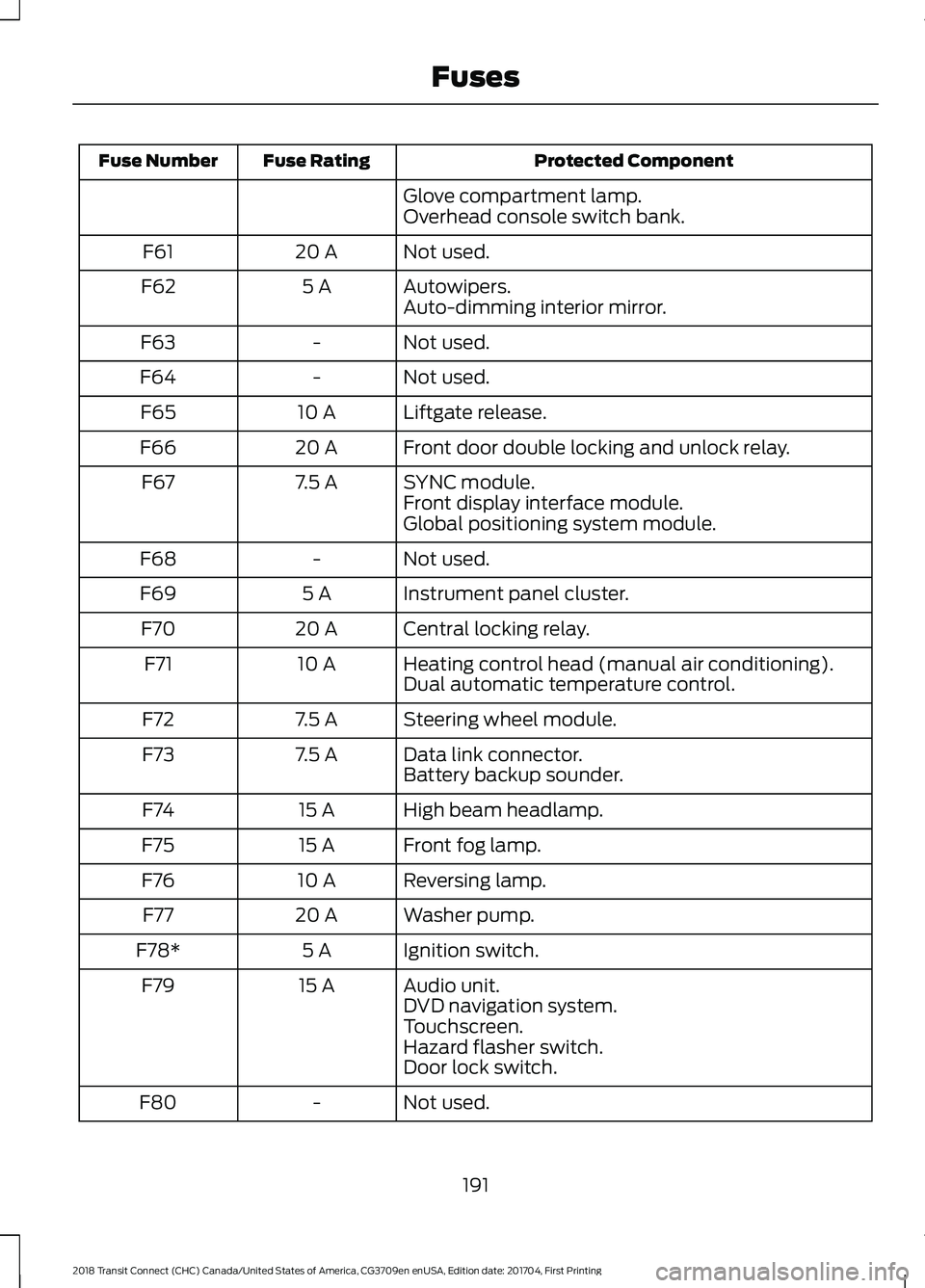
Protected Component
Fuse Rating
Fuse Number
Glove compartment lamp.
Overhead console switch bank.
Not used.
20 A
F61
Autowipers.
5 A
F62
Auto-dimming interior mirror.
Not used.
-
F63
Not used.
-
F64
Liftgate release.
10 A
F65
Front door double locking and unlock relay.
20 A
F66
SYNC module.
7.5 A
F67
Front display interface module.
Global positioning system module.
Not used.
-
F68
Instrument panel cluster.
5 A
F69
Central locking relay.
20 A
F70
Heating control head (manual air conditioning).
10 A
F71
Dual automatic temperature control.
Steering wheel module.
7.5 A
F72
Data link connector.
7.5 A
F73
Battery backup sounder.
High beam headlamp.
15 A
F74
Front fog lamp.
15 A
F75
Reversing lamp.
10 A
F76
Washer pump.
20 A
F77
Ignition switch.
5 A
F78*
Audio unit.
15 A
F79
DVD navigation system.
Touchscreen.
Hazard flasher switch.
Door lock switch.
Not used.
-
F80
191
2018 Transit Connect (CHC) Canada/United States of America, CG3709en enUSA, Edition date: 201704, First Printing Fuses
Page 211 of 449
1. With the vehicle at a complete stop,
set the parking brake.
2. Shift into park (P).
3. Switch off all accessories.
4. Fully press the brake pedal and start the vehicle.
5. Run the engine until it reaches normal operating temperature. While the
engine is warming up, complete the
following: Reset the clock. See Audio
System (page 261). Reset the power
windows bounce-back feature. See
Windows and Mirrors
(page 73).
Reset the radio station presets. See
Audio System
(page 261).
6. Allow the engine to idle for at least one
minute. If the engine turns off, press
the accelerator pedal to start the
engine.
7. While the engine is running, press the brake pedal and shift into neutral (N).
8. Allow the engine to run for at least one
minute by pressing on the accelerator
pedal.
9. Drive the vehicle at least 12 mi (20 km)
to completely relearn the idle and fuel
trim strategy.
Note: If you do not allow the engine to
relearn the idle and fuel trim strategy, the
idle quality of your vehicle may be adversely
affected until the engine computer
eventually relearns the idle trim and fuel
trim strategy.
Make sure that you dispose of old batteries
in an environmentally friendly way. Seek
advice from your local authority about
recycling old batteries. CHECKING THE WIPER
BLADES
Run the tip of your fingers over the edge of
the blade to check for roughness.
Clean the wiper blades with washer fluid
or water applied with a soft sponge or
cloth.
CHANGING THE WIPER
BLADES
Replace the wiper blades at least annually
for optimum performance.
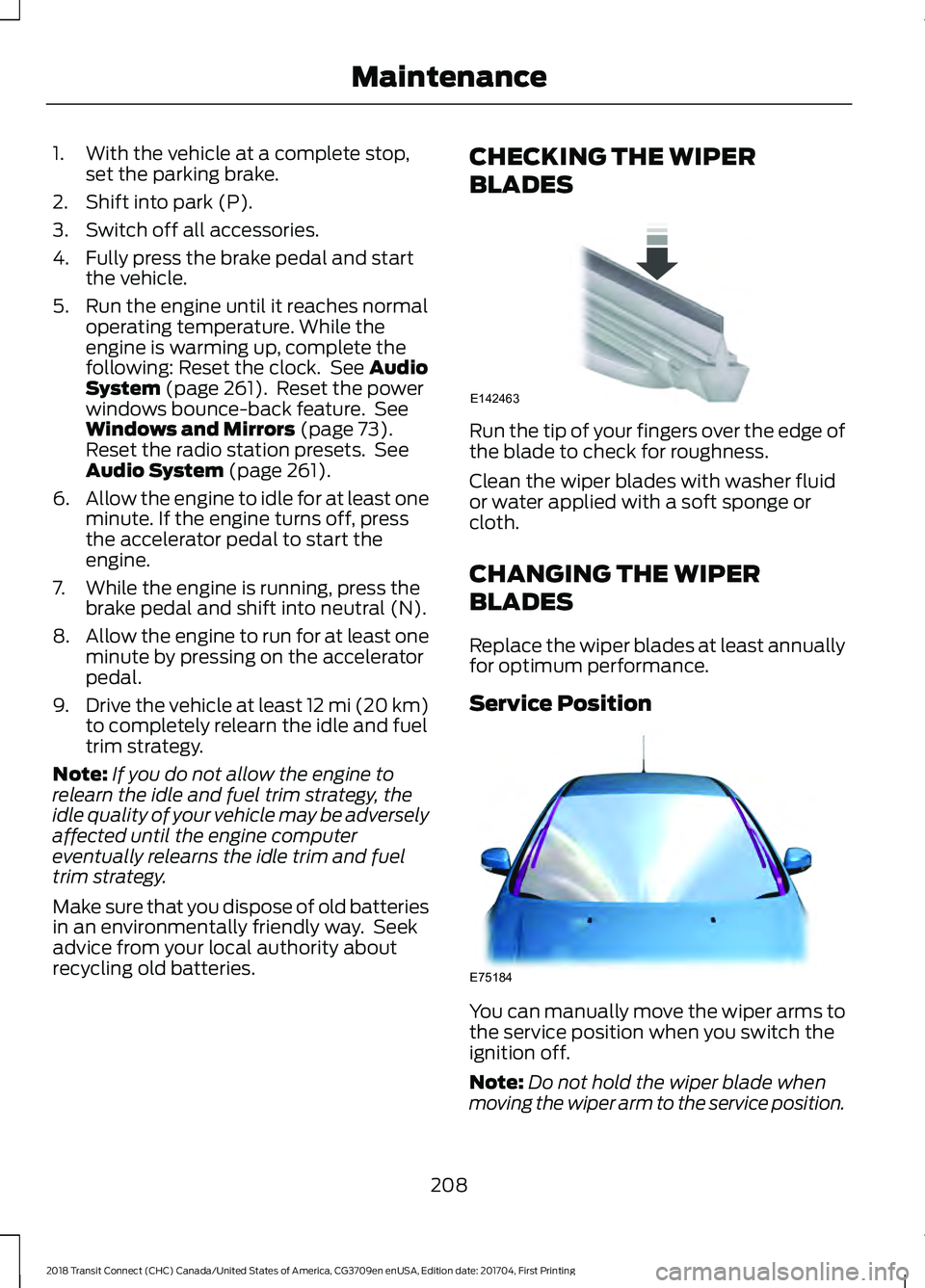
Service Position
You can manually move the wiper arms to
the service position when you switch the
ignition off.
Note:
Do not hold the wiper blade when
moving the wiper arm to the service position.
208
2018 Transit Connect (CHC) Canada/United States of America, CG3709en enUSA, Edition date: 201704, First Printing MaintenanceE142463 E75184
Page 224 of 449
Underbody
Flush the complete underside of your
vehicle frequently. Keep body and door
drain holes free of debris or foreign
material.
Under Hood
For removing black rubber marks from
under the hood we recommend Motorcraft
Wheel and Tire Cleaner or Motorcraft Bug
and Tar Remover.
WAXING
Regular waxing is necessary to protect your
car's paint from the elements. We
recommend that you wash and wax the
painted surface once or twice a year.
When washing and waxing, park your
vehicle in a shaded area out of direct
sunlight. Always wash your vehicle before
applying wax.
•
Use a quality wax that does not contain
abrasives.
• Follow the manufacturer ’s instructions
to apply and remove the wax.
• Apply a small amount of wax in a
back-and-forth motion, not in circles.
• Do not allow wax to come in contact
with any non-body (low-gloss black)
colored trim. The wax will discolor or
stain the parts over time.
•Roof racks.
• Bumpers.
• Grained door handles.
• Side moldings.
• Mirror housings.
• Windshield cowl area.
• Do not apply wax to glass areas.
• After waxing, your car's paint should
feel smooth, and be free of streaks and
smudges. CLEANING THE ENGINE
Engines are more efficient when they are
clean because grease and dirt buildup keep
the engine warmer than normal.
When washing:
•
Take care when using a power washer
to clean the engine. The high-pressure
fluid could penetrate the sealed parts
and cause damage.
• Do not spray a hot engine with cold
water to avoid cracking the engine
block or other engine components.
• Spray Motorcraft Engine Shampoo and
Degreaser on all parts that require
cleaning and pressure rinse clean. In
Canada, use Motorcraft Engine
Shampoo.
• Never wash or rinse the engine while it
is hot or running; water in the running
engine may cause internal damage.
• Never wash or rinse any ignition coil,
spark plug wire or spark plug well, or
the area in and around these locations.
• Cover the battery, power distribution
box, and air filter assembly to prevent
water damage when cleaning the
engine.
CLEANING THE WINDOWS AND
WIPER BLADES
Car wash chemicals and environmental
fallout can result in windshield and wiper
blade contamination. Dirty windshield and
wipers will result in poor windshield wiper
operation. Keep the windshield and wiper
blades clean to maintain windshield wiper
performance.
221
2018 Transit Connect (CHC) Canada/United States of America, CG3709en enUSA, Edition date: 201704, First Printing Vehicle Care
Page 442 of 449
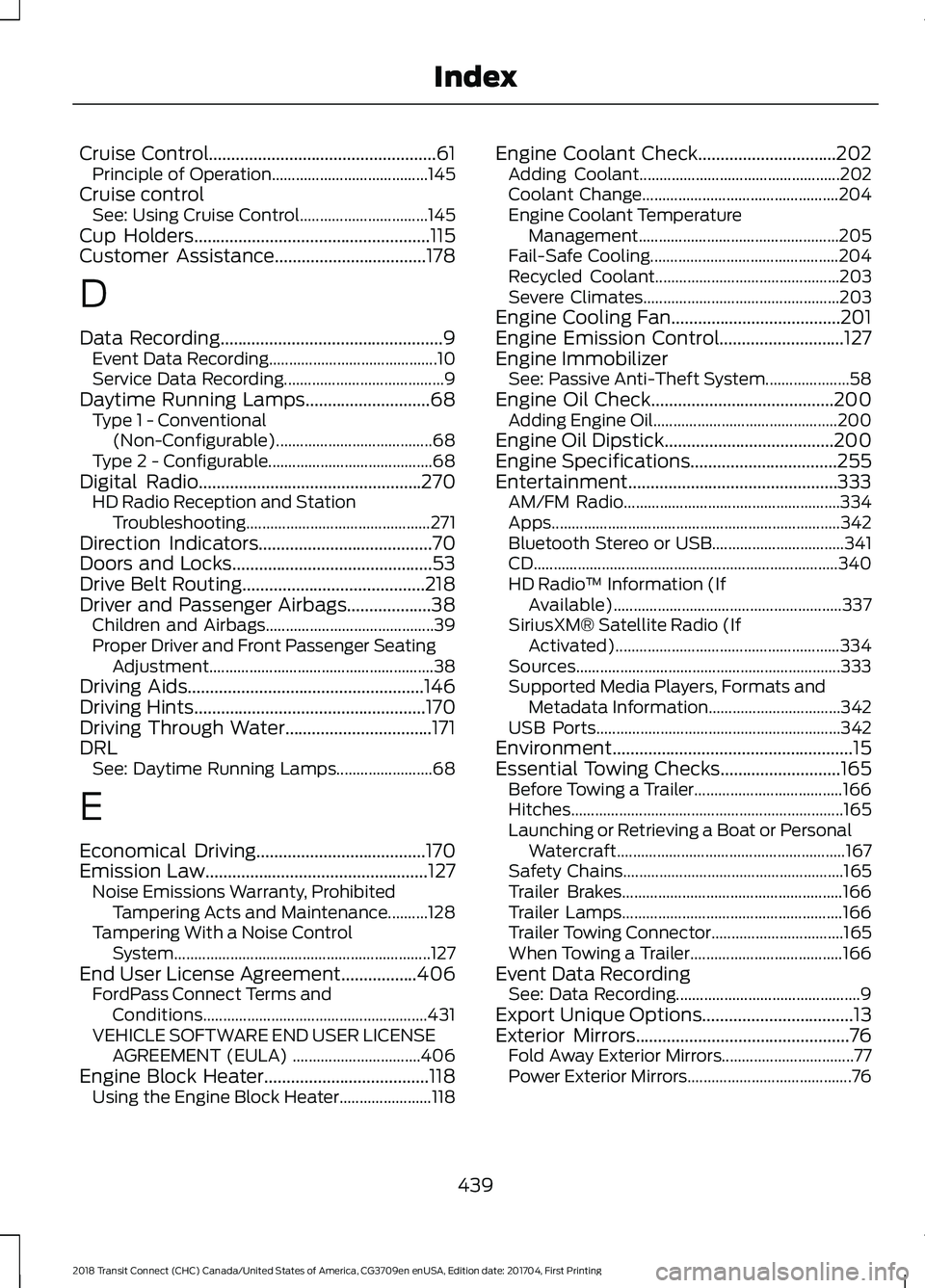
Cruise Control...................................................61
Principle of Operation....................................... 145
Cruise control See: Using Cruise Control................................ 145
Cup Holders.....................................................115
Customer Assistance..................................178
D
Data Recording
..................................................9
Event Data Recording.......................................... 10
Service Data Recording........................................ 9
Daytime Running Lamps
............................68
Type 1 - Conventional
(Non-Configurable)....................................... 68
Type 2 - Configurable......................................... 68
Digital Radio..................................................270 HD Radio Reception and Station
Troubleshooting.............................................. 271
Direction Indicators
.......................................70
Doors and Locks.............................................53
Drive Belt Routing.........................................218
Driver and Passenger Airbags...................38 Children and Airbags.......................................... 39
Proper Driver and Front Passenger Seating Adjustment........................................................ 38
Driving Aids.....................................................146
Driving Hints
....................................................170
Driving Through Water.................................171
DRL See: Daytime Running Lamps........................ 68
E
Economical Driving
......................................170
Emission Law..................................................127 Noise Emissions Warranty, Prohibited
Tampering Acts and Maintenance..........128
Tampering With a Noise Control System................................................................ 127
End User License Agreement
.................406
FordPass Connect Terms and
Conditions........................................................ 431
VEHICLE SOFTWARE END USER LICENSE AGREEMENT (EULA) ................................ 406
Engine Block Heater.....................................118 Using the Engine Block Heater....................... 118Engine Coolant Check...............................202
Adding Coolant.................................................. 202
Coolant Change................................................. 204
Engine Coolant Temperature Management.................................................. 205
Fail-Safe Cooling............................................... 204
Recycled Coolant.............................................. 203
Severe Climates................................................. 203
Engine Cooling Fan......................................201
Engine Emission Control
............................127
Engine Immobilizer See: Passive Anti-Theft System..................... 58
Engine Oil Check
.........................................200
Adding Engine Oil.............................................. 200
Engine Oil Dipstick
......................................200
Engine Specifications.................................255
Entertainment...............................................333 AM/FM Radio...................................................... 334
Apps........................................................................\
342
Bluetooth Stereo or USB................................. 341
CD ........................................................................\
.... 340
HD Radio ™ Information (If
Available)......................................................... 337
SiriusXM® Satellite Radio (If Activated)........................................................ 334
Sources.................................................................. 333
Supported Media Players, Formats and Metadata Information................................. 342
USB Ports............................................................. 342
Environment
......................................................15
Essential Towing Checks...........................165
Before Towing a Trailer..................................... 166
Hitches.................................................................... 165
Launching or Retrieving a Boat or Personal Watercraft......................................................... 167
Safety Chains....................................................... 165
Trailer Brakes....................................................... 166
Trailer Lamps....................................................... 166
Trailer Towing Connector................................. 165
When Towing a Trailer...................................... 166
Event Data Recording See: Data Recording.............................................. 9
Export Unique Options..................................13
Exterior Mirrors
................................................76
Fold Away Exterior Mirrors................................. 77
Power Exterior Mirrors......................................... 76
439
2018 Transit Connect (CHC) Canada/United States of America, CG3709en enUSA, Edition date: 201704, First Printing Index
Page 443 of 449
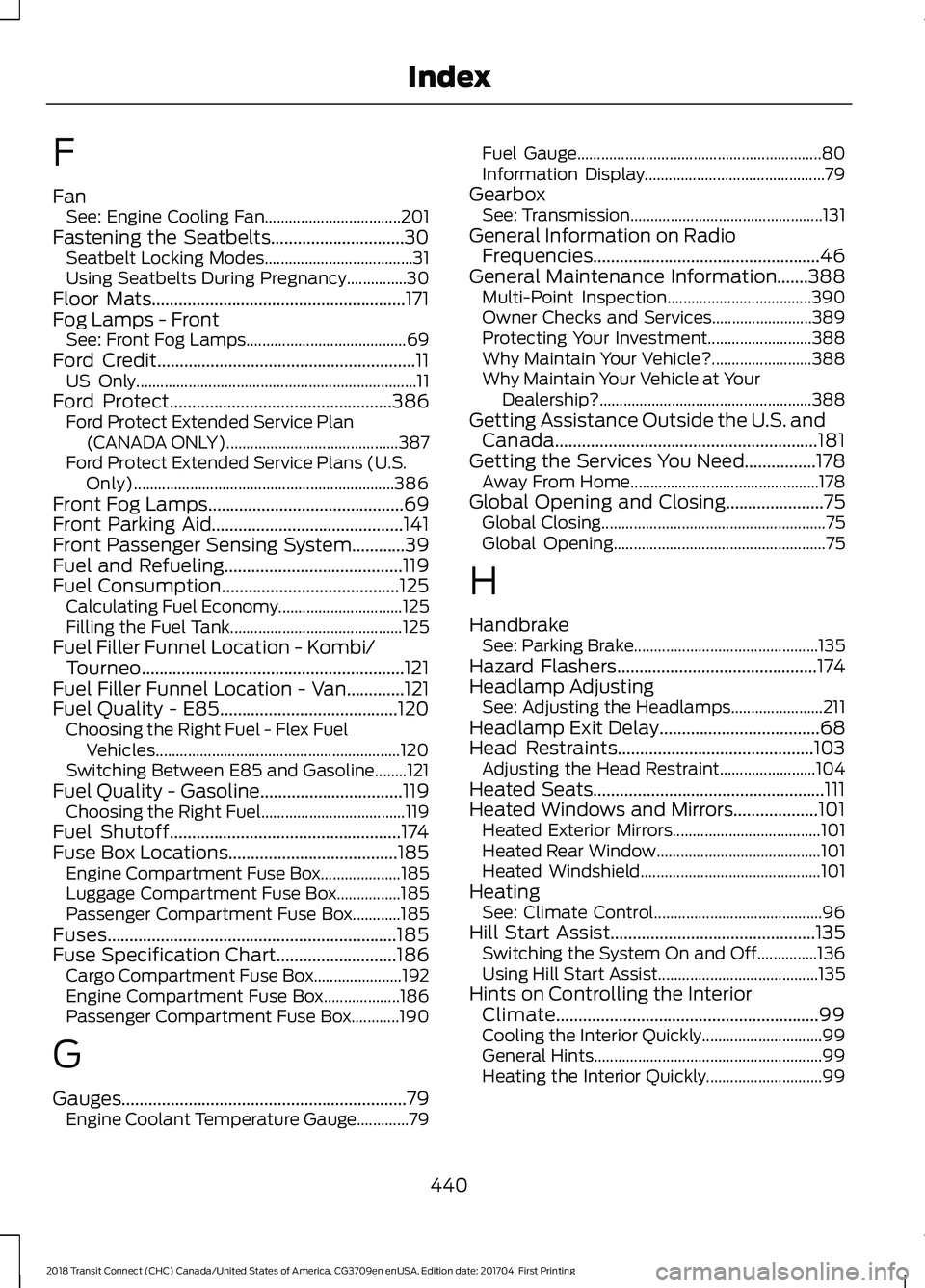
F
Fan
See: Engine Cooling Fan.................................. 201
Fastening the Seatbelts..............................30 Seatbelt Locking Modes..................................... 31
Using Seatbelts During Pregnancy...............30
Floor Mats.........................................................171
Fog Lamps - Front See: Front Fog Lamps........................................ 69
Ford Credit..........................................................11
US Only...................................................................... 11
Ford Protect
..................................................386
Ford Protect Extended Service Plan
(CANADA ONLY)........................................... 387
Ford Protect Extended Service Plans (U.S. Only)................................................................. 386
Front Fog Lamps............................................69
Front Parking Aid...........................................141
Front Passenger Sensing System............39
Fuel and Refueling
........................................119
Fuel Consumption........................................125 Calculating Fuel Economy............................... 125
Filling the Fuel Tank........................................... 125
Fuel Filler Funnel Location - Kombi/ Tourneo...........................................................121
Fuel Filler Funnel Location - Van.............121
Fuel Quality - E85
........................................120
Choosing the Right Fuel - Flex Fuel
Vehicles............................................................. 120
Switching Between E85 and Gasoline........121
Fuel Quality - Gasoline................................119 Choosing the Right Fuel.................................... 119
Fuel Shutoff
....................................................174
Fuse Box Locations......................................185 Engine Compartment Fuse Box.................... 185
Luggage Compartment Fuse Box................185
Passenger Compartment Fuse Box............185
Fuses.................................................................185
Fuse Specification Chart
...........................186
Cargo Compartment Fuse Box...................... 192
Engine Compartment Fuse Box................... 186
Passenger Compartment Fuse Box............190
G
Gauges................................................................79 Engine Coolant Temperature Gauge.............79 Fuel Gauge.............................................................
80
Information Display............................................. 79
Gearbox See: Transmission................................................ 131
General Information on Radio Frequencies...................................................46
General Maintenance Information
.......388
Multi-Point Inspection.................................... 390
Owner Checks and Services......................... 389
Protecting Your Investment.......................... 388
Why Maintain Your Vehicle?......................... 388
Why Maintain Your Vehicle at Your Dealership?..................................................... 388
Getting Assistance Outside the U.S. and Canada...........................................................181
Getting the Services You Need................178 Away From Home............................................... 178
Global Opening and Closing
......................75
Global Closing........................................................ 75
Global Opening..................................................... 75
H
Handbrake See: Parking Brake.............................................. 135
Hazard Flashers
.............................................174
Headlamp Adjusting See: Adjusting the Headlamps....................... 211
Headlamp Exit Delay....................................68
Head Restraints............................................103 Adjusting the Head Restraint........................ 104
Heated Seats....................................................111
Heated Windows and Mirrors...................101 Heated Exterior Mirrors..................................... 101
Heated Rear Window......................................... 101
Heated Windshield............................................. 101
Heating See: Climate Control.......................................... 96
Hill Start Assist
..............................................135
Switching the System On and Off...............136
Using Hill Start Assist........................................ 135
Hints on Controlling the Interior Climate...........................................................99
Cooling the Interior Quickly.............................. 99
General Hints......................................................... 99
Heating the Interior Quickly............................. 99
440
2018 Transit Connect (CHC) Canada/United States of America, CG3709en enUSA, Edition date: 201704, First Printing Index