instrument FORD TRANSIT CONNECT 2018 Owner's Manual
[x] Cancel search | Manufacturer: FORD, Model Year: 2018, Model line: TRANSIT CONNECT, Model: FORD TRANSIT CONNECT 2018Pages: 449, PDF Size: 6.73 MB
Page 177 of 449
Vehicles Sold in Canada: Getting
Roadside Assistance
To fully assist you should you have a
vehicle concern, Ford Motor Company of
Canada, Limited offers a complimentary
roadside assistance program. This
program is eligible within Canada or the
continental United States.
This program is separate from the New
Vehicle Limited Warranty, but the coverage
is concurrent with the powertrain coverage
period of your vehicle.
Canadian customers who require roadside
assistance, call 1-800-665-2006.
Vehicles Sold in Canada: Using
Roadside Assistance
Complete the roadside assistance
identification card and place it in your
wallet for quick reference.
In Canada, this card is found in the
Warranty Guide in the glove compartment
of your vehicle.
Vehicles Sold in Canada: Roadside
Assistance Program Coverage
The service is available 24 hours a day,
seven days a week.
Canadian roadside coverage and benefits
may differ from the U.S. coverage.
If you require more information, please
refer to the coverage section of your
warranty guide, call us in Canada at
1-800-665-2006, or visit our website at
www.ford.ca.
HAZARD FLASHERS
Note:
If used when the vehicle is not
running, the battery will lose charge. There
may be insufficient power to restart your
vehicle. The hazard warning button is
located on the instrument panel.
Use it when your vehicle is
creating a safety hazard for other
motorists.
• Press the button to turn on the hazard
warning function, and the front and
rear direction indicators will flash.
• Press the button again to turn them
off.
FUEL SHUTOFF WARNING
Failure to inspect and, if necessary,
repair fuel leaks after a collision may
increase the risk of fire and serious
injury. Ford Motor Company recommends
that the fuel system be inspected by an
authorized dealer after any collision. In the event of a moderate to severe
collision, this vehicle is equipped with a
fuel pump shut-off feature that stops the
flow of fuel to the engine. Not every impact
will cause a shut-off.
Should your vehicle shut off after a
collision, you may restart your vehicle by
doing the following:
1. Turn the ignition off.
2. Turn the ignition to crank.
3. Turn the ignition off.
4.
Turn the ignition on again to re-enable
the fuel pump.
Note: In the event that your vehicle does
not restart after your third attempt, contact
an authorized dealer.
174
2018 Transit Connect (CHC) Canada/United States of America, CG3709en enUSA, Edition date: 201704, First Printing Roadside Emergencies
Page 194 of 449
Protected Component
Fuse Rating
Fuse Number
Glove compartment lamp.
Overhead console switch bank.
Not used.
20 A
F61
Autowipers.
5 A
F62
Auto-dimming interior mirror.
Not used.
-
F63
Not used.
-
F64
Liftgate release.
10 A
F65
Front door double locking and unlock relay.
20 A
F66
SYNC module.
7.5 A
F67
Front display interface module.
Global positioning system module.
Not used.
-
F68
Instrument panel cluster.
5 A
F69
Central locking relay.
20 A
F70
Heating control head (manual air conditioning).
10 A
F71
Dual automatic temperature control.
Steering wheel module.
7.5 A
F72
Data link connector.
7.5 A
F73
Battery backup sounder.
High beam headlamp.
15 A
F74
Front fog lamp.
15 A
F75
Reversing lamp.
10 A
F76
Washer pump.
20 A
F77
Ignition switch.
5 A
F78*
Audio unit.
15 A
F79
DVD navigation system.
Touchscreen.
Hazard flasher switch.
Door lock switch.
Not used.
-
F80
191
2018 Transit Connect (CHC) Canada/United States of America, CG3709en enUSA, Edition date: 201704, First Printing Fuses
Page 225 of 449
To clean the windshield and wiper blades:
•
Clean the windshield with a
non-abrasive glass cleaner. When
cleaning the interior of the windshield,
avoid getting any glass cleaner on the
instrument panel or door panels. Wipe
any glass cleaner off these surfaces
immediately.
• For windshields contaminated with
tree sap, chemicals, wax or bugs, clean
the entire windshield using steel wool
(no greater than 0000 grade) in a
circular motion and rinse with water.
• Clean the wiper blades with isopropyl
rubbing alcohol or windshield washer
concentrate.
Note: Do not use razor blades or other
sharp objects to clean or remove decals
from the inside of the heated rear window.
The vehicle warranty does not cover
damage caused to the heated rear window
grid lines.
CLEANING THE INTERIOR WARNINGS
Do not use cleaning solvents, bleach
or dye on the vehicle
’s safety belts,
as these actions may weaken the
belt webbing. On vehicles equipped with
seat-mounted airbags, do not use
chemical solvents or strong
detergents. Such products could
contaminate the side airbag system and
affect performance of the side airbag in a
collision. For fabric, carpets, cloth seats, safety belts
and seats equipped with side airbags:
•
Remove dust and loose dirt with a
vacuum cleaner.
• Remove light stains and soil with
Motorcraft Professional Strength
Carpet & Upholstery Cleaner.
• If grease or tar is present on the
material, spot-clean the area first with
Motorcraft Spot and Stain Remover. In
Canada, use Motorcraft Multi-Purpose
Cleaner.
• If a ring forms on the fabric after spot
cleaning, clean the entire area
immediately (but do not oversaturate)
or the ring will set.
• Do not use household cleaning
products or glass cleaners, which can
stain and discolor the fabric and affect
the flame retardant abilities of the seat
materials.
CLEANING THE INSTRUMENT
PANEL AND INSTRUMENT
CLUSTER LENS WARNING
Do not use chemical solvents or
strong detergents when cleaning the
steering wheel or instrument panel
to avoid contamination of the airbag
system. Note:
Follow the same procedure as
cleaning leather seats for cleaning leather
instrument panels and leather interior trim
surfaces. See Cleaning Leather Seats
(page 223).
Clean the instrument panel and cluster
lens with a clean, damp and soft cloth,
then use a clean, dry and soft cloth to dry
these areas.
222
2018 Transit Connect (CHC) Canada/United States of America, CG3709en enUSA, Edition date: 201704, First Printing Vehicle Care
Page 226 of 449
•
Avoid cleaners or polishes that increase
the gloss of the upper portion of the
instrument panel. The dull finish in this
area helps protect you from
undesirable windshield reflection.
• Do not use any household cleaning
products or glass cleaners as these
may damage the finish of the
instrument panel, interior trim and
cluster lens.
• Wash or wipe your hands clean if you
have been in contact with certain
products such as insect repellent and
suntan lotion to avoid possible damage
to the interior painted surfaces.
• Do not allow air fresheners and hand
sanitizers to spill onto interior surfaces.
If a spill occurs, wipe off immediately.
Your warranty may not cover these
damages.
If a staining liquid like coffee or juice has
been spilled on the instrument panel or on
interior trim surfaces:
1. Wipe up spilled liquid using a clean, soft cloth as quickly as possible.
2. Use Motorcraft Premium Leather and Vinyl Cleaner or a commercially
available leather cleaning product for
automotive interiors. Test any cleaner
or stain remover on an inconspicuous
area.
3. Alternatively, wipe the surface with a clean, soft cloth and a mild soap and
water solution. Dry the area with a
clean, soft cloth.
4. If necessary, apply more soap and water solution or cleaning product to
a clean, soft cloth and press it onto the
soiled area. Allow this to set at room
temperature for 30 minutes.
5. Remove the soaked cloth, then with a clean, damp cloth, use a rubbing
motion for 60 seconds on the soiled
area. 6. Dry the area with a clean, soft cloth.
CLEANING LEATHER SEATS (If
Equipped)
Note: Follow the same procedure as
cleaning leather seats for cleaning leather
instrument panels and leather interior trim
surfaces.
For routine cleaning, wipe the surface with
a soft, damp cloth and a mild soap and
water solution. Dry the area with a clean,
soft cloth.
For cleaning and removing stains such as
dye transfer, use Motorcraft Premium
Leather and Vinyl Cleaner or a
commercially available leather cleaning
product for automotive interiors.
Note: Test any cleaner or stain remover on
an inconspicuous area.
You should:
• Remove dust and loose dirt with a
vacuum cleaner.
• Clean and treat spills and stains as
soon as possible.
Do not use the following products as these
may damage the leather:
• Oil and petroleum or silicone-based
leather conditioners.
• Household cleaners.
• Alcohol solutions.
• Solvents or cleaners intended
specifically for rubber, vinyl and
plastics.
223
2018 Transit Connect (CHC) Canada/United States of America, CG3709en enUSA, Edition date: 201704, First Printing Vehicle Care
Page 258 of 449
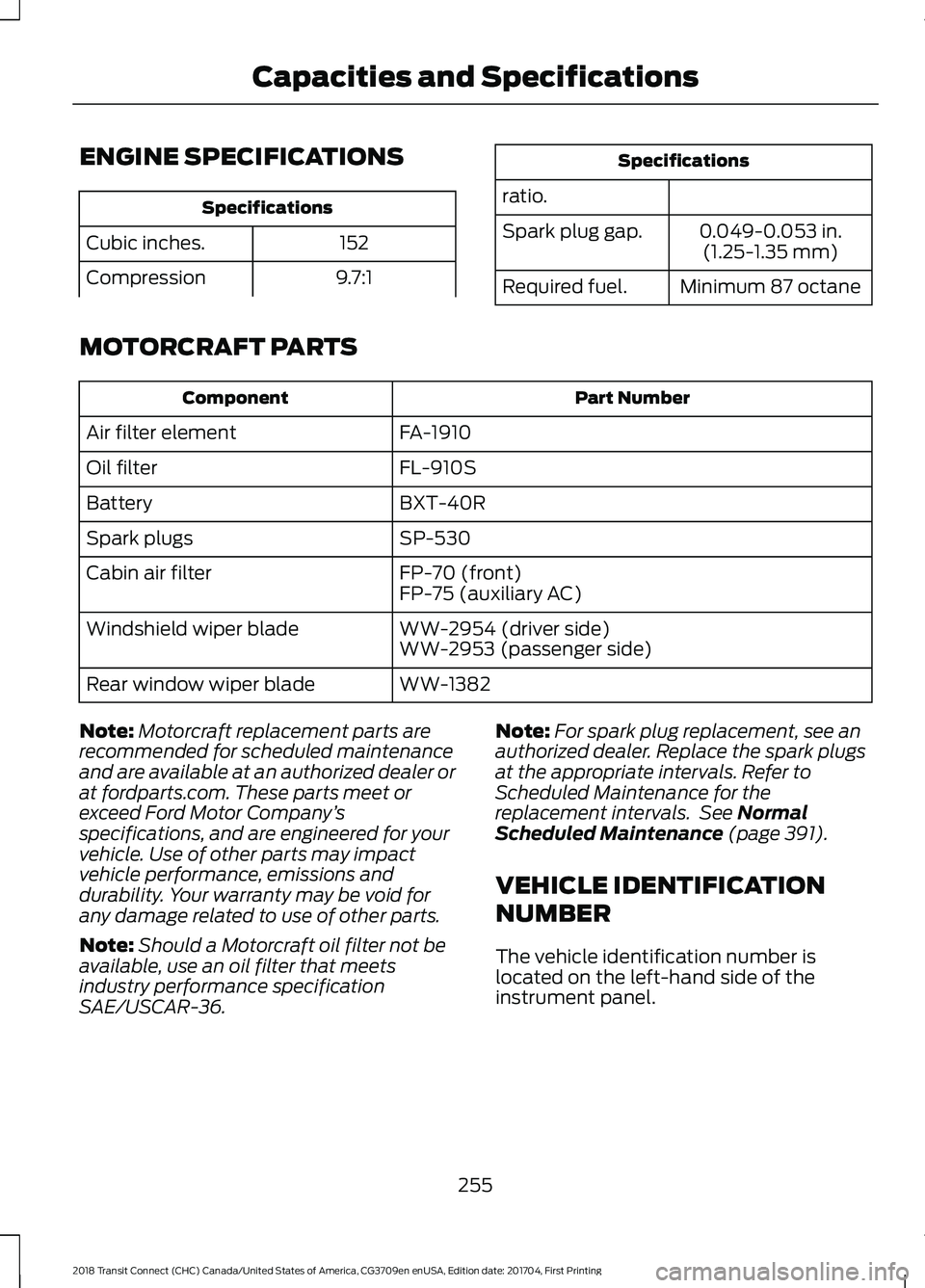
ENGINE SPECIFICATIONS
Specifications
152
Cubic inches.
9.7:1
Compression Specifications
ratio. 0.049-0.053 in.(1.25-1.35 mm)
Spark plug gap.
Minimum 87 octane
Required fuel.
MOTORCRAFT PARTS Part Number
Component
FA-1910
Air filter element
FL-910S
Oil filter
BXT-40R
Battery
SP-530
Spark plugs
FP-70 (front)
Cabin air filter
FP-75 (auxiliary AC)
WW-2954 (driver side)
Windshield wiper blade
WW-2953 (passenger side)
WW-1382
Rear window wiper blade
Note: Motorcraft replacement parts are
recommended for scheduled maintenance
and are available at an authorized dealer or
at fordparts.com. These parts meet or
exceed Ford Motor Company ’s
specifications, and are engineered for your
vehicle. Use of other parts may impact
vehicle performance, emissions and
durability. Your warranty may be void for
any damage related to use of other parts.
Note: Should a Motorcraft oil filter not be
available, use an oil filter that meets
industry performance specification
SAE/USCAR-36. Note:
For spark plug replacement, see an
authorized dealer. Replace the spark plugs
at the appropriate intervals. Refer to
Scheduled Maintenance for the
replacement intervals. See Normal
Scheduled Maintenance (page 391).
VEHICLE IDENTIFICATION
NUMBER
The vehicle identification number is
located on the left-hand side of the
instrument panel.
255
2018 Transit Connect (CHC) Canada/United States of America, CG3709en enUSA, Edition date: 201704, First Printing Capacities and Specifications
Page 279 of 449
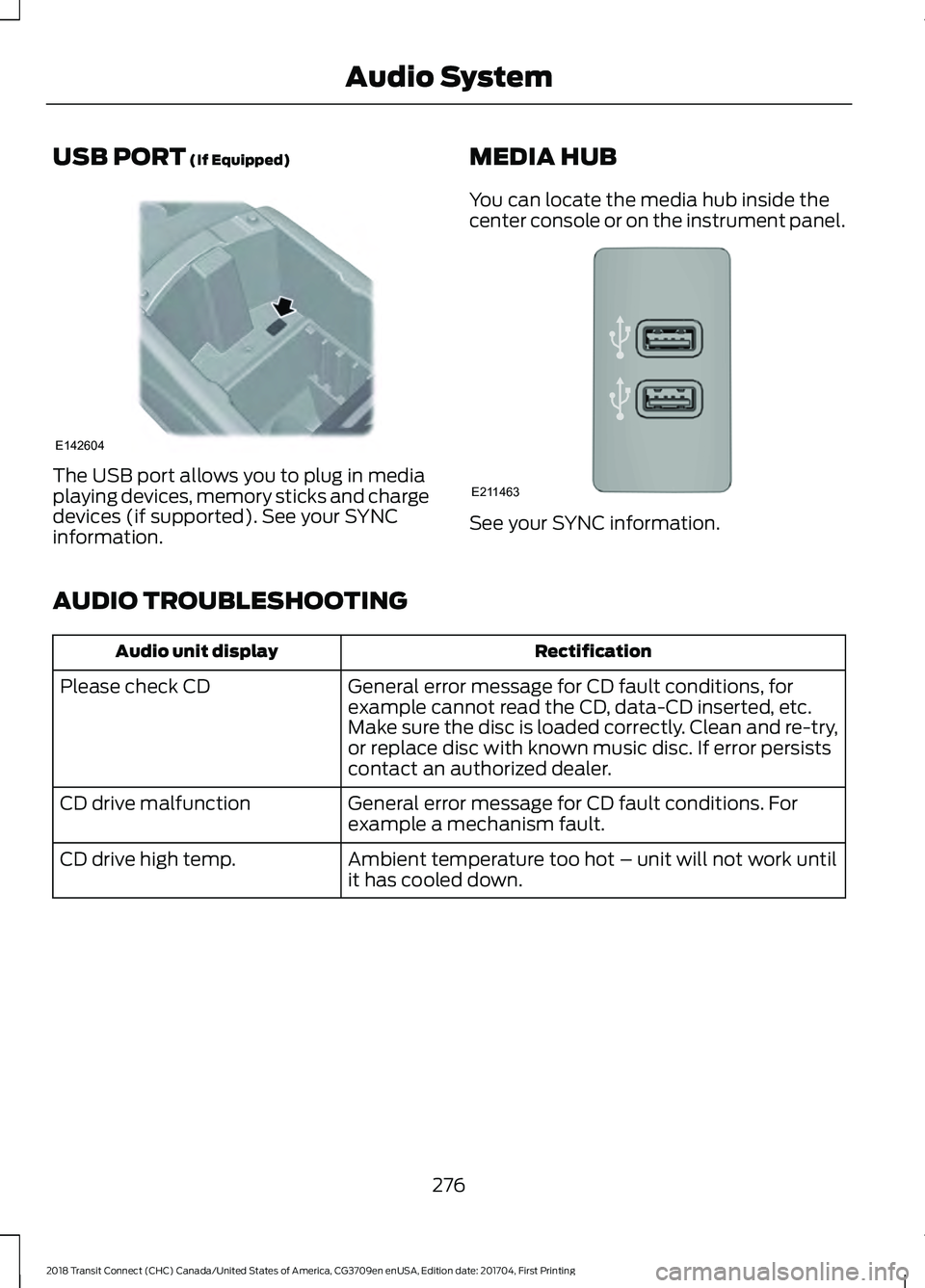
USB PORT (If Equipped)
The USB port allows you to plug in media
playing devices, memory sticks and charge
devices (if supported). See your SYNC
information.
MEDIA HUB
You can locate the media hub inside the
center console or on the instrument panel. See your SYNC information.
AUDIO TROUBLESHOOTING Rectification
Audio unit display
General error message for CD fault conditions, for
example cannot read the CD, data-CD inserted, etc.
Make sure the disc is loaded correctly. Clean and re-try,
or replace disc with known music disc. If error persists
contact an authorized dealer.
Please check CD
General error message for CD fault conditions. For
example a mechanism fault.
CD drive malfunction
Ambient temperature too hot – unit will not work until
it has cooled down.
CD drive high temp.
276
2018 Transit Connect (CHC) Canada/United States of America, CG3709en enUSA, Edition date: 201704, First Printing Audio SystemE142604 E211463
Page 322 of 449
Cleaning the Touchscreen
You can remove fingerprints with a dry,
clean, soft cloth.
If dirt or fingerprints are still on the screen,
apply a small amount of alcohol to the
cloth and try to clean it again.
Note:
Do not use detergent or any type of
solvent to clean the touchscreen.
Note: Do not pour or spray alcohol onto the
touchscreen.
Using Voice Recognition
Using voice commands allows you to keep
your hands on the wheel and focus on
what is in front of you. The system provides
feedback through audible tones, prompts,
questions and spoken confirmations
depending on the situation and the chosen
level of interaction (voice settings).
The system also asks short questions
(confirmation prompts) when it is not sure
of your request or when there are multiple
possible responses to your request.
When using voice commands, words and
icons may appear in the status bar
indicating the status of the voice command
session. See Using Voice Recognition
(page 326).
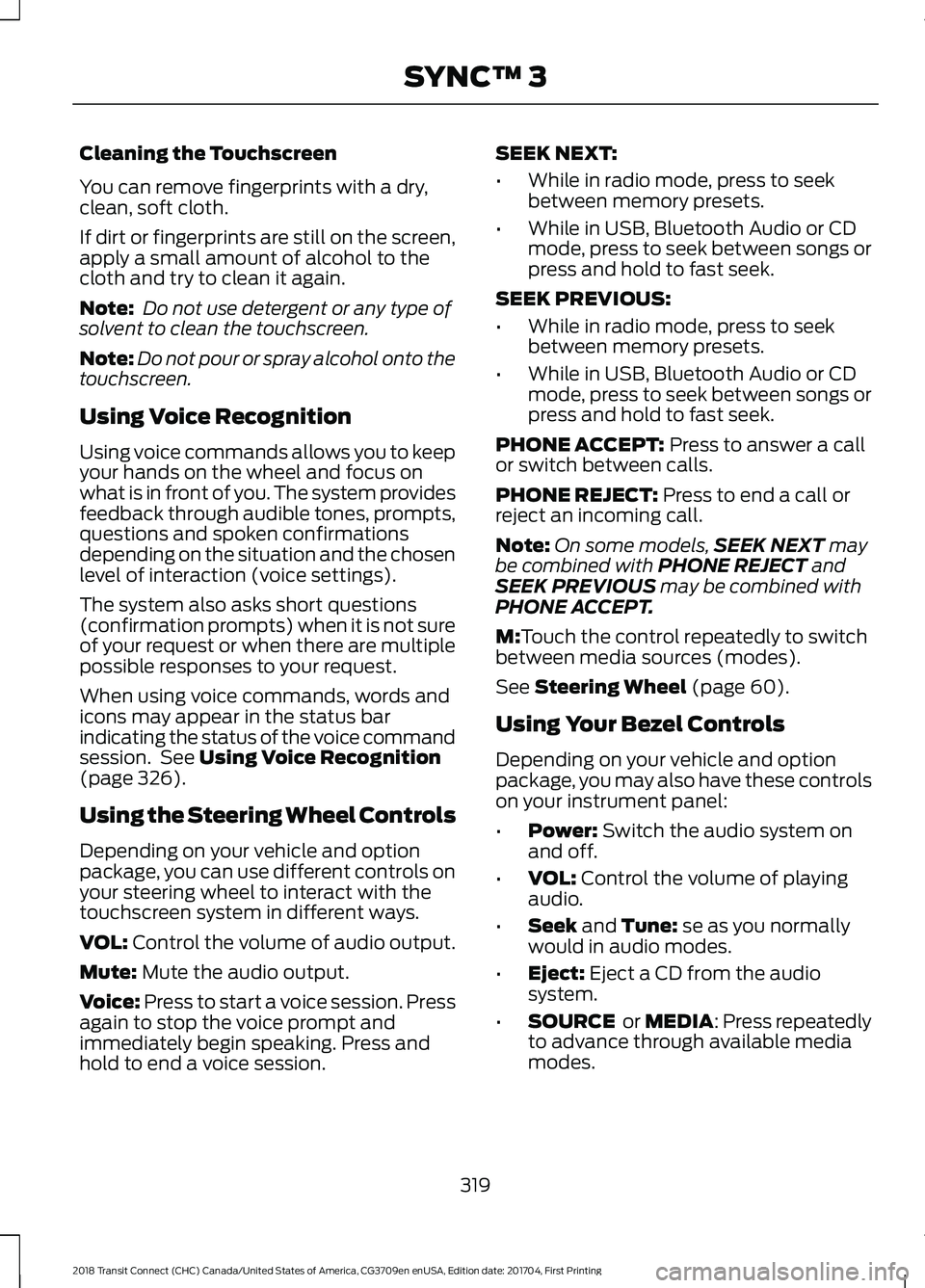
Using the Steering Wheel Controls
Depending on your vehicle and option
package, you can use different controls on
your steering wheel to interact with the
touchscreen system in different ways.
VOL:
Control the volume of audio output.
Mute:
Mute the audio output.
Voice:
Press to start a voice session. Press
again to stop the voice prompt and
immediately begin speaking. Press and
hold to end a voice session. SEEK NEXT:
•
While in radio mode, press to seek
between memory presets.
• While in USB, Bluetooth Audio or CD
mode, press to seek between songs or
press and hold to fast seek.
SEEK PREVIOUS:
• While in radio mode, press to seek
between memory presets.
• While in USB, Bluetooth Audio or CD
mode, press to seek between songs or
press and hold to fast seek.
PHONE ACCEPT:
Press to answer a call
or switch between calls.
PHONE REJECT:
Press to end a call or
reject an incoming call.
Note: On some models, SEEK NEXT
may
be combined with PHONE REJECT and
SEEK PREVIOUS may be combined with
PHONE ACCEPT.
M:
Touch the control repeatedly to switch
between media sources (modes).
See
Steering Wheel (page 60).
Using Your Bezel Controls
Depending on your vehicle and option
package, you may also have these controls
on your instrument panel:
• Power:
Switch the audio system on
and off.
• VOL:
Control the volume of playing
audio.
• Seek
and Tune: se as you normally
would in audio modes.
• Eject:
Eject a CD from the audio
system.
• SOURCE
or MEDIA: Press repeatedly
to advance through available media
modes.
319
2018 Transit Connect (CHC) Canada/United States of America, CG3709en enUSA, Edition date: 201704, First Printing SYNC™ 3
Page 345 of 449
Function
Button
Composers
This button allows you to choose a specific
letter to view within the category you are
browsing.
A-Z Jump
If available, this allows you to browse the
folders and files on your USB device.
Explore Device
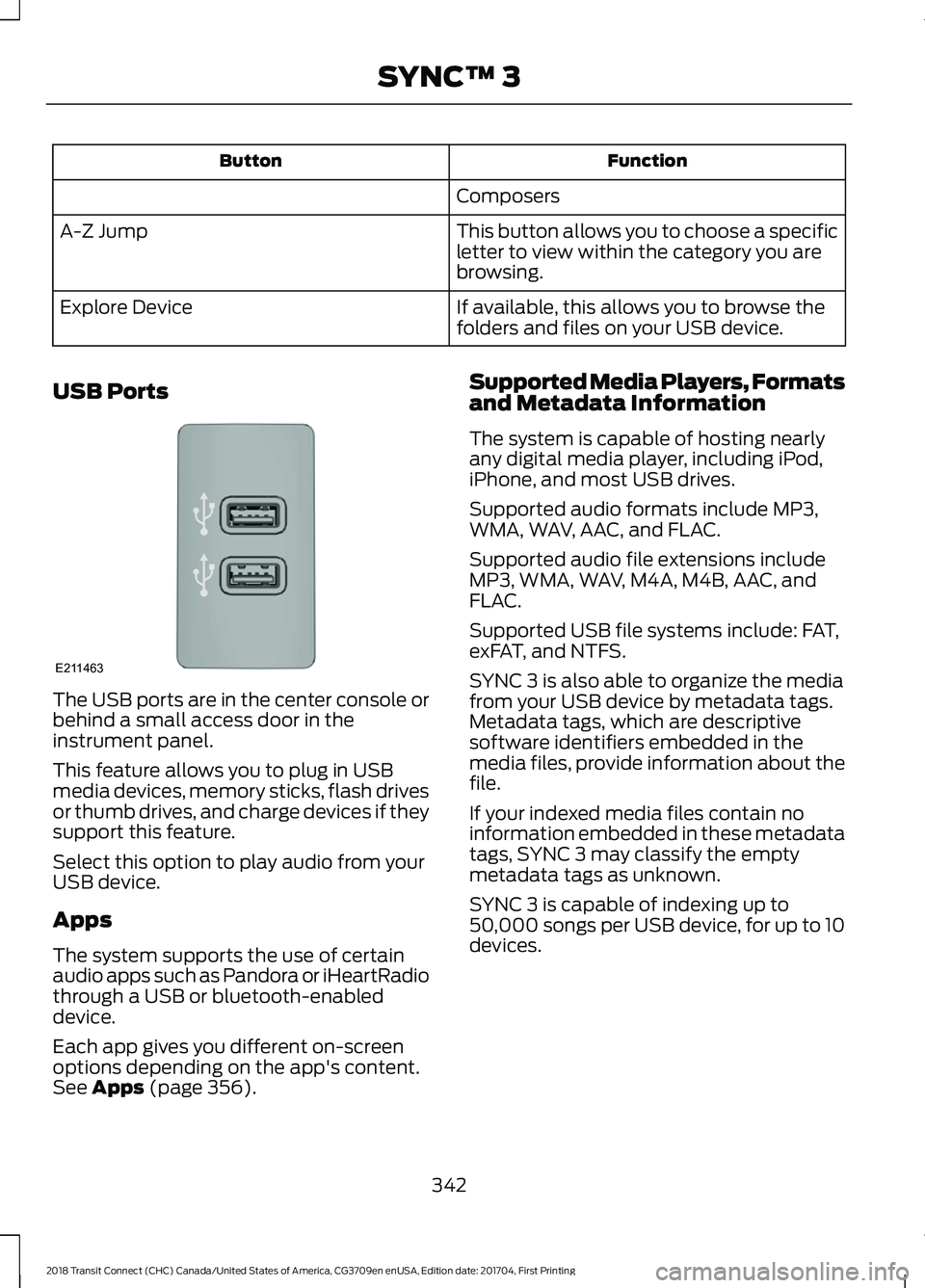
USB Ports The USB ports are in the center console or
behind a small access door in the
instrument panel.
This feature allows you to plug in USB
media devices, memory sticks, flash drives
or thumb drives, and charge devices if they
support this feature.
Select this option to play audio from your
USB device.
Apps
The system supports the use of certain
audio apps such as Pandora or iHeartRadio
through a USB or bluetooth-enabled
device.
Each app gives you different on-screen
options depending on the app's content.
See Apps (page 356). Supported Media Players, Formats
and Metadata Information
The system is capable of hosting nearly
any digital media player, including iPod,
iPhone, and most USB drives.
Supported audio formats include MP3,
WMA, WAV, AAC, and FLAC.
Supported audio file extensions include
MP3, WMA, WAV, M4A, M4B, AAC, and
FLAC.
Supported USB file systems include: FAT,
exFAT, and NTFS.
SYNC 3 is also able to organize the media
from your USB device by metadata tags.
Metadata tags, which are descriptive
software identifiers embedded in the
media files, provide information about the
file.
If your indexed media files contain no
information embedded in these metadata
tags, SYNC 3 may classify the empty
metadata tags as unknown.
SYNC 3 is capable of indexing up to
50,000 songs per USB device, for up to 10
devices.
342
2018 Transit Connect (CHC) Canada/United States of America, CG3709en enUSA, Edition date: 201704, First Printing SYNC™ 3E211463
Page 386 of 449
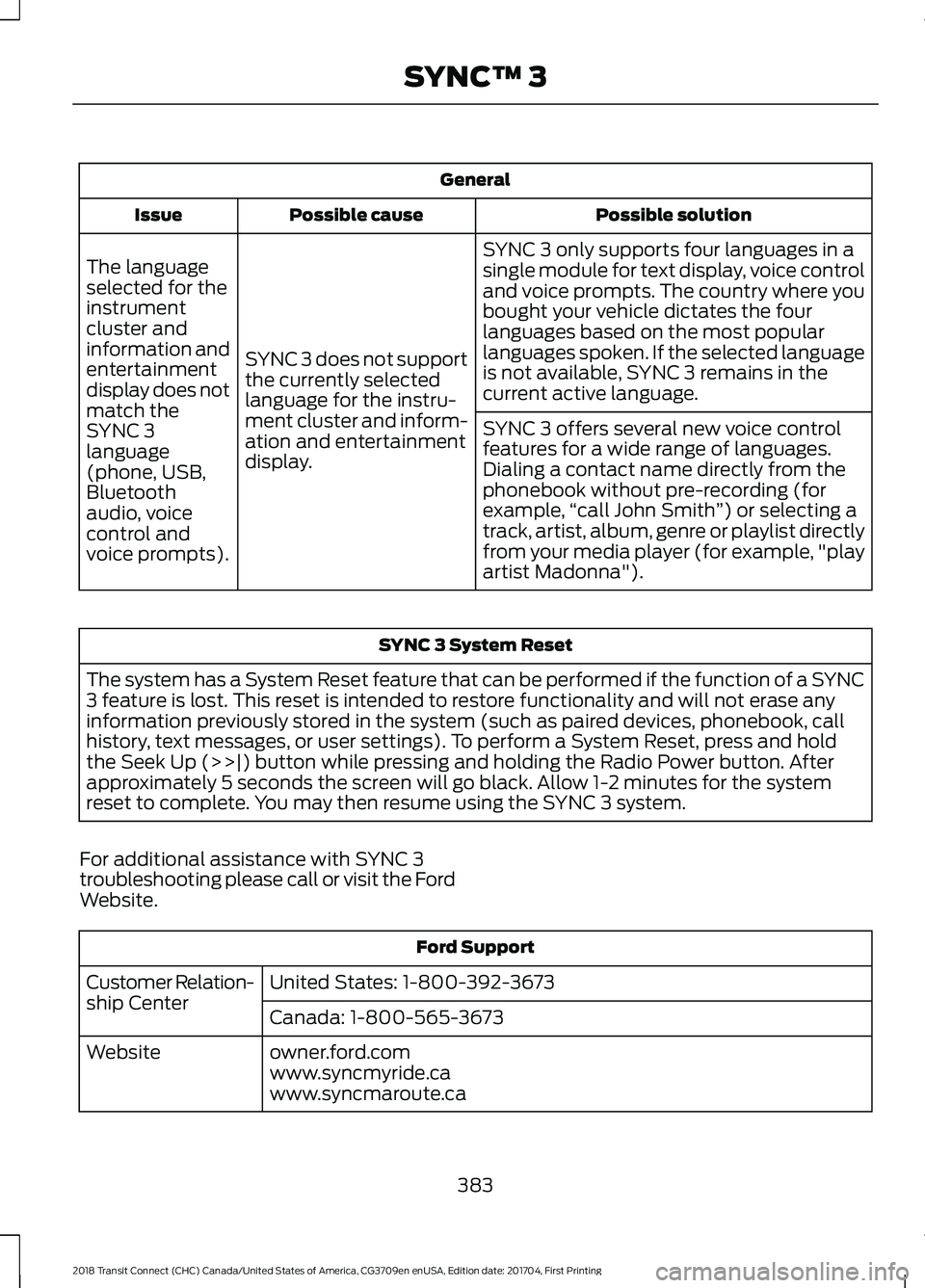
General
Possible solution
Possible cause
Issue
SYNC 3 only supports four languages in a
single module for text display, voice control
and voice prompts. The country where you
bought your vehicle dictates the four
languages based on the most popular
languages spoken. If the selected language
is not available, SYNC 3 remains in the
current active language.
SYNC 3 does not support
the currently selected
language for the instru-
ment cluster and inform-
ation and entertainment
display.
The language
selected for the
instrument
cluster and
information and
entertainment
display does not
match the
SYNC 3
SYNC 3 offers several new voice control
features for a wide range of languages.
Dialing a contact name directly from the
phonebook without pre-recording (for
example,
“call John Smith ”) or selecting a
track, artist, album, genre or playlist directly
from your media player (for example, "play
artist Madonna").
language
(phone, USB,
Bluetooth
audio, voice
control and
voice prompts). SYNC 3 System Reset
The system has a System Reset feature that can be performed if the function of a SYNC
3 feature is lost. This reset is intended to restore functionality and will not erase any
information previously stored in the system (such as paired devices, phonebook, call
history, text messages, or user settings). To perform a System Reset, press and hold
the Seek Up (>>|) button while pressing and holding the Radio Power button. After
approximately 5 seconds the screen will go black. Allow 1-2 minutes for the system
reset to complete. You may then resume using the SYNC 3 system.
For additional assistance with SYNC 3
troubleshooting please call or visit the Ford
Website. Ford Support
United States: 1-800-392-3673
Customer Relation-
ship Center
Canada: 1-800-565-3673
owner.ford.com
Website
www.syncmyride.ca
www.syncmaroute.ca
383
2018 Transit Connect (CHC) Canada/United States of America, CG3709en enUSA, Edition date: 201704, First Printing SYNC™ 3
Page 441 of 449
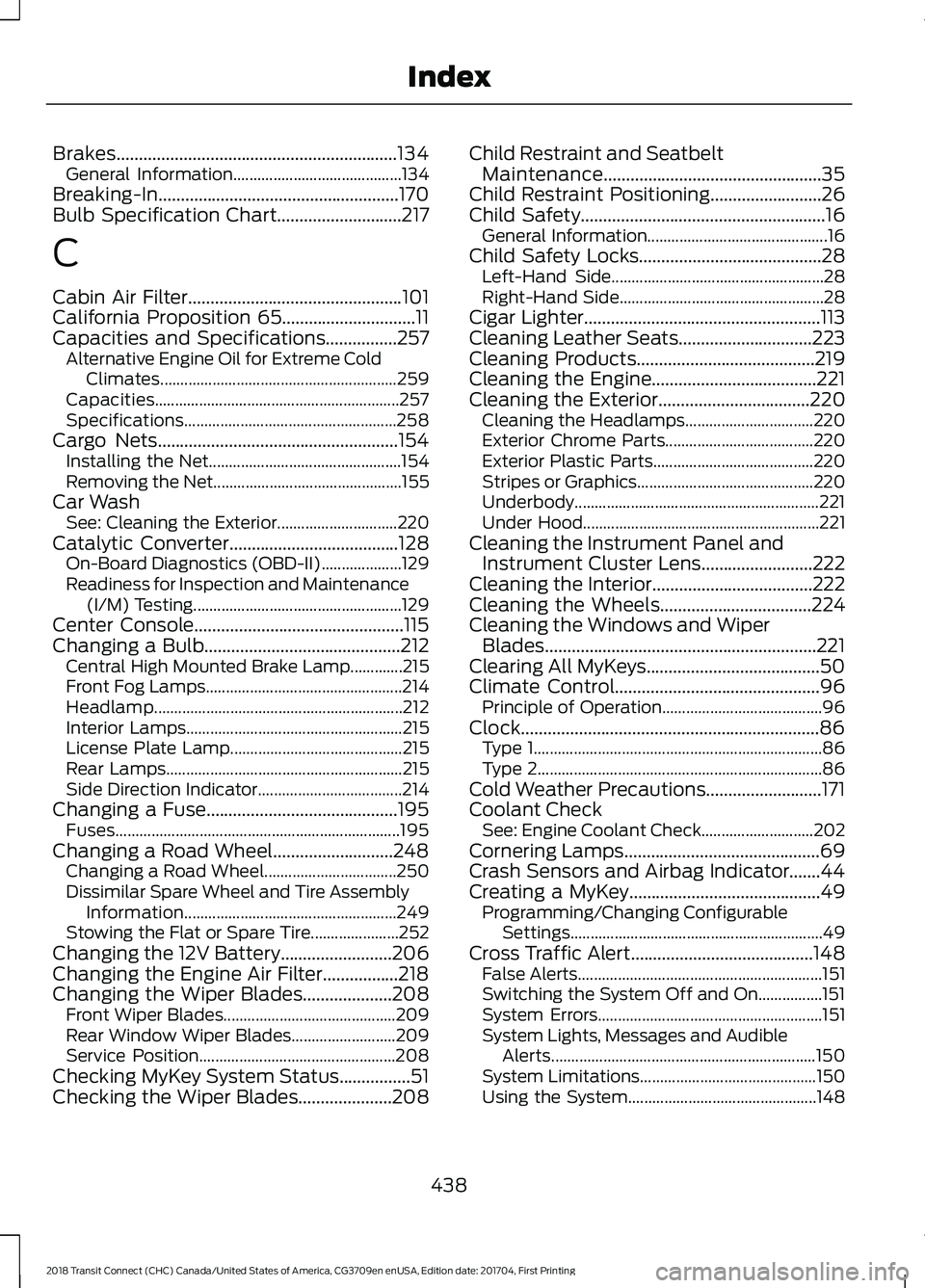
Brakes...............................................................134
General Information.......................................... 134
Breaking-In......................................................170
Bulb Specification Chart............................217
C
Cabin Air Filter................................................101
California Proposition 65..............................11
Capacities and Specifications................257 Alternative Engine Oil for Extreme Cold
Climates........................................................... 259
Capacities............................................................. 257
Specifications..................................................... 258
Cargo Nets
......................................................154
Installing the Net................................................ 154
Removing the Net............................................... 155
Car Wash See: Cleaning the Exterior.............................. 220
Catalytic Converter
......................................128
On-Board Diagnostics (OBD-II).................... 129
Readiness for Inspection and Maintenance (I/M) Testing.................................................... 129
Center Console...............................................115
Changing a Bulb............................................212 Central High Mounted Brake Lamp.............215
Front Fog Lamps................................................. 214
Headlamp.............................................................. 212
Interior Lamps...................................................... 215
License Plate Lamp........................................... 215
Rear Lamps........................................................... 215
Side Direction Indicator.................................... 214
Changing a Fuse...........................................195 Fuses....................................................................... 195
Changing a Road Wheel...........................248 Changing a Road Wheel................................. 250
Dissimilar Spare Wheel and Tire Assembly Information..................................................... 249
Stowing the Flat or Spare Tire...................... 252
Changing the 12V Battery.........................206
Changing the Engine Air Filter.................218
Changing the Wiper Blades
....................208
Front Wiper Blades........................................... 209
Rear Window Wiper Blades.......................... 209
Service Position................................................. 208
Checking MyKey System Status................51
Checking the Wiper Blades
.....................208 Child Restraint and Seatbelt
Maintenance.................................................35
Child Restraint Positioning
.........................26
Child Safety.......................................................16 General Information............................................. 16
Child Safety Locks.........................................28 Left-Hand Side..................................................... 28
Right-Hand Side................................................... 28
Cigar Lighter
.....................................................113
Cleaning Leather Seats..............................223
Cleaning Products........................................219
Cleaning the Engine
.....................................221
Cleaning the Exterior..................................220
Cleaning the Headlamps................................ 220
Exterior Chrome Parts..................................... 220
Exterior Plastic Parts........................................ 220
Stripes or Graphics............................................ 220
Underbody............................................................. 221
Under Hood........................................................... 221
Cleaning the Instrument Panel and Instrument Cluster Lens.........................222
Cleaning the Interior....................................222
Cleaning the Wheels
..................................224
Cleaning the Windows and Wiper Blades.............................................................221
Clearing All MyKeys.......................................50
Climate Control..............................................96 Principle of Operation........................................ 96
Clock...................................................................86 Type 1........................................................................\
86
Type 2....................................................................... 86
Cold Weather Precautions..........................171
Coolant Check See: Engine Coolant Check............................ 202
Cornering Lamps............................................69
Crash Sensors and Airbag Indicator.......44
Creating a MyKey
...........................................49
Programming/Changing Configurable
Settings............................................................... 49
Cross Traffic Alert.........................................148 False Alerts............................................................. 151
Switching the System Off and On................151
System Errors........................................................ 151
System Lights, Messages and Audible Alerts.................................................................. 150
System Limitations............................................ 150
Using the System............................................... 148
438
2018 Transit Connect (CHC) Canada/United States of America, CG3709en enUSA, Edition date: 201704, First Printing Index