warning FORD TRANSIT CONNECT 2018 Workshop Manual
[x] Cancel search | Manufacturer: FORD, Model Year: 2018, Model line: TRANSIT CONNECT, Model: FORD TRANSIT CONNECT 2018Pages: 449, PDF Size: 6.73 MB
Page 89 of 449
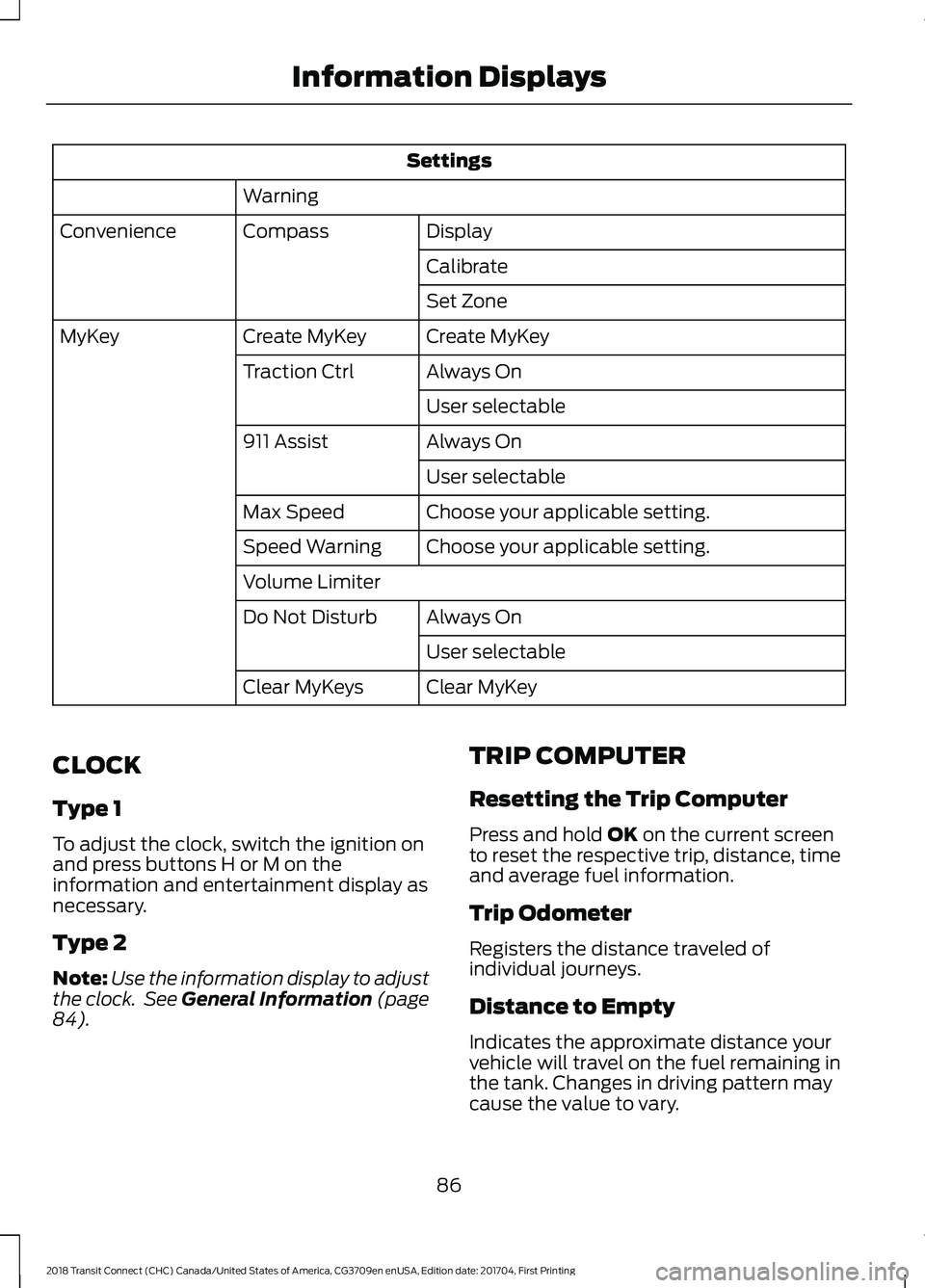
Settings
Warning Display
Compass
Convenience
Calibrate
Set Zone
Create MyKey
Create MyKey
MyKey
Always On
Traction Ctrl
User selectable
Always On
911 Assist
User selectable
Choose your applicable setting.
Max Speed
Choose your applicable setting.
Speed Warning
Volume Limiter
Always On
Do Not Disturb
User selectable
Clear MyKey
Clear MyKeys
CLOCK
Type 1
To adjust the clock, switch the ignition on
and press buttons H or M on the
information and entertainment display as
necessary.
Type 2
Note: Use the information display to adjust
the clock. See General Information (page
84). TRIP COMPUTER
Resetting the Trip Computer
Press and hold
OK on the current screen
to reset the respective trip, distance, time
and average fuel information.
Trip Odometer
Registers the distance traveled of
individual journeys.
Distance to Empty
Indicates the approximate distance your
vehicle will travel on the fuel remaining in
the tank. Changes in driving pattern may
cause the value to vary.
86
2018 Transit Connect (CHC) Canada/United States of America, CG3709en enUSA, Edition date: 201704, First Printing Information Displays
Page 90 of 449
Average Fuel
Indicates the average fuel consumption
since the function was last reset.
Digital Speedometer
The speed your vehicle is traveling at will
display as a digital number.
PERSONALIZED SETTINGS
Measure Units
To swap between imperial and metric
units, scroll to this display and press the
OK button.
Swapping between imperial and metric
units will affect the following displays:
• Distance to empty.
• Average fuel consumption.
• Instantaneous fuel consumption.
• Average speed.
Switching Chimes Off
The following chimes can be switched off:
• Warning messages.
• Information messages. INFORMATION MESSAGES Press the
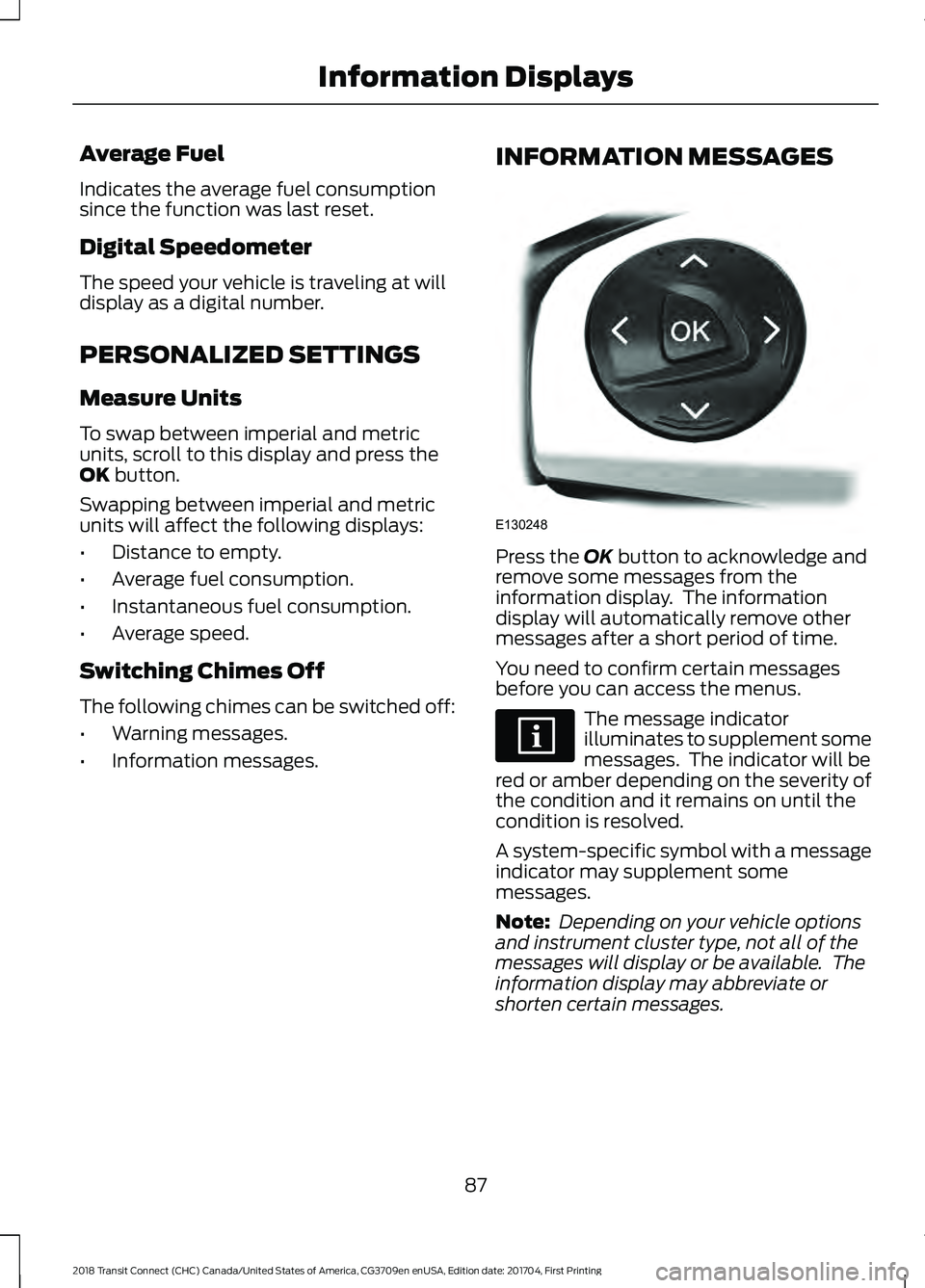
OK button to acknowledge and
remove some messages from the
information display. The information
display will automatically remove other
messages after a short period of time.
You need to confirm certain messages
before you can access the menus. The message indicator
illuminates to supplement some
messages. The indicator will be
red or amber depending on the severity of
the condition and it remains on until the
condition is resolved.
A system-specific symbol with a message
indicator may supplement some
messages.
Note: Depending on your vehicle options
and instrument cluster type, not all of the
messages will display or be available. The
information display may abbreviate or
shorten certain messages.
87
2018 Transit Connect (CHC) Canada/United States of America, CG3709en enUSA, Edition date: 201704, First Printing Information DisplaysE130248
Page 96 of 449
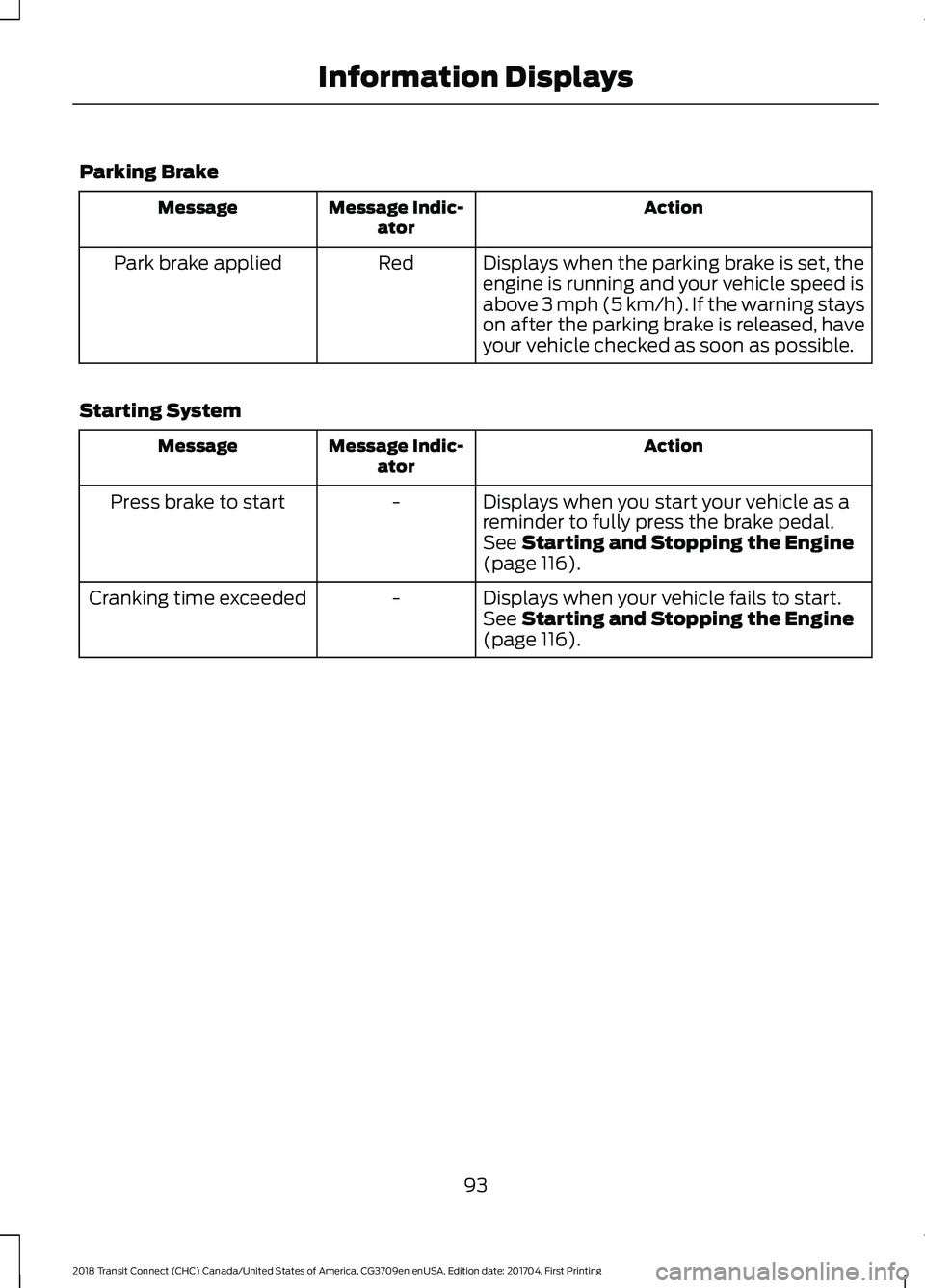
Parking Brake
Action
Message Indic-
ator
Message
Displays when the parking brake is set, the
engine is running and your vehicle speed is
above 3 mph (5 km/h). If the warning stays
on after the parking brake is released, have
your vehicle checked as soon as possible.
Red
Park brake applied
Starting System Action
Message Indic-
ator
Message
Displays when you start your vehicle as a
reminder to fully press the brake pedal.
-
Press brake to start
See
Starting and Stopping the Engine
(page 116).
Displays when your vehicle fails to start.
-
Cranking time exceeded
See
Starting and Stopping the Engine
(page 116).
93
2018 Transit Connect (CHC) Canada/United States of America, CG3709en enUSA, Edition date: 201704, First Printing Information Displays
Page 97 of 449
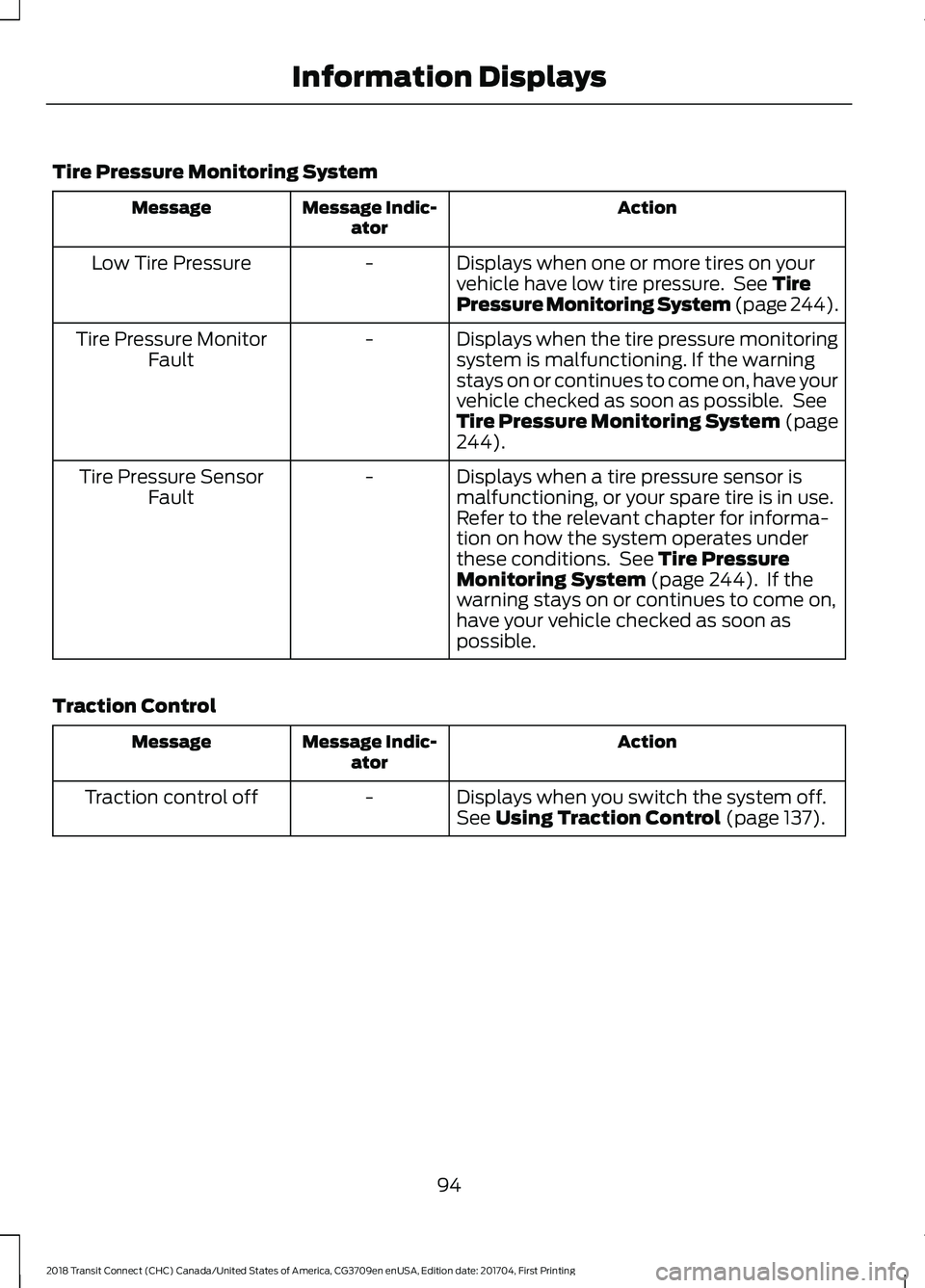
Tire Pressure Monitoring System
Action
Message Indic-
ator
Message
Displays when one or more tires on your
vehicle have low tire pressure. See Tire
Pressure Monitoring System (page 244).
-
Low Tire Pressure
Displays when the tire pressure monitoring
system is malfunctioning. If the warning
stays on or continues to come on, have your
vehicle checked as soon as possible. See
Tire Pressure Monitoring System (page
244
).
-
Tire Pressure Monitor
Fault
Displays when a tire pressure sensor is
malfunctioning, or your spare tire is in use.
Refer to the relevant chapter for informa-
tion on how the system operates under
these conditions. See
Tire Pressure
Monitoring System (page 244). If the
warning stays on or continues to come on,
have your vehicle checked as soon as
possible.
-
Tire Pressure Sensor
Fault
Traction Control Action
Message Indic-
ator
Message
Displays when you switch the system off.
-
Traction control off
See
Using Traction Control (page 137).
94
2018 Transit Connect (CHC) Canada/United States of America, CG3709en enUSA, Edition date: 201704, First Printing Information Displays
Page 106 of 449
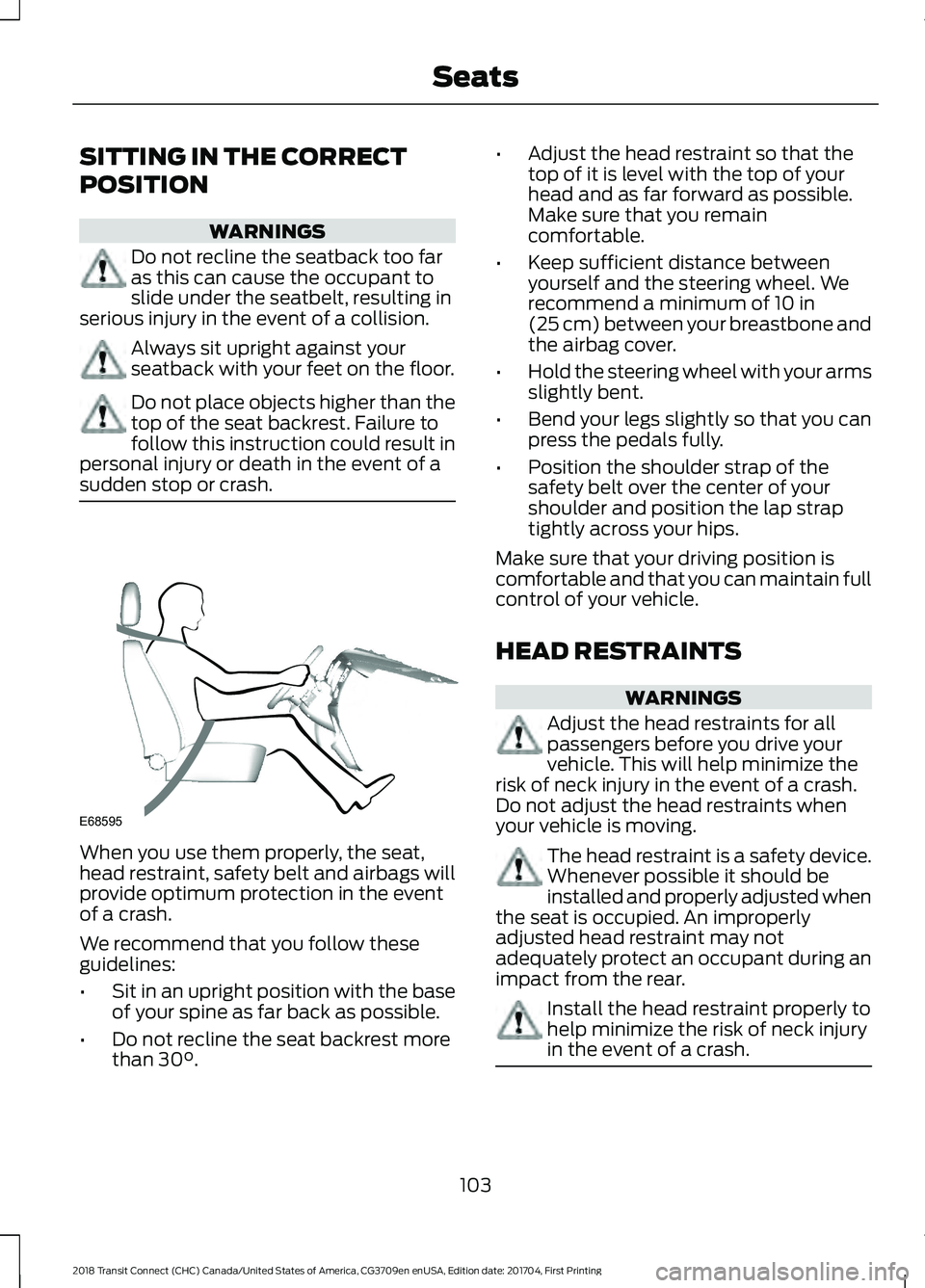
SITTING IN THE CORRECT
POSITION
WARNINGS
Do not recline the seatback too far
as this can cause the occupant to
slide under the seatbelt, resulting in
serious injury in the event of a collision. Always sit upright against your
seatback with your feet on the floor.
Do not place objects higher than the
top of the seat backrest. Failure to
follow this instruction could result in
personal injury or death in the event of a
sudden stop or crash. When you use them properly, the seat,
head restraint, safety belt and airbags will
provide optimum protection in the event
of a crash.
We recommend that you follow these
guidelines:
•
Sit in an upright position with the base
of your spine as far back as possible.
• Do not recline the seat backrest more
than 30°. •
Adjust the head restraint so that the
top of it is level with the top of your
head and as far forward as possible.
Make sure that you remain
comfortable.
• Keep sufficient distance between
yourself and the steering wheel. We
recommend a minimum of
10 in
(25 cm) between your breastbone and
the airbag cover.
• Hold the steering wheel with your arms
slightly bent.
• Bend your legs slightly so that you can
press the pedals fully.
• Position the shoulder strap of the
safety belt over the center of your
shoulder and position the lap strap
tightly across your hips.
Make sure that your driving position is
comfortable and that you can maintain full
control of your vehicle.
HEAD RESTRAINTS WARNINGS
Adjust the head restraints for all
passengers before you drive your
vehicle. This will help minimize the
risk of neck injury in the event of a crash.
Do not adjust the head restraints when
your vehicle is moving. The head restraint is a safety device.
Whenever possible it should be
installed and properly adjusted when
the seat is occupied. An improperly
adjusted head restraint may not
adequately protect an occupant during an
impact from the rear. Install the head restraint properly to
help minimize the risk of neck injury
in the event of a crash.
103
2018 Transit Connect (CHC) Canada/United States of America, CG3709en enUSA, Edition date: 201704, First Printing SeatsE68595
Page 108 of 449
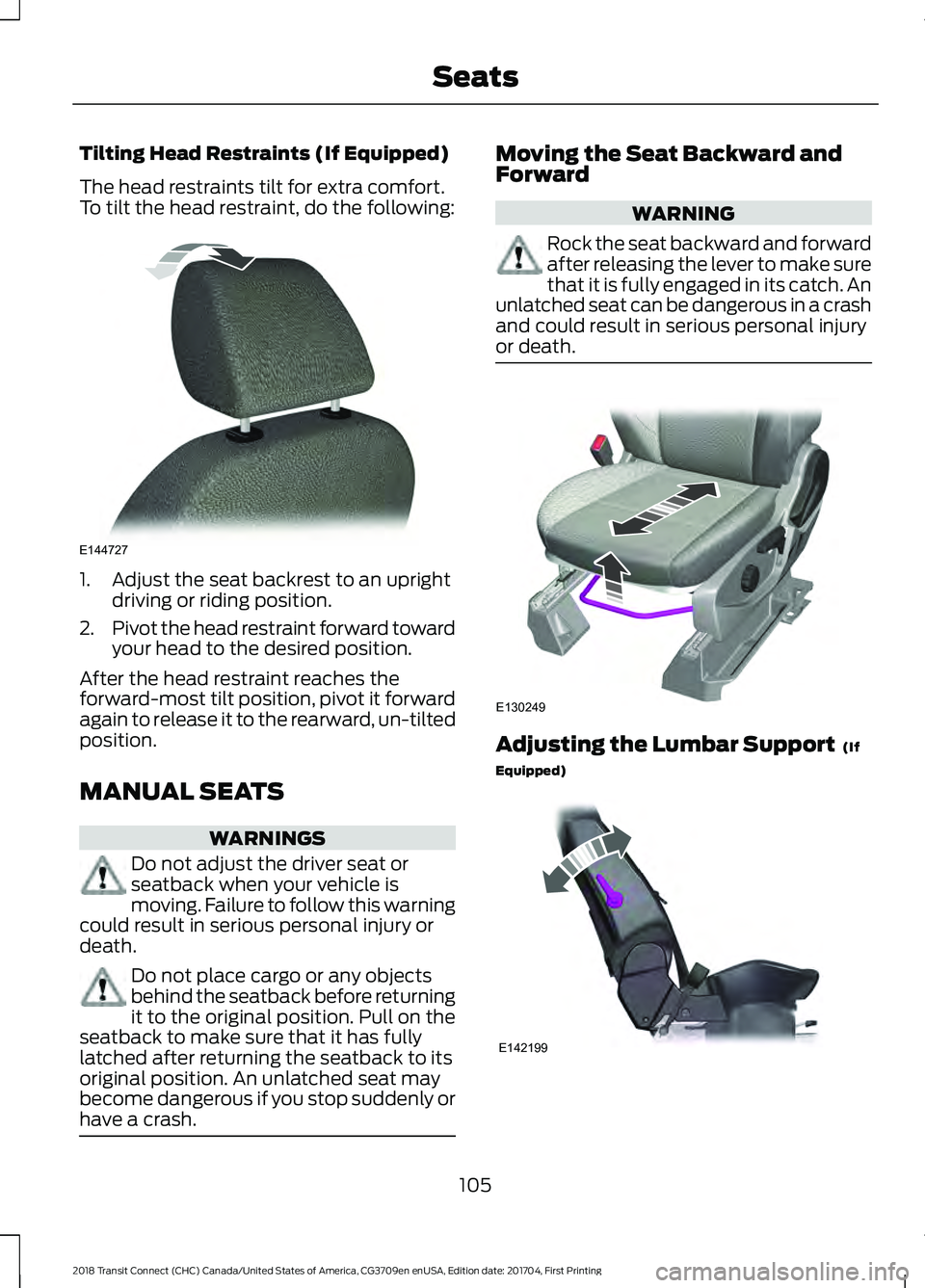
Tilting Head Restraints (If Equipped)
The head restraints tilt for extra comfort.
To tilt the head restraint, do the following:
1. Adjust the seat backrest to an upright
driving or riding position.
2. Pivot the head restraint forward toward
your head to the desired position.
After the head restraint reaches the
forward-most tilt position, pivot it forward
again to release it to the rearward, un-tilted
position.
MANUAL SEATS WARNINGS
Do not adjust the driver seat or
seatback when your vehicle is
moving. Failure to follow this warning
could result in serious personal injury or
death. Do not place cargo or any objects
behind the seatback before returning
it to the original position. Pull on the
seatback to make sure that it has fully
latched after returning the seatback to its
original position. An unlatched seat may
become dangerous if you stop suddenly or
have a crash. Moving the Seat Backward and
Forward
WARNING
Rock the seat backward and forward
after releasing the lever to make sure
that it is fully engaged in its catch. An
unlatched seat can be dangerous in a crash
and could result in serious personal injury
or death. Adjusting the Lumbar Support (If
Equipped) 105
2018 Transit Connect (CHC) Canada/United States of America, CG3709en enUSA, Edition date: 201704, First Printing SeatsE144727 E130249 E142199
Page 109 of 449
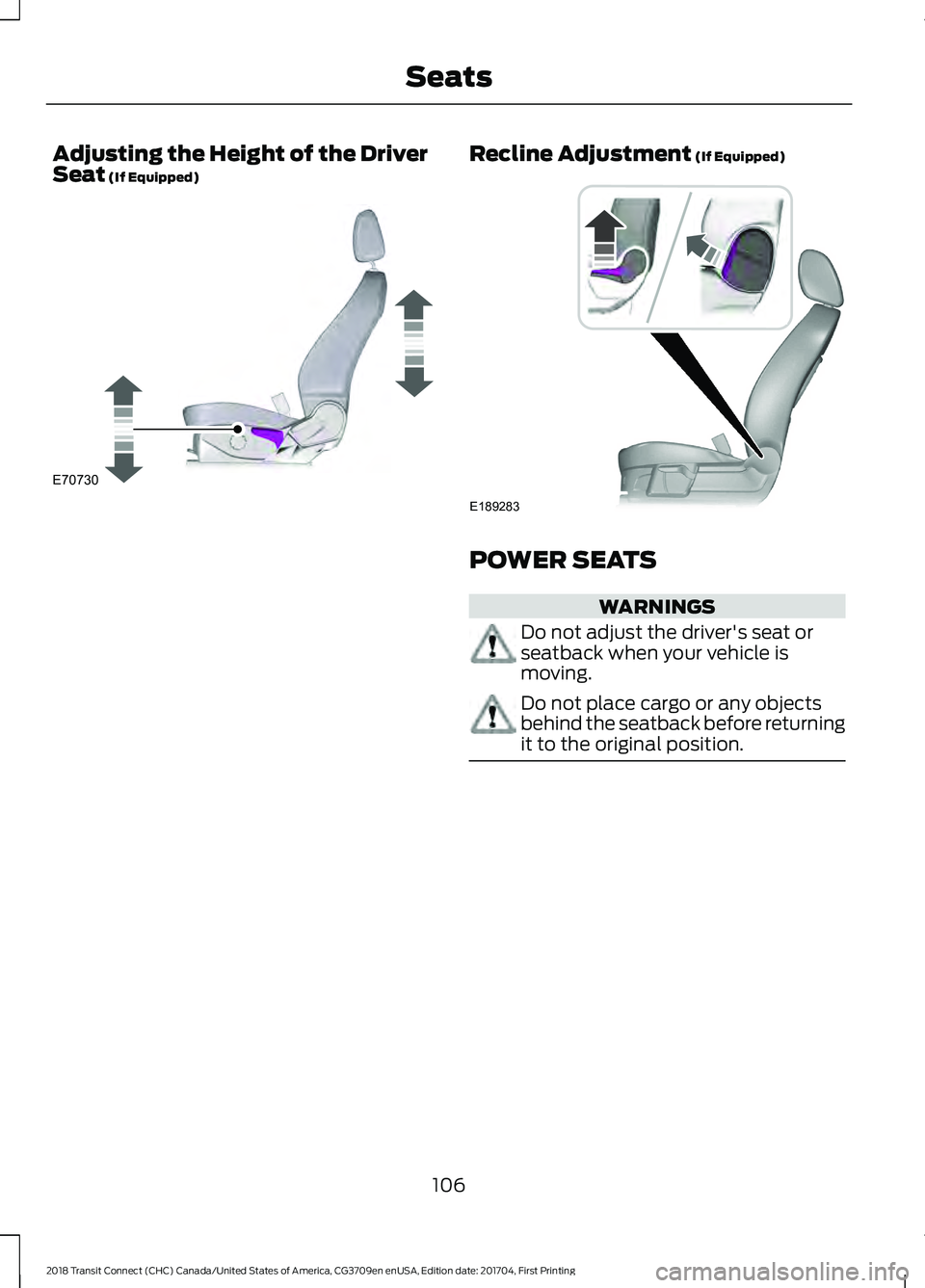
Adjusting the Height of the Driver
Seat (If Equipped) Recline Adjustment (If Equipped)
POWER SEATS
WARNINGS
Do not adjust the driver's seat or
seatback when your vehicle is
moving.
Do not place cargo or any objects
behind the seatback before returning
it to the original position.
106
2018 Transit Connect (CHC) Canada/United States of America, CG3709en enUSA, Edition date: 201704, First Printing SeatsE70730 E189283
Page 110 of 449
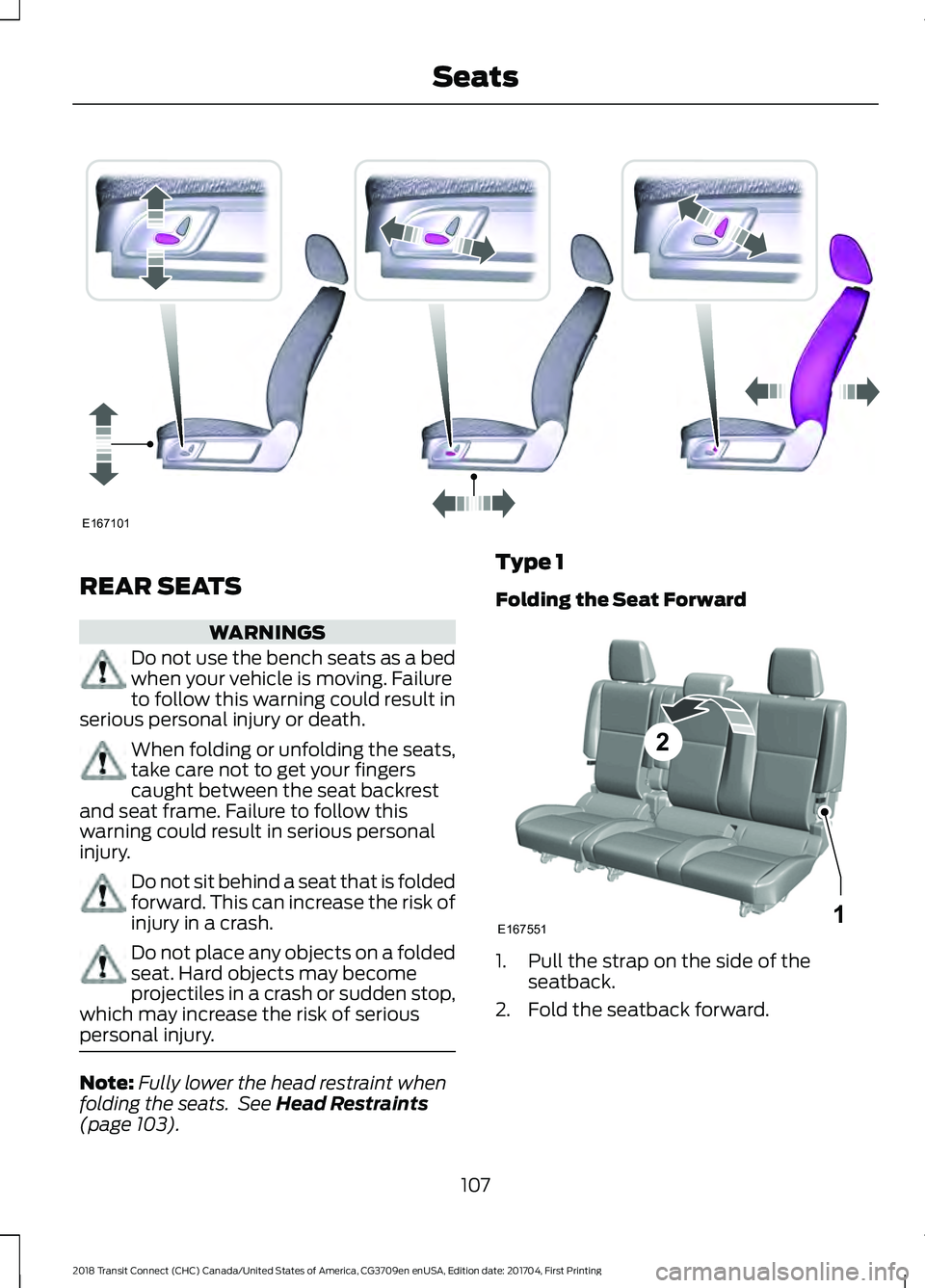
REAR SEATS
WARNINGS
Do not use the bench seats as a bed
when your vehicle is moving. Failure
to follow this warning could result in
serious personal injury or death. When folding or unfolding the seats,
take care not to get your fingers
caught between the seat backrest
and seat frame. Failure to follow this
warning could result in serious personal
injury. Do not sit behind a seat that is folded
forward. This can increase the risk of
injury in a crash.
Do not place any objects on a folded
seat. Hard objects may become
projectiles in a crash or sudden stop,
which may increase the risk of serious
personal injury. Note:
Fully lower the head restraint when
folding the seats. See Head Restraints
(page 103). Type 1
Folding the Seat Forward
1. Pull the strap on the side of the
seatback.
2. Fold the seatback forward.
107
2018 Transit Connect (CHC) Canada/United States of America, CG3709en enUSA, Edition date: 201704, First Printing SeatsE167101 E167551
2
1
Page 113 of 449
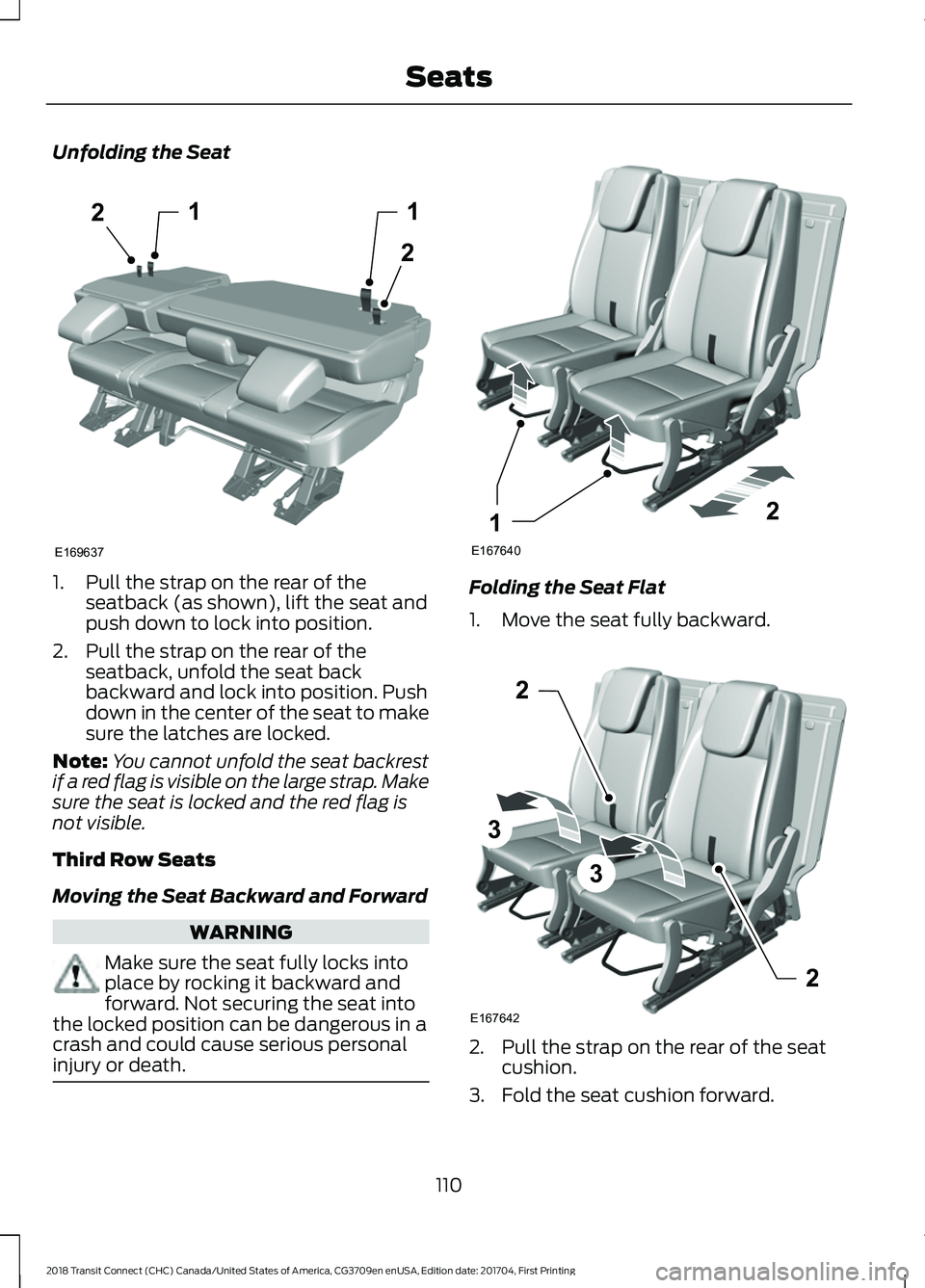
Unfolding the Seat
1. Pull the strap on the rear of the
seatback (as shown), lift the seat and
push down to lock into position.
2. Pull the strap on the rear of the seatback, unfold the seat back
backward and lock into position. Push
down in the center of the seat to make
sure the latches are locked.
Note: You cannot unfold the seat backrest
if a red flag is visible on the large strap. Make
sure the seat is locked and the red flag is
not visible.
Third Row Seats
Moving the Seat Backward and Forward WARNING
Make sure the seat fully locks into
place by rocking it backward and
forward. Not securing the seat into
the locked position can be dangerous in a
crash and could cause serious personal
injury or death. Folding the Seat Flat
1. Move the seat fully backward.
2. Pull the strap on the rear of the seat
cushion.
3. Fold the seat cushion forward.
110
2018 Transit Connect (CHC) Canada/United States of America, CG3709en enUSA, Edition date: 201704, First Printing Seats12
2
1
E169637 E167640
21 E167642
2
3
3
2
Page 114 of 449
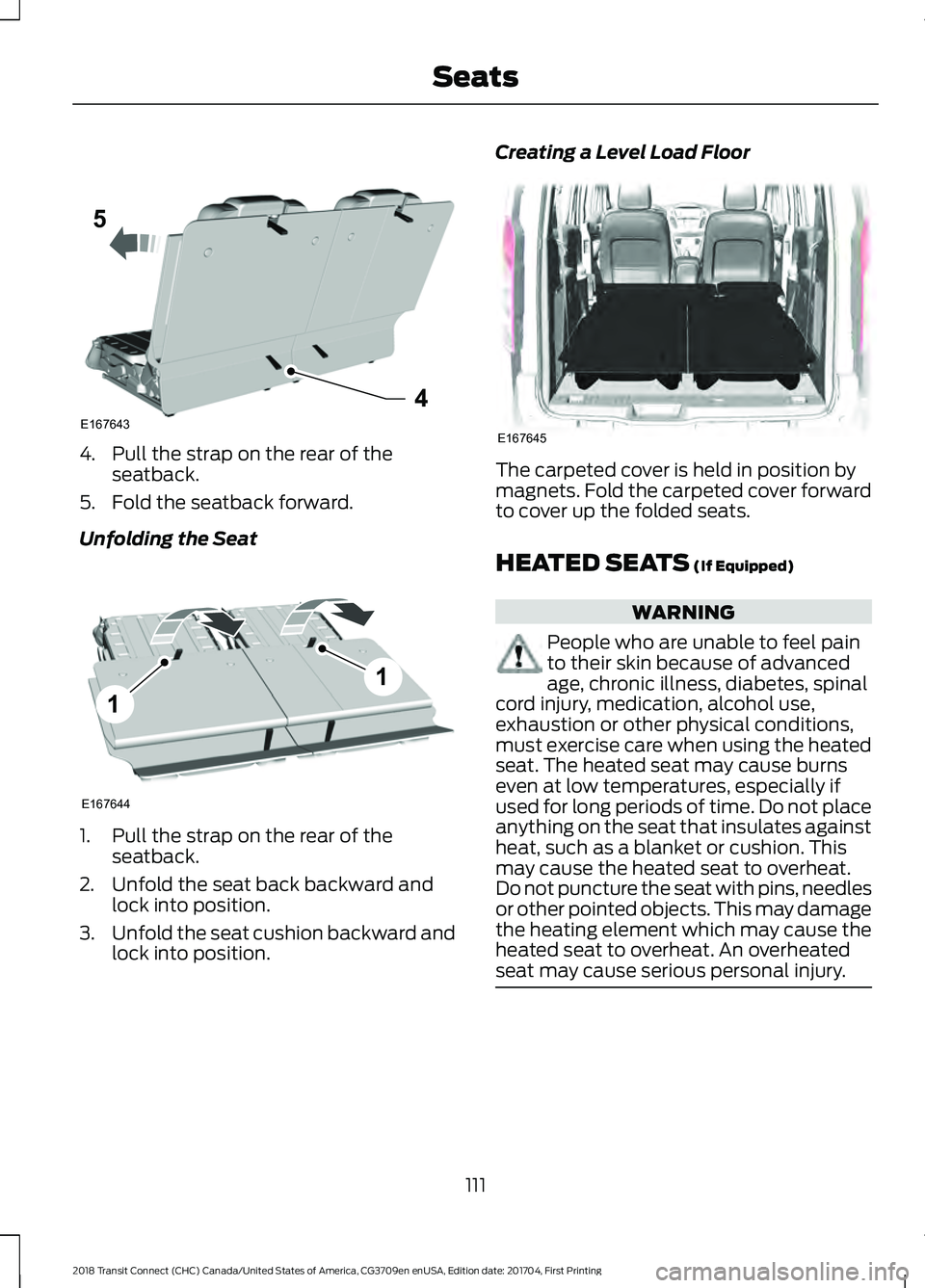
4. Pull the strap on the rear of the
seatback.
5. Fold the seatback forward.
Unfolding the Seat 1. Pull the strap on the rear of the
seatback.
2. Unfold the seat back backward and lock into position.
3. Unfold the seat cushion backward and
lock into position. Creating a Level Load Floor
The carpeted cover is held in position by
magnets. Fold the carpeted cover forward
to cover up the folded seats.
HEATED SEATS (If Equipped)
WARNING
People who are unable to feel pain
to their skin because of advanced
age, chronic illness, diabetes, spinal
cord injury, medication, alcohol use,
exhaustion or other physical conditions,
must exercise care when using the heated
seat. The heated seat may cause burns
even at low temperatures, especially if
used for long periods of time. Do not place
anything on the seat that insulates against
heat, such as a blanket or cushion. This
may cause the heated seat to overheat.
Do not puncture the seat with pins, needles
or other pointed objects. This may damage
the heating element which may cause the
heated seat to overheat. An overheated
seat may cause serious personal injury. 111
2018 Transit Connect (CHC) Canada/United States of America, CG3709en enUSA, Edition date: 201704, First Printing SeatsE1676434
5 E167644
1
1 E167645