height FORD TRANSIT CONNECT 2019 User Guide
[x] Cancel search | Manufacturer: FORD, Model Year: 2019, Model line: TRANSIT CONNECT, Model: FORD TRANSIT CONNECT 2019Pages: 493, PDF Size: 7.43 MB
Page 84 of 493
HEADLAMP EXIT DELAY
After you switch the ignition off, you can
switch the headlamps on by pulling the
direction indicator lever toward you. You
will hear a short tone. The headlamps will
switch off automatically after three
minutes with any door open or 30 seconds
after the last door has been closed. You
can cancel this feature by pulling the
direction indicator toward you again or
switching the ignition on.
AUTOMATIC HIGH BEAM
CONTROL
WARNING: The system does not
relieve you of your responsibility to drive
with due care and attention. You may need
to override the system if it does not turn
the high beams on or off.
The system turns on high beams if it is dark
enough and no other traffic is present. If it
detects an approaching vehicle ’s
headlamps or tail lamps, or street lighting
ahead, the system turns off high beams
before they can distract other road users.
Low beams remain on.
Note: The system may not operate properly
if the sensor is blocked. Keep the windshield
free from obstruction or damage.
Note: The system may not operate properly
in cold or inclement conditions. You can
switch on the high beams by overriding the
system.
Note: If the system detects a blockage, for
example bird droppings, bug splatter, snow
or ice, the system goes into low beam mode
until you clear the blockage. A message may
appear in the information display if the
camera is blocked. Note:
Using much larger tires or equipping
vehicle accessories such as snowplows can
modify your vehicle's ride height and
degrade automatic high beam control
performance.
A camera sensor, centrally mounted
behind the windshield of your vehicle,
continuously monitors conditions to turn
the high beams on and off.
Once the system is active, the high beams
turn on if:
• The ambient light level is low enough.
• There is no traffic in front of your
vehicle.
• The vehicle speed is greater than
approximately
32 mph (51 km/h).
The system turns the high beams off if:
• The ambient light level is high enough
that high beams are not required.
• The system detects an approaching
vehicle's headlamps or tail lamps.
• The vehicle speed falls below
approximately
27 mph (44 km/h).
• The system detects severe rain, snow
or fog.
• The camera is blocked.
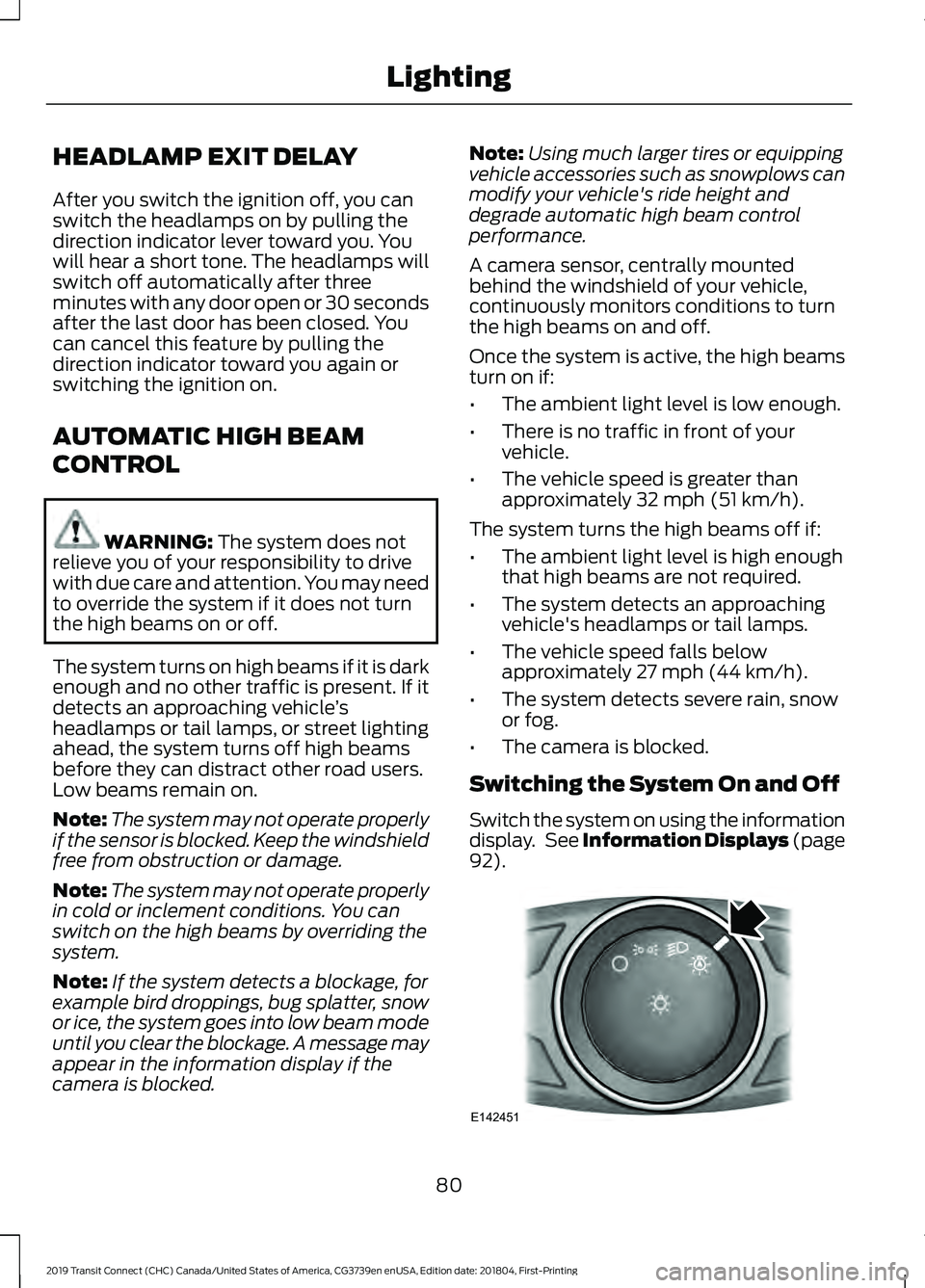
Switching the System On and Off
Switch the system on using the information
display. See Information Displays (page
92
). 80
2019 Transit Connect (CHC) Canada/United States of America, CG3739en enUSA, Edition date: 201804, First-Printing LightingE142451
Page 122 of 493
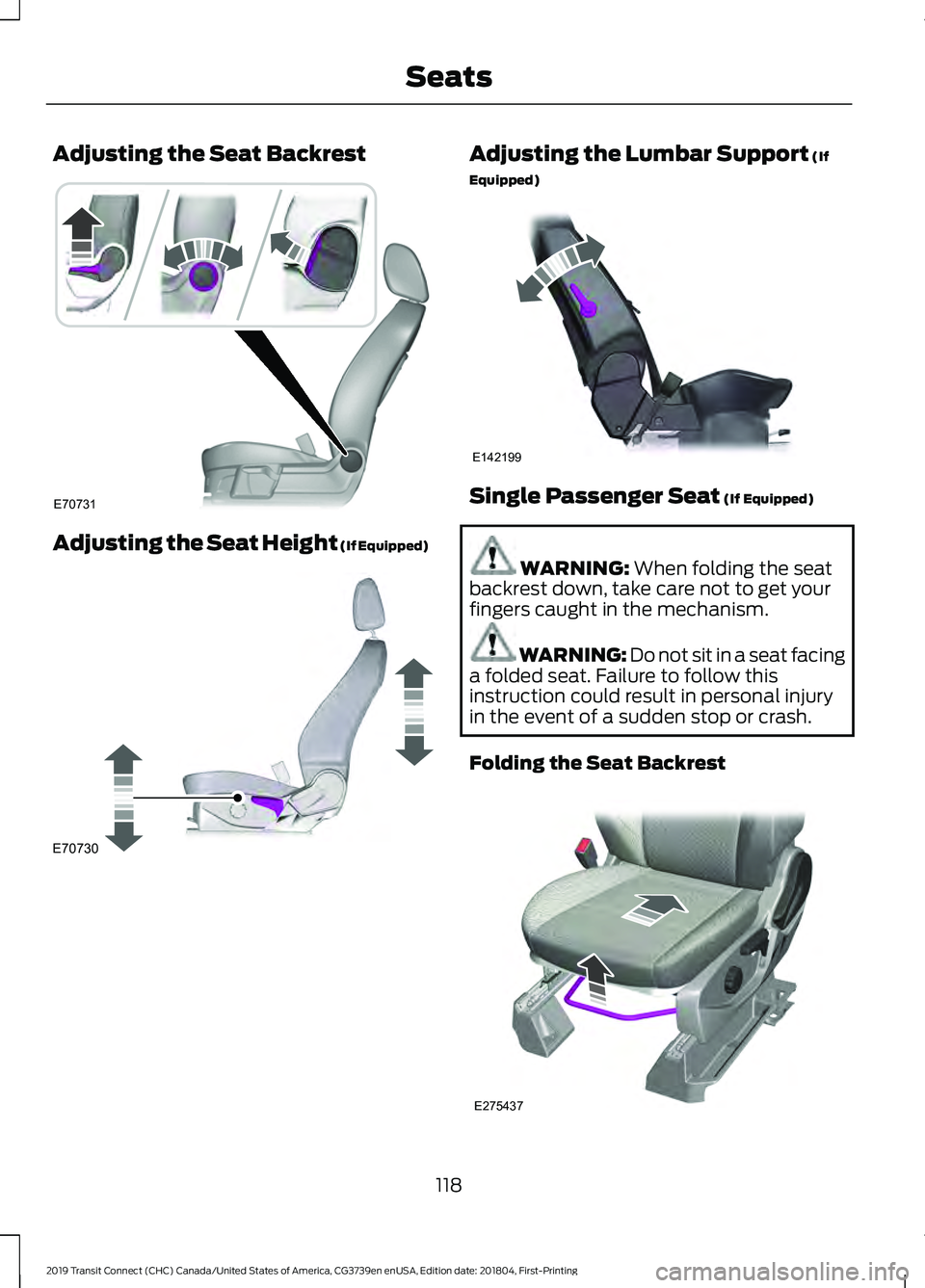
Adjusting the Seat Backrest
Adjusting the Seat Height (If Equipped) Adjusting the Lumbar Support (If
Equipped) Single Passenger Seat
(If Equipped)
WARNING:
When folding the seat
backrest down, take care not to get your
fingers caught in the mechanism. WARNING: Do not sit in a seat facing
a folded seat. Failure to follow this
instruction could result in personal injury
in the event of a sudden stop or crash.
Folding the Seat Backrest 118
2019 Transit Connect (CHC) Canada/United States of America, CG3739en enUSA, Edition date: 201804, First-Printing SeatsE70731 E70730 E142199 E275437
Page 281 of 493
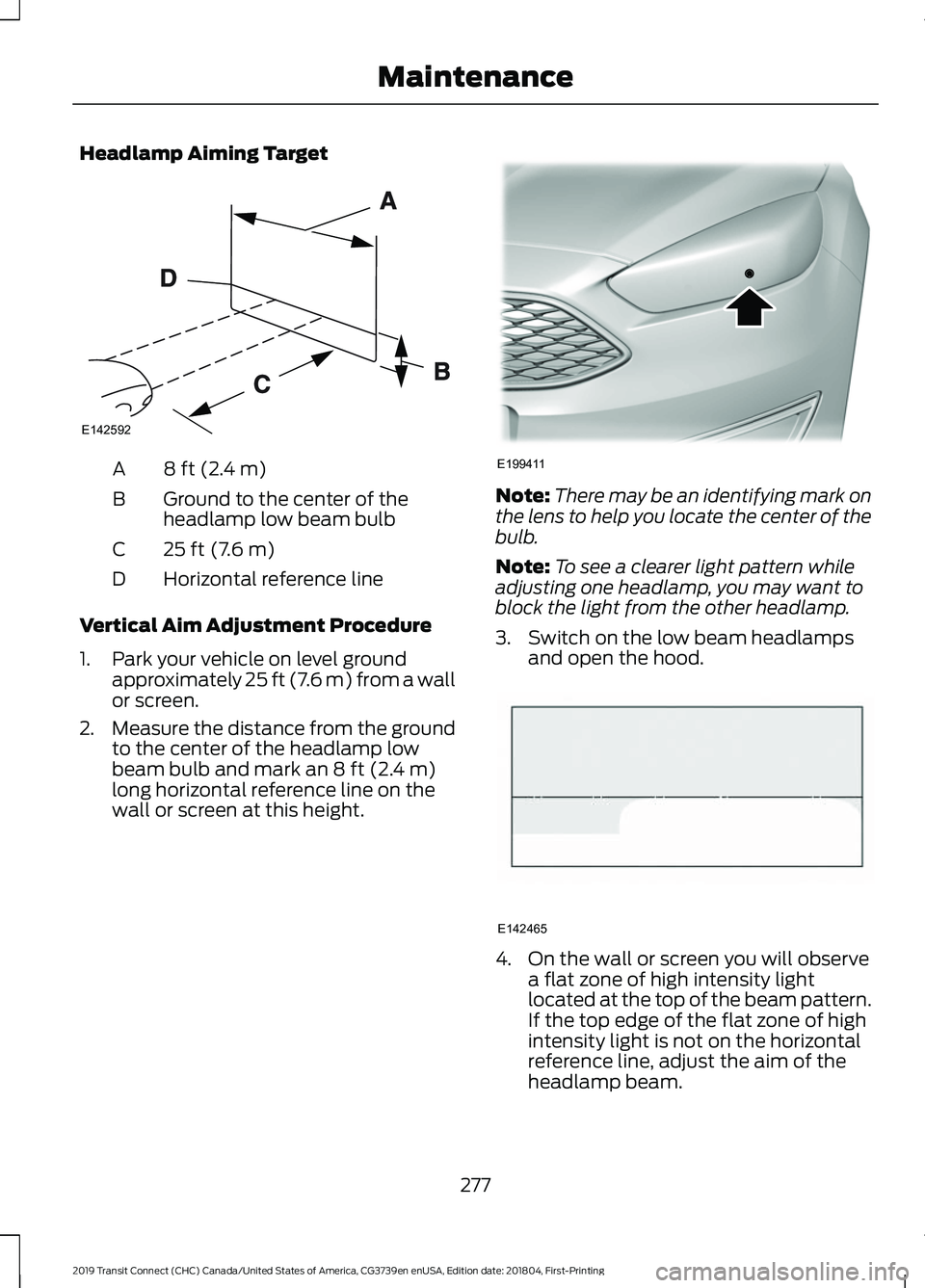
Headlamp Aiming Target
8 ft (2.4 m)
A
Ground to the center of the
headlamp low beam bulb
B
25 ft (7.6 m)
C
Horizontal reference line
D
Vertical Aim Adjustment Procedure
1. Park your vehicle on level ground approximately 25 ft (7.6 m) from a wall
or screen.
2. Measure the distance from the ground
to the center of the headlamp low
beam bulb and mark an
8 ft (2.4 m)
long horizontal reference line on the
wall or screen at this height. Note:
There may be an identifying mark on
the lens to help you locate the center of the
bulb.
Note: To see a clearer light pattern while
adjusting one headlamp, you may want to
block the light from the other headlamp.
3. Switch on the low beam headlamps and open the hood. 4. On the wall or screen you will observe
a flat zone of high intensity light
located at the top of the beam pattern.
If the top edge of the flat zone of high
intensity light is not on the horizontal
reference line, adjust the aim of the
headlamp beam.
277
2019 Transit Connect (CHC) Canada/United States of America, CG3739en enUSA, Edition date: 201804, First-Printing MaintenanceE142592 E199411 E142465
Page 308 of 493
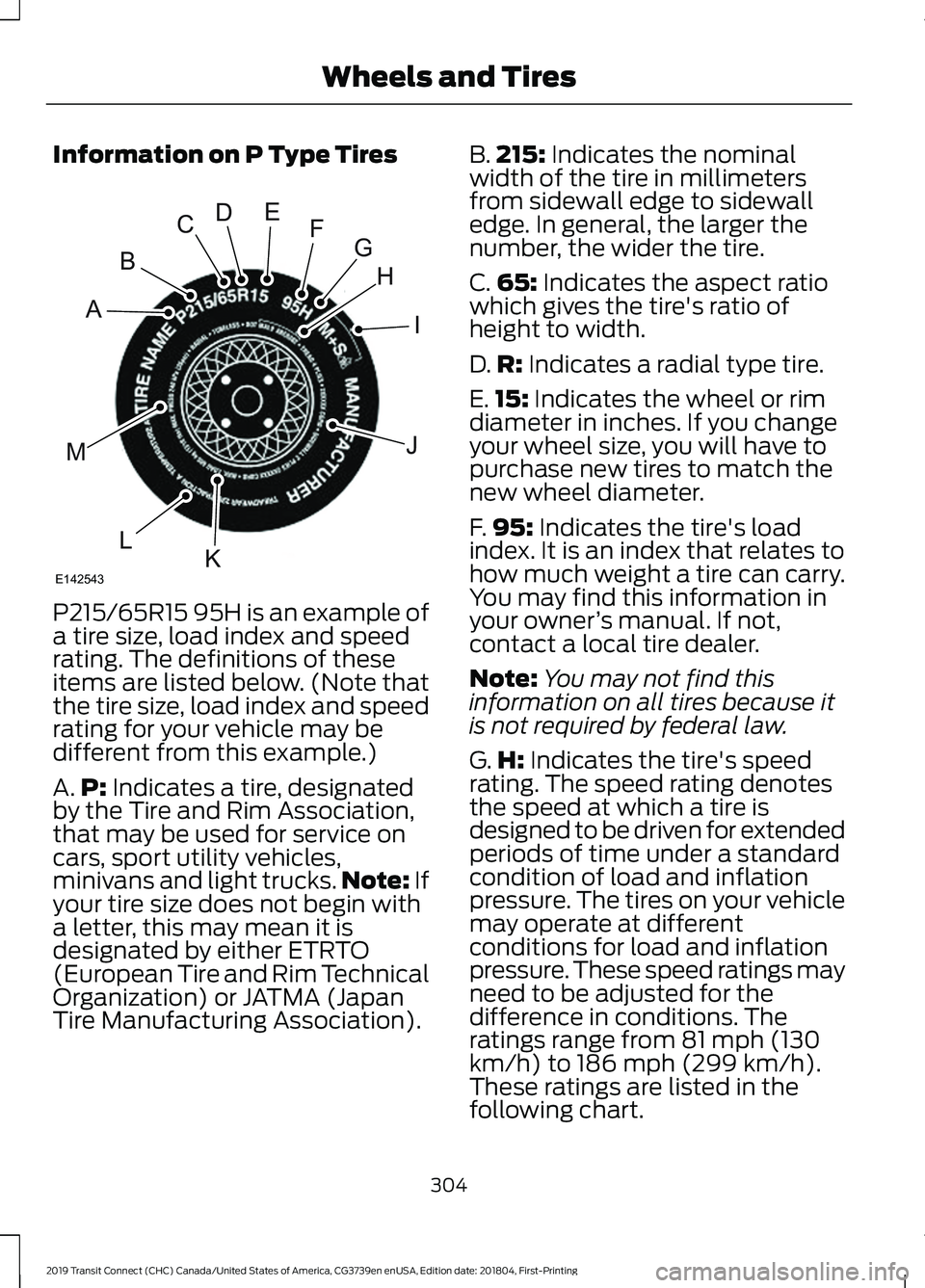
Information on P Type Tires
P215/65R15 95H is an example of
a tire size, load index and speed
rating. The definitions of these
items are listed below. (Note that
the tire size, load index and speed
rating for your vehicle may be
different from this example.)
A.
P: Indicates a tire, designated
by the Tire and Rim Association,
that may be used for service on
cars, sport utility vehicles,
minivans and light trucks. Note:
If
your tire size does not begin with
a letter, this may mean it is
designated by either ETRTO
(European Tire and Rim Technical
Organization) or JATMA (Japan
Tire Manufacturing Association). B.
215:
Indicates the nominal
width of the tire in millimeters
from sidewall edge to sidewall
edge. In general, the larger the
number, the wider the tire.
C. 65:
Indicates the aspect ratio
which gives the tire's ratio of
height to width.
D. R:
Indicates a radial type tire.
E. 15:
Indicates the wheel or rim
diameter in inches. If you change
your wheel size, you will have to
purchase new tires to match the
new wheel diameter.
F. 95:
Indicates the tire's load
index. It is an index that relates to
how much weight a tire can carry.
You may find this information in
your owner ’s manual. If not,
contact a local tire dealer.
Note: You may not find this
information on all tires because it
is not required by federal law.
G. H:
Indicates the tire's speed
rating. The speed rating denotes
the speed at which a tire is
designed to be driven for extended
periods of time under a standard
condition of load and inflation
pressure. The tires on your vehicle
may operate at different
conditions for load and inflation
pressure. These speed ratings may
need to be adjusted for the
difference in conditions. The
ratings range from 81 mph (130
km/h) to 186 mph (299 km/h).
These ratings are listed in the
following chart.
304
2019 Transit Connect (CHC) Canada/United States of America, CG3739en enUSA, Edition date: 201804, First-Printing Wheels and TiresH
I
J
KL
M
A
B
CDEFG
E142543
Page 311 of 493
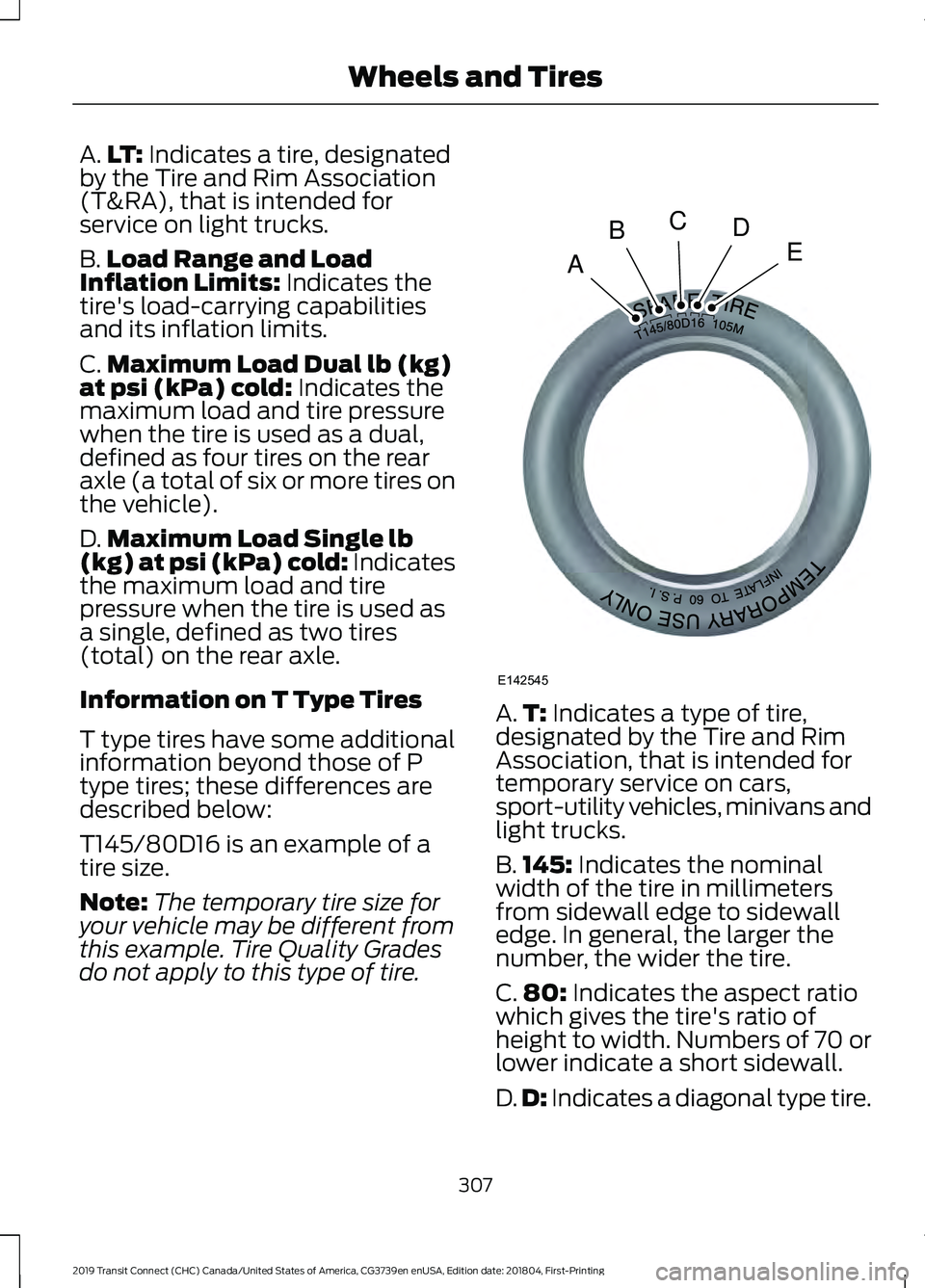
A.
LT: Indicates a tire, designated
by the Tire and Rim Association
(T&RA), that is intended for
service on light trucks.
B. Load Range and Load
Inflation Limits:
Indicates the
tire's load-carrying capabilities
and its inflation limits.
C. Maximum Load Dual lb (kg)
at psi (kPa) cold:
Indicates the
maximum load and tire pressure
when the tire is used as a dual,
defined as four tires on the rear
axle (a total of six or more tires on
the vehicle).
D. Maximum Load Single lb
(kg) at psi (kPa) cold:
Indicates
the maximum load and tire
pressure when the tire is used as
a single, defined as two tires
(total) on the rear axle.
Information on T Type Tires
T type tires have some additional
information beyond those of P
type tires; these differences are
described below:
T145/80D16 is an example of a
tire size.
Note: The temporary tire size for
your vehicle may be different from
this example. Tire Quality Grades
do not apply to this type of tire. A.
T:
Indicates a type of tire,
designated by the Tire and Rim
Association, that is intended for
temporary service on cars,
sport-utility vehicles, minivans and
light trucks.
B. 145:
Indicates the nominal
width of the tire in millimeters
from sidewall edge to sidewall
edge. In general, the larger the
number, the wider the tire.
C. 80:
Indicates the aspect ratio
which gives the tire's ratio of
height to width. Numbers of 70 or
lower indicate a short sidewall.
D. D:
Indicates a diagonal type tire.
307
2019 Transit Connect (CHC) Canada/United States of America, CG3739en enUSA, Edition date: 201804, First-Printing Wheels and TiresA
BCDE
E142545
Page 315 of 493
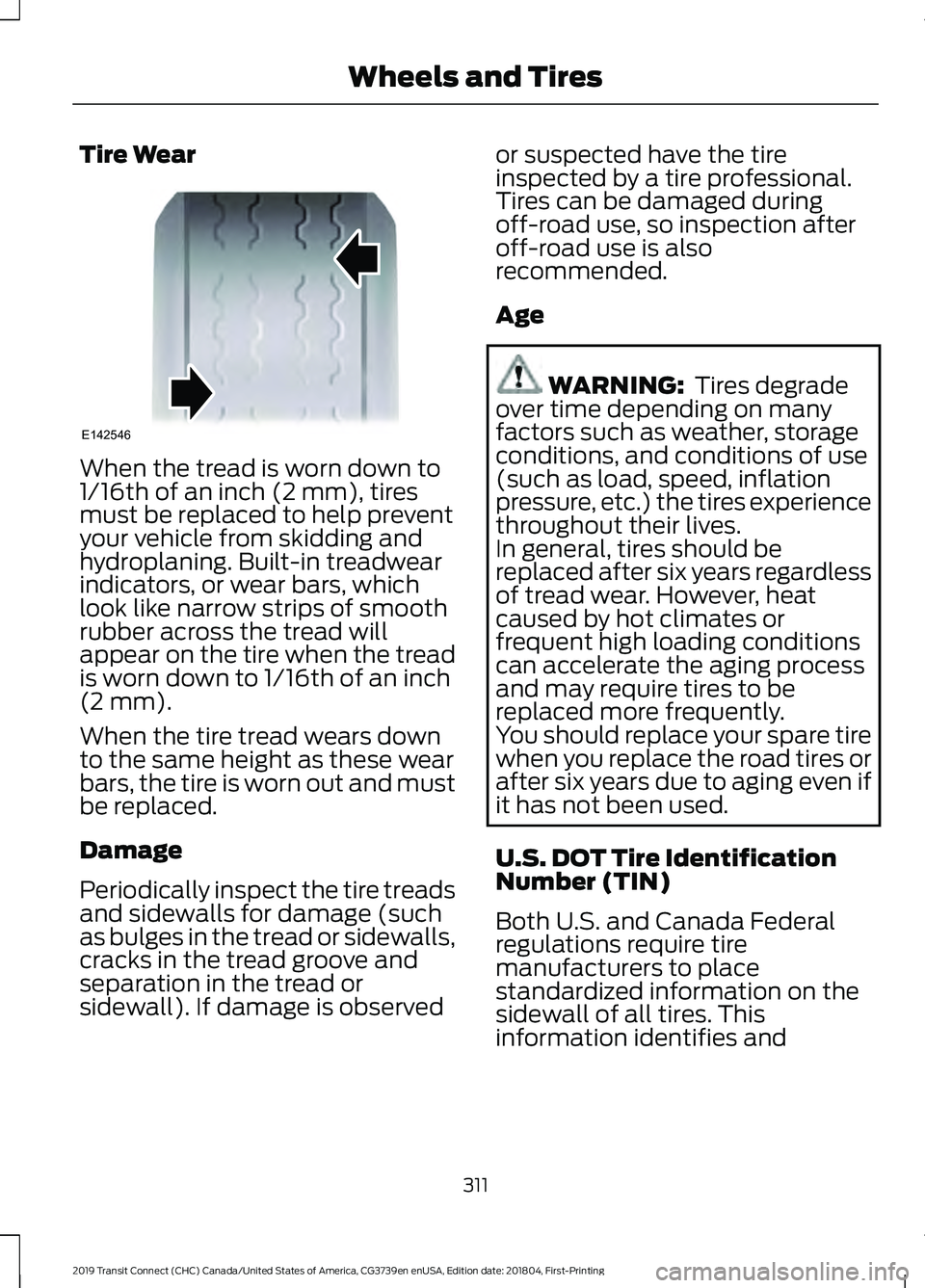
Tire Wear
When the tread is worn down to
1/16th of an inch (2 mm), tires
must be replaced to help prevent
your vehicle from skidding and
hydroplaning. Built-in treadwear
indicators, or wear bars, which
look like narrow strips of smooth
rubber across the tread will
appear on the tire when the tread
is worn down to 1/16th of an inch
(2 mm).
When the tire tread wears down
to the same height as these wear
bars, the tire is worn out and must
be replaced.
Damage
Periodically inspect the tire treads
and sidewalls for damage (such
as bulges in the tread or sidewalls,
cracks in the tread groove and
separation in the tread or
sidewall). If damage is observed or suspected have the tire
inspected by a tire professional.
Tires can be damaged during
off-road use, so inspection after
off-road use is also
recommended.
Age
WARNING: Tires degrade
over time depending on many
factors such as weather, storage
conditions, and conditions of use
(such as load, speed, inflation
pressure, etc.) the tires experience
throughout their lives.
In general, tires should be
replaced after six years regardless
of tread wear. However, heat
caused by hot climates or
frequent high loading conditions
can accelerate the aging process
and may require tires to be
replaced more frequently.
You should replace your spare tire
when you replace the road tires or
after six years due to aging even if
it has not been used.
U.S. DOT Tire Identification
Number (TIN)
Both U.S. and Canada Federal
regulations require tire
manufacturers to place
standardized information on the
sidewall of all tires. This
information identifies and
311
2019 Transit Connect (CHC) Canada/United States of America, CG3739en enUSA, Edition date: 201804, First-Printing Wheels and TiresE142546
Page 486 of 493
Vehicle Loading - with and without a
Trailer................................................................. 225
Locking and Unlocking.................................63 Autolock.................................................................. 65
Autounlock............................................................. 65
Emergency Locking with the Key................... 65
Locking and Unlocking the Doors From Inside.................................................................... 63
Locking and Unlocking the Doors with the Key Blade........................................................... 64
Opening the Double Rear Doors..................... 63
Opening the Double Rear Doors From Inside................................................................... 66
Remote Control.................................................... 63
Smart Unlocks for Integrated Keyhead Transmitter........................................................ 64
Unlocking the Doors with the Interior Door Handles............................................................... 64
Luggage Anchor Points...............................221
Lug Nuts See: Changing a Road Wheel....................... 320
Lug Nuts..........................................................325
M
Maintenance..................................................261 General Information.......................................... 261
Manual Climate Control............................108
Directing Air to the Footwell Air
Vents.................................................................. 109
Directing Air to the Instrument Panel Air Vents.................................................................. 109
Directing Air to the Windshield Air Vents.................................................................. 109
Setting the Blower Motor Speed.................. 108
Setting the Temperature................................. 109
Switching Maximum Cooling On and Off....................................................................... 108
Switching Maximum Defrost On and Off....................................................................... 108
Switching the Air Conditioning On and Off....................................................................... 108
Switching the Climate Control On and Off....................................................................... 108
Switching the Recirculated Air On and Off....................................................................... 108
Manual Liftgate
..............................................69
Closing the Liftgate............................................. 69Opening the Liftgate...........................................
69
Unlocking the Liftgate........................................ 69
Manual Seats
...................................................117
Adjusting the Lumbar Support....................... 118
Adjusting the Seat Backrest............................ 118
Adjusting the Seat Height................................ 118
Moving the Seat Backward and Forward............................................................... 117
Single Passenger Seat....................................... 118
Message Center See: Information Displays................................. 92
Mirrors See: Windows and Mirrors................................ 83
Mobile Communications Equipment.......15
Motorcraft Parts - 1.5L Duratorq-TDCi Diesel............................................................330
Motorcraft Parts - 2.0L Duratec-HE (MI4)/2.0L Flex Fuel.................................331
Motorcraft Parts - 2.5L...............................332
MyKey Settings...............................................56 Configurable Settings......................................... 56
Non-Configurable Settings.............................. 56
MyKey Troubleshooting - Vehicles With: Push Button Start........................................61
What is an admin key?........................................ 61
Why can I not clear the MyKeys?.................... 61
Why can I not create a MyKey?....................... 61
Why can I not program a MyKey?................... 61
Why can I not start the engine with a MyKey?................................................................ 62
Why does the MyKey distance not accumulate?..................................................... 62
MyKey Troubleshooting - Vehicles Without: Push Button Start.....................61
What is an admin key?........................................ 61
Why can I not clear the MyKeys?.................... 61
Why can I not create a MyKey?....................... 61
Why can I not program a MyKey?................... 61
Why does the MyKey distance not accumulate?...................................................... 61
MyKey ™
.............................................................56
Principle of Operation........................................ 56
N
Navigation.......................................................381 Changing the Format of the Map................382
Live Traffic............................................................ 384
482
2019 Transit Connect (CHC) Canada/United States of America, CG3739en enUSA, Edition date: 201804, First-Printing Index
Page 489 of 493
Vehicles Sold in Canada: Using Roadside
Assistance....................................................... 242
Vehicles Sold in the United States: Getting Roadside Assistance.................................... 241
Vehicles Sold in the United States: Using Roadside Assistance.................................... 241
Roadside Emergencies...............................241
Roof Racks and Load Carriers.................224 Maximum Load Weights................................. 224
Running-In See: Breaking-In................................................. 238
Running Out of Fuel.....................................153 Adding Fuel From a Portable Fuel
Container.......................................................... 153
Filling a Portable Fuel Container.................. 153
S
Safety Canopy ™
............................................46
Safety Precautions......................................148
Satellite Radio
..............................................359
Satellite Radio Electronic Serial Number
(ESN)................................................................ 360
Satellite Radio Reception Factors..............359
SiriusXM Satellite Radio Service.................359
Troubleshooting................................................ 360
Scheduled Maintenance Record...........424
Scheduled Maintenance
...........................416
Seatbelt Extension........................................38
Seatbelt Height Adjustment......................35
Seatbelt Reminder........................................36 Belt-Minder™........................................................ 36
Seatbelts...........................................................32 Principle of Operation......................................... 32
Seatbelt Warning Lamp and Indicator Chime..............................................................36
Conditions of operation..................................... 36
Seats...................................................................115
Security..............................................................70
Selective Catalytic Reductant System..........................................................160
Diesel Exhaust Fluid Guidelines................... 160
Filling the Diesel Exhaust Fluid Tank..........160
Filling the Diesel Exhaust Fluid Tank Using a Container....................................................... 162
Filling the Diesel Exhaust Fluid Tank Using a Fuel Station Pump...................................... 161Selective Catalytic Reductant System
Warning Lamp................................................ 163
Settings...........................................................386 911 Assist................................................................ 391
Ambient Lighting............................................... 398
Bluetooth............................................................. 388
Clock....................................................................... 387
Display................................................................... 399
General.................................................................. 396
Media Player........................................................ 387
Mobile Apps......................................................... 394
Navigation............................................................ 392
Phone
.................................................................... 388
Radio....................................................................... 391
Sound.................................................................... 386
Valet Mode.......................................................... 400
Vehicle................................................................... 398
Voice Control....................................................... 399
Wi-Fi & Hotspot................................................. 396
Side Airbags
.....................................................45
Side Sensing System..................................183 Object Distance Indicator............................... 184
Sitting in the Correct Position...................115
Sliding Door
.....................................................66
Snow Chains See: Using Snow Chains.................................. 315
Spare Wheel See: Changing a Road Wheel....................... 320
Special Notices
................................................14
New Vehicle Limited Warranty......................... 14
On Board Diagnostics Data Link Connector ............................................................ 14
Special Instructions.............................................. 14
Special Operating Conditions Scheduled Maintenance...............................................422
Speed Control See: Cruise Control............................................ 195
Speed Limiter
................................................202
Principle of Operation...................................... 202
Using the System.............................................. 202
Stability Control
.............................................177
Principle of Operation........................................ 177
Starter Switch See: Ignition Switch........................................... 134
Starting a Diesel Engine.............................142 Engine Warning Lamps.................................... 143
Failure to Start..................................................... 142
Glow Plug Indicator............................................ 143
485
2019 Transit Connect (CHC) Canada/United States of America, CG3739en enUSA, Edition date: 201804, First-Printing Index