park assist FORD TRANSIT CONNECT 2019 Owner's Manual
[x] Cancel search | Manufacturer: FORD, Model Year: 2019, Model line: TRANSIT CONNECT, Model: FORD TRANSIT CONNECT 2019Pages: 493, PDF Size: 7.43 MB
Page 191 of 493
Note:
If the vehicle speed is greater than
approximately 22 mph (35 km/h), the
system shows a message to instruct you to
reduce the vehicle speed.
Automatically Steering into a Parallel
Parking Space
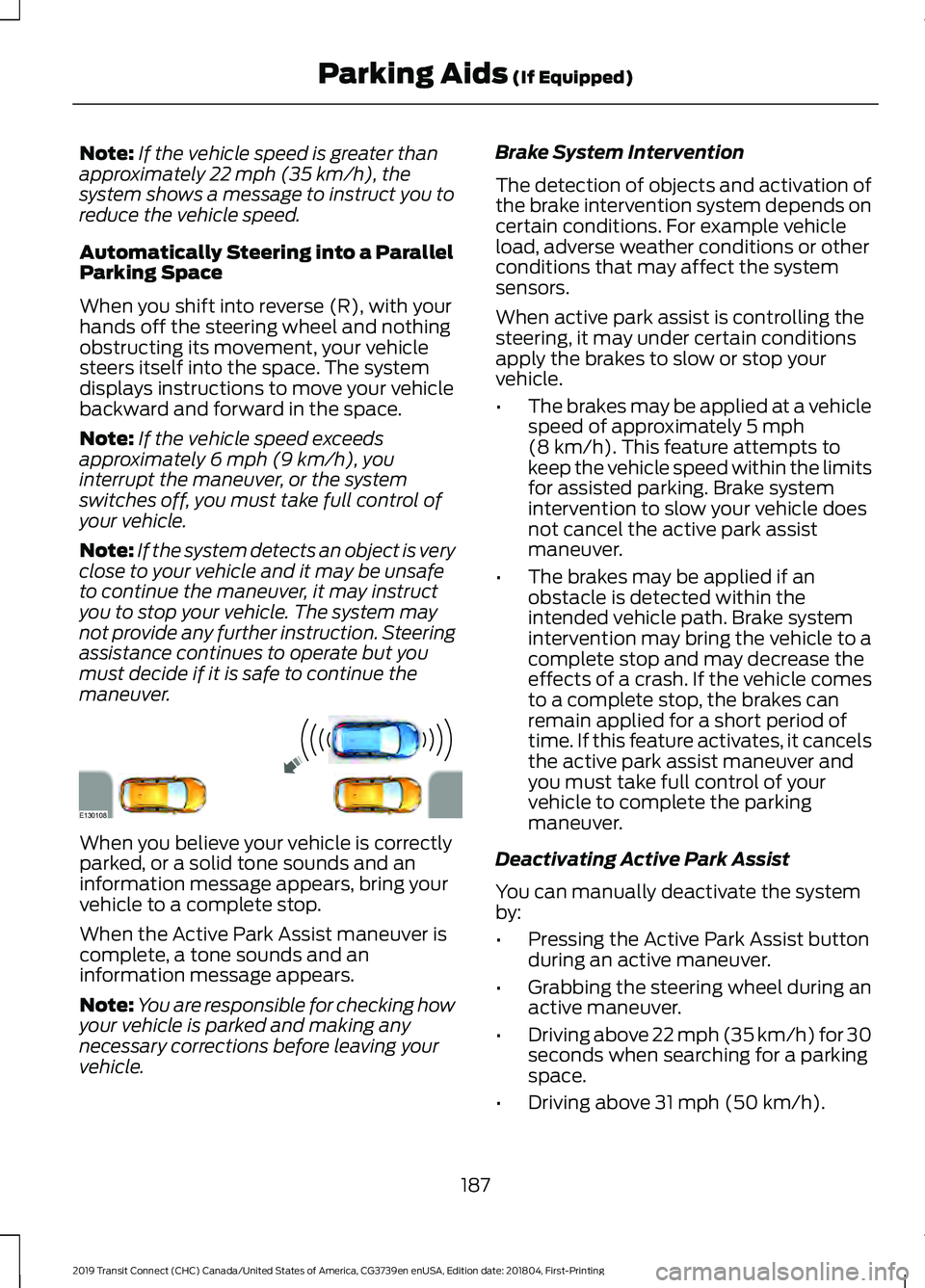
When you shift into reverse (R), with your
hands off the steering wheel and nothing
obstructing its movement, your vehicle
steers itself into the space. The system
displays instructions to move your vehicle
backward and forward in the space.
Note: If the vehicle speed exceeds
approximately
6 mph (9 km/h), you
interrupt the maneuver, or the system
switches off, you must take full control of
your vehicle.
Note: If the system detects an object is very
close to your vehicle and it may be unsafe
to continue the maneuver, it may instruct
you to stop your vehicle. The system may
not provide any further instruction. Steering
assistance continues to operate but you
must decide if it is safe to continue the
maneuver. When you believe your vehicle is correctly
parked, or a solid tone sounds and an
information message appears, bring your
vehicle to a complete stop.
When the Active Park Assist maneuver is
complete, a tone sounds and an
information message appears.
Note:
You are responsible for checking how
your vehicle is parked and making any
necessary corrections before leaving your
vehicle. Brake System Intervention
The detection of objects and activation of
the brake intervention system depends on
certain conditions. For example vehicle
load, adverse weather conditions or other
conditions that may affect the system
sensors.
When active park assist is controlling the
steering, it may under certain conditions
apply the brakes to slow or stop your
vehicle.
•
The brakes may be applied at a vehicle
speed of approximately
5 mph
(8 km/h). This feature attempts to
keep the vehicle speed within the limits
for assisted parking. Brake system
intervention to slow your vehicle does
not cancel the active park assist
maneuver.
• The brakes may be applied if an
obstacle is detected within the
intended vehicle path. Brake system
intervention may bring the vehicle to a
complete stop and may decrease the
effects of a crash. If the vehicle comes
to a complete stop, the brakes can
remain applied for a short period of
time. If this feature activates, it cancels
the active park assist maneuver and
you must take full control of your
vehicle to complete the parking
maneuver.
Deactivating Active Park Assist
You can manually deactivate the system
by:
• Pressing the Active Park Assist button
during an active maneuver.
• Grabbing the steering wheel during an
active maneuver.
• Driving above 22 mph (35 km/h) for 30
seconds when searching for a parking
space.
• Driving above
31 mph (50 km/h).
187
2019 Transit Connect (CHC) Canada/United States of America, CG3739en enUSA, Edition date: 201804, First-Printing Parking Aids
(If Equipped)E130108
Page 193 of 493
Note:
If the vehicle speed exceeds
approximately 6 mph (9 km/h), you
interrupt the maneuver, or the system
switches off, you must take full control of
your vehicle.
Note: If the system detects an object is very
close to your vehicle and it may be unsafe
to continue the maneuver, it may instruct
you to stop your vehicle. The system may
not provide any further instruction. Steering
assistance continues to operate but you
must decide if it is safe to continue the
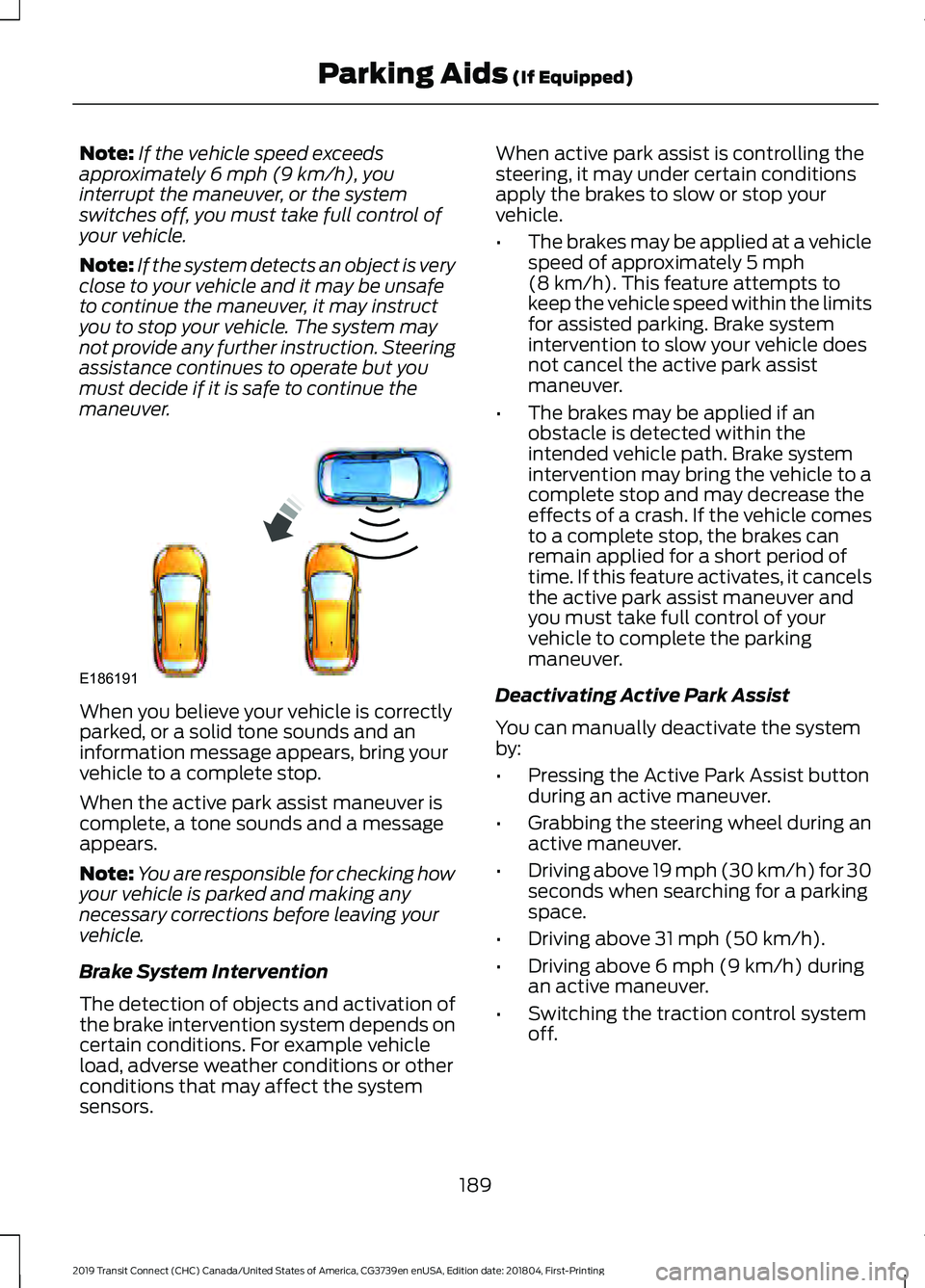
maneuver. When you believe your vehicle is correctly
parked, or a solid tone sounds and an
information message appears, bring your
vehicle to a complete stop.
When the active park assist maneuver is
complete, a tone sounds and a message
appears.
Note:
You are responsible for checking how
your vehicle is parked and making any
necessary corrections before leaving your
vehicle.
Brake System Intervention
The detection of objects and activation of
the brake intervention system depends on
certain conditions. For example vehicle
load, adverse weather conditions or other
conditions that may affect the system
sensors. When active park assist is controlling the
steering, it may under certain conditions
apply the brakes to slow or stop your
vehicle.
•
The brakes may be applied at a vehicle
speed of approximately
5 mph
(8 km/h). This feature attempts to
keep the vehicle speed within the limits
for assisted parking. Brake system
intervention to slow your vehicle does
not cancel the active park assist
maneuver.
• The brakes may be applied if an
obstacle is detected within the
intended vehicle path. Brake system
intervention may bring the vehicle to a
complete stop and may decrease the
effects of a crash. If the vehicle comes
to a complete stop, the brakes can
remain applied for a short period of
time. If this feature activates, it cancels
the active park assist maneuver and
you must take full control of your
vehicle to complete the parking
maneuver.
Deactivating Active Park Assist
You can manually deactivate the system
by:
• Pressing the Active Park Assist button
during an active maneuver.
• Grabbing the steering wheel during an
active maneuver.
• Driving above
19 mph (30 km/h) for 30
seconds when searching for a parking
space.
• Driving above
31 mph (50 km/h).
• Driving above
6 mph (9 km/h) during
an active maneuver.
• Switching the traction control system
off.
189
2019 Transit Connect (CHC) Canada/United States of America, CG3739en enUSA, Edition date: 201804, First-Printing Parking Aids
(If Equipped)E186191
Page 194 of 493
Certain vehicle conditions may also
deactivate the system, for example:
•
The traction control system activates
or fails.
• The anti-lock brake system activates
or fails.
If the system malfunctions, a message
appears and a tone sounds. Have your
vehicle checked as soon as possible.
Parallel Park Out Assist
The system steers your vehicle out of a
parallel parking space. You control the
accelerator, gearshift and brakes. The
system visually and audibly guides you out
of a parallel parking space.
Note: This system is not intended to assist
when exiting a perpendicular parking space. Press the button once when your
vehicle is stationary in a parallel
parking space.
Note: If you did not use active park assist
to parallel park your vehicle, pressing the
button once selects parallel park. You must
use the information display to select park
out assist.
The system displays a message instructing
you to switch a direction indicator on. Use
the direction indicator to select which side
of your vehicle you want to exit the parking
space. The system displays instructions to
move your vehicle backward and forward
in the space.
Note: If the system detects an object is very
close to your vehicle and it may be unsafe
to continue the maneuver, it may instruct
you to stop your vehicle. The system may
not provide any further instruction. Steering
assistance continues to operate but you
must decide if it is safe to continue the
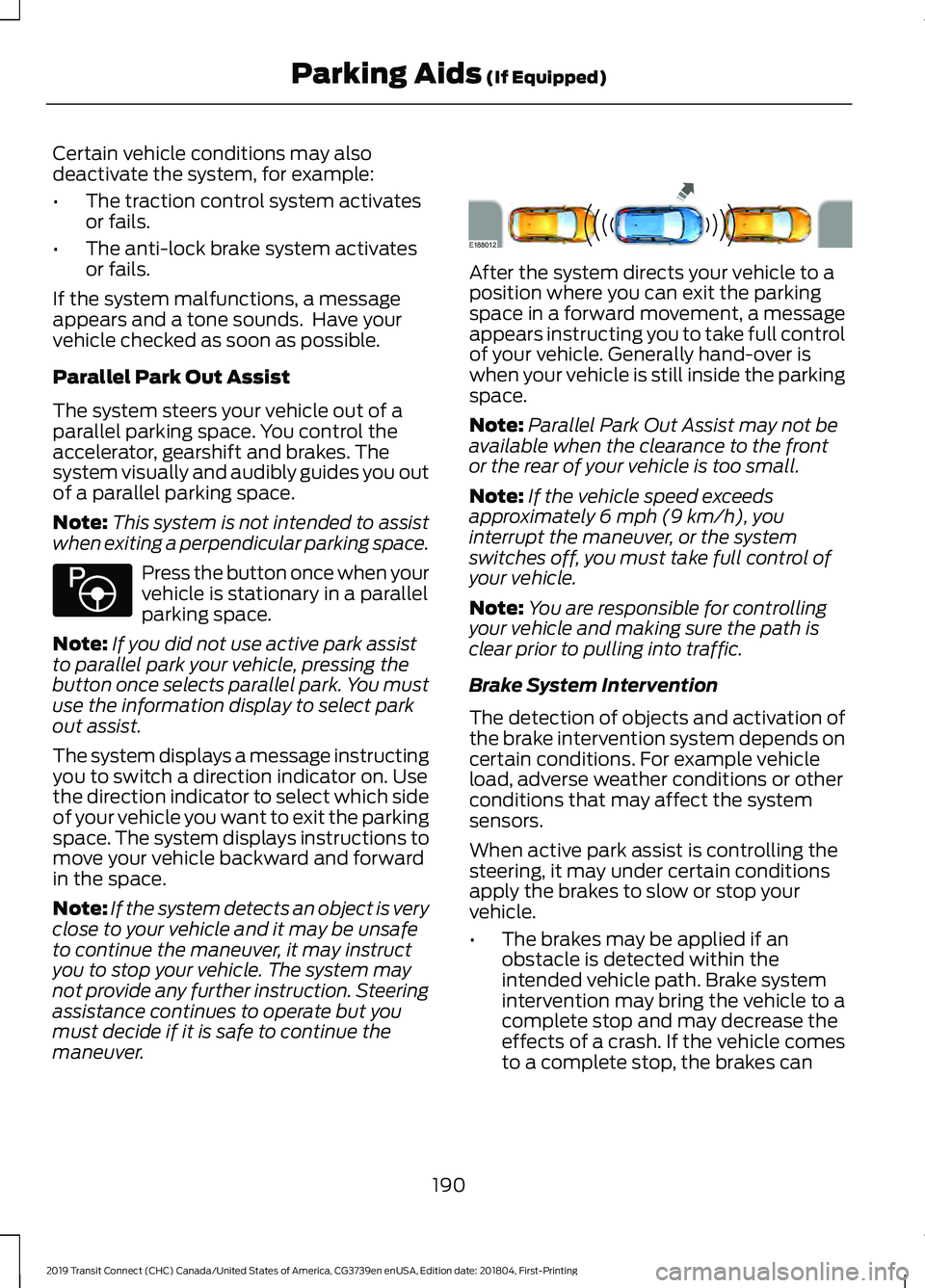
maneuver. After the system directs your vehicle to a
position where you can exit the parking
space in a forward movement, a message
appears instructing you to take full control
of your vehicle. Generally hand-over is
when your vehicle is still inside the parking
space.
Note:
Parallel Park Out Assist may not be
available when the clearance to the front
or the rear of your vehicle is too small.
Note: If the vehicle speed exceeds
approximately 6 mph (9 km/h), you
interrupt the maneuver, or the system
switches off, you must take full control of
your vehicle.
Note: You are responsible for controlling
your vehicle and making sure the path is
clear prior to pulling into traffic.
Brake System Intervention
The detection of objects and activation of
the brake intervention system depends on
certain conditions. For example vehicle
load, adverse weather conditions or other
conditions that may affect the system
sensors.
When active park assist is controlling the
steering, it may under certain conditions
apply the brakes to slow or stop your
vehicle.
• The brakes may be applied if an
obstacle is detected within the
intended vehicle path. Brake system
intervention may bring the vehicle to a
complete stop and may decrease the
effects of a crash. If the vehicle comes
to a complete stop, the brakes can
190
2019 Transit Connect (CHC) Canada/United States of America, CG3739en enUSA, Edition date: 201804, First-Printing Parking Aids
(If Equipped)E146186 E188012
Page 195 of 493
remain applied for a short period of
time. If this feature activates, it cancels
the active park assist maneuver and
you must take full control of your
vehicle to complete the parking
maneuver.
Troubleshooting Possible Cause
Symptom
You may have switched the traction control off.
The system does not search for
a parking space.
The transmission is in reverse (R). Your vehicle must
be moving forward to be able to detect a parking space.
The sensors may be blocked. For example, snow, ice
or dirt buildup. Blocked sensors can affect how the
system functions.
The system does not offer a
parking space.
There is not enough room in the parking space for your
vehicle to safely park.
There is not enough space for the parking maneuver on
the opposite side of the parking space.
The parking space is more than 5 ft (1.5 m) or less than
2 ft (0.5 m) away.
The vehicle speed is greater than
22 mph (35 km/h)
for parallel parking or greater than 19 mph (30 km/h)
for perpendicular parking.
You recently disconnected or replaced the battery. After
you reconnect the battery you must drive your vehicle
on a straight road for a short period of time.
Your vehicle is rolling in the opposite direction of the
current transmission position. For example, rolling
forward when in reverse (R).
The system does not correctly
position your vehicle in a
parking space.
An irregular curb along the parking space prevents the
system from correctly aligning your vehicle.
Vehicles or objects bordering the space may not be
correctly parked.
Your vehicle stopped too far past the parking space.
The tires may not be correctly installed or maintained.
For example, not inflated correctly, improper size, or of
different sizes.
A repair or alteration changes the detection capabilities.
191
2019 Transit Connect (CHC) Canada/United States of America, CG3739en enUSA, Edition date: 201804, First-Printing Parking Aids
(If Equipped)
Page 240 of 493
•
Allow more distance for stopping with
a trailer attached. Anticipate stops and
brake gradually.
• Avoid parking on a grade. However, if
you must park on a grade:
•Turn the steering wheel to point
your vehicle tires away from traffic
flow.
• Set the vehicle parking brake.
• Place the transmission selector
lever in position P.
• Place wheel chocks in front and
back of the trailer wheels. (Chocks
not included with vehicle.)
Launching or Retrieving a Boat or
Personal Watercraft
Note: Disconnect the trailer wiring
connector before the trailer enters the
water.
Note: Reconnect the trailer wiring
connector after the trailer is removed from
the water.
When backing down a ramp during boat
launching or retrieval:
• Do not allow the static water level to
rise above the bottom edge of the rear
bumper.
• Do not allow waves to break higher
than 6 inches (15 centimeters) above
the bottom edge of the rear bumper.
Note: Exceeding these limits may allow
water to enter your vehicle or its
components, affecting driveability,
emissions and reliability. The vehicle
warranty may not cover component damage
caused by water entry.
Replace the rear axle lubricant anytime
the rear axle has been submerged in water.
Water may have contaminated the rear
axle lubricant, which is not normally
checked or changed unless a leak is
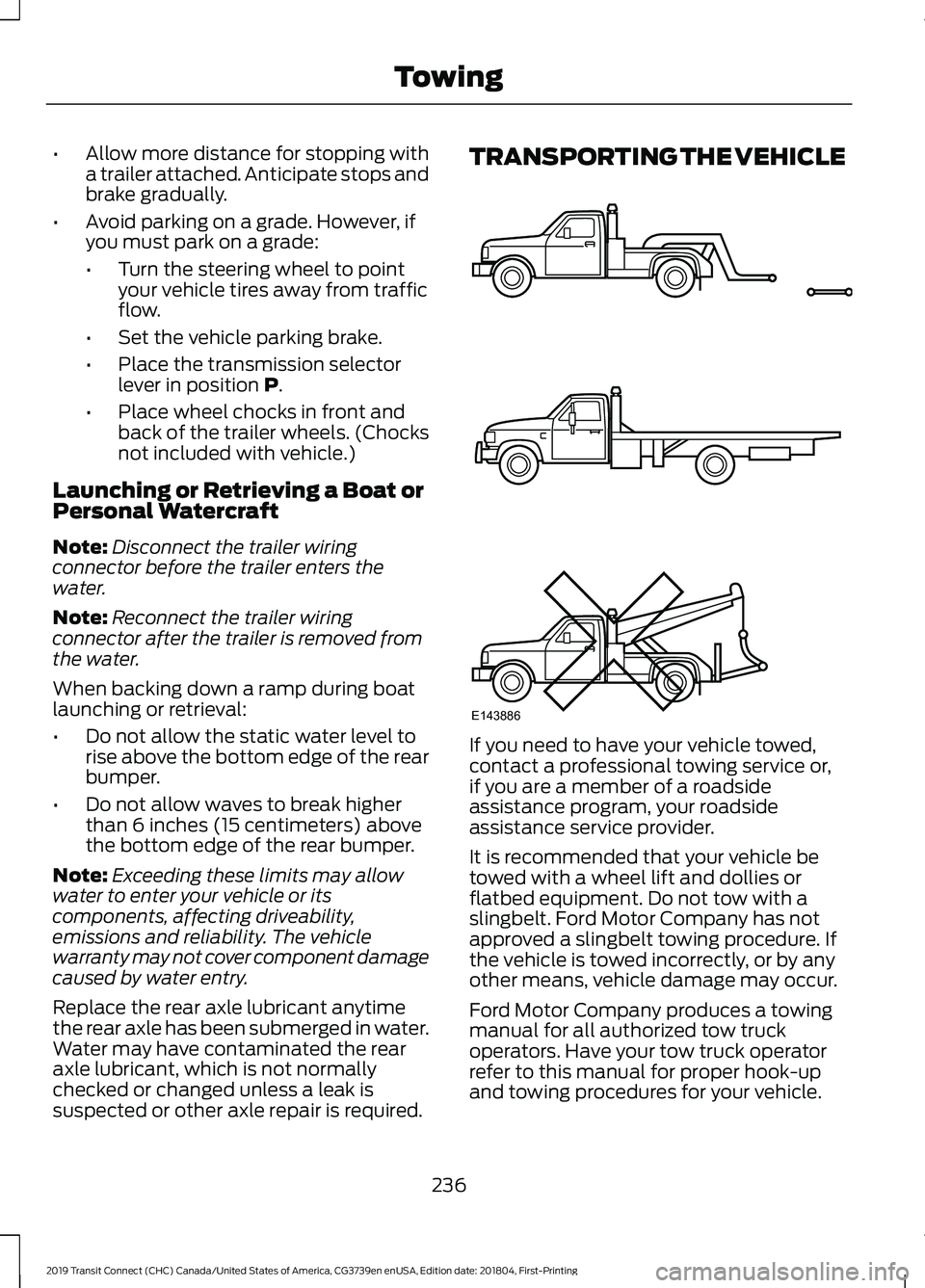
suspected or other axle repair is required. TRANSPORTING THE VEHICLE
If you need to have your vehicle towed,
contact a professional towing service or,
if you are a member of a roadside
assistance program, your roadside
assistance service provider.
It is recommended that your vehicle be
towed with a wheel lift and dollies or
flatbed equipment. Do not tow with a
slingbelt. Ford Motor Company has not
approved a slingbelt towing procedure. If
the vehicle is towed incorrectly, or by any
other means, vehicle damage may occur.
Ford Motor Company produces a towing
manual for all authorized tow truck
operators. Have your tow truck operator
refer to this manual for proper hook-up
and towing procedures for your vehicle.
236
2019 Transit Connect (CHC) Canada/United States of America, CG3739en enUSA, Edition date: 201804, First-Printing TowingE143886
Page 248 of 493
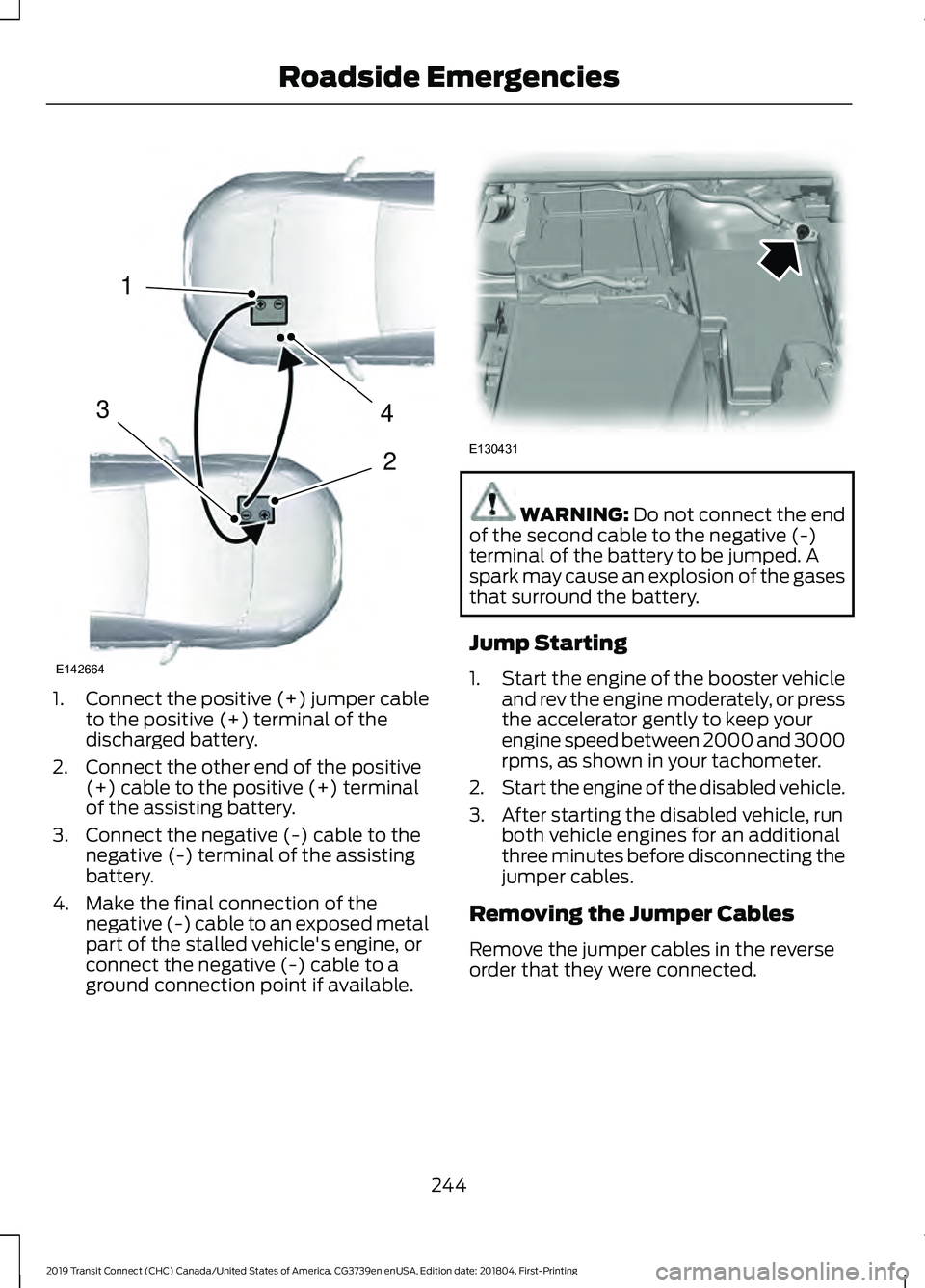
1.
Connect the positive (+) jumper cable
to the positive (+) terminal of the
discharged battery.
2. Connect the other end of the positive (+) cable to the positive (+) terminal
of the assisting battery.
3. Connect the negative (-) cable to the negative (-) terminal of the assisting
battery.
4. Make the final connection of the negative (-) cable to an exposed metal
part of the stalled vehicle's engine, or
connect the negative (-) cable to a
ground connection point if available. WARNING: Do not connect the end
of the second cable to the negative (-)
terminal of the battery to be jumped. A
spark may cause an explosion of the gases
that surround the battery.
Jump Starting
1. Start the engine of the booster vehicle
and rev the engine moderately, or press
the accelerator gently to keep your
engine speed between 2000 and 3000
rpms, as shown in your tachometer.
2. Start the engine of the disabled vehicle.
3. After starting the disabled vehicle, run both vehicle engines for an additional
three minutes before disconnecting the
jumper cables.
Removing the Jumper Cables
Remove the jumper cables in the reverse
order that they were connected.
244
2019 Transit Connect (CHC) Canada/United States of America, CG3739en enUSA, Edition date: 201804, First-Printing Roadside Emergencies4
2
1
3
E142664 E130431
Page 261 of 493
Protected Component
Fuse Rating
Fuse Location
Body control module.
40 A
46
Trailer tow module.
40 A
47
Heated seats.
20 A
48
Left-hand low beam.
20 A
49
Sun shade.
5 A
50
Anti-lock brake system.
30 A
51
Electronic stability control.
Right-hand heated windshield element.
40 A
52
Air conditioning clutch.
10 A
53
Transmission control module.
5 A
55
Anti-lock brake system.
5 A
56
Electronic stability control.
Modified vehicle connection.
10 A
57
Powertrain control module.
10 A
58
Modified vehicle connection.
20 A
60
Blind spot information system.
15 A
61
Front parking aid camera.Rear view camera.
Body control module.
20 A
62
Modified vehicle connection.
10 A
63
Headlamp leveling.
5 A
64
Electronic power assist steering.
5 A
65
Dosing control unit - diesel.
5 A
66
Glow plugs - diesel.
Powetrain control module - diesel.
Powertrain control module.
20 A
67
Powertrain control module.
20 A
68
Powertrain control module.
15 A
69
Powertrain control module.
20 A
70
257
2019 Transit Connect (CHC) Canada/United States of America, CG3739en enUSA, Edition date: 201804, First-Printing Fuses
Page 263 of 493
Protected Component
Fuse Rating
Fuse Location
Restraints control module.
5 A
1
In-vehicle temperature and humidity sensor.
5 A
2
Rear blower motor.
Parking assist control module.
10 A
3
Ignition switch.
10 A
4
Push button ignition switch.
Central locking system.
20 A
5
Direct current inverter.
10 A
6
Driver door lock.
Power exterior mirror switch.
Driver door control.
30 A
7
Auto-dimming interior mirror.
5 A
9
Front parking aid camera.
Passenger airbag deactivation indicator.
Restraints control module.
10 A
10
Telematics control unit module.
5 A
11
Anti-theft alarm.
5 A
12
Unlock.
15 A
13
Passenger door control.
30 A
14
Battery energy control module.
10 A
15
Voice control.
15 A
17
Information and entertainment display.Compact disc player.
Wireless accessory charging module.
7.5 A
18
Battery back-up sounder.
7.5 A
19
Security horn.
10 A
20
Climate control.
7.5 A
21
Data link connector.
7.5 A
22
259
2019 Transit Connect (CHC) Canada/United States of America, CG3739en enUSA, Edition date: 201804, First-Printing Fuses
Page 373 of 493
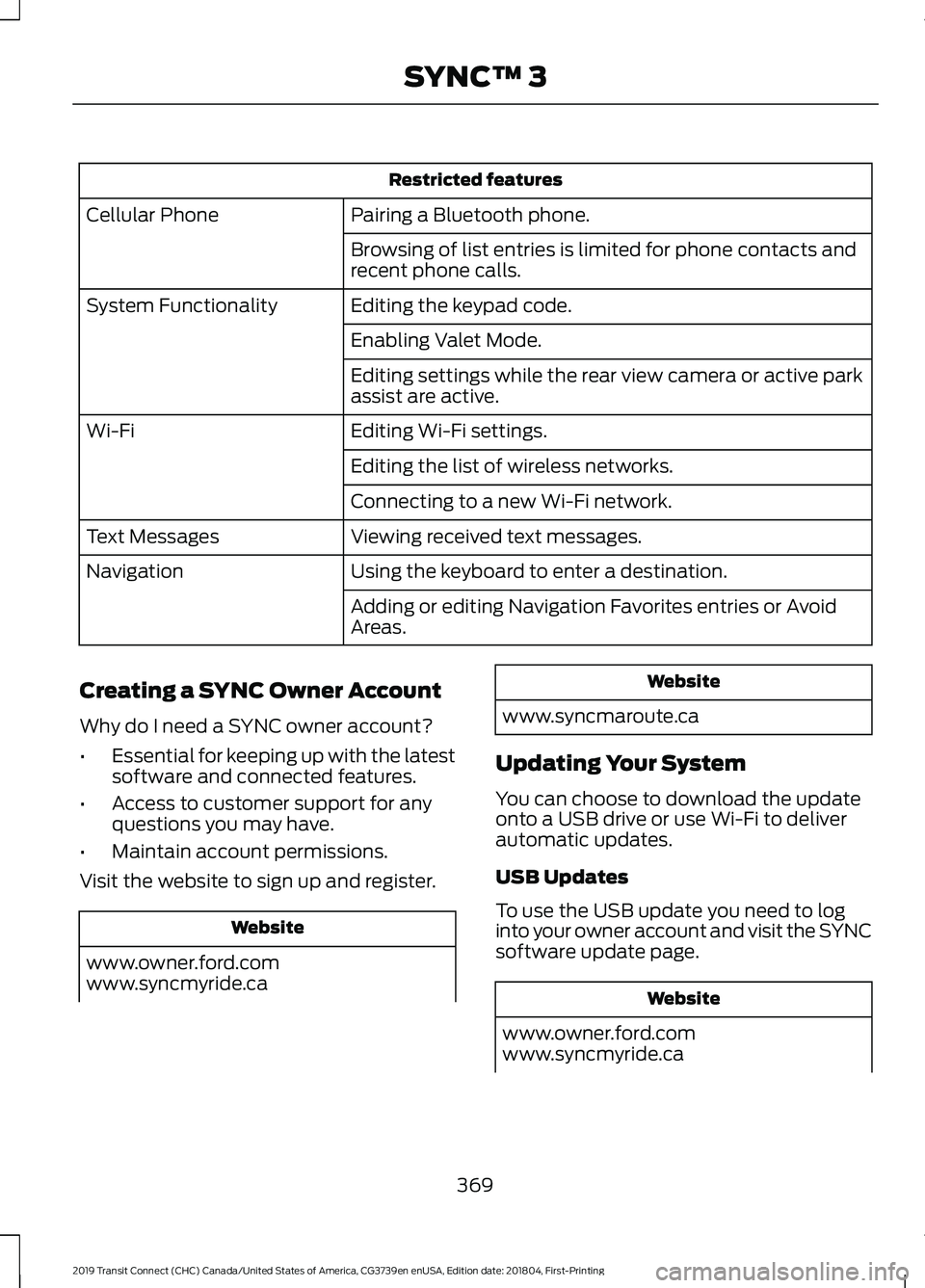
Restricted features
Pairing a Bluetooth phone.
Cellular Phone
Browsing of list entries is limited for phone contacts and
recent phone calls.
Editing the keypad code.
System Functionality
Enabling Valet Mode.
Editing settings while the rear view camera or active park
assist are active.
Editing Wi-Fi settings.
Wi-Fi
Editing the list of wireless networks.
Connecting to a new Wi-Fi network.
Viewing received text messages.
Text Messages
Using the keyboard to enter a destination.
Navigation
Adding or editing Navigation Favorites entries or Avoid
Areas.
Creating a SYNC Owner Account
Why do I need a SYNC owner account?
• Essential for keeping up with the latest
software and connected features.
• Access to customer support for any
questions you may have.
• Maintain account permissions.
Visit the website to sign up and register. Website
www.owner.ford.com
www.syncmyride.ca Website
www.syncmaroute.ca
Updating Your System
You can choose to download the update
onto a USB drive or use Wi-Fi to deliver
automatic updates.
USB Updates
To use the USB update you need to log
into your owner account and visit the SYNC
software update page. Website
www.owner.ford.com
www.syncmyride.ca
369
2019 Transit Connect (CHC) Canada/United States of America, CG3739en enUSA, Edition date: 201804, First-Printing SYNC™ 3
Page 416 of 493
For a complete listing of the accessories
that are available for your vehicle, please
contact your authorized dealer or visit the
online store web site:
Web Address (United States)
www.Accessories.Ford.com Web Address (Canada)
www.Accessories.Ford.ca
Ford Accessories are available for your
vehicle through an authorized Ford dealer.
Ford Motor Company will repair or replace
any properly authorized dealer-installed
Ford Original Accessory found to be
defective in factory-supplied materials or
workmanship during the warranty period,
as well as any component damaged by the
defective accessories.
Ford Motor Company warrants your
accessory through the warranty that
provides the greatest benefit:
• 24 months, unlimited mileage.
• The remainder of your new vehicle
limited warranty.
Contact an authorized dealer for details
and a copy of the warranty.
Exterior Style
• Hood deflector*.
• Hitch and towing accessories.
• Keyless entry.
• Side window deflectors.
• Splash guards.
• Window grilles.
Interior Style
• All-weather floor mats.
• Cargo area protectors. •
Cargo organizers.
• Carpeted floor mats.
• Interior light kit.
Lifestyle
• Ash cup and smokers packages.
• Roof racks and carriers*.
• Telematics*.
• In-vehicle safe*.
• Bluetooth speakers*.
• Rear seat entertainment*.
Peace of Mind
• Back-up alarm*.
• Bumper-mounted parking sensor*.
• Remote start.
• Roadside assistance kit*.
• Vehicle security systems.
*Ford Licensed Accessory. The accessory
manufacturer designs, develops and
therefore warrants Ford Licensed
Accessories, and does not design or test
these accessories to Ford Motor Company
engineering requirements. Contact an
authorized Ford dealer for the
manufacturer's limited warranty details,
and request a copy of the Ford Licensed
Accessories product limited warranty from
the accessory manufacturer.
412
2019 Transit Connect (CHC) Canada/United States of America, CG3739en enUSA, Edition date: 201804, First-Printing Accessories