ignition FORD TRANSIT CONNECT 2019 Owner's Guide
[x] Cancel search | Manufacturer: FORD, Model Year: 2019, Model line: TRANSIT CONNECT, Model: FORD TRANSIT CONNECT 2019Pages: 493, PDF Size: 7.43 MB
Page 92 of 493
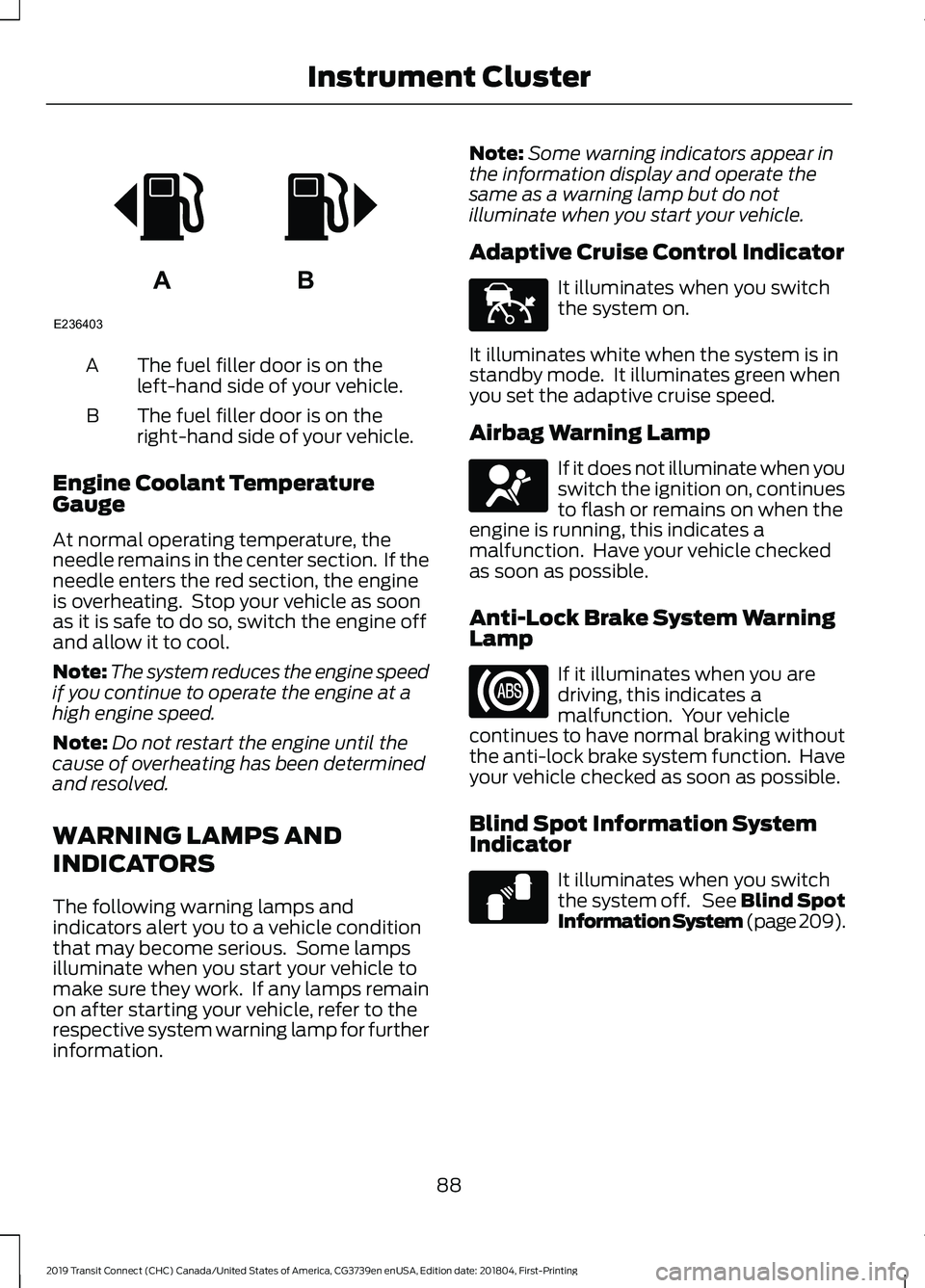
The fuel filler door is on the
left-hand side of your vehicle.
A
The fuel filler door is on the
right-hand side of your vehicle.
B
Engine Coolant Temperature
Gauge
At normal operating temperature, the
needle remains in the center section. If the
needle enters the red section, the engine
is overheating. Stop your vehicle as soon
as it is safe to do so, switch the engine off
and allow it to cool.
Note: The system reduces the engine speed
if you continue to operate the engine at a
high engine speed.
Note: Do not restart the engine until the
cause of overheating has been determined
and resolved.
WARNING LAMPS AND
INDICATORS
The following warning lamps and
indicators alert you to a vehicle condition
that may become serious. Some lamps
illuminate when you start your vehicle to
make sure they work. If any lamps remain
on after starting your vehicle, refer to the
respective system warning lamp for further
information. Note:
Some warning indicators appear in
the information display and operate the
same as a warning lamp but do not
illuminate when you start your vehicle.
Adaptive Cruise Control Indicator It illuminates when you switch
the system on.
It illuminates white when the system is in
standby mode. It illuminates green when
you set the adaptive cruise speed.
Airbag Warning Lamp If it does not illuminate when you
switch the ignition on, continues
to flash or remains on when the
engine is running, this indicates a
malfunction. Have your vehicle checked
as soon as possible.
Anti-Lock Brake System Warning
Lamp If it illuminates when you are
driving, this indicates a
malfunction. Your vehicle
continues to have normal braking without
the anti-lock brake system function. Have
your vehicle checked as soon as possible.
Blind Spot Information System
Indicator It illuminates when you switch
the system off. See Blind Spot
Information System (page 209).
88
2019 Transit Connect (CHC) Canada/United States of America, CG3739en enUSA, Edition date: 201804, First-Printing Instrument ClusterAB
E236403 E144524 E67017 E124823
Page 93 of 493
Brake System Warning Lamp
WARNING: Driving your vehicle with
the warning lamp on is dangerous. A
significant decrease in braking
performance may occur. It may take you
longer to stop your vehicle. Have your
vehicle checked as soon as possible.
Driving extended distances with the
parking brake engaged can cause brake
failure and the risk of personal injury. It illuminates when you engage
the parking brake and the
ignition is on.
If it illuminates when your vehicle
is moving, make sure the parking
brake is disengaged. If the
parking brake is disengaged, this indicates
low brake fluid level or a brake system
fault. Have your vehicle checked as soon
as possible.
Cruise Control Indicator It illuminates when you switch
the system on. See Using
Cruise Control (page 195).
Direction Indicator It flashes when you switch the
direction indicators on.
Note: An increase in the rate of flashing
warns of a failed indicator bulb.
Engine Coolant Temperature
Warning Lamp It illuminates if the system has
malfunctioned. Have your
vehicle checked as soon as
possible. Engine Warning Lamps Service Engine Soon
If it illuminates when the engine is running
this indicates a malfunction.
If it flashes when you are driving, reduce
the speed of your vehicle immediately.
Avoid heavy acceleration and deceleration
and have your vehicle checked as soon as
possible. Malfunction Indicator Lamp
If it illuminates when the engine is running
this indicates a malfunction. The On Board
Diagnostics system has detected a
malfunction of the vehicle emission control
system.
If it flashes, engine misfire may be
occurring. Increased exhaust gas
temperatures could damage the catalytic
converter or other vehicle components.
Avoid heavy acceleration and deceleration
and have your vehicle checked as soon as
possible.
If both lamps illuminate when the engine
is running, stop your vehicle as soon as it
is safe to do so. Continuing to drive your
vehicle may cause reduced power or the
engine to stop. Switch the ignition off and
attempt to restart the engine. Have your
vehicle checked as soon as possible.
Fasten Seatbelt Warning Lamp It illuminates to remind you to
fasten your seatbelt. See
Seatbelt Reminder
(page 36).
Front Fog Lamp Indicator It illuminates when you switch
the front fog lamps on.
89
2019 Transit Connect (CHC) Canada/United States of America, CG3739en enUSA, Edition date: 201804, First-Printing Instrument ClusterE270480 E71340 E71880
Page 94 of 493
Hazard Flashers Warning Lamp
It flashes when you switch the
hazard flashers on.
High Beam Headlamp Indicator It illuminates when you switch
the high beam headlamps on.
Ignition Warning Lamp It illuminates when you switch
the ignition on.
If it illuminates when the engine
is running this indicates a malfunction.
Have your vehicle checked as soon as
possible.
Information Message Indicator It illuminates to supplement
some information messages.
The indicator is red or amber
depending on the severity of the condition
and it remains on until the condition is
resolved.
Lamps on Indicator It illuminates when you switch
the low beam headlamps or the
parking lamps on.
Low Fuel Level Warning Lamp It illuminates when the fuel level
is low or the fuel tank is nearly
empty. Refuel as soon as
possible.
Low Tire Pressure Warning Lamp It illuminates if one or more tires
on your vehicle has low tire
pressure. See Tire Pressure
Monitoring System (page 316). Oil Pressure Warning Lamp It illuminates when you switch
the ignition on.
If it illuminates when the engine
is running this indicates a malfunction.
Stop your vehicle as soon as it is safe to
do so and switch the engine off. Check the
engine oil level. If the oil level is sufficient,
this indicates a system malfunction. Have
your vehicle checked as soon as possible.
See
Engine Oil Check (page 266).
Stability Control and Traction
Control Indicator Flashes during operation.
If it does not illuminate when you
switch the ignition on, or remains
on when the engine is running, this
indicates a malfunction. Have your vehicle
checked as soon as possible.
Stability Control and Traction
Control Off Warning Lamp It illuminates when you switch
the system off.
AUDIBLE WARNINGS AND
INDICATORS
Airbag Secondary Warning Audible
Warning
Sounds when the airbag warning lamp is
not working.
Automatic Transmission Audible
Warning
Sounds when you have not moved the
transmission selector lever to park. A
message will be shown in the display.
90
2019 Transit Connect (CHC) Canada/United States of America, CG3739en enUSA, Edition date: 201804, First-Printing Instrument Cluster E138639 E130458
Page 95 of 493
Door Ajar Audible Warning
Sounds when a door is not fully closed and
your vehicle is moving.
Fasten Seatbelt Audible Warning
Sounds when a seatbelt is unfastened in
an occupied seat and your vehicle is
moving.
Key in Ignition Audible Warning
Sounds when you open the driver's door
and you have left the key in the ignition.
Headlamps On Audible Warning
Sounds when you remove the key from the
ignition and open the driver door and you
have left the headlamps or parking lamps
on.
Parking Brake On Audible Warning
Sounds when you have left the parking
brake on and drive your vehicle. If the
audible warning remains on after you have
released the parking brake, have your
vehicle checked by an authorized dealer
immediately.
91
2019 Transit Connect (CHC) Canada/United States of America, CG3739en enUSA, Edition date: 201804, First-Printing Instrument Cluster
Page 98 of 493
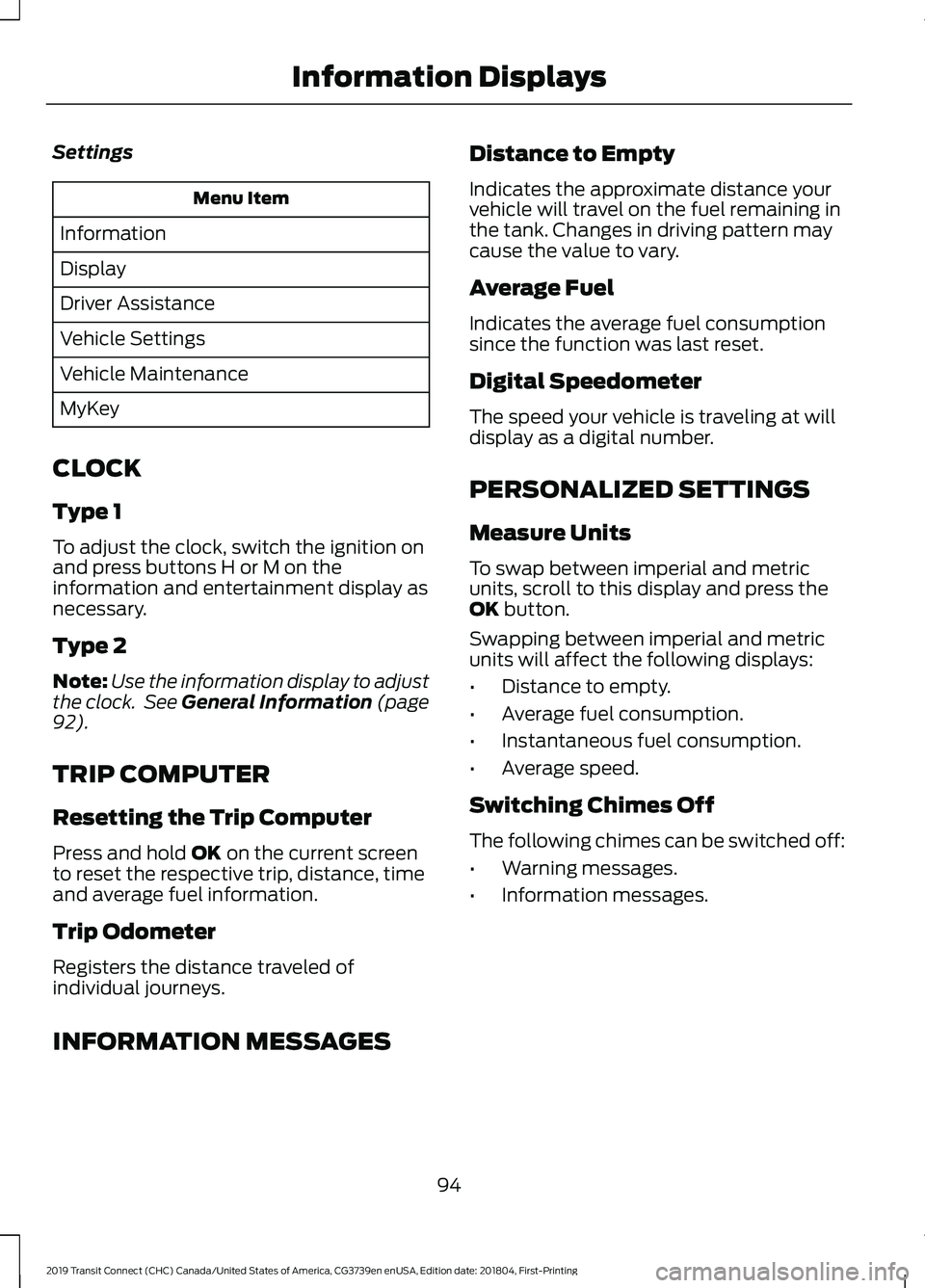
Settings
Menu Item
Information
Display
Driver Assistance
Vehicle Settings
Vehicle Maintenance
MyKey
CLOCK
Type 1
To adjust the clock, switch the ignition on
and press buttons H or M on the
information and entertainment display as
necessary.
Type 2
Note: Use the information display to adjust
the clock. See General Information (page
92).
TRIP COMPUTER
Resetting the Trip Computer
Press and hold
OK on the current screen
to reset the respective trip, distance, time
and average fuel information.
Trip Odometer
Registers the distance traveled of
individual journeys. Distance to Empty
Indicates the approximate distance your
vehicle will travel on the fuel remaining in
the tank. Changes in driving pattern may
cause the value to vary.
Average Fuel
Indicates the average fuel consumption
since the function was last reset.
Digital Speedometer
The speed your vehicle is traveling at will
display as a digital number.
PERSONALIZED SETTINGS
Measure Units
To swap between imperial and metric
units, scroll to this display and press the
OK
button.
Swapping between imperial and metric
units will affect the following displays:
• Distance to empty.
• Average fuel consumption.
• Instantaneous fuel consumption.
• Average speed.
Switching Chimes Off
The following chimes can be switched off:
• Warning messages.
• Information messages.
INFORMATION MESSAGES 94
2019 Transit Connect (CHC) Canada/United States of America, CG3739en enUSA, Edition date: 201804, First-Printing Information Displays
Page 105 of 493
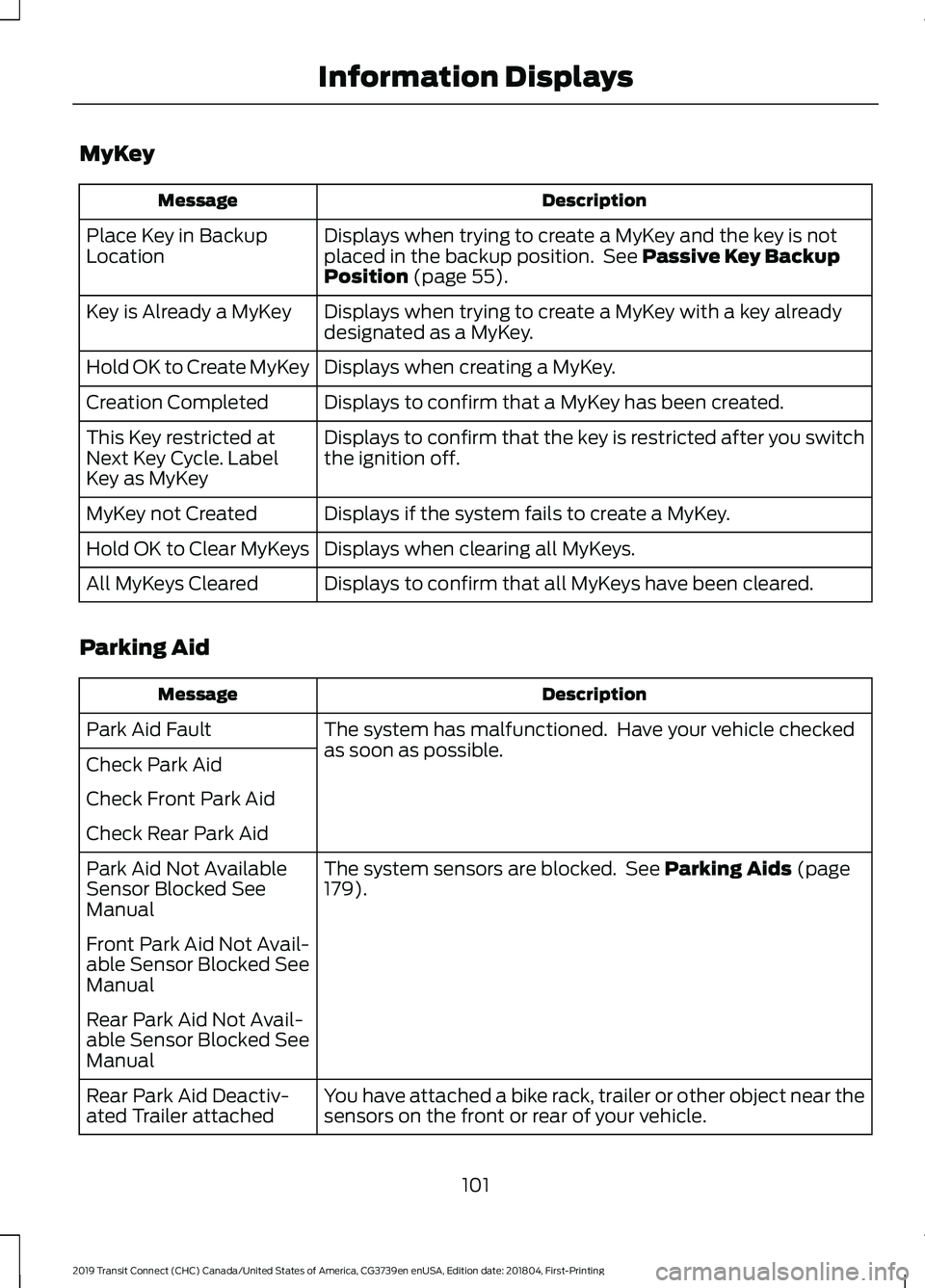
MyKey
Description
Message
Displays when trying to create a MyKey and the key is not
placed in the backup position. See Passive Key Backup
Position (page 55).
Place Key in Backup
Location
Displays when trying to create a MyKey with a key already
designated as a MyKey.
Key is Already a MyKey
Displays when creating a MyKey.
Hold OK to Create MyKey
Displays to confirm that a MyKey has been created.
Creation Completed
Displays to confirm that the key is restricted after you switch
the ignition off.
This Key restricted at
Next Key Cycle. Label
Key as MyKey
Displays if the system fails to create a MyKey.
MyKey not Created
Displays when clearing all MyKeys.
Hold OK to Clear MyKeys
Displays to confirm that all MyKeys have been cleared.
All MyKeys Cleared
Parking Aid Description
Message
The system has malfunctioned. Have your vehicle checked
as soon as possible.
Park Aid Fault
Check Park Aid
Check Front Park Aid
Check Rear Park Aid
The system sensors are blocked. See
Parking Aids (page
179).
Park Aid Not Available
Sensor Blocked See
Manual
Front Park Aid Not Avail-
able Sensor Blocked See
Manual
Rear Park Aid Not Avail-
able Sensor Blocked See
Manual
You have attached a bike rack, trailer or other object near the
sensors on the front or rear of your vehicle.
Rear Park Aid Deactiv-
ated Trailer attached
101
2019 Transit Connect (CHC) Canada/United States of America, CG3739en enUSA, Edition date: 201804, First-Printing Information Displays
Page 109 of 493
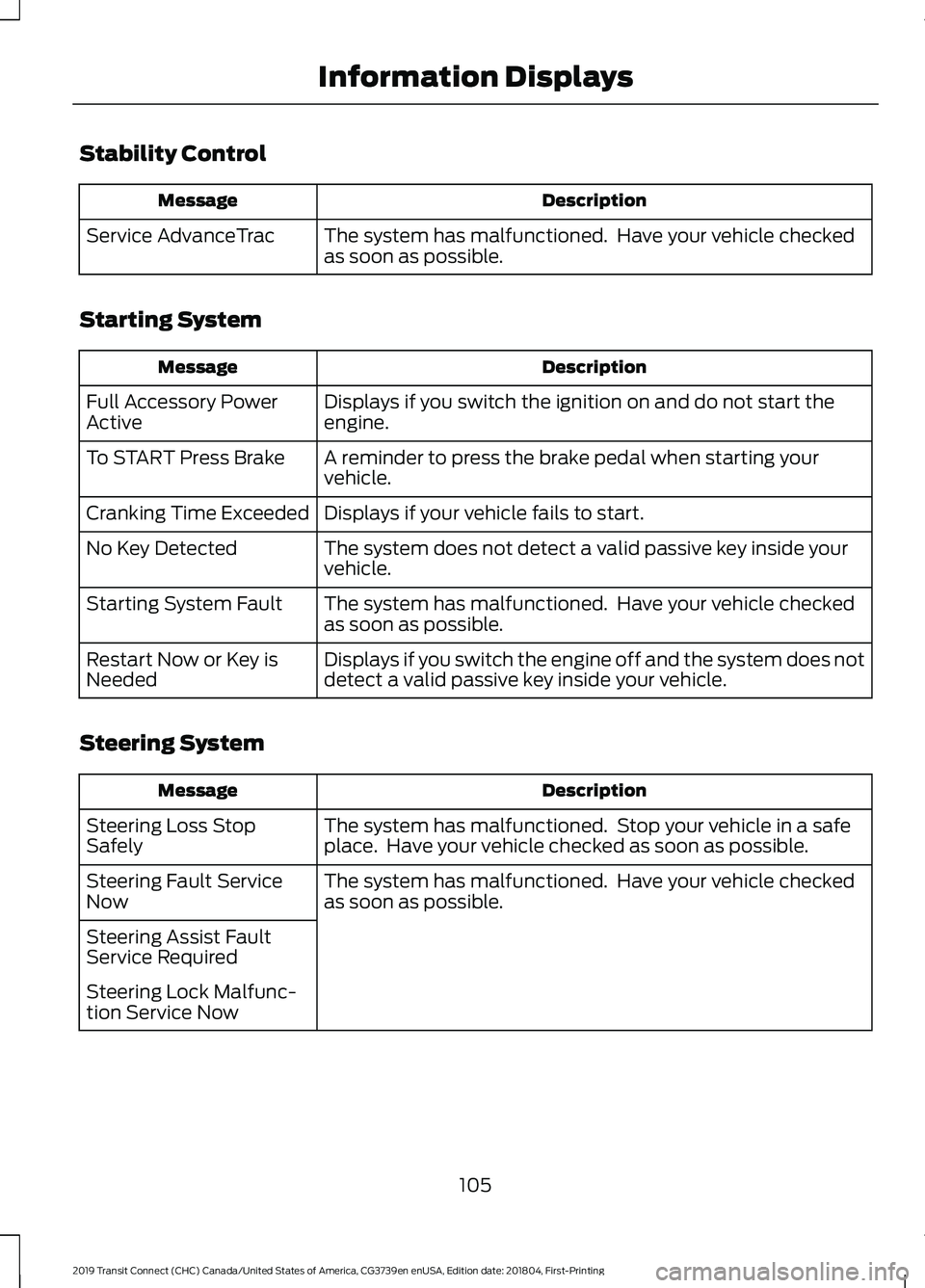
Stability Control
Description
Message
The system has malfunctioned. Have your vehicle checked
as soon as possible.
Service AdvanceTrac
Starting System Description
Message
Displays if you switch the ignition on and do not start the
engine.
Full Accessory Power
Active
A reminder to press the brake pedal when starting your
vehicle.
To START Press Brake
Displays if your vehicle fails to start.
Cranking Time Exceeded
The system does not detect a valid passive key inside your
vehicle.
No Key Detected
The system has malfunctioned. Have your vehicle checked
as soon as possible.
Starting System Fault
Displays if you switch the engine off and the system does not
detect a valid passive key inside your vehicle.
Restart Now or Key is
Needed
Steering System Description
Message
The system has malfunctioned. Stop your vehicle in a safe
place. Have your vehicle checked as soon as possible.
Steering Loss Stop
Safely
The system has malfunctioned. Have your vehicle checked
as soon as possible.
Steering Fault Service
Now
Steering Assist Fault
Service Required
Steering Lock Malfunc-
tion Service Now
105
2019 Transit Connect (CHC) Canada/United States of America, CG3739en enUSA, Edition date: 201804, First-Printing Information Displays
Page 135 of 493
12 Volt DC Power Point
WARNING: Do not plug optional
electrical accessories into the cigar lighter
socket. Incorrect use of the cigar lighter
can cause damage not covered by the
vehicle warranty, and can result in fire or
serious injury. WARNING: Do not use a power point
for operating a cigar lighter. Incorrect use
of the power points can cause damage not
covered by the vehicle warranty, and can
result in fire or serious injury.
Do not hang any accessory from the
accessory plug.
Do not use the power point over the vehicle
capacity of 12 volt DC 180 watts or a fuse
may blow.
Keep the power point caps closed when
not in use.
Do not insert objects other than an
accessory plug into the power point.
You can use the power point for up to 20
minutes after you switch the ignition off.
Note: When you switch the ignition on, you
can use the socket to power 12 volt
appliances with a maximum current rating
of 15 amps.
Run the vehicle for full capacity use of the
power point.
To prevent the battery from running out of
charge:
• Do not use the power point longer than
necessary when the vehicle is not
running.
• Do not leave devices plugged in
overnight or when you park your vehicle
for extended periods. Power points may be in the following
locations:
•
Front of the floor console.
• Rear of the floor console.
• Right hand side of the luggage
compartment.
• Instrument panel cluster storage
compartment.
CIGAR LIGHTER WARNING:
Do not plug optional
electrical accessories into the cigar lighter
socket. Incorrect use of the cigar lighter
can cause damage not covered by the
vehicle warranty, and can result in fire or
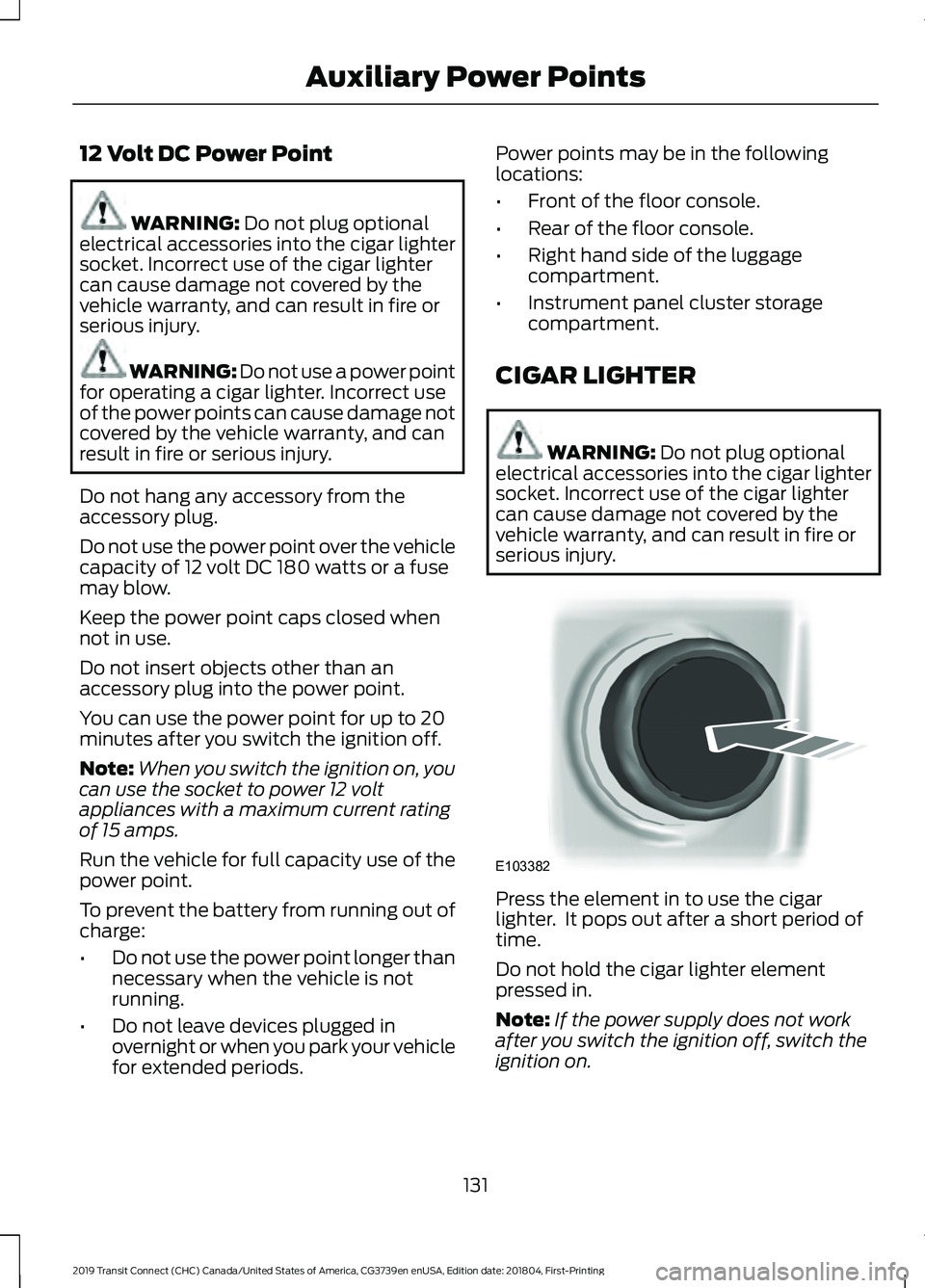
serious injury. Press the element in to use the cigar
lighter. It pops out after a short period of
time.
Do not hold the cigar lighter element
pressed in.
Note:
If the power supply does not work
after you switch the ignition off, switch the
ignition on.
131
2019 Transit Connect (CHC) Canada/United States of America, CG3739en enUSA, Edition date: 201804, First-Printing Auxiliary Power PointsE103382
Page 136 of 493
Note:
If you use the socket when the engine
is not running, the battery may run out of
charge.
Note: When you switch the ignition on, you
can use the socket to power 12 volt
appliances with a maximum current rating
of 15 amps.
WIRELESS ACCESSORY
CHARGING WARNING: Wireless charging
devices can affect the operation of
implanted medical devices, including
cardiac pacemakers. If you have any
implanted medical devices, we
recommend that you consult with your
physician.
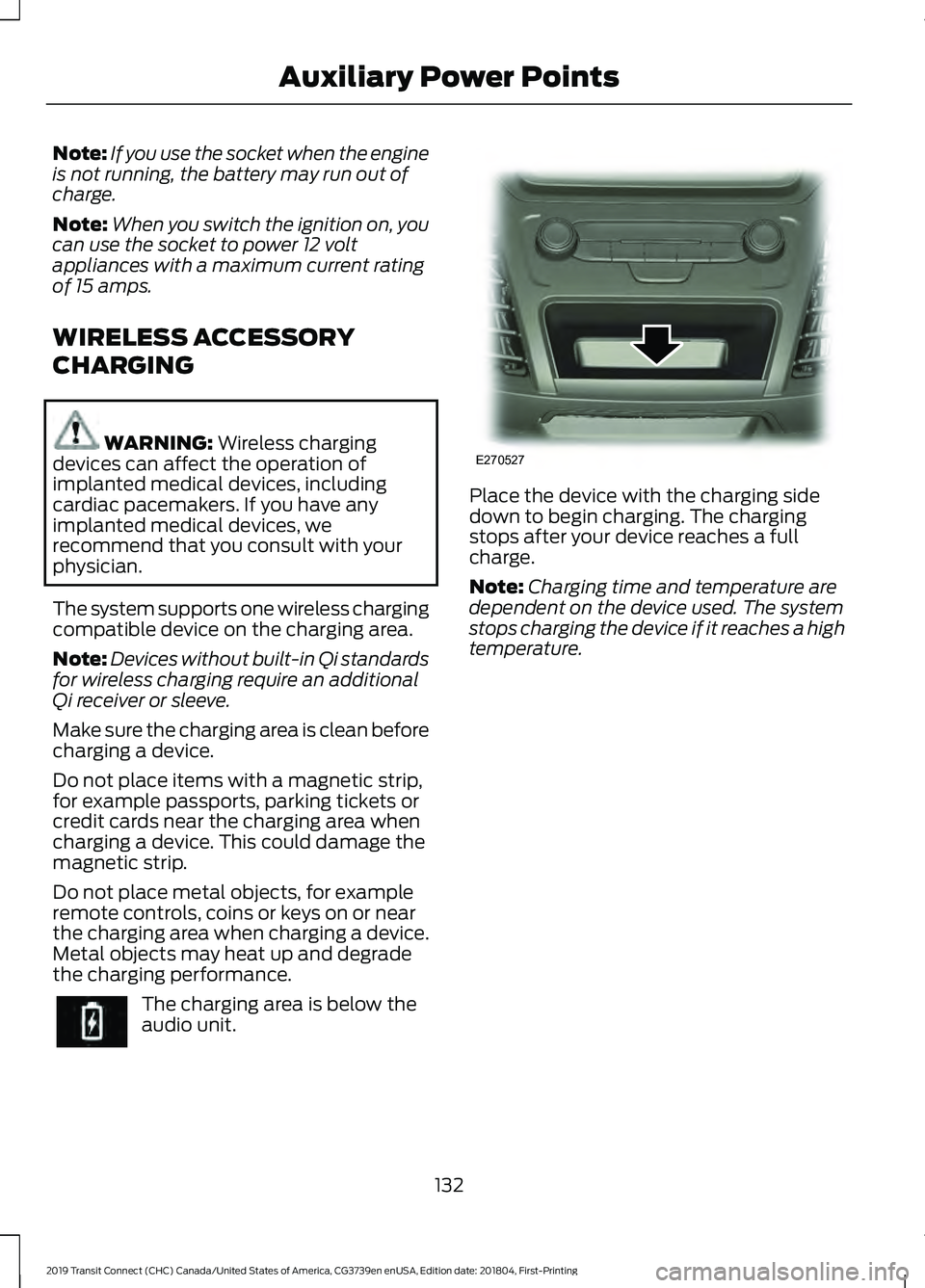
The system supports one wireless charging
compatible device on the charging area.
Note: Devices without built-in Qi standards
for wireless charging require an additional
Qi receiver or sleeve.
Make sure the charging area is clean before
charging a device.
Do not place items with a magnetic strip,
for example passports, parking tickets or
credit cards near the charging area when
charging a device. This could damage the
magnetic strip.
Do not place metal objects, for example
remote controls, coins or keys on or near
the charging area when charging a device.
Metal objects may heat up and degrade
the charging performance. The charging area is below the
audio unit. Place the device with the charging side
down to begin charging. The charging
stops after your device reaches a full
charge.
Note:
Charging time and temperature are
dependent on the device used. The system
stops charging the device if it reaches a high
temperature.
132
2019 Transit Connect (CHC) Canada/United States of America, CG3739en enUSA, Edition date: 201804, First-Printing Auxiliary Power Points E270527
Page 138 of 493
GENERAL INFORMATION
WARNING: Extended idling at high
engine speeds can produce very high
temperatures in the engine and exhaust
system, creating the risk of fire or other
damage. WARNING: Do not park, idle or drive
your vehicle on dry grass or other dry
ground cover. The emission system heats
up the engine compartment and exhaust
system, creating the risk of fire. WARNING:
Do not start the engine
in a closed garage or in other enclosed
areas. Exhaust fumes can be toxic. Always
open the garage door before you start the
engine. WARNING: Exhaust leaks may result
in entry of harmful and potentially lethal
fumes into the passenger compartment.
If you smell exhaust fumes inside your
vehicle, have your vehicle inspected
immediately. Do not drive if you smell
exhaust fumes.
If you disconnect the battery, your vehicle
may exhibit some unusual driving
characteristics for approximately
5 mi
(8 km) after you reconnect it. This is
because the engine management system
must realign itself with the engine. You
can disregard any unusual driving
characteristics during this period.
The powertrain control system meets all
Canadian interference-causing equipment
standard requirements regulating the
impulse electrical field or radio noise. When you start the engine, avoid pressing
the accelerator pedal before and during
operation. Only use the accelerator pedal
when you have difficulty starting the
engine.
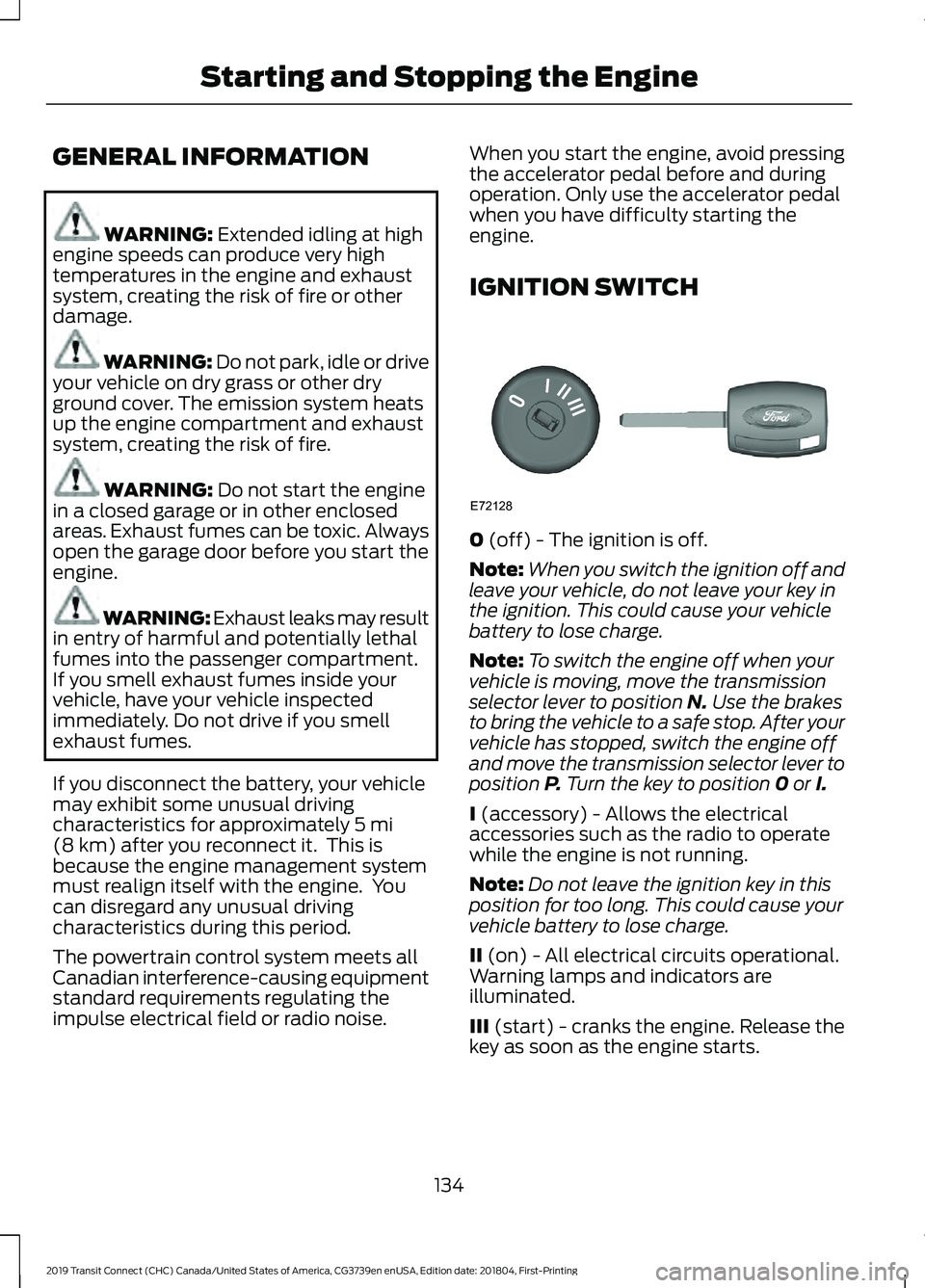
IGNITION SWITCH
0
(off) - The ignition is off.
Note: When you switch the ignition off and
leave your vehicle, do not leave your key in
the ignition. This could cause your vehicle
battery to lose charge.
Note: To switch the engine off when your
vehicle is moving, move the transmission
selector lever to position
N. Use the brakes
to bring the vehicle to a safe stop. After your
vehicle has stopped, switch the engine off
and move the transmission selector lever to
position
P. Turn the key to position 0 or I.
I
(accessory) - Allows the electrical
accessories such as the radio to operate
while the engine is not running.
Note: Do not leave the ignition key in this
position for too long. This could cause your
vehicle battery to lose charge.
II
(on) - All electrical circuits operational.
Warning lamps and indicators are
illuminated.
III
(start) - cranks the engine. Release the
key as soon as the engine starts.
134
2019 Transit Connect (CHC) Canada/United States of America, CG3739en enUSA, Edition date: 201804, First-Printing Starting and Stopping the EngineE72128