brake FORD TRANSIT CONNECT 2020 User Guide
[x] Cancel search | Manufacturer: FORD, Model Year: 2020, Model line: TRANSIT CONNECT, Model: FORD TRANSIT CONNECT 2020Pages: 509, PDF Size: 7.73 MB
Page 98 of 509
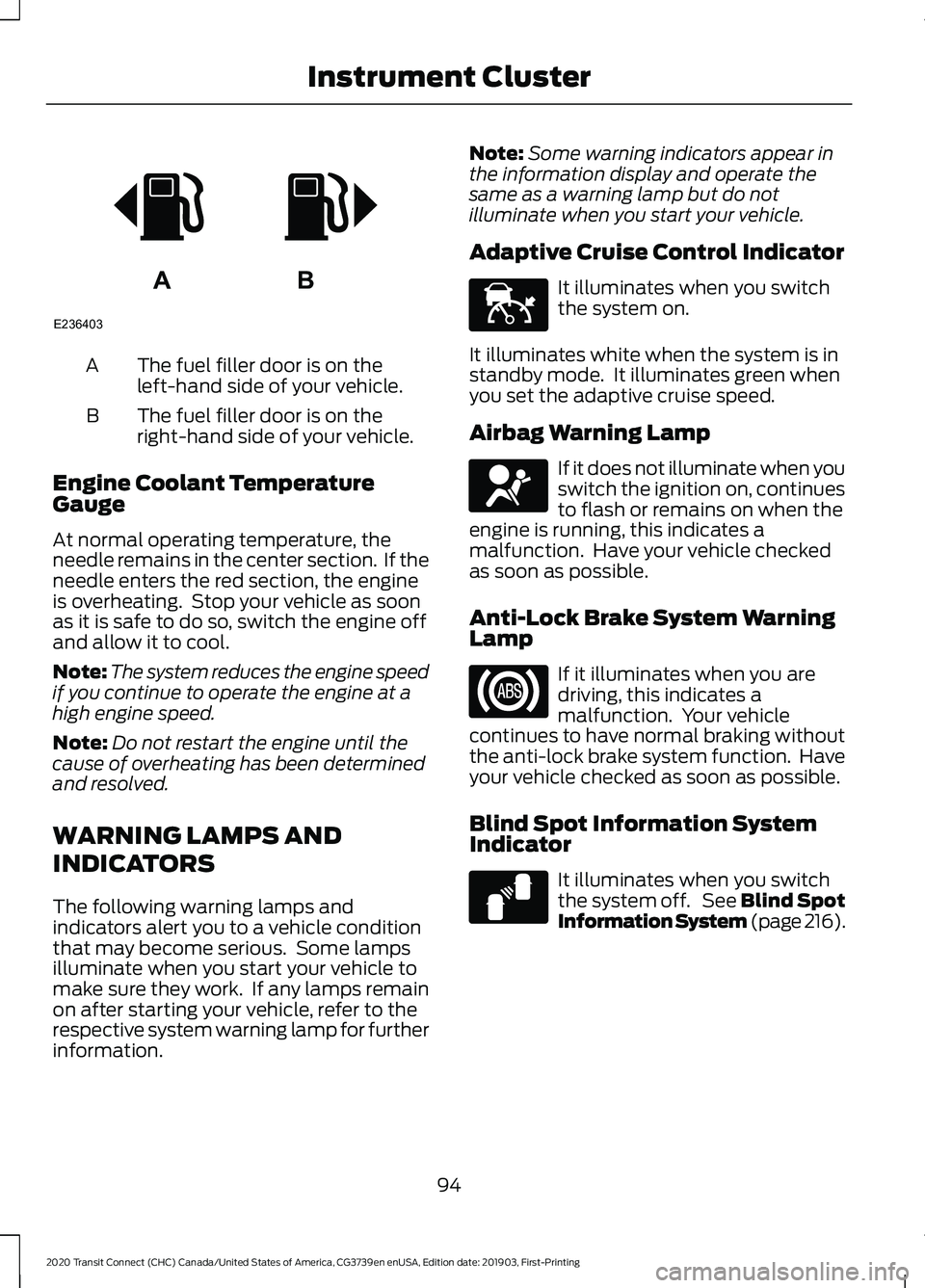
The fuel filler door is on the
left-hand side of your vehicle.
A
The fuel filler door is on the
right-hand side of your vehicle.
B
Engine Coolant Temperature
Gauge
At normal operating temperature, the
needle remains in the center section. If the
needle enters the red section, the engine
is overheating. Stop your vehicle as soon
as it is safe to do so, switch the engine off
and allow it to cool.
Note: The system reduces the engine speed
if you continue to operate the engine at a
high engine speed.
Note: Do not restart the engine until the
cause of overheating has been determined
and resolved.
WARNING LAMPS AND
INDICATORS
The following warning lamps and
indicators alert you to a vehicle condition
that may become serious. Some lamps
illuminate when you start your vehicle to
make sure they work. If any lamps remain
on after starting your vehicle, refer to the
respective system warning lamp for further
information. Note:
Some warning indicators appear in
the information display and operate the
same as a warning lamp but do not
illuminate when you start your vehicle.
Adaptive Cruise Control Indicator It illuminates when you switch
the system on.
It illuminates white when the system is in
standby mode. It illuminates green when
you set the adaptive cruise speed.
Airbag Warning Lamp If it does not illuminate when you
switch the ignition on, continues
to flash or remains on when the
engine is running, this indicates a
malfunction. Have your vehicle checked
as soon as possible.
Anti-Lock Brake System Warning
Lamp If it illuminates when you are
driving, this indicates a
malfunction. Your vehicle
continues to have normal braking without
the anti-lock brake system function. Have
your vehicle checked as soon as possible.
Blind Spot Information System
Indicator It illuminates when you switch
the system off. See Blind Spot
Information System (page 216).
94
2020 Transit Connect (CHC) Canada/United States of America, CG3739en enUSA, Edition date: 201903, First-Printing Instrument ClusterAB
E236403 E144524 E67017 E124823
Page 99 of 509
Brake System Warning Lamp
WARNING: Driving your vehicle
with the warning lamp on is dangerous.
A significant decrease in braking
performance may occur. It may take you
longer to stop your vehicle. Have your
vehicle checked as soon as possible.
Driving extended distances with the
parking brake engaged can cause brake
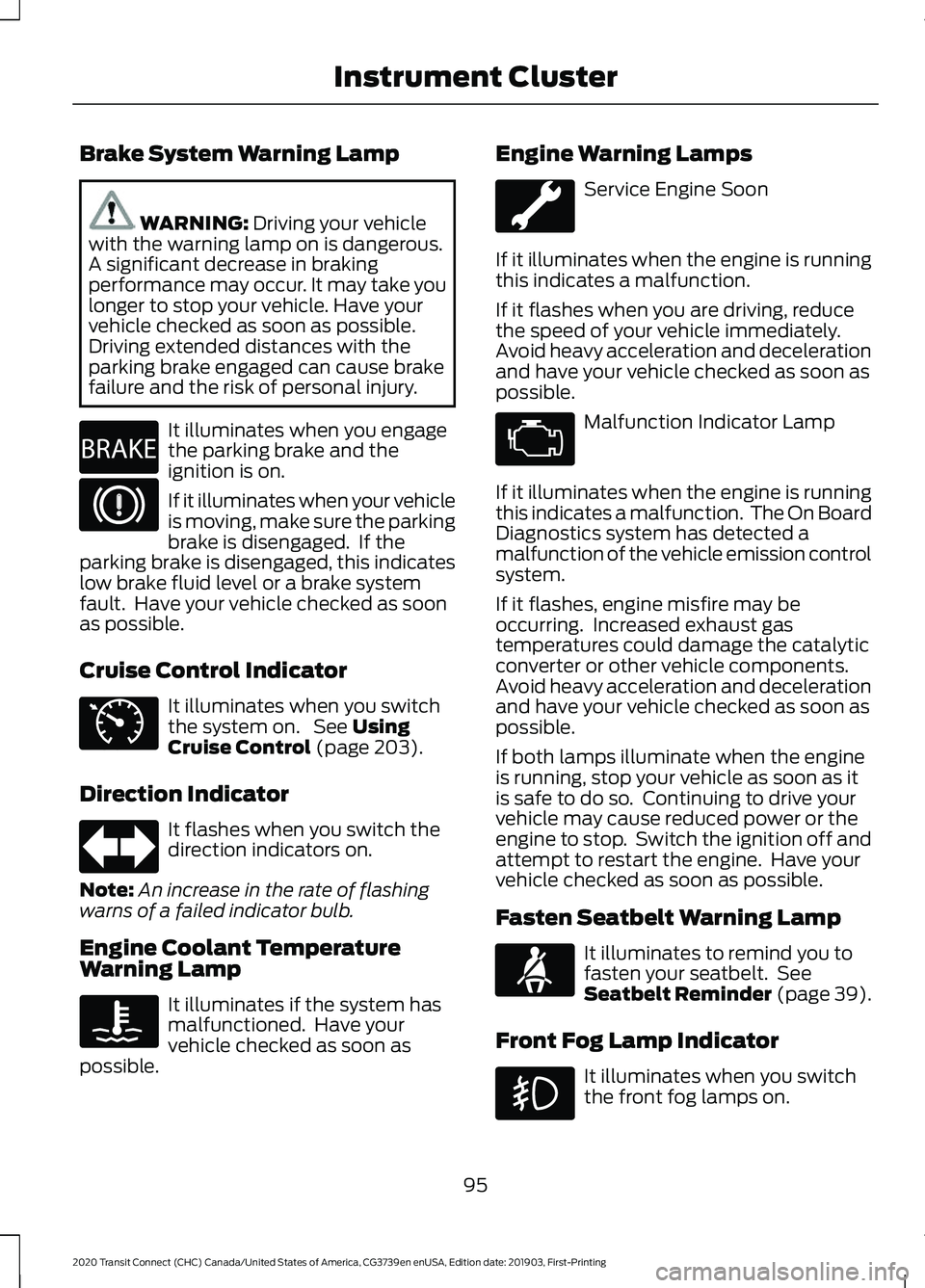
failure and the risk of personal injury. It illuminates when you engage
the parking brake and the
ignition is on.
If it illuminates when your vehicle
is moving, make sure the parking
brake is disengaged. If the
parking brake is disengaged, this indicates
low brake fluid level or a brake system
fault. Have your vehicle checked as soon
as possible.
Cruise Control Indicator It illuminates when you switch
the system on. See
Using
Cruise Control (page 203).
Direction Indicator It flashes when you switch the
direction indicators on.
Note: An increase in the rate of flashing
warns of a failed indicator bulb.
Engine Coolant Temperature
Warning Lamp It illuminates if the system has
malfunctioned. Have your
vehicle checked as soon as
possible. Engine Warning Lamps Service Engine Soon
If it illuminates when the engine is running
this indicates a malfunction.
If it flashes when you are driving, reduce
the speed of your vehicle immediately.
Avoid heavy acceleration and deceleration
and have your vehicle checked as soon as
possible. Malfunction Indicator Lamp
If it illuminates when the engine is running
this indicates a malfunction. The On Board
Diagnostics system has detected a
malfunction of the vehicle emission control
system.
If it flashes, engine misfire may be
occurring. Increased exhaust gas
temperatures could damage the catalytic
converter or other vehicle components.
Avoid heavy acceleration and deceleration
and have your vehicle checked as soon as
possible.
If both lamps illuminate when the engine
is running, stop your vehicle as soon as it
is safe to do so. Continuing to drive your
vehicle may cause reduced power or the
engine to stop. Switch the ignition off and
attempt to restart the engine. Have your
vehicle checked as soon as possible.
Fasten Seatbelt Warning Lamp It illuminates to remind you to
fasten your seatbelt. See
Seatbelt Reminder
(page 39).
Front Fog Lamp Indicator It illuminates when you switch
the front fog lamps on.
95
2020 Transit Connect (CHC) Canada/United States of America, CG3739en enUSA, Edition date: 201903, First-Printing Instrument ClusterE270480 E71340 E71880
Page 101 of 509
Fasten Seatbelt Audible Warning
Sounds when a seatbelt is unfastened in
an occupied seat and your vehicle is
moving.
Key in Ignition Audible Warning
Sounds when you open the driver's door
and you have left the key in the ignition.
Headlamps On Audible Warning
Sounds when you remove the key from the
ignition and open the driver door and you
have left the headlamps or parking lamps
on.
Parking Brake On Audible Warning
Sounds when you have left the parking
brake on and drive your vehicle. If the
audible warning remains on after you have
released the parking brake, have your
vehicle checked by an authorized dealer
immediately.
97
2020 Transit Connect (CHC) Canada/United States of America, CG3739en enUSA, Edition date: 201903, First-Printing Instrument Cluster
Page 106 of 509
Automatic High Beam Control
Description
Message
The camera has reduced visibility. Clean the windshield. If
the message continues to appear, have your vehicle checked
as soon as possible.
Front Camera Low Visib-
ility Clean Screen
The camera has malfunctioned. Wait a short period of time
for the camera to cool down. If the message continues to
appear, have your vehicle checked as soon as possible.
Front Camera Tempor-
arily Not Available
The camera has malfunctioned. Have your vehicle checked
as soon as possible.
Front Camera Malfunc-
tion Service Required
Auto-Start-Stop Description
Message
The system needs to restart the engine but requires your
confirmation. Press the brake pedal to restart the engine.
Auto StartStop Press
Brake to Start Engine
The system needs to restart the engine but requires your
confirmation. Press any pedal to restart the engine.
Auto StartStop Press a
Pedal to Start Engine
The system needs to restart the engine but requires your
confirmation. Shift into neutral (N) to restart the engine.
Auto StartStop Select
Neutral To Start Engine
The system needs to restart the engine but requires your
confirmation. Shift into park (P) to restart the engine.
Auto StartStop Shift to
P, then Restart Engine
The system is not functioning. Restart the engine.
Auto StartStop Manual
Restart Required
The system has malfunctioned. Have your vehicle checked
as soon as possible.
Auto StartStop Malfunc-
tion Service Required
102
2020 Transit Connect (CHC) Canada/United States of America, CG3739en enUSA, Edition date: 201903, First-Printing Information Displays
Page 107 of 509
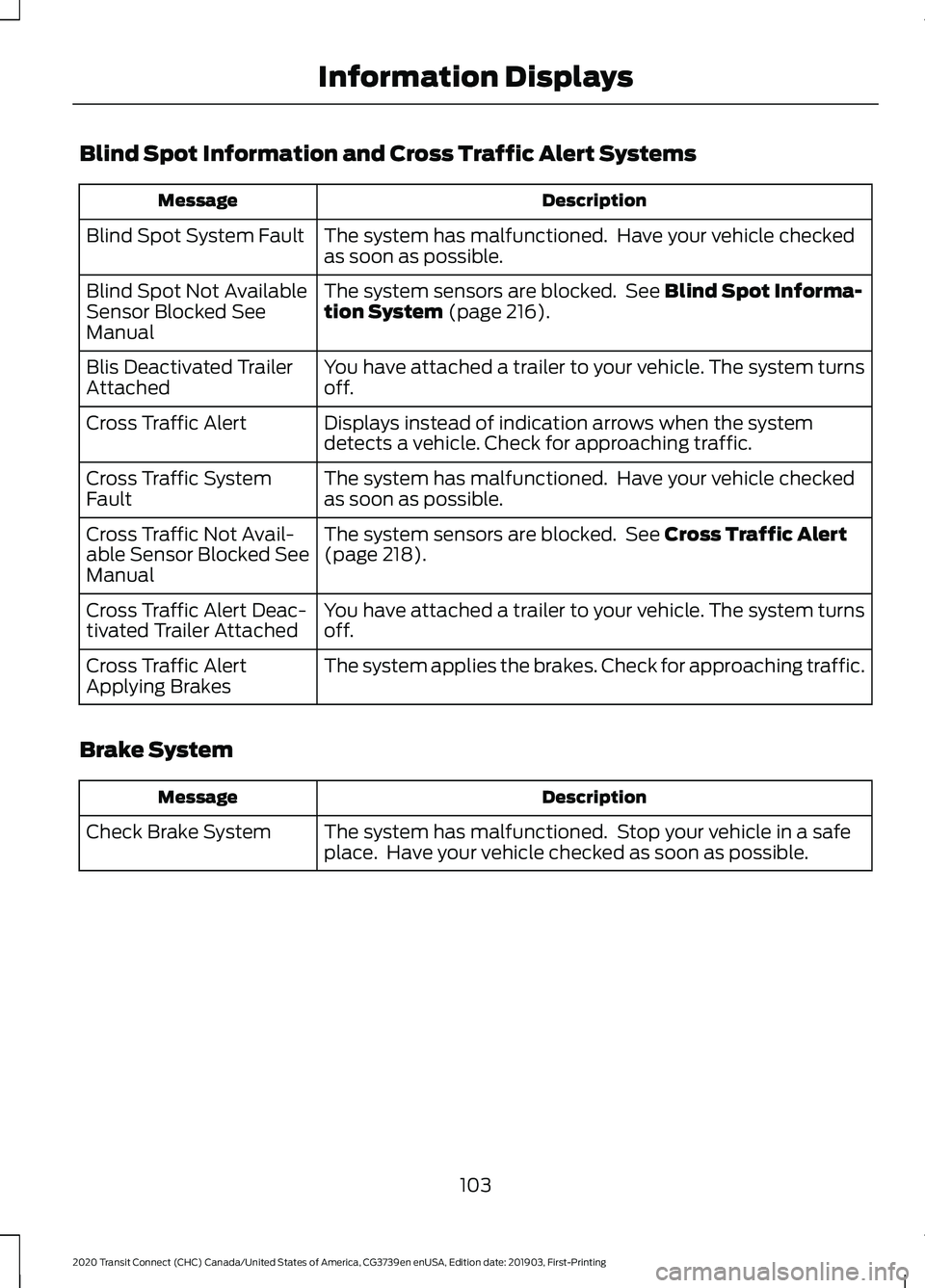
Blind Spot Information and Cross Traffic Alert Systems
Description
Message
The system has malfunctioned. Have your vehicle checked
as soon as possible.
Blind Spot System Fault
The system sensors are blocked. See Blind Spot Informa-
tion System (page 216).
Blind Spot Not Available
Sensor Blocked See
Manual
You have attached a trailer to your vehicle. The system turns
off.
Blis Deactivated Trailer
Attached
Displays instead of indication arrows when the system
detects a vehicle. Check for approaching traffic.
Cross Traffic Alert
The system has malfunctioned. Have your vehicle checked
as soon as possible.
Cross Traffic System
Fault
The system sensors are blocked. See
Cross Traffic Alert
(page 218).
Cross Traffic Not Avail-
able Sensor Blocked See
Manual
You have attached a trailer to your vehicle. The system turns
off.
Cross Traffic Alert Deac-
tivated Trailer Attached
The system applies the brakes. Check for approaching traffic.
Cross Traffic Alert
Applying Brakes
Brake System Description
Message
The system has malfunctioned. Stop your vehicle in a safe
place. Have your vehicle checked as soon as possible.
Check Brake System
103
2020 Transit Connect (CHC) Canada/United States of America, CG3739en enUSA, Edition date: 201903, First-Printing Information Displays
Page 110 of 509
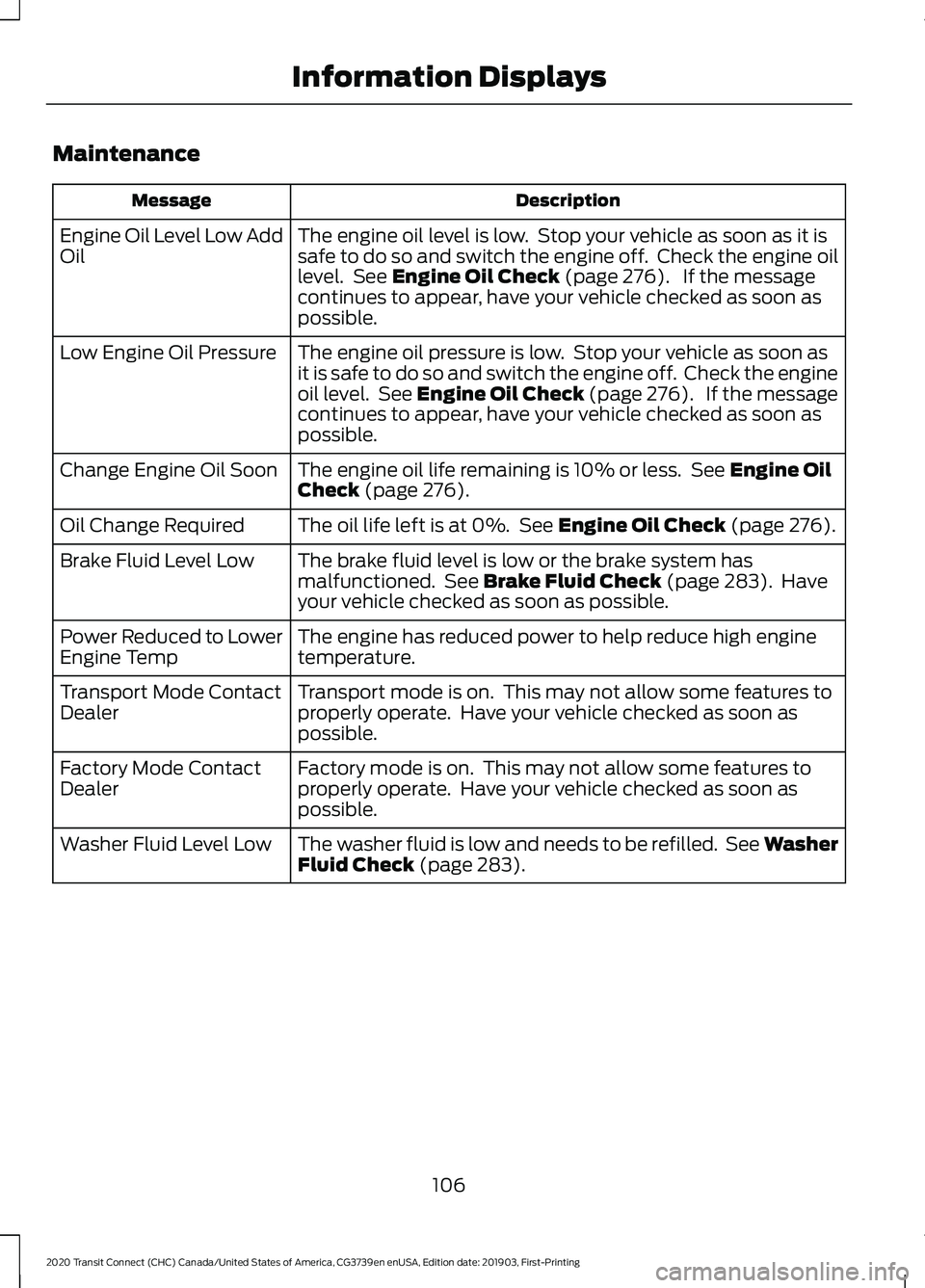
Maintenance
Description
Message
The engine oil level is low. Stop your vehicle as soon as it is
safe to do so and switch the engine off. Check the engine oil
level. See Engine Oil Check (page 276). If the message
continues to appear, have your vehicle checked as soon as
possible.
Engine Oil Level Low Add
Oil
The engine oil pressure is low. Stop your vehicle as soon as
it is safe to do so and switch the engine off. Check the engine
oil level. See Engine Oil Check (page 276). If the message
continues to appear, have your vehicle checked as soon as
possible.
Low Engine Oil Pressure
The engine oil life remaining is 10% or less. See
Engine Oil
Check (page 276).
Change Engine Oil Soon
The oil life left is at 0%. See
Engine Oil Check (page 276).
Oil Change Required
The brake fluid level is low or the brake system has
malfunctioned. See
Brake Fluid Check (page 283). Have
your vehicle checked as soon as possible.
Brake Fluid Level Low
The engine has reduced power to help reduce high engine
temperature.
Power Reduced to Lower
Engine Temp
Transport mode is on. This may not allow some features to
properly operate. Have your vehicle checked as soon as
possible.
Transport Mode Contact
Dealer
Factory mode is on. This may not allow some features to
properly operate. Have your vehicle checked as soon as
possible.
Factory Mode Contact
Dealer
The washer fluid is low and needs to be refilled. See Washer
Fluid Check
(page 283).
Washer Fluid Level Low
106
2020 Transit Connect (CHC) Canada/United States of America, CG3739en enUSA, Edition date: 201903, First-Printing Information Displays
Page 112 of 509
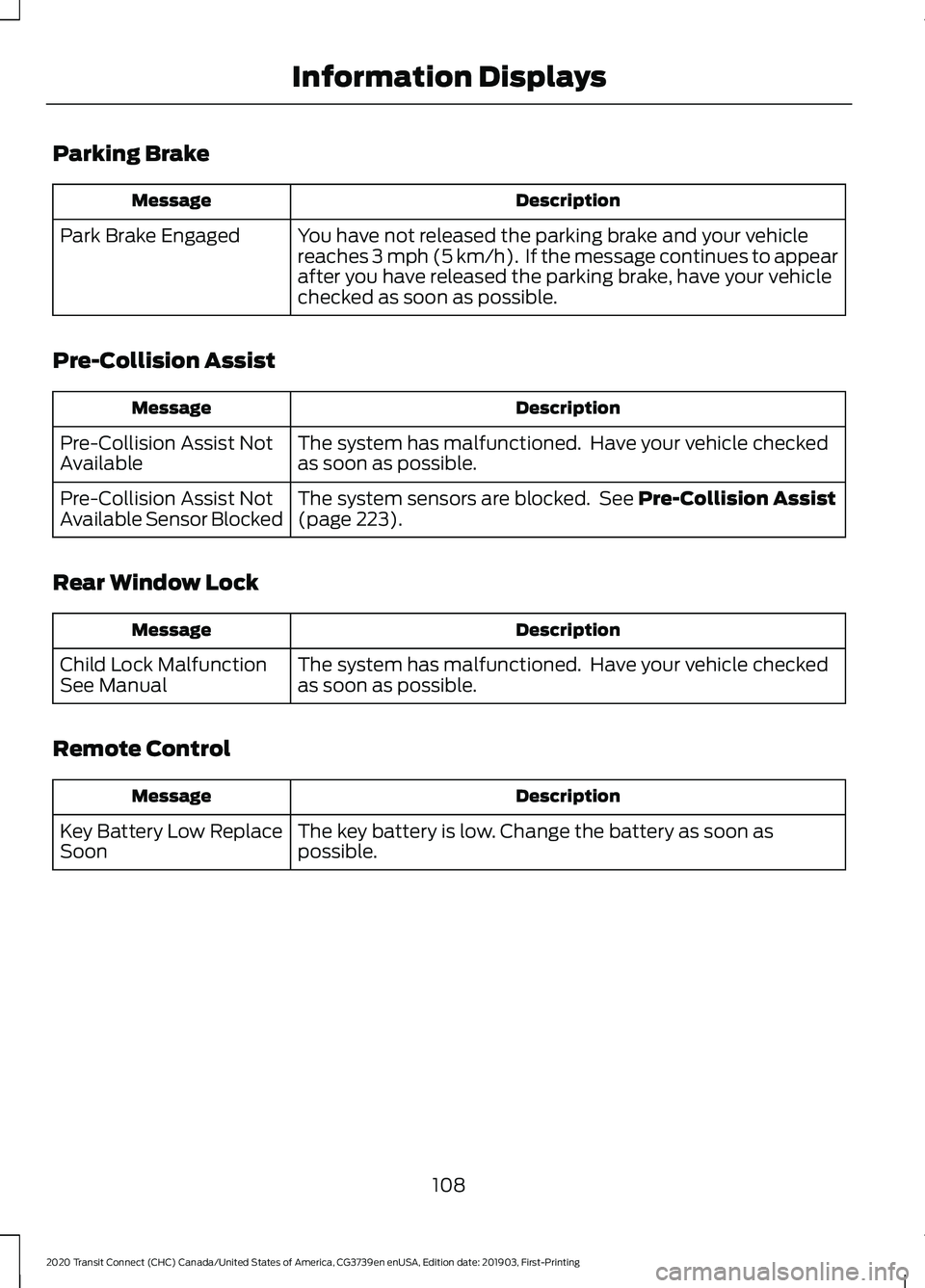
Parking Brake
Description
Message
You have not released the parking brake and your vehicle
reaches 3 mph (5 km/h). If the message continues to appear
after you have released the parking brake, have your vehicle
checked as soon as possible.
Park Brake Engaged
Pre-Collision Assist Description
Message
The system has malfunctioned. Have your vehicle checked
as soon as possible.
Pre-Collision Assist Not
Available
The system sensors are blocked. See
Pre-Collision Assist
(page 223).
Pre-Collision Assist Not
Available Sensor Blocked
Rear Window Lock Description
Message
The system has malfunctioned. Have your vehicle checked
as soon as possible.
Child Lock Malfunction
See Manual
Remote Control Description
Message
The key battery is low. Change the battery as soon as
possible.
Key Battery Low Replace
Soon
108
2020 Transit Connect (CHC) Canada/United States of America, CG3739en enUSA, Edition date: 201903, First-Printing Information Displays
Page 115 of 509
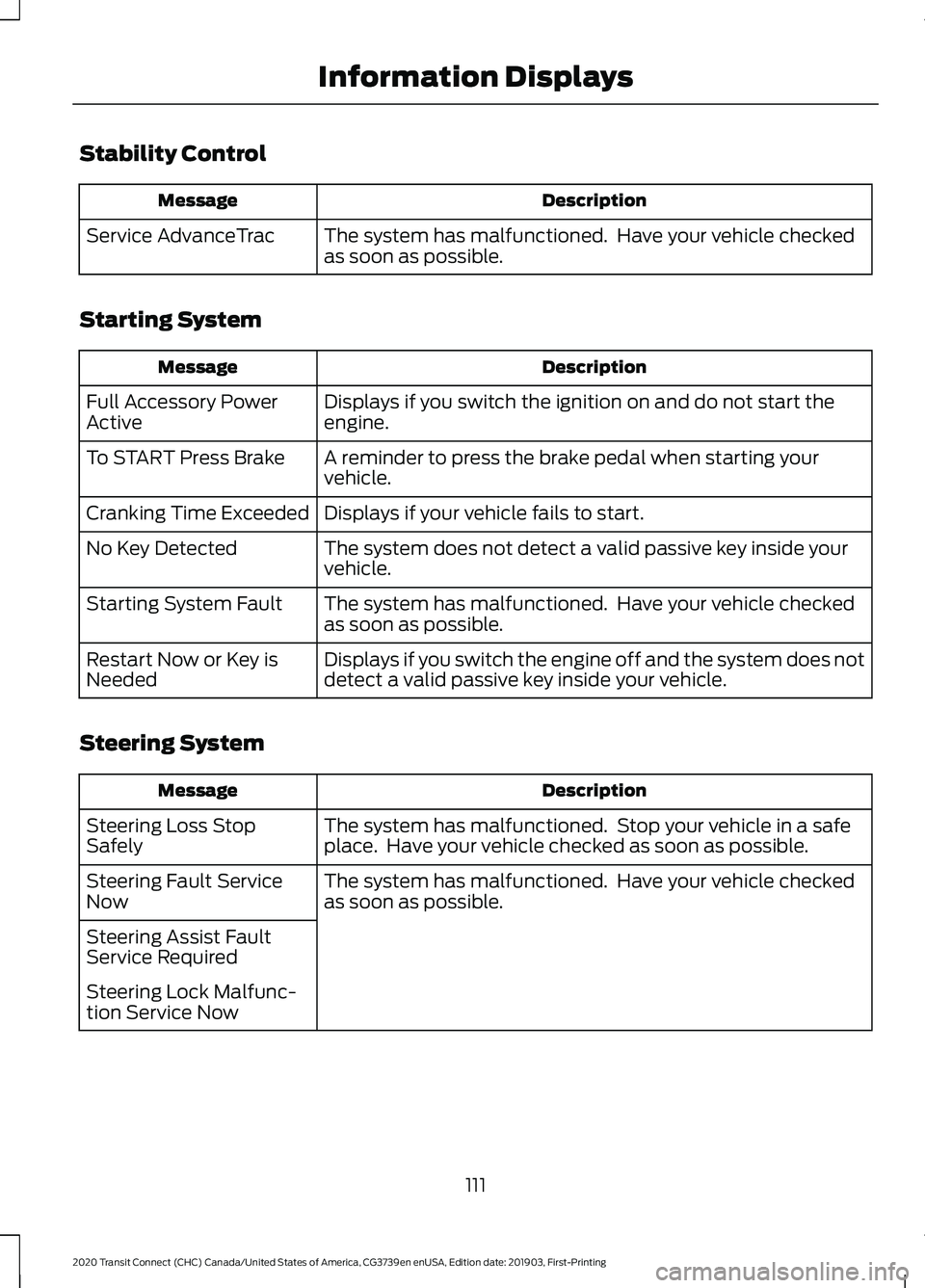
Stability Control
Description
Message
The system has malfunctioned. Have your vehicle checked
as soon as possible.
Service AdvanceTrac
Starting System Description
Message
Displays if you switch the ignition on and do not start the
engine.
Full Accessory Power
Active
A reminder to press the brake pedal when starting your
vehicle.
To START Press Brake
Displays if your vehicle fails to start.
Cranking Time Exceeded
The system does not detect a valid passive key inside your
vehicle.
No Key Detected
The system has malfunctioned. Have your vehicle checked
as soon as possible.
Starting System Fault
Displays if you switch the engine off and the system does not
detect a valid passive key inside your vehicle.
Restart Now or Key is
Needed
Steering System Description
Message
The system has malfunctioned. Stop your vehicle in a safe
place. Have your vehicle checked as soon as possible.
Steering Loss Stop
Safely
The system has malfunctioned. Have your vehicle checked
as soon as possible.
Steering Fault Service
Now
Steering Assist Fault
Service Required
Steering Lock Malfunc-
tion Service Now
111
2020 Transit Connect (CHC) Canada/United States of America, CG3739en enUSA, Edition date: 201903, First-Printing Information Displays
Page 116 of 509
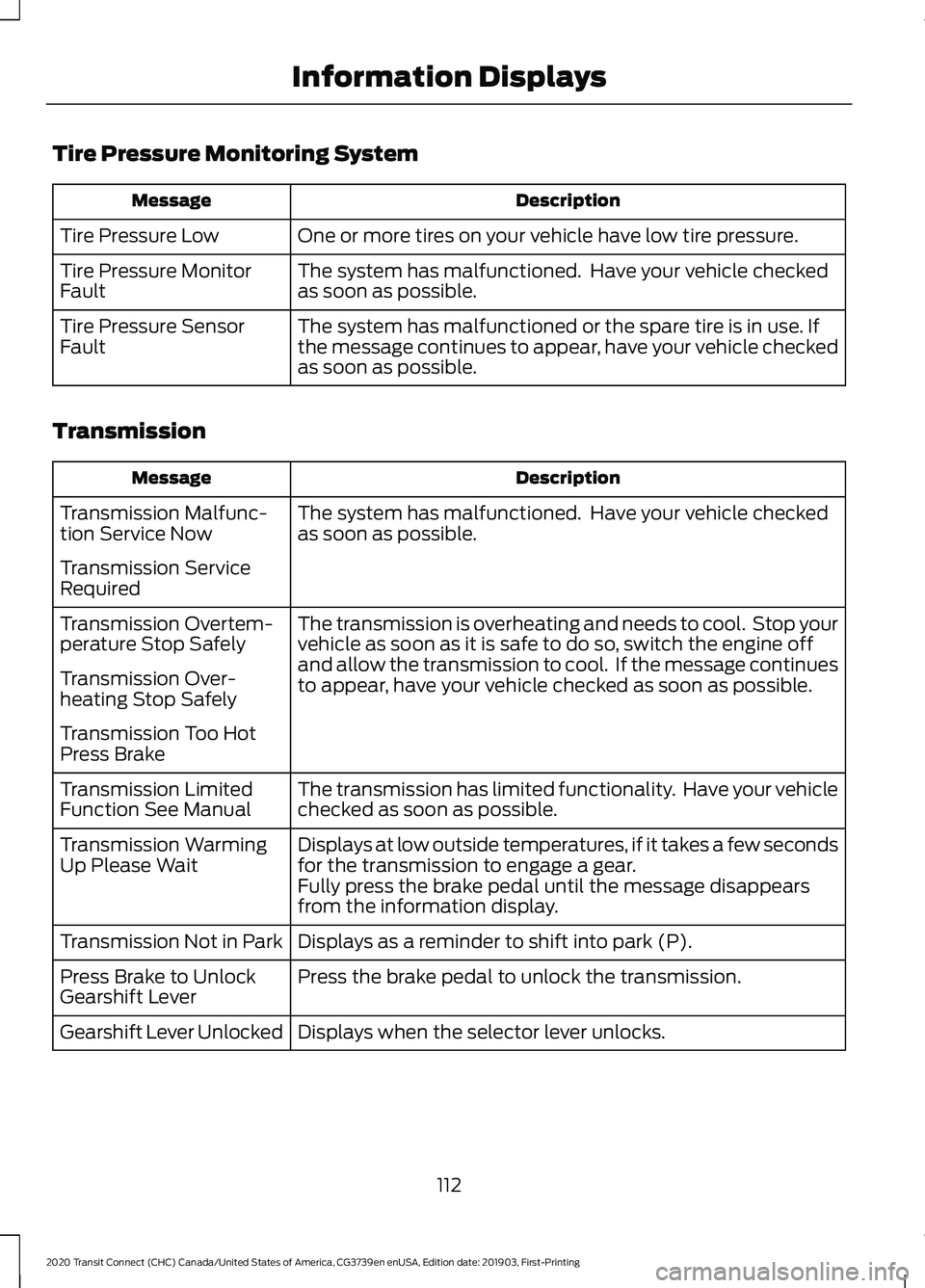
Tire Pressure Monitoring System
Description
Message
One or more tires on your vehicle have low tire pressure.
Tire Pressure Low
The system has malfunctioned. Have your vehicle checked
as soon as possible.
Tire Pressure Monitor
Fault
The system has malfunctioned or the spare tire is in use. If
the message continues to appear, have your vehicle checked
as soon as possible.
Tire Pressure Sensor
Fault
Transmission Description
Message
The system has malfunctioned. Have your vehicle checked
as soon as possible.
Transmission Malfunc-
tion Service Now
Transmission Service
Required
The transmission is overheating and needs to cool. Stop your
vehicle as soon as it is safe to do so, switch the engine off
and allow the transmission to cool. If the message continues
to appear, have your vehicle checked as soon as possible.
Transmission Overtem-
perature Stop Safely
Transmission Over-
heating Stop Safely
Transmission Too Hot
Press Brake
The transmission has limited functionality. Have your vehicle
checked as soon as possible.
Transmission Limited
Function See Manual
Displays at low outside temperatures, if it takes a few seconds
for the transmission to engage a gear.
Transmission Warming
Up Please Wait
Fully press the brake pedal until the message disappears
from the information display.
Displays as a reminder to shift into park (P).
Transmission Not in Park
Press the brake pedal to unlock the transmission.
Press Brake to Unlock
Gearshift Lever
Displays when the selector lever unlocks.
Gearshift Lever Unlocked
112
2020 Transit Connect (CHC) Canada/United States of America, CG3739en enUSA, Edition date: 201903, First-Printing Information Displays
Page 144 of 509
Switching the Ignition On
Turn the key to position II. All electrical
circuits and accessories are operational
and the warning lamps and indicators
illuminate.
Starting the Engine
Turn the key to position
III. Release the
key when the engine starts.
PUSH BUTTON IGNITION
SWITCH
Switching the Ignition On to
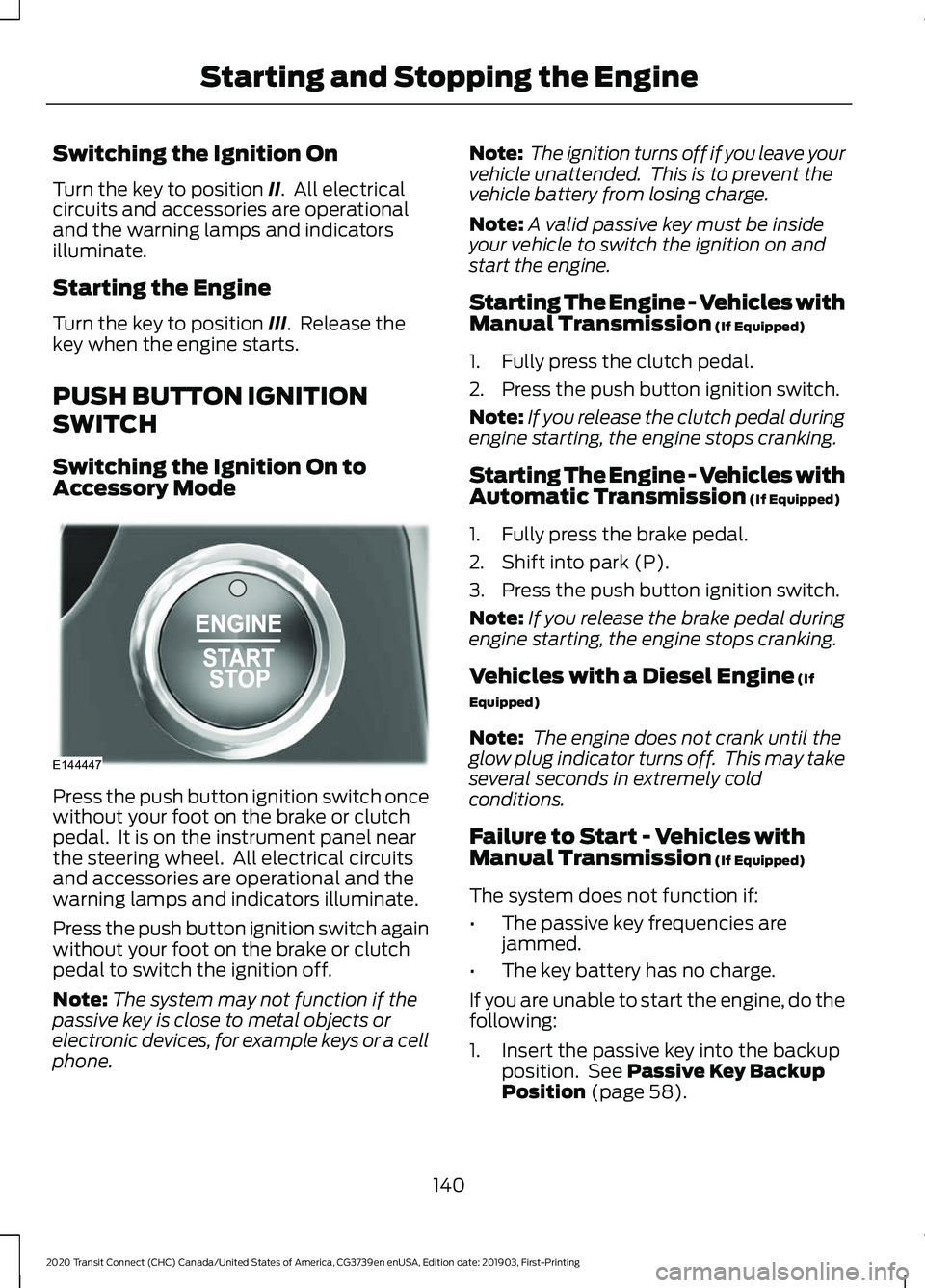
Accessory Mode Press the push button ignition switch once
without your foot on the brake or clutch
pedal. It is on the instrument panel near
the steering wheel. All electrical circuits
and accessories are operational and the
warning lamps and indicators illuminate.
Press the push button ignition switch again
without your foot on the brake or clutch
pedal to switch the ignition off.
Note:
The system may not function if the
passive key is close to metal objects or
electronic devices, for example keys or a cell
phone. Note:
The ignition turns off if you leave your
vehicle unattended. This is to prevent the
vehicle battery from losing charge.
Note: A valid passive key must be inside
your vehicle to switch the ignition on and
start the engine.
Starting The Engine - Vehicles with
Manual Transmission (If Equipped)
1. Fully press the clutch pedal.
2. Press the push button ignition switch.
Note: If you release the clutch pedal during
engine starting, the engine stops cranking.
Starting The Engine - Vehicles with
Automatic Transmission
(If Equipped)
1. Fully press the brake pedal.
2. Shift into park (P).
3. Press the push button ignition switch.
Note: If you release the brake pedal during
engine starting, the engine stops cranking.
Vehicles with a Diesel Engine
(If
Equipped)
Note: The engine does not crank until the
glow plug indicator turns off. This may take
several seconds in extremely cold
conditions.
Failure to Start - Vehicles with
Manual Transmission
(If Equipped)
The system does not function if:
• The passive key frequencies are
jammed.
• The key battery has no charge.
If you are unable to start the engine, do the
following:
1. Insert the passive key into the backup position. See
Passive Key Backup
Position (page 58).
140
2020 Transit Connect (CHC) Canada/United States of America, CG3739en enUSA, Edition date: 201903, First-Printing Starting and Stopping the EngineE144447