Reversing FORD TRANSIT CONNECT 2020 Owners Manual
[x] Cancel search | Manufacturer: FORD, Model Year: 2020, Model line: TRANSIT CONNECT, Model: FORD TRANSIT CONNECT 2020Pages: 509, PDF Size: 7.73 MB
Page 187 of 509
once the engine has developed sufficient
torque to prevent your vehicle from rolling
down the slope. This is an advantage when
pulling away on a slope, for example from
a car park ramp, traffic lights or when
reversing uphill into a parking space.
The system will turn on automatically on
any slope which can result in significant
vehicle rollback.
Using Hill Start Assist
1. Press the brake pedal to bring your
vehicle to a complete standstill. Keep
the brake pedal pressed. If equipped
with a manual transmission, also press
the clutch pedal.
2. If the sensors detect that your vehicle is on a slope, the system will activate
automatically.
3. When you remove your foot from the brake pedal, your vehicle will remain
on the slope without rolling away for
approximately two to three seconds.
This hold time will automatically be
extended if you are in the process of
driving off.
4. Drive off in the normal manner. The brakes will be released automatically.
Switching the System On and Off
Vehicles with Manual Transmission
You can switch this feature on or off in the
information display. The system
remembers the last setting when you start
your vehicle.
Vehicles with Automatic Transmission
You cannot turn the system on or off.
When you switch the ignition on, the
system automatically turns on.
183
2020 Transit Connect (CHC) Canada/United States of America, CG3739en enUSA, Edition date: 201903, First-Printing Brakes
Page 206 of 509
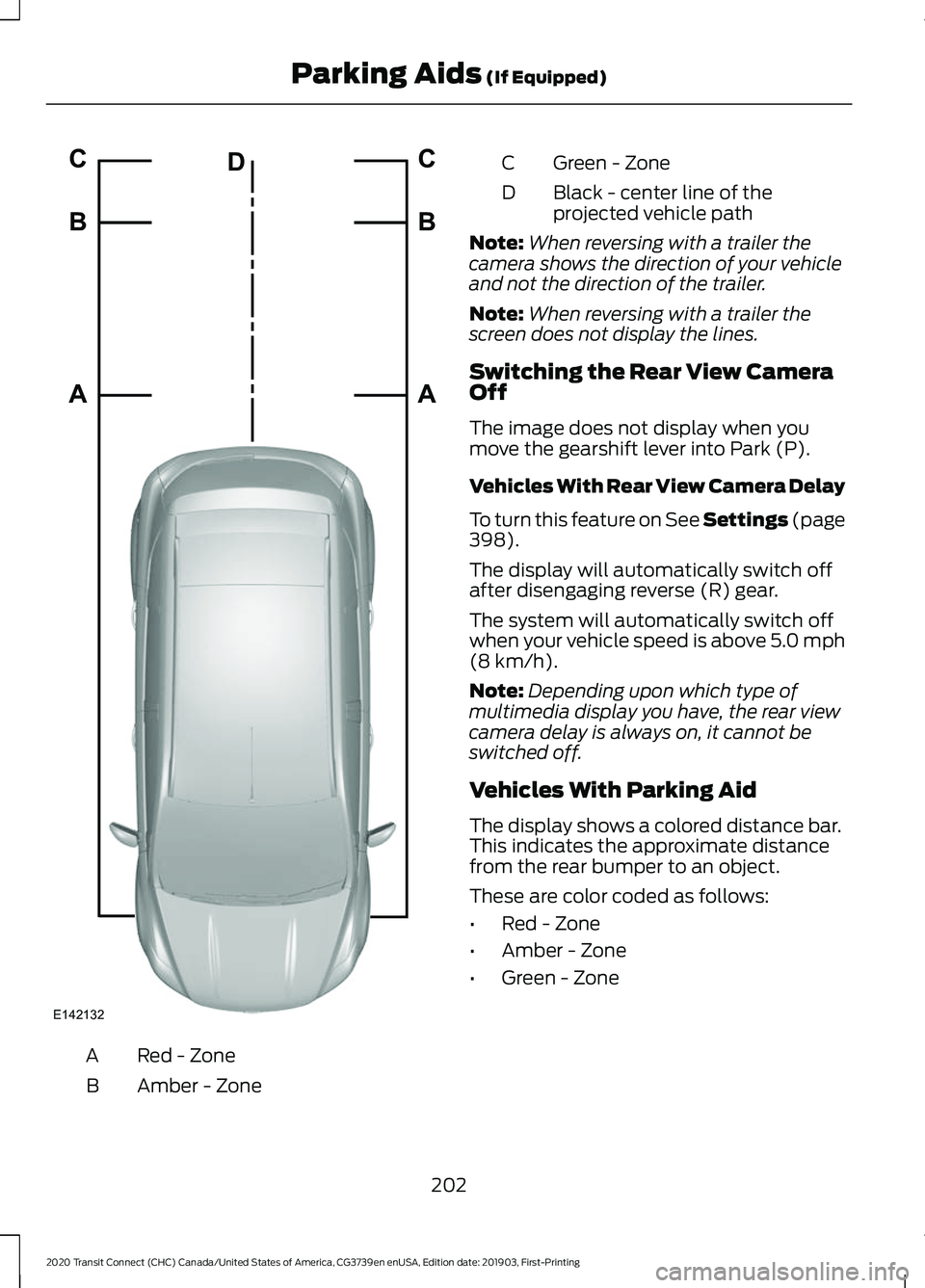
Red - Zone
A
Amber - Zone
B Green - Zone
C
Black - center line of the
projected vehicle path
D
Note: When reversing with a trailer the
camera shows the direction of your vehicle
and not the direction of the trailer.
Note: When reversing with a trailer the
screen does not display the lines.
Switching the Rear View Camera
Off
The image does not display when you
move the gearshift lever into Park (P).
Vehicles With Rear View Camera Delay
To turn this feature on See Settings (page
398).
The display will automatically switch off
after disengaging reverse (R) gear.
The system will automatically switch off
when your vehicle speed is above 5.0 mph
(8 km/h)
.
Note: Depending upon which type of
multimedia display you have, the rear view
camera delay is always on, it cannot be
switched off.
Vehicles With Parking Aid
The display shows a colored distance bar.
This indicates the approximate distance
from the rear bumper to an object.
These are color coded as follows:
• Red - Zone
• Amber - Zone
• Green - Zone
202
2020 Transit Connect (CHC) Canada/United States of America, CG3739en enUSA, Edition date: 201903, First-Printing Parking Aids
(If Equipped)E142132A B C
A B C
D
Page 222 of 509
If the sensors become blocked, a message
may appear in the information display. See
Information Messages (page 100). The
alert indicators remain illuminated but the
system does not alert you.
System Errors
If the system detects a fault, a warning
lamp illuminates and a message displays.
See Information Messages (page 100).
Switching the System On and Off
You can switch the system off using the
information display.
See General
Information (page 98). When you switch
the system off, a warning lamp illuminates
and a message displays. When you switch
the system on or off, the alert indicators
flash twice.
Note: The system remembers the last
setting when you start your vehicle.
Note: The system may not correctly operate
when towing a trailer. For vehicles with a
trailer tow module and tow bar approved
by us, the system turns off when you attach
a trailer. For vehicles with an aftermarket
trailer tow module or tow bar, we
recommend that you switch the system off
when you attach a trailer.
To permanently switch the system off,
contact an authorized dealer. CROSS TRAFFIC ALERT WARNING:
Do not use the cross
traffic alert system as a replacement for
using the interior and exterior mirrors or
looking over your shoulder before
reversing out of a parking space. The
cross traffic alert system is not a
replacement for careful driving. WARNING:
The system may not
operate properly during severe weather
conditions, for example snow, ice, heavy
rain and spray. Always drive with due
care and attention. Failure to take care
may result in a crash.
The system is designed to alert you of
vehicles approaching from the sides behind
your vehicle when you shift into reverse
(R). If you continue to reverse after the
system alerts you, the system is designed
to apply the brakes if it still detects an
approaching vehicle. If the system applies
the brakes, a message appears in the
information display.
Note: The system does not apply the brakes
if you override it by firmly pressing the
accelerator pedal.
Using Cross Traffic Alert
The system is designed to detect vehicles
that approach at a speed between
4 mph
(6 km/h) and 37 mph (60 km/h). Coverage
decreases when the sensors are partially,
mostly or fully obstructed. Slowly reversing
helps increase the coverage area and
effectiveness.
The system turns on when you start the
engine and you shift into reverse (R). The
system turns off when you shift out of
reverse (R).
218
2020 Transit Connect (CHC) Canada/United States of America, CG3739en enUSA, Edition date: 201903, First-Printing Driving Aids
Page 365 of 509
Power (Watt)
Specification
Lamp
LED.
LED.
License plate lamp. 4
21
WY21W.
Rear direction indicator.
16
921.
Reversing lamp.
1 Front position lamps are also available as LED lamps.
2 Vehicles with HID headlamps.
3 Vehicles with rear cargo doors.
4 Vehicles with Liftgate.
LEDs are not serviceable. If a LED fails have your vehicle checked as soon as possible.
Interior Lamps Power (Watt)
Specification
Lamp
6
W6W.
Luggage compartment lamp.
10
Festoon.
Cargo area lamp. 1
6
W6W.
Map reading lamp.
1 If your vehicle has LED cargo area lamps they are not serviceable. If a LED fails have
your vehicle checked as soon as possible.
361
2020 Transit Connect (CHC) Canada/United States of America, CG3739en enUSA, Edition date: 201903, First-Printing Capacities and Specifications