ad blue FORD TRANSIT CONNECT 2020 Owners Manual
[x] Cancel search | Manufacturer: FORD, Model Year: 2020, Model line: TRANSIT CONNECT, Model: FORD TRANSIT CONNECT 2020Pages: 509, PDF Size: 7.73 MB
Page 8 of 509
Cruise Control
Principle of Operation
...............................203
Using Cruise Control ..................................
203
Using Adaptive Cruise Control ..............
204
Driving Aids
Driver Alert .....................................................
210
Lane Keeping System .................................
212
Blind Spot Information System .............
216
Cross Traffic Alert ........................................
218
Eco .....................................................................
221
Steering ...........................................................
222
Pre-Collision Assist ....................................
223
Load Carrying
Luggage Anchor Points ............................
229
Rear Under Floor Storage ........................
229
Cargo Nets ....................................................
230
Roof Racks and Load Carriers ................
232
Load Limit ......................................................
233
Towing
Towing a Trailer ...........................................
238
Trailer Sway Control ..................................
239
Recommended Towing Weights ..........
239
Essential Towing Checks ..........................
241
Transporting the Vehicle ..........................
244
Towing the Vehicle on Four Wheels .....
245
Driving Hints
Breaking-In ....................................................
247
Reduced Engine Performance ...............
247
Economical Driving ....................................
247
Cold Weather Precautions ......................
248
Driving Through Water .............................
248
Floor Mats .....................................................
248
Roadside Emergencies
Roadside Assistance .................................
250Hazard Flashers
............................................
251
Fuel Shutoff ...................................................
251
Jump Starting the Vehicle .......................
252
Post-Crash Alert System .........................
254
Towing Points ...............................................
254
Customer Assistance
Getting the Services You Need ..............
256
In California (U.S. Only) ............................
257
The Better Business Bureau (BBB) Auto Line Program (U.S. Only) ....................
258
Utilizing the Mediation/Arbitration Program (Canada Only) ......................
259
Getting Assistance Outside the U.S. and Canada .......................................................
259
Ordering Additional Owner's Literature ........................................................................\
.
261
Reporting Safety Defects (U.S. Only) ........................................................................\
.
261
Reporting Safety Defects (Canada Only) ........................................................................\
.
261
Fuses
Fuse Box Locations ....................................
263
Fuse Specification Chart .........................
264
Changing a Fuse .........................................
269
Maintenance
General Information ..................................
270
Opening and Closing the Hood .............
270
Under Hood Overview - 1.5L EcoBlue ........................................................................\
.
272
Under Hood Overview - 2.0L Duratec-HE (MI4)/2.0L Flex Fuel ..............................
273
Under Hood Overview - 2.5L, LHD ........
274
Under Hood Overview - 2.5L, RHD .......
275
Engine Oil Dipstick - 1.5L EcoBlue ........
276
Engine Oil Dipstick - 2.0L Duratec-HE (MI4)/2.0L Flex Fuel/2.5L ...................
276
Engine Oil Check .........................................
276
Oil Change Indicator Reset ......................
277
4
2020 Transit Connect (CHC) Canada/United States of America, CG3739en enUSA, Edition date: 201903, First-Printing Table of Contents
Page 9 of 509
Engine Cooling Fan - Gasoline
...............278
Engine Cooling Fan - Diesel ....................
278
Engine Coolant Check ...............................
278
Automatic Transmission Fluid Check ........................................................................\
282
Brake Fluid Check .......................................
283
Washer Fluid Check ...................................
283
Changing the 12V Battery ........................
284
Checking the Wiper Blades ....................
285
Changing the Front Wiper Blades ........
285
Changing the Rear Wiper Blades - Vehicles With: Manual Liftgate .........
286
Changing the Rear Wiper Blades - Vehicles With: Rear Cargo Doors ......
287
Adjusting the Headlamps ........................
287
Changing a Bulb .........................................
288
Changing the Engine Air Filter - 2.0L Duratec-HE (MI4)/2.0L Flex Fuel, 1.5L
EcoBlue ......................................................
293
Changing the Engine Air Filter - 2.5L ....
294
Drive Belt Routing - 1.5L EcoBlue .........
295
Drive Belt Routing - 2.0L Duratec-HE (MI4)/2.0L Flex Fuel .............................
295
Drive Belt Routing - 2.5L ..........................
295
Vehicle Care
Cleaning Products ......................................
296
Cleaning the Exterior .................................
297
Waxing ............................................................
298
Cleaning the Windows and Wiper Blades ........................................................................\
299
Cleaning the Interior ..................................
299
Cleaning the Instrument Panel and Instrument Cluster Lens .......................
301
Cleaning Leather Seats .............................
301
Repairing Minor Paint Damage .............
302
Cleaning the Wheels .................................
302
Vehicle Storage ...........................................
302
Wheels and Tires
General Information ..................................
305Tire Sealant and Inflator Kit
...................
306
Tire Care ...........................................................
311
Using Winter Tires ......................................
325
Using Snow Chains ....................................
325
Tire Pressure Monitoring System ..........
326
Changing a Road Wheel ..........................
330
Tire Pressures ...............................................
334
Lug Nuts .........................................................
335
Capacities and Specifications
Engine Specifications - 1.5L EcoBlue ........................................................................\
337
Engine Specifications - 2.0L Duratec-HE (MI4)/2.0L Flex Fuel .............................
338
Engine Specifications - 2.5L ...................
339
Motorcraft Parts - 1.5L EcoBlue ............
340
Motorcraft Parts - 2.0L Duratec-HE (MI4)/2.0L Flex Fuel ..............................
341
Motorcraft Parts - 2.5L .............................
342
Vehicle Identification Number ...............
343
Vehicle Certification Label ......................
344
Transmission Code Designation - 6-Speed Automatic Transmission
........................................................................\
344
Transmission Code Designation - 8-Speed Automatic Transmission
........................................................................\
345
Capacities and Specifications - 1.5L EcoBlue ......................................................
345
Capacities and Specifications - 2.0L Duratec-HE (MI4)/2.0L Flex Fuel .....
350
Capacities and Specifications - 2.5L ........................................................................\
355
Bulb Specification Chart .........................
360
Network Connectivity
Connecting the Vehicle to a Mobile Network ......................................................
362
Connecting the Vehicle to a Wi-Fi Network - Vehicles With: SYNC 3 ......
362
Network Connectivity – Troubleshooting ........................................................................\
363
5
2020 Transit Connect (CHC) Canada/United States of America, CG3739en enUSA, Edition date: 201903, First-Printing Table of Contents
Page 10 of 509
Wi-Fi Hotspot
Creating a Wi-Fi Hotspot - Vehicles
Without: SYNC 3 .....................................365
Creating a Wi-Fi Hotspot - Vehicles With: SYNC 3 .......................................................
365
Changing the Wi-Fi Hotspot Name or Password - Vehicles Without: SYNC 3
.......................................................................
366
Changing the Wi-Fi Hotspot Name or Password - Vehicles With: SYNC 3
.......................................................................
366
Audio System
General Information ..................................
367
Audio Unit - Vehicles Without: SYNC 3 .......................................................................
368
Audio Unit - Vehicles With: SYNC 3 ......
371
AM/FM Radio - Vehicles Without: SYNC 3.....................................................................
372
Audio Unit Clock and Date Displays - Vehicles Without: SYNC 3 ...................
373
Connecting a Bluetooth Device - Vehicles Without: SYNC 3 ...................
373
Satellite Radio ..............................................
373
Streaming Bluetooth Audio - Vehicles Without: SYNC 3 .....................................
375
Playing Media From a USB Device - Vehicles Without: SYNC 3 ...................
375
USB Port .........................................................
376
Using Voice Recognition ..........................
376
SYNC™ 3
General Information ...................................
377
Home Screen ...............................................
384
Using Voice Recognition ..........................
384
Entertainment .............................................
390
Phone ..............................................................
392
Navigation .....................................................
393
Apps .................................................................
397
Settings ..........................................................
398
SYNC™ 3 Troubleshooting ......................
412Accessories
Accessories
...................................................
425
Ford Protect
Ford Protect ..................................................
426
Scheduled Maintenance
General Maintenance Information ......
428
Normal Scheduled Maintenance ..........
431
Special Operating Conditions Scheduled Maintenance ............................................
434
Scheduled Maintenance Record ..........
436
Appendices
Electromagnetic Compatibility .............
446
End User License Agreement ................
448
Declaration of Conformity - Vehicles Without: SYNC 3 .....................................
473
Declaration of Conformity - Vehicles With: SYNC 3 ............................................
474
Declaration of Conformity - Vehicles With: Wireless Accessory Charging
........................................................................\
474
Type Approvals ............................................
476
6
2020 Transit Connect (CHC) Canada/United States of America, CG3739en enUSA, Edition date: 201903, First-Printing Table of Contents
Page 56 of 509
![FORD TRANSIT CONNECT 2020 Owners Manual ABOUT 911 ASSIST
911 Assist is a SYNC system feature that
can call for help if you’re in an accident. If
a crash deploys an airbag (excluding knee
airbags and rear inflatable seatbelts [if
equipped]](/img/11/40678/w960_40678-55.png "FORD TRANSIT CONNECT 2020 Owners Manual ABOUT 911 ASSIST
911 Assist is a SYNC system feature that
can call for help if you’re in an accident. If
a crash deploys an airbag (excluding knee
airbags and rear inflatable seatbelts [if
equipped]")
ABOUT 911 ASSIST
911 Assist is a SYNC system feature that
can call for help if you’re in an accident. If
a crash deploys an airbag (excluding knee
airbags and rear inflatable seatbelts [if
equipped]) or activates the fuel pump
shut-off, your SYNC-equipped vehicle may
be able to contact emergency services by
dialing 911 through a paired and connected
Bluetooth-enabled phone. You can learn
more about the 911 Assist feature, by
visiting:
Website
www.owner.ford.com
www.syncmyride.ca
www.syncmaroute.ca
Not all crashes will deploy an airbag or
activate the fuel pump shut-off (the
triggers for 911 Assist). If a connected cell
phone sustains damage or loses its
connection to SYNC during a crash, SYNC
will search for and try to connect to a
previously paired cell phone; SYNC will
then attempt to call the emergency
services.
Before making the call:
• SYNC provides a short window of time
(about 10 seconds) to cancel the call.
If you fail to cancel the call, SYNC
attempts to dial 911.
• SYNC says the following, or a similar
message: "SYNC will attempt to call
911, to cancel the call, press Cancel on
your screen or press and hold the
phone button on your steering wheel." If you do not cancel the call, and SYNC
makes a successful call, a pre-recorded
message plays for the 911 operator, and
then the occupant(s) in your vehicle is able
to talk with the operator. Be prepared to
provide your name, phone number and
location immediately, because not all 911
systems are capable of receiving this
information electronically.
During an emergency call, the system
transmits vehicle data to the emergency
service. See Data Recording (page 9).
EMERGENCY CALL
REQUIREMENTS WARNING:
Do not wait for 911
Assist to make an emergency call if you
can do it yourself. Dial emergency
services immediately to avoid delayed
response time which could increase the
risk of serious injury or death after a
crash. If you do not hear 911 Assist within
five seconds of the crash, the system or
phone may be damaged or
non-functional. WARNING:
Always place your
phone in a secure location in your vehicle
so it does not become a projectile or get
damaged in a crash. Failure to do so may
cause serious injury to someone or
damage the phone which could prevent
911 Assist from working properly. WARNING:
Unless the 911 Assist
setting is set on before a crash, the
system will not dial for help which could
delay response time, potentially
increasing the risk of serious injury or
death after a crash.
52
2020 Transit Connect (CHC) Canada/United States of America, CG3739en enUSA, Edition date: 201903, First-Printing 911 Assist
Page 57 of 509
•
SYNC must be powered and working
properly at the time of the incident and
throughout feature activation and use.
• The 911 Assist feature must be set on
before the incident.
• You must pair and connect a Bluetooth
enabled and compatible cell phone to
SYNC.
• A connected Bluetooth enabled phone
must have the ability to make and
maintain an outgoing call at the time
of the incident.
• A connected Bluetooth enabled phone
must have adequate network coverage,
battery power and signal strength.
• The vehicle must have battery power
and be located in the U.S., Canada or
in a territory in which 911 is the
emergency number.
Note: If any user sets 911 Assist to on or off,
that setting applies for all paired phones. If
911 Assist is switched off and the phone is
connected to SYNC, an icon displays on the
status bar.
Note: Every phone operates differently.
While SYNC 911 Assist works with most
cellular phones, some may have trouble
using this feature.
EMERGENCY CALL
LIMITATIONS
The SYNC 911 Assist feature only operates
in the U.S., Canada or in a territory in which
911 is the emergency number.
• Your cellular phone or 911 Assist
hardware sustains damage in a crash.
• The vehicle's battery or the SYNC
system has no power.
• The phone(s) thrown from your vehicle
are the ones paired and connected to
the system.
53
2020 Transit Connect (CHC) Canada/United States of America, CG3739en enUSA, Edition date: 201903, First-Printing 911 Assist
Page 103 of 509
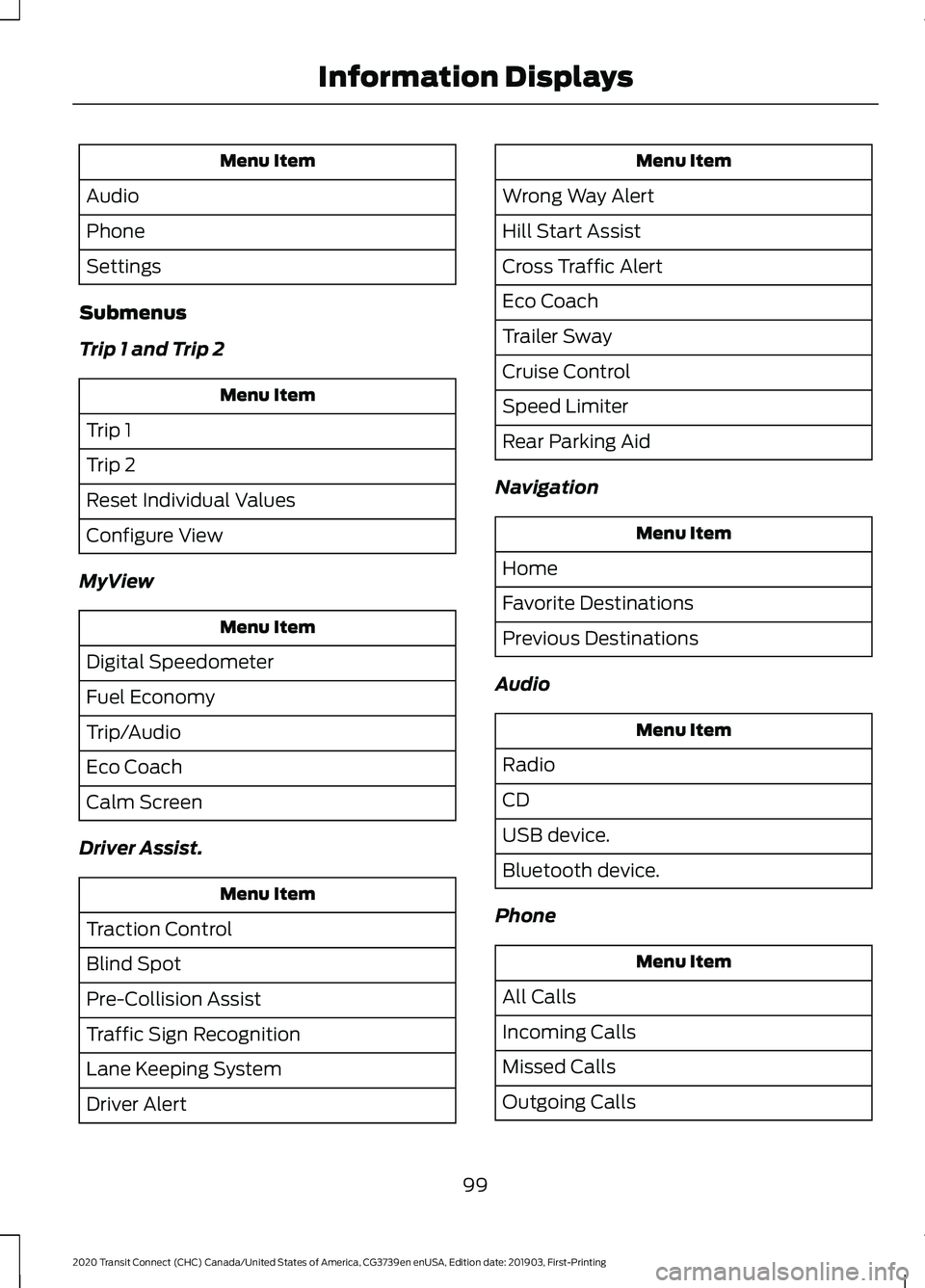
Menu Item
Audio
Phone
Settings
Submenus
Trip 1 and Trip 2 Menu Item
Trip 1
Trip 2
Reset Individual Values
Configure View
MyView Menu Item
Digital Speedometer
Fuel Economy
Trip/Audio
Eco Coach
Calm Screen
Driver Assist. Menu Item
Traction Control
Blind Spot
Pre-Collision Assist
Traffic Sign Recognition
Lane Keeping System
Driver Alert Menu Item
Wrong Way Alert
Hill Start Assist
Cross Traffic Alert
Eco Coach
Trailer Sway
Cruise Control
Speed Limiter
Rear Parking Aid
Navigation Menu Item
Home
Favorite Destinations
Previous Destinations
Audio Menu Item
Radio
CD
USB device.
Bluetooth device.
Phone Menu Item
All Calls
Incoming Calls
Missed Calls
Outgoing Calls
99
2020 Transit Connect (CHC) Canada/United States of America, CG3739en enUSA, Edition date: 201903, First-Printing Information Displays
Page 171 of 509
Continuing to drive your vehicle may cause
reduced power or the engine to stop.
Failure to respond to a warning lamp may
cause component damage not covered by
the vehicle Warranty. Have your vehicle
checked as soon as possible.
See Warning Lamps and Indicators
(page 94).
SELECTIVE CATALYTIC
REDUCTANT SYSTEM
Your vehicle has a selective catalytic
reductant system to help reduce exhaust
emission levels by injecting diesel exhaust
fluid into the exhaust system. The engine
may not start if you tamper with or disable
the selective catalytic reductant system.
For the system to correctly operate, you
must maintain the fluid level. The
minimum fluid refill quantity required to
restart the engine is
1.3 gal (5 L).
Note: If your vehicle is on a gradient, the
minimum fluid refill quantity required to
restart the engine may be greater than
1.3 gal (5 L)
.
Diesel Exhaust Fluid Guidelines
• Do not put in the vehicle fuel tank. This
can cause engine damage not covered
by the vehicle Warranty.
• Do not overfill the tank.
• Do not dilute with water or any other
liquid.
• Do not re-use an empty fluid container. •
Do not store in direct sunlight.
• Store at temperatures between
23°F
(-5°C) and 68°F (20°C).
• Do not store fluid containers in your
vehicle.
• The fluid is non-flammable, non-toxic,
colorless and water-soluble.
Filling the Diesel Exhaust Fluid
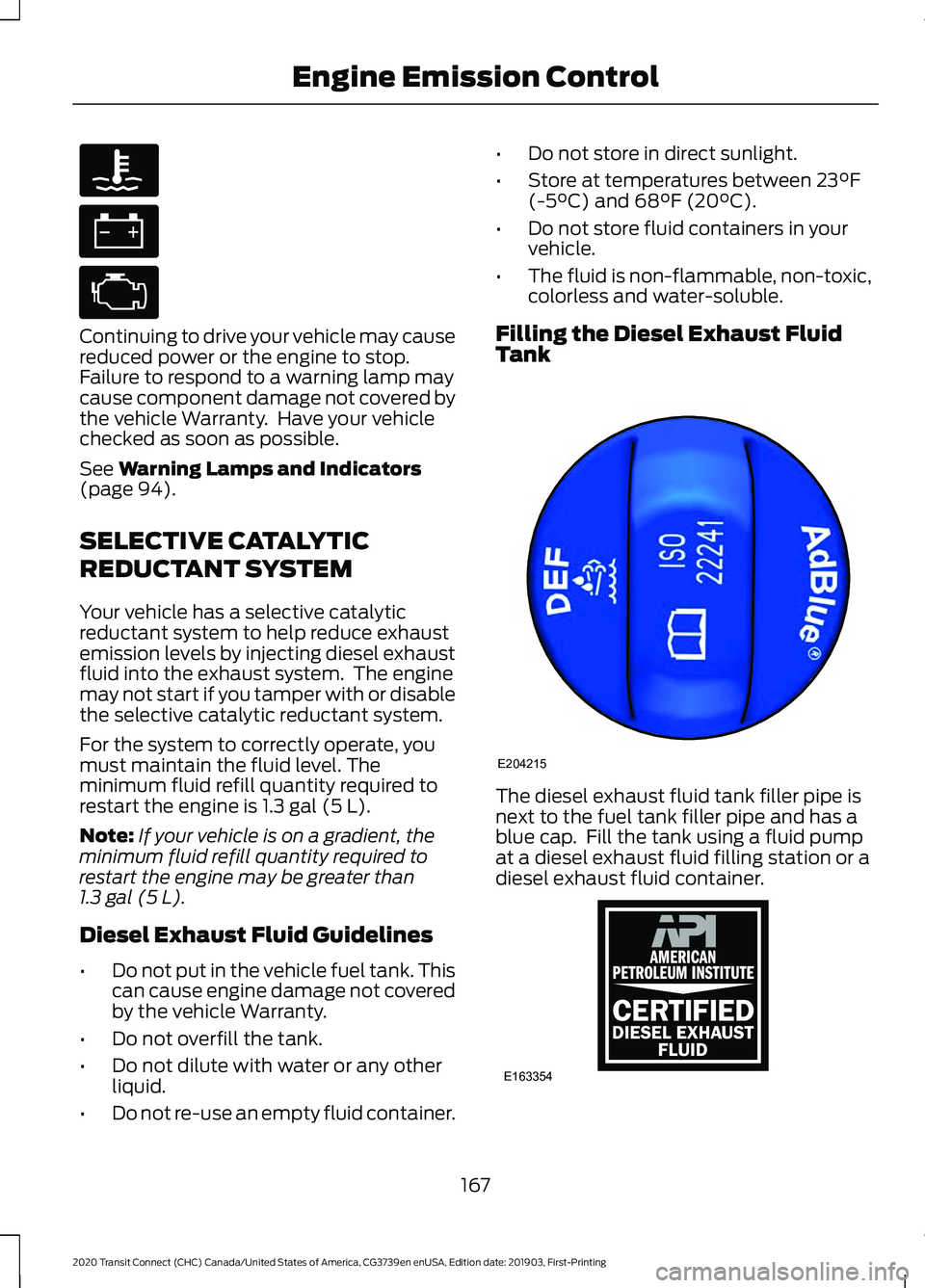
Tank The diesel exhaust fluid tank filler pipe is
next to the fuel tank filler pipe and has a
blue cap. Fill the tank using a fluid pump
at a diesel exhaust fluid filling station or a
diesel exhaust fluid container.
167
2020 Transit Connect (CHC) Canada/United States of America, CG3739en enUSA, Edition date: 201903, First-Printing Engine Emission Control E204215 E163354)E163354
Page 276 of 509
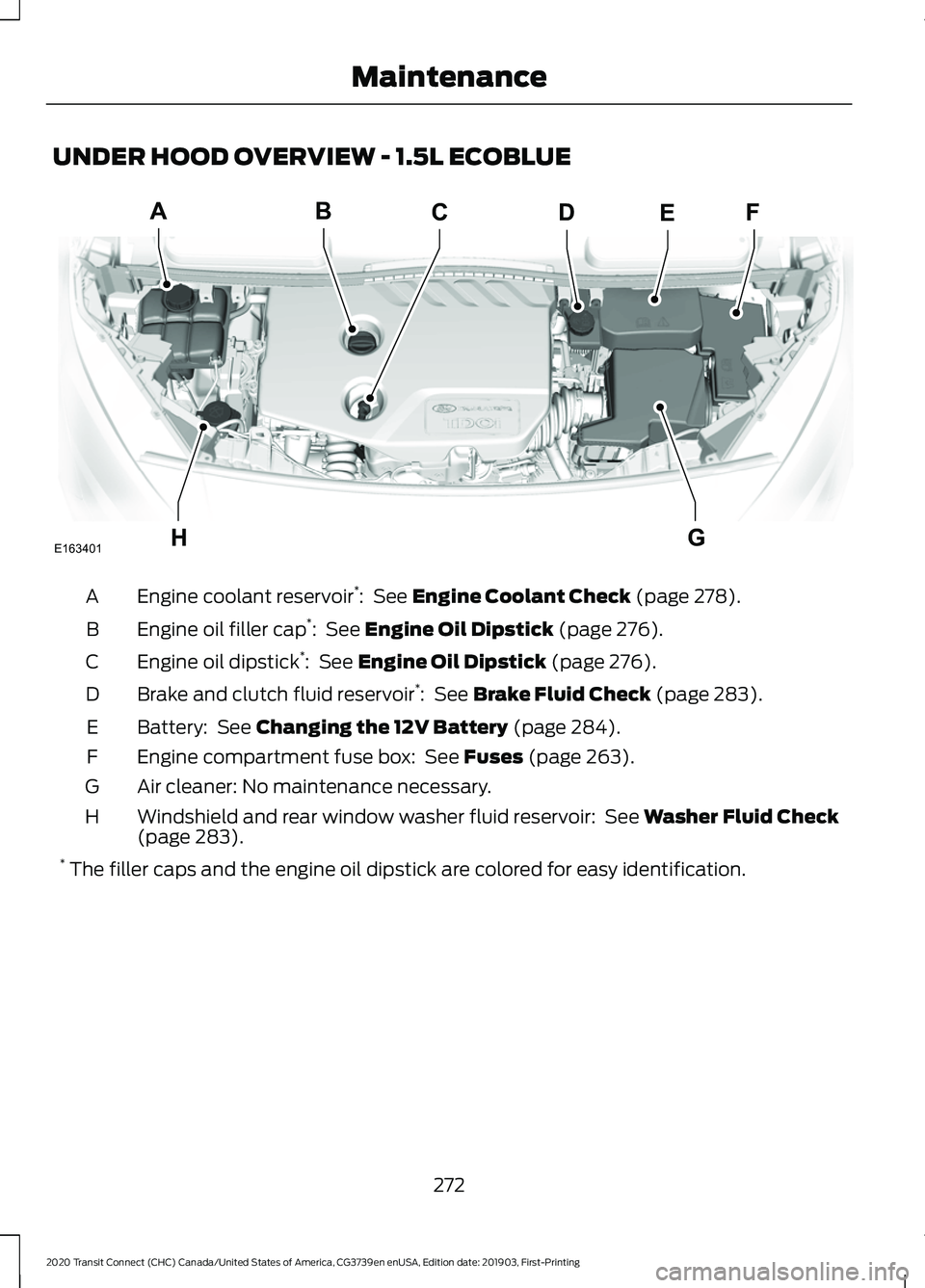
UNDER HOOD OVERVIEW - 1.5L ECOBLUE
Engine coolant reservoir
*
: See Engine Coolant Check (page 278).
A
Engine oil filler cap *
:
See Engine Oil Dipstick (page 276).
B
Engine oil dipstick *
:
See Engine Oil Dipstick (page 276).
C
Brake and clutch fluid reservoir *
:
See Brake Fluid Check (page 283).
D
Battery:
See Changing the 12V Battery (page 284).
E
Engine compartment fuse box:
See Fuses (page 263).
F
Air cleaner: No maintenance necessary.
G
Windshield and rear window washer fluid reservoir:
See Washer Fluid Check
(page 283).
H
* The filler caps and the engine oil dipstick are colored for easy identification.
272
2020 Transit Connect (CHC) Canada/United States of America, CG3739en enUSA, Edition date: 201903, First-Printing MaintenanceA
HG
DBCEF
E163401
Page 280 of 509
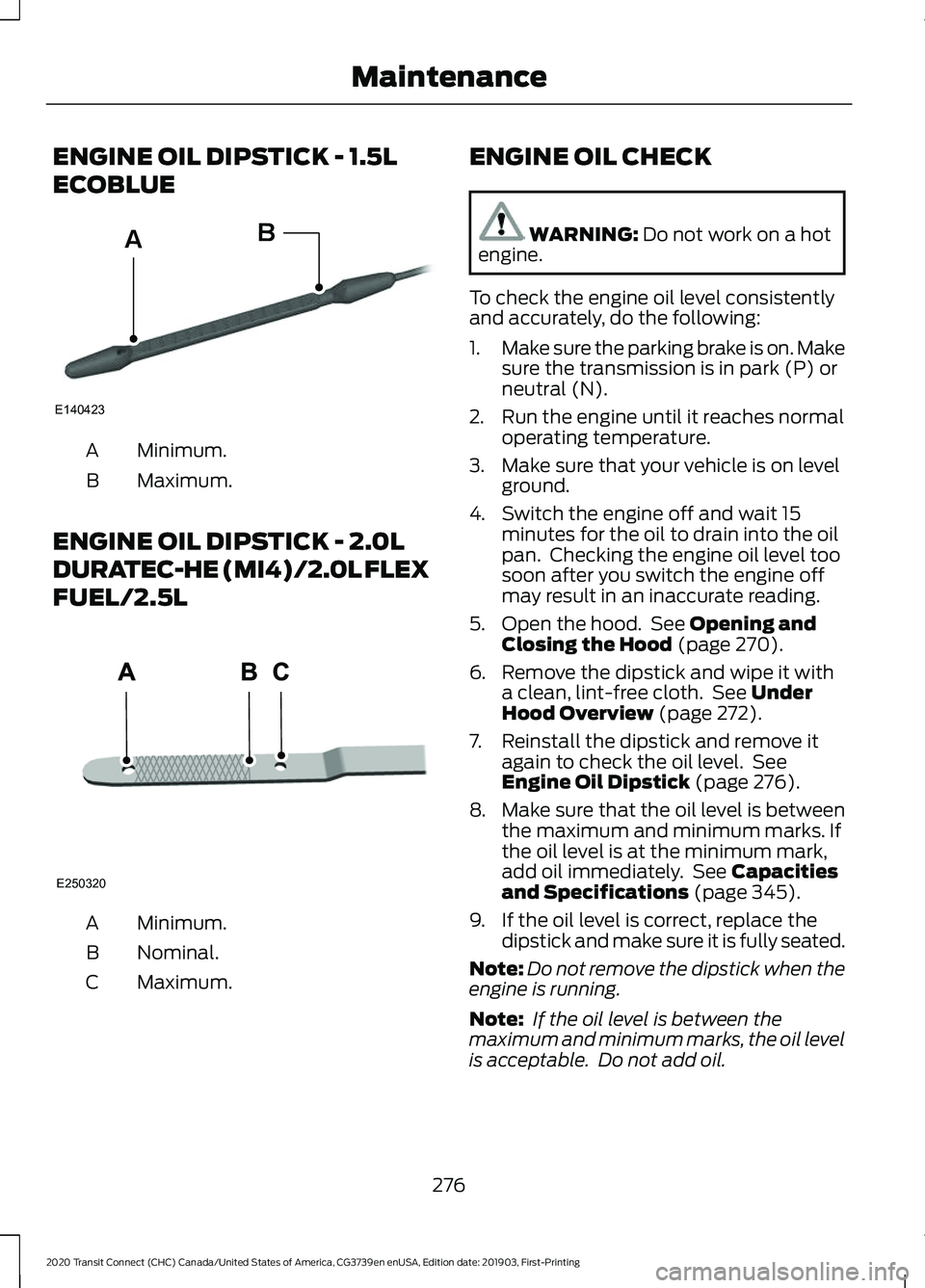
ENGINE OIL DIPSTICK - 1.5L
ECOBLUE
Minimum.
A
Maximum.
B
ENGINE OIL DIPSTICK - 2.0L
DURATEC-HE (MI4)/2.0L FLEX
FUEL/2.5L Minimum.
A
Nominal.
B
Maximum.
C ENGINE OIL CHECK WARNING: Do not work on a hot
engine.
To check the engine oil level consistently
and accurately, do the following:
1. Make sure the parking brake is on. Make
sure the transmission is in park (P) or
neutral (N).
2. Run the engine until it reaches normal operating temperature.
3. Make sure that your vehicle is on level ground.
4. Switch the engine off and wait 15 minutes for the oil to drain into the oil
pan. Checking the engine oil level too
soon after you switch the engine off
may result in an inaccurate reading.
5. Open the hood. See
Opening and
Closing the Hood (page 270).
6. Remove the dipstick and wipe it with a clean, lint-free cloth. See
Under
Hood Overview (page 272).
7. Reinstall the dipstick and remove it again to check the oil level. See
Engine Oil Dipstick
(page 276).
8. Make sure that the oil level is between
the maximum and minimum marks. If
the oil level is at the minimum mark,
add oil immediately. See
Capacities
and Specifications (page 345).
9. If the oil level is correct, replace the dipstick and make sure it is fully seated.
Note: Do not remove the dipstick when the
engine is running.
Note: If the oil level is between the
maximum and minimum marks, the oil level
is acceptable. Do not add oil.
276
2020 Transit Connect (CHC) Canada/United States of America, CG3739en enUSA, Edition date: 201903, First-Printing MaintenanceE140423
AB E250320
Page 297 of 509
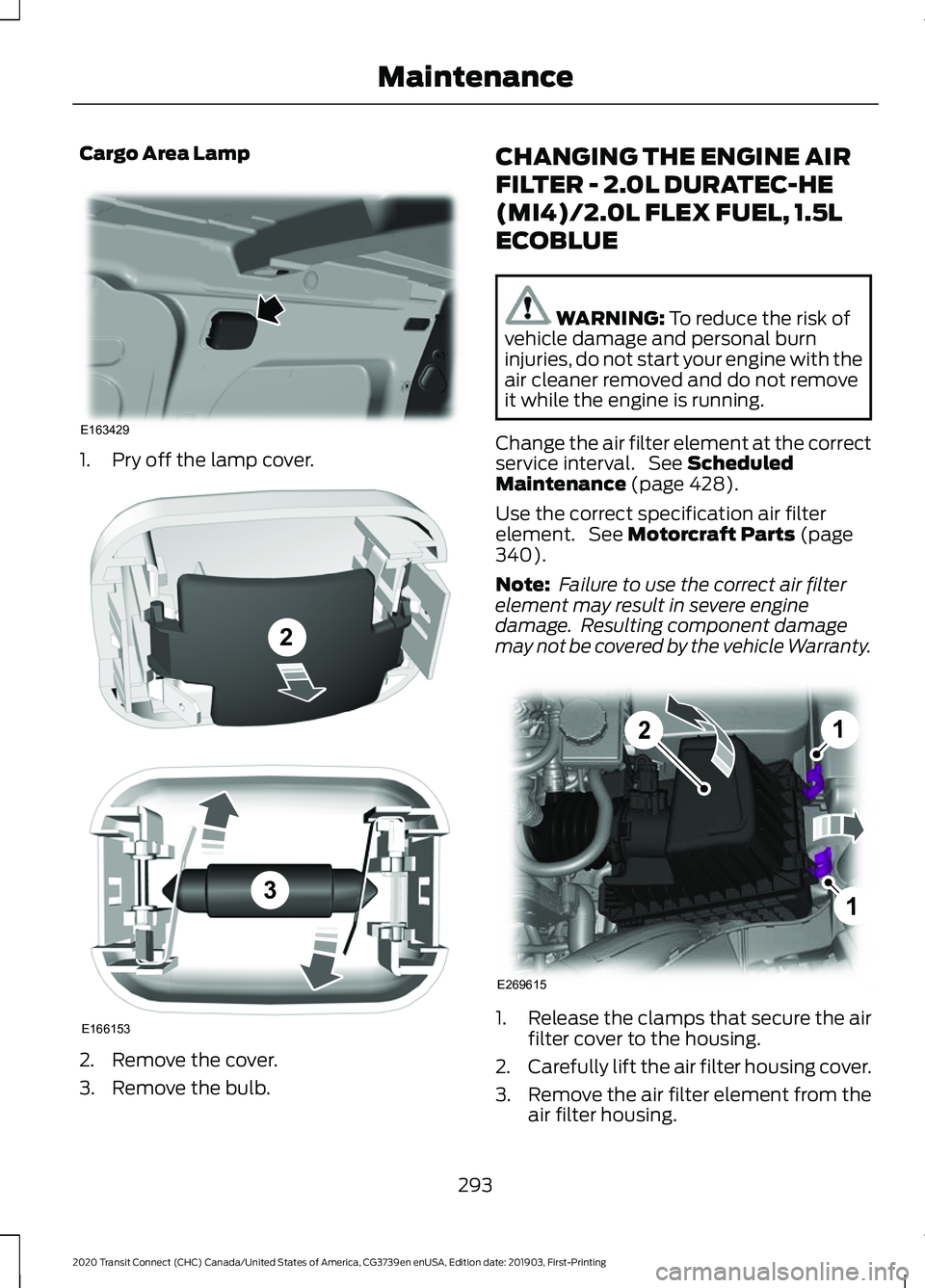
Cargo Area Lamp
1. Pry off the lamp cover.
2. Remove the cover.
3. Remove the bulb. CHANGING THE ENGINE AIR
FILTER - 2.0L DURATEC-HE
(MI4)/2.0L FLEX FUEL, 1.5L
ECOBLUE
WARNING: To reduce the risk of
vehicle damage and personal burn
injuries, do not start your engine with the
air cleaner removed and do not remove
it while the engine is running.
Change the air filter element at the correct
service interval. See
Scheduled
Maintenance (page 428).
Use the correct specification air filter
element. See
Motorcraft Parts (page
340).
Note: Failure to use the correct air filter
element may result in severe engine
damage. Resulting component damage
may not be covered by the vehicle Warranty. 1.
Release the clamps that secure the air
filter cover to the housing.
2. Carefully lift the air filter housing cover.
3. Remove the air filter element from the
air filter housing.
293
2020 Transit Connect (CHC) Canada/United States of America, CG3739en enUSA, Edition date: 201903, First-Printing MaintenanceE163429 E166153
2
3 1
1
2
E269615