service FORD WINDSTAR 1998 1.G User Guide
[x] Cancel search | Manufacturer: FORD, Model Year: 1998, Model line: WINDSTAR, Model: FORD WINDSTAR 1998 1.GPages: 370, PDF Size: 2.97 MB
Page 20 of 370
![FORD WINDSTAR 1998 1.G User Guide 18
[IS07900(ALL)12/95]
6 pica art:0050190-A
The turn signal indicator lights
[IS08000(ALL)12/95]
If one or both of your turn signal indicators does not light up
or remains on continuously when you sig](/img/11/5414/w960_5414-19.png "FORD WINDSTAR 1998 1.G User Guide 18
[IS07900(ALL)12/95]
6 pica art:0050190-A
The turn signal indicator lights
[IS08000(ALL)12/95]
If one or both of your turn signal indicators does not light up
or remains on continuously when you sig")
18
[IS07900(ALL)12/95]
6 pica art:0050190-A
The turn signal indicator lights
[IS08000(ALL)12/95]
If one or both of your turn signal indicators does not light up
or remains on continuously when you signal a turn, have the
turn signaling system serviced as soon as possible.
[IS08010(ALL)10/96]
Turn Signal Warning Chime
[IS08020(ALL)10/96]
If you drive with either turn signal on for more than 1/2 mile,
a chime will sound every time the flasher is activated until the
turn signal is turned off. This feature can be activated or
deactivated by performing the following procedure:
[IS08030(ALL)10/96]1.
Ensure the ignition switch is on the OFF position and the
front doors are closed.
[IS08040(ALL)10/96]2.
Place the key into the ignition and turn it to RUN, then turn
the ignition to OFF and remove the key from the ignition.
[IS08050(ALL)10/96]3.
Press and hold the rear defroster control. While holding the
defroster control, put the key into the ignition and wait until
a tone sounds for two seconds.
[IS08060(ALL)10/96]4.
When the tone sounds, release the defroster control.
[IS08070(ALL)10/96]5.
If you hear one beep after the tone, the feature is activated. If
you hear two beeps after the tone, the feature is deactivated.
%*
[IS08100(ALL)05/96]
High Beam Light
[IS08200(ALL)09/96]
This light comes on when the headlamps are turned to high
beam or when the high beams are flashed. If your vehicle is
equipped with Daytime Running Lights (Canadian vehicles
only) and they are on when the high beams are flashed, the
high beam indicator will not light.
File:03wniss.ex
Update:Fri Oct 11 10:45:38 1996
Page 25 of 370
![FORD WINDSTAR 1998 1.G User Guide Instrumentation
23
*
[IS12200(ALL)08/96]3.
Let the engine cool.DO NOT REMOVE COOLANT
SYSTEM FILL CAP UNTIL THE ENGINE IS COOL.
[IS12300(ALL)08/96]4.
Check the coolant level following the instructions](/img/11/5414/w960_5414-24.png "FORD WINDSTAR 1998 1.G User Guide Instrumentation
23
*
[IS12200(ALL)08/96]3.
Let the engine cool.DO NOT REMOVE COOLANT
SYSTEM FILL CAP UNTIL THE ENGINE IS COOL.
[IS12300(ALL)08/96]4.
Check the coolant level following the instructions")
Instrumentation
23
*
[IS12200(ALL)08/96]3.
Let the engine cool.DO NOT REMOVE COOLANT
SYSTEM FILL CAP UNTIL THE ENGINE IS COOL.
[IS12300(ALL)08/96]4.
Check the coolant level following the instructions on
checking and adding coolant to your engine in this Owner
Guide. Seeengine coolantin the index. If you do not follow
these instructions, you or others could be injured.
*
[IS12400(ALL)08/96]
If the coolant continues to overheat, have the coolant system
serviced as soon as possible.
%*
[IS13600(ALL)08/96]
Speedometer
*
[IS13700(ALL)03/96]
The speedometer tells you how many miles (kilometers) per
hour your vehicle is moving.
%*
[IS14200(ALL)08/96]
Odometer
*
[IS14300(ALL)01/96]
The odometer records the total distance the vehicle has been
driven.
%*
[IS14700(ALL)01/96]
Trip Odometer
%*
[IS14800(ALL)05/96]
The trip odometer records the distance of individual trips.
Before each trip, set the trip odometer to zero by pushing the
reset control.
[IS14900(ALL)01/96]
10-1/2 pica
art:0050155-C
The speedometer, odometer and trip odometer
File:03wniss.ex
Update:Fri Oct 11 10:45:38 1996
Page 28 of 370
![FORD WINDSTAR 1998 1.G User Guide 26
[IS19800(ALL)01/96]
The Traction Control light will stay on for a minimum of four
seconds.
[IS19900(ALL)07/96]
Traction Control Off Light
[IS20000(ALL)01/96]
This light comes on when the Traction C](/img/11/5414/w960_5414-27.png "FORD WINDSTAR 1998 1.G User Guide 26
[IS19800(ALL)01/96]
The Traction Control light will stay on for a minimum of four
seconds.
[IS19900(ALL)07/96]
Traction Control Off Light
[IS20000(ALL)01/96]
This light comes on when the Traction C")
26
[IS19800(ALL)01/96]
The Traction Control light will stay on for a minimum of four
seconds.
[IS19900(ALL)07/96]
Traction Control Off Light
[IS20000(ALL)01/96]
This light comes on when the Traction Control system is not
operating. In some conditions, you may want to turn Traction
Control off, such as when rocking your vehicle out of deep
snow or mud.
[IS20100(ALL)07/96]
one inch art:0050275-B[IS20200(ALL)01/96]
Traction Control will automatically turn off to prevent the
brakes from overheating. The system will turn back on once the
brakes have cooled down.
[IS20300(ALL)01/96]
NOTE: If the TRAC OFF light is flashing repeatedly, it means
that there is a Traction Control system malfunction
and the system is inoperative. Contact your dealer for
service as soon as possible.
File:03wniss.ex
Update:Fri Oct 11 10:45:38 1996
Page 29 of 370
![FORD WINDSTAR 1998 1.G User Guide Instrumentation
27
% [IS20400(ALL)01/96]
Anti-Theft Active Indicator Light
[IS20500(ALL)07/96]
This indicator is used in the optional Anti-Theft System. See
ªAnti-Theft Systemº in theControls and Fe](/img/11/5414/w960_5414-28.png "FORD WINDSTAR 1998 1.G User Guide Instrumentation
27
% [IS20400(ALL)01/96]
Anti-Theft Active Indicator Light
[IS20500(ALL)07/96]
This indicator is used in the optional Anti-Theft System. See
ªAnti-Theft Systemº in theControls and Fe")
Instrumentation
27
% [IS20400(ALL)01/96]
Anti-Theft Active Indicator Light
[IS20500(ALL)07/96]
This indicator is used in the optional Anti-Theft System. See
ªAnti-Theft Systemº in theControls and Featureschapter of this
Owner Guide.
[IS20600(ALL)01/96]
6 pica art:0050123-B
The anti-theft active indicator light
[IS20700(ALL)01/96]
Air Suspension Warning Light
[IS20800(ALL)01/96]
6 pica art:0050227-A
The air suspension warning light
[IS20900(ALL)01/96]
The warning light for the Air Suspension indicates one of two
things:
[IS21000(ALL)01/96]1.
The service switch (located in the jack storage area) is in the
ªoffº position.
[IS21100(ALL)01/96]2.
A system malfunction has occurred electronically disabling
Air Suspension function.
[IS21200(ALL)01/96]
NOTE: If the switch is returned to or in the ªONº position
and the light does not go out after recycling the
ignition switch OFF/ON, the Air Suspension should
be checked by a qualified service technician.
File:03wniss.ex
Update:Fri Oct 11 10:45:38 1996
Page 52 of 370
![FORD WINDSTAR 1998 1.G User Guide Electronic Sound Systems
51
*
[AS11010(ALL)08/95]
Tape error messages
*
[AS11020(ALL)08/95]
Your cassette tape player is equipped to diagnose certain
problems you may experience. Error codes are as fo](/img/11/5414/w960_5414-51.png "FORD WINDSTAR 1998 1.G User Guide Electronic Sound Systems
51
*
[AS11010(ALL)08/95]
Tape error messages
*
[AS11020(ALL)08/95]
Your cassette tape player is equipped to diagnose certain
problems you may experience. Error codes are as fo")
Electronic Sound Systems
51
*
[AS11010(ALL)08/95]
Tape error messages
*
[AS11020(ALL)08/95]
Your cassette tape player is equipped to diagnose certain
problems you may experience. Error codes are as follows:
*
[AS11030(ALL)08/95]
Error 0Ð Communication error between the radio controller
and the tape controller. The cassette player will eject the tape.
Insert the tape again. If the same error code appears, turn the
ignition off, then back on again and insert the tape.
*
[AS11040(ALL)08/95]
Error 1Ð Possible problem cartridge. The cassette tape player
will eject the tape. Insert the tape again. If the same error code
appears in the display, try a different cartridge.
*
[AS11050(ALL)08/95]
Error 2Ð Tape eject or load failure. Your cassette tape player
will go into the pause mode. Push ªEJCTº to eject the tape. If
the tape doesn't eject, refer the problem to qualified personnel
for service.
%*
[AS11060(ALL)05/96]
Clock Operation
*
[AS11080(ALL)05/96]
How to view the clock mode
*
[AS11090(ALL)08/95]
Press the ªCLOCKº button to alternate the frequency and time
in the display. In the clock mode, pressing any radio function
will automatically display the radio frequency for approximately
ten seconds before changing back to the clock mode.
*
[AS11100(ALL)05/96]
How to set the clock
[AS11120(ALL)12/93]
Press and hold in the ªCLOCKº button, press the ªSEEKº
button left (
b) to advance the hours and right (
a) to advance
the minutes.
*
[AS11130(ALL)05/96]
NOTE: The clock displays 12-hour time with no AM/PM
indications.
*
[AS11135(ALL)09/95]
NOTE: On the High-Level Audio System, the clock can be set
with the radio power on or off.
File:04wnass.ex
Update:Fri Sep 27 13:16:38 1996
Page 70 of 370
![FORD WINDSTAR 1998 1.G User Guide Electronic Sound Systems
69
%*
[AS36600(ALL)05/96]
All About Radio Frequencies
*
[AS36700(ALL)05/96]
The Federal Communications Commission (FCC) and the
Canadian Radio Telecommunications Commission (C](/img/11/5414/w960_5414-69.png "FORD WINDSTAR 1998 1.G User Guide Electronic Sound Systems
69
%*
[AS36600(ALL)05/96]
All About Radio Frequencies
*
[AS36700(ALL)05/96]
The Federal Communications Commission (FCC) and the
Canadian Radio Telecommunications Commission (C")
Electronic Sound Systems
69
%*
[AS36600(ALL)05/96]
All About Radio Frequencies
*
[AS36700(ALL)05/96]
The Federal Communications Commission (FCC) and the
Canadian Radio Telecommunications Commission (CRTC)
establish the frequencies that AM and FM radio stations may
use for their broadcasts. The allowable frequencies are, AM: 530,
540...1600, 1610 kHz in 10 kHz steps; FM: 87.9, 88.1...107.7, 107.9
MHz in 0.2 MHz steps.
*
[AS36800(ALL)05/96]
Not all frequencies will be assigned to a given area. This radio
will tune to each of these frequencies using manual tune and no
fine tuning is necessary as radio stations may not use other
frequencies.
*
[AS36900(ALL)05/96]
Some FM radio stations advertise a ªrounded-offº frequency
which is not the frequency they actually broadcast on. For
example, a radio station that is assigned a frequency of 98.7
MHz may call itself ªRadio 99º even though 99.0 MHz is not an
allowable FM broadcast frequency.
%*
[AS37000(ALL)05/96]
Important Warranty and Service Information
*
[AS37050(ALL)07/90]
n
Warranty
[AS37100(ALL)10/94]
Your sound system is warranted for three years/36,000 miles
(60,000 km). Consult your vehicle warranty booklet for further
information.
*
[AS37150(ALL)07/90]
n
Service
*
[AS37200(ALL)05/96]
At Ford, we stand behind our audio systems with a
comprehensive service and repair program. If anything should
go wrong with your Ford audio system, return to your dealer
for service. There is a nationwide network of qualified Ford
authorized repair centers to assist you.
File:04wnass.ex
Update:Fri Sep 27 13:16:38 1996
Page 92 of 370
![FORD WINDSTAR 1998 1.G User Guide 92
[CF15300(ALL)12/95]
START cranks the engine. Release the key once the engine starts
so that you dont damage the starter. The key should return to
the ON position when you release it. The START pos](/img/11/5414/w960_5414-91.png "FORD WINDSTAR 1998 1.G User Guide 92
[CF15300(ALL)12/95]
START cranks the engine. Release the key once the engine starts
so that you dont damage the starter. The key should return to
the ON position when you release it. The START pos")
92
[CF15300(ALL)12/95]
START cranks the engine. Release the key once the engine starts
so that you don't damage the starter. The key should return to
the ON position when you release it. The START position also
allows you to test the brake warning light.
%*
[CF15400(ALL)03/96]
Removing the Key From the Ignition
[CF15500(ALL)12/95]
LOCK is the only position that allows you to remove the key
from the ignition. The LOCK feature helps to protect your
vehicle from theft, because it also locks the steering wheel and
the gearshift lever when the key is removed.
%*
[CF15600(ALL)01/96]
If your key is stuck in the LOCK position, and you are unable
to turn it, move your steering wheel left or right until the key
turns freely.
*
[CF15700(ALL)01/96]
To remove your key from the ignition:
[CF15750(ALL)09/96]1.
Maintain firm pressure on the service brake and set parking
brake fully. (This will avoid ªbindingº or ªloadingº the
powertrain, which may result in an objectionable noise
during park disengagement.)
[CF15800(ALL)09/96]2.
Put the gearshift lever in P (Park).
*
[CF16000(ALL)06/96]3.
Turn the ignition key to LOCK.
*
[CF16100(ALL)03/96]4.
Remove the key.
[CF16200(ALL)09/96]
RWARNING
When you leave your vehicle, set the parking brake fully,
place the gearshift lever in P (Park), and shut off the
engine. Never park your vehicle in N (Neutral). If you do
not take these precautions, your vehicle may move
suddenly and injure someone.
File:05wncfs.ex
Update:Tue Oct 8 10:20:34 1996
Page 99 of 370
Controls and Features
99 only upshift and downshift from 1st through 3rd gears. The
vehicle will always return to the overdrive operation mode
when the ignition is turned off and back on.
[CF21000(ALL)01/96]
If the lamp does not come on when the Overdrive ON/OFF
button is depressed or if the lamp flashes when you are driving,
have your vehicle serviced at the first opportunity. If this
condition persists, damage could occur to the transaxle.
%*
[CF21200(ALL)05/96]
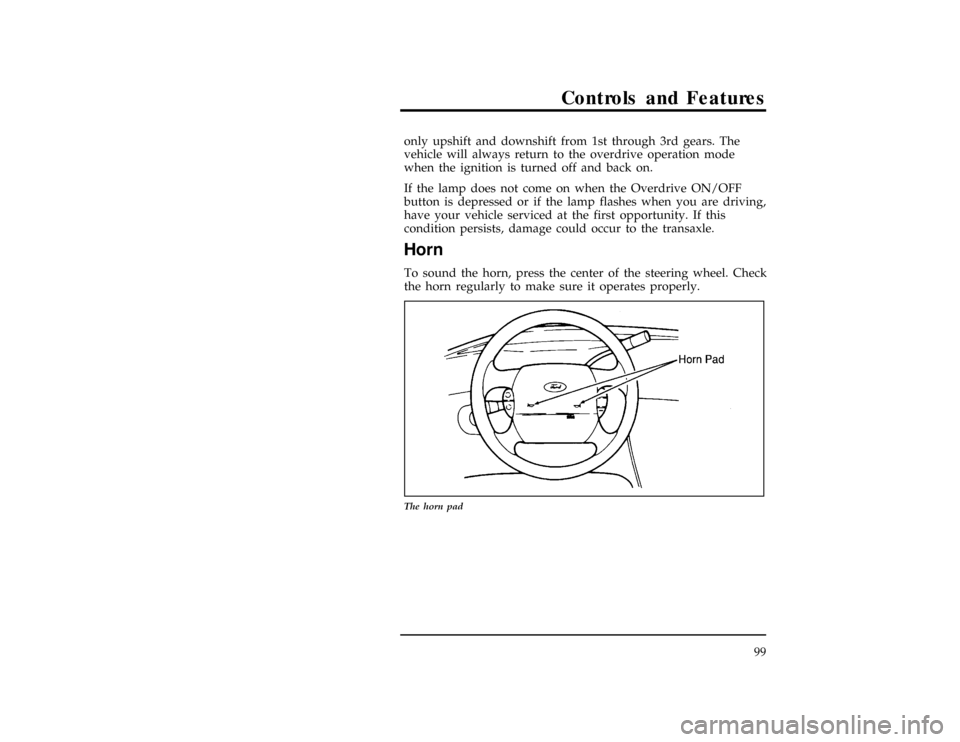
Horn
[CF21300(ALL)01/96]
To sound the horn, press the center of the steering wheel. Check
the horn regularly to make sure it operates properly.
[CF21400(ALL)01/96]
13-1/2 pica
art:0050017-A
The horn pad
File:05wncfs.ex
Update:Tue Oct 8 10:20:34 1996
Page 170 of 370
![FORD WINDSTAR 1998 1.G User Guide 170
*
[SS20100(ALL)05/96]
RWARNING
Do not attempt to service, repair, or modify the Air Bag
Supplemental Restraint System or its fuses. See your
Ford or Lincoln-Mercury dealer.
[SS20200(ALL)04/96]
If](/img/11/5414/w960_5414-169.png "FORD WINDSTAR 1998 1.G User Guide 170
*
[SS20100(ALL)05/96]
RWARNING
Do not attempt to service, repair, or modify the Air Bag
Supplemental Restraint System or its fuses. See your
Ford or Lincoln-Mercury dealer.
[SS20200(ALL)04/96]
If")
170
*
[SS20100(ALL)05/96]
RWARNING
Do not attempt to service, repair, or modify the Air Bag
Supplemental Restraint System or its fuses. See your
Ford or Lincoln-Mercury dealer.
[SS20200(ALL)04/96]
If a collision occurs, the sensors sense the severity of the impact
and activates the air bags if necessary. The air bag system is
designed to deploy in frontal and front-angled collisions more
severe than hitting a parked vehicle (of similar size and weight)
head-on at about 28 mph (45 km/h). Because the system senses
the crash severity rather than vehicle speed, some frontal
collisions at speeds above 28 mph (45 km/h) will not inflate the
air bag.
*
[SS20300(ALL)05/96]
When the sensors activate the system, the air bags inflate
rapidly, filling with non-toxic nitrogen gas in a fraction of a
second. Immediately after inflation, the air bags deflate by
releasing the nitrogen gas through vent holes. The whole
process takes place in a matter of seconds.
*
[SS20400(ALL)07/96]
RWARNING
Several air bag system components get hot after inflation.
Do not touch them after inflation.
File:06wnsss.ex
Update:Fri Oct 11 10:48:20 1996
Page 173 of 370
![FORD WINDSTAR 1998 1.G User Guide Seating and Safety Restraints
173
*
[SS20800(ALL)05/96]
To ensure that the air bag system will operate as intended in a
crash, the system is equipped with a diagnostic module, which
controls a readine](/img/11/5414/w960_5414-172.png "FORD WINDSTAR 1998 1.G User Guide Seating and Safety Restraints
173
*
[SS20800(ALL)05/96]
To ensure that the air bag system will operate as intended in a
crash, the system is equipped with a diagnostic module, which
controls a readine")
Seating and Safety Restraints
173
*
[SS20800(ALL)05/96]
To ensure that the air bag system will operate as intended in a
crash, the system is equipped with a diagnostic module, which
controls a readiness lamp and a warning tone. The diagnostic
module monitors its own circuits, the air bag electrical system,
the air bag readiness light, the air bag power and the air bag
inflators.
*
[SS20900(ALL)03/96]
The air bag supplemental restraint system uses a readiness light
and a tone to indicate the condition of the system. The
readiness light is in the instrument cluster. When you turn the
ignition key to ON, this light will illuminate for approximately
six (6) seconds and then turn off. This indicates that the system
is operating normally.NOTE:Maintenance of the air bag system
is not required.
%*
[SS21000(ALL)05/96]
A problem with the system is indicated by one or more of the
following:
*
[SS21100(ALL)05/96]
n
the readiness light will either flash or stay illuminated,
*
[SS21200(ALL)05/96]
n
or it will not illuminate immediately after ignition is turned
on,
%*
[SS21300(ALL)05/96]
n
a group of five beeps will be heard. The tone pattern will
repeat periodically until the problem and light are repaired.
[SS21400(ALL)12/95]
If any of these things happen, even intermittently, have the air
bag system serviced at your Ford or Lincoln-Mercury dealer
immediately.
%*
[SS21500(ALL)05/96]
Disposal of air bags and air bag equipped vehicles
[SS21600(ALL)12/95]
For disposal of air bags or air bag equipped vehicles, see your
local Ford or Lincoln-Mercury dealer. Air bags MUST be
disposed of by qualified personnel.
File:06wnsss.ex
Update:Fri Oct 11 10:48:20 1996